steering wheel FORD EXPLORER 2023 User Guide
[x] Cancel search | Manufacturer: FORD, Model Year: 2023, Model line: EXPLORER, Model: FORD EXPLORER 2023Pages: 573, PDF Size: 16.1 MB
Page 83 of 573
ADJUSTING THE STEERING
WHEEL - VEHICLES WITH:
MANUAL ADJUSTABLE
STEERING COLUMN
WARNING: Do not adjust thesteering wheel when your vehicle ismoving.
Note:Make sure that you are sitting in thecorrect position. See Sitting in the CorrectPosition (page 144).
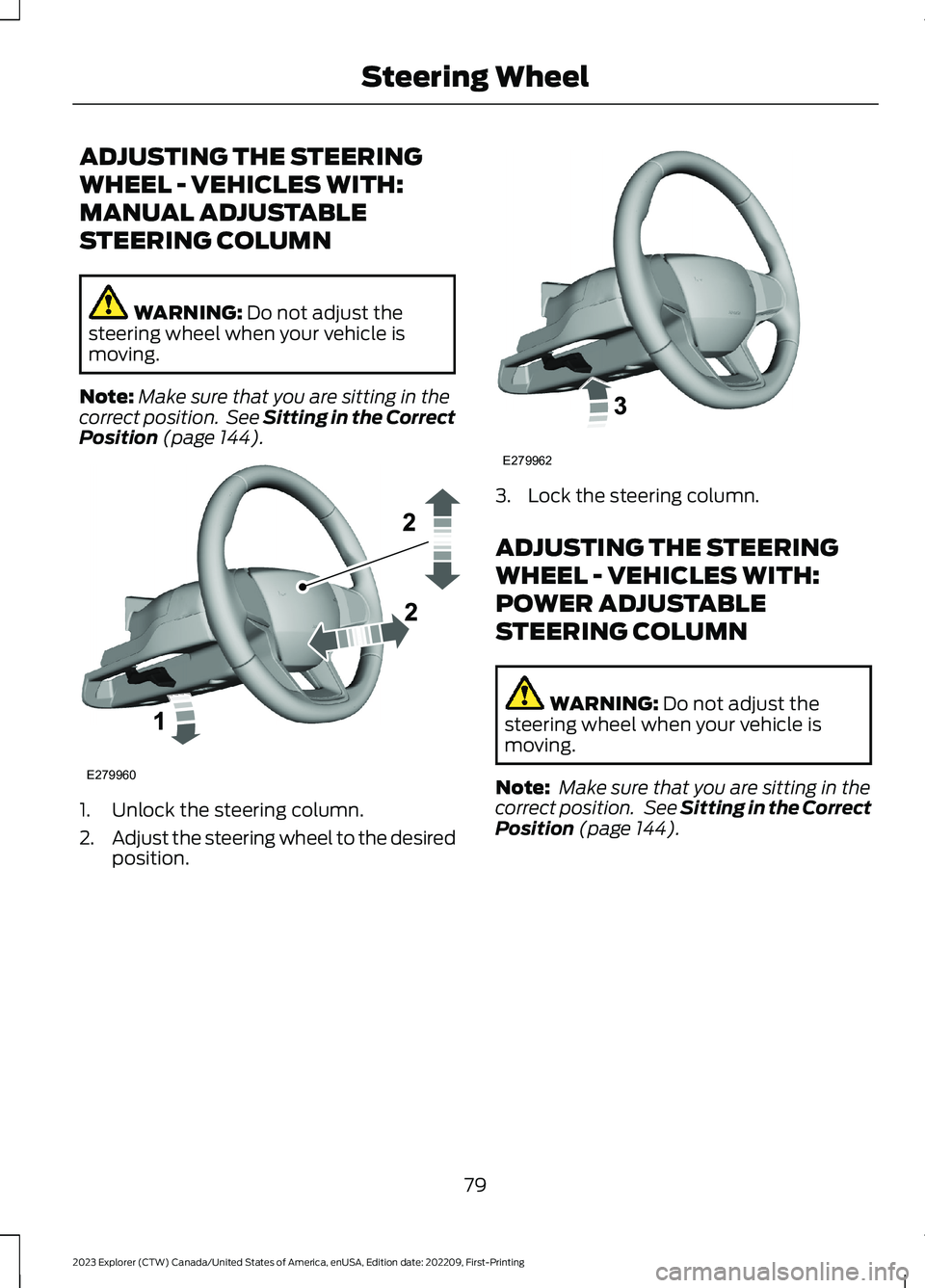
1.Unlock the steering column.
2.Adjust the steering wheel to the desiredposition.
3.Lock the steering column.
ADJUSTING THE STEERING
WHEEL - VEHICLES WITH:
POWER ADJUSTABLE
STEERING COLUMN
WARNING: Do not adjust thesteering wheel when your vehicle ismoving.
Note: Make sure that you are sitting in thecorrect position. See Sitting in the CorrectPosition (page 144).
79
2023 Explorer (CTW) Canada/United States of America, enUSA, Edition date: 202209, First-PrintingSteering WheelE279960 E279962
Page 84 of 573

Use the control on the side of the steeringcolumn to adjust the position.
To adjust:
•Tilt: Press the top or bottom of thecontrol.
•Telescope: Press the front or rear ofthe control.
End of Travel Position
The steering column stops just short of theend of the column travel to preventdamage to the steering column. A newstopping position sets if it encounters anobject when tilting or telescoping.
To reset the steering column to its normalstopping position:
1.Confirm there is nothing obstructingthe motion of the steering column.
2.Press and hold the steering columncontrol until the steering column stopsmoving.
3.Press the steering column controlagain.
Note:The steering column may begin tomove again.
4.When the steering column stops,continue holding the control for a fewseconds.
5.Repeat for each direction as necessary.
A new stopping position sets. The nexttime you tilt or telescope the steeringcolumn, it stops just short of the end of thecolumn travel.
Memory Feature
You can save and recall the steeringcolumn position with the memoryfunction. See Memory Function (page150).
Pressing the adjustment control during amemory recall cancels the operation.
Easy Entry and Exit Feature
The column moves up when you switchthe ignition off. Switch the ignition on toreturn the system to its previous settings.You can switch this feature on or offthrough the touchscreen. See Settings(page 458).
Note: If you press any adjustment ormemory button when in easy exit mode, thesystem cancels the operation.
Note:Depending on your vehicle, thecolumn may move up and in.
80
2023 Explorer (CTW) Canada/United States of America, enUSA, Edition date: 202209, First-PrintingSteering WheelE261582
Page 85 of 573

AUDIO CONTROL
You can operate the followingfunctions with the control:
Press to decrease volume level.
Press to increase volume level.
Press to silence the currentmedia
Press to access phone mode orto answer a phone call.
Press to end a phone call.
Press to access the previousmedia selection.
Press to access the next mediaselection.
VOICE CONTROL
The controls are on the steering wheel.
Press and release to activatevoice recognition.
CRUISE CONTROL - VEHICLES
WITH: CRUISE CONTROL
See What Is Cruise Control (page 239).
81
2023 Explorer (CTW) Canada/United States of America, enUSA, Edition date: 202209, First-PrintingSteering WheelE280796 E280795 E280802 E280803 E268549 E265040 E265045 E265044 E142599 E280796
Page 86 of 573

CRUISE CONTROL - VEHICLES
WITH: STOP AND GO
See How Does Adaptive Cruise ControlWith Stop and Go Work (page 241).
INFORMATION DISPLAY
CONTROL
See Information Displays (page 110).
HEATED STEERING WHEEL (IF
EQUIPPED)
The heated steering wheel button is on theclimate controls.
Press the button to switch theheated steering wheel on andoff.
Note:You can use the heated steeringwheel only when the engine is running.
Note:The system uses a sensor and isdesigned to control the temperature of thesteering wheel and to prevent it fromoverheating.
Note:In warm temperatures, the steeringwheel quickly reaches its maximumtemperature and the system reduces thecurrent to the heating element. This couldcause you to think that the system hasstopped working but it has not. This isnormal.
HORN
Press on the center of thesteering wheel near the horn iconto activate the horn.
82
2023 Explorer (CTW) Canada/United States of America, enUSA, Edition date: 202209, First-PrintingSteering WheelE289570 E280795 E256621 E270945
Page 93 of 573
Note:The lights on the front fog lamps turnoff when you switch the high beams on.
Front Fog Lamp Indicator
It illuminates when you switchthe front fog lamps on.
ADAPTIVE HEADLAMPS (IF
EQUIPPED)
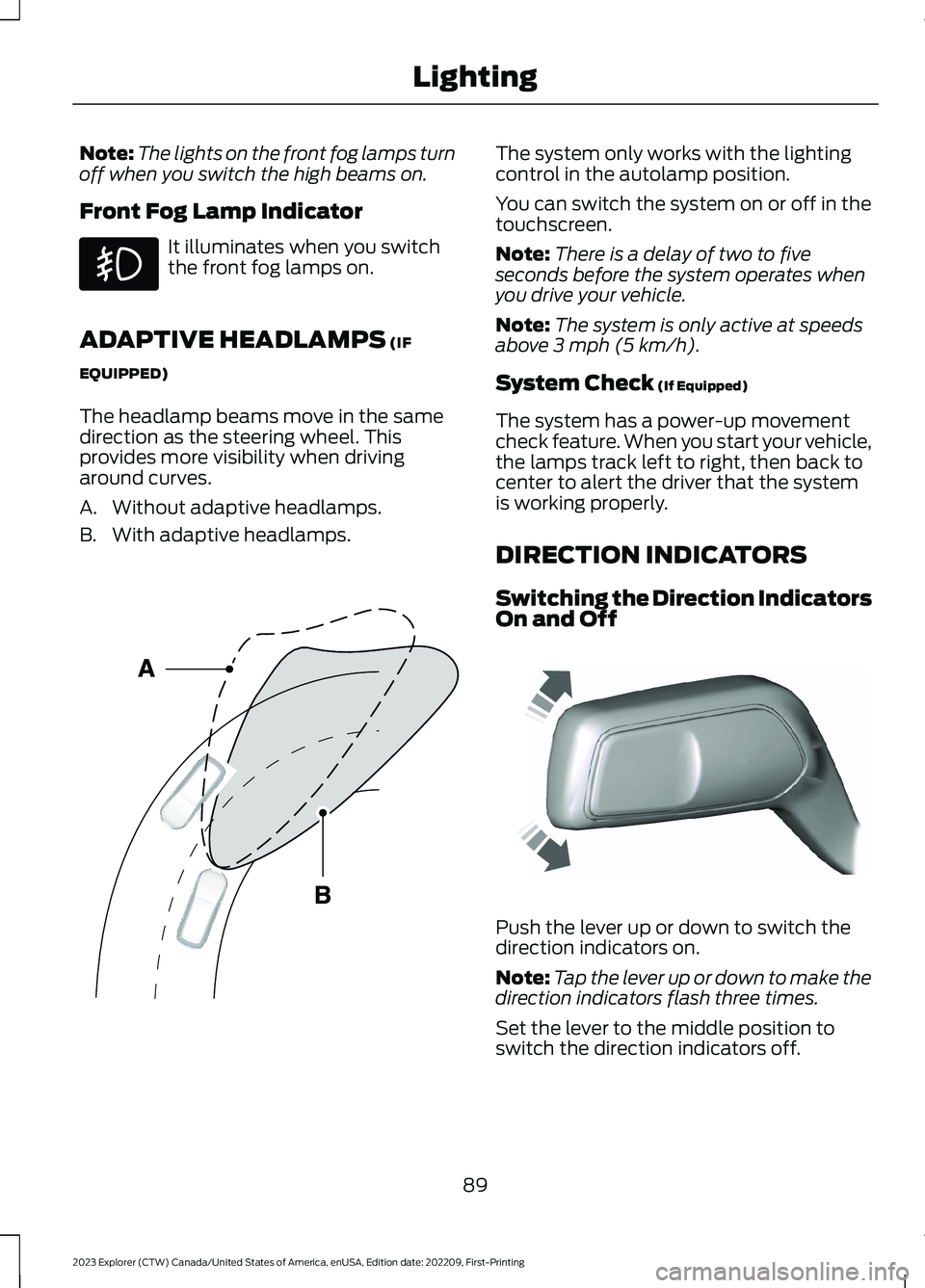
The headlamp beams move in the samedirection as the steering wheel. Thisprovides more visibility when drivingaround curves.
A.Without adaptive headlamps.
B.With adaptive headlamps.
The system only works with the lightingcontrol in the autolamp position.
You can switch the system on or off in thetouchscreen.
Note:There is a delay of two to fiveseconds before the system operates whenyou drive your vehicle.
Note:The system is only active at speedsabove 3 mph (5 km/h).
System Check (If Equipped)
The system has a power-up movementcheck feature. When you start your vehicle,the lamps track left to right, then back tocenter to alert the driver that the systemis working properly.
DIRECTION INDICATORS
Switching the Direction IndicatorsOn and Off
Push the lever up or down to switch thedirection indicators on.
Note:Tap the lever up or down to make thedirection indicators flash three times.
Set the lever to the middle position toswitch the direction indicators off.
89
2023 Explorer (CTW) Canada/United States of America, enUSA, Edition date: 202209, First-PrintingLighting E161714 E242676
Page 114 of 573
GENERAL INFORMATION -
VEHICLES WITH: 6.5 INCH
INSTRUMENT CLUSTER
DISPLAY SCREEN
WARNING: Driving while distractedcan result in loss of vehicle control, crashand injury. We strongly recommend thatyou use extreme caution when using anydevice that may take your focus off theroad. Your primary responsibility is thesafe operation of your vehicle. Werecommend against the use of anyhand-held device while driving andencourage the use of voice-operatedsystems when possible. Make sure youare aware of all applicable local lawsthat may affect the use of electronicdevices while driving.
You can control various systems on yourvehicle using the information displaycontrols on the steering wheel.Corresponding information appears in theinstrument cluster display.
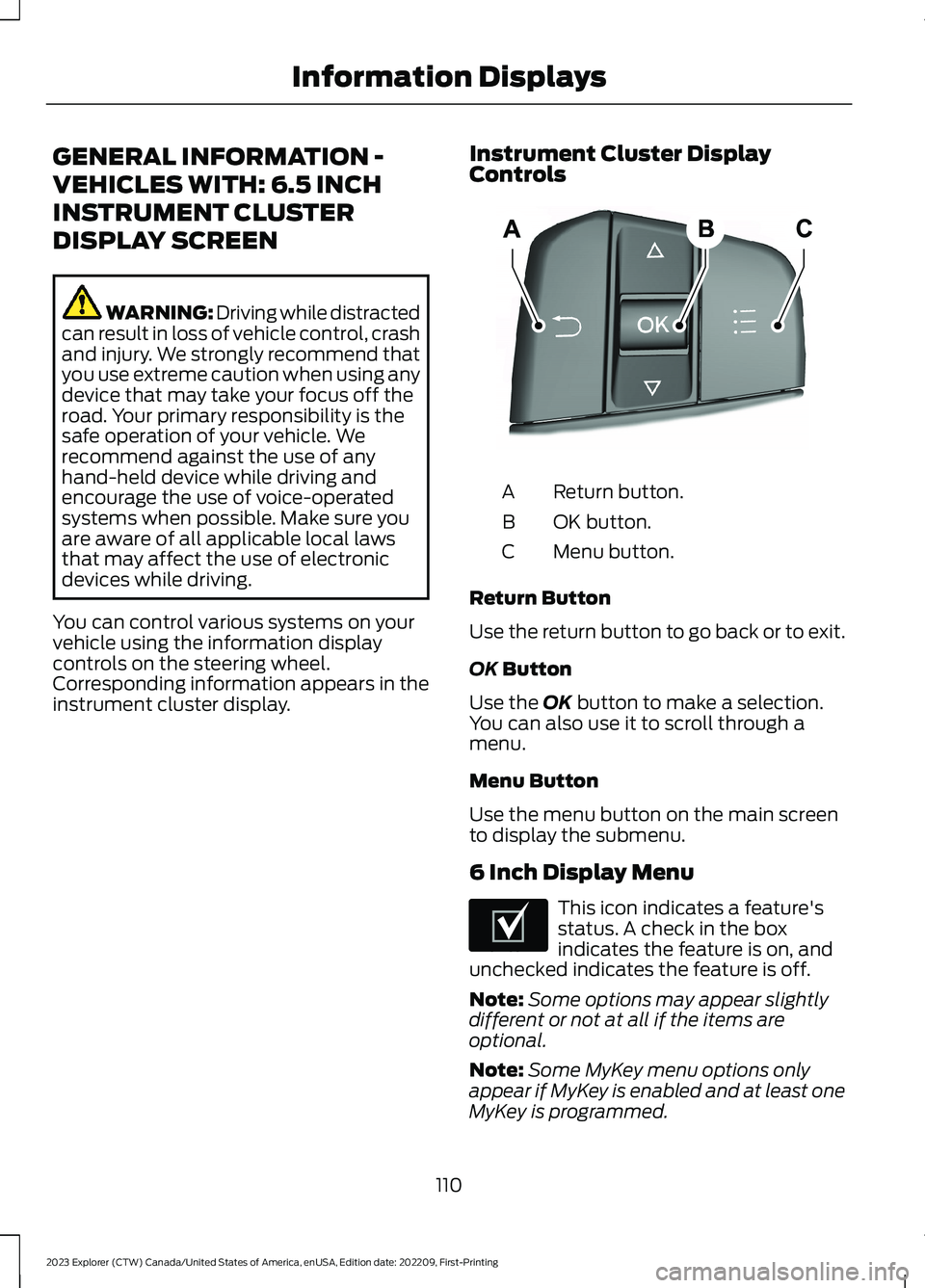
Instrument Cluster DisplayControls
Return button.A
OK button.B
Menu button.C
Return Button
Use the return button to go back or to exit.
OK Button
Use the OK button to make a selection.You can also use it to scroll through amenu.
Menu Button
Use the menu button on the main screento display the submenu.
6 Inch Display Menu
This icon indicates a feature'sstatus. A check in the boxindicates the feature is on, andunchecked indicates the feature is off.
Note:Some options may appear slightlydifferent or not at all if the items areoptional.
Note:Some MyKey menu options onlyappear if MyKey is enabled and at least oneMyKey is programmed.
110
2023 Explorer (CTW) Canada/United States of America, enUSA, Edition date: 202209, First-PrintingInformation DisplaysE250032 E204495
Page 116 of 573
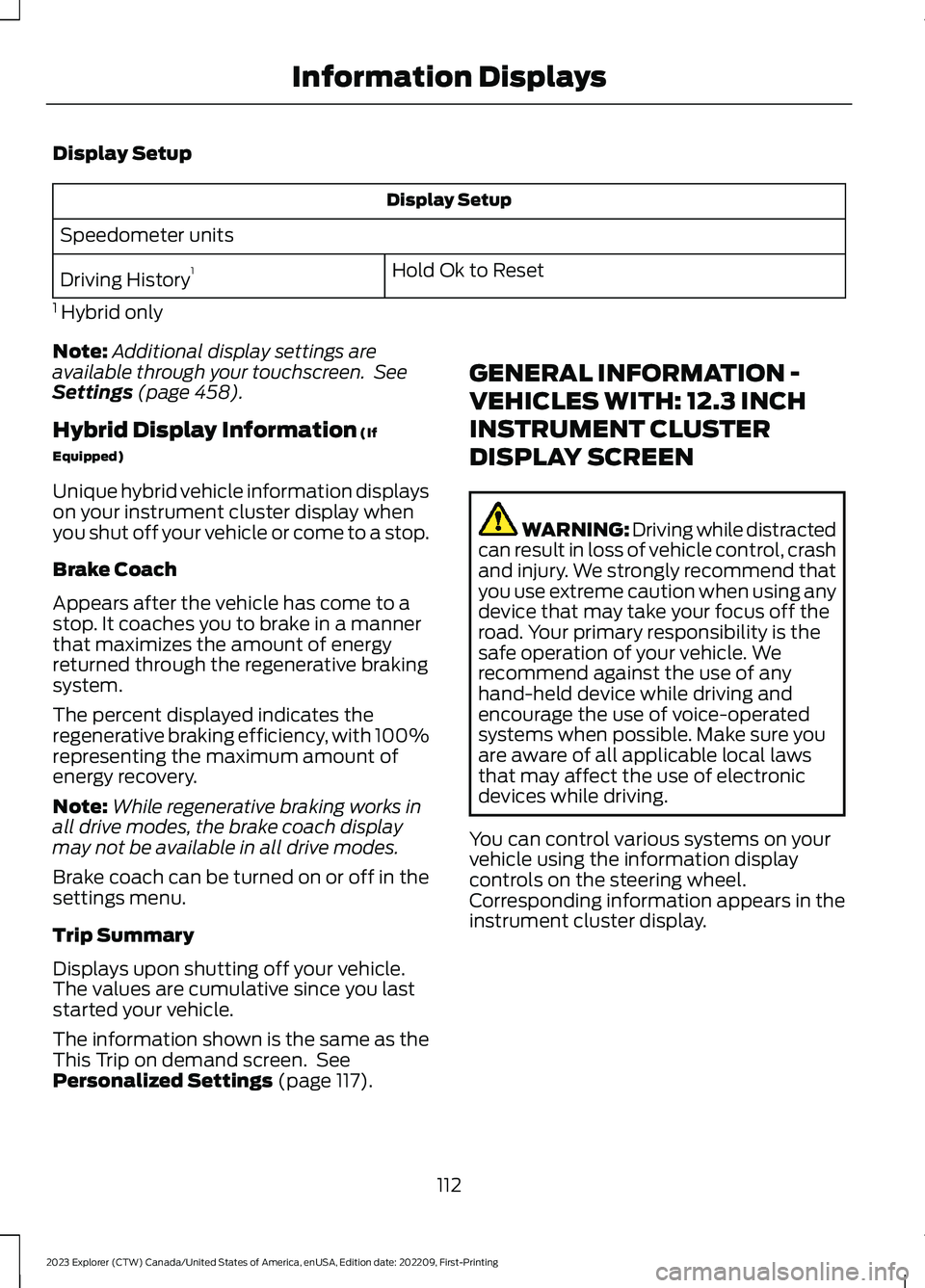
Display Setup
Display Setup
Speedometer units
Hold Ok to ResetDriving History1
1 Hybrid only
Note:Additional display settings areavailable through your touchscreen. SeeSettings (page 458).
Hybrid Display Information (If
Equipped)
Unique hybrid vehicle information displayson your instrument cluster display whenyou shut off your vehicle or come to a stop.
Brake Coach
Appears after the vehicle has come to astop. It coaches you to brake in a mannerthat maximizes the amount of energyreturned through the regenerative brakingsystem.
The percent displayed indicates theregenerative braking efficiency, with 100%representing the maximum amount ofenergy recovery.
Note:While regenerative braking works inall drive modes, the brake coach displaymay not be available in all drive modes.
Brake coach can be turned on or off in thesettings menu.
Trip Summary
Displays upon shutting off your vehicle.The values are cumulative since you laststarted your vehicle.
The information shown is the same as theThis Trip on demand screen. SeePersonalized Settings (page 117).
GENERAL INFORMATION -
VEHICLES WITH: 12.3 INCH
INSTRUMENT CLUSTER
DISPLAY SCREEN
WARNING: Driving while distractedcan result in loss of vehicle control, crashand injury. We strongly recommend thatyou use extreme caution when using anydevice that may take your focus off theroad. Your primary responsibility is thesafe operation of your vehicle. Werecommend against the use of anyhand-held device while driving andencourage the use of voice-operatedsystems when possible. Make sure youare aware of all applicable local lawsthat may affect the use of electronicdevices while driving.
You can control various systems on yourvehicle using the information displaycontrols on the steering wheel.Corresponding information appears in theinstrument cluster display.
112
2023 Explorer (CTW) Canada/United States of America, enUSA, Edition date: 202209, First-PrintingInformation Displays
Page 119 of 573
Note:While regenerative braking works inall drive modes, the brake coach displaymay not be available in all drive modes.
Brake coach can be turned on or off in thesettings menu.
Trip Summary
Displays upon shutting off your vehicle.The values are cumulative since you laststarted your vehicle.
The information shown is the same as theThis Trip on demand screen. SeePersonalized Settings (page 117).
GENERAL INFORMATION -
VEHICLES WITH: 4.2 INCH
INSTRUMENT CLUSTER
DISPLAY SCREEN
WARNING: Driving while distractedcan result in loss of vehicle control, crashand injury. We strongly recommend thatyou use extreme caution when using anydevice that may take your focus off theroad. Your primary responsibility is thesafe operation of your vehicle. Werecommend against the use of anyhand-held device while driving andencourage the use of voice-operatedsystems when possible. Make sure youare aware of all applicable local lawsthat may affect the use of electronicdevices while driving.
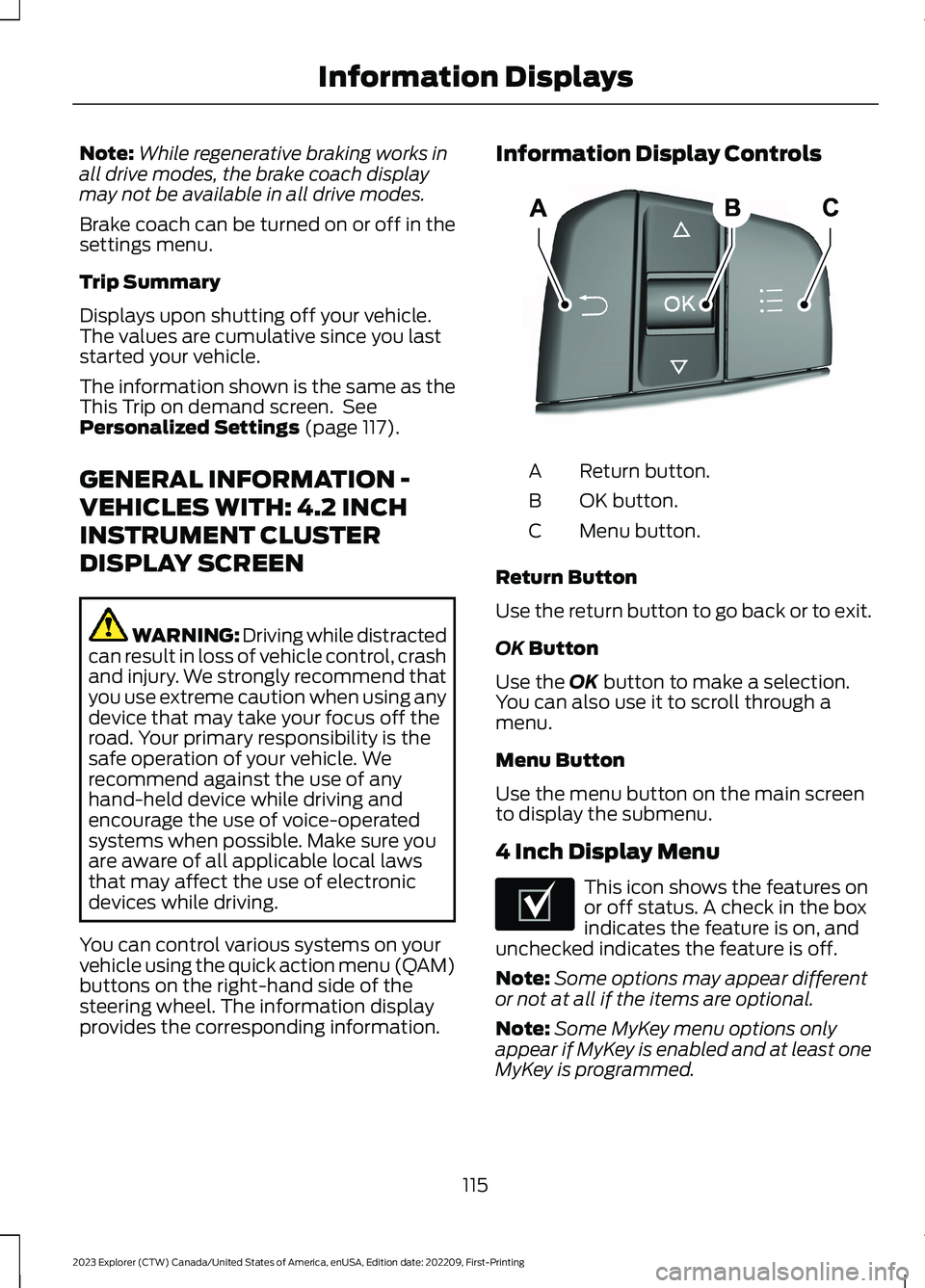
You can control various systems on yourvehicle using the quick action menu (QAM)buttons on the right-hand side of thesteering wheel. The information displayprovides the corresponding information.
Information Display Controls
Return button.A
OK button.B
Menu button.C
Return Button
Use the return button to go back or to exit.
OK Button
Use the OK button to make a selection.You can also use it to scroll through amenu.
Menu Button
Use the menu button on the main screento display the submenu.
4 Inch Display Menu
This icon shows the features onor off status. A check in the boxindicates the feature is on, andunchecked indicates the feature is off.
Note:Some options may appear differentor not at all if the items are optional.
Note:Some MyKey menu options onlyappear if MyKey is enabled and at least oneMyKey is programmed.
115
2023 Explorer (CTW) Canada/United States of America, enUSA, Edition date: 202209, First-PrintingInformation DisplaysE250032 E204495
Page 131 of 573
Lane Keeping System
ActionMessage
The system has malfunctioned. Have the system checked as soonas possible.Lane Keeping Sys.MalfunctionService Required
The system has detected a condition that has caused the systemto be temporarily unavailable.Front CameraTemporarily NotAvailable
The system has detected a condition that requires the windshieldto be cleaned to operate properly.Front Camera LowVisibility CleanScreen
The system has malfunctioned. Have the system checked as soonas possible.Front CameraMalfunctionService Required
The system requests the driver to keep their hands on the steeringwheel.Keep Hands onSteering Wheel
Maintenance
ActionMessage
Stop your vehicle as soon as safely possible and turn off the engine.Check the oil level. If the warning stays on or continues to come onwith your engine running, have the system checked as soon aspossible.
Low Engine OilPressure
The engine oil life is low and needs to be changed soon.Change Engine OilSoon
The engine oil life is low and needs to be changed immediately.Oil ChangeRequired
The brake fluid level is low and the brake system should beinspected immediately. See Brake Fluid Check (page 328).Brake Fluid LevelLow
The brake system needs servicing. Stop the vehicle in a safe place.Contact an authorized dealer.Check BrakeSystem
The engine coolant temperature is excessively high.Engine CoolantOver Temperature
The washer fluid is low and needs to be refilled.Washer Fluid LevelLow
127
2023 Explorer (CTW) Canada/United States of America, enUSA, Edition date: 202209, First-PrintingInformation Displays
Page 146 of 573
HEATED REAR WINDOW
Press the button to clear the rearwindow of thin ice and fog. Theheated rear window turns offafter a short period of time.
Note:Do not use harsh chemicals, razorblades or other sharp objects to clean orremove decals from the inside of the heatedrear window. The vehicle warranty may notcover damage to the heated rear windowgrid lines.
HEATED EXTERIOR MIRRORS
(IF EQUIPPED)
When you switch the heated rear windowon, the heated exterior mirrors turn on.
Note:Do not remove ice from the mirrorswith a scraper or adjust the mirror glasswhen it is frozen in place.
Note:Do not clean the mirror housing orglass with harsh abrasives, fuel or otherpetroleum-based cleaning products. Thevehicle warranty may not cover damagecaused to the mirror housing or glass.
REMOTE START (IF EQUIPPED)
The climate control system adjusts theinterior temperature during remote start.
You can switch this feature on or off andadjust the settings using the touchscreen.See Settings (page 458).
You cannot adjust the climate controlsetting during remote start operation.Switch the ignition on to makeadjustments.
Based on your remote start settings, thefollowing vehicle-dependent features mayor may not remain on after remote startingyour vehicle:
•Climate controlled seats.
•Heated steering wheel.
•Heated mirrors.
•Heated rear window.
•Windshield wiper de-icer.
Note:For dual zone climate controlledseats, the passenger seat setting defaultsto match the driver seat during remote start.
Automatic Settings
If Auto is on, the system sets the interiortemperature to 72°F (22°C) and heats orcools the vehicle interior as required toachieve comfort.
Note:In cold weather, the heated rearwindow and heated mirrors turn on.
Last Settings
If Last Settings is on, the system uses thesettings last selected before you turnedoff the vehicle.
Heated and Cooled Features
In Auto mode, certain heated features mayswitch on during cold weather, and cooledfeatures during hot weather.
142
2023 Explorer (CTW) Canada/United States of America, enUSA, Edition date: 202209, First-PrintingClimate ControlE184884