ECO mode FORD EXPLORER 2023 Owner's Manual
[x] Cancel search | Manufacturer: FORD, Model Year: 2023, Model line: EXPLORER, Model: FORD EXPLORER 2023Pages: 573, PDF Size: 16.1 MB
Page 101 of 573
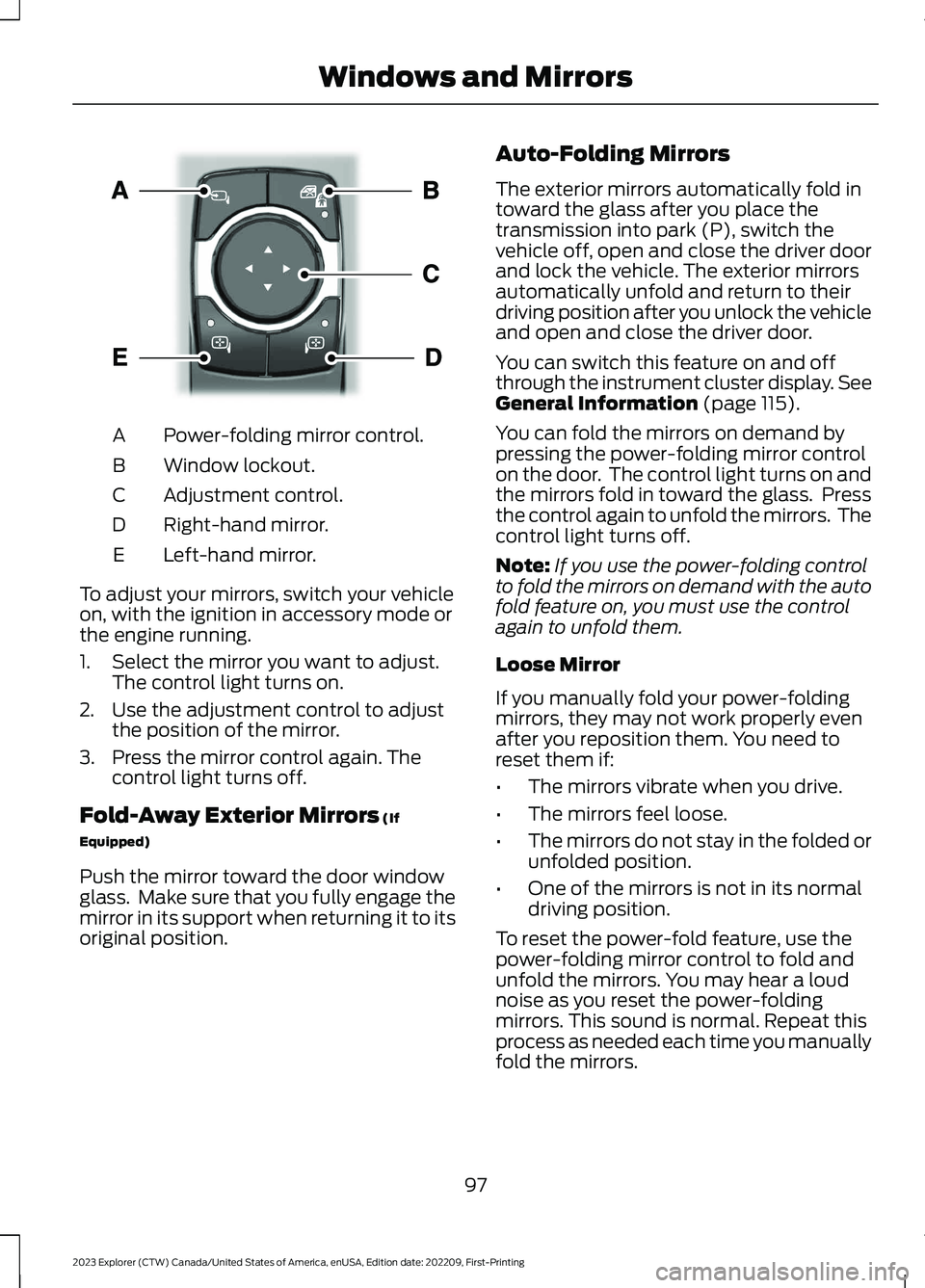
Power-folding mirror control.A
Window lockout.B
Adjustment control.C
Right-hand mirror.D
Left-hand mirror.E
To adjust your mirrors, switch your vehicleon, with the ignition in accessory mode orthe engine running.
1.Select the mirror you want to adjust.The control light turns on.
2.Use the adjustment control to adjustthe position of the mirror.
3.Press the mirror control again. Thecontrol light turns off.
Fold-Away Exterior Mirrors (If
Equipped)
Push the mirror toward the door windowglass. Make sure that you fully engage themirror in its support when returning it to itsoriginal position.
Auto-Folding Mirrors
The exterior mirrors automatically fold intoward the glass after you place thetransmission into park (P), switch thevehicle off, open and close the driver doorand lock the vehicle. The exterior mirrorsautomatically unfold and return to theirdriving position after you unlock the vehicleand open and close the driver door.
You can switch this feature on and offthrough the instrument cluster display. SeeGeneral Information (page 115).
You can fold the mirrors on demand bypressing the power-folding mirror controlon the door. The control light turns on andthe mirrors fold in toward the glass. Pressthe control again to unfold the mirrors. Thecontrol light turns off.
Note:If you use the power-folding controlto fold the mirrors on demand with the autofold feature on, you must use the controlagain to unfold them.
Loose Mirror
If you manually fold your power-foldingmirrors, they may not work properly evenafter you reposition them. You need toreset them if:
•The mirrors vibrate when you drive.
•The mirrors feel loose.
•The mirrors do not stay in the folded orunfolded position.
•One of the mirrors is not in its normaldriving position.
To reset the power-fold feature, use thepower-folding mirror control to fold andunfold the mirrors. You may hear a loudnoise as you reset the power-foldingmirrors. This sound is normal. Repeat thisprocess as needed each time you manuallyfold the mirrors.
97
2023 Explorer (CTW) Canada/United States of America, enUSA, Edition date: 202209, First-PrintingWindows and MirrorsE295322
Page 109 of 573
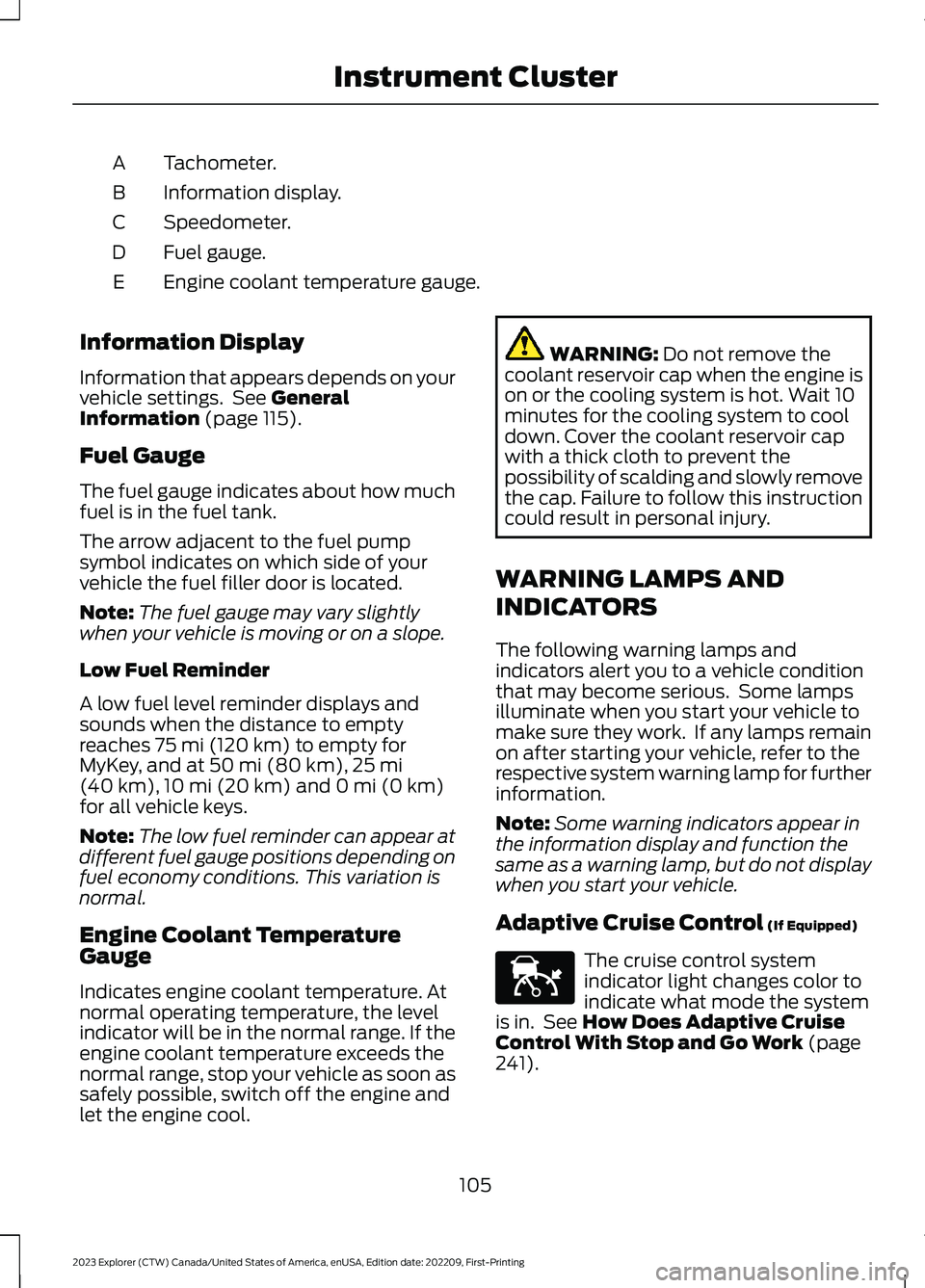
Tachometer.A
Information display.B
Speedometer.C
Fuel gauge.D
Engine coolant temperature gauge.E
Information Display
Information that appears depends on yourvehicle settings. See GeneralInformation (page 115).
Fuel Gauge
The fuel gauge indicates about how muchfuel is in the fuel tank.
The arrow adjacent to the fuel pumpsymbol indicates on which side of yourvehicle the fuel filler door is located.
Note:The fuel gauge may vary slightlywhen your vehicle is moving or on a slope.
Low Fuel Reminder
A low fuel level reminder displays andsounds when the distance to emptyreaches 75 mi (120 km) to empty forMyKey, and at 50 mi (80 km),25 mi(40 km),10 mi (20 km) and 0 mi (0 km)for all vehicle keys.
Note:The low fuel reminder can appear atdifferent fuel gauge positions depending onfuel economy conditions. This variation isnormal.
Engine Coolant TemperatureGauge
Indicates engine coolant temperature. Atnormal operating temperature, the levelindicator will be in the normal range. If theengine coolant temperature exceeds thenormal range, stop your vehicle as soon assafely possible, switch off the engine andlet the engine cool.
WARNING: Do not remove thecoolant reservoir cap when the engine ison or the cooling system is hot. Wait 10minutes for the cooling system to cooldown. Cover the coolant reservoir capwith a thick cloth to prevent thepossibility of scalding and slowly removethe cap. Failure to follow this instructioncould result in personal injury.
WARNING LAMPS AND
INDICATORS
The following warning lamps andindicators alert you to a vehicle conditionthat may become serious. Some lampsilluminate when you start your vehicle tomake sure they work. If any lamps remainon after starting your vehicle, refer to therespective system warning lamp for furtherinformation.
Note:Some warning indicators appear inthe information display and function thesame as a warning lamp, but do not displaywhen you start your vehicle.
Adaptive Cruise Control (If Equipped)
The cruise control systemindicator light changes color toindicate what mode the systemis in. See How Does Adaptive CruiseControl With Stop and Go Work (page241).
105
2023 Explorer (CTW) Canada/United States of America, enUSA, Edition date: 202209, First-PrintingInstrument ClusterE144524
Page 116 of 573
Display Setup
Display Setup
Speedometer units
Hold Ok to ResetDriving History1
1 Hybrid only
Note:Additional display settings areavailable through your touchscreen. SeeSettings (page 458).
Hybrid Display Information (If
Equipped)
Unique hybrid vehicle information displayson your instrument cluster display whenyou shut off your vehicle or come to a stop.
Brake Coach
Appears after the vehicle has come to astop. It coaches you to brake in a mannerthat maximizes the amount of energyreturned through the regenerative brakingsystem.
The percent displayed indicates theregenerative braking efficiency, with 100%representing the maximum amount ofenergy recovery.
Note:While regenerative braking works inall drive modes, the brake coach displaymay not be available in all drive modes.
Brake coach can be turned on or off in thesettings menu.
Trip Summary
Displays upon shutting off your vehicle.The values are cumulative since you laststarted your vehicle.
The information shown is the same as theThis Trip on demand screen. SeePersonalized Settings (page 117).
GENERAL INFORMATION -
VEHICLES WITH: 12.3 INCH
INSTRUMENT CLUSTER
DISPLAY SCREEN
WARNING: Driving while distractedcan result in loss of vehicle control, crashand injury. We strongly recommend thatyou use extreme caution when using anydevice that may take your focus off theroad. Your primary responsibility is thesafe operation of your vehicle. Werecommend against the use of anyhand-held device while driving andencourage the use of voice-operatedsystems when possible. Make sure youare aware of all applicable local lawsthat may affect the use of electronicdevices while driving.
You can control various systems on yourvehicle using the information displaycontrols on the steering wheel.Corresponding information appears in theinstrument cluster display.
112
2023 Explorer (CTW) Canada/United States of America, enUSA, Edition date: 202209, First-PrintingInformation Displays
Page 119 of 573
Note:While regenerative braking works inall drive modes, the brake coach displaymay not be available in all drive modes.
Brake coach can be turned on or off in thesettings menu.
Trip Summary
Displays upon shutting off your vehicle.The values are cumulative since you laststarted your vehicle.
The information shown is the same as theThis Trip on demand screen. SeePersonalized Settings (page 117).
GENERAL INFORMATION -
VEHICLES WITH: 4.2 INCH
INSTRUMENT CLUSTER
DISPLAY SCREEN
WARNING: Driving while distractedcan result in loss of vehicle control, crashand injury. We strongly recommend thatyou use extreme caution when using anydevice that may take your focus off theroad. Your primary responsibility is thesafe operation of your vehicle. Werecommend against the use of anyhand-held device while driving andencourage the use of voice-operatedsystems when possible. Make sure youare aware of all applicable local lawsthat may affect the use of electronicdevices while driving.
You can control various systems on yourvehicle using the quick action menu (QAM)buttons on the right-hand side of thesteering wheel. The information displayprovides the corresponding information.
Information Display Controls
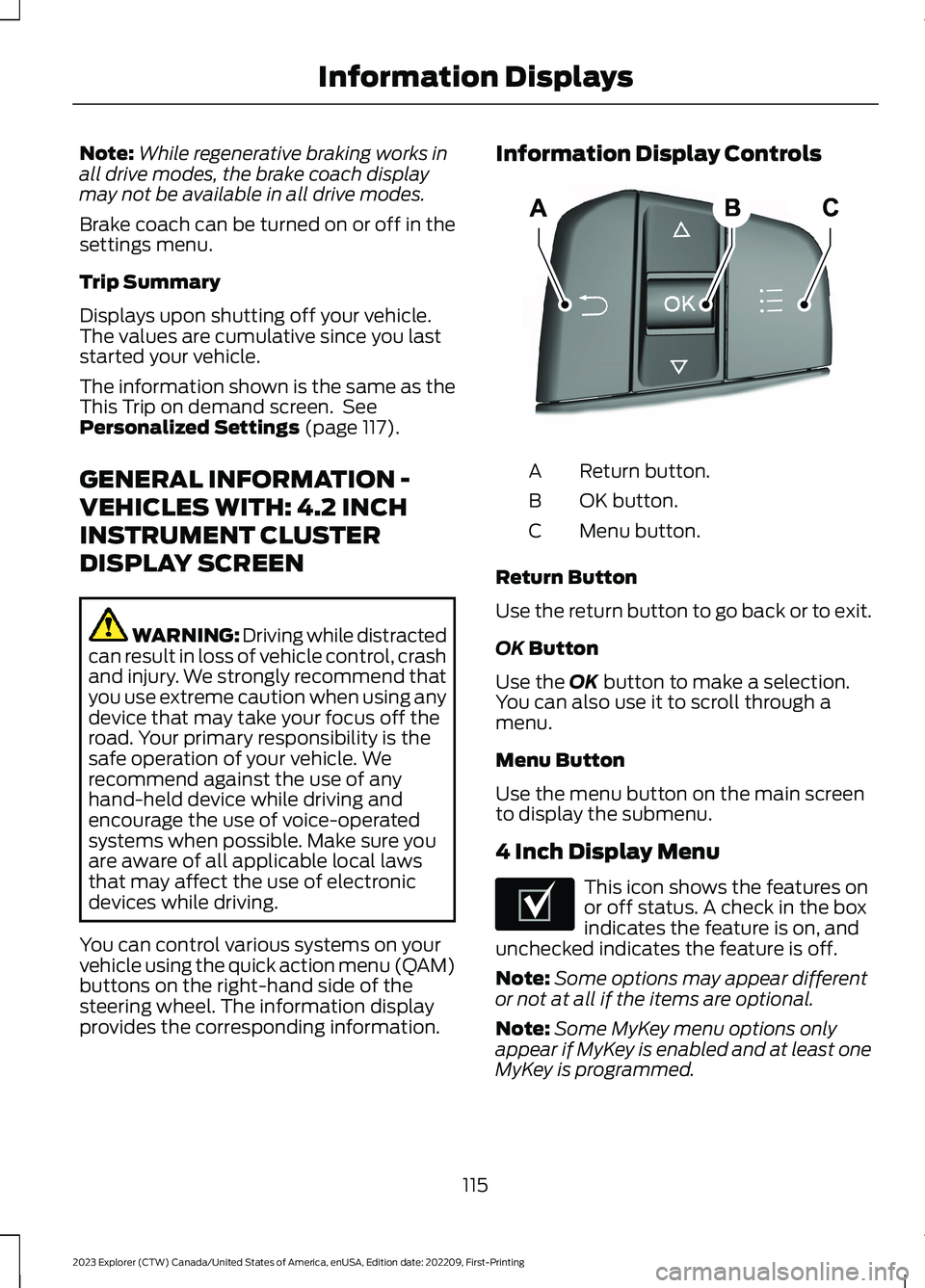
Return button.A
OK button.B
Menu button.C
Return Button
Use the return button to go back or to exit.
OK Button
Use the OK button to make a selection.You can also use it to scroll through amenu.
Menu Button
Use the menu button on the main screento display the submenu.
4 Inch Display Menu
This icon shows the features onor off status. A check in the boxindicates the feature is on, andunchecked indicates the feature is off.
Note:Some options may appear differentor not at all if the items are optional.
Note:Some MyKey menu options onlyappear if MyKey is enabled and at least oneMyKey is programmed.
115
2023 Explorer (CTW) Canada/United States of America, enUSA, Edition date: 202209, First-PrintingInformation DisplaysE250032 E204495
Page 126 of 573
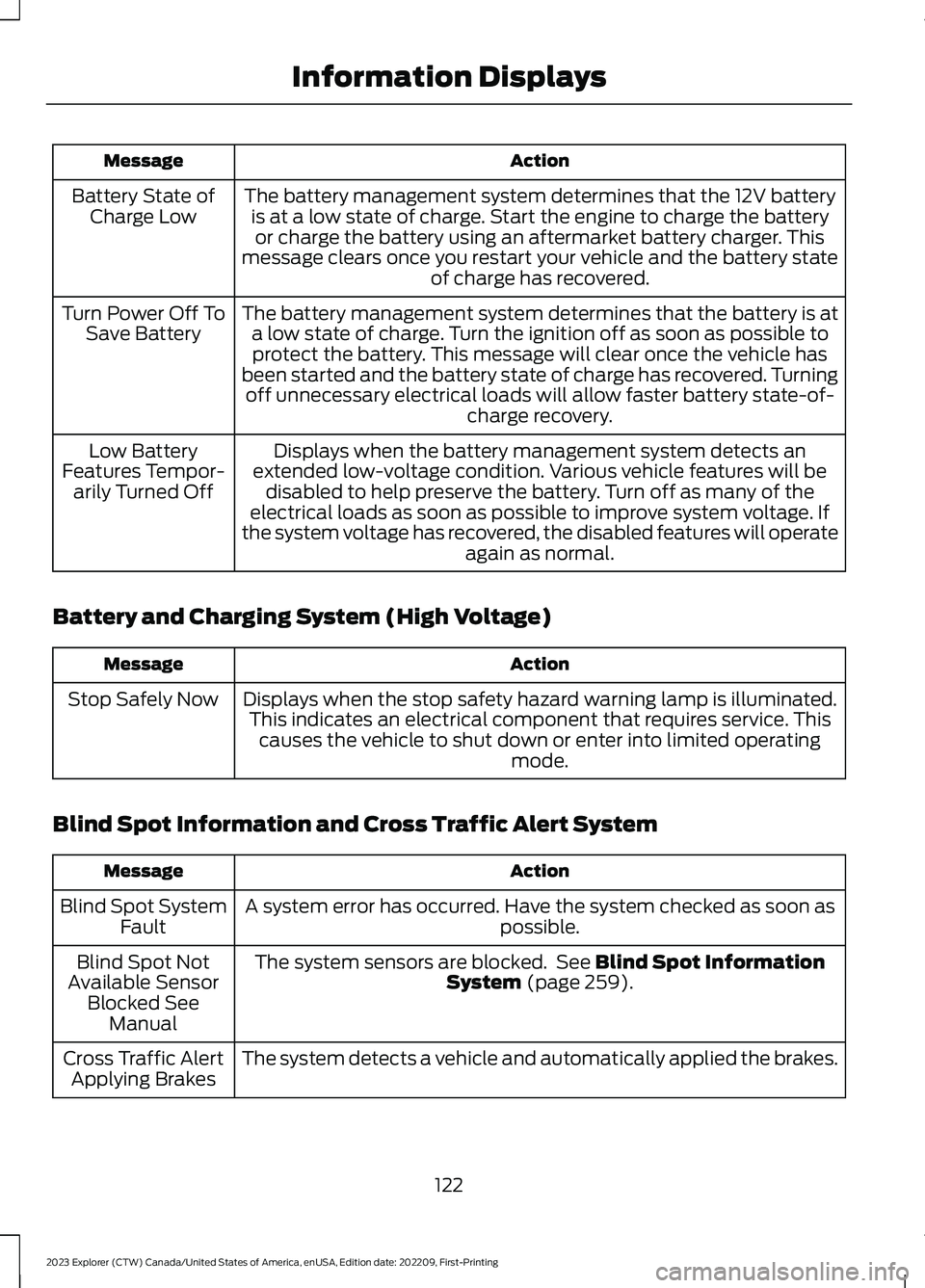
ActionMessage
The battery management system determines that the 12V batteryis at a low state of charge. Start the engine to charge the batteryor charge the battery using an aftermarket battery charger. Thismessage clears once you restart your vehicle and the battery stateof charge has recovered.
Battery State ofCharge Low
The battery management system determines that the battery is ata low state of charge. Turn the ignition off as soon as possible toprotect the battery. This message will clear once the vehicle hasbeen started and the battery state of charge has recovered. Turningoff unnecessary electrical loads will allow faster battery state-of-charge recovery.
Turn Power Off ToSave Battery
Displays when the battery management system detects anextended low-voltage condition. Various vehicle features will bedisabled to help preserve the battery. Turn off as many of theelectrical loads as soon as possible to improve system voltage. Ifthe system voltage has recovered, the disabled features will operateagain as normal.
Low BatteryFeatures Tempor-arily Turned Off
Battery and Charging System (High Voltage)
ActionMessage
Displays when the stop safety hazard warning lamp is illuminated.This indicates an electrical component that requires service. Thiscauses the vehicle to shut down or enter into limited operatingmode.
Stop Safely Now
Blind Spot Information and Cross Traffic Alert System
ActionMessage
A system error has occurred. Have the system checked as soon aspossible.Blind Spot SystemFault
The system sensors are blocked. See Blind Spot InformationSystem (page 259).Blind Spot NotAvailable SensorBlocked SeeManual
The system detects a vehicle and automatically applied the brakes.Cross Traffic AlertApplying Brakes
122
2023 Explorer (CTW) Canada/United States of America, enUSA, Edition date: 202209, First-PrintingInformation Displays
Page 132 of 573
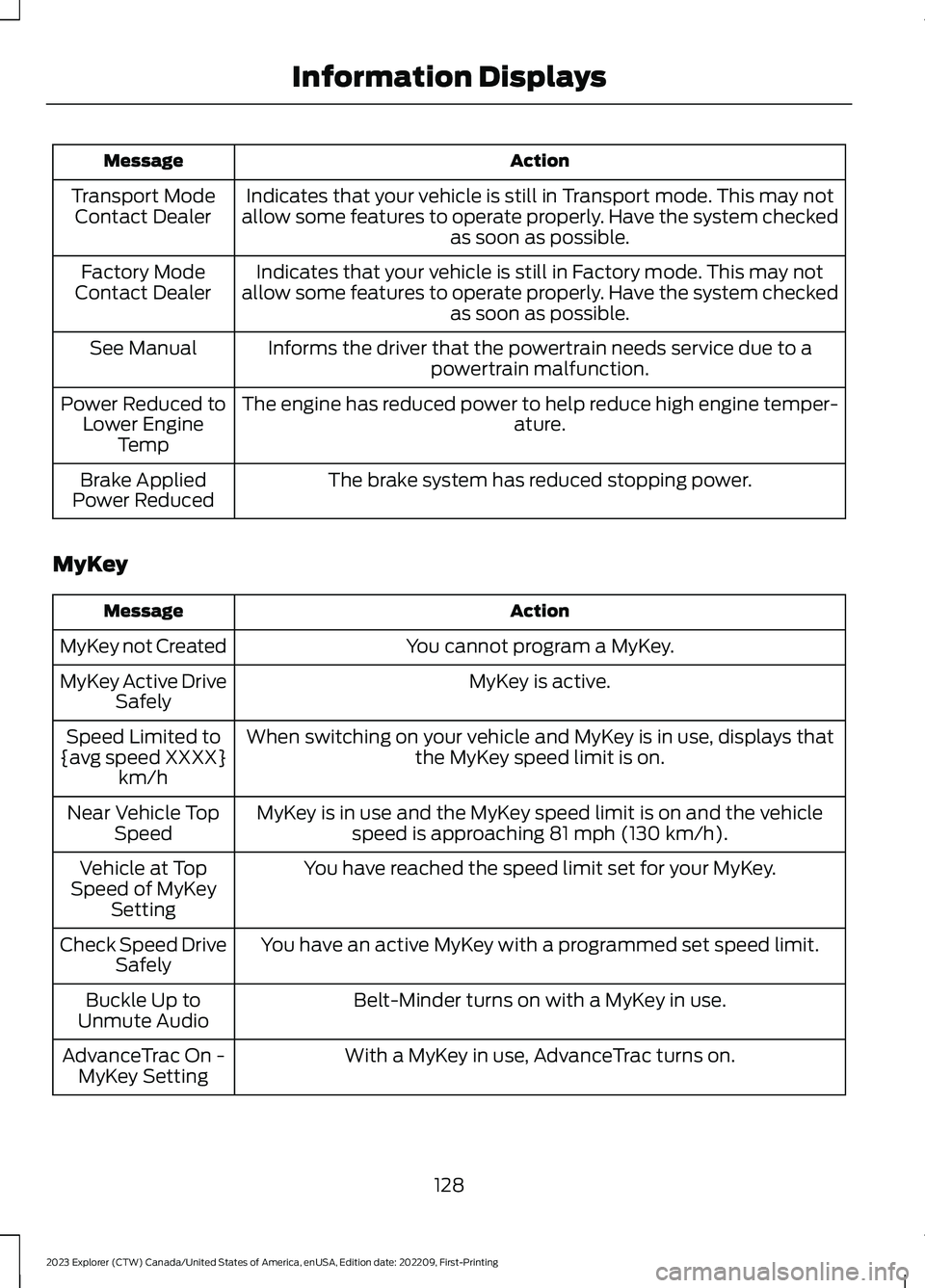
ActionMessage
Indicates that your vehicle is still in Transport mode. This may notallow some features to operate properly. Have the system checkedas soon as possible.
Transport ModeContact Dealer
Indicates that your vehicle is still in Factory mode. This may notallow some features to operate properly. Have the system checkedas soon as possible.
Factory ModeContact Dealer
Informs the driver that the powertrain needs service due to apowertrain malfunction.See Manual
The engine has reduced power to help reduce high engine temper-ature.Power Reduced toLower EngineTemp
The brake system has reduced stopping power.Brake AppliedPower Reduced
MyKey
ActionMessage
You cannot program a MyKey.MyKey not Created
MyKey is active.MyKey Active DriveSafely
When switching on your vehicle and MyKey is in use, displays thatthe MyKey speed limit is on.Speed Limited to{avg speed XXXX}km/h
MyKey is in use and the MyKey speed limit is on and the vehiclespeed is approaching 81 mph (130 km/h).Near Vehicle TopSpeed
You have reached the speed limit set for your MyKey.Vehicle at TopSpeed of MyKeySetting
You have an active MyKey with a programmed set speed limit.Check Speed DriveSafely
Belt-Minder turns on with a MyKey in use.Buckle Up toUnmute Audio
With a MyKey in use, AdvanceTrac turns on.AdvanceTrac On -MyKey Setting
128
2023 Explorer (CTW) Canada/United States of America, enUSA, Edition date: 202209, First-PrintingInformation Displays
Page 138 of 573
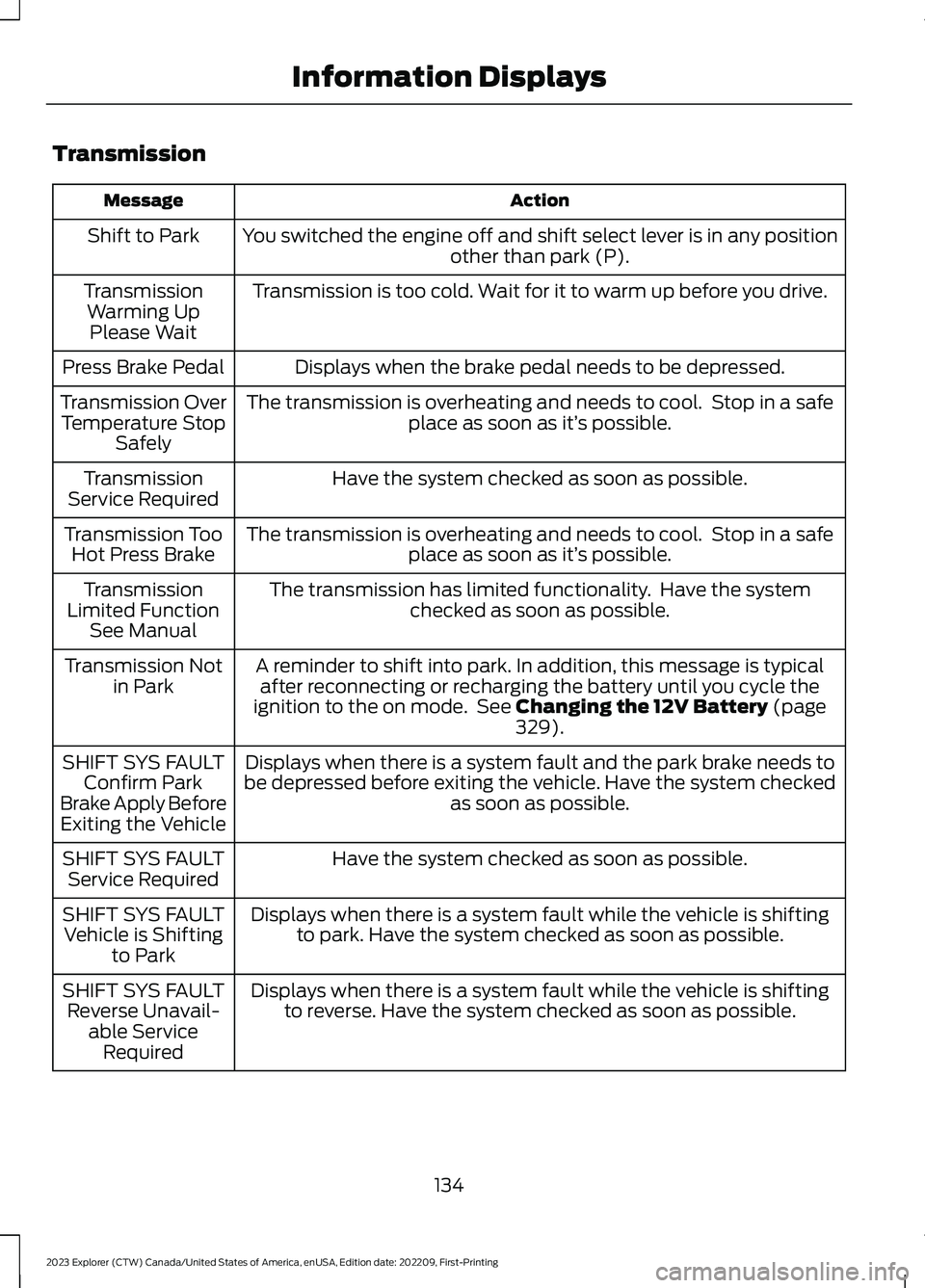
Transmission
ActionMessage
You switched the engine off and shift select lever is in any positionother than park (P).Shift to Park
Transmission is too cold. Wait for it to warm up before you drive.TransmissionWarming UpPlease Wait
Displays when the brake pedal needs to be depressed.Press Brake Pedal
The transmission is overheating and needs to cool. Stop in a safeplace as soon as it’s possible.Transmission OverTemperature StopSafely
Have the system checked as soon as possible.TransmissionService Required
The transmission is overheating and needs to cool. Stop in a safeplace as soon as it’s possible.Transmission TooHot Press Brake
The transmission has limited functionality. Have the systemchecked as soon as possible.TransmissionLimited FunctionSee Manual
A reminder to shift into park. In addition, this message is typicalafter reconnecting or recharging the battery until you cycle theignition to the on mode. See Changing the 12V Battery (page329).
Transmission Notin Park
Displays when there is a system fault and the park brake needs tobe depressed before exiting the vehicle. Have the system checkedas soon as possible.
SHIFT SYS FAULTConfirm ParkBrake Apply BeforeExiting the Vehicle
Have the system checked as soon as possible.SHIFT SYS FAULTService Required
Displays when there is a system fault while the vehicle is shiftingto park. Have the system checked as soon as possible.SHIFT SYS FAULTVehicle is Shiftingto Park
Displays when there is a system fault while the vehicle is shiftingto reverse. Have the system checked as soon as possible.SHIFT SYS FAULTReverse Unavail-able ServiceRequired
134
2023 Explorer (CTW) Canada/United States of America, enUSA, Edition date: 202209, First-PrintingInformation Displays
Page 142 of 573
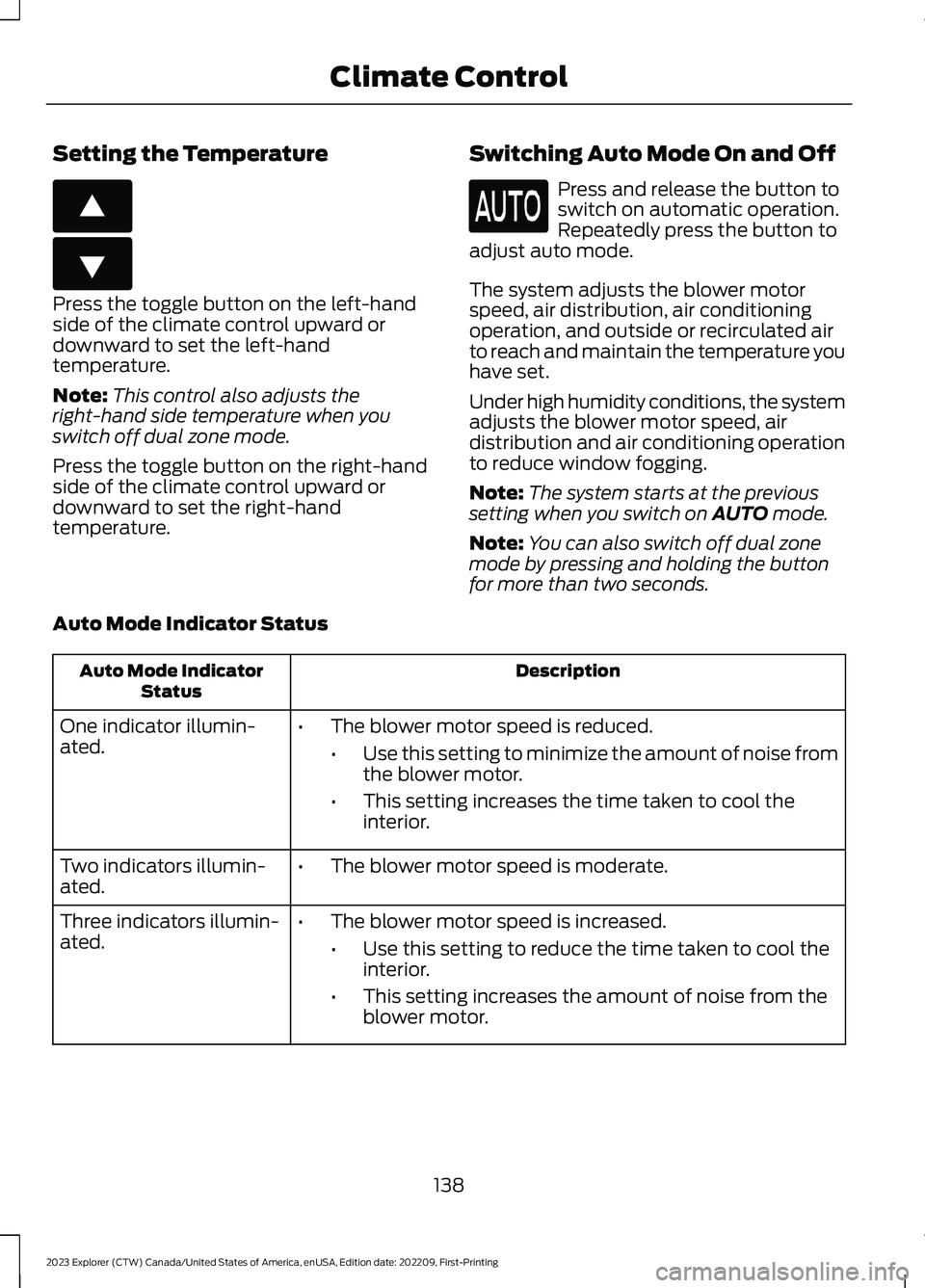
Setting the Temperature
Press the toggle button on the left-handside of the climate control upward ordownward to set the left-handtemperature.
Note:This control also adjusts theright-hand side temperature when youswitch off dual zone mode.
Press the toggle button on the right-handside of the climate control upward ordownward to set the right-handtemperature.
Switching Auto Mode On and Off
Press and release the button toswitch on automatic operation.Repeatedly press the button toadjust auto mode.
The system adjusts the blower motorspeed, air distribution, air conditioningoperation, and outside or recirculated airto reach and maintain the temperature youhave set.
Under high humidity conditions, the systemadjusts the blower motor speed, airdistribution and air conditioning operationto reduce window fogging.
Note:The system starts at the previoussetting when you switch on AUTO mode.
Note:You can also switch off dual zonemode by pressing and holding the buttonfor more than two seconds.
Auto Mode Indicator Status
DescriptionAuto Mode IndicatorStatus
One indicator illumin-ated.•The blower motor speed is reduced.
•Use this setting to minimize the amount of noise fromthe blower motor.
•This setting increases the time taken to cool theinterior.
Two indicators illumin-ated.•The blower motor speed is moderate.
Three indicators illumin-ated.•The blower motor speed is increased.
•Use this setting to reduce the time taken to cool theinterior.
•This setting increases the amount of noise from theblower motor.
138
2023 Explorer (CTW) Canada/United States of America, enUSA, Edition date: 202209, First-PrintingClimate ControlE266187 E266186
Page 144 of 573
Note:Do not place objects under the frontseats as this may interfere with the airflowto the rear seats.
Note:Remove any snow, ice or leaves fromthe air intake area at the base of thewindshield.
Note:To improve the time to reach acomfortable temperature in hot weather,drive with the windows open until you feelcold air through the air vents.
Automatic Climate Control
Note:Adjusting the settings when yourvehicle interior is extremely hot or cold isnot necessary. Automatic mode is bestrecommended to maintain set temperature.
Note:The system adjusts to heat or coolthe interior to the temperature you selectas quickly as possible.
Note:For the system to function efficiently,the instrument panel and side air ventsshould be fully open.
Note:If you select AUTO during coldoutside temperatures, the system directsair flow to the windshield and side windowair vents. In addition, the blower motor mayrun at a slower speed until the engine warmsup.
Note:If you select AUTO during hottemperatures and the inside of the vehicleis hot, the system uses recirculated air tomaximize interior cooling. Blower motorspeed may also reduce until the air cools.
Quickly Heating the Interior
1.Press and release AUTO.
2.Adjust the temperature function to thesetting you prefer.
Recommended Settings forHeating
1.Press and release AUTO.
2.Adjust the temperature function to thesetting you prefer. Use 72°F (22°C) asa starting point, then adjust the settingas necessary.
Quickly Cooling the Interior
1.Press and release MAX A/C.
Recommended Settings forCooling
1.Press and release AUTO.
2.Adjust the temperature function to thesetting you prefer. Use 72°F (22°C) asa starting point, then adjust the settingas necessary.
Defogging the Side Windows inCold Weather
1.Press and release defrost or maximumdefrost.
2.Adjust the temperature control to thesetting you prefer. Use 72°F (22°C) asa starting point, then adjust the settingas necessary.
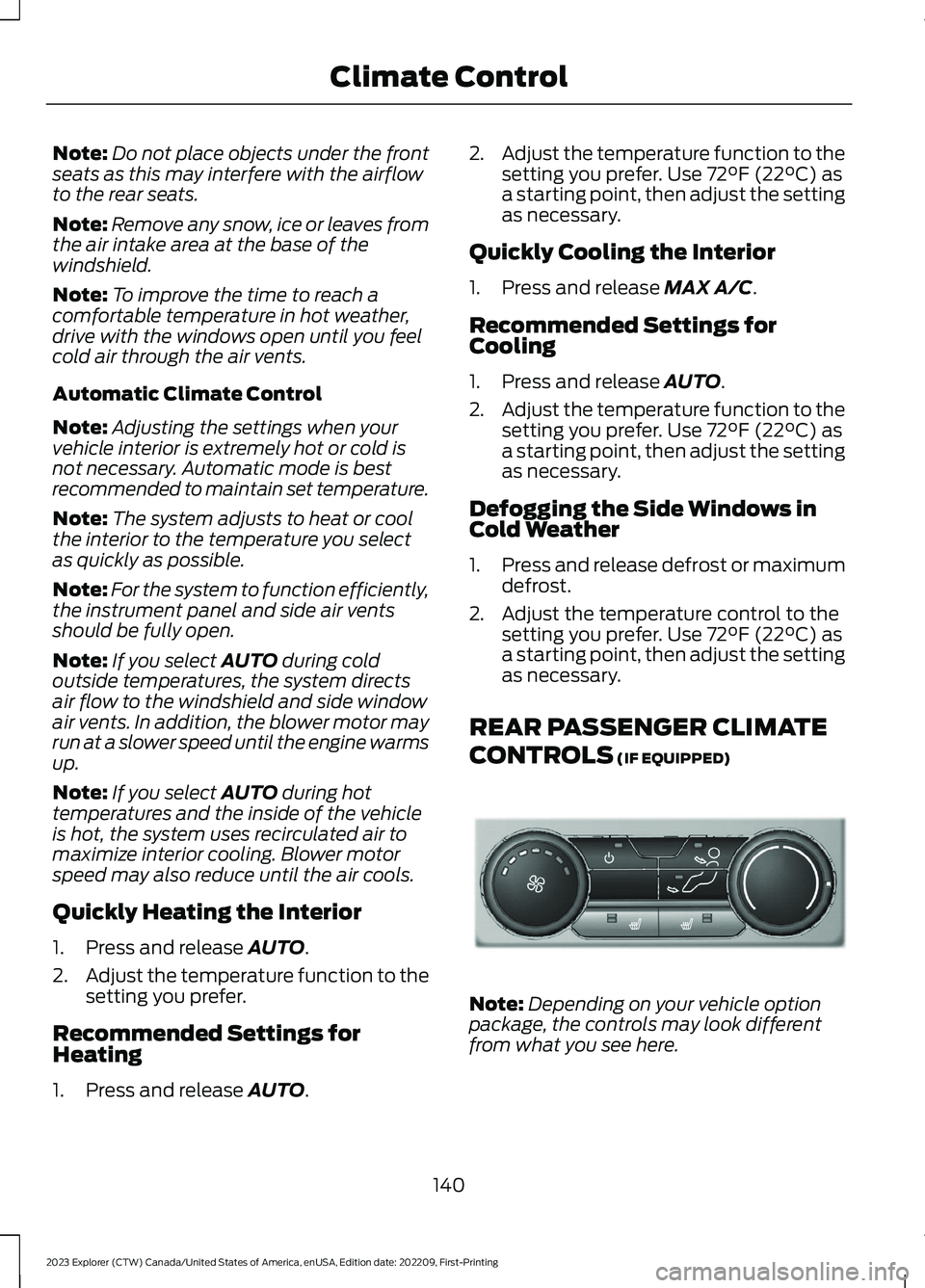
REAR PASSENGER CLIMATE
CONTROLS (IF EQUIPPED)
Note:Depending on your vehicle optionpackage, the controls may look differentfrom what you see here.
140
2023 Explorer (CTW) Canada/United States of America, enUSA, Edition date: 202209, First-PrintingClimate ControlE289989
Page 153 of 573
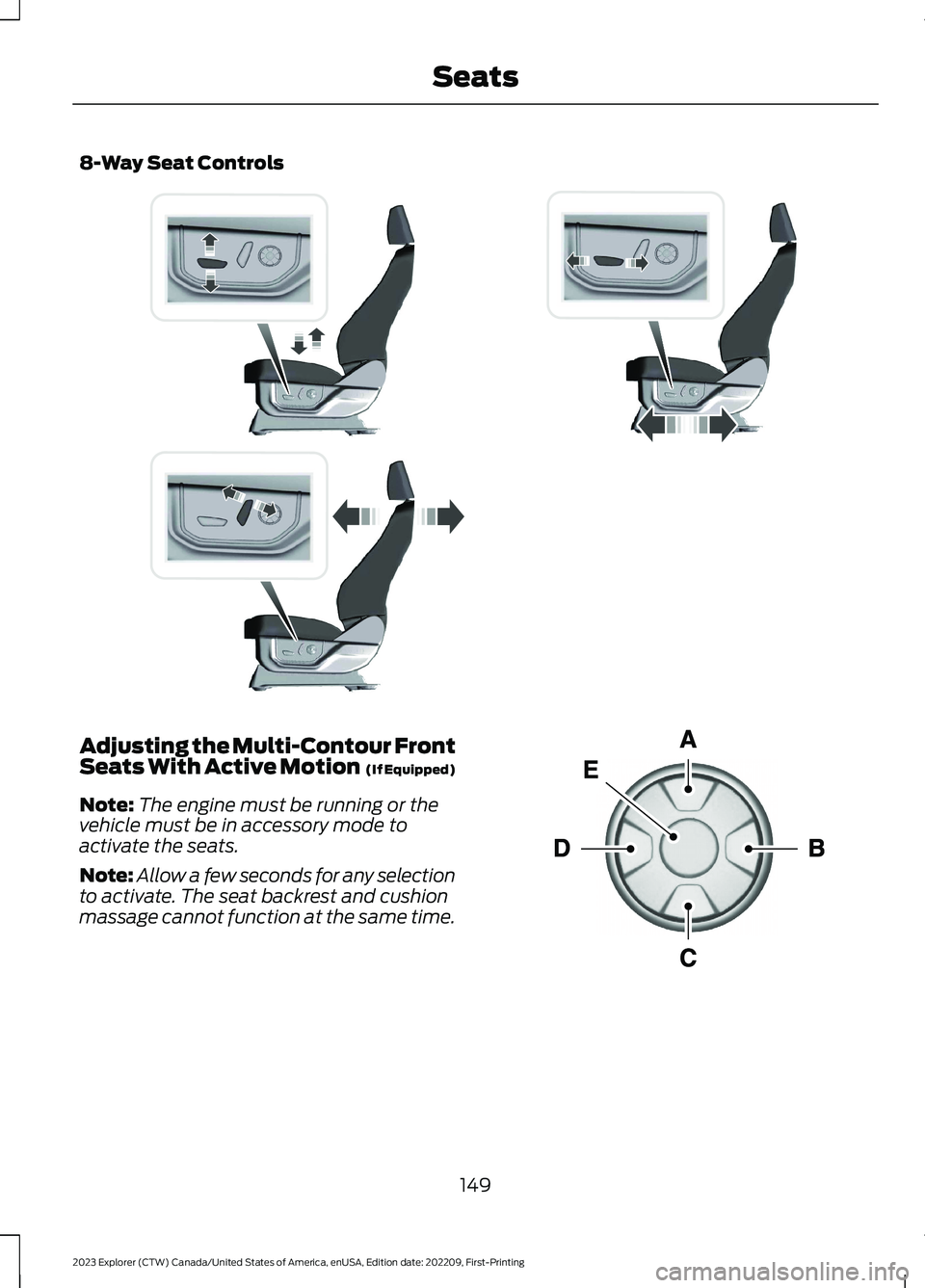
8-Way Seat Controls
Adjusting the Multi-Contour FrontSeats With Active Motion (If Equipped)
Note:The engine must be running or thevehicle must be in accessory mode toactivate the seats.
Note:Allow a few seconds for any selectionto activate. The seat backrest and cushionmassage cannot function at the same time.
149
2023 Explorer (CTW) Canada/United States of America, enUSA, Edition date: 202209, First-PrintingSeatsE338902 E156301