battery FORD EXPLORER 2023 Owner's Manual
[x] Cancel search | Manufacturer: FORD, Model Year: 2023, Model line: EXPLORER, Model: FORD EXPLORER 2023Pages: 573, PDF Size: 16.1 MB
Page 137 of 573
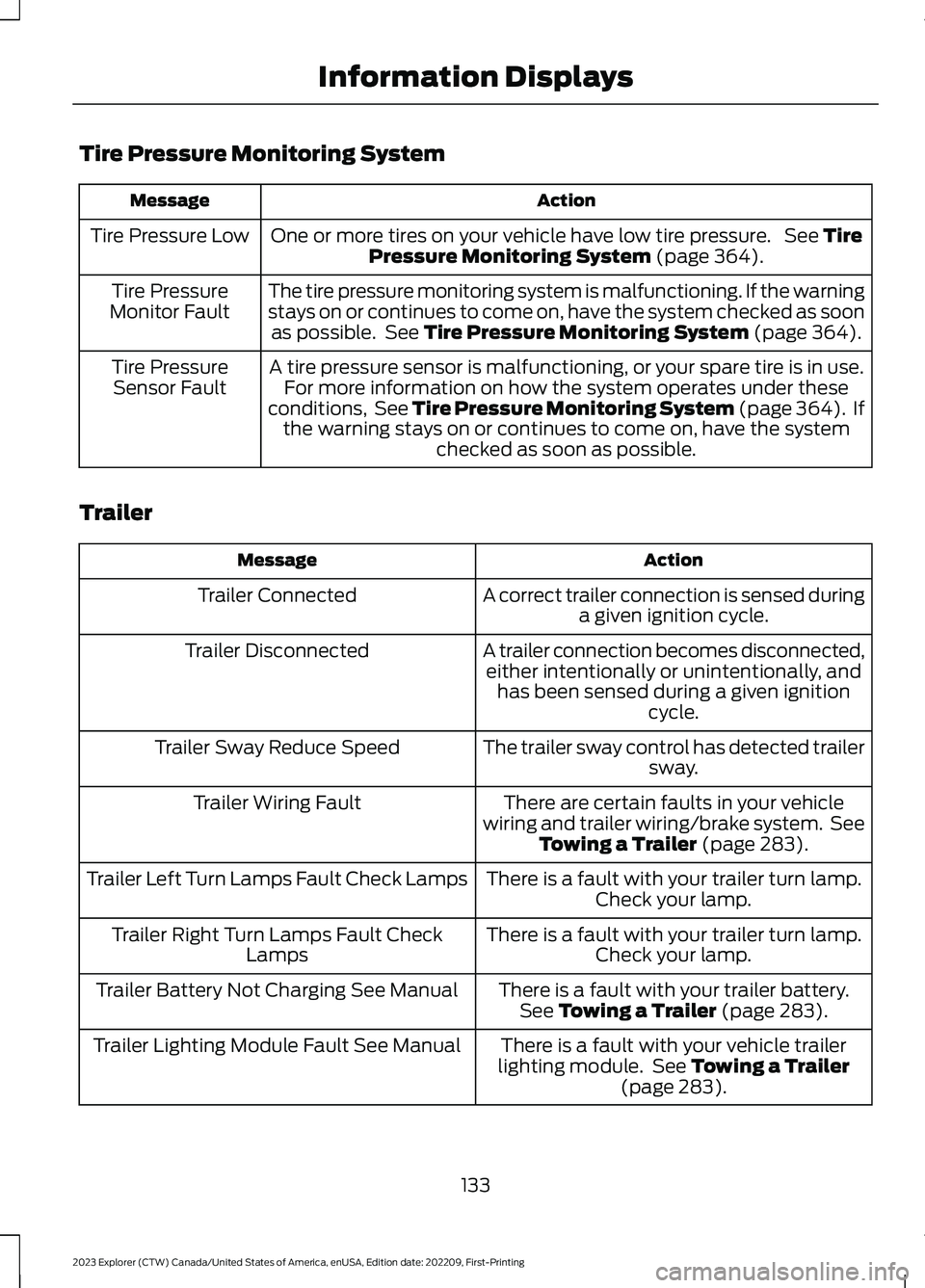
Tire Pressure Monitoring System
ActionMessage
One or more tires on your vehicle have low tire pressure. See TirePressure Monitoring System (page 364).Tire Pressure Low
The tire pressure monitoring system is malfunctioning. If the warningstays on or continues to come on, have the system checked as soonas possible. See Tire Pressure Monitoring System (page 364).
Tire PressureMonitor Fault
A tire pressure sensor is malfunctioning, or your spare tire is in use.For more information on how the system operates under theseconditions, See Tire Pressure Monitoring System (page 364). Ifthe warning stays on or continues to come on, have the systemchecked as soon as possible.
Tire PressureSensor Fault
Trailer
ActionMessage
A correct trailer connection is sensed duringa given ignition cycle.Trailer Connected
A trailer connection becomes disconnected,either intentionally or unintentionally, andhas been sensed during a given ignitioncycle.
Trailer Disconnected
The trailer sway control has detected trailersway.Trailer Sway Reduce Speed
There are certain faults in your vehiclewiring and trailer wiring/brake system. SeeTowing a Trailer (page 283).
Trailer Wiring Fault
There is a fault with your trailer turn lamp.Check your lamp.Trailer Left Turn Lamps Fault Check Lamps
There is a fault with your trailer turn lamp.Check your lamp.Trailer Right Turn Lamps Fault CheckLamps
There is a fault with your trailer battery.See Towing a Trailer (page 283).Trailer Battery Not Charging See Manual
There is a fault with your vehicle trailerlighting module. See Towing a Trailer(page 283).
Trailer Lighting Module Fault See Manual
133
2023 Explorer (CTW) Canada/United States of America, enUSA, Edition date: 202209, First-PrintingInformation Displays
Page 138 of 573
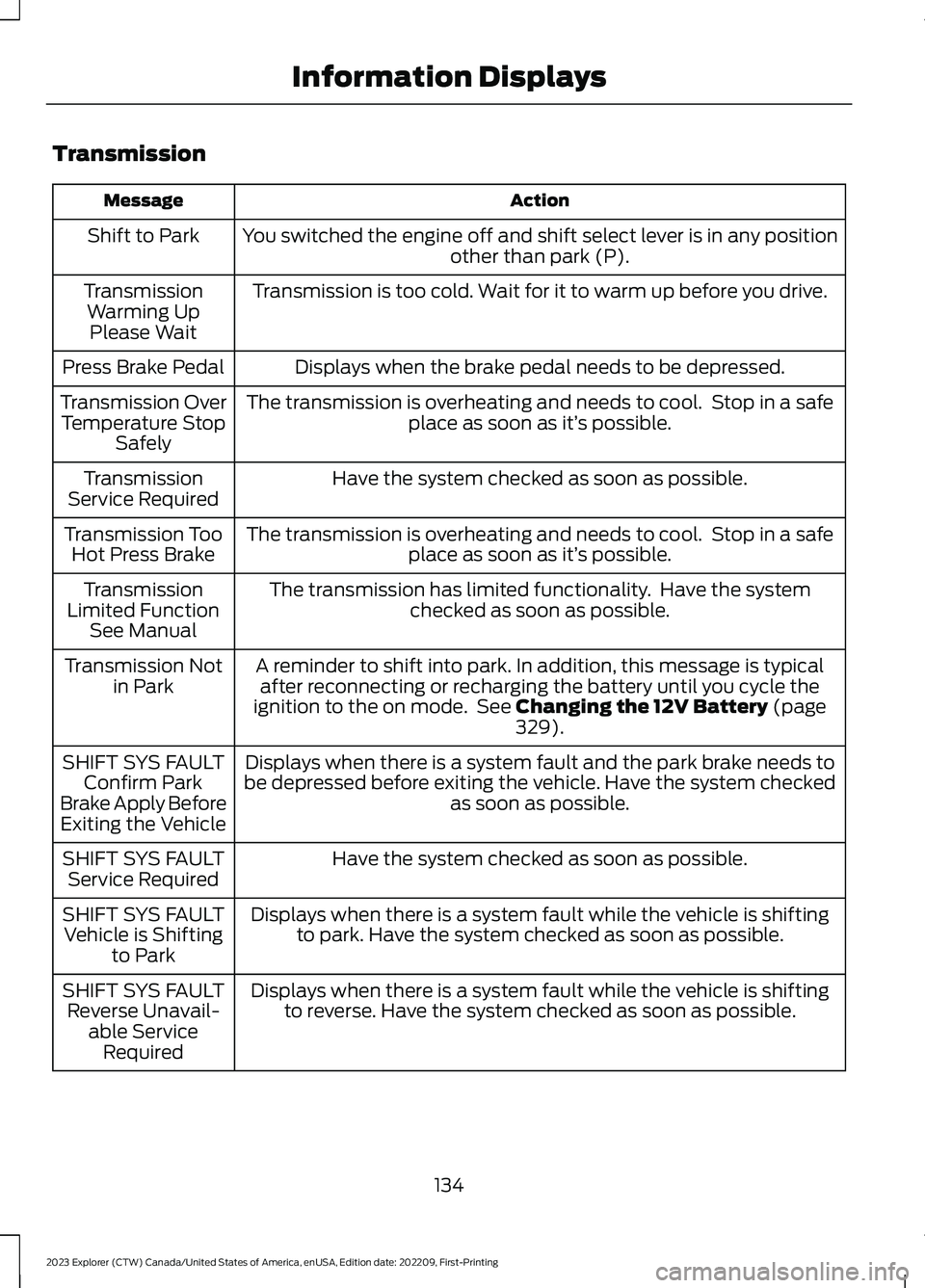
Transmission
ActionMessage
You switched the engine off and shift select lever is in any positionother than park (P).Shift to Park
Transmission is too cold. Wait for it to warm up before you drive.TransmissionWarming UpPlease Wait
Displays when the brake pedal needs to be depressed.Press Brake Pedal
The transmission is overheating and needs to cool. Stop in a safeplace as soon as it’s possible.Transmission OverTemperature StopSafely
Have the system checked as soon as possible.TransmissionService Required
The transmission is overheating and needs to cool. Stop in a safeplace as soon as it’s possible.Transmission TooHot Press Brake
The transmission has limited functionality. Have the systemchecked as soon as possible.TransmissionLimited FunctionSee Manual
A reminder to shift into park. In addition, this message is typicalafter reconnecting or recharging the battery until you cycle theignition to the on mode. See Changing the 12V Battery (page329).
Transmission Notin Park
Displays when there is a system fault and the park brake needs tobe depressed before exiting the vehicle. Have the system checkedas soon as possible.
SHIFT SYS FAULTConfirm ParkBrake Apply BeforeExiting the Vehicle
Have the system checked as soon as possible.SHIFT SYS FAULTService Required
Displays when there is a system fault while the vehicle is shiftingto park. Have the system checked as soon as possible.SHIFT SYS FAULTVehicle is Shiftingto Park
Displays when there is a system fault while the vehicle is shiftingto reverse. Have the system checked as soon as possible.SHIFT SYS FAULTReverse Unavail-able ServiceRequired
134
2023 Explorer (CTW) Canada/United States of America, enUSA, Edition date: 202209, First-PrintingInformation Displays
Page 141 of 573
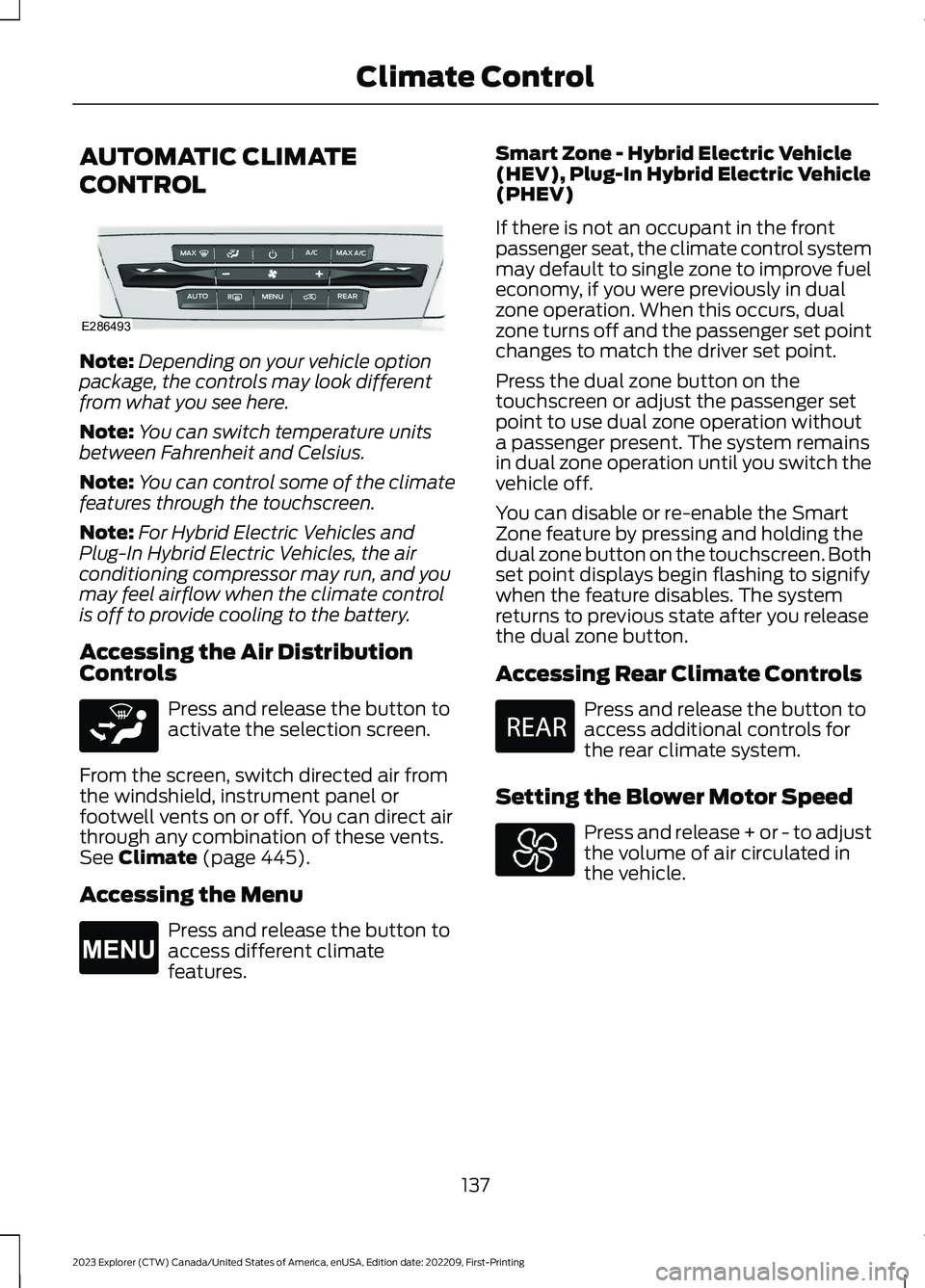
AUTOMATIC CLIMATE
CONTROL
Note:Depending on your vehicle optionpackage, the controls may look differentfrom what you see here.
Note:You can switch temperature unitsbetween Fahrenheit and Celsius.
Note:You can control some of the climatefeatures through the touchscreen.
Note:For Hybrid Electric Vehicles andPlug-In Hybrid Electric Vehicles, the airconditioning compressor may run, and youmay feel airflow when the climate controlis off to provide cooling to the battery.
Accessing the Air DistributionControls
Press and release the button toactivate the selection screen.
From the screen, switch directed air fromthe windshield, instrument panel orfootwell vents on or off. You can direct airthrough any combination of these vents.See Climate (page 445).
Accessing the Menu
Press and release the button toaccess different climatefeatures.
Smart Zone - Hybrid Electric Vehicle(HEV), Plug-In Hybrid Electric Vehicle(PHEV)
If there is not an occupant in the frontpassenger seat, the climate control systemmay default to single zone to improve fueleconomy, if you were previously in dualzone operation. When this occurs, dualzone turns off and the passenger set pointchanges to match the driver set point.
Press the dual zone button on thetouchscreen or adjust the passenger setpoint to use dual zone operation withouta passenger present. The system remainsin dual zone operation until you switch thevehicle off.
You can disable or re-enable the SmartZone feature by pressing and holding thedual zone button on the touchscreen. Bothset point displays begin flashing to signifywhen the feature disables. The systemreturns to previous state after you releasethe dual zone button.
Accessing Rear Climate Controls
Press and release the button toaccess additional controls forthe rear climate system.
Setting the Blower Motor Speed
Press and release + or - to adjustthe volume of air circulated inthe vehicle.
137
2023 Explorer (CTW) Canada/United States of America, enUSA, Edition date: 202209, First-PrintingClimate ControlE286493 E265283 E265038 E270447
Page 168 of 573
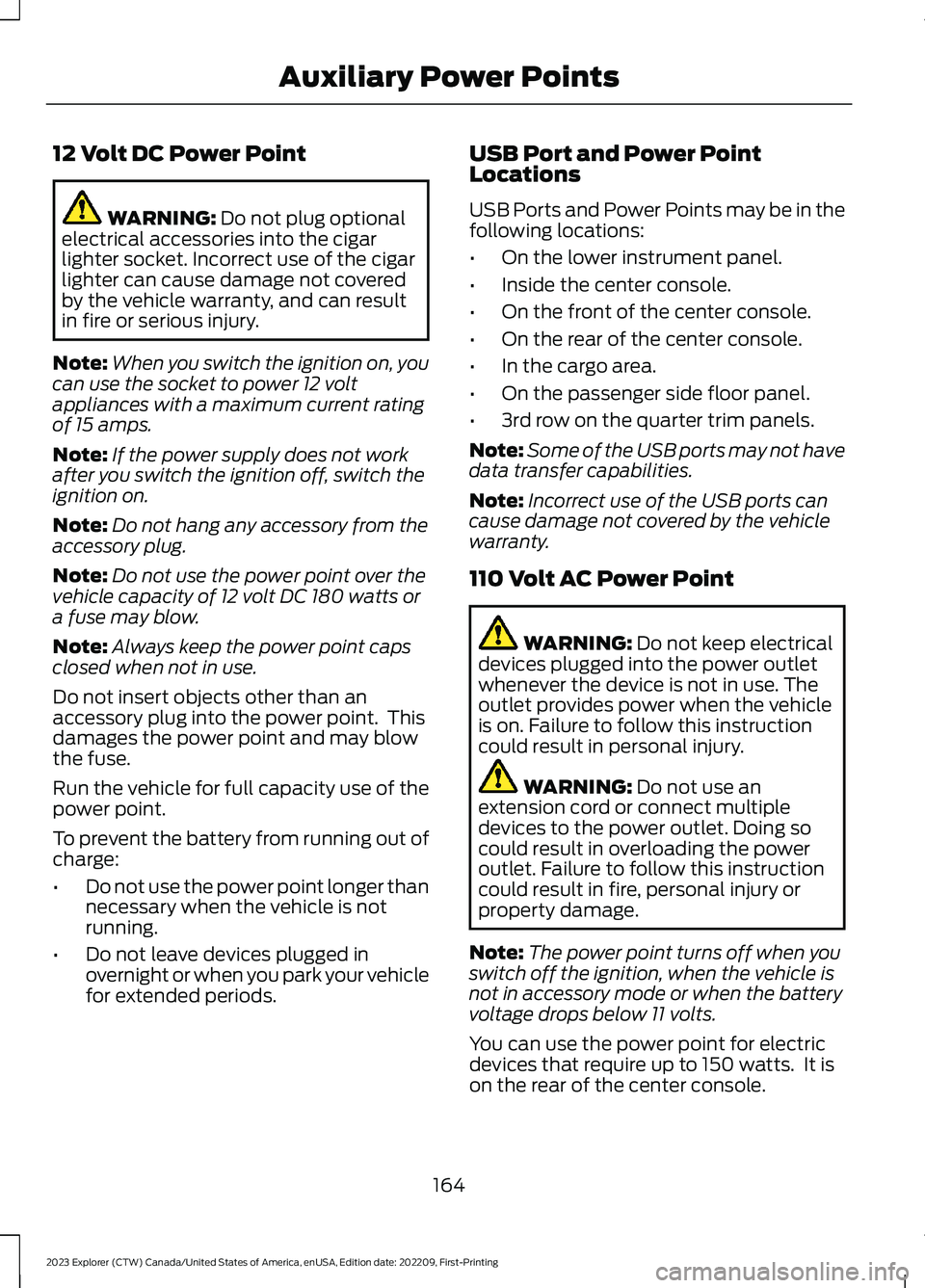
12 Volt DC Power Point
WARNING: Do not plug optionalelectrical accessories into the cigarlighter socket. Incorrect use of the cigarlighter can cause damage not coveredby the vehicle warranty, and can resultin fire or serious injury.
Note:When you switch the ignition on, youcan use the socket to power 12 voltappliances with a maximum current ratingof 15 amps.
Note:If the power supply does not workafter you switch the ignition off, switch theignition on.
Note:Do not hang any accessory from theaccessory plug.
Note:Do not use the power point over thevehicle capacity of 12 volt DC 180 watts ora fuse may blow.
Note:Always keep the power point capsclosed when not in use.
Do not insert objects other than anaccessory plug into the power point. Thisdamages the power point and may blowthe fuse.
Run the vehicle for full capacity use of thepower point.
To prevent the battery from running out ofcharge:
•Do not use the power point longer thannecessary when the vehicle is notrunning.
•Do not leave devices plugged inovernight or when you park your vehiclefor extended periods.
USB Port and Power PointLocations
USB Ports and Power Points may be in thefollowing locations:
•On the lower instrument panel.
•Inside the center console.
•On the front of the center console.
•On the rear of the center console.
•In the cargo area.
•On the passenger side floor panel.
•3rd row on the quarter trim panels.
Note:Some of the USB ports may not havedata transfer capabilities.
Note:Incorrect use of the USB ports cancause damage not covered by the vehiclewarranty.
110 Volt AC Power Point
WARNING: Do not keep electricaldevices plugged into the power outletwhenever the device is not in use. Theoutlet provides power when the vehicleis on. Failure to follow this instructioncould result in personal injury.
WARNING: Do not use anextension cord or connect multipledevices to the power outlet. Doing socould result in overloading the poweroutlet. Failure to follow this instructioncould result in fire, personal injury orproperty damage.
Note:The power point turns off when youswitch off the ignition, when the vehicle isnot in accessory mode or when the batteryvoltage drops below 11 volts.
You can use the power point for electricdevices that require up to 150 watts. It ison the rear of the center console.
164
2023 Explorer (CTW) Canada/United States of America, enUSA, Edition date: 202209, First-PrintingAuxiliary Power Points
Page 170 of 573
WHAT IS THE WIRELESS
ACCESSORY CHARGER
The wireless accessory charger allows youto charge one compatible Qi wirelesscharging device on the charging area.
WIRELESS ACCESSORY
CHARGER PRECAUTIONS
WARNING: Wireless chargingdevices can affect the operation ofimplanted medical devices, includingcardiac pacemakers. If you have anyimplanted medical devices, werecommend that you consult with yourphysician.
Keep the charging area clean and removeforeign objects prior to charging a device.
Do not place items with a magnetic stripor radio-frequency identification chip, forexample passports, parking tickets,transportation passes or credit cards, nearthe charging area when charging a device.Damage could occur to the magnetic stripor radio-frequency identification chip.
Do not place metal objects, for exampleremote controls, coins and candywrappers, on or near the charging areawhen charging a device. Metal objects mayheat up and degrade the chargingperformance, in addition to causinginterruptions in charging.
Charging could be interrupted, degraded,or could stop if any of the following occur:
•The system detects a foreign object.
•The device is misaligned on thecharging area.
•The device moves on the activecharging area when the vehicle is inmotion.
•The vehicle ambient temperature is toohigh.
•You attempt to charge a non-Qicompatible device on the wirelesscharger.
Note:During charging, the device and thecharger could heat up, this is normal. If thebattery gets hotter than usual, the devicemay stop charging.
LOCATING THE WIRELESS
ACCESSORY CHARGER
The charging area is on thecenter console or in the mediabin below the instrument panel.
CHARGING A WIRELESS
DEVICE
Place the device on the center of thecharging surface with the charging sidedown. The charging stops after your devicereaches a full charge.
You can use the charger when the vehicleis in accessory mode, when the vehicle isrunning, or when SYNC is on.
Displays on the status bar whenwireless charging is in progress.
Note:The charging performance may beaffected if your device is in a case. It may benecessary to remove the case to wirelesslycharge your device.
Note:Software and firmware updates mayaffect device compatibility, including theuse of unofficial software or firmware. Youshould verify charging functionality with yourspecific devices in-vehicle.
166
2023 Explorer (CTW) Canada/United States of America, enUSA, Edition date: 202209, First-PrintingWireless Accessory Charger (If Equipped)E297549 E263583
Page 172 of 573
GENERAL INFORMATION
WARNING: Extended idling at highengine speeds can produce very hightemperatures in the engine and exhaustsystem, creating the risk of fire or otherdamage.
WARNING: Do not park, idle ordrive your vehicle on dry grass or otherdry ground cover. The emission systemheats up the engine compartment andexhaust system, creating the risk of fire.
WARNING: Do not start the enginein a closed garage or in other enclosedareas. Exhaust fumes are toxic. Alwaysopen the garage door before you startthe engine. Failure to follow thisinstruction could result in personal injuryor death.
WARNING: Exhaust leaks mayresult in entry of harmful and potentiallylethal fumes into the passengercompartment. If you smell exhaustfumes inside your vehicle, have yourvehicle inspected immediately. Do notdrive if you smell exhaust fumes.
The powertrain control system meets allCanadian interference-causing equipmentstandard requirements regulating theimpulse electrical field or radio noise.
Note:If you use your vehicle regularly abovethe altitude of 7,500 ft (2,286 m) and underthe temperature of -4.0°F (-20°C), it isrecommended to use the alternative engineoil. See Capacities and Specifications(page 378).
If you disconnect the battery, your vehiclemay exhibit some unusual drivingcharacteristics for approximately 6 mi(10 km) after you reconnect it. This isbecause the engine management systemmust realign itself with the engine. You candisregard any unusual drivingcharacteristics during this period.
When you start the engine, avoid pressingthe accelerator pedal before and duringoperation. Only use the accelerator pedalwhen you have difficulty starting theengine.
IGNITION SWITCH
0 (off) - The ignition is off.
Note: When you switch the ignition off andleave your vehicle, do not leave your key inthe ignition. This could cause your vehiclebattery to lose charge.
I (accessory) - Allows the electricalaccessories, such as the radio, to operatewhile the engine is not running.
Note: Do not leave the ignition key in thisposition for too long.This could cause yourvehicle battery to lose charge.
II (on) - All electrical circuits areoperational and the warning lamps andindicators illuminate.
III (start) - Cranks the engine.
168
2023 Explorer (CTW) Canada/United States of America, enUSA, Edition date: 202209, First-PrintingStarting and Stopping the EngineE304650
Page 174 of 573
Note:The engine may continue crankingfor up to 15 seconds or until it starts.
Note:If you cannot start the engine on thefirst try, wait for a short period and try again.
Vehicles with Keyless Start
Note:Do not touch the accelerator pedal.
Note:You must have your intelligent accesskey in your vehicle in order to shift thetransmission out of park (P).
1.Fully press the brake pedal.
2.Press the push button ignition switch.
The system does not function if:
•The passive key frequencies arejammed.
•The key battery has no charge.
If you are unable to start your vehicle, dothe following:
1.Open the floor console storagecompartment lid.
2.Insert the passive key into the backupslot.
3.With the key in this position, press thebrake pedal then press the push buttonignition switch to switch the ignition onand start your vehicle.
Fast Restart
The fast restart feature allows you torestart your vehicle within 20 seconds ofswitching it off, even if it does not detecta valid passive key.
After 20 seconds, you can no longer startyour vehicle if it does not detect a validpassive key. Within 20 seconds ofswitching the engine off, press the brakepedal and press the push button ignitionswitch.
Once your vehicle starts, it remains runninguntil you press the push button ignitionswitch, even if your vehicle does not detecta valid passive key. If you open and closea door while your vehicle is running, thesystem searches for a valid passive key.You cannot start your vehicle if the systemdoes not detect a valid passive key within20 seconds.
Failure to Start
If you cannot start the engine after threeattempts, wait 10 seconds and follow thisprocedure:
1.Fully press the brake pedal.
2.Shift into park (P).
3.Fully press the accelerator pedal andhold it there.
4.Attempt to start your vehicle and waituntil the engine stops cranking.
5.Release the accelerator pedal.
6.Start the engine.
170
2023 Explorer (CTW) Canada/United States of America, enUSA, Edition date: 202209, First-PrintingStarting and Stopping the EngineE297184
Page 175 of 573
Automatic Engine Shutdown
For vehicles with a keyless ignition, thisfeature shuts down the engine if it hasbeen idling for an extended period. Theignition also turns off in order to savebattery power. Before your vehicle shutsdown, a message appears in theinformation display showing a timercounting down from 30 seconds. If you donot intervene within 30 seconds, yourvehicle shuts down. Another messageappears in the information display toinform you that your vehicle has shut downto save fuel. Start your vehicle as younormally do.
Automatic Engine Shutdown Override
You can stop the shutdown, or reset thetimer, at any point before the 30-secondcountdown has expired by doing any of thefollowing:
•You can reset the timer by interactingwith your vehicle, for example pressingthe brake or accelerator pedal.
•You can temporarily switch off theshutdown feature any time the ignitionis on. Use the vehicle settings on yourtouchscreen to switch the 30min MaxIdle on or off. The feature only remainsoff for the current ignition cycle.
•During the 30-second countdown, thesystem prompts you to press OK orRESET to temporarily switch thefeature off for the current ignition cycleonly.
Note:You cannot permanently switch offthe automatic shutdown feature. When youtemporarily switch it off, it turns on at thenext ignition cycle.
Stopping the Engine When YourVehicle is Stationary
Vehicles with an Ignition Key
1.Shift into park (P).
2.Switch the ignition off.
3.Apply the parking brake.
Vehicles with Keyless Start
1.Shift into park (P).
2.Press the push button ignition switch.
3.Apply the parking brake.
Note:The ignition, all electrical circuits andall warning lamps and indicators will beturned off.
Note:If the engine is idling for 30 minutes,the ignition and engine automatically shutdown.
Stopping the Engine When YourVehicle is Moving
WARNING: Switching off theengine when your vehicle is still movingresults in a significant decrease inbraking assistance. Higher effort isrequired to apply the brakes and to stopyour vehicle. A significant decrease insteering assistance could also occur. Thesteering does not lock, but higher effortcould be required to steer your vehicle.When you switch the ignition off, someelectrical circuits, for example airbags,also turn off. If you unintentionally switchthe ignition off, shift into neutral (N) andrestart the engine.
Vehicles with an Ignition Key
1.Switch the ignition off.
2.Shift into neutral and use the brakes tobring your vehicle to a safe stop.
3.Apply the parking brake.
Vehicles with Keyless Start
1.Press and hold the push button ignitionswitch, or press it three times withintwo seconds.
171
2023 Explorer (CTW) Canada/United States of America, enUSA, Edition date: 202209, First-PrintingStarting and Stopping the Engine
Page 176 of 573
2.Shift into neutral and use the brakes tobring your vehicle to a safe stop.
3.Shift into park (P).
4.Apply the parking brake.
Guarding Against Exhaust Fumes
WARNING: Exhaust leaks mayresult in entry of harmful and potentiallylethal fumes into the passengercompartment. If you smell exhaustfumes inside your vehicle, have yourvehicle inspected immediately. Do notdrive if you smell exhaust fumes.
Important Ventilating Information
If you stop your vehicle and then leave theengine idling for long periods, werecommend that you do one of thefollowing:
•Open the windows at least 1 in (3 cm).
•Set your climate control to outside air.
STARTING A HYBRID
ELECTRIC VEHICLE SYSTEM
Before starting your vehicle, check thefollowing:
•Make sure all occupants fasten theirseatbelt.
•Make sure the headlamps andelectrical accessories are off.
•Make sure the parking brake is on.
•Make sure the transmission is in park(P).
Note:Do not touch the accelerator pedal.
1.Fully press the brake pedal.
2.Press the push button ignition switch.
Note:The green ready indicator illuminatesletting you know that your vehicle is readyfor driving. Since your vehicle comes with asilent key start, the engine may not startwhen your vehicle starts. See HybridVehicle Operation (page 178).
When the engine starts for the first timeon your drive, the idle speed increases, thishelps to warm up the engine. If the engineidle speed does not slow down, have yourvehicle checked by an authorized dealer.
The system does not function if:
•The passive key frequencies arejammed.
•The key battery has no charge.
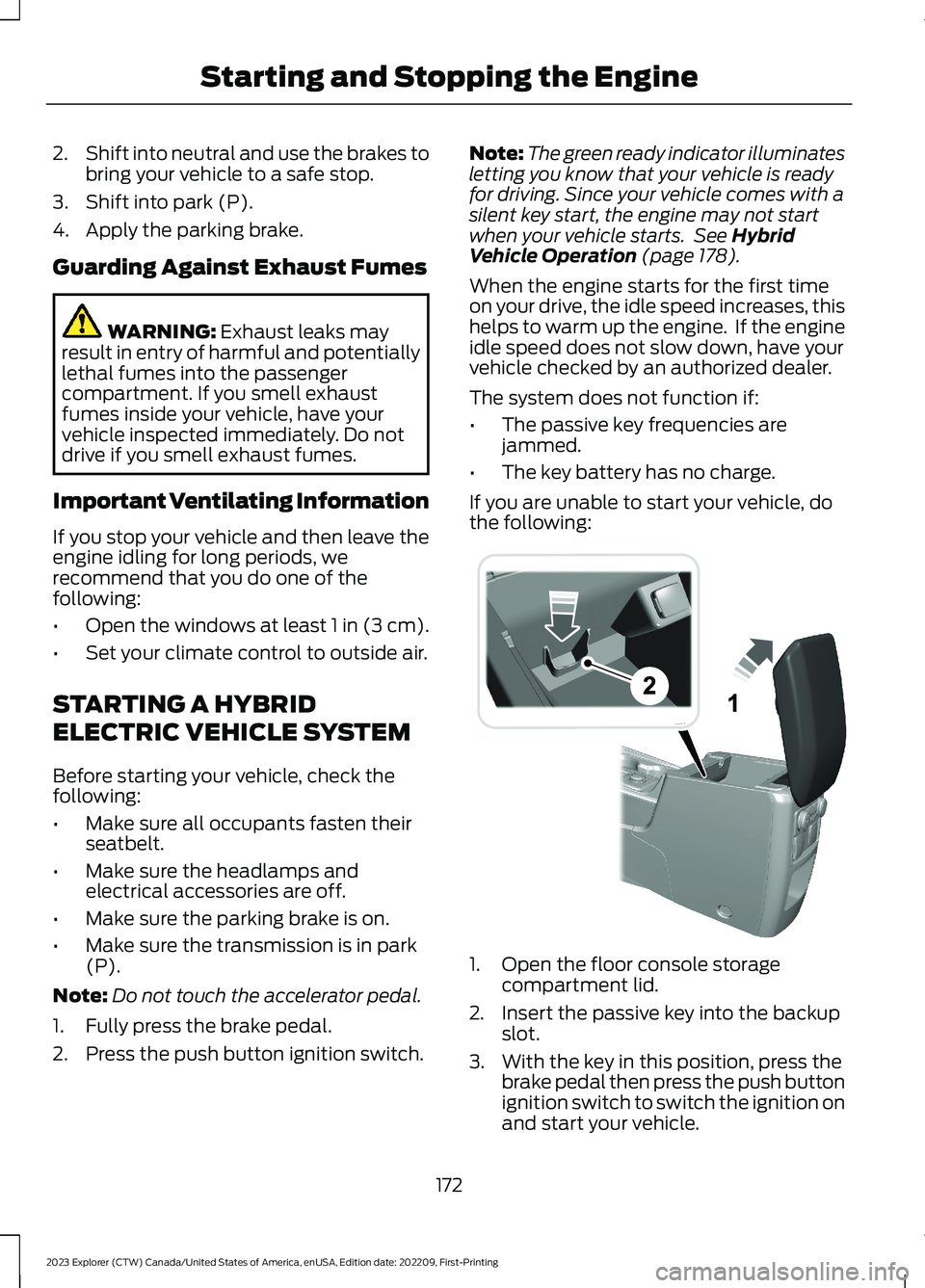
If you are unable to start your vehicle, dothe following:
1.Open the floor console storagecompartment lid.
2.Insert the passive key into the backupslot.
3.With the key in this position, press thebrake pedal then press the push buttonignition switch to switch the ignition onand start your vehicle.
172
2023 Explorer (CTW) Canada/United States of America, enUSA, Edition date: 202209, First-PrintingStarting and Stopping the EngineE297184
Page 177 of 573
Fast Restart
The fast restart feature allows you torestart your vehicle within 20 seconds ofswitching it off, even if it does not detecta valid passive key.
Within 20 seconds of switching yourvehicle off, press the brake pedal and pressthe push button ignition switch. After 20seconds, you can no longer start yourvehicle if it does not detect a valid passivekey.
Once your vehicle starts, it remains runninguntil you press the push button ignitionswitch, even if your vehicle does not detecta valid passive key. You cannot start yourvehicle if the system does not detect avalid passive key within 20 seconds.
Automatic Engine Shutdown
For vehicles with a keyless ignition, thisfeature shuts down the engine if it hasbeen idling for an extended period. Theignition also turns off in order to savebattery power. Before your vehicle shutsdown, a message appears in theinformation display showing a timercounting down from 30 seconds. If you donot intervene within 30 seconds, yourvehicle shuts down. Another messageappears in the information display toinform you that your vehicle has shut downto save fuel. Start your vehicle as younormally do.
Note:Automatic Engine Shutdown may bemore frequent for hybrid vehicles.
Automatic Engine Shutdown Override
Note: You cannot permanently switch offthe automatic shutdown feature. When youswitch it off temporarily, it turns on at thenext ignition cycle.
You can stop the shutdown, or reset thetimer, at any point before the 30-secondcountdown expires by doing any of thefollowing:
•You can reset the timer by interactingwith your vehicle, for example pressingthe brake or accelerator pedal.
•You can temporarily switch off theshutdown feature any time the ignitionis on using the information display. SeeInformation Displays (page 110). Thefeature only remains off for the currentignition cycle.
•During the 30-second countdown, thesystem prompts you to press OK orRESET to temporarily switch thefeature off for the current ignition cycleonly.
Switching Off Your Vehicle WhenIt Is Stationary
1.Put the transmission in park (P).
2.Press the push button ignition switchonce.
3.Apply the parking brake.
Note:This switches off the ignition, warninglamps and indicators.
Switching Off Your Vehicle WhenIt Is Moving
WARNING: Switching off theengine when your vehicle is still movingresults in a significant decrease inbraking assistance. Higher effort isrequired to apply the brakes and to stopyour vehicle. A significant decrease insteering assistance could also occur. Thesteering does not lock, but higher effort
173
2023 Explorer (CTW) Canada/United States of America, enUSA, Edition date: 202209, First-PrintingStarting and Stopping the Engine