steering FORD EXPLORER 2023 Owner's Manual
[x] Cancel search | Manufacturer: FORD, Model Year: 2023, Model line: EXPLORER, Model: FORD EXPLORER 2023Pages: 573, PDF Size: 16.1 MB
Page 131 of 573
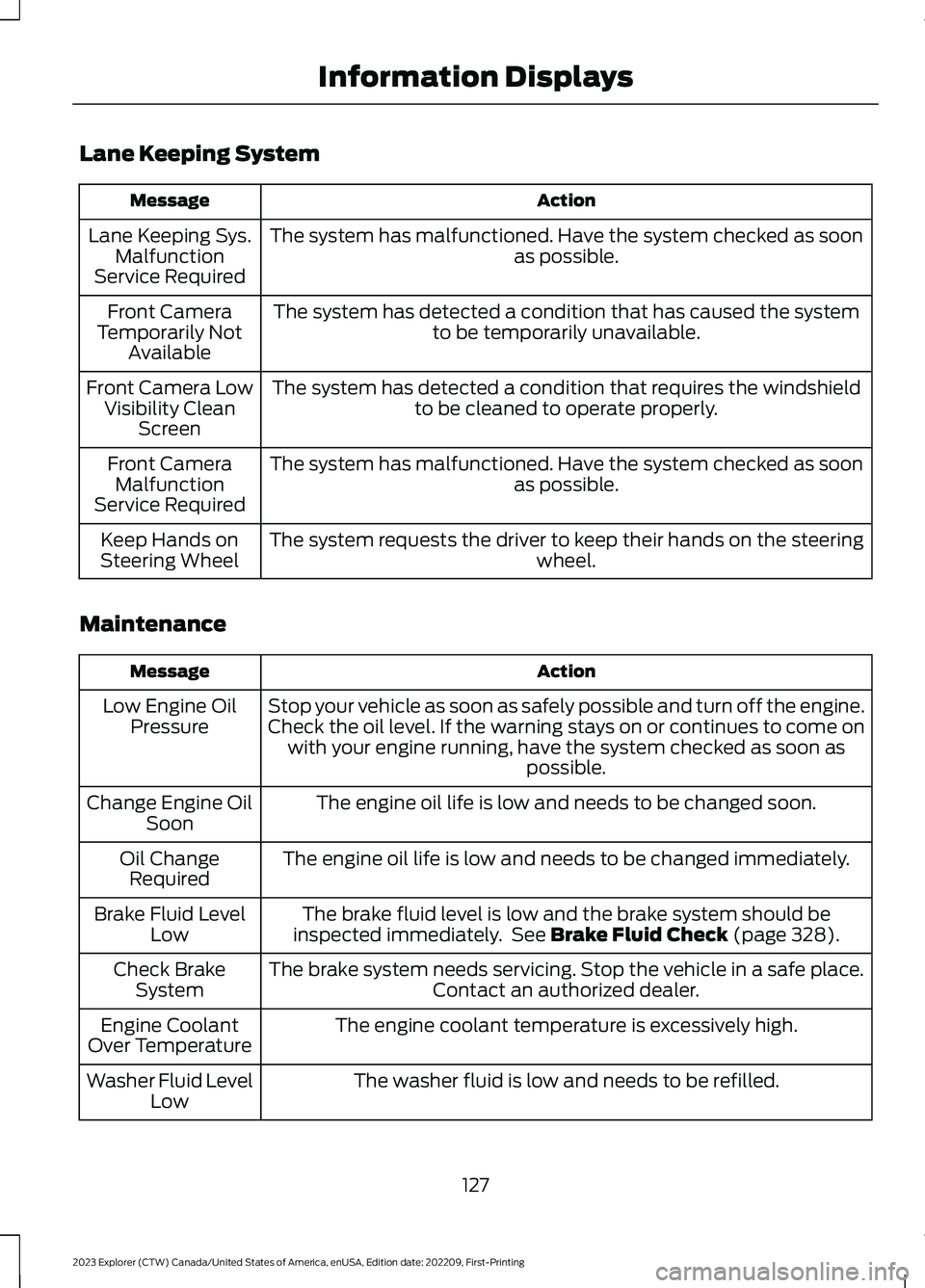
Lane Keeping System
ActionMessage
The system has malfunctioned. Have the system checked as soonas possible.Lane Keeping Sys.MalfunctionService Required
The system has detected a condition that has caused the systemto be temporarily unavailable.Front CameraTemporarily NotAvailable
The system has detected a condition that requires the windshieldto be cleaned to operate properly.Front Camera LowVisibility CleanScreen
The system has malfunctioned. Have the system checked as soonas possible.Front CameraMalfunctionService Required
The system requests the driver to keep their hands on the steeringwheel.Keep Hands onSteering Wheel
Maintenance
ActionMessage
Stop your vehicle as soon as safely possible and turn off the engine.Check the oil level. If the warning stays on or continues to come onwith your engine running, have the system checked as soon aspossible.
Low Engine OilPressure
The engine oil life is low and needs to be changed soon.Change Engine OilSoon
The engine oil life is low and needs to be changed immediately.Oil ChangeRequired
The brake fluid level is low and the brake system should beinspected immediately. See Brake Fluid Check (page 328).Brake Fluid LevelLow
The brake system needs servicing. Stop the vehicle in a safe place.Contact an authorized dealer.Check BrakeSystem
The engine coolant temperature is excessively high.Engine CoolantOver Temperature
The washer fluid is low and needs to be refilled.Washer Fluid LevelLow
127
2023 Explorer (CTW) Canada/United States of America, enUSA, Edition date: 202209, First-PrintingInformation Displays
Page 135 of 573
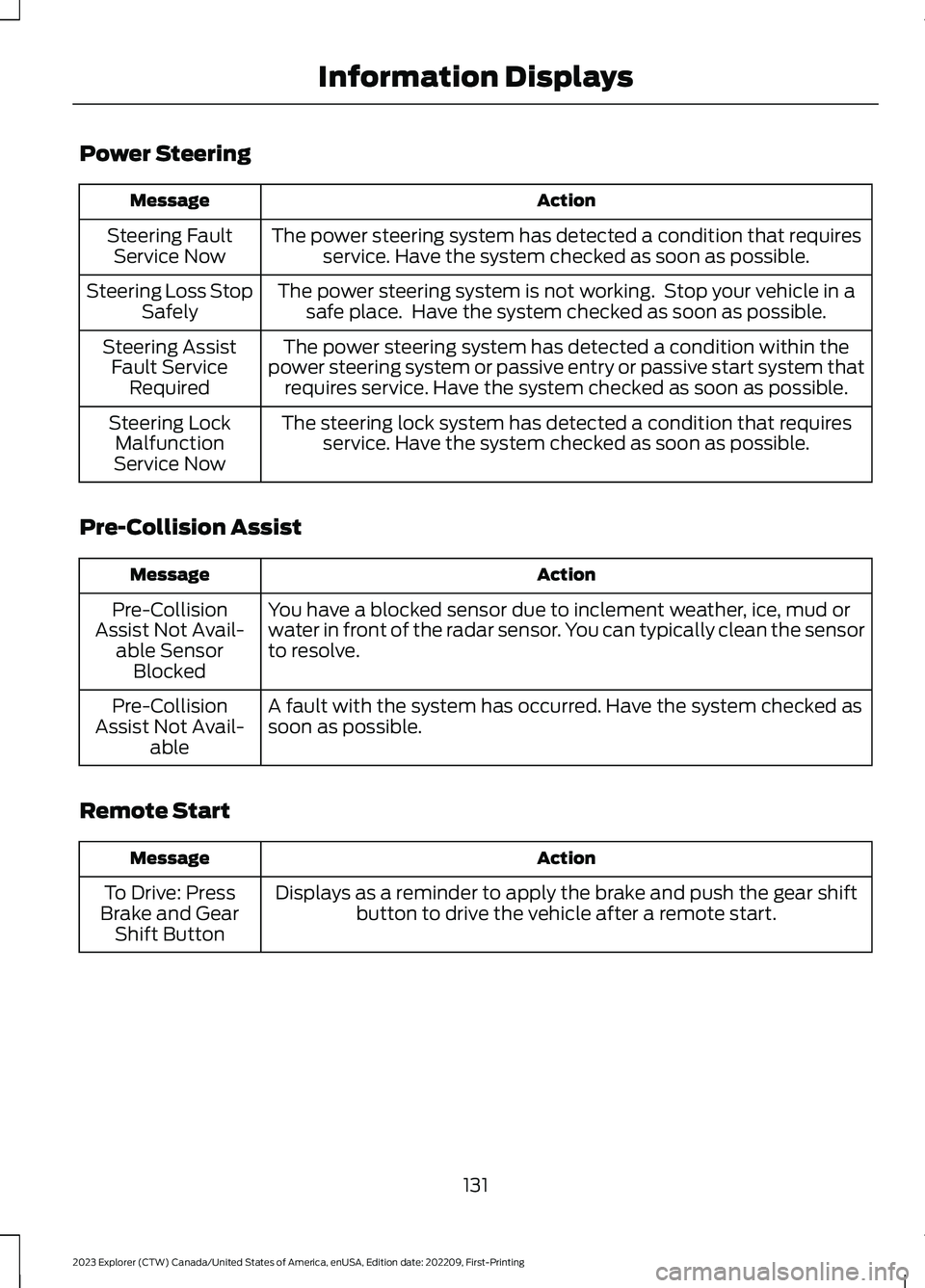
Power Steering
ActionMessage
The power steering system has detected a condition that requiresservice. Have the system checked as soon as possible.Steering FaultService Now
The power steering system is not working. Stop your vehicle in asafe place. Have the system checked as soon as possible.Steering Loss StopSafely
The power steering system has detected a condition within thepower steering system or passive entry or passive start system thatrequires service. Have the system checked as soon as possible.
Steering AssistFault ServiceRequired
The steering lock system has detected a condition that requiresservice. Have the system checked as soon as possible.Steering LockMalfunctionService Now
Pre-Collision Assist
ActionMessage
You have a blocked sensor due to inclement weather, ice, mud orwater in front of the radar sensor. You can typically clean the sensorto resolve.
Pre-CollisionAssist Not Avail-able SensorBlocked
A fault with the system has occurred. Have the system checked assoon as possible.Pre-CollisionAssist Not Avail-able
Remote Start
ActionMessage
Displays as a reminder to apply the brake and push the gear shiftbutton to drive the vehicle after a remote start.To Drive: PressBrake and GearShift Button
131
2023 Explorer (CTW) Canada/United States of America, enUSA, Edition date: 202209, First-PrintingInformation Displays
Page 146 of 573
HEATED REAR WINDOW
Press the button to clear the rearwindow of thin ice and fog. Theheated rear window turns offafter a short period of time.
Note:Do not use harsh chemicals, razorblades or other sharp objects to clean orremove decals from the inside of the heatedrear window. The vehicle warranty may notcover damage to the heated rear windowgrid lines.
HEATED EXTERIOR MIRRORS
(IF EQUIPPED)
When you switch the heated rear windowon, the heated exterior mirrors turn on.
Note:Do not remove ice from the mirrorswith a scraper or adjust the mirror glasswhen it is frozen in place.
Note:Do not clean the mirror housing orglass with harsh abrasives, fuel or otherpetroleum-based cleaning products. Thevehicle warranty may not cover damagecaused to the mirror housing or glass.
REMOTE START (IF EQUIPPED)
The climate control system adjusts theinterior temperature during remote start.
You can switch this feature on or off andadjust the settings using the touchscreen.See Settings (page 458).
You cannot adjust the climate controlsetting during remote start operation.Switch the ignition on to makeadjustments.
Based on your remote start settings, thefollowing vehicle-dependent features mayor may not remain on after remote startingyour vehicle:
•Climate controlled seats.
•Heated steering wheel.
•Heated mirrors.
•Heated rear window.
•Windshield wiper de-icer.
Note:For dual zone climate controlledseats, the passenger seat setting defaultsto match the driver seat during remote start.
Automatic Settings
If Auto is on, the system sets the interiortemperature to 72°F (22°C) and heats orcools the vehicle interior as required toachieve comfort.
Note:In cold weather, the heated rearwindow and heated mirrors turn on.
Last Settings
If Last Settings is on, the system uses thesettings last selected before you turnedoff the vehicle.
Heated and Cooled Features
In Auto mode, certain heated features mayswitch on during cold weather, and cooledfeatures during hot weather.
142
2023 Explorer (CTW) Canada/United States of America, enUSA, Edition date: 202209, First-PrintingClimate ControlE184884
Page 148 of 573
SITTING IN THE CORRECT
POSITION
WARNING: Sitting improperly, outof position or with the seatback reclinedtoo far can take weight off the seatcushion and affect the decision of thepassenger sensing system, resulting inserious injury or death in the event of acrash. Always sit upright against yourseat back, with your feet on the floor.
WARNING: Do not recline the seatbackrest too far as this can cause theoccupant to slide under the seatbelt,resulting in personal injury in the eventof a crash.
WARNING: Do not place objectshigher than the top of the seat backrest.Failure to follow this instruction couldresult in personal injury or death in theevent of a sudden stop or crash.
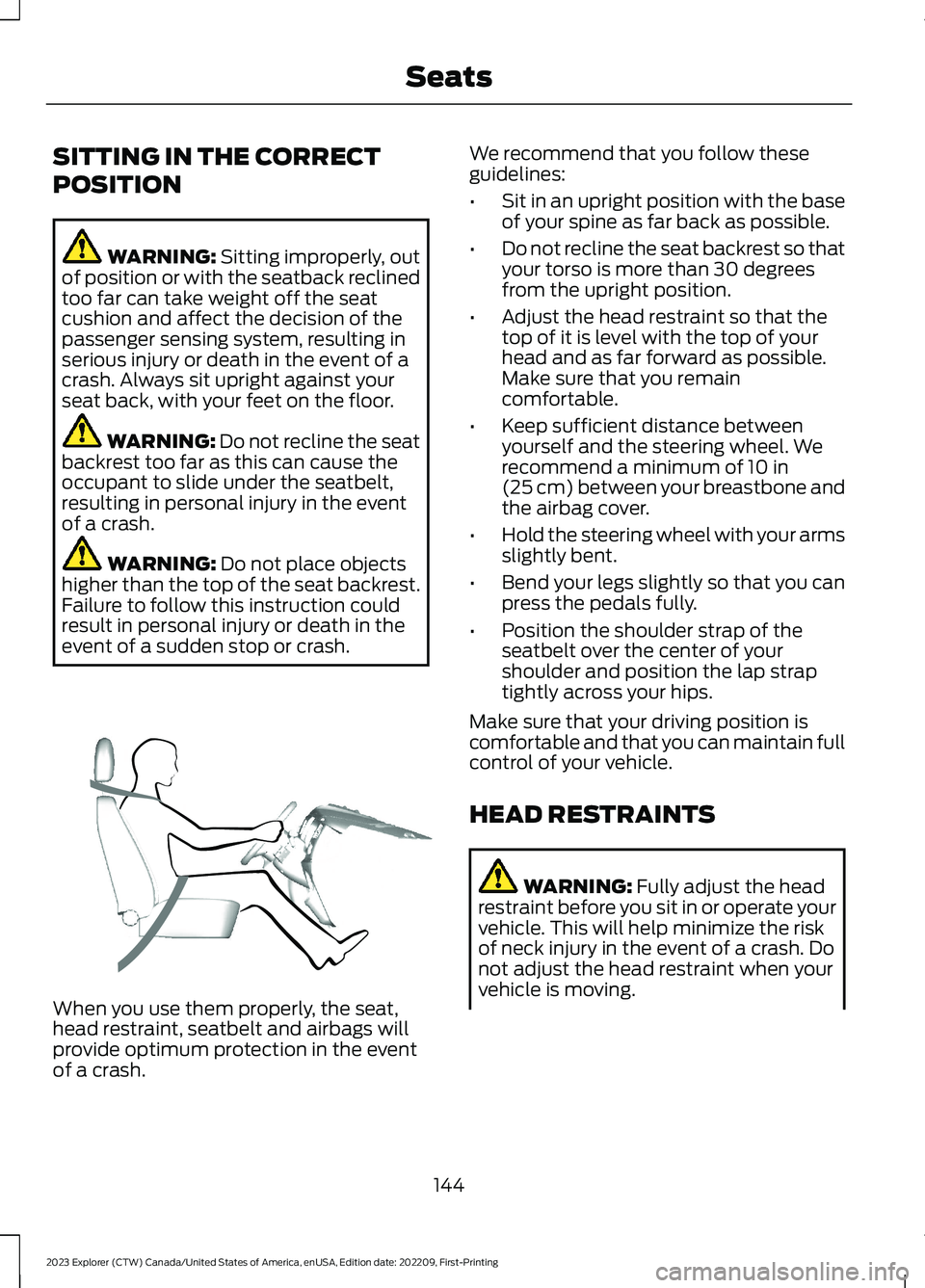
When you use them properly, the seat,head restraint, seatbelt and airbags willprovide optimum protection in the eventof a crash.
We recommend that you follow theseguidelines:
•Sit in an upright position with the baseof your spine as far back as possible.
•Do not recline the seat backrest so thatyour torso is more than 30 degreesfrom the upright position.
•Adjust the head restraint so that thetop of it is level with the top of yourhead and as far forward as possible.Make sure that you remaincomfortable.
•Keep sufficient distance betweenyourself and the steering wheel. Werecommend a minimum of 10 in(25 cm) between your breastbone andthe airbag cover.
•Hold the steering wheel with your armsslightly bent.
•Bend your legs slightly so that you canpress the pedals fully.
•Position the shoulder strap of theseatbelt over the center of yourshoulder and position the lap straptightly across your hips.
Make sure that your driving position iscomfortable and that you can maintain fullcontrol of your vehicle.
HEAD RESTRAINTS
WARNING: Fully adjust the headrestraint before you sit in or operate yourvehicle. This will help minimize the riskof neck injury in the event of a crash. Donot adjust the head restraint when yourvehicle is moving.
144
2023 Explorer (CTW) Canada/United States of America, enUSA, Edition date: 202209, First-PrintingSeatsE68595
Page 154 of 573
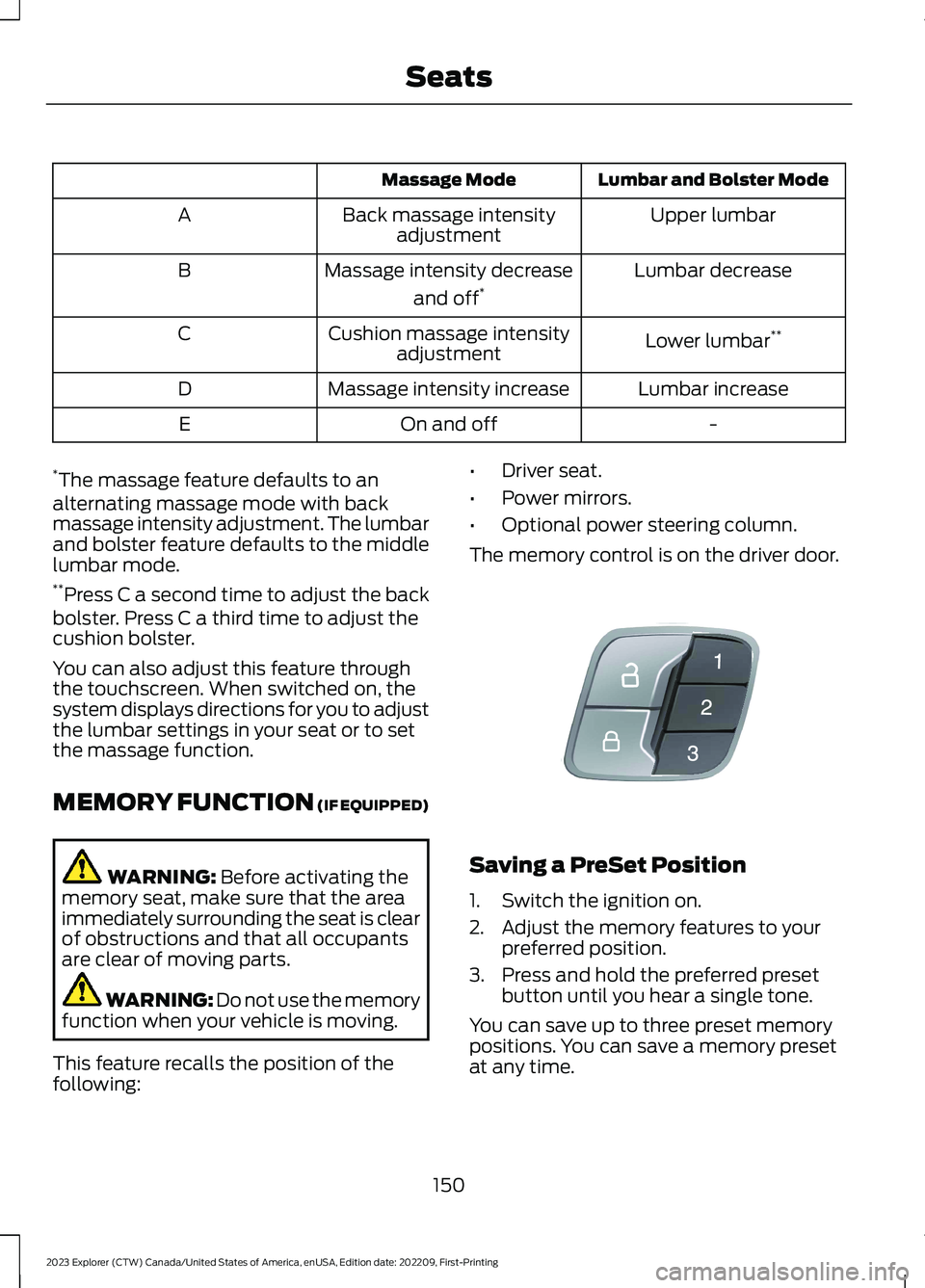
Lumbar and Bolster ModeMassage Mode
Upper lumbarBack massage intensityadjustmentA
Lumbar decreaseMassage intensity decrease
and off*B
Lower lumbar**Cushion massage intensityadjustmentC
Lumbar increaseMassage intensity increaseD
-On and offE
*The massage feature defaults to analternating massage mode with backmassage intensity adjustment. The lumbarand bolster feature defaults to the middlelumbar mode.**Press C a second time to adjust the backbolster. Press C a third time to adjust thecushion bolster.
You can also adjust this feature throughthe touchscreen. When switched on, thesystem displays directions for you to adjustthe lumbar settings in your seat or to setthe massage function.
MEMORY FUNCTION (IF EQUIPPED)
WARNING: Before activating thememory seat, make sure that the areaimmediately surrounding the seat is clearof obstructions and that all occupantsare clear of moving parts.
WARNING: Do not use the memoryfunction when your vehicle is moving.
This feature recalls the position of thefollowing:
•Driver seat.
•Power mirrors.
•Optional power steering column.
The memory control is on the driver door.
Saving a PreSet Position
1.Switch the ignition on.
2.Adjust the memory features to yourpreferred position.
3.Press and hold the preferred presetbutton until you hear a single tone.
You can save up to three preset memorypositions. You can save a memory presetat any time.
150
2023 Explorer (CTW) Canada/United States of America, enUSA, Edition date: 202209, First-PrintingSeatsE142554
Page 175 of 573
Automatic Engine Shutdown
For vehicles with a keyless ignition, thisfeature shuts down the engine if it hasbeen idling for an extended period. Theignition also turns off in order to savebattery power. Before your vehicle shutsdown, a message appears in theinformation display showing a timercounting down from 30 seconds. If you donot intervene within 30 seconds, yourvehicle shuts down. Another messageappears in the information display toinform you that your vehicle has shut downto save fuel. Start your vehicle as younormally do.
Automatic Engine Shutdown Override
You can stop the shutdown, or reset thetimer, at any point before the 30-secondcountdown has expired by doing any of thefollowing:
•You can reset the timer by interactingwith your vehicle, for example pressingthe brake or accelerator pedal.
•You can temporarily switch off theshutdown feature any time the ignitionis on. Use the vehicle settings on yourtouchscreen to switch the 30min MaxIdle on or off. The feature only remainsoff for the current ignition cycle.
•During the 30-second countdown, thesystem prompts you to press OK orRESET to temporarily switch thefeature off for the current ignition cycleonly.
Note:You cannot permanently switch offthe automatic shutdown feature. When youtemporarily switch it off, it turns on at thenext ignition cycle.
Stopping the Engine When YourVehicle is Stationary
Vehicles with an Ignition Key
1.Shift into park (P).
2.Switch the ignition off.
3.Apply the parking brake.
Vehicles with Keyless Start
1.Shift into park (P).
2.Press the push button ignition switch.
3.Apply the parking brake.
Note:The ignition, all electrical circuits andall warning lamps and indicators will beturned off.
Note:If the engine is idling for 30 minutes,the ignition and engine automatically shutdown.
Stopping the Engine When YourVehicle is Moving
WARNING: Switching off theengine when your vehicle is still movingresults in a significant decrease inbraking assistance. Higher effort isrequired to apply the brakes and to stopyour vehicle. A significant decrease insteering assistance could also occur. Thesteering does not lock, but higher effortcould be required to steer your vehicle.When you switch the ignition off, someelectrical circuits, for example airbags,also turn off. If you unintentionally switchthe ignition off, shift into neutral (N) andrestart the engine.
Vehicles with an Ignition Key
1.Switch the ignition off.
2.Shift into neutral and use the brakes tobring your vehicle to a safe stop.
3.Apply the parking brake.
Vehicles with Keyless Start
1.Press and hold the push button ignitionswitch, or press it three times withintwo seconds.
171
2023 Explorer (CTW) Canada/United States of America, enUSA, Edition date: 202209, First-PrintingStarting and Stopping the Engine
Page 177 of 573
Fast Restart
The fast restart feature allows you torestart your vehicle within 20 seconds ofswitching it off, even if it does not detecta valid passive key.
Within 20 seconds of switching yourvehicle off, press the brake pedal and pressthe push button ignition switch. After 20seconds, you can no longer start yourvehicle if it does not detect a valid passivekey.
Once your vehicle starts, it remains runninguntil you press the push button ignitionswitch, even if your vehicle does not detecta valid passive key. You cannot start yourvehicle if the system does not detect avalid passive key within 20 seconds.
Automatic Engine Shutdown
For vehicles with a keyless ignition, thisfeature shuts down the engine if it hasbeen idling for an extended period. Theignition also turns off in order to savebattery power. Before your vehicle shutsdown, a message appears in theinformation display showing a timercounting down from 30 seconds. If you donot intervene within 30 seconds, yourvehicle shuts down. Another messageappears in the information display toinform you that your vehicle has shut downto save fuel. Start your vehicle as younormally do.
Note:Automatic Engine Shutdown may bemore frequent for hybrid vehicles.
Automatic Engine Shutdown Override
Note: You cannot permanently switch offthe automatic shutdown feature. When youswitch it off temporarily, it turns on at thenext ignition cycle.
You can stop the shutdown, or reset thetimer, at any point before the 30-secondcountdown expires by doing any of thefollowing:
•You can reset the timer by interactingwith your vehicle, for example pressingthe brake or accelerator pedal.
•You can temporarily switch off theshutdown feature any time the ignitionis on using the information display. SeeInformation Displays (page 110). Thefeature only remains off for the currentignition cycle.
•During the 30-second countdown, thesystem prompts you to press OK orRESET to temporarily switch thefeature off for the current ignition cycleonly.
Switching Off Your Vehicle WhenIt Is Stationary
1.Put the transmission in park (P).
2.Press the push button ignition switchonce.
3.Apply the parking brake.
Note:This switches off the ignition, warninglamps and indicators.
Switching Off Your Vehicle WhenIt Is Moving
WARNING: Switching off theengine when your vehicle is still movingresults in a significant decrease inbraking assistance. Higher effort isrequired to apply the brakes and to stopyour vehicle. A significant decrease insteering assistance could also occur. Thesteering does not lock, but higher effort
173
2023 Explorer (CTW) Canada/United States of America, enUSA, Edition date: 202209, First-PrintingStarting and Stopping the Engine
Page 180 of 573
AUTO-START-STOP (IF EQUIPPED)
The system helps reduce fuel consumptionby automatically stopping and restartingthe engine when your vehicle has stopped.The engine restarts automatically whenyou release the brake pedal.
In some situations, your vehicle may restartautomatically, for example:
•To maintain interior comfort.
•To recharge the battery.
Note:Power assist steering turns off whenthe engine is off.
Note:If your vehicle is flex fuel capable,Auto-Start-Stop will be inhibited for a shorttime after a refuel event while the systemis verifying the fuel type being used.
WARNING: Apply the parkingbrake, shift into park (P), switch theignition off and remove the key beforeyou leave your vehicle. Failure to followthis instruction could result in personalinjury or death.
WARNING: Apply the parkingbrake, shift into park (P), switch theignition off and remove the key beforeyou open the hood or have any serviceor repair work completed. If you do notswitch the ignition off, the engine couldrestart at any time. Failure to follow thisinstruction could result in personal injuryor death.
WARNING: The system mayrequire the engine to automaticallyrestart when the auto-start-stopindicator illuminates green or flashesamber. Failure to follow this instructioncould result in personal injury.
The Auto-Start-Stop system status isavailable at a glance within the informationdisplay. See Information Displays (page110).
Enabling Auto-Start-Stop
The system automatically enables everytime you start your vehicle if:
•You do not press the Auto-Start-Stopbutton (not illuminated).
•Your vehicle exceeds an initial speedof 3 mph (5 km/h) after you haveinitially started your vehicle.
•You have stopped your vehicle.
•Your foot is on the brake pedal.
•The driver door is closed.
•The interior compartment has cooledor warmed to an acceptable level.
•The front windshield defroster is off.
•You have not turned the steering wheelrapidly or you do not have it at a sharpangle.
•The vehicle is not on a steep roadgrade.
•The battery is within optimal operatingconditions (battery state of charge andtemperature in range).
•The engine coolant is near operatingtemperature.
•Elevation is below about 12,000 ft(3,650 m).
•Ambient temperature is moderate.
•The trailer is not connected.
•If you select Normal, Eco, Snow/Wetor Grass/Gravel/Snow modes.
•You are not in 4H or 4L.
•You have not selected Manual shiftmode.
•Hill descent control is not active.
•You have not selected Tow haul, Sport,Sand or Mud/Rut modes.
176
2023 Explorer (CTW) Canada/United States of America, enUSA, Edition date: 202209, First-PrintingUnique Driving Characteristics
Page 203 of 573
2.Bring your vehicle to a complete stop.
3.Press and hold the brake pedal.
4.Shift into neutral (N).
Note:A instructional message appears.
5.Press the manual (M), or low (L)button.
Note:A confirmation message appearswhen your vehicle enters the mode.
6.Release the brake pedal.
Note:Your vehicle is free to roll.
7.Switch your vehicle off.
Note:Do not tow your vehicle in this mode.
Note:The neutral (N) indicator on thetransmission selector may flash in thismode.
Exiting Temporary Neutral Mode
1.Press the brake pedal.
2.Shift into park (P), or switch yourvehicle on and shift into drive (D), orreverse (R).
Drive (D)
Drive (D) is the normal driving position forthe best fuel economy and smoothness.Shift the transmission selector to drive (D)to allow your vehicle to move forward andshift automatically through the forwardgears.
The transmission shifts to the appropriategear for optimum performance based onambient temperature, road slope, vehicleload and your input.
Manual Mode (M) - Vehicles withPaddle Shifters
With the transmission selector in manual(M), the driver can change gears up ordown. After selecting the Manual (M)button while the transmission rangeselector is in the Drive (D) position, younow have control of selecting the gear youdesire using shift buttons on the steeringwheel.
To exit manual mode, push the manual(M) button on your transmission selector.
Low (L) - Vehicles without PaddleShifters
With the transmission selector in low (L),your vehicle provides maximum enginebraking. You can shift the transmission intolow (L) at any vehicle speed. Do not useunder extended or normal drivingconditions as it results in lower fueleconomy.
Manually Shifting Gears
Shifting Using Paddle Shifters
The instrument cluster displays the currentgear. The current gear flashes when yourvehicle cannot shift into the requestedgear. Your vehicle will not shift if therequested gear raises or lowers the enginespeed beyond the limit.
Your vehicle may shift when you fully pressthe accelerator or brake pedal.
Note:Prolonged driving with high enginespeed could cause vehicle damage notcovered by vehicle warranty.
Note:When the vehicle shifts into therequested gear, it could affect drive modes.
199
2023 Explorer (CTW) Canada/United States of America, enUSA, Edition date: 202209, First-PrintingTransmission
Page 207 of 573
PRINCIPLE OF OPERATION
This system is a proactive system. It hasthe ability to anticipate wheel slip andtransfer torque to the front wheels beforeslip occurs. Even when wheel slip is notpresent, the system is continuouslyadjusting to the torque distribution, in anattempt to improve straight line andcornering behavior, both on and off road.
The system automatically turns on everytime you switch the ignition on.
If any component requires maintenance,a message appears in the informationdisplay.
USING FOUR-WHEEL DRIVE
WARNING: Vehicles with a highercenter of gravity (utility and four-wheeldrive vehicles) handle differently thanvehicles with a lower center of gravity(passenger cars). Avoid sharp turns,excessive speed and abrupt steering inthese vehicles. Failure to drive cautiouslyincreases the risk of losing control of yourvehicle, vehicle rollover, personal injuryand death.
The intelligent 4WD system continuouslymonitors vehicle conditions and adjuststhe power distribution between the frontand rear wheels. It combines transparentall-surface operation with highly capablefour-wheel drive.
The 4WD system is always active andrequires no driver input. It is capable ofhandling all road conditions includingstreet and highway driving as well asoff-road and winter driving. You canoptimize more 4WD control by selectingdifferent drive modes. See Selecting aDrive Mode (page 273).
Note:A warning message displays in theinformation display when a 4WD systemfault is present. See InformationMessages (page 119). A 4WD system faultcauses the 4WD system to default torear-wheel drive only mode. When thiswarning message is displayed, have yourvehicle serviced at an authorized dealer.
Note:A warning message displays in theinformation display if the 4WD systemoverheats. See Information Messages(page 119). This condition could occur if thevehicle is operated in extreme conditionswith excessive wheel slip, such as deepsand. To resume normal 4WD function assoon as possible, stop the vehicle in a safelocation and stop the engine for at least 10minutes. After the engine is restarted andthe 4WD system is adequately cooled, thewarning message turns off and normal 4WDfunction returns.
Operating Four-Wheel Drive (4WD)Vehicles With Spare Tires
Do not use a different size spare tire otherthan the tire provided. If the mini-spare tireis installed, the 4WD system will disableand enter rear-wheel drive only mode toprotect driveline components. Somelimited 4WD traction could be provided ifthe mini-spare is installed on one of thefront wheels. If you are in driving conditionswhere limited 4WD traction is neededwhile the mini-spare is installed, it isrecommended the mini-spare be installedon the front axle. See InformationMessages (page 119).
If the mini-spare is installed, this conditionis indicated by a warning in the informationdisplay. If there is a warning message inthe information display from using thespare tire, this indicator should turn offafter reinstalling or replacing the normalroad tire and cycling the ignition off andon. We recommended reinstalling or
203
2023 Explorer (CTW) Canada/United States of America, enUSA, Edition date: 202209, First-PrintingFour-Wheel Drive (If Equipped)