key battery FORD EXPLORER 2023 Owners Manual
[x] Cancel search | Manufacturer: FORD, Model Year: 2023, Model line: EXPLORER, Model: FORD EXPLORER 2023Pages: 573, PDF Size: 16.1 MB
Page 8 of 573
Auxiliary Power Points
Auxiliary Power Points...............................164
Wireless Accessory Charger
What Is the Wireless Accessory Charger........................................................................166
Wireless Accessory Charger Precautions........................................................................166
Locating the Wireless Accessory Charger........................................................................166
Charging a Wireless Device.....................166
Storage Compartments
Cup Holders...................................................167
Overhead Console.......................................167
Starting and Stopping theEngine
General Information...................................168
Ignition Switch..............................................168
Keyless Starting...........................................169
Starting a Gasoline Engine......................169
Starting a Hybrid Electric Vehicle System..........................................................................172
Engine Block Heater....................................174
Unique Driving Characteristics
Auto-Start-Stop...........................................176
Hybrid Vehicle Operation - HybridElectric Vehicle (HEV)...........................178
Hybrid Vehicle Frequently AskedQuestions - Hybrid Electric Vehicle(HEV)..........................................................180
Fuel and Refueling
Safety Precautions......................................181
Fuel Quality - E85........................................181
Fuel Quality - Gasoline..............................183
Fuel Filler Funnel Location.......................183
Running Out of Fuel...................................183
Refueling - Excluding: Hybrid ElectricVehicle (HEV)...........................................185
Refueling - Hybrid Electric Vehicle (HEV)........................................................................188
Fuel Consumption........................................191
Engine Emission Control
Emission Law................................................192
Catalytic Converter.....................................193
High Voltage Battery
General Information - Hybrid ElectricVehicle (HEV)...........................................196
Transmission
Automatic Transmission...........................197
Four-Wheel Drive
Principle of Operation...............................203
Using Four-Wheel Drive...........................203
Rear Axle
Limited Slip Differential...........................209
Brakes
General Information...................................210
Hints on Driving With Anti-Lock Brakes..........................................................................211
Electric Parking Brake..................................211
Hill Start Assist.............................................213
Auto Hold........................................................214
Reverse Braking Assist
What Is Reverse Braking Assist..............216
Reverse Braking Assist Precautions......216
Switching Reverse Braking Assist On andOff..................................................................217
Overriding Reverse Braking Assist.........217
Reverse Braking Assist Indicators..........217
Reverse Braking Assist –Troubleshooting.......................................218
4
2023 Explorer (CTW) Canada/United States of America, enUSA, Edition date: 202209, First-PrintingTable of Contents
Page 61 of 573

GENERAL INFORMATION ON
RADIO FREQUENCIES
This device complies with Part 15 of theFCC Rules and with Industry Canadalicense-exempt RSS standard(s).Operation is subject to the following twoconditions: (1) This device may not causeharmful interference, and (2) This devicemust accept any interference received,including interference that may causeundesired operation.
WARNING: Changes ormodifications not expressively approvedby the party responsible for compliancecould void the user's authority to operatethe equipment. The term "IC:" before theradio certification number only signifiesthat Industry Canada technicalspecifications were met.
The typical operating range for yourtransmitter is approximately 33 ft (10 m).Vehicles with the remote start feature willhave a greater range.
One of the following could cause adecrease in operating range:
•Weather conditions.
•Nearby radio towers.
•Structures around the vehicle.
•Other vehicles parked next to yourvehicle.
The radio frequency used by your remotecontrol can also be used by other radiotransmitters, for example amateur radios,medical equipment, wireless headphones,wireless remote controls, cell phones,battery chargers and alarm systems. If thefrequencies are jammed, you will not beable to use your remote control. You canlock and unlock the doors with the key.
Note:Make sure to lock your vehicle beforeleaving it unattended.
Note:If you are in range, the remote controlwill operate if you press any buttonunintentionally.
Note:The remote control contains sensitiveelectrical components. Exposure to moistureor impact may cause permanent damage.
Intelligent Access (If Equipped)
The system uses a radio frequency signalto communicate with your vehicle andauthorize your vehicle to unlock when oneof the following conditions are met:
•You activate the front exterior doorhandle switch.
•You press the luggage compartmentbutton.
•You press a button on the transmitter.
If excessive radio frequency interferenceis present in the area or if the transmitterbattery is low, you may need tomechanically unlock your door. You canuse the mechanical key blade in yourintelligent access key to open the driverdoor in this situation. See RemoteControl (page 57).
REMOTE CONTROL
Integrated Keyhead Transmitter
Use the key blade to start your vehicle andunlock or lock the driver door from outsideyour vehicle. The integrated keyheadtransmitter functions as a programmedignition key that operates all the locks andstarts your vehicle, as well as a remotecontrol.
57
2023 Explorer (CTW) Canada/United States of America, enUSA, Edition date: 202209, First-PrintingKeys and Remote Controls
Page 63 of 573

Press the release button and pull the keyblade out.
Note: Your vehicle keys came with asecurity label that provides important keycut information. Keep the label in a safeplace for future reference.
Replacing the Battery
WARNING: Keep batteries awayfrom children to prevent ingestion.Failure to follow this instruction couldresult in personal injury or death. Ifingested, immediately seek medicalattention.
WARNING: If the batterycompartment does not securely close,stop using the remote control andreplace it as soon as possible. In themeantime, keep the remote control awayfrom children. Failure to follow thisinstruction could result in personal injuryor death.
A message appears in the informationdisplay when the remote control batteryis low. See Information Messages (page119).
Note:Refer to local regulations whendisposing of transmitter batteries.
Note:Do not wipe off any grease on thebattery terminals or on the back surface ofthe circuit board.
Note: Replacing the battery does not erasethe programmed key from your vehicle. Yourremote control should operate normally.
Integrated Keyhead Transmitter
The remote control uses one coin-typethree-volt lithium battery.
Press the button to release the key bladebefore beginning the procedure.
1.Insert a suitable tool, for example ascrewdriver, in the position shown andgently push the clip.
59
2023 Explorer (CTW) Canada/United States of America, enUSA, Edition date: 202209, First-PrintingKeys and Remote ControlsE305199 E151795 E151798
Page 64 of 573

2.Press the clip down to release thebattery cover.
3.Carefully remove the cover.
Note:Do not touch the battery contacts orthe printed circuit board with thescrewdriver.
4.Insert the screwdriver as shown torelease the battery.
5.Remove the battery.
6.Install a new battery with the + facingupward.
7.Reinstall the battery cover.
Intelligent Access Key
The remote control uses one coin-typethree-volt lithium battery.
1.Push the release button and pull thekey blade out.
60
2023 Explorer (CTW) Canada/United States of America, enUSA, Edition date: 202209, First-PrintingKeys and Remote ControlsE151799 E151800 E151801 E305199
Page 65 of 573

2.Twist a thin coin under the tab hiddenbehind the key blade head to removethe battery cover.
3.Insert a suitable tool, for example ascrewdriver, in the position shown andcarefully remove the battery.
4.Install a new battery with the + facingupward.
5.Reinstall the battery housing coveronto the transmitter and install the keyblade.
Memory Feature (If Equipped)
You can use the remote control to recallmemory positions.
If programmed to a pre-set position, theremote control recalls memory positionswhen you unlock your vehicle. If you havethe easy entry and exit feature enabledand the ignition is off, the seat moves tothe easy entry position. The seat movesto the driver memory position when youswitch the ignition on.
Linking a Preset Position to YourRemote Control or Intelligent AccessKey
See Memory Function (page 150).
61
2023 Explorer (CTW) Canada/United States of America, enUSA, Edition date: 202209, First-PrintingKeys and Remote ControlsE303824 E218402
Page 66 of 573
Car Finder
Press the button twice withinthree seconds. The horn soundsand the direction indicatorsflash. We recommend you use this methodto locate your vehicle, rather than usingthe panic alarm.
Sounding the Panic Alarm
Press the button to sound thepanic alarm. Press the buttonagain or switch the ignition on toturn it off.
Note:The panic alarm only operates whenthe ignition is off.
Remote Start (If Equipped)
WARNING: Do not start the enginein a closed garage or in other enclosedareas. Exhaust fumes are toxic. Alwaysopen the garage door before you startthe engine. Failure to follow thisinstruction could result in personal injuryor death.
The remote start button is on theremote control.
This feature allows you to start yourvehicle from the outside. Your remotecontrol has an extended operating range.
If your vehicle has automatic climatecontrol, you can configure it to operatewhen you remote start your vehicle. SeeClimate Control (page 137).A manualclimate control system runs at the settingit was set to when you switched yourvehicle off.
Many states and provinces haverestrictions for the use of remote start.
Check your local and state or provinciallaws for specific requirements regardingremote start systems.
The system does not work if:
•The ignition is on.
•The anti-theft alarm triggers.
•You disable the feature.
•The hood is open.
•The transmission is not in park (P).
•The battery voltage is below theminimum operating voltage.
•The service engine soon light is on.
Note: Do not use remote start if your fuellevel is low.
Remote Control Feedback (IfEquipped)
An LED on the remote control providesstatus feedback of remote start or stopcommands.
StatusLED
Remote startsuccessfulSolid green
Remote stopsuccessfulSolid red
Request failed orstatus not receivedBlinking red
Status incompleteBlinking green
Remote Starting Your Vehicle
Note: You must press each button withinthree seconds of each other. If you do notfollow this sequence, your vehicle does notstart remotely, the direction indicators donot flash twice and the horn does not sound.
62
2023 Explorer (CTW) Canada/United States of America, enUSA, Edition date: 202209, First-PrintingKeys and Remote ControlsE138623 E138624 E138625
Page 73 of 573

Note:The rear doors do not open using theinterior door handles if your vehicle has therear door lock disable feature, or with thechild locks enabled.
Locking and Unlocking the Doorswith the Key Blade
Locking with the Key
Turn the top of the key toward the front ofyour vehicle.
Unlocking with the Key
Turn the top of the key toward the rear ofyour vehicle.
Note: If the child safety locks are on andyou pull the interior handle, you only turn offthe emergency locking, not the child safetylock. You can only open the doors using theexternal door handle.
Activating Intelligent Access (If
Equipped)
You can unlock and lock the vehiclewithout taking the keys out of your pocketor purse when your intelligent access keyis within 3 ft (1 m) of your vehicle.Intelligent access uses a sensor on theback of the door handle for unlocking anda separate sensor on the face of each doorhandle for locking.
The system does not function if:
•Your vehicle battery has no charge.
•The key battery has no charge.
•The key frequencies jam.
Note:The system may not function if thekey is close to metal objects or electronicdevices, for example keys or a cell phone.
Note:If the system does not function, usethe key blade to lock and unlock yourvehicle. See Remote Control (page 57).
Unlocking Using Intelligent Access
With your intelligent access key within 3 ft(1 m) of your vehicle, touch the unlocksensor on the back of the door handle fora brief period and then pull on the doorhandle to unlock, being careful to nottouch the lock sensor at the same time orpulling the door handle too quickly. Theintelligent access system requires a briefdelay to authenticate your intelligentaccess key fob.
Locking Using Intelligent Access
With your intelligent access key within 3 ft(1 m) of your vehicle, touch the outer doorhandle lock sensor for approximately onesecond to lock, being careful to not touchthe unlock sensor on the back of the doorhandle at the same time. After locking, youcan immediately pull on the door handleto confirm locking occurred withoutinadvertently unlocking.
Opening the Liftgate
Press the exterior liftgate release buttonon the top of the liftgate pull-cup handle.See Power Liftgate (page 73).
Smart Unlocks for IntegratedKeyhead Remote Control (If Equipped)
This prevents you from locking yourself outof your vehicle if the key is still in theignition.
69
2023 Explorer (CTW) Canada/United States of America, enUSA, Edition date: 202209, First-PrintingDoors and LocksE297236 E297235
Page 75 of 573
Illuminated Entry
The interior lamps and some exteriorlamps illuminate when you unlock thedoors with the remote control.
The lamps turn off if:
•The ignition is on.
•You press the remote control lockbutton.
•More than 25 seconds have elapsed.
The lamps do not turn off if:
•You switch them on with the lightingcontrol.
•Any door is open.
Illuminated Exit
The interior lamps and some exteriorlamps illuminate when all doors close andyou switch the ignition off.
The lamps turn off if all the doors remainclosed and:
•More than 25 seconds have elapsed.
•You lock your vehicle from the outside.
Battery Saver
If you leave the courtesy lamps, interiorlamps or headlamps on, the battery savershuts them off 10 minutes after you switchthe ignition off.
Battery Saver for Intelligent AccessKeys (If Equipped)
If you leave the ignition switched on andthe engine is not running, the battery saverturns the ignition off when it detects acertain amount of battery drain, or after30 minutes have elapsed.
KEYLESS ENTRY (IF EQUIPPED)
SECURICODE™ Keyless EntryKeypad
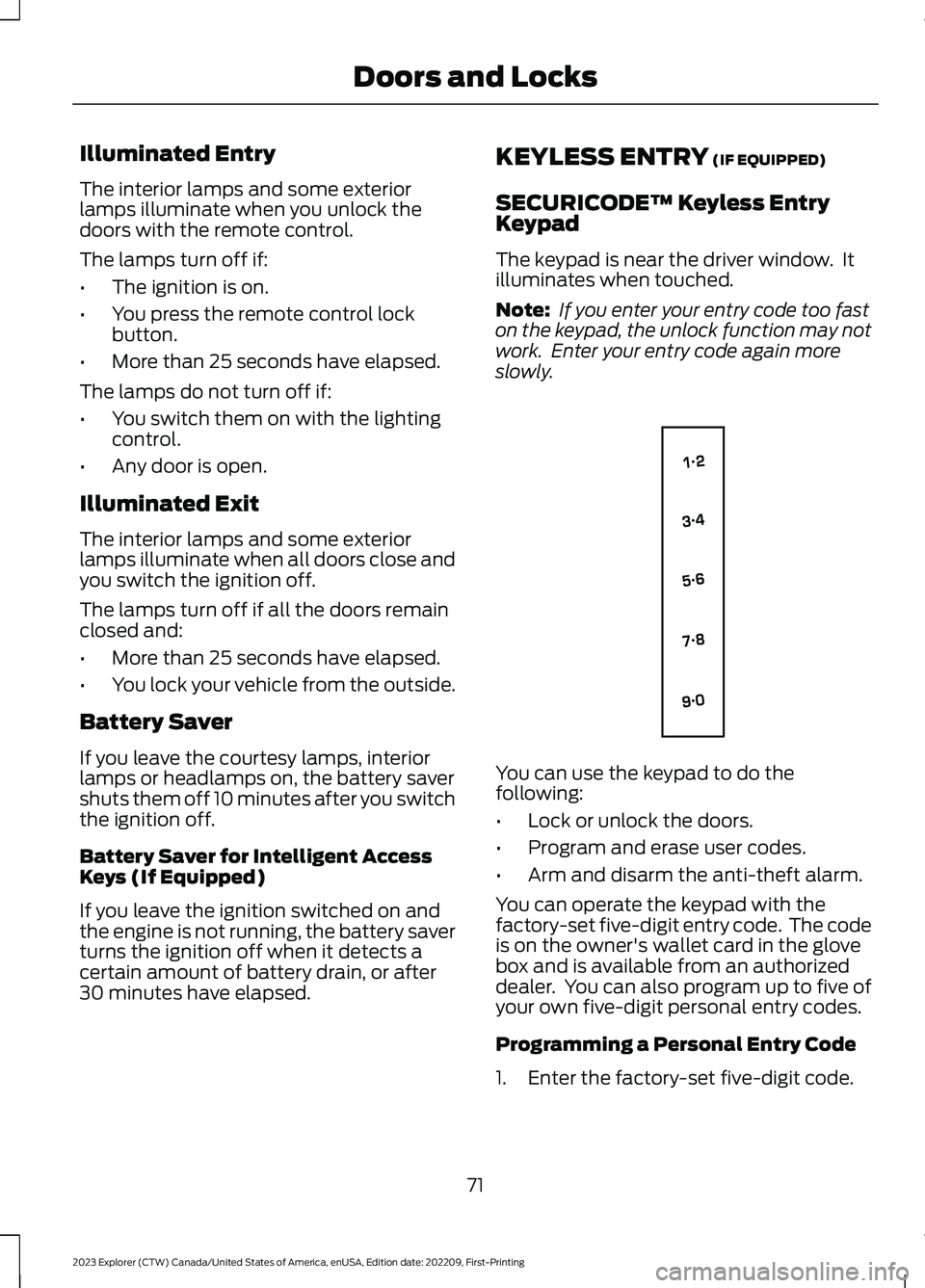
The keypad is near the driver window. Itilluminates when touched.
Note: If you enter your entry code too faston the keypad, the unlock function may notwork. Enter your entry code again moreslowly.
You can use the keypad to do thefollowing:
•Lock or unlock the doors.
•Program and erase user codes.
•Arm and disarm the anti-theft alarm.
You can operate the keypad with thefactory-set five-digit entry code. The codeis on the owner's wallet card in the glovebox and is available from an authorizeddealer. You can also program up to five ofyour own five-digit personal entry codes.
Programming a Personal Entry Code
1.Enter the factory-set five-digit code.
71
2023 Explorer (CTW) Canada/United States of America, enUSA, Edition date: 202209, First-PrintingDoors and LocksE138637
Page 77 of 573

POWER LIFTGATE
WARNING: It is extremelydangerous to ride in a cargo area, insideor outside of a vehicle. In a crash, peopleriding in these areas are more likely to beseriously injured or killed. Do not allowpeople to ride in any area of your vehiclethat is not equipped with seats andseatbelts. Make sure everyone in yourvehicle is in a seat and properly using aseatbelt. Failure to follow this warningcould result in serious personal injury ordeath.
WARNING: Make sure that you fullyclose the liftgate to prevent exhaustfumes from entering your vehicle. If youare unable to fully close the liftgate,open the air vents or the windows toallow fresh air to enter your vehicle.Failure to follow this instruction couldresult in personal injury or death.
WARNING: Keep keys out of reachof children. Do not allow children tooperate or play near an open or movingpower liftgate. You should supervise theoperation of the power liftgate at alltimes.
Note: Make sure that you close the liftgatebefore operating or moving your vehicle,especially in an enclosure, like a garage ora parking structure. This could damage theliftgate and its components.
Note: Do not hang anything, for examplea bike rack, from the glass or liftgate. Thiscould damage the liftgate and itscomponents.
Note:Make sure that you fully close theliftgate to prevent cargo from falling out.
The liftgate only operates with thetransmission in park (P).
If there is a problem with the open or closerequest, a tone sounds for one of thefollowing reasons:
•The ignition is on and the transmissionis not in park (P).
•The battery voltage is below theminimum operating voltage.
•The liftgate is not fully closed and yourvehicle speed is at or above 3 mph(5 km/h).
If the liftgate starts to close after it hasfully opened, this indicates there may beexcessive weight on the liftgate or apossible strut failure. A repetitive tonesounds and the liftgate closes undercontrol. If the liftgate continues to closeafter opening, have the system checkedby an authorized dealer. Remove anyexcessive weight from the liftgate.
Opening and Closing the Liftgate
WARNING: Make sure all personsare clear of the power liftgate areabefore using the power liftgate control.
Note: Make sure the area behind yourvehicle is free from obstruction and thatthere is enough room for you to operate theliftgate. Objects too close to your vehicle,for example a wall, garage door or anothervehicle may come into contact with themoving liftgate. This could damage theliftgate and its components.
Note:Be careful when opening or closingthe liftgate in a garage or other enclosedarea to avoid damaging the liftgate.
Note: Do not leave the liftgate open whenyou are driving. This could damage theliftgate and its components.
73
2023 Explorer (CTW) Canada/United States of America, enUSA, Edition date: 202209, First-PrintingLiftgate
Page 79 of 573

*This method only works for vehicles withthe hands-free liftgate feature.
Setting the Liftgate Open Height
1.Open the liftgate.
2.Stop the liftgate movement by pressingthe control button on the liftgate whenit reaches the desired height.
Note:Once the liftgate has stoppedmoving, you can also manually move it tothe desired height.
3.Press and hold the liftgate controlbutton on the liftgate until you hear atone, indicating programming iscomplete.
Note:You can only use the liftgate controlbutton to program the height.
Note:You cannot program the height if theliftgate position is too low.
The new open liftgate height is recalledwhen the power liftgate is opened. Tochange the programmed height, repeat theabove procedure. Once you open thepower liftgate, you can manually move itto a different height.
Note:The system recalls the newprogrammed height until you reprogram it,even if you disconnect the battery.
When operating the power liftgate afteryou have programmed a lower height thanfully open, you can fully open the liftgateby manually pushing it upward to themaximum open position.
Obstacle Detection
Note:Entering your vehicle while theliftgate is closing can cause your vehicle tobounce and activate obstacle detection. Toprevent this, let the power liftgate closecompletely before you enter your vehicle.Before driving off, check the instrumentcluster for a liftgate or door ajar message orwarning indicator. Failure to do this couldresult in unintentionally leaving the liftgateopen while driving.
When Closing
The system stops when it detects anobstacle. A tone sounds and the systemreverses to open. Once you remove theobstacle, you can power close the liftgate.
When Opening
The system stops when it detects anobstacle and a tone sounds. Once youremove the obstacle, you can continue tooperate the liftgate.
Switching the Power Liftgate Onor Off
You can switch the power liftgate on or offthrough the vehicle settings on yourtouchscreen.
When switched off, the liftgate onlyunlatches and will not power open or close.
Hands-Free Feature (If Equipped)
Make sure you have the passive key within3 ft (1 m) of the liftgate.
1.Stand behind your vehicle, and face theliftgate.
2.Move your foot, in a single-kick motion,without pausing, under and away fromthe rear bumper detection area.
75
2023 Explorer (CTW) Canada/United States of America, enUSA, Edition date: 202209, First-PrintingLiftgate