parking sensors FORD EXPLORER 2023 Owners Manual
[x] Cancel search | Manufacturer: FORD, Model Year: 2023, Model line: EXPLORER, Model: FORD EXPLORER 2023Pages: 573, PDF Size: 16.1 MB
Page 217 of 573
HILL START ASSIST
WARNING: The system does notreplace the parking brake. When youleave your vehicle, always apply theparking brake.
WARNING: You must remain inyour vehicle when the system turns on.At all times, you are responsible forcontrolling your vehicle, supervising thesystem and intervening, if required.Failure to take care may result in the lossof control of your vehicle, seriouspersonal injury or death.
WARNING: The system will turnoff if a malfunction is apparent or if yourev the engine excessively. Failure to takecare may result in the loss of control ofyour vehicle, serious personal injury ordeath.
The system makes it easier to pull awaywhen your vehicle is on a slope without theneed to use the parking brake.
When the system is active, your vehicleremains stationary on the slope for two tothree seconds after you release the brakepedal. This allows time to move your footfrom the brake to the accelerator pedal.The system releases the brakesautomatically once the engine hasdeveloped sufficient torque to prevent yourvehicle from rolling down the slope. Thisis an advantage when pulling away on aslope, for example from a car park ramp,traffic lights or when reversing uphill intoa parking space.
The system activates on any slope thatcauses your vehicle to roll.
Note:There is no warning light to indicatethe system is either on or off.
Using Hill Start Assist
1.Press the brake pedal to bring yourvehicle to a complete standstill. Keepthe brake pedal pressed and shift intofirst gear when facing uphill or reverse(R) when facing downhill.
2.If the sensors detect that your vehicleis on a slope, the system activatesautomatically.
3.When you remove your foot from thebrake pedal, your vehicle remains onthe slope without rolling away forabout two to three seconds. This holdtime automatically extends if you arein the process of driving off.
4.Drive off in the normal manner. Thesystem releases the brakesautomatically.
Note:When you remove your foot from thebrake pedal and press the pedal again whenthe system is active, you will experiencesignificantly reduced brake pedal travel. Thisis normal.
Switching the System On and Off
Vehicles with Manual Transmission
You can switch this feature on or off in theinformation display. The systemremembers the last setting when you startyour vehicle.
Vehicles with Automatic Transmission
You cannot turn the system on or off.When you switch the ignition on, thesystem automatically turns on.
213
2023 Explorer (CTW) Canada/United States of America, enUSA, Edition date: 202209, First-PrintingBrakes
Page 221 of 573
Note:If your vehicle sustains damage tothe bumper or fascia leaving it misalignedor bent, it could alter the sensing zonecausing inaccurate measurement ofobstacles or false alerts.
Note:Vehicle loading and suspensionchanges can impact the angle of the sensorsand may change the normal detection zoneof the system resulting in inaccuratemeasurement of obstacles or false alerts.
Note:When you connect a trailer, thesystem may detect the trailer and providean alert, or the system turns off. If thesystem does not turn off, manually switchthe system off after you connect the trailer.
Note:You may experience reduced systemperformance on road surfaces that limitdeceleration. For example, roads with ice,loose gravel, mud or sand.
SWITCHING REVERSE
BRAKING ASSIST ON AND OFF
You can switch the system on or offthrough the touchscreen. See Settings(page 458).
Note:The system is unavailable when rearparking aid or cross traffic alert is off.
OVERRIDING REVERSE
BRAKING ASSIST
There could be instances whenunexpected or unwanted braking occurs.Firmly pressing the accelerator pedal orswitching the feature off overrides thesystem.
REVERSE BRAKING ASSIST
INDICATORS
If the system determines that a collisionwith an obstacle may occur, full brakingmay apply.
A message and warningindicator appear when thesystem applies the brakes.
217
2023 Explorer (CTW) Canada/United States of America, enUSA, Edition date: 202209, First-PrintingReverse Braking Assist (If Equipped)E293490
Page 223 of 573
REVERSE BRAKING ASSIST –FREQUENTLY ASKED QUESTIONS
Why is reverse braking assist unavailable?
•Make sure you switch the system on.See Switching Reverse BrakingAssist On and Off (page 217).
•Make sure that the liftgate, hood andall doors are closed.
•Make sure the cross traffic alert systemis on. See Cross Traffic Alert (page263).
•Make sure the rear parking aid systemis on. See Rear Parking Aid (page 225).
•Make sure traction control is on. SeeUsing Traction Control (page 220).
•The vehicle has sustained a rear endimpact. Have the sensors checked forproper coverage and operation.
•An ABS, traction control or stabilitycontrol event may have occurred. Thesystem resumes operation when theevent is complete.
•Make sure the rear view camera and360 degree camera are not dirty orobstructed. If it is dirty, clean thecamera. See Rear View Camera(page 234). See 360 Degree Camera(page 237). If the message still appearsafter cleaning the camera, wait a shorttime and the message should clear. Ifthe message does not clear, have thesystem checked.
•Make sure the sensors are not blockedor faulted. See Cross Traffic Alert(page 263). See Rear Parking Aid(page 225).
•You recently had your vehicle serviced,or the battery disconnected. Drive yourvehicle a short distance to resumesystem operation.
•The system does not function whenyou connect a trailer. Operationresumes when you disconnect thetrailer.
Note:If the answers to why the system isunavailable do not assist in returning reversebraking assist to available, have the systemchecked as soon as possible.
219
2023 Explorer (CTW) Canada/United States of America, enUSA, Edition date: 202209, First-PrintingReverse Braking Assist (If Equipped)
Page 229 of 573
PRINCIPLE OF OPERATION
WARNING: To help avoid personalinjury, always use caution when inreverse (R) and when using the sensingsystem.
WARNING: The system may notdetect objects with surfaces that absorbreflection. Always drive with due careand attention. Failure to take care mayresult in a crash.
WARNING: Traffic control systems,inclement weather, air brakes, externalmotors and fans may affect the correctoperation of the sensing system. Thismay cause reduced performance or falsealerts.
WARNING: The system may notdetect small or moving objects,particularly those close to the ground.
Note:If your vehicle has MyKey™, thesensing system cannot be switched offwhen a MyKey™ is present. See Principleof Operation (page 64).
Note:Keep the sensors on the bumper orfascia free from snow, ice and largeaccumulations of dirt. If the sensors arecovered, the system’s accuracy can beaffected. Do not clean the sensors withsharp objects.
Note:If your vehicle sustains damage tothe bumper or fascia, leaving it misalignedor bent, the sensing zone may be alteredcausing inaccurate measurement ofobstacles or false alerts.
Note:Certain add-on devices installedaround the bumper or fascia may createfalse alerts. For example, large trailerhitches, bike or surfboard racks, license platebrackets, bumper covers or any other devicethat may block the normal detection zoneof the system. Remove the add-on deviceto prevent false alerts.
Note:When you connect a trailer to yourvehicle, the rear parking aid may detect thetrailer and therefore provide an alert. Disablethe rear parking aid when you connect atrailer to prevent the alert.
The sensing system warns the driver ofobstacles within a certain range of yourvehicle. The system turns on automaticallywhenever you switch the ignition on.
You can switch the system off through thetouchscreen, information display or fromthe pop-up message that appears onceyou shift the transmission into reverse (R).If your vehicle has a parking aid button, youcan switch the system off by pressing thebutton.
If a fault is present in the system, a warningmessage appears in the informationdisplay. See Information Messages(page 119).
REAR PARKING AID
WARNING: The system may notdetect objects with surfaces that absorbreflection. Always drive with due careand attention. Failure to take care mayresult in a crash.
WARNING: The system may notdetect small or moving objects,particularly those close to the ground.
225
2023 Explorer (CTW) Canada/United States of America, enUSA, Edition date: 202209, First-PrintingParking Aids
Page 230 of 573
WARNING: To help avoid personalinjury, always use caution when inreverse (R) and when using the sensingsystem.
WARNING: The parking aid systemcan only assist you to detect objectswhen your vehicle is moving at parkingspeeds. To help avoid personal injury youmust take care when using the parkingaid system.
Note:Keep the sensors free from snow, iceand large accumulations of dirt.
Note:Do not cover up the sensors.
Note:Do not clean the sensors with sharpobjects.
Note:If your vehicle sustains damageleaving the sensors misaligned, this maycause inaccurate measurements or falsealerts.
Note:Some accessories, for example largetrailer hitches or bike or surfboard racks, cancause reduced performance or false alerts.
The sensors are on the rear bumper.
The sensors are active when thetransmission is in reverse (R) and thevehicle speed is less than 5 mph (8 km/h).When the parking aid system sounds atone, the audio system may reduce the setvolume.
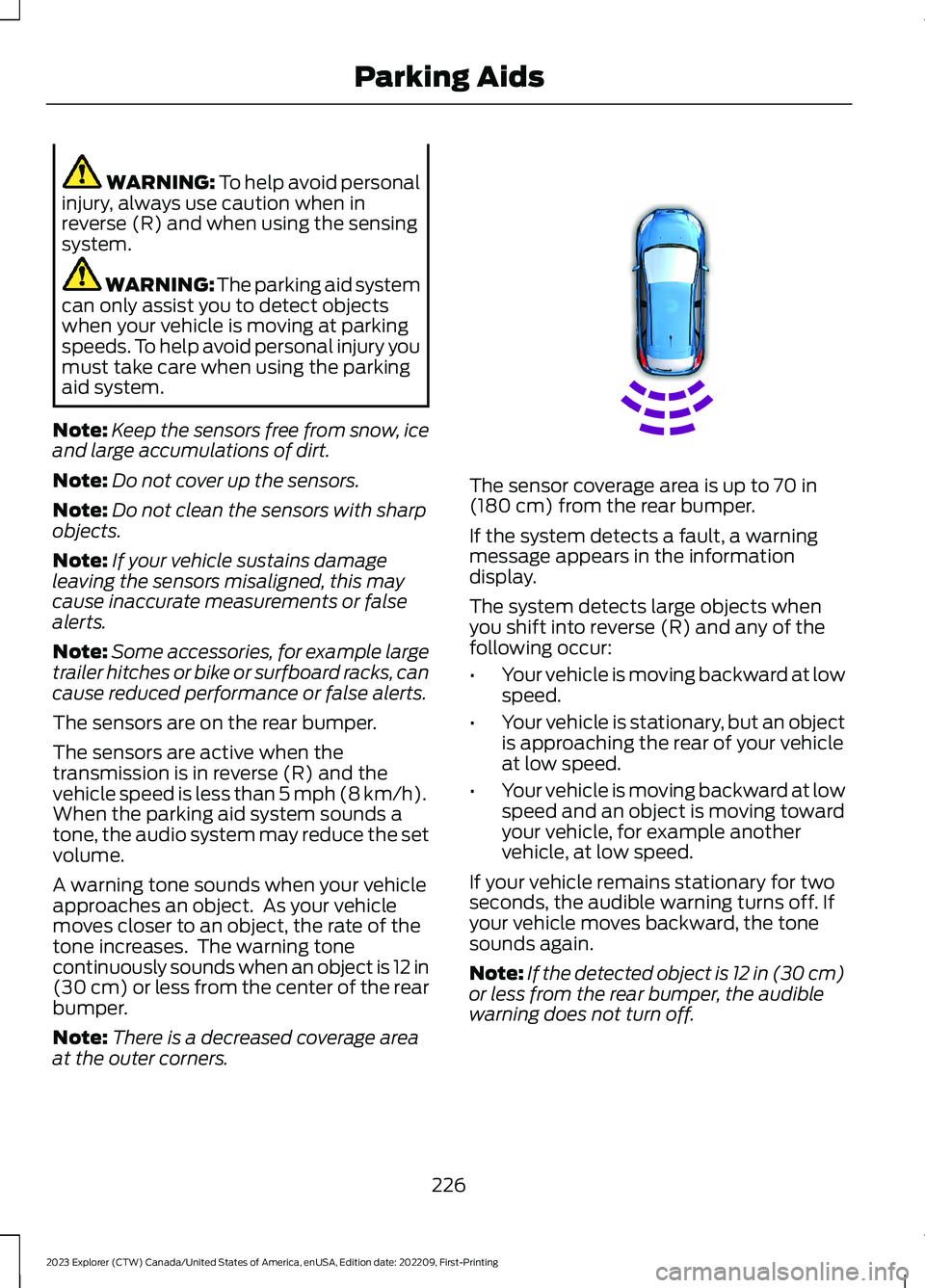
A warning tone sounds when your vehicleapproaches an object. As your vehiclemoves closer to an object, the rate of thetone increases. The warning tonecontinuously sounds when an object is 12 in(30 cm) or less from the center of the rearbumper.
Note:There is a decreased coverage areaat the outer corners.
The sensor coverage area is up to 70 in(180 cm) from the rear bumper.
If the system detects a fault, a warningmessage appears in the informationdisplay.
The system detects large objects whenyou shift into reverse (R) and any of thefollowing occur:
•Your vehicle is moving backward at lowspeed.
•Your vehicle is stationary, but an objectis approaching the rear of your vehicleat low speed.
•Your vehicle is moving backward at lowspeed and an object is moving towardyour vehicle, for example anothervehicle, at low speed.
If your vehicle remains stationary for twoseconds, the audible warning turns off. Ifyour vehicle moves backward, the tonesounds again.
Note:If the detected object is 12 in (30 cm)or less from the rear bumper, the audiblewarning does not turn off.
226
2023 Explorer (CTW) Canada/United States of America, enUSA, Edition date: 202209, First-PrintingParking AidsE130178
Page 231 of 573
Object Distance Indicator (If Equipped)
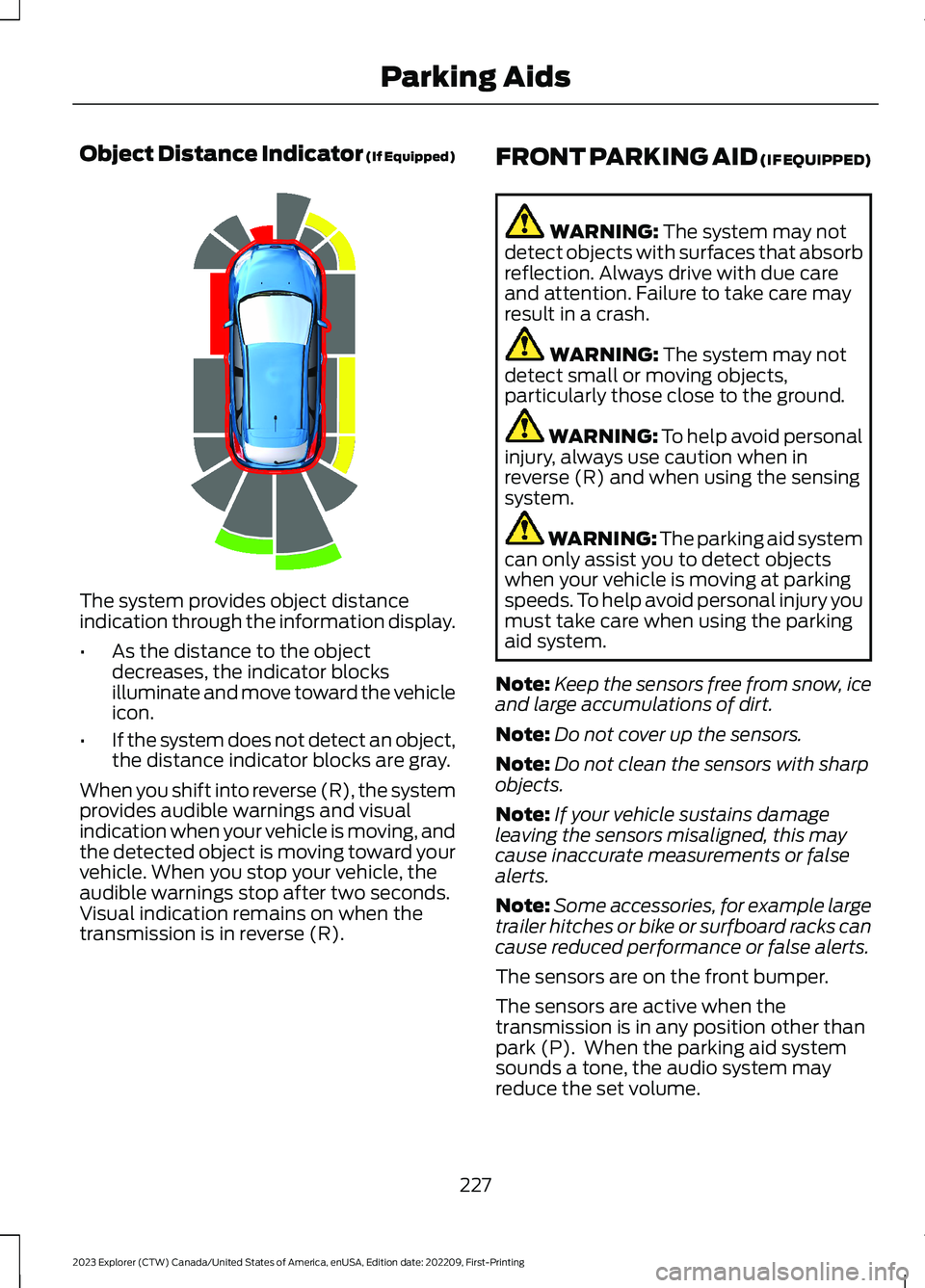
The system provides object distanceindication through the information display.
•As the distance to the objectdecreases, the indicator blocksilluminate and move toward the vehicleicon.
•If the system does not detect an object,the distance indicator blocks are gray.
When you shift into reverse (R), the systemprovides audible warnings and visualindication when your vehicle is moving, andthe detected object is moving toward yourvehicle. When you stop your vehicle, theaudible warnings stop after two seconds.Visual indication remains on when thetransmission is in reverse (R).
FRONT PARKING AID (IF EQUIPPED)
WARNING: The system may notdetect objects with surfaces that absorbreflection. Always drive with due careand attention. Failure to take care mayresult in a crash.
WARNING: The system may notdetect small or moving objects,particularly those close to the ground.
WARNING: To help avoid personalinjury, always use caution when inreverse (R) and when using the sensingsystem.
WARNING: The parking aid systemcan only assist you to detect objectswhen your vehicle is moving at parkingspeeds. To help avoid personal injury youmust take care when using the parkingaid system.
Note:Keep the sensors free from snow, iceand large accumulations of dirt.
Note:Do not cover up the sensors.
Note:Do not clean the sensors with sharpobjects.
Note:If your vehicle sustains damageleaving the sensors misaligned, this maycause inaccurate measurements or falsealerts.
Note:Some accessories, for example largetrailer hitches or bike or surfboard racks cancause reduced performance or false alerts.
The sensors are on the front bumper.
The sensors are active when thetransmission is in any position other thanpark (P). When the parking aid systemsounds a tone, the audio system mayreduce the set volume.
227
2023 Explorer (CTW) Canada/United States of America, enUSA, Edition date: 202209, First-PrintingParking AidsE190459
Page 233 of 573
When you shift into neutral (N), the systemonly provides visual indication if yourvehicle is moving at a speed ofapproximately 5 mph (8 km/h) or below,for example, your vehicle is moving on aslope, and the system detects an objectmoving toward your vehicle. When youstop your vehicle, visual indication stopsafter four seconds.
SIDE SENSING SYSTEM (IF
EQUIPPED)
WARNING: The system may notdetect objects with surfaces that absorbreflection. Always drive with due careand attention. Failure to take care mayresult in a crash.
WARNING: The system may notdetect small or moving objects,particularly those close to the ground.
WARNING: To help avoid personalinjury, always use caution when inreverse (R) and when using the sensingsystem.
WARNING: The parking aid systemcan only assist you to detect objectswhen your vehicle is moving at parkingspeeds. To help avoid personal injury youmust take care when using the parkingaid system.
The system uses the front and rearoutermost parking aid sensors to detectobjects that are near to the sides of yourvehicle. The system displays them on avirtual map in the information display asyour vehicle moves past them.
The sensors are on the front and rearbumpers.
Note:Keep the sensors free from snow, iceand large accumulations of dirt.
Note:Do not cover up the sensors.
Note:Do not clean the sensors with sharpobjects.
Note:If your vehicle sustains damageleaving the sensors misaligned, this maycause inaccurate measurements or falsealerts.
The system may not function if:
•You switch the ignition on, off and backon within a few seconds.
•Your vehicle remains stationary for overtwo minutes.
•The anti-lock brake system activates.
•The traction control system activates.
Note:If you switch traction control off, theside sensing system also turns off.
Note:Some accessories, for example largetrailer hitches or bike or surfboard racks cancause reduced performance or false alerts.
To reinitialize the system, you may have todrive your vehicle approximately 10 ft(3 m).
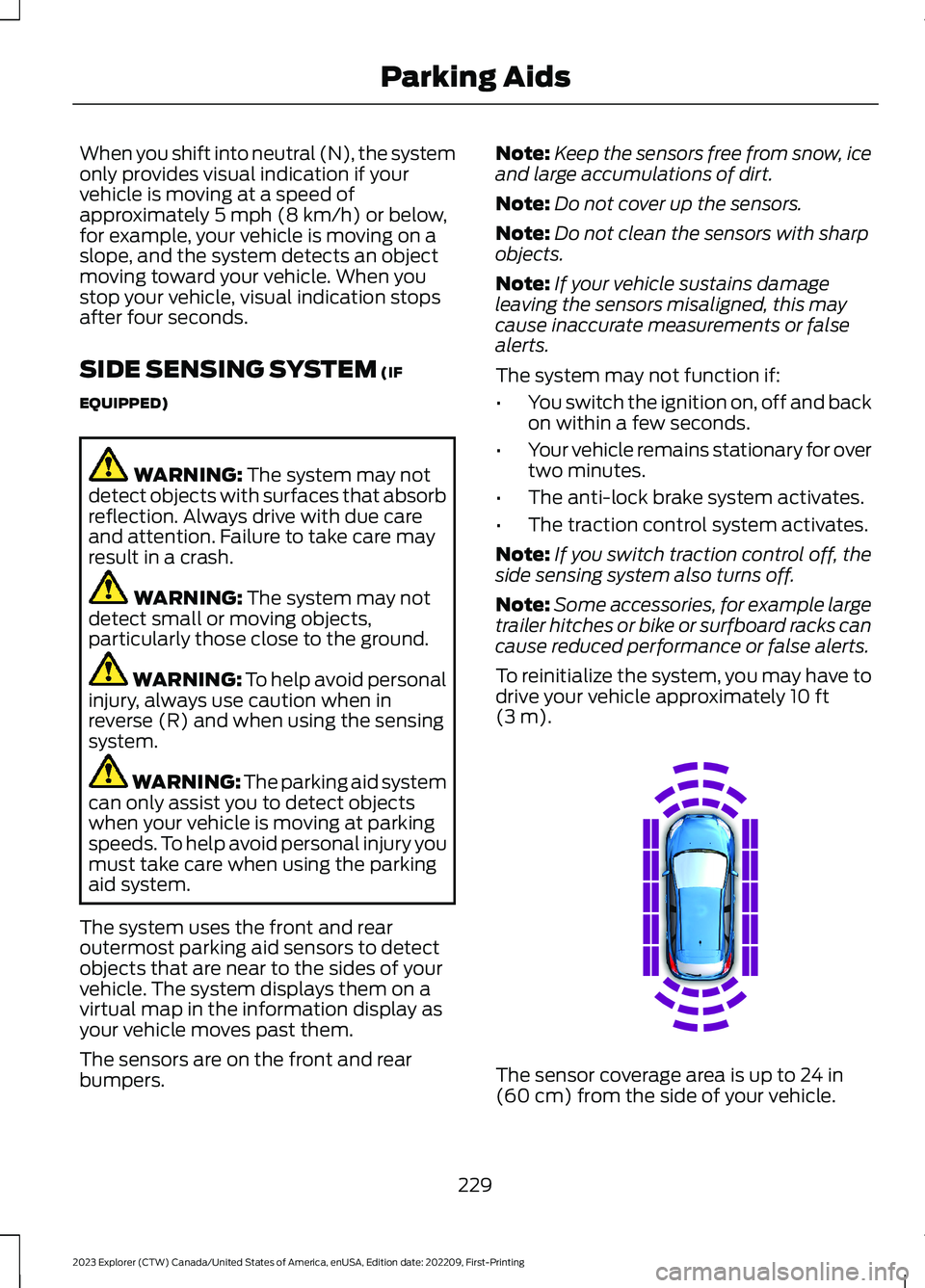
The sensor coverage area is up to 24 in(60 cm) from the side of your vehicle.
229
2023 Explorer (CTW) Canada/United States of America, enUSA, Edition date: 202209, First-PrintingParking AidsE190458
Page 234 of 573
When the system detects an object withinthe coverage area and the driving path ofyour vehicle, an audible warning sounds.As your vehicle moves closer to the object,the rate of the tone increases.
Note:The system does not detect an objectthat is moving toward the side of yourvehicle, for example another vehicle movingat low speed, if it does not pass a front orrear sensor.
Object Distance Indicator (If Equipped)
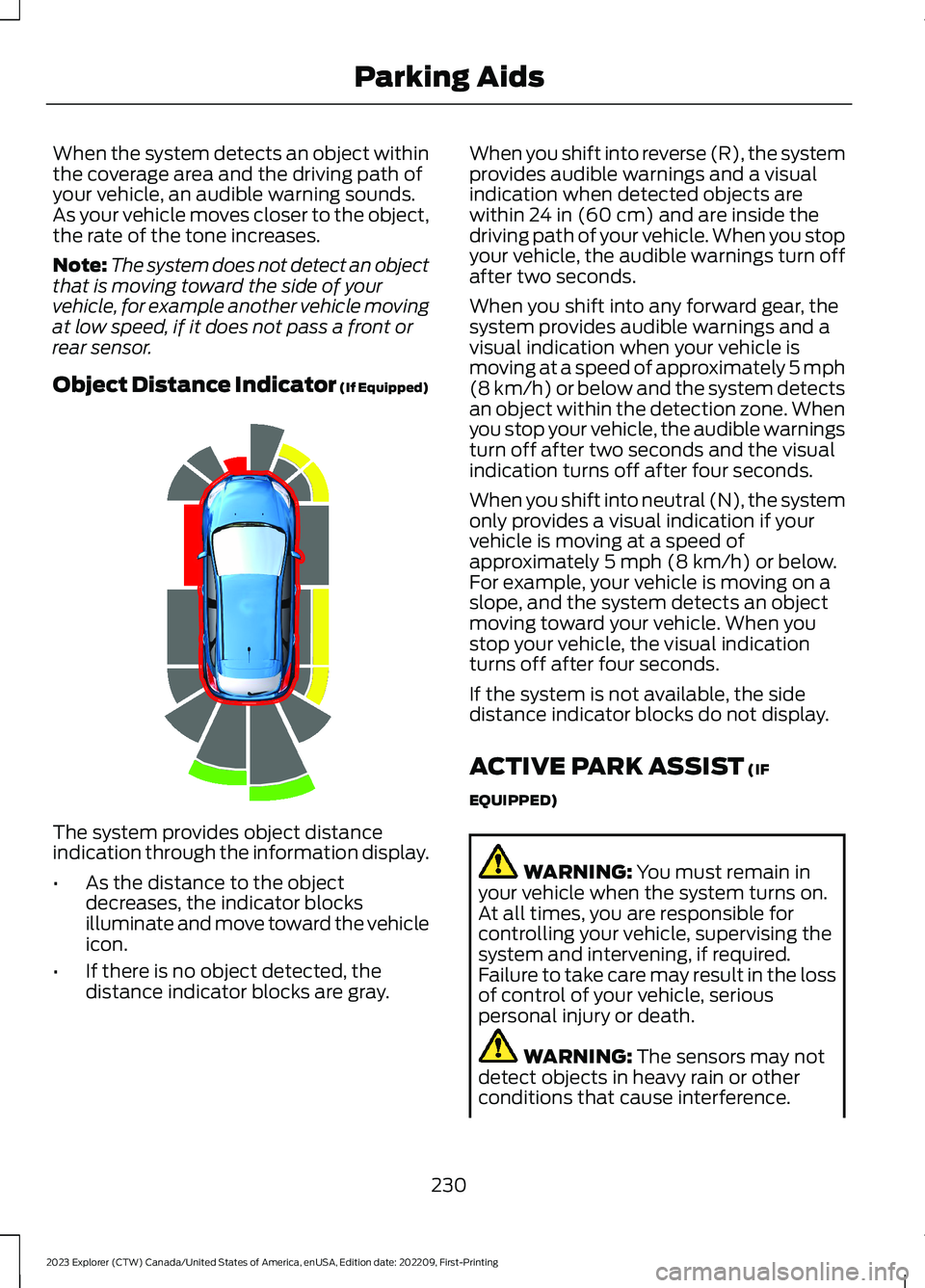
The system provides object distanceindication through the information display.
•As the distance to the objectdecreases, the indicator blocksilluminate and move toward the vehicleicon.
•If there is no object detected, thedistance indicator blocks are gray.
When you shift into reverse (R), the systemprovides audible warnings and a visualindication when detected objects arewithin 24 in (60 cm) and are inside thedriving path of your vehicle. When you stopyour vehicle, the audible warnings turn offafter two seconds.
When you shift into any forward gear, thesystem provides audible warnings and avisual indication when your vehicle ismoving at a speed of approximately 5 mph(8 km/h) or below and the system detectsan object within the detection zone. Whenyou stop your vehicle, the audible warningsturn off after two seconds and the visualindication turns off after four seconds.
When you shift into neutral (N), the systemonly provides a visual indication if yourvehicle is moving at a speed ofapproximately 5 mph (8 km/h) or below.For example, your vehicle is moving on aslope, and the system detects an objectmoving toward your vehicle. When youstop your vehicle, the visual indicationturns off after four seconds.
If the system is not available, the sidedistance indicator blocks do not display.
ACTIVE PARK ASSIST (IF
EQUIPPED)
WARNING: You must remain inyour vehicle when the system turns on.At all times, you are responsible forcontrolling your vehicle, supervising thesystem and intervening, if required.Failure to take care may result in the lossof control of your vehicle, seriouspersonal injury or death.
WARNING: The sensors may notdetect objects in heavy rain or otherconditions that cause interference.
230
2023 Explorer (CTW) Canada/United States of America, enUSA, Edition date: 202209, First-PrintingParking AidsE190459
Page 235 of 573
WARNING: You are responsible forcontrolling your vehicle at all times. Thesystem is designed to be an aid and doesnot relieve you of your responsibility todrive with due care and attention. Failureto follow this instruction could result inthe loss of control of your vehicle,personal injury or death.
WARNING: Do not use the systemwith accessories that extend beyond thefront or rear of your vehicle, for examplea trailer hitch, bike rack or side mirrorextensions such as telescoping mirrorsor towing mirrors. The system is not ableto make corrections for the additionallength of the accessories.
The system assists parking into and out ofparking spaces. It uses sensors to detectparking spaces. The system then steers,accelerates, brakes and shifts gear asrequired to maneuver into or out of aparking space.
Using Active Park Assist
The active park assist button isnear the transmission selectoron the center console.
Press the active park assist button to bringup full screen notifications. Press either theactive park assist button or the soft keyson the display screen to switch betweenParallel Park In, Perpendicular Park In orParallel Park Out parking modes.
Driving into a Parking Space
Note:When parking perpendicularly, thesystem backs your vehicle into parkingspaces.
1.Press the active park assist button.
Note:The system does not recognizeparking space lines and centers your vehiclebetween objects.
Note:The system detects other vehiclesand curbs to find a parking space.
Note:The system searches for parallelparking spaces on the passenger side. Pressthe active park assist button again to makethe system search for perpendicular spaces.
2.Use the direction indicator lever tosearch for a parking space on the driveror passenger side of your vehicle.
3.Drive your vehicle approximately 3 ft(1 m) away from and parallel to theother parked vehicles when searchingfor a parking space.
Note: A tone sounds and a messageappears in the information display whenactive park assist finds a suitable parkingspace.
4.Press and hold the brake pedal.
5.Release the steering wheel and shiftinto neutral (N).
6.Press and hold the active park assistbutton.
7.Release the brake pedal to allow thevehicle to park.
Note:When parallel parking betweenobjects, the system parks closer to theobject in front of your vehicle to allow easieraccess to your luggage compartment.
Note:When perpendicular parking, thesystem aligns the front end of your vehiclewith the object next to it.
Note:When perpendicular parking, if thesystem detects only one object, it allowsenough distance to open the door on eitherside.
Note:You can slow down your vehicle atany time by pressing the brake pedal.
Note:When parking is complete the vehicleshifts into park (P).
231
2023 Explorer (CTW) Canada/United States of America, enUSA, Edition date: 202209, First-PrintingParking AidsE146186
Page 236 of 573
Leaving a Parking Space
The system assists leaving only parallelparking spaces.
1.Press the active park assist button.
2.Use the direction indicator lever tochoose the direction to leave.
3.Press and hold the brake pedal.
4.Release the steering wheel and shiftinto neutral (N).
5.Release the parking brake.
6.Press and hold the active park assistbutton.
7.Release the brake pedal to allow thevehicle to move.
Note: You can slow down your vehicle atany time by pressing the brake pedal.
Note:After the system drives your vehicleto a position where you can exit the parkingspace in a forward movement, a messageappears instructing you to take full controlof your vehicle.
Canceling Active Park Assist
To cancel parking assistance at any time,shift out of neutral (N).
Note:If you turn the steering wheel or openthe driver door the parking assistance alsocancels.
Pausing Active Park Assist
To pause parking assistance at any time,release the active park assist button.
The vehicle stops moving until you pressand hold the active park assist buttonagain.
Note:If you open the passenger or reardoors the parking assistance also pauses.
Active Park Assist Troubleshooting
Possible CauseSymptom
The system is unable to detect a vehicle, curb or objectto park next to, or in-between. This could occur becauseof sensors not operating correctly, not enough roomfor your vehicle, or the traction control is off.
The system does not correctlyoperate.
You may have switched traction control off.The system does not search fora parking space.The transmission is in reverse (R). Your vehicle mustbe moving forward to be able to detect a parking space.
There could be blockage on the sensors. For example,snow, ice or large accumulations of dirt. Blockedsensors can affect how the system functions.
The system does not offer aparking space.
The sensors in the front or rear bumper could bedamaged.
There is not enough room in the parking space for yourvehicle to safely park.
232
2023 Explorer (CTW) Canada/United States of America, enUSA, Edition date: 202209, First-PrintingParking Aids