start stop button FORD EXPLORER 2023 Owners Manual
[x] Cancel search | Manufacturer: FORD, Model Year: 2023, Model line: EXPLORER, Model: FORD EXPLORER 2023Pages: 573, PDF Size: 16.1 MB
Page 66 of 573
Car Finder
Press the button twice withinthree seconds. The horn soundsand the direction indicatorsflash. We recommend you use this methodto locate your vehicle, rather than usingthe panic alarm.
Sounding the Panic Alarm
Press the button to sound thepanic alarm. Press the buttonagain or switch the ignition on toturn it off.
Note:The panic alarm only operates whenthe ignition is off.
Remote Start (If Equipped)
WARNING: Do not start the enginein a closed garage or in other enclosedareas. Exhaust fumes are toxic. Alwaysopen the garage door before you startthe engine. Failure to follow thisinstruction could result in personal injuryor death.
The remote start button is on theremote control.
This feature allows you to start yourvehicle from the outside. Your remotecontrol has an extended operating range.
If your vehicle has automatic climatecontrol, you can configure it to operatewhen you remote start your vehicle. SeeClimate Control (page 137).A manualclimate control system runs at the settingit was set to when you switched yourvehicle off.
Many states and provinces haverestrictions for the use of remote start.
Check your local and state or provinciallaws for specific requirements regardingremote start systems.
The system does not work if:
•The ignition is on.
•The anti-theft alarm triggers.
•You disable the feature.
•The hood is open.
•The transmission is not in park (P).
•The battery voltage is below theminimum operating voltage.
•The service engine soon light is on.
Note: Do not use remote start if your fuellevel is low.
Remote Control Feedback (IfEquipped)
An LED on the remote control providesstatus feedback of remote start or stopcommands.
StatusLED
Remote startsuccessfulSolid green
Remote stopsuccessfulSolid red
Request failed orstatus not receivedBlinking red
Status incompleteBlinking green
Remote Starting Your Vehicle
Note: You must press each button withinthree seconds of each other. If you do notfollow this sequence, your vehicle does notstart remotely, the direction indicators donot flash twice and the horn does not sound.
62
2023 Explorer (CTW) Canada/United States of America, enUSA, Edition date: 202209, First-PrintingKeys and Remote ControlsE138623 E138624 E138625
Page 67 of 573
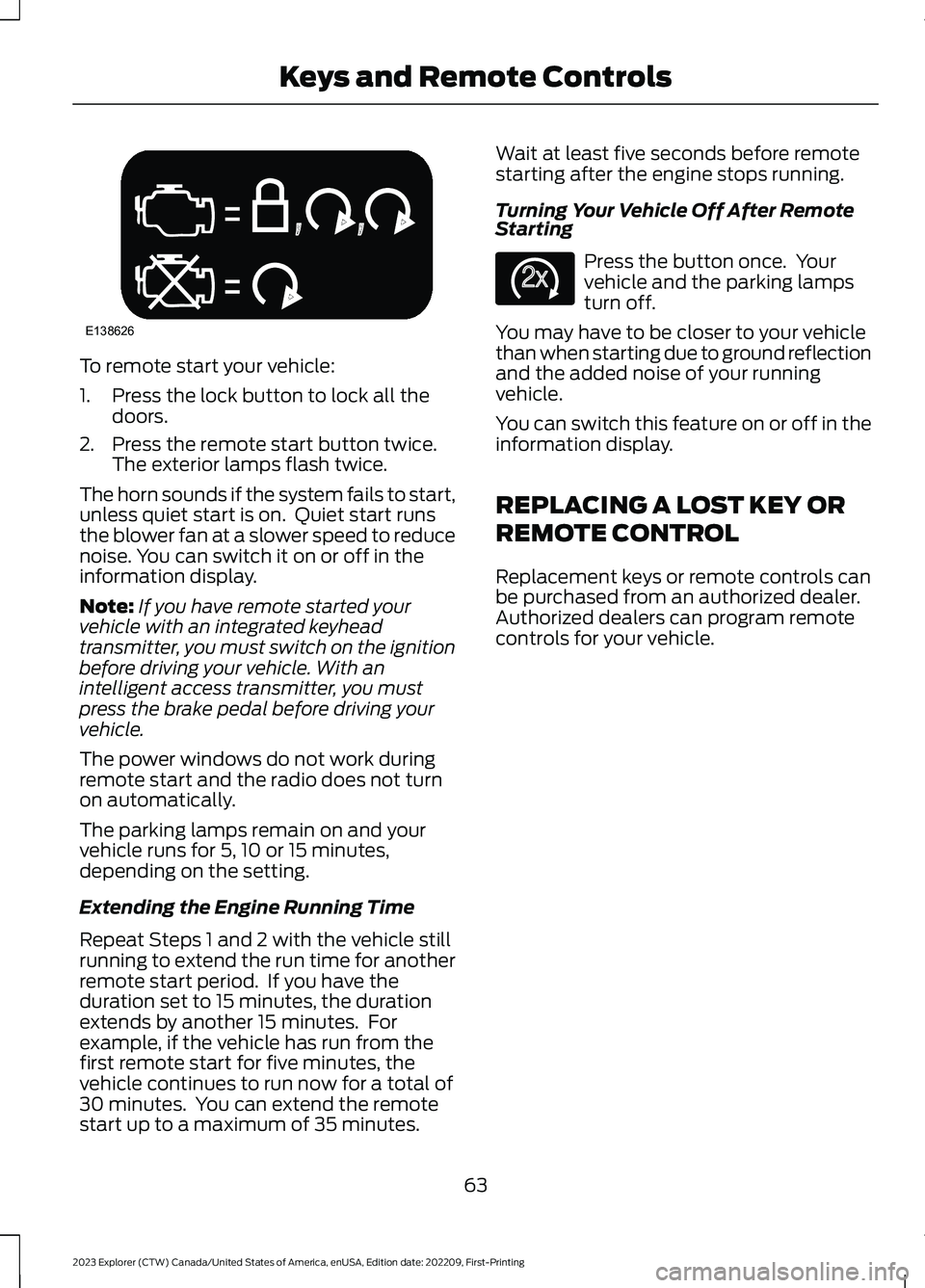
To remote start your vehicle:
1.Press the lock button to lock all thedoors.
2.Press the remote start button twice.The exterior lamps flash twice.
The horn sounds if the system fails to start,unless quiet start is on. Quiet start runsthe blower fan at a slower speed to reducenoise. You can switch it on or off in theinformation display.
Note:If you have remote started yourvehicle with an integrated keyheadtransmitter, you must switch on the ignitionbefore driving your vehicle. With anintelligent access transmitter, you mustpress the brake pedal before driving yourvehicle.
The power windows do not work duringremote start and the radio does not turnon automatically.
The parking lamps remain on and yourvehicle runs for 5, 10 or 15 minutes,depending on the setting.
Extending the Engine Running Time
Repeat Steps 1 and 2 with the vehicle stillrunning to extend the run time for anotherremote start period. If you have theduration set to 15 minutes, the durationextends by another 15 minutes. Forexample, if the vehicle has run from thefirst remote start for five minutes, thevehicle continues to run now for a total of30 minutes. You can extend the remotestart up to a maximum of 35 minutes.
Wait at least five seconds before remotestarting after the engine stops running.
Turning Your Vehicle Off After RemoteStarting
Press the button once. Yourvehicle and the parking lampsturn off.
You may have to be closer to your vehiclethan when starting due to ground reflectionand the added noise of your runningvehicle.
You can switch this feature on or off in theinformation display.
REPLACING A LOST KEY OR
REMOTE CONTROL
Replacement keys or remote controls canbe purchased from an authorized dealer.Authorized dealers can program remotecontrols for your vehicle.
63
2023 Explorer (CTW) Canada/United States of America, enUSA, Edition date: 202209, First-PrintingKeys and Remote ControlsE138626 E138625
Page 82 of 573

Take all remote controls to an authorizeddealer if there is any potential alarmproblem with your vehicle.
Arming the Alarm
The alarm is ready to arm when there isnot a key in your vehicle. Electronically lockyour vehicle to arm the alarm.
Disarming the Alarm
Disarm the alarm by any of the followingactions:
•Unlock the doors or luggagecompartment with the remote controlor keyless entry keypad.
•Switch your vehicle on or start yourvehicle.
•Use a key in the driver door to unlockyour vehicle, then switch your vehicleon within 12 seconds.
Note:Pressing the panic button on theremote control will stop the horn and signalindicators, but will not disarm the system.
78
2023 Explorer (CTW) Canada/United States of America, enUSA, Edition date: 202209, First-PrintingSecurity
Page 99 of 573
Press the control to lock or unlock the rearwindow controls. It illuminates when youlock the rear window controls.
Accessory Delay
You can use the window switches forseveral minutes after you switch theignition off or until you open either frontdoor.
GLOBAL OPENING
You can use the remote control to openthe windows with the ignition off.
Note:You can enable or disable this featurein the information display, or see anauthorized dealer. See GeneralInformation (page 115).
Note:To operate this feature, accessorydelay must not be active.
Remote Control Front Windows
After you unlock your vehicle with theremote control, you can open the windowsfor a short period of time. Press and holdthe remote control unlock button to openthe windows. Release the button oncemovement starts. Press the lock or unlockbutton to stop movement.
EXTERIOR MIRRORS -
EXCLUDING: ST
Power Exterior Mirrors
WARNING: Do not adjust themirrors when your vehicle is moving. Thiscould result in the loss of control of yourvehicle, serious personal injury or death.
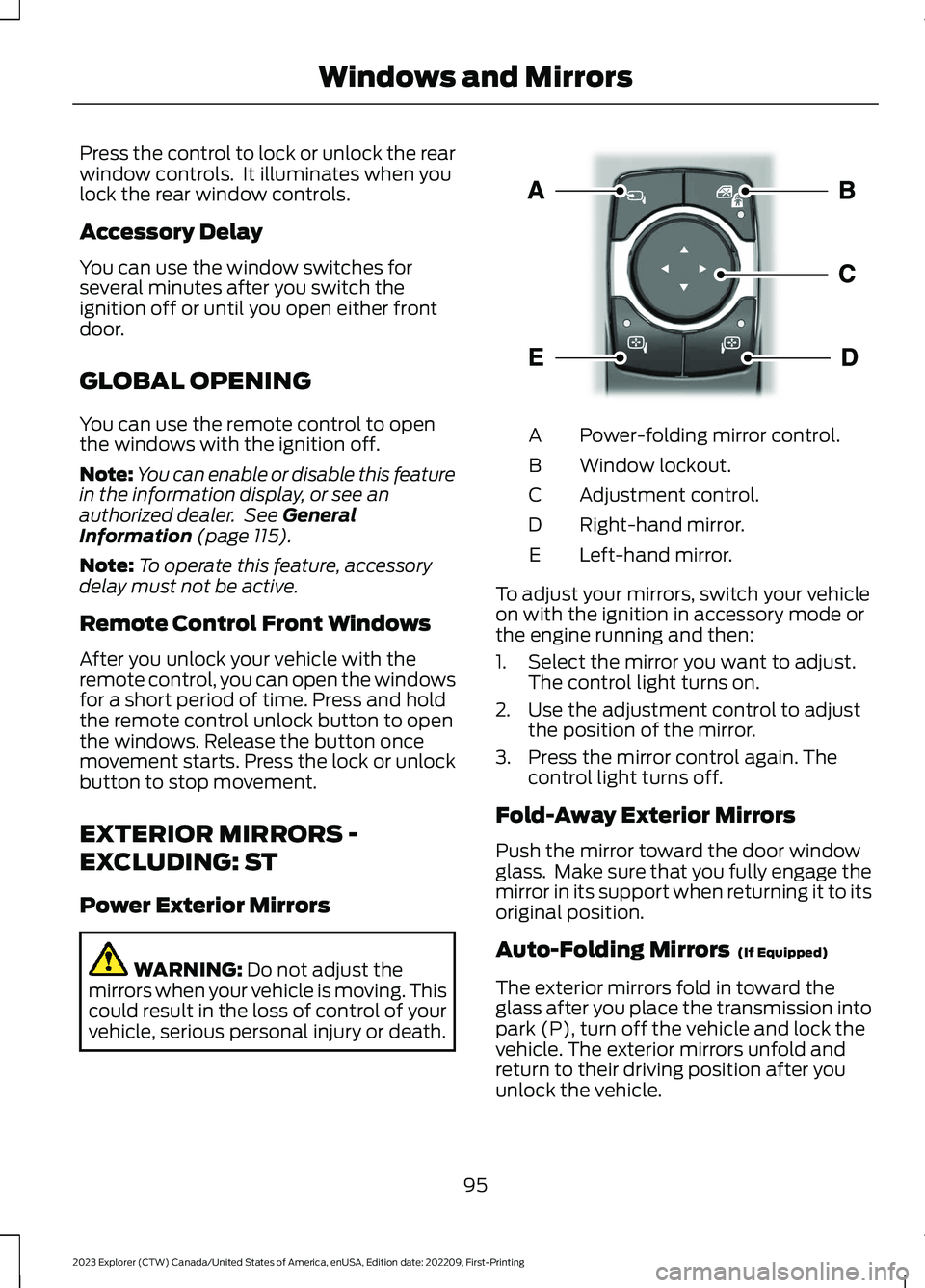
Power-folding mirror control.A
Window lockout.B
Adjustment control.C
Right-hand mirror.D
Left-hand mirror.E
To adjust your mirrors, switch your vehicleon with the ignition in accessory mode orthe engine running and then:
1.Select the mirror you want to adjust.The control light turns on.
2.Use the adjustment control to adjustthe position of the mirror.
3.Press the mirror control again. Thecontrol light turns off.
Fold-Away Exterior Mirrors
Push the mirror toward the door windowglass. Make sure that you fully engage themirror in its support when returning it to itsoriginal position.
Auto-Folding Mirrors (If Equipped)
The exterior mirrors fold in toward theglass after you place the transmission intopark (P), turn off the vehicle and lock thevehicle. The exterior mirrors unfold andreturn to their driving position after youunlock the vehicle.
95
2023 Explorer (CTW) Canada/United States of America, enUSA, Edition date: 202209, First-PrintingWindows and MirrorsE295322
Page 122 of 573
Note:Some options may appear slightlydifferent or not at all if the items areoptional.
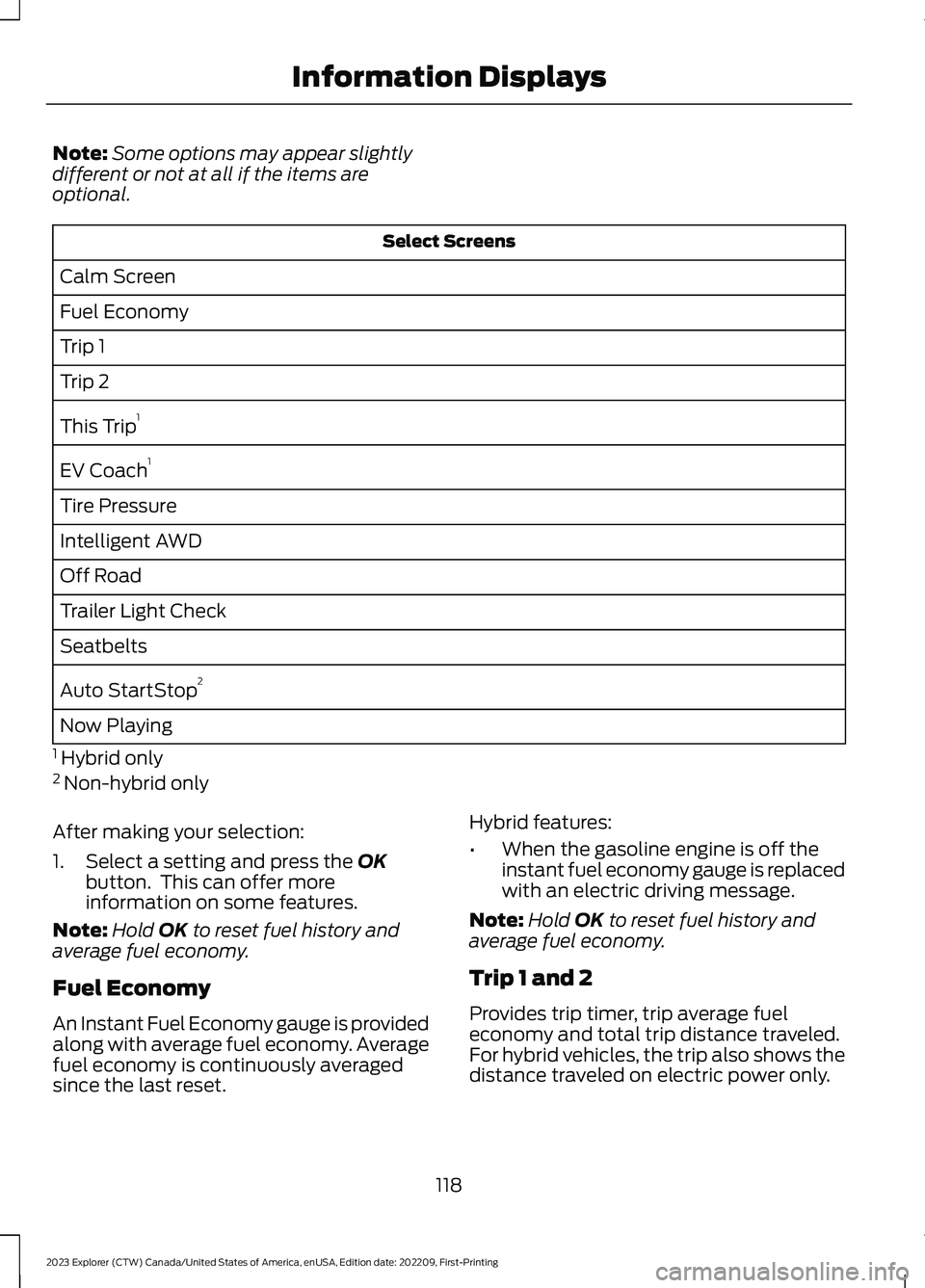
Select Screens
Calm Screen
Fuel Economy
Trip 1
Trip 2
This Trip1
EV Coach1
Tire Pressure
Intelligent AWD
Off Road
Trailer Light Check
Seatbelts
Auto StartStop2
Now Playing
1 Hybrid only2 Non-hybrid only
After making your selection:
1.Select a setting and press the OKbutton. This can offer moreinformation on some features.
Note:Hold OK to reset fuel history andaverage fuel economy.
Fuel Economy
An Instant Fuel Economy gauge is providedalong with average fuel economy. Averagefuel economy is continuously averagedsince the last reset.
Hybrid features:
•When the gasoline engine is off theinstant fuel economy gauge is replacedwith an electric driving message.
Note:Hold OK to reset fuel history andaverage fuel economy.
Trip 1 and 2
Provides trip timer, trip average fueleconomy and total trip distance traveled.For hybrid vehicles, the trip also shows thedistance traveled on electric power only.
118
2023 Explorer (CTW) Canada/United States of America, enUSA, Edition date: 202209, First-PrintingInformation Displays
Page 130 of 573
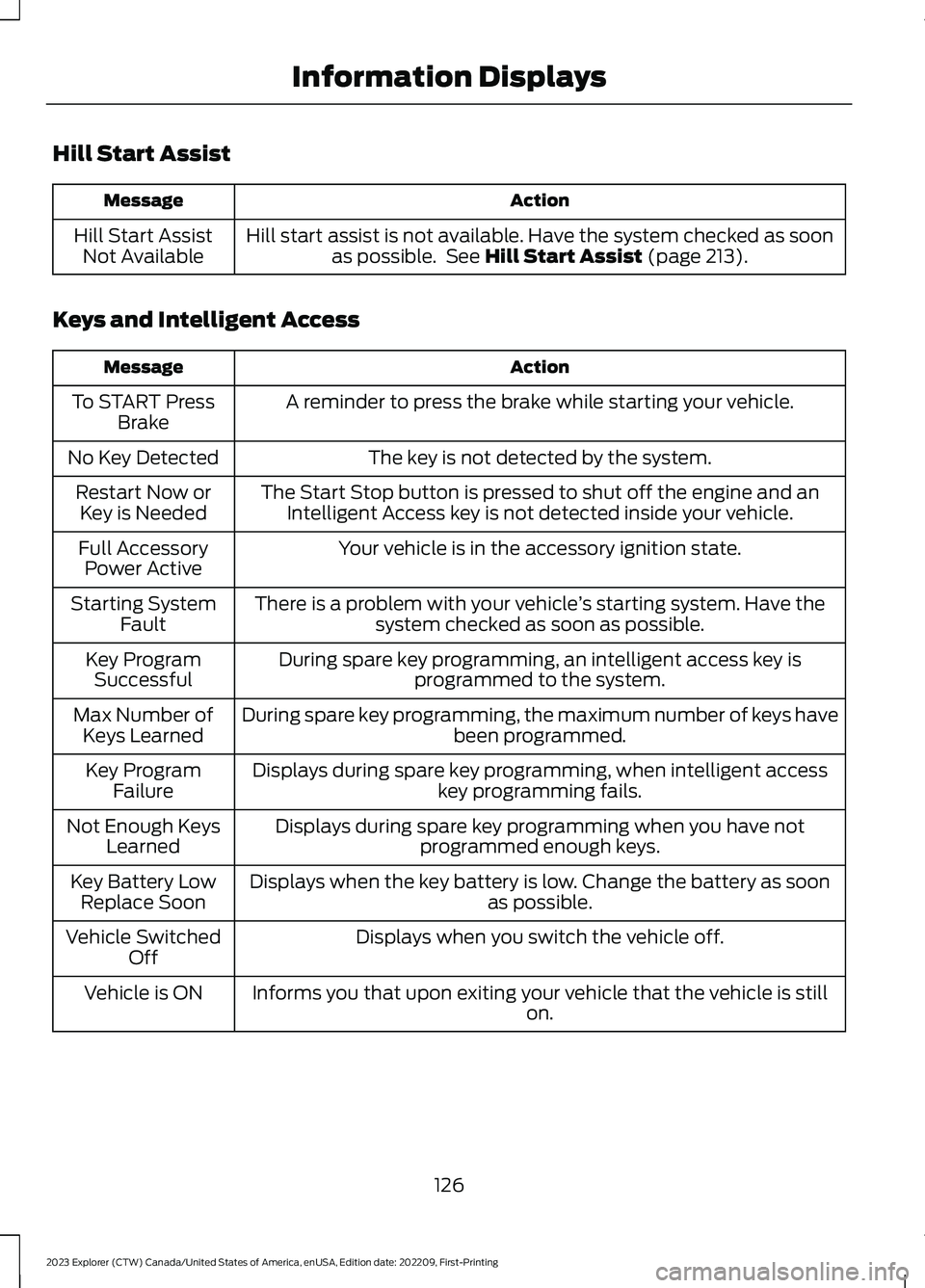
Hill Start Assist
ActionMessage
Hill start assist is not available. Have the system checked as soonas possible. See Hill Start Assist (page 213).Hill Start AssistNot Available
Keys and Intelligent Access
ActionMessage
A reminder to press the brake while starting your vehicle.To START PressBrake
The key is not detected by the system.No Key Detected
The Start Stop button is pressed to shut off the engine and anIntelligent Access key is not detected inside your vehicle.Restart Now orKey is Needed
Your vehicle is in the accessory ignition state.Full AccessoryPower Active
There is a problem with your vehicle’s starting system. Have thesystem checked as soon as possible.Starting SystemFault
During spare key programming, an intelligent access key isprogrammed to the system.Key ProgramSuccessful
During spare key programming, the maximum number of keys havebeen programmed.Max Number ofKeys Learned
Displays during spare key programming, when intelligent accesskey programming fails.Key ProgramFailure
Displays during spare key programming when you have notprogrammed enough keys.Not Enough KeysLearned
Displays when the key battery is low. Change the battery as soonas possible.Key Battery LowReplace Soon
Displays when you switch the vehicle off.Vehicle SwitchedOff
Informs you that upon exiting your vehicle that the vehicle is stillon.Vehicle is ON
126
2023 Explorer (CTW) Canada/United States of America, enUSA, Edition date: 202209, First-PrintingInformation Displays
Page 135 of 573
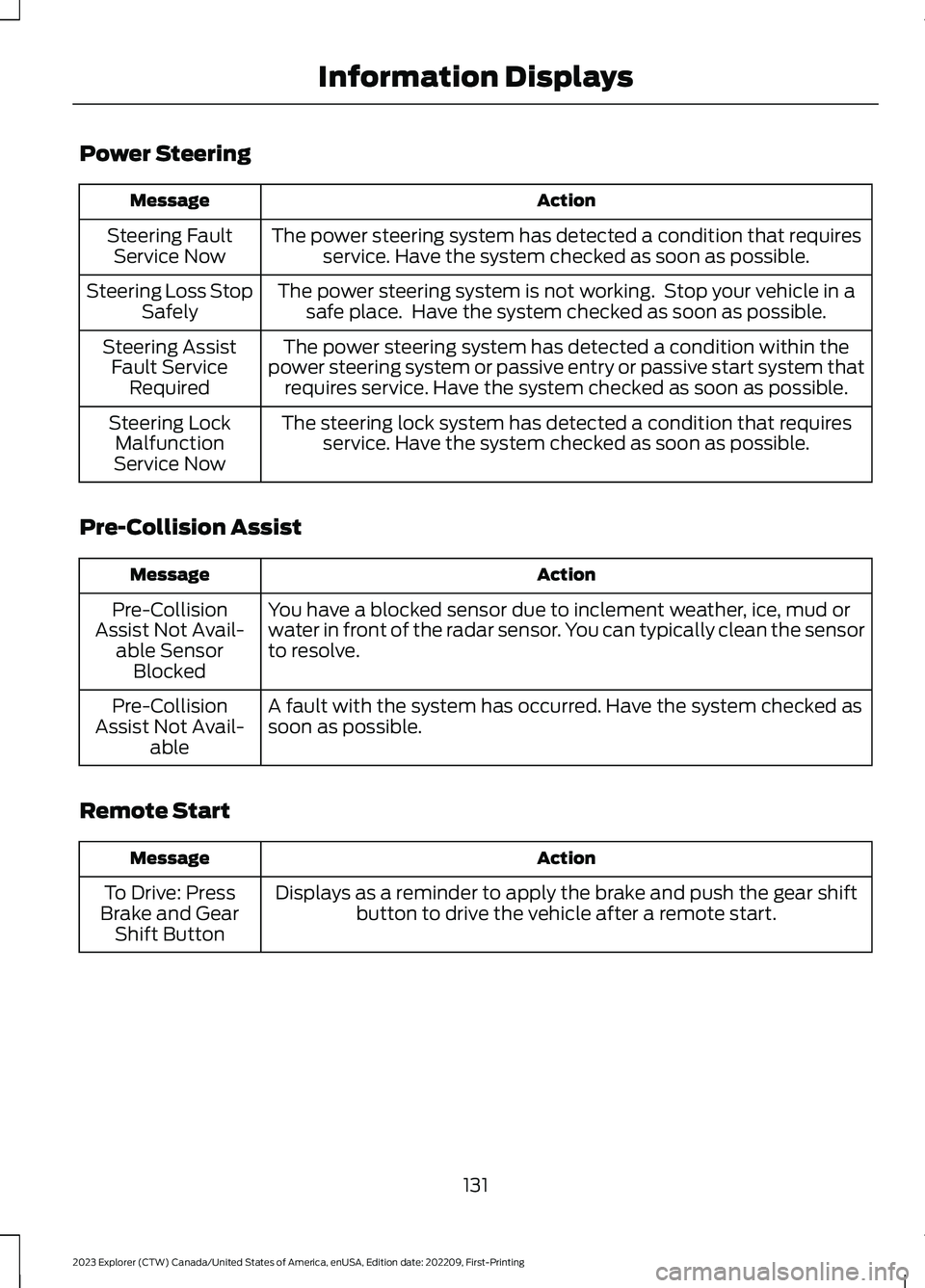
Power Steering
ActionMessage
The power steering system has detected a condition that requiresservice. Have the system checked as soon as possible.Steering FaultService Now
The power steering system is not working. Stop your vehicle in asafe place. Have the system checked as soon as possible.Steering Loss StopSafely
The power steering system has detected a condition within thepower steering system or passive entry or passive start system thatrequires service. Have the system checked as soon as possible.
Steering AssistFault ServiceRequired
The steering lock system has detected a condition that requiresservice. Have the system checked as soon as possible.Steering LockMalfunctionService Now
Pre-Collision Assist
ActionMessage
You have a blocked sensor due to inclement weather, ice, mud orwater in front of the radar sensor. You can typically clean the sensorto resolve.
Pre-CollisionAssist Not Avail-able SensorBlocked
A fault with the system has occurred. Have the system checked assoon as possible.Pre-CollisionAssist Not Avail-able
Remote Start
ActionMessage
Displays as a reminder to apply the brake and push the gear shiftbutton to drive the vehicle after a remote start.To Drive: PressBrake and GearShift Button
131
2023 Explorer (CTW) Canada/United States of America, enUSA, Edition date: 202209, First-PrintingInformation Displays
Page 159 of 573
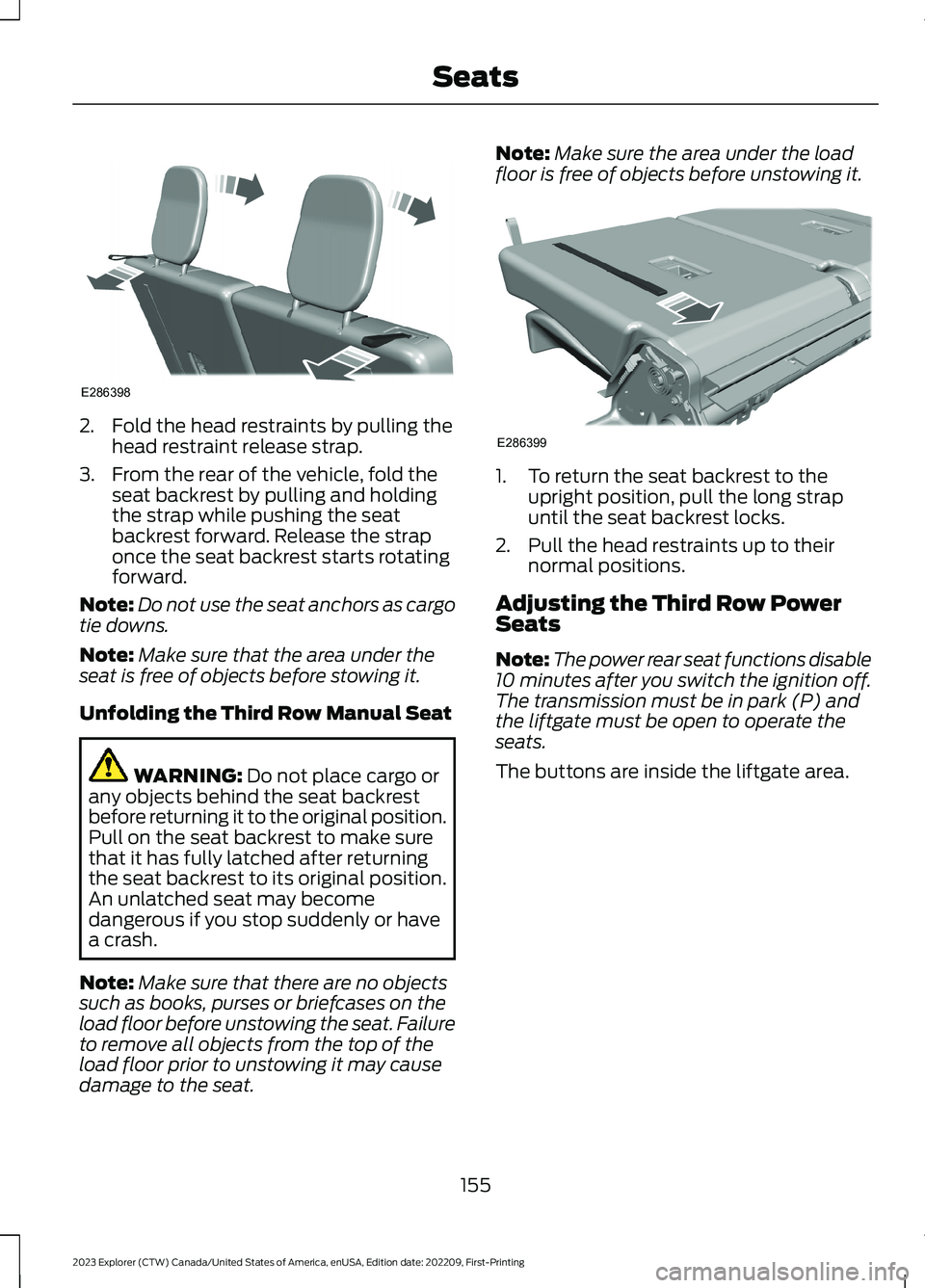
2.Fold the head restraints by pulling thehead restraint release strap.
3.From the rear of the vehicle, fold theseat backrest by pulling and holdingthe strap while pushing the seatbackrest forward. Release the straponce the seat backrest starts rotatingforward.
Note:Do not use the seat anchors as cargotie downs.
Note:Make sure that the area under theseat is free of objects before stowing it.
Unfolding the Third Row Manual Seat
WARNING: Do not place cargo orany objects behind the seat backrestbefore returning it to the original position.Pull on the seat backrest to make surethat it has fully latched after returningthe seat backrest to its original position.An unlatched seat may becomedangerous if you stop suddenly or havea crash.
Note:Make sure that there are no objectssuch as books, purses or briefcases on theload floor before unstowing the seat. Failureto remove all objects from the top of theload floor prior to unstowing it may causedamage to the seat.
Note:Make sure the area under the loadfloor is free of objects before unstowing it.
1.To return the seat backrest to theupright position, pull the long strapuntil the seat backrest locks.
2.Pull the head restraints up to theirnormal positions.
Adjusting the Third Row PowerSeats
Note:The power rear seat functions disable10 minutes after you switch the ignition off.The transmission must be in park (P) andthe liftgate must be open to operate theseats.
The buttons are inside the liftgate area.
155
2023 Explorer (CTW) Canada/United States of America, enUSA, Edition date: 202209, First-PrintingSeatsE286398 E286399
Page 173 of 573
KEYLESS STARTING (IF EQUIPPED)
Note:The system may not function if theremote control is close to metal objects orelectronic devices, for example keys or a cellphone.
Note:A valid remote control must belocated inside your vehicle to switch theignition on and start your vehicle.
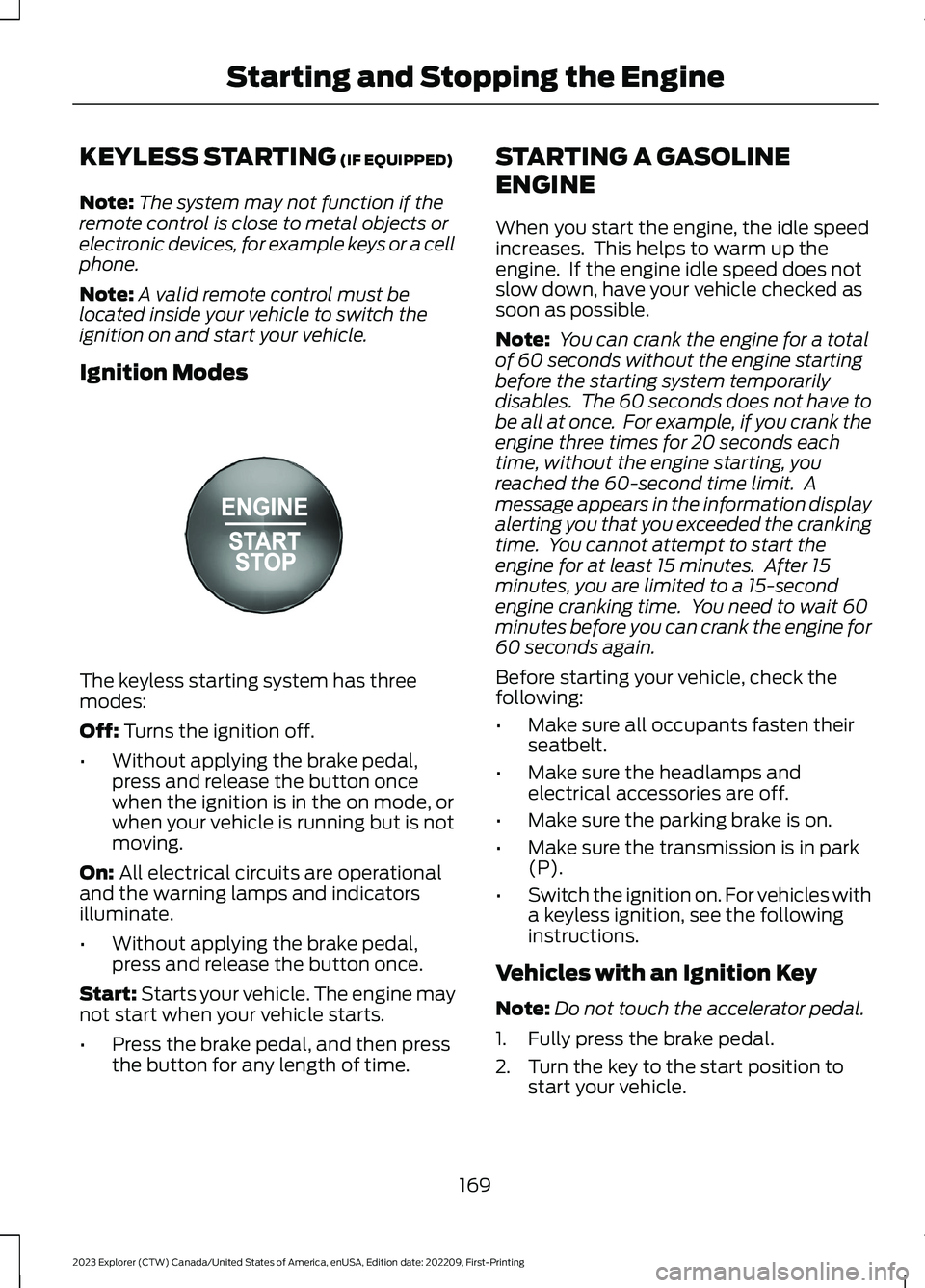
Ignition Modes
The keyless starting system has threemodes:
Off: Turns the ignition off.
•Without applying the brake pedal,press and release the button oncewhen the ignition is in the on mode, orwhen your vehicle is running but is notmoving.
On: All electrical circuits are operationaland the warning lamps and indicatorsilluminate.
•Without applying the brake pedal,press and release the button once.
Start: Starts your vehicle. The engine maynot start when your vehicle starts.
•Press the brake pedal, and then pressthe button for any length of time.
STARTING A GASOLINE
ENGINE
When you start the engine, the idle speedincreases. This helps to warm up theengine. If the engine idle speed does notslow down, have your vehicle checked assoon as possible.
Note: You can crank the engine for a totalof 60 seconds without the engine startingbefore the starting system temporarilydisables. The 60 seconds does not have tobe all at once. For example, if you crank theengine three times for 20 seconds eachtime, without the engine starting, youreached the 60-second time limit. Amessage appears in the information displayalerting you that you exceeded the crankingtime. You cannot attempt to start theengine for at least 15 minutes. After 15minutes, you are limited to a 15-secondengine cranking time. You need to wait 60minutes before you can crank the engine for60 seconds again.
Before starting your vehicle, check thefollowing:
•Make sure all occupants fasten theirseatbelt.
•Make sure the headlamps andelectrical accessories are off.
•Make sure the parking brake is on.
•Make sure the transmission is in park(P).
•Switch the ignition on. For vehicles witha keyless ignition, see the followinginstructions.
Vehicles with an Ignition Key
Note:Do not touch the accelerator pedal.
1.Fully press the brake pedal.
2.Turn the key to the start position tostart your vehicle.
169
2023 Explorer (CTW) Canada/United States of America, enUSA, Edition date: 202209, First-PrintingStarting and Stopping the EngineE357532
Page 174 of 573
Note:The engine may continue crankingfor up to 15 seconds or until it starts.
Note:If you cannot start the engine on thefirst try, wait for a short period and try again.
Vehicles with Keyless Start
Note:Do not touch the accelerator pedal.
Note:You must have your intelligent accesskey in your vehicle in order to shift thetransmission out of park (P).
1.Fully press the brake pedal.
2.Press the push button ignition switch.
The system does not function if:
•The passive key frequencies arejammed.
•The key battery has no charge.
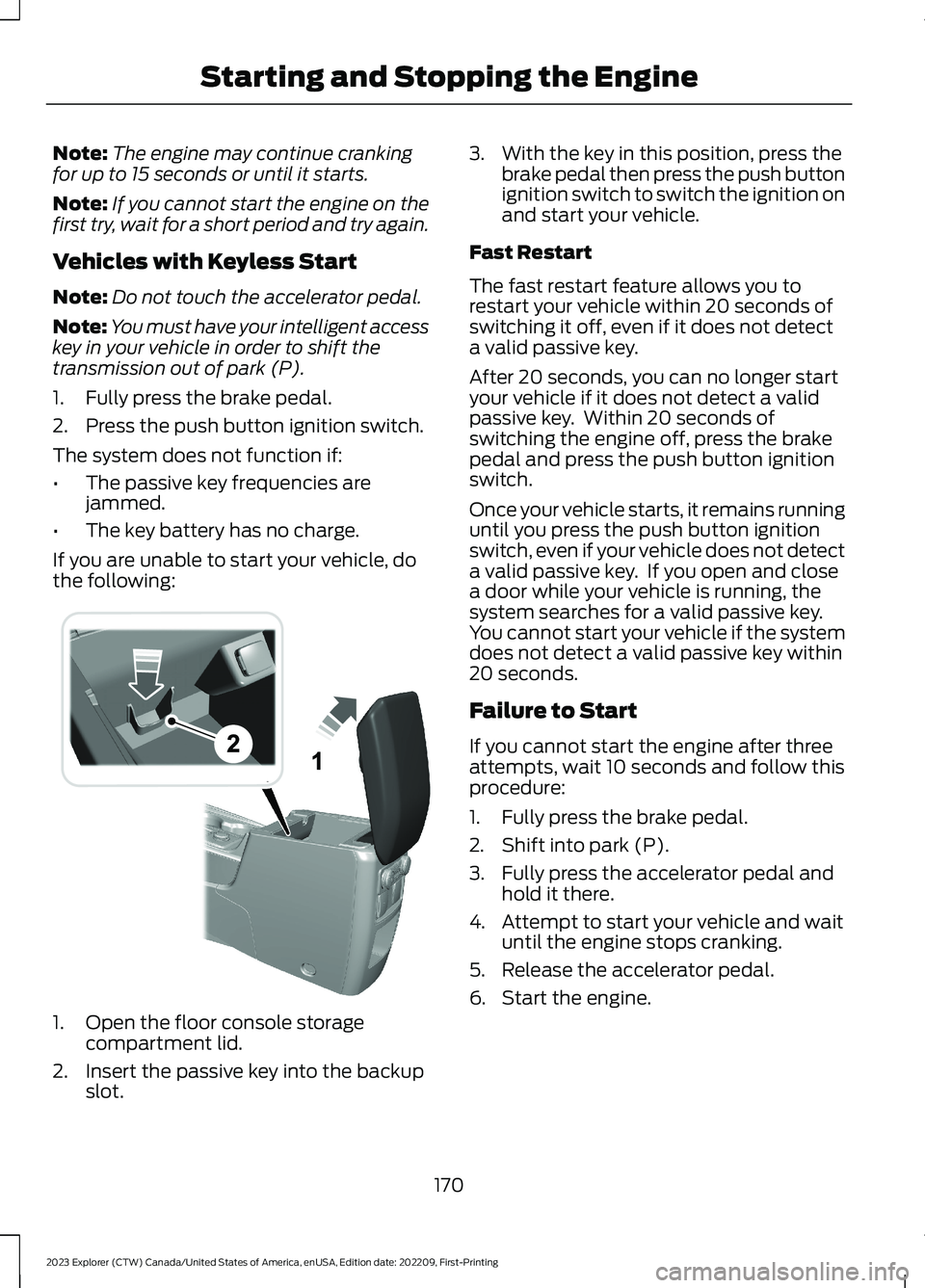
If you are unable to start your vehicle, dothe following:
1.Open the floor console storagecompartment lid.
2.Insert the passive key into the backupslot.
3.With the key in this position, press thebrake pedal then press the push buttonignition switch to switch the ignition onand start your vehicle.
Fast Restart
The fast restart feature allows you torestart your vehicle within 20 seconds ofswitching it off, even if it does not detecta valid passive key.
After 20 seconds, you can no longer startyour vehicle if it does not detect a validpassive key. Within 20 seconds ofswitching the engine off, press the brakepedal and press the push button ignitionswitch.
Once your vehicle starts, it remains runninguntil you press the push button ignitionswitch, even if your vehicle does not detecta valid passive key. If you open and closea door while your vehicle is running, thesystem searches for a valid passive key.You cannot start your vehicle if the systemdoes not detect a valid passive key within20 seconds.
Failure to Start
If you cannot start the engine after threeattempts, wait 10 seconds and follow thisprocedure:
1.Fully press the brake pedal.
2.Shift into park (P).
3.Fully press the accelerator pedal andhold it there.
4.Attempt to start your vehicle and waituntil the engine stops cranking.
5.Release the accelerator pedal.
6.Start the engine.
170
2023 Explorer (CTW) Canada/United States of America, enUSA, Edition date: 202209, First-PrintingStarting and Stopping the EngineE297184