ignition FORD F-150 2018 Owners Manual
[x] Cancel search | Manufacturer: FORD, Model Year: 2018, Model line: F-150, Model: FORD F-150 2018Pages: 641, PDF Size: 8.37 MB
Page 506 of 641
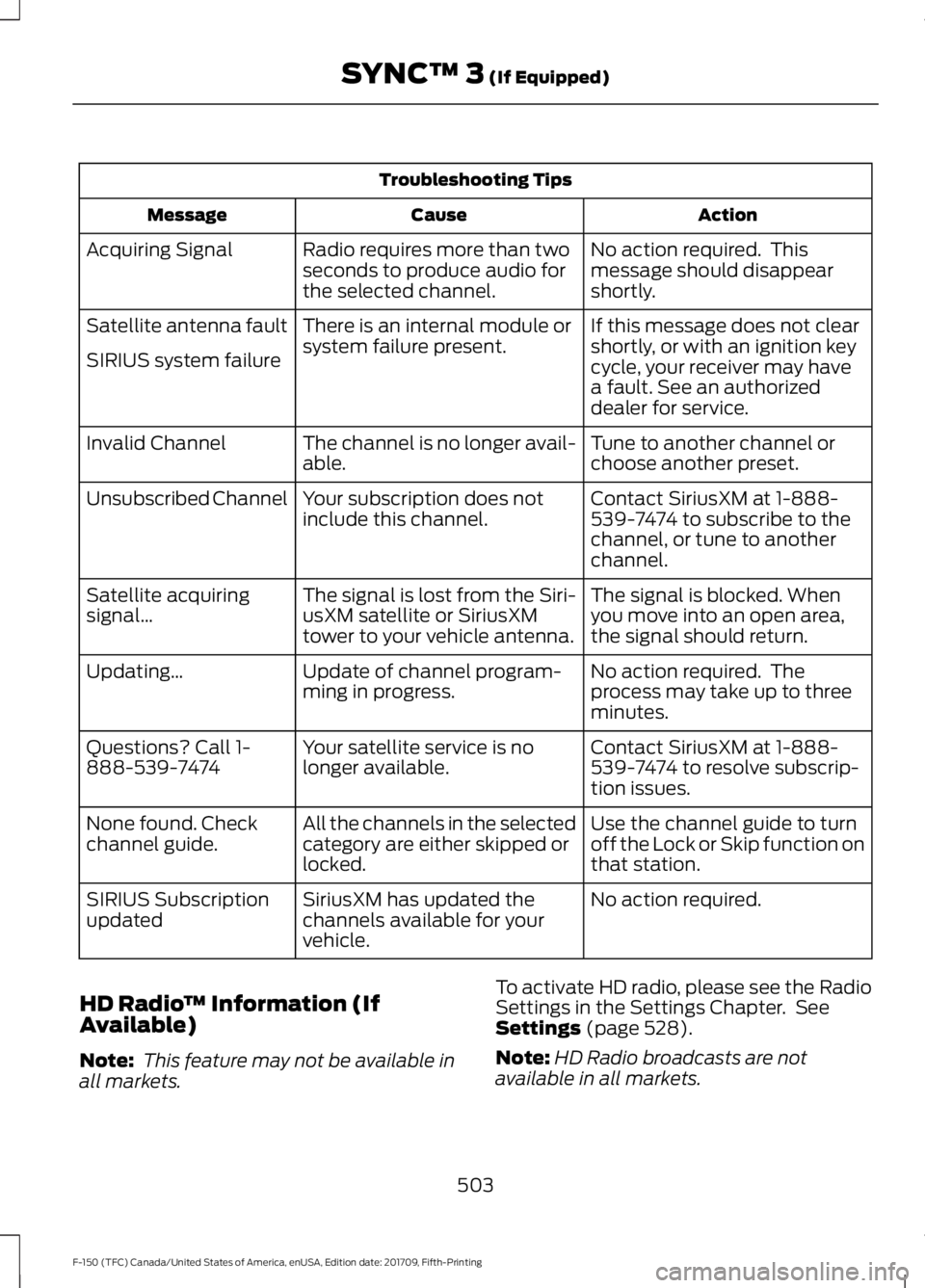
Troubleshooting Tips
Action
Cause
Message
No action required. This
message should disappear
shortly.
Radio requires more than two
seconds to produce audio for
the selected channel.
Acquiring Signal
If this message does not clear
shortly, or with an ignition key
cycle, your receiver may have
a fault. See an authorized
dealer for service.
There is an internal module or
system failure present.
Satellite antenna fault
SIRIUS system failure
Tune to another channel or
choose another preset.
The channel is no longer avail-
able.
Invalid Channel
Contact SiriusXM at 1-888-
539-7474 to subscribe to the
channel, or tune to another
channel.
Your subscription does not
include this channel.
Unsubscribed Channel
The signal is blocked. When
you move into an open area,
the signal should return.
The signal is lost from the Siri-
usXM satellite or SiriusXM
tower to your vehicle antenna.
Satellite acquiring
signal\b
No action required. The
process may take up to three
minutes.
Update of channel program-
ming in progress.
Updating\b
Contact SiriusXM at 1-888-
539-7474 to resolve subscrip-
tion issues.
Your satellite service is no
longer available.
Questions? Call 1-
888-539-7474
Use the channel guide to turn
off the Lock or Skip function on
that station.
All the channels in the selected
category are either skipped or
locked.
None found. Check
channel guide.
No action required.
SiriusXM has updated the
channels available for your
vehicle.
SIRIUS Subscription
updated
HD Radio ™ Information (If
Available)
Note: This feature may not be available in
all markets. To activate HD radio, please see the Radio
Settings in the Settings Chapter. See
Settings (page 528).
Note: HD Radio broadcasts are not
available in all markets.
503
F-150 (TFC) Canada/United States of America, enUSA, Edition date: 201709, Fifth-Printing SYNC™ 3
(If Equipped)
Page 527 of 641
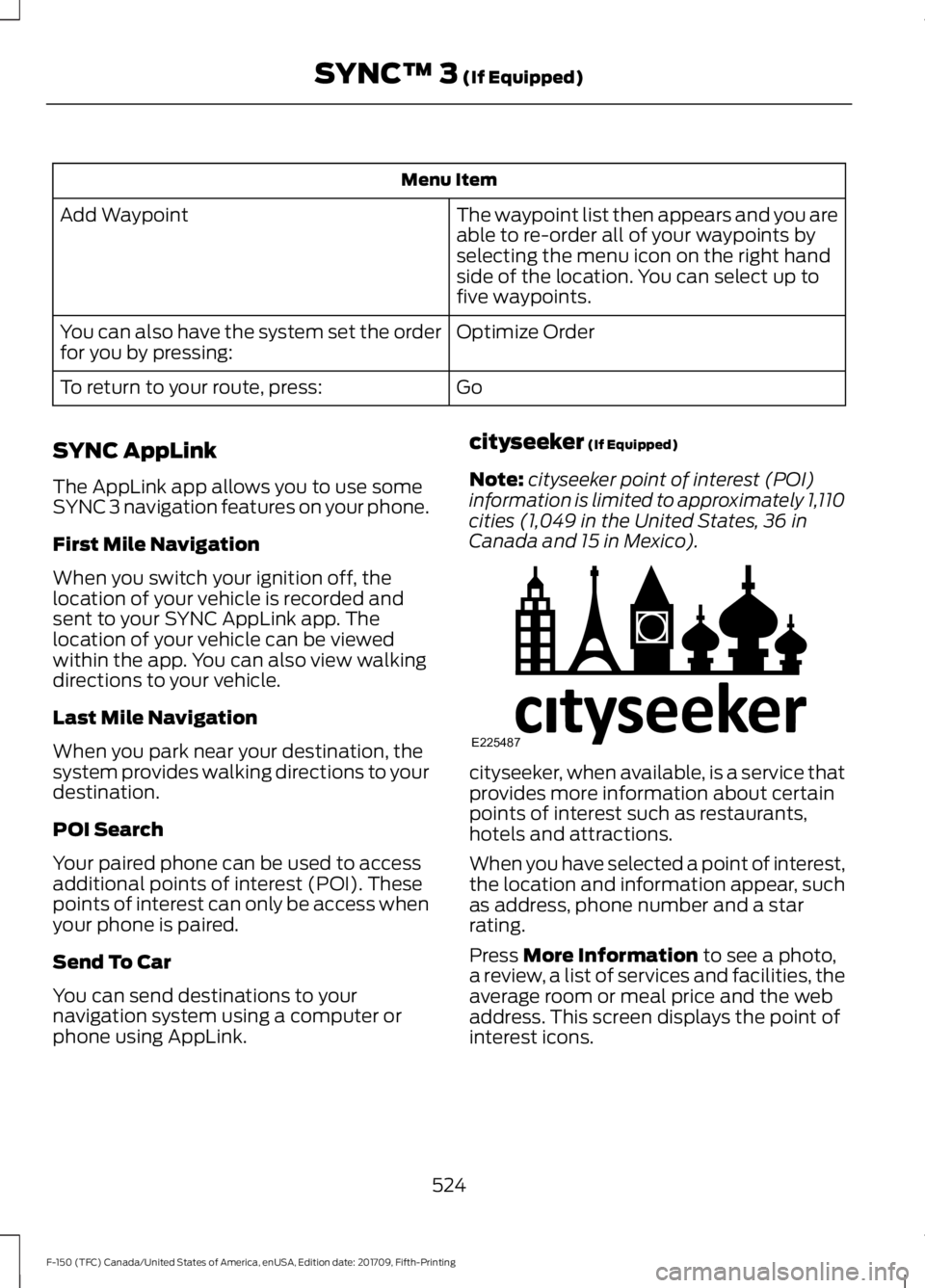
Menu Item
The waypoint list then appears and you are
able to re-order all of your waypoints by
selecting the menu icon on the right hand
side of the location. You can select up to
five waypoints.
Add Waypoint
Optimize Order
You can also have the system set the order
for you by pressing:
Go
To return to your route, press:
SYNC AppLink
The AppLink app allows you to use some
SYNC 3 navigation features on your phone.
First Mile Navigation
When you switch your ignition off, the
location of your vehicle is recorded and
sent to your SYNC AppLink app. The
location of your vehicle can be viewed
within the app. You can also view walking
directions to your vehicle.
Last Mile Navigation
When you park near your destination, the
system provides walking directions to your
destination.
POI Search
Your paired phone can be used to access
additional points of interest (POI). These
points of interest can only be access when
your phone is paired.
Send To Car
You can send destinations to your
navigation system using a computer or
phone using AppLink. cityseeker (If Equipped)
Note: cityseeker point of interest (POI)
information is limited to approximately 1,110
cities (1,049 in the United States, 36 in
Canada and 15 in Mexico). cityseeker, when available, is a service that
provides more information about certain
points of interest such as restaurants,
hotels and attractions.
When you have selected a point of interest,
the location and information appear, such
as address, phone number and a star
rating.
Press
More Information to see a photo,
a review, a list of services and facilities, the
average room or meal price and the web
address. This screen displays the point of
interest icons.
524
F-150 (TFC) Canada/United States of America, enUSA, Edition date: 201709, Fifth-Printing SYNC™ 3
(If Equipped)E225487
Page 543 of 641
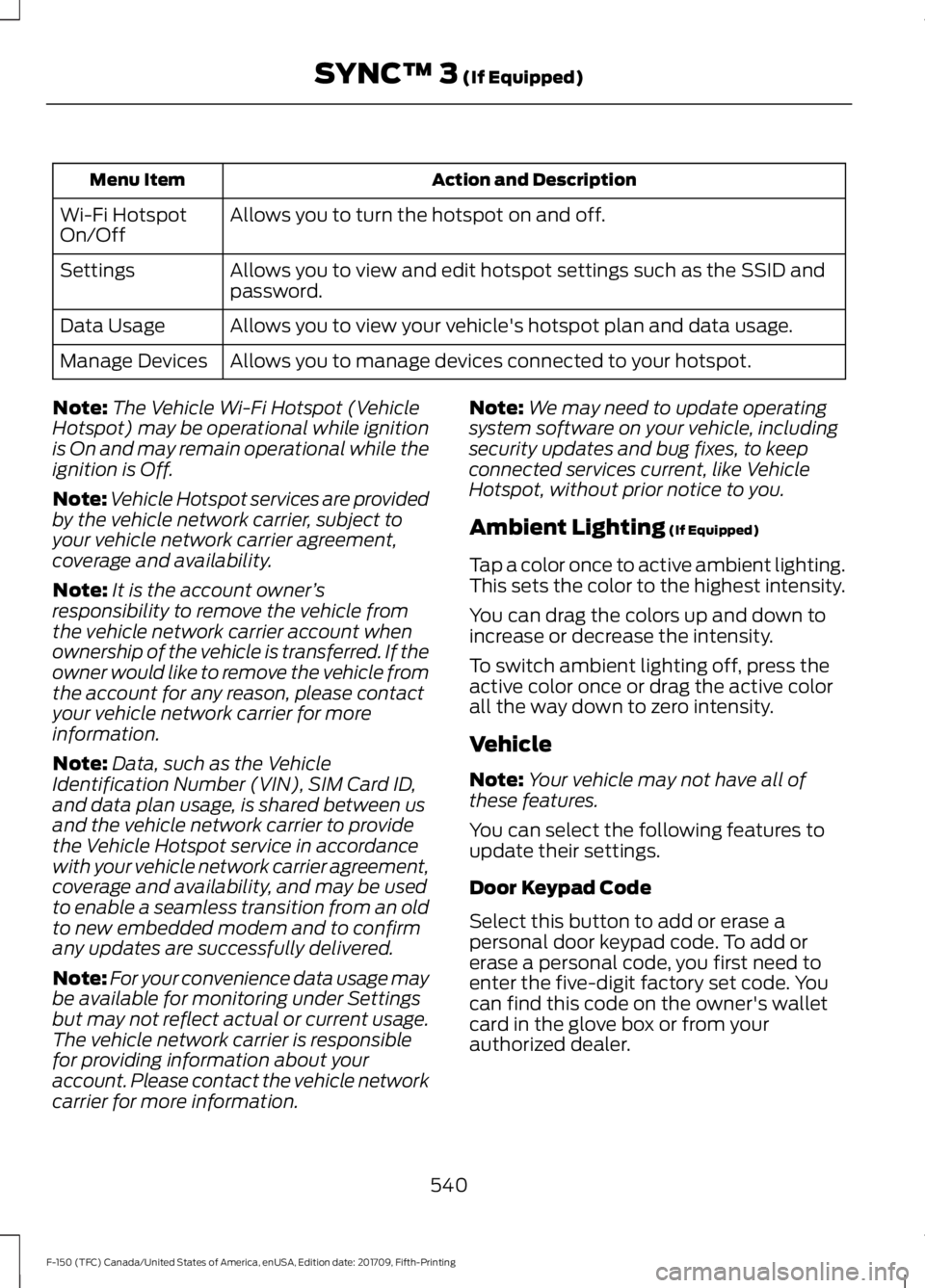
Action and Description
Menu Item
Allows you to turn the hotspot on and off.
Wi-Fi Hotspot
On/Off
Allows you to view and edit hotspot settings such as the SSID and
password.
Settings
Allows you to view your vehicle's hotspot plan and data usage.
Data Usage
Allows you to manage devices connected to your hotspot.
Manage Devices
Note: The Vehicle Wi-Fi Hotspot (Vehicle
Hotspot) may be operational while ignition
is On and may remain operational while the
ignition is Off.
Note: Vehicle Hotspot services are provided
by the vehicle network carrier, subject to
your vehicle network carrier agreement,
coverage and availability.
Note: It is the account owner ’s
responsibility to remove the vehicle from
the vehicle network carrier account when
ownership of the vehicle is transferred. If the
owner would like to remove the vehicle from
the account for any reason, please contact
your vehicle network carrier for more
information.
Note: Data, such as the Vehicle
Identification Number (VIN), SIM Card ID,
and data plan usage, is shared between us
and the vehicle network carrier to provide
the Vehicle Hotspot service in accordance
with your vehicle network carrier agreement,
coverage and availability, and may be used
to enable a seamless transition from an old
to new embedded modem and to confirm
any updates are successfully delivered.
Note: For your convenience data usage may
be available for monitoring under Settings
but may not reflect actual or current usage.
The vehicle network carrier is responsible
for providing information about your
account. Please contact the vehicle network
carrier for more information. Note:
We may need to update operating
system software on your vehicle, including
security updates and bug fixes, to keep
connected services current, like Vehicle
Hotspot, without prior notice to you.
Ambient Lighting (If Equipped)
Tap a color once to active ambient lighting.
This sets the color to the highest intensity.
You can drag the colors up and down to
increase or decrease the intensity.
To switch ambient lighting off, press the
active color once or drag the active color
all the way down to zero intensity.
Vehicle
Note: Your vehicle may not have all of
these features.
You can select the following features to
update their settings.
Door Keypad Code
Select this button to add or erase a
personal door keypad code. To add or
erase a personal code, you first need to
enter the five-digit factory set code. You
can find this code on the owner's wallet
card in the glove box or from your
authorized dealer.
540
F-150 (TFC) Canada/United States of America, enUSA, Edition date: 201709, Fifth-Printing SYNC™ 3
(If Equipped)
Page 552 of 641
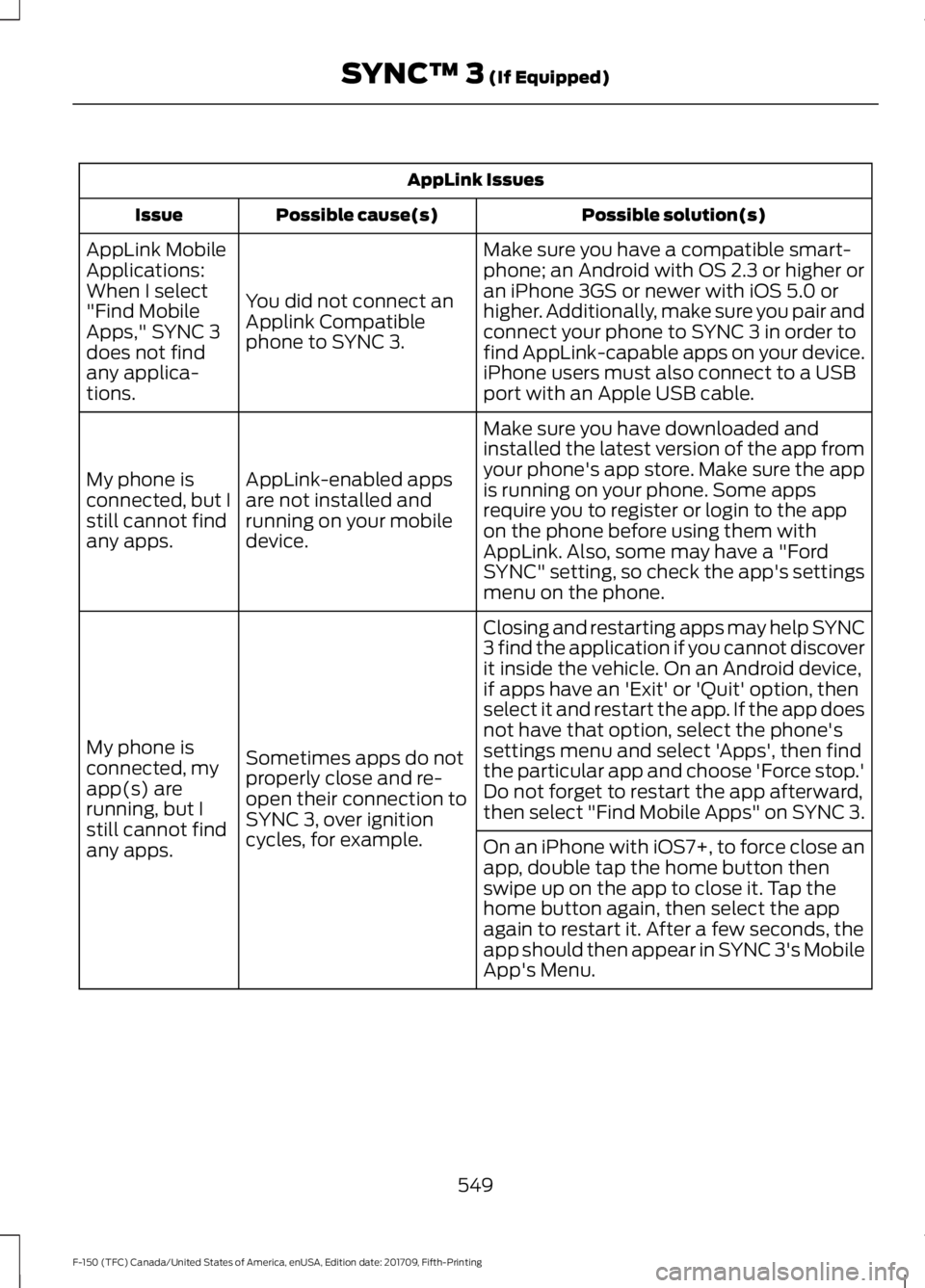
AppLink Issues
Possible solution(s)
Possible cause(s)
Issue
Make sure you have a compatible smart-
phone; an Android with OS 2.3 or higher or
an iPhone 3GS or newer with iOS 5.0 or
higher. Additionally, make sure you pair and
connect your phone to SYNC 3 in order to
find AppLink-capable apps on your device.
iPhone users must also connect to a USB
port with an Apple USB cable.
You did not connect an
Applink Compatible
phone to SYNC 3.
AppLink Mobile
Applications:
When I select
"Find Mobile
Apps," SYNC 3
does not find
any applica-
tions.
Make sure you have downloaded and
installed the latest version of the app from
your phone's app store. Make sure the app
is running on your phone. Some apps
require you to register or login to the app
on the phone before using them with
AppLink. Also, some may have a "Ford
SYNC" setting, so check the app's settings
menu on the phone.
AppLink-enabled apps
are not installed and
running on your mobile
device.
My phone is
connected, but I
still cannot find
any apps.
Closing and restarting apps may help SYNC
3 find the application if you cannot discover
it inside the vehicle. On an Android device,
if apps have an 'Exit' or 'Quit' option, then
select it and restart the app. If the app does
not have that option, select the phone's
settings menu and select 'Apps', then find
the particular app and choose 'Force stop.'
Do not forget to restart the app afterward,
then select "Find Mobile Apps" on SYNC 3.
Sometimes apps do not
properly close and re-
open their connection to
SYNC 3, over ignition
cycles, for example.
My phone is
connected, my
app(s) are
running, but I
still cannot find
any apps.
On an iPhone with iOS7+, to force close an
app, double tap the home button then
swipe up on the app to close it. Tap the
home button again, then select the app
again to restart it. After a few seconds, the
app should then appear in SYNC 3's Mobile
App's Menu.
549
F-150 (TFC) Canada/United States of America, enUSA, Edition date: 201709, Fifth-Printing SYNC™ 3 (If Equipped)
Page 556 of 641
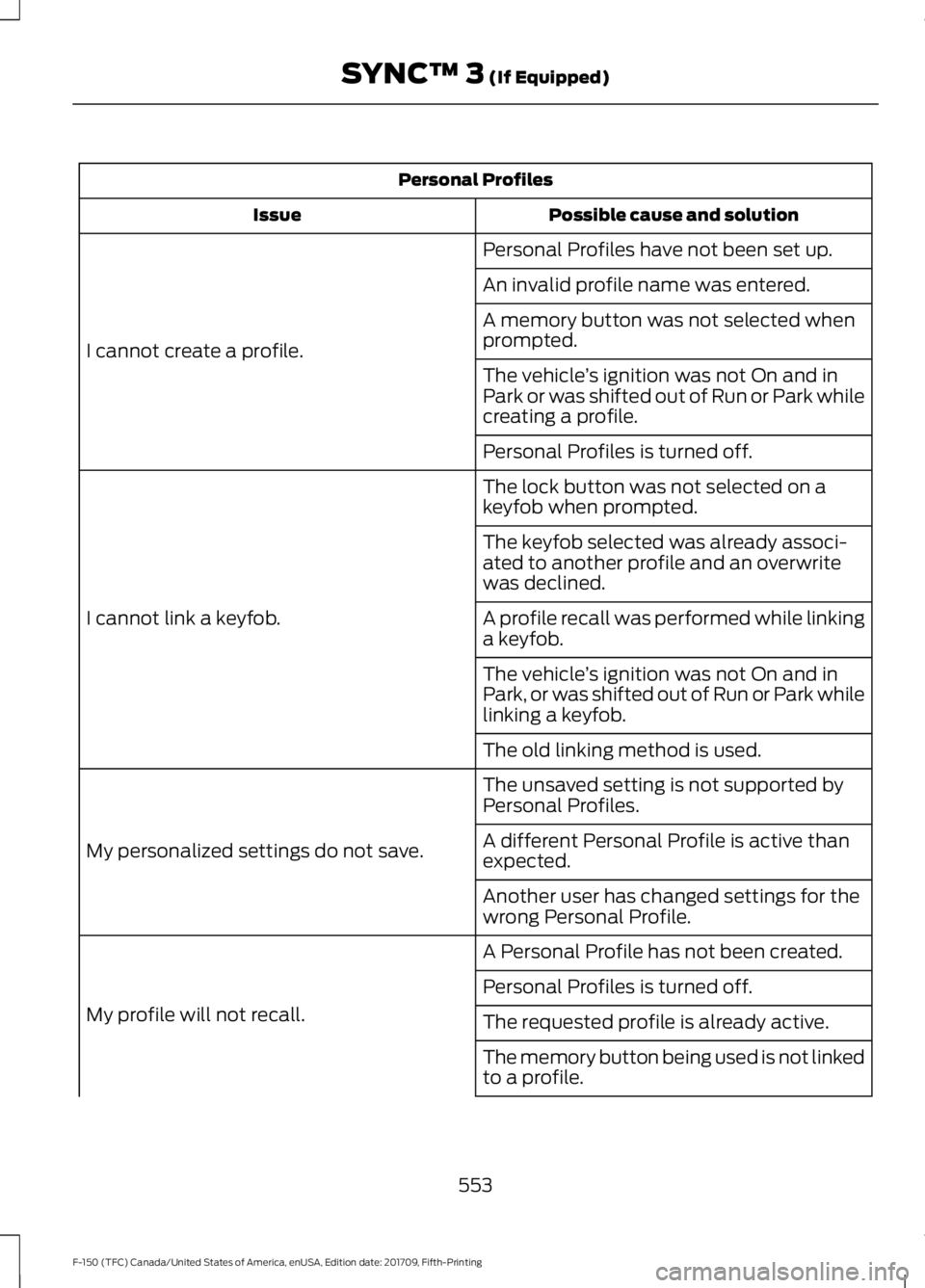
Personal Profiles
Possible cause and solution
Issue
Personal Profiles have not been set up.
I cannot create a profile. An invalid profile name was entered.
A memory button was not selected when
prompted.
The vehicle
’s ignition was not On and in
Park or was shifted out of Run or Park while
creating a profile.
Personal Profiles is turned off.
The lock button was not selected on a
keyfob when prompted.
I cannot link a keyfob. The keyfob selected was already associ-
ated to another profile and an overwrite
was declined.
A profile recall was performed while linking
a keyfob.
The vehicle
’s ignition was not On and in
Park, or was shifted out of Run or Park while
linking a keyfob.
The old linking method is used.
The unsaved setting is not supported by
Personal Profiles.
My personalized settings do not save. A different Personal Profile is active than
expected.
Another user has changed settings for the
wrong Personal Profile.
A Personal Profile has not been created.
My profile will not recall. Personal Profiles is turned off.
The requested profile is already active.
The memory button being used is not linked
to a profile.
553
F-150 (TFC) Canada/United States of America, enUSA, Edition date: 201709, Fifth-Printing SYNC™ 3 (If Equipped)
Page 590 of 641
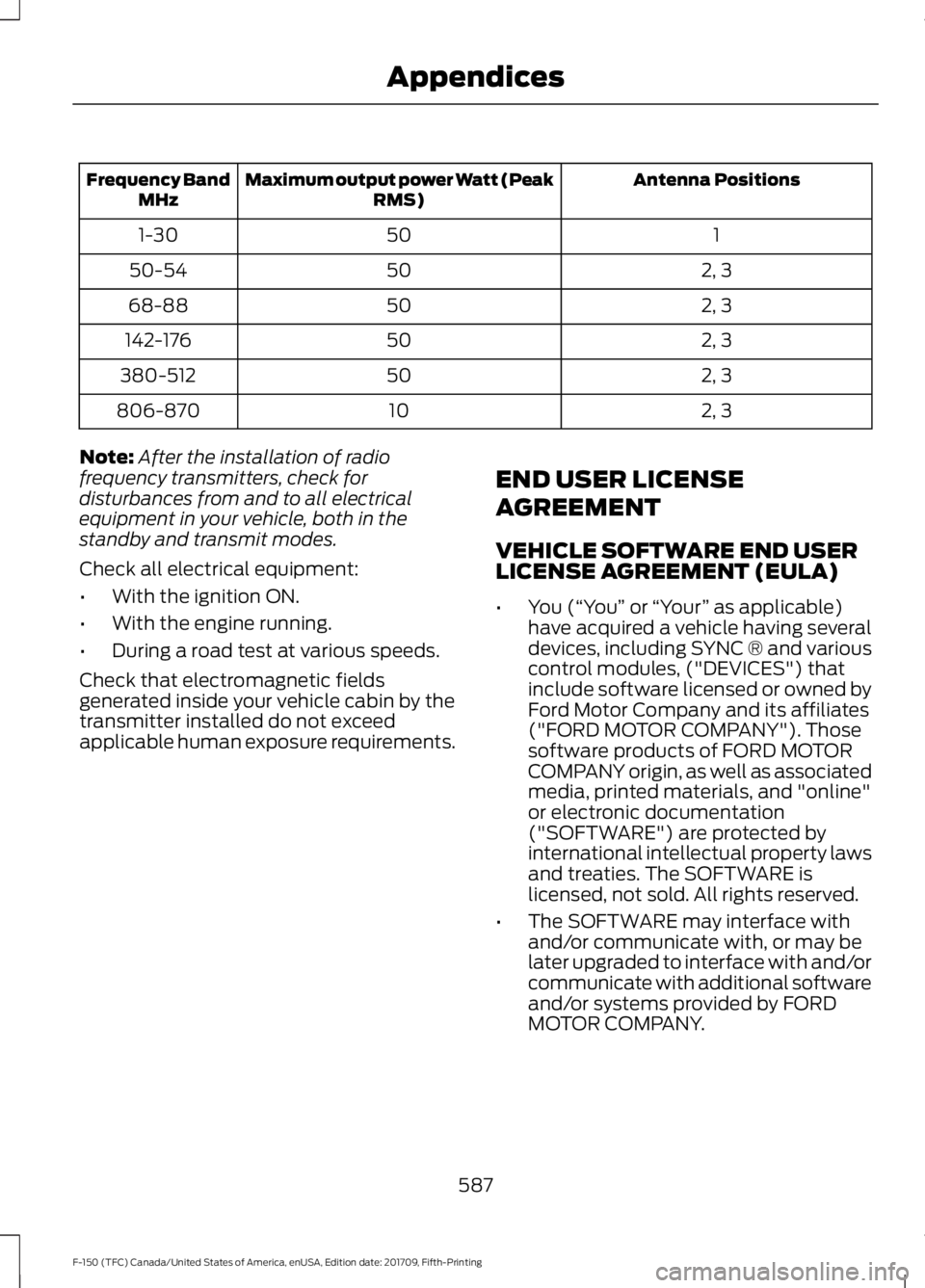
Antenna Positions
Maximum output power Watt (Peak
RMS)
Frequency Band
MHz
1
50
1-30
2, 3
50
50-54
2, 3
50
68-88
2, 3
50
142-176
2, 3
50
380-512
2, 3
10
806-870
Note: After the installation of radio
frequency transmitters, check for
disturbances from and to all electrical
equipment in your vehicle, both in the
standby and transmit modes.
Check all electrical equipment:
• With the ignition ON.
• With the engine running.
• During a road test at various speeds.
Check that electromagnetic fields
generated inside your vehicle cabin by the
transmitter installed do not exceed
applicable human exposure requirements. END USER LICENSE
AGREEMENT
VEHICLE SOFTWARE END USER
LICENSE AGREEMENT (EULA)
•
You (“You” or “Your ” as applicable)
have acquired a vehicle having several
devices, including SYNC ® and various
control modules, ("DEVICES") that
include software licensed or owned by
Ford Motor Company and its affiliates
("FORD MOTOR COMPANY"). Those
software products of FORD MOTOR
COMPANY origin, as well as associated
media, printed materials, and "online"
or electronic documentation
("SOFTWARE") are protected by
international intellectual property laws
and treaties. The SOFTWARE is
licensed, not sold. All rights reserved.
• The SOFTWARE may interface with
and/or communicate with, or may be
later upgraded to interface with and/or
communicate with additional software
and/or systems provided by FORD
MOTOR COMPANY.
587
F-150 (TFC) Canada/United States of America, enUSA, Edition date: 201709, Fifth-Printing Appendices
Page 628 of 641
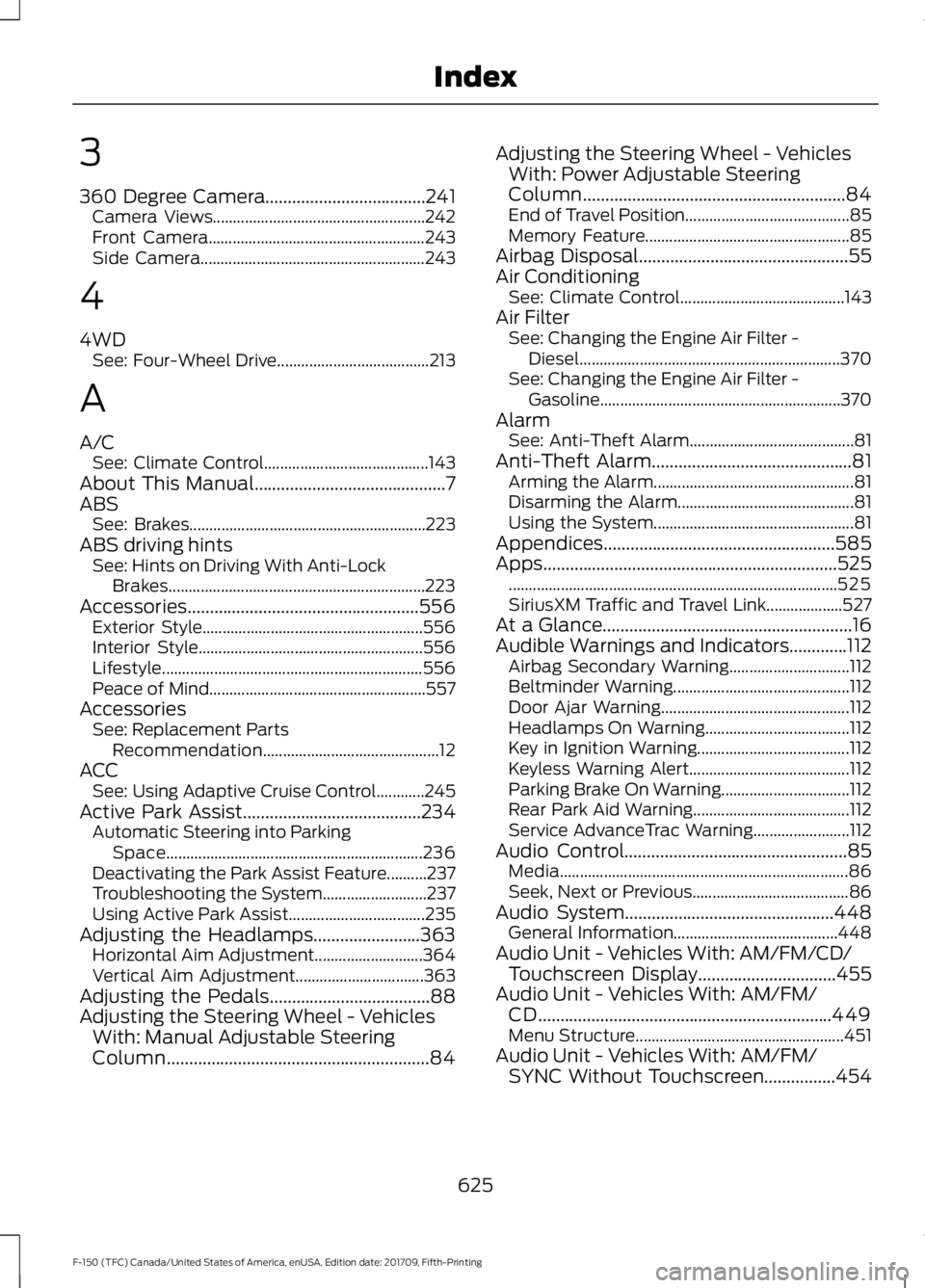
3
360 Degree Camera....................................241
Camera Views..................................................... 242
Front Camera...................................................... 243
Side Camera........................................................ 243
4
4WD See: Four-Wheel Drive...................................... 213
A
A/C See: Climate Control......................................... 143
About This Manual
...........................................7
ABS See: Brakes........................................................... 223
ABS driving hints See: Hints on Driving With Anti-Lock
Brakes................................................................ 223
Accessories....................................................556 Exterior Style....................................................... 556
Interior Style........................................................ 556
Lifestyle................................................................. 556
Peace of Mind...................................................... 557
Accessories See: Replacement Parts
Recommendation............................................ 12
ACC See: Using Adaptive Cruise Control............245
Active Park Assist........................................234 Automatic Steering into Parking
Space................................................................ 236
Deactivating the Park Assist Feature..........237
Troubleshooting the System.......................... 237
Using Active Park Assist.................................. 235
Adjusting the Headlamps........................363 Horizontal Aim Adjustment........................... 364
Vertical Aim Adjustment................................ 363
Adjusting the Pedals....................................88
Adjusting the Steering Wheel - Vehicles With: Manual Adjustable Steering
Column
...........................................................84 Adjusting the Steering Wheel - Vehicles
With: Power Adjustable Steering
Column
...........................................................84
End of Travel Position......................................... 85
Memory Feature................................................... 85
Airbag Disposal...............................................55
Air Conditioning See: Climate Control......................................... 143
Air Filter See: Changing the Engine Air Filter -
Diesel................................................................. 370
See: Changing the Engine Air Filter - Gasoline............................................................ 370
Alarm See: Anti-Theft Alarm......................................... 81
Anti-Theft Alarm
.............................................81
Arming the Alarm.................................................. 81
Disarming the Alarm............................................ 81
Using the System.................................................. 81
Appendices....................................................585
Apps..................................................................525 ........................................................................\
.......... 525
SiriusXM Traffic and Travel Link................... 527
At a Glance........................................................16
Audible Warnings and Indicators.............112 Airbag Secondary Warning.............................. 112
Beltminder Warning............................................ 112
Door Ajar Warning............................................... 112
Headlamps On Warning.................................... 112
Key in Ignition Warning...................................... 112
Keyless Warning Alert........................................ 112
Parking Brake On Warning................................ 112
Rear Park Aid Warning....................................... 112
Service AdvanceTrac Warning........................ 112
Audio Control
..................................................85
Media........................................................................\
86
Seek, Next or Previous....................................... 86
Audio System
...............................................448
General Information......................................... 448
Audio Unit - Vehicles With: AM/FM/CD/ Touchscreen Display
...............................455
Audio Unit - Vehicles With: AM/FM/ CD..................................................................449
Menu Structure.................................................... 451
Audio Unit - Vehicles With: AM/FM/ SYNC Without Touchscreen
................454
625
F-150 (TFC) Canada/United States of America, enUSA, Edition date: 201709, Fifth-Printing Index
Page 633 of 641
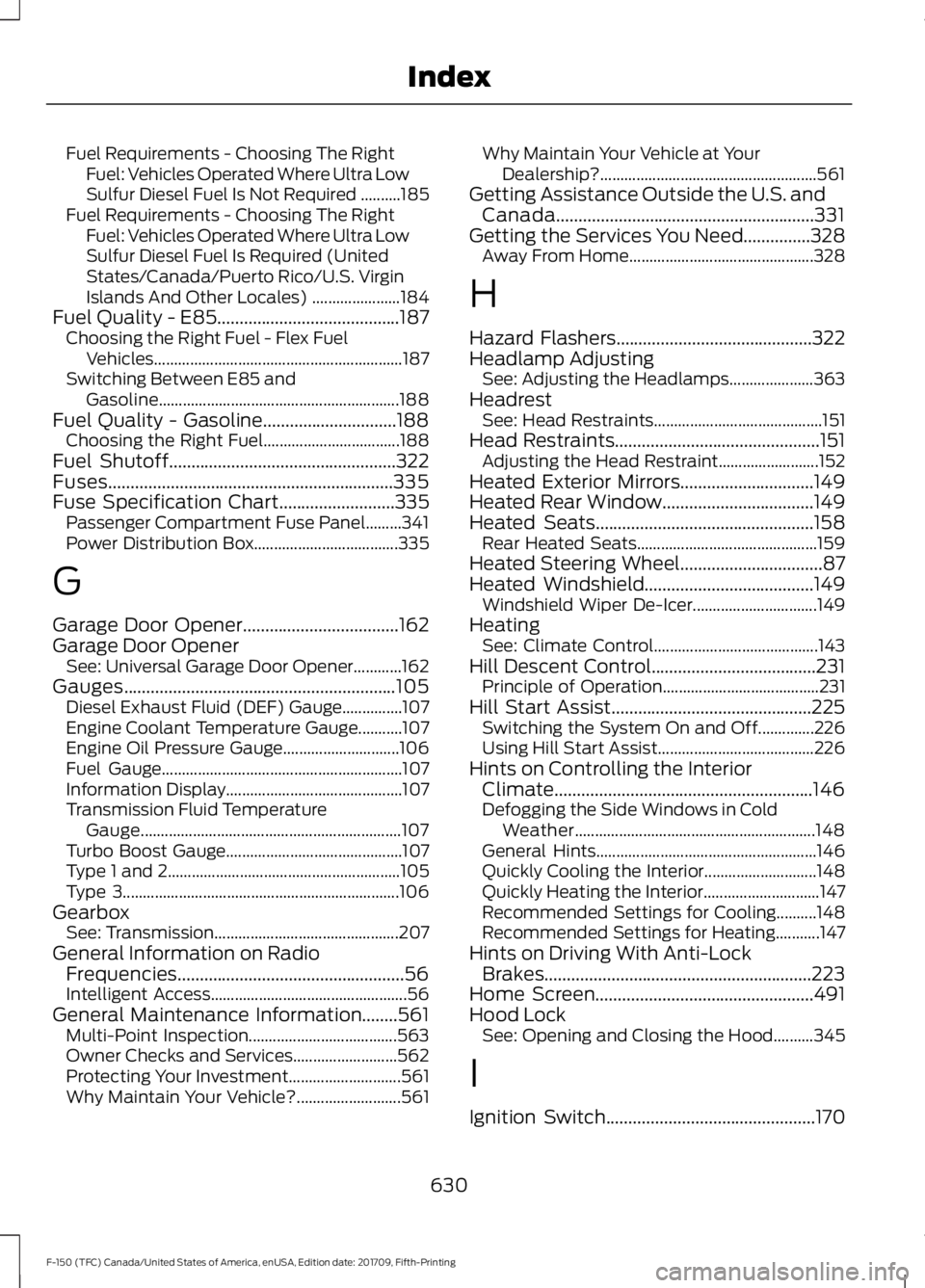
Fuel Requirements - Choosing The Right
Fuel: Vehicles Operated Where Ultra Low
Sulfur Diesel Fuel Is Not Required ..........185
Fuel Requirements - Choosing The Right Fuel: Vehicles Operated Where Ultra Low
Sulfur Diesel Fuel Is Required (United
States/Canada/Puerto Rico/U.S. Virgin
Islands And Other Locales) ...................... 184
Fuel Quality - E85.........................................187 Choosing the Right Fuel - Flex Fuel
Vehicles.............................................................. 187
Switching Between E85 and Gasoline............................................................ 188
Fuel Quality - Gasoline..............................188 Choosing the Right Fuel.................................. 188
Fuel Shutoff...................................................322
Fuses................................................................335
Fuse Specification Chart..........................335
Passenger Compartment Fuse Panel.........341
Power Distribution Box.................................... 335
G
Garage Door Opener...................................162
Garage Door Opener See: Universal Garage Door Opener............162
Gauges
.............................................................105
Diesel Exhaust Fluid (DEF) Gauge...............107
Engine Coolant Temperature Gauge...........107
Engine Oil Pressure Gauge............................. 106
Fuel Gauge............................................................ 107
Information Display............................................ 107
Transmission Fluid Temperature Gauge................................................................. 107
Turbo Boost Gauge............................................ 107
Type 1 and 2.......................................................... 105
Type 3..................................................................... 106
Gearbox See: Transmission.............................................. 207
General Information on Radio Frequencies...................................................56
Intelligent Access................................................. 56
General Maintenance Information........561 Multi-Point Inspection..................................... 563
Owner Checks and Services.......................... 562
Protecting Your Investment............................ 561
Why Maintain Your Vehicle?.......................... 561Why Maintain Your Vehicle at Your
Dealership?...................................................... 561
Getting Assistance Outside the U.S. and Canada..........................................................331
Getting the Services You Need...............328 Away From Home.............................................. 328
H
Hazard Flashers............................................322
Headlamp Adjusting See: Adjusting the Headlamps..................... 363
Headrest See: Head Restraints.......................................... 151
Head Restraints
..............................................151
Adjusting the Head Restraint......................... 152
Heated Exterior Mirrors..............................149
Heated Rear Window..................................149
Heated Seats.................................................158 Rear Heated Seats............................................. 159
Heated Steering Wheel
................................87
Heated Windshield......................................149 Windshield Wiper De-Icer............................... 149
Heating See: Climate Control......................................... 143
Hill Descent Control.....................................231 Principle of Operation....................................... 231
Hill Start Assist.............................................225 Switching the System On and Off..............226
Using Hill Start Assist....................................... 226
Hints on Controlling the Interior Climate..........................................................146
Defogging the Side Windows in Cold Weather............................................................ 148
General Hints....................................................... 146
Quickly Cooling the Interior............................ 148
Quickly Heating the Interior............................. 147
Recommended Settings for Cooling..........148
Recommended Settings for Heating...........147
Hints on Driving With Anti-Lock Brakes............................................................223
Home Screen.................................................491
Hood Lock See: Opening and Closing the Hood..........345
I
Ignition Switch
...............................................170
630
F-150 (TFC) Canada/United States of America, enUSA, Edition date: 201709, Fifth-Printing Index
Page 634 of 641
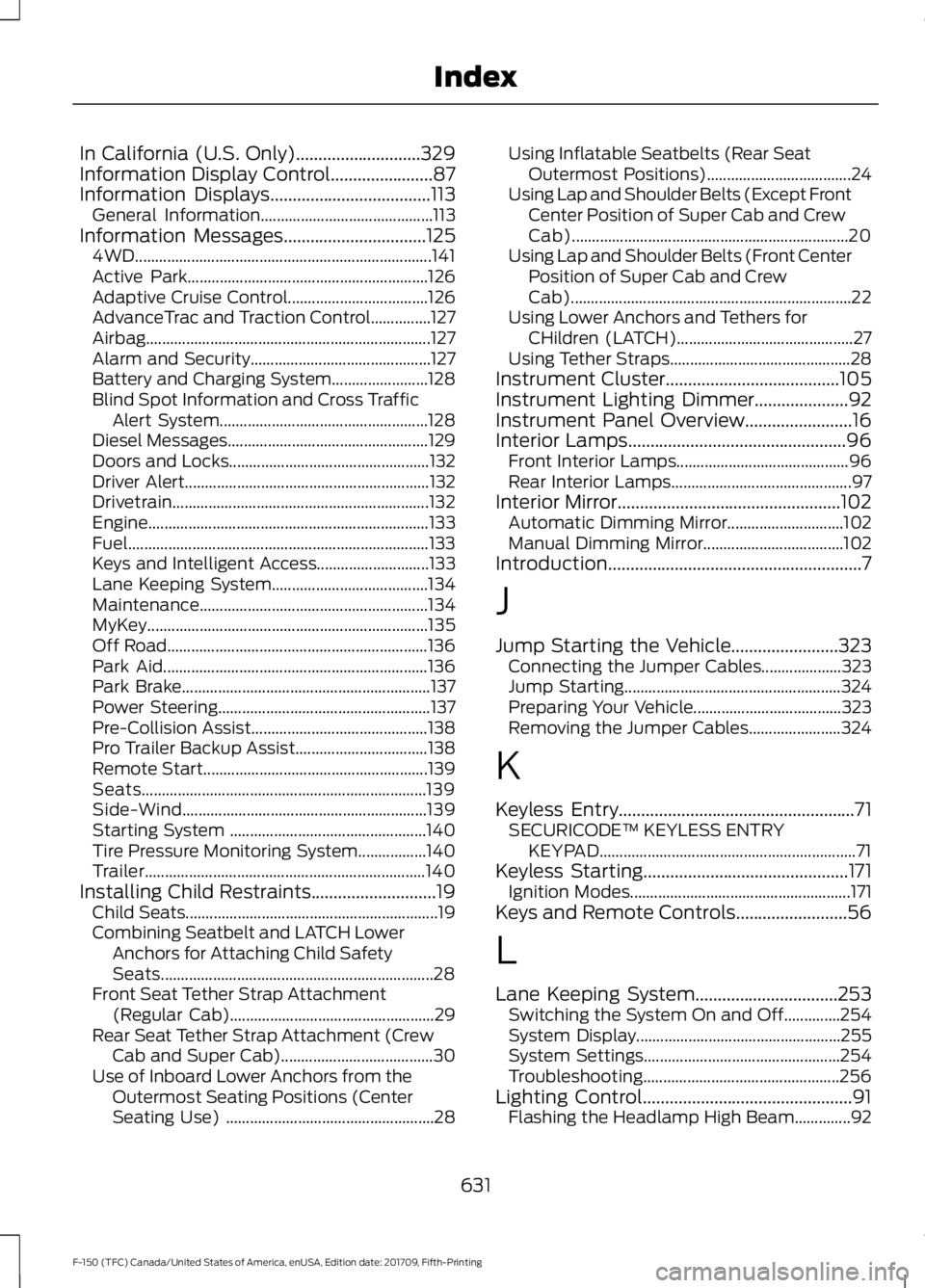
In California (U.S. Only)............................329
Information Display Control.......................87
Information Displays....................................113
General Information........................................... 113
Information Messages
................................125
4WD........................................................................\
.. 141
Active Park............................................................ 126
Adaptive Cruise Control................................... 126
AdvanceTrac and Traction Control...............127
Airbag....................................................................... 127
Alarm and Security............................................. 127
Battery and Charging System........................ 128
Blind Spot Information and Cross Traffic Alert System.................................................... 128
Diesel Messages.................................................. 129
Doors and Locks.................................................. 132
Driver Alert............................................................. 132
Drivetrain................................................................ 132
Engine...................................................................... 133
Fuel........................................................................\
... 133
Keys and Intelligent Access............................ 133
Lane Keeping System....................................... 134
Maintenance......................................................... 134
MyKey...................................................................... 135
Off Road................................................................. 136
Park Aid.................................................................. 136
Park Brake.............................................................. 137
Power Steering..................................................... 137
Pre-Collision Assist............................................ 138
Pro Trailer Backup Assist................................. 138
Remote Start........................................................ 139
Seats....................................................................... 139
Side-Wind............................................................. 139
Starting System ................................................. 140
Tire Pressure Monitoring System.................140
Trailer...................................................................... 140
Installing Child Restraints............................19 Child Seats............................................................... 19
Combining Seatbelt and LATCH Lower Anchors for Attaching Child Safety
Seats.................................................................... 28
Front Seat Tether Strap Attachment (Regular Cab)................................................... 29
Rear Seat Tether Strap Attachment (Crew Cab and Super Cab)...................................... 30
Use of Inboard Lower Anchors from the Outermost Seating Positions (Center
Seating Use) .................................................... 28Using Inflatable Seatbelts (Rear Seat
Outermost Positions).................................... 24
Using Lap and Shoulder Belts (Except Front Center Position of Super Cab and Crew
Cab)..................................................................... 20
Using Lap and Shoulder Belts (Front Center Position of Super Cab and Crew
Cab)...................................................................... 22
Using Lower Anchors and Tethers for CHildren (LATCH)............................................ 27
Using Tether Straps............................................. 28
Instrument Cluster.......................................105
Instrument Lighting Dimmer
.....................92
Instrument Panel Overview........................16
Interior Lamps.................................................96 Front Interior Lamps........................................... 96
Rear Interior Lamps............................................. 97
Interior Mirror
..................................................102
Automatic Dimming Mirror............................. 102
Manual Dimming Mirror................................... 102
Introduction.........................................................7
J
Jump Starting the Vehicle........................323 Connecting the Jumper Cables.................... 323
Jump Starting...................................................... 324
Preparing Your Vehicle..................................... 323
Removing the Jumper Cables....................... 324
K
Keyless Entry
.....................................................71
SECURICODE™ KEYLESS ENTRY
KEYPAD................................................................ 71
Keyless Starting
..............................................171
Ignition Modes....................................................... 171
Keys and Remote Controls.........................56
L
Lane Keeping System
................................253
Switching the System On and Off..............254
System Display................................................... 255
System Settings................................................. 254
Troubleshooting................................................. 256
Lighting Control...............................................91 Flashing the Headlamp High Beam..............92
631
F-150 (TFC) Canada/United States of America, enUSA, Edition date: 201709, Fifth-Printing Index
Page 638 of 641
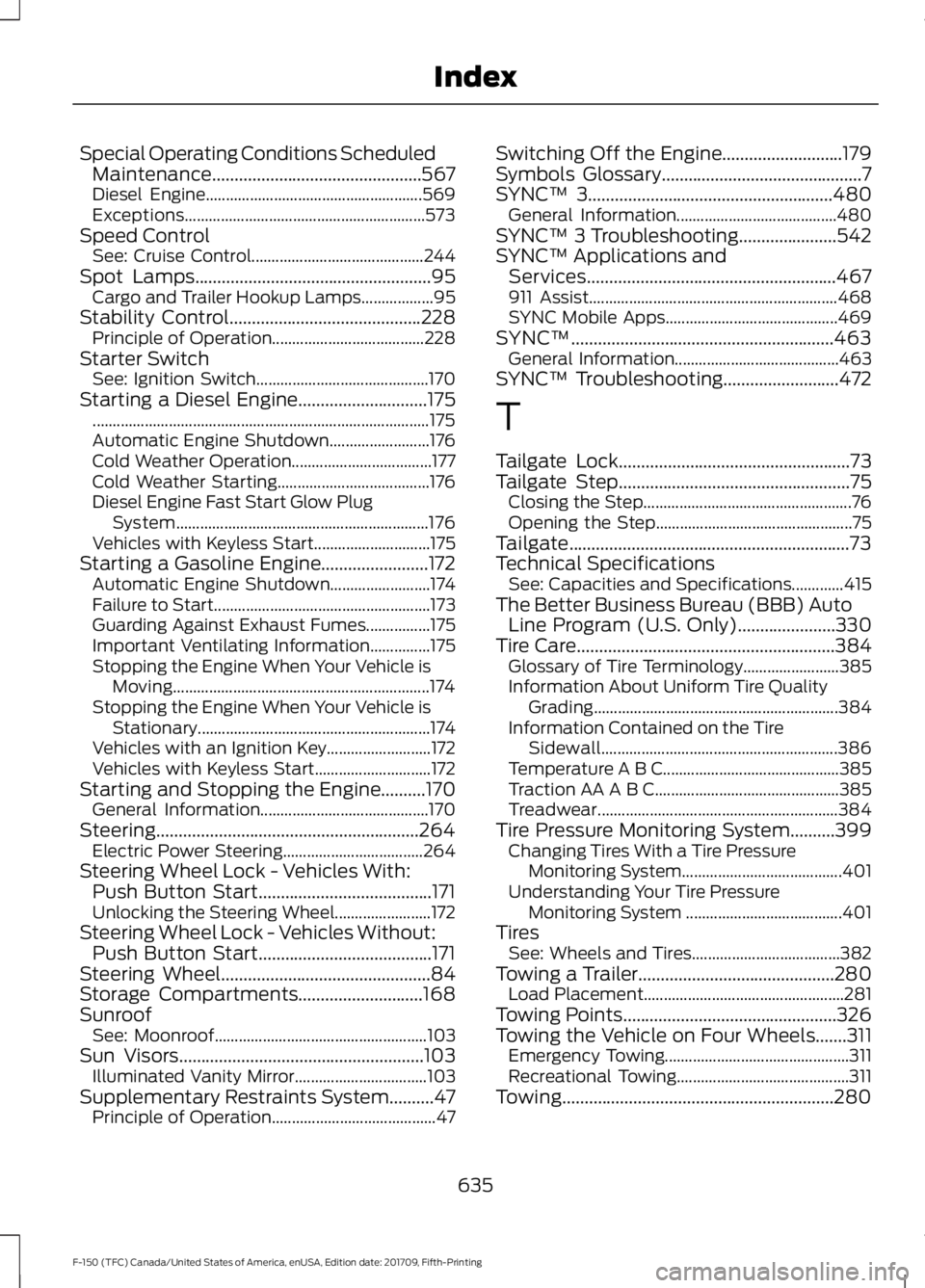
Special Operating Conditions Scheduled
Maintenance...............................................567
Diesel Engine...................................................... 569
Exceptions............................................................ 573
Speed Control See: Cruise Control........................................... 244
Spot Lamps.....................................................95
Cargo and Trailer Hookup Lamps.................. 95
Stability Control
...........................................228
Principle of Operation...................................... 228
Starter Switch See: Ignition Switch........................................... 170
Starting a Diesel Engine
.............................175
........................................................................\
............ 175
Automatic Engine Shutdown......................... 176
Cold Weather Operation................................... 177
Cold Weather Starting...................................... 176
Diesel Engine Fast Start Glow Plug System............................................................... 176
Vehicles with Keyless Start............................. 175
Starting a Gasoline Engine........................172 Automatic Engine Shutdown......................... 174
Failure to Start...................................................... 173
Guarding Against Exhaust Fumes................175
Important Ventilating Information...............175
Stopping the Engine When Your Vehicle is Moving................................................................ 174
Stopping the Engine When Your Vehicle is Stationary.......................................................... 174
Vehicles with an Ignition Key.......................... 172
Vehicles with Keyless Start............................. 172
Starting and Stopping the Engine..........170 General Information.......................................... 170
Steering...........................................................264 Electric Power Steering................................... 264
Steering Wheel Lock - Vehicles With: Push Button Start.......................................171
Unlocking the Steering Wheel........................ 172
Steering Wheel Lock - Vehicles Without: Push Button Start.......................................171
Steering Wheel
...............................................84
Storage Compartments............................168
Sunroof See: Moonroof..................................................... 103
Sun Visors
.......................................................103
Illuminated Vanity Mirror................................. 103
Supplementary Restraints System..........47 Principle of Operation......................................... 47Switching Off the Engine...........................179
Symbols Glossary
.............................................7
SYNC™ 3.......................................................480
General Information........................................ 480
SYNC™ 3 Troubleshooting......................542
SYNC™ Applications and Services........................................................467
911 Assist.............................................................. 468
SYNC Mobile Apps........................................... 469
SYNC™...........................................................463 General Information......................................... 463
SYNC™ Troubleshooting
..........................472
T
Tailgate Lock
....................................................73
Tailgate Step....................................................75
Closing the Step.................................................... 76
Opening the Step................................................. 75
Tailgate...............................................................73
Technical Specifications See: Capacities and Specifications.............415
The Better Business Bureau (BBB) Auto Line Program (U.S. Only)
......................330
Tire Care..........................................................384
Glossary of Tire Terminology........................ 385
Information About Uniform Tire Quality Grading............................................................. 384
Information Contained on the Tire Sidewall........................................................... 386
Temperature A B C............................................ 385
Traction AA A B C.............................................. 385
Treadwear............................................................ 384
Tire Pressure Monitoring System..........399 Changing Tires With a Tire Pressure
Monitoring System........................................ 401
Understanding Your Tire Pressure Monitoring System ....................................... 401
Tires See: Wheels and Tires..................................... 382
Towing a Trailer............................................280 Load Placement.................................................. 281
Towing Points................................................326
Towing the Vehicle on Four Wheels.......311 Emergency Towing.............................................. 311
Recreational Towing........................................... 311
Towing.............................................................280
635
F-150 (TFC) Canada/United States of America, enUSA, Edition date: 201709, Fifth-Printing Index