ECU FORD F-150 2018 User Guide
[x] Cancel search | Manufacturer: FORD, Model Year: 2018, Model line: F-150, Model: FORD F-150 2018Pages: 641, PDF Size: 8.37 MB
Page 30 of 641
Using Lower Anchors and Tethers
for CHildren (LATCH)
WARNING: Do not attach two
child safety restraints to the same
anchor. In a crash, one anchor may not
be strong enough to hold two child
safety restraint attachments and may
break, causing serious injury or death. WARNING:
Depending on where
you secure a child restraint, and
depending on the child restraint design,
you may block access to certain seatbelt
buckle assemblies and LATCH lower
anchors, rendering those features
potentially unusable. To avoid risk of
injury, make sure occupants only use
seating positions where they are able to
be properly restrained. The LATCH system is composed of three
vehicle anchor points: two lower anchors
where the vehicle seat backrest and seat
cushion meet (called the seat bight) and
one top tether anchor behind that seating
position.
LATCH compatible child safety seats have
two rigid or webbing mounted
attachments that connect to the two lower
anchors at the LATCH equipped seating
positions in your vehicle. This type of
attachment method eliminates the need
to use seatbelts to attach the child
restraint. However, the seatbelt can still
be used to attach the child restraint if the
lower anchors are not used. For
forward-facing child restraints, the top
tether strap must also be attached to the
proper top tether anchor, if a top tether
strap has been provided with your child
restraint.
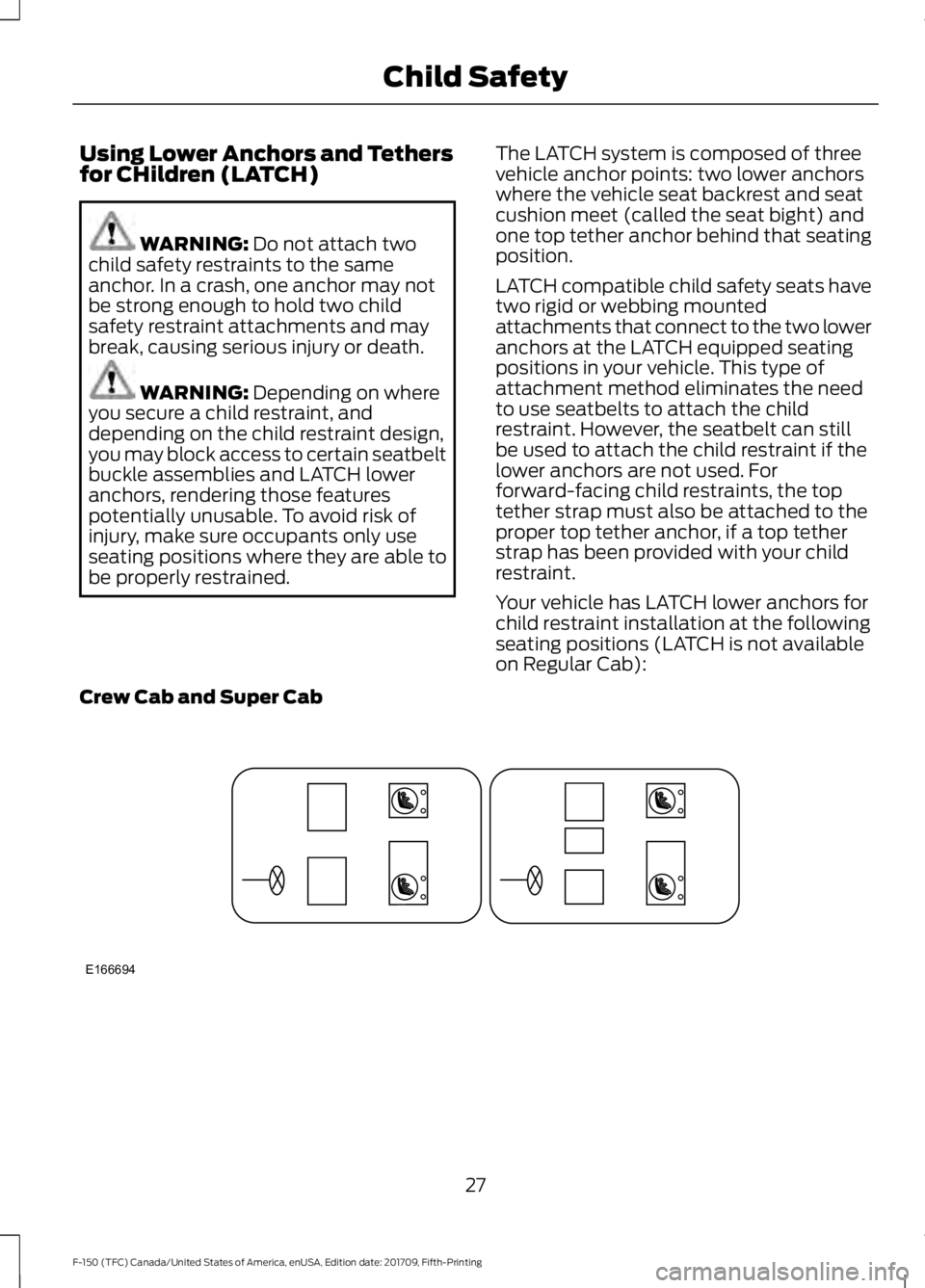
Your vehicle has LATCH lower anchors for
child restraint installation at the following
seating positions (LATCH is not available
on Regular Cab):
Crew Cab and Super Cab 27
F-150 (TFC) Canada/United States of America, enUSA, Edition date: 201709, Fifth-Printing Child SafetyE166694
Page 31 of 641
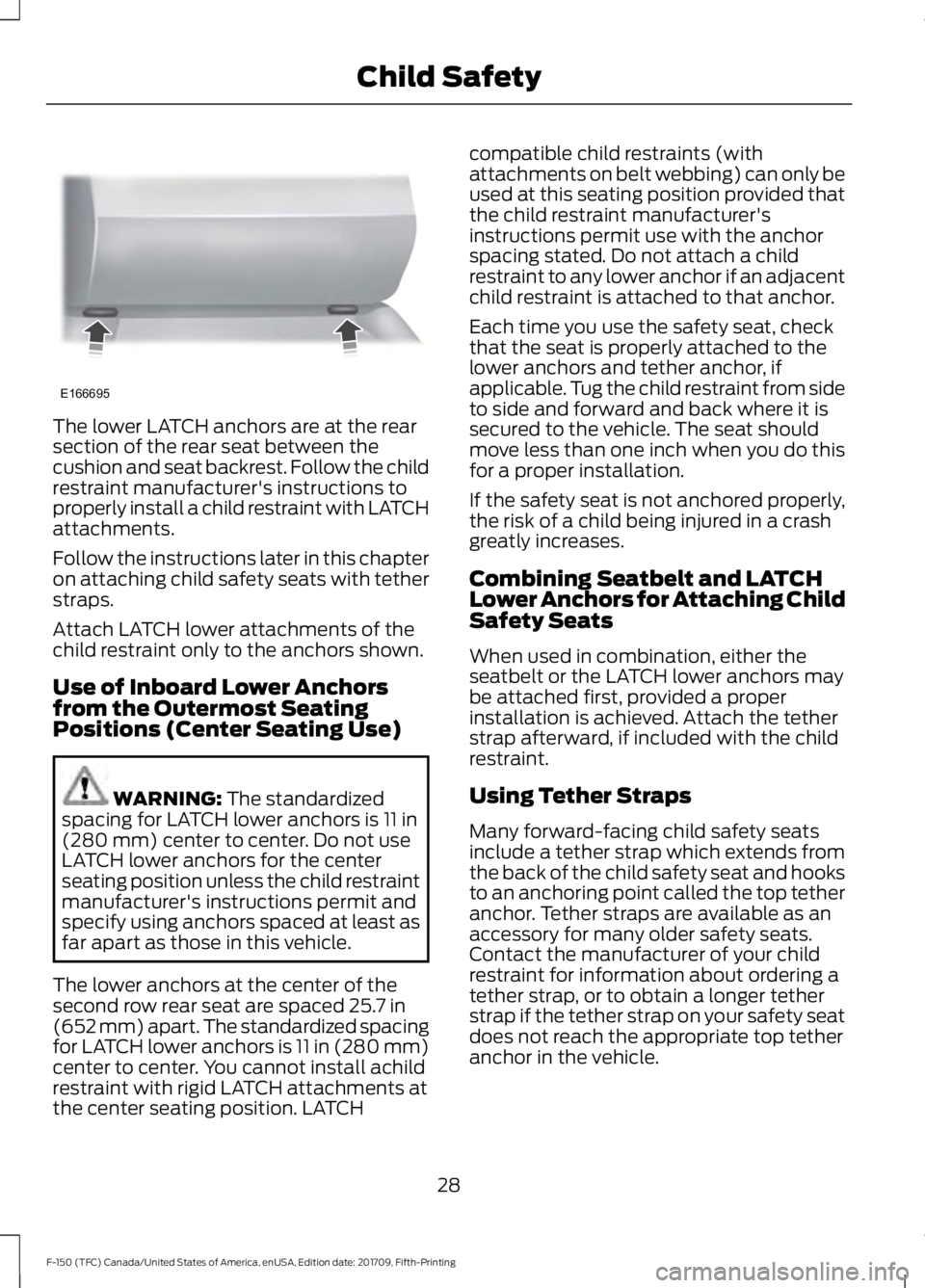
The lower LATCH anchors are at the rear
section of the rear seat between the
cushion and seat backrest. Follow the child
restraint manufacturer's instructions to
properly install a child restraint with LATCH
attachments.
Follow the instructions later in this chapter
on attaching child safety seats with tether
straps.
Attach LATCH lower attachments of the
child restraint only to the anchors shown.
Use of Inboard Lower Anchors
from the Outermost Seating
Positions (Center Seating Use)
WARNING: The standardized
spacing for LATCH lower anchors is 11 in
(280 mm) center to center. Do not use
LATCH lower anchors for the center
seating position unless the child restraint
manufacturer's instructions permit and
specify using anchors spaced at least as
far apart as those in this vehicle.
The lower anchors at the center of the
second row rear seat are spaced
25.7 in
(652 mm) apart. The standardized spacing
for LATCH lower anchors is 11 in (280 mm)
center to center. You cannot install achild
restraint with rigid LATCH attachments at
the center seating position. LATCH compatible child restraints (with
attachments on belt webbing) can only be
used at this seating position provided that
the child restraint manufacturer's
instructions permit use with the anchor
spacing stated. Do not attach a child
restraint to any lower anchor if an adjacent
child restraint is attached to that anchor.
Each time you use the safety seat, check
that the seat is properly attached to the
lower anchors and tether anchor, if
applicable. Tug the child restraint from side
to side and forward and back where it is
secured to the vehicle. The seat should
move less than one inch when you do this
for a proper installation.
If the safety seat is not anchored properly,
the risk of a child being injured in a crash
greatly increases.
Combining Seatbelt and LATCH
Lower Anchors for Attaching Child
Safety Seats
When used in combination, either the
seatbelt or the LATCH lower anchors may
be attached first, provided a proper
installation is achieved. Attach the tether
strap afterward, if included with the child
restraint.
Using Tether Straps
Many forward-facing child safety seats
include a tether strap which extends from
the back of the child safety seat and hooks
to an anchoring point called the top tether
anchor. Tether straps are available as an
accessory for many older safety seats.
Contact the manufacturer of your child
restraint for information about ordering a
tether strap, or to obtain a longer tether
strap if the tether strap on your safety seat
does not reach the appropriate top tether
anchor in the vehicle.
28
F-150 (TFC) Canada/United States of America, enUSA, Edition date: 201709, Fifth-Printing Child SafetyE166695
Page 36 of 641
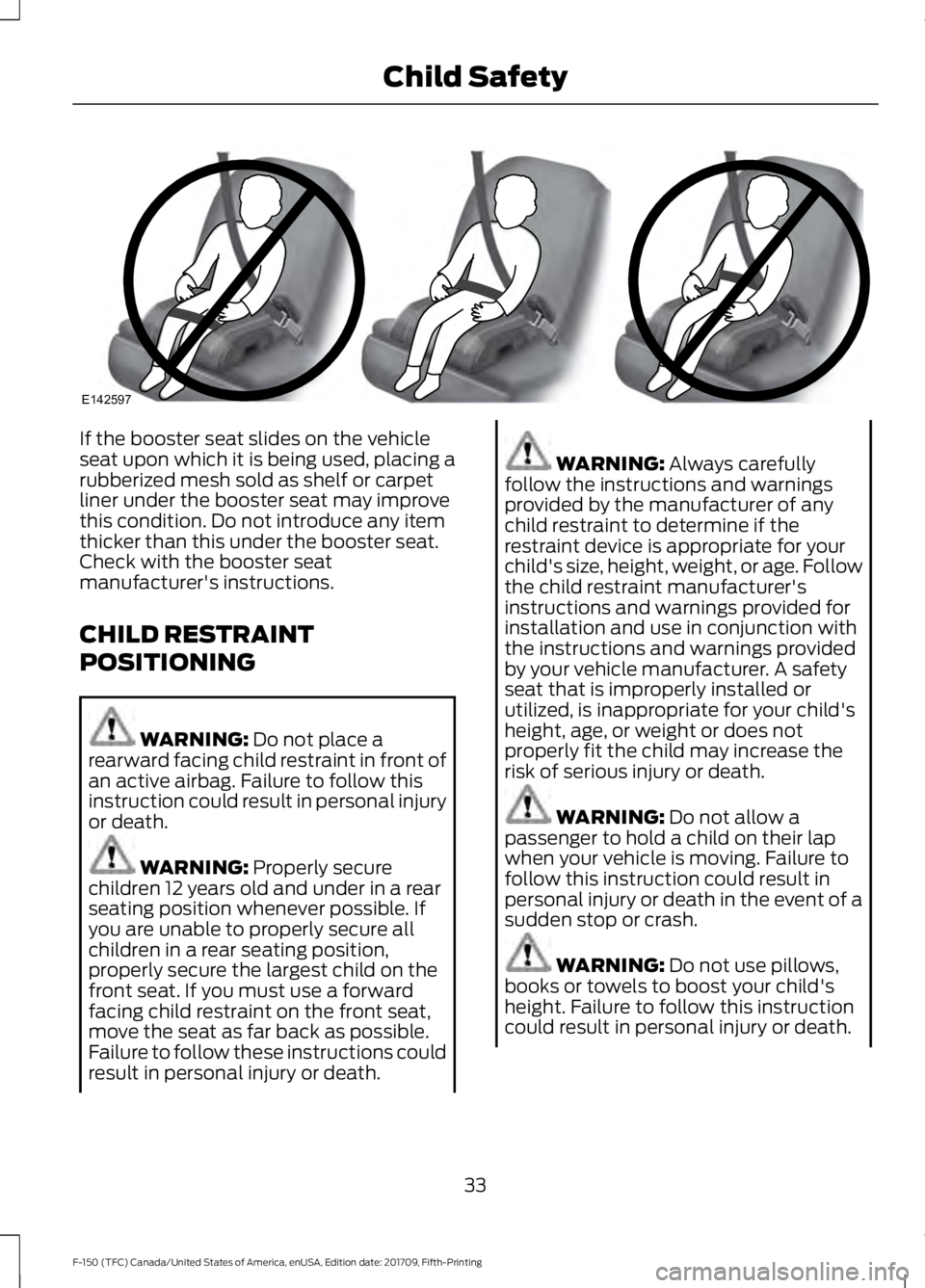
If the booster seat slides on the vehicle
seat upon which it is being used, placing a
rubberized mesh sold as shelf or carpet
liner under the booster seat may improve
this condition. Do not introduce any item
thicker than this under the booster seat.
Check with the booster seat
manufacturer's instructions.
CHILD RESTRAINT
POSITIONING
WARNING: Do not place a
rearward facing child restraint in front of
an active airbag. Failure to follow this
instruction could result in personal injury
or death. WARNING:
Properly secure
children 12 years old and under in a rear
seating position whenever possible. If
you are unable to properly secure all
children in a rear seating position,
properly secure the largest child on the
front seat. If you must use a forward
facing child restraint on the front seat,
move the seat as far back as possible.
Failure to follow these instructions could
result in personal injury or death. WARNING:
Always carefully
follow the instructions and warnings
provided by the manufacturer of any
child restraint to determine if the
restraint device is appropriate for your
child's size, height, weight, or age. Follow
the child restraint manufacturer's
instructions and warnings provided for
installation and use in conjunction with
the instructions and warnings provided
by your vehicle manufacturer. A safety
seat that is improperly installed or
utilized, is inappropriate for your child's
height, age, or weight or does not
properly fit the child may increase the
risk of serious injury or death. WARNING:
Do not allow a
passenger to hold a child on their lap
when your vehicle is moving. Failure to
follow this instruction could result in
personal injury or death in the event of a
sudden stop or crash. WARNING:
Do not use pillows,
books or towels to boost your child's
height. Failure to follow this instruction
could result in personal injury or death.
33
F-150 (TFC) Canada/United States of America, enUSA, Edition date: 201709, Fifth-Printing Child SafetyE142597
Page 37 of 641
WARNING: Properly secure child
restraints or booster seats when they are
not in use. They could become projectiles
in a sudden stop or crash. Failure to
follow this instruction could result in
personal injury or death. WARNING: Do not put the
shoulder section of the seatbelt or allow
the child to put the shoulder section of
the seatbelt under their arm or behind
their back. Failure to follow this
instruction could reduce the
effectiveness of the seatbelt and
increase the risk of injury or death in a
crash. WARNING:
Do not leave children
or pets unattended in your vehicle.
Failure to follow this instruction could
result in personal injury or death.
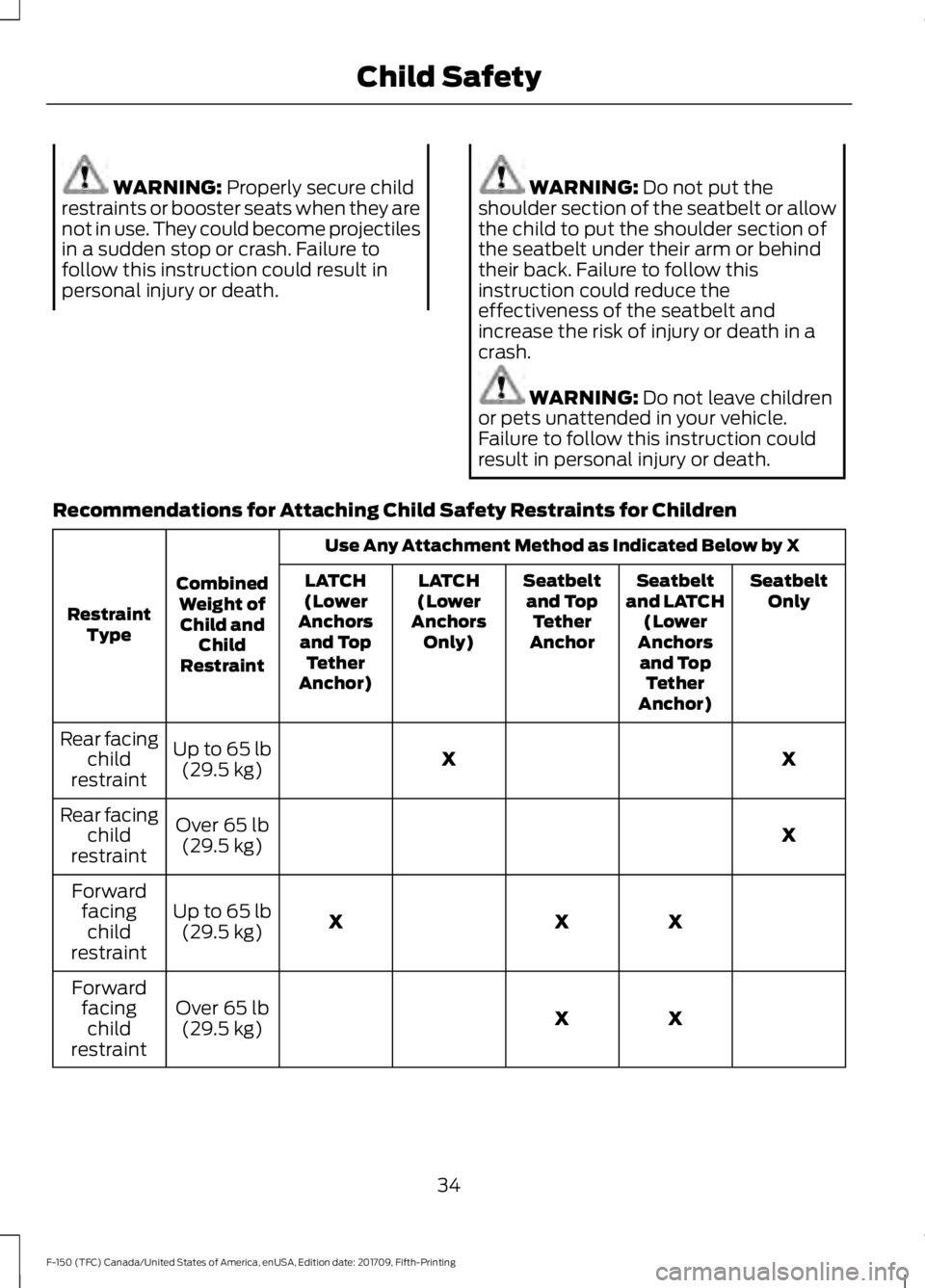
Recommendations for Attaching Child Safety Restraints for Children Use Any Attachment Method as Indicated Below by X
Combined Weight ofChild and Child
Restraint
Restraint
Type Seatbelt
Only
Seatbelt
and LATCH (Lower
Anchors and Top Tether
Anchor)
Seatbelt
and Top Tether
Anchor
LATCH
(Lower
Anchors Only)
LATCH
(Lower
Anchors and Top Tether
Anchor)
X
X
Up to
65 lb
(29.5 kg)
Rear facing
child
restraint
X
Over
65 lb
(29.5 kg)
Rear facing
child
restraint
X
X
X
Up to
65 lb
(29.5 kg)
Forward
facingchild
restraint
X
X
Over
65 lb
(29.5 kg)
Forward
facingchild
restraint
34
F-150 (TFC) Canada/United States of America, enUSA, Edition date: 201709, Fifth-Printing Child Safety
Page 40 of 641
•
Height adjuster at the front outboard
seating positions.
• Safety belt pretensioner at the front
outboard seating positions. •
Safety belt warning light and chime. •
Crash sensors and monitoring system
with readiness indicator.
The safety belt pretensioners at the front
seating positions are designed to tighten
the safety belts when activated. In frontal
and near-frontal crashes, the safety belt
pretensioners may be activated alone or,
if the crash is of sufficient severity, together
with the front airbags. In side crashes and
rollovers, the pretensioners will be
activated when the Safety Canopy is
activated.
FASTENING THE SEATBELTS
Standard belts shown, inflatable belts
similar
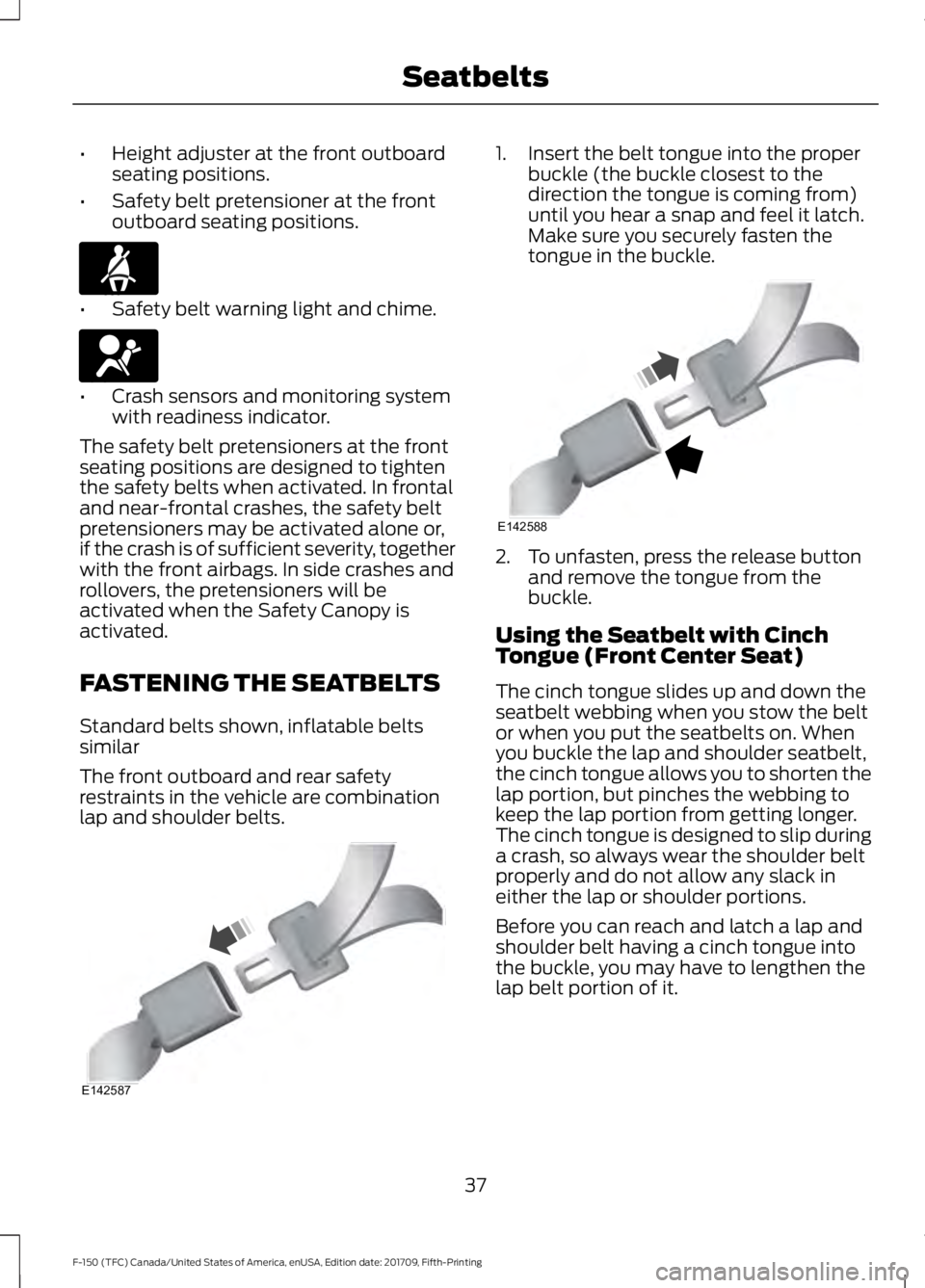
The front outboard and rear safety
restraints in the vehicle are combination
lap and shoulder belts. 1. Insert the belt tongue into the proper
buckle (the buckle closest to the
direction the tongue is coming from)
until you hear a snap and feel it latch.
Make sure you securely fasten the
tongue in the buckle. 2. To unfasten, press the release button
and remove the tongue from the
buckle.
Using the Seatbelt with Cinch
Tongue (Front Center Seat)
The cinch tongue slides up and down the
seatbelt webbing when you stow the belt
or when you put the seatbelts on. When
you buckle the lap and shoulder seatbelt,
the cinch tongue allows you to shorten the
lap portion, but pinches the webbing to
keep the lap portion from getting longer.
The cinch tongue is designed to slip during
a crash, so always wear the shoulder belt
properly and do not allow any slack in
either the lap or shoulder portions.
Before you can reach and latch a lap and
shoulder belt having a cinch tongue into
the buckle, you may have to lengthen the
lap belt portion of it.
37
F-150 (TFC) Canada/United States of America, enUSA, Edition date: 201709, Fifth-Printing SeatbeltsE71880 E67017 E142587 E142588
Page 41 of 641
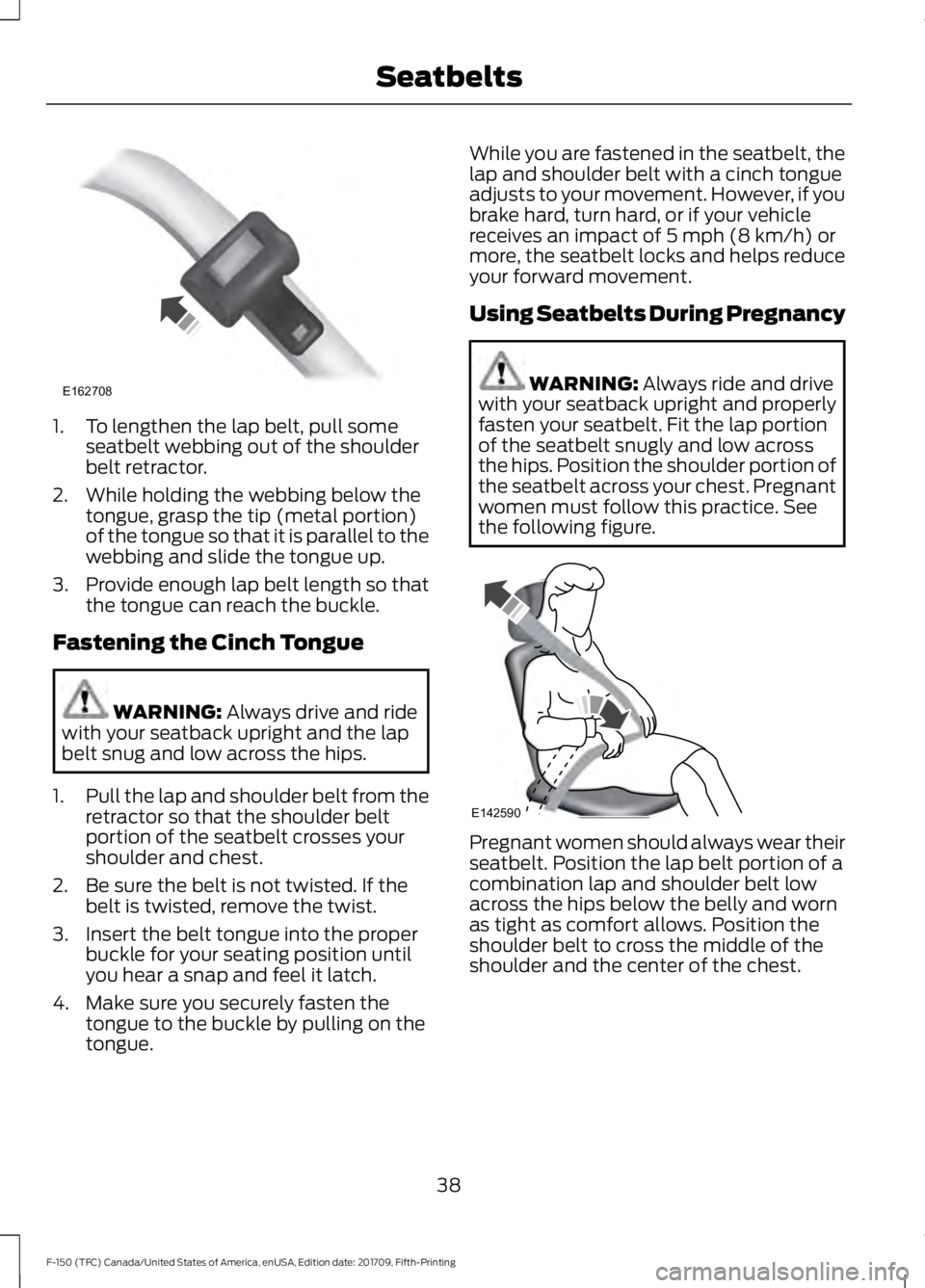
1. To lengthen the lap belt, pull some
seatbelt webbing out of the shoulder
belt retractor.
2. While holding the webbing below the tongue, grasp the tip (metal portion)
of the tongue so that it is parallel to the
webbing and slide the tongue up.
3. Provide enough lap belt length so that
the tongue can reach the buckle.
Fastening the Cinch Tongue WARNING: Always drive and ride
with your seatback upright and the lap
belt snug and low across the hips.
1. Pull the lap and shoulder belt from the
retractor so that the shoulder belt
portion of the seatbelt crosses your
shoulder and chest.
2. Be sure the belt is not twisted. If the belt is twisted, remove the twist.
3. Insert the belt tongue into the proper buckle for your seating position until
you hear a snap and feel it latch.
4. Make sure you securely fasten the tongue to the buckle by pulling on the
tongue. While you are fastened in the seatbelt, the
lap and shoulder belt with a cinch tongue
adjusts to your movement. However, if you
brake hard, turn hard, or if your vehicle
receives an impact of
5 mph (8 km/h) or
more, the seatbelt locks and helps reduce
your forward movement.
Using Seatbelts During Pregnancy WARNING:
Always ride and drive
with your seatback upright and properly
fasten your seatbelt. Fit the lap portion
of the seatbelt snugly and low across
the hips. Position the shoulder portion of
the seatbelt across your chest. Pregnant
women must follow this practice. See
the following figure. Pregnant women should always wear their
seatbelt. Position the lap belt portion of a
combination lap and shoulder belt low
across the hips below the belly and worn
as tight as comfort allows. Position the
shoulder belt to cross the middle of the
shoulder and the center of the chest.
38
F-150 (TFC) Canada/United States of America, enUSA, Edition date: 201709, Fifth-Printing SeatbeltsE162708 E142590
Page 60 of 641
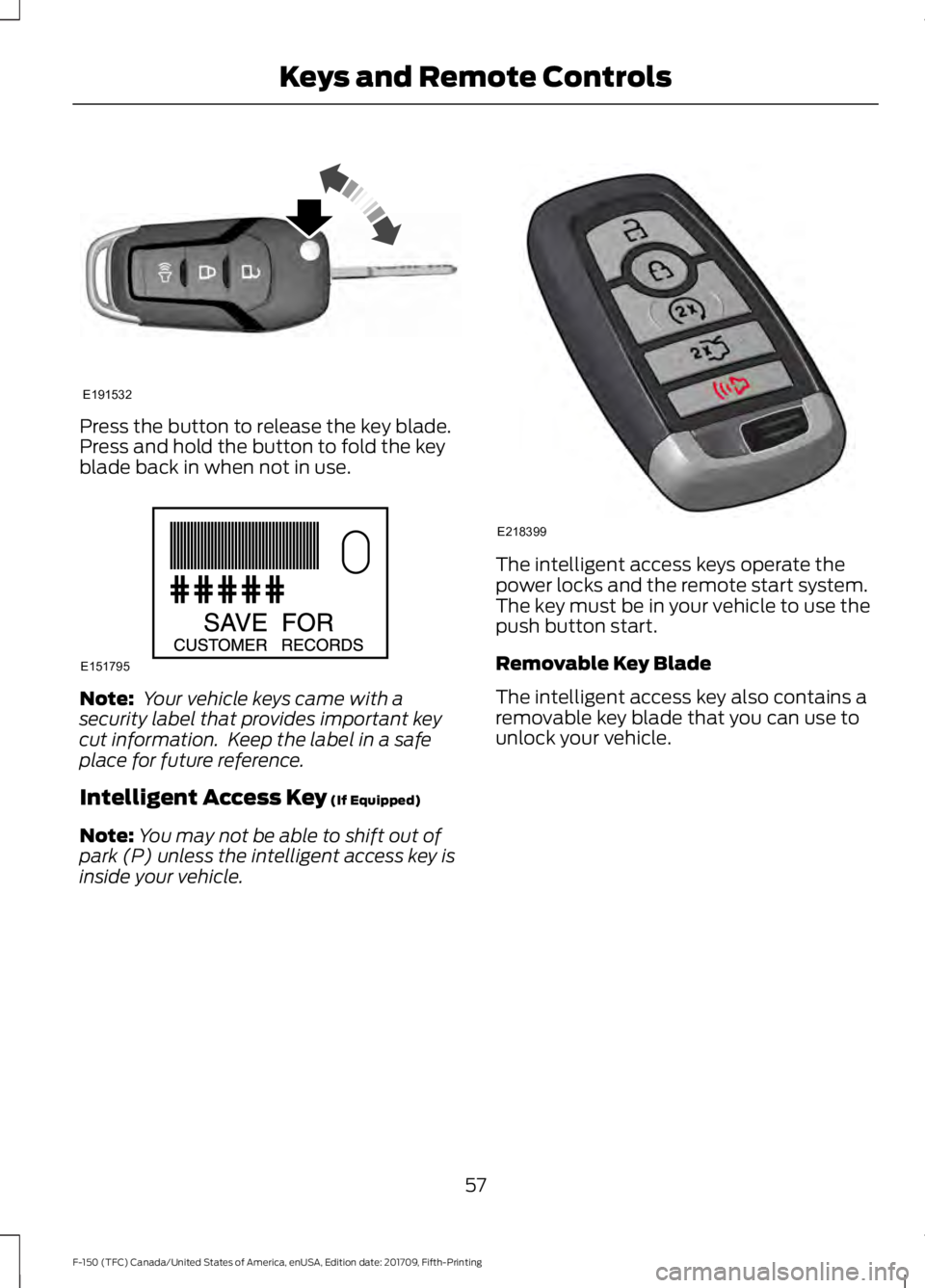
Press the button to release the key blade.
Press and hold the button to fold the key
blade back in when not in use.
Note:
Your vehicle keys came with a
security label that provides important key
cut information. Keep the label in a safe
place for future reference.
Intelligent Access Key (If Equipped)
Note: You may not be able to shift out of
park (P) unless the intelligent access key is
inside your vehicle. The intelligent access keys operate the
power locks and the remote start system.
The key must be in your vehicle to use the
push button start.
Removable Key Blade
The intelligent access key also contains a
removable key blade that you can use to
unlock your vehicle.
57
F-150 (TFC) Canada/United States of America, enUSA, Edition date: 201709, Fifth-Printing Keys and Remote ControlsE191532 E151795 E218399
Page 61 of 641
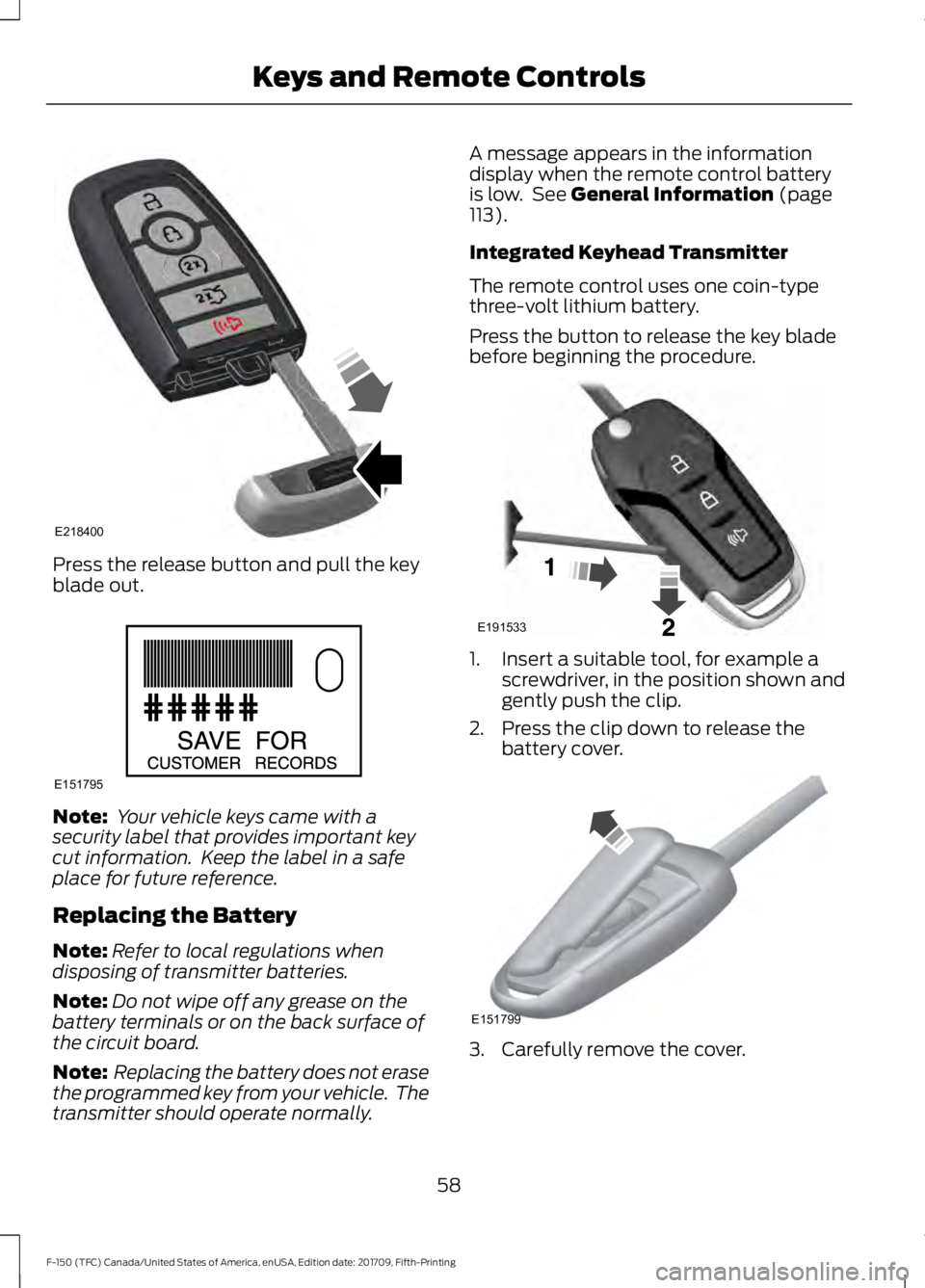
Press the release button and pull the key
blade out.
Note:
Your vehicle keys came with a
security label that provides important key
cut information. Keep the label in a safe
place for future reference.
Replacing the Battery
Note: Refer to local regulations when
disposing of transmitter batteries.
Note: Do not wipe off any grease on the
battery terminals or on the back surface of
the circuit board.
Note: Replacing the battery does not erase
the programmed key from your vehicle. The
transmitter should operate normally. A message appears in the information
display when the remote control battery
is low. See General Information (page
113).
Integrated Keyhead Transmitter
The remote control uses one coin-type
three-volt lithium battery.
Press the button to release the key blade
before beginning the procedure. 1. Insert a suitable tool, for example a
screwdriver, in the position shown and
gently push the clip.
2. Press the clip down to release the battery cover. 3. Carefully remove the cover.
58
F-150 (TFC) Canada/United States of America, enUSA, Edition date: 201709, Fifth-Printing Keys and Remote ControlsE218400 E151795 E191533 E151799
Page 69 of 641
USING MYKEY WITH REMOTE
START SYSTEMS
MyKey is not compatible with non
Ford-approved, aftermarket remote start
systems. If you choose to install a remote
start system, see an authorized dealer for
a Ford-approved remote start system.
MYKEY — TROUBLESHOOTING Potential Causes
Condition
I cannot create a MyKey. •The key or transmitter used to start the
vehicle does not have admin privileges.
• The key or transmitter used to start the
vehicle is the only admin key (there always
has to be at least one admin key).
• Vehicles with keyless start: The keyless
start transmitter is not placed in the backup
position. See Passive Anti-Theft System
(page 78).
• SecuriLock passive anti-theft system is
disabled or in unlimited mode.
• The key or transmitter used to start your
vehicle does not have admin privileges.
• No MyKeys are created. See
Creating a
MyKey (page 64).
I cannot program the configurable
settings.
•The key or transmitter used to start your
vehicle does not have admin privileges.
• No MyKeys are created. See
Creating a
MyKey (page 64).
I cannot clear the MyKeys.
Purchase a new key from an authorized dealer.
I lost the only admin key.
66
F-150 (TFC) Canada/United States of America, enUSA, Edition date: 201709, Fifth-Printing MyKey
™
(If Equipped)
Page 74 of 641
Battery Saver
The battery saver turns off the interior
lamps 30 minutes after you switch off the
ignition if a door is open and the dome
lamp switch is on. It turns off the interior
lamps after 10 minutes if the dome lamp
switch is off.
Accessory Mode Battery Saver for
Intelligent Access Keys (If Equipped)
If you leave the ignition on after leaving
your vehicle, it turns off 15 minutes after
you close all of the doors.
KEYLESS ENTRY (IF EQUIPPED)
SECURICODE™ KEYLESS ENTRY
KEYPAD
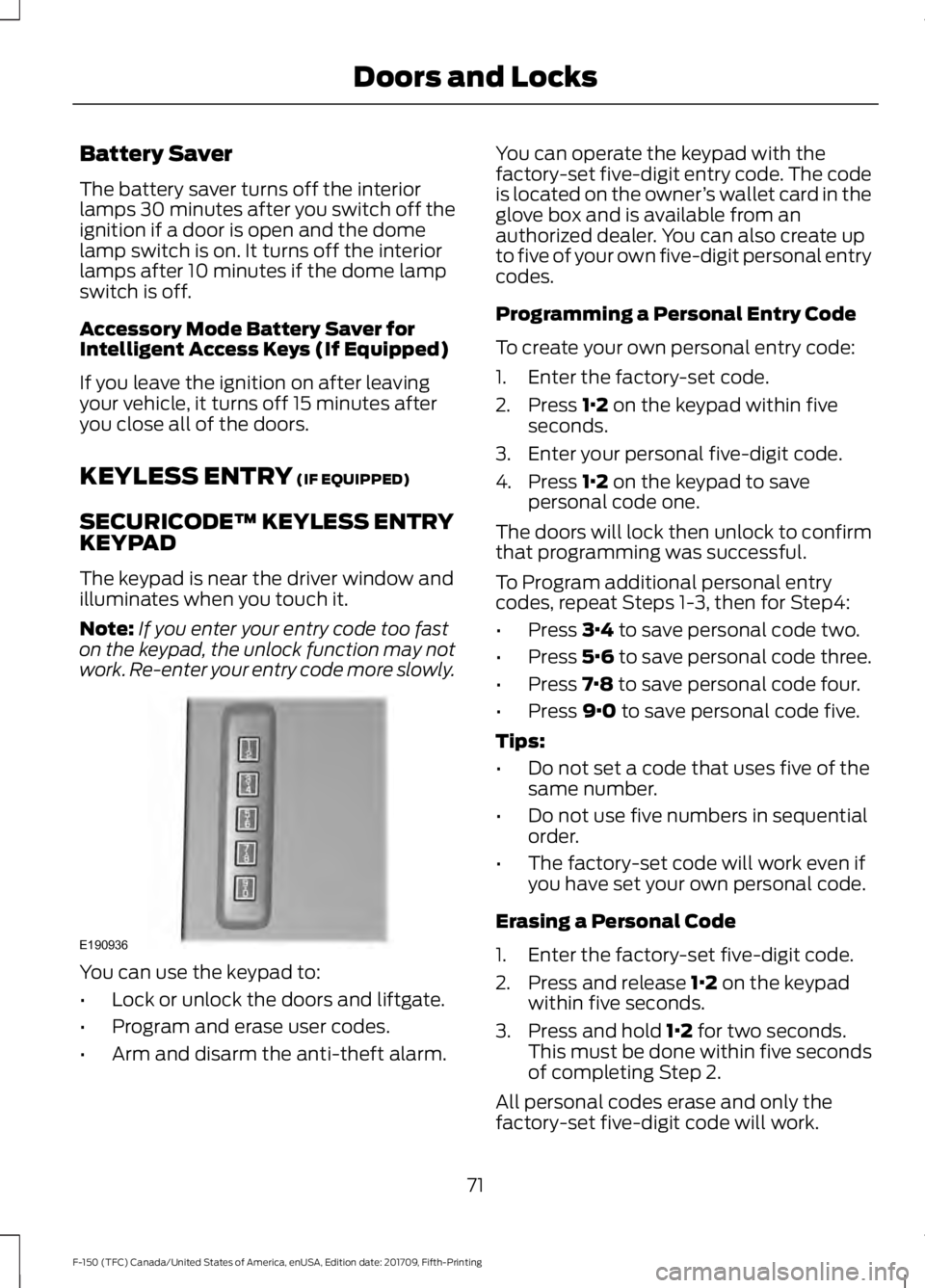
The keypad is near the driver window and
illuminates when you touch it.
Note: If you enter your entry code too fast
on the keypad, the unlock function may not
work. Re-enter your entry code more slowly. You can use the keypad to:
•
Lock or unlock the doors and liftgate.
• Program and erase user codes.
• Arm and disarm the anti-theft alarm. You can operate the keypad with the
factory-set five-digit entry code. The code
is located on the owner
’s wallet card in the
glove box and is available from an
authorized dealer. You can also create up
to five of your own five-digit personal entry
codes.
Programming a Personal Entry Code
To create your own personal entry code:
1. Enter the factory-set code.
2. Press
1·2 on the keypad within five
seconds.
3. Enter your personal five-digit code.
4. Press
1·2 on the keypad to save
personal code one.
The doors will lock then unlock to confirm
that programming was successful.
To Program additional personal entry
codes, repeat Steps 1-3, then for Step4:
• Press
3·4 to save personal code two.
• Press
5·6 to save personal code three.
• Press
7·8 to save personal code four.
• Press
9·0 to save personal code five.
Tips:
• Do not set a code that uses five of the
same number.
• Do not use five numbers in sequential
order.
• The factory-set code will work even if
you have set your own personal code.
Erasing a Personal Code
1. Enter the factory-set five-digit code.
2. Press and release
1·2 on the keypad
within five seconds.
3. Press and hold
1·2 for two seconds.
This must be done within five seconds
of completing Step 2.
All personal codes erase and only the
factory-set five-digit code will work.
71
F-150 (TFC) Canada/United States of America, enUSA, Edition date: 201709, Fifth-Printing Doors and LocksE190936