ESP FORD F-150 2018 User Guide
[x] Cancel search | Manufacturer: FORD, Model Year: 2018, Model line: F-150, Model: FORD F-150 2018Pages: 641, PDF Size: 8.37 MB
Page 116 of 641
GENERAL INFORMATION
WARNING: Driving while
distracted can result in loss of vehicle
control, crash and injury. We strongly
recommend that you use extreme
caution when using any device that may
take your focus off the road. Your
primary responsibility is the safe
operation of your vehicle. We
recommend against the use of any
hand-held device while driving and
encourage the use of voice-operated
systems when possible. Make sure you
are aware of all applicable local laws
that may affect the use of electronic
devices while driving.
Various systems on your vehicle can be
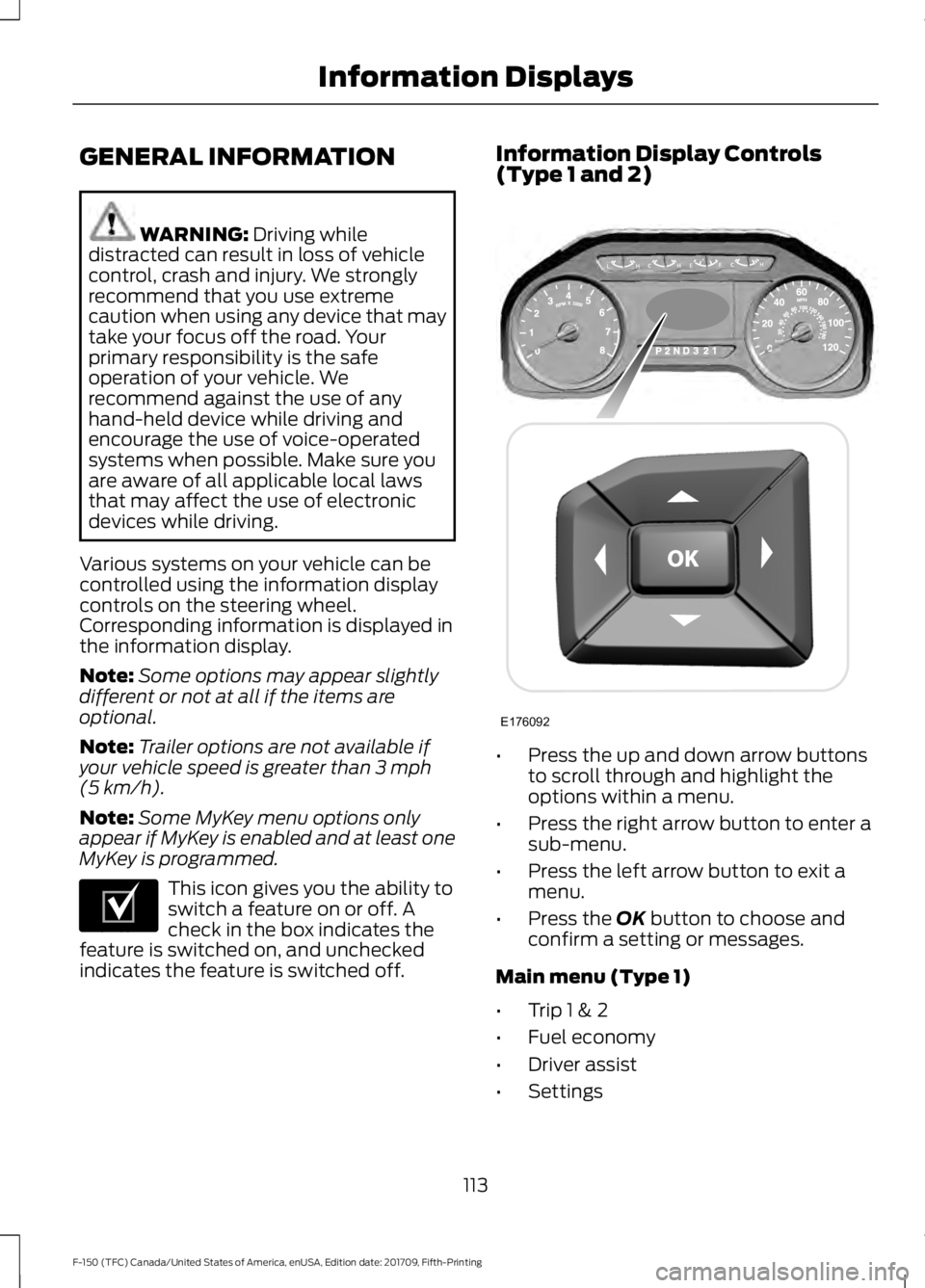
controlled using the information display
controls on the steering wheel.
Corresponding information is displayed in
the information display.
Note: Some options may appear slightly
different or not at all if the items are
optional.
Note: Trailer options are not available if
your vehicle speed is greater than
3 mph
(5 km/h).
Note: Some MyKey menu options only
appear if MyKey is enabled and at least one
MyKey is programmed. This icon gives you the ability to
switch a feature on or off. A
check in the box indicates the
feature is switched on, and unchecked
indicates the feature is switched off. Information Display Controls
(Type 1 and 2)
•
Press the up and down arrow buttons
to scroll through and highlight the
options within a menu.
• Press the right arrow button to enter a
sub-menu.
• Press the left arrow button to exit a
menu.
• Press the
OK button to choose and
confirm a setting or messages.
Main menu (Type 1)
• Trip 1 & 2
• Fuel economy
• Driver assist
• Settings
113
F-150 (TFC) Canada/United States of America, enUSA, Edition date: 201709, Fifth-Printing Information DisplaysE204495 E176092
Page 133 of 641
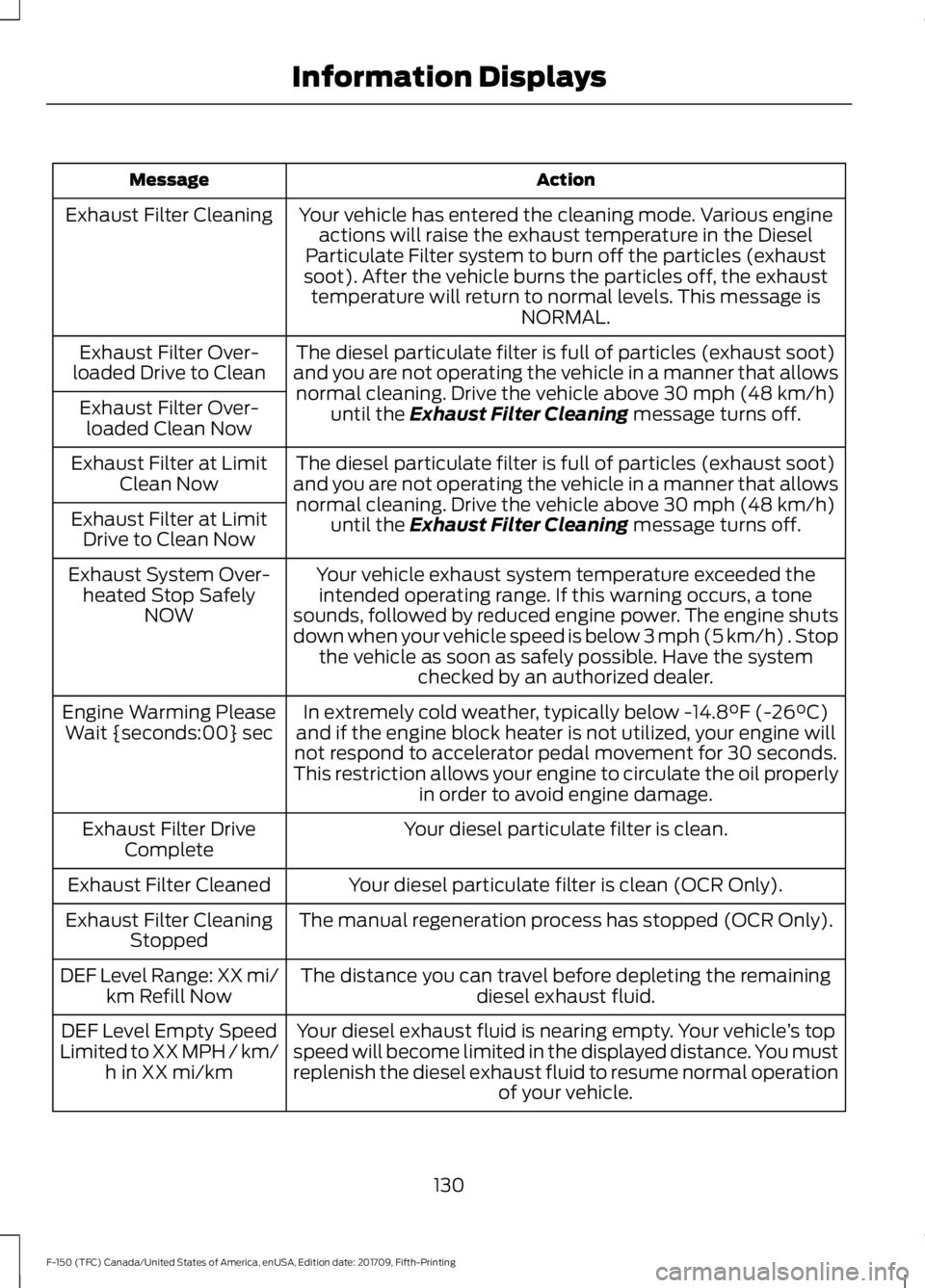
Action
Message
Your vehicle has entered the cleaning mode. Various engineactions will raise the exhaust temperature in the Diesel
Particulate Filter system to burn off the particles (exhaust
soot). After the vehicle burns the particles off, the exhaust temperature will return to normal levels. This message is NORMAL.
Exhaust Filter Cleaning
The diesel particulate filter is full of particles (exhaust soot)
and you are not operating the vehicle in a manner that allows normal cleaning. Drive the vehicle above 30 mph (48 km/h)
until the Exhaust Filter Cleaning message turns off.
Exhaust Filter Over-
loaded Drive to Clean
Exhaust Filter Over-loaded Clean Now
The diesel particulate filter is full of particles (exhaust soot)
and you are not operating the vehicle in a manner that allows normal cleaning. Drive the vehicle above
30 mph (48 km/h)
until the Exhaust Filter Cleaning message turns off.
Exhaust Filter at Limit
Clean Now
Exhaust Filter at Limit Drive to Clean Now
Your vehicle exhaust system temperature exceeded theintended operating range. If this warning occurs, a tone
sounds, followed by reduced engine power. The engine shuts
down when your vehicle speed is below 3 mph (5 km/h) . Stop the vehicle as soon as safely possible. Have the system checked by an authorized dealer.
Exhaust System Over-
heated Stop Safely NOW
In extremely cold weather, typically below
-14.8°F (-26°C)
and if the engine block heater is not utilized, your engine will
not respond to accelerator pedal movement for 30 seconds.
This restriction allows your engine to circulate the oil properly in order to avoid engine damage.
Engine Warming Please
Wait {seconds:00} sec
Your diesel particulate filter is clean.
Exhaust Filter Drive
Complete
Your diesel particulate filter is clean (OCR Only).
Exhaust Filter Cleaned
The manual regeneration process has stopped (OCR Only).
Exhaust Filter Cleaning
Stopped
The distance you can travel before depleting the remaining diesel exhaust fluid.
DEF Level Range: XX mi/
km Refill Now
Your diesel exhaust fluid is nearing empty. Your vehicle ’s top
speed will become limited in the displayed distance. You must
replenish the diesel exhaust fluid to resume normal operation of your vehicle.
DEF Level Empty Speed
Limited to XX MPH / km/ h in XX mi/km
130
F-150 (TFC) Canada/United States of America, enUSA, Edition date: 201709, Fifth-Printing Information Displays
Page 138 of 641
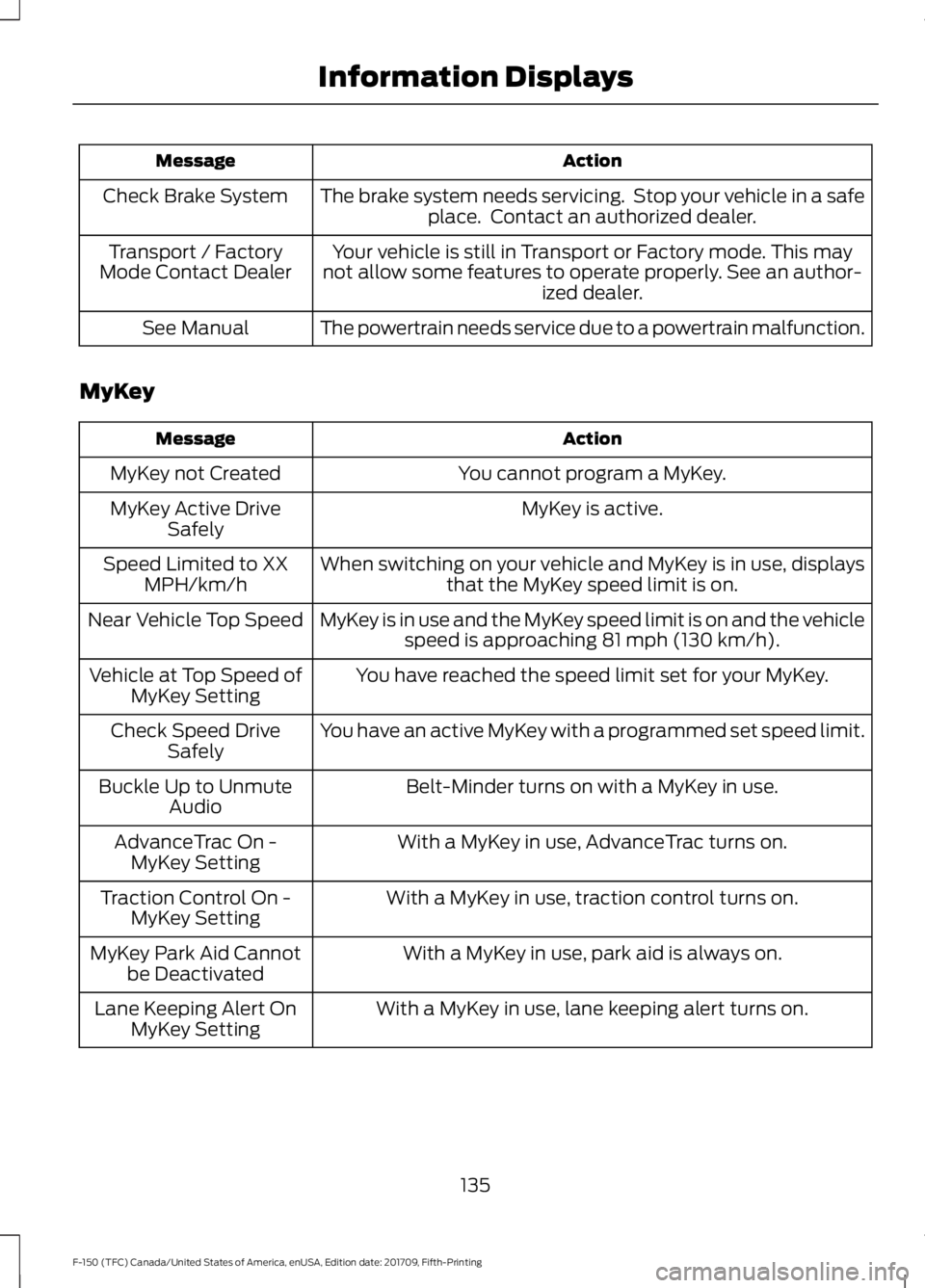
Action
Message
The brake system needs servicing. Stop your vehicle in a safeplace. Contact an authorized dealer.
Check Brake System
Your vehicle is still in Transport or Factory mode. This may
not allow some features to operate properly. See an author- ized dealer.
Transport / Factory
Mode Contact Dealer
The powertrain needs service due to a powertrain malfunction.
See Manual
MyKey Action
Message
You cannot program a MyKey.
MyKey not Created
MyKey is active.
MyKey Active Drive
Safely
When switching on your vehicle and MyKey is in use, displaysthat the MyKey speed limit is on.
Speed Limited to XX
MPH/km/h
MyKey is in use and the MyKey speed limit is on and the vehiclespeed is approaching 81 mph (130 km/h).
Near Vehicle Top Speed
You have reached the speed limit set for your MyKey.
Vehicle at Top Speed of
MyKey Setting
You have an active MyKey with a programmed set speed limit.
Check Speed Drive
Safely
Belt-Minder turns on with a MyKey in use.
Buckle Up to Unmute
Audio
With a MyKey in use, AdvanceTrac turns on.
AdvanceTrac On -
MyKey Setting
With a MyKey in use, traction control turns on.
Traction Control On -
MyKey Setting
With a MyKey in use, park aid is always on.
MyKey Park Aid Cannot
be Deactivated
With a MyKey in use, lane keeping alert turns on.
Lane Keeping Alert On
MyKey Setting
135
F-150 (TFC) Canada/United States of America, enUSA, Edition date: 201709, Fifth-Printing Information Displays
Page 142 of 641
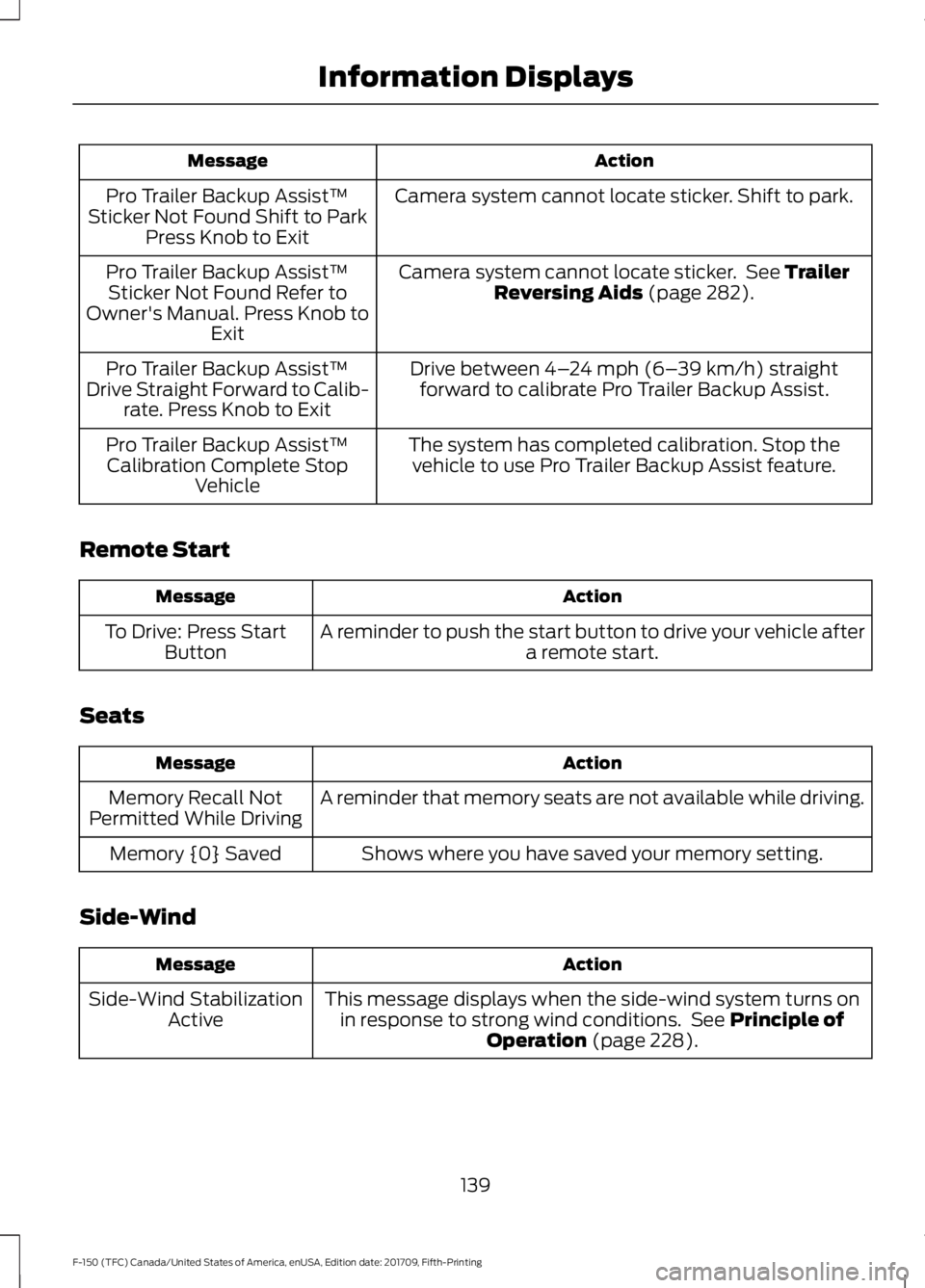
Action
Message
Camera system cannot locate sticker. Shift to park.
Pro Trailer Backup Assist™
Sticker Not Found Shift to Park Press Knob to Exit
Camera system cannot locate sticker. See Trailer
Reversing Aids (page 282).
Pro Trailer Backup Assist™
Sticker Not Found Refer to
Owner's Manual. Press Knob to Exit
Drive between
4–24 mph (6– 39 km/h) straight
forward to calibrate Pro Trailer Backup Assist.
Pro Trailer Backup Assist™
Drive Straight Forward to Calib- rate. Press Knob to Exit
The system has completed calibration. Stop thevehicle to use Pro Trailer Backup Assist feature.
Pro Trailer Backup Assist™
Calibration Complete Stop Vehicle
Remote Start Action
Message
A reminder to push the start button to drive your vehicle after a remote start.
To Drive: Press Start
Button
Seats Action
Message
A reminder that memory seats are not available while driving.
Memory Recall Not
Permitted While Driving
Shows where you have saved your memory setting.
Memory {0} Saved
Side-Wind Action
Message
This message displays when the side-wind system turns onin response to strong wind conditions. See
Principle of
Operation (page 228).
Side-Wind Stabilization
Active
139
F-150 (TFC) Canada/United States of America, enUSA, Edition date: 201709, Fifth-Printing Information Displays
Page 161 of 641
3. Within three seconds, press the lock
button on the remote control you are
linking.
To unlink a remote control, follow the
same procedure – except in Step 3, press
the unlock button on the remote control.
Easy Entry and Exit Feature
If you enable this feature, it automatically
moves the driver seat position rearward up
to 2 in (5 cm) when you switch the ignition
off. The driver seat returns to the previous
position when you switch the ignition on.
Switch this feature on and off through the
Information displays settings menu. See
General Information (page 113).
Note: After moving the seat to the easy exit
position, pressing any of the memory feature
controls cancels the easy entry return
movement.
REAR SEATS
(IF EQUIPPED)
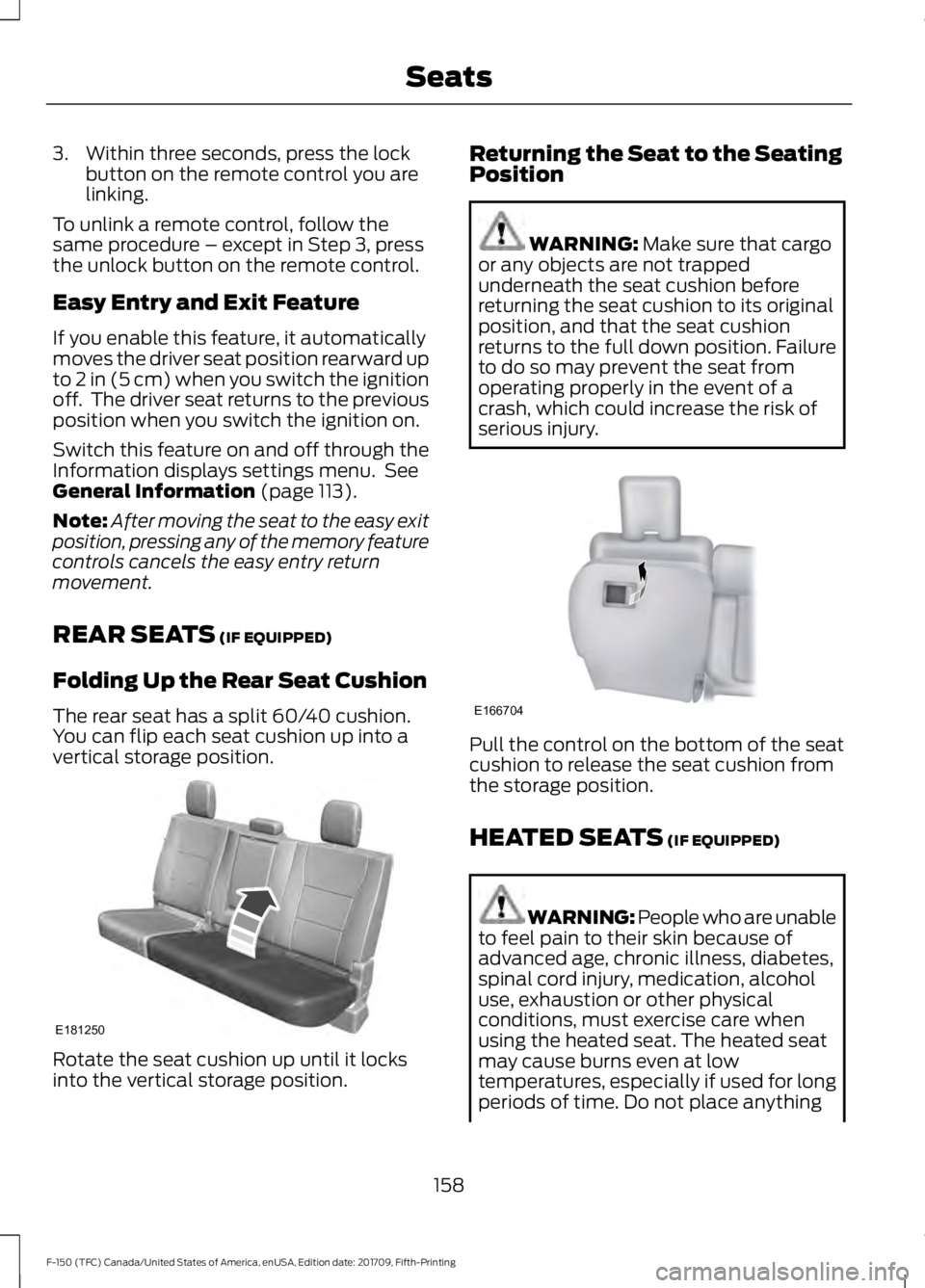
Folding Up the Rear Seat Cushion
The rear seat has a split 60/40 cushion.
You can flip each seat cushion up into a
vertical storage position. Rotate the seat cushion up until it locks
into the vertical storage position. Returning the Seat to the Seating
Position WARNING:
Make sure that cargo
or any objects are not trapped
underneath the seat cushion before
returning the seat cushion to its original
position, and that the seat cushion
returns to the full down position. Failure
to do so may prevent the seat from
operating properly in the event of a
crash, which could increase the risk of
serious injury. Pull the control on the bottom of the seat
cushion to release the seat cushion from
the storage position.
HEATED SEATS
(IF EQUIPPED)
WARNING: People who are unable
to feel pain to their skin because of
advanced age, chronic illness, diabetes,
spinal cord injury, medication, alcohol
use, exhaustion or other physical
conditions, must exercise care when
using the heated seat. The heated seat
may cause burns even at low
temperatures, especially if used for long
periods of time. Do not place anything
158
F-150 (TFC) Canada/United States of America, enUSA, Edition date: 201709, Fifth-Printing SeatsE181250 E166704
Page 162 of 641
on the seat that insulates against heat,
such as a blanket or cushion. This may
cause the heated seat to overheat. Do
not puncture the seat with pins, needles
or other pointed objects. This may
damage the heating element which may
cause the heated seat to overheat. An
overheated seat may cause serious
personal injury.
Do not do the following:
• Place heavy objects on the seat.
• Operate the heated seat if water or any
other liquid spills on the seat. Allow the
seat to dry thoroughly.
Note: The engine must be running to use
this feature. Press the heated seat symbol to cycle
through the various heat settings and off.
More indicator lights indicate warmer
settings.
Note:
The heated seats may remain on
after you remote start your vehicle, based
on your remote start settings. The heated
seats may also turn on when you start your
vehicle if they were on when you switched
your vehicle off. Rear Heated Seats (If Equipped) WARNING: People who are unable
to feel pain to their skin because of
advanced age, chronic illness, diabetes,
spinal cord injury, medication, alcohol
use, exhaustion or other physical
conditions, must exercise care when
using the heated seat. The heated seat
may cause burns even at low
temperatures, especially if used for long
periods of time. Do not place anything
on the seat that insulates against heat,
such as a blanket or cushion. This may
cause the heated seat to overheat. Do
not puncture the seat with pins, needles
or other pointed objects. This may
damage the heating element which may
cause the heated seat to overheat. An
overheated seat may cause serious
personal injury.
Do not do the following:
• Place heavy objects on the seat.
• Operate the heated seat if water or any
other liquid spills on the seat. Allow the
seat to dry thoroughly.
Note: The engine must be running to use
this feature.
The rear seat heat controls are on the rear
of the center console. 159
F-150 (TFC) Canada/United States of America, enUSA, Edition date: 201709, Fifth-Printing SeatsE146322 E146322
Page 168 of 641
FCC and RSS-210 Industry Canada
Compliance
This device complies with Part 15 of the
FCC Rules and with RSS-210 of Industry
Canada. Operation is subject to the
following two conditions: (1) this device
may not cause harmful interference, and
(2) this device must accept any
interference received, including
interference that may cause undesired
operation.
Note:
Changes or modifications to your
device not expressly approved by the party
responsible for compliance can void the
user ’s authority to operate the equipment.
This equipment complies with FCC
radiation exposure limits set forth for an
uncontrolled environment. End Users must
follow the specific operating instructions
for satisfying RF exposure compliance. This
transmitter must be at least 8 in (20 cm)
from the user and must not be co-located
or operating in conjunction with any other
antenna or transmitter.
The term “IC:” before the
certification/registration number only
signifies that Industry Canada technical
specifications were met.
165
F-150 (TFC) Canada/United States of America, enUSA, Edition date: 201709, Fifth-Printing Garage Door Opener
(If Equipped)
Page 180 of 641
Switch the ignition on. Do not
start the engine until the
glow-plug indicator turns off.
When the glow plug pre-heat indicator
turns off, turn the key to start and release
the key as soon as the engine starts. After
starting the engine, the glow plugs may
remain on for a period. If you do not start
the engine before the glow plug activation
time ends, you will need to reset the glow
plugs by switching the ignition off. After
the engine starts, allow it to idle for about
15 seconds. This is to protect the engine.
Do not increase engine speed until the oil
pressure gauge indicates normal pressure.
For vehicles with keyless start:
1. Fully depress brake pedal and hold to allow time for glow-plugs to heat.
2. Press and release the start button.
Note: A message "Engine Start Pending,
Please Wait", along with the glow plug
indicator displays on the instrument cluster.
3. When the engine starts, release the brake pedal.
Cold Weather Operation
Note: Idling in cold weather does not heat
the engine to its normal operating
temperature. Long periods of idling,
especially in cold weather, can cause a
buildup of deposits which can cause engine
damage.
Changing to a lighter grade engine oil also
makes starting easier under these
conditions. Refer to Engine oil
specifications. See Capacities and
Specifications (page 424).
Diesel fuel is adjusted seasonally for cold
temperatures. Diesel fuel which has not
been properly formulated for the ambient
conditions may gel which can clog the fuel
filters. One indication that the fuel filter(s)
may be clogged is if the engine starts, stalls
after a short time, and then does not restart. If you have been using biodiesel,
you may need to use a fuel with lower
biodiesel content, try another brand, or
discontinue using biodiesel. Do not use
alcohol based additives to correct fuel
gelling. This may result in damage to the
fuel injectors and system. Use the proper
anti-gel and performance improvement
product. See
Capacities and
Specifications (page 424).
Your vehicle is equipped with a fuel and
water separator that recirculates fuel from
the engine to help prevent fuel filter
clogging. To avoid engine fuel starvation
during cold weather operation of 32°F
(0°C) or below, we recommended that
the fuel level in your tank should not drop
below 1⁄4 full. This helps prevent air from
entering the fuel system and stalling the
engine.
In cold weather below 32°F (0°C), the
engine may slowly increase to a higher idle
speed if left idling in park (P). As the engine
warms-up, the engine sound level
decreases due to the activation of
PCM-controlled sound reduction features.
If you operate your vehicle in a heavy
snowstorm or blowing snow conditions,
snow and ice can clog the engine air
induction. If this occurs, the engine may
experience a significant reduction in power
output. At the earliest opportunity, clear
all the snow and/or ice away from inside
the air filter assembly. Remove the air
cleaner cover and the pleated paper filter,
leaving the foam filter in and remove any
snow or ice. Make sure you install the foam
filter correctly in place. Remove any debris,
snow or ice on the foam filter by brushing
the surface with soft brush. Once you have
cleared all of the debris, reinstall the air
filter and assembly.
Do not use water, solvents, or a hard brush
for cleaning the foam filter.
177
F-150 (TFC) Canada/United States of America, enUSA, Edition date: 201709, Fifth-Printing Starting and Stopping the Engine
Page 183 of 641
WARNING: Do not fully close the
hood, or allow it to drop under its own
weight when using the engine block
heater. This could damage the power
cable and may cause an electrical short
resulting in fire, injury and property
damage.
Note: The heater is most effective when
outdoor temperatures are below
0°F
(-18°C).
The heater acts as a starting aid by
warming the engine coolant. This allows
the climate control system to respond
quickly. The equipment includes a heater
element (installed in the engine block) and
a wire harness. You can connect the
system to a grounded 120-volt AC
electrical source.
We recommend that you do the following
for a safe and correct operation:
• Use a 16-gauge outdoor extension cord
that is product certified by
Underwriter ’s Laboratory (UL) or
Canadian Standards Association
(CSA). This extension cord must be
suitable for use outdoors, in cold
temperatures, and be clearly marked
Suitable for Use with Outdoor
Appliances. Do not use an indoor
extension cord outdoors. This could
result in an electric shock or become a
fire hazard.
• Use as short an extension cord as
possible.
• Do not use multiple extension cords.
• Make sure that when in operation, the
extension cord plug and heater cord
plug connections are free and clear of
water. This could cause an electric
shock or fire.
• Make sure your vehicle is parked in a
clean area, clear of combustibles. •
Make sure the heater, heater cord and
extension cord are firmly connected.
• Check for heat anywhere in the
electrical hookup once the system has
been operating for approximately 30
minutes.
• Make sure the system is unplugged and
properly stowed before starting and
driving your vehicle. Make sure the
protective cover seals the prongs of the
block heater cord plug when not in use.
• Make sure the heater system is
checked for proper operation before
winter.
Using the Engine Block Heater
Make sure the receptacle terminals are
clean and dry prior to use. Clean them with
a dry cloth if necessary.
The heater uses 0.4 to 1.0 kilowatt-hours
of energy per hour of use. The system does
not have a thermostat. It achieves
maximum temperature after
approximately three hours of operation.
Using the heater longer than three hours
does not improve system performance and
unnecessarily uses electricity.
180
F-150 (TFC) Canada/United States of America, enUSA, Edition date: 201709, Fifth-Printing Starting and Stopping the Engine
Page 187 of 641
SAFETY PRECAUTIONS
WARNING: Do not overfill the fuel
tank. The pressure in an overfilled tank
may cause leakage and lead to fuel spray
and fire. WARNING:
The fuel system may
be under pressure. If you hear a hissing
sound near the fuel filler inlet, do not
refuel until the sound stops. Otherwise,
fuel may spray out, which could cause
serious personal injury. WARNING:
Fuels can cause
serious injury or death if misused or
mishandled. WARNING:
Fuel may contain
benzene, which is a cancer-causing
agent. WARNING: When refueling always
shut the engine off and never allow
sparks or open flames near the fuel tank
filler valve. Never smoke or use a cell
phone while refueling. Fuel vapor is
extremely hazardous under certain
conditions. Avoid inhaling excess fumes.
Follow these guidelines when refueling:
• Extinguish all smoking materials and
any open flames before refueling your
vehicle.
• Always switch the engine off before
refueling.
• Automotive fuels can be harmful or
fatal if swallowed. Fuel is highly toxic
and if swallowed can cause death or
permanent injury. If fuel is swallowed
immediately call a physician, even if no
symptoms are immediately apparent.
The toxic effects of fuel may not be
apparent for hours. •
Avoid inhaling fuel vapors. Inhaling fuel
vapor can lead to eye and respiratory
tract irritation. In severe cases,
excessive or prolonged breathing of
fuel vapor can cause serious illness and
permanent injury.
• Avoid getting fuel in your eyes. If you
splash fuel in your eyes, immediately
remove contact lenses (if worn), flush
with water for 15 minutes and seek
medical attention. Failure to seek
proper medical attention could lead to
permanent injury.
• Fuels can be harmful if absorbed
through the skin. If you splash fuel on
your skin, clothing or both, promptly
remove contaminated clothing and
thoroughly wash your skin with soap
and water. Repeated or prolonged skin
contact causes skin irritation.
• Be particularly careful if you are taking
Antabuse or other forms of Disulfiram
for the treatment of alcoholism.
Breathing fuel vapors could cause an
adverse reaction, serious personal
injury or sickness. Immediately call a
physician if you experience any adverse
reactions.
FUEL QUALITY - DIESEL
Fuel Requirements - Choosing The
Right Fuel: Vehicles Operated
Where Ultra Low Sulfur Diesel Fuel
Is Required (United
States/Canada/Puerto Rico/U.S.
Virgin Islands And Other Locales)
Note: Your warranty will not cover damage
caused by using an improper type of fuel or
fuel additive.
184
F-150 (TFC) Canada/United States of America, enUSA, Edition date: 201709, Fifth-Printing Fuel and Refueling