ECO mode FORD F-150 2018 Repair Manual
[x] Cancel search | Manufacturer: FORD, Model Year: 2018, Model line: F-150, Model: FORD F-150 2018Pages: 641, PDF Size: 8.37 MB
Page 515 of 641

Switch on Bluetooth on your device to
begin pairing. See your phone
’s manual if
necessary.
To add a phone, select: Menu Item
Add Phone
1. Follow the on-screen instructions.
2. A prompt alerts you to search for the system on your phone.
3. Select your vehicle's make and model as it displays on your phone.
4. Confirm that the six-digit number appearing on your phone matches the
six-digit number on the touchscreen.
5. The touchscreen indicates when the pairing is successful.
6. Your phone may prompt you to give the system permission to access
information. To check your phone ’s
compatibility, see your phone ’s manual
or visit the website.
Alternatively, to add a phone, select: Menu Item
Add Phone
Then select:
Discover Other Bluetooth Devices
1. Follow the on-screen instructions.
2. Select your phone's name when it appears on the touchscreen. 3. Confirm that the six-digit number
appearing on your phone matches the
six-digit number on the touchscreen.
4. The touchscreen indicates when the pairing is successful.
5. Your phone may prompt you to give the system permission to access
information. To check your phone ’s
compatibility, see your phone ’s manual
or visit the website.
At a minimum, most cell phones with
Bluetooth wireless technology support the
following functions:
• Answering an incoming call.
• Ending a call.
• Dialing a number.
• Call waiting notification.
• Caller identification.
Other features, such as text messaging
using Bluetooth and automatic phonebook
download, are phone-dependent features.
To check your phone ’s compatibility,
see your phone ’s manual or visit the
website: Websites
owner.ford.com
www.syncmyride.ca
www.syncmaroute.ca
Phone Menu
This menu becomes available after pairing
a phone.
512
F-150 (TFC) Canada/United States of America, enUSA, Edition date: 201709, Fifth-Printing SYNC™ 3 (If Equipped)
Page 520 of 641
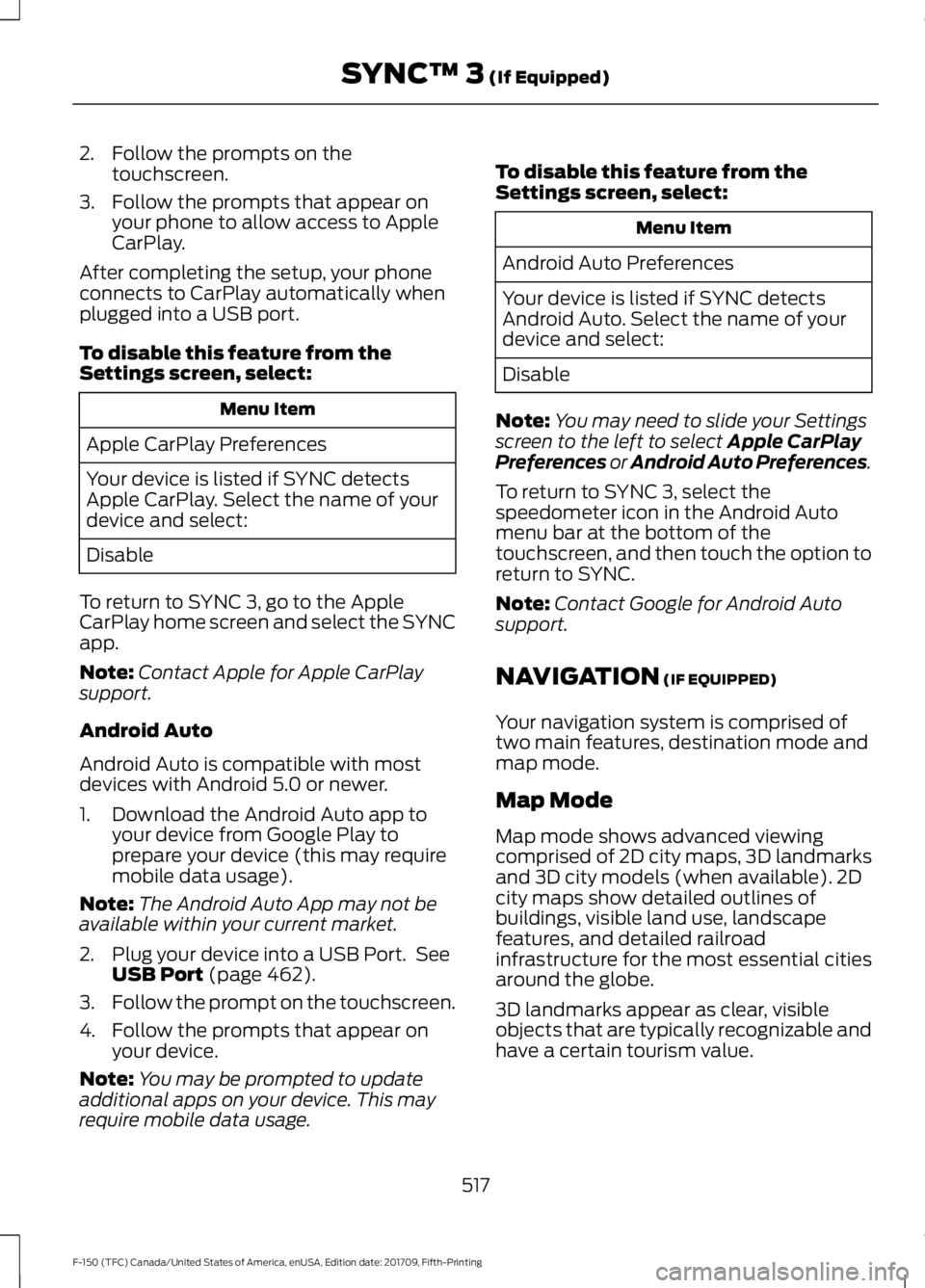
2. Follow the prompts on the
touchscreen.
3. Follow the prompts that appear on your phone to allow access to Apple
CarPlay.
After completing the setup, your phone
connects to CarPlay automatically when
plugged into a USB port.
To disable this feature from the
Settings screen, select: Menu Item
Apple CarPlay Preferences
Your device is listed if SYNC detects
Apple CarPlay. Select the name of your
device and select:
Disable
To return to SYNC 3, go to the Apple
CarPlay home screen and select the SYNC
app.
Note: Contact Apple for Apple CarPlay
support.
Android Auto
Android Auto is compatible with most
devices with Android 5.0 or newer.
1. Download the Android Auto app to your device from Google Play to
prepare your device (this may require
mobile data usage).
Note: The Android Auto App may not be
available within your current market.
2. Plug your device into a USB Port. See USB Port (page 462).
3. Follow the prompt on the touchscreen.
4. Follow the prompts that appear on your device.
Note: You may be prompted to update
additional apps on your device. This may
require mobile data usage. To disable this feature from the
Settings screen, select: Menu Item
Android Auto Preferences
Your device is listed if SYNC detects
Android Auto. Select the name of your
device and select:
Disable
Note: You may need to slide your Settings
screen to the left to select
Apple CarPlay
Preferences or Android Auto Preferences.
To return to SYNC 3, select the
speedometer icon in the Android Auto
menu bar at the bottom of the
touchscreen, and then touch the option to
return to SYNC.
Note: Contact Google for Android Auto
support.
NAVIGATION
(IF EQUIPPED)
Your navigation system is comprised of
two main features, destination mode and
map mode.
Map Mode
Map mode shows advanced viewing
comprised of 2D city maps, 3D landmarks
and 3D city models (when available). 2D
city maps show detailed outlines of
buildings, visible land use, landscape
features, and detailed railroad
infrastructure for the most essential cities
around the globe.
3D landmarks appear as clear, visible
objects that are typically recognizable and
have a certain tourism value.
517
F-150 (TFC) Canada/United States of America, enUSA, Edition date: 201709, Fifth-Printing SYNC™ 3
(If Equipped)
Page 524 of 641
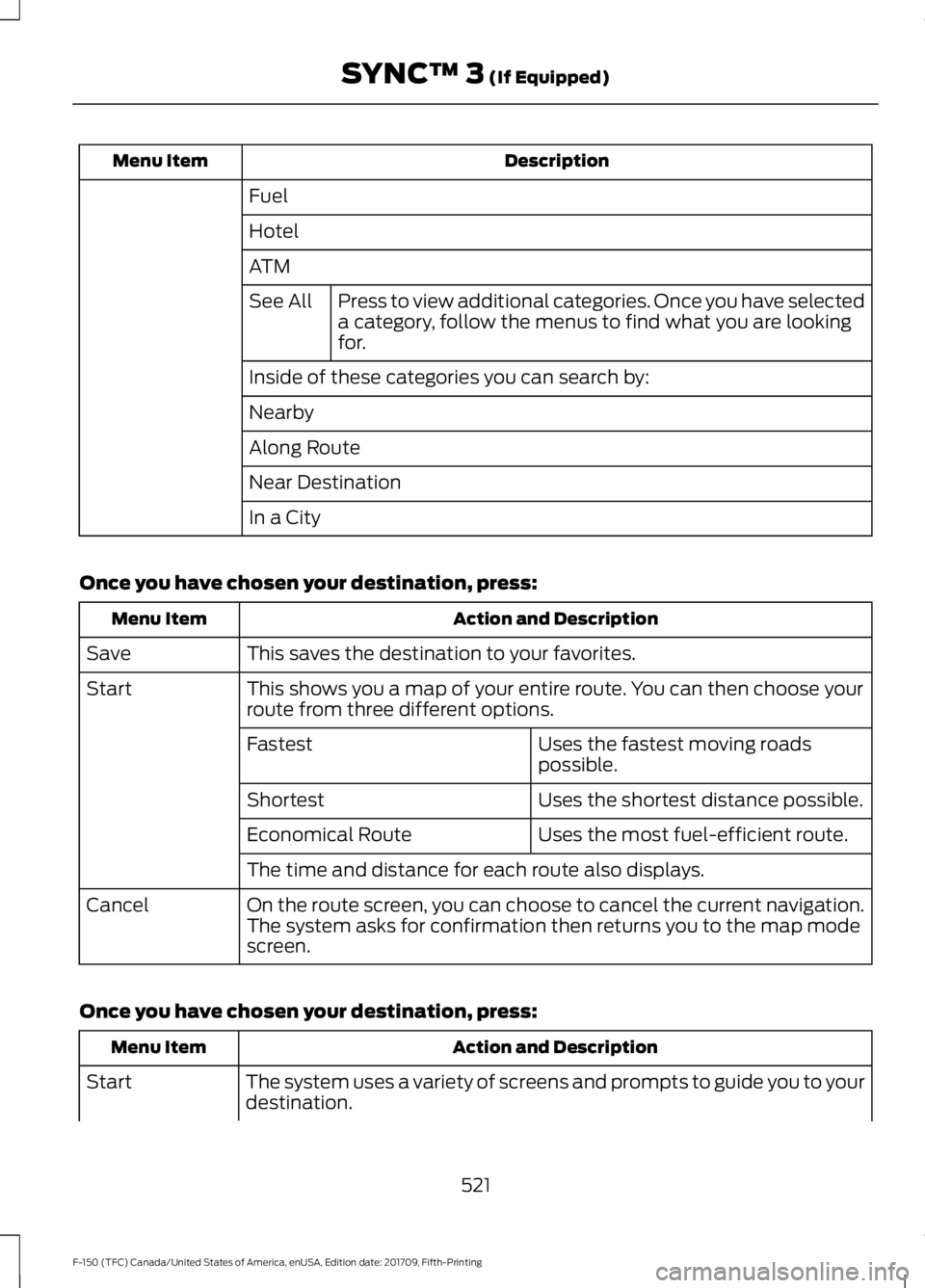
Description
Menu Item
Fuel
Hotel
ATMPress to view additional categories. Once you have selected
a category, follow the menus to find what you are looking
for.
See All
Inside of these categories you can search by:
Nearby
Along Route
Near Destination
In a City
Once you have chosen your destination, press: Action and Description
Menu Item
This saves the destination to your favorites.
Save
This shows you a map of your entire route. You can then choose your
route from three different options.
Start
Uses the fastest moving roads
possible.
Fastest
Uses the shortest distance possible.
Shortest
Uses the most fuel-efficient route.
Economical Route
The time and distance for each route also displays.
On the route screen, you can choose to cancel the current navigation.
The system asks for confirmation then returns you to the map mode
screen.
Cancel
Once you have chosen your destination, press: Action and Description
Menu Item
The system uses a variety of screens and prompts to guide you to your
destination.
Start
521
F-150 (TFC) Canada/United States of America, enUSA, Edition date: 201709, Fifth-Printing SYNC™ 3 (If Equipped)
Page 545 of 641
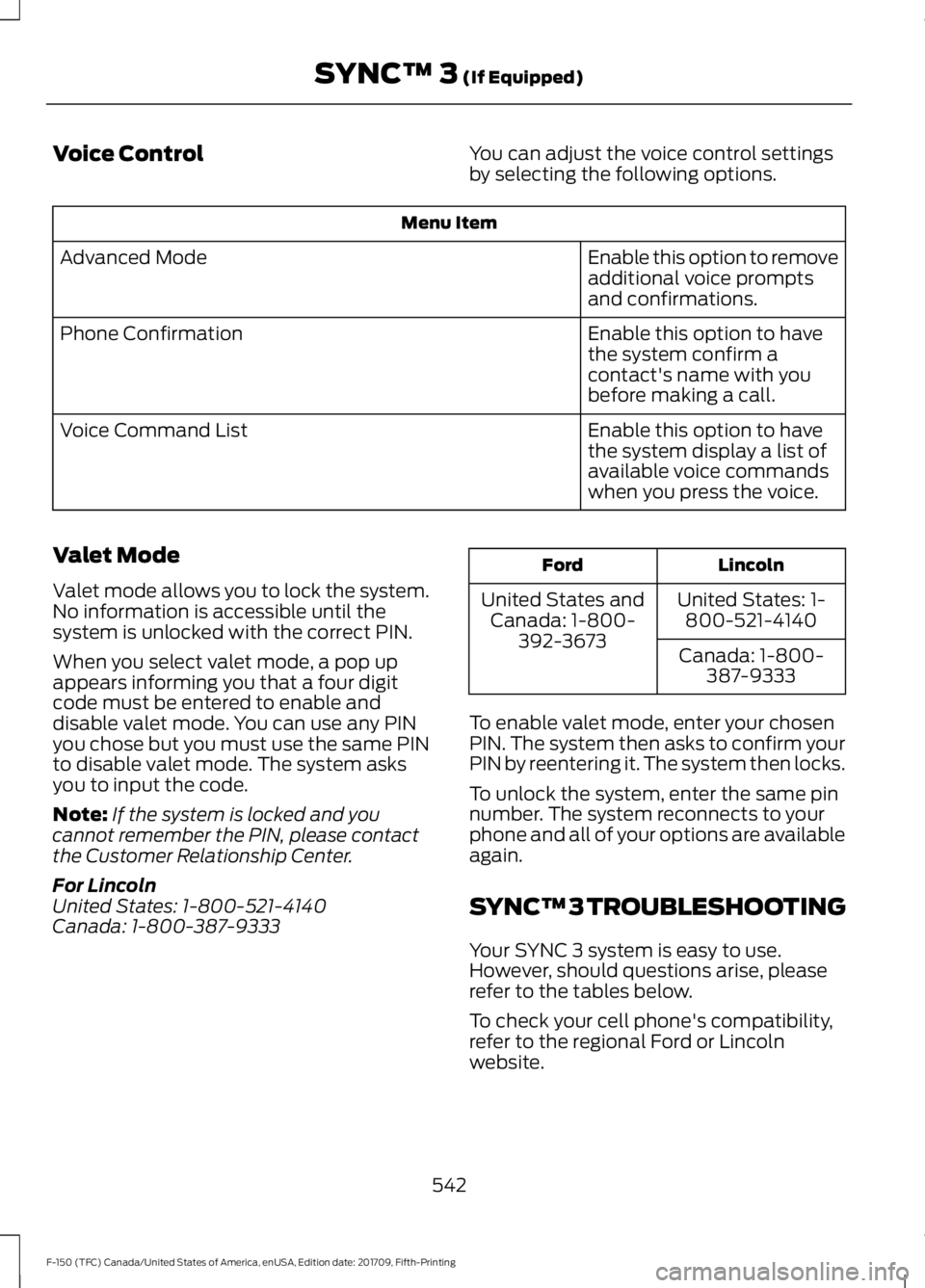
Voice Control
You can adjust the voice control settings
by selecting the following options.Menu Item
Enable this option to remove
additional voice prompts
and confirmations.
Advanced Mode
Enable this option to have
the system confirm a
contact's name with you
before making a call.
Phone Confirmation
Enable this option to have
the system display a list of
available voice commands
when you press the voice.
Voice Command List
Valet Mode
Valet mode allows you to lock the system.
No information is accessible until the
system is unlocked with the correct PIN.
When you select valet mode, a pop up
appears informing you that a four digit
code must be entered to enable and
disable valet mode. You can use any PIN
you chose but you must use the same PIN
to disable valet mode. The system asks
you to input the code.
Note: If the system is locked and you
cannot remember the PIN, please contact
the Customer Relationship Center.
For Lincoln
United States: 1-800-521-4140
Canada: 1-800-387-9333 Lincoln
Ford
United States: 1-800-521-4140
United States and
Canada: 1-800- 392-3673 Canada: 1-800-
387-9333
To enable valet mode, enter your chosen
PIN. The system then asks to confirm your
PIN by reentering it. The system then locks.
To unlock the system, enter the same pin
number. The system reconnects to your
phone and all of your options are available
again.
SYNC™ 3 TROUBLESHOOTING
Your SYNC 3 system is easy to use.
However, should questions arise, please
refer to the tables below.
To check your cell phone's compatibility,
refer to the regional Ford or Lincoln
website.
542
F-150 (TFC) Canada/United States of America, enUSA, Edition date: 201709, Fifth-Printing SYNC™ 3 (If Equipped)
Page 547 of 641
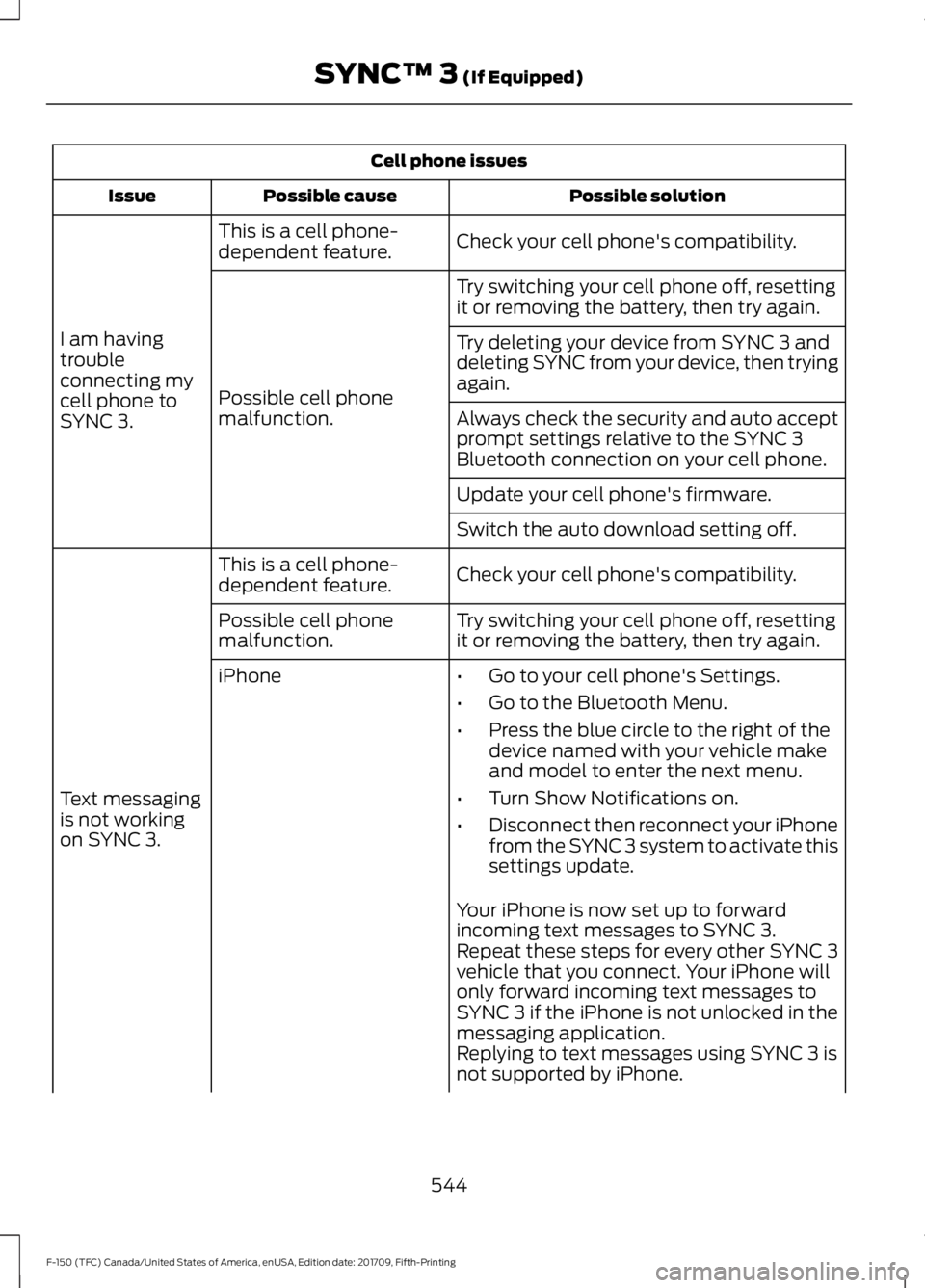
Cell phone issues
Possible solution
Possible cause
Issue
Check your cell phone's compatibility.
This is a cell phone-
dependent feature.
I am having
trouble
connecting my
cell phone to
SYNC 3. Try switching your cell phone off, resetting
it or removing the battery, then try again.
Possible cell phone
malfunction. Try deleting your device from SYNC 3 and
deleting SYNC from your device, then trying
again.
Always check the security and auto accept
prompt settings relative to the SYNC 3
Bluetooth connection on your cell phone.
Update your cell phone's firmware.
Switch the auto download setting off.
Check your cell phone's compatibility.
This is a cell phone-
dependent feature.
Text messaging
is not working
on SYNC 3. Try switching your cell phone off, resetting
it or removing the battery, then try again.
Possible cell phone
malfunction.
iPhone
•Go to your cell phone's Settings.
• Go to the Bluetooth Menu.
• Press the blue circle to the right of the
device named with your vehicle make
and model to enter the next menu.
• Turn Show Notifications on.
• Disconnect then reconnect your iPhone
from the SYNC 3 system to activate this
settings update.
Your iPhone is now set up to forward
incoming text messages to SYNC 3.
Repeat these steps for every other SYNC 3
vehicle that you connect. Your iPhone will
only forward incoming text messages to
SYNC 3 if the iPhone is not unlocked in the
messaging application.
Replying to text messages using SYNC 3 is
not supported by iPhone.
544
F-150 (TFC) Canada/United States of America, enUSA, Edition date: 201709, Fifth-Printing SYNC™ 3 (If Equipped)
Page 548 of 641
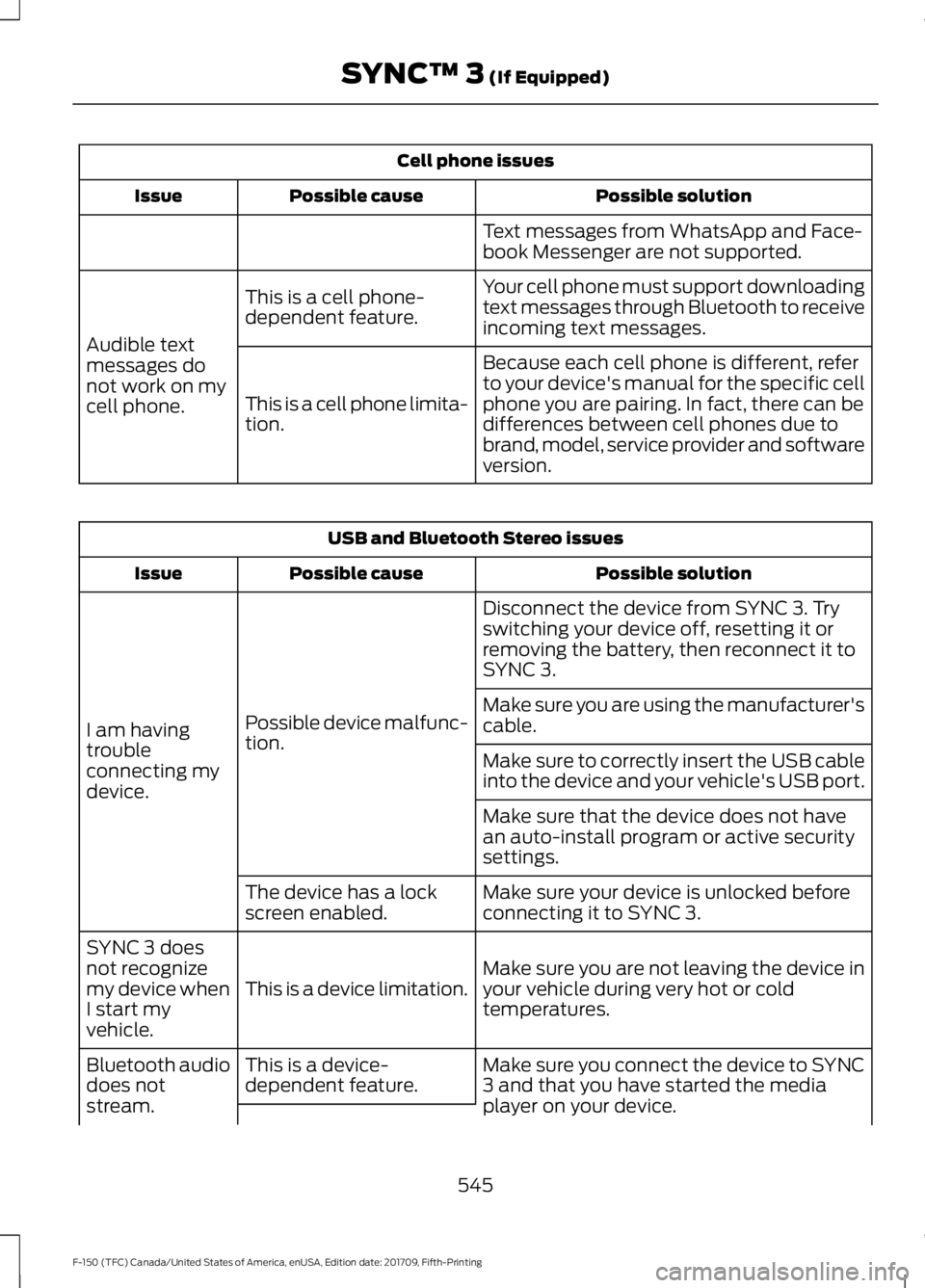
Cell phone issues
Possible solution
Possible cause
Issue
Text messages from WhatsApp and Face-
book Messenger are not supported.
Your cell phone must support downloading
text messages through Bluetooth to receive
incoming text messages.
This is a cell phone-
dependent feature.
Audible text
messages do
not work on my
cell phone. Because each cell phone is different, refer
to your device's manual for the specific cell
phone you are pairing. In fact, there can be
differences between cell phones due to
brand, model, service provider and software
version.
This is a cell phone limita-
tion. USB and Bluetooth Stereo issues
Possible solution
Possible cause
Issue
Disconnect the device from SYNC 3. Try
switching your device off, resetting it or
removing the battery, then reconnect it to
SYNC 3.
Possible device malfunc-
tion.
I am having
trouble
connecting my
device. Make sure you are using the manufacturer's
cable.
Make sure to correctly insert the USB cable
into the device and your vehicle's USB port.
Make sure that the device does not have
an auto-install program or active security
settings.
Make sure your device is unlocked before
connecting it to SYNC 3.
The device has a lock
screen enabled.
Make sure you are not leaving the device in
your vehicle during very hot or cold
temperatures.
This is a device limitation.
SYNC 3 does
not recognize
my device when
I start my
vehicle.
Make sure you connect the device to SYNC
3 and that you have started the media
player on your device.
This is a device-
dependent feature.
Bluetooth audio
does not
stream.
545
F-150 (TFC) Canada/United States of America, enUSA, Edition date: 201709, Fifth-Printing SYNC™ 3 (If Equipped)
Page 614 of 641

IMPLIED WARRANTIES OF
MERCHANTABILITY, FITNESS FOR A
PARTICULAR PURPOSE, TITLE, AND
NON-INFRINGEMENT. NEITHER
GRACENOTE WARRANTS THE RESULTS
THAT WILL BE OBTAINED BY YOUR USE
OF THE GRACENOTE SOFTWARE OR ANY
GRACENOTE SERVER. IN NO CASE WILL
GRACENOTE BE LIABLE FOR ANY
CONSEQUENTIAL OR INCIDENTAL
DAMAGES OR FOR ANY LOST PROFITS
OR LOST REVENUES FOR ANY REASON
WHATSOEVER. © Gracenote 2007.
Radio Frequency Statement
FCC ID: ACJ-SYNCG3-L
IC: 216B-SYNCG3-L
This device complies with Part 15 of the
FCC Rules and with RSS-210 of Industry
Canada. Operation is subject to the
following two conditions:
(1) This device may not cause harmful
interference, and
(2)
this device must accept any
interference received, including
interference that may cause undesired
operation. WARNING:
Changes or
modifications not expressively approved
by the party responsible for compliance
could void the user's authority to operate
the equipment. The term "IC:" before the
radio certification number only signifies
that Industry Canada technical
specifications were met.
The antenna used for this transmitter must
not be co-located or operating in
conjunction with any other antenna or
transmitter. Taiwan Territory
Note: In accordance with the management
approach of low-power radio wave
radiation motors:
Article 12: For approved and certified
low-power radiation motor models,
companies, firms or users must not alter
the frequency, increase the power or
change the characteristics and functions
of the original design without authorization.
Article 14: The usage of low-power
radio-frequency motors must not affect
aviation safety and interfere with legal
telecommunications. Should interference
be detected, immediately stop using the
device and only resume usage after
ensuring that there is no longer any
interference. For the legal
telecommunication and wireless
telecommunication of the telco, the
low-power radio frequency motor must be
able to tolerate legal limits of interference
from telecommunication, industrial,
scientific and radio wave equipment.
SUNA TRAFFIC CHANNEL – TERMS
AND CONDITIONS
By activating, using and/or accessing the
SUNA Traffic Channel, SUNA Predictive or
other content or material provided by
Intelematics (together,
SUNA Products
and/or Services
), you must accept
certain terms and conditions. The following
is a brief summary of the terms and
conditions that apply to you. To view the
full terms and conditions relevant to your
use of the SUNA Products and/or Services,
please consult: Website
www.sunatraffic.com.au/termsandcon- ditions/
1. Acceptance
611
F-150 (TFC) Canada/United States of America, enUSA, Edition date: 201709, Fifth-Printing Appendices
Page 629 of 641
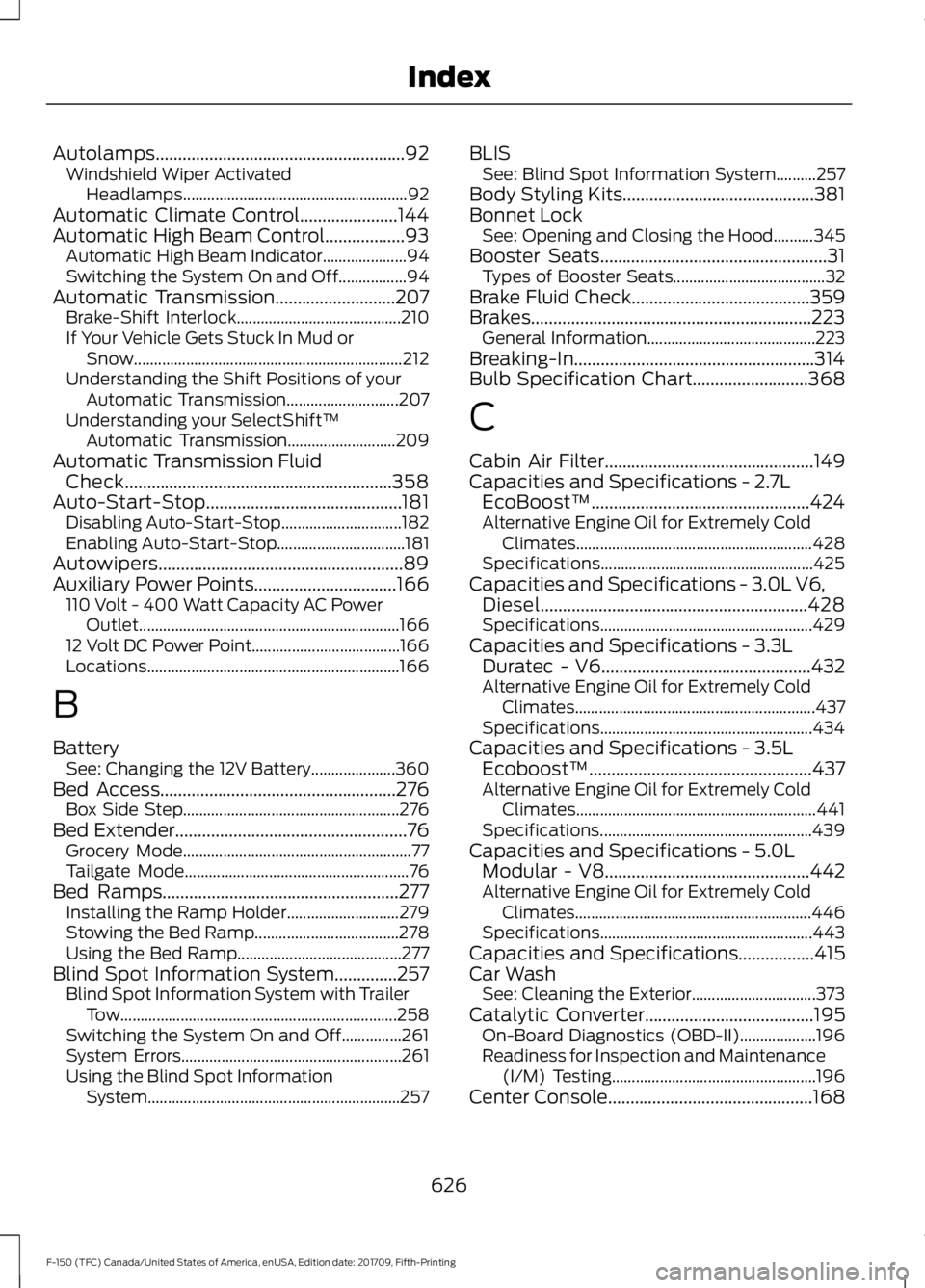
Autolamps........................................................92
Windshield Wiper Activated
Headlamps........................................................ 92
Automatic Climate Control......................144
Automatic High Beam Control..................93 Automatic High Beam Indicator..................... 94
Switching the System On and Off.................94
Automatic Transmission
...........................207
Brake-Shift Interlock......................................... 210
If Your Vehicle Gets Stuck In Mud or Snow................................................................... 212
Understanding the Shift Positions of your Automatic Transmission............................ 207
Understanding your SelectShift™ Automatic Transmission........................... 209
Automatic Transmission Fluid Check............................................................358
Auto-Start-Stop............................................181 Disabling Auto-Start-Stop.............................. 182
Enabling Auto-Start-Stop................................ 181
Autowipers.......................................................89
Auxiliary Power Points
................................166
110 Volt - 400 Watt Capacity AC Power
Outlet................................................................. 166
12 Volt DC Power Point..................................... 166
Locations............................................................... 166
B
Battery See: Changing the 12V Battery..................... 360
Bed Access.....................................................276 Box Side Step...................................................... 276
Bed Extender
....................................................76
Grocery Mode......................................................... 77
Tailgate Mode........................................................ 76
Bed Ramps
.....................................................277
Installing the Ramp Holder............................ 279
Stowing the Bed Ramp.................................... 278
Using the Bed Ramp......................................... 277
Blind Spot Information System..............257 Blind Spot Information System with Trailer
Tow..................................................................... 258
Switching the System On and Off...............261
System Errors....................................................... 261
Using the Blind Spot Information System............................................................... 257BLIS
See: Blind Spot Information System..........257
Body Styling Kits...........................................381
Bonnet Lock See: Opening and Closing the Hood..........345
Booster Seats
...................................................31
Types of Booster Seats...................................... 32
Brake Fluid Check........................................359
Brakes...............................................................223 General Information.......................................... 223
Breaking-In......................................................314
Bulb Specification Chart..........................368
C
Cabin Air Filter...............................................149
Capacities and Specifications - 2.7L EcoBoost™.................................................424
Alternative Engine Oil for Extremely Cold Climates........................................................... 428
Specifications..................................................... 425
Capacities and Specifications - 3.0L V6, Diesel............................................................428
Specifications..................................................... 429
Capacities and Specifications - 3.3L Duratec - V6...............................................432
Alternative Engine Oil for Extremely Cold Climates............................................................ 437
Specifications..................................................... 434
Capacities and Specifications - 3.5L Ecoboost™..................................................437
Alternative Engine Oil for Extremely Cold Climates............................................................ 441
Specifications..................................................... 439
Capacities and Specifications - 5.0L Modular - V8..............................................442
Alternative Engine Oil for Extremely Cold Climates ........................................................... 446
Specifications..................................................... 443
Capacities and Specifications.................415
Car Wash See: Cleaning the Exterior............................... 373
Catalytic Converter
......................................195
On-Board Diagnostics (OBD-II)................... 196
Readiness for Inspection and Maintenance (I/M) Testing................................................... 196
Center Console..............................................168
626
F-150 (TFC) Canada/United States of America, enUSA, Edition date: 201709, Fifth-Printing Index
Page 631 of 641
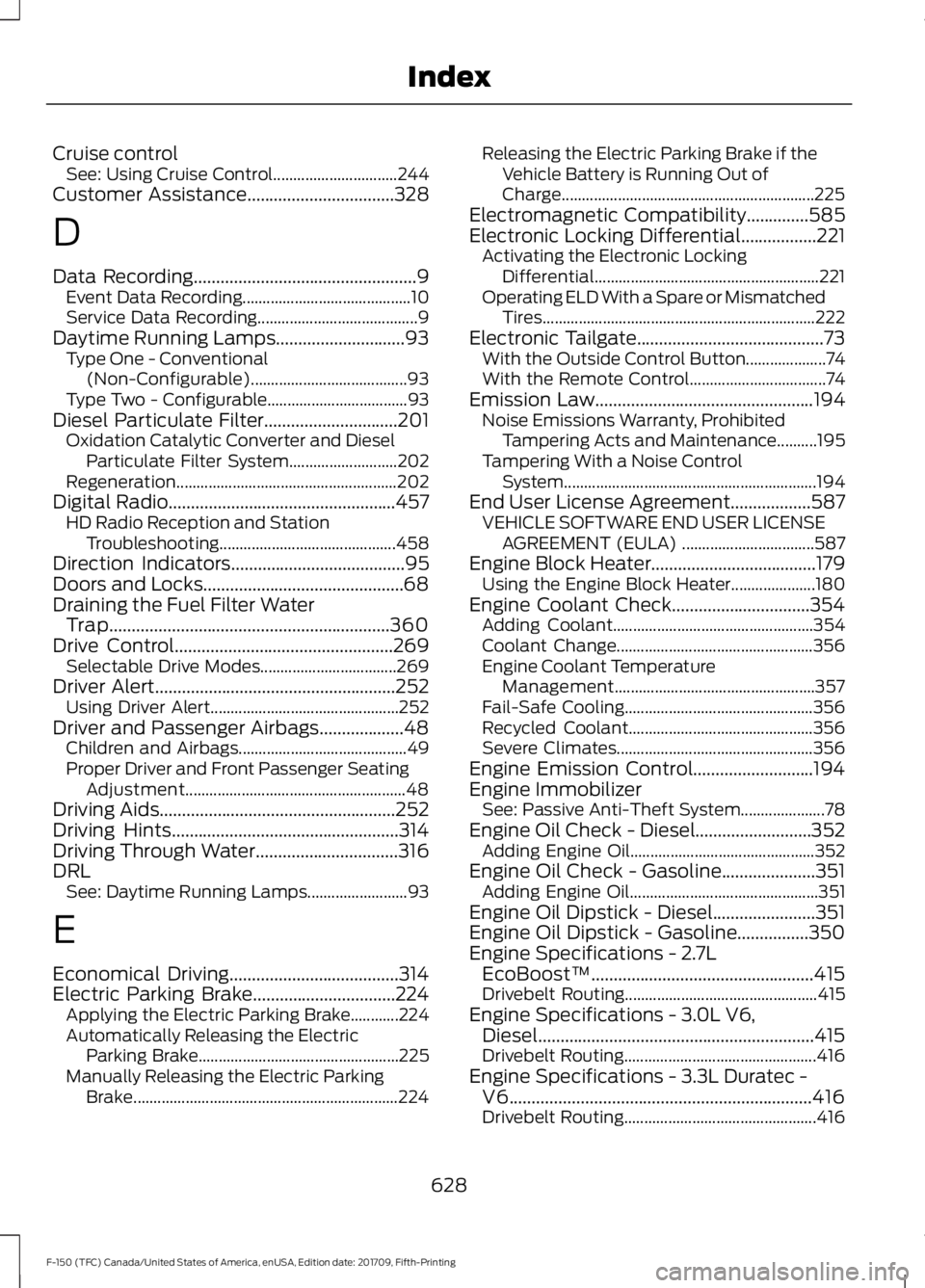
Cruise control
See: Using Cruise Control............................... 244
Customer Assistance.................................328
D
Data Recording
..................................................9
Event Data Recording.......................................... 10
Service Data Recording........................................ 9
Daytime Running Lamps.............................93 Type One - Conventional
(Non-Configurable)....................................... 93
Type Two - Configurable................................... 93
Diesel Particulate Filter
..............................201
Oxidation Catalytic Converter and Diesel
Particulate Filter System........................... 202
Regeneration....................................................... 202
Digital Radio
...................................................457
HD Radio Reception and Station
Troubleshooting............................................ 458
Direction Indicators
.......................................95
Doors and Locks.............................................68
Draining the Fuel Filter Water Trap...............................................................360
Drive Control
.................................................269
Selectable Drive Modes.................................. 269
Driver Alert
......................................................252
Using Driver Alert............................................... 252
Driver and Passenger Airbags...................48 Children and Airbags.......................................... 49
Proper Driver and Front Passenger Seating Adjustment....................................................... 48
Driving Aids
.....................................................252
Driving Hints...................................................314
Driving Through Water................................316
DRL See: Daytime Running Lamps......................... 93
E
Economical Driving......................................314
Electric Parking Brake
................................224
Applying the Electric Parking Brake............224
Automatically Releasing the Electric
Parking Brake.................................................. 225
Manually Releasing the Electric Parking Brake.................................................................. 224Releasing the Electric Parking Brake if the
Vehicle Battery is Running Out of
Charge............................................................... 225
Electromagnetic Compatibility..............585
Electronic Locking Differential.................221 Activating the Electronic Locking
Differential........................................................ 221
Operating ELD With a Spare or Mismatched Tires.................................................................... 222
Electronic Tailgate
..........................................73
With the Outside Control Button.................... 74
With the Remote Control.................................. 74
Emission Law
.................................................194
Noise Emissions Warranty, Prohibited
Tampering Acts and Maintenance..........195
Tampering With a Noise Control System............................................................... 194
End User License Agreement..................587 VEHICLE SOFTWARE END USER LICENSE
AGREEMENT (EULA) ................................. 587
Engine Block Heater.....................................179 Using the Engine Block Heater..................... 180
Engine Coolant Check...............................354 Adding Coolant.................................................. 354
Coolant Change................................................. 356
Engine Coolant Temperature Management.................................................. 357
Fail-Safe Cooling............................................... 356
Recycled Coolant.............................................. 356
Severe Climates................................................. 356
Engine Emission Control...........................194
Engine Immobilizer See: Passive Anti-Theft System..................... 78
Engine Oil Check - Diesel..........................352 Adding Engine Oil.............................................. 352
Engine Oil Check - Gasoline
.....................351
Adding Engine Oil............................................... 351
Engine Oil Dipstick - Diesel.......................351
Engine Oil Dipstick - Gasoline................350
Engine Specifications - 2.7L EcoBoost™..................................................415
Drivebelt Routing................................................ 415
Engine Specifications - 3.0L V6, Diesel..............................................................415
Drivebelt Routing................................................ 416
Engine Specifications - 3.3L Duratec - V6....................................................................416
Drivebelt Routing................................................ 416
628
F-150 (TFC) Canada/United States of America, enUSA, Edition date: 201709, Fifth-Printing Index
Page 632 of 641
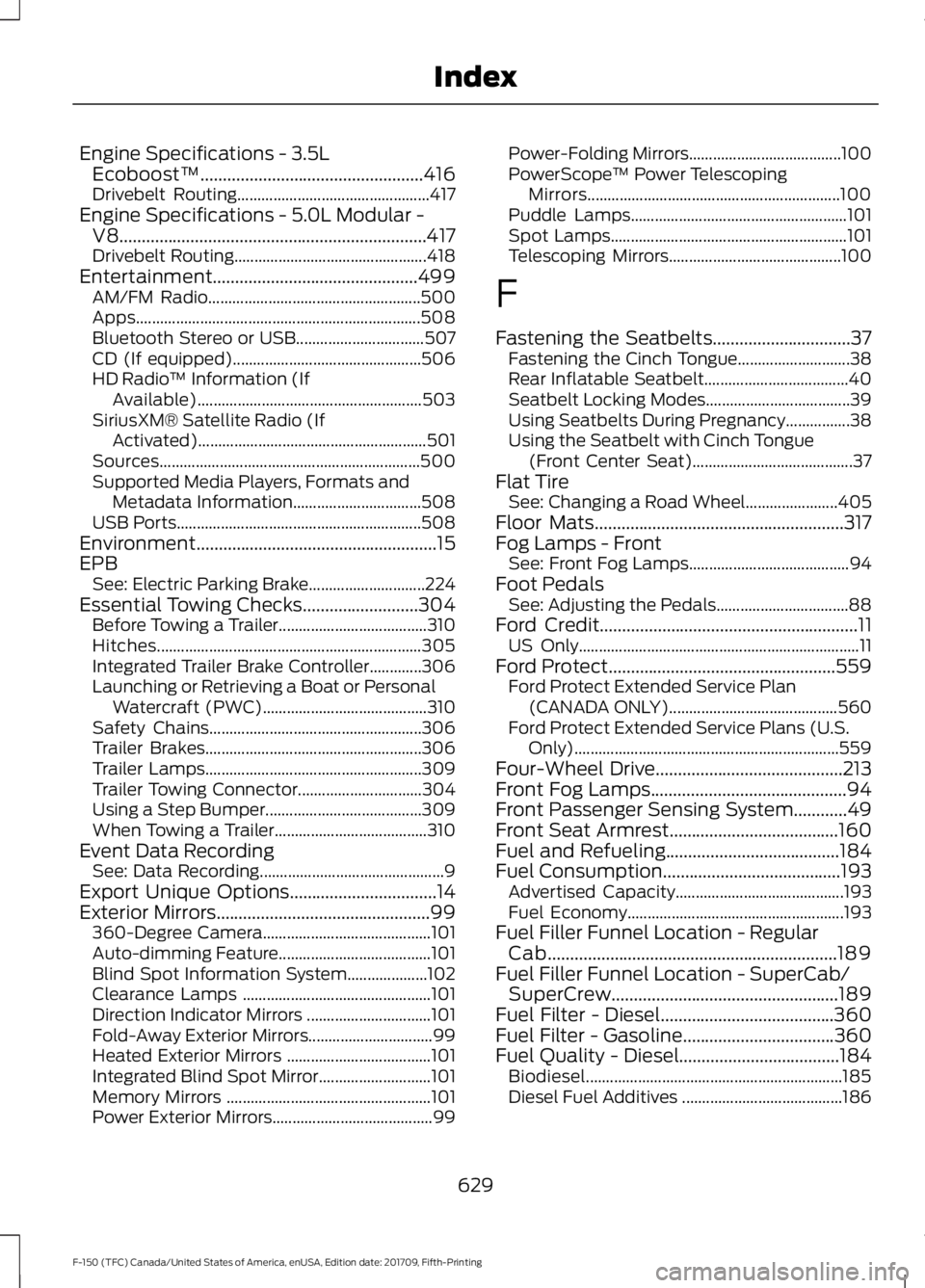
Engine Specifications - 3.5L
Ecoboost™..................................................416
Drivebelt Routing................................................ 417
Engine Specifications - 5.0L Modular - V8.....................................................................417
Drivebelt Routing................................................ 418
Entertainment..............................................499 AM/FM Radio..................................................... 500
Apps....................................................................... 508
Bluetooth Stereo or USB................................ 507
CD (If equipped)............................................... 506
HD Radio ™ Information (If
Available)........................................................ 503
SiriusXM® Satellite Radio (If Activated).........................................................501
Sources................................................................. 500
Supported Media Players, Formats and Metadata Information................................ 508
USB Ports............................................................. 508
Environment......................................................15
EPB See: Electric Parking Brake............................. 224
Essential Towing Checks..........................304 Before Towing a Trailer..................................... 310
Hitches.................................................................. 305
Integrated Trailer Brake Controller.............306
Launching or Retrieving a Boat or Personal Watercraft (PWC)......................................... 310
Safety Chains..................................................... 306
Trailer Brakes...................................................... 306
Trailer Lamps...................................................... 309
Trailer Towing Connector............................... 304
Using a Step Bumper....................................... 309
When Towing a Trailer...................................... 310
Event Data Recording See: Data Recording.............................................. 9
Export Unique Options.................................14
Exterior Mirrors
................................................99
360-Degree Camera.......................................... 101
Auto-dimming Feature...................................... 101
Blind Spot Information System.................... 102
Clearance Lamps ............................................... 101
Direction Indicator Mirrors ............................... 101
Fold-Away Exterior Mirrors............................... 99
Heated Exterior Mirrors .................................... 101
Integrated Blind Spot Mirror............................ 101
Memory Mirrors ................................................... 101
Power Exterior Mirrors........................................ 99Power-Folding Mirrors......................................
100
PowerScope ™ Power Telescoping
Mirrors............................................................... 100
Puddle Lamps...................................................... 101
Spot Lamps........................................................... 101
Telescoping Mirrors........................................... 100
F
Fastening the Seatbelts...............................37 Fastening the Cinch Tongue............................ 38
Rear Inflatable Seatbelt.................................... 40
Seatbelt Locking Modes.................................... 39
Using Seatbelts During Pregnancy................38
Using the Seatbelt with Cinch Tongue (Front Center Seat)........................................ 37
Flat Tire See: Changing a Road Wheel....................... 405
Floor Mats........................................................317
Fog Lamps - Front See: Front Fog Lamps........................................ 94
Foot Pedals See: Adjusting the Pedals................................. 88
Ford Credit
..........................................................11
US Only...................................................................... 11
Ford Protect
...................................................559
Ford Protect Extended Service Plan
(CANADA ONLY).......................................... 560
Ford Protect Extended Service Plans (U.S. Only).................................................................. 559
Four-Wheel Drive
..........................................213
Front Fog Lamps............................................94
Front Passenger Sensing System
............49
Front Seat Armrest......................................160
Fuel and Refueling
.......................................184
Fuel Consumption........................................193
Advertised Capacity.......................................... 193
Fuel Economy...................................................... 193
Fuel Filler Funnel Location - Regular Cab.................................................................189
Fuel Filler Funnel Location - SuperCab/ SuperCrew...................................................189
Fuel Filter - Diesel.......................................360
Fuel Filter - Gasoline
..................................360
Fuel Quality - Diesel....................................184 Biodiesel................................................................ 185
Diesel Fuel Additives ........................................ 186
629
F-150 (TFC) Canada/United States of America, enUSA, Edition date: 201709, Fifth-Printing Index