phone FORD F-150 2018 Owners Manual
[x] Cancel search | Manufacturer: FORD, Model Year: 2018, Model line: F-150, Model: FORD F-150 2018Pages: 641, PDF Size: 8.37 MB
Page 9 of 641
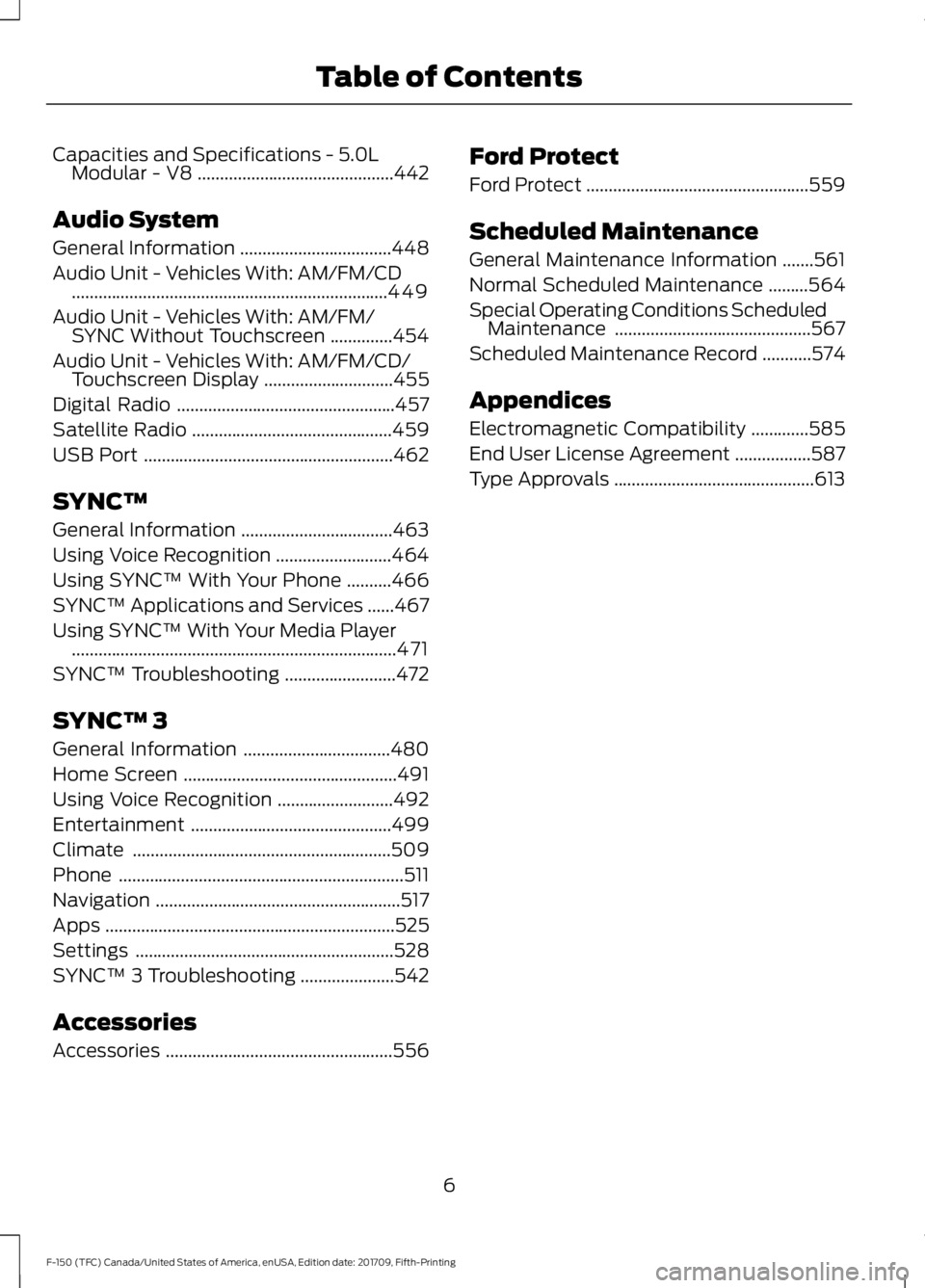
Capacities and Specifications - 5.0L
Modular - V8 ............................................442
Audio System
General Information ..................................
448
Audio Unit - Vehicles With: AM/FM/CD .......................................................................
449
Audio Unit - Vehicles With: AM/FM/ SYNC Without Touchscreen ..............
454
Audio Unit - Vehicles With: AM/FM/CD/ Touchscreen Display .............................
455
Digital Radio .................................................
457
Satellite Radio .............................................
459
USB Port ........................................................
462
SYNC™
General Information ..................................
463
Using Voice Recognition ..........................
464
Using SYNC™ With Your Phone ..........
466
SYNC™ Applications and Services ......
467
Using SYNC™ With Your Media Player ........................................................................\
.
471
SYNC™ Troubleshooting .........................
472
SYNC™ 3
General Information .................................
480
Home Screen ................................................
491
Using Voice Recognition ..........................
492
Entertainment .............................................
499
Climate ..........................................................
509
Phone ................................................................
511
Navigation .......................................................
517
Apps .................................................................
525
Settings ..........................................................
528
SYNC™ 3 Troubleshooting .....................
542
Accessories
Accessories ...................................................
556Ford Protect
Ford Protect
..................................................
559
Scheduled Maintenance
General Maintenance Information .......
561
Normal Scheduled Maintenance .........
564
Special Operating Conditions Scheduled Maintenance ............................................
567
Scheduled Maintenance Record ...........
574
Appendices
Electromagnetic Compatibility .............
585
End User License Agreement .................
587
Type Approvals .............................................
613
6
F-150 (TFC) Canada/United States of America, enUSA, Edition date: 201709, Fifth-Printing Table of Contents
Page 14 of 641
the information if they have access to
the vehicle or the event data recorder.
Ford Motor Company and Ford of
Canada do not access event data
recorder information without obtaining
consent, unless pursuant to court order
or where required by law enforcement,
other government authorities or other
third parties acting with lawful
authority. Other parties may seek to
access the information independently
of Ford Motor Company and Ford of
Canada.
Note:
Including to the extent that any
law pertaining to Event Data Recorders
applies to SYNC or its features, please
note the following: Once 911 Assist (if
equipped) is enabled (set ON), 911 Assist
may, through any paired and connected
cell phone, disclose to emergency
services that the vehicle has been in a
crash involving the deployment of an
airbag or, in certain vehicles, the
activation of the fuel pump shut-off.
Certain versions or updates to 911 Assist
may also be capable of being used to
electronically or verbally provide to 911
operators the vehicle location (such as
latitude and longitude), and/or other
details about the vehicle or crash or
personal information about the
occupants to assist 911 operators to
provide the most appropriate emergency
services. If you do not want to disclose
this information, do not activate the 911
Assist feature. See SYNC™ 3 (page 480).
Additionally, when you connect to
Traffic, Directions and Information (if
equipped, U.S. only), the service uses
GPS technology and advanced vehicle
sensors to collect the vehicle ’s current
location, travel direction, and speed
(“ vehicle travel information ”), only to
help provide you with the directions,
traffic reports, or business searches
that you request. If you do not want Ford or its vendors to receive this
information, do not activate the
service. For more information, see
Traffic, Directions and Information,
Terms and Conditions.
See
SYNC™ 3
(page 480).
PERCHLORATE
Certain components in your vehicle such
as airbag modules, seatbelt pretensioners
and remote control batteries may contain
perchlorate material. Special handling
may apply for service or vehicle end of life
disposal.
For more information visit: Web Address
www.dtsc.ca.gov/hazard- ouswaste/perchlorate
FORD CREDIT
US Only
Ford Credit offers a full range of financing
and lease plans to help you acquire your
vehicle. If you have financed or leased your
vehicle through Ford Credit, thank you for
your business.
We offer a number of convenient ways for
you to contact us, and to manage your
account.
Call 1-800-727-7000.
For more information about Ford Credit
and access to Account Manager, go to
www.ford.com/finance.
11
F-150 (TFC) Canada/United States of America, enUSA, Edition date: 201709, Fifth-Printing Introduction
Page 17 of 641
emergency situations. Safety must be
paramount when using mobile
communications equipment to avoid
negating these benefits. Mobile
communication equipment includes, but
is not limited to, cellular phones, pagers,
portable email devices, text messaging
devices and portable two-way radios.
EXPORT UNIQUE OPTIONS
For your particular global region, your
vehicle may be equipped with features and
options that are different from the features
and options that are described in this
Owner
’s Manual. A market unique
supplement may be supplied that
complements this book. By referring to the
market unique supplement, if provided,
you can properly identify those features,
recommendations and specifications that
are unique to your vehicle. This Owner ’s
Manual is written primarily for the U.S. and
Canadian Markets. Features or equipment
listed as standard may be different on units
built for export. Refer to this Owner ’s
Manual for all other required
information and warnings.
14
F-150 (TFC) Canada/United States of America, enUSA, Edition date: 201709, Fifth-Printing Introduction
Page 59 of 641
GENERAL INFORMATION ON
RADIO FREQUENCIES
This device complies with Part 15 of the
FCC Rules and with Industry Canada
license-exempt RSS standard(s).
Operation is subject to the following two
conditions: (1) This device may not cause
harmful interference, and (2) This device
must accept any interference received,
including interference that may cause
undesired operation.
Note:
Changes or modifications not
expressively approved by the party
responsible for compliance could void the
user's authority to operate the equipment.
The term "IC:" before the radio certification
number only signifies that Industry Canada
technical specifications were met.
The typical operating range for your
transmitter is approximately 33 ft (10 m).
Vehicles with the remote start feature will
have a greater range. One of the following
could cause a decrease in operating range:
• Weather conditions.
• Nearby radio towers.
• Structures around the vehicle.
• Other vehicles parked next to your
vehicle.
Other short-distance radio transmitters,
such as amateur radios, medical
equipment, wireless headphones, remote
controls and alarm systems may operate
on the same frequency as your remote
control. If other transmitters are operating
on those frequencies, you may not be able
to use your remote control. Using your
remote control near some types of
electronic equipment, such as USB devices,
computers or cell phones can interfere with
remote operation. Operating your remote
control near metal or metallic-finished
purses, bags or clothing can interfere with
remote operation. You can lock and unlock
the doors with the key. Note:
Make sure to lock your vehicle before
leaving it unattended.
Note: If you are in range, the remote control
still operates if you press any button
unintentionally.
Intelligent Access
(If Equipped)
The system uses a radio frequency signal
to communicate with your vehicle and
authorize your vehicle to unlock when one
of the following conditions are met:
• You touch the inside of the front
exterior door handle within
3 ft (1 m)
proximity of an intelligent access key.
• You press the tailgate release button.
• You press a button on the remote
control.
If excessive radio frequency interference
is present in the area or if the remote
control battery is low, you may need to
mechanically unlock your door. You can
use the mechanical key blade in your
intelligent access key to open the driver
door in this situation. See Remote Control
(page
56).
REMOTE CONTROL
Integrated Keyhead Transmitter (If
Equipped)
Use the key blade to start your vehicle and
unlock or lock the driver door from outside
your vehicle. The integrated keyhead
transmitter functions as a programmed
ignition key that operates all the locks and
starts your vehicle, as well as a remote
control.
56
F-150 (TFC) Canada/United States of America, enUSA, Edition date: 201709, Fifth-Printing Keys and Remote Controls
Page 72 of 641
Note:
The system may not function if the
key is close to metal objects or electronic
devices, for example keys or a cell phone.
Note: If the system does not function, use
the key blade to lock and unlock your
vehicle. See Remote Control (page 56).
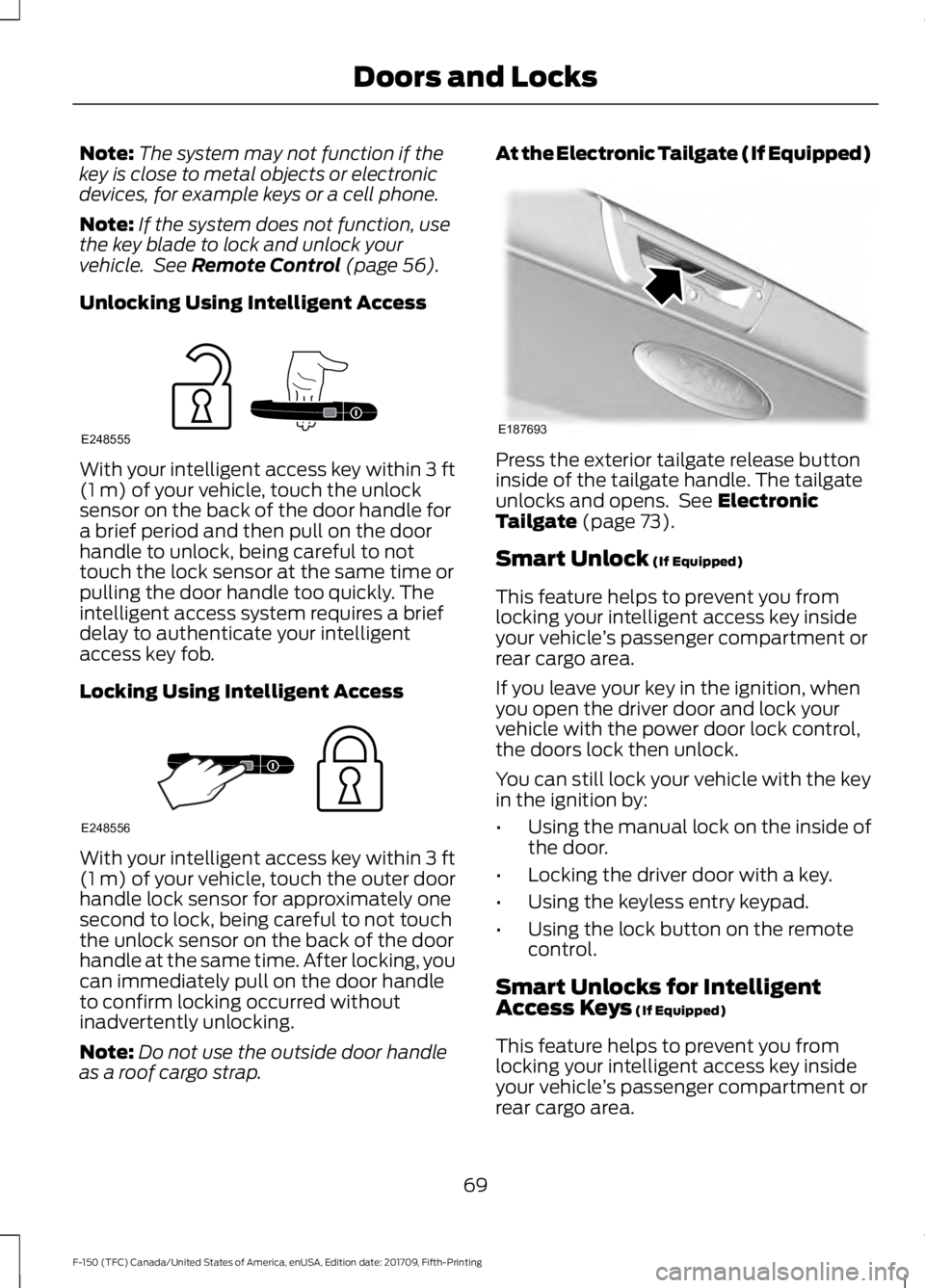
Unlocking Using Intelligent Access With your intelligent access key within
3 ft
(1 m) of your vehicle, touch the unlock
sensor on the back of the door handle for
a brief period and then pull on the door
handle to unlock, being careful to not
touch the lock sensor at the same time or
pulling the door handle too quickly. The
intelligent access system requires a brief
delay to authenticate your intelligent
access key fob.
Locking Using Intelligent Access With your intelligent access key within
3 ft
(1 m) of your vehicle, touch the outer door
handle lock sensor for approximately one
second to lock, being careful to not touch
the unlock sensor on the back of the door
handle at the same time. After locking, you
can immediately pull on the door handle
to confirm locking occurred without
inadvertently unlocking.
Note: Do not use the outside door handle
as a roof cargo strap. At the Electronic Tailgate (If Equipped)
Press the exterior tailgate release button
inside of the tailgate handle. The tailgate
unlocks and opens. See
Electronic
Tailgate (page 73).
Smart Unlock
(If Equipped)
This feature helps to prevent you from
locking your intelligent access key inside
your vehicle ’s passenger compartment or
rear cargo area.
If you leave your key in the ignition, when
you open the driver door and lock your
vehicle with the power door lock control,
the doors lock then unlock.
You can still lock your vehicle with the key
in the ignition by:
• Using the manual lock on the inside of
the door.
• Locking the driver door with a key.
• Using the keyless entry keypad.
• Using the lock button on the remote
control.
Smart Unlocks for Intelligent
Access Keys
(If Equipped)
This feature helps to prevent you from
locking your intelligent access key inside
your vehicle ’s passenger compartment or
rear cargo area.
69
F-150 (TFC) Canada/United States of America, enUSA, Edition date: 201709, Fifth-Printing Doors and LocksE248555 E248556 E187693
Page 174 of 641
KEYLESS STARTING (IF EQUIPPED)
Note: The keyless starting system may not
function if the key is close to metal objects
or electronic devices such as cellular
phones.
Note: A valid key must be located inside
your vehicle to switch the ignition on and
start the engine.
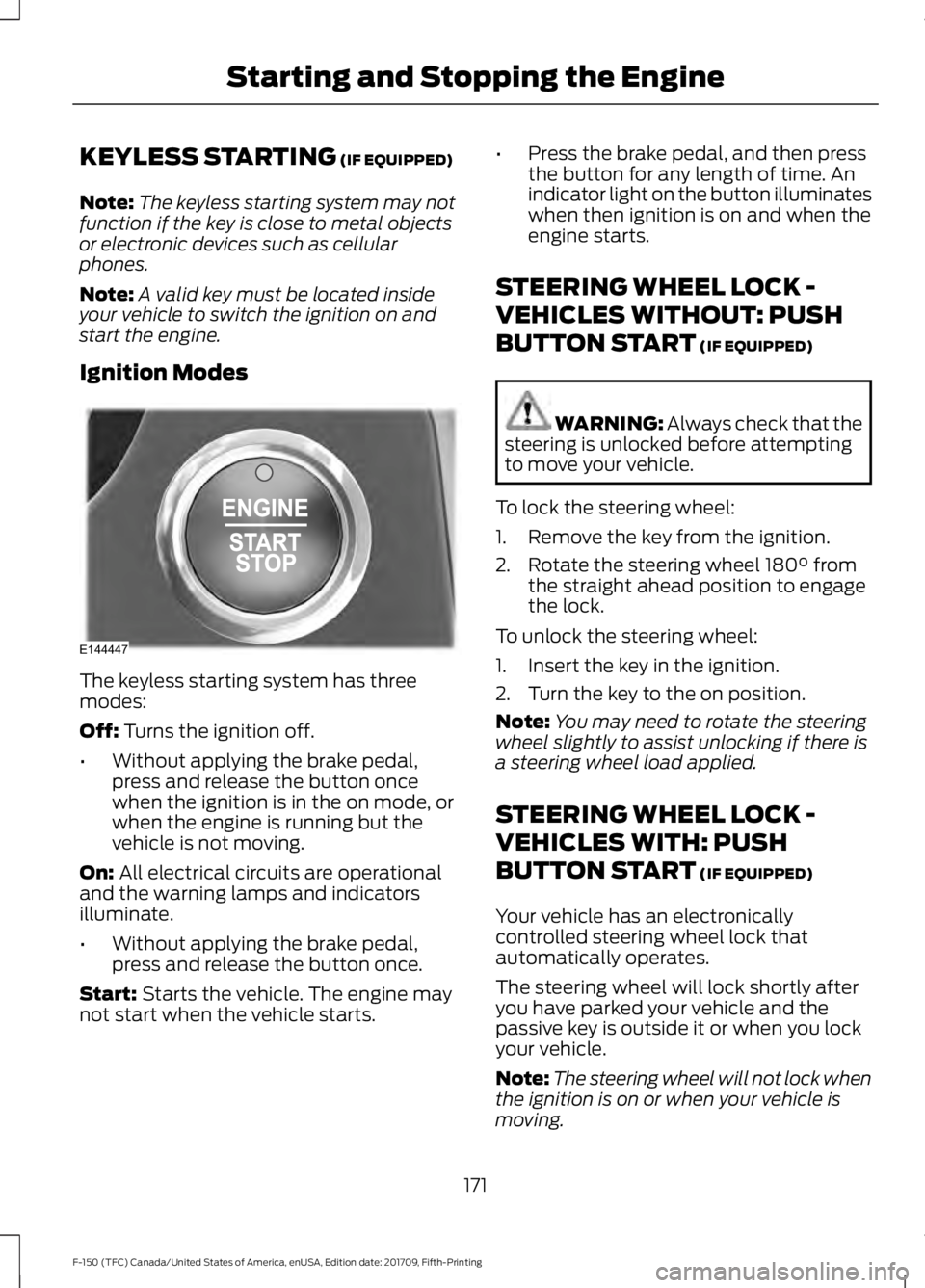
Ignition Modes The keyless starting system has three
modes:
Off:
Turns the ignition off.
• Without applying the brake pedal,
press and release the button once
when the ignition is in the on mode, or
when the engine is running but the
vehicle is not moving.
On:
All electrical circuits are operational
and the warning lamps and indicators
illuminate.
• Without applying the brake pedal,
press and release the button once.
Start:
Starts the vehicle. The engine may
not start when the vehicle starts. •
Press the brake pedal, and then press
the button for any length of time. An
indicator light on the button illuminates
when then ignition is on and when the
engine starts.
STEERING WHEEL LOCK -
VEHICLES WITHOUT: PUSH
BUTTON START
(IF EQUIPPED) WARNING:
Always check that the
steering is unlocked before attempting
to move your vehicle.
To lock the steering wheel:
1. Remove the key from the ignition.
2. Rotate the steering wheel 180° from the straight ahead position to engage
the lock.
To unlock the steering wheel:
1. Insert the key in the ignition.
2. Turn the key to the on position.
Note: You may need to rotate the steering
wheel slightly to assist unlocking if there is
a steering wheel load applied.
STEERING WHEEL LOCK -
VEHICLES WITH: PUSH
BUTTON START
(IF EQUIPPED)
Your vehicle has an electronically
controlled steering wheel lock that
automatically operates.
The steering wheel will lock shortly after
you have parked your vehicle and the
passive key is outside it or when you lock
your vehicle.
Note: The steering wheel will not lock when
the ignition is on or when your vehicle is
moving.
171
F-150 (TFC) Canada/United States of America, enUSA, Edition date: 201709, Fifth-Printing Starting and Stopping the EngineE144447
Page 187 of 641
SAFETY PRECAUTIONS
WARNING: Do not overfill the fuel
tank. The pressure in an overfilled tank
may cause leakage and lead to fuel spray
and fire. WARNING:
The fuel system may
be under pressure. If you hear a hissing
sound near the fuel filler inlet, do not
refuel until the sound stops. Otherwise,
fuel may spray out, which could cause
serious personal injury. WARNING:
Fuels can cause
serious injury or death if misused or
mishandled. WARNING:
Fuel may contain
benzene, which is a cancer-causing
agent. WARNING: When refueling always
shut the engine off and never allow
sparks or open flames near the fuel tank
filler valve. Never smoke or use a cell
phone while refueling. Fuel vapor is
extremely hazardous under certain
conditions. Avoid inhaling excess fumes.
Follow these guidelines when refueling:
• Extinguish all smoking materials and
any open flames before refueling your
vehicle.
• Always switch the engine off before
refueling.
• Automotive fuels can be harmful or
fatal if swallowed. Fuel is highly toxic
and if swallowed can cause death or
permanent injury. If fuel is swallowed
immediately call a physician, even if no
symptoms are immediately apparent.
The toxic effects of fuel may not be
apparent for hours. •
Avoid inhaling fuel vapors. Inhaling fuel
vapor can lead to eye and respiratory
tract irritation. In severe cases,
excessive or prolonged breathing of
fuel vapor can cause serious illness and
permanent injury.
• Avoid getting fuel in your eyes. If you
splash fuel in your eyes, immediately
remove contact lenses (if worn), flush
with water for 15 minutes and seek
medical attention. Failure to seek
proper medical attention could lead to
permanent injury.
• Fuels can be harmful if absorbed
through the skin. If you splash fuel on
your skin, clothing or both, promptly
remove contaminated clothing and
thoroughly wash your skin with soap
and water. Repeated or prolonged skin
contact causes skin irritation.
• Be particularly careful if you are taking
Antabuse or other forms of Disulfiram
for the treatment of alcoholism.
Breathing fuel vapors could cause an
adverse reaction, serious personal
injury or sickness. Immediately call a
physician if you experience any adverse
reactions.
FUEL QUALITY - DIESEL
Fuel Requirements - Choosing The
Right Fuel: Vehicles Operated
Where Ultra Low Sulfur Diesel Fuel
Is Required (United
States/Canada/Puerto Rico/U.S.
Virgin Islands And Other Locales)
Note: Your warranty will not cover damage
caused by using an improper type of fuel or
fuel additive.
184
F-150 (TFC) Canada/United States of America, enUSA, Edition date: 201709, Fifth-Printing Fuel and Refueling
Page 194 of 641
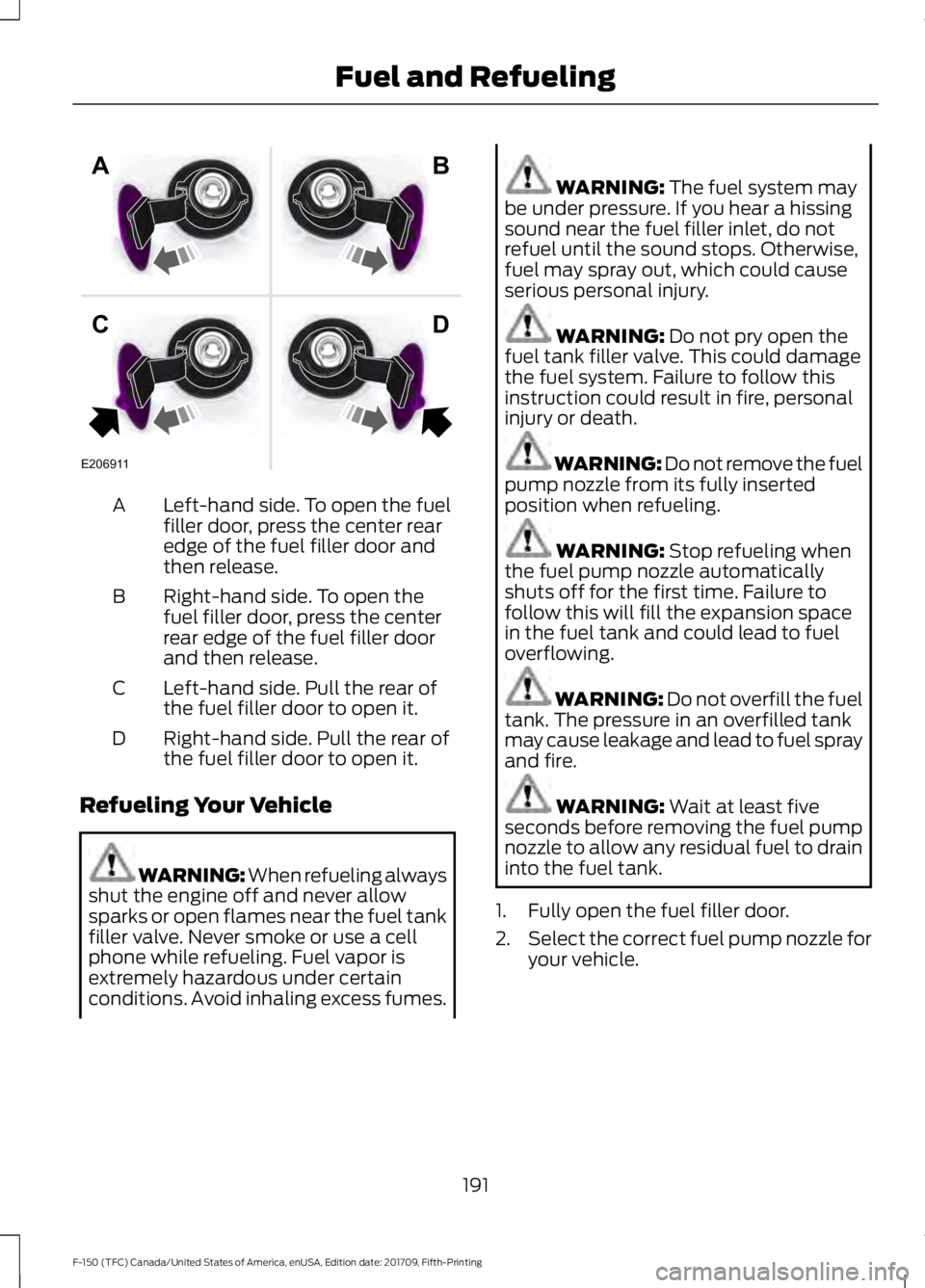
Left-hand side. To open the fuel
filler door, press the center rear
edge of the fuel filler door and
then release.
A
Right-hand side. To open the
fuel filler door, press the center
rear edge of the fuel filler door
and then release.
B
Left-hand side. Pull the rear of
the fuel filler door to open it.
C
Right-hand side. Pull the rear of
the fuel filler door to open it.
D
Refueling Your Vehicle WARNING: When refueling always
shut the engine off and never allow
sparks or open flames near the fuel tank
filler valve. Never smoke or use a cell
phone while refueling. Fuel vapor is
extremely hazardous under certain
conditions. Avoid inhaling excess fumes. WARNING: The fuel system may
be under pressure. If you hear a hissing
sound near the fuel filler inlet, do not
refuel until the sound stops. Otherwise,
fuel may spray out, which could cause
serious personal injury. WARNING:
Do not pry open the
fuel tank filler valve. This could damage
the fuel system. Failure to follow this
instruction could result in fire, personal
injury or death. WARNING: Do not remove the fuel
pump nozzle from its fully inserted
position when refueling. WARNING:
Stop refueling when
the fuel pump nozzle automatically
shuts off for the first time. Failure to
follow this will fill the expansion space
in the fuel tank and could lead to fuel
overflowing. WARNING:
Do not overfill the fuel
tank. The pressure in an overfilled tank
may cause leakage and lead to fuel spray
and fire. WARNING:
Wait at least five
seconds before removing the fuel pump
nozzle to allow any residual fuel to drain
into the fuel tank.
1. Fully open the fuel filler door.
2. Select the correct fuel pump nozzle for
your vehicle.
191
F-150 (TFC) Canada/United States of America, enUSA, Edition date: 201709, Fifth-Printing Fuel and RefuelingE206911
AB
CD
Page 318 of 641
•
Transmissions give their best fuel
economy when operated in the top
cruise gear and with steady pressure
on the gas pedal.
• Four-wheel-drive operation (if
equipped) is less fuel efficient than
two-wheel-drive operation.
• Close the windows for high-speed
driving.
OFF-ROAD DRIVING
In addition to providing an excellent
on-road driving experience, your vehicle
excels at all types of off-road driving. The
truck has been designed and equipped to
allow you to explore those places where
the road doesn ’t take you whether it’ s a
forest trail or the open desert. Before going
off-roading, consult with your local
governmental agencies to determine
designated off-road trails and recreation
areas. Also, be sure to understand any
off-road vehicle registration requirements
for the area in which you plan on driving.
Tread Lightly is an educational program
designed to increase public awareness of
land-use regulations and responsibilities
in our nation ’s wilderness areas. Ford joins
the U.S. Forest Service and Bureau of Land
Management in encouraging you to help
preserve our national forest and other
public and private lands by treading lightly.
Before taking your vehicle off-roading, a
basic vehicle inspection should be done to
make sure that the vehicle is in top working
condition. It is always recommended that at least
two vehicles are used while off-roading.
The buddy system helps make sure that
help is close at hand should a vehicle
become stuck or damaged. It is also wise
to take supplies such as a first aid kit,
supply of water, tow strap, cell or satellite
phone with you any time an off-road
excursion is planned.
Basic Off-road Driving Techniques
•
Grip the steering wheel with thumbs
on the outside of the rim. This will
reduce the risk of injury due to abrupt
steering wheel motions that occur
when negotiating rough terrain. Do not
grip the steering wheel with thumbs
inside the rim.
• Throttle, brake and steering inputs
should be made in a smooth and
controlled manner. Sudden inputs to
the controls can cause loss of traction
or upset the vehicle, especially while
on sloped terrain or while crossing
obstacles such as rocks or logs.
• Look ahead on your route noting
upcoming obstacles, surface texture
or color changes or any other factors
which may indicate a change in
available traction, and adjust the
vehicle speed and route accordingly.
During pre-run, mark obstacles with
GPS markers to make sure appropriate
speeds are used to avoid potential
vehicle damage.
• When driving off-road, if the front or
rear suspension is bottoming out
and/or excessive contact with the
skid-plates is encountered, reduce
vehicle speed to avoid potential
damage to the vehicle.
• When running with other vehicles, it is
recommended that communication is
used, and the lead vehicle notify other
vehicles of obstacles that could cause
potential vehicle damage.
315
F-150 (TFC) Canada/United States of America, enUSA, Edition date: 201709, Fifth-Printing Driving Hints
Page 331 of 641
GETTING THE SERVICES YOU
NEED
Warranty repairs to your vehicle must be
performed by an authorized dealer. While
any authorized dealer handling your vehicle
line will provide warranty service, we
recommend you return to your selling
authorized dealer who wants to ensure
your continued satisfaction.
Please note that certain warranty repairs
require special training and equipment, so
not all authorized dealers are authorized
to perform all warranty repairs. This means
that, depending on the warranty repair
needed, you may have to take your vehicle
to another authorized dealer.
A reasonable time must be allowed to
perform a repair after taking your vehicle
to the authorized dealer. Repairs will be
made using Ford or Motorcraft® parts, or
remanufactured or other parts that are
authorized by Ford.
Away From Home
If you are away from home when your
vehicle needs service, contact the Ford
Customer Relationship Center or use the
online resources listed below to find the
nearest authorized dealer.
In the United States:
Mailing address
Ford Motor Company
Customer Relationship Center
P.O. Box 6248
Dearborn, MI 48126
Telephone
1-800-392-3673 (FORD)
(TDD for the hearing impaired:
1-800-232-5952)
Additional information and resources are
available online:
Website
www.owner.ford.com
These are some of the items that can be
found online:
• U.S. dealer locator by Dealer Name,
City/State or Zip Code.
• Owner Manuals.
• Maintenance Schedules.
• Recalls.
• Ford Extended Service Plans.
• Ford Genuine Accessories.
• Service specials and promotions.
In Canada:
Mailing address
Customer Relationship Centre
Ford Motor Company of Canada, Limited
P.O. Box 2000
Oakville, Ontario L6K 0C8
Telephone
1-800-565-3673 (FORD) Website
www.ford.ca
Twitter
@FordServiceCA (English Canada)
@FordServiceQC (Quebec)
Additional Assistance
If you have questions or concerns, or are
unsatisfied with the service you are
receiving, follow these steps:
1. Contact your Sales Representative or Service Advisor at your selling or
servicing authorized dealer.
328
F-150 (TFC) Canada/United States of America, enUSA, Edition date: 201709, Fifth-Printing Customer Assistance