roof FORD F-150 2020 User Guide
[x] Cancel search | Manufacturer: FORD, Model Year: 2020, Model line: F-150, Model: FORD F-150 2020Pages: 625, PDF Size: 7.98 MB
Page 342 of 625
You are required to submit your warranty
dispute to BBB AUTO LINE before asserting
in court any rights or remedies conferred
by California Civil Code Section 1793.22(b).
You are also required to use BBB AUTO
LINE before exercising rights or seeking
remedies created by the Federal
Magnuson-Moss Warranty Act, 15 U.S.C.
sec. 2301 et seq. If you choose to seek
redress by pursuing rights and remedies
not created by California Civil Code Section
1793.22(b) or the Magnuson-Moss
Warranty Act, resort to BBB AUTO LINE is
not required by those statutes.
THE BETTER BUSINESS
BUREAU (BBB) AUTO LINE
PROGRAM (U.S. ONLY)
Your satisfaction is important to Ford
Motor Company and to your dealer. If a
warranty concern has not been resolved
using the three-step procedure outlined
earlier in this chapter in the Getting the
Services you need section, you may be
eligible to participate in the BBB AUTO
LINE program.
The BBB AUTO LINE program consists of
two parts – mediation and arbitration.
During mediation, a representative of the
BBB will contact both you and Ford Motor
Company to explore options for settlement
of the claim. If an agreement is not reached
during mediation or you do not want to
participate in mediation, and if your claim
is eligible, you may participate in the
arbitration process. An arbitration hearing
will be scheduled so that you can present
your case in an informal setting before an
impartial person. The arbitrator will
consider the testimony provided and make
a decision after the hearing.
Disputes submitted to the BBB AUTO LINE
program are usually decided within forty
days after you file your claim with the BBB.
You are not bound by the decision, and
may reject the decision and proceed to
court where all findings of the BBB Auto
Line dispute, and decision, are admissible
in the court action. Should you choose to
accept the BBB AUTO LINE decision, Ford
is then bound by the decision, and must
comply with the decision within 30 days
of receipt of your acceptance letter.
BBB AUTO LINE Application: Using the
information provided below, please call or
write to request a program application.
You will be asked for your name and
address, general information about your
new vehicle, information about your
warranty concerns, and any steps you have
already taken to try to resolve them. A
Customer Claim Form will be mailed that
will need to be completed, signed and
returned to the BBB along with proof of
ownership. Upon receipt, the BBB will
review the claim for eligibility under the
Program Summary Guidelines.
You can get more information by
calling BBB AUTO LINE at
1-800-955-5100, or writing to:
BBB AUTO LINE
3033 Wilson Boulevard, Suite 600
Arlington, Virginia 22201
BBB AUTO LINE applications can also be
requested by calling the Ford Motor
Company Customer Relationship Center
at 1-800-392-3673.
For additional information refer to the
Better Business Bureau website.
Note:
Ford Motor Company reserves the
right to change eligibility limitations, modify
procedures, or to discontinue this process
at any time without notice and without
obligation.
339
F-150 (TFC) Canada/United States of America, enUSA, Edition date: 201907, Third-Printing- Customer Assistance
Page 354 of 625
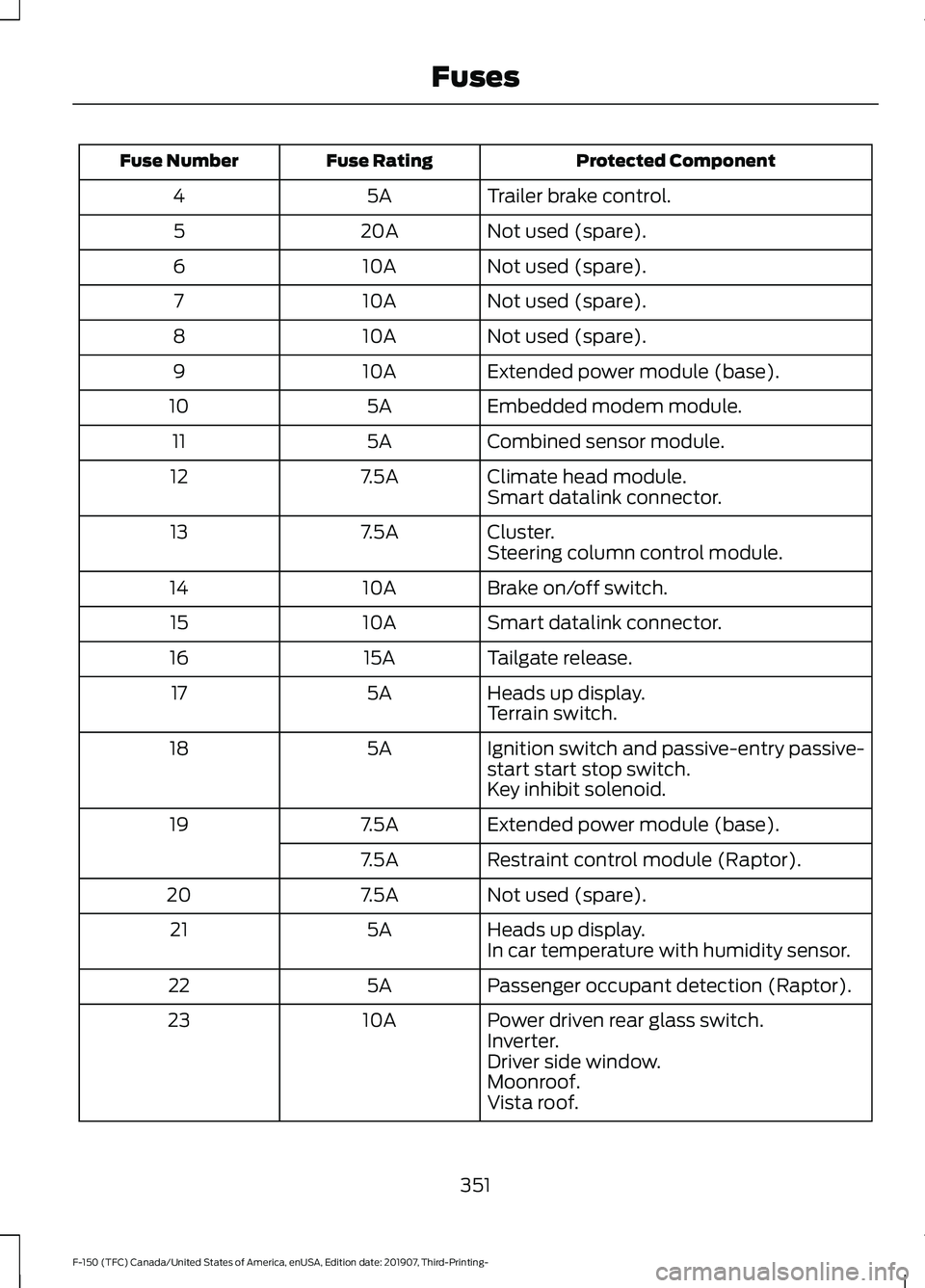
Protected Component
Fuse Rating
Fuse Number
Trailer brake control.
5A
4
Not used (spare).
20A
5
Not used (spare).
10A
6
Not used (spare).
10A
7
Not used (spare).
10A
8
Extended power module (base).
10A
9
Embedded modem module.
5A
10
Combined sensor module.
5A
11
Climate head module.
7.5A
12
Smart datalink connector.
Cluster.
7.5A
13
Steering column control module.
Brake on/off switch.
10A
14
Smart datalink connector.
10A
15
Tailgate release.
15A
16
Heads up display.
5A
17
Terrain switch.
Ignition switch and passive-entry passive-
start start stop switch.
5A
18
Key inhibit solenoid.
Extended power module (base).
7.5A
19
Restraint control module (Raptor).
7.5A
Not used (spare).
7.5A
20
Heads up display.
5A
21
In car temperature with humidity sensor.
Passenger occupant detection (Raptor).
5A
22
Power driven rear glass switch.
10A
23
Inverter.
Driver side window.
Moonroof.
Vista roof.
351
F-150 (TFC) Canada/United States of America, enUSA, Edition date: 201907, Third-Printing- Fuses
Page 355 of 625
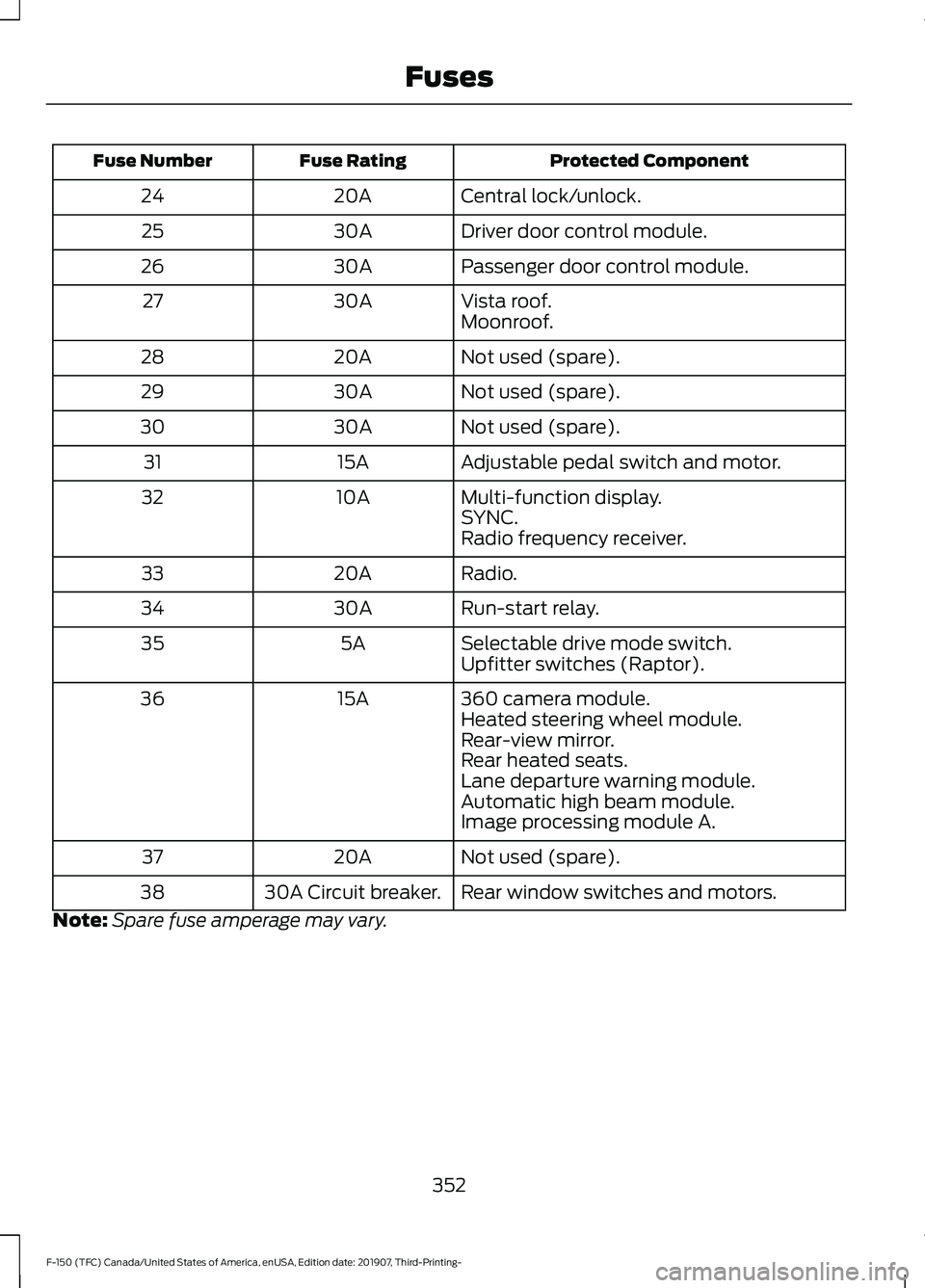
Protected Component
Fuse Rating
Fuse Number
Central lock/unlock.
20A
24
Driver door control module.
30A
25
Passenger door control module.
30A
26
Vista roof.
30A
27
Moonroof.
Not used (spare).
20A
28
Not used (spare).
30A
29
Not used (spare).
30A
30
Adjustable pedal switch and motor.
15A
31
Multi-function display.
10A
32
SYNC.
Radio frequency receiver.
Radio.
20A
33
Run-start relay.
30A
34
Selectable drive mode switch.
5A
35
Upfitter switches (Raptor).
360 camera module.
15A
36
Heated steering wheel module.
Rear-view mirror.
Rear heated seats.
Lane departure warning module.
Automatic high beam module.
Image processing module A.
Not used (spare).
20A
37
Rear window switches and motors.
30A Circuit breaker.
38
Note: Spare fuse amperage may vary.
352
F-150 (TFC) Canada/United States of America, enUSA, Edition date: 201907, Third-Printing- Fuses
Page 387 of 625
Underbody
Regularly clean the underside of your
vehicle using water. Keep body and door
drain holes free of debris or foreign
material.
Under Hood
For removing black rubber marks from
under the hood we recommend Motorcraft
Wheel and Tire Cleaner or Motorcraft Bug
and Tar Remover.
WAXING
Regular waxing is necessary to protect your
car's paint from the elements. We
recommend that you wash and wax the
painted surface once or twice a year.
When washing and waxing, park your
vehicle in a shaded area out of direct
sunlight. Always wash your vehicle before
applying wax.
•
Use a quality wax that does not contain
abrasives.
• Follow the manufacturer ’s instructions
to apply and remove the wax.
• Apply a small amount of wax in a
back-and-forth motion, not in circles.
• Do not allow wax to come in contact
with any non-body (low-gloss black)
colored trim. The wax will discolor or
stain the parts over time.
•Roof racks.
• Bumpers.
• Grained door handles.
• Side moldings.
• Mirror housings.
• Windshield cowl area.
• Do not apply wax to glass areas.
• After waxing, your car's paint should
feel smooth, and be free of streaks and
smudges. CLEANING THE ENGINE
Engines are more efficient when they are
clean because grease and dirt buildup keep
the engine warmer than normal.
When washing:
•
Take care when using a power washer
to clean the engine. The high-pressure
fluid could penetrate the sealed parts
and cause damage.
• Do not spray a hot engine with cold
water to avoid cracking the engine
block or other engine components.
• Spray Motorcraft Engine Shampoo and
Degreaser on all parts that require
cleaning and pressure rinse clean. In
Canada, use Motorcraft Engine
Shampoo.
Note: If your vehicle has an engine cover
remove the cover before application of
Motorcraft Engine Shampoo and Degreaser.
Immediately rinse away any over spray.
• Never wash or rinse the engine while it
is hot or running; water in the running
engine may cause internal damage.
• Never wash or rinse any ignition coil,
spark plug wire or spark plug well, or
the area in and around these locations.
• Cover the battery, power distribution
box, and air filter assembly to prevent
water damage when cleaning the
engine.
384
F-150 (TFC) Canada/United States of America, enUSA, Edition date: 201907, Third-Printing- Vehicle Care
Page 391 of 625
Scratches
Because the leather in the seat comes
from genuine steer hides, there may be
evidence of naturally occurring markings,
such as small scars. These markings give
character to the seating covers and are
considered to be proof of a genuine leather
product.
In order to lessen the appearance of
certain scratches and other wear marks,
apply conditioner on the affected area
following the same instructions as in the
Conditioning section.
Conditioning
Bottles of King Ranch Leather Conditioner
are available at the King Ranch Saddle
Shop. Visit the website at
www.krsaddleshop.com, or call
1–800– 282–KING (5464) in the United
States. If you are unable to obtain King
Ranch Leather Conditioner, use another
premium leather conditioner.
• Clean the surfaces using the steps
outlined in the Cleaning section.
• Make sure the leather is dry then apply
a nickel-sized amount of conditioner
to a clean, dry cloth.
• Rub the conditioner into the leather
until it disappears. Allow the
conditioner to dry, then repeat the
process for the entire interior. If a film
appears, wipe it off with a dry, clean
cloth.
REPAIRING MINOR PAINT
DAMAGE
Authorized dealers have touch-up paint to
match your vehicle ’s color. Your vehicle
color code is printed on a sticker on the
front, left-hand side door jamb. Take your
color code to your authorized dealer to
make sure you get the correct color. Before repairing minor paint damage, use
a cleaner such as Motorcraft Bug and Tar
Remover to remove particles such as bird
droppings, tree sap, insect deposits, tar
spots, road salt and industrial fallout.
Read the instructions before using cleaning
products.
CLEANING THE WHEELS
1. Regularly clean them with a wheel
cleaner. We recommend that you use
Ford approved wheel cleaner if
available.
2. Remove dirt and brake dust with a sponge.
3. Remove tar and grease with a bug and
tar remover. We recommend that you
use Ford approved bug and tar remover
if available.
4. Thoroughly rinse the wheels with water
after cleaning.
If you intend on parking your vehicle for an
extended period after cleaning the wheels
with a wheel cleaner, drive your vehicle for
a few minutes before doing so. This
reduces the risk of corrosion of the brake
discs, brake pads and linings.
Do not clean the wheels when they are hot.
Note: Some car washes could damage
wheel rims and covers.
Note: Using non-recommended cleaners,
harsh cleaning products, chrome wheel
cleaners or abrasive materials could
damage wheel rims and covers.
VEHICLE STORAGE
If you plan on storing your vehicle for 30
days or more, read the following
maintenance recommendations to make
sure your vehicle stays in good operating
condition.
388
F-150 (TFC) Canada/United States of America, enUSA, Edition date: 201907, Third-Printing- Vehicle Care
Page 604 of 625
rigCustomer Remedies
NAV2 and its suppliers’
entire liability and
your exclusive remedy shall be, at NAV2’ s
sole discretion, either (a) return of the price
paid, if any, or (b) repair or replacement of
the Data that do not meet NAV2’ s Limited
Warranty and that are returned to NAV2
with a copy of your receipt. This Limited
Warranty is void if failure of the Data has
resulted from accident, abuse, or
misapplication. Any replacement Data will
be warranted for the remainder of the
original warranty period or thirty (30) days,
whichever is longer. Neither these remedies
nor any product support services offered
by NAV2 are available without proof of
purchase from an authorized international
source.
No Other Warranty:
EXCEPT FOR THE LMITED WARRANTY
SET FORTH ABOVE AND TO THE EXTENT
PERMITTED BY APPLICABLE LAW, NAV2
AND ITS LICENSORS (INCLUDING THEIR
LICENSORS AND SUPPLIERS) DISCLAIM
ANY WARRANTIES, EXPRESS OR IMPLIED,
OF QUALITY, PERFORMANCE,
MERCHANTABILITY, FITNESS FOR A
PARTICULAR PURPOSE, OWNERSHIP OR
NON-INFRINGEMENT. Certain warranty
exclusions may not be permitted under
applicable law, so to that extent the above
exclusion may not apply to you.
Limited Liability:
TO THE EXTENT PERMITTED BY
APPLICABLE LAW, NAV2 AND ITS
LICENSORS (INCLUDING THEIR
LICENSORS AND SUPPLIERS) SHALL NOT
BE LIABLE TO YOU: IN RESPECT OF ANY
CLAIM, DEMAND OR ACTION,
IRRESPECTIVE OF THE NATURE OF THE
CAUSE OF THE CLAIM, DEMAND OR
ACTION ALLEGING ANY LOSS, INJURY OR
DAMAGES, DIRECT OR INDIRECT, WHICH
MAY RESULT FROM THE USE OR
POSSESSION OF THE INFORMATION; OR FOR ANY LOSS OF PROFIT, REVENUE,
CONTRACTS OR SAVINGS, OR ANY
OTHER DIRECT, INDIRECT, INCIDENTAL,
SPECIAL OR CONSEQUENTIAL DAMAGES
ARISING OUT OF YOUR USE OF OR
INABILITY TO USE THIS INFORMATION,
ANY DEFECT IN THE INFROMATION, OR
THE BREACH OF THESE TERMS OR
CONDITIONS, WHETHER IN AN ACTION
IN CONTRACT OR TORT OR BASED ON A
WARRANTY, EVEN IF NAV2 OR ITS
LICENSORS HAVE BEEN ADVISED OF THE
POSSIBILITY OF SUCH DAMAGES. UNDER
NO CIRCUMSTANCES SHALL NAV2’
s OR
ITS SUPPLIERS ’ LIABILITY HEREUNDER
EXCEED THE PRICE PAID. Certain liability
exclusions may not be permitted under
applicable law, so to that extent the above
exclusion may not apply to you.
Export Control
You agree not to export to anywhere any
part of the Data provided to you or any
direct product thereof except in
compliance with, and with all licenses and
approvals required under, applicable
export laws, rules and regulations.
IP Protection
The Data are owned by NAV2 or its
suppliers and are protected by applicable
copyright and other intellectual property
law and treaties. The Data are provided
solely on the basis of a license to use, not
sale.
Entire Agreement
These terms and conditions constitute the
entire agreement between NAV2(and its
licensors, including their licensors and
suppliers) and you pertaining to the subject
matter hereof, and supersedes in their
entirety any and all written or oral
agreements previously existing between
us with respect to such subject matter.
601
F-150 (TFC) Canada/United States of America, enUSA, Edition date: 201907, Third-Printing- Appendices
Page 619 of 625
Interior Lamps.................................................98
Front Interior Lamp............................................. 98
Rear Interior Lamps............................................ 99
Interior Mirror..................................................107
Automatic Dimming Mirror............................. 108
Manual Dimming Mirror.................................... 107
Introduction........................................................9
J
Jump Starting the Vehicle
........................333
Connecting the Jumper Cables.................... 333
Jump Starting...................................................... 334
Preparing Your Vehicle..................................... 333
Removing the Jumper Cables....................... 334
K
Keyless Entry....................................................75 SECURICODE™ KEYLESS ENTRY
KEYPAD............................................................... 75
Keyless Starting
.............................................179
Ignition Modes..................................................... 180
Keys and Remote Controls........................60
L
Lane Keeping System................................262 Switching the System On and Off..............263
System Display................................................... 264
System Settings................................................. 263
Troubleshooting................................................. 265
Lighting Control..............................................95 Flashing the Headlamp High Beam..............96
Headlamp High Beam........................................ 95
Lighting..............................................................95 General Information............................................ 95
Load Carrying.................................................281
Load Limit
.......................................................282
Special Loading Instructions for Owners of
Pick-up Trucks and Utility-type
Vehicles............................................................ 286
Vehicle Loading - with and without a Trailer................................................................. 282
Load Retaining Fixtures..............................281 BoxLink ™ Cleats................................................. 281
Locking and Unlocking
.................................72
Activating Intelligent Access............................ 72Autolock...................................................................
74
Battery Saver.......................................................... 74
Illuminated Entry................................................... 74
Power Door Locks................................................. 72
Remote Control..................................................... 72
Smart Unlock......................................................... 73
Smart Unlocks for Intelligent Access Keys....................................................................... 73
Lug Nuts See: Changing a Road Wheel........................ 414
M
Maintenance.................................................355 General Information......................................... 355
Manual Climate Control
..............................151
Directing the Airflow........................................... 151
Setting the Blower Motor Speed................... 151
Setting the Temperature................................... 151
Switching Maximum Air Conditioning On and Off............................................................... 152
Switching Maximum Defrost On and Off........................................................................\
152
Switching Recirculated Air On and Off........................................................................\
152
Switching the Air Conditioning On and Off........................................................................\
. 151
Switching the Climate Control On and Off........................................................................\
152
Manual Seats.................................................160 Manual Lumbar ................................................... 161
Moving the Seat Backward and Forward............................................................. 160
Recline Adjustment............................................ 161
Manual Tailgate
...............................................77
Memory Function.........................................164
Easy Entry and Exit Feature............................ 165
Linking a PreSet Position to your Remote Control or Intelligent Access Key.............164
Saving a PreSet Position................................. 164
Message Center See: Information Displays............................... 120
Mirrors See: Windows and Mirrors.............................. 103
Mobile Communications Equipment......................................................18
Moonroof.........................................................109 Bounce-Back....................................................... 109
616
F-150 (TFC) Canada/United States of America, enUSA, Edition date: 201907, Third-Printing- Index
Page 620 of 625
Opening and Closing the Moonroof............109
Motorcraft Parts - 2.7L EcoBoost™.................................................427
Motorcraft Parts - 3.0L Diesel................428
Motorcraft Parts - 3.3L..............................428
Motorcraft Parts - 3.5L Ecoboost™.................................................429
Motorcraft Parts - 5.0L.............................430
MyKey – Troubleshooting...........................70
MyKey ™.............................................................67
Principle of Operation......................................... 67
N
Navigation.......................................................527 Changing the Format of the Map................529
cityseeker............................................................... 531
Michelin Travel Guide....................................... 532
Navigation Map Accuracy and Updates............................................................ 532
Route Guidance................................................. 529
Setting a Destination....................................... 528
SiriusXM Traffic and Travel Link................... 532
Zoom...................................................................... 529
Normal Scheduled Maintenance..........556 Intelligent Oil-Life Monitor............................. 556
Normal Maintenance Intervals.................... 558
O
Off-Road Driving..........................................324 Basic Off-road Driving Techniques.............325
Crossing Obstacles........................................... 326
Hill Climbing........................................................ 326
Oil Change Indicator Reset......................363
Oil Check See: Engine Oil Check - Diesel...................... 362
See: Engine Oil Check - Gasoline.................361
Opening and Closing the Hood..............355
Ordering Additional Owner's Literature......................................................342
Obtaining a French Owner ’s Manual.........342
Overhead Console........................................178
Overriding Automatic High Beam Control...........................................................102 P
Parking Aids...................................................242
Principle of Operation...................................... 242
Passive Anti-Theft System.........................82 SecuriLock ™.......................................................... 82
PATS See: Passive Anti-Theft System..................... 82
Perchlorate........................................................16
Personal Safety System ™.........................50
How Does the Personal Safety System
Work?.................................................................. 50
Phone...............................................................525 Android Auto........................................................ 527
Apple CarPlay...................................................... 527
Pairing Your Cell Phone for the First Time................................................................... 526
Text Messaging................................................... 526
Using Your Cell Phone..................................... 526
Post-Crash Alert System..........................335
Power Door Locks See: Locking and Unlocking.............................. 72
Power Running Boards
................................86
Power Seats....................................................161 Adjusting the Lumbar Support...................... 162
Adjusting the Multi-Contour Front Seats With Active Motion ....................................... 162
Power Steering Fluid Check.....................373
Power Windows............................................103 Accessory Delay.................................................. 104
Bounce-Back....................................................... 103
One-Touch Up or Down................................... 103
Window Lock....................................................... 104
Pre-Collision Assist
.....................................274
Adjusting the Pre-Collision Assist
Settings............................................................. 277
Blocked Sensors................................................. 277
Distance Indication and Alert........................ 276
Using the Pre-Collision Assist System.............................................................. 275
Protecting the Environment
........................19
Puncture See: Changing a Road Wheel........................ 414
R
Rear Axle
..........................................................231
617
F-150 (TFC) Canada/United States of America, enUSA, Edition date: 201907, Third-Printing- Index
Page 623 of 625
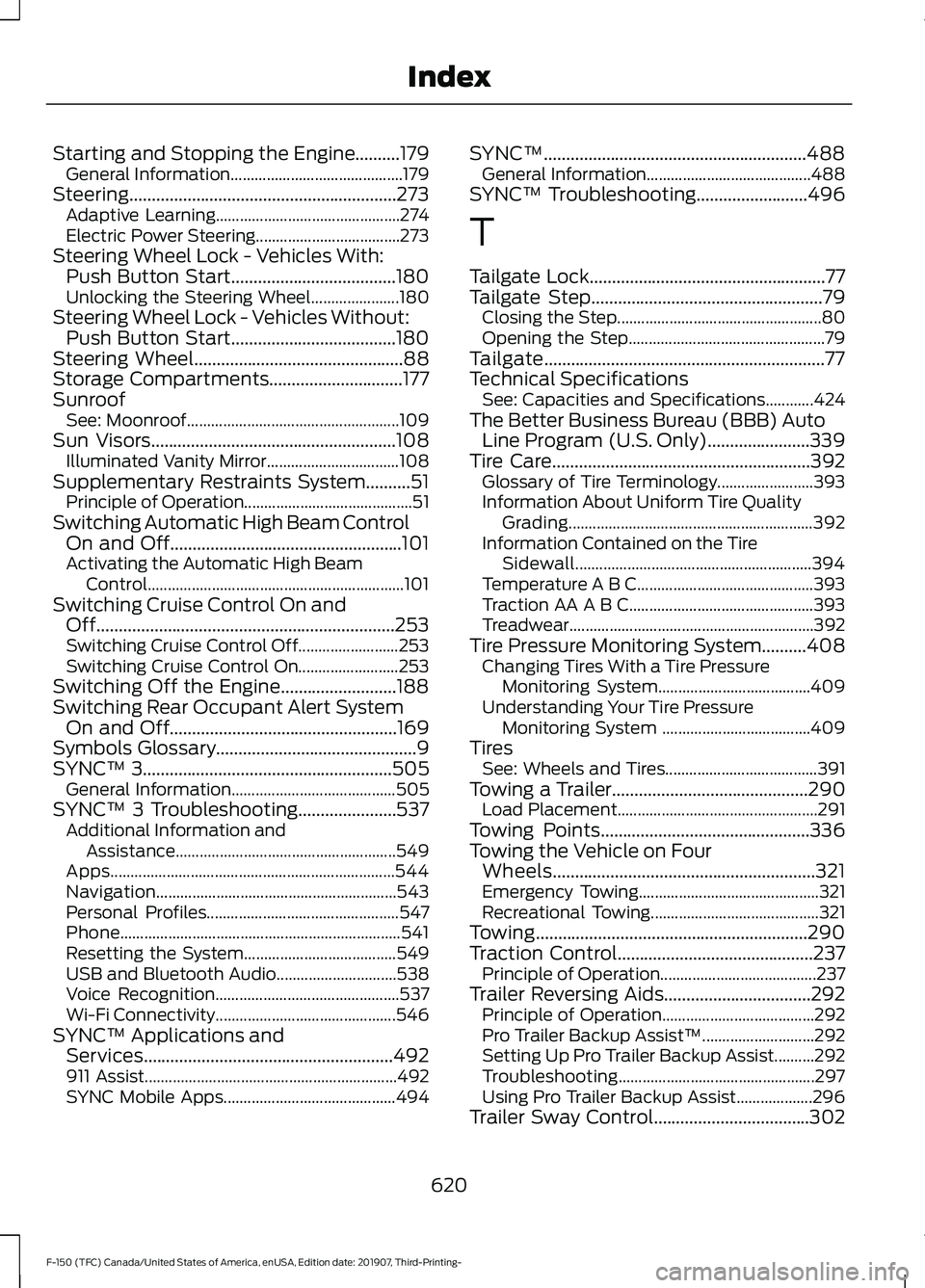
Starting and Stopping the Engine..........179
General Information........................................... 179
Steering............................................................273 Adaptive Learning.............................................. 274
Electric Power Steering.................................... 273
Steering Wheel Lock - Vehicles With: Push Button Start.....................................180
Unlocking the Steering Wheel...................... 180
Steering Wheel Lock - Vehicles Without: Push Button Start.....................................180
Steering Wheel...............................................88
Storage Compartments..............................177
Sunroof See: Moonroof..................................................... 109
Sun Visors
.......................................................108
Illuminated Vanity Mirror................................. 108
Supplementary Restraints System
..........51
Principle of Operation.......................................... 51
Switching Automatic High Beam Control On and Off....................................................101
Activating the Automatic High Beam Control................................................................ 101
Switching Cruise Control On and Off...................................................................253
Switching Cruise Control Off......................... 253
Switching Cruise Control On......................... 253
Switching Off the Engine..........................188
Switching Rear Occupant Alert System On and Off...................................................169
Symbols Glossary
.............................................9
SYNC™ 3........................................................505
General Information......................................... 505
SYNC™ 3 Troubleshooting......................537 Additional Information and
Assistance....................................................... 549
Apps....................................................................... 544
Navigation............................................................ 543
Personal Profiles................................................ 547
Phone...................................................................... 541
Resetting the System...................................... 549
USB and Bluetooth Audio.............................. 538
Voice Recognition.............................................. 537
Wi-Fi Connectivity............................................. 546
SYNC™ Applications and Services........................................................492
911 Assist............................................................... 492
SYNC Mobile Apps........................................... 494SYNC™...........................................................488
General Information......................................... 488
SYNC™ Troubleshooting.........................496
T
Tailgate Lock
.....................................................77
Tailgate Step....................................................79
Closing the Step................................................... 80
Opening the Step................................................. 79
Tailgate...............................................................77
Technical Specifications See: Capacities and Specifications............424
The Better Business Bureau (BBB) Auto Line Program (U.S. Only).......................339
Tire Care
..........................................................392
Glossary of Tire Terminology........................ 393
Information About Uniform Tire Quality Grading............................................................. 392
Information Contained on the Tire Sidewall........................................................... 394
Temperature A B C............................................ 393
Traction AA A B C.............................................. 393
Treadwear............................................................. 392
Tire Pressure Monitoring System..........408 Changing Tires With a Tire Pressure
Monitoring System...................................... 409
Understanding Your Tire Pressure Monitoring System ..................................... 409
Tires See: Wheels and Tires...................................... 391
Towing a Trailer
............................................290
Load Placement.................................................. 291
Towing Points
...............................................336
Towing the Vehicle on Four Wheels...........................................................321
Emergency Towing............................................. 321
Recreational Towing.......................................... 321
Towing.............................................................290
Traction Control
............................................237
Principle of Operation....................................... 237
Trailer Reversing Aids.................................292 Principle of Operation...................................... 292
Pro Trailer Backup Assist™............................ 292
Setting Up Pro Trailer Backup Assist..........292
Troubleshooting................................................. 297
Using Pro Trailer Backup Assist................... 296
Trailer Sway Control...................................302
620
F-150 (TFC) Canada/United States of America, enUSA, Edition date: 201907, Third-Printing- Index