maintenance reset FORD F-150 2020 Owners Manual
[x] Cancel search | Manufacturer: FORD, Model Year: 2020, Model line: F-150, Model: FORD F-150 2020Pages: 625, PDF Size: 7.98 MB
Page 8 of 625
Snow Plowing
...............................................327
Floor Mats ......................................................
329
Roadside Emergencies
Roadside Assistance ..................................
331
Hazard Flashers ...........................................
332
Fuel Shutoff ..................................................
332
Jump Starting the Vehicle .......................
333
Post-Crash Alert System .........................
335
Transporting the Vehicle ..........................
335
Towing Points ..............................................
336
Customer Assistance
Getting the Services You Need ..............
337
In California (U.S. Only) ...........................
338
The Better Business Bureau (BBB) Auto Line Program (U.S. Only) ....................
339
Utilizing the Mediation/Arbitration Program (Canada Only) ......................
340
Getting Assistance Outside the U.S. and Canada ......................................................
340
Ordering Additional Owner's Literature ........................................................................\
342
Reporting Safety Defects (U.S. Only) ........................................................................\
342
Reporting Safety Defects (Canada Only) ........................................................................\
342
Fuses
Fuse Specification Chart .........................
344
Changing a Fuse ..........................................
353
Maintenance
General Information ..................................
355
Opening and Closing the Hood .............
355
Under Hood Overview - 2.7L EcoBoost™ ........................................................................\
356
Under Hood Overview - 3.0L Diesel ......
357
Under Hood Overview - 3.3L ..................
358
Under Hood Overview - 3.5L Ecoboost™ ........................................................................\
359 Under Hood Overview - 5.0L
.................
360
Engine Oil Dipstick - Gasoline .................
361
Engine Oil Dipstick - Diesel ......................
361
Engine Oil Check - Gasoline ....................
361
Engine Oil Check - Diesel .........................
362
Oil Change Indicator Reset .....................
363
Changing the Engine Air Filter - Gasoline ........................................................................\
364
Changing the Engine Air Filter - Diesel ........................................................................\
364
Draining the Fuel Filter Water Trap - Diesel ..........................................................
366
Engine Coolant Check ..............................
366
Automatic Transmission Fluid Check ........................................................................\
.
371
Transfer Case Fluid Check ........................
371
Brake Fluid Check ........................................
372
Power Steering Fluid Check ....................
373
Changing the 12V Battery .........................
373
Adjusting the Headlamps ........................
375
Washer Fluid Check ...................................
376
Fuel Filter - Diesel .......................................
376
Fuel Filter - Gasoline ..................................
376
Checking the Wiper Blades .....................
376
Changing the Wiper Blades .....................
377
Changing a Bulb ...........................................
377
Vehicle Care
General Information ..................................
382
Cleaning Products ......................................
382
Cleaning the Exterior .................................
383
Waxing ............................................................
384
Cleaning the Engine ..................................
384
Cleaning the Exhaust - Diesel ...............
385
Cleaning the Windows and Wiper Blades ........................................................................\
385
Cleaning the Interior ..................................
385
Cleaning the Instrument Panel and Instrument Cluster Lens ......................
386
Cleaning Leather Seats ............................
387
Repairing Minor Paint Damage .............
388
5
F-150 (TFC) Canada/United States of America, enUSA, Edition date: 201907, Third-Printing- Table of Contents
Page 15 of 625
Your vehicle has electronic control units
that have data recording functionality and
the ability to permanently or temporarily
store data. This data could include
information on the condition and status of
your vehicle, vehicle maintenance
requirements, events and malfunctions.
The types of data that can be recorded are
described in this section. Some of the data
recorded is stored in event logs or error
logs.
Note:
Error logs are reset following a service
or repair.
Note: We may provide information in
response to requests from law enforcement,
other government authorities and third
parties acting with lawful authority or
through a legal process. Such information
could be used by them in legal proceedings.
Data recorded includes, for example:
• Operating states of system
components, for example, fuel level,
tire pressure and battery charge level.
• Vehicle and component status, for
example, wheel speed, deceleration,
lateral acceleration and seatbelt
status.
• Events or errors in essential systems,
for example, headlamps and brakes.
• System responses to driving situations,
for example, airbag deployment and
stability control.
• Environmental conditions, for example,
temperature.
Some of this data, when used in
combination with other information, for
example, an accident report, damage to a
vehicle or eyewitness statements, could
be associated with a specific person. Service Data
Service data recorders in your vehicle are
capable of collecting and storing
diagnostic information about your vehicle.
This potentially includes information about
the performance or status of various
systems and modules in the vehicle, such
as engine, throttle, steering or brake
systems. In order to properly diagnose and
service your vehicle, Ford Motor Company
(Ford of Canada in Canada), and service
and repair facilities may access or share
among them vehicle diagnostic
information received through a direct
connection to your vehicle when
diagnosing or servicing your vehicle.
Additionally, Ford Motor Company (Ford
of Canada, in Canada) may, where
permitted by law, use vehicle diagnostic
information for vehicle improvement or
with other information we may have about
you, for example, your contact information,
to offer you products or services that may
interest you. Data may be provided to our
service providers such as part suppliers
that may help diagnose malfunctions, and
who are similarly obligated to protect data.
We retain this data only as long as
necessary to perform these functions or to
comply with law. We may provide
information where required in response to
official requests to law enforcement or
other government authorities or third
parties acting with lawful authority or court
order, and such information may be used
in legal proceedings. For U.S. only (if
equipped), if you choose to use connected
apps and services, you consent that certain
diagnostic information may also be
accessed electronically by Ford Motor
Company and Ford authorized service
facilities, and that the diagnostic
information may be used to provide
services to you, personalizing your
experience, troubleshoot, and to improve
products and services and offer you
products and services that may interest
12
F-150 (TFC) Canada/United States of America, enUSA, Edition date: 201907, Third-Printing- Introduction
Page 191 of 625
Idle Control
Your vehicle may have a factory option for
a stationary elevated idle control through
dash-mounted upfitter switches that
allows the operator to elevate the idle rpm
for extended idle periods, as well as
aftermarket equipment such as PTO
operation. You must configure this feature
even if ordered from the factory. See your
authorized dealer for required upfitting.
Operation in Snow and Rain
Vehicle operation in heavy snowfall or
extreme rain conditions may feed
excessive amounts of snow or water into
the air intake system. This could plug the
air filter with snow and may cause the
engine to lose power and possibly shut
down.
We recommend the following actions after
operating your vehicle up to 200 mi
(320 km) in snowfall or extreme rain:
• Snow: At the earliest opportunity, open
the hood and clear all the snow and ice
from the air filter housing inlet (do not
remove the foam filter) and reset the
air filter restriction gauge.
Note: Removal of the foam filter degrades
your vehicle performance during snow and
hot weather conditions.
• Extreme rain: The air filter dries after
about 15– 30 minutes at highway
speeds. At the earliest opportunity,
open the hood and reset the air filter
restriction gauge.
Refer to Air filter and restriction gauge in
the Maintenance chapter for more
information. See
Changing the Engine
Air Filter (page 364). Operation in Standing Water
Ingestion of water into the diesel engine
can result in immediate and severe
damage to the engine. If driving through
water, slow down to avoid splashing water
into the intake. If the engine stalls, and you
suspect ingestion of water into the engine,
do not try to restart the engine. Consult
your dealer for service immediately.
Your fuel tank vents to the atmosphere by
valves on top of the tank and through the
fuel cap. If water reaches the top of the
tank, the valves may pull water into the
fuel tank. Water in the fuel can cause
performance issues and damage the fuel
injection system.
SWITCHING OFF THE ENGINE
Allow the engine to idle for three to five
minutes before shutting it down. The larger
the engine, the greater the need is for this
idling period.
Note:
Try to limit engine idle to 10 minutes.
Excessive idling reduces fuel economy.
ENGINE BLOCK HEATER
(IF
EQUIPPED) WARNING:
Failure to follow engine
block heater instructions could result in
property damage or serious personal
injury. WARNING: Do not use your heater
with ungrounded electrical systems or
two-pronged adapters. There is a risk of
electrical shock.
188
F-150 (TFC) Canada/United States of America, enUSA, Edition date: 201907, Third-Printing- Starting and Stopping the Engine
Page 366 of 625
Note:
If the oil level is between the full and
minimum marks, the oil level is acceptable.
Do not add oil.
Note: The oil consumption of new engines
reaches its normal level after approximately
3,000 mi (5,000 km).
Adding Engine Oil WARNING: Do not remove the filler
cap when the engine is running.
Do not use supplemental engine oil
additives because they are unnecessary
and could lead to engine damage that may
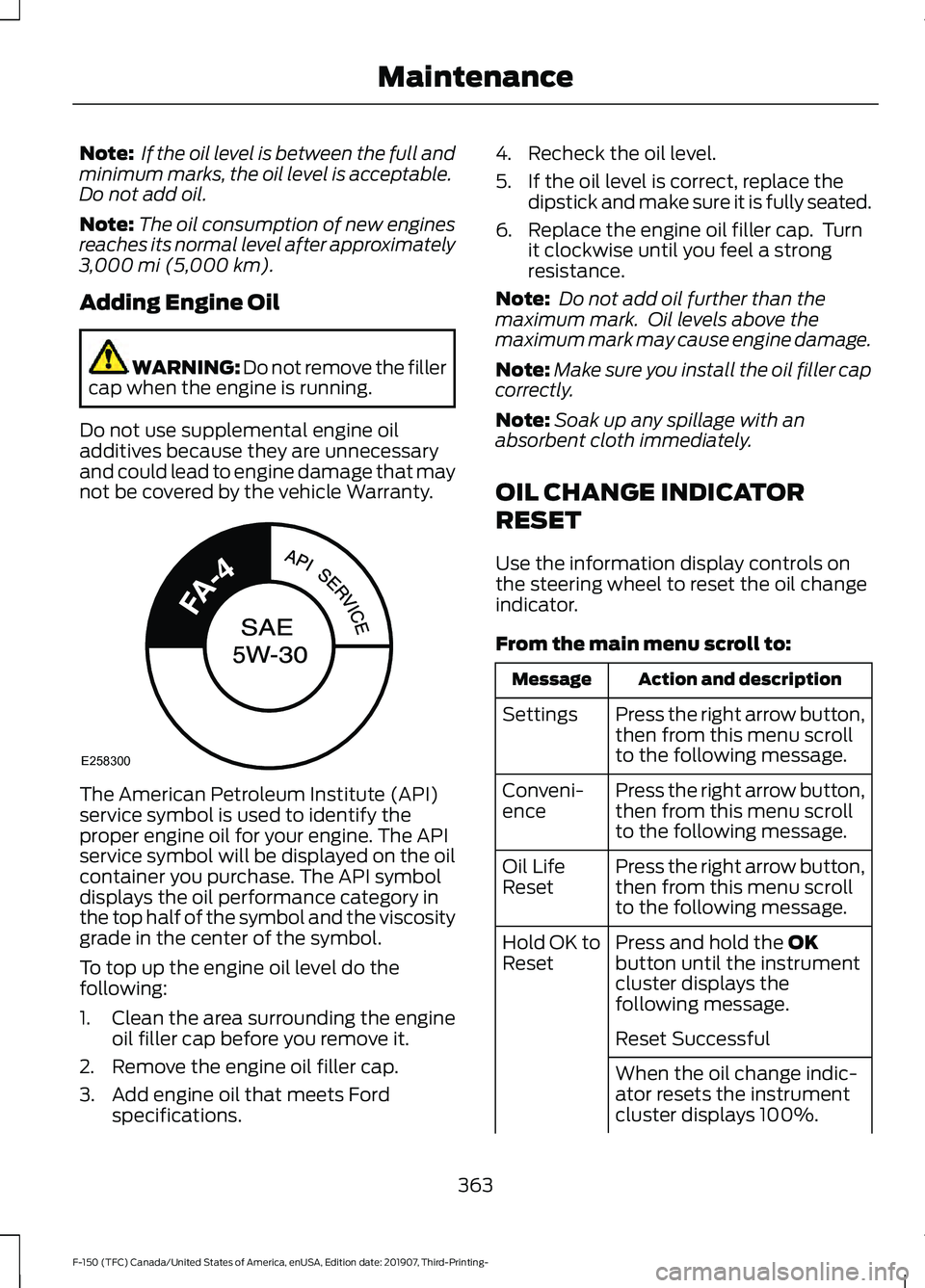
not be covered by the vehicle Warranty. The American Petroleum Institute (API)
service symbol is used to identify the
proper engine oil for your engine. The API
service symbol will be displayed on the oil
container you purchase. The API symbol
displays the oil performance category in
the top half of the symbol and the viscosity
grade in the center of the symbol.
To top up the engine oil level do the
following:
1. Clean the area surrounding the engine
oil filler cap before you remove it.
2. Remove the engine oil filler cap.
3. Add engine oil that meets Ford specifications. 4. Recheck the oil level.
5. If the oil level is correct, replace the
dipstick and make sure it is fully seated.
6. Replace the engine oil filler cap. Turn it clockwise until you feel a strong
resistance.
Note: Do not add oil further than the
maximum mark. Oil levels above the
maximum mark may cause engine damage.
Note: Make sure you install the oil filler cap
correctly.
Note: Soak up any spillage with an
absorbent cloth immediately.
OIL CHANGE INDICATOR
RESET
Use the information display controls on
the steering wheel to reset the oil change
indicator.
From the main menu scroll to: Action and description
Message
Press the right arrow button,
then from this menu scroll
to the following message.
Settings
Press the right arrow button,
then from this menu scroll
to the following message.
Conveni-
ence
Press the right arrow button,
then from this menu scroll
to the following message.
Oil Life
Reset
Press and hold the
OK
button until the instrument
cluster displays the
following message.
Hold OK to
Reset
Reset Successful
When the oil change indic-
ator resets the instrument
cluster displays 100%.
363
F-150 (TFC) Canada/United States of America, enUSA, Edition date: 201907, Third-Printing- MaintenanceE258300
Page 367 of 625
Action and description
Message
Remaining Life
{00}%
If the instrument cluster
displays one of the following
messages, repeat the
process.
Not Reset
Reset Cancelled
CHANGING THE ENGINE AIR
FILTER - GASOLINE WARNING: To reduce the risk of
vehicle damage and personal burn
injuries, do not start your engine with the
air cleaner removed and do not remove
it while the engine is running.
Note: Failure to use the correct air filter
element may result in severe engine
damage. Resulting component damage
may not be covered by the vehicle Warranty.
Note: When servicing the air cleaner, do not
allow foreign material to enter the air
induction system. The engine is susceptible
to damage from even small particles.
When changing the air filter element, use
only the air filter element listed. See
Capacities and Specifications
(page
424).
Change the air filter element at the proper
intervals. See
Scheduled Maintenance
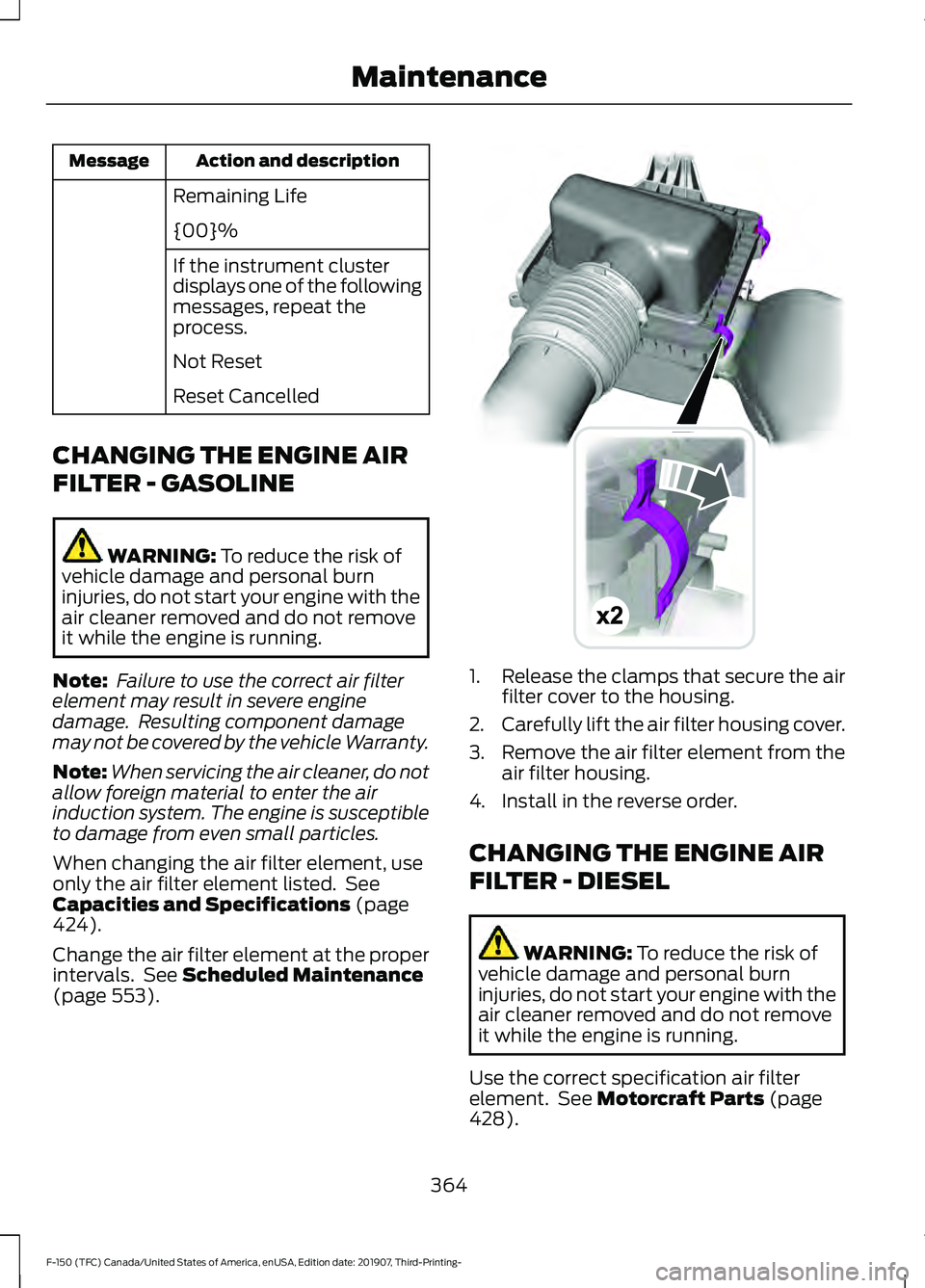
(page 553). 1.
Release the clamps that secure the air
filter cover to the housing.
2. Carefully lift the air filter housing cover.
3. Remove the air filter element from the
air filter housing.
4. Install in the reverse order.
CHANGING THE ENGINE AIR
FILTER - DIESEL WARNING:
To reduce the risk of
vehicle damage and personal burn
injuries, do not start your engine with the
air cleaner removed and do not remove
it while the engine is running.
Use the correct specification air filter
element. See
Motorcraft Parts (page
428).
364
F-150 (TFC) Canada/United States of America, enUSA, Edition date: 201907, Third-Printing- MaintenanceE191820
Page 368 of 625
Note:
Failure to use the correct air filter
element may result in severe engine
damage. Resulting component damage
may not be covered by the vehicle Warranty.
Change the air filter element at the correct
service interval. See Scheduled
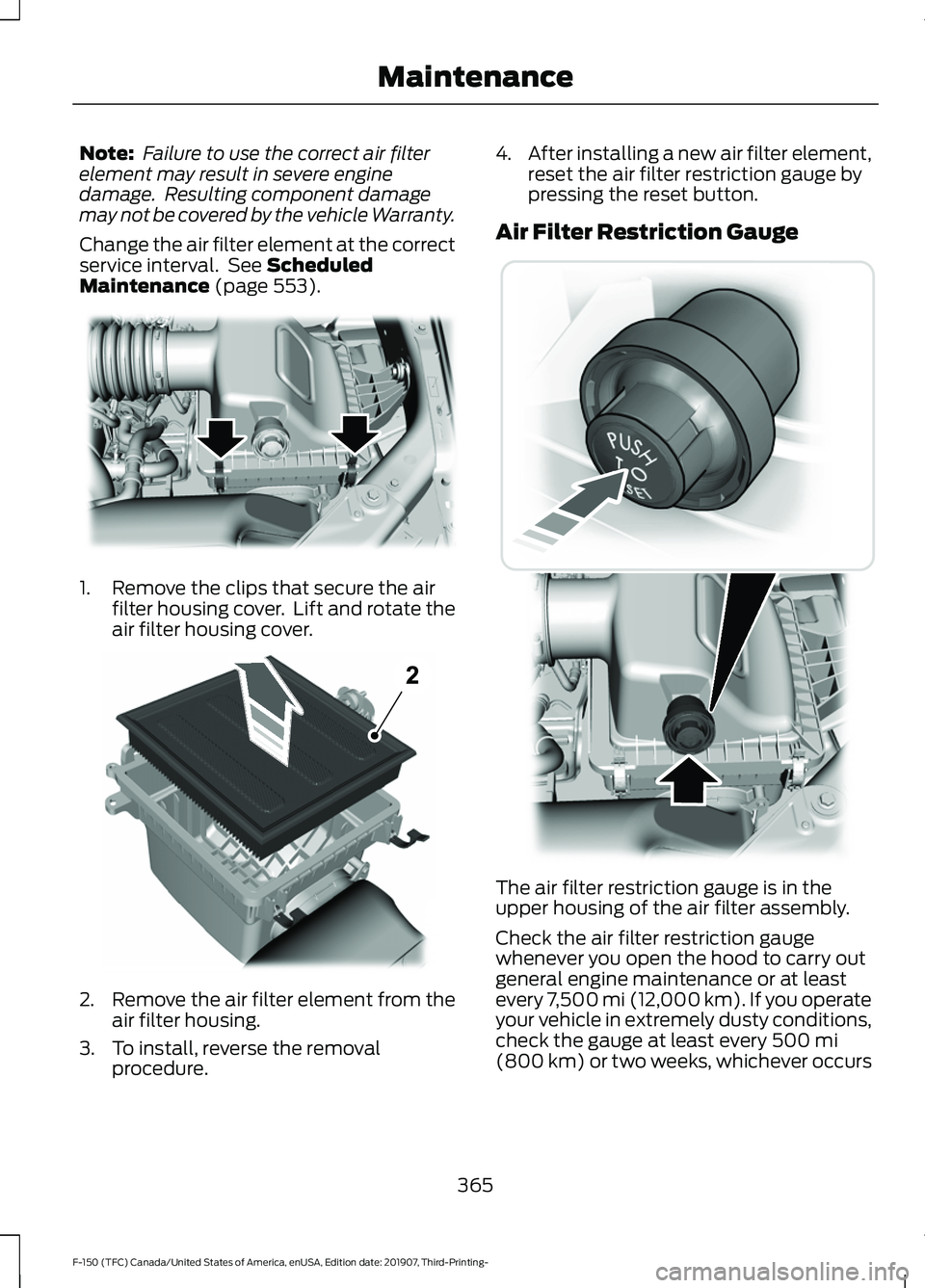
Maintenance (page 553). 1. Remove the clips that secure the air
filter housing cover. Lift and rotate the
air filter housing cover. 2.
Remove the air filter element from the
air filter housing.
3. To install, reverse the removal procedure. 4.
After installing a new air filter element,
reset the air filter restriction gauge by
pressing the reset button.
Air Filter Restriction Gauge The air filter restriction gauge is in the
upper housing of the air filter assembly.
Check the air filter restriction gauge
whenever you open the hood to carry out
general engine maintenance or at least
every 7,500 mi (12,000 km). If you operate
your vehicle in extremely dusty conditions,
check the gauge at least every
500 mi
(800 km) or two weeks, whichever occurs
365
F-150 (TFC) Canada/United States of America, enUSA, Edition date: 201907, Third-Printing- MaintenanceE254171 E254172 E254173
Page 369 of 625
first. Change the air filter element when
the restriction gauge reads near the
change filter line and the gauge is yellow.
Allowing the restriction gauge to reach
maximum affects engine performance and
fuel economy.
Operating your vehicle in heavy snowfall
or extreme rain conditions may allow
excessive amounts of snow or water into
the air intake system. This could restrict air
flow and cause the engine to lose power
or shut down.
After installing a new air filter element,
reset the gauge by pressing the reset
button.
After operating your vehicle during heavy
snowfall or extreme rain, do the following:
•
Snow: At the earliest opportunity, open
the hood and clear any snow and ice
from the air filter housing inlet and
reset the air filter restriction gauge.
• Extreme rain: The air filter element
dries out after approximately 15– 30
minutes of driving at highway speeds.
At the earliest opportunity, open the
hood and reset the air filter restriction
gauge.
DRAINING THE FUEL FILTER
WATER TRAP - DIESEL WARNING: Do not dispose of fuel
in the household refuse or the public
sewage system. Use an authorized waste
disposal facility.
Note: Only add fuel that meets the Ford
specification. See
Fuel Quality (page 196).
Note: The in-tank pump will turn off
automatically after approximately 30
seconds.
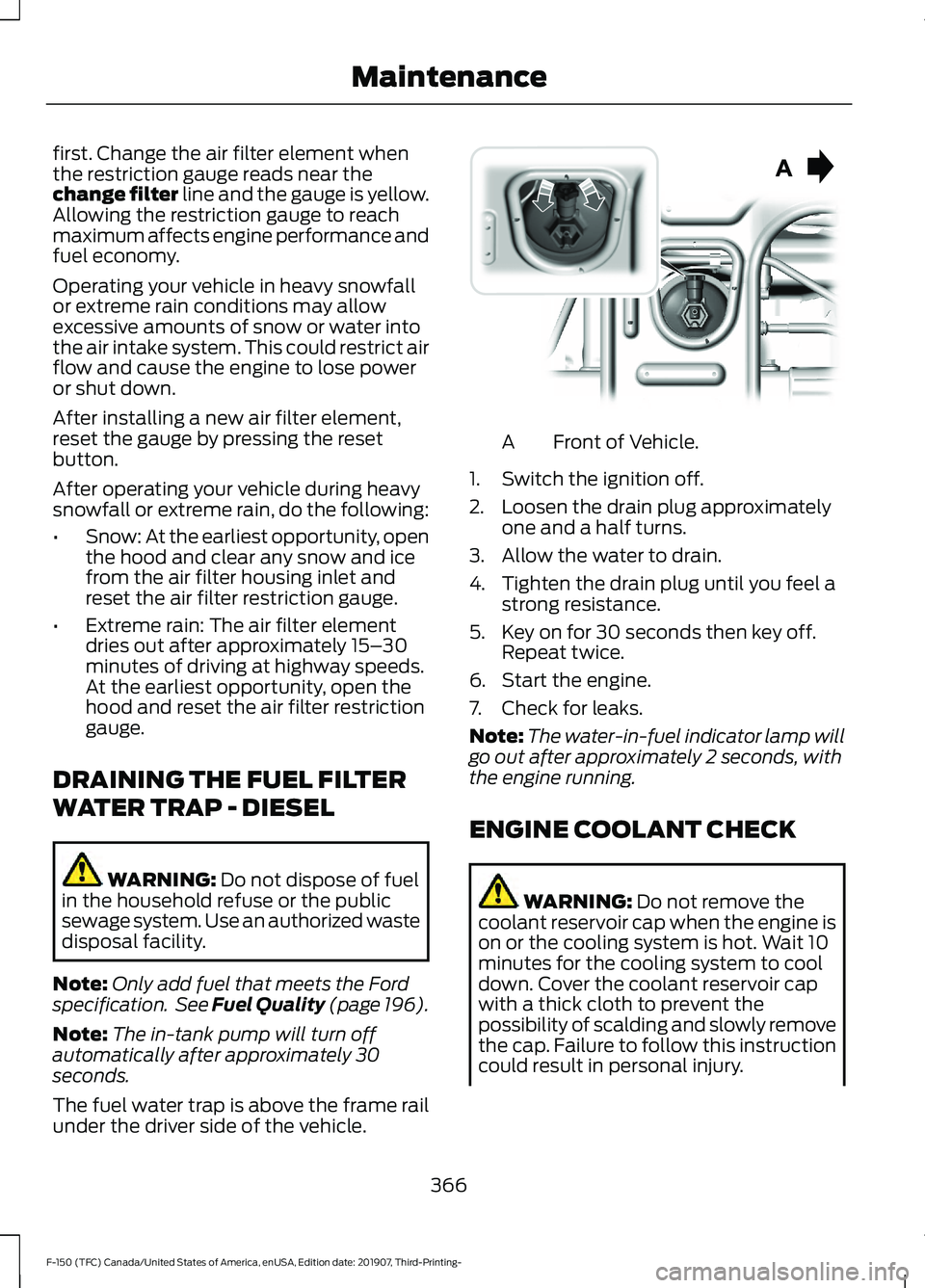
The fuel water trap is above the frame rail
under the driver side of the vehicle. Front of Vehicle.
A
1. Switch the ignition off.
2. Loosen the drain plug approximately one and a half turns.
3. Allow the water to drain.
4. Tighten the drain plug until you feel a strong resistance.
5. Key on for 30 seconds then key off. Repeat twice.
6. Start the engine.
7. Check for leaks.
Note: The water-in-fuel indicator lamp will
go out after approximately 2 seconds, with
the engine running.
ENGINE COOLANT CHECK WARNING:
Do not remove the
coolant reservoir cap when the engine is
on or the cooling system is hot. Wait 10
minutes for the cooling system to cool
down. Cover the coolant reservoir cap
with a thick cloth to prevent the
possibility of scalding and slowly remove
the cap. Failure to follow this instruction
could result in personal injury.
366
F-150 (TFC) Canada/United States of America, enUSA, Edition date: 201907, Third-Printing- Maintenance E254226
Page 372 of 625
If you drive in extremely hot climates:
•
You can decrease the coolant
concentration to 40%.
• Coolant concentrations below 40%
decrease the freeze and corrosion
protection characteristics of the
coolant and may cause engine
damage.
Vehicles driven year-round in non-extreme
climates should use prediluted coolant for
optimum cooling system and engine
protection.
Coolant Change
At specific mileage intervals, as listed in
the scheduled maintenance information,
the coolant should be changed. Add
prediluted coolant approved to the correct
specification. See Capacities and
Specifications (page 424).
Fail-Safe Cooling
Fail-safe cooling allows you to temporarily
drive your vehicle before any incremental
component damage occurs. The fail-safe
distance depends on ambient
temperature, vehicle load and terrain.
How Fail-Safe Cooling Works If the engine begins to overheat,
the coolant temperature gauge
moves toward the red zone:
A warning lamp illuminates and
a message may appear in the
information display.
If the engine reaches a preset
over-temperature condition, the engine
automatically switches to alternating
cylinder operation. Each disabled cylinder
acts as an air pump and cools the engine. When this occurs, your vehicle still
operates, however:
•
Engine power is limited.
• The air conditioning system turns off.
Continued operation increases the engine
temperature, causing the engine to
completely shut down. Your steering and
braking effort increases in this situation.
When the engine temperature cools, you
can re-start the engine. Have your vehicle
checked as soon as possible to minimize
engine damage.
When Fail-Safe Mode Is Activated WARNING:
Fail-safe mode is for
use during emergencies only. Operate
your vehicle in fail-safe mode only as
long as necessary to bring your vehicle
to rest in a safe location and seek
immediate repairs. When in fail-safe
mode, your vehicle will have limited
power, will not be able to maintain
high-speed operation, and may
completely shut down without warning,
potentially losing engine power, power
steering assist, and power brake assist,
which may increase the possibility of a
crash resulting in serious injury. WARNING:
Do not remove the
coolant reservoir cap when the engine is
on or the cooling system is hot. Wait 10
minutes for the cooling system to cool
down. Cover the coolant reservoir cap
with a thick cloth to prevent the
possibility of scalding and slowly remove
the cap. Failure to follow this instruction
could result in personal injury.
Your vehicle has limited engine power
when in the fail-safe mode, drive your
vehicle with caution. Your vehicle does not
maintain high-speed operation and the
engine may operate poorly.
369
F-150 (TFC) Canada/United States of America, enUSA, Edition date: 201907, Third-Printing- Maintenance
Page 377 of 625
Because your vehicle
’s engine is
electronically controlled by a computer,
some control conditions are maintained
by power from the battery. When the
battery is disconnected or a new battery
is installed, the engine must relearn its idle
and fuel trim strategy for optimum
driveability and performance. Flexible fuel
vehicles (FFV) must also relearn the
ethanol content of the fuel for optimum
driveability and performance.
To restore the settings, do the following:
1. Apply the parking brake.
2. Shift into park (P) or neutral (N).
3. Switch off all accessories.
4. Press the brake pedal and start your vehicle.
5. Run the engine until it reaches normal operating temperature. While the
engine is warming up, complete the
following: Reset the clock. Reset the
power windows bounce-back feature.
See Windows and Mirrors (page 103).
Reset the radio station presets. See
Audio System (page 478).
6. Allow the engine to idle for at least one
minute.
7. Drive the vehicle at least 10 mi (16 km)
to completely relearn the idle trim and
fuel trim strategy.
Note: If you do not allow the engine to
relearn the idle and fuel trim strategy, the
idle quality of your vehicle may be adversely
affected until the engine computer
eventually relearns the idle trim and fuel
trim strategy.
Note: For flexible fuel vehicles, if you are
operating on E85, you may experience poor
starts or an inability to start the engine and
driveability problems until the fuel trim and
ethanol content have been relearned. Make sure that you dispose of old batteries
in an environmentally friendly way. Seek
advice from your local authority about
recycling old batteries.
If storing your vehicle for more than 30
days without recharging the battery, we
recommend that you disconnect the
negative battery cable to maintain battery
charge for quick starting.
Battery Management System
(If
Equipped)
The battery management system monitors
battery conditions and takes actions to
extend battery life. If excessive battery
drain is detected, the system temporarily
disables some electrical systems to
protect the battery.
Systems included are:
• Heated rear window.
• Heated seats.
• Climate control.
• Heated steering wheel.
• Audio unit.
• Navigation system.
A message may appear in the information
displays to alert you that battery
protection actions are active. These
messages are only for notification that an
action is taking place, and not intended to
indicate an electrical problem or that the
battery requires replacement.
After battery replacement, or in some
cases after charging the battery with an
external charger, the battery management
system requires eight hours of vehicle sleep
time to relearn the battery state of charge.
During this time your vehicle must remain
fully locked with the ignition switched off.
Note: Prior to relearning the battery state
of charge, the battery management system
may temporarily disable some electrical
systems.
374
F-150 (TFC) Canada/United States of America, enUSA, Edition date: 201907, Third-Printing- Maintenance
Page 392 of 625
We engineer and test all motor vehicles
and their components for reliable, regular
driving. Under various conditions,
long-term storage may lead to degraded
engine performance or failure unless you
use specific precautions to preserve engine
components.
General
•
Store all vehicles in a dry, ventilated
place.
• Protect from sunlight, if possible.
• If vehicles are stored outside, they
require regular maintenance to protect
against rust and damage.
Body
• Wash your vehicle thoroughly to
remove dirt, grease, oil, tar or mud from
exterior surfaces, rear-wheel housing
and the underside of front fenders.
• Periodically wash your vehicle if it is
stored in exposed locations.
• Touch-up exposed or primed metal to
prevent rust.
• Cover chrome and stainless steel parts
with a thick coat of auto wax to prevent
discoloration. Re-wax as necessary
when you wash your vehicle.
• Lubricate all hood, door and luggage
compartment hinges and latches with
a light grade oil.
• Cover interior trim to prevent fading.
• Keep all rubber parts free from oil and
solvents. Engine
•
Change the engine oil and filter prior to
storage because used engine oil
contains contaminates which may
cause engine damage.
• Start the engine every 15 days for a
minimum of 15 minutes. Run at fast
idle with the climate controls set to
defrost until the engine reaches normal
operating temperature.
• With your foot on the brake, shift
through all the gears while the engine
is running.
• We recommend that you change the
engine oil before you use your vehicle
again.
Fuel system
• Fill the fuel tank with high-quality fuel
until the first automatic shutoff of the
fuel pump nozzle.
Cooling system
• Protect against freezing temperatures.
• When removing your vehicle from
storage, check coolant fluid level.
Confirm that there are no cooling
system leaks and that fluid is at the
recommended level.
Disconnecting Your 12 Volt Battery
• Check and recharge as necessary. Keep
connections clean.
• If storing your vehicle for more than 30
days without recharging the battery,
we recommend that you disconnect
the battery cables to maintain battery
charge for quick starting.
Note: It is necessary to reset memory
features if you disconnect the battery
cables.
389
F-150 (TFC) Canada/United States of America, enUSA, Edition date: 201907, Third-Printing- Vehicle Care