tailgate FORD F-150 2020 User Guide
[x] Cancel search | Manufacturer: FORD, Model Year: 2020, Model line: F-150, Model: FORD F-150 2020Pages: 625, PDF Size: 7.98 MB
Page 103 of 625
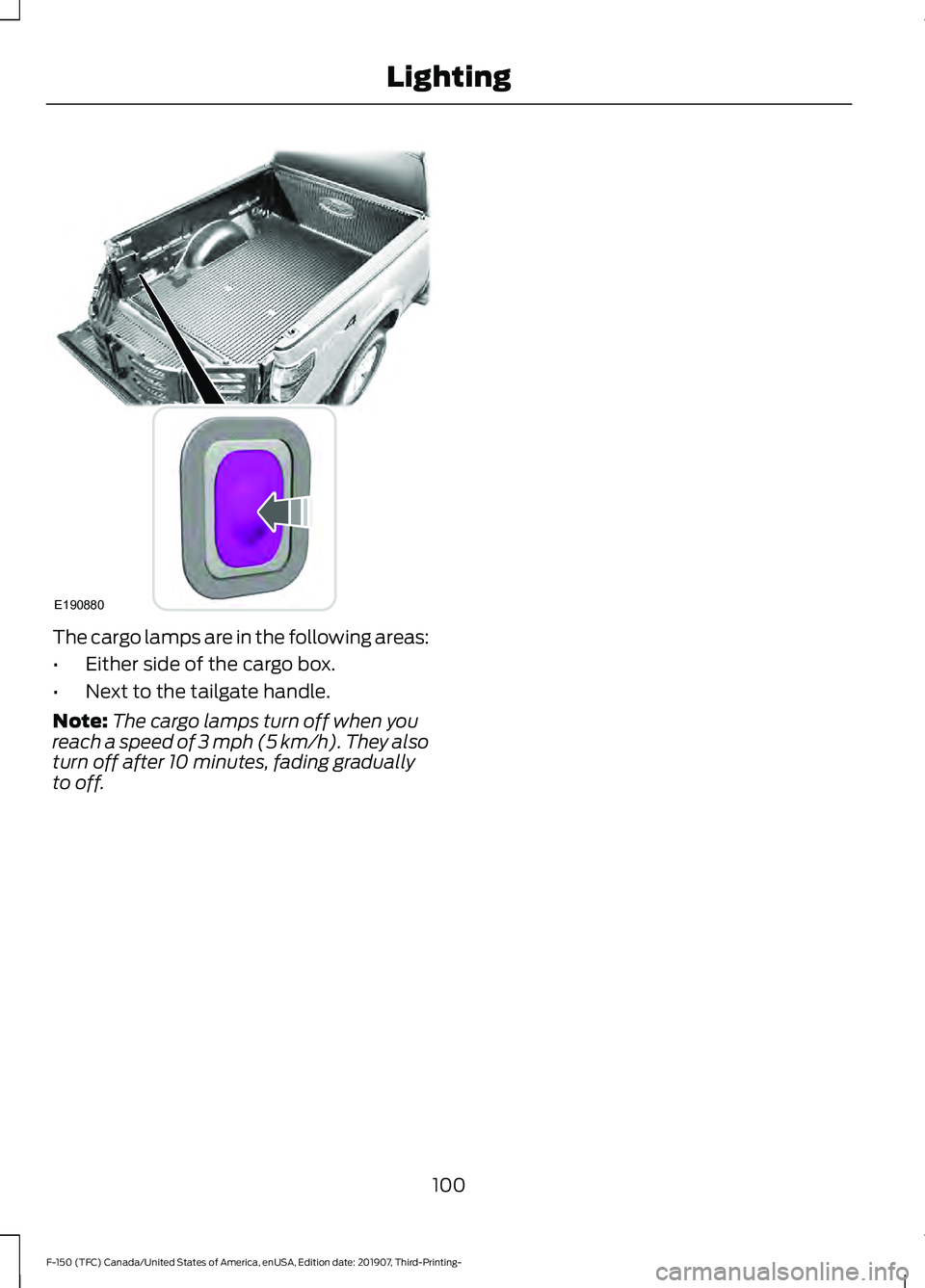
The cargo lamps are in the following areas:
•
Either side of the cargo box.
• Next to the tailgate handle.
Note: The cargo lamps turn off when you
reach a speed of 3 mph (5 km/h). They also
turn off after 10 minutes, fading gradually
to off.
100
F-150 (TFC) Canada/United States of America, enUSA, Edition date: 201907, Third-Printing- LightingE190880
Page 251 of 625
WARNING: Use caution when the
rear cargo door is ajar. If the rear cargo
door is ajar, the camera will be out of
position and the video image may be
incorrect. All guidelines disappear when
the rear cargo door is ajar. Some vehicles
may not come equipped with guidelines. WARNING:
Use caution when
turning camera features on or off when
the transmission is not in park (P). Make
sure your vehicle is not moving.
The rear view camera system provides a
video image of the area behind your
vehicle.
During operation, lines appear in the
display which represent your vehicle ’s path
and proximity to objects behind your
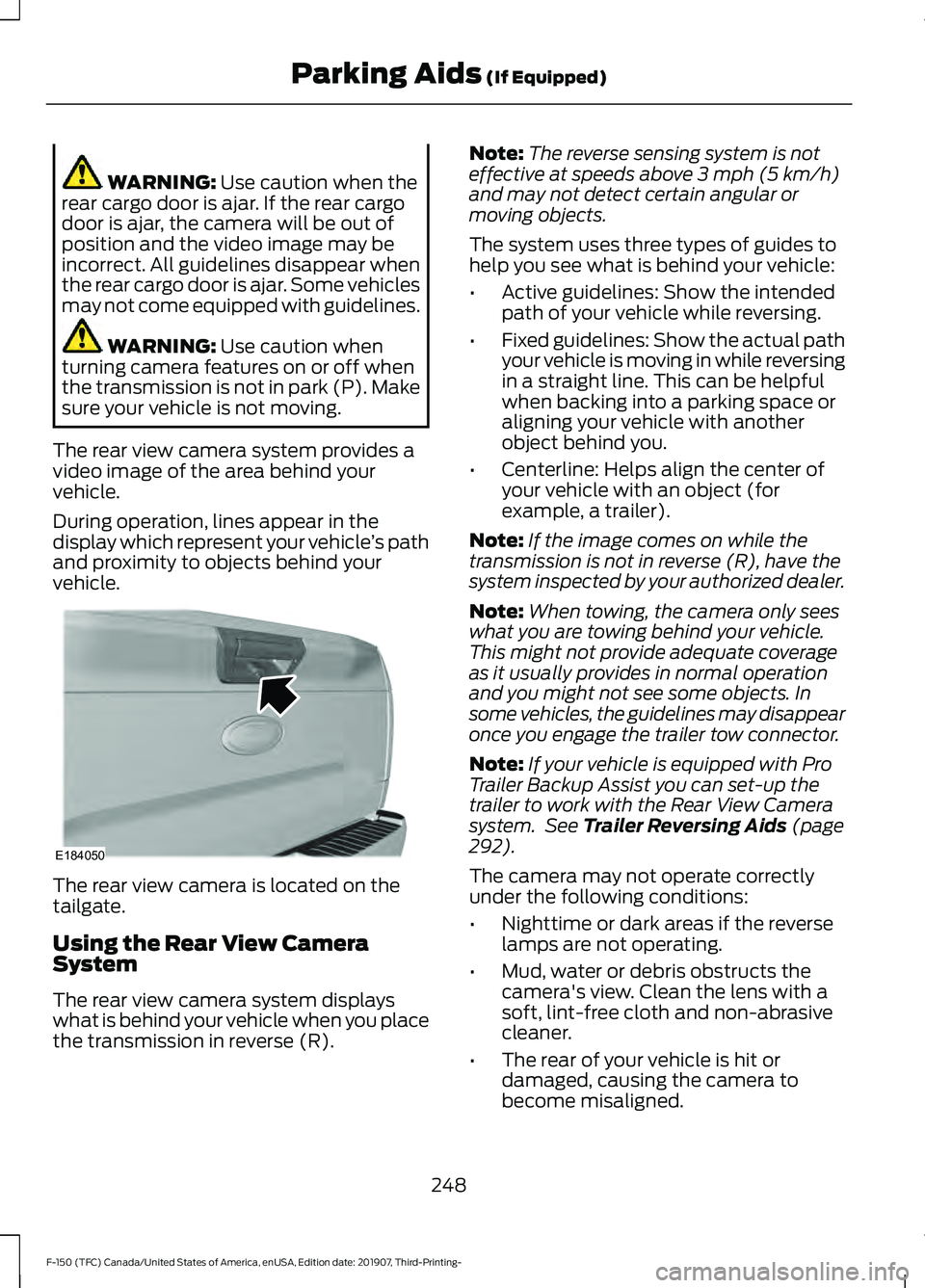
vehicle. The rear view camera is located on the
tailgate.
Using the Rear View Camera
System
The rear view camera system displays
what is behind your vehicle when you place
the transmission in reverse (R). Note:
The reverse sensing system is not
effective at speeds above
3 mph (5 km/h)
and may not detect certain angular or
moving objects.
The system uses three types of guides to
help you see what is behind your vehicle:
• Active guidelines: Show the intended
path of your vehicle while reversing.
• Fixed guidelines: Show the actual path
your vehicle is moving in while reversing
in a straight line. This can be helpful
when backing into a parking space or
aligning your vehicle with another
object behind you.
• Centerline: Helps align the center of
your vehicle with an object (for
example, a trailer).
Note: If the image comes on while the
transmission is not in reverse (R), have the
system inspected by your authorized dealer.
Note: When towing, the camera only sees
what you are towing behind your vehicle.
This might not provide adequate coverage
as it usually provides in normal operation
and you might not see some objects. In
some vehicles, the guidelines may disappear
once you engage the trailer tow connector.
Note: If your vehicle is equipped with Pro
Trailer Backup Assist you can set-up the
trailer to work with the Rear View Camera
system. See
Trailer Reversing Aids (page
292).
The camera may not operate correctly
under the following conditions:
• Nighttime or dark areas if the reverse
lamps are not operating.
• Mud, water or debris obstructs the
camera's view. Clean the lens with a
soft, lint-free cloth and non-abrasive
cleaner.
• The rear of your vehicle is hit or
damaged, causing the camera to
become misaligned.
248
F-150 (TFC) Canada/United States of America, enUSA, Edition date: 201907, Third-Printing- Parking Aids
(If Equipped)E184050
Page 290 of 625
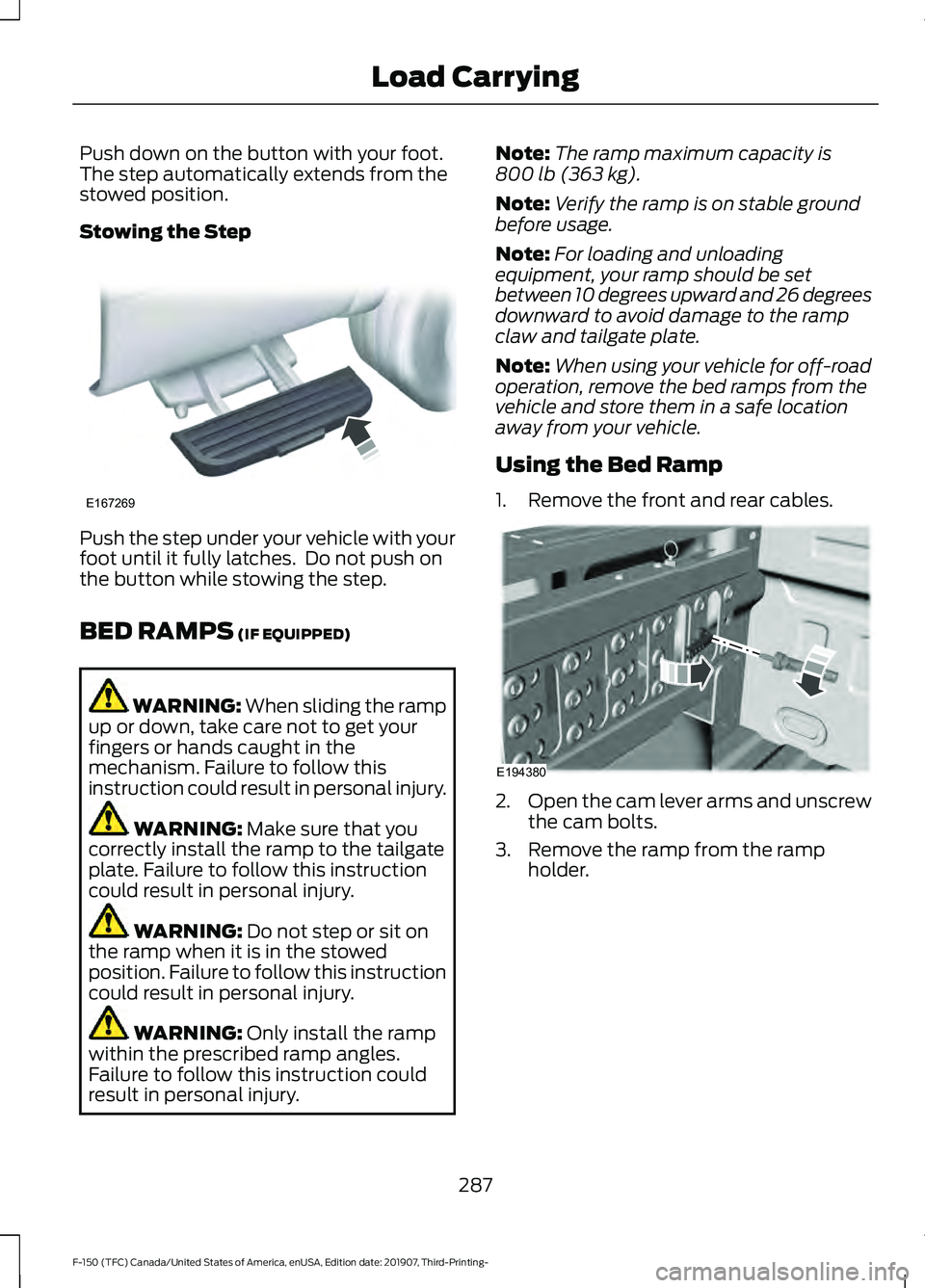
Push down on the button with your foot.
The step automatically extends from the
stowed position.
Stowing the Step
Push the step under your vehicle with your
foot until it fully latches. Do not push on
the button while stowing the step.
BED RAMPS (IF EQUIPPED)
WARNING:
When sliding the ramp
up or down, take care not to get your
fingers or hands caught in the
mechanism. Failure to follow this
instruction could result in personal injury. WARNING:
Make sure that you
correctly install the ramp to the tailgate
plate. Failure to follow this instruction
could result in personal injury. WARNING:
Do not step or sit on
the ramp when it is in the stowed
position. Failure to follow this instruction
could result in personal injury. WARNING:
Only install the ramp
within the prescribed ramp angles.
Failure to follow this instruction could
result in personal injury. Note:
The ramp maximum capacity is
800 lb (363 kg)
.
Note: Verify the ramp is on stable ground
before usage.
Note: For loading and unloading
equipment, your ramp should be set
between 10 degrees upward and 26 degrees
downward to avoid damage to the ramp
claw and tailgate plate.
Note: When using your vehicle for off-road
operation, remove the bed ramps from the
vehicle and store them in a safe location
away from your vehicle.
Using the Bed Ramp
1. Remove the front and rear cables. 2.
Open the cam lever arms and unscrew
the cam bolts.
3. Remove the ramp from the ramp holder.
287
F-150 (TFC) Canada/United States of America, enUSA, Edition date: 201907, Third-Printing- Load CarryingE167269 E194380
Page 291 of 625
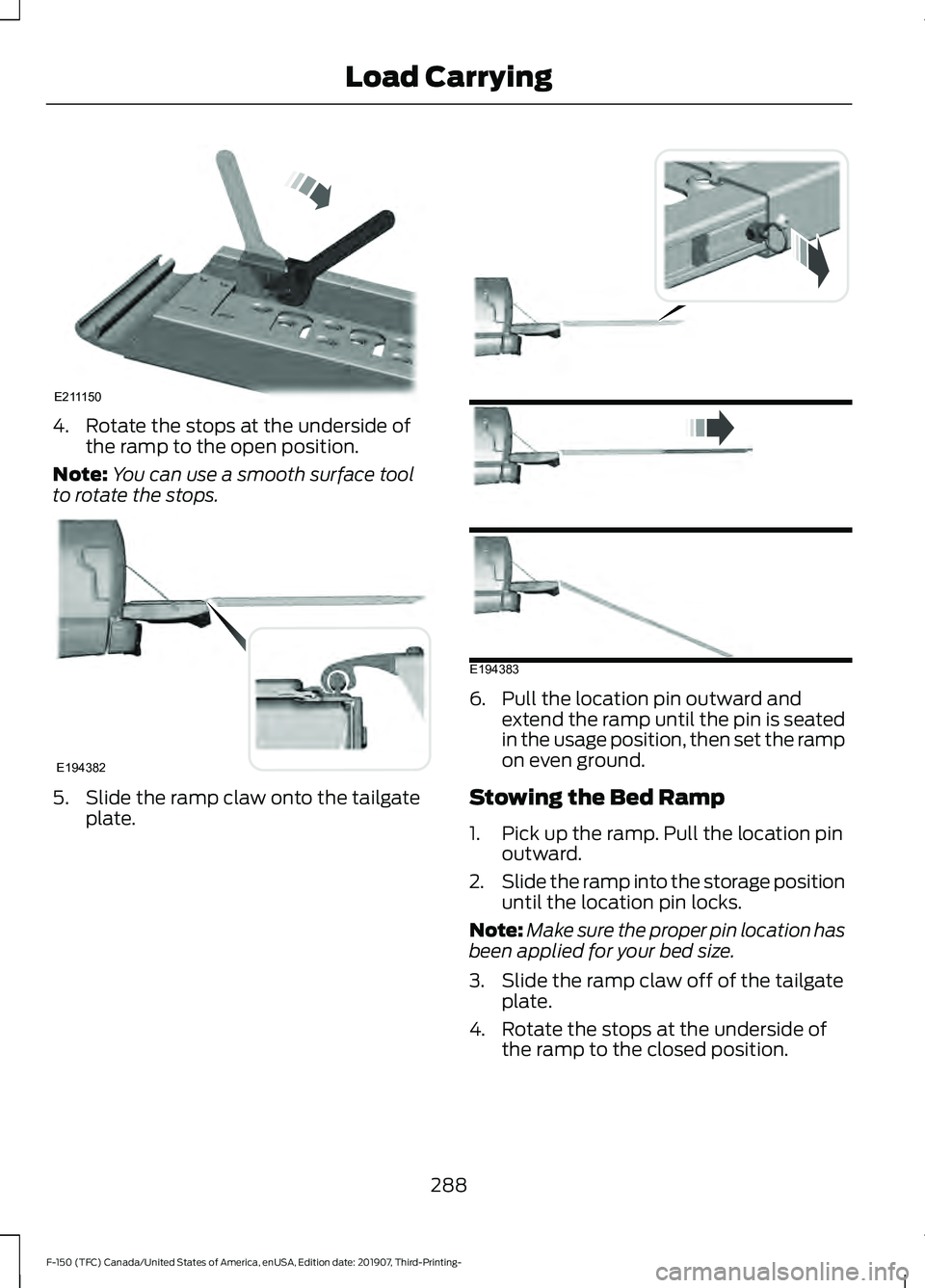
4. Rotate the stops at the underside of
the ramp to the open position.
Note: You can use a smooth surface tool
to rotate the stops. 5. Slide the ramp claw onto the tailgate
plate. 6. Pull the location pin outward and
extend the ramp until the pin is seated
in the usage position, then set the ramp
on even ground.
Stowing the Bed Ramp
1. Pick up the ramp. Pull the location pin outward.
2. Slide the ramp into the storage position
until the location pin locks.
Note: Make sure the proper pin location has
been applied for your bed size.
3. Slide the ramp claw off of the tailgate plate.
4. Rotate the stops at the underside of the ramp to the closed position.
288
F-150 (TFC) Canada/United States of America, enUSA, Edition date: 201907, Third-Printing- Load CarryingE211150 E194382 E194383
Page 298 of 625
Note:
When rounding in inches, round
upward if the measured length is a quarter
inch or greater. Round downward if the
measured length is less than a quarter inch.
For example 12.25 in (31.11 cm) would be
rounded up to 12.50 in (31.75 cm). 12.13 in
(30.8 cm) would be rounded down to
12.00 in (30.48 cm).
Note: When rounding in centimeters, round
to the nearest whole centimeter. If the
measurement is less than
0.2 in (0.5 cm)
round downward. If the measurement is
more than or equal to 0.2 in (0.5 cm) round
upward. For example, 11.9 in (30.3 cm)
would be rounded down to
11.8 in (30 cm).
12.0 in (30.5 cm) would be rounded up to
12.2 in (31 cm).
Note: Use consistent metric or imperial
units as required by your country or vehicle.
The measurement card requires you to
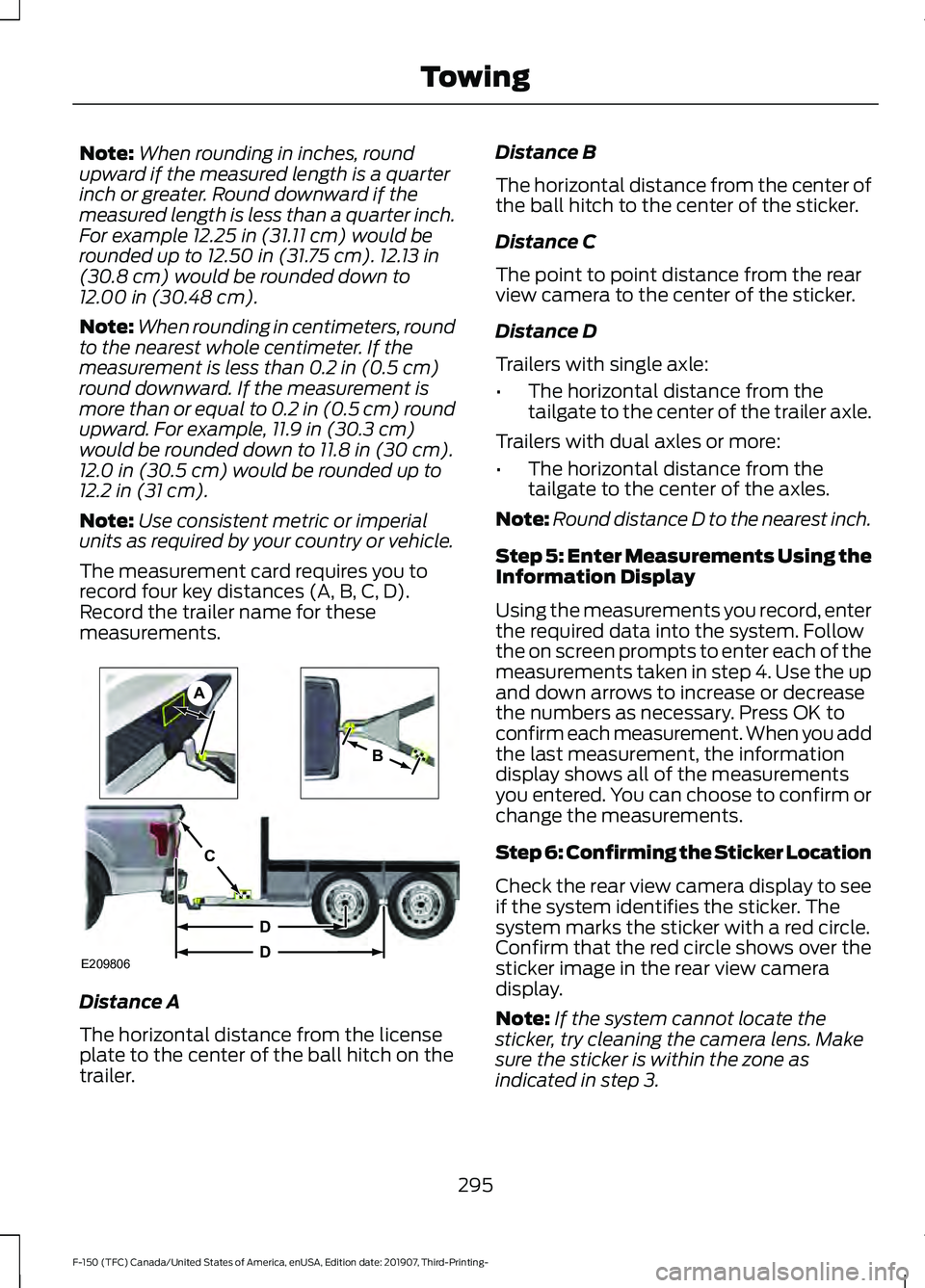
record four key distances (A, B, C, D).
Record the trailer name for these
measurements. Distance A
The horizontal distance from the license
plate to the center of the ball hitch on the
trailer. Distance B
The horizontal distance from the center of
the ball hitch to the center of the sticker.
Distance C
The point to point distance from the rear
view camera to the center of the sticker.
Distance D
Trailers with single axle:
•
The horizontal distance from the
tailgate to the center of the trailer axle.
Trailers with dual axles or more:
• The horizontal distance from the
tailgate to the center of the axles.
Note: Round distance D to the nearest inch.
Step 5: Enter Measurements Using the
Information Display
Using the measurements you record, enter
the required data into the system. Follow
the on screen prompts to enter each of the
measurements taken in step 4. Use the up
and down arrows to increase or decrease
the numbers as necessary. Press OK to
confirm each measurement. When you add
the last measurement, the information
display shows all of the measurements
you entered. You can choose to confirm or
change the measurements.
Step 6: Confirming the Sticker Location
Check the rear view camera display to see
if the system identifies the sticker. The
system marks the sticker with a red circle.
Confirm that the red circle shows over the
sticker image in the rear view camera
display.
Note: If the system cannot locate the
sticker, try cleaning the camera lens. Make
sure the sticker is within the zone as
indicated in step 3.
295
F-150 (TFC) Canada/United States of America, enUSA, Edition date: 201907, Third-Printing- TowingE209806
A
B
C
D
D
Page 301 of 625
Note:
If you still experience issues with the
system's ability to detect the sticker, see
the information in the next section regarding
sticker lost during system operation.
Measurement A has reached maximum or
minimum value:
• The system is designed to work with
drawbars that have a license plate to
hitch ball center measurement of 9 in
(23 cm) to 16 in (41 cm) when installed.
Do not attempt to use drawbars that
have a length outside this range as the
system performance will be degraded
and could cause improper system
function.
• Make sure that the measurement being
made is the horizontal distance only
from license plate and the hitch ball
center. A straight line distance that
includes any vertical rise or drop
increases the measurement and makes
it inaccurate. Inaccurate
measurements degrade system
performance and could cause improper
system function. See step 4 of the
setup instruction to review
measurement instructions.
Measurement B has reached maximum or
minimum value:
• Make sure that the sticker placement
instruction in step 3 of the setup has
been followed. Stickers placed outside
the allowed zone will adversely affect
the system performance and could
cause improper feature function.
• Make sure that the measurement being
made is the horizontal distance only
from center of sticker to the hitch ball
center. A straight line distance that
includes any vertical rise or drop
increases the measurement and
causes an inaccurate value to be
entered into the system. See step 4 of
the setup for additional measurement
instructions. Measurement C has reached maximum or
minimum value:
•
Make sure you follow the sticker
placement instructions in step 3 of the
setup. Stickers placed outside the
allowed zone adversely affect the
system performance and could cause
improper feature function. If you have
met all the criteria for sticker
placement and you see this message,
the sticker is either too far below or too
close to the camera to properly
recognize the sticker. In order for the
system to operate correctly, the sticker
height must be lowered if you receive
the minimum warning or the sticker
height must be raised if you receive the
maximum warning.
• Only one sticker can be placed on the
trailer for correct system function. The
previous sticker must be removed or
covered so only one sticker is visible to
the camera.
• Measurement B and C must be
measured again if a new sticker is
placed on the trailer.
Measurement D has reached maximum or
minimum value:
• Make sure that the measurement being
made is the horizontal distance only
from tailgate to the center of the single
axle or the center of all the axles on the
trailer. See step 4 of the setup for
additional measurement instructions.
The system does not support trailer
lengths outside the range allowed by
the information display.
298
F-150 (TFC) Canada/United States of America, enUSA, Edition date: 201907, Third-Printing- Towing
Page 354 of 625
Protected Component
Fuse Rating
Fuse Number
Trailer brake control.
5A
4
Not used (spare).
20A
5
Not used (spare).
10A
6
Not used (spare).
10A
7
Not used (spare).
10A
8
Extended power module (base).
10A
9
Embedded modem module.
5A
10
Combined sensor module.
5A
11
Climate head module.
7.5A
12
Smart datalink connector.
Cluster.
7.5A
13
Steering column control module.
Brake on/off switch.
10A
14
Smart datalink connector.
10A
15
Tailgate release.
15A
16
Heads up display.
5A
17
Terrain switch.
Ignition switch and passive-entry passive-
start start stop switch.
5A
18
Key inhibit solenoid.
Extended power module (base).
7.5A
19
Restraint control module (Raptor).
7.5A
Not used (spare).
7.5A
20
Heads up display.
5A
21
In car temperature with humidity sensor.
Passenger occupant detection (Raptor).
5A
22
Power driven rear glass switch.
10A
23
Inverter.
Driver side window.
Moonroof.
Vista roof.
351
F-150 (TFC) Canada/United States of America, enUSA, Edition date: 201907, Third-Printing- Fuses
Page 383 of 625
Replacing LED Headlamp Bulbs (If
Equipped)
These lamps have LED bulbs. Contact an
authorized dealer.
Replacing LED Fog lamp Bulbs
(If
Equipped)
These lamps have LED bulbs. Contact an
authorized dealer.
Replacing LED Direction Indicator
and Side Marker Bulbs
(If Equipped)
These lamps have LED bulbs. Contact an
authorized dealer.
Replacing Brake, Rear, Direction
Indicator and Reverse Lamp Bulbs
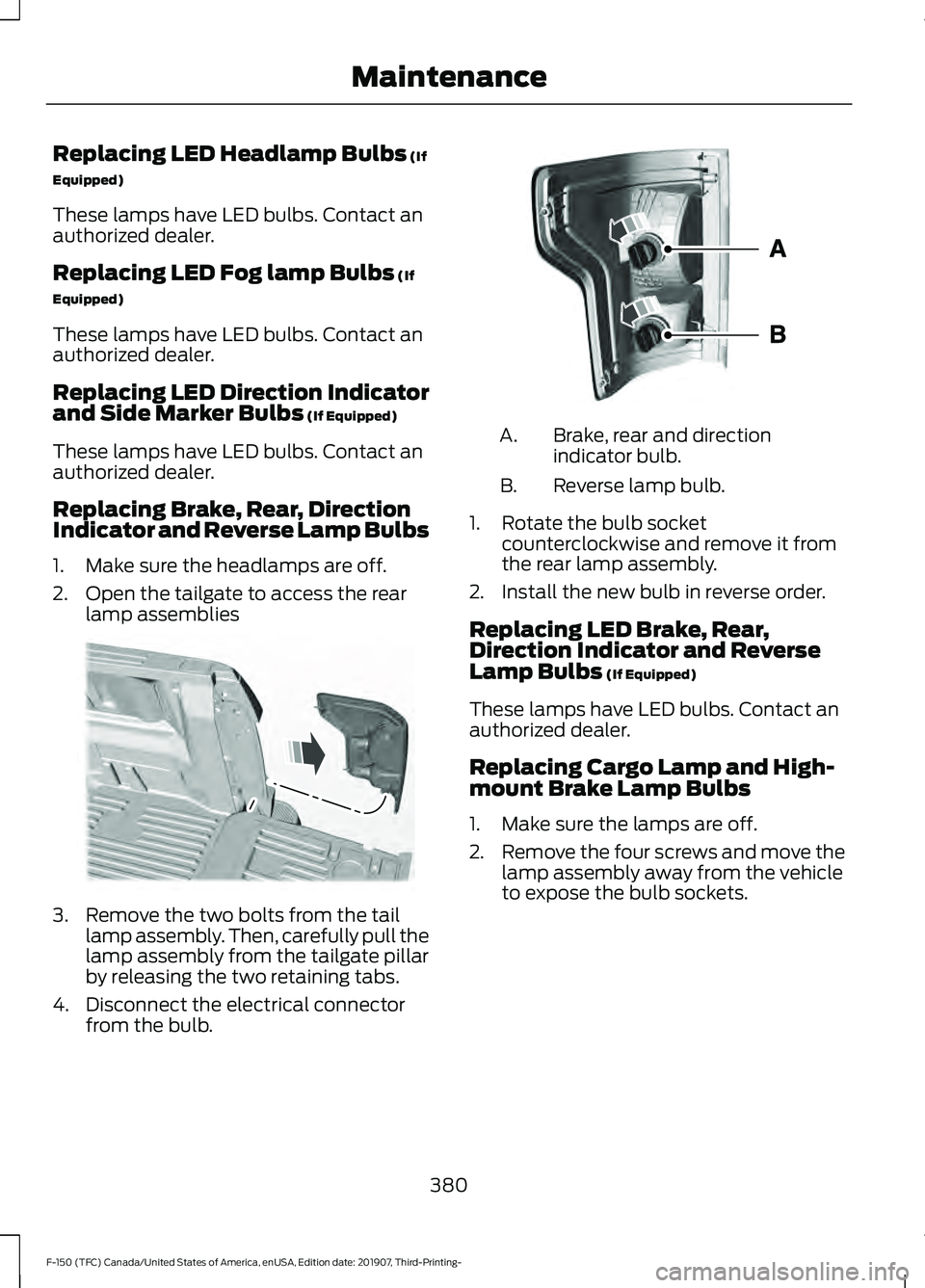
1. Make sure the headlamps are off.
2. Open the tailgate to access the rear lamp assemblies 3. Remove the two bolts from the tail
lamp assembly. Then, carefully pull the
lamp assembly from the tailgate pillar
by releasing the two retaining tabs.
4. Disconnect the electrical connector from the bulb. Brake, rear and direction
indicator bulb.
A.
Reverse lamp bulb.
B.
1. Rotate the bulb socket counterclockwise and remove it from
the rear lamp assembly.
2. Install the new bulb in reverse order.
Replacing LED Brake, Rear,
Direction Indicator and Reverse
Lamp Bulbs
(If Equipped)
These lamps have LED bulbs. Contact an
authorized dealer.
Replacing Cargo Lamp and High-
mount Brake Lamp Bulbs
1. Make sure the lamps are off.
2. Remove the four screws and move the
lamp assembly away from the vehicle
to expose the bulb sockets.
380
F-150 (TFC) Canada/United States of America, enUSA, Edition date: 201907, Third-Printing- MaintenanceE187288 E187289
Page 611 of 625
Using Seek, Fast Forward and
Reverse............................................................. 482
Audio Unit - Vehicles Without: SYNC 3.......................................................................478
Accessing the Apps Menu.............................. 479
Accessing the Clock Settings........................ 479
Accessing the Media Source Menu.............479
Accessing the Phone Features..................... 479
Accessing the Settings Menu........................ 479
Accessing the Sound Settings...................... 479
Adjusting the Volume....................................... 479
Changing Radio Stations................................ 479
Listening to the Radio..................................... 480
Playing or Pausing Media............................... 480
Switching Radio Text On and Off...............480
Switching Repeat Mode On and Off.........480
Switching Shuffle Mode On and Off.........480
Switching the Audio Unit On and Off.......480
Switching the Display On and Off..............480
Using Seek, Fast Forward and Reverse............................................................ 480
Using the Display Control.............................. 480
Using the Number Block................................ 480
Autolamps........................................................96 Windshield Wiper Activated
Headlamps........................................................ 96
Automatic Climate Control.......................152 Directing the Airflow.......................................... 152
Setting the Blower Motor Speed.................. 153
Setting the Temperature.................................. 153
Switching Auto Mode On and Off................153
Switching Dual Zone Mode On and Off........................................................................\
153
Switching Maximum Air Conditioning On and Off............................................................... 153
Switching Maximum Defrost On and Off........................................................................\
153
Switching Recirculated Air On and Off....................................................................... 154
Switching the Air Conditioning On and Off........................................................................\
153
Switching the Climate Control On and Off........................................................................\
153
Automatic High Beam Control.................101
Automatic High Beam Control Indicators.......................................................101
Automatic Transmission
............................217
Brake-Shift Interlock........................................ 220If Your Vehicle Gets Stuck in Mud or
Snow.................................................................. 222
Understanding the Shift Positions of your Automatic Transmission............................. 217
Understanding your SelectShift™ Automatic Transmission............................. 219
Automatic Transmission Fluid Check..............................................................371
Auto-Start-Stop...........................................190 Disabling Auto-Start-Stop............................... 191
Enabling Auto-Start-Stop.............................. 190
Autowipers
.......................................................93
Auxiliary Power Points................................175
400 Watt AC Power Point............................... 175
DC Power Point.................................................... 175
Locations................................................................ 176
B
Battery See: Changing the 12V Battery...................... 373
Bed Access
....................................................286
Box Side Step..................................................... 286
Bed Extender...................................................80 Grocery Mode......................................................... 81
Tailgate Mode....................................................... 80
Bed Ramps
.....................................................287
Installing the Ramp Holder........................... 289
Stowing the Bed Ramp................................... 288
Using the Bed Ramp......................................... 287
Blind Spot Information System.............266 Blind Spot Information System with Trailer
Tow..................................................................... 267
Switching the System On and Off...............270
System Errors...................................................... 270
Using the Blind Spot Information System.............................................................. 267
BLIS See: Blind Spot Information System.........266
Body Styling Kits.........................................390
Bonnet Lock See: Opening and Closing the Hood..........355
Booster Seats
..................................................35
Types of Booster Seats...................................... 35
Brake Fluid Check.........................................372 Brake Fluid Service Interval............................ 372
Brakes...............................................................233 General Information.......................................... 233
608
F-150 (TFC) Canada/United States of America, enUSA, Edition date: 201907, Third-Printing- Index
Page 615 of 625
Cruise Control - Vehicles With: Cruise
Control.............................................................91
Customer Assistance.................................337
D
Data Recording
..................................................11
Comfort, Convenience and Entertainment
Data....................................................................... 13
Event Data................................................................ 13
Service Data............................................................ 12
Services That Third Parties Provide...............14
Services That We Provide.................................. 14
Vehicles With a Connectivity Device..............14
Vehicles With a Modem...................................... 14
Vehicles With an Emergency Call System.................................................................. 15
Vehicles With SYNC............................................. 15
Daytime Running Lamps - Vehicles With: Configurable Daytime Running
Lamps..............................................................97
Daytime Running Lamps - Vehicles With: Daytime Running Lamps (DRL)
............96
Declaration of Conformity.......................605
Declaration of Conformity - Vehicles With: SYNC 3
.............................................605
Radio Frequency Statement........................ 605
Diesel Particulate Filter...............................212 Oxidation Catalytic Converter and Diesel
Particulate Filter System............................. 212
Regeneration.........................................................212
Digital Radio
..................................................482
HD Radio Reception and Station
Troubleshooting............................................ 483
Direction Indicators
.......................................98
Doors and Locks..............................................72
Draining the Fuel Filter Water Trap - Diesel............................................................366
Drive Control..................................................278 Selectable Drive Modes................................... 278
Driver Alert
.......................................................261
Using Driver Alert................................................ 261
Driver and Passenger Airbags....................52 Children and Airbags........................................... 53
Proper Driver and Front Passenger Seating Adjustment........................................................ 52
Driving Aids
.....................................................261
Driving Hints...................................................324 Driving Through Water...............................326
DRL
See: Daytime Running Lamps - Vehicles With:
Configurable Daytime Running Lamps....97
See: Daytime Running Lamps - Vehicles With: Daytime Running Lamps (DRL)................96
E
Economical Driving
.....................................324
Electric Parking Brake................................234 Applying the Electric Parking Brake............234
Automatically Releasing the Electric
Parking Brake.................................................. 235
Manually Releasing the Electric Parking Brake.................................................................. 235
Releasing the Electric Parking Brake if the Vehicle Battery is Running Out of
Charge............................................................... 235
Electromagnetic Compatibility...............577
Electronic Locking Differential.................231 Activating the Electronic Locking
Differential........................................................ 231
Operating Electronic Locking Differential With a Spare or Mismatched Tires.........232
Electronic Tailgate
..........................................77
With the Outside Control Button................... 78
With the Remote Control................................... 77
Emission Law................................................204 Noise Emissions Warranty, Prohibited
Tampering Acts and Maintenance.........205
Tampering With a Noise Control System............................................................. 204
End User License Agreement
.................580
VEHICLE SOFTWARE END USER LICENSE
AGREEMENT (EULA) ................................ 580
Engine Block Heater....................................188 Using the Engine Block Heater...................... 189
Engine Coolant Check...............................366 Adding Coolant................................................... 367
Coolant Change................................................. 369
Engine Coolant Temperature Management.................................................. 370
Fail-Safe Cooling............................................... 369
Recycled Coolant.............................................. 368
Severe Climates................................................. 368
Engine Emission Control..........................204
612
F-150 (TFC) Canada/United States of America, enUSA, Edition date: 201907, Third-Printing- Index