steering FORD F-150 2021 Owners Manual
[x] Cancel search | Manufacturer: FORD, Model Year: 2021, Model line: F-150, Model: FORD F-150 2021Pages: 796, PDF Size: 13.89 MB
Page 467 of 796
Note:
If the trailer was connected just prior
to turning the system on, you may need to
drive forward to initialize the system. Follow
the instructions on the touchscreen to
activate the system.
USING TRAILER REVERSE
GUIDANCE VIEWS
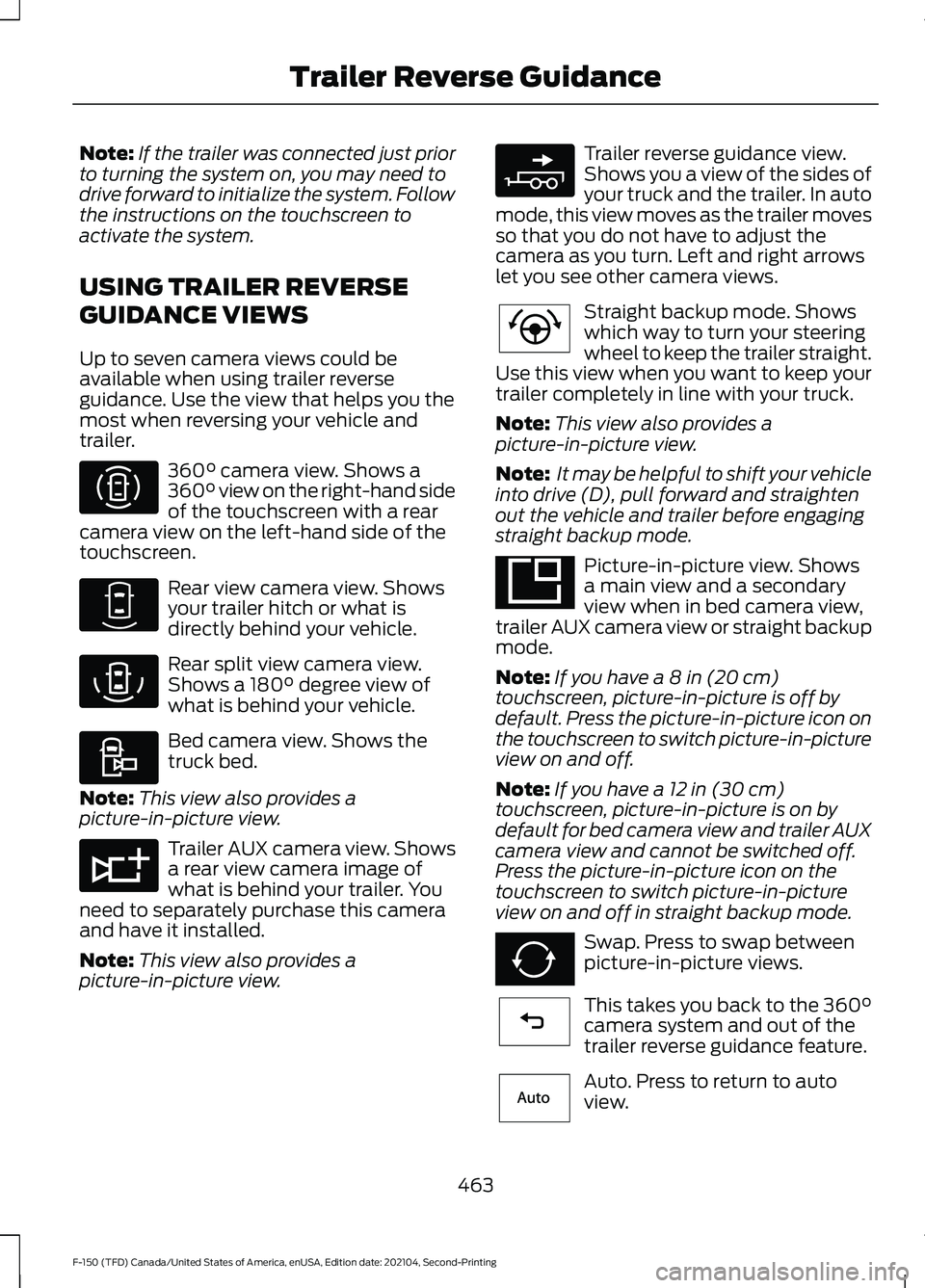
Up to seven camera views could be
available when using trailer reverse
guidance. Use the view that helps you the
most when reversing your vehicle and
trailer. 360° camera view. Shows a
360° view on the right-hand side
of the touchscreen with a rear
camera view on the left-hand side of the
touchscreen. Rear view camera view. Shows
your trailer hitch or what is
directly behind your vehicle.
Rear split view camera view.
Shows a
180° degree view of
what is behind your vehicle. Bed camera view. Shows the
truck bed.
Note: This view also provides a
picture-in-picture view. Trailer AUX camera view. Shows
a rear view camera image of
what is behind your trailer. You
need to separately purchase this camera
and have it installed.
Note: This view also provides a
picture-in-picture view. Trailer reverse guidance view.
Shows you a view of the sides of
your truck and the trailer. In auto
mode, this view moves as the trailer moves
so that you do not have to adjust the
camera as you turn. Left and right arrows
let you see other camera views. Straight backup mode. Shows
which way to turn your steering
wheel to keep the trailer straight.
Use this view when you want to keep your
trailer completely in line with your truck.
Note: This view also provides a
picture-in-picture view.
Note: It may be helpful to shift your vehicle
into drive (D), pull forward and straighten
out the vehicle and trailer before engaging
straight backup mode. Picture-in-picture view. Shows
a main view and a secondary
view when in bed camera view,
trailer AUX camera view or straight backup
mode.
Note: If you have a 8 in (20 cm)
touchscreen, picture-in-picture is off by
default. Press the picture-in-picture icon on
the touchscreen to switch picture-in-picture
view on and off.
Note: If you have a
12 in (30 cm)
touchscreen, picture-in-picture is on by
default for bed camera view and trailer AUX
camera view and cannot be switched off.
Press the picture-in-picture icon on the
touchscreen to switch picture-in-picture
view on and off in straight backup mode. Swap. Press to swap between
picture-in-picture views.
This takes you back to the
360°
camera system and out of the
trailer reverse guidance feature. Auto. Press to return to auto
view.
463
F-150 (TFD) Canada/United States of America, enUSA, Edition date: 202104, Second-Printing Trailer Reverse GuidanceE310996 E310967 E310974 E310995 E311776 E310965 E224484 E351663 E351662 E224486 E315644
Page 468 of 796
Note:
Auto mode is the default setting.
Hitch Angle Graphic
The hitch angle graphic shows a small
representation of your truck and trailer with
visual feedback to help you monitor the
trailer. The graphic shows two different
colored lines for the trailer hitch angle. A
black line shows you where your trailer is
in relation to your vehicle. The white line
represents the amount the trailer can turn
based on steering wheel position.
The graphic shows a yellow and red zone
for the hitch angle to warn you of a high
angle condition that could require you to
pull forward to reduce the hitch angle. The
angle limits for each zone vary based on
the trailer length. The yellow zone indicates you are
approaching the maximum controllable
trailer angle for the system. When the
trailer enters this zone, it is more difficult
to reduce the trailer turn when backing up.
It may be necessary to put your vehicle
back into drive (D) and pull forward to get
the truck and trailer back to an in-line
position.
The red zone indicates you have exceeded
the maximum controllable trailer angle for
the system. Immediately stop reversing.
Put your vehicle into drive (D) and pull
forward until the trailer is no longer in the
red zone.
464
F-150 (TFD) Canada/United States of America, enUSA, Edition date: 202104, Second-Printing Trailer Reverse Guidance
Page 469 of 796
TRAILER REVERSE GUIDANCE – TROUBLESHOOTING
TRAILER REVERSE GUIDANCE – INFORMATION MESSAGES
Description
Message
Displays when the system turns on and is
initializing.
Detecting Trailer Please Wait…
A condition exists that prevents the system
from turning on. If the message continues
to display, visit your authorized dealer to
have your vehicle checked.
Trailer Reverse Guidance System is Not
Available
The steering system needs to learn internal
parameters to fully enable the feature.
Drive your vehicle straight forward above
25 mph (40 km/h) for approximately 5
minutes.
Trailer Reverse Guidance Driving Required
to Initialize Steering Press OK to Exit
Displays when you exceed the maximum
controllable trailer angle for the system.
Place your vehicle in drive (D) and pull
forward to get your vehicle and trailer back
to an in-line position, then activate the
system by selecting the connected trailer
and following the instructions on the
touchscreen.
Stop now. Deactivated by trailer angle.
If this message consistently displays, you
may need to repeat the trailer setup and
calibration. Delete the trailer from the
system and repeat the setup and calibra-
tion process.
Displays when the system does not detect
the sensor. Check the sensor connection,
check that there is no damaged wiring
between the connector and sensor and
check that there is only one sensor
connected.
Trailer Reverse Guidance Sensor Not
Detected Refer to Owner's Manual Press
OK to Exit
If you do not want to use the sensor for this
trailer, delete the trailer in the touchscreen
then repeat the setup process with the
sticker.
465
F-150 (TFD) Canada/United States of America, enUSA, Edition date: 202104, Second-Printing Trailer Reverse Guidance
Page 471 of 796
TRAILER REVERSE GUIDANCE –
FREQUENTLY ASKED QUESTIONS
Why does the trailer not reverse
straight?
Verify the sensor is correctly installed.
Other factors such as the hitch
connection, road camber, road slope
and trailer suspension could influence
how straight the system can reverse
the trailer when the control knob is not
turned. You can compensate for the
trailer drifting to the right or left by
slowly turning the knob until the trailer
is following your desired path and then
holding the knob in that position.
Why does the system not detect a
sensor? There could be an issue with the
connection, the wiring harness could
be damaged, you could have multiple
sensors connected or the sensor could
be incorrectly installed. Check that the
12-way connector is fully inserted into
the 12-way socket. The red rubber seal
is not visible when the connector is
fully inserted. Also check that the
wiring harness sensor connection is
fully inserted at the trailer sensor, and
check for damaged wiring between
the 12-way connector and the trailer
sensor. Also, check that the sensor is
installed on a vertical surface with the
arrows pointing straight up. What does it mean if the system
remains on one message for an
extended time during calibration when
setting up the system with the sticker?
The camera could need to be cleaned,
the sticker could be blocked, the
drawbar could be outside the allowed
range of 4–19 in (10–48 cm) or you
could need to move to a different area
to change the lighting and background.
Verify the sticker is in the proper
location. See
Applying the Trailer
Reverse Aid Sticker (page 461). You
can move to a different area or change
the direction you are driving or setup
the system at a different time of day.
Some trailers are not compatible with
the sticker and camera system. If the
issue persists with the sticker setup,
you may choose to setup the trailer
with a sensor.
What does it mean if the system pauses
during calibration? There could be steering input or trailer
movement during the straight drive
portion of the calibration process.
What does it mean if the system
remains on one message for an
extended time during calibration when
setting up the system with the sensor? The sensor could be incorrectly
installed, the trailer length could be
outside the allowed range or the road
surface could be too rough or bumpy.
What does it mean if the system
displays hold steering steady during
turn? Part of the calibration process for the
sticker setup requires a steady turn. If
you are continually moving the
steering wheel during the turn, this
delays the calibration process. To
enable the calibration process, hold
the steering wheel at the same
position when turning.
467
F-150 (TFD) Canada/United States of America, enUSA, Edition date: 202104, Second-Printing Trailer Reverse Guidance
Page 472 of 796
What does it mean if the system
displays that it is not available?
There could be a sub-system that the
system uses that is not correctly
operating or there could be a battery
voltage issue. If the system continues
to display it is not available, visit your
authorized dealer to have your vehicle
checked.
What does it mean if the system
displays that driving is required to
initialize steering? The steering system needs to learn
internal parameters to fully turn on the
feature. Drive your vehicle straight
forward above 25 mph (40 km/h) for
approximately 5 minutes. This could
also occur when your vehicle is new,
there is a battery voltage issue or if the
steering system has been serviced.
What does it mean if the system does
not detect a trailer when configured
with a sensor? Verify that the sensor is properly
connected. See
Trailer Sensor
Installation (page 461). Repeat
calibration on a different route if you
have verified sensor installation.
What does it mean if the system
requires you to pull forward to
initialize? This occurs when the vehicle has not
moved during the current key cycle
after you connect and select the trailer
in the touchscreen or you operate the
system at speeds below
1 mph
(1 km/h) for an extended period of
time. Drive forward above 2 mph
(3 km/h) and the system indicates
when it initializes. What does it mean if the trailer is at its
maximum angle or the system
deactivated by trailer angle?
You are at the maximum controllable
trailer angle for the system. Place your
vehicle in drive (D) and pull forward to
get the truck and trailer back to an
in-line position. If this message
consistently displays, this could
indicate the sensor is incorrectly
installed, the trailer needs to be
recalibrated or the drawbar or the
trailer dimensions are outside of the
supported range. The system is
designed to work with drawbars that
have a license plate to hitch ball center
measurement of
9–18 in (23–46 cm)
when installed. The system is designed
to work with trailers that have a hitch
point to center of the axle or axles
measurement of
6– 33 ft
(1.85– 10.05 m). Do not attempt to use
drawbars or trailers that have a length
outside of this range as the system
performance degrades and could
cause improper system function.
Check that the correct trailer is
selected in the touchscreen. Verify the
sensor is installed according to the
instructions included in the sensor kit
and check that the drawbar and the
trailer dimensions are within the
allowed range. Then, delete the trailer
from the system and repeat the setup
process to calibrate the trailer.
468
F-150 (TFD) Canada/United States of America, enUSA, Edition date: 202104, Second-Printing Trailer Reverse Guidance
Page 473 of 796
What does it mean when the system
tells you to take control of the steering
wheel?
The system is no longer steering the
vehicle and you must take over
steering. There are four reasons the
system could display this message.
The first reason the system could
display this message is that you have
touched the steering wheel when the
system is steering. The second reason
the system could display this message
is that you have exceeded the
maximum speed for the feature. The
third reason the system could display
this message is that the trailer is not
detected. The final reason the system
could display this message is that an
internal condition for system operation
is not met that requires your vehicle to
return to manual control of the
steering.
How do I use a sticker if I have
previously setup a trailer with the
sensor? Disconnect the sensor wiring and add
a new trailer to the system and follow
the instructions for setup with a
sticker. See Applying the Trailer
Reverse Aid Sticker (page 461). If
your vehicle does not support the
sticker option, the touchscreen
instructs you to install the sensor
again.
What if I want to use a sensor for the
trailer instead of a sticker? Install the sensor and connect the
sensor wiring before adding the new
trailer to the system. You must
connect the sensor before you add the
trailer. If your vehicle did not come with
a sensor, you can purchase one from
your authorized dealer. What does it mean if the system does
not detect a trailer that is setup with a
sticker?
The system requires a clear view of the
sticker placed on the trailer. You must
keep the camera lens and sticker clean
for the system to correctly operate. If
the system cannot initially detect the
trailer, it could be necessary for you to
change the lighting conditions by
moving your vehicle and trailer or
waiting until the conditions change.
See
Applying the Trailer Reverse
Aid Sticker (page 461). Some trailers
are not compatible with the sticker
and camera system. If the system
consistently does not detect the trailer
with the sticker setup, you may choose
to setup the trailer with a sensor.
Note: The system is designed to be used
with the same trailer connection every time
you choose the trailer from the touchscreen.
When using a different drawbar or a
different pin hole on drawbars with more
than one, connecting the drawbar to your
vehicle affects the trailer position and you
may need to repeat the trailer setup and
calibration process.
469
F-150 (TFD) Canada/United States of America, enUSA, Edition date: 202104, Second-Printing Trailer Reverse Guidance
Page 474 of 796
OFF-ROAD DRIVING
WHAT IS OFF-ROAD DRIVING
Off-road driving is driving your vehicle on
unsurfaced roads or trails, made from dirt,
rocks, sand and mud.
OFF-ROAD DRIVING
PRECAUTIONS - RAPTOR
WARNING: If you continue to drive
your vehicle when the engine is
overheating, the engine could stop
without warning. Failure to follow this
instruction could result in the loss of
control of your vehicle.
Before going off-road driving, consult with
all the appropriate government entities to
determine where you are legally allowed
to operate your vehicle and what permits
or registrations are required to do so.
Inspect your vehicle before and after any
off-road driving.
Familiarize yourself with the dimensions
of your vehicle including approach angles,
breakover angles, and ground clearance.
Also familiarize yourself with the features
of your vehicle. Some of these features
such as drive modes and cameras can
improve your off-road driving experience.
Secure loose objects inside your vehicle
and in the cargo area.
BASIC OFF-ROAD DRIVING
TECHNIQUES - RAPTOR
Grip the steering wheel with your thumbs
on the outside of the rim. This reduces the
risk of injury due to abrupt steering wheel
motions that occur when negotiating rough
terrain. If you are driving in a dusty area, be sure to
leave ample distance between your vehicle
and any other vehicles to allow for
adequate vision.
BASIC OFF-ROAD DRIVING
TECHNIQUES
Off-road Driving Hints
Before taking your vehicle off-roading, a
basic vehicle inspection should be done to
make sure that the vehicle is in top working
condition. It is always recommended that
at least two vehicles are used while
off-roading. The buddy system helps make
sure that help is close at hand should a
vehicle become stuck or damaged. It is also
wise to take supplies such as a first aid kit,
supply of water, tow strap, cell or satellite
phone with you any time an off-road
excursion is planned.
1. Grip the steering wheel with thumbs
on the outside of the rim. This will
reduce the risk of injury due to abrupt
steering wheel motions that occur
when negotiating rough terrain.
2. Throttle, brake and steering inputs should be made in a smooth and
controlled manner. Sudden inputs to
the controls can cause loss of traction
or upset the vehicle, especially while
on loose terrain or while crossing
obstacles such as rocks or logs.
3. Look ahead on your route noting upcoming obstacles, or any other
factors which may indicate a change
in available traction, and adjust the
vehicle speed and route accordingly.
4. When driving off-road, if the front or rear suspension is bottoming out
and/or excessive contact with the
skid-plates is encountered, reduce
vehicle speed to avoid potential
damage to the vehicle.
470
F-150 (TFD) Canada/United States of America, enUSA, Edition date: 202104, Second-Printing Driving Hints
Page 475 of 796
5. When with other vehicles, it is
recommended that communication is
used, and the lead vehicle notify other
vehicles of obstacles that could cause
potential vehicle damage.
6. Always keep available ground clearance in mind and pick a route that
minimizes the risk of catching the
underside of the vehicle on an obstacle.
7. When negotiating low speed obstacles,
applying light brake pressure in
conjunction with the throttle will help
prevent the vehicle from jerking and
will allow you to negotiate the obstacle
in a more controlled manner. Using 4L
will also help with this.
8. Off-roading requires a high degree of concentration. Even if your local law
does not prohibit alcohol use while
driving off-road, Ford strongly
recommends against drinking if you
plan to off-road.
Crossing Obstacles
• Review the path ahead before
attempting to cross any obstacle. It is
best if the obstacle is reviewed from
outside the vehicle so that there is a
good understanding of terrain condition
both in front of and behind the
obstacle.
• Approach obstacles slowly.
• If a large obstacle such as a rock
cannot be avoided, choose a path that
places the rock directly under the tire
rather than the undercarriage of the
vehicle. This will help prevent damage
to the vehicle.
• Ditches and washouts should be
crossed at a 45° angle, allowing each
wheel to independently cross the
obstacle. Hill Climbing WARNING:
Extreme care should
be used when steering the vehicle in
reverse down a slope so as not to cause
the vehicle to swerve out of control.
• Always attempt to climb a steep hill
along the fall line of the slope and not
diagonally.
• If the vehicle is unable to make it up
the hill, DO NOT attempt to turn back
down the slope. Place the vehicle in
low range and slowly back down in
reverse.
• When descending a steep slope, select
low gear and engage hill descent
control. Use the throttle and brake
pedals to control your descent speed.
Note: Hill descent control is functional in
reverse and should be used in this situation.
DRIVING OFF-ROAD - RAPTOR
Driving In Snow and Ice WARNING:
Do not become
overconfident in the ability of four-wheel
drive vehicles. Although a four-wheel
drive vehicle may accelerate better than
a two-wheel drive vehicle in low traction
situations, it won't stop any faster than
two-wheel drive vehicles. Always drive
at a safe speed.
Make sure you allow sufficient distance
between your vehicle and other vehicles
for stopping.
Driving In Sand
When driving over sand, try to keep all four
wheels on the most solid area of the trail.
471
F-150 (TFD) Canada/United States of America, enUSA, Edition date: 202104, Second-Printing Driving Hints
Page 476 of 796
Driving In Mud
Be cautious of sudden changes in vehicle
speed or direction when you are driving in
mud.
After driving through mud, clean your
vehicle. Excess mud stuck on the wheels
and tires and rotating components can
cause an imbalance and result in damage.
Note:
The vehicle brakes are less effective
when wet or muddy.
Driving Over Rocks and Gravel
Never attempt to straddle a rock that is
large enough to strike your axles or
undercarriage.
Leave a generous gap between your
vehicle and other vehicles to minimize the
risk of damage. Avoid dust clouds as they
reduce visibility.
Climbing A Hill WARNING: Extreme care should
be used when steering the vehicle in
reverse down a slope so as not to cause
the vehicle to swerve out of control.
Do not drive over the crest of a hill without
seeing what conditions are on the other
side. Do not drive in reverse over a hill
without the aid of an observer.
Note: Avoid turning on steep slopes or hills.
A danger lies in losing traction, slipping
sideways and possible vehicle roll over.
Note: Too much acceleration can cause
the tires to slip, spin or lose traction,
resulting in loss of vehicle control. Driving Through Water WARNING:
Do not attempt to
cross a deep, fast flowing body of water.
Failure to follow this instruction could
result in the loss of control of your
vehicle, personal injury or death.
The key to a safe crossing is the water
depth, current and bottom of the water's
condition. On soft bottoms, the vehicle
sinks in, effectively increasing the water
level on the vehicle. Make sure to consider
this when determining the depth of water.
Determine the depth and speed of the
current before attempting a water crossing.
Be aware that obstacles and debris could
be beneath the water ’s surface.
Note: Cross flowing water at an angle
heading slightly upstream.
Note: Tread lightly and avoid damage to
the environment.
Water can cause permanent damage that
may not be covered by your vehicle
warranty. See
Driving Through Water
Limitations (page 474).
Note: Failure to follow the recommended
speeds can result in vehicle damage.
Muddy waters can reduce the cooling
system effectiveness by depositing debris
into the radiator.
High currents even in shallow water can
wash the dirt out from around your tires or
push your vehicle across slippery rocks or
surfaces.
Do not cross any body of water that is fast
flowing and rising.
472
F-150 (TFD) Canada/United States of America, enUSA, Edition date: 202104, Second-Printing Driving Hints
Page 478 of 796
DRIVING THROUGH WATER
LIMITATIONS - RAPTOR
Maximum Wading
Depth
Model
32 in (810 mm)
All.
When you are driving though water do not
exceed 4 mph (7 km/h).
WATER WADING WARNING:
Do not attempt to
cross a deep, fast flowing body of water.
Failure to follow this instruction could
result in the loss of control of your
vehicle, personal injury or death.
As the water depth increases, you must
reduce your vehicle speed to avoid
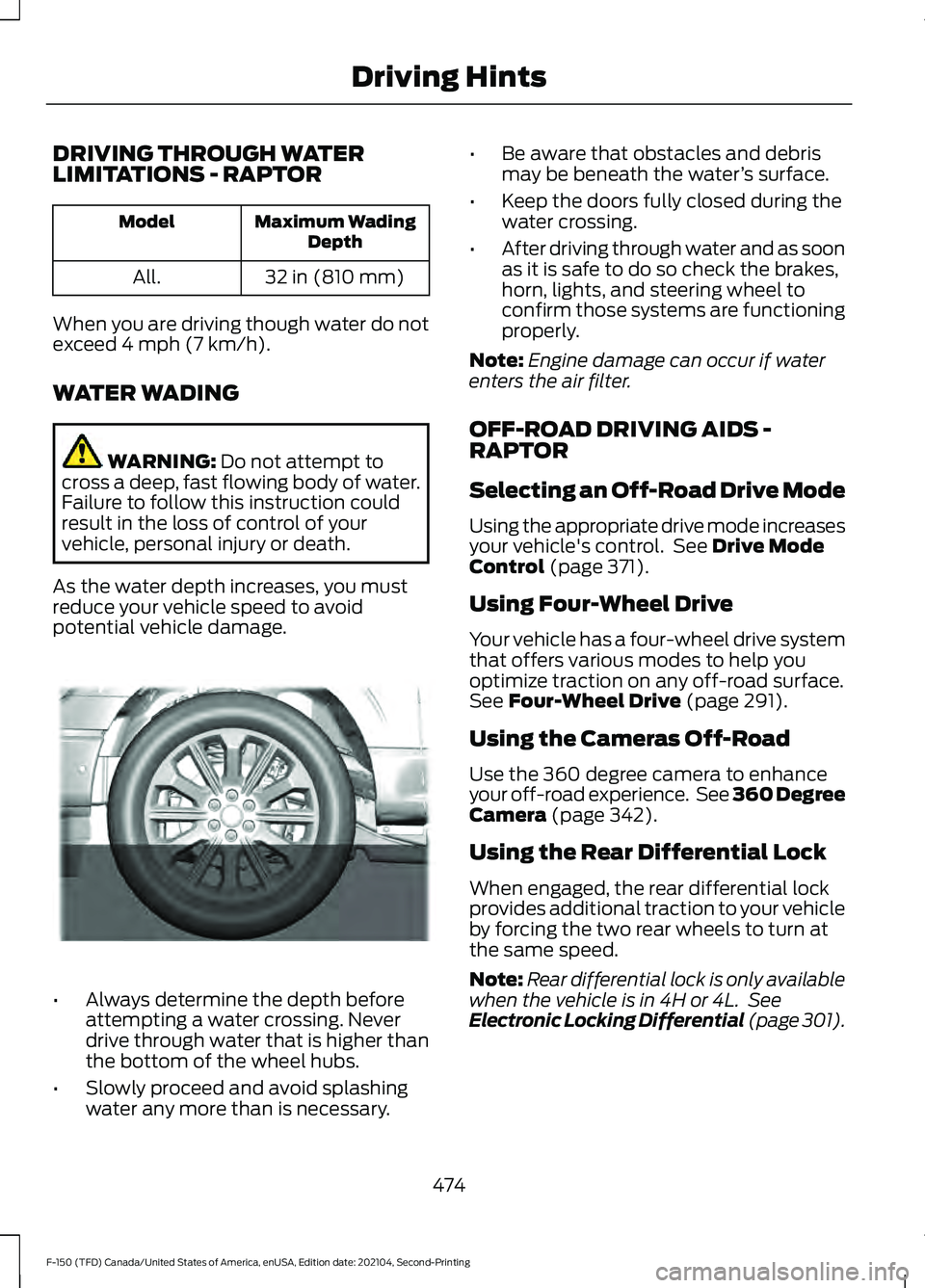
potential vehicle damage. •
Always determine the depth before
attempting a water crossing. Never
drive through water that is higher than
the bottom of the wheel hubs.
• Slowly proceed and avoid splashing
water any more than is necessary. •
Be aware that obstacles and debris
may be beneath the water ’s surface.
• Keep the doors fully closed during the
water crossing.
• After driving through water and as soon
as it is safe to do so check the brakes,
horn, lights, and steering wheel to
confirm those systems are functioning
properly.
Note: Engine damage can occur if water
enters the air filter.
OFF-ROAD DRIVING AIDS -
RAPTOR
Selecting an Off-Road Drive Mode
Using the appropriate drive mode increases
your vehicle's control. See
Drive Mode
Control (page 371).
Using Four-Wheel Drive
Your vehicle has a four-wheel drive system
that offers various modes to help you
optimize traction on any off-road surface.
See
Four-Wheel Drive (page 291).
Using the Cameras Off-Road
Use the 360 degree camera to enhance
your off-road experience. See 360 Degree
Camera
(page 342).
Using the Rear Differential Lock
When engaged, the rear differential lock
provides additional traction to your vehicle
by forcing the two rear wheels to turn at
the same speed.
Note: Rear differential lock is only available
when the vehicle is in 4H or 4L. See
Electronic Locking Differential (page 301).
474
F-150 (TFD) Canada/United States of America, enUSA, Edition date: 202104, Second-Printing Driving HintsE310941