Fuel FORD F-150 2021 User Guide
[x] Cancel search | Manufacturer: FORD, Model Year: 2021, Model line: F-150, Model: FORD F-150 2021Pages: 796, PDF Size: 13.89 MB
Page 173 of 796
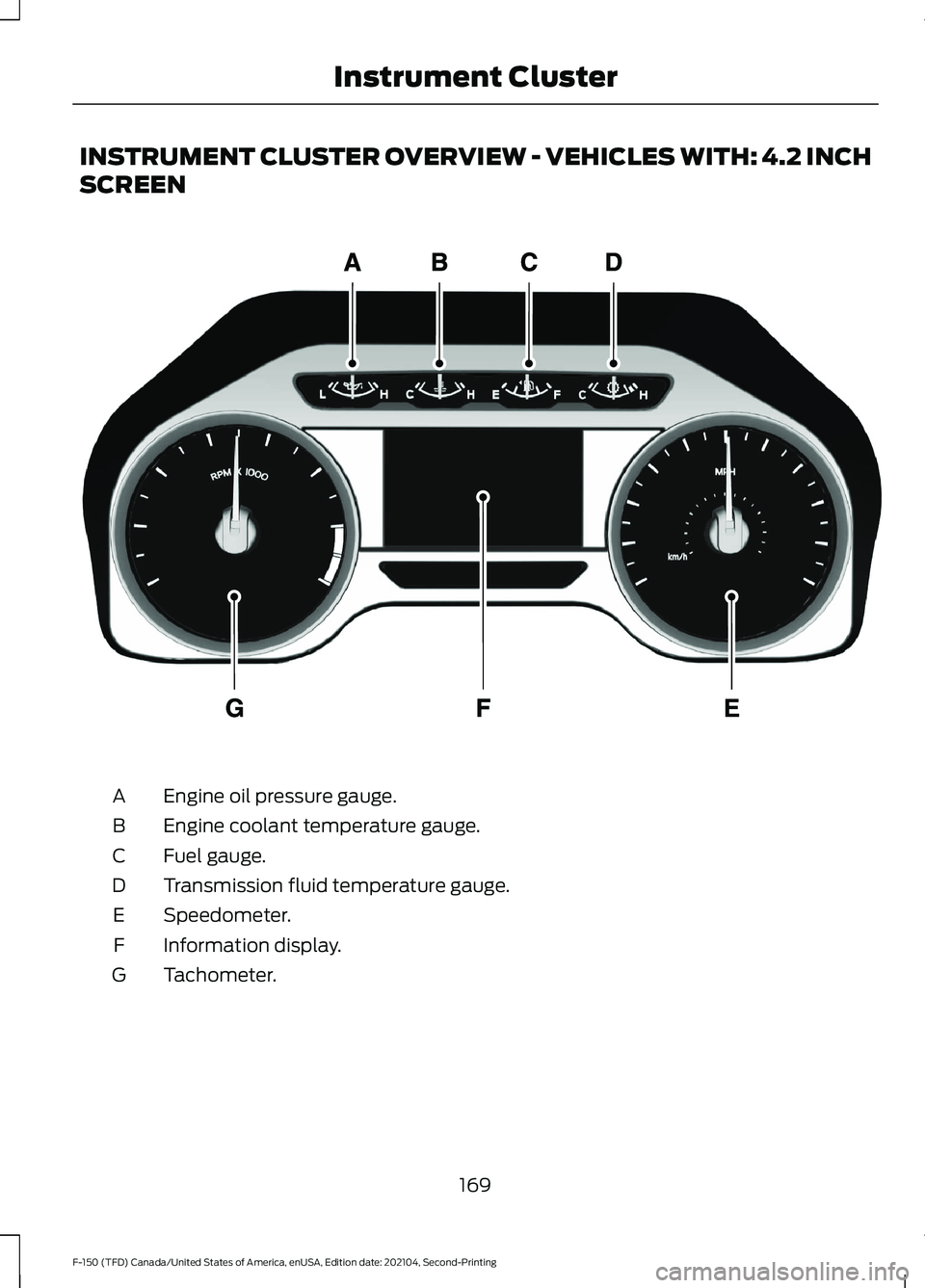
INSTRUMENT CLUSTER OVERVIEW - VEHICLES WITH: 4.2 INCH
SCREEN
Engine oil pressure gauge.
A
Engine coolant temperature gauge.
B
Fuel gauge.
C
Transmission fluid temperature gauge.
D
Speedometer.
E
Information display.
F
Tachometer.
G
169
F-150 (TFD) Canada/United States of America, enUSA, Edition date: 202104, Second-Printing Instrument ClusterE219638
Page 174 of 796
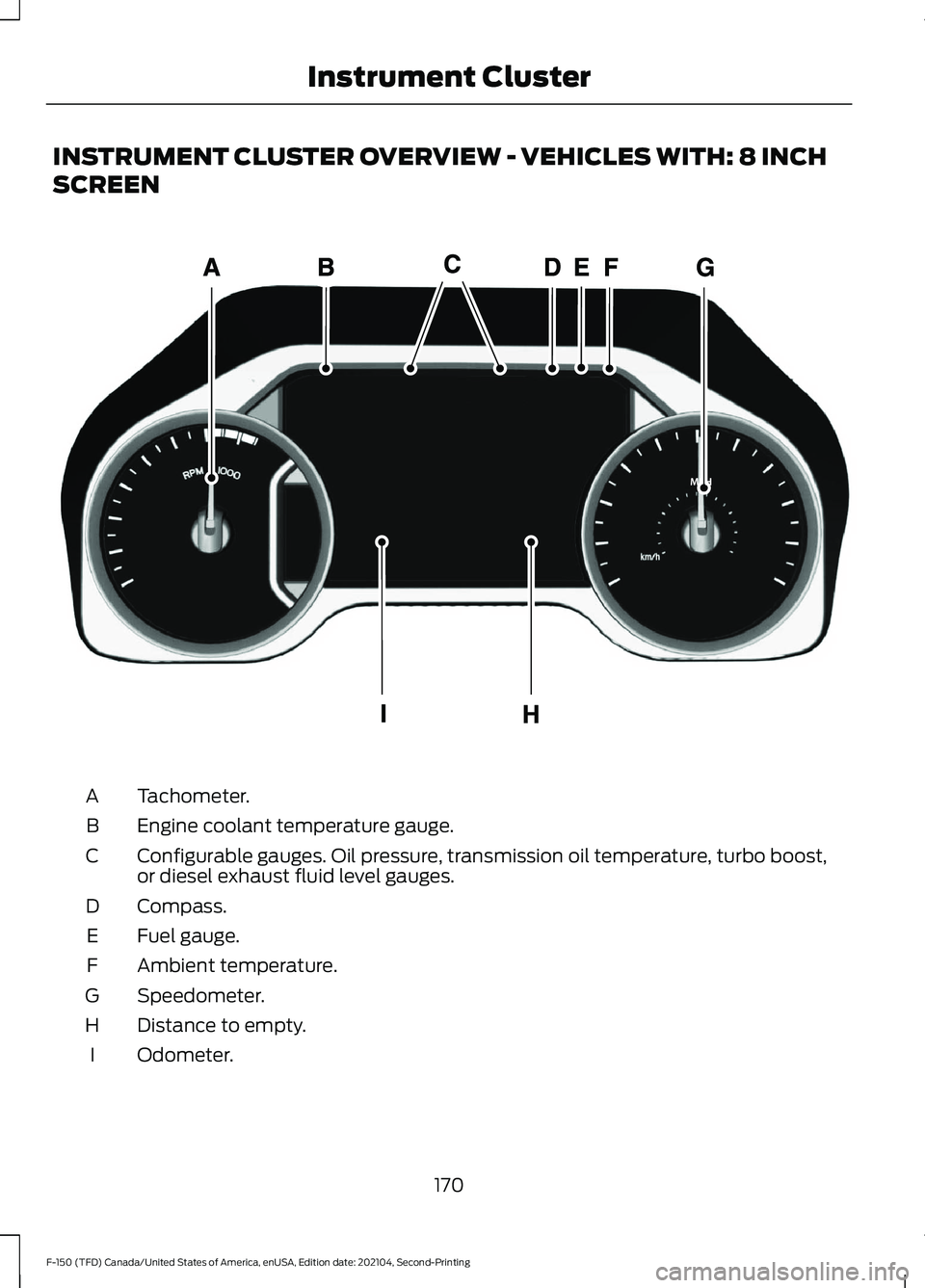
INSTRUMENT CLUSTER OVERVIEW - VEHICLES WITH: 8 INCH
SCREEN
Tachometer.
A
Engine coolant temperature gauge.
B
Configurable gauges. Oil pressure, transmission oil temperature, turbo boost,
or diesel exhaust fluid level gauges.
C
Compass.
D
Fuel gauge.
E
Ambient temperature.
F
Speedometer.
G
Distance to empty.
H
Odometer.
I
170
F-150 (TFD) Canada/United States of America, enUSA, Edition date: 202104, Second-Printing Instrument ClusterE311317
Page 175 of 796
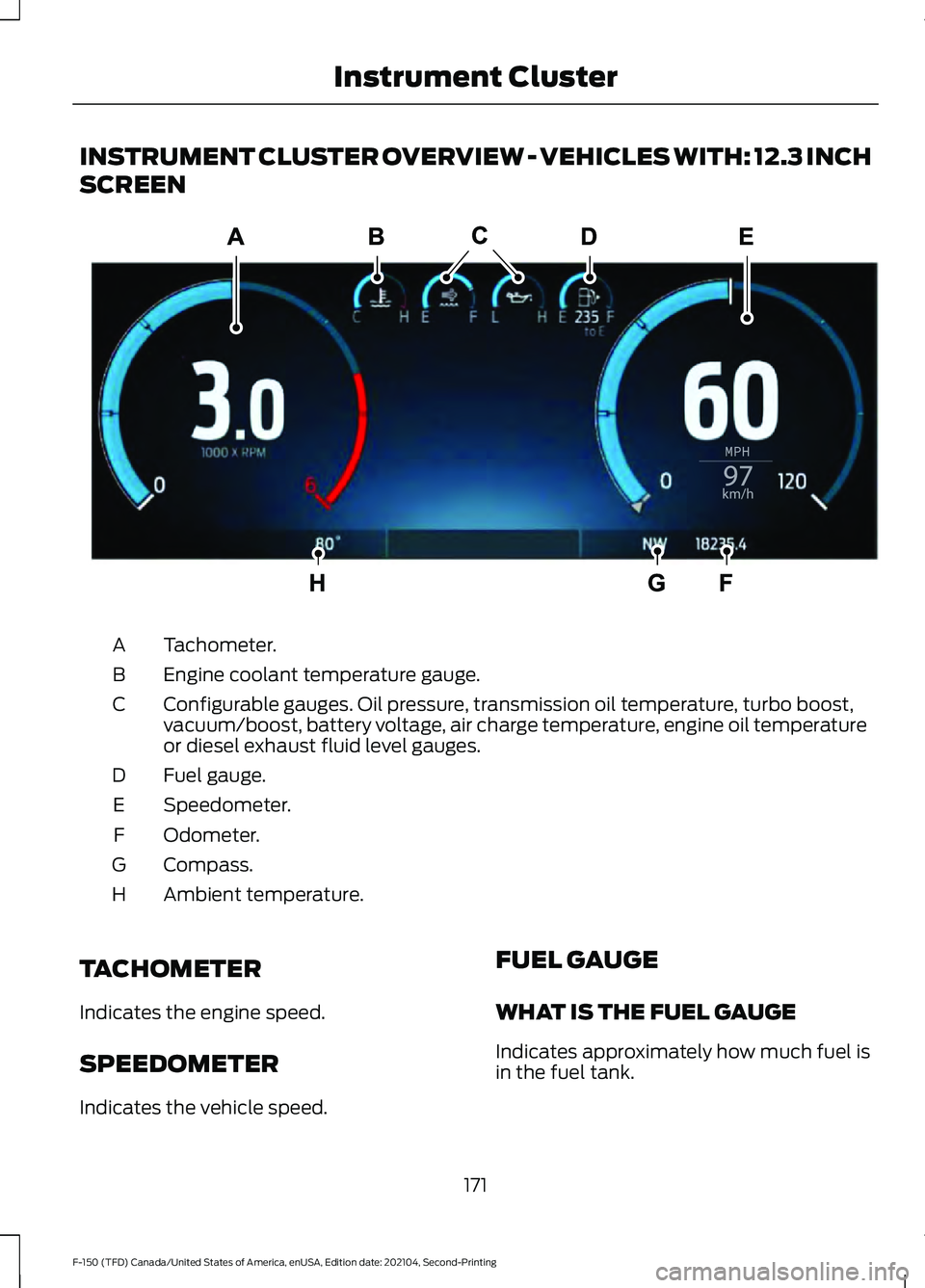
INSTRUMENT CLUSTER OVERVIEW - VEHICLES WITH: 12.3 INCH
SCREEN
Tachometer.
A
Engine coolant temperature gauge.
B
Configurable gauges. Oil pressure, transmission oil temperature, turbo boost,
vacuum/boost, battery voltage, air charge temperature, engine oil temperature
or diesel exhaust fluid level gauges.
C
Fuel gauge.
D
Speedometer.
E
Odometer.
F
Compass.
G
Ambient temperature.
H
TACHOMETER
Indicates the engine speed.
SPEEDOMETER
Indicates the vehicle speed. FUEL GAUGE
WHAT IS THE FUEL GAUGE
Indicates approximately how much fuel is
in the fuel tank.
171
F-150 (TFD) Canada/United States of America, enUSA, Edition date: 202104, Second-Printing Instrument ClusterE310245
Page 176 of 796
FUEL GAUGE LIMITATIONS
The fuel gauge may not provide an
accurate reading when your vehicle is on
an incline.
LOCATING THE FUEL FILLER
DOOR
The arrow adjacent to the fuel pump
symbol indicates on which side of your
vehicle the fuel filler door is located.
WHAT IS THE LOW FUEL
REMINDER
A low fuel level reminder displays and
sounds when the distance to empty
reaches 75 mi (120 km) to empty for
MyKey, and at 50 mi (80 km), 25 mi
(40 km), 12 mi (20 km) and 0 mi (0 km)
for all vehicle keys.
Note: The low fuel reminder can appear at
different fuel gauge positions depending on
fuel economy conditions. This variation is
normal.
WHAT IS DISTANCE TO EMPTY
Indicates the approximate distance your
vehicle can travel on the fuel remaining in
the tank. Changes in driving pattern can
cause the value to not only decrease but
also increase or stay constant for periods
of time.
ENGINE COOLANT
TEMPERATURE GAUGE
Indicates the engine coolant temperature.
ENGINE OIL PRESSURE GAUGE
Indicates the engine oil pressure.
Note: This is a configurable gauge. TRANSMISSION FLUID
TEMPERATURE GAUGE
Indicates the transmission fluid
temperature.
Special operating conditions can cause
higher than normal operating
temperatures. See
Special Operating
Conditions Scheduled Maintenance
(page
675).
Note: This is a configurable gauge.
TURBO BOOST GAUGE
(IF
EQUIPPED)
Indicates the amount of manifold air
pressure in the engine.
Note: This is a configurable gauge.
DIESEL EXHAUST FLUID
GAUGE
(IF EQUIPPED)
Indicates the current diesel exhaust fluid
level.
WHAT ARE THE INSTRUMENT
CLUSTER WARNING LAMPS
Warning lamps alert you to a vehicle
condition that could become serious.
Some lamps illuminate when you start
your vehicle to make sure they work. If any
lamps remain on after starting your vehicle,
refer to the respective system warning
lamp for further information.
172
F-150 (TFD) Canada/United States of America, enUSA, Edition date: 202104, Second-Printing Instrument Cluster
Page 177 of 796
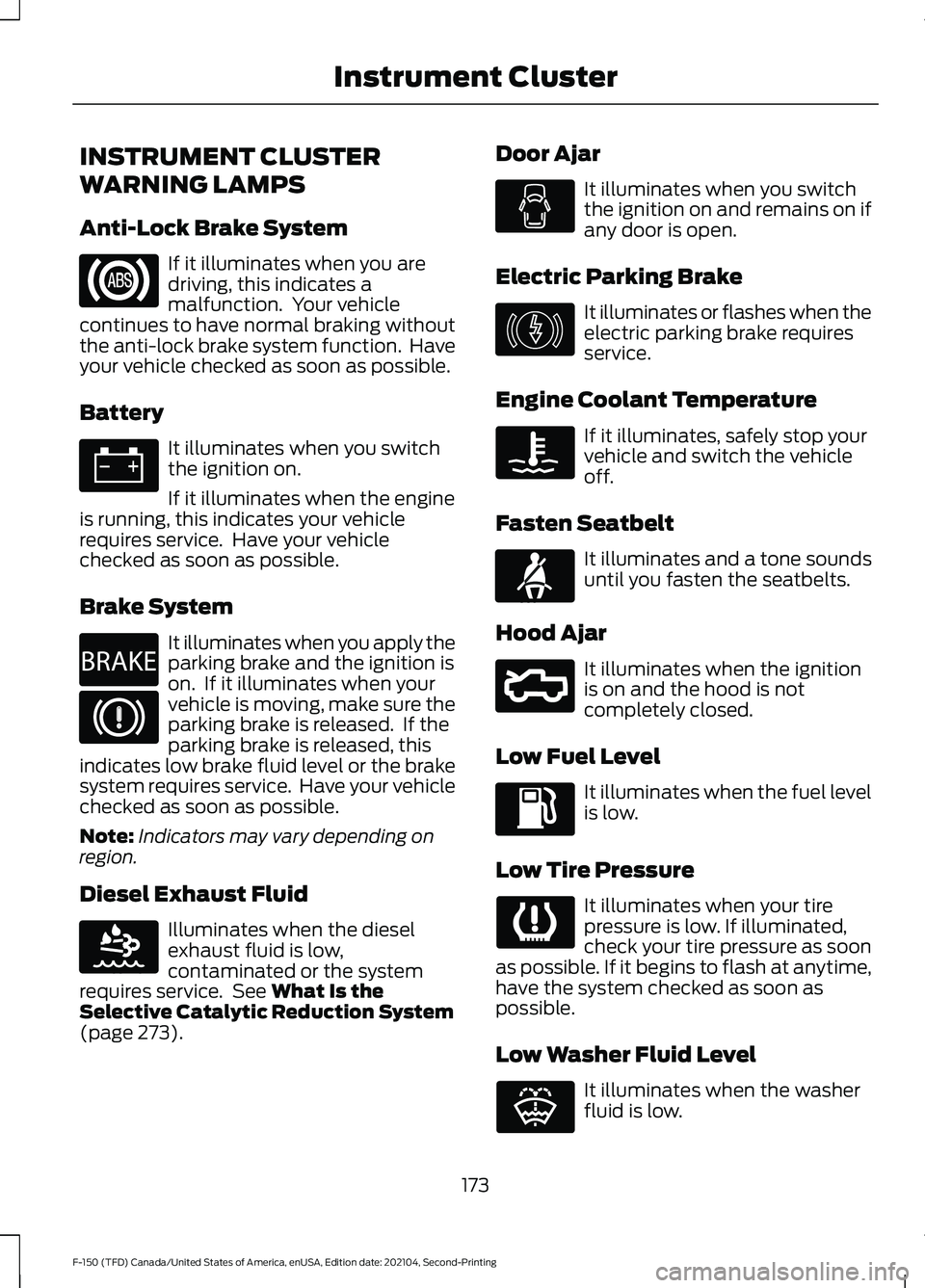
INSTRUMENT CLUSTER
WARNING LAMPS
Anti-Lock Brake System
If it illuminates when you are
driving, this indicates a
malfunction. Your vehicle
continues to have normal braking without
the anti-lock brake system function. Have
your vehicle checked as soon as possible.
Battery It illuminates when you switch
the ignition on.
If it illuminates when the engine
is running, this indicates your vehicle
requires service. Have your vehicle
checked as soon as possible.
Brake System It illuminates when you apply the
parking brake and the ignition is
on. If it illuminates when your
vehicle is moving, make sure the
parking brake is released. If the
parking brake is released, this
indicates low brake fluid level or the brake
system requires service. Have your vehicle
checked as soon as possible.
Note: Indicators may vary depending on
region.
Diesel Exhaust Fluid Illuminates when the diesel
exhaust fluid is low,
contaminated or the system
requires service. See What Is the
Selective Catalytic Reduction System
(page
273). Door Ajar It illuminates when you switch
the ignition on and remains on if
any door is open.
Electric Parking Brake It illuminates or flashes when the
electric parking brake requires
service.
Engine Coolant Temperature If it illuminates, safely stop your
vehicle and switch the vehicle
off.
Fasten Seatbelt It illuminates and a tone sounds
until you fasten the seatbelts.
Hood Ajar It illuminates when the ignition
is on and the hood is not
completely closed.
Low Fuel Level It illuminates when the fuel level
is low.
Low Tire Pressure It illuminates when your tire
pressure is low. If illuminated,
check your tire pressure as soon
as possible. If it begins to flash at anytime,
have the system checked as soon as
possible.
Low Washer Fluid Level It illuminates when the washer
fluid is low.
173
F-150 (TFD) Canada/United States of America, enUSA, Edition date: 202104, Second-Printing Instrument Cluster E270480 E163176 E146190 E71880 E296055 E132353
Page 178 of 796
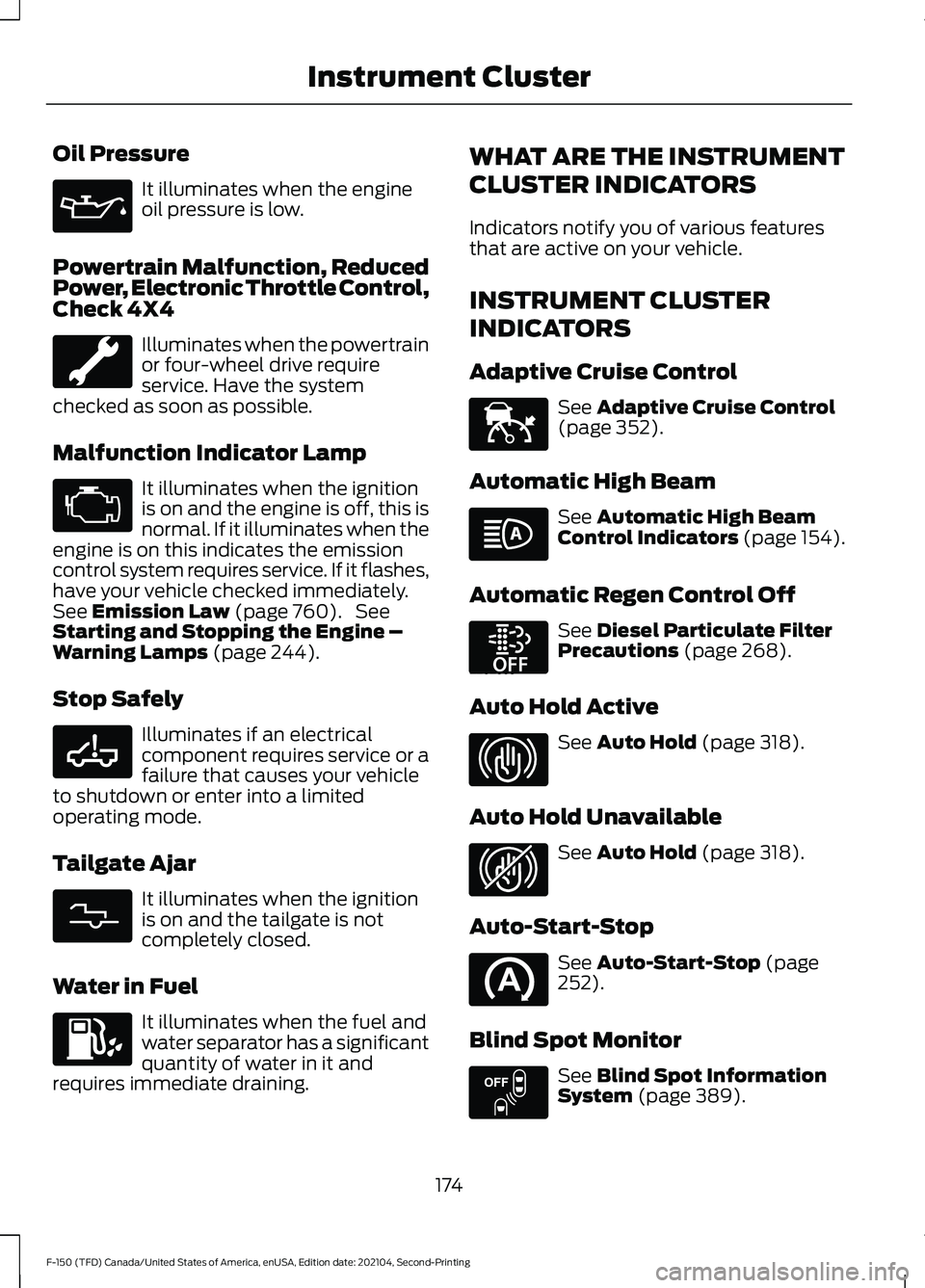
Oil Pressure
It illuminates when the engine
oil pressure is low.
Powertrain Malfunction, Reduced
Power, Electronic Throttle Control,
Check 4X4 Illuminates when the powertrain
or four-wheel drive require
service. Have the system
checked as soon as possible.
Malfunction Indicator Lamp It illuminates when the ignition
is on and the engine is off, this is
normal. If it illuminates when the
engine is on this indicates the emission
control system requires service. If it flashes,
have your vehicle checked immediately.
See Emission Law (page 760). See
Starting and Stopping the Engine –
Warning Lamps
(page 244).
Stop Safely Illuminates if an electrical
component requires service or a
failure that causes your vehicle
to shutdown or enter into a limited
operating mode.
Tailgate Ajar It illuminates when the ignition
is on and the tailgate is not
completely closed.
Water in Fuel It illuminates when the fuel and
water separator has a significant
quantity of water in it and
requires immediate draining. WHAT ARE THE INSTRUMENT
CLUSTER INDICATORS
Indicators notify you of various features
that are active on your vehicle.
INSTRUMENT CLUSTER
INDICATORS
Adaptive Cruise Control
See
Adaptive Cruise Control
(page 352).
Automatic High Beam See
Automatic High Beam
Control Indicators (page 154).
Automatic Regen Control Off See
Diesel Particulate Filter
Precautions (page 268).
Auto Hold Active See
Auto Hold (page 318).
Auto Hold Unavailable See
Auto Hold (page 318).
Auto-Start-Stop See
Auto-Start-Stop (page
252).
Blind Spot Monitor See
Blind Spot Information
System (page 389).
174
F-150 (TFD) Canada/United States of America, enUSA, Edition date: 202104, Second-Printing Instrument Cluster E332963 E311338 E144524 E252868 E323448 E323449 E151262
Page 182 of 796
USING THE INSTRUMENT
CLUSTER DISPLAY CONTROLS
WARNING: Driving while distracted
can result in loss of vehicle control, crash
and injury. We strongly recommend that
you use extreme caution when using any
device that may take your focus off the
road. Your primary responsibility is the
safe operation of your vehicle. We
recommend against the use of any
hand-held device while driving and
encourage the use of voice-operated
systems when possible. Make sure you
are aware of all applicable local laws
that may affect the use of electronic
devices while driving.
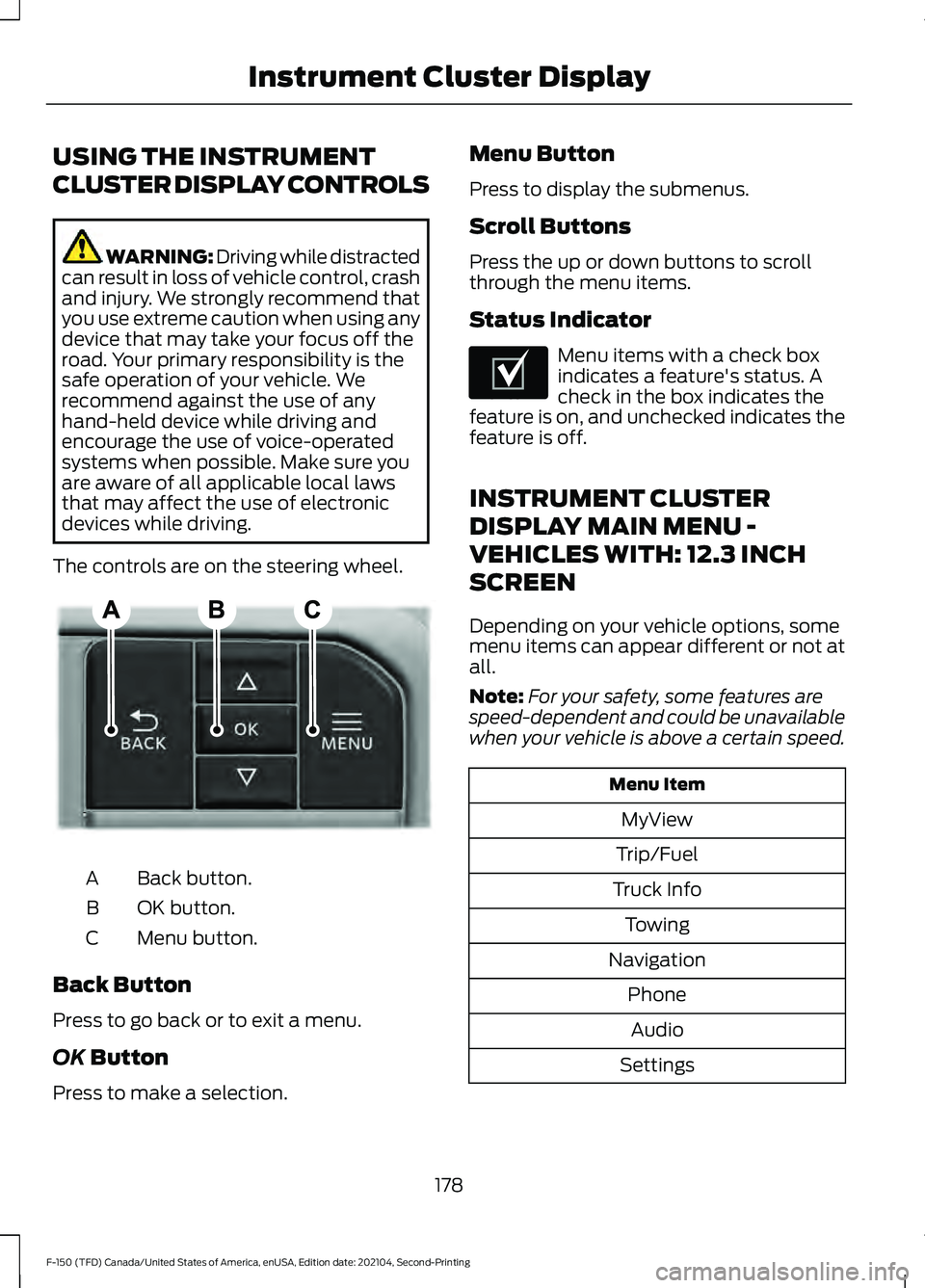
The controls are on the steering wheel. Back button.
A
OK button.
B
Menu button.
C
Back Button
Press to go back or to exit a menu.
OK Button
Press to make a selection. Menu Button
Press to display the submenus.
Scroll Buttons
Press the up or down buttons to scroll
through the menu items.
Status Indicator
Menu items with a check box
indicates a feature's status. A
check in the box indicates the
feature is on, and unchecked indicates the
feature is off.
INSTRUMENT CLUSTER
DISPLAY MAIN MENU -
VEHICLES WITH: 12.3 INCH
SCREEN
Depending on your vehicle options, some
menu items can appear different or not at
all.
Note: For your safety, some features are
speed-dependent and could be unavailable
when your vehicle is above a certain speed. Menu Item
MyView
Trip/Fuel
Truck Info Towing
Navigation PhoneAudio
Settings
178
F-150 (TFD) Canada/United States of America, enUSA, Edition date: 202104, Second-Printing Instrument Cluster DisplayE309379 E204495
Page 183 of 796
INSTRUMENT CLUSTER
DISPLAY MAIN MENU -
RAPTOR, VEHICLES WITH: 12.3
INCH SCREEN
Depending on your vehicle options, some
menu items can appear different or not at
all.
Note:
For your safety, some features are
speed-dependent and could be unavailable
when your vehicle is above a certain speed. Menu Item
MyView
Trip/Fuel
Raptor Info Towing
Navigation PhoneAudio
Settings
INSTRUMENT CLUSTER
DISPLAY MAIN MENU -
VEHICLES WITH: 4.2 INCH
SCREEN
Depending on your vehicle options, some
menu items can appear different or not at
all.
Note: For your safety, some features are
speed-dependent and could be unavailable
when your vehicle is above a certain speed. Menu Item
Select Screens Truck InfoTowing
Settings
INSTRUMENT CLUSTER
DISPLAY MAIN MENU -
VEHICLES WITH: 8 INCH
SCREEN
Depending on your vehicle options, some
menu items can appear different or not at
all.
Note: For your safety, some features are
speed-dependent and could be unavailable
when your vehicle is above a certain speed. Menu Item
MyView
Trip/Fuel
Truck Info Towing
Navigation PhoneAudio
Settings
179
F-150 (TFD) Canada/United States of America, enUSA, Edition date: 202104, Second-Printing Instrument Cluster Display
Page 184 of 796
TRIP COMPUTER - VEHICLES
WITH: 4.2 INCH SCREEN
ACCESSING THE TRIP COMPUTER
Using Select Screens
1. Select Select Screens.
2. Use the controls on the steering wheel
to navigate the menu. See
Customizing the Instrument Cluster
Display
(page 180).
Using the Home Screen
Once screens have been added, use the
controls on the steering wheel to view each
trip screen.
RESETTING THE TRIP COMPUTER
1. Use the controls on the steering wheel
to navigate the home screen.
2. Select
Trip 1 or Trip 2.
3. Press and hold the OK button for a few
seconds.
Note: This Trip resets every time you start
your vehicle.
TRIP COMPUTER - VEHICLES
WITH: 8 INCH SCREEN/12.3
INCH SCREEN
ACCESSING THE TRIP COMPUTER
1. Select
Trip/Fuel.
2. Select
This Trip, Trip 1 or Trip 2.
RESETTING THE TRIP COMPUTER
1. Select
Trip/Fuel.
2. Select
Trip 1 or Trip 2. 3.
Press and hold the OK button for a few
seconds.
Note: This Trip resets every time you start
your vehicle.
CUSTOMIZING THE
INSTRUMENT CLUSTER
DISPLAY
Adding Screens Using MyView
1. Using the information display controls on the steering wheel, select
MyView.
2. Select
Configure MyView.
3. Select a screen.
4. Press the
OK button.
Note: The number of screens you can add
is limited. If the selected screen does not
appear you must deselect screens from the
MyView menu.
Adding Screens Using Select
Screens
1. Select
Select Screens.
2. Use the controls on the steering wheel
to highlight a screen to add.
3. Press the
OK button.
Note: The number of screens you can add
is limited. If the selected screen does not
appear you must deselect screens from the
Select Screens menu.
Configuring Gauges
1. Select
Settings.
2. Select
Configure Gauges.
3. Select to swap or change left-hand side and right-hand side gauges.
180
F-150 (TFD) Canada/United States of America, enUSA, Edition date: 202104, Second-Printing Instrument Cluster Display
Page 187 of 796
WHAT IS REMOTE START
The system allows you to remotely start
your vehicle and to adjust the interior
temperature according to the settings that
you chose.
REMOTE START
PRECAUTIONS
WARNING: Do not start the engine
in a closed garage or in other enclosed
areas. Exhaust fumes are toxic. Always
open the garage door before you start
the engine. Failure to follow this
instruction could result in personal injury
or death. WARNING: Do not keep electrical
devices plugged in the power point
whenever the device is not in use. Power
points power up during remote start. WARNING:
Do not keep electrical
devices plugged into the power outlet
whenever the device is not in use. The
outlet provides power when the vehicle
is on. Failure to follow this instruction
could result in personal injury.
REMOTE START LIMITATIONS
Remote start does not work under the
following conditions:
• The alarm horn is sounding.
• The hood is open.
• The transmission is not in park (P).
• The ignition is on.
• The battery voltage is below the
minimum operating voltage.
• Remote start is not enabled. Note:
Do not use remote start if the fuel
level is low.
Note: You can use remote start with
FordPass.
See Connecting the Vehicle to
a Wi-Fi Network (page 620).
ENABLING REMOTE START
1. Press
Settings on the touchscreen.
2. Press
Vehicle Settings.
3. Press
Remote Start Setup.
4. Switch
Remote Start on or off.
Note: To remote start with FordPass, make
sure that the modem is enabled.
See
Connecting FordPass to the Modem
(page
620).
REMOTELY STARTING AND
STOPPING THE VEHICLE
Remotely Starting the Vehicle Press the button on the remote
control.
Within three seconds, press the
button on the remote control.
Within three seconds, press the
button again.
Note: You can also use FordPass to start
the vehicle.
Note: The turn signal lamps flash twice.
Note: The parking lamps turn on when the
vehicle is running.
Note: The horn sounds if the system fails
to start.
Note: All other vehicle systems remain off
when you have remotely started the vehicle.
183
F-150 (TFD) Canada/United States of America, enUSA, Edition date: 202104, Second-Printing Remote Start
(If Equipped)E138623 E138625