phone FORD F-150 2021 User Guide
[x] Cancel search | Manufacturer: FORD, Model Year: 2021, Model line: F-150, Model: FORD F-150 2021Pages: 796, PDF Size: 13.89 MB
Page 103 of 796
Emergency Assistance
If you set emergency assistance to always
on, you cannot switch it off with a MyKey.
Do Not Disturb
If you set do not disturb to always on, you
cannot switch it off with a MyKey.
Note:
If a phone is connected using Apple
CarPlay or Android Auto while driving with
a MyKey, the driver can receive phone calls
and text messages even if the do not disturb
restriction is on, and if the vehicle comes
with satellite radio, there is no restriction on
the adult content.
Traction and Stability Control
If you set traction control or stability
control to always on, you cannot switch it
off with a MyKey.
CREATING A MYKEY -
VEHICLES WITH: PUSH
BUTTON START
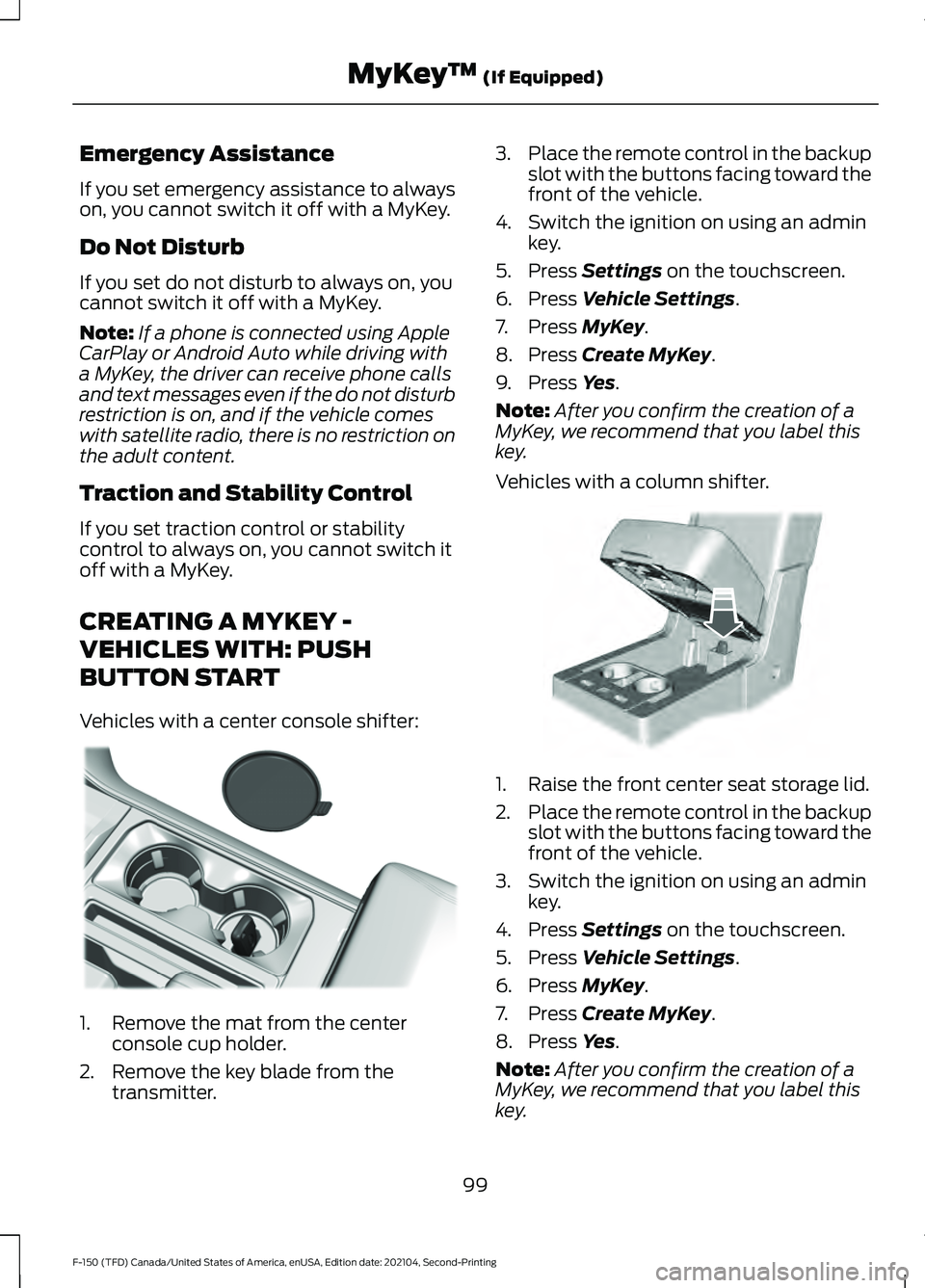
Vehicles with a center console shifter: 1. Remove the mat from the center
console cup holder.
2. Remove the key blade from the transmitter. 3.
Place the remote control in the backup
slot with the buttons facing toward the
front of the vehicle.
4. Switch the ignition on using an admin key.
5. Press Settings on the touchscreen.
6. Press
Vehicle Settings.
7. Press
MyKey.
8. Press
Create MyKey.
9. Press
Yes.
Note: After you confirm the creation of a
MyKey, we recommend that you label this
key.
Vehicles with a column shifter. 1. Raise the front center seat storage lid.
2.
Place the remote control in the backup
slot with the buttons facing toward the
front of the vehicle.
3. Switch the ignition on using an admin key.
4. Press
Settings on the touchscreen.
5. Press
Vehicle Settings.
6. Press
MyKey.
7. Press
Create MyKey.
8. Press
Yes.
Note: After you confirm the creation of a
MyKey, we recommend that you label this
key.
99
F-150 (TFD) Canada/United States of America, enUSA, Edition date: 202104, Second-Printing MyKey
™
(If Equipped)E312216 E269950
Page 112 of 796
KEYLESS ENTRY LIMITATIONS
Make sure your remote control is within 3 ft
(1 m) from the front door handles and the
tailgate.
The system could not function if:
• The remote control remains stationary
for about a minute.
• The vehicle battery has no charge.
• The remote control battery has no
charge.
• There is interference causing issues
with the remote control frequencies.
• The remote control is too close to
metal objects or electronic devices, for
example keys or a cell phone.
KEYLESS ENTRY SETTINGS
Switching Keyless Entry On and
Off
1. Switch the ignition on using an original
key that has not been created as a
MyKey.
2. Press
Settings on the touchscreen.
3. Press
Vehicle Settings.
4. Press
Locks.
Reprogramming the Unlocking
Function
You can enable two-stage unlocking
function allowing you to unlock only the
driver door when you touch the unlock
sensor.
Press and hold both the lock and unlock
buttons on the remote control for four
seconds to disable or enable two-stage
unlocking. If you program the unlocking function so
that only the driver door unlocks, you can
unlock all of the other doors from inside
your vehicle using the power door lock
control. You can unlock individual doors
by pulling the interior door handles on
those doors.
USING KEYLESS ENTRY
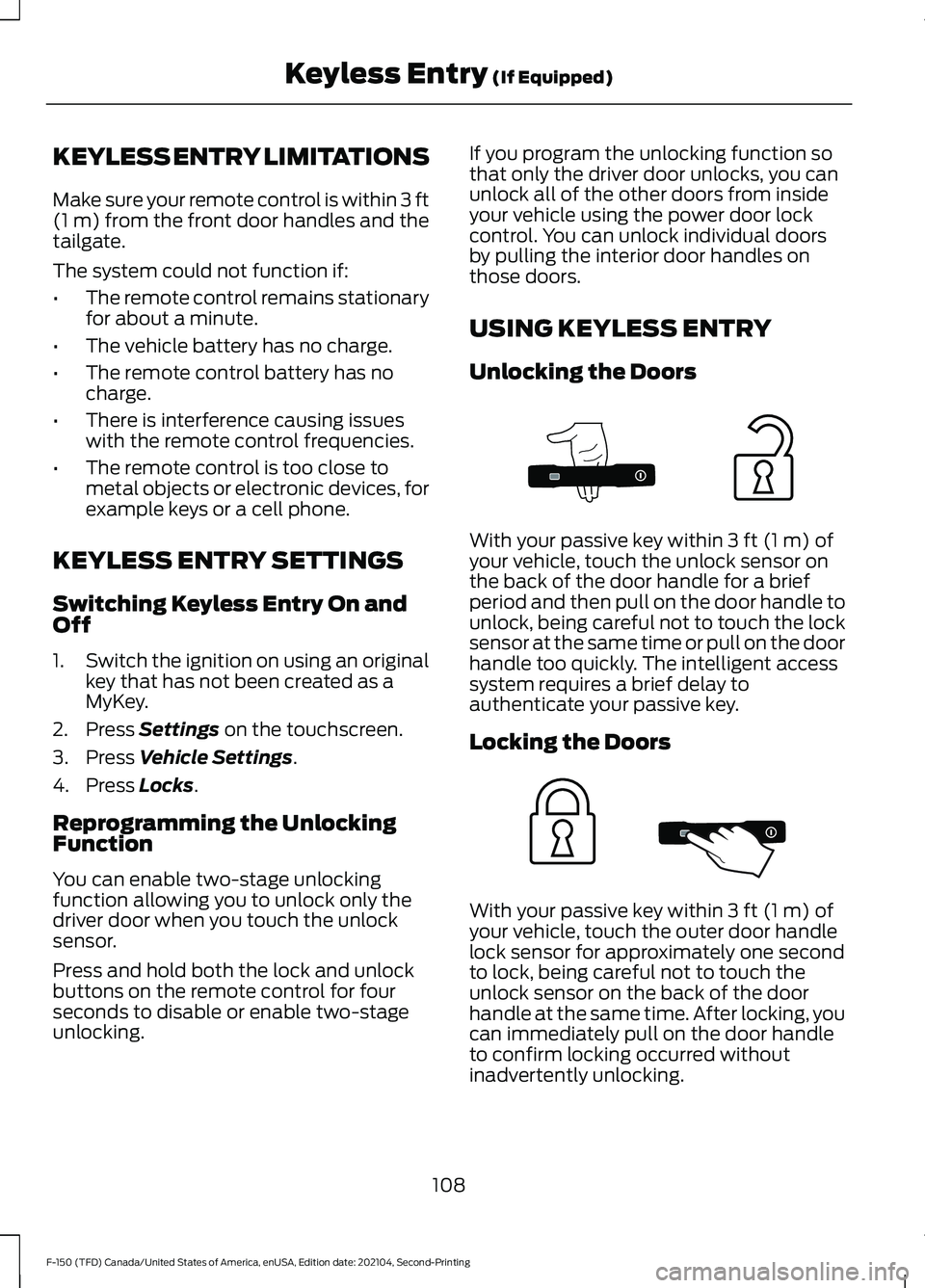
Unlocking the Doors
With your passive key within
3 ft (1 m) of
your vehicle, touch the unlock sensor on
the back of the door handle for a brief
period and then pull on the door handle to
unlock, being careful not to touch the lock
sensor at the same time or pull on the door
handle too quickly. The intelligent access
system requires a brief delay to
authenticate your passive key.
Locking the Doors With your passive key within
3 ft (1 m) of
your vehicle, touch the outer door handle
lock sensor for approximately one second
to lock, being careful not to touch the
unlock sensor on the back of the door
handle at the same time. After locking, you
can immediately pull on the door handle
to confirm locking occurred without
inadvertently unlocking.
108
F-150 (TFD) Canada/United States of America, enUSA, Edition date: 202104, Second-Printing Keyless Entry
(If Equipped)E333747 E333746
Page 182 of 796
USING THE INSTRUMENT
CLUSTER DISPLAY CONTROLS
WARNING: Driving while distracted
can result in loss of vehicle control, crash
and injury. We strongly recommend that
you use extreme caution when using any
device that may take your focus off the
road. Your primary responsibility is the
safe operation of your vehicle. We
recommend against the use of any
hand-held device while driving and
encourage the use of voice-operated
systems when possible. Make sure you
are aware of all applicable local laws
that may affect the use of electronic
devices while driving.
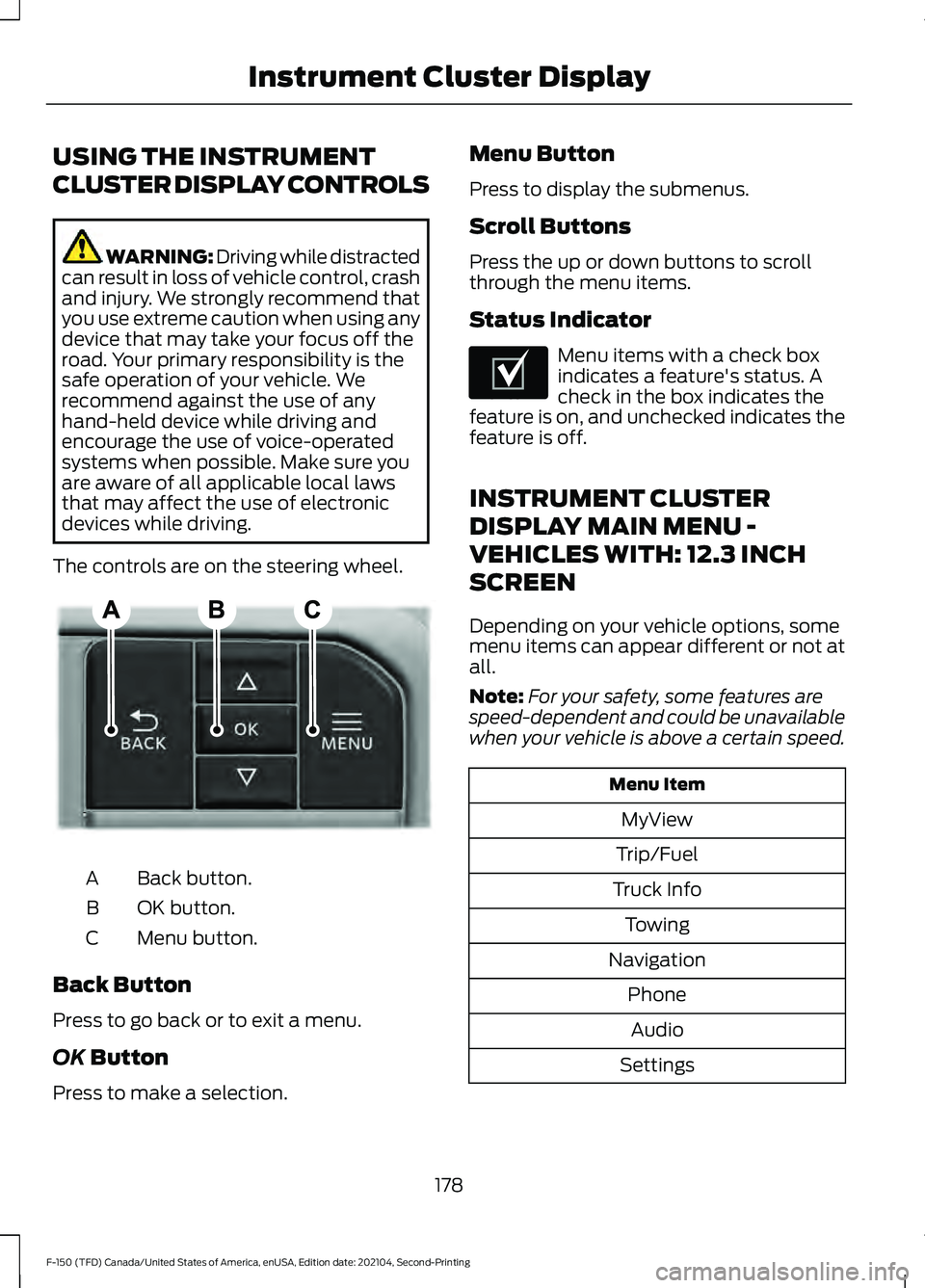
The controls are on the steering wheel. Back button.
A
OK button.
B
Menu button.
C
Back Button
Press to go back or to exit a menu.
OK Button
Press to make a selection. Menu Button
Press to display the submenus.
Scroll Buttons
Press the up or down buttons to scroll
through the menu items.
Status Indicator
Menu items with a check box
indicates a feature's status. A
check in the box indicates the
feature is on, and unchecked indicates the
feature is off.
INSTRUMENT CLUSTER
DISPLAY MAIN MENU -
VEHICLES WITH: 12.3 INCH
SCREEN
Depending on your vehicle options, some
menu items can appear different or not at
all.
Note: For your safety, some features are
speed-dependent and could be unavailable
when your vehicle is above a certain speed. Menu Item
MyView
Trip/Fuel
Truck Info Towing
Navigation PhoneAudio
Settings
178
F-150 (TFD) Canada/United States of America, enUSA, Edition date: 202104, Second-Printing Instrument Cluster DisplayE309379 E204495
Page 183 of 796
INSTRUMENT CLUSTER
DISPLAY MAIN MENU -
RAPTOR, VEHICLES WITH: 12.3
INCH SCREEN
Depending on your vehicle options, some
menu items can appear different or not at
all.
Note:
For your safety, some features are
speed-dependent and could be unavailable
when your vehicle is above a certain speed. Menu Item
MyView
Trip/Fuel
Raptor Info Towing
Navigation PhoneAudio
Settings
INSTRUMENT CLUSTER
DISPLAY MAIN MENU -
VEHICLES WITH: 4.2 INCH
SCREEN
Depending on your vehicle options, some
menu items can appear different or not at
all.
Note: For your safety, some features are
speed-dependent and could be unavailable
when your vehicle is above a certain speed. Menu Item
Select Screens Truck InfoTowing
Settings
INSTRUMENT CLUSTER
DISPLAY MAIN MENU -
VEHICLES WITH: 8 INCH
SCREEN
Depending on your vehicle options, some
menu items can appear different or not at
all.
Note: For your safety, some features are
speed-dependent and could be unavailable
when your vehicle is above a certain speed. Menu Item
MyView
Trip/Fuel
Truck Info Towing
Navigation PhoneAudio
Settings
179
F-150 (TFD) Canada/United States of America, enUSA, Edition date: 202104, Second-Printing Instrument Cluster Display
Page 241 of 796
Starting the Engine
Turn the key to position III. Release the
key when the engine starts.
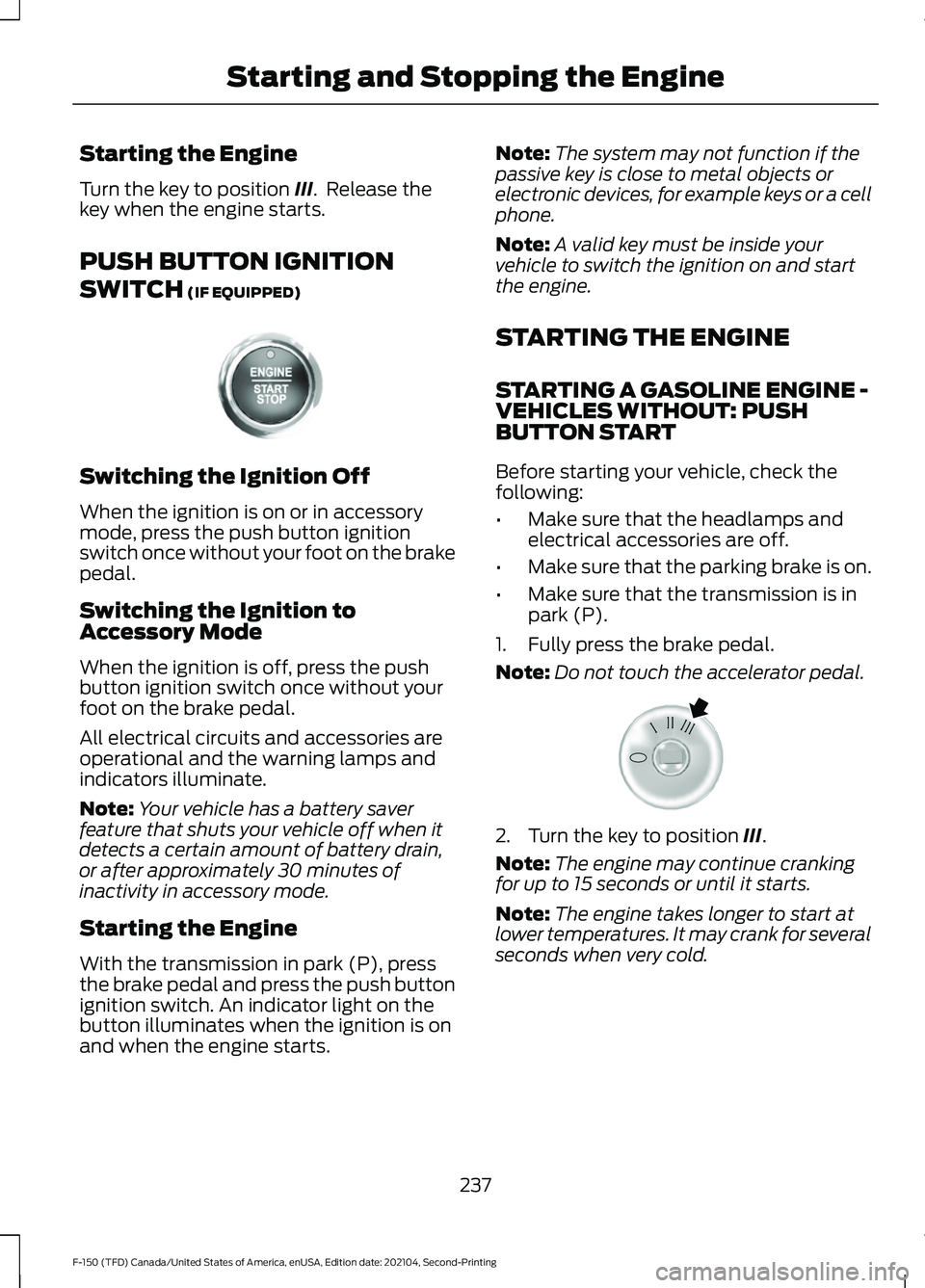
PUSH BUTTON IGNITION
SWITCH
(IF EQUIPPED) Switching the Ignition Off
When the ignition is on or in accessory
mode, press the push button ignition
switch once without your foot on the brake
pedal.
Switching the Ignition to
Accessory Mode
When the ignition is off, press the push
button ignition switch once without your
foot on the brake pedal.
All electrical circuits and accessories are
operational and the warning lamps and
indicators illuminate.
Note:
Your vehicle has a battery saver
feature that shuts your vehicle off when it
detects a certain amount of battery drain,
or after approximately 30 minutes of
inactivity in accessory mode.
Starting the Engine
With the transmission in park (P), press
the brake pedal and press the push button
ignition switch. An indicator light on the
button illuminates when the ignition is on
and when the engine starts. Note:
The system may not function if the
passive key is close to metal objects or
electronic devices, for example keys or a cell
phone.
Note: A valid key must be inside your
vehicle to switch the ignition on and start
the engine.
STARTING THE ENGINE
STARTING A GASOLINE ENGINE -
VEHICLES WITHOUT: PUSH
BUTTON START
Before starting your vehicle, check the
following:
• Make sure that the headlamps and
electrical accessories are off.
• Make sure that the parking brake is on.
• Make sure that the transmission is in
park (P).
1. Fully press the brake pedal.
Note: Do not touch the accelerator pedal. 2. Turn the key to position
III.
Note: The engine may continue cranking
for up to 15 seconds or until it starts.
Note: The engine takes longer to start at
lower temperatures. It may crank for several
seconds when very cold.
237
F-150 (TFD) Canada/United States of America, enUSA, Edition date: 202104, Second-Printing Starting and Stopping the EngineE321258 E322354
Page 259 of 796
FUEL AND REFUELING
PRECAUTIONS
WARNING: Do not overfill the fuel
tank. The pressure in an overfilled tank
may cause leakage and lead to fuel spray
and fire. WARNING:
The fuel system may
be under pressure. If you hear a hissing
sound near the fuel filler inlet, do not
refuel until the sound stops. Otherwise,
fuel may spray out, which could cause
serious personal injury. WARNING: Fuels can cause serious
injury or death if misused or mishandled. WARNING:
Fuel may contain
benzene, which is a cancer-causing
agent. WARNING: When refueling always
shut the engine off and never allow
sparks or open flames near the fuel tank
filler valve. Never smoke or use a cell
phone while refueling. Fuel vapor is
extremely hazardous under certain
conditions. Avoid inhaling excess fumes. WARNING: Read and follow all the
instructions on the pump island.
Follow these guidelines when refueling:
• Extinguish all smoking materials and
any open flames before refueling your
vehicle.
• Switch the engine off before refueling. •
Automotive fuels can be harmful or
fatal if swallowed. Fuel is highly toxic
and if swallowed can cause death or
permanent injury. If fuel is swallowed
immediately call a physician, even if no
symptoms are immediately apparent.
The toxic effects of fuel may not be
apparent for hours.
• Avoid inhaling fuel vapors. Inhaling fuel
vapor can lead to eye and respiratory
tract irritation. In severe cases,
excessive or prolonged breathing of
fuel vapor can cause serious illness and
permanent injury.
• Avoid getting fuel in your eyes. If you
splash fuel in your eyes, immediately
remove contact lenses, if worn, flush
with water for 15 minutes and seek
medical attention. Failure to seek
proper medical attention could lead to
permanent injury.
• Fuels can be harmful if absorbed
through the skin. If you splash fuel on
your skin, clothing or both, promptly
remove contaminated clothing and
thoroughly wash your skin with soap
and water. Repeated or prolonged skin
contact causes skin irritation.
• Be particularly careful if you are taking
Antabuse or other forms of Disulfiram
for the treatment of alcoholism.
Breathing fuel vapors could cause an
adverse reaction, serious personal
injury or sickness. Immediately call a
physician if you experience any adverse
reactions.
255
F-150 (TFD) Canada/United States of America, enUSA, Edition date: 202104, Second-Printing Fuel and Refueling
Page 266 of 796
REFUELING YOUR VEHICLE -
EXCLUDING: HYBRID ELECTRIC
VEHICLE (HEV)
WARNING: When refueling always
shut the engine off and never allow
sparks or open flames near the fuel tank
filler valve. Never smoke or use a cell
phone while refueling. Fuel vapor is
extremely hazardous under certain
conditions. Avoid inhaling excess fumes. WARNING: Fuel vapor burns
violently and a fuel fire can cause severe
injuries. WARNING:
The fuel system may
be under pressure. If you hear a hissing
sound near the fuel filler inlet, do not
refuel until the sound stops. Otherwise,
fuel may spray out, which could cause
serious personal injury. WARNING:
Keep children away
from the fuel pump. Never let children
pump fuel. WARNING:
Do not pry open the
fuel tank filler valve. This could damage
the fuel system. Failure to follow this
instruction could result in fire, personal
injury or death. WARNING:
Stay outside your
vehicle and do not leave the fuel pump
unattended when refueling your vehicle. WARNING: Do not remove the fuel
pump nozzle from its fully inserted
position when refueling. WARNING:
Stop refueling when
the fuel pump nozzle automatically
shuts off for the first time. Failure to
follow this will fill the expansion space
in the fuel tank and could lead to fuel
overflowing. WARNING:
Do not overfill the fuel
tank. The pressure in an overfilled tank
may cause leakage and lead to fuel spray
and fire. WARNING:
Wait at least five
seconds before removing the fuel pump
nozzle to allow any residual fuel to drain
into the fuel tank.
1. Fully open the fuel filler door.
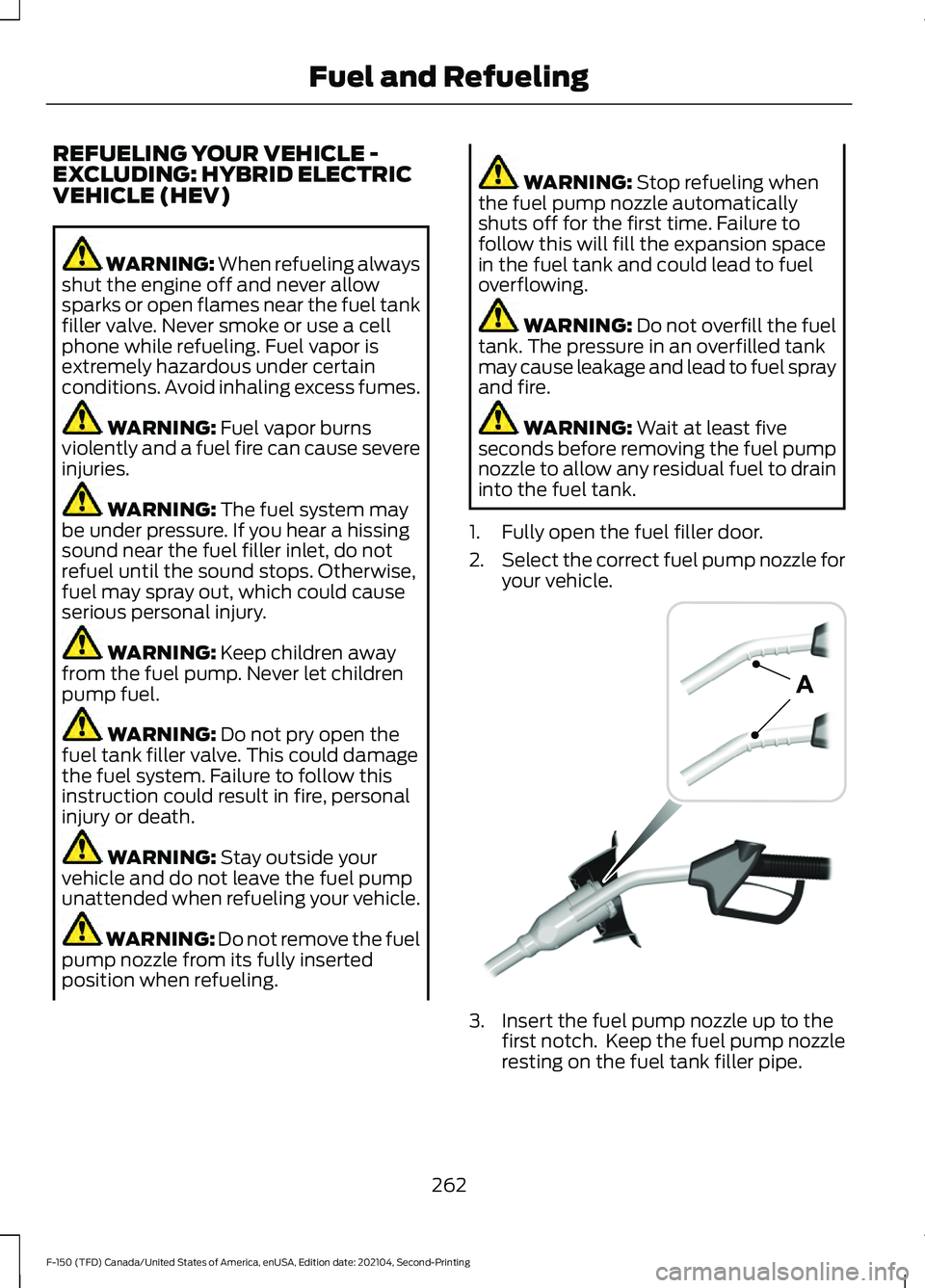
2. Select the correct fuel pump nozzle for
your vehicle. 3. Insert the fuel pump nozzle up to the
first notch. Keep the fuel pump nozzle
resting on the fuel tank filler pipe.
262
F-150 (TFD) Canada/United States of America, enUSA, Edition date: 202104, Second-Printing Fuel and RefuelingE139202
Page 267 of 796
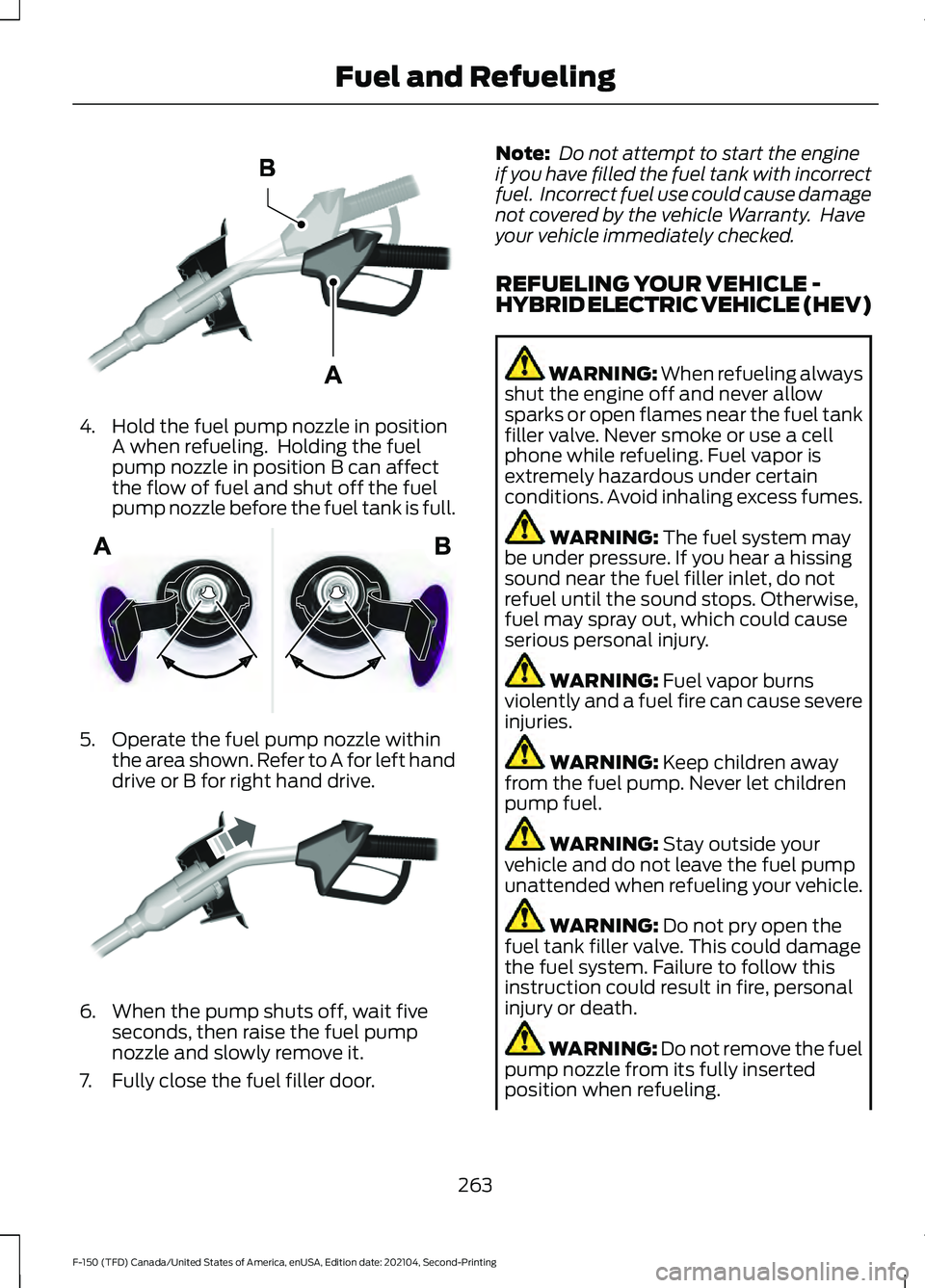
4. Hold the fuel pump nozzle in position
A when refueling. Holding the fuel
pump nozzle in position B can affect
the flow of fuel and shut off the fuel
pump nozzle before the fuel tank is full. 5. Operate the fuel pump nozzle within
the area shown. Refer to A for left hand
drive or B for right hand drive. 6. When the pump shuts off, wait five
seconds, then raise the fuel pump
nozzle and slowly remove it.
7. Fully close the fuel filler door. Note:
Do not attempt to start the engine
if you have filled the fuel tank with incorrect
fuel. Incorrect fuel use could cause damage
not covered by the vehicle Warranty. Have
your vehicle immediately checked.
REFUELING YOUR VEHICLE -
HYBRID ELECTRIC VEHICLE (HEV) WARNING: When refueling always
shut the engine off and never allow
sparks or open flames near the fuel tank
filler valve. Never smoke or use a cell
phone while refueling. Fuel vapor is
extremely hazardous under certain
conditions. Avoid inhaling excess fumes. WARNING: The fuel system may
be under pressure. If you hear a hissing
sound near the fuel filler inlet, do not
refuel until the sound stops. Otherwise,
fuel may spray out, which could cause
serious personal injury. WARNING:
Fuel vapor burns
violently and a fuel fire can cause severe
injuries. WARNING:
Keep children away
from the fuel pump. Never let children
pump fuel. WARNING:
Stay outside your
vehicle and do not leave the fuel pump
unattended when refueling your vehicle. WARNING:
Do not pry open the
fuel tank filler valve. This could damage
the fuel system. Failure to follow this
instruction could result in fire, personal
injury or death. WARNING: Do not remove the fuel
pump nozzle from its fully inserted
position when refueling.
263
F-150 (TFD) Canada/United States of America, enUSA, Edition date: 202104, Second-Printing Fuel and RefuelingE327438 E206912 E119081
Page 474 of 796
OFF-ROAD DRIVING
WHAT IS OFF-ROAD DRIVING
Off-road driving is driving your vehicle on
unsurfaced roads or trails, made from dirt,
rocks, sand and mud.
OFF-ROAD DRIVING
PRECAUTIONS - RAPTOR
WARNING: If you continue to drive
your vehicle when the engine is
overheating, the engine could stop
without warning. Failure to follow this
instruction could result in the loss of
control of your vehicle.
Before going off-road driving, consult with
all the appropriate government entities to
determine where you are legally allowed
to operate your vehicle and what permits
or registrations are required to do so.
Inspect your vehicle before and after any
off-road driving.
Familiarize yourself with the dimensions
of your vehicle including approach angles,
breakover angles, and ground clearance.
Also familiarize yourself with the features
of your vehicle. Some of these features
such as drive modes and cameras can
improve your off-road driving experience.
Secure loose objects inside your vehicle
and in the cargo area.
BASIC OFF-ROAD DRIVING
TECHNIQUES - RAPTOR
Grip the steering wheel with your thumbs
on the outside of the rim. This reduces the
risk of injury due to abrupt steering wheel
motions that occur when negotiating rough
terrain. If you are driving in a dusty area, be sure to
leave ample distance between your vehicle
and any other vehicles to allow for
adequate vision.
BASIC OFF-ROAD DRIVING
TECHNIQUES
Off-road Driving Hints
Before taking your vehicle off-roading, a
basic vehicle inspection should be done to
make sure that the vehicle is in top working
condition. It is always recommended that
at least two vehicles are used while
off-roading. The buddy system helps make
sure that help is close at hand should a
vehicle become stuck or damaged. It is also
wise to take supplies such as a first aid kit,
supply of water, tow strap, cell or satellite
phone with you any time an off-road
excursion is planned.
1. Grip the steering wheel with thumbs
on the outside of the rim. This will
reduce the risk of injury due to abrupt
steering wheel motions that occur
when negotiating rough terrain.
2. Throttle, brake and steering inputs should be made in a smooth and
controlled manner. Sudden inputs to
the controls can cause loss of traction
or upset the vehicle, especially while
on loose terrain or while crossing
obstacles such as rocks or logs.
3. Look ahead on your route noting upcoming obstacles, or any other
factors which may indicate a change
in available traction, and adjust the
vehicle speed and route accordingly.
4. When driving off-road, if the front or rear suspension is bottoming out
and/or excessive contact with the
skid-plates is encountered, reduce
vehicle speed to avoid potential
damage to the vehicle.
470
F-150 (TFD) Canada/United States of America, enUSA, Edition date: 202104, Second-Printing Driving Hints
Page 504 of 796
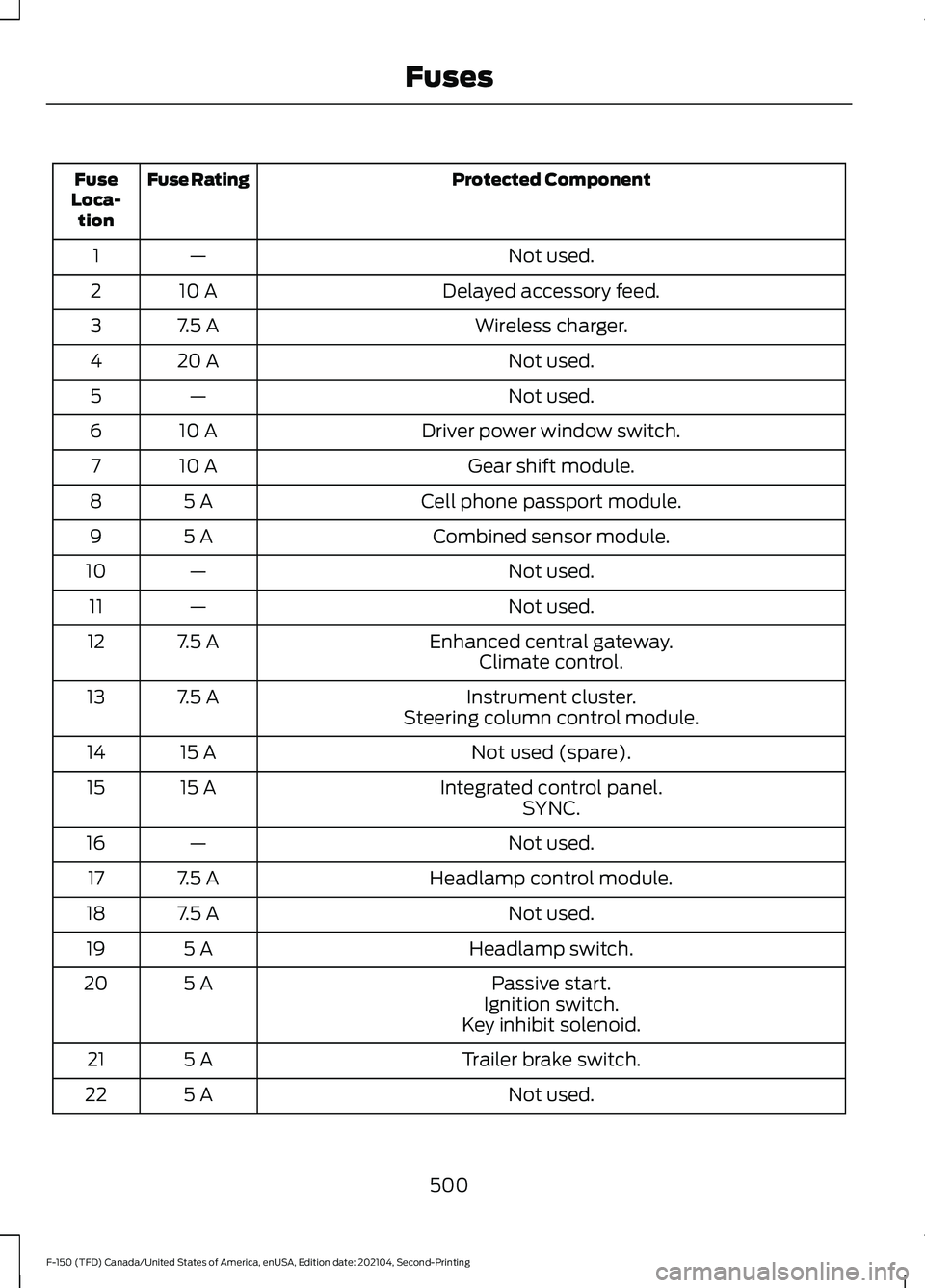
Protected Component
Fuse Rating
Fuse
Loca- tion
Not used.
—
1
Delayed accessory feed.
10 A
2
Wireless charger.
7.5 A
3
Not used.
20 A
4
Not used.
—
5
Driver power window switch.
10 A
6
Gear shift module.
10 A
7
Cell phone passport module.
5 A
8
Combined sensor module.
5 A
9
Not used.
—
10
Not used.
—
11
Enhanced central gateway.
7.5 A
12
Climate control.
Instrument cluster.
7.5 A
13
Steering column control module.
Not used (spare).
15 A
14
Integrated control panel.
15 A
15
SYNC.
Not used.
—
16
Headlamp control module.
7.5 A
17
Not used.
7.5 A
18
Headlamp switch.
5 A
19
Passive start.
5 A
20
Ignition switch.
Key inhibit solenoid.
Trailer brake switch.
5 A
21
Not used.
5 A
22
500
F-150 (TFD) Canada/United States of America, enUSA, Edition date: 202104, Second-Printing Fuses