torque FORD F-150 2021 User Guide
[x] Cancel search | Manufacturer: FORD, Model Year: 2021, Model line: F-150, Model: FORD F-150 2021Pages: 796, PDF Size: 13.89 MB
Page 365 of 796
If your vehicle starts to slow
down, you must provide steering
input to the wheel and press and
release the button to regain full system
performance.
Automatic cancellation can also occur if:
• The lane becomes too wide or too
narrow.
• The system cannot detect valid lane
markings.
• Lane markings cross over one another.
Note: The system disables until the next
key cycle if your vehicle slows down due to
driver inactivity twice within a key cycle.
LANE CENTERING INDICATORS Illuminates when you switch
lane centering on. The color of
the indicator changes to indicate
the system status.
Gray indicates the system is on but
inactive.
Green indicates the system is active and
applying steering torque assistance input
to keep your vehicle in the center of the
lane.
Amber with an audible tone and then gray
indicates a system automatic cancellation. INTELLIGENT ADAPTIVE
CRUISE CONTROL (IF EQUIPPED)
HOW DOES INTELLIGENT
ADAPTIVE CRUISE CONTROL
WORK
Intelligent adaptive cruise control
combines speed sign recognition with
adaptive cruise control to adjust the cruise
set speed to the speed limit detected by
the speed sign recognition system. As the
system detects new speed signs, the set
speed updates.
There are limitations that affect the
accuracy of the speed sign recognition
system and its ability to determine the
current speed limit. The intelligent
adaptive cruise control system and its
ability to determine the current speed limit
shares these limitations. See Speed Sign
Recognition
(page 409).
Note: The adaptive cruise control gap
setting operates normally.
INTELLIGENT ADAPTIVE CRUISE
CONTROL PRECAUTIONS WARNING: You are responsible for
controlling your vehicle at all times. The
system is designed to be an aid and does
not relieve you of your responsibility to
drive with due care and attention. Failure
to follow this instruction could result in
the loss of control of your vehicle,
personal injury or death.
INTELLIGENT ADAPTIVE CRUISE
CONTROL REQUIREMENTS
Traffic sign recognition must be enabled
for intelligent adaptive cruise control to be
active.
361
F-150 (TFD) Canada/United States of America, enUSA, Edition date: 202104, Second-Printing Adaptive Cruise Control
(If Equipped)E308130 E297977
Page 377 of 796
•
Comfort – Slightly more assist for
driver preference and daily driving ease.
• Off-road – Similar assist to Normal
with added damping for improved
control during off-road driving.
After selecting the desired setting, you may
feel a soft feedback bump in the steering
wheel when the changeover occurs.
Note: If you disconnect or remove the
battery, the steering system defaults to
normal.
Selecting a Suspension Mode To change the suspension feel,
press the button on the steering
wheel. The first press displays a
pop-up message in the instrument cluster
display for the selected mode and
subsequent presses changes the selected
mode.
Modes:
• Normal – Default factory setting.
• Sport – Slightly stiffer suspension with
emphasis on handling and control.
• Off-road – Maximizes shock
performance in extreme off-road
environments.
Selecting an Exhaust Mode To change the exhaust sound,
press the button on the steering
wheel. The first press displays a
pop-up message in the instrument cluster
display for the selected mode and
subsequent presses changes the selected
mode.
Modes:
• Normal – Default setting provides a
balance of comfort and feedback.
• Sport – Slightly louder than normal for
spirited driving. •
Baja – Loudest setting for off-road use
only. Maximum exhaust noise under all
driving conditions.
• Quiet – Quietest setting for maximum
comfort under all driving conditions.
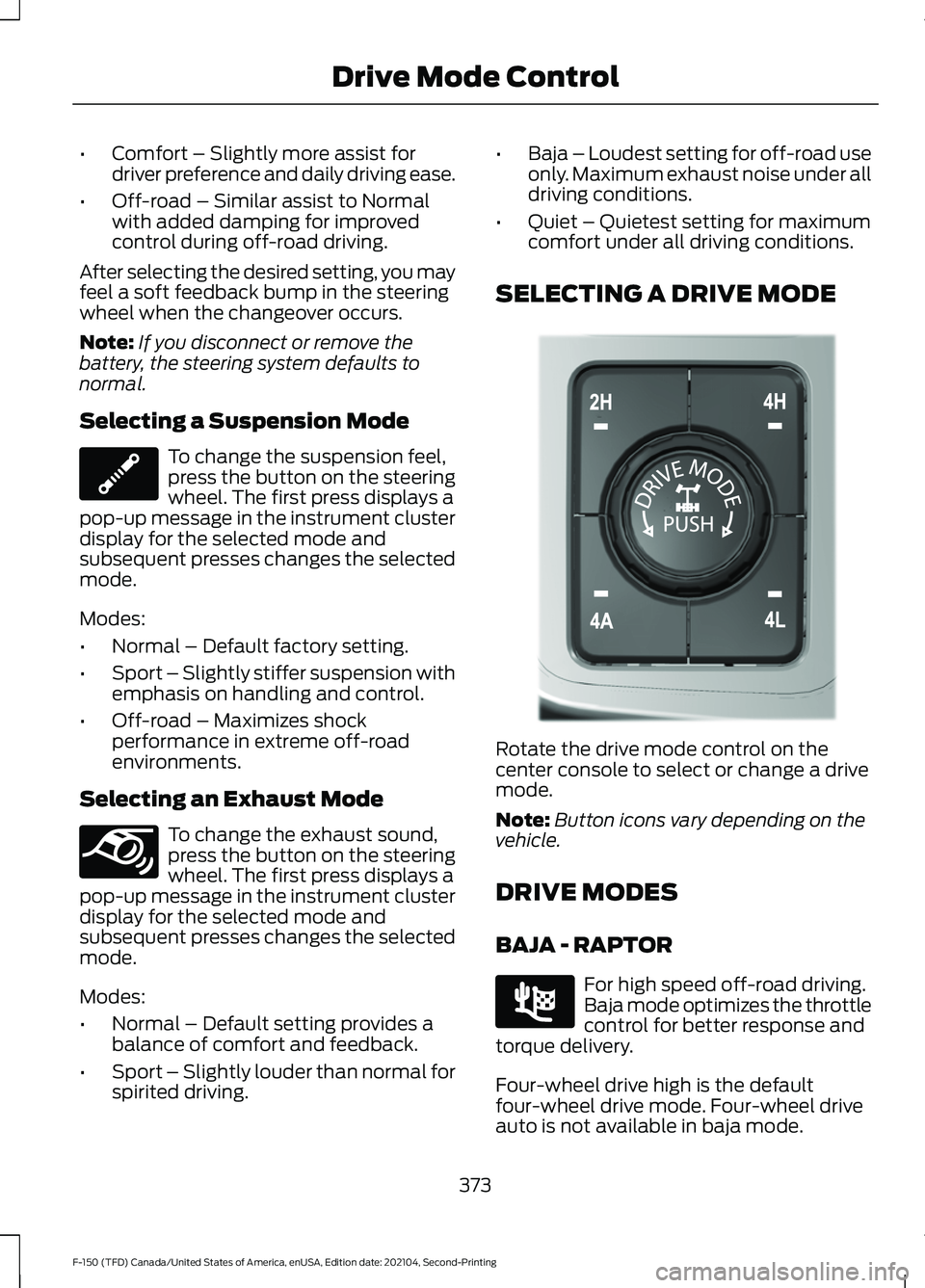
SELECTING A DRIVE MODE Rotate the drive mode control on the
center console to select or change a drive
mode.
Note:
Button icons vary depending on the
vehicle.
DRIVE MODES
BAJA - RAPTOR For high speed off-road driving.
Baja mode optimizes the throttle
control for better response and
torque delivery.
Four-wheel drive high is the default
four-wheel drive mode. Four-wheel drive
auto is not available in baja mode.
373
F-150 (TFD) Canada/United States of America, enUSA, Edition date: 202104, Second-Printing Drive Mode ControlE347107 E347131 E308146 E225314
Page 380 of 796
NORMAL - 4X2
For everyday driving. This mode
is the perfect balance of
excitement, comfort and
convenience. This is the default mode after
each ignition cycle.
The electronic locking differential is
available below 25 mph (40 km/h). See
Switching the Electronic Locking
Differential On and Off
(page 305).
ROCK CRAWL - RAPTOR For off-road driving and
optimum rock-climbing. Rock
crawl mode engages the
electronic locking differential, optimizes
throttle response and adjusts transmission
shift points to provide additional control
of your vehicle.
Four-wheel drive low is the only four-wheel
drive mode available in rock crawl mode.
Comfort is the default steering mode. All
steering modes are available.
Off-road is the default suspension mode.
All suspension modes are available.
Normal is the default exhaust mode. All
exhaust modes are available.
The system tunes the engine and
transmission controls to rock crawl mode.
The system tunes the stability and traction
controls to rock crawl mode.
The electronic locking differential engages
when you select this mode at any speed,
and you can disengage it at any time using
the button. See Switching the Electronic
Locking Differential On and Off
(page
303). ROCK CRAWL - 4X4 For off-road driving and
optimum rock-climbing. Rock
crawl mode engages the
electronic locking differential, optimizes
throttle response and adjusts transmission
shift points to provide additional control
of your vehicle.
Four-wheel drive low is the only four-wheel
drive mode available in rock crawl mode.
The electronic locking differential engages
when you select this mode at any speed,
and you can disengage it at any time using
the button. See Switching the Electronic
Locking Differential On and Off
(page
303).
SLIPPERY - 4X4, VEHICLES WITH:
2-SPEED TORQUE ON DEMAND For less than ideal road
conditions such as snow or ice
covered roads. Use this mode for
crossing terrain where loose or slippery
materials cover a firm surface. Slippery
mode lowers throttle response and
optimizes shifting for slippery surfaces.
Four-wheel drive auto is the default
four-wheel drive mode. Two-wheel drive
high is not available in slippery mode.
The electronic locking differential is
available below
25 mph (40 km/h). See
Switching the Electronic Locking
Differential On and Off
(page 303).
Note: Do not use this mode when driving
on dry pavement. This could cause driveline
bind up and damage the system depending
on the four-wheel drive mode selection.
See
Four-Wheel Drive (page 291).
376
F-150 (TFD) Canada/United States of America, enUSA, Edition date: 202104, Second-Printing Drive Mode ControlE225310 E347002 E225315 E295414
Page 381 of 796
SLIPPERY - RAPTOR
For less than ideal road
conditions such as snow or ice
covered roads. Use this mode for
crossing terrain where loose or slippery
materials cover a firm surface. Slippery
mode lowers throttle response and
optimizes shifting for slippery surfaces.
Four-wheel drive auto is the default
four-wheel drive mode. Two-wheel drive
high is not available in slippery mode.
Normal is the default steering, suspension,
and exhaust modes. Off-road steering
mode is not available. All suspension and
exhaust modes are available.
The system tunes the engine and
transmission controls to slippery mode.
The system tunes stability and traction
controls to slippery mode.
The electronic locking differential is
available below 25 mph (40 km/h). See
Switching the Electronic Locking
Differential On and Off
(page 303).
Note: Do not use this mode when driving
on dry pavement. This could cause driveline
bind up and damage the system depending
on the four-wheel drive mode selection.
See
Four-Wheel Drive (page 291).
SLIPPERY - 4X4, VEHICLES WITH:
ELECTRONIC SHIFT-ON-THE-FLY For less than ideal road
conditions such as snow or ice
covered roads. Use this mode for
crossing terrain where loose or slippery
materials cover a firm surface. Slippery
mode lowers throttle response and
optimizes shifting for slippery surfaces.
Four-wheel drive high is the default
four-wheel drive mode. All four-wheel drive
modes are selectable in slippery mode. The electronic locking differential is
available below
25 mph (40 km/h). See
Switching the Electronic Locking
Differential On and Off
(page 303).
Note: Do not use this mode when driving
on dry pavement. This could cause driveline
bind up and damage the system depending
on the four-wheel drive mode selection.
See
Four-Wheel Drive (page 291).
SLIPPERY - 4X2 For less than ideal road
conditions such as snow or ice
covered roads. Use this mode for
crossing terrain where loose or slippery
materials cover a firm surface. Slippery
mode lowers throttle response and
optimizes shifting for slippery surfaces.
The electronic locking differential is
available below
25 mph (40 km/h). See
Switching the Electronic Locking
Differential On and Off
(page 305).
Note: Do not use this mode when driving
on dry pavement. This could cause driveline
bind up and damage the system depending
on the four-wheel drive mode selection.
See
Four-Wheel Drive (page 291).
SPORT - 4X4, VEHICLES WITH: 2-
SPEED TORQUE ON DEMAND For sporty driving with improved
performance handling and
response. This mode increases
accelerator pedal response and provides
a sportier steering feel. The powertrain
system holds onto lower gears longer,
helping your vehicle accelerate faster.
Four-wheel drive auto is the default
four-wheel drive mode. Four-wheel drive
low is not available in sport mode.
The system tunes the steering and
suspension to provide a more connected
and spirited driving experience.
377
F-150 (TFD) Canada/United States of America, enUSA, Edition date: 202104, Second-Printing Drive Mode ControlE347004 E295414 E295414 E246593
Page 406 of 796
SWITCHING AUTOMATIC
EMERGENCY BRAKING ON AND
OFF
To switch the system on or off, use the
touchscreen:
1. Press Features on the touchscreen.
2. Press
Driver Assistance.
3. Press
Pre-Collision Assist.
4. Press
Auto Emergency Braking.
5. Switch the feature on or off.
EVASIVE STEERING ASSIST
(IF
EQUIPPED)
WHAT IS EVASIVE STEERING
ASSIST
If your vehicle is rapidly approaching a road
user, evasive steering assist helps you steer
around the road user.
After you turn the steering wheel in an
attempt to avoid a crash with the road
user, the system applies additional steering
torque to help you steer around the road
user. After you pass the road user, the
system applies steering torque when you
turn the steering wheel to steer back into
the lane. The system deactivates after you
fully pass the road user.
Note: Road users are defined as another
stationary vehicle in the same lane or a
vehicle traveling in the same lane in the
same direction as you. See
Pre-Collision
Assist Precautions (page 396). EVASIVE STEERING ASSIST
LIMITATIONS
Evasive steering assist only activates when
all the following occur:
•
Automatic emergency braking and
evasive steering assist are on.
• The system detects a road user ahead
and starts to apply the brakes.
• You significantly turn the steering
wheel to steer around a road user.
Note: Evasive steering assist does not
automatically steer around a road user. If
you do not turn the steering wheel, evasive
steering assist does not activate.
Note: Evasive steering assist does not
activate if the distance to the road user
ahead is too small and the system cannot
avoid a crash.
Note: Evasive steering does not activate
with cyclists or pedestrians.
SWITCHING EVASIVE STEERING
ASSIST ON AND OFF
To switch the system on or off, use the
touchscreen:
1. Press
Features on the touchscreen.
2. Press
Driver Assistance.
3. Press
Pre-Collision Assist.
4. Switch
Evasive Steering on or off.
Note: If you switch automatic emergency
braking off, evasive steering assist turns off.
Note: Automatic emergency braking and
evasive steering assist turn on every time
you switch the ignition on.
402
F-150 (TFD) Canada/United States of America, enUSA, Edition date: 202104, Second-Printing Pre-Collision Assist
(If Equipped)
Page 442 of 796
HOW DOES TRAILER SWAY
CONTROL WORK
The system applies the brakes to the
individual wheels and reduces engine
torque to aid vehicle stability.
If the trailer begins to sway, the stability
control lamp flashes and the message
Trailer Sway Reduce Speed appears in
the information display.
Stop your vehicle as soon as it is safe to
do so. Check the vertical weight on the
tow ball and trailer load distribution.
TRAILER SWAY CONTROL
PRECAUTIONS WARNING: Turning off trailer sway
control increases the risk of loss of
vehicle control, serious injury or death.
Ford does not recommend disabling this
feature except in situations where speed
reduction may be detrimental (such as
hill climbing), the driver has significant
trailer towing experience, and can control
trailer sway and maintain safe operation.
Note: This feature only activates when
significant trailer sway occurs.
Note: This feature does not prevent trailer
sway, but reduces it once it begins.
Note: This feature cannot stop all trailers
from swaying.
Note: In some cases, if vehicle speed is too
high, the system may activate multiple
times, gradually reducing vehicle speed.
SWITCHING TRAILER SWAY
CONTROL ON AND OFF
1. Press
Features on the touchscreen. 2. Press
Towing.
3. Switch
Trailer Sway Control on or off.
The system turns on each time you start
your vehicle.
438
F-150 (TFD) Canada/United States of America, enUSA, Edition date: 202104, Second-Printing Trailer Sway Control
Page 557 of 796
USING BEAD-LOCK WHEELS -
RAPTOR
Your vehicle comes with unique wheels
matched to the tires. To avoid damage to
your wheels:
•
Maintain proper tire pressure.
• Due to extreme tire and wheel width,
do not take your vehicle through an
automatic car wash that uses
mechanical tracks, as wheel damage
may result.
• When installing wheels, always torque
lug nuts to specification with a torque
wrench.
• Inspect your wheels for damage on a
regular basis. If you have a damaged
wheel, replace it immediately.
• If you encounter an abnormally harsh
impact, inspect the outside tire wall of
your wheels, both inside and out, for
damage.
Note: Ford Performance only recommends
using bead-lock rings from Ford
Performance Parts, in conjunction with the
original equipment manufacturer (OEM)
tire. Any other combination using this wheel
could result in air loss or tire failure.
Note: Converting the bead-lock compatible
wheel to true bead-locks is for off-road use
only. We do not approve of the use of true
bead-locks for on-road driving.
If your vehicles equipped with the optional
bead lock compatible wheel, you can
convert this wheel to use a true bead-lock
ring, which allows operation at low tire
pressures when off-road to minimize the
risk of de-beading the tire. See your local
Ford Performance Parts Dealer for more
information. Tire Care WARNING: Always re-inflate tires
to recommended tire pressures before
the vehicle is operated on-road. The
recommended pressure is located on the
tire label or safety certification label,
located on the B-pillar, inside the driver's
door. WARNING:
After off-road use,
before returning to the road, check the
wheels and tires for damage. Off-road
use may cause damage to your wheels
and tires that can lead to tire failure, loss
of vehicle control, serious injury or death. WARNING:
Replace the wheels
and tires with the exact original brand,
size and construction that came
originally on your vehicle. Use of any
other wheel or tire combinations, even
with identical size ratings, may result in
insufficient running clearances, tire
rubbing and eventual puncture. Failure
to follow tire replacement
recommendations can lead to tire failure,
loss of vehicle control, serious injury or
death.
Note: If you have reduced your tire pressure
for off-road use, the tire pressure monitoring
system (TPMS) warning light then activates
in the instrument panel as a reminder to
re-inflate the tires before returning to the
road.
553
F-150 (TFD) Canada/United States of America, enUSA, Edition date: 202104, Second-Printing Wheel and Tire Information
Page 576 of 796
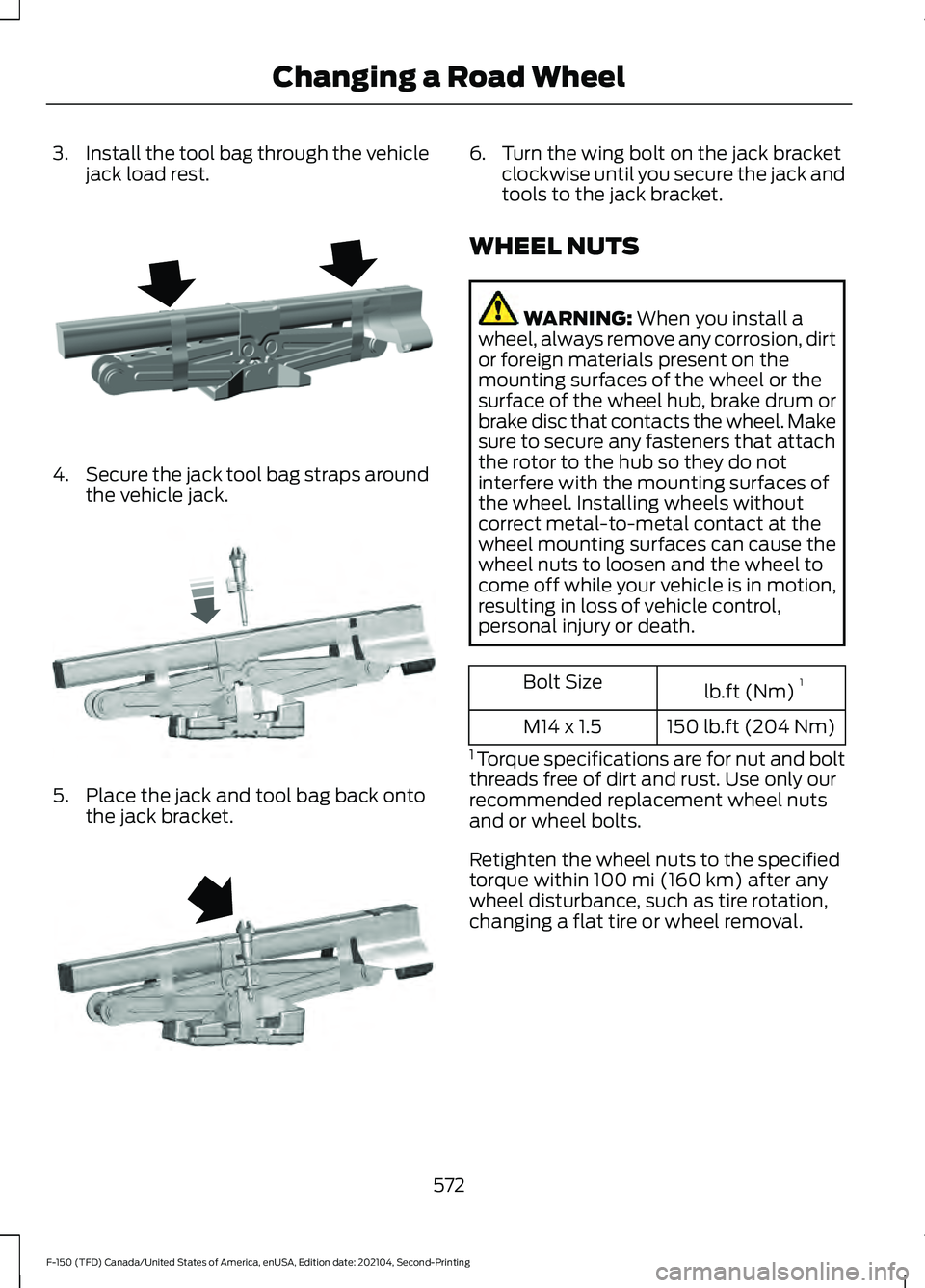
3.
Install the tool bag through the vehicle
jack load rest. 4.
Secure the jack tool bag straps around
the vehicle jack. 5. Place the jack and tool bag back onto
the jack bracket. 6. Turn the wing bolt on the jack bracket
clockwise until you secure the jack and
tools to the jack bracket.
WHEEL NUTS WARNING: When you install a
wheel, always remove any corrosion, dirt
or foreign materials present on the
mounting surfaces of the wheel or the
surface of the wheel hub, brake drum or
brake disc that contacts the wheel. Make
sure to secure any fasteners that attach
the rotor to the hub so they do not
interfere with the mounting surfaces of
the wheel. Installing wheels without
correct metal-to-metal contact at the
wheel mounting surfaces can cause the
wheel nuts to loosen and the wheel to
come off while your vehicle is in motion,
resulting in loss of vehicle control,
personal injury or death. lb.ft (Nm)
1
Bolt Size
150 lb.ft (204 Nm)
M14 x 1.5
1 Torque specifications are for nut and bolt
threads free of dirt and rust. Use only our
recommended replacement wheel nuts
and or wheel bolts.
Retighten the wheel nuts to the specified
torque within
100 mi (160 km) after any
wheel disturbance, such as tire rotation,
changing a flat tire or wheel removal.
572
F-150 (TFD) Canada/United States of America, enUSA, Edition date: 202104, Second-Printing Changing a Road WheelE323386 E327654 E323384
Page 618 of 796
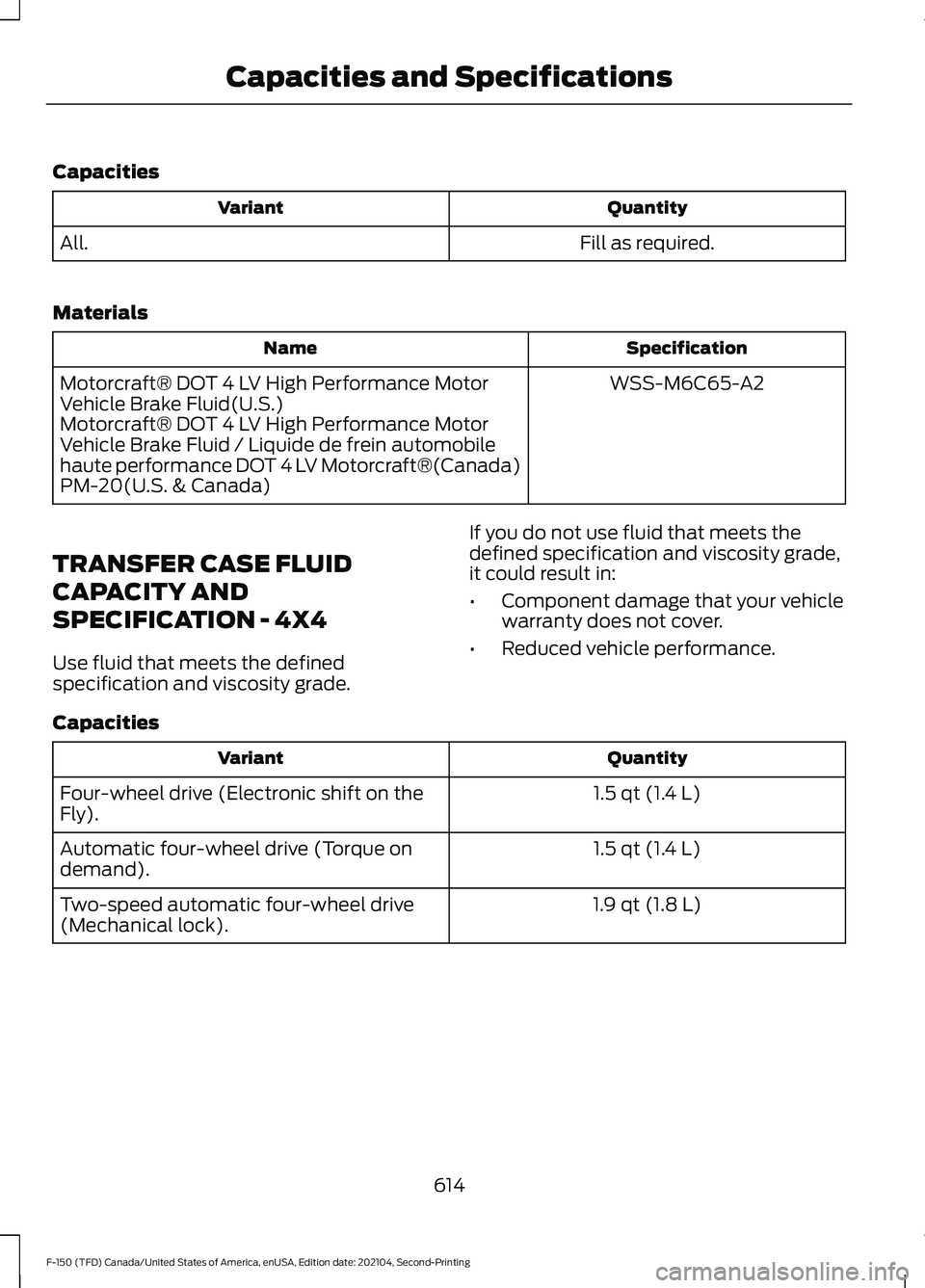
Capacities
Quantity
Variant
Fill as required.
All.
Materials Specification
Name
WSS-M6C65-A2
Motorcraft® DOT 4 LV High Performance Motor
Vehicle Brake Fluid(U.S.)
Motorcraft® DOT 4 LV High Performance Motor
Vehicle Brake Fluid / Liquide de frein automobile
haute performance DOT 4 LV Motorcraft®(Canada)
PM-20(U.S. & Canada)
TRANSFER CASE FLUID
CAPACITY AND
SPECIFICATION - 4X4
Use fluid that meets the defined
specification and viscosity grade. If you do not use fluid that meets the
defined specification and viscosity grade,
it could result in:
•
Component damage that your vehicle
warranty does not cover.
• Reduced vehicle performance.
Capacities Quantity
Variant
1.5 qt (1.4 L)
Four-wheel drive (Electronic shift on the
Fly).
1.5 qt (1.4 L)
Automatic four-wheel drive (Torque on
demand).
1.9 qt (1.8 L)
Two-speed automatic four-wheel drive
(Mechanical lock).
614
F-150 (TFD) Canada/United States of America, enUSA, Edition date: 202104, Second-Printing Capacities and Specifications
Page 619 of 796
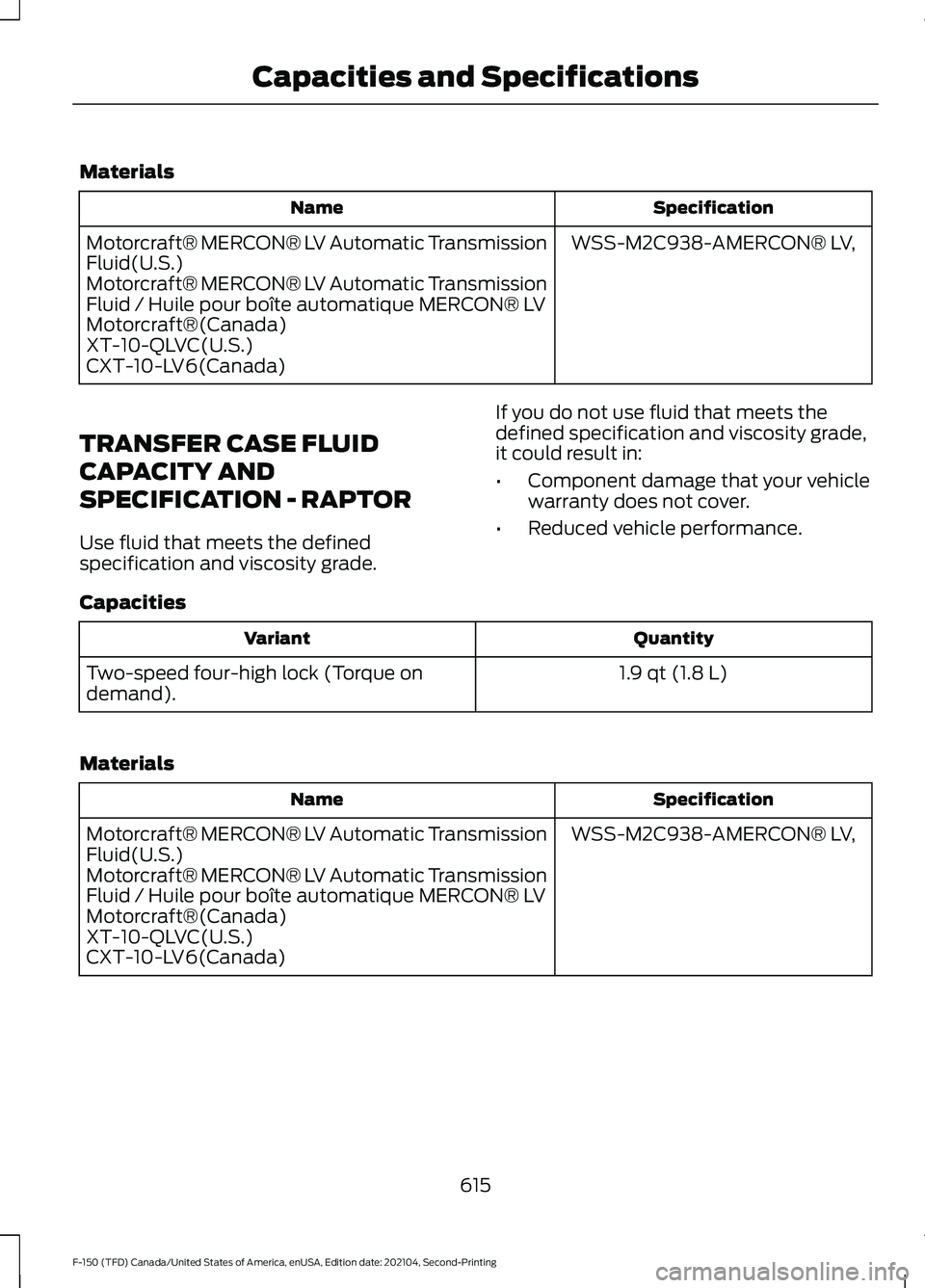
Materials
Specification
Name
WSS-M2C938-AMERCON® LV,
Motorcraft® MERCON® LV Automatic Transmission
Fluid(U.S.)
Motorcraft® MERCON® LV Automatic Transmission
Fluid / Huile pour boîte automatique MERCON® LV
Motorcraft®(Canada)
XT-10-QLVC(U.S.)
CXT-10-LV6(Canada)
TRANSFER CASE FLUID
CAPACITY AND
SPECIFICATION - RAPTOR
Use fluid that meets the defined
specification and viscosity grade. If you do not use fluid that meets the
defined specification and viscosity grade,
it could result in:
•
Component damage that your vehicle
warranty does not cover.
• Reduced vehicle performance.
Capacities Quantity
Variant
1.9 qt (1.8 L)
Two-speed four-high lock (Torque on
demand).
Materials Specification
Name
WSS-M2C938-AMERCON® LV,
Motorcraft® MERCON® LV Automatic Transmission
Fluid(U.S.)
Motorcraft® MERCON® LV Automatic Transmission
Fluid / Huile pour boîte automatique MERCON® LV
Motorcraft®(Canada)
XT-10-QLVC(U.S.)
CXT-10-LV6(Canada)
615
F-150 (TFD) Canada/United States of America, enUSA, Edition date: 202104, Second-Printing Capacities and Specifications