traction control FORD F-150 2021 User Guide
[x] Cancel search | Manufacturer: FORD, Model Year: 2021, Model line: F-150, Model: FORD F-150 2021Pages: 796, PDF Size: 13.89 MB
Page 324 of 796
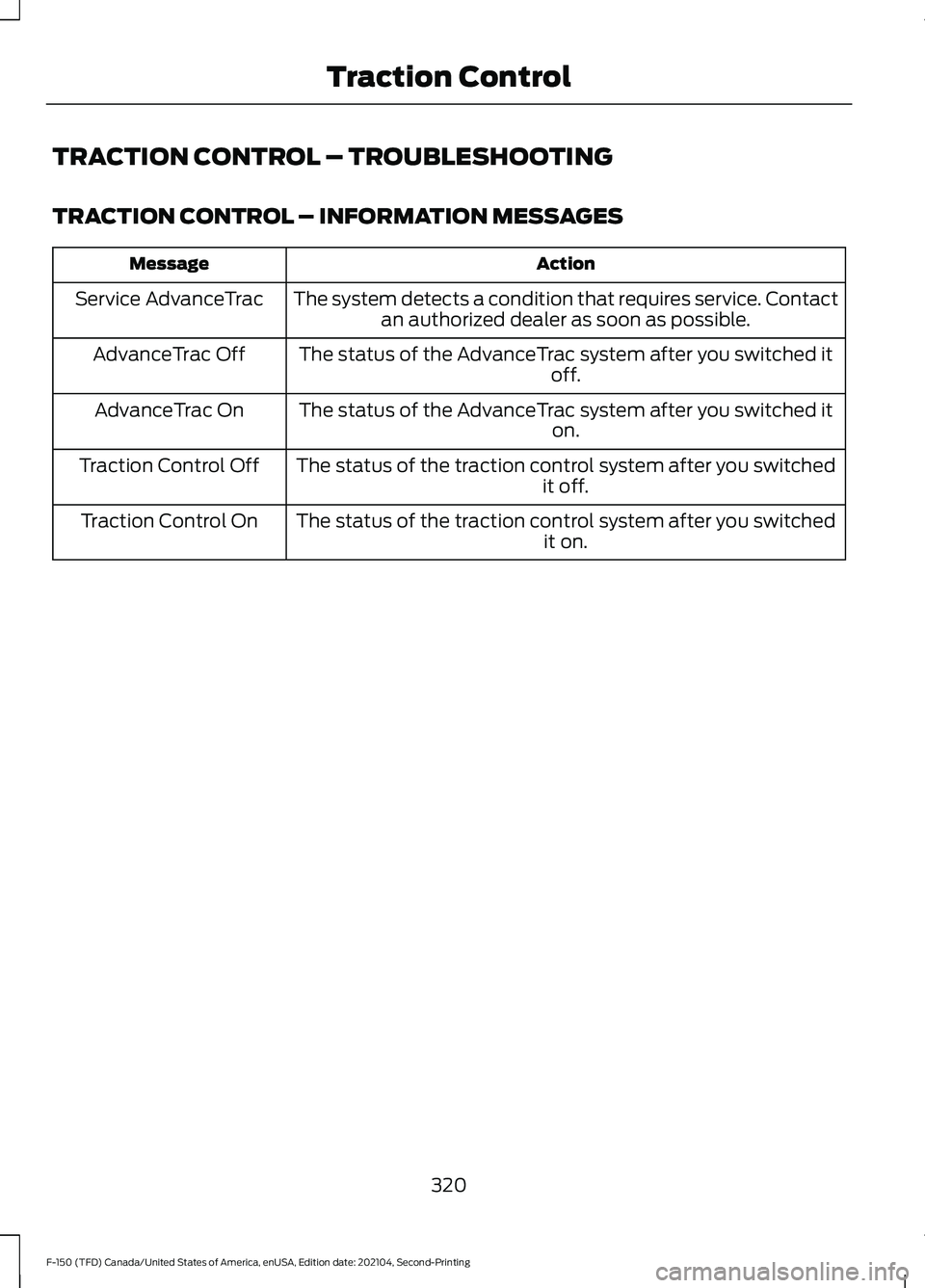
TRACTION CONTROL – TROUBLESHOOTING
TRACTION CONTROL – INFORMATION MESSAGES
Action
Message
The system detects a condition that requires service. Contactan authorized dealer as soon as possible.
Service AdvanceTrac
The status of the AdvanceTrac system after you switched it off.
AdvanceTrac Off
The status of the AdvanceTrac system after you switched it on.
AdvanceTrac On
The status of the traction control system after you switched it off.
Traction Control Off
The status of the traction control system after you switched it on.
Traction Control On
320
F-150 (TFD) Canada/United States of America, enUSA, Edition date: 202104, Second-Printing Traction Control
Page 325 of 796
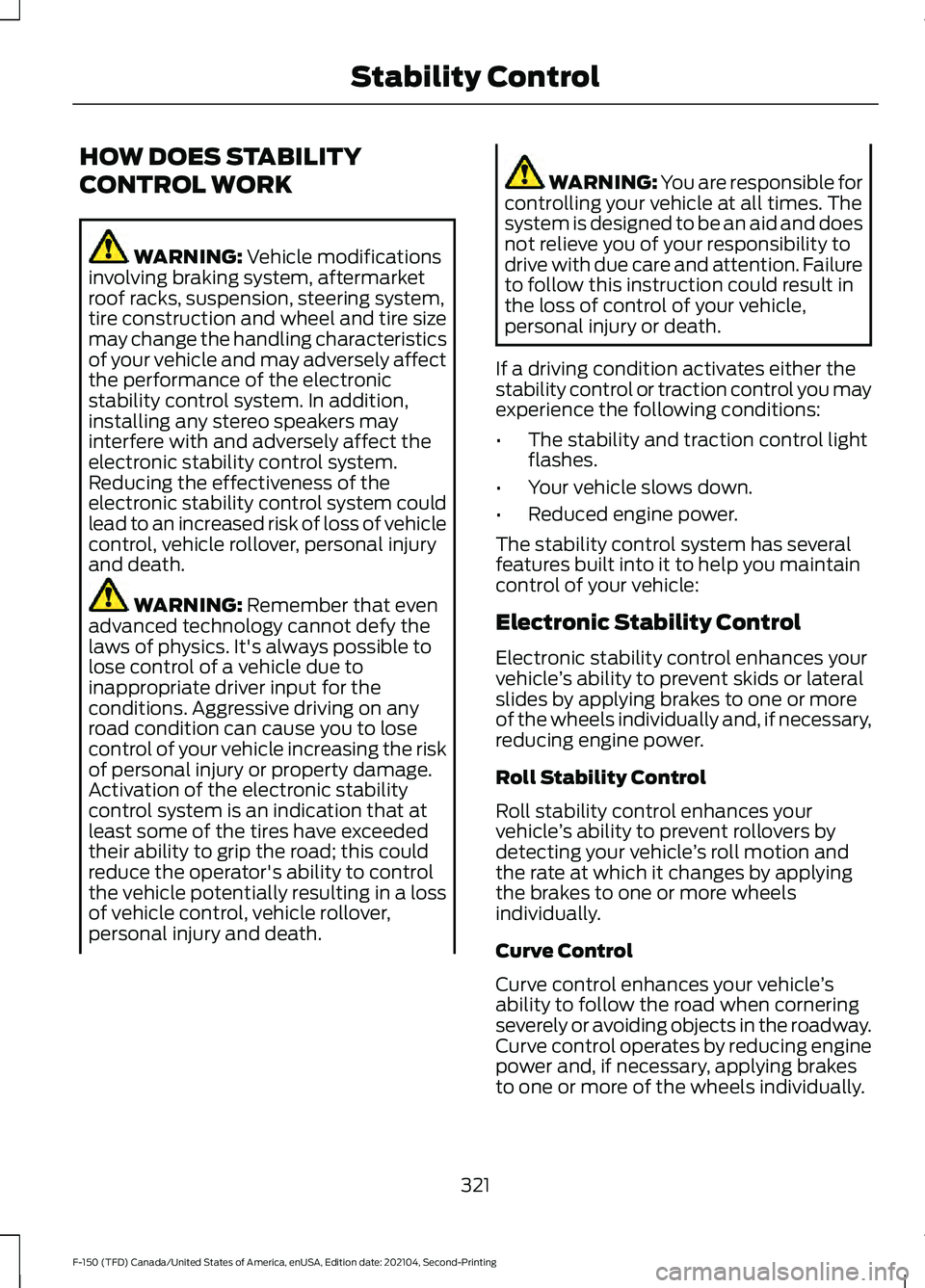
HOW DOES STABILITY
CONTROL WORK
WARNING: Vehicle modifications
involving braking system, aftermarket
roof racks, suspension, steering system,
tire construction and wheel and tire size
may change the handling characteristics
of your vehicle and may adversely affect
the performance of the electronic
stability control system. In addition,
installing any stereo speakers may
interfere with and adversely affect the
electronic stability control system.
Reducing the effectiveness of the
electronic stability control system could
lead to an increased risk of loss of vehicle
control, vehicle rollover, personal injury
and death. WARNING:
Remember that even
advanced technology cannot defy the
laws of physics. It's always possible to
lose control of a vehicle due to
inappropriate driver input for the
conditions. Aggressive driving on any
road condition can cause you to lose
control of your vehicle increasing the risk
of personal injury or property damage.
Activation of the electronic stability
control system is an indication that at
least some of the tires have exceeded
their ability to grip the road; this could
reduce the operator's ability to control
the vehicle potentially resulting in a loss
of vehicle control, vehicle rollover,
personal injury and death. WARNING: You are responsible for
controlling your vehicle at all times. The
system is designed to be an aid and does
not relieve you of your responsibility to
drive with due care and attention. Failure
to follow this instruction could result in
the loss of control of your vehicle,
personal injury or death.
If a driving condition activates either the
stability control or traction control you may
experience the following conditions:
• The stability and traction control light
flashes.
• Your vehicle slows down.
• Reduced engine power.
The stability control system has several
features built into it to help you maintain
control of your vehicle:
Electronic Stability Control
Electronic stability control enhances your
vehicle ’s ability to prevent skids or lateral
slides by applying brakes to one or more
of the wheels individually and, if necessary,
reducing engine power.
Roll Stability Control
Roll stability control enhances your
vehicle ’s ability to prevent rollovers by
detecting your vehicle ’s roll motion and
the rate at which it changes by applying
the brakes to one or more wheels
individually.
Curve Control
Curve control enhances your vehicle ’s
ability to follow the road when cornering
severely or avoiding objects in the roadway.
Curve control operates by reducing engine
power and, if necessary, applying brakes
to one or more of the wheels individually.
321
F-150 (TFD) Canada/United States of America, enUSA, Edition date: 202104, Second-Printing Stability Control
Page 326 of 796
Side Wind Stabilization
Side wind stabilization is an advanced
feature that works by carefully applying
the brakes on one side of the vehicle to
reduce the effect of a side wind gust on
the vehicle's path.
Torque Vectoring by Brakes
Torque vectoring control applies brake
torque on the inner driven wheel in a curve
for better traction to avoid an understeer,
or oversteer situation. Unlike electronic
stability control, enhanced torque
vectoring control does not slow the
vehicle. It helps control excessive wheel
slip and gives the vehicle improved
cornering agility.
Traction Control
Traction control enhances your vehicle
’s
ability to maintain traction of the wheels
by detecting and controlling wheel spin.
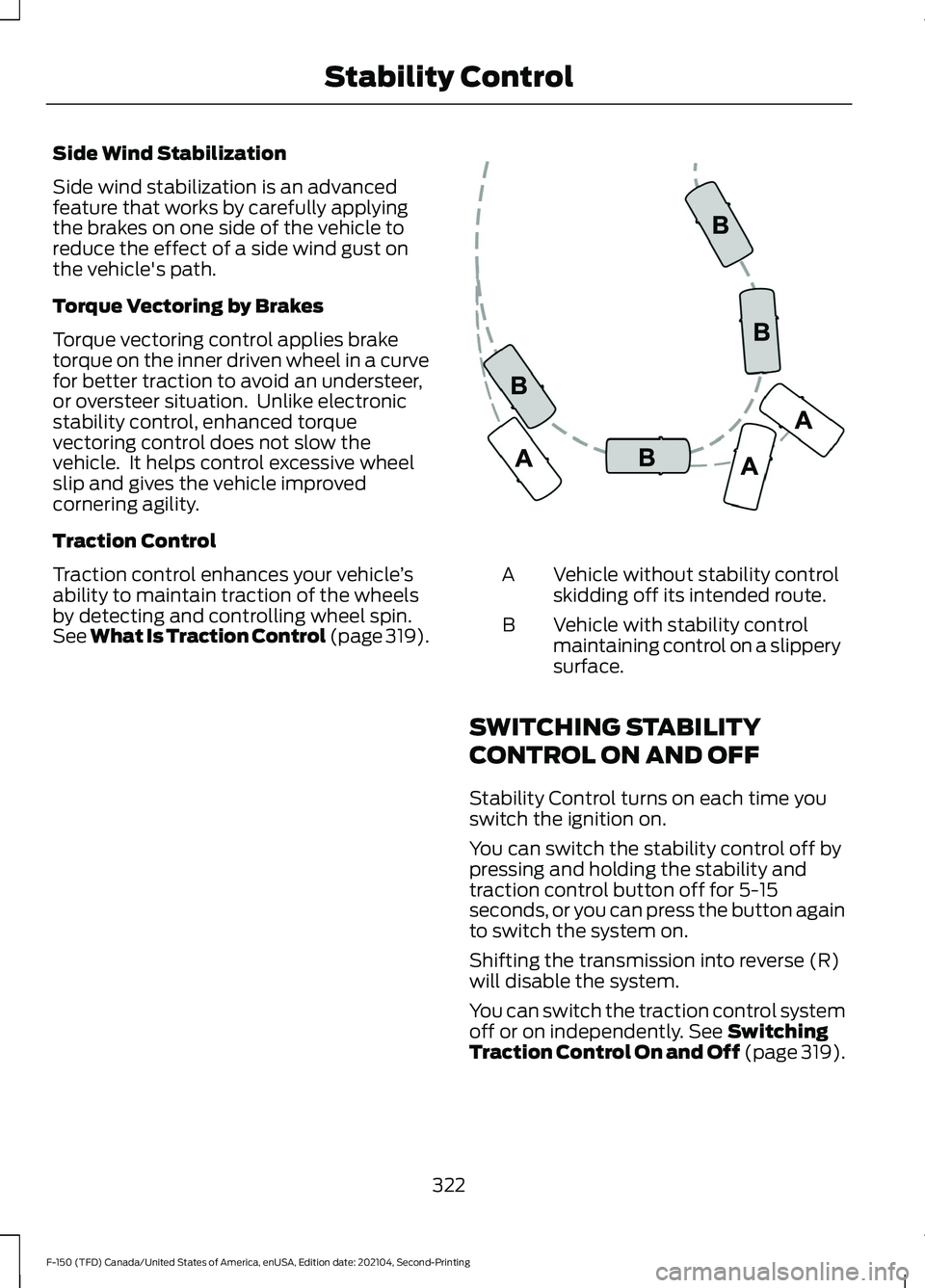
See What Is Traction Control (page 319). Vehicle without stability control
skidding off its intended route.
A
Vehicle with stability control
maintaining control on a slippery
surface.
B
SWITCHING STABILITY
CONTROL ON AND OFF
Stability Control turns on each time you
switch the ignition on.
You can switch the stability control off by
pressing and holding the stability and
traction control button off for 5-15
seconds, or you can press the button again
to switch the system on.
Shifting the transmission into reverse (R)
will disable the system.
You can switch the traction control system
off or on independently. See Switching
Traction Control On and Off (page 319).
322
F-150 (TFD) Canada/United States of America, enUSA, Edition date: 202104, Second-Printing Stability ControlE72903
Page 327 of 796
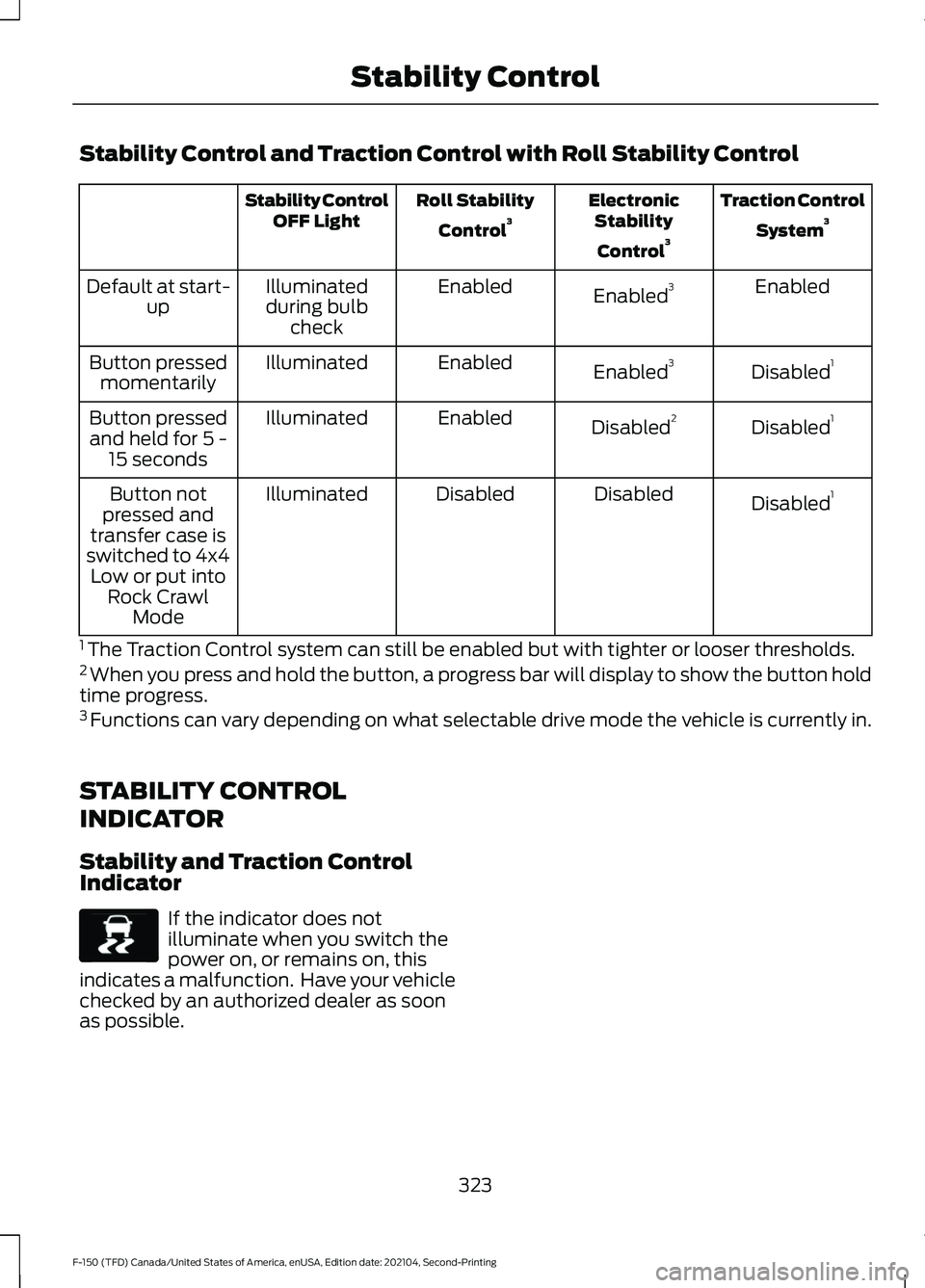
Stability Control and Traction Control with Roll Stability Control
Traction Control
System 3
Electronic
Stability
Control 3
Roll Stability
Control 3
Stability Control
OFF Light
Enabled
Enabled 3
Enabled
Illuminated
during bulb check
Default at start-
up
Disabled1
Enabled 3
Enabled
Illuminated
Button pressed
momentarily
Disabled1
Disabled 2
Enabled
Illuminated
Button pressed
and held for 5 - 15 seconds
Disabled1
Disabled
Disabled
Illuminated
Button not
pressed and
transfer case is
switched to 4x4 Low or put into Rock Crawl Mode
1 The Traction Control system can still be enabled but with tighter or looser thresholds.
2 When you press and hold the button, a progress bar will display to show the button hold
time progress.
3 Functions can vary depending on what selectable drive mode the vehicle is currently in.
STABILITY CONTROL
INDICATOR
Stability and Traction Control
Indicator If the indicator does not
illuminate when you switch the
power on, or remains on, this
indicates a malfunction. Have your vehicle
checked by an authorized dealer as soon
as possible.
323
F-150 (TFD) Canada/United States of America, enUSA, Edition date: 202104, Second-Printing Stability ControlE138639
Page 328 of 796
WHAT IS TRAIL CONTROL -
RAPTOR
WARNING: The system does not
control speed in low traction conditions
or extremely steep slopes. The system
is designed to be an aid and does not
relieve you of your responsibility to drive
with due care and attention. Failure to
follow this instruction could result in
personal injury.
Trail control lets you focus on steering
during low-speed and off-road use by
controlling your vehicle's acceleration and
braking to maintain the speed that you set.
You may hear a noise from the anti-lock
brake system pump motor when you use
the system. This is normal.
TRAIL CONTROL LIMITATIONS
- RAPTOR
Trail control is unavailable when any of the
following occur:
• Your vehicle speed is greater than
20 mph (32 km/h)
in two-wheel drive
high (2H) or four-wheel drive high (4H)
modes.
• Your vehicle speed is greater than
9 mph (15 km/h)
in four-wheel drive
low (4L) mode.
• Your vehicle speed is greater than
5 mph (8 km/h)
in reverse (R).
• The transmission is in park (P).
• The driver side door is open or your
seatbelt is off when the driver side door
is removed.
• Cruise control is on.
• Pro trailer backup assist is on. SWITCHING TRAIL CONTROL
ON AND OFF - RAPTOR Press the button.
The system switches off if you press the
button again or exceed 40 mph (64 km/h).
SETTING THE TRAIL CONTROL
SPEED - RAPTOR
Note: The buttons are located on the
steering wheel.
Drive to your preferred speed. Press button to increase the set
current speed.
Press button to decrease the set
current speed.
Note: The indicator changes color.
You can adjust the set speed in small or
large increments. Press the toggle button
upward or downward once to adjust the
set speed in small increments. Press and
hold the toggle button upward or
downward to adjust the set speed in large
increments.
You can also adjust the set speed by
braking.
Note: Pressing the brake pedal does not
switch off the system.
CANCELING THE SET SPEED -
RAPTOR Press the button.
324
F-150 (TFD) Canada/United States of America, enUSA, Edition date: 202104, Second-Printing Trail ControlE332910 E350925
Page 334 of 796
WHAT IS HILL DESCENT
CONTROL
Hill descent control allows the driver to set
and maintain vehicle speed while
descending steep slopes in various surface
conditions.
HOW DOES HILL DESCENT
CONTROL WORK
Hill descent control can maintain vehicle
speeds on downhill slopes between
2
– 20 mph (3– 32 km/h). Above 20 mph
(32 km/h), the system remains on but the
descent speed cannot be set or
maintained.
Note: The system does not function below
2 mph (3 km/h)
.
The system requires a cool down interval
after a period of sustained use. Hill descent
control provides a warning in the message
center and a tone sounds when the system
is about to disengage for cooling. At this
time, manually apply the brakes as needed
to maintain descent speed.
Note: The amount of time that the system
can remain active before cooling varies with
conditions.
HILL DESCENT CONTROL
PRECAUTIONS WARNING:
The system does not
control speed in low traction conditions
or extremely steep slopes. The system
is designed to be an aid and does not
relieve you of your responsibility to drive
with due care and attention. Failure to
follow this instruction could result in
personal injury. WARNING:
Hill descent control
cannot control descent in all surface
conditions and circumstances, such as
ice or extremely steep grades. Hill
descent control is a driver assist system
and cannot substitute for good judgment
by the driver. Failure to do so may result
in loss of vehicle control, crash or serious
injury. WARNING:
The system does not
replace the parking brake. When you
leave your vehicle, always apply the
parking brake and shift the transmission
into park (P) for automatic transmission
or first gear for manual transmission.
SWITCHING HILL DESCENT
CONTROL ON AND OFF Press the button on the
instrument panel. A light
illuminates and a tone sounds
when the system is active.
SETTING THE HILL DESCENT
SPEED
To increase or decrease the descent speed,
press the accelerator or brake pedal, or use
the SET
+ and SET - buttons on the
steering wheel. Once you reach the
preferred speed remove your feet from the
pedals.
HILL DESCENT CONTROL
INDICATOR Illuminates when you switch hill
descent control on.
330
F-150 (TFD) Canada/United States of America, enUSA, Edition date: 202104, Second-Printing Hill Descent Control
(If Equipped)E163171 E163171
Page 340 of 796
If your vehicle is in any forward gear, the
front parking aid provides audible warnings
and visual indication when your vehicle is
moving at a speed of 5 mph (8 km/h) or
below and the system detects an object
within the detection zone. Once your
vehicle reaches a stop, the visual indication
and audio warning stops after a few
seconds.
If your vehicle is in neutral (N), the front
and rear sensors provide visual indication
only when your vehicle is moving below a
speed of
5 mph (8 km/h) and obstacles
are detected inside the detection areas.
Once your vehicle stops, the visual
indication and audio warning stops after
a few seconds.
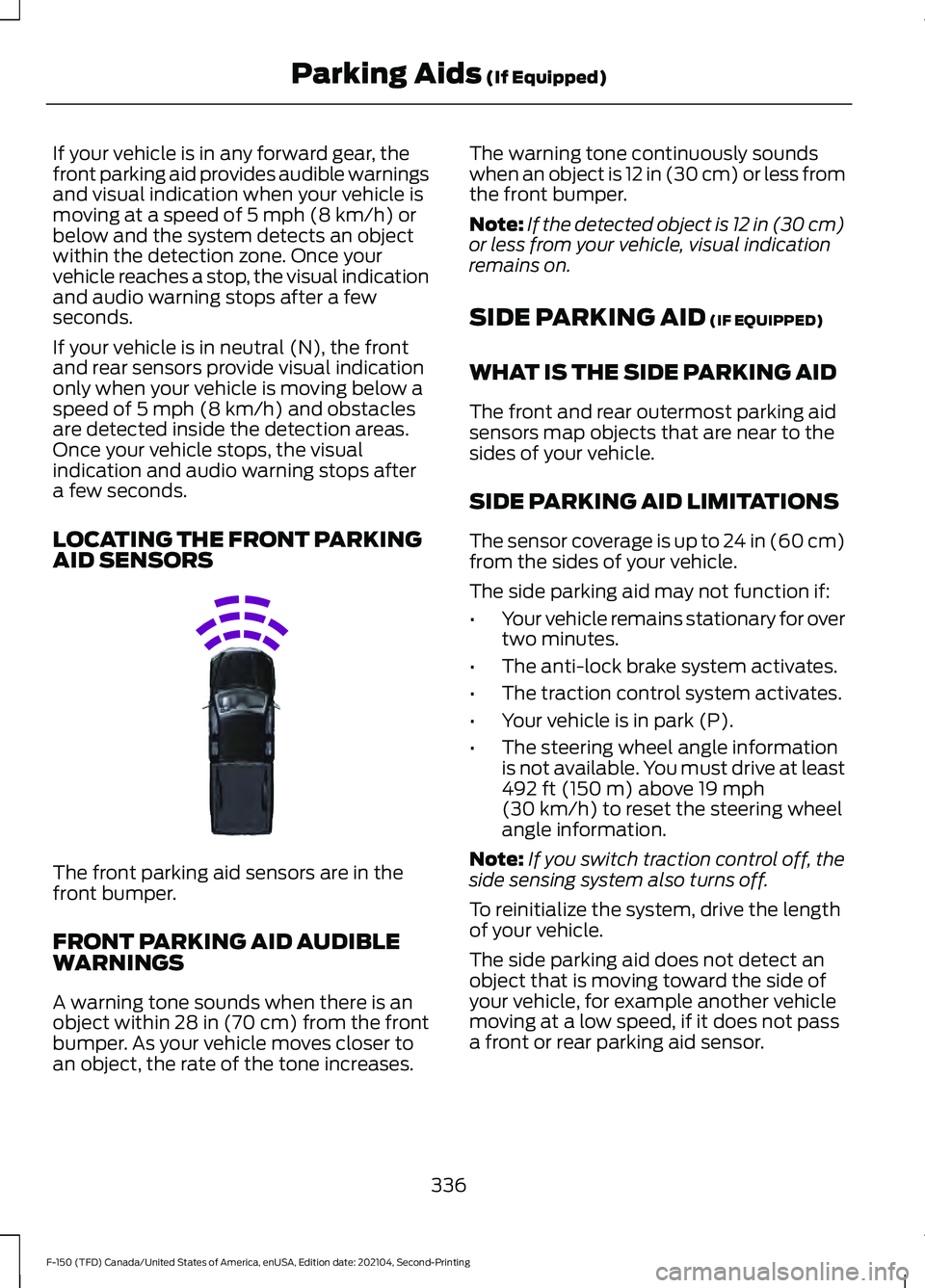
LOCATING THE FRONT PARKING
AID SENSORS The front parking aid sensors are in the
front bumper.
FRONT PARKING AID AUDIBLE
WARNINGS
A warning tone sounds when there is an
object within
28 in (70 cm) from the front
bumper. As your vehicle moves closer to
an object, the rate of the tone increases. The warning tone continuously sounds
when an object is 12 in (30 cm) or less from
the front bumper.
Note:
If the detected object is 12 in (30 cm)
or less from your vehicle, visual indication
remains on.
SIDE PARKING AID
(IF EQUIPPED)
WHAT IS THE SIDE PARKING AID
The front and rear outermost parking aid
sensors map objects that are near to the
sides of your vehicle.
SIDE PARKING AID LIMITATIONS
The sensor coverage is up to 24 in (60 cm)
from the sides of your vehicle.
The side parking aid may not function if:
• Your vehicle remains stationary for over
two minutes.
• The anti-lock brake system activates.
• The traction control system activates.
• Your vehicle is in park (P).
• The steering wheel angle information
is not available. You must drive at least
492 ft (150 m)
above 19 mph
(30 km/h) to reset the steering wheel
angle information.
Note: If you switch traction control off, the
side sensing system also turns off.
To reinitialize the system, drive the length
of your vehicle.
The side parking aid does not detect an
object that is moving toward the side of
your vehicle, for example another vehicle
moving at a low speed, if it does not pass
a front or rear parking aid sensor.
336
F-150 (TFD) Canada/United States of America, enUSA, Edition date: 202104, Second-Printing Parking Aids
(If Equipped)E310332
Page 352 of 796
3. Select parallel park exit.
4. Use the turn signal to choose the
direction to exit the parking space.
5. Press and hold the brake pedal.
6. Release the steering wheel and shift into neutral (N).
7. Release the parking brake.
8. Press and hold the active park assist button.
9. Release the brake pedal to allow your vehicle to move.
Note: After active park assist drives your
vehicle to a position where you can exit the
parking space in a forward movement, a
message appears instructing you to take full
control of your vehicle.
10. Take control of your vehicle.
Note: You can slow down your vehicle at
any time by pressing the brake pedal. ACTIVE PARK ASSIST –
TROUBLESHOOTING
ACTIVE PARK ASSIST –
INFORMATION MESSAGES Action
Message
The system
requires service.
Have your vehicle
checked as soon as possible.
Active Park Fault
ACTIVE PARK ASSIST –
FREQUENTLY ASKED QUESTIONS
Why does active park assist not
operate correctly? The system is unable to detect a
vehicle, curb or object to park next to
or in between. The system needs
boundary objects to operate correctly.
Why does active park assist not search
for a parking space? You have switched traction control off.
Why does active park assist not search
for a parking space? The transmission is in reverse (R). Your
vehicle must be moving forward to be
able to detect a parking space.
Why does active park assist not offer
a parking space? The sensors could be blocked. For
example, snow, ice or large
accumulations of dirt. Blocked sensors
can affect how the system functions.
Why does active park assist not offer
a parking space? The sensors in the front or rear bumper
could be damaged.
348
F-150 (TFD) Canada/United States of America, enUSA, Edition date: 202104, Second-Printing Active Park Assist (If Equipped)
Page 359 of 796
Switching Adaptive Cruise Control
Off
Press the button when the
system is in standby mode or
switch the ignition off.
Note: When you switch the system off, the
set speed clears.
ADAPTIVE CRUISE CONTROL
AUTOMATIC CANCELLATION
The system may cancel if:
• The tires lose traction.
• You apply the parking brake.
The system may cancel and set the parking
brake if:
• You unbuckle the seatbelt and open
the driver door after you stop your
vehicle.
• Your vehicle is at a stop continuously
for more than three minutes.
The system may deactivate or prevent
activating when requested if:
• The vehicle has a blocked sensor.
• The brake temperature is too high.
• There is a failure in the system or a
related system.
SETTING THE ADAPTIVE
CRUISE CONTROL SPEED
Drive to the speed you prefer. Press the SET+ or SET- buttons
to set the current speed.
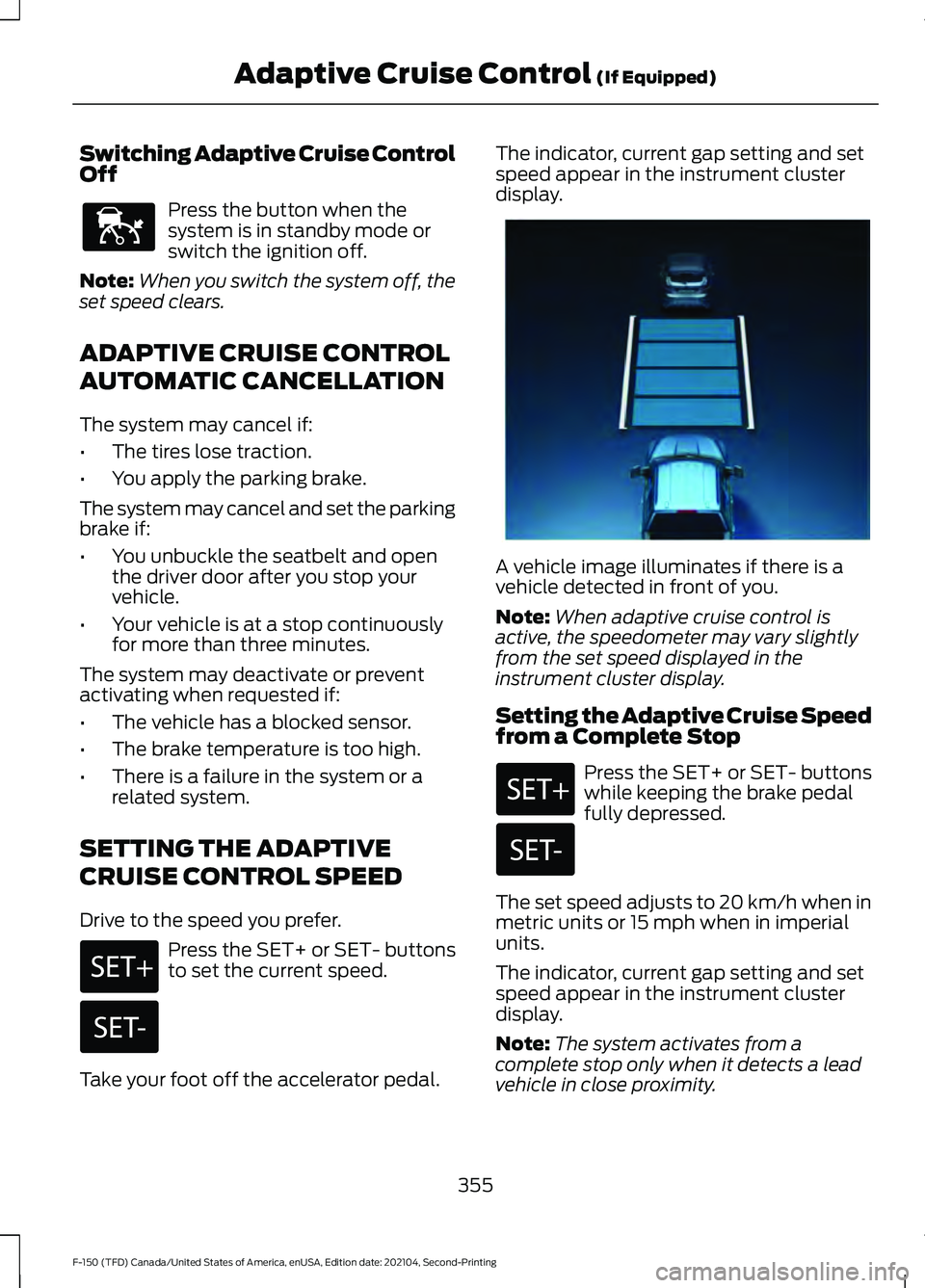
Take your foot off the accelerator pedal. The indicator, current gap setting and set
speed appear in the instrument cluster
display.
A vehicle image illuminates if there is a
vehicle detected in front of you.
Note:
When adaptive cruise control is
active, the speedometer may vary slightly
from the set speed displayed in the
instrument cluster display.
Setting the Adaptive Cruise Speed
from a Complete Stop Press the SET+ or SET- buttons
while keeping the brake pedal
fully depressed.
The set speed adjusts to 20 km/h when in
metric units or 15 mph when in imperial
units.
The indicator, current gap setting and set
speed appear in the instrument cluster
display.
Note: The system activates from a
complete stop only when it detects a lead
vehicle in close proximity.
355
F-150 (TFD) Canada/United States of America, enUSA, Edition date: 202104, Second-Printing Adaptive Cruise Control (If Equipped)E144529 E337576
Page 375 of 796
WHAT IS DRIVE MODE
CONTROL
Your vehicle has various drive modes that
you can select for different driving
conditions. Depending on the drive mode
that you select, the system adjusts various
vehicle settings.
HOW DOES DRIVE MODE
CONTROL WORK - RAPTOR
Selectable drive modes change various
electronic and mechanical settings within
your vehicle to tailor its performance and
driving characteristics to on-road or
off-road driving conditions. Steering feel
and effort, traction control, stability
control, chassis controls, powertrain
response, transmission shift points,
four-wheel driveline settings, exhaust noise
level and suspension dampening are
automatically altered to a pre-determined
setting depending upon the drive mode
that you select.
Note:
Your vehicle has diagnostic checks
that continuously monitor all systems for
proper operation. If a drive mode is
unavailable due to a system fault, your
vehicle defaults to normal mode and the
driveline remains in the four-wheel drive
setting that you last selected prior to the
system fault. Note:
Your vehicle reverts to normal mode
each time you start it. If you shut your
vehicle off in a drive mode other than
normal mode, at startup the instrument
cluster screen displays a pop-up asking if
you would like to return to your last used
drive mode. If you select yes to the pop-up,
your vehicle returns to the last selected drive
mode and the default four-wheel driveline
setting associated with that drive mode. If
you select no, your vehicle remains in normal
mode and the default four-wheel driveline
setting associated with that drive mode. If
you do not select yes or no, the pop-up
message times out, your vehicle remains in
normal mode, and the four-wheel driveline
setting remains in its last used setting.
Note: Do not use the electronic locking
differential on dry, hard surfaces. Doing so
produces excessive noise, vibration and
increases tire wear. See Electronic Locking
Differential (page 301).
HOW DOES DRIVE MODE
CONTROL WORK
Selectable drive modes change various
electronic and mechanical settings within
your vehicle to tailor its performance and
driving characteristics to on-road or
off-road driving conditions. Steering feel
and effort, traction control, stability
control, chassis controls, powertrain
response, transmissions shift points,
four-wheel driveline setting, exhaust noise
level and suspension dampening are
automatically altered to a pre-determined
setting depending upon the drive mode
that is selected.
371
F-150 (TFD) Canada/United States of America, enUSA, Edition date: 202104, Second-Printing Drive Mode Control