wiring FORD F-150 2021 User Guide
[x] Cancel search | Manufacturer: FORD, Model Year: 2021, Model line: F-150, Model: FORD F-150 2021Pages: 796, PDF Size: 13.89 MB
Page 441 of 796
INTEGRATED TRAILER BRAKE
CONTROLLER – FREQUENTLY
ASKED QUESTIONS
How do I determine if there is an issue
with the wiring on my vehicle?
A message displays accompanied by
a single tone, when no trailer is
connected. This indicates that the
issue is between the trailer brake
controller and the 7-pin connector at
the bumper.
How do I determine if there is an issue
with the wiring on my trailer? A message only displays with a trailer
connected. Consult your trailer dealer
for assistance.
437
F-150 (TFD) Canada/United States of America, enUSA, Edition date: 202104, Second-Printing Integrated Trailer Brake Controller (If Equipped)
Page 443 of 796
WHAT IS TRAILER HITCHING
ASSISTANCE
Trailer hitching assistance helps the driver
align the vehicle hitch ball to a trailer
coupler.
HOW DOES TRAILER HITCHING
ASSISTANCE WORK
Trailer hitching assistance uses the
following to detect your trailer:
•
Rear view camera.
• Radar.
• Parking aid sensors.
• External rear lighting.
This feature also controls the following to
align the hitch ball with the trailer coupler:
• Steering.
• Shifting.
• Braking and acceleration.
Note: Blocked sensors could affect system
performance. Do not cover the sensors with
bumper stickers, tape, repair compound or
other objects.
TRAILER HITCHING
ASSISTANCE PRECAUTIONS WARNING: You are responsible for
controlling your vehicle at all times. The
system is designed to be an aid and does
not relieve you of your responsibility to
drive with due care and attention. Failure
to follow this instruction could result in
the loss of control of your vehicle,
personal injury or death. WARNING: The system is not
designed to detect cyclists,
motorcyclists, pedestrians or animals.
Apply the brakes when necessary. Failure
to follow this instruction could result
personal injury or death. WARNING:
The system may not
operate properly during severe weather
conditions, for example snow, ice, heavy
rain and spray. Always drive with due
care and attention. Failure to take care
may result in a crash.
Note: Trailer hitching assistance only works
with conventional trailers, couplers and
hitch balls.
Note: The hitch ball must be properly
installed on the vehicle for the system to
function as intended. An improperly
installed hitch ball could result in damage
to your vehicle or trailer.
Note: Certain aftermarket modifications
such as oversized tires or lift kits could make
trailer hitching assistance fail or not work
as intended.
Note: Keep the sensors and camera free
from snow, ice and dirt.
Note: Clean the camera lens with a soft,
lint-free cloth and non-abrasive cleaner.
TRAILER HITCHING
ASSISTANCE LIMITATIONS
The system could not function or could
function with reduced performance during
the following:
• When using trailer hitching assistance
in tall grass and weeds.
• When safety chains, cables or wiring
are dangling near the coupler.
• When using trailer hitching assistance
on slippery surfaces.
439
F-150 (TFD) Canada/United States of America, enUSA, Edition date: 202104, Second-Printing Trailer Hitching Assistance
Page 451 of 796
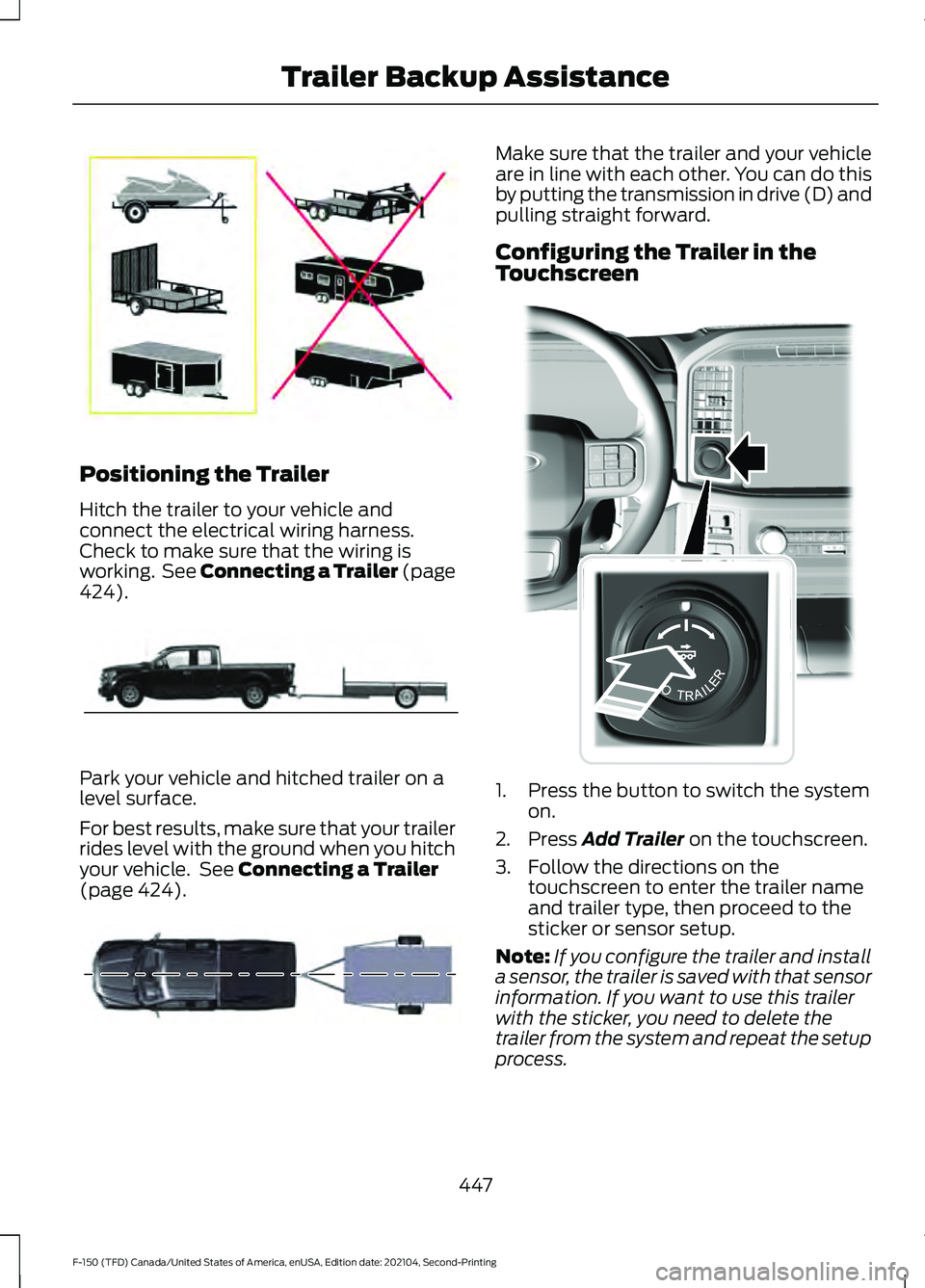
Positioning the Trailer
Hitch the trailer to your vehicle and
connect the electrical wiring harness.
Check to make sure that the wiring is
working. See Connecting a Trailer (page
424).
Park your vehicle and hitched trailer on a
level surface.
For best results, make sure that your trailer
rides level with the ground when you hitch
your vehicle. See
Connecting a Trailer
(page 424). Make sure that the trailer and your vehicle
are in line with each other. You can do this
by putting the transmission in drive (D) and
pulling straight forward.
Configuring the Trailer in the
Touchscreen
1. Press the button to switch the system
on.
2. Press
Add Trailer on the touchscreen.
3. Follow the directions on the touchscreen to enter the trailer name
and trailer type, then proceed to the
sticker or sensor setup.
Note: If you configure the trailer and install
a sensor, the trailer is saved with that sensor
information. If you want to use this trailer
with the sticker, you need to delete the
trailer from the system and repeat the setup
process.
447
F-150 (TFD) Canada/United States of America, enUSA, Edition date: 202104, Second-Printing Trailer Backup AssistanceE209766 E209759 E209760 E310335
Page 452 of 796
Note:
Your vehicle has two options for the
trailer reversing aid setup. If your vehicle
came with a trailer sensor kit or if a message
displays to install a sensor, follow the sensor
installation instructions. See Trailer Sensor
Installation (page 448). If your vehicle did
not come with a trailer sensor kit, follow the
sticker installation instructions. See
Applying the Trailer Reversing Aid Sticker
(page
448).
Note: If your vehicle came with a trailer
sensor kit, the vehicle will receive an update
that allows the system to operate with a
sensor or sticker. If your vehicle did not come
with a trailer sensor kit, your vehicle can be
setup using either method, but you need to
separately purchase the trailer sensor kit
from your authorized dealer.
APPLYING THE TRAILER
REVERSING AID STICKER
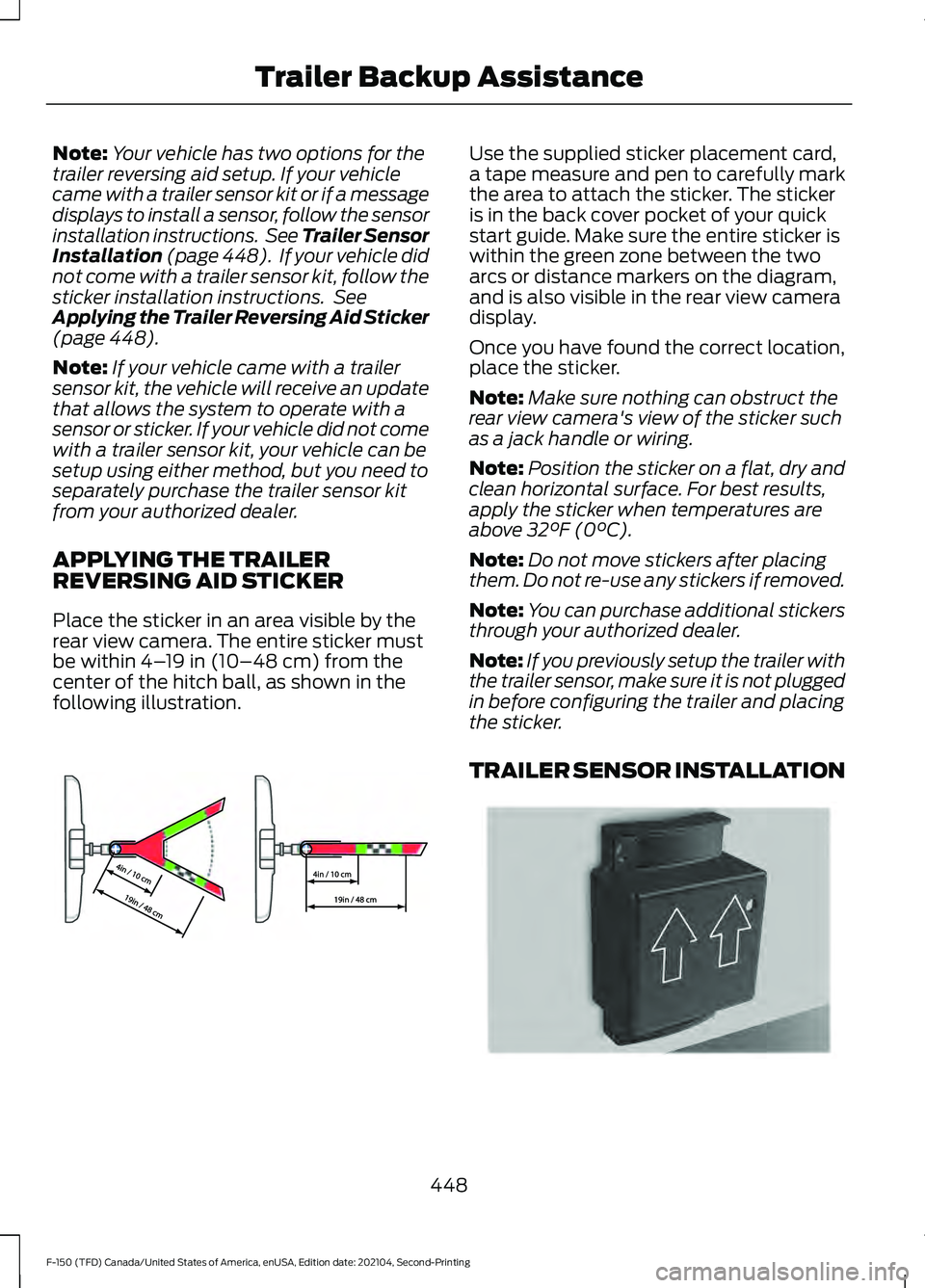
Place the sticker in an area visible by the
rear view camera. The entire sticker must
be within
4– 19 in (10–48 cm) from the
center of the hitch ball, as shown in the
following illustration. Use the supplied sticker placement card,
a tape measure and pen to carefully mark
the area to attach the sticker. The sticker
is in the back cover pocket of your quick
start guide. Make sure the entire sticker is
within the green zone between the two
arcs or distance markers on the diagram,
and is also visible in the rear view camera
display.
Once you have found the correct location,
place the sticker.
Note:
Make sure nothing can obstruct the
rear view camera's view of the sticker such
as a jack handle or wiring.
Note: Position the sticker on a flat, dry and
clean horizontal surface. For best results,
apply the sticker when temperatures are
above
32°F (0°C).
Note: Do not move stickers after placing
them. Do not re-use any stickers if removed.
Note: You can purchase additional stickers
through your authorized dealer.
Note: If you previously setup the trailer with
the trailer sensor, make sure it is not plugged
in before configuring the trailer and placing
the sticker.
TRAILER SENSOR INSTALLATION 448
F-150 (TFD) Canada/United States of America, enUSA, Edition date: 202104, Second-Printing Trailer Backup AssistanceE333148 E315959
Page 458 of 796
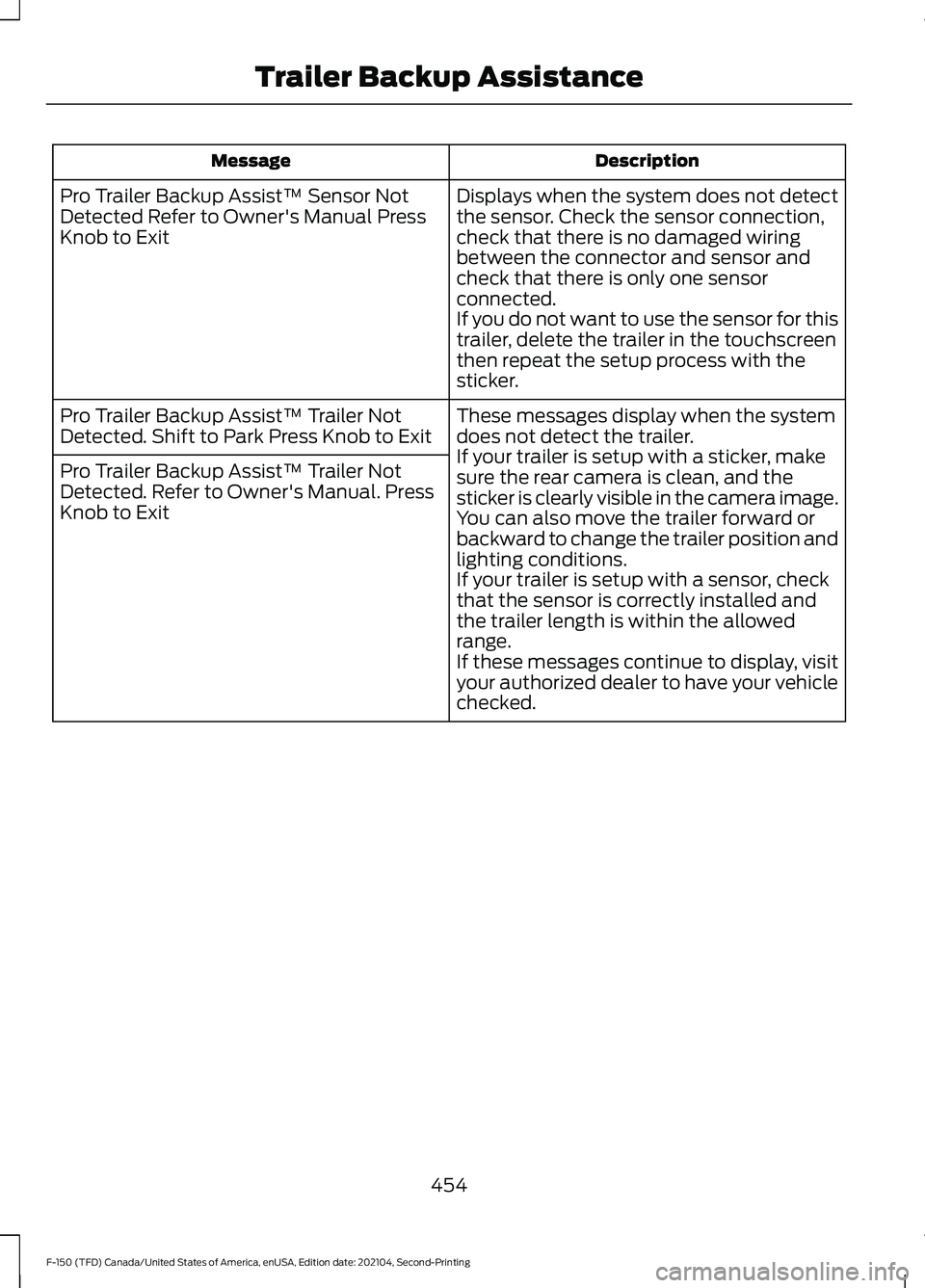
Description
Message
Displays when the system does not detect
the sensor. Check the sensor connection,
check that there is no damaged wiring
between the connector and sensor and
check that there is only one sensor
connected.
If you do not want to use the sensor for this
trailer, delete the trailer in the touchscreen
then repeat the setup process with the
sticker.
Pro Trailer Backup Assist™ Sensor Not
Detected Refer to Owner's Manual Press
Knob to Exit
These messages display when the system
does not detect the trailer.
If your trailer is setup with a sticker, make
sure the rear camera is clean, and the
sticker is clearly visible in the camera image.
You can also move the trailer forward or
backward to change the trailer position and
lighting conditions.
If your trailer is setup with a sensor, check
that the sensor is correctly installed and
the trailer length is within the allowed
range.
If these messages continue to display, visit
your authorized dealer to have your vehicle
checked.
Pro Trailer Backup Assist™ Trailer Not
Detected. Shift to Park Press Knob to Exit
Pro Trailer Backup Assist™ Trailer Not
Detected. Refer to Owner's Manual. Press
Knob to Exit
454
F-150 (TFD) Canada/United States of America, enUSA, Edition date: 202104, Second-Printing Trailer Backup Assistance
Page 460 of 796
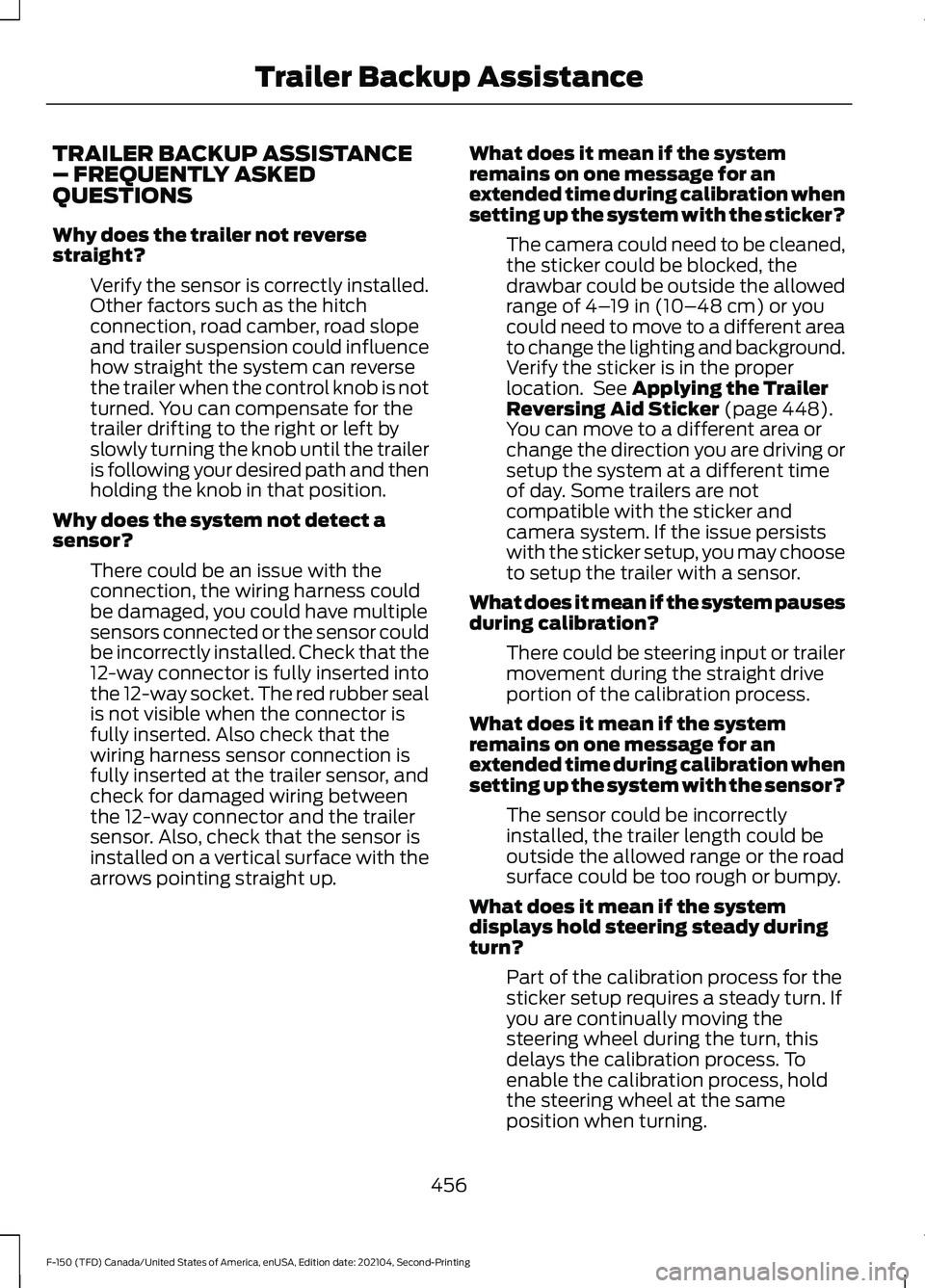
TRAILER BACKUP ASSISTANCE
– FREQUENTLY ASKED
QUESTIONS
Why does the trailer not reverse
straight?
Verify the sensor is correctly installed.
Other factors such as the hitch
connection, road camber, road slope
and trailer suspension could influence
how straight the system can reverse
the trailer when the control knob is not
turned. You can compensate for the
trailer drifting to the right or left by
slowly turning the knob until the trailer
is following your desired path and then
holding the knob in that position.
Why does the system not detect a
sensor? There could be an issue with the
connection, the wiring harness could
be damaged, you could have multiple
sensors connected or the sensor could
be incorrectly installed. Check that the
12-way connector is fully inserted into
the 12-way socket. The red rubber seal
is not visible when the connector is
fully inserted. Also check that the
wiring harness sensor connection is
fully inserted at the trailer sensor, and
check for damaged wiring between
the 12-way connector and the trailer
sensor. Also, check that the sensor is
installed on a vertical surface with the
arrows pointing straight up. What does it mean if the system
remains on one message for an
extended time during calibration when
setting up the system with the sticker?
The camera could need to be cleaned,
the sticker could be blocked, the
drawbar could be outside the allowed
range of 4–19 in (10–48 cm) or you
could need to move to a different area
to change the lighting and background.
Verify the sticker is in the proper
location. See
Applying the Trailer
Reversing Aid Sticker (page 448).
You can move to a different area or
change the direction you are driving or
setup the system at a different time
of day. Some trailers are not
compatible with the sticker and
camera system. If the issue persists
with the sticker setup, you may choose
to setup the trailer with a sensor.
What does it mean if the system pauses
during calibration? There could be steering input or trailer
movement during the straight drive
portion of the calibration process.
What does it mean if the system
remains on one message for an
extended time during calibration when
setting up the system with the sensor? The sensor could be incorrectly
installed, the trailer length could be
outside the allowed range or the road
surface could be too rough or bumpy.
What does it mean if the system
displays hold steering steady during
turn? Part of the calibration process for the
sticker setup requires a steady turn. If
you are continually moving the
steering wheel during the turn, this
delays the calibration process. To
enable the calibration process, hold
the steering wheel at the same
position when turning.
456
F-150 (TFD) Canada/United States of America, enUSA, Edition date: 202104, Second-Printing Trailer Backup Assistance
Page 462 of 796
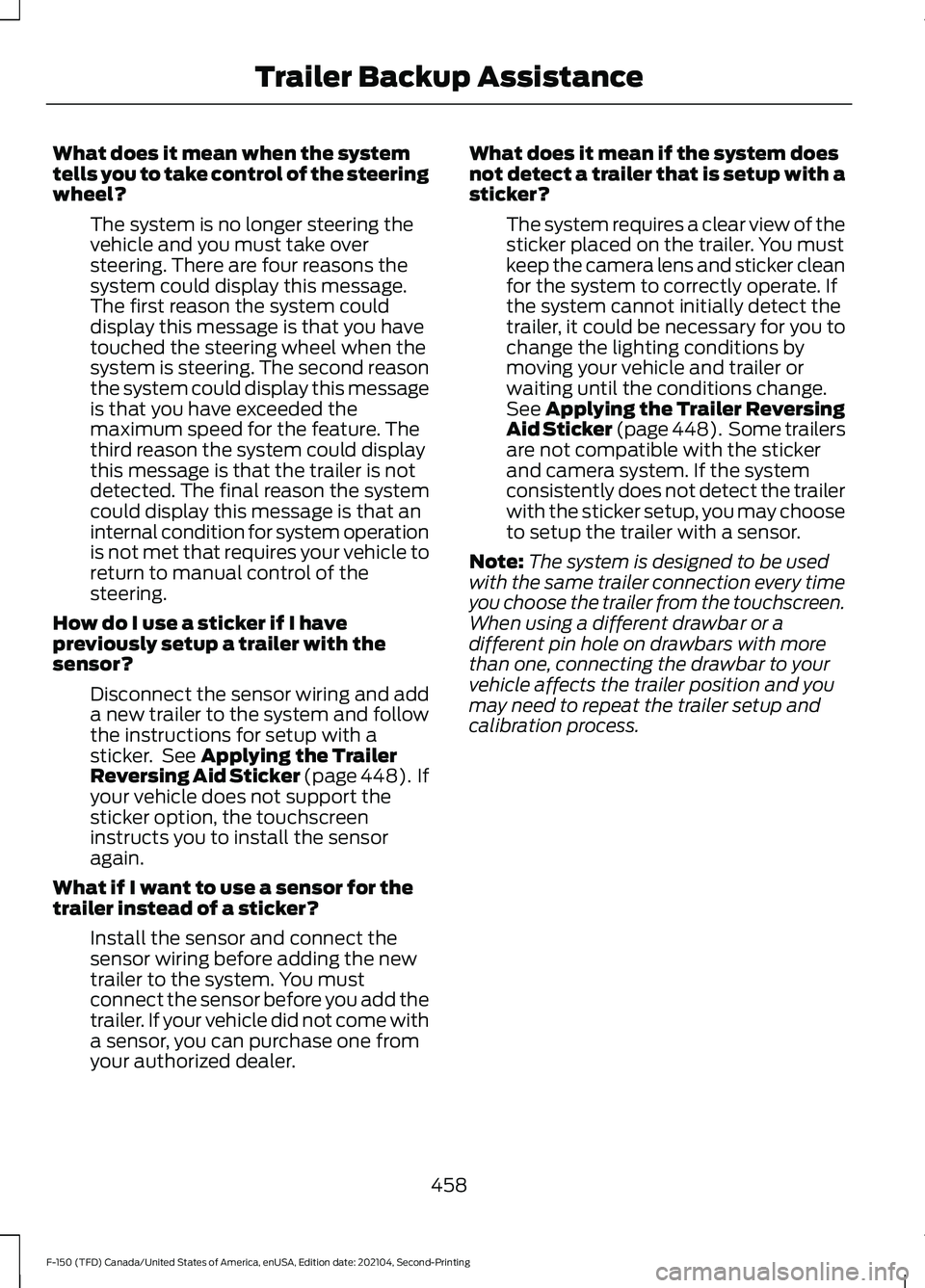
What does it mean when the system
tells you to take control of the steering
wheel?
The system is no longer steering the
vehicle and you must take over
steering. There are four reasons the
system could display this message.
The first reason the system could
display this message is that you have
touched the steering wheel when the
system is steering. The second reason
the system could display this message
is that you have exceeded the
maximum speed for the feature. The
third reason the system could display
this message is that the trailer is not
detected. The final reason the system
could display this message is that an
internal condition for system operation
is not met that requires your vehicle to
return to manual control of the
steering.
How do I use a sticker if I have
previously setup a trailer with the
sensor? Disconnect the sensor wiring and add
a new trailer to the system and follow
the instructions for setup with a
sticker. See Applying the Trailer
Reversing Aid Sticker (page 448). If
your vehicle does not support the
sticker option, the touchscreen
instructs you to install the sensor
again.
What if I want to use a sensor for the
trailer instead of a sticker? Install the sensor and connect the
sensor wiring before adding the new
trailer to the system. You must
connect the sensor before you add the
trailer. If your vehicle did not come with
a sensor, you can purchase one from
your authorized dealer. What does it mean if the system does
not detect a trailer that is setup with a
sticker?
The system requires a clear view of the
sticker placed on the trailer. You must
keep the camera lens and sticker clean
for the system to correctly operate. If
the system cannot initially detect the
trailer, it could be necessary for you to
change the lighting conditions by
moving your vehicle and trailer or
waiting until the conditions change.
See
Applying the Trailer Reversing
Aid Sticker (page 448). Some trailers
are not compatible with the sticker
and camera system. If the system
consistently does not detect the trailer
with the sticker setup, you may choose
to setup the trailer with a sensor.
Note: The system is designed to be used
with the same trailer connection every time
you choose the trailer from the touchscreen.
When using a different drawbar or a
different pin hole on drawbars with more
than one, connecting the drawbar to your
vehicle affects the trailer position and you
may need to repeat the trailer setup and
calibration process.
458
F-150 (TFD) Canada/United States of America, enUSA, Edition date: 202104, Second-Printing Trailer Backup Assistance
Page 464 of 796
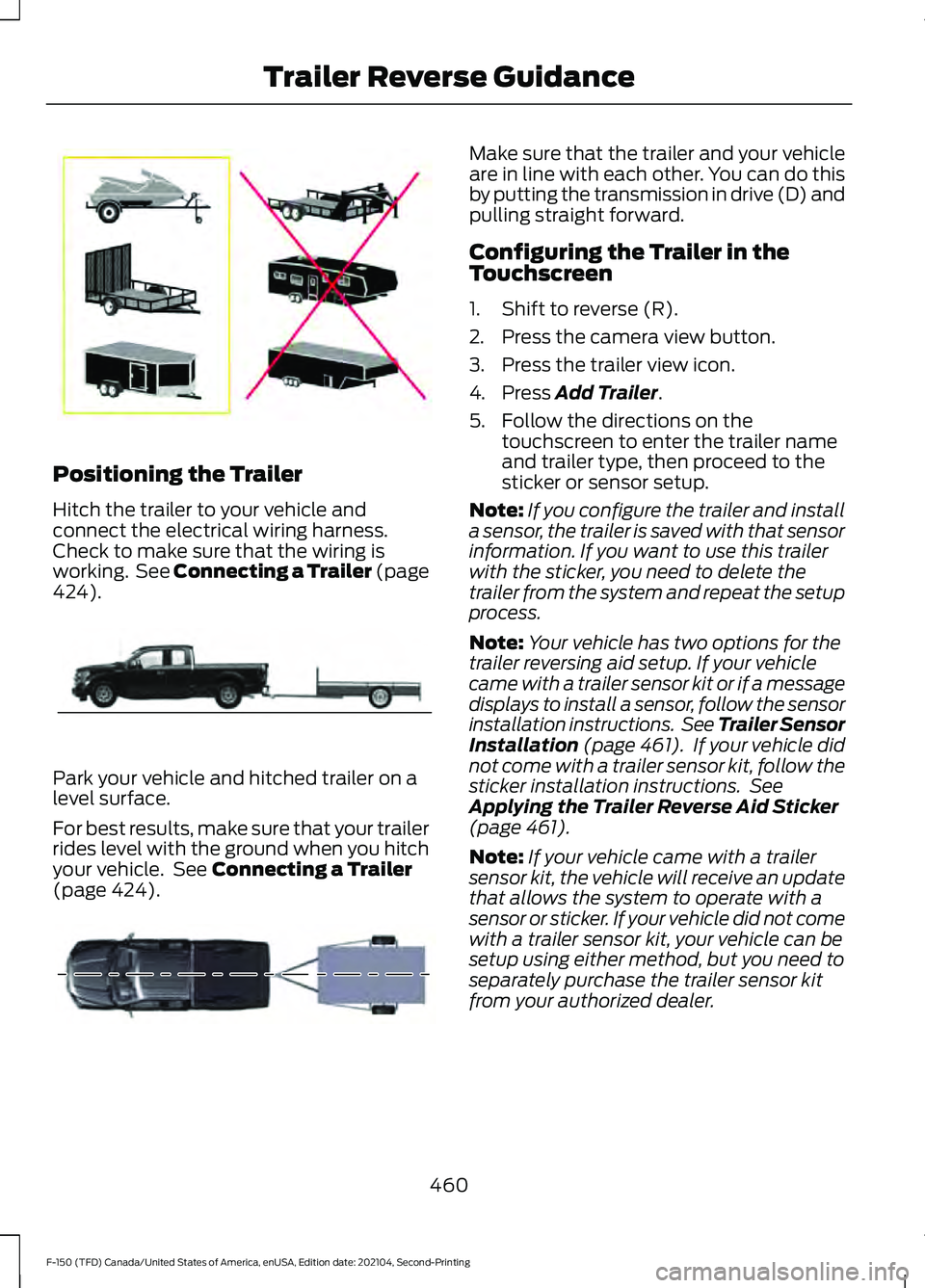
Positioning the Trailer
Hitch the trailer to your vehicle and
connect the electrical wiring harness.
Check to make sure that the wiring is
working. See Connecting a Trailer (page
424).
Park your vehicle and hitched trailer on a
level surface.
For best results, make sure that your trailer
rides level with the ground when you hitch
your vehicle. See
Connecting a Trailer
(page 424). Make sure that the trailer and your vehicle
are in line with each other. You can do this
by putting the transmission in drive (D) and
pulling straight forward.
Configuring the Trailer in the
Touchscreen
1. Shift to reverse (R).
2. Press the camera view button.
3. Press the trailer view icon.
4. Press
Add Trailer.
5. Follow the directions on the touchscreen to enter the trailer name
and trailer type, then proceed to the
sticker or sensor setup.
Note: If you configure the trailer and install
a sensor, the trailer is saved with that sensor
information. If you want to use this trailer
with the sticker, you need to delete the
trailer from the system and repeat the setup
process.
Note: Your vehicle has two options for the
trailer reversing aid setup. If your vehicle
came with a trailer sensor kit or if a message
displays to install a sensor, follow the sensor
installation instructions. See Trailer Sensor
Installation
(page 461). If your vehicle did
not come with a trailer sensor kit, follow the
sticker installation instructions. See
Applying the Trailer Reverse Aid Sticker
(page
461).
Note: If your vehicle came with a trailer
sensor kit, the vehicle will receive an update
that allows the system to operate with a
sensor or sticker. If your vehicle did not come
with a trailer sensor kit, your vehicle can be
setup using either method, but you need to
separately purchase the trailer sensor kit
from your authorized dealer.
460
F-150 (TFD) Canada/United States of America, enUSA, Edition date: 202104, Second-Printing Trailer Reverse GuidanceE209766 E209759 E209760
Page 465 of 796
APPLYING THE TRAILER
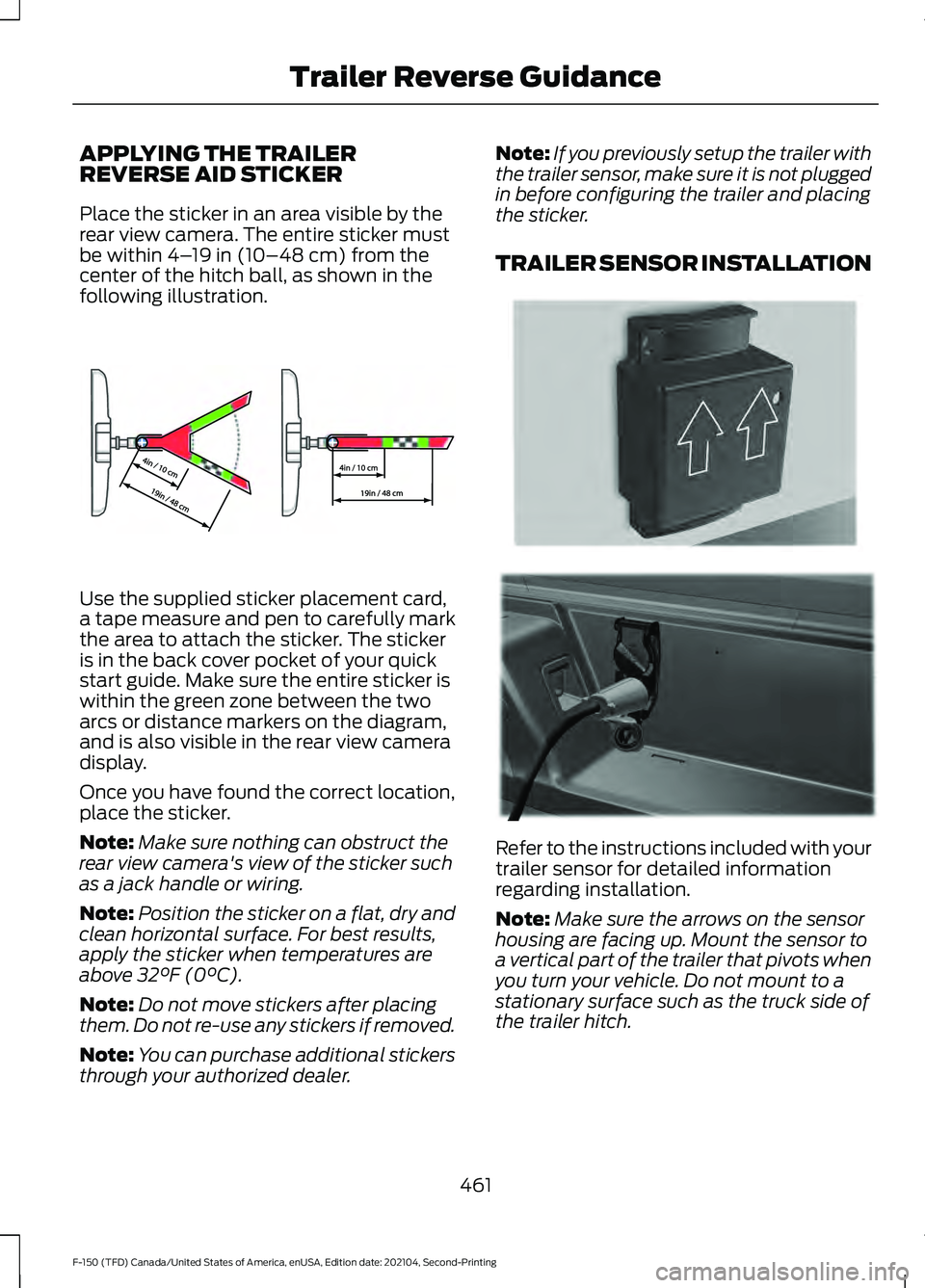
REVERSE AID STICKER
Place the sticker in an area visible by the
rear view camera. The entire sticker must
be within 4–
19 in (10–48 cm) from the
center of the hitch ball, as shown in the
following illustration. Use the supplied sticker placement card,
a tape measure and pen to carefully mark
the area to attach the sticker. The sticker
is in the back cover pocket of your quick
start guide. Make sure the entire sticker is
within the green zone between the two
arcs or distance markers on the diagram,
and is also visible in the rear view camera
display.
Once you have found the correct location,
place the sticker.
Note:
Make sure nothing can obstruct the
rear view camera's view of the sticker such
as a jack handle or wiring.
Note: Position the sticker on a flat, dry and
clean horizontal surface. For best results,
apply the sticker when temperatures are
above
32°F (0°C).
Note: Do not move stickers after placing
them. Do not re-use any stickers if removed.
Note: You can purchase additional stickers
through your authorized dealer. Note:
If you previously setup the trailer with
the trailer sensor, make sure it is not plugged
in before configuring the trailer and placing
the sticker.
TRAILER SENSOR INSTALLATION Refer to the instructions included with your
trailer sensor for detailed information
regarding installation.
Note:
Make sure the arrows on the sensor
housing are facing up. Mount the sensor to
a vertical part of the trailer that pivots when
you turn your vehicle. Do not mount to a
stationary surface such as the truck side of
the trailer hitch.
461
F-150 (TFD) Canada/United States of America, enUSA, Edition date: 202104, Second-Printing Trailer Reverse GuidanceE333148 E315959 E335221
Page 469 of 796
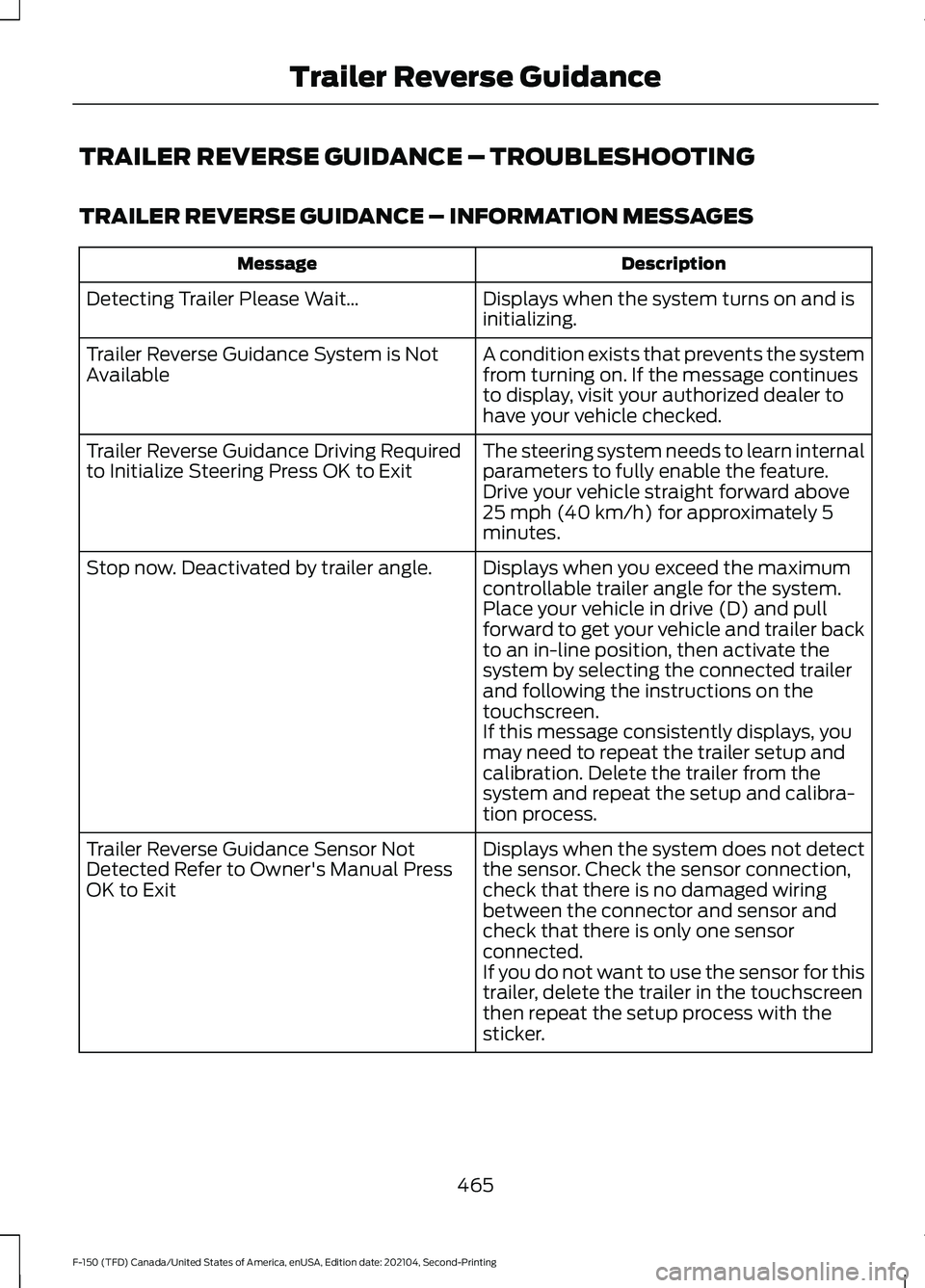
TRAILER REVERSE GUIDANCE – TROUBLESHOOTING
TRAILER REVERSE GUIDANCE – INFORMATION MESSAGES
Description
Message
Displays when the system turns on and is
initializing.
Detecting Trailer Please Wait…
A condition exists that prevents the system
from turning on. If the message continues
to display, visit your authorized dealer to
have your vehicle checked.
Trailer Reverse Guidance System is Not
Available
The steering system needs to learn internal
parameters to fully enable the feature.
Drive your vehicle straight forward above
25 mph (40 km/h) for approximately 5
minutes.
Trailer Reverse Guidance Driving Required
to Initialize Steering Press OK to Exit
Displays when you exceed the maximum
controllable trailer angle for the system.
Place your vehicle in drive (D) and pull
forward to get your vehicle and trailer back
to an in-line position, then activate the
system by selecting the connected trailer
and following the instructions on the
touchscreen.
Stop now. Deactivated by trailer angle.
If this message consistently displays, you
may need to repeat the trailer setup and
calibration. Delete the trailer from the
system and repeat the setup and calibra-
tion process.
Displays when the system does not detect
the sensor. Check the sensor connection,
check that there is no damaged wiring
between the connector and sensor and
check that there is only one sensor
connected.
Trailer Reverse Guidance Sensor Not
Detected Refer to Owner's Manual Press
OK to Exit
If you do not want to use the sensor for this
trailer, delete the trailer in the touchscreen
then repeat the setup process with the
sticker.
465
F-150 (TFD) Canada/United States of America, enUSA, Edition date: 202104, Second-Printing Trailer Reverse Guidance