child seat FORD F-150 2021 Owner's Manual
[x] Cancel search | Manufacturer: FORD, Model Year: 2021, Model line: F-150, Model: FORD F-150 2021Pages: 796, PDF Size: 13.89 MB
Page 74 of 796
•
Shoulder belt height adjusters.
• Shoulder belt guide on seat backrest.
• Child restraint LATCH and tether
anchors.
• Attaching hardware.
Read the child restraint manufacturer's
instructions for additional inspection and
maintenance information specific to the
child restraint.
We recommend that all seatbelt
assemblies in use in vehicles involved in a
crash be replaced. However, if the crash
was minor and an authorized dealer finds
that the belts do not show damage and
continue to operate properly, they do not
need to be replaced. Seatbelt assemblies
not in use during a crash should also be
checked and replaced if either damage or
improper operation is noted.
Properly care for seatbelts. See Cleaning
Seatbelts (page 538).
SEATBELT EXTENSIONS WARNING:
Persons who fit into
the vehicle's seatbelt should not use an
extension. Unnecessary use could result
in serious personal injury in the event of
a crash. WARNING:
Only use extensions
provided free of charge by our dealers.
The dealer will provide an extension
designed specifically for this vehicle,
model year and seating position. The use
of an extension intended for another
vehicle, model year or seating position
may not offer you the full protection of
your vehicle's seatbelt restraint system. WARNING:
Never use seatbelt
extensions to install child restraints. WARNING:
Do not use extensions
to change the way the seatbelt fits
across the torso, over the lap or to make
the seatbelt buckle easier to reach.
If, because of body size or driving position,
it is not possible to properly fasten the
seatbelt over your lap and shoulder, an
extension that is compatible with the
seatbelts is available free of charge from
our dealers. Only use our seatbelt
extensions made by the original equipment
seatbelt manufacturer with our seatbelts.
Ask your authorized dealer if your extension
is compatible with your vehicle restraint
system.
70
F-150 (TFD) Canada/United States of America, enUSA, Edition date: 202104, Second-Printing Seatbelts
Page 78 of 796
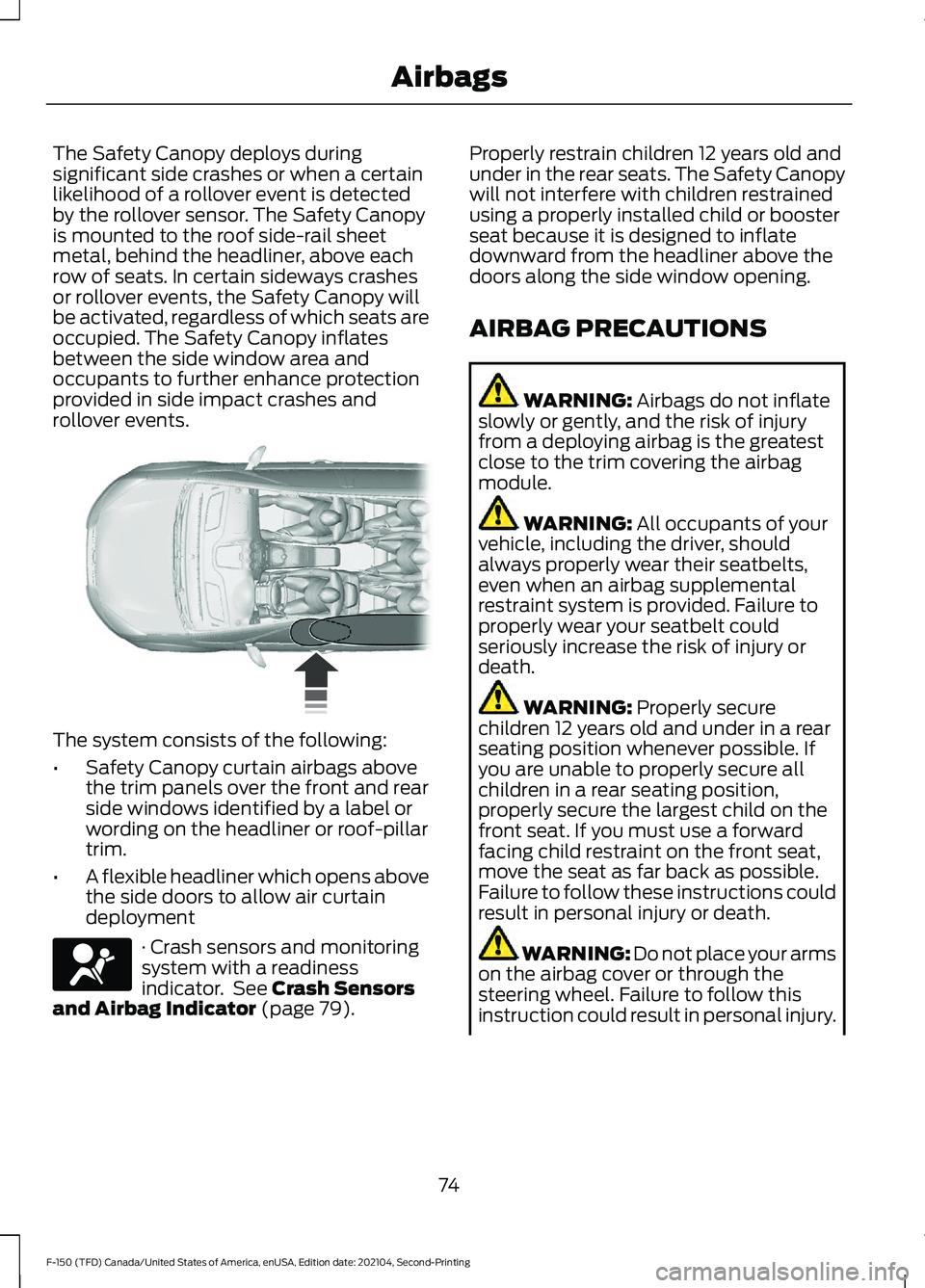
The Safety Canopy deploys during
significant side crashes or when a certain
likelihood of a rollover event is detected
by the rollover sensor. The Safety Canopy
is mounted to the roof side-rail sheet
metal, behind the headliner, above each
row of seats. In certain sideways crashes
or rollover events, the Safety Canopy will
be activated, regardless of which seats are
occupied. The Safety Canopy inflates
between the side window area and
occupants to further enhance protection
provided in side impact crashes and
rollover events.
The system consists of the following:
•
Safety Canopy curtain airbags above
the trim panels over the front and rear
side windows identified by a label or
wording on the headliner or roof-pillar
trim.
• A flexible headliner which opens above
the side doors to allow air curtain
deployment · Crash sensors and monitoring
system with a readiness
indicator. See Crash Sensors
and Airbag Indicator (page 79). Properly restrain children 12 years old and
under in the rear seats. The Safety Canopy
will not interfere with children restrained
using a properly installed child or booster
seat because it is designed to inflate
downward from the headliner above the
doors along the side window opening.
AIRBAG PRECAUTIONS
WARNING:
Airbags do not inflate
slowly or gently, and the risk of injury
from a deploying airbag is the greatest
close to the trim covering the airbag
module. WARNING:
All occupants of your
vehicle, including the driver, should
always properly wear their seatbelts,
even when an airbag supplemental
restraint system is provided. Failure to
properly wear your seatbelt could
seriously increase the risk of injury or
death. WARNING:
Properly secure
children 12 years old and under in a rear
seating position whenever possible. If
you are unable to properly secure all
children in a rear seating position,
properly secure the largest child on the
front seat. If you must use a forward
facing child restraint on the front seat,
move the seat as far back as possible.
Failure to follow these instructions could
result in personal injury or death. WARNING:
Do not place your arms
on the airbag cover or through the
steering wheel. Failure to follow this
instruction could result in personal injury.
74
F-150 (TFD) Canada/United States of America, enUSA, Edition date: 202104, Second-Printing Airbags E75004 E67017
Page 79 of 796
WARNING: Keep the areas in front
of the airbags free from obstruction. Do
not affix anything to or over the airbag
covers. Objects could become projectiles
during airbag deployment. Failure to
follow this instruction could result in
personal injury or death. WARNING:
To reduce risk of injury,
do not obstruct or place objects in the
deployment path of the airbag. WARNING:
Do not place a
rearward facing child restraint in front of
an active airbag. Failure to follow this
instruction could result in personal injury
or death. WARNING:
Do not attempt to
service, repair, or modify the
supplementary restraint system or
associated components. Failure to
follow this instruction could result in
personal injury or death. WARNING:
Several airbag system
components get hot after inflation. To
reduce the risk of injury, do not touch
them after inflation. WARNING:
If a supplementary
restraint system component has
deployed, it will not function again. Have
the system and associated components
inspected as soon as possible. Failure to
follow this instruction could result in
personal injury or death. PROPERLY ADJUSTING THE
DRIVER AND FRONT
PASSENGER SEATS WARNING:
National Highway
Traffic Safety Administration (NHTSA)
recommends a minimum distance of at
least
10 in (25 cm) between an
occupant's chest and the driver airbag
module.
To properly position yourself away from
the airbag:
• Move your seat to the rear as far as you
can while still reaching the pedals
comfortably.
• Recline the seat slightly one or two
degrees from the upright position.
After all occupants have adjusted their
seats and put on seatbelts, it is very
important that they continue to sit
properly. Properly seated occupants sit
upright, lean against the seat backrest, and
center themselves on the seat cushion,
with their feet comfortably extended on
the floor. Sitting improperly can increase
the chance of injury in a crash event. For
example, if an occupant slouches, lies
down, turns sideways, sits forward, leans
forward or sideways, or puts one or both
feet up, the chance of injury during a crash
greatly increases.
CHILDREN AND AIRBAGS WARNING:
Do not place a
rearward facing child restraint in front of
an active airbag. Failure to follow this
instruction could result in personal injury
or death.
75
F-150 (TFD) Canada/United States of America, enUSA, Edition date: 202104, Second-Printing Airbags
Page 80 of 796
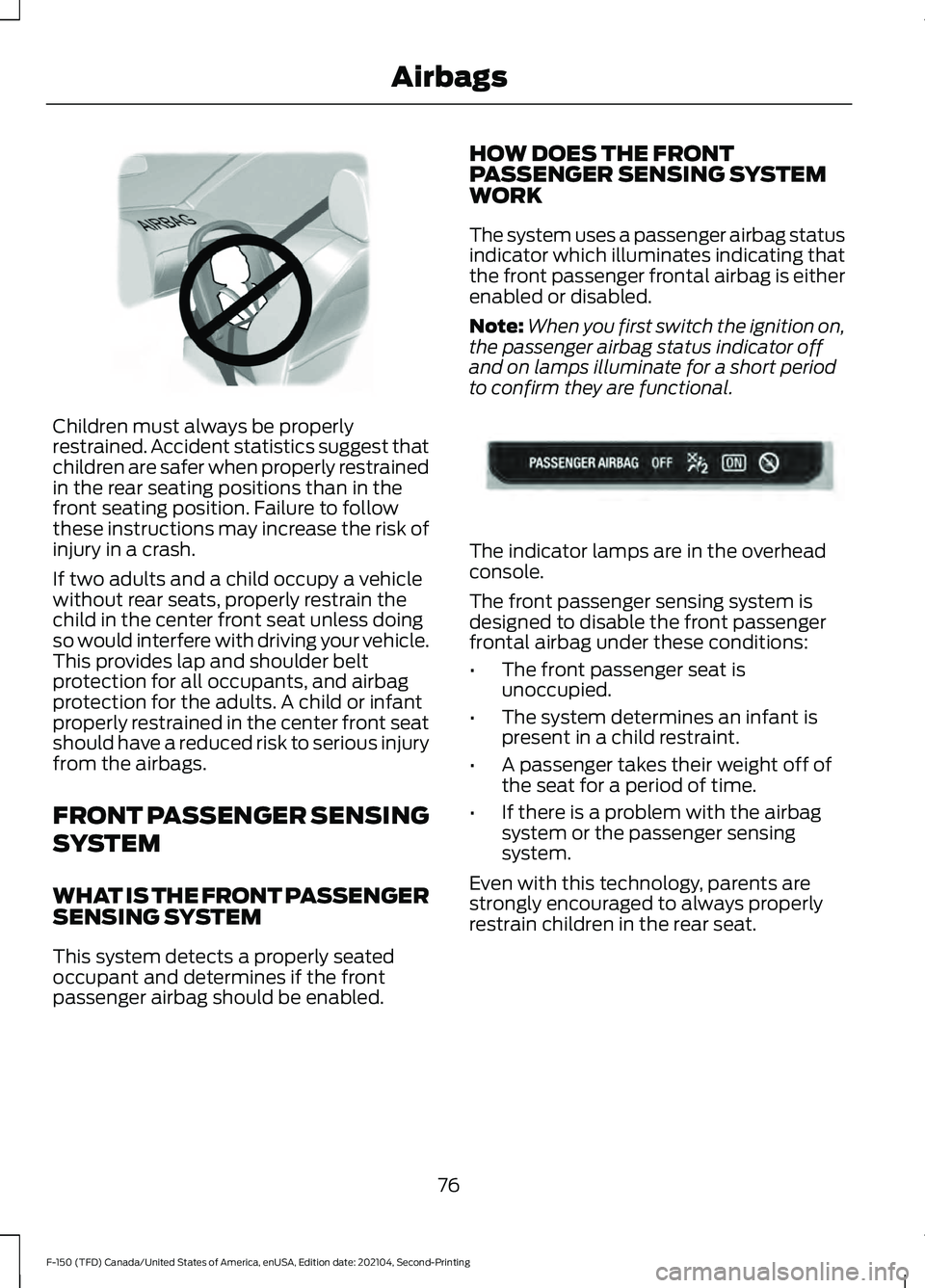
Children must always be properly
restrained. Accident statistics suggest that
children are safer when properly restrained
in the rear seating positions than in the
front seating position. Failure to follow
these instructions may increase the risk of
injury in a crash.
If two adults and a child occupy a vehicle
without rear seats, properly restrain the
child in the center front seat unless doing
so would interfere with driving your vehicle.
This provides lap and shoulder belt
protection for all occupants, and airbag
protection for the adults. A child or infant
properly restrained in the center front seat
should have a reduced risk to serious injury
from the airbags.
FRONT PASSENGER SENSING
SYSTEM
WHAT IS THE FRONT PASSENGER
SENSING SYSTEM
This system detects a properly seated
occupant and determines if the front
passenger airbag should be enabled. HOW DOES THE FRONT
PASSENGER SENSING SYSTEM
WORK
The system uses a passenger airbag status
indicator which illuminates indicating that
the front passenger frontal airbag is either
enabled or disabled.
Note:
When you first switch the ignition on,
the passenger airbag status indicator off
and on lamps illuminate for a short period
to confirm they are functional. The indicator lamps are in the overhead
console.
The front passenger sensing system is
designed to disable the front passenger
frontal airbag under these conditions:
•
The front passenger seat is
unoccupied.
• The system determines an infant is
present in a child restraint.
• A passenger takes their weight off of
the seat for a period of time.
• If there is a problem with the airbag
system or the passenger sensing
system.
Even with this technology, parents are
strongly encouraged to always properly
restrain children in the rear seat.
76
F-150 (TFD) Canada/United States of America, enUSA, Edition date: 202104, Second-Printing AirbagsE142846 E181984
Page 81 of 796
•
When the front passenger sensing
system disables the front passenger
frontal airbag, the passenger airbag
status indicator illuminates the off
lamp.
• If you have installed the child restraint
and the passenger airbag status
indicator illuminates the on lamp,
switch your vehicle off, remove the
child restraint from your vehicle and
reinstall the restraint following the
child restraint manufacturer's
instructions.
The front passenger sensing system works
with sensors that are part of the front
passenger seat and seatbelt. The sensors
are designed to detect the presence of a
properly seated occupant and determine
if the front passenger frontal airbag should
be enabled.
• When the front passenger sensing
system enables the front passenger
frontal airbag, the passenger airbag
status indicator illuminates the on
lamp.
If a person of adult size is sitting in the front
passenger seat, but the passenger airbag
status indicator off lamp is illuminated, it
is possible that the person is not sitting
properly in the seat. If this happens:
• Switch your vehicle off and ask the
person to place the seat backrest in an
upright position.
• Have the person sit upright in the seat,
centered on the seat cushion, with the
person's legs comfortably extended.
• Restart your vehicle and have the
person remain in this position for about
two minutes. This allows the system
to detect that person and enable the
passenger frontal airbag.
• If the indicator off lamp remains
illuminated even after this, you should
advise the person to ride in the rear
seat. After all occupants have adjusted their
seats and put on seatbelts, it is very
important that they continue to sit upright,
leaning against the seat backrest, and
centered on the seat cushion, with their
feet comfortably extended on the floor.
Sitting improperly can increase the chance
of injury in a crash event. For example, if
an occupant slouches, lies down, turns
sideways, sits forward, leans forward or
sideways, or puts one or both feet up, the
chance of injury during a crash greatly
increases.
If you think that the state of the passenger
airbag status indicator lamp is incorrect,
check for the following:
•
Objects lodged underneath the seat.
• Objects between the seat cushion and
the center console.
• Objects hanging off the seat backrest.
• Objects stowed in the seat backrest
map pocket.
• Objects placed on the occupant's lap.
• Cargo interference with the seat
• Other passengers pushing or pulling on
the seat.
• Rear passenger feet and knees resting
or pushing on the seat.
The listed conditions could cause the
weight of a properly seated occupant to
be incorrectly interpreted by the front
passenger sensing system. The person in
the front passenger seat could appear
heavier or lighter due to the conditions
listed. Make sure the front passenger
sensing system is operating
properly. See Crash Sensors
and Airbag Indicator (page 79).
If the airbag readiness light is on, do the
following:
77
F-150 (TFD) Canada/United States of America, enUSA, Edition date: 202104, Second-Printing AirbagsE67017
Page 82 of 796
•
Pull your vehicle over.
• Switch your vehicle off.
• Check for any objects lodged
underneath the front passenger seat
or cargo interfering with the seat.
• Remove the obstruction if found.
• Restart your vehicle.
• Wait at least two minutes and verify
that the airbag readiness light in the
instrument cluster is no longer
illuminated.
• If the airbag readiness light in the
instrument cluster remains illuminated,
there may be a problem due to the
front passenger sensing system.
Do not attempt to repair or service the
system. Take your vehicle in for service
immediately.
If it is necessary to modify an advanced
front airbag system to accommodate a
person with disabilities, contact your
Customer Relationship Center. See
Contacting Us (page 22). FRONT PASSENGER SENSING
SYSTEM PRECAUTIONS WARNING:
Sitting improperly, out
of position or with the seatback reclined
too far can take weight off the seat
cushion and affect the decision of the
passenger sensing system, resulting in
serious injury or death in the event of a
crash. Always sit upright against your
seat back, with your feet on the floor. WARNING:
Any alteration or
modification to the front passenger seat
may affect the performance of the front
passenger sensing system. This could
seriously increase the risk of injury or
death.
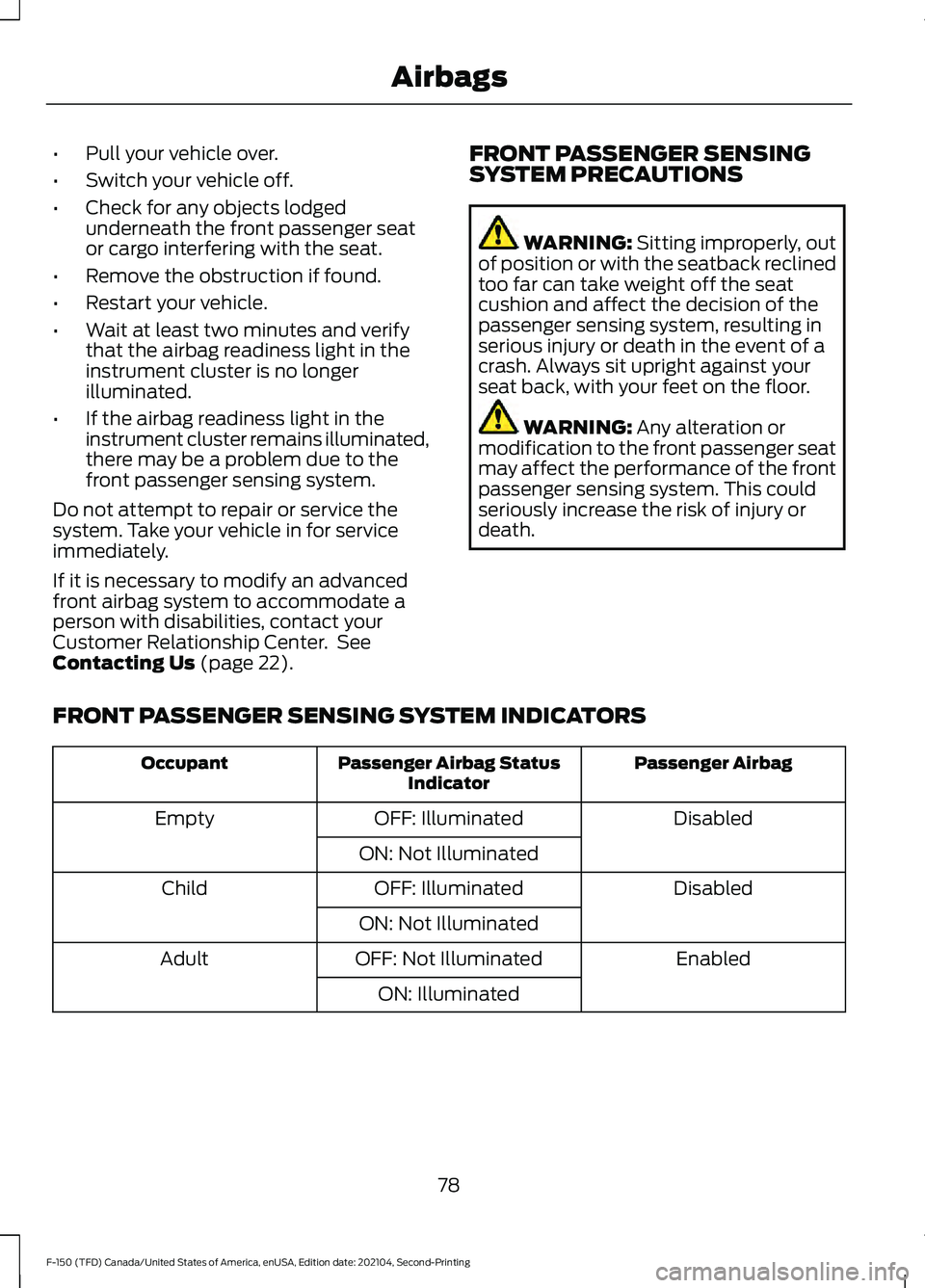
FRONT PASSENGER SENSING SYSTEM INDICATORS Passenger Airbag
Passenger Airbag Status
Indicator
Occupant
Disabled
OFF: Illuminated
Empty
ON: Not Illuminated Disabled
OFF: Illuminated
Child
ON: Not Illuminated Enabled
OFF: Not Illuminated
Adult
ON: Illuminated
78
F-150 (TFD) Canada/United States of America, enUSA, Edition date: 202104, Second-Printing Airbags
Page 96 of 796
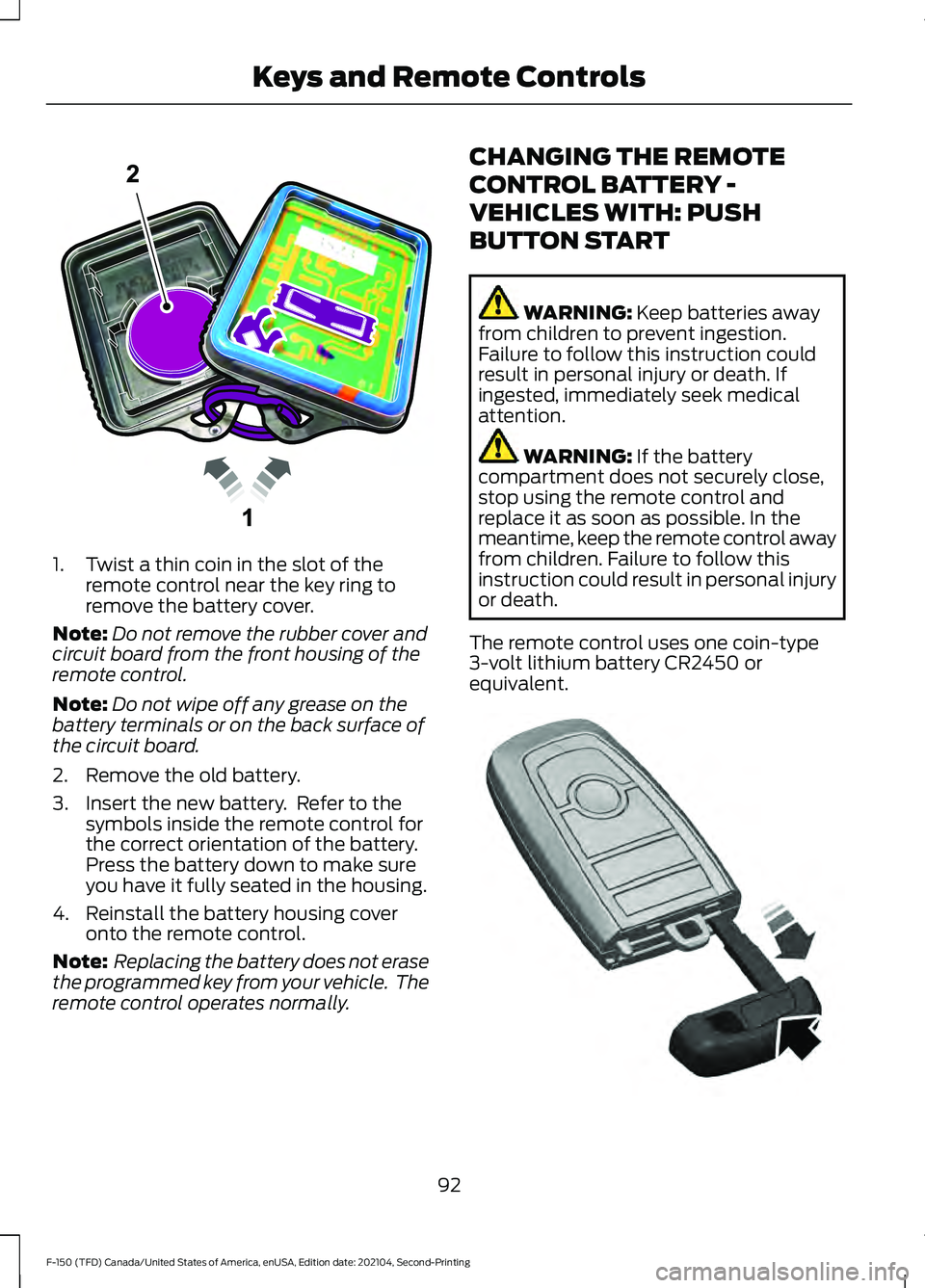
1. Twist a thin coin in the slot of the
remote control near the key ring to
remove the battery cover.
Note: Do not remove the rubber cover and
circuit board from the front housing of the
remote control.
Note: Do not wipe off any grease on the
battery terminals or on the back surface of
the circuit board.
2. Remove the old battery.
3. Insert the new battery. Refer to the symbols inside the remote control for
the correct orientation of the battery.
Press the battery down to make sure
you have it fully seated in the housing.
4. Reinstall the battery housing cover onto the remote control.
Note: Replacing the battery does not erase
the programmed key from your vehicle. The
remote control operates normally. CHANGING THE REMOTE
CONTROL BATTERY -
VEHICLES WITH: PUSH
BUTTON START WARNING: Keep batteries away
from children to prevent ingestion.
Failure to follow this instruction could
result in personal injury or death. If
ingested, immediately seek medical
attention. WARNING:
If the battery
compartment does not securely close,
stop using the remote control and
replace it as soon as possible. In the
meantime, keep the remote control away
from children. Failure to follow this
instruction could result in personal injury
or death.
The remote control uses one coin-type
3-volt lithium battery CR2450 or
equivalent. 92
F-150 (TFD) Canada/United States of America, enUSA, Edition date: 202104, Second-Printing Keys and Remote ControlsE203601 E322866
Page 211 of 796
WHAT IS THE REAR
OCCUPANT ALERT SYSTEM
The rear occupant alert system monitors
vehicle conditions and notifies you to check
for rear seat occupants when you switch
the ignition off.
HOW DOES THE REAR
OCCUPANT ALERT SYSTEM
WORK
The system monitors when rear doors have
been opened and closed to indicate the
potential presence of an occupant in the
rear seat.
A message displays in the information and
entertainment display screen and an
audible warning sounds when you switch
the ignition off after any of the following
conditions have been met:
•
A rear door is opened or closed while
the ignition is on.
• You switch the ignition on within 15
minutes of a rear door opening and
closing.
• You switch the ignition on within 15
minutes of the alert having displayed
or sounded.
REAR OCCUPANT ALERT
SYSTEM PRECAUTIONS WARNING: On hot days, the
temperature inside the vehicle can rise
very quickly. Exposure of people or
animals to these high temperatures for
even a short time can cause death or
serious heat related injuries, including
brain damage. Small children are
particularly at risk. WARNING:
Do not leave children
or pets unattended in your vehicle.
Failure to follow this instruction could
result in personal injury or death.
REAR OCCUPANT ALERT
SYSTEM LIMITATIONS
The system does not detect the presence
of objects or passengers in the rear seat.
It monitors when rear doors are opened
and closed.
Note: It is possible to receive an alert when
there is no rear seat occupant, but alert
conditions are met.
Note: It is possible to receive no alert when
there is an occupant in the rear seat, if alert
conditions are not met. For example, if a rear
seat occupant does not enter the vehicle
through a rear door.
Note: The audible warning does not sound
when the front door is opened before you
switch the ignition off.
SWITCHING REAR OCCUPANT
ALERT SYSTEM ON AND OFF
1. Press
Settings on the touchscreen.
2. Press
Vehicle.
3. Switch
Rear Occupant Alert on or off.
Note: The default setting is on.
Note: Performing a master reset causes the
system to switch on again.
Semiannual Reminder
(If Equipped)
When you switch the system off, a
message appears every six months as a
reminder that the system is off. You can
switch the system back on or leave it off.
207
F-150 (TFD) Canada/United States of America, enUSA, Edition date: 202104, Second-Printing Rear Occupant Alert System
(If Equipped)
Page 775 of 796
Changing the Remote Control Battery -
Vehicles With: Push Button Start..........92
Changing the Vehicle Wi-Fi Hotspot Name or Password..................................624
Charging a Device.........................................215
Charging a Wireless Device.......................231
Checking MyKey System Status............100
Checking the Brake Fluid
..........................309
Checking the Coolant..................................511
Checking the Seatbelts
...............................69
Checking the Selective Catalytic Reduction System Status.......................277
Checking the Tire Pressures....................555
Checking the Wiper Blades
......................144
Children and Airbags.....................................75
Child Restraint Anchor Points...................50 Locating the Child Restraint Lower Anchor
Points................................................................... 50
Locating the Child Restraint Top Tether Anchor Points.................................................... 51
What Are the Child Restraint Anchor Points................................................................... 50
Child Restraints...............................................52 Child Restraint Position Information.............52
Child Restraints Recommendation...............53
Child Safety......................................................49 Child Restraint Anchor Points......................... 50
Child Restraints..................................................... 52
Installing Child Restraints................................. 53
Child Safety Locks.........................................62
Child Safety Precautions.............................49
Cleaning Products.......................................534
Cleaning the Exterior..................................535 Cleaning Camera Lenses and
Sensors............................................................. 536
Cleaning Chrome, Aluminium or Stainless Steel................................................................... 535
Cleaning Headlamps and Rear Lamps............................................................... 535
Cleaning Stripes or Graphics.........................536
Cleaning the Engine Compartment...........536
Cleaning the Exterior Precautions...............535
Cleaning the Underbody................................. 536
Cleaning Wheels................................................ 535
Cleaning Windows and Wiper Blades............................................................... 535
Cleaning the Interior....................................537 Cleaning Carpets and Floor Mats................538 Cleaning Displays and Screens.....................
537
Cleaning Moonroof Tracks............................. 538
Cleaning Plastic.................................................. 537
Cleaning Seatbelts............................................ 538
Cleaning Seats and the Headliner...............537
Cleaning the Instrument Panel.....................537
Clearing All MyKeys
.....................................100
Clearing the Garage Door Opener..........212
Climate Control
.............................................186
Auto Mode............................................................ 188
Climate Control Hints.................................189
Closing the Tailgate
......................................119
Closing the Tailgate From Inside Your
Vehicle................................................................ 119
Closing the Tailgate From Outside Your Vehicle................................................................ 119
Closing the Tailgate Using the Remote Control............................................................... 120
Cold Weather Precautions.......................476
Connected Vehicle
......................................620
Connected Vehicle –
Troubleshooting............................................. 621
Connecting the Vehicle to a Mobile Network........................................................... 620
Connected Vehicle Data...............................31
Connected Vehicle Limitations..............620
Connected Vehicle Requirements
........620
Connected Vehicle – Troubleshooting.........................................621
Connected Vehicle – Frequently Asked Questions......................................................... 621
Connecting a Bluetooth® Device.........648
Connecting a Trailer....................................424 Connecting a Trailer –
Troubleshooting............................................ 427
Hitches................................................................... 424
Connecting a Trailer Precautions..........424
Connecting a Trailer – Troubleshooting........................................427
Connecting a Trailer – Information Messages.......................................................... 427
Connecting the Vehicle to a Mobile Network.......................................................620
Connecting FordPass to the Modem.........620
Enabling and Disabling the Modem...........620
What Is the Modem.......................................... 620
Connecting the Vehicle to a Wi-Fi Network.......................................................620
771
F-150 (TFD) Canada/United States of America, enUSA, Edition date: 202104, Second-Printing Index
Page 782 of 796
How Does the Electronic Locking
Differential Work - Raptor......................301
How Does the Garage Door Opener Work...............................................................210
How Does the Lane Keeping System Work..............................................................382
How Does the Personal Safety System Work...................................................................71
How Does the Rear Occupant Alert System Work..............................................207
How Does the Safety Canopy ™
Work
..................................................................73
How Does the Selective Catalytic Reduction System Work.........................273
How Does Traction Control Work...........319
How Does Trailer Backup Assistance Work..............................................................446
How Does Trailer Hitching Assistance Work..............................................................439
How Does Trailer Reverse Guidance Work..............................................................459
How Does Trailer Sway Control Work..............................................................438
How Do Personal Profiles Work..............651
How Do the Front Airbags Work...............72
How Do the Knee Airbags Work................73
How Do the Side Airbags Work.................72
Hybrid Display Information........................181 How Does EV Coach Work............................... 181
What Is EV Coach................................................ 181
Hybrid Electric Vehicle Driving Characteristics...........................................249
Hybrid Electric Vehicle Indicators..........249
Hybrid Electric Vehicle Information.................................................249
Eco Idle.................................................................. 250
Eco Idle – Troubleshooting............................. 251
Hybrid Electric Vehicle Information – Troubleshooting............................................ 250
Hybrid Electric Vehicle Information – Troubleshooting........................................250
Hybrid Electric Vehicle Information – Frequently Asked Questions....................250
I
Identifying Fuse Types
...............................502
Identifying the Audio Unit........................626 Identifying the Auxiliary Switch
Wiring...........................................................660
Identifying the Climate Control Unit.................................................................186
Ignition Switch
..............................................236
Inflating the Tires.........................................555
Information On Demand Screen - Vehicles With: 12.3 Inch Screen...........639
Information on the Tire Sidewall
...........543
Inspecting the Tire for Damage.............556
Inspecting the Tire for Wear....................556
Inspecting the Wheel Valve Stems.......557
Installing Child Restraints...........................53 Attaching the Front Seat Tether
Strap.................................................................... 58
Attaching the Rear Seat Tether Strap..........59
Combining the Seatbelt and Lower Anchors for Attaching Child Restraints.................... 58
Installing a Child Restraint in a Center Seat....................................................................... 57
Using Lower Anchors and Tethers for Children............................................................... 57
Using Seatbelts..................................................... 53
Using Tether Straps............................................. 58
Instrument Cluster Display.......................178 Hybrid Display Information.............................. 181
Personalized Settings........................................ 181
Trip Computer - Vehicles With: 4.2 Inch Screen............................................................... 180
Trip Computer - Vehicles With: 8 Inch Screen/12.3 Inch Screen............................. 180
Instrument Cluster Display Main Menu - Raptor, Vehicles With: 12.3 Inch
Screen............................................................179
Instrument Cluster Display Main Menu - Vehicles With: 12.3 Inch Screen
............178
Instrument Cluster Display Main Menu - Vehicles With: 4.2 Inch Screen..............179
Instrument Cluster Display Main Menu - Vehicles With: 8 Inch Screen
.................179
Instrument Cluster Indicators...................174
Instrument Cluster Indicators - Police Responder....................................................176
Instrument Cluster.......................................169 Fuel Gauge.............................................................. 171
Instrument Cluster Overview - Vehicles With: 12.3 Inch Screen
................................171
778
F-150 (TFD) Canada/United States of America, enUSA, Edition date: 202104, Second-Printing Index