tow bar FORD F-150 2021 Owners Manual
[x] Cancel search | Manufacturer: FORD, Model Year: 2021, Model line: F-150, Model: FORD F-150 2021Pages: 796, PDF Size: 13.89 MB
Page 22 of 796
Center Display Limitations
......................637
Status Bar ......................................................
637
Feature Bar ...................................................
638
Information On Demand Screen - Vehicles With: 12.3 Inch Screen ........
639
Rebooting the Center Display ...............
639
Voice Interaction
What is Voice Interaction ........................
640
Setting the Wake Word ...........................
640
Beginning a Voice Interaction ...............
640
Voice Interaction Examples ...................
640
Phone
Phone Precautions ....................................
643
Connecting Your Phone ...........................
643
Phone Menu .................................................
643
Making and Receiving a Phone Call .....
645
Sending and Receiving a Text Message .......................................................................
646
Switching Text Message Notification On and Off .......................................................
647
Bluetooth®
Connecting a Bluetooth® Device ........
648
Playing Media Using Bluetooth® .........
648
Apps
App Precautions .........................................
649
App Requirements ....................................
649
Accessing Apps ...........................................
649
Enabling Apps on an iOS Device ..........
649
Enabling Apps on an Android Device .......................................................................
649
Switching Apple CarPlay On and Off .......................................................................
650
Switching Android Auto On and Off ....
650
Personal Profiles
How Do Personal Profiles Work .............
651Enabling or Disabling Personal Profiles
........................................................................\
.
651
Creating a Personal Profile .....................
652
Linking or Unlinking a Personal Profile to a Remote Control ...................................
652
Navigation
Accessing Navigation ................................
653
Navigation Map Updates .........................
653
Adjusting the Map ......................................
653
Live Traffic .....................................................
653
Setting a Destination ................................
653
Waypoints .....................................................
654
Route Guidance ..........................................
654
Trailer Towing Navigation ........................
655
Vehicle System Updates
Updating the Vehicle Systems Wirelessly .......................................................................
656
Performing a Master Reset .....................
657
Accessories
Accessories ...................................................
658
Auxiliary Switches - Raptor/ Tremor
What Are the Auxiliary Switches ..........
659
Locating the Auxiliary Switches ...........
659
Locating the Auxiliary Switch Wiring .......................................................................
659
Identifying the Auxiliary Switch Wiring .......................................................................
660
Warranty Terms and Conditions - Raptor
Base Warranty ..............................................
661
Ford Protect
What Is Ford Protect .................................
662
18
F-150 (TFD) Canada/United States of America, enUSA, Edition date: 202104, Second-Printing Table of Contents
Page 37 of 796
UNIQUE FEATURES
Powertrain
•
3.5L EcoBoost engine.
• 10R80 10-speed automatic
transmission with paddle shifters and
water to air transmission cooler.
• Torque On Demand™ 2-speed transfer
case with 4 Hi-Loc.
• Rear differential capable of locking in
4A, 4H and 4L.
• 35 spline rear axle shafts for increased
capability.
• 4.10 front and rear axle ratios and
optional Torsen front differential.
• Equal length dual exhaust with X-pipe
and active exhaust valves, 4.5 in
(114.3 mm) exhaust tips.
• Charge air cooler fan assembly for
greater cooling at low speeds.
Chassis
• Cast aluminum lower control arms.
• Forged steel upper control arms.
• Fox Factory 3.1 Live Valve Internal
Bypass front shocks.
• Fox Factory 3.1 Live Valve Internal
Bypass Remote Reservoir rear shocks.
• 24 inch triple rate rear springs.
• Unique underbody shields.
• Heavy duty fully boxed frame.
• Unique 5 link rear suspension.
• Unique cast aluminum knuckle.
• Ride height sensors at each corner.
• Off-road tuned stabilizer bar and
jounce bumpers. Exterior
•
Optional off-road driving lights.
• Modified rear bumper with integrated
rear tow hooks.
• Underbody shields plus front tow
hooks.
• Hood with functional air extractors.
• Front fenders with functional air
extractors.
• Front and rear LED marker lamps.
• 17 x 8.5 aluminum wheels.
• Optional 17 x 8.5 forged beadlock
compatible wheels.
• LT 315/70R17 BF Goodrich All Terrain
TA KO2 tires.
• Optional 37x12.5R17 LT BF Goodrich All
Terrain TA KO2 tires.
Interior
• Unique terrain-mode and trail control
functionality plus six auxiliary switches.
• Optional premium leather and suede
seats.
33
F-150 (TFD) Canada/United States of America, enUSA, Edition date: 202104, Second-Printing At a Glance - Raptor
Page 83 of 796
CRASH SENSORS AND
AIRBAG INDICATOR
WARNING: Modifying or adding
equipment to the front of your vehicle
could affect the performance of the
airbag system, increasing the risk of
injury. This includes the hood, bumper
system, frame, front body structure, tow
hooks, hood pins, push bar and
snowplows.
Your vehicle has a collection of crash and
occupant sensors. These sensors provide
information to the restraints control
module which activates the following:
• Front seatbelt pretensioners.
• Driver airbag.
• Passenger airbag.
• Knee airbag(s).
• Seat mounted side airbags.
• Safety Canopy.
Based on the type of crash, the restraints
control module deploys the appropriate
safety devices.
The restraints control module also
monitors the readiness of the above safety
devices plus the crash and occupant
sensors. The readiness of the safety
system is indicated by a warning indicator
light in the instrument cluster or by a
backup tone if the warning light is not
working. Routine maintenance of the
airbag is not required.
A difficulty with the system is indicated by
one or more of the following: The readiness light will not
illuminate immediately after you
switch the ignition on. •
The readiness light either flashes or
stays on.
• You hear a series of five tones. The
tone pattern repeats periodically until
the problem, the light or both are
repaired.
If any of these things happen, even
intermittently, have the supplemental
restraint system serviced immediately.
Unless serviced, the system may not
function properly in the event of a crash.
The fact that the seatbelt pretensioners
or front airbags did not activate for both
front seat occupants in a crash does not
mean that something is wrong with the
system. Rather, it means the restraints
control module determined the accident
conditions (crash severity, seatbelt usage)
were not appropriate to activate these
safety devices.
• The front airbags activate only in
frontal and near-frontal crashes. Front
airbags may activate in rollovers, side
impacts or rear impacts if the crash
causes sufficient frontal deceleration.
• The seatbelt pretensioners activate in
frontal, near-frontal and side crashes,
and in rollovers.
• The knee airbag(s) deploy based on
crash severity and occupant conditions.
• The side airbags inflate in certain side
impact crashes or rollover events. Side
airbags may activate in other types of
crashes if the vehicle experiences
sufficient sideways motion or
deformation.
• The Safety Canopy inflates in certain
side impact crashes or rollover events.
The Safety Canopy may activate in
other types of crashes if the vehicle
experiences sufficient sideways motion
or deformation, or a certain likelihood
of rollover.
79
F-150 (TFD) Canada/United States of America, enUSA, Edition date: 202104, Second-Printing AirbagsE67017
Page 84 of 796
CRASH SENSORS AND
AIRBAG INDICATOR - POLICE
RESPONDER
WARNING: Modifying or adding
equipment to the front of your vehicle
could affect the performance of the
airbag system, increasing the risk of
injury. This includes the hood, bumper
system, frame, front body structure, tow
hooks, hood pins, push bar and
snowplows.
Your vehicle has a collection of crash and
occupant sensors. These sensors provide
information to the restraints control
module which activates the following:
• Front seatbelt pretensioners.
• Driver airbag.
• Passenger airbag.
• Knee airbag(s).
• Seat mounted side airbags.
• Safety Canopy.
Based on the type of crash, the restraints
control module deploys the appropriate
safety devices.
The restraints control module also
monitors the readiness of the above safety
devices plus the crash and occupant
sensors. The readiness of the safety
system is indicated by a warning indicator
light in the instrument cluster or by a
backup tone if the warning light is not
working. Routine maintenance of the
airbag is not required.
A difficulty with the system is indicated by
one or more of the following: •
The readiness light either flashes or
stays on.
• You hear a series of five tones. The
tone pattern repeats periodically until
the problem, the light or both are
repaired. •
The readiness light will not illuminate
immediately after you switch the
ignition on.
If any of these things happen, even
intermittently, have the supplemental
restraint system serviced immediately.
Unless serviced, the system may not
function properly in the event of a crash.
The fact that the seatbelt pretensioners
or airbags did not activate for both front
seat occupants in a crash does not mean
that something is wrong with the system.
Rather, it means the restraints control
module determined the accident
conditions (crash severity, belt usage)
were not appropriate to activate these
safety devices.
• The front airbags activate only in
frontal and near-frontal crashes, not
rollovers, side impacts or rear impacts,
unless the crash causes sufficient
frontal deceleration.
• The seatbelt pretensioners activate in
frontal, near-frontal and side crashes
and in rollovers.
• The side airbags inflate in certain side
impact crashes and in rollovers. Side
airbags may activate in other types of
crashes if the vehicle experiences
sufficient sideways motion or
deformation.
80
F-150 (TFD) Canada/United States of America, enUSA, Edition date: 202104, Second-Printing AirbagsE67017
Page 119 of 796
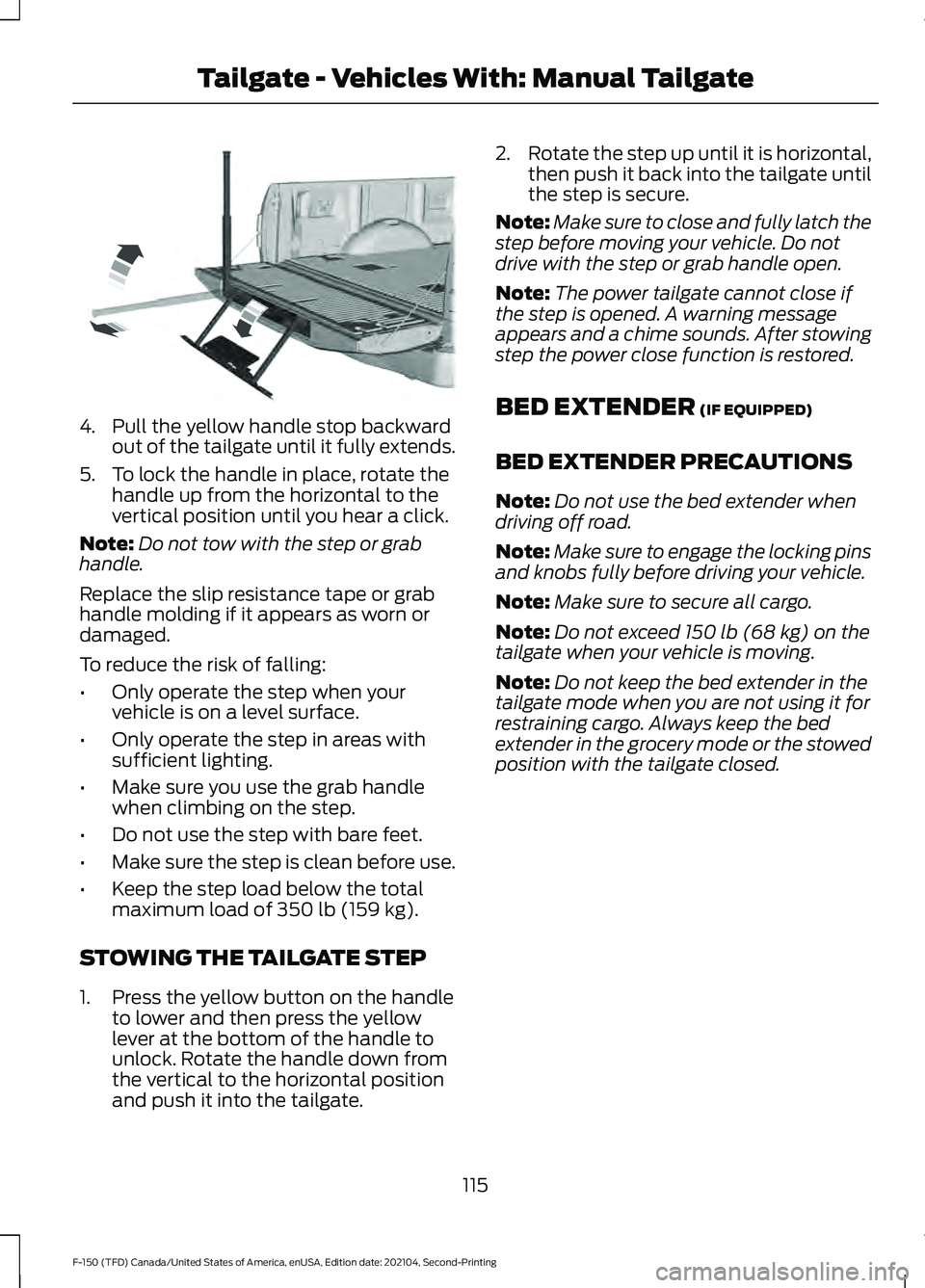
4. Pull the yellow handle stop backward
out of the tailgate until it fully extends.
5. To lock the handle in place, rotate the handle up from the horizontal to the
vertical position until you hear a click.
Note: Do not tow with the step or grab
handle.
Replace the slip resistance tape or grab
handle molding if it appears as worn or
damaged.
To reduce the risk of falling:
• Only operate the step when your
vehicle is on a level surface.
• Only operate the step in areas with
sufficient lighting.
• Make sure you use the grab handle
when climbing on the step.
• Do not use the step with bare feet.
• Make sure the step is clean before use.
• Keep the step load below the total
maximum load of 350 lb (159 kg).
STOWING THE TAILGATE STEP
1. Press the yellow button on the handle to lower and then press the yellow
lever at the bottom of the handle to
unlock. Rotate the handle down from
the vertical to the horizontal position
and push it into the tailgate. 2.
Rotate the step up until it is horizontal,
then push it back into the tailgate until
the step is secure.
Note: Make sure to close and fully latch the
step before moving your vehicle. Do not
drive with the step or grab handle open.
Note: The power tailgate cannot close if
the step is opened. A warning message
appears and a chime sounds. After stowing
step the power close function is restored.
BED EXTENDER
(IF EQUIPPED)
BED EXTENDER PRECAUTIONS
Note: Do not use the bed extender when
driving off road.
Note: Make sure to engage the locking pins
and knobs fully before driving your vehicle.
Note: Make sure to secure all cargo.
Note: Do not exceed
150 lb (68 kg) on the
tailgate when your vehicle is moving.
Note: Do not keep the bed extender in the
tailgate mode when you are not using it for
restraining cargo. Always keep the bed
extender in the grocery mode or the stowed
position with the tailgate closed.
115
F-150 (TFD) Canada/United States of America, enUSA, Edition date: 202104, Second-Printing Tailgate - Vehicles With: Manual TailgateE189557
Page 126 of 796
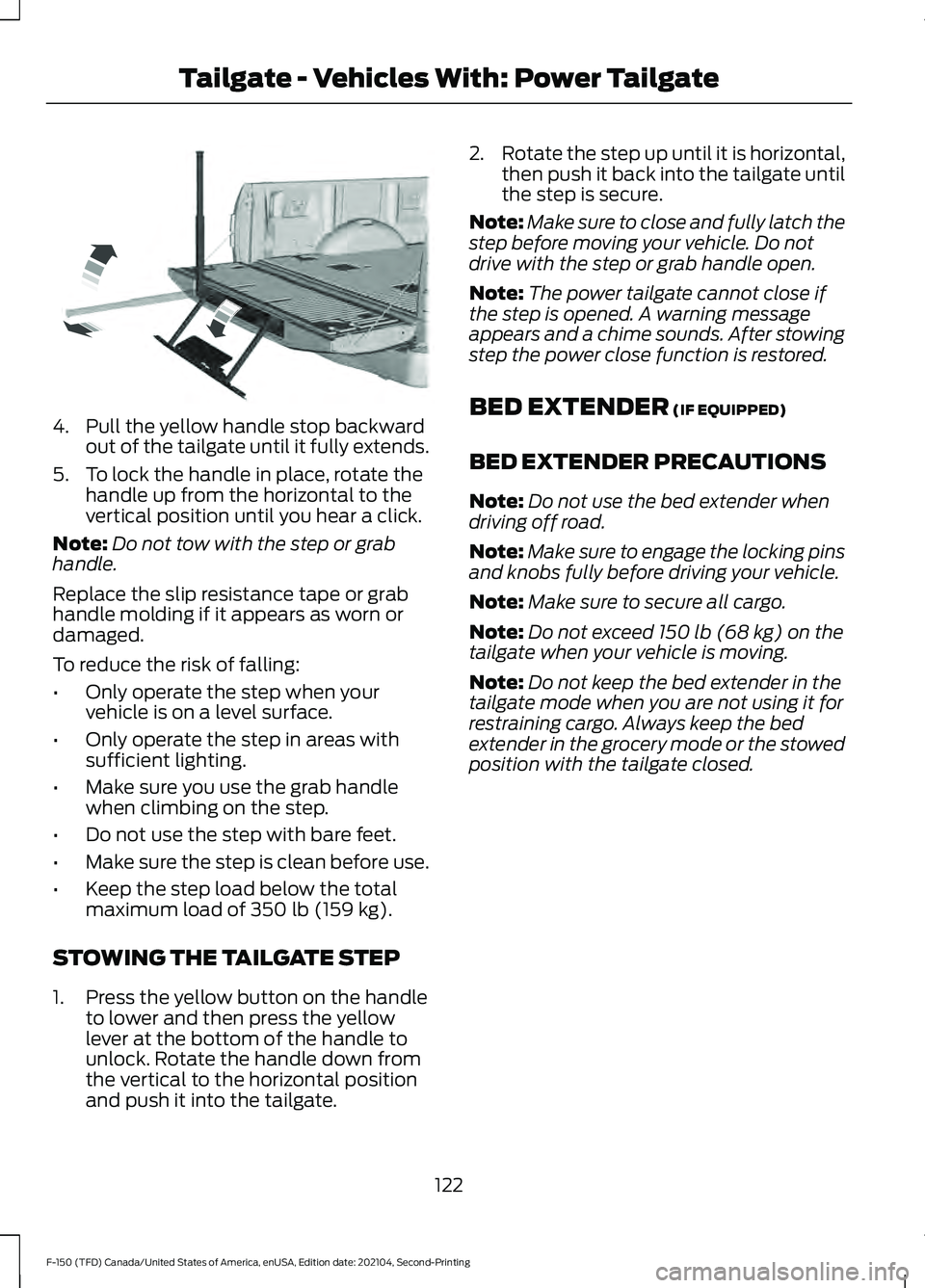
4. Pull the yellow handle stop backward
out of the tailgate until it fully extends.
5. To lock the handle in place, rotate the handle up from the horizontal to the
vertical position until you hear a click.
Note: Do not tow with the step or grab
handle.
Replace the slip resistance tape or grab
handle molding if it appears as worn or
damaged.
To reduce the risk of falling:
• Only operate the step when your
vehicle is on a level surface.
• Only operate the step in areas with
sufficient lighting.
• Make sure you use the grab handle
when climbing on the step.
• Do not use the step with bare feet.
• Make sure the step is clean before use.
• Keep the step load below the total
maximum load of 350 lb (159 kg).
STOWING THE TAILGATE STEP
1. Press the yellow button on the handle to lower and then press the yellow
lever at the bottom of the handle to
unlock. Rotate the handle down from
the vertical to the horizontal position
and push it into the tailgate. 2.
Rotate the step up until it is horizontal,
then push it back into the tailgate until
the step is secure.
Note: Make sure to close and fully latch the
step before moving your vehicle. Do not
drive with the step or grab handle open.
Note: The power tailgate cannot close if
the step is opened. A warning message
appears and a chime sounds. After stowing
step the power close function is restored.
BED EXTENDER
(IF EQUIPPED)
BED EXTENDER PRECAUTIONS
Note: Do not use the bed extender when
driving off road.
Note: Make sure to engage the locking pins
and knobs fully before driving your vehicle.
Note: Make sure to secure all cargo.
Note: Do not exceed
150 lb (68 kg) on the
tailgate when your vehicle is moving.
Note: Do not keep the bed extender in the
tailgate mode when you are not using it for
restraining cargo. Always keep the bed
extender in the grocery mode or the stowed
position with the tailgate closed.
122
F-150 (TFD) Canada/United States of America, enUSA, Edition date: 202104, Second-Printing Tailgate - Vehicles With: Power TailgateE189557
Page 133 of 796
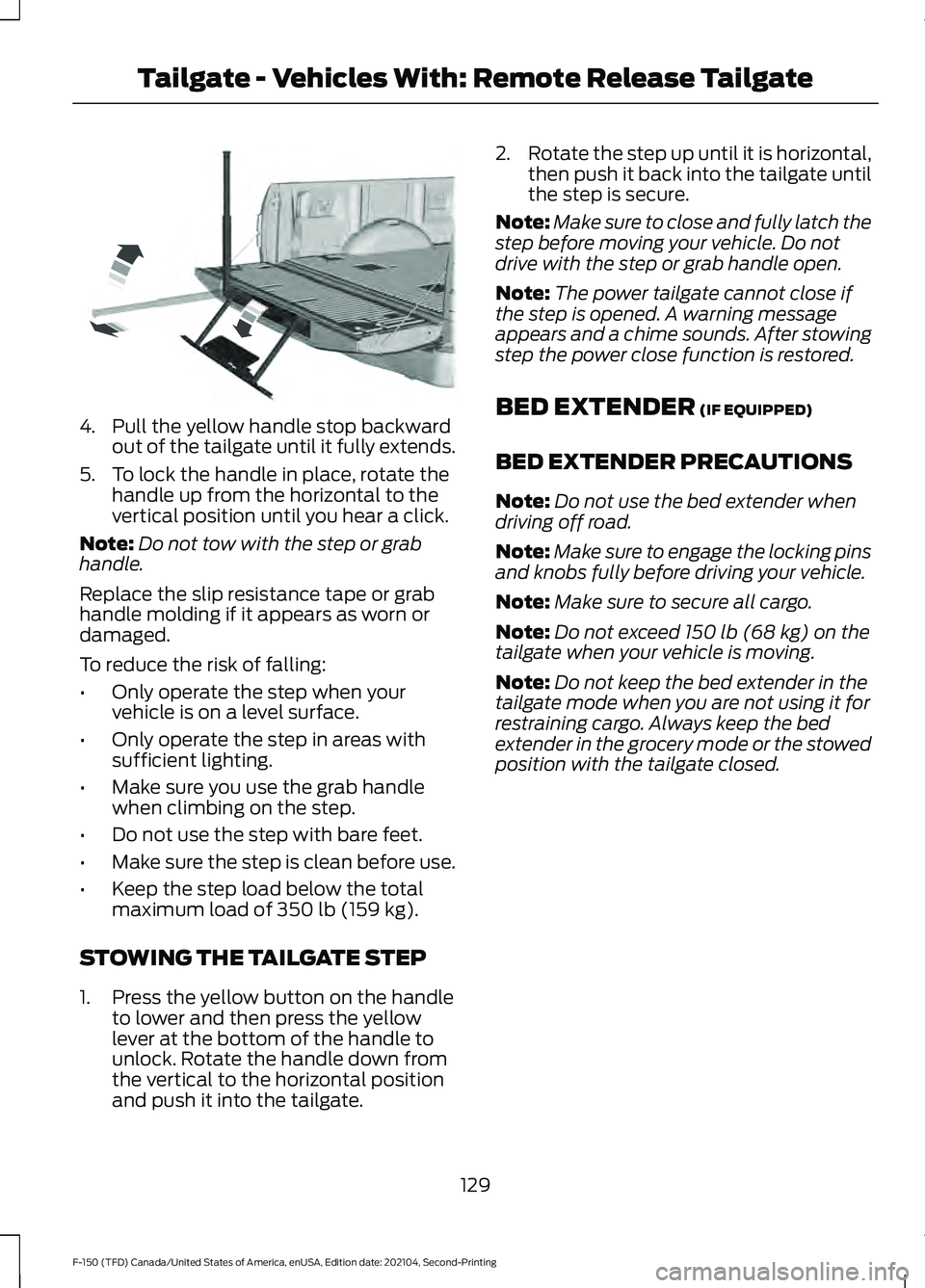
4. Pull the yellow handle stop backward
out of the tailgate until it fully extends.
5. To lock the handle in place, rotate the handle up from the horizontal to the
vertical position until you hear a click.
Note: Do not tow with the step or grab
handle.
Replace the slip resistance tape or grab
handle molding if it appears as worn or
damaged.
To reduce the risk of falling:
• Only operate the step when your
vehicle is on a level surface.
• Only operate the step in areas with
sufficient lighting.
• Make sure you use the grab handle
when climbing on the step.
• Do not use the step with bare feet.
• Make sure the step is clean before use.
• Keep the step load below the total
maximum load of 350 lb (159 kg).
STOWING THE TAILGATE STEP
1. Press the yellow button on the handle to lower and then press the yellow
lever at the bottom of the handle to
unlock. Rotate the handle down from
the vertical to the horizontal position
and push it into the tailgate. 2.
Rotate the step up until it is horizontal,
then push it back into the tailgate until
the step is secure.
Note: Make sure to close and fully latch the
step before moving your vehicle. Do not
drive with the step or grab handle open.
Note: The power tailgate cannot close if
the step is opened. A warning message
appears and a chime sounds. After stowing
step the power close function is restored.
BED EXTENDER
(IF EQUIPPED)
BED EXTENDER PRECAUTIONS
Note: Do not use the bed extender when
driving off road.
Note: Make sure to engage the locking pins
and knobs fully before driving your vehicle.
Note: Make sure to secure all cargo.
Note: Do not exceed
150 lb (68 kg) on the
tailgate when your vehicle is moving.
Note: Do not keep the bed extender in the
tailgate mode when you are not using it for
restraining cargo. Always keep the bed
extender in the grocery mode or the stowed
position with the tailgate closed.
129
F-150 (TFD) Canada/United States of America, enUSA, Edition date: 202104, Second-Printing Tailgate - Vehicles With: Remote Release TailgateE189557
Page 205 of 796
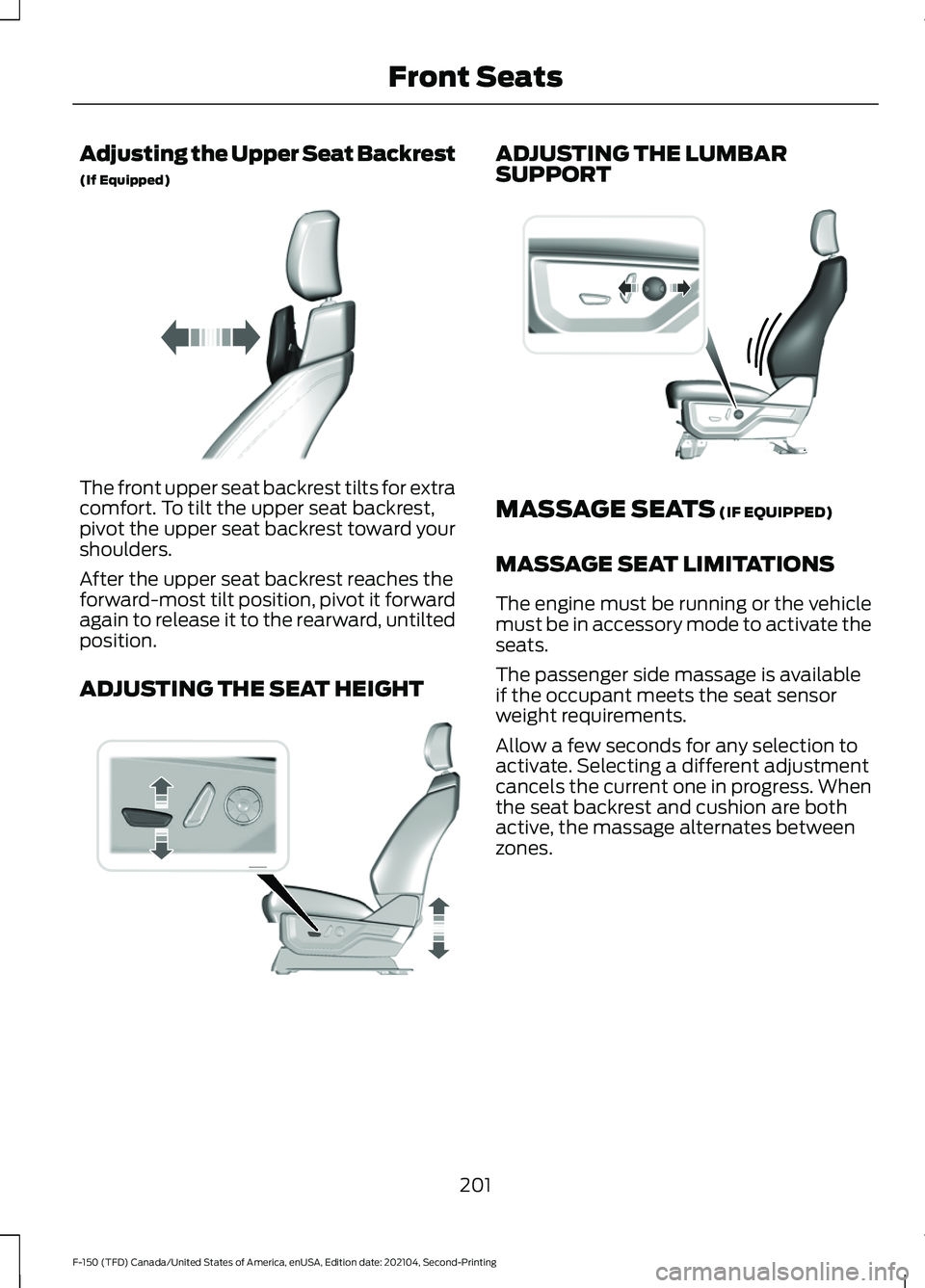
Adjusting the Upper Seat Backrest
(If Equipped)
The front upper seat backrest tilts for extra
comfort. To tilt the upper seat backrest,
pivot the upper seat backrest toward your
shoulders.
After the upper seat backrest reaches the
forward-most tilt position, pivot it forward
again to release it to the rearward, untilted
position.
ADJUSTING THE SEAT HEIGHT ADJUSTING THE LUMBAR
SUPPORT
MASSAGE SEATS (IF EQUIPPED)
MASSAGE SEAT LIMITATIONS
The engine must be running or the vehicle
must be in accessory mode to activate the
seats.
The passenger side massage is available
if the occupant meets the seat sensor
weight requirements.
Allow a few seconds for any selection to
activate. Selecting a different adjustment
cancels the current one in progress. When
the seat backrest and cushion are both
active, the massage alternates between
zones.
201
F-150 (TFD) Canada/United States of America, enUSA, Edition date: 202104, Second-Printing Front SeatsE311333 E308337 E327927
Page 398 of 796
Cross Traffic Alert Limitations
with a Trailer Attached
The system remains on when you attach
a trailer in vehicles with blind spot
information system with trailer tow under
the following conditions:
•
You connect a trailer.
• The trailer is a bike rack or cargo rack
with a maximum length of 3 ft (1 m).
• You set the trailer length to
3 ft (1 m)
in the instrument cluster display.
Note: The system may not correctly operate
when towing a trailer. For vehicles with an
approved trailer tow module and tow bar,
the system turns off when you attach a
trailer. For vehicles with an aftermarket
trailer tow module or tow bar, we
recommend that you switch the system off
when you attach a trailer.
SWITCHING CROSS TRAFFIC
ALERT ON AND OFF
To switch cross traffic alert on or off use
the touchscreen.
1. Press
Features on the touchscreen.
2. Press
Driver Assistance.
3. Switch
Cross Traffic Alert on or off.
Note: The system switches on every time
you switch the ignition on. To permanently
switch the system off, contact an authorized
dealer. LOCATING THE CROSS
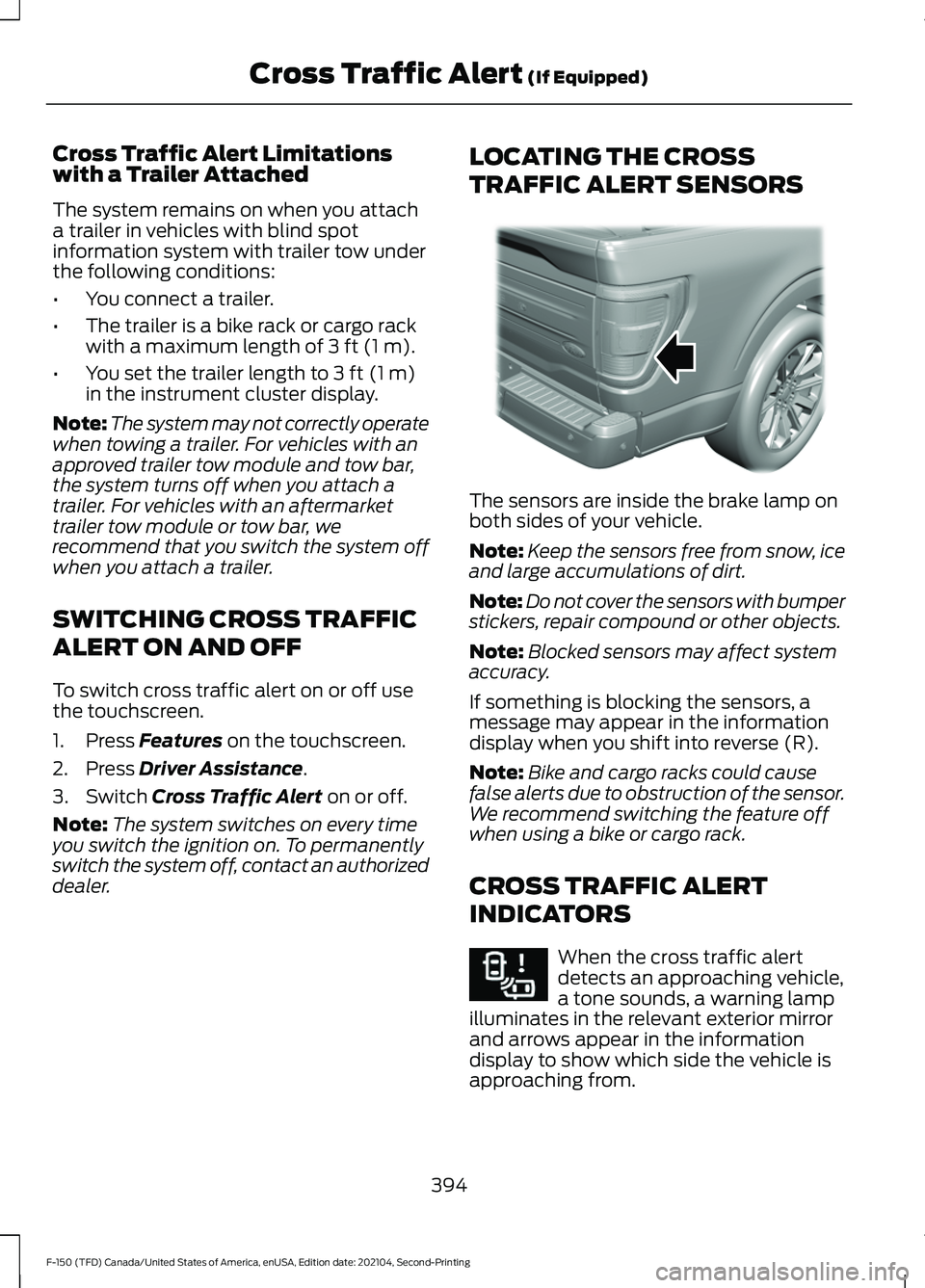
TRAFFIC ALERT SENSORS The sensors are inside the brake lamp on
both sides of your vehicle.
Note:
Keep the sensors free from snow, ice
and large accumulations of dirt.
Note: Do not cover the sensors with bumper
stickers, repair compound or other objects.
Note: Blocked sensors may affect system
accuracy.
If something is blocking the sensors, a
message may appear in the information
display when you shift into reverse (R).
Note: Bike and cargo racks could cause
false alerts due to obstruction of the sensor.
We recommend switching the feature off
when using a bike or cargo rack.
CROSS TRAFFIC ALERT
INDICATORS When the cross traffic alert
detects an approaching vehicle,
a tone sounds, a warning lamp
illuminates in the relevant exterior mirror
and arrows appear in the information
display to show which side the vehicle is
approaching from.
394
F-150 (TFD) Canada/United States of America, enUSA, Edition date: 202104, Second-Printing Cross Traffic Alert
(If Equipped)E310325 E268294
Page 428 of 796
CONNECTING A TRAILER
PRECAUTIONS
Do not tow a trailer until you drive your
vehicle at least 1,000 mi (1,600 km).
Consult your local motor vehicle laws for
towing a trailer.
See the instructions included with towing
accessories for the proper installation and
adjustment specifications.
Service your vehicle more frequently if you
tow a trailer. See
Normal Scheduled
Maintenance (page 667).
If you use a rental trailer, follow the
instructions the rental agency gives you.
When attaching the trailer wiring connector
to your vehicle, only use a proper fitting
connector that works with the vehicle and
trailer functions.
Account for the trailer coupler weight as
part of your vehicle load when calculating
the total vehicle weight.
Do not exceed the load limits. See
Calculating the Load Limit
(page 415).
HITCHES
HOOKING UP A TRAILER USING A
WEIGHT-DISTRIBUTING HITCH WARNING: Do not adjust the spring
bars so that your vehicle's rear bumper
is higher than before attaching the trailer.
Doing so will defeat the function of the
weight-distributing hitch, which may
cause unpredictable handling, and could
result in serious personal injury.
A weight-distributing hitch helps distribute
tongue load to all towing vehicle and trailer
wheels. For more information, visit the links
in the following table. Website
Market
ht tp s:/ /
www .fl e e t.f or d . c om/
t o wing-g uide s/United States of
America
ht tp s:/ /
www .fl e e t.f or d . c a/
t o wing-g uide s/Canada
CONNECTING A TRAILER
Recognizing a Trailer
1. Attach the trailer and wiring connector
to your vehicle.
2. Switch on your vehicle.
3. Set up a profile for the trailer using the
touchscreen.
Note: If your vehicle does not recognize the
trailer, press and hold the brake pedal for a
few seconds.
Note: Trailer profiles store trailer types,
dimensions, preferences, trailer specific
mileage and fuel economy.
Note: Disabling the trailer detection
notification makes the default trailer profile
active when the system detects a
connection.
424
F-150 (TFD) Canada/United States of America, enUSA, Edition date: 202104, Second-Printing Connecting a Trailer