towing FORD F-150 2021 Owner's Guide
[x] Cancel search | Manufacturer: FORD, Model Year: 2021, Model line: F-150, Model: FORD F-150 2021Pages: 796, PDF Size: 13.89 MB
Page 296 of 796
sand, steep slopes, or pulling heavy
objects. Additionally, the system is capable
of recreational flat towing by putting the
transfer case into neutral (N). See
Recreationally Towing Your Vehicle
(page
490).
There is further information on driving in
unique driving conditions.
See Off-Road
Driving (page 470).
FOUR-WHEEL DRIVE
PRECAUTIONS WARNING:
Vehicles with a higher
center of gravity (utility and four-wheel
drive vehicles) handle differently than
vehicles with a lower center of gravity
(passenger cars). Avoid sharp turns,
excessive speed and abrupt steering in
these vehicles. Failure to drive cautiously
increases the risk of losing control of your
vehicle, vehicle rollover, personal injury
and death. WARNING:
Do not become
overconfident in the ability of four-wheel
drive vehicles. Although a four-wheel
drive vehicle may accelerate better than
a two-wheel drive vehicle in low traction
situations, it won't stop any faster than
two-wheel drive vehicles. Always drive
at a safe speed.
Truck and utility vehicles can differ from
some other vehicles. Your vehicle could be
higher to allow it to travel over rough
terrain without getting stuck or damaging
underbody components. The differences
that make your vehicle so versatile also
make it handle differently than an ordinary
passenger car. Always maintain steering
wheel control, especially in rough terrain.
Since sudden changes in terrain can result
in abrupt steering wheel motion, make sure
you grip the steering wheel from the outside. Do not grip the spokes. Drive
cautiously to avoid vehicle damage from
concealed objects such as rocks and
stumps. Drive slower in strong crosswinds
which can affect the normal steering
characteristics of your vehicle. Be
extremely careful when driving on
pavement made slippery by loose sand,
water, gravel, snow or ice.
Note:
Do not use four-wheel drive high or
four-wheel drive low mode on dry, hard
surfaced roads. Doing so can produce
excessive noise, increase tire wear and can
damage drive components.
FOUR-WHEEL DRIVE
LIMITATIONS
Operating Four-Wheel Drive with
a Spare or Mismatched Tires
(If
Equipped)
On four-wheel drive vehicles, the size of
the spare tire can affect the four-wheel
drive system. If there is a significant
difference between the size of the spare
tire and the remaining tires, you could have
limited four-wheel drive functionality.
When driving with the full-size dissimilar
spare wheel and tire assembly, we
recommend that you do not:
• Exceed
50 mph (80 km/h) with a
four-wheel drive mode turned on.
• Turn on a four-wheel drive mode
unless the vehicle is stationary.
• Use a four-wheel drive mode on dry
pavement.
Driving with the full-size dissimilar spare
wheel and tire assembly can limit
four-wheel drive functionality, especially
when driving in a mechanically locked
four-wheel drive mode. You can experience
the following:
292
F-150 (TFD) Canada/United States of America, enUSA, Edition date: 202104, Second-Printing Four-Wheel Drive
(If Equipped)
Page 315 of 796
WHAT IS THE ELECTRIC
PARKING BRAKE
The electric parking brake is used to hold
your vehicle on slopes and flat roads.
APPLYING THE ELECTRIC
PARKING BRAKE
WARNING: Always fully apply the
parking brake and make sure you shift
into park (P). Failure to follow this
instruction could result in personal injury
or death. WARNING:
If you drive extended
distances with the parking brake applied,
you could cause damage to the brake
system. The switch is on the lower part
of the instrument panel.
1. Pull the switch up.
The red warning lamp flashes during
operation and illuminates when the parking
brake is applied.
Note: You can apply the electric parking
brake when the ignition is off.
Note: The electric parking brake could
apply when you shift into park (P).
See Park
(P) (page 281).
APPLYING THE ELECTRIC
PARKING BRAKE IN AN
EMERGENCY
You can use the electric parking brake to
slow or stop your vehicle in an emergency.
1. Pull the switch up and hold it. The electric parking brake continues to
slow your vehicle down unless you release
the switch.
The red warning lamp illuminates, a tone
sounds and the stoplamps turn on when
you use the electric parking brake in an
emergency.
Note:
Do not apply the electric parking
brake when your vehicle is moving, except
in an emergency. If you repeatedly use the
electric parking brake to slow or stop your
vehicle, you could cause damage to the
brake system.
MANUALLY RELEASING THE
ELECTRIC PARKING BRAKE
1. Switch the ignition on.
2. Press and hold the brake pedal.
3. Push the switch down.
The red warning lamp turns off.
Pulling Away on a Hill When Towing a
Trailer
1. Press and hold the brake pedal.
2. Pull the switch upward and hold it.
3. Shift into gear.
4. Press the accelerator pedal until engine
has developed sufficient torque to
prevent your vehicle from rolling down
the hill.
5. Release the switch and pull away in a normal manner.
AUTOMATICALLY RELEASING
THE ELECTRIC PARKING
BRAKE
1. Close the driver door.
2. Shift into gear.
311
F-150 (TFD) Canada/United States of America, enUSA, Edition date: 202104, Second-Printing Electric Parking BrakeE267156
Page 343 of 796
WHAT IS THE REAR VIEW
CAMERA
The rear view camera provides a video
image of the area behind your vehicle when
the transmission is in reverse (R).
The rear view camera button is
on the instrument panel.
REAR VIEW CAMERA
PRECAUTIONS WARNING: The rear view camera
system is a reverse aid supplement
device that still requires the driver to use
it in conjunction with the interior and
exterior mirrors for maximum coverage. WARNING:
Objects that are close
to either corner of the bumper or under
the bumper, might not be seen on the
screen due to the limited coverage of the
camera system. WARNING:
Reverse your vehicle
slowly. Failure to follow this instruction
could result in the loss of control of your
vehicle, personal injury or death. WARNING:
Use caution when the
rear cargo door is ajar. If the rear cargo
door is ajar, the camera will be out of
position and the video image could be
incorrect. All guide lines disappear when
the rear cargo door is ajar. Failure to
follow this instruction could result in
personal injury. WARNING:
Use caution when
turning camera features on or off when
the transmission is not in park (P). Make
sure your vehicle is not moving. Note:
When towing, the camera only sees
what you are towing. This might not provide
adequate coverage and you might not see
some objects. In some vehicles, the guide
lines may disappear when you connect the
trailer tow connector.
LOCATING THE REAR VIEW
CAMERA
The rear view camera is on the tailgate. It
provides a video image of the area behind
your vehicle.
339
F-150 (TFD) Canada/United States of America, enUSA, Edition date: 202104, Second-Printing Rear View CameraE332186
Page 356 of 796
HOW DOES ADAPTIVE CRUISE
CONTROL WITH STOP AND GO
WORK
Adaptive cruise control with stop and go
uses radar and camera sensors to maintain
a set gap between your vehicle and the
vehicle in front of you while following it to
a complete stop. Stop and go can also be
set to follow a vehicle directly in front of
you and adjust the set speed, while you are
at a complete stop.
ADAPTIVE CRUISE CONTROL
PRECAUTIONS
WARNING: You are responsible for
controlling your vehicle at all times. The
system is designed to be an aid and does
not relieve you of your responsibility to
drive with due care and attention. Failure
to follow this instruction could result in
the loss of control of your vehicle,
personal injury or death. WARNING: Do not use adaptive
cruise control on winding roads, in heavy
traffic or when the road surface is
slippery. This could result in loss of
vehicle control, serious injury or death. WARNING:
Pay close attention to
changing road conditions such as
entering or leaving a highway, on roads
with intersections or roundabouts, roads
without visible lanes of travel, roads that
are unpaved, or steep slopes. Failure to
follow this instruction could result in the
loss of control of your vehicle, personal
injury or death. WARNING:
The system is not a
crash warning or avoidance system. WARNING:
Do not use the system
when towing a trailer that has
aftermarket electronic trailer brake
controls. Failure to follow this instruction
could result in the loss of control of your
vehicle, personal injury or death. WARNING:
Do not use tire sizes
other than those recommended because
this can affect the normal operation of
the system. Failure to do so may result
in a loss of vehicle control, which could
result in serious injury. WARNING:
Do not use the system
with a snow plow blade installed. WARNING:
Do not use the system
in poor visibility, for example fog, heavy
rain, spray or snow.
When Following a Vehicle WARNING:
When following a
vehicle that is braking, your vehicle does
not always decelerate quickly enough to
avoid a crash without driver intervention.
Apply the brakes when necessary. Failure
to follow this instruction could result in
personal injury or death.
Hilly Condition Usage
Select a lower gear when the system is
active in situations such as prolonged
downhill driving on steep slopes, for
example in mountainous areas.
352
F-150 (TFD) Canada/United States of America, enUSA, Edition date: 202104, Second-Printing Adaptive Cruise Control
(If Equipped)
Page 363 of 796
1. Press Features on the touchscreen.
2. Press
Driver Assistance.
3. Press
Cruise Control.
4. Press
Normal Cruise Control. The cruise control indicator
replaces the adaptive cruise
control indicator if you select
normal cruise control. The gap setting
does not display, and the system does not
respond to lead vehicles. Automatic
braking remains active to maintain set
speed. The system remembers the last
setting when you start your vehicle.
LANE CENTERING
HOW DOES LANE CENTERING
WORK
Adaptive cruise control with lane centering
uses radar and camera sensors to help
keep your vehicle in the middle of the lane
by applying continuous assistance steering
torque input toward the lane center on
highways.
Note: The adaptive cruise control gap
setting operates normally.
If you drive off-center within the lane, the
system sets and maintains that preferred
lane position. The system provides
continuous assistance steering torque
input toward the preferred position.
Note: The system can only set preferred
lane positions within the lane.
Note: If the system cancels, the preferred
position erases. On the next activation, the
system provides continuous assistance
steering torque input toward the lane center. LANE CENTERING PRECAUTIONS WARNING: Do not use the system
when towing a trailer. Failure to follow
this instruction could result in the loss of
control of your vehicle, personal injury or
death. WARNING:
Do not use the system
if any changes or modifications to the
steering wheel have been made. Any
changes or modifications to the steering
wheel could affect the functionality or
performance of the system. Failure to
follow this instruction could result in the
loss of control of your vehicle, personal
injury or death.
Adaptive cruise control precautions apply
to lane centering unless stated otherwise
or contradicted by a lane centering
precaution. See Adaptive Cruise Control
Precautions
(page 352).
LANE CENTERING
REQUIREMENTS
You must keep your hands on the steering
wheel at all times.
The system only activates when all of the
following occur:
• You have adaptive cruise control with
stop and go on.
• Lane centering assist is enabled in your
information and entertainment screen.
See
Switching Lane Centering On
and Off (page 360).
• You have your hands on the steering
wheel.
• The system detects both lane
markings.
Note: If it does not detect valid lane
markings, the system stays inactive until
valid markings are available.
359
F-150 (TFD) Canada/United States of America, enUSA, Edition date: 202104, Second-Printing Adaptive Cruise Control
(If Equipped)E332905
Page 369 of 796
WHAT IS BLUECRUISE
BlueCruise keeps your vehicle centered in
the lane and offers a hands-free driving
mode in certain situations when using
adaptive cruise control.
HOW DOES BLUECRUISE
WORK
BlueCruise uses cameras to monitor your
vehicle position within a lane and applies
steering support to keep your vehicle
centered in the lane.
Using the cameras and location
information, BlueCruise allows you to
remove your hands from the steering wheel
and offers a hands-free driving mode in
certain areas.
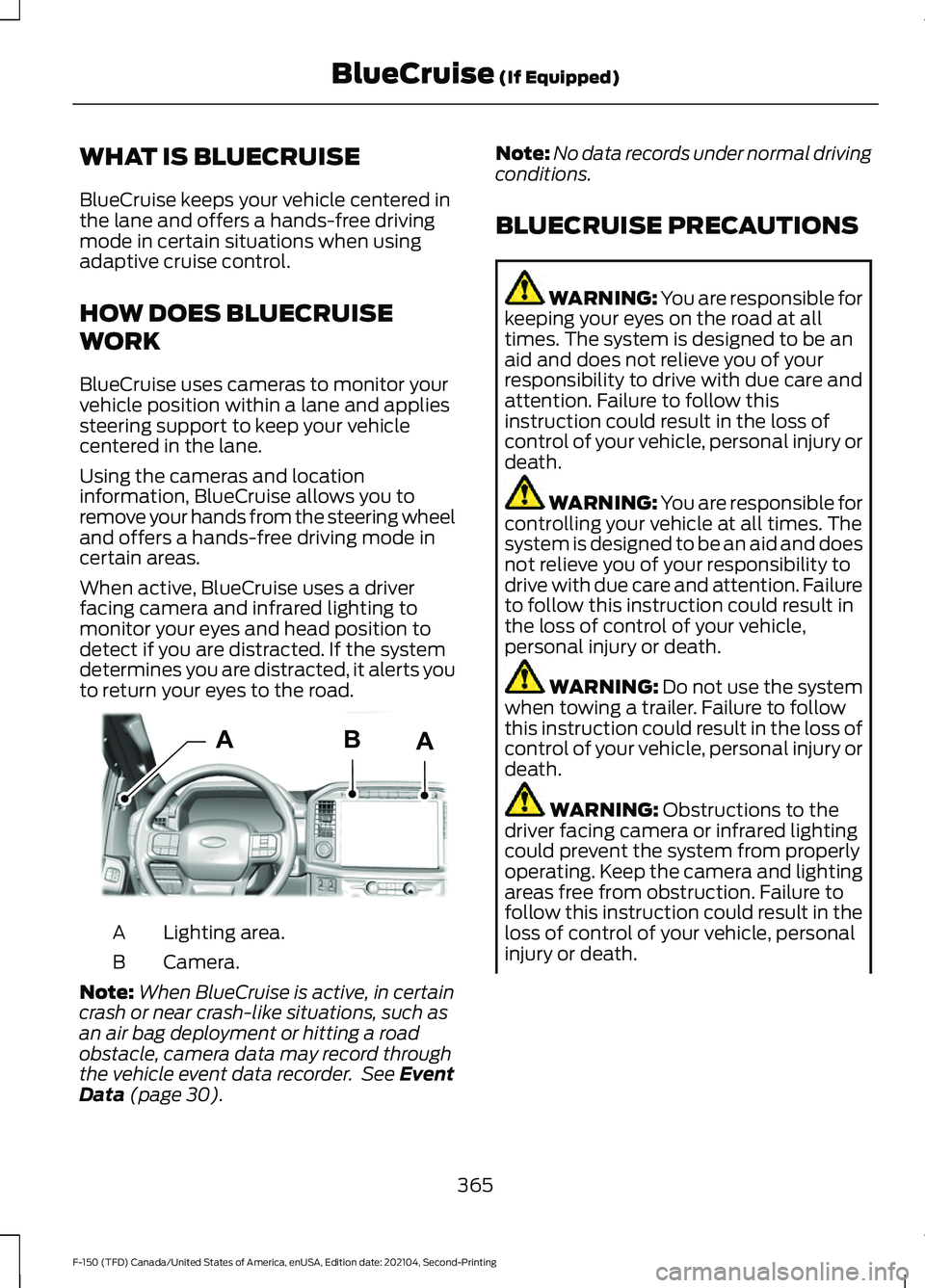
When active, BlueCruise uses a driver
facing camera and infrared lighting to
monitor your eyes and head position to
detect if you are distracted. If the system
determines you are distracted, it alerts you
to return your eyes to the road.
Lighting area.
A
Camera.
B
Note: When BlueCruise is active, in certain
crash or near crash-like situations, such as
an air bag deployment or hitting a road
obstacle, camera data may record through
the vehicle event data recorder. See Event
Data (page 30). Note:
No data records under normal driving
conditions.
BLUECRUISE PRECAUTIONS WARNING: You are responsible for
keeping your eyes on the road at all
times. The system is designed to be an
aid and does not relieve you of your
responsibility to drive with due care and
attention. Failure to follow this
instruction could result in the loss of
control of your vehicle, personal injury or
death. WARNING: You are responsible for
controlling your vehicle at all times. The
system is designed to be an aid and does
not relieve you of your responsibility to
drive with due care and attention. Failure
to follow this instruction could result in
the loss of control of your vehicle,
personal injury or death. WARNING:
Do not use the system
when towing a trailer. Failure to follow
this instruction could result in the loss of
control of your vehicle, personal injury or
death. WARNING:
Obstructions to the
driver facing camera or infrared lighting
could prevent the system from properly
operating. Keep the camera and lighting
areas free from obstruction. Failure to
follow this instruction could result in the
loss of control of your vehicle, personal
injury or death.
365
F-150 (TFD) Canada/United States of America, enUSA, Edition date: 202104, Second-Printing BlueCruise
(If Equipped)AABE319812
Page 382 of 796
The electronic locking differential is
available below 25 mph (40 km/h). See
Switching the Electronic Locking
Differential On and Off
(page 303).
SPORT - RAPTOR For sporty driving with improved
performance handling and
response. This mode increases
accelerator pedal response and provides
a sportier steering feel. The powertrain
system holds onto lower gears longer,
helping your vehicle accelerate faster.
Two-wheel drive high is the default
four-wheel drive mode. Four-wheel drive
low is not available in sport mode.
Sport is the default steering, suspension,
and exhaust modes. Off-road steering
mode is not available. All suspension and
exhaust modes are available.
The system tunes the engine and
transmission controls to sport mode.
The system tunes the stability and traction
controls to normal mode.
The electronic locking differential is
available below
25 mph (40 km/h). See
Switching the Electronic Locking
Differential On and Off
(page 303).
SPORT - 4X4, VEHICLES WITH:
ELECTRONIC SHIFT-ON-THE-FLY For sporty driving with improved
performance handling and
response. This mode increases
accelerator pedal response and provides
a sportier steering feel. The powertrain
system holds onto lower gears longer,
helping your vehicle accelerate faster.
Two-wheel drive high is the default
four-wheel drive mode. Four-wheel drive
low is not available in sport mode. The system tunes the steering and
suspension to provide a more connected
and spirited driving experience.
The electronic locking differential is
available below
25 mph (40 km/h). See
Switching the Electronic Locking
Differential On and Off
(page 303).
SPORT - 4X2 For sporty driving with improved
performance handling and
response. This mode increases
accelerator pedal response and provides
a sportier steering feel. The powertrain
system holds onto lower gears longer,
helping your vehicle accelerate faster.
The system tunes the steering and
suspension to provide a more connected
and spirited driving experience.
The electronic locking differential is
available below
25 mph (40 km/h). See
Switching the Electronic Locking
Differential On and Off
(page 305).
TOW/HAUL - RAPTOR For improved transmission
operation when towing a trailer
or a heavy load. This mode
moves upshifts to higher engine speeds to
reduce the frequency of transmission
shifting. This mode also provides engine
braking in all forward gears, which slows
your vehicle and assists you in controlling
your vehicle when descending a slope. The
amount of downshift braking provided
varies based on the amount you press the
brake pedal.
All four-wheel drive modes are selectable
when in tow/haul mode. This mode does
not default to a certain four-wheel drive
mode and maintains the previous
selection.
378
F-150 (TFD) Canada/United States of America, enUSA, Edition date: 202104, Second-Printing Drive Mode ControlE347140 E246593 E246593 E347108
Page 383 of 796
Normal is the default steering and exhaust
modes. Off-road steering mode is not
available. All exhaust modes are available.
Sport is the default suspension mode.
Normal suspension mode is available.
Off-road suspension mode is not available.
The system tunes the engine and
transmission controls to tow mode.
The system tunes the stability and traction
controls to normal mode.
The electronic locking differential is
available below 25 mph (40 km/h). See
Switching the Electronic Locking
Differential On and Off
(page 303).
TOW/HAUL - 4X4 For improved transmission
operation when towing a trailer
or a heavy load. This mode
moves upshifts to higher engine speeds to
reduce the frequency of transmission
shifting. This mode also provides engine
braking in all forward gears, which slows
your vehicle and assists you in controlling
your vehicle when descending a slope. The
amount of downshift braking provided
varies based on the amount you press the
brake pedal.
All four-wheel drive modes are selectable
in tow/haul mode. This mode does not
default to a certain four-wheel drive mode
and maintains the previous selection.
The system tunes the steering and
suspension to enhance driving comfort
when towing or carrying heavy loads.
The electronic locking differential is
available below
25 mph (40 km/h). See
Switching the Electronic Locking
Differential On and Off
(page 303). TOW/HAUL - 4X2 For improved transmission
operation when towing a trailer
or a heavy load. This mode
moves upshifts to higher engine speeds to
reduce the frequency of transmission
shifting. This mode also provides engine
braking in all forward gears, which slows
your vehicle and assists you in controlling
your vehicle when descending a slope. The
amount of downshift braking provided
varies based on the amount you press the
brake pedal.
The system tunes the steering and
suspension to enhance driving comfort
when towing or carrying heavy loads.
The electronic locking differential is
available below
25 mph (40 km/h). See
Switching the Electronic Locking
Differential On and Off
(page 305).
TRAIL - 4X2 Trail mode is for off-road driving
on muddy, rutted, soft or uneven
terrain. This mode lowers
throttle response to increase wheel spin
to keep the tires clear and to prevent
getting stuck.
The electronic locking differential is
available below
25 mph (40 km/h). See
Switching the Electronic Locking
Differential On and Off
(page 305).
379
F-150 (TFD) Canada/United States of America, enUSA, Edition date: 202104, Second-Printing Drive Mode ControlE246592 E246592 E295419
Page 398 of 796
Cross Traffic Alert Limitations
with a Trailer Attached
The system remains on when you attach
a trailer in vehicles with blind spot
information system with trailer tow under
the following conditions:
•
You connect a trailer.
• The trailer is a bike rack or cargo rack
with a maximum length of 3 ft (1 m).
• You set the trailer length to
3 ft (1 m)
in the instrument cluster display.
Note: The system may not correctly operate
when towing a trailer. For vehicles with an
approved trailer tow module and tow bar,
the system turns off when you attach a
trailer. For vehicles with an aftermarket
trailer tow module or tow bar, we
recommend that you switch the system off
when you attach a trailer.
SWITCHING CROSS TRAFFIC
ALERT ON AND OFF
To switch cross traffic alert on or off use
the touchscreen.
1. Press
Features on the touchscreen.
2. Press
Driver Assistance.
3. Switch
Cross Traffic Alert on or off.
Note: The system switches on every time
you switch the ignition on. To permanently
switch the system off, contact an authorized
dealer. LOCATING THE CROSS
TRAFFIC ALERT SENSORS The sensors are inside the brake lamp on
both sides of your vehicle.
Note:
Keep the sensors free from snow, ice
and large accumulations of dirt.
Note: Do not cover the sensors with bumper
stickers, repair compound or other objects.
Note: Blocked sensors may affect system
accuracy.
If something is blocking the sensors, a
message may appear in the information
display when you shift into reverse (R).
Note: Bike and cargo racks could cause
false alerts due to obstruction of the sensor.
We recommend switching the feature off
when using a bike or cargo rack.
CROSS TRAFFIC ALERT
INDICATORS When the cross traffic alert
detects an approaching vehicle,
a tone sounds, a warning lamp
illuminates in the relevant exterior mirror
and arrows appear in the information
display to show which side the vehicle is
approaching from.
394
F-150 (TFD) Canada/United States of America, enUSA, Edition date: 202104, Second-Printing Cross Traffic Alert
(If Equipped)E310325 E268294
Page 401 of 796
WARNING: Take additional care if
your vehicle is heavily loaded or you are
towing a trailer. These conditions could
result in reduced performance of this
system. Failure to follow this instruction
could result in the loss of control of your
vehicle, personal injury or death. WARNING:
The system cannot
help prevent all crashes. Do not rely on
this system to replace driver judgment
and the need to maintain a safe distance
and speed. WARNING:
In situations where the
vehicle camera has limited detection
capability, this may reduce system
performance. These situations include
but are not limited to direct or low
sunlight, vehicles at night without tail
lights, unconventional vehicle types,
pedestrians with complex backgrounds,
running pedestrians, partly obscured
pedestrians, or pedestrians that the
system cannot distinguish from a group.
Failure to take care may result in the loss
of control of your vehicle, serious
personal injury or death.
PRE-COLLISION ASSIST
LIMITATIONS - POLICE
RESPONDER
Pre-collision assist depends on the
detection ability of its camera and sensors.
Any obstructions or damage to these areas
can limit detection or prevent the system
from functioning. See
Locating the
Pre-Collision Assist Sensors (page 399).
The system is active at speeds above
3 mph (5 km/h)
. Note:
The pre-collision assist system
automatically disables when you select
four-wheel drive low, manually disable
AdvanceTrac ™, or select rock crawl mode.
Note: Brake support and automatic
emergency braking are active at speeds up
to
75 mph (120 km/h).
Pedestrian Detection Limitations
Pedestrian detection is active at speeds
up to
50 mph (80 km/h).
Pedestrian detection operates optimally
when detected hazards are clearly
identifiable. System performance may
reduce in situations where pedestrians are
running, partly obscured, have a complex
background, or cannot be distinguished
from a group.
PRE-COLLISION ASSIST
LIMITATIONS
Pre-collision assist depends on the
detection ability of its camera and sensors.
Any obstructions or damage to these areas
can limit detection or prevent the system
from functioning. See
Locating the
Pre-Collision Assist Sensors (page 399).
The system is active at speeds above
3 mph (5 km/h)
.
Note: The pre-collision assist system
automatically disables when you select
four-wheel drive low, manually disable
AdvanceTrac ™, or select rock crawl mode.
Note: Brake support and automatic
emergency braking are active at speeds up
to 80 mph (130 km/h). If your vehicle has a
radar sensor included with adaptive cruise
control, then brake support and automatic
emergency braking are active up to the
maximum speed of your vehicle.
397
F-150 (TFD) Canada/United States of America, enUSA, Edition date: 202104, Second-Printing Pre-Collision Assist
(If Equipped)