service FORD F-150 2021 Service Manual
[x] Cancel search | Manufacturer: FORD, Model Year: 2021, Model line: F-150, Model: FORD F-150 2021Pages: 796, PDF Size: 13.89 MB
Page 404 of 796
If a message regarding a blocked sensor
or camera appears in the information
display, something is obstructing the radar
signals or camera images. The radar sensor
is behind the fascia cover in the center of
the lower grille. With a blocked sensor or
camera, the system may not function, or
performance may reduce. See
Pre-Collision Assist – Information
Messages (page 404).
Note: Proper system operation requires a
clear view of the road by the camera. Have
any windshield damage in the area of the
camera's field of view repaired.
Note: If something hits the front end of your
vehicle or damage occurs and your vehicle
has a radar sensor, the radar sensing zone
could change. This could cause missed or
false vehicle detections. Have your vehicle
serviced to have the radar checked for
proper coverage and operation. Note:
If your vehicle detects excessive heat
at the camera or a potential misalignment
condition, a message could display in the
information display indicating temporary
sensor unavailability. When operational
conditions are correct, the message
deactivates. For example, when the ambient
temperature around the sensor decreases
or the sensor recalibrates successfully.
DISTANCE INDICATION
(IF
EQUIPPED)
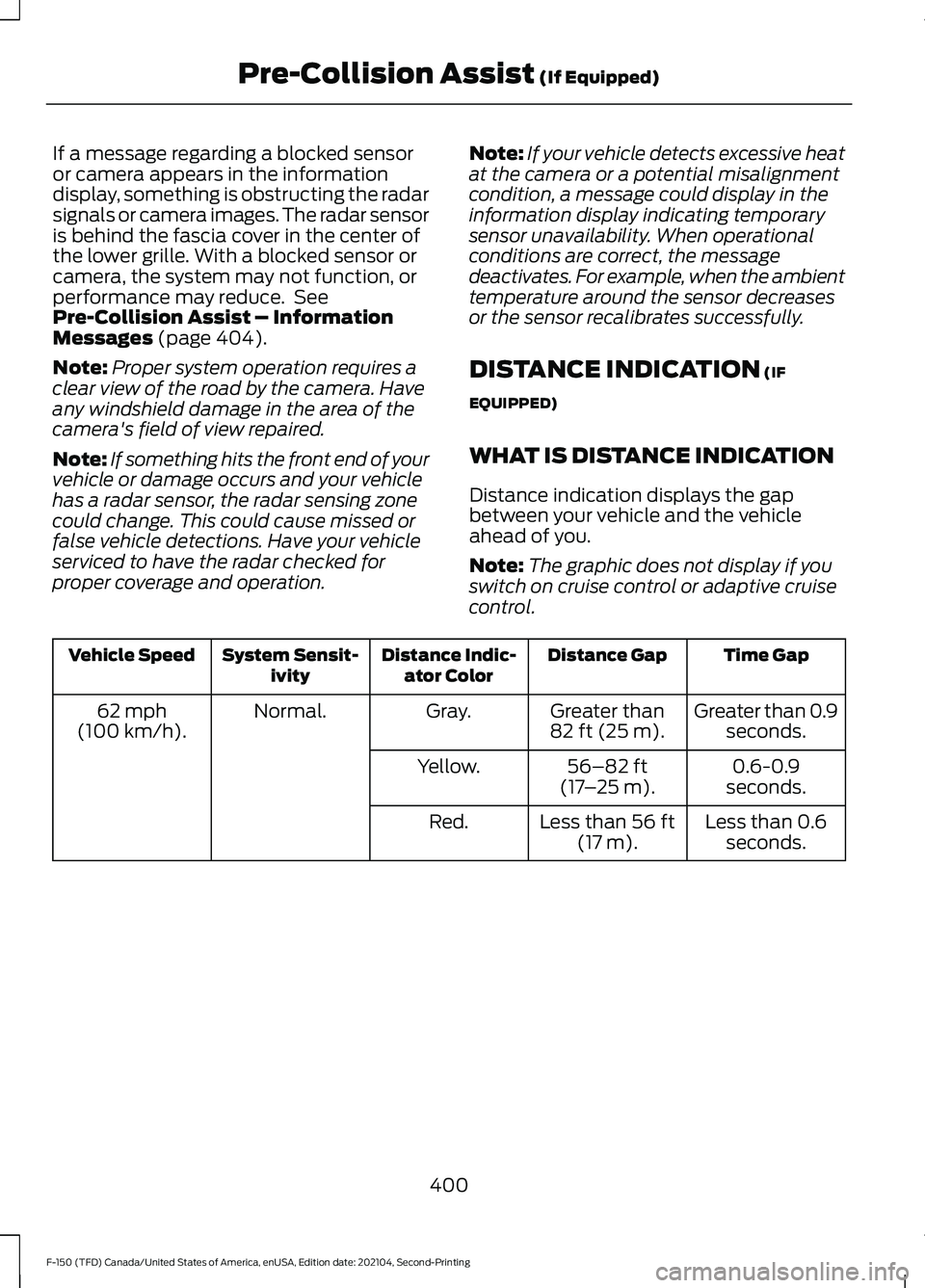
WHAT IS DISTANCE INDICATION
Distance indication displays the gap
between your vehicle and the vehicle
ahead of you.
Note: The graphic does not display if you
switch on cruise control or adaptive cruise
control. Time Gap
Distance Gap
Distance Indic-
ator Color
System Sensit-
ivity
Vehicle Speed
Greater than 0.9seconds.
Greater than
82 ft (25 m)
.
Gray.
Normal.
62 mph
(100 km/h).
0.6-0.9
seconds.
56–82 ft
(17 –25 m)
.
Yellow.
Less than 0.6seconds.
Less than
56 ft
(17 m).
Red.
400
F-150 (TFD) Canada/United States of America, enUSA, Edition date: 202104, Second-Printing Pre-Collision Assist
(If Equipped)
Page 409 of 796
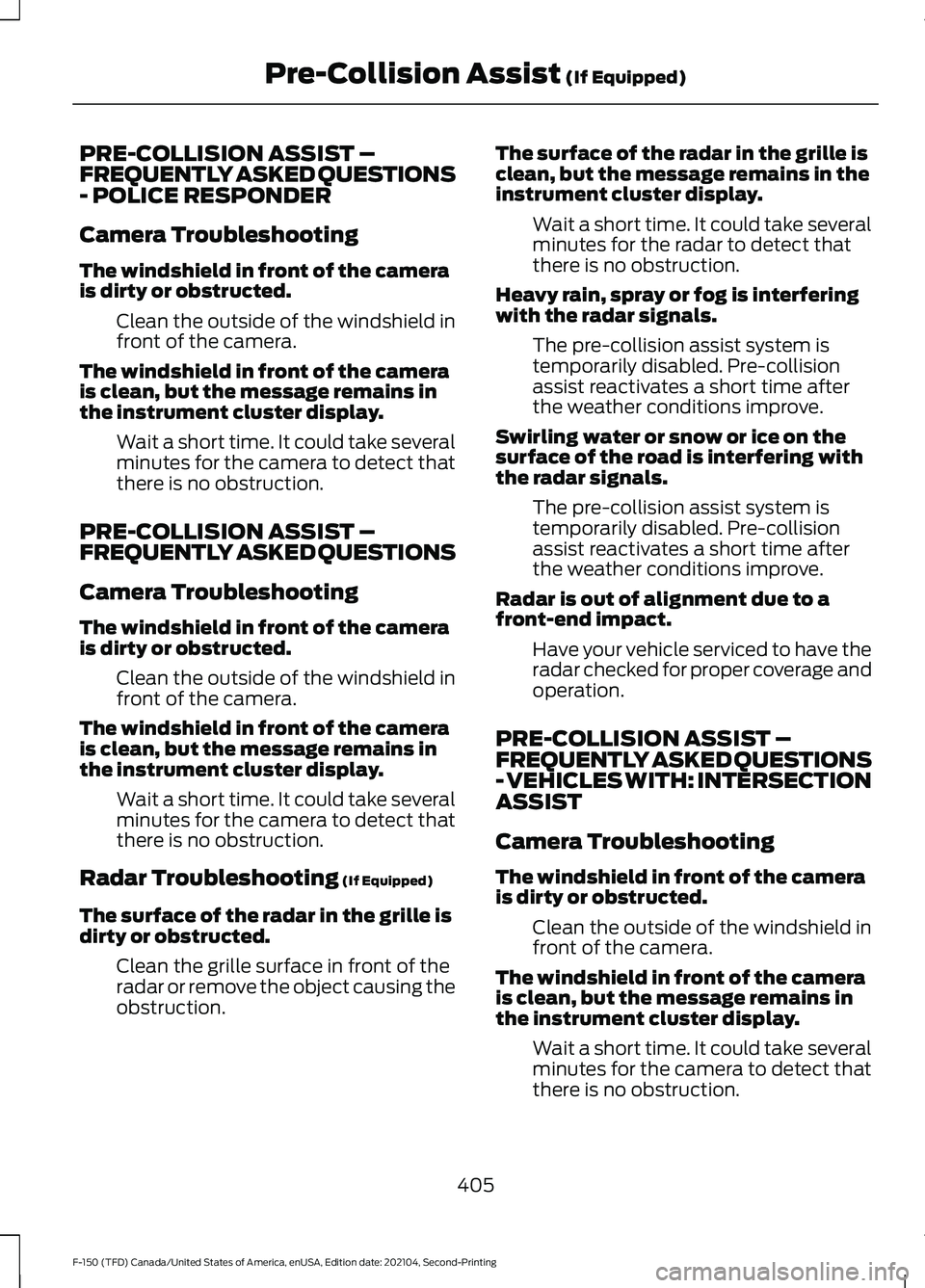
PRE-COLLISION ASSIST –
FREQUENTLY ASKED QUESTIONS
- POLICE RESPONDER
Camera Troubleshooting
The windshield in front of the camera
is dirty or obstructed.
Clean the outside of the windshield in
front of the camera.
The windshield in front of the camera
is clean, but the message remains in
the instrument cluster display. Wait a short time. It could take several
minutes for the camera to detect that
there is no obstruction.
PRE-COLLISION ASSIST –
FREQUENTLY ASKED QUESTIONS
Camera Troubleshooting
The windshield in front of the camera
is dirty or obstructed. Clean the outside of the windshield in
front of the camera.
The windshield in front of the camera
is clean, but the message remains in
the instrument cluster display. Wait a short time. It could take several
minutes for the camera to detect that
there is no obstruction.
Radar Troubleshooting (If Equipped)
The surface of the radar in the grille is
dirty or obstructed. Clean the grille surface in front of the
radar or remove the object causing the
obstruction. The surface of the radar in the grille is
clean, but the message remains in the
instrument cluster display.
Wait a short time. It could take several
minutes for the radar to detect that
there is no obstruction.
Heavy rain, spray or fog is interfering
with the radar signals. The pre-collision assist system is
temporarily disabled. Pre-collision
assist reactivates a short time after
the weather conditions improve.
Swirling water or snow or ice on the
surface of the road is interfering with
the radar signals. The pre-collision assist system is
temporarily disabled. Pre-collision
assist reactivates a short time after
the weather conditions improve.
Radar is out of alignment due to a
front-end impact. Have your vehicle serviced to have the
radar checked for proper coverage and
operation.
PRE-COLLISION ASSIST –
FREQUENTLY ASKED QUESTIONS
- VEHICLES WITH: INTERSECTION
ASSIST
Camera Troubleshooting
The windshield in front of the camera
is dirty or obstructed. Clean the outside of the windshield in
front of the camera.
The windshield in front of the camera
is clean, but the message remains in
the instrument cluster display. Wait a short time. It could take several
minutes for the camera to detect that
there is no obstruction.
405
F-150 (TFD) Canada/United States of America, enUSA, Edition date: 202104, Second-Printing Pre-Collision Assist
(If Equipped)
Page 410 of 796
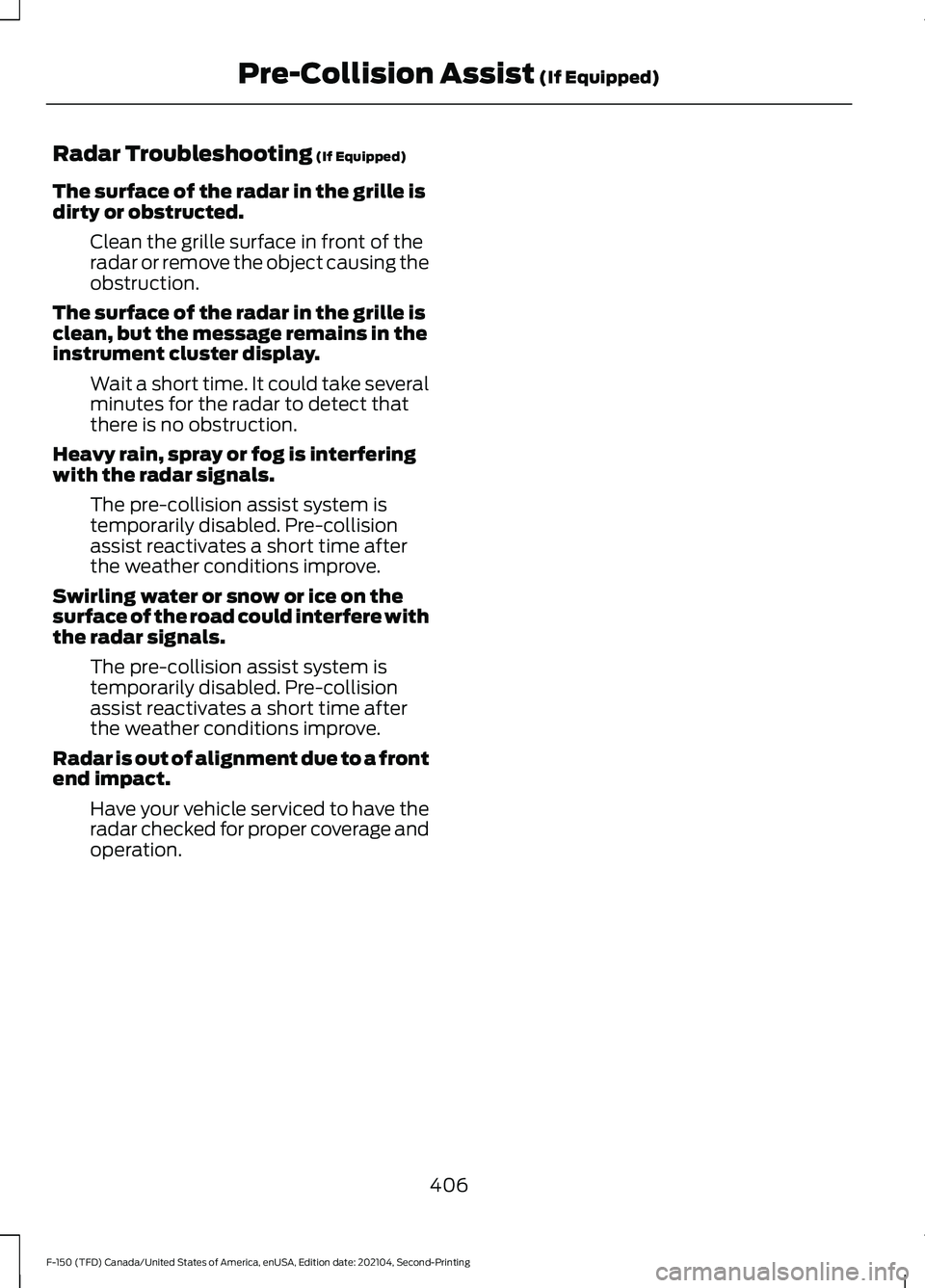
Radar Troubleshooting (If Equipped)
The surface of the radar in the grille is
dirty or obstructed. Clean the grille surface in front of the
radar or remove the object causing the
obstruction.
The surface of the radar in the grille is
clean, but the message remains in the
instrument cluster display. Wait a short time. It could take several
minutes for the radar to detect that
there is no obstruction.
Heavy rain, spray or fog is interfering
with the radar signals. The pre-collision assist system is
temporarily disabled. Pre-collision
assist reactivates a short time after
the weather conditions improve.
Swirling water or snow or ice on the
surface of the road could interfere with
the radar signals. The pre-collision assist system is
temporarily disabled. Pre-collision
assist reactivates a short time after
the weather conditions improve.
Radar is out of alignment due to a front
end impact. Have your vehicle serviced to have the
radar checked for proper coverage and
operation.
406
F-150 (TFD) Canada/United States of America, enUSA, Edition date: 202104, Second-Printing Pre-Collision Assist
(If Equipped)
Page 428 of 796
CONNECTING A TRAILER
PRECAUTIONS
Do not tow a trailer until you drive your
vehicle at least 1,000 mi (1,600 km).
Consult your local motor vehicle laws for
towing a trailer.
See the instructions included with towing
accessories for the proper installation and
adjustment specifications.
Service your vehicle more frequently if you
tow a trailer. See
Normal Scheduled
Maintenance (page 667).
If you use a rental trailer, follow the
instructions the rental agency gives you.
When attaching the trailer wiring connector
to your vehicle, only use a proper fitting
connector that works with the vehicle and
trailer functions.
Account for the trailer coupler weight as
part of your vehicle load when calculating
the total vehicle weight.
Do not exceed the load limits. See
Calculating the Load Limit
(page 415).
HITCHES
HOOKING UP A TRAILER USING A
WEIGHT-DISTRIBUTING HITCH WARNING: Do not adjust the spring
bars so that your vehicle's rear bumper
is higher than before attaching the trailer.
Doing so will defeat the function of the
weight-distributing hitch, which may
cause unpredictable handling, and could
result in serious personal injury.
A weight-distributing hitch helps distribute
tongue load to all towing vehicle and trailer
wheels. For more information, visit the links
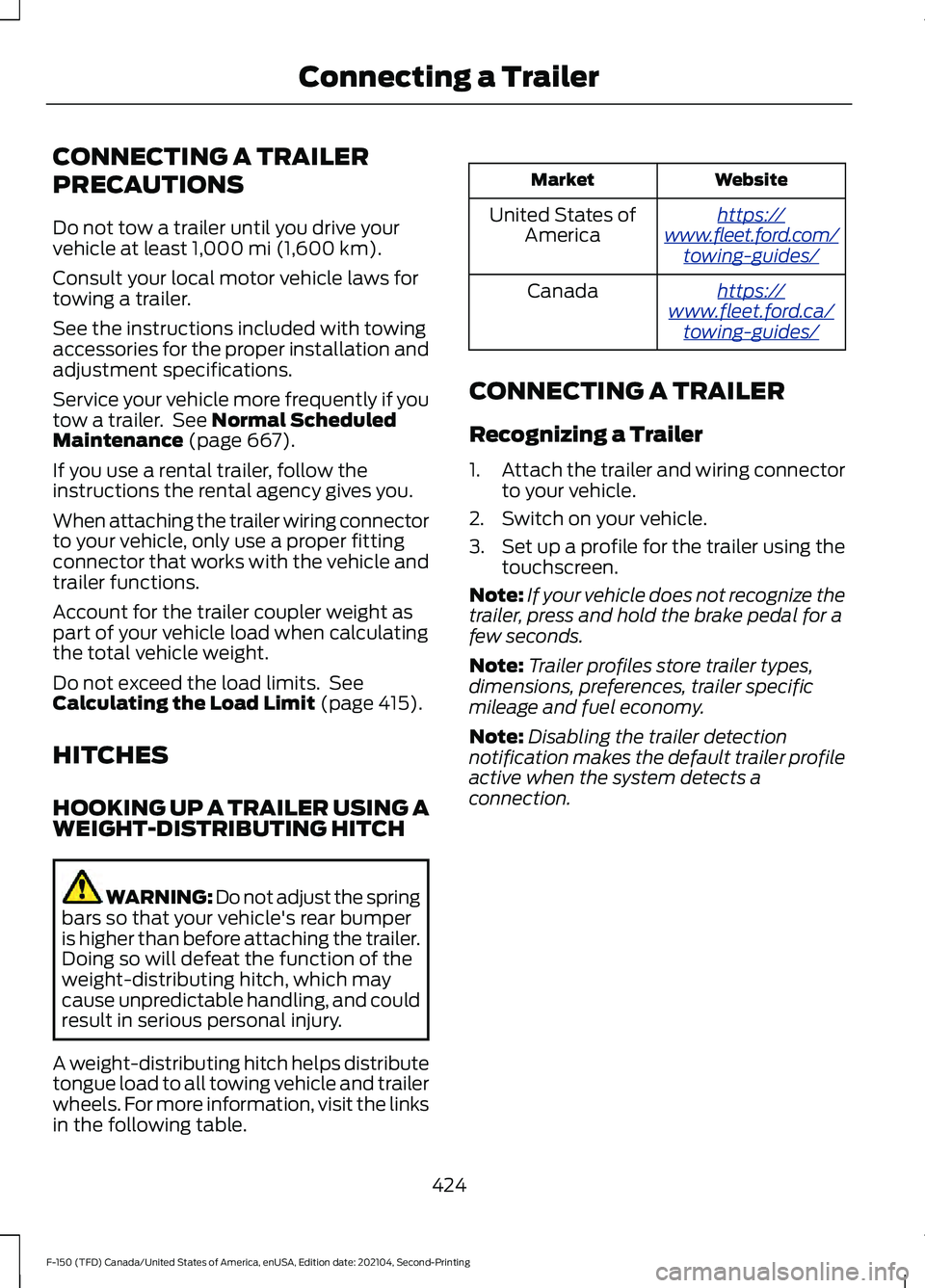
in the following table. Website
Market
ht tp s:/ /
www .fl e e t.f or d . c om/
t o wing-g uide s/United States of
America
ht tp s:/ /
www .fl e e t.f or d . c a/
t o wing-g uide s/Canada
CONNECTING A TRAILER
Recognizing a Trailer
1. Attach the trailer and wiring connector
to your vehicle.
2. Switch on your vehicle.
3. Set up a profile for the trailer using the
touchscreen.
Note: If your vehicle does not recognize the
trailer, press and hold the brake pedal for a
few seconds.
Note: Trailer profiles store trailer types,
dimensions, preferences, trailer specific
mileage and fuel economy.
Note: Disabling the trailer detection
notification makes the default trailer profile
active when the system detects a
connection.
424
F-150 (TFD) Canada/United States of America, enUSA, Edition date: 202104, Second-Printing Connecting a Trailer
Page 437 of 796
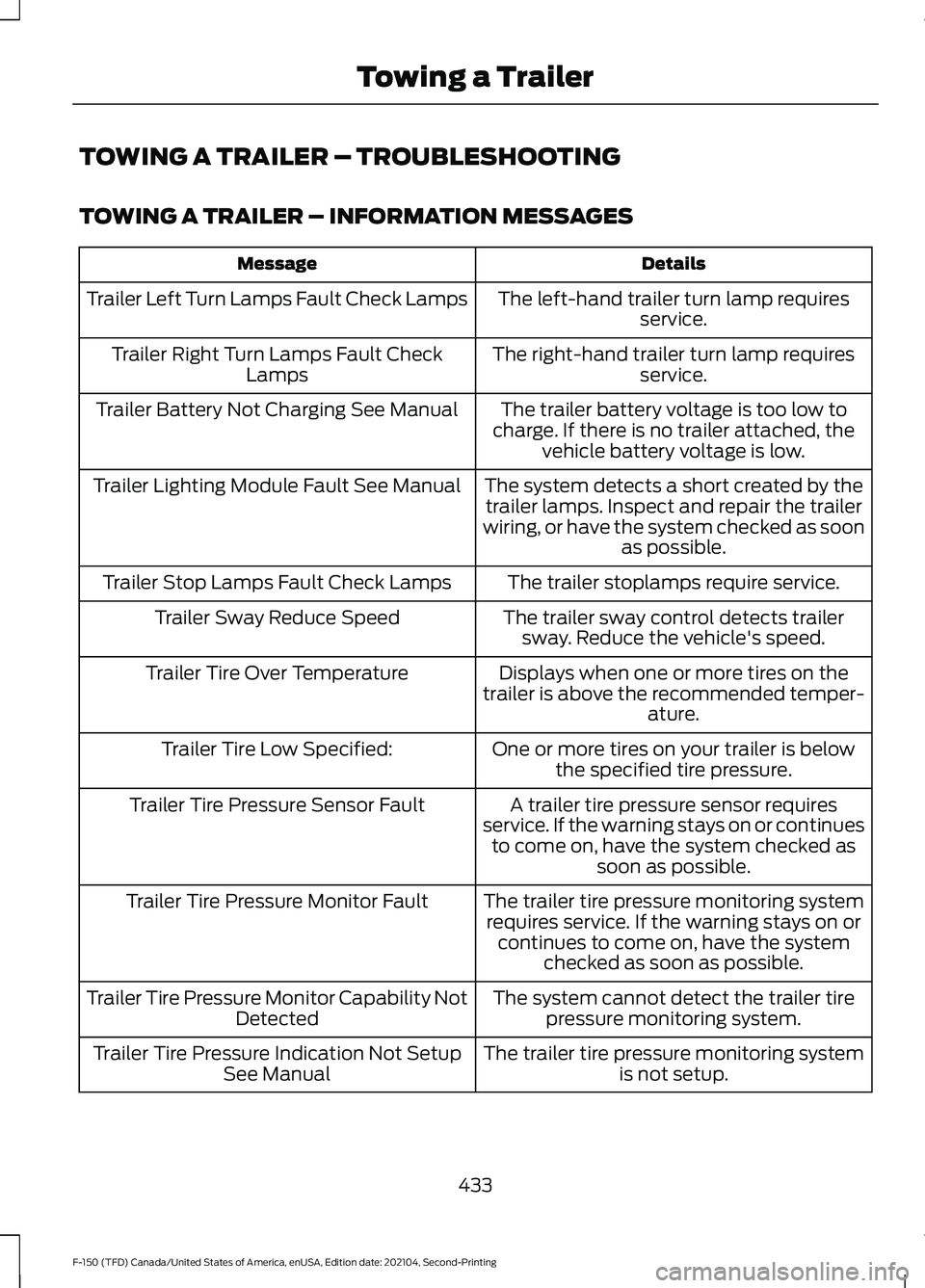
TOWING A TRAILER – TROUBLESHOOTING
TOWING A TRAILER – INFORMATION MESSAGES
Details
Message
The left-hand trailer turn lamp requiresservice.
Trailer Left Turn Lamps Fault Check Lamps
The right-hand trailer turn lamp requiresservice.
Trailer Right Turn Lamps Fault Check
Lamps
The trailer battery voltage is too low to
charge. If there is no trailer attached, the vehicle battery voltage is low.
Trailer Battery Not Charging See Manual
The system detects a short created by thetrailer lamps. Inspect and repair the trailer
wiring, or have the system checked as soon as possible.
Trailer Lighting Module Fault See Manual
The trailer stoplamps require service.
Trailer Stop Lamps Fault Check Lamps
The trailer sway control detects trailersway. Reduce the vehicle's speed.
Trailer Sway Reduce Speed
Displays when one or more tires on the
trailer is above the recommended temper- ature.
Trailer Tire Over Temperature
One or more tires on your trailer is belowthe specified tire pressure.
Trailer Tire Low Specified:
A trailer tire pressure sensor requires
service. If the warning stays on or continues to come on, have the system checked as soon as possible.
Trailer Tire Pressure Sensor Fault
The trailer tire pressure monitoring systemrequires service. If the warning stays on or continues to come on, have the system checked as soon as possible.
Trailer Tire Pressure Monitor Fault
The system cannot detect the trailer tirepressure monitoring system.
Trailer Tire Pressure Monitor Capability Not
Detected
The trailer tire pressure monitoring systemis not setup.
Trailer Tire Pressure Indication Not Setup
See Manual
433
F-150 (TFD) Canada/United States of America, enUSA, Edition date: 202104, Second-Printing Towing a Trailer
Page 461 of 796
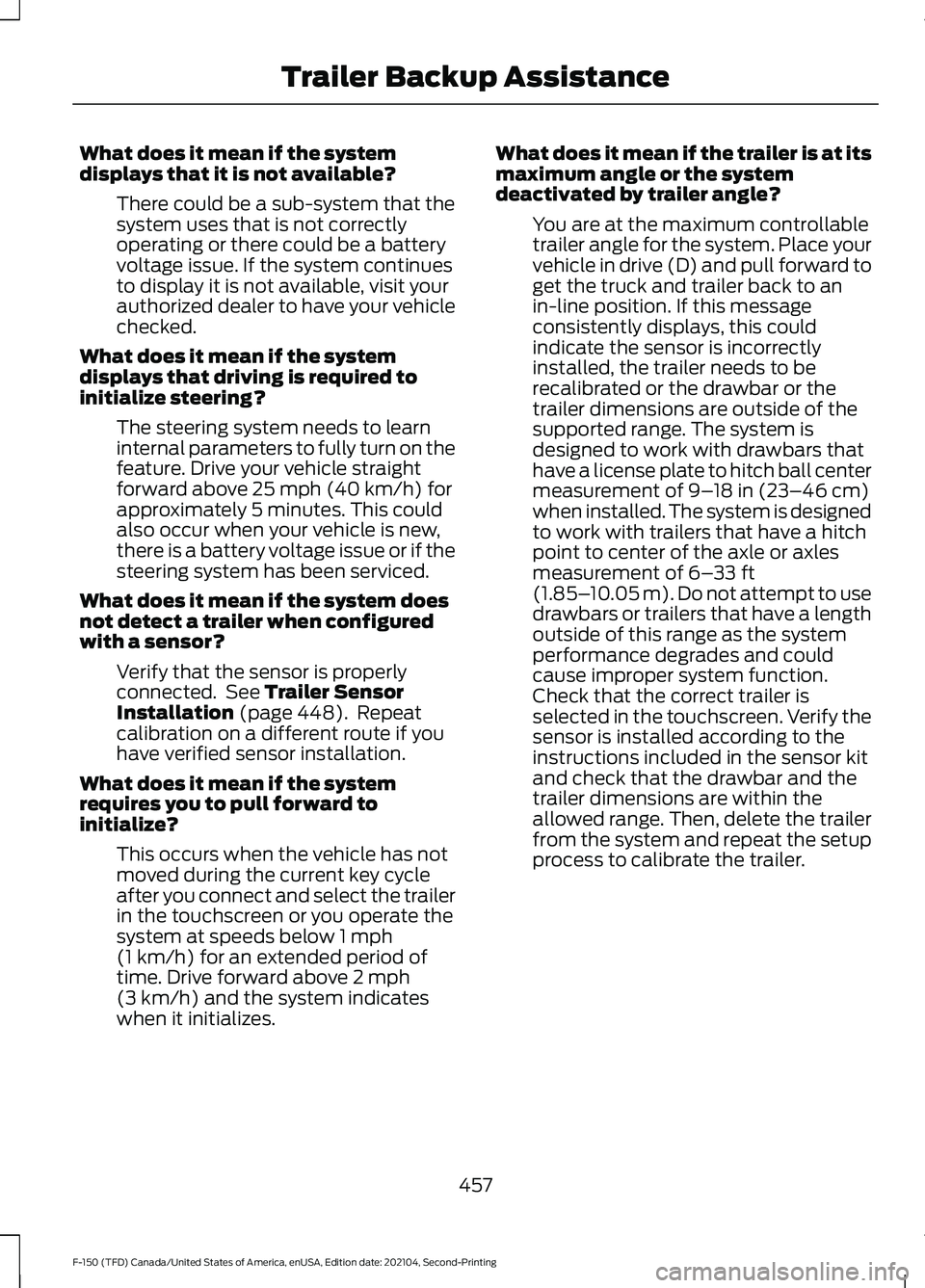
What does it mean if the system
displays that it is not available?
There could be a sub-system that the
system uses that is not correctly
operating or there could be a battery
voltage issue. If the system continues
to display it is not available, visit your
authorized dealer to have your vehicle
checked.
What does it mean if the system
displays that driving is required to
initialize steering? The steering system needs to learn
internal parameters to fully turn on the
feature. Drive your vehicle straight
forward above 25 mph (40 km/h) for
approximately 5 minutes. This could
also occur when your vehicle is new,
there is a battery voltage issue or if the
steering system has been serviced.
What does it mean if the system does
not detect a trailer when configured
with a sensor? Verify that the sensor is properly
connected. See
Trailer Sensor
Installation (page 448). Repeat
calibration on a different route if you
have verified sensor installation.
What does it mean if the system
requires you to pull forward to
initialize? This occurs when the vehicle has not
moved during the current key cycle
after you connect and select the trailer
in the touchscreen or you operate the
system at speeds below
1 mph
(1 km/h) for an extended period of
time. Drive forward above 2 mph
(3 km/h) and the system indicates
when it initializes. What does it mean if the trailer is at its
maximum angle or the system
deactivated by trailer angle?
You are at the maximum controllable
trailer angle for the system. Place your
vehicle in drive (D) and pull forward to
get the truck and trailer back to an
in-line position. If this message
consistently displays, this could
indicate the sensor is incorrectly
installed, the trailer needs to be
recalibrated or the drawbar or the
trailer dimensions are outside of the
supported range. The system is
designed to work with drawbars that
have a license plate to hitch ball center
measurement of
9–18 in (23–46 cm)
when installed. The system is designed
to work with trailers that have a hitch
point to center of the axle or axles
measurement of
6– 33 ft
(1.85– 10.05 m). Do not attempt to use
drawbars or trailers that have a length
outside of this range as the system
performance degrades and could
cause improper system function.
Check that the correct trailer is
selected in the touchscreen. Verify the
sensor is installed according to the
instructions included in the sensor kit
and check that the drawbar and the
trailer dimensions are within the
allowed range. Then, delete the trailer
from the system and repeat the setup
process to calibrate the trailer.
457
F-150 (TFD) Canada/United States of America, enUSA, Edition date: 202104, Second-Printing Trailer Backup Assistance
Page 472 of 796
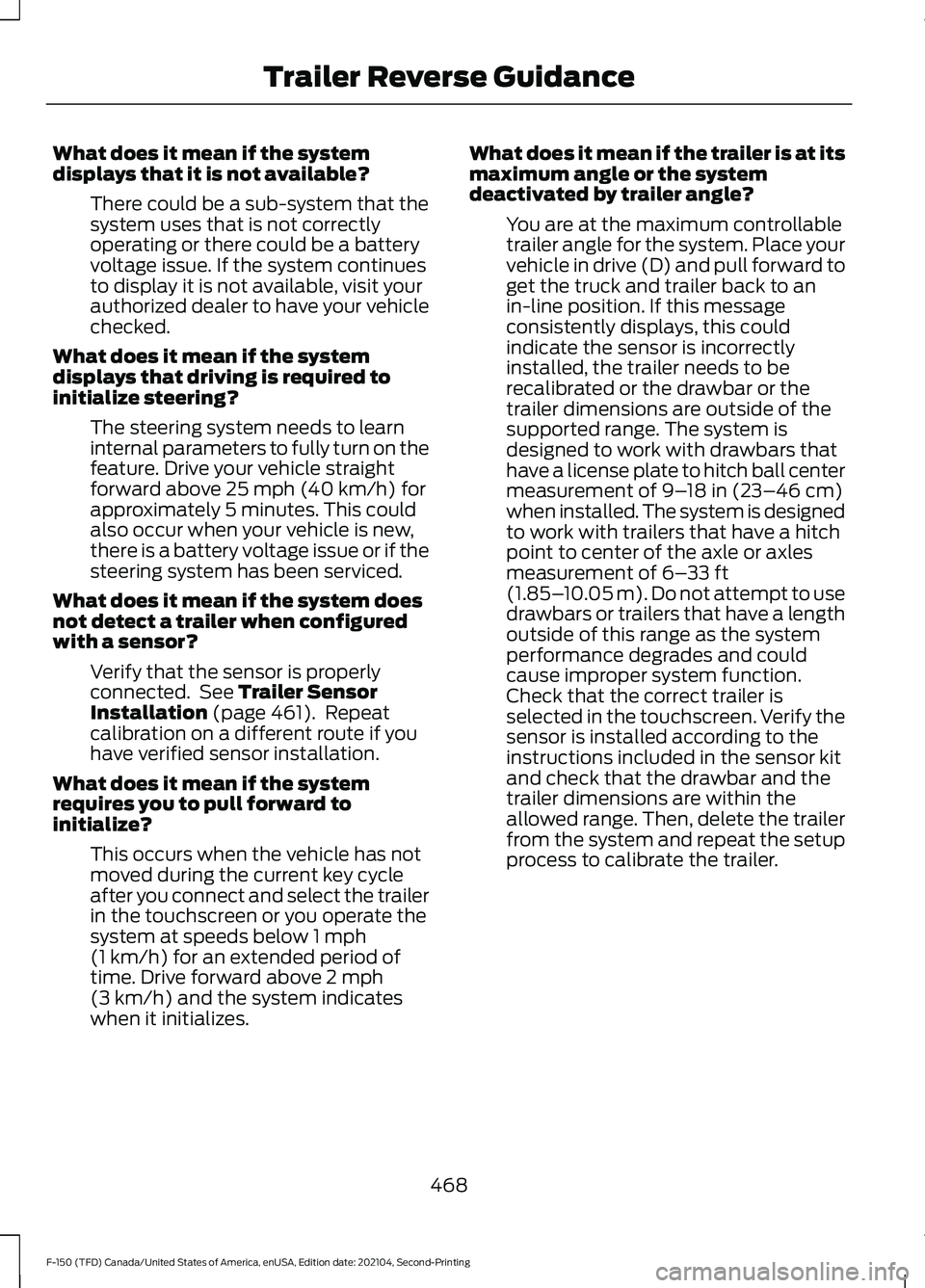
What does it mean if the system
displays that it is not available?
There could be a sub-system that the
system uses that is not correctly
operating or there could be a battery
voltage issue. If the system continues
to display it is not available, visit your
authorized dealer to have your vehicle
checked.
What does it mean if the system
displays that driving is required to
initialize steering? The steering system needs to learn
internal parameters to fully turn on the
feature. Drive your vehicle straight
forward above 25 mph (40 km/h) for
approximately 5 minutes. This could
also occur when your vehicle is new,
there is a battery voltage issue or if the
steering system has been serviced.
What does it mean if the system does
not detect a trailer when configured
with a sensor? Verify that the sensor is properly
connected. See
Trailer Sensor
Installation (page 461). Repeat
calibration on a different route if you
have verified sensor installation.
What does it mean if the system
requires you to pull forward to
initialize? This occurs when the vehicle has not
moved during the current key cycle
after you connect and select the trailer
in the touchscreen or you operate the
system at speeds below
1 mph
(1 km/h) for an extended period of
time. Drive forward above 2 mph
(3 km/h) and the system indicates
when it initializes. What does it mean if the trailer is at its
maximum angle or the system
deactivated by trailer angle?
You are at the maximum controllable
trailer angle for the system. Place your
vehicle in drive (D) and pull forward to
get the truck and trailer back to an
in-line position. If this message
consistently displays, this could
indicate the sensor is incorrectly
installed, the trailer needs to be
recalibrated or the drawbar or the
trailer dimensions are outside of the
supported range. The system is
designed to work with drawbars that
have a license plate to hitch ball center
measurement of
9–18 in (23–46 cm)
when installed. The system is designed
to work with trailers that have a hitch
point to center of the axle or axles
measurement of
6– 33 ft
(1.85– 10.05 m). Do not attempt to use
drawbars or trailers that have a length
outside of this range as the system
performance degrades and could
cause improper system function.
Check that the correct trailer is
selected in the touchscreen. Verify the
sensor is installed according to the
instructions included in the sensor kit
and check that the drawbar and the
trailer dimensions are within the
allowed range. Then, delete the trailer
from the system and repeat the setup
process to calibrate the trailer.
468
F-150 (TFD) Canada/United States of America, enUSA, Edition date: 202104, Second-Printing Trailer Reverse Guidance
Page 477 of 796
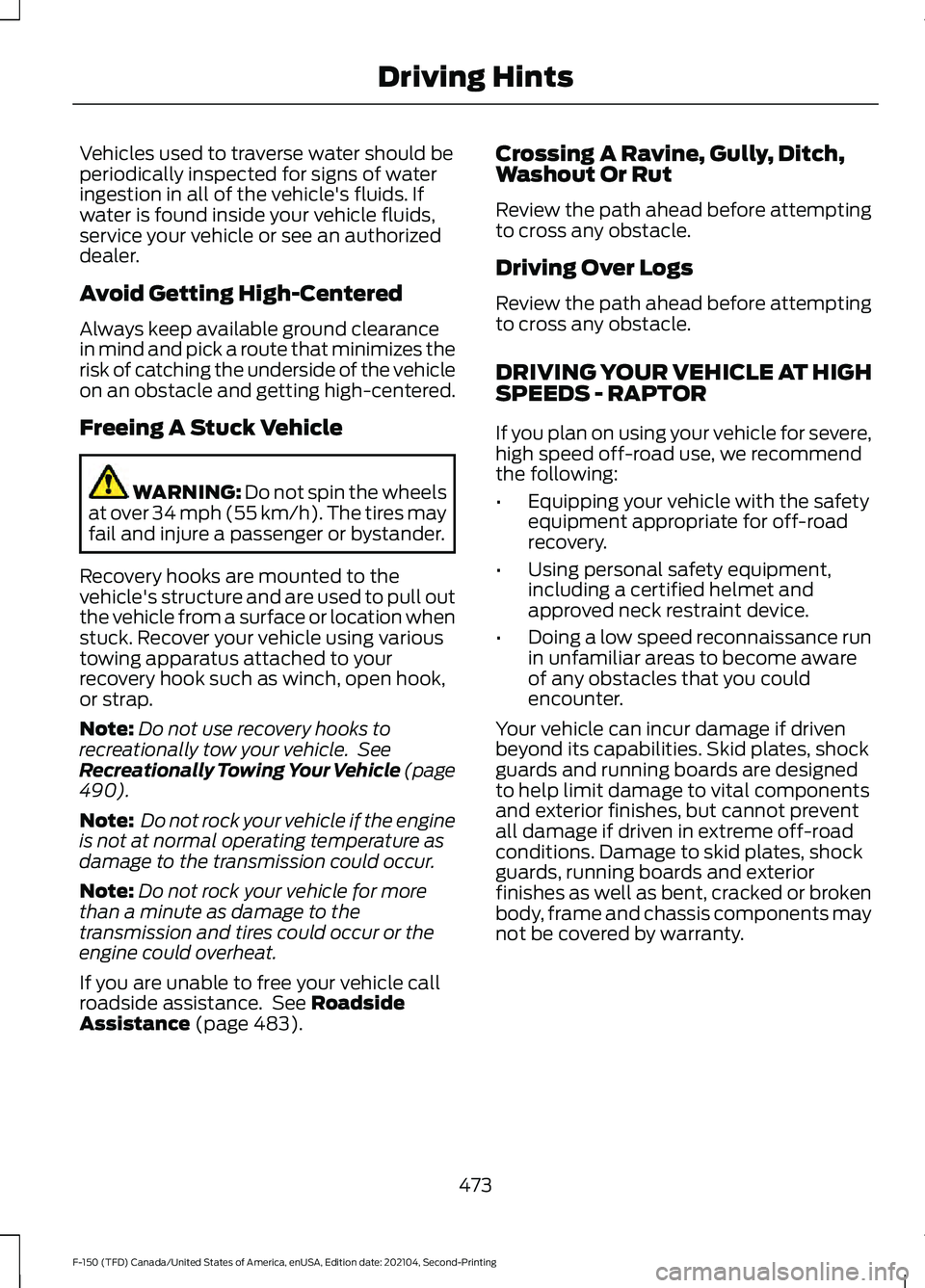
Vehicles used to traverse water should be
periodically inspected for signs of water
ingestion in all of the vehicle's fluids. If
water is found inside your vehicle fluids,
service your vehicle or see an authorized
dealer.
Avoid Getting High-Centered
Always keep available ground clearance
in mind and pick a route that minimizes the
risk of catching the underside of the vehicle
on an obstacle and getting high-centered.
Freeing A Stuck Vehicle
WARNING: Do not spin the wheels
at over 34 mph (55 km/h). The tires may
fail and injure a passenger or bystander.
Recovery hooks are mounted to the
vehicle's structure and are used to pull out
the vehicle from a surface or location when
stuck. Recover your vehicle using various
towing apparatus attached to your
recovery hook such as winch, open hook,
or strap.
Note: Do not use recovery hooks to
recreationally tow your vehicle. See
Recreationally Towing Your Vehicle (page
490
).
Note: Do not rock your vehicle if the engine
is not at normal operating temperature as
damage to the transmission could occur.
Note: Do not rock your vehicle for more
than a minute as damage to the
transmission and tires could occur or the
engine could overheat.
If you are unable to free your vehicle call
roadside assistance. See
Roadside
Assistance (page 483). Crossing A Ravine, Gully, Ditch,
Washout Or Rut
Review the path ahead before attempting
to cross any obstacle.
Driving Over Logs
Review the path ahead before attempting
to cross any obstacle.
DRIVING YOUR VEHICLE AT HIGH
SPEEDS - RAPTOR
If you plan on using your vehicle for severe,
high speed off-road use, we recommend
the following:
•
Equipping your vehicle with the safety
equipment appropriate for off-road
recovery.
• Using personal safety equipment,
including a certified helmet and
approved neck restraint device.
• Doing a low speed reconnaissance run
in unfamiliar areas to become aware
of any obstacles that you could
encounter.
Your vehicle can incur damage if driven
beyond its capabilities. Skid plates, shock
guards and running boards are designed
to help limit damage to vital components
and exterior finishes, but cannot prevent
all damage if driven in extreme off-road
conditions. Damage to skid plates, shock
guards, running boards and exterior
finishes as well as bent, cracked or broken
body, frame and chassis components may
not be covered by warranty.
473
F-150 (TFD) Canada/United States of America, enUSA, Edition date: 202104, Second-Printing Driving Hints
Page 484 of 796
SNOW PLOWING
PRECAUTIONS
WARNING: Modifying or adding
equipment to the front of your vehicle
could affect the performance of the
airbag system, increasing the risk of
injury. This includes the hood, bumper
system, frame, front body structure, tow
hooks, hood pins, push bar and
snowplows. WARNING:
Do not attempt to
service, repair, or modify the
supplementary restraint system or
associated components. Failure to
follow this instruction could result in
personal injury or death. WARNING:
All occupants of your
vehicle, including the driver, should
always properly wear their seatbelts,
even when an airbag supplemental
restraint system is provided. Failure to
properly wear your seatbelt could
seriously increase the risk of injury or
death. WARNING:
Do not spin the wheels
at over 34 mph (55 km/h). The tires may
fail and injure a passenger or bystander.
Note: Look for an alterer ’s label on your
vehicle from the snowplow installer
certifying that the installation meets all
applicable Federal Motor Vehicle Safety
Standards (FMVSS).
Note: Federal and some local regulations
require additional exterior lamps for
snowplow-equipped vehicles. Contact an
authorized dealer for additional information. Note:
Do not remove or defeat the tripping
mechanisms designed into the snow
removal equipment by its manufacturer.
Doing so could cause damage to your
vehicle and the snow removal equipment
as well as possible airbag deployment.
OPERATING YOUR VEHICLE
WITH A SNOWPLOW
Weight limits and guidelines for selecting
and installing the snowplow are in the Ford
Truck Body Builders Layout Book. For
additional information, visit
www .f or dbb a s. c om .
A typical snowplow installation affects the
following:
• Front gross axle weight rating. See
What Is the Gross Axle Weight
Rating
(page 413).
• Gross vehicle weight rating. See
What
Is the Gross Vehicle Weight Rating
(page
413).
• Braking and steering.
• Front wheel toe. See the
Ford
Workshop Manual.
• Headlight aim. See
Adjusting the
Headlamps (page 521).
• Tire air pressure. See Information on
the Tire Sidewall
(page 543).
Note: Do not exceed the front gross axle
weight rating or gross vehicle weight rating.
Note: Your vehicle may require rear ballast
weight for proper braking and steering.
Your vehicle has a driver and passenger
airbag supplemental restraint system. The
supplemental restraint system activates
in certain frontal and offset frontal
collisions when the vehicle sustains
sufficient longitudinal deceleration.
480
F-150 (TFD) Canada/United States of America, enUSA, Edition date: 202104, Second-Printing Snow Plowing - Vehicles With: Snow Plow Mode
Page 487 of 796
ROADSIDE ASSISTANCE
Vehicles Sold in the United States:
Getting Roadside Assistance
To fully assist you should you have a
vehicle concern, Ford Motor Company
offers a complimentary roadside
assistance program. This program is
separate from the New Vehicle Limited
Warranty.
The service is available:
•
24 hours a day, seven days a week.
• For the coverage period supplied with
your vehicle.
Roadside Assistance covers:
• A flat tire change with a good spare
(except vehicles supplied with a tire
inflation kit).
• Battery jump start.
• Lock-out assistance (key replacement
cost is the customer's responsibility).
• Fuel delivery — independent service
contractors, if not prohibited by state,
local or municipal law, shall deliver up
to 2 gal (8 L) of gasoline or 5 gal (20 L)
of diesel fuel to a disabled vehicle.
Roadside assistance limits fuel delivery
service to two no-charge occurrences
within a 12-month period.
• Winch out — available within 100 ft
(30 m) of a paved or county
maintained road, no recoveries. •
Towing — independent service
contractors, if not prohibited by state,
local or municipal law, shall tow Ford
eligible vehicles to an authorized dealer
within
35 mi (56 km) of the
disablement location or to the nearest
authorized dealer. If a member
requests a tow to an authorized dealer
that is more than
35 mi (56 km) from
the disablement location, the member
shall be responsible for any mileage
costs in excess of
35 mi (56 km).
• Roadside Assistance includes up to
$200 for a towed trailer if the disabled
eligible vehicle requires service at the
nearest authorized dealer. If the towing
vehicle is operational but the trailer is
not, then the trailer does not qualify for
any roadside services.
Vehicles Sold in the United States:
Using Roadside Assistance
Complete the roadside assistance
identification card and place it in your
wallet for quick reference. This card is in
the Owner's Manual kit.
United States vehicle customers who
require Roadside Assistance, call
1-800-241-3673.
If you need to arrange roadside assistance
for yourself, Ford Motor Company
reimburses a reasonable amount for
towing to the nearest dealership within
35 mi (56 km)
. To obtain reimbursement
information, United States vehicle
customers call 1-800-241-3673.
Customers need to submit their original
receipts.
483
F-150 (TFD) Canada/United States of America, enUSA, Edition date: 202104, Second-Printing Crash and Breakdown Information