display FORD F-150 2021 Workshop Manual
[x] Cancel search | Manufacturer: FORD, Model Year: 2021, Model line: F-150, Model: FORD F-150 2021Pages: 796, PDF Size: 13.89 MB
Page 299 of 796
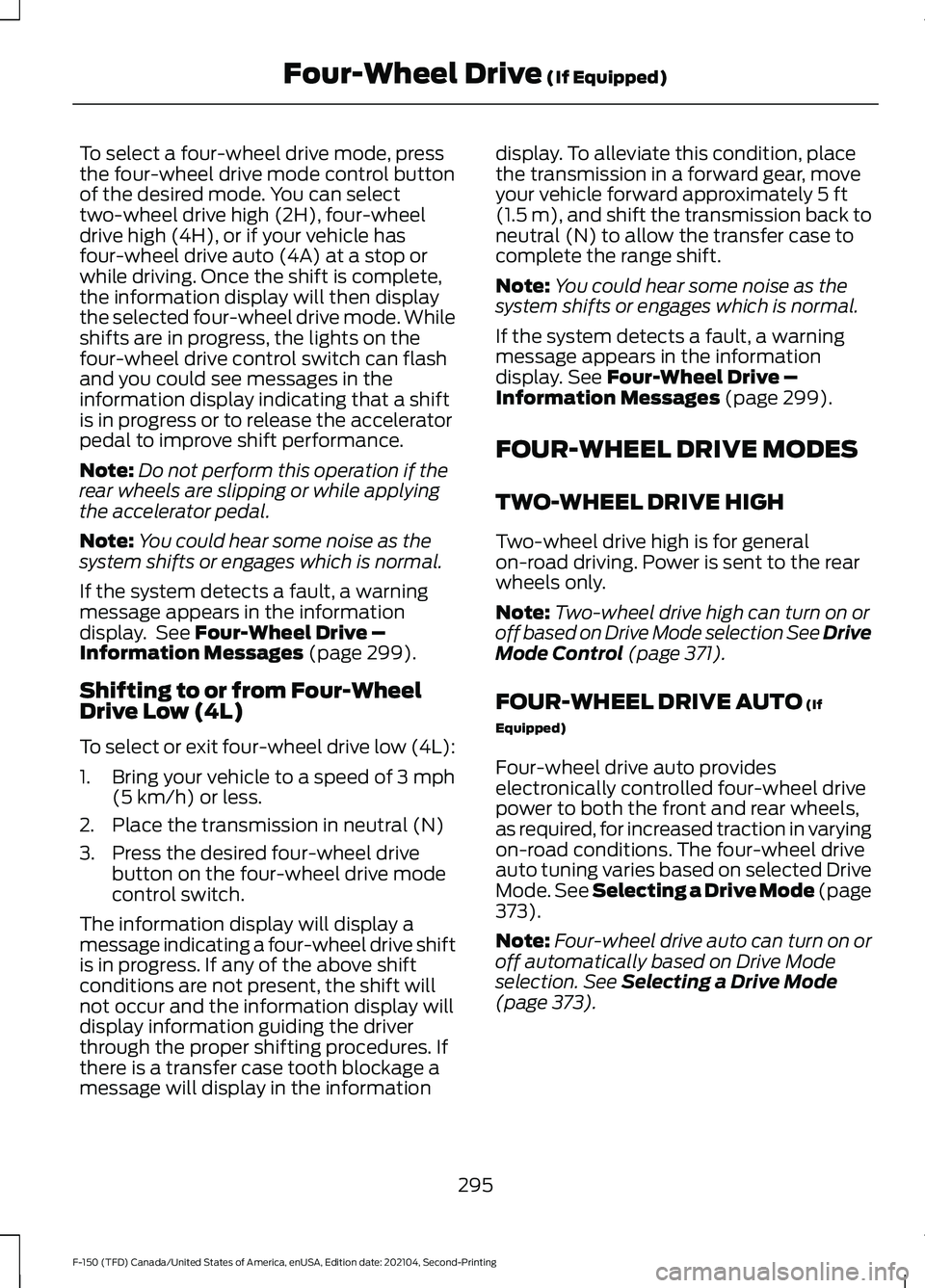
To select a four-wheel drive mode, press
the four-wheel drive mode control button
of the desired mode. You can select
two-wheel drive high (2H), four-wheel
drive high (4H), or if your vehicle has
four-wheel drive auto (4A) at a stop or
while driving. Once the shift is complete,
the information display will then display
the selected four-wheel drive mode. While
shifts are in progress, the lights on the
four-wheel drive control switch can flash
and you could see messages in the
information display indicating that a shift
is in progress or to release the accelerator
pedal to improve shift performance.
Note:
Do not perform this operation if the
rear wheels are slipping or while applying
the accelerator pedal.
Note: You could hear some noise as the
system shifts or engages which is normal.
If the system detects a fault, a warning
message appears in the information
display. See Four-Wheel Drive –
Information Messages (page 299).
Shifting to or from Four-Wheel
Drive Low (4L)
To select or exit four-wheel drive low (4L):
1. Bring your vehicle to a speed of
3 mph
(5 km/h) or less.
2. Place the transmission in neutral (N)
3. Press the desired four-wheel drive button on the four-wheel drive mode
control switch.
The information display will display a
message indicating a four-wheel drive shift
is in progress. If any of the above shift
conditions are not present, the shift will
not occur and the information display will
display information guiding the driver
through the proper shifting procedures. If
there is a transfer case tooth blockage a
message will display in the information display. To alleviate this condition, place
the transmission in a forward gear, move
your vehicle forward approximately
5 ft
(1.5 m), and shift the transmission back to
neutral (N) to allow the transfer case to
complete the range shift.
Note: You could hear some noise as the
system shifts or engages which is normal.
If the system detects a fault, a warning
message appears in the information
display.
See Four-Wheel Drive –
Information Messages (page 299).
FOUR-WHEEL DRIVE MODES
TWO-WHEEL DRIVE HIGH
Two-wheel drive high is for general
on-road driving. Power is sent to the rear
wheels only.
Note: Two-wheel drive high can turn on or
off based on Drive Mode selection See Drive
Mode Control
(page 371).
FOUR-WHEEL DRIVE AUTO
(If
Equipped)
Four-wheel drive auto provides
electronically controlled four-wheel drive
power to both the front and rear wheels,
as required, for increased traction in varying
on-road conditions. The four-wheel drive
auto tuning varies based on selected Drive
Mode.
See Selecting a Drive Mode (page
373).
Note: Four-wheel drive auto can turn on or
off automatically based on Drive Mode
selection.
See Selecting a Drive Mode
(page 373).
295
F-150 (TFD) Canada/United States of America, enUSA, Edition date: 202104, Second-Printing Four-Wheel Drive
(If Equipped)
Page 301 of 796
FOUR-WHEEL DRIVE –
TROUBLESHOOTING
FOUR-WHEEL DRIVE – WARNING
LAMPS
Illuminates when a four-wheel
drive or power train fault is
present.
Note:
When a system fault is present, the
system can typically remain in whichever
mode was selected prior to the fault
condition occurring. It does not default to
two-wheel drive in all circumstances. When
this warning is displayed, have your vehicle
serviced by an authorized dealer.
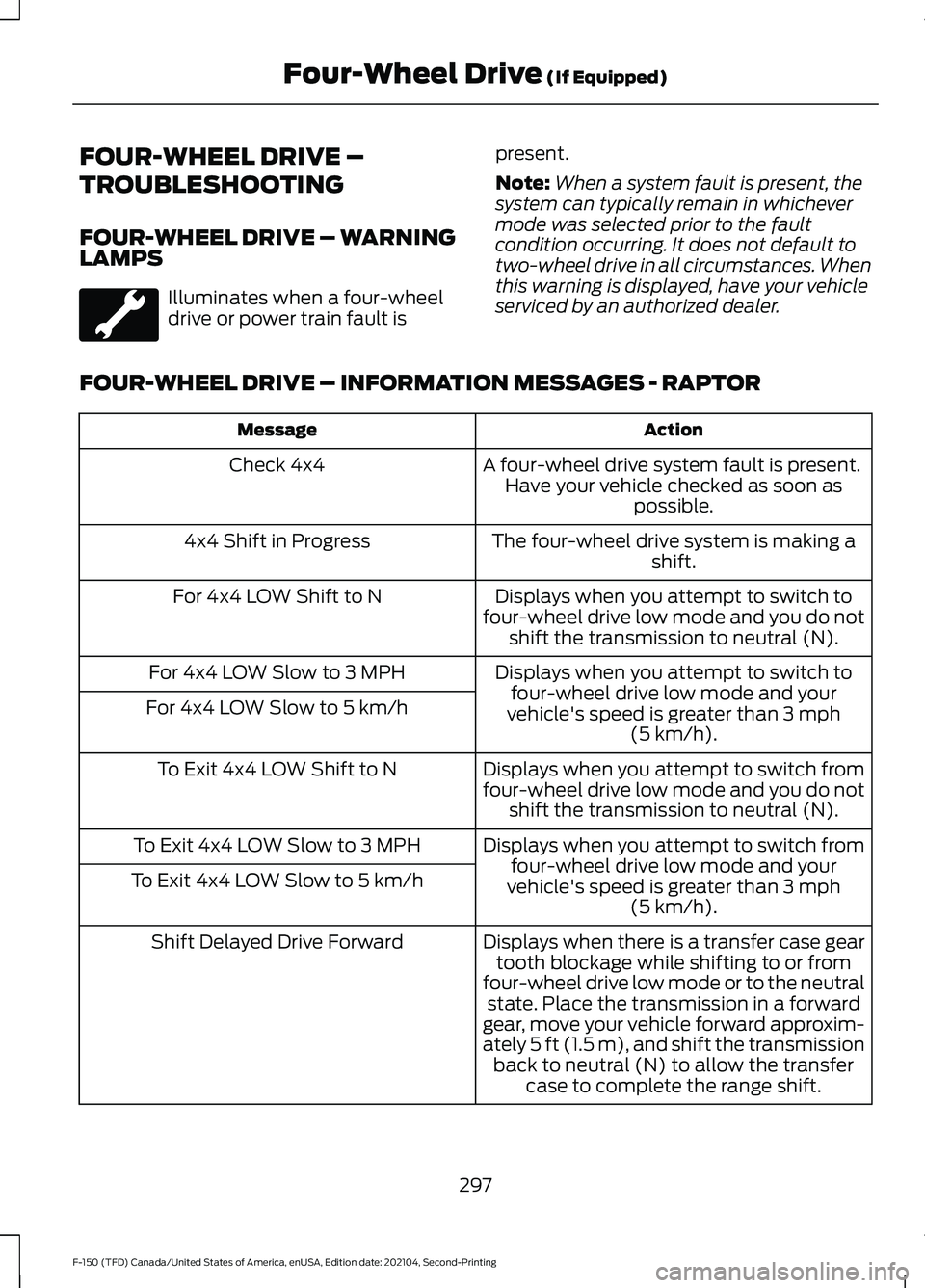
FOUR-WHEEL DRIVE – INFORMATION MESSAGES - RAPTOR Action
Message
A four-wheel drive system fault is present.Have your vehicle checked as soon as possible.
Check 4x4
The four-wheel drive system is making ashift.
4x4 Shift in Progress
Displays when you attempt to switch to
four-wheel drive low mode and you do not shift the transmission to neutral (N).
For 4x4 LOW Shift to N
Displays when you attempt to switch tofour-wheel drive low mode and your
vehicle's speed is greater than 3 mph
(5 km/h).
For 4x4 LOW Slow to 3 MPH
For 4x4 LOW Slow to 5 km/h
Displays when you attempt to switch from
four-wheel drive low mode and you do notshift the transmission to neutral (N).
To Exit 4x4 LOW Shift to N
Displays when you attempt to switch fromfour-wheel drive low mode and your
vehicle's speed is greater than
3 mph
(5 km/h).
To Exit 4x4 LOW Slow to 3 MPH
To Exit 4x4 LOW Slow to 5 km/h
Displays when there is a transfer case geartooth blockage while shifting to or from
four-wheel drive low mode or to the neutral state. Place the transmission in a forward
gear, move your vehicle forward approxim-
ately
5 ft (1.5 m), and shift the transmission
back to neutral (N) to allow the transfer case to complete the range shift.
Shift Delayed Drive Forward
297
F-150 (TFD) Canada/United States of America, enUSA, Edition date: 202104, Second-Printing Four-Wheel Drive
(If Equipped)
Page 302 of 796
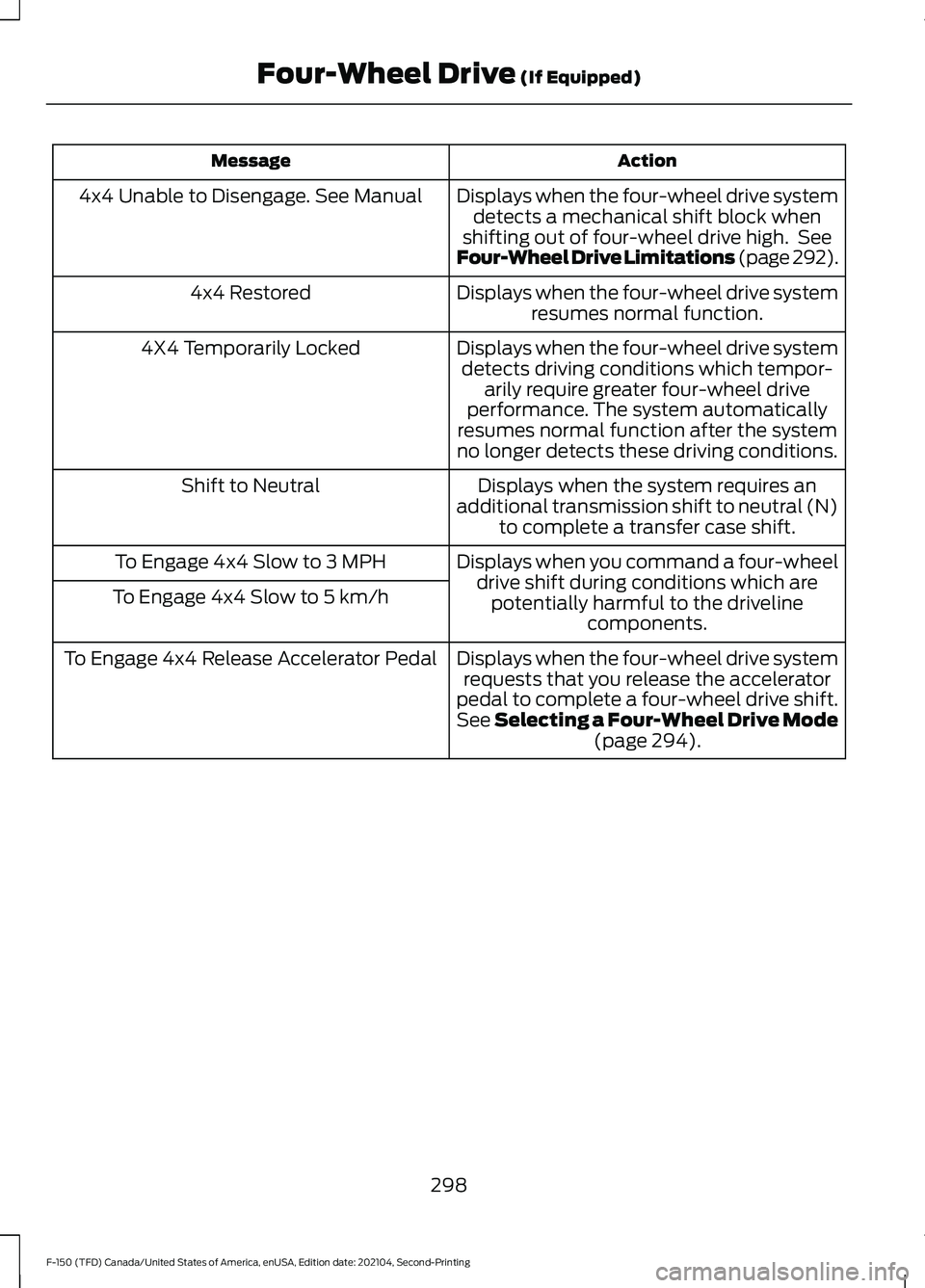
Action
Message
Displays when the four-wheel drive systemdetects a mechanical shift block when
shifting out of four-wheel drive high. See
Four-Wheel Drive Limitations (page 292).
4x4 Unable to Disengage. See Manual
Displays when the four-wheel drive systemresumes normal function.
4x4 Restored
Displays when the four-wheel drive systemdetects driving conditions which tempor- arily require greater four-wheel drive
performance. The system automatically
resumes normal function after the system
no longer detects these driving conditions.
4X4 Temporarily Locked
Displays when the system requires an
additional transmission shift to neutral (N) to complete a transfer case shift.
Shift to Neutral
Displays when you command a four-wheeldrive shift during conditions which arepotentially harmful to the driveline components.
To Engage 4x4 Slow to 3 MPH
To Engage 4x4 Slow to 5 km/h
Displays when the four-wheel drive systemrequests that you release the accelerator
pedal to complete a four-wheel drive shift.
See Selecting a Four-Wheel Drive Mode (page 294).
To Engage 4x4 Release Accelerator Pedal
298
F-150 (TFD) Canada/United States of America, enUSA, Edition date: 202104, Second-Printing Four-Wheel Drive
(If Equipped)
Page 303 of 796
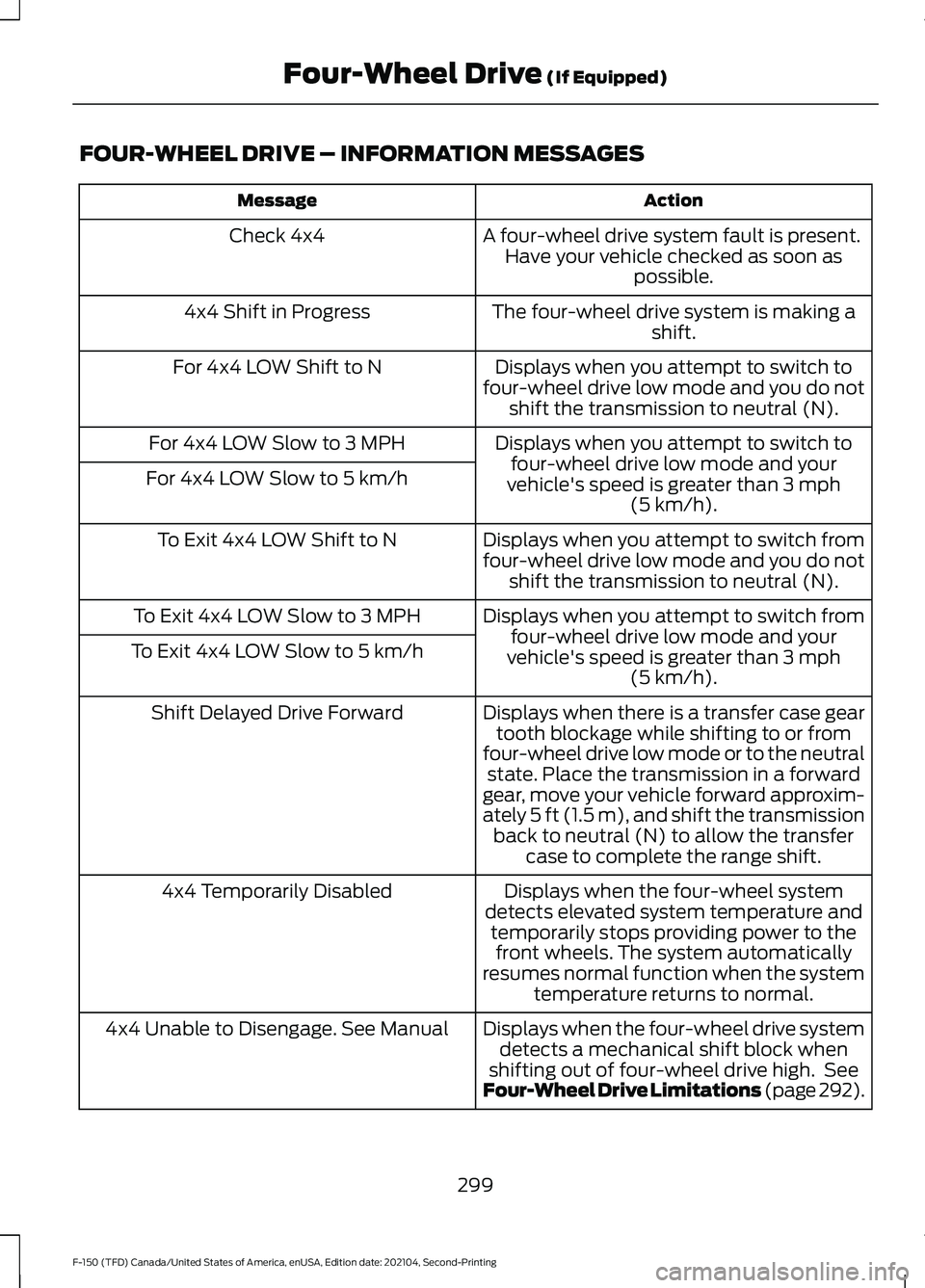
FOUR-WHEEL DRIVE – INFORMATION MESSAGES
Action
Message
A four-wheel drive system fault is present.Have your vehicle checked as soon as possible.
Check 4x4
The four-wheel drive system is making ashift.
4x4 Shift in Progress
Displays when you attempt to switch to
four-wheel drive low mode and you do not shift the transmission to neutral (N).
For 4x4 LOW Shift to N
Displays when you attempt to switch tofour-wheel drive low mode and your
vehicle's speed is greater than 3 mph
(5 km/h).
For 4x4 LOW Slow to 3 MPH
For 4x4 LOW Slow to 5 km/h
Displays when you attempt to switch from
four-wheel drive low mode and you do notshift the transmission to neutral (N).
To Exit 4x4 LOW Shift to N
Displays when you attempt to switch fromfour-wheel drive low mode and your
vehicle's speed is greater than
3 mph
(5 km/h).
To Exit 4x4 LOW Slow to 3 MPH
To Exit 4x4 LOW Slow to 5 km/h
Displays when there is a transfer case geartooth blockage while shifting to or from
four-wheel drive low mode or to the neutral state. Place the transmission in a forward
gear, move your vehicle forward approxim-
ately
5 ft (1.5 m), and shift the transmission
back to neutral (N) to allow the transfer case to complete the range shift.
Shift Delayed Drive Forward
Displays when the four-wheel system
detects elevated system temperature and temporarily stops providing power to thefront wheels. The system automatically
resumes normal function when the system temperature returns to normal.
4x4 Temporarily Disabled
Displays when the four-wheel drive systemdetects a mechanical shift block when
shifting out of four-wheel drive high. See
Four-Wheel Drive Limitations (page 292).
4x4 Unable to Disengage. See Manual
299
F-150 (TFD) Canada/United States of America, enUSA, Edition date: 202104, Second-Printing Four-Wheel Drive
(If Equipped)
Page 304 of 796
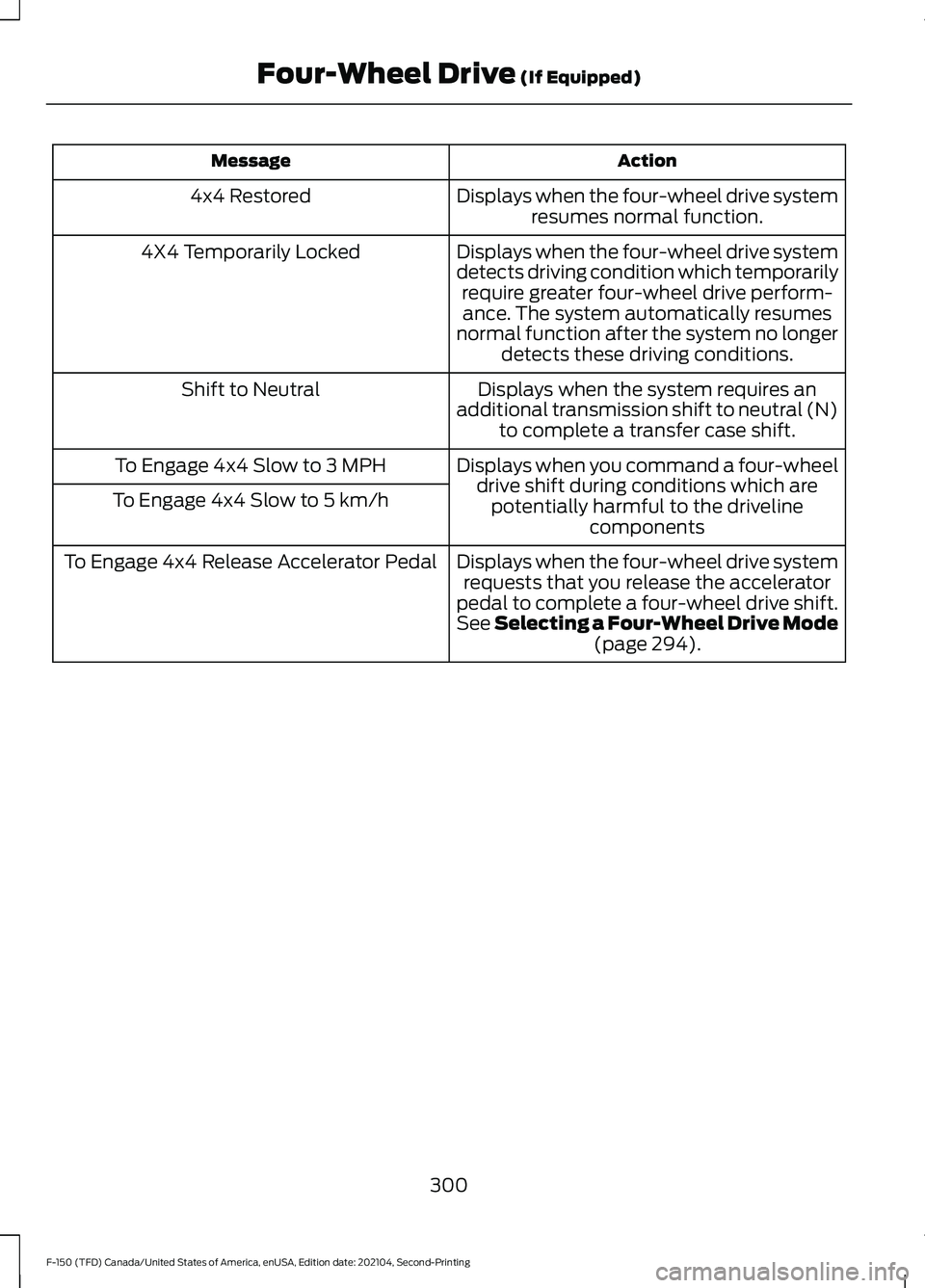
Action
Message
Displays when the four-wheel drive systemresumes normal function.
4x4 Restored
Displays when the four-wheel drive system
detects driving condition which temporarilyrequire greater four-wheel drive perform-ance. The system automatically resumes
normal function after the system no longer detects these driving conditions.
4X4 Temporarily Locked
Displays when the system requires an
additional transmission shift to neutral (N) to complete a transfer case shift.
Shift to Neutral
Displays when you command a four-wheeldrive shift during conditions which arepotentially harmful to the driveline components
To Engage 4x4 Slow to 3 MPH
To Engage 4x4 Slow to 5 km/h
Displays when the four-wheel drive systemrequests that you release the accelerator
pedal to complete a four-wheel drive shift.
See Selecting a Four-Wheel Drive Mode (page 294).
To Engage 4x4 Release Accelerator Pedal
300
F-150 (TFD) Canada/United States of America, enUSA, Edition date: 202104, Second-Printing Four-Wheel Drive
(If Equipped)
Page 307 of 796
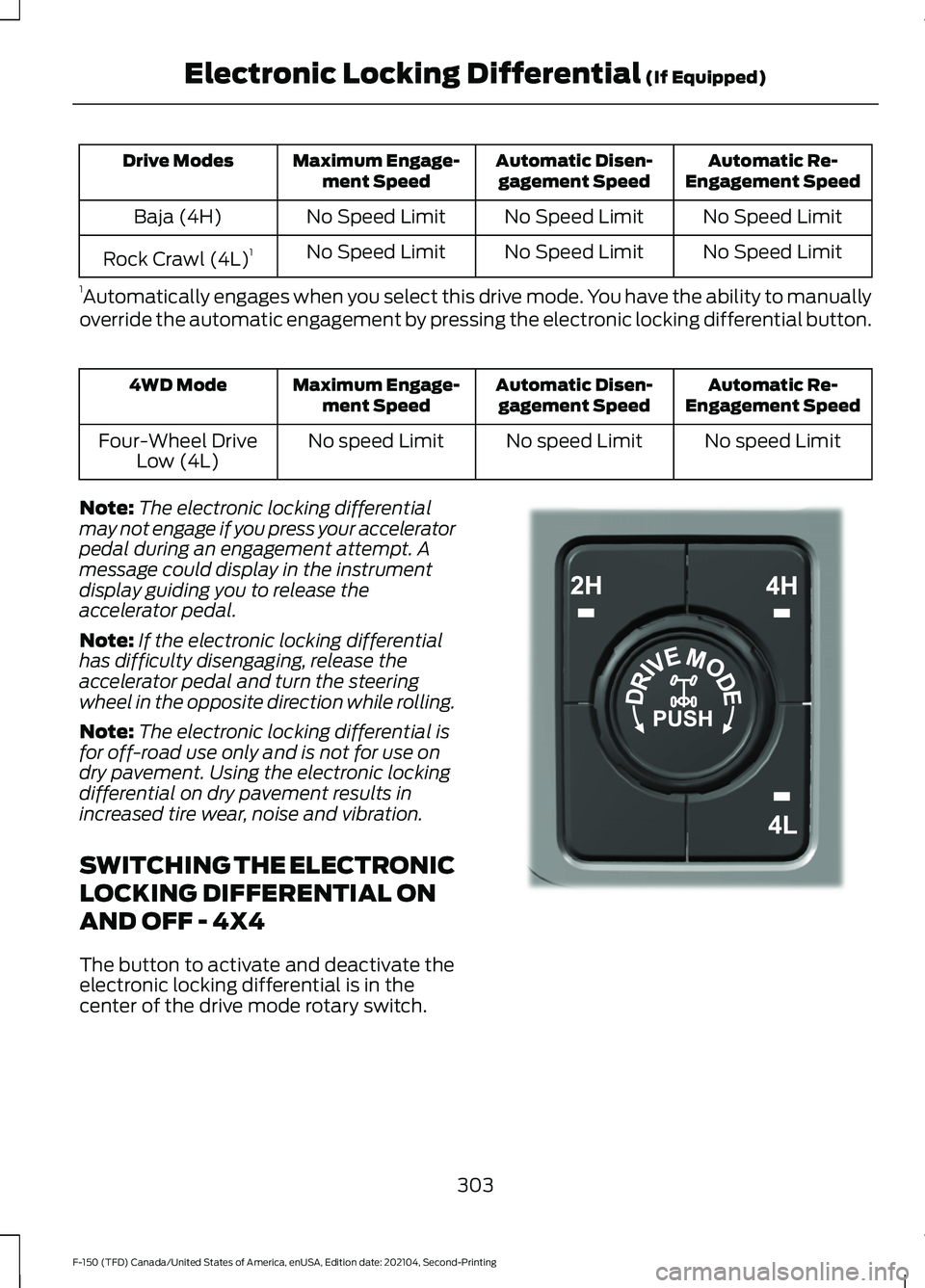
Automatic Re-
Engagement Speed
Automatic Disen-
gagement Speed
Maximum Engage-
ment Speed
Drive Modes
No Speed Limit
No Speed Limit
No Speed Limit
Baja (4H)
No Speed Limit
No Speed Limit
No Speed Limit
Rock Crawl (4L) 1
1 Automatically engages when you select this drive mode. You have the ability to manually
override the automatic engagement by pressing the electronic locking differential button. Automatic Re-
Engagement Speed
Automatic Disen-
gagement Speed
Maximum Engage-
ment Speed
4WD Mode
No speed Limit
No speed Limit
No speed Limit
Four-Wheel Drive
Low (4L)
Note: The electronic locking differential
may not engage if you press your accelerator
pedal during an engagement attempt. A
message could display in the instrument
display guiding you to release the
accelerator pedal.
Note: If the electronic locking differential
has difficulty disengaging, release the
accelerator pedal and turn the steering
wheel in the opposite direction while rolling.
Note: The electronic locking differential is
for off-road use only and is not for use on
dry pavement. Using the electronic locking
differential on dry pavement results in
increased tire wear, noise and vibration.
SWITCHING THE ELECTRONIC
LOCKING DIFFERENTIAL ON
AND OFF - 4X4
The button to activate and deactivate the
electronic locking differential is in the
center of the drive mode rotary switch. 303
F-150 (TFD) Canada/United States of America, enUSA, Edition date: 202104, Second-Printing Electronic Locking Differential (If Equipped)E323655
Page 309 of 796
Automatic Re-
Engagement Speed
Automatic Disen-
gagement Speed
Maximum Engage-
ment Speed
4WD Mode
No speed Limit
No speed Limit
No speed Limit
Four-Wheel Drive
Low (4L)
Note: The electronic locking differential
may not engage if you press your accelerator
pedal during an engagement attempt. A
message could display in the instrument
display guiding you to release the
accelerator pedal.
Note: If the electronic locking differential
has difficulty disengaging, release the
accelerator pedal and turn the steering
wheel in the opposite direction while rolling.
Note: The electronic locking differential is
for off-road use only and is not for use on
dry pavement. Using the electronic locking
differential on dry pavement results in
increased tire wear, noise and vibration.
SWITCHING THE ELECTRONIC
LOCKING DIFFERENTIAL ON
AND OFF - 4X2
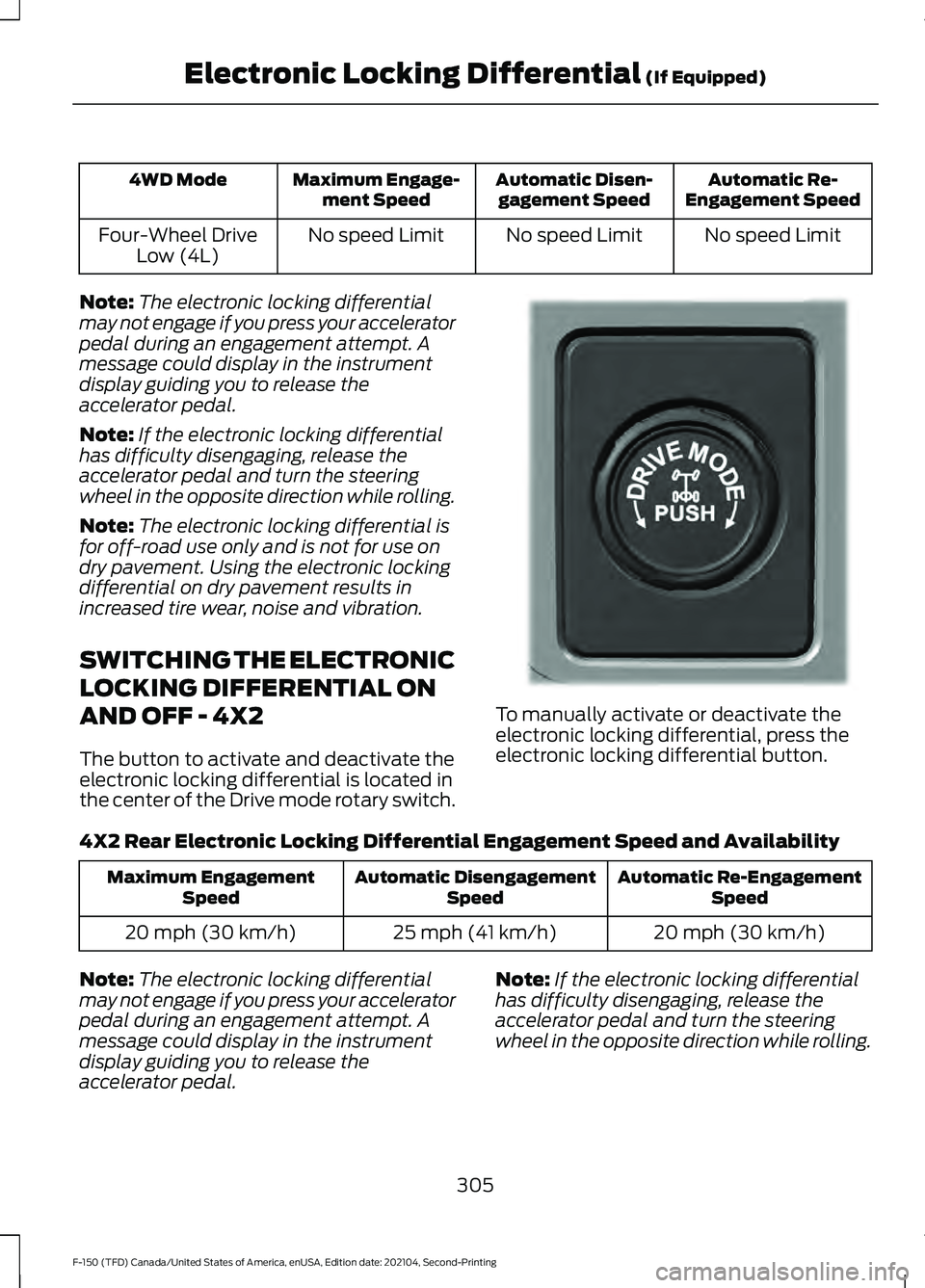
The button to activate and deactivate the
electronic locking differential is located in
the center of the Drive mode rotary switch. To manually activate or deactivate the
electronic locking differential, press the
electronic locking differential button.
4X2 Rear Electronic Locking Differential Engagement Speed and Availability Automatic Re-Engagement
Speed
Automatic Disengagement
Speed
Maximum Engagement
Speed
20 mph (30 km/h)
25 mph (41 km/h)
20 mph (30 km/h)
Note: The electronic locking differential
may not engage if you press your accelerator
pedal during an engagement attempt. A
message could display in the instrument
display guiding you to release the
accelerator pedal. Note:
If the electronic locking differential
has difficulty disengaging, release the
accelerator pedal and turn the steering
wheel in the opposite direction while rolling.
305
F-150 (TFD) Canada/United States of America, enUSA, Edition date: 202104, Second-Printing Electronic Locking Differential (If Equipped)E333748
Page 310 of 796
Note:
The electronic locking differential is
for off-road use only and is not for use on
dry pavement. Using the electronic locking
differential on dry pavement results in
increased tire wear, noise and vibration.
ELECTRONIC LOCKING
DIFFERENTIAL INDICATORS If both rear wheel axle shafts
lock together, the indicator in the
cluster is amber, providing
additional traction.
If you select the electronic locking
differential and the indicator in the cluster
is gray or turns from amber to gray while
driving, one of the following has occurred:
• The vehicle speed is too high.
• The accelerator pedal is too high during
an engagement attempt. •
The vehicle is experiencing an anti-lock
brake activation.
• The left and right wheel speed
difference is too high during an
engagement attempt.
If you select the electronic locking
differential and the indicator in the cluster
does not turn on, the following has
occurred:
• The system has malfunctioned and
accompanies a check locking
differential message in the information
display. See your dealer as soon as
possible.
Note: If the vehicle is experiencing an
anti-lock braking event, the electronic
locking differential could momentarily
disengage.
ELECTRONIC LOCKING DIFFERENTIAL – TROUBLESHOOTING
ELECTRONIC LOCKING DIFFERENTIAL – INFORMATION MESSAGES -
RAPTOR Description and Action
Message
The electronic locking differential has been requested andwill engage when the speed condition is met.
To Engage Locking
Differential Slow to XX mph/km/h
Release the accelerator pedal in order to engage.
To Engage Locking
Differential Release Accelerator Pedal
An electronic locking differential system fault is present.Contact an authorized dealer as soon as possible.
Check Locking Differen-
tial
Displays when the electronic locking differential is selected while in 2H.
Locking differential not
available in 2H
306
F-150 (TFD) Canada/United States of America, enUSA, Edition date: 202104, Second-Printing Electronic Locking Differential (If Equipped)E325779
Page 319 of 796
Note:
If your vehicle sustains damage to
the bumper or fascia leaving it misaligned
or bent, it could alter the sensing zone
causing inaccurate measurement of
obstacles or false alerts.
Note: Vehicle loading and suspension
changes can impact the angle of the sensors
and may change the normal detection zone
of the system resulting in inaccurate
measurement of obstacles or false alerts.
Note: When you connect a trailer, the
system may detect the trailer and provide
an alert, or the system turns off. If the
system does not turn off, switch the system
off manually after you connect the trailer.
Note: You may experience reduced system
performance on road surfaces that limit
deceleration. For example, roads with ice,
loose gravel, mud or sand.
SWITCHING REVERSE
BRAKING ASSIST ON AND OFF
1. Press Features on the touchscreen. 2. Press
Driver Assistance.
3. Switch
Reverse Brake Assist on or off.
Note: The system is unavailable when rear
parking aid or cross traffic alert is off.
OVERRIDING REVERSE
BRAKING ASSIST
There could be instances when
unexpected or unwanted braking occurs.
Firmly pressing the accelerator pedal or
switching the feature off overrides the
system.
REVERSE BRAKING ASSIST
INDICATORS
If the system determines that a collision
with an obstacle may occur, full braking
may apply. Bring your vehicle to a stop a
safe distance away from the obstacle. A message and warning
indicator appear when the
system applies the brakes.
REVERSE BRAKING ASSIST – TROUBLESHOOTING
REVERSE BRAKING ASSIST – INFORMATION MESSAGES Action
Message
Make sure that all doors, liftgate and hoodare closed. Drive the vehicle on a straight road for a short period. Make sure the
parking aids and cross traffic alert systems
are on. If the message remains on, have the system checked as soon as possible.
Reverse Brake Assist Not Available See
Manual
Displays when a system error has occurred.Have your vehicle checked as soon as possible.
Reverse Brake Assist Fault
Displays when reverse brake assist is off.
Reverse Brake Assist Off
315
F-150 (TFD) Canada/United States of America, enUSA, Edition date: 202104, Second-Printing Reverse Braking Assist
(If Equipped)E293490
Page 321 of 796
WHAT IS HILL START ASSIST
Hill Start Assist makes it easier for you to
pull away when your vehicle is on a slope
without using the parking brake.
HOW DOES HILL START
ASSIST WORK
When the system activates, your vehicle
remains stationary for a few seconds after
you release the brake pedal. This gives you
time to move your foot from the brake
pedal to the accelerator pedal. The brakes
release when the engine has developed
sufficient torque to prevent your vehicle
from rolling down the slope.
HILL START ASSIST
PRECAUTIONS
WARNING: The system does not
replace the parking brake. When you
leave your vehicle, always apply the
parking brake. WARNING:
You must remain in
your vehicle when the system turns on.
At all times, you are responsible for
controlling your vehicle, supervising the
system and intervening, if required.
Failure to take care may result in the loss
of control of your vehicle, serious
personal injury or death. WARNING:
The system will turn
off if a malfunction is apparent. Failure
to take care may result in the loss of
control of your vehicle, serious personal
injury or death. HILL START ASSIST –
TROUBLESHOOTING
HILL START ASSIST –
INFORMATION MESSAGES Action
Message
Displays when
system is not avail- able. Have your
vehicle checked as soon as possible.
Hill Start Assist Not
Available
317
F-150 (TFD) Canada/United States of America, enUSA, Edition date: 202104, Second-Printing Hill Start Assist