display FORD F-150 2021 Owners Manual
[x] Cancel search | Manufacturer: FORD, Model Year: 2021, Model line: F-150, Model: FORD F-150 2021Pages: 796, PDF Size: 13.89 MB
Page 377 of 796
•
Comfort – Slightly more assist for
driver preference and daily driving ease.
• Off-road – Similar assist to Normal
with added damping for improved
control during off-road driving.
After selecting the desired setting, you may
feel a soft feedback bump in the steering
wheel when the changeover occurs.
Note: If you disconnect or remove the
battery, the steering system defaults to
normal.
Selecting a Suspension Mode To change the suspension feel,
press the button on the steering
wheel. The first press displays a
pop-up message in the instrument cluster
display for the selected mode and
subsequent presses changes the selected
mode.
Modes:
• Normal – Default factory setting.
• Sport – Slightly stiffer suspension with
emphasis on handling and control.
• Off-road – Maximizes shock
performance in extreme off-road
environments.
Selecting an Exhaust Mode To change the exhaust sound,
press the button on the steering
wheel. The first press displays a
pop-up message in the instrument cluster
display for the selected mode and
subsequent presses changes the selected
mode.
Modes:
• Normal – Default setting provides a
balance of comfort and feedback.
• Sport – Slightly louder than normal for
spirited driving. •
Baja – Loudest setting for off-road use
only. Maximum exhaust noise under all
driving conditions.
• Quiet – Quietest setting for maximum
comfort under all driving conditions.
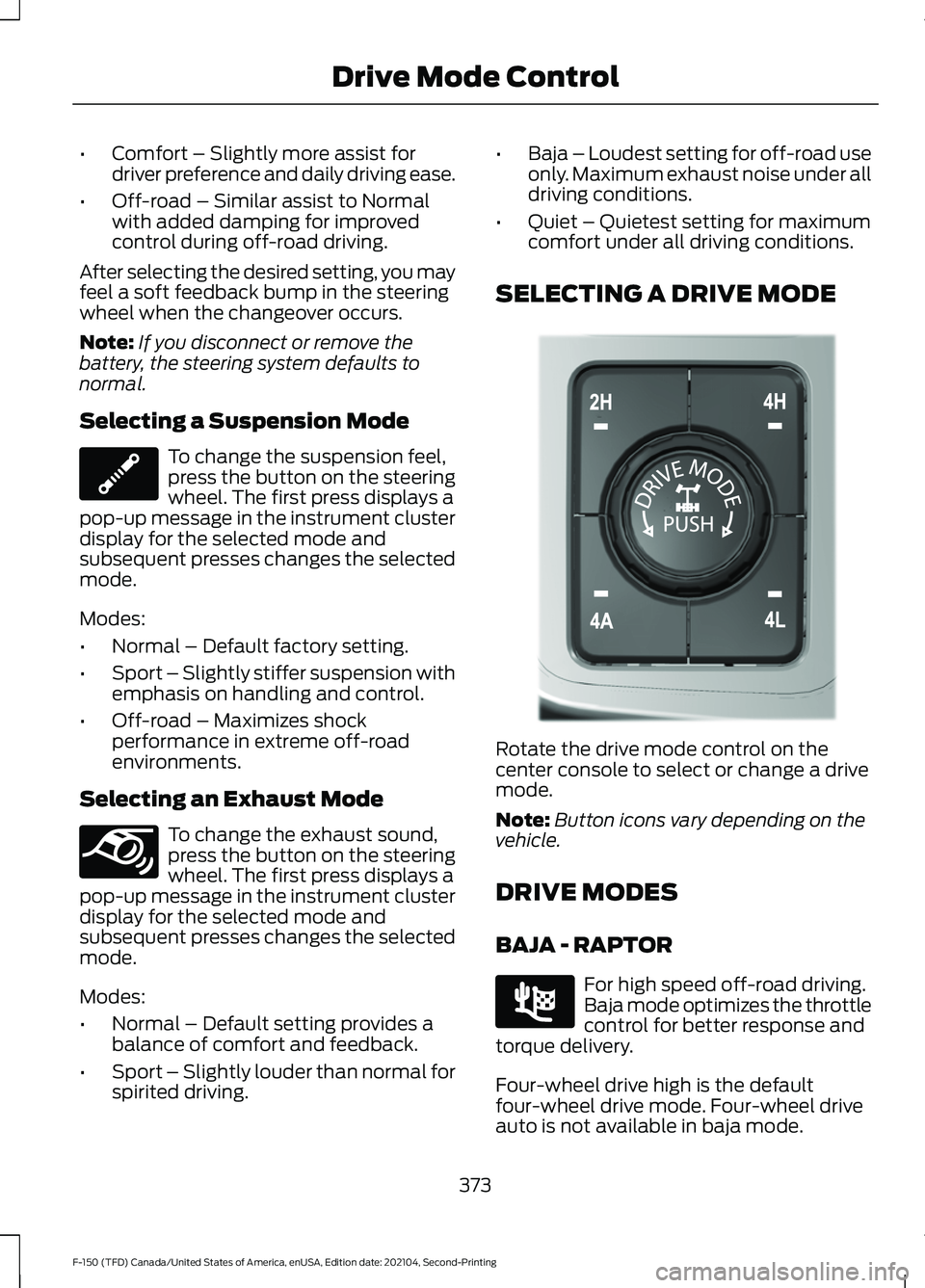
SELECTING A DRIVE MODE Rotate the drive mode control on the
center console to select or change a drive
mode.
Note:
Button icons vary depending on the
vehicle.
DRIVE MODES
BAJA - RAPTOR For high speed off-road driving.
Baja mode optimizes the throttle
control for better response and
torque delivery.
Four-wheel drive high is the default
four-wheel drive mode. Four-wheel drive
auto is not available in baja mode.
373
F-150 (TFD) Canada/United States of America, enUSA, Edition date: 202104, Second-Printing Drive Mode ControlE347107 E347131 E308146 E225314
Page 387 of 796
The lane keeping system may not correctly
operate in any of the following conditions:
•
The lane keeping system does not
detect at least one lane marking.
• You switch the turn signal on.
• You apply direct steering, accelerate
fast or brake hard.
• The vehicle speed is less than 40 mph
(64 km/h).
• The anti-lock brake, stability control or
traction control system activates.
• The lane is too narrow.
• Something is obscuring the camera or
it is unable to detect the lane markings
due to environment, traffic or vehicle
conditions.
• Entering or exiting a tight curve when
driving at high speeds.
The lane keeping system may not correct
lane positioning in any of the following
conditions:
• High winds.
• Uneven road surfaces.
• Heavy or uneven loads.
• Incorrect tire pressure.
SWITCHING THE LANE
KEEPING SYSTEM ON AND
OFF To activate the lane keeping
system, press the button on the
steering wheel.
To deactivate the lane keeping system,
press the button again.
Note: When switching the system on or off
a message appears in the information and
entertainment display to show the status. Note:
The system stores the on or off
setting until manually changed, unless it
detects a MyKey ™. If the system detects a
MyKey ™, it defaults to the last setting for
that MyKey ™.
Note: If the system detects a MyKey ™,
pressing the button does not affect the on
or off status of the system. You can only
change the mode and intensity settings.
SWITCHING THE LANE
KEEPING SYSTEM MODE
The lane keeping system has different
settings that you can view or adjust using
the information display.
The system stores the last known selection
for each of these settings. You do not need
to readjust your settings each time you
switch on the system.
To change the lane keeping system mode,
use the touchscreen:
1. Press
Features on the touchscreen.
2. Press
Driver Assistance.
3. Press
Lane-Keeping System.
4. Press
Lane-Keeping Mode.
5. Select a mode.
Note: The system remembers the last
setting when you start your vehicle. If the
system detects a MyKey ™, it defaults to the
last setting for that MyKey ™.
ALERT MODE
WHAT IS ALERT MODE
Alert mode vibrates the steering wheel
when it detects an unintended lane
departure.
383
F-150 (TFD) Canada/United States of America, enUSA, Edition date: 202104, Second-Printing Lane Keeping System
(If Equipped)E334922
Page 389 of 796
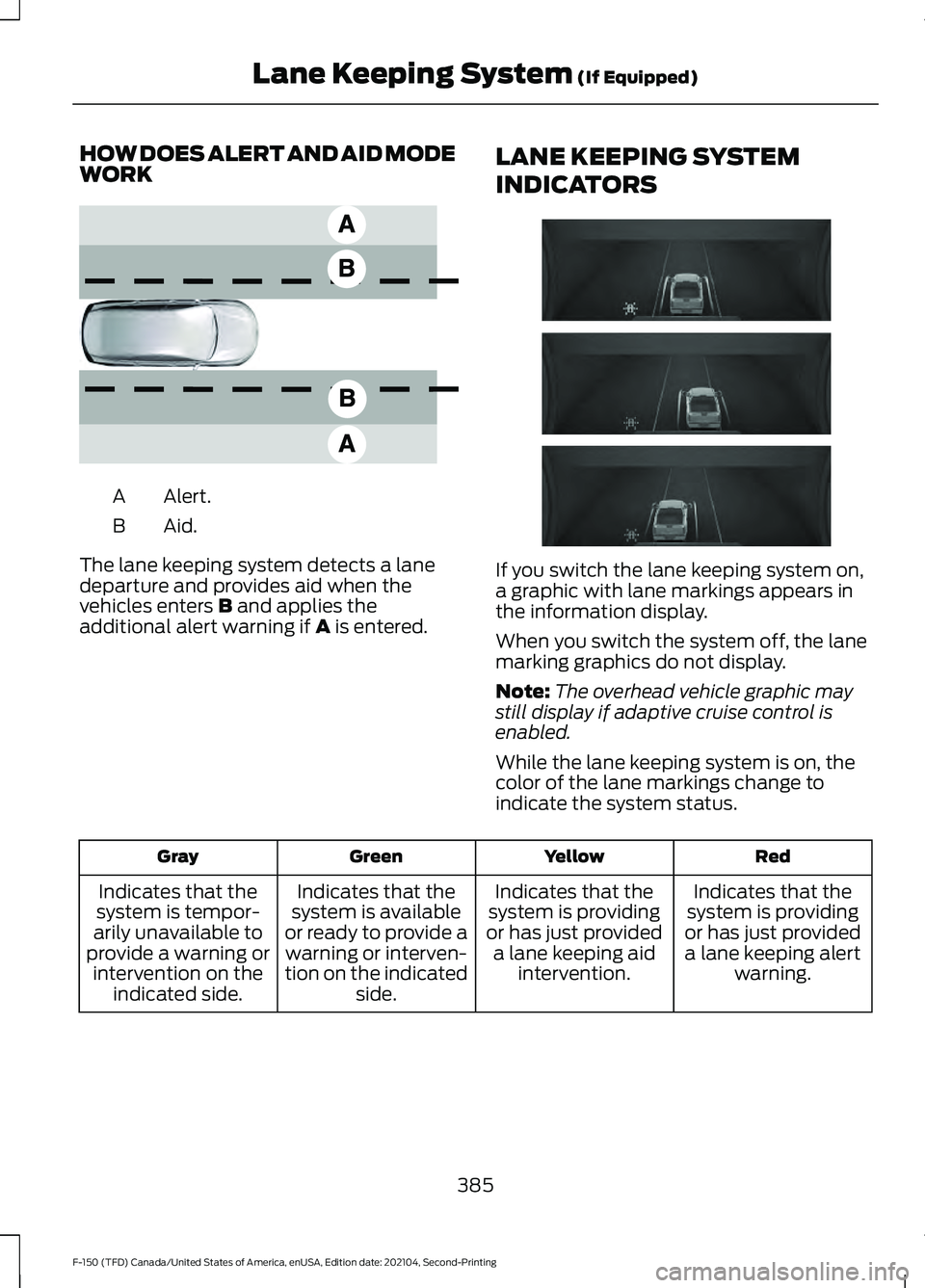
HOW DOES ALERT AND AID MODE
WORK
Alert.
A
Aid.B
The lane keeping system detects a lane
departure and provides aid when the
vehicles enters B and applies the
additional alert warning if A is entered. LANE KEEPING SYSTEM
INDICATORS If you switch the lane keeping system on,
a graphic with lane markings appears in
the information display.
When you switch the system off, the lane
marking graphics do not display.
Note:
The overhead vehicle graphic may
still display if adaptive cruise control is
enabled.
While the lane keeping system is on, the
color of the lane markings change to
indicate the system status. Red
Yellow
Green
Gray
Indicates that the
system is providing
or has just provided a lane keeping alert warning.
Indicates that the
system is providing
or has just provided a lane keeping aid intervention.
Indicates that the
system is available
or ready to provide a warning or interven-
tion on the indicated side.
Indicates that the
system is tempor-
arily unavailable to
provide a warning or intervention on the indicated side.
385
F-150 (TFD) Canada/United States of America, enUSA, Edition date: 202104, Second-Printing Lane Keeping System
(If Equipped)E165517 E335296
Page 394 of 796
When you switch blind spot information
system off, a warning lamp illuminates and
a message displays. When you switch the
system on or off, the alert indicators flash
twice.
Note:
The system remembers the last
setting when you start your vehicle.
To permanently switch the system off,
contact an authorized dealer.
LOCATING THE BLIND SPOT
INFORMATION SYSTEM
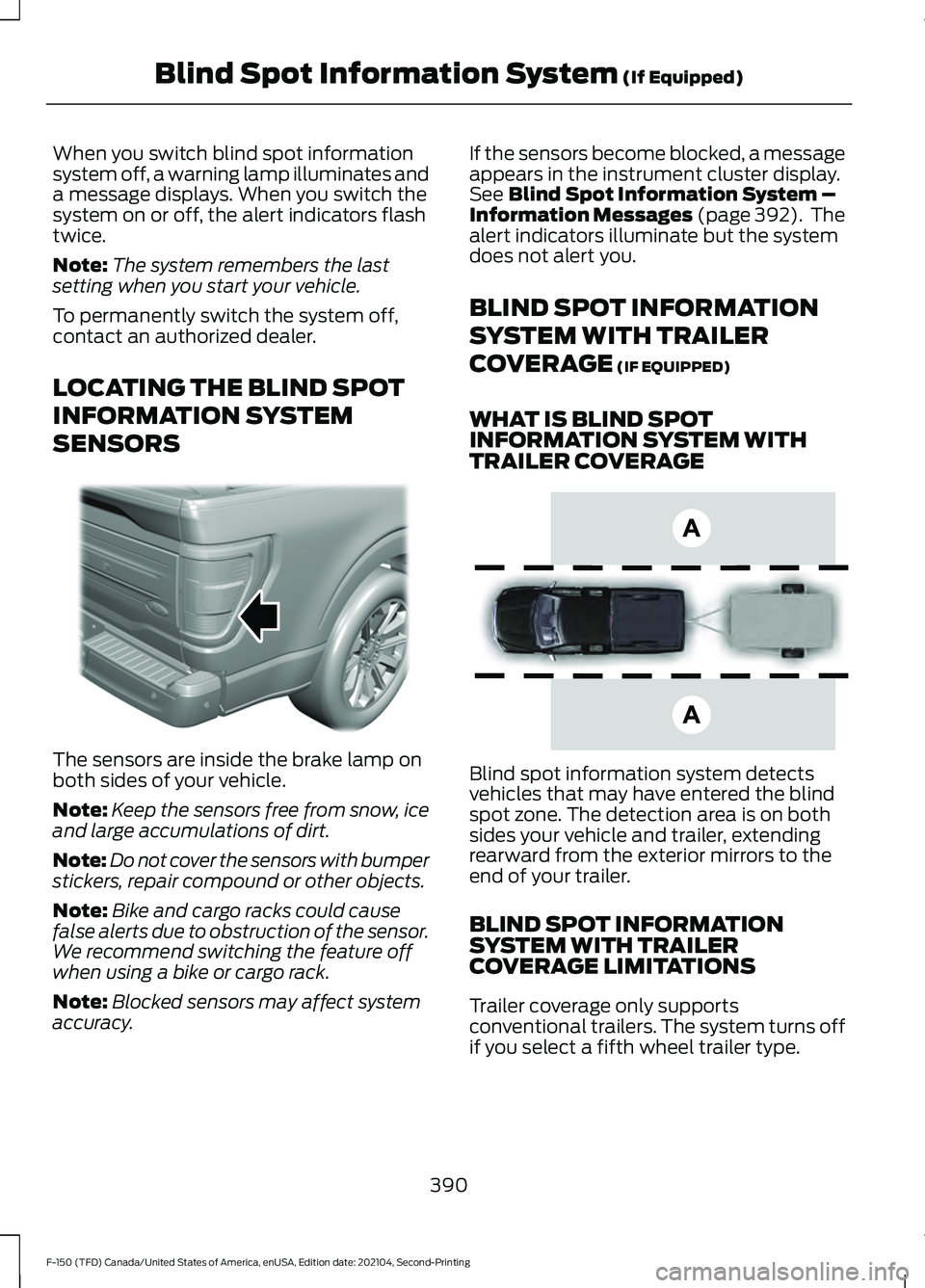
SENSORS The sensors are inside the brake lamp on
both sides of your vehicle.
Note:
Keep the sensors free from snow, ice
and large accumulations of dirt.
Note: Do not cover the sensors with bumper
stickers, repair compound or other objects.
Note: Bike and cargo racks could cause
false alerts due to obstruction of the sensor.
We recommend switching the feature off
when using a bike or cargo rack.
Note: Blocked sensors may affect system
accuracy. If the sensors become blocked, a message
appears in the instrument cluster display.
See Blind Spot Information System –
Information Messages (page 392). The
alert indicators illuminate but the system
does not alert you.
BLIND SPOT INFORMATION
SYSTEM WITH TRAILER
COVERAGE
(IF EQUIPPED)
WHAT IS BLIND SPOT
INFORMATION SYSTEM WITH
TRAILER COVERAGE Blind spot information system detects
vehicles that may have entered the blind
spot zone. The detection area is on both
sides your vehicle and trailer, extending
rearward from the exterior mirrors to the
end of your trailer.
BLIND SPOT INFORMATION
SYSTEM WITH TRAILER
COVERAGE LIMITATIONS
Trailer coverage only supports
conventional trailers. The system turns off
if you select a fifth wheel trailer type.
390
F-150 (TFD) Canada/United States of America, enUSA, Edition date: 202104, Second-Printing Blind Spot Information System
(If Equipped)E310325 E225007
Page 396 of 796
Note:
If the trailer is a bike rack or cargo
rack with electrical lighting, enter a length
of 3 ft (1 m). Cross traffic alert remains on
for trailers with a length of 3 ft (1 m) or less.
Note: The system requires proper
measurement and measure entry to function
properly.
SELECTING A TRAILER
When you connect a trailer to your vehicle,
the trailer set up menu appears in the
touchscreen. This menu allows you to set
up a new trailer or choose from a
previously set up trailer. A warning
message appears and the system turns off
if you do not choose or add a new trailer.
Note: The warning message may not
appear until your vehicle reaches
22 mph
(35 km/h). BLIND SPOT INFORMATION
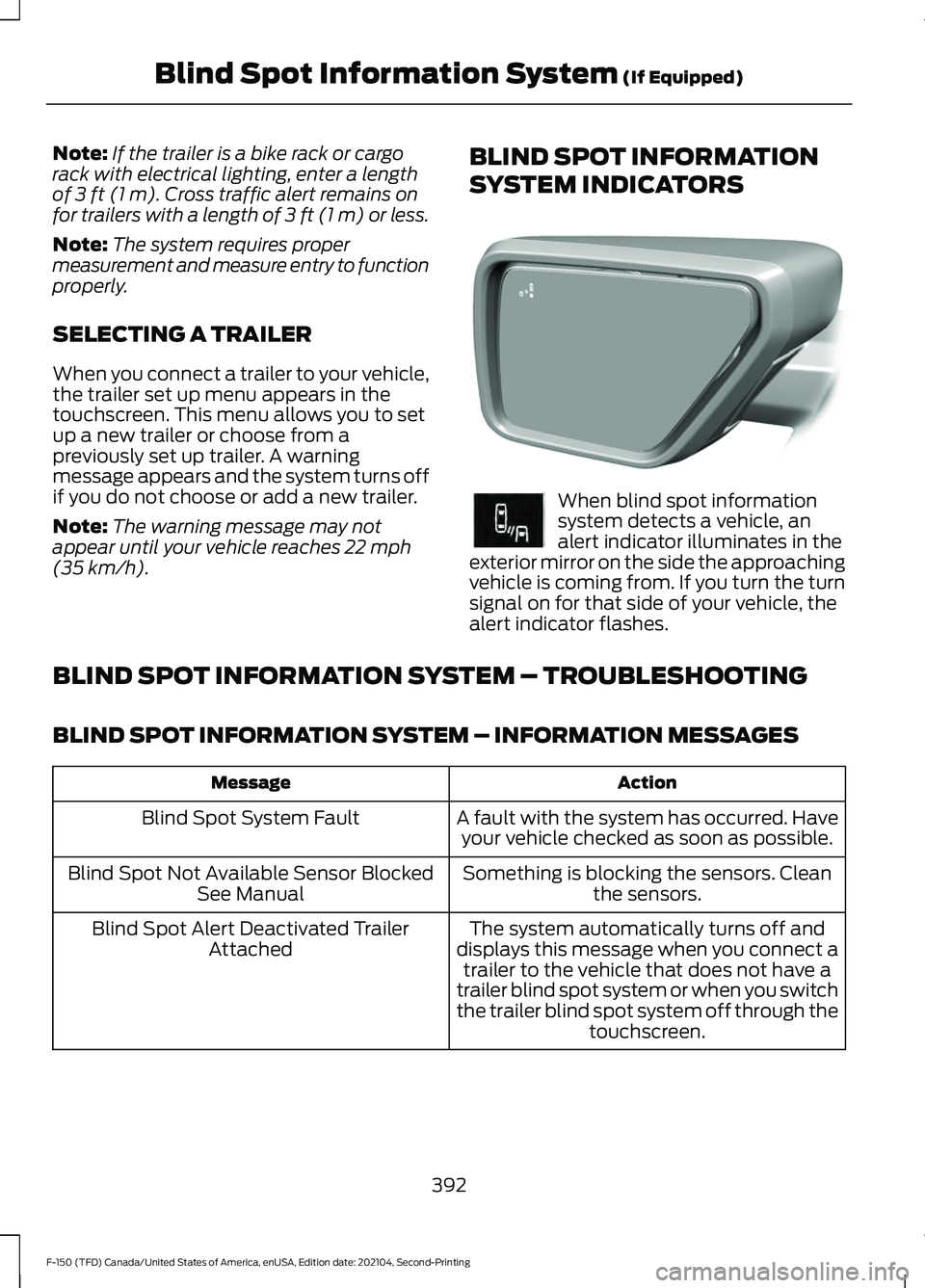
SYSTEM INDICATORS When blind spot information
system detects a vehicle, an
alert indicator illuminates in the
exterior mirror on the side the approaching
vehicle is coming from. If you turn the turn
signal on for that side of your vehicle, the
alert indicator flashes.
BLIND SPOT INFORMATION SYSTEM – TROUBLESHOOTING
BLIND SPOT INFORMATION SYSTEM – INFORMATION MESSAGES Action
Message
A fault with the system has occurred. Haveyour vehicle checked as soon as possible.
Blind Spot System Fault
Something is blocking the sensors. Cleanthe sensors.
Blind Spot Not Available Sensor Blocked
See Manual
The system automatically turns off and
displays this message when you connect a trailer to the vehicle that does not have a
trailer blind spot system or when you switch
the trailer blind spot system off through the touchscreen.
Blind Spot Alert Deactivated Trailer
Attached
392
F-150 (TFD) Canada/United States of America, enUSA, Edition date: 202104, Second-Printing Blind Spot Information System
(If Equipped)E309137 E249861E249861
Page 398 of 796
Cross Traffic Alert Limitations
with a Trailer Attached
The system remains on when you attach
a trailer in vehicles with blind spot
information system with trailer tow under
the following conditions:
•
You connect a trailer.
• The trailer is a bike rack or cargo rack
with a maximum length of 3 ft (1 m).
• You set the trailer length to
3 ft (1 m)
in the instrument cluster display.
Note: The system may not correctly operate
when towing a trailer. For vehicles with an
approved trailer tow module and tow bar,
the system turns off when you attach a
trailer. For vehicles with an aftermarket
trailer tow module or tow bar, we
recommend that you switch the system off
when you attach a trailer.
SWITCHING CROSS TRAFFIC
ALERT ON AND OFF
To switch cross traffic alert on or off use
the touchscreen.
1. Press
Features on the touchscreen.
2. Press
Driver Assistance.
3. Switch
Cross Traffic Alert on or off.
Note: The system switches on every time
you switch the ignition on. To permanently
switch the system off, contact an authorized
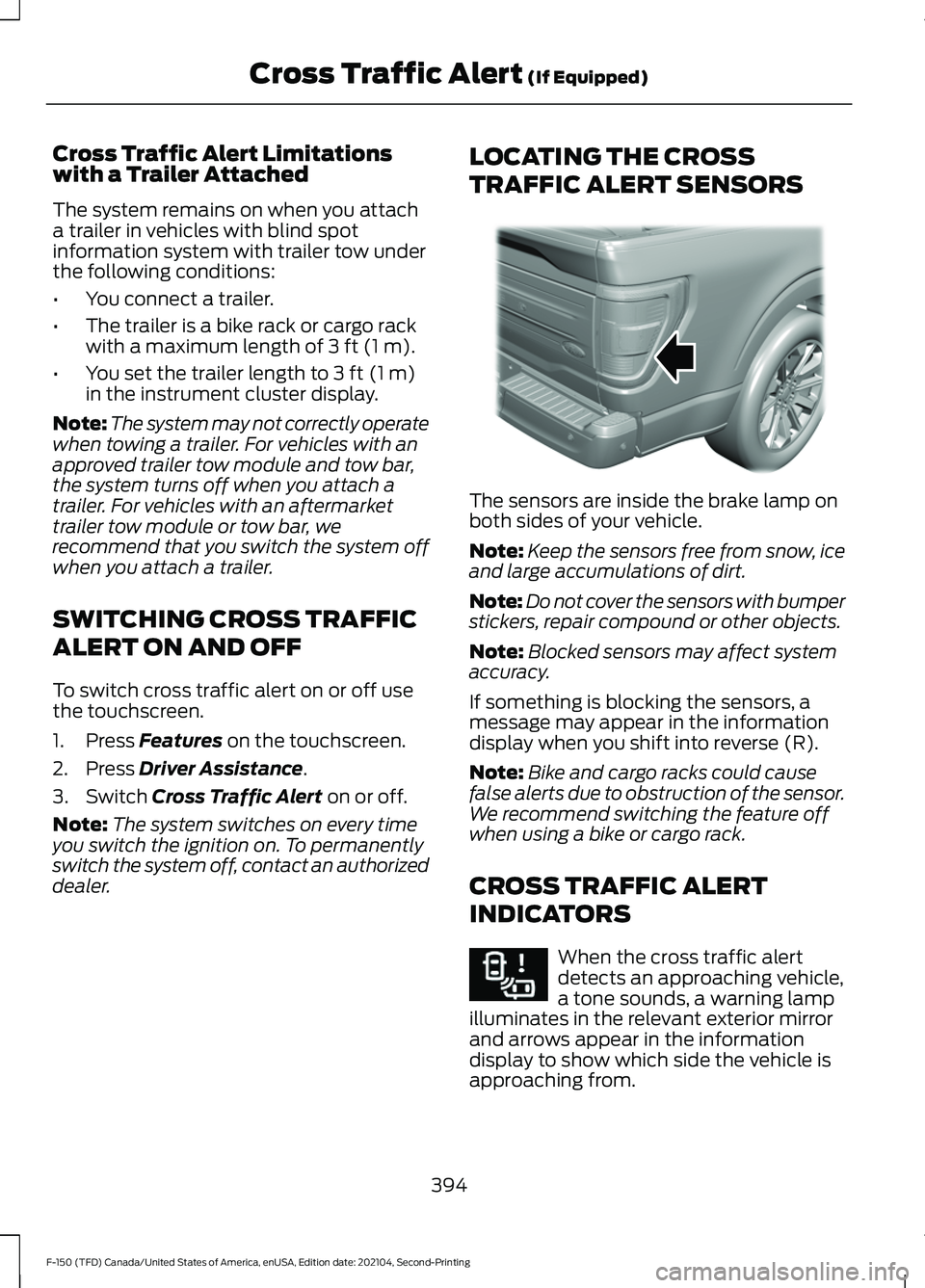
dealer. LOCATING THE CROSS
TRAFFIC ALERT SENSORS The sensors are inside the brake lamp on
both sides of your vehicle.
Note:
Keep the sensors free from snow, ice
and large accumulations of dirt.
Note: Do not cover the sensors with bumper
stickers, repair compound or other objects.
Note: Blocked sensors may affect system
accuracy.
If something is blocking the sensors, a
message may appear in the information
display when you shift into reverse (R).
Note: Bike and cargo racks could cause
false alerts due to obstruction of the sensor.
We recommend switching the feature off
when using a bike or cargo rack.
CROSS TRAFFIC ALERT
INDICATORS When the cross traffic alert
detects an approaching vehicle,
a tone sounds, a warning lamp
illuminates in the relevant exterior mirror
and arrows appear in the information
display to show which side the vehicle is
approaching from.
394
F-150 (TFD) Canada/United States of America, enUSA, Edition date: 202104, Second-Printing Cross Traffic Alert
(If Equipped)E310325 E268294
Page 399 of 796
If the system malfunctions, a warning lamp
illuminates in the instrument cluster and
a message appears in the information
display. Have your vehicle checked as soon
as possible.
Note:
If arrows do not display, a message
appears in the information display.
Note: In some conditions, the system could
alert you, even when there is nothing in the
detection zone, for example a vehicle
passing further away from your vehicle.
CROSS TRAFFIC ALERT – TROUBLESHOOTING
CROSS TRAFFIC ALERT – INFORMATION MESSAGES Action
Message
Displays instead of indication arrows whenthe system detects a vehicle. Check for approaching traffic.
Cross Traffic Alert
Indicates blocked cross traffic alert systemsensors. Clean the sensors. If the message continues to appear, have your vehicle checked as soon as possible.
Cross Traffic Not Available Sensor Blocked
See Manual
The system has malfunctioned. Have yourvehicle checked as soon as possible.
Cross Traffic System Fault
Displays if you attach a trailer to yourvehicle.
Cross Traffic Alert Deactivated Trailer
Attached
395
F-150 (TFD) Canada/United States of America, enUSA, Edition date: 202104, Second-Printing Cross Traffic Alert (If Equipped)
Page 403 of 796
•
If required, switch the entire
pre-collision assist feature on or off.
• If required, switch evasive steering
assist on or off.
Note: Automatic emergency braking and
evasive steering turn on every time you
switch the ignition on.
Note: If your vehicle has a radar sensor, we
recommend that you switch the system off
if you install a snow plow or similar object
in such a way that it may block the radar
sensor. Your vehicle remembers the selected
setting across key cycles.
Note: If you switch automatic emergency
braking off, evasive steering assist switches
off.
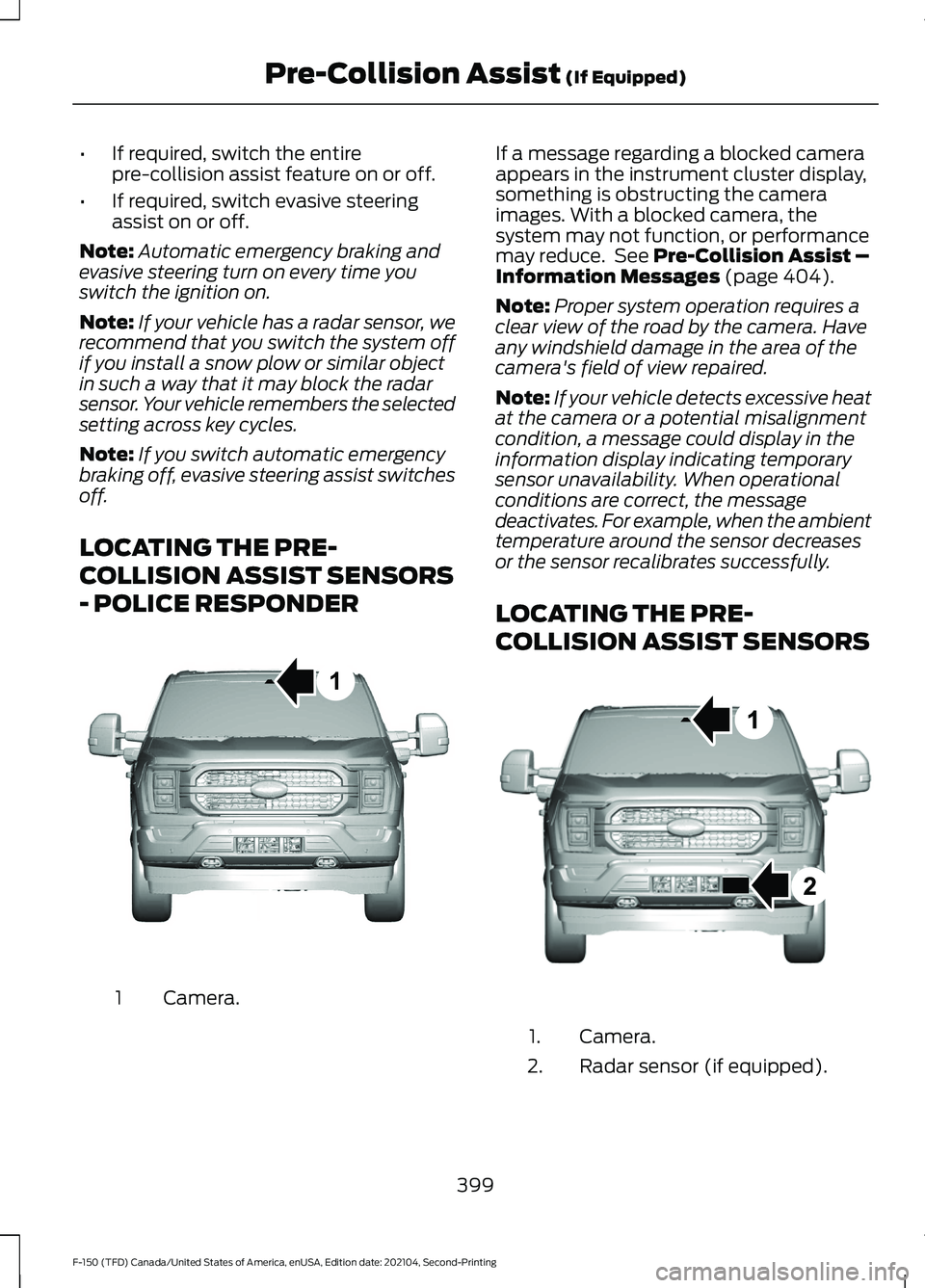
LOCATING THE PRE-
COLLISION ASSIST SENSORS
- POLICE RESPONDER Camera.
1 If a message regarding a blocked camera
appears in the instrument cluster display,
something is obstructing the camera
images. With a blocked camera, the
system may not function, or performance
may reduce. See Pre-Collision Assist –
Information Messages (page 404).
Note: Proper system operation requires a
clear view of the road by the camera. Have
any windshield damage in the area of the
camera's field of view repaired.
Note: If your vehicle detects excessive heat
at the camera or a potential misalignment
condition, a message could display in the
information display indicating temporary
sensor unavailability. When operational
conditions are correct, the message
deactivates. For example, when the ambient
temperature around the sensor decreases
or the sensor recalibrates successfully.
LOCATING THE PRE-
COLLISION ASSIST SENSORS Camera.
1.
Radar sensor (if equipped).
2.
399
F-150 (TFD) Canada/United States of America, enUSA, Edition date: 202104, Second-Printing Pre-Collision Assist
(If Equipped)1E346800 E328125
Page 404 of 796
If a message regarding a blocked sensor
or camera appears in the information
display, something is obstructing the radar
signals or camera images. The radar sensor
is behind the fascia cover in the center of
the lower grille. With a blocked sensor or
camera, the system may not function, or
performance may reduce. See
Pre-Collision Assist – Information
Messages (page 404).
Note: Proper system operation requires a
clear view of the road by the camera. Have
any windshield damage in the area of the
camera's field of view repaired.
Note: If something hits the front end of your
vehicle or damage occurs and your vehicle
has a radar sensor, the radar sensing zone
could change. This could cause missed or
false vehicle detections. Have your vehicle
serviced to have the radar checked for
proper coverage and operation. Note:
If your vehicle detects excessive heat
at the camera or a potential misalignment
condition, a message could display in the
information display indicating temporary
sensor unavailability. When operational
conditions are correct, the message
deactivates. For example, when the ambient
temperature around the sensor decreases
or the sensor recalibrates successfully.
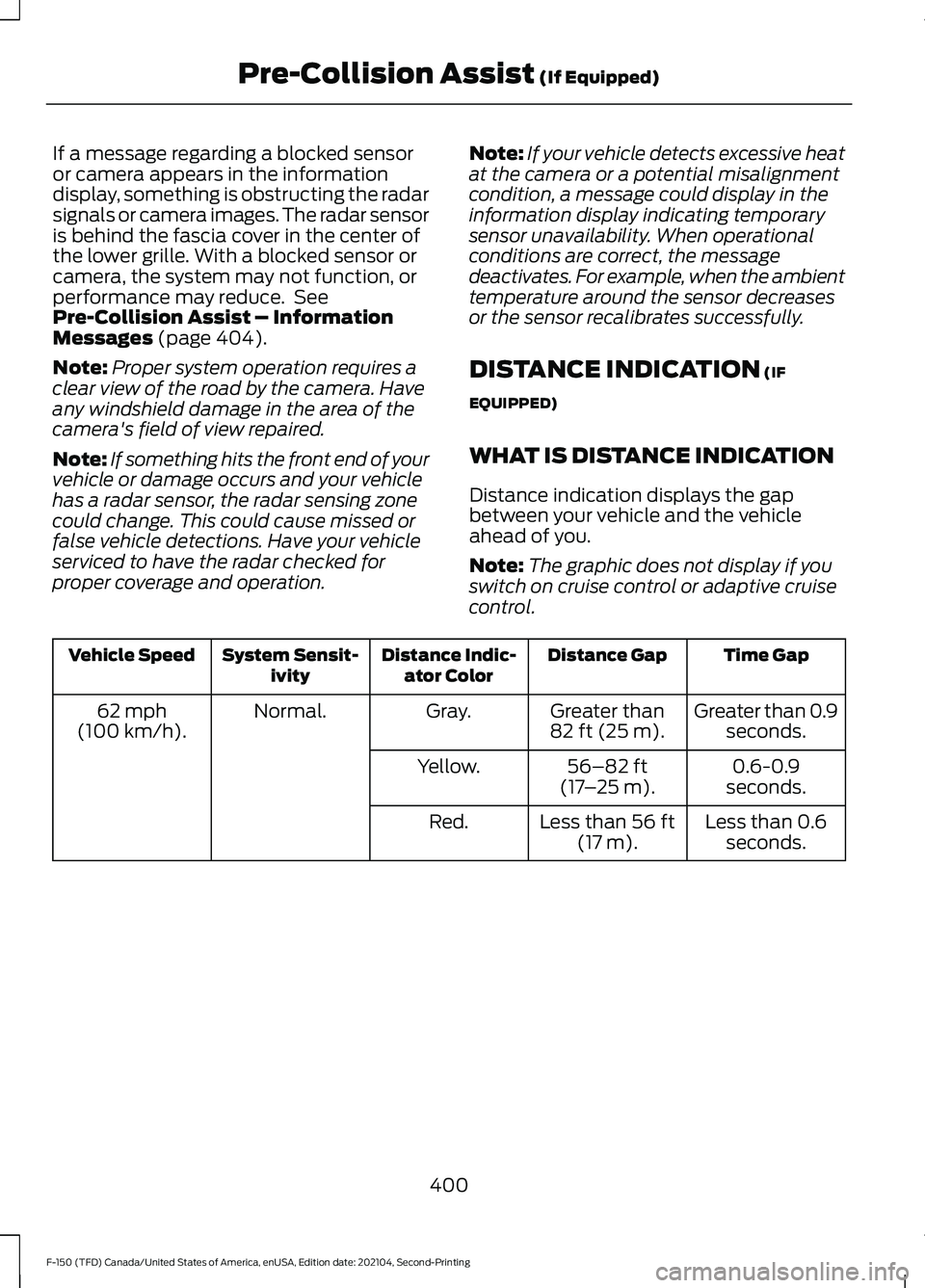
DISTANCE INDICATION
(IF
EQUIPPED)
WHAT IS DISTANCE INDICATION
Distance indication displays the gap
between your vehicle and the vehicle
ahead of you.
Note: The graphic does not display if you
switch on cruise control or adaptive cruise
control. Time Gap
Distance Gap
Distance Indic-
ator Color
System Sensit-
ivity
Vehicle Speed
Greater than 0.9seconds.
Greater than
82 ft (25 m)
.
Gray.
Normal.
62 mph
(100 km/h).
0.6-0.9
seconds.
56–82 ft
(17 –25 m)
.
Yellow.
Less than 0.6seconds.
Less than
56 ft
(17 m).
Red.
400
F-150 (TFD) Canada/United States of America, enUSA, Edition date: 202104, Second-Printing Pre-Collision Assist
(If Equipped)
Page 405 of 796
SWITCHING DISTANCE
INDICATION ON AND OFF
To switch the system on or off, use the
touchscreen:
1. Press Features on the touchscreen.
2. Press
Driver Assistance.
3. Press
Pre-Collision Assist.
4. Switch
Distance Indication on or off.
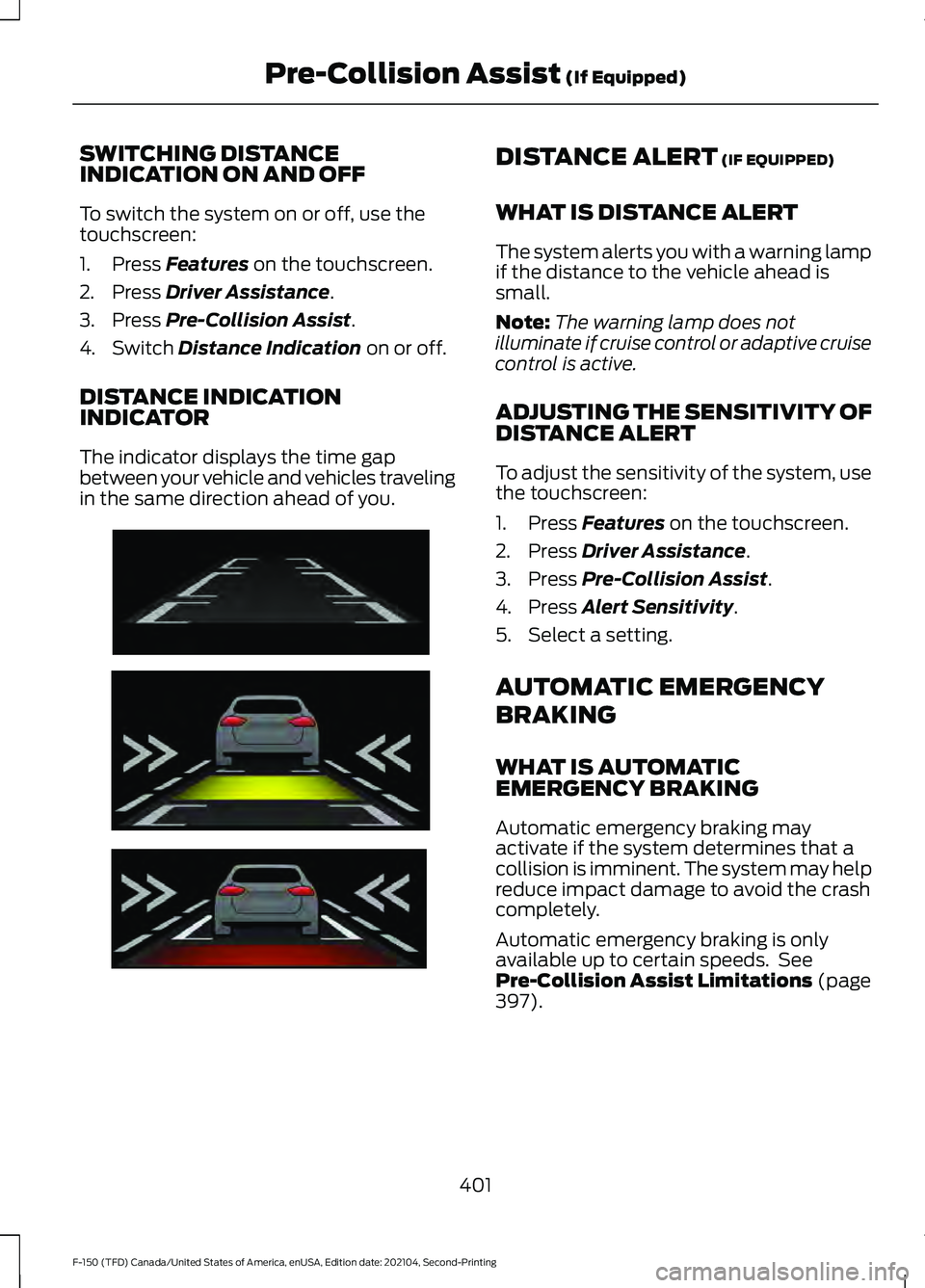
DISTANCE INDICATION
INDICATOR
The indicator displays the time gap
between your vehicle and vehicles traveling
in the same direction ahead of you. DISTANCE ALERT
(IF EQUIPPED)
WHAT IS DISTANCE ALERT
The system alerts you with a warning lamp
if the distance to the vehicle ahead is
small.
Note: The warning lamp does not
illuminate if cruise control or adaptive cruise
control is active.
ADJUSTING THE SENSITIVITY OF
DISTANCE ALERT
To adjust the sensitivity of the system, use
the touchscreen:
1. Press
Features on the touchscreen.
2. Press
Driver Assistance.
3. Press
Pre-Collision Assist.
4. Press
Alert Sensitivity.
5. Select a setting.
AUTOMATIC EMERGENCY
BRAKING
WHAT IS AUTOMATIC
EMERGENCY BRAKING
Automatic emergency braking may
activate if the system determines that a
collision is imminent. The system may help
reduce impact damage to avoid the crash
completely.
Automatic emergency braking is only
available up to certain speeds. See
Pre-Collision Assist Limitations
(page
397).
401
F-150 (TFD) Canada/United States of America, enUSA, Edition date: 202104, Second-Printing Pre-Collision Assist
(If Equipped)E254791