stop start FORD F-150 2021 Workshop Manual
[x] Cancel search | Manufacturer: FORD, Model Year: 2021, Model line: F-150, Model: FORD F-150 2021Pages: 796, PDF Size: 13.89 MB
Page 499 of 796
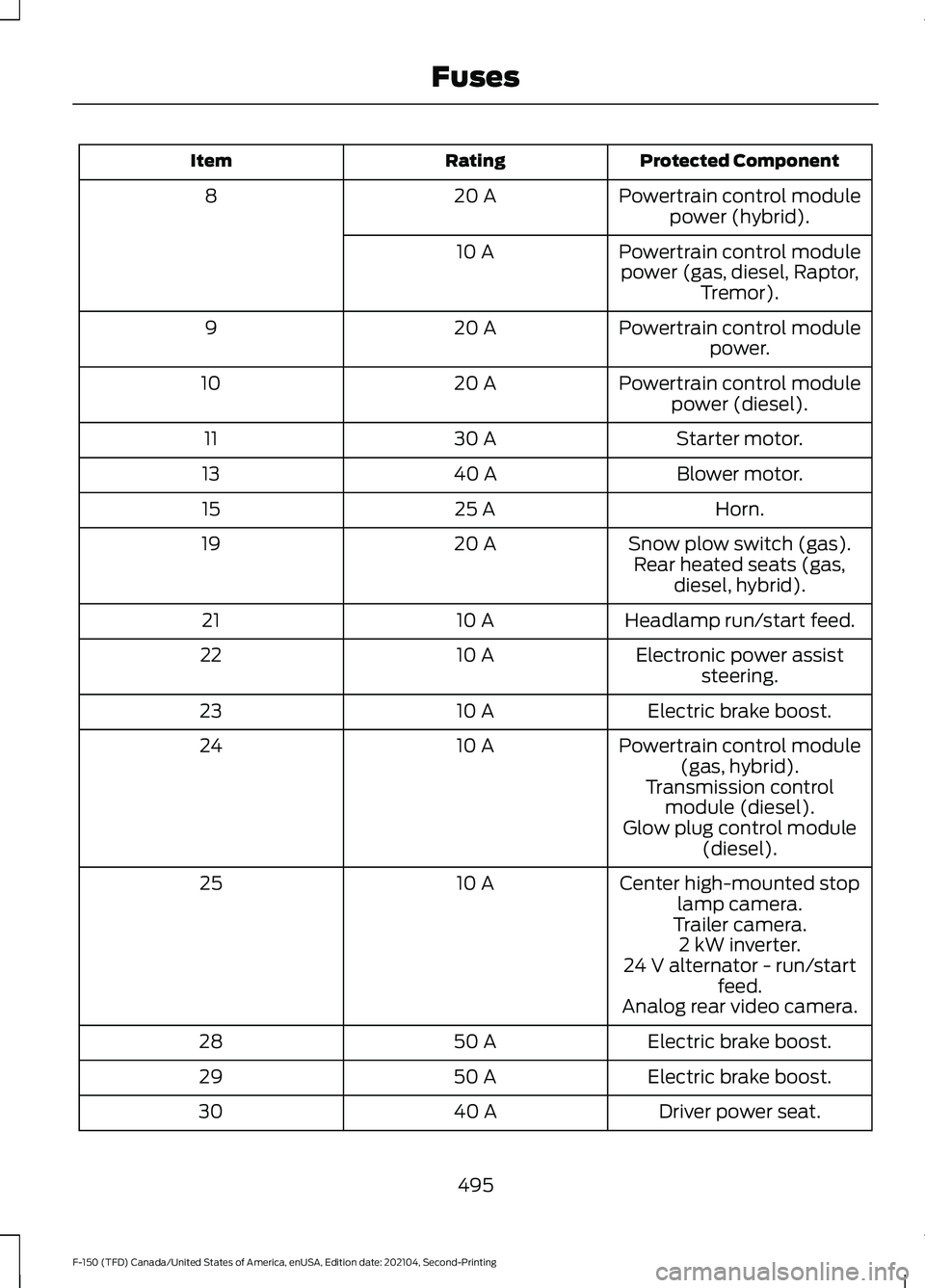
Protected Component
Rating
Item
Powertrain control modulepower (hybrid).
20 A
8
Powertrain control modulepower (gas, diesel, Raptor, Tremor).
10 A
Powertrain control modulepower.
20 A
9
Powertrain control modulepower (diesel).
20 A
10
Starter motor.
30 A
11
Blower motor.
40 A
13
Horn.
25 A
15
Snow plow switch (gas).
20 A
19
Rear heated seats (gas,diesel, hybrid).
Headlamp run/start feed.
10 A
21
Electronic power assiststeering.
10 A
22
Electric brake boost.
10 A
23
Powertrain control module(gas, hybrid).
10 A
24
Transmission controlmodule (diesel).
Glow plug control module (diesel).
Center high-mounted stop lamp camera.
10 A
25
Trailer camera.2 kW inverter.
24 V alternator - run/start feed.
Analog rear video camera.
Electric brake boost.
50 A
28
Electric brake boost.
50 A
29
Driver power seat.
40 A
30
495
F-150 (TFD) Canada/United States of America, enUSA, Edition date: 202104, Second-Printing Fuses
Page 502 of 796
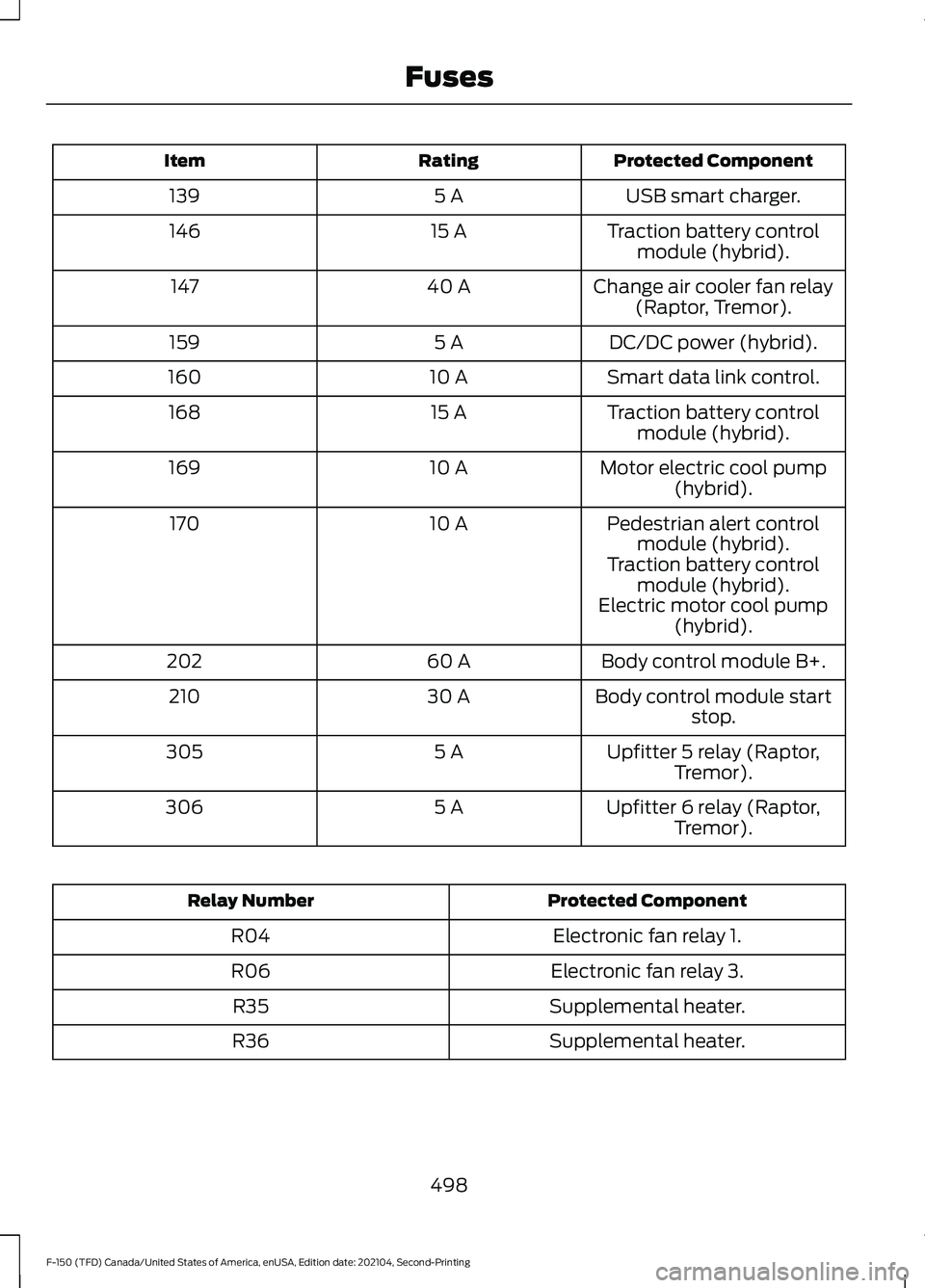
Protected Component
Rating
Item
USB smart charger.
5 A
139
Traction battery controlmodule (hybrid).
15 A
146
Change air cooler fan relay(Raptor, Tremor).
40 A
147
DC/DC power (hybrid).
5 A
159
Smart data link control.
10 A
160
Traction battery controlmodule (hybrid).
15 A
168
Motor electric cool pump(hybrid).
10 A
169
Pedestrian alert controlmodule (hybrid).
10 A
170
Traction battery controlmodule (hybrid).
Electric motor cool pump (hybrid).
Body control module B+.
60 A
202
Body control module startstop.
30 A
210
Upfitter 5 relay (Raptor,Tremor).
5 A
305
Upfitter 6 relay (Raptor,Tremor).
5 A
306 Protected Component
Relay Number
Electronic fan relay 1.
R04
Electronic fan relay 3.
R06
Supplemental heater.
R35
Supplemental heater.
R36
498
F-150 (TFD) Canada/United States of America, enUSA, Edition date: 202104, Second-Printing Fuses
Page 518 of 796
When Fail-Safe Mode Is Activated
WARNING: Fail-safe mode is for
use during emergencies only. Operate
your vehicle in fail-safe mode only as
long as necessary to bring your vehicle
to rest in a safe location and seek
immediate repairs. When in fail-safe
mode, your vehicle will have limited
power, will not be able to maintain
high-speed operation, and may
completely shut down without warning,
potentially losing engine power, power
steering assist, and power brake assist,
which may increase the possibility of a
crash resulting in serious injury. WARNING:
Do not remove the
coolant reservoir cap when the engine is
on or the cooling system is hot. Wait 10
minutes for the cooling system to cool
down. Cover the coolant reservoir cap
with a thick cloth to prevent the
possibility of scalding and slowly remove
the cap. Failure to follow this instruction
could result in personal injury.
Your vehicle has limited engine power
when in the fail-safe mode, drive your
vehicle with caution. Your vehicle does not
maintain high-speed operation and the
engine could operate poorly.
Remember that the engine is capable of
automatically shutting down to prevent
engine damage. In this situation:
1. Pull off the road as soon as safely possible and switch the engine off.
2. If you are a member of a roadside assistance program, we recommend
that you contact your roadside
assistance service provider.
3. If this is not possible, wait for a short period of time for the engine to cool. 4. Check the coolant level. If the coolant
level is at or below the minimum mark,
add prediluted coolant immediately.
5. When the engine temperature cools, you can re-start the engine. Have your
vehicle checked as soon as possible to
minimize engine damage.
Note: Driving your vehicle without repair
increases the chance of engine damage.
Engine Coolant Temperature
Management
(If Equipped) WARNING:
To reduce the risk of
crash and injury, be prepared that the
vehicle speed may reduce and the
vehicle may not be able to accelerate
with full power until the coolant
temperature reduces.
If you tow a trailer with your vehicle, the
engine may temporarily reach a higher
temperature during severe operating
conditions, for example ascending a long
or steep grade in high ambient
temperatures.
At this time, you may notice the coolant
temperature gauge moves toward the red
zone and a message may appear in the
information display.
You may notice a reduction in vehicle
speed caused by reduced engine power in
order to manage the engine coolant
temperature. Your vehicle may enter this
mode if certain high-temperature and
high-load conditions take place. The
amount of speed reduction depends on
vehicle loading, grade and ambient
temperature. If this occurs, there is no
need to stop your vehicle. You can
continue to drive.
514
F-150 (TFD) Canada/United States of America, enUSA, Edition date: 202104, Second-Printing Maintenance
Page 519 of 796
The air conditioning may automatically
turn on and off during severe operating
conditions to protect the engine from
overheating. When the coolant
temperature decreases to the normal
operating temperature, the air conditioning
turns on.
If the coolant temperature gauge moves
fully into the red zone, or if the coolant
temperature warning or service engine
soon messages appear in your information
display, do the following:
1. Stop your vehicle as soon as it is safe
to do so. Fully apply the parking brake,
shift into park (P) or neutral (N).
2. Leave the engine running until the coolant temperature gauge needle
returns to the normal position. If the
temperature does not drop after
several minutes, follow the remaining
steps.
3. Switch the engine off and wait for it to
cool. Check the coolant level.
4. If the coolant level is at or below the minimum mark, add prediluted coolant
immediately.
5. If the coolant level is normal, restart the engine and continue. ENGINE AIR FILTER
CHECKING THE ENGINE AIR
FILTER RESTRICTION GAUGE -
DIESEL
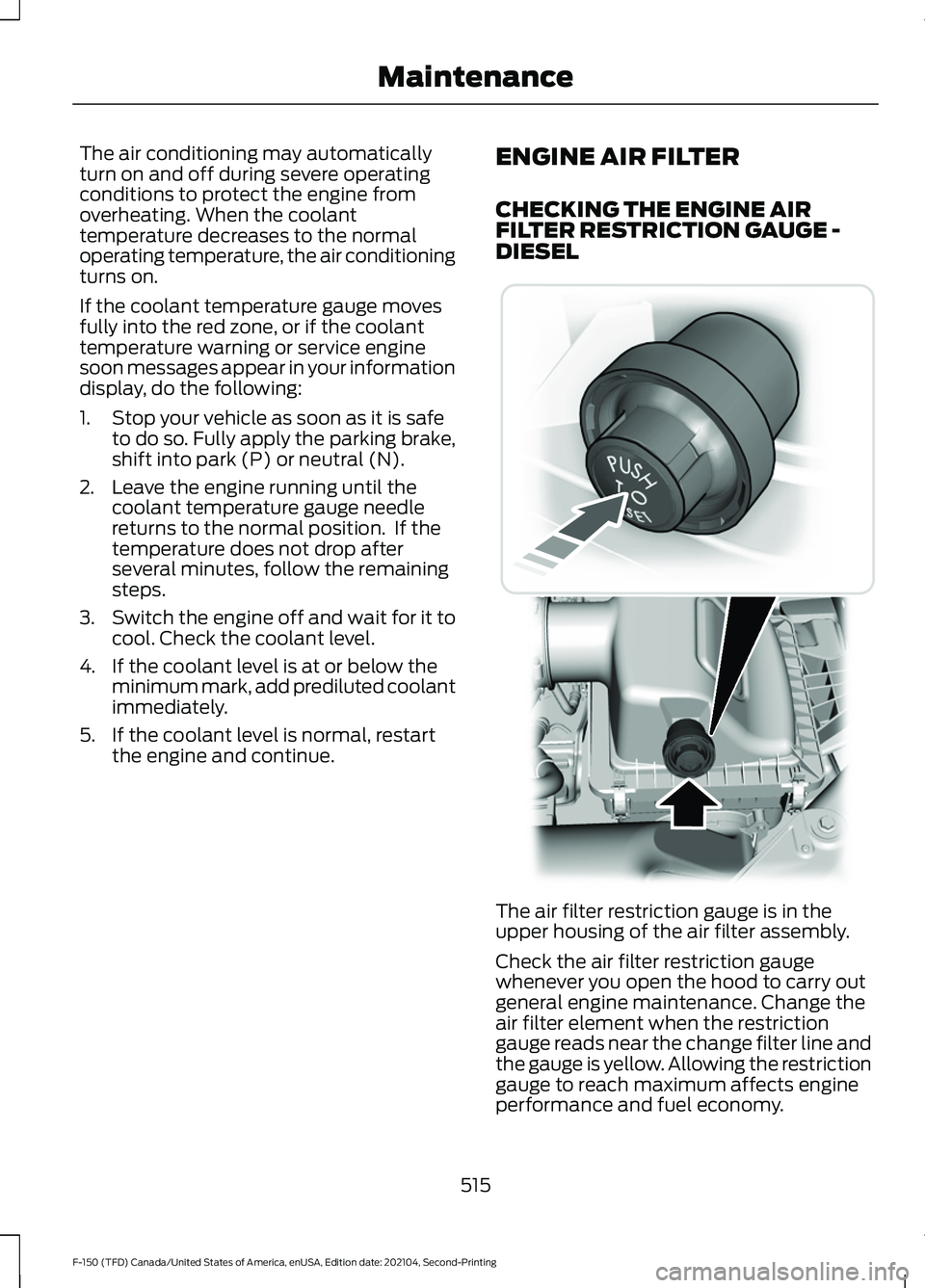
The air filter restriction gauge is in the
upper housing of the air filter assembly.
Check the air filter restriction gauge
whenever you open the hood to carry out
general engine maintenance. Change the
air filter element when the restriction
gauge reads near the change filter line and
the gauge is yellow. Allowing the restriction
gauge to reach maximum affects engine
performance and fuel economy.
515
F-150 (TFD) Canada/United States of America, enUSA, Edition date: 202104, Second-Printing Maintenance E254173
Page 563 of 796
WHAT IS THE TIRE PRESSURE
MONITORING SYSTEM
The tire pressure monitoring
system measures the vehicle's
tire pressures. A warning lamp
illuminates if one or more tires are
significantly underinflated or if there is a
system malfunction.
TIRE PRESSURE MONITORING
SYSTEM OVERVIEW WARNING: If the tire pressure
monitor sensor becomes damaged it
may not function. WARNING:
Under-inflation is the
most common cause of tire failures and
may result in severe tire cracking, tread
separation or blowout, with unexpected
loss of vehicle control and increased risk
of injury. Under-inflation increases
sidewall flexing and rolling resistance,
resulting in heat buildup and internal
damage to the tire. It also may result in
unnecessary tire stress, irregular wear,
loss of vehicle control and accidents. A
tire can lose up to half of its air pressure
and not appear to be flat! WARNING:
To determine the
required pressure(s) for your vehicle, see
the Safety Compliance Certification
Label (on the door hinge pillar,
door-latch post or the door edge that
meets the door-latch post, next to the
driver seat) or the Tire Label on the
B-Pillar or the edge of the driver door. Each tire, including the spare (if provided),
should be checked monthly when cold and
inflated to the inflation pressure
recommended by the vehicle manufacturer
on the vehicle placard or tire inflation
pressure label. (If your vehicle has tires of
a different size than the size indicated on
the vehicle placard or tire inflation pressure
label, you should determine the proper tire
inflation pressure for those tires).
As an added safety feature, your vehicle
has been equipped with a Tire Pressure
Monitoring System (TPMS) that
illuminates a low tire pressure telltale
when one or more of your tires is
significantly under-inflated. Accordingly,
when the low tire pressure telltale
illuminates, you should stop and check
your tires as soon as possible, and inflate
them to the proper pressure. Driving on a
significantly under-inflated tire causes the
tire to overheat and can lead to tire failure.
Under-inflation also reduces fuel efficiency
and tire tread life, and may affect the
vehicle
’s handling and stopping ability.
Please note that the TPMS is not a
substitute for proper tire maintenance, and
it is the driver ’s responsibility to maintain
correct tire pressure, even if under-inflation
has not reached the level to trigger
illumination of the TPMS low tire pressure
telltale.
Your vehicle has also been equipped with
a TPMS malfunction indicator to indicate
when the system is not operating properly.
The TPMS malfunction indicator is
combined with the low tire pressure
telltale. When the system detects a
malfunction, the telltale will flash for
approximately one minute and then remain
continuously illuminated. This sequence
will continue upon subsequent vehicle
start-ups as long as the malfunction exists.
559
F-150 (TFD) Canada/United States of America, enUSA, Edition date: 202104, Second-Printing Tire Pressure Monitoring System
Page 641 of 796
CENTER DISPLAY
PRECAUTIONS
WARNING: Driving while distracted
can result in loss of vehicle control, crash
and injury. We strongly recommend that
you use extreme caution when using any
device that may take your focus off the
road. Your primary responsibility is the
safe operation of your vehicle. We
recommend against the use of any
hand-held device while driving and
encourage the use of voice-operated
systems when possible. Make sure you
are aware of all applicable local laws
that may affect the use of electronic
devices while driving. CENTER DISPLAY
LIMITATIONS
Speed-restricted Features
For your safety, some features are not
available while the vehicle is in motion at
or above 6 mph (10 km/h).
Settings that are not critical while driving
your vehicle will be shown as restricted on
your display. See the following chart for
specific examples. Restricted Features
System updates.
System Functionality
Personal profiles setup.
Valet mode setup.
Driver assistance settings.
Auto start-stop speed threshold.
30 minute max idle.
Vehicle Settings
MyKey setup.
Keyless entry keypad code setup.
Restricted features will become available
again once the vehicle is no longer in
motion.
STATUS BAR
The bar is on top of the display and
indicates the status of your vehicle's
features. Audio System Audio system muted.
Connected Device Cell phone microphone muted.
637
F-150 (TFD) Canada/United States of America, enUSA, Edition date: 202104, Second-Printing Center Display OverviewE353221
Page 660 of 796
UPDATING THE VEHICLE
SYSTEMS WIRELESSLY
Over the air system updates
allow you to update your vehicle
system software wirelessly. To
make sure you receive all updates, set a
recurring schedule and connect to Wi-Fi.
Updates may take longer if not connected
to Wi-Fi, or may not download at all. See
Connected Vehicle (page 620).
Over the Air System Update
Requirements
Before updating, reference this list to make
sure your vehicle is ready be updated. If
these requirements are not met during a
scheduled update, the update will be
canceled and you can reschedule.
• Your vehicle is not running.
• Your vehicle is stopped.
• Your vehicle is parked.
• The hazard indicators are switched off.
• The alarm is not sounding.
• The doors are closed.
• The parking lights are switched off.
• You are not pressing the brake pedal.
• An emergency call is not in progress.
• Your vehicle is not in limp mode.
Enabling Over the Air Updates
1. Press
Settings on the touchscreen.
2. Press
Software Update.
3. Switch
Automatic Updates on or off.
Note: Over the air updates are enabled by
default.
Note: If you do not want to receive over the
air updates you can turn them off. You will
not be notified of new updates. Scheduling an Update
Scheduling an update allows you to set a
convenient time for the update to
complete. We recommend updating
overnight when your vehicle is not in use.
Ensure Vehicle Connectivity and Automatic
Updates are enabled. Once you complete
these steps, your schedule will be saved
for future updates. As long as an update is
not in process you can adjust your
schedule.
Note:
Some updates may be applied
outside of your set schedule. Information
about the unscheduled update appears on
the touchscreen after it is applied.
Using the Settings Menu
1. Press
Settings on the touchscreen.
2. Press
Software Update.
3. Press
Schedule Updates.
4. Use the controls to set the time and day of the update.
5. Save the schedule.
Note: You can set the updates to occur at
any time.
Using the Status Bar Icon When an update is available, tap
the notification icon and follow
the prompts on the screen.
Applying an Over the Air Update
You can see the progress of the update on
the touchscreen. An update cannot be
canceled once it has been started.
656
F-150 (TFD) Canada/United States of America, enUSA, Edition date: 202104, Second-Printing Vehicle System UpdatesE327789 E327785
Page 661 of 796
During an update you will not be able to
drive your vehicle, start the vehicle, use
remote controls to lock and unlock the
vehicle. The alarm, central locks, and door
tones are disabled. The electronic door
lock will not function during an update. You
can open the doors using the mechanical
latch if child locks are not on. Pull the
handle until it stops to use the mechanical
latch Some updates may not allow you to
use your vehicle during the update process.
Note:
Some updates can complete in the
background, but more complex updates can
take up to 45 minutes.
Note: Double locking is switched off and
central locking is switched on during and
after an update.
Note: If your vehicle is plugged in, charging
will stop during an update and resume when
the update is complete.
Viewing Update Details
If an update is successful, the touchscreen
will provide additional details about the
update. You can also access this
information under the System Update tile.
If an update is not successful, follow the
prompt that appears on the touchscreen.
PERFORMING A MASTER
RESET Press the settings option on the
feature bar.
1. Press the Reset tile.
2. Press
Master Reset.
3. Follow the prompts on the screen to complete the reset.
657
F-150 (TFD) Canada/United States of America, enUSA, Edition date: 202104, Second-Printing Vehicle System UpdatesE280315
Page 773 of 796
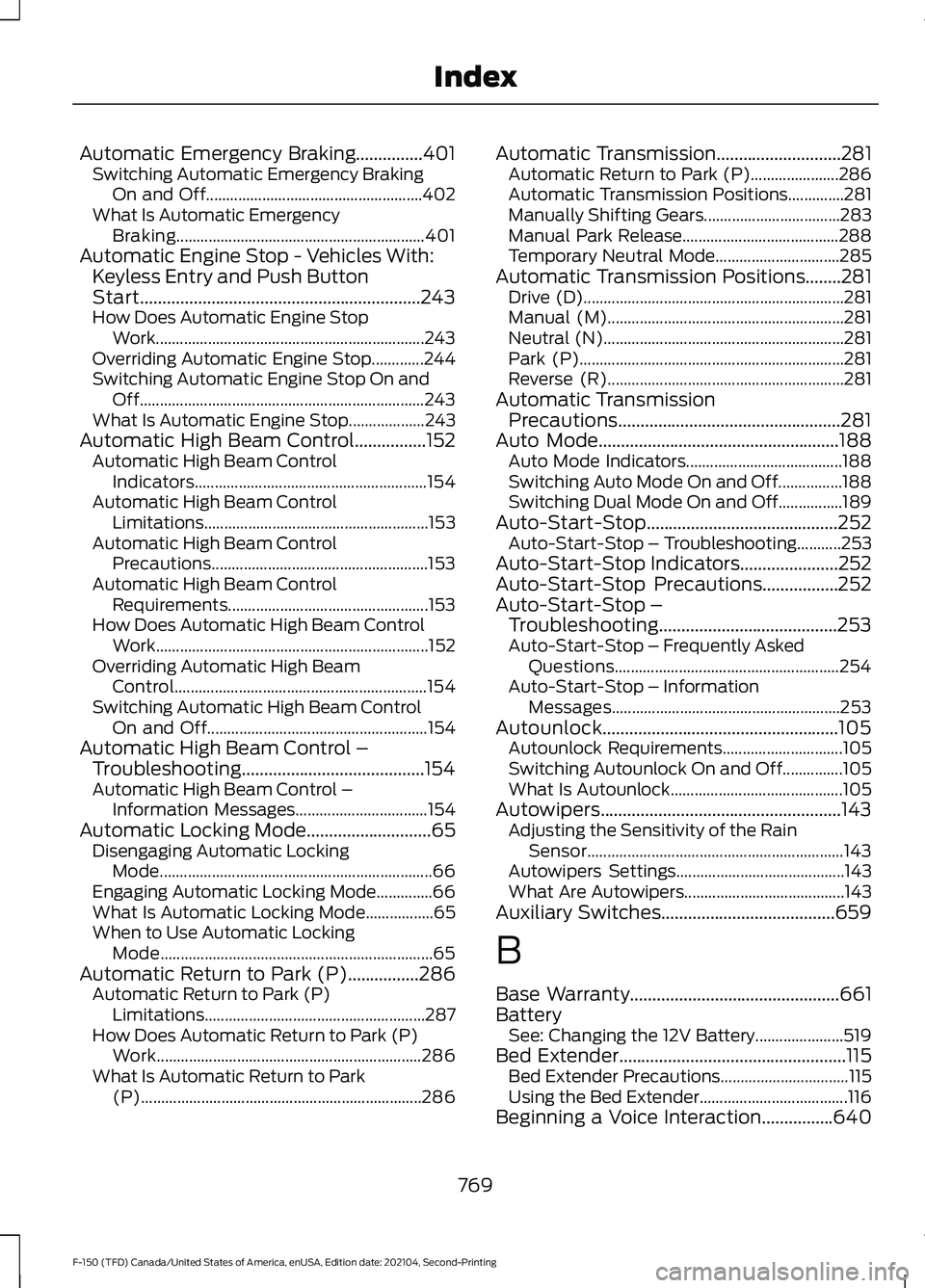
Automatic Emergency Braking...............401
Switching Automatic Emergency Braking
On and Off...................................................... 402
What Is Automatic Emergency Braking.............................................................. 401
Automatic Engine Stop - Vehicles With: Keyless Entry and Push Button
Start...............................................................243
How Does Automatic Engine Stop Work................................................................... 243
Overriding Automatic Engine Stop.............244
Switching Automatic Engine Stop On and Off....................................................................... 243
What Is Automatic Engine Stop...................243
Automatic High Beam Control................152 Automatic High Beam Control
Indicators.......................................................... 154
Automatic High Beam Control Limitations........................................................ 153
Automatic High Beam Control Precautions...................................................... 153
Automatic High Beam Control Requirements.................................................. 153
How Does Automatic High Beam Control Work.................................................................... 152
Overriding Automatic High Beam Control............................................................... 154
Switching Automatic High Beam Control On and Off....................................................... 154
Automatic High Beam Control – Troubleshooting.........................................154
Automatic High Beam Control – Information Messages................................. 154
Automatic Locking Mode............................65 Disengaging Automatic Locking
Mode.................................................................... 66
Engaging Automatic Locking Mode..............66
What Is Automatic Locking Mode.................65
When to Use Automatic Locking Mode.................................................................... 65
Automatic Return to Park (P)................286 Automatic Return to Park (P)
Limitations....................................................... 287
How Does Automatic Return to Park (P) Work.................................................................. 286
What Is Automatic Return to Park (P)...................................................................... 286Automatic Transmission............................281
Automatic Return to Park (P)......................286
Automatic Transmission Positions..............281
Manually Shifting Gears.................................. 283
Manual Park Release....................................... 288
Temporary Neutral Mode............................... 285
Automatic Transmission Positions
........281
Drive (D)................................................................. 281
Manual (M)........................................................... 281
Neutral (N)............................................................ 281
Park (P).................................................................. 281
Reverse (R)........................................................... 281
Automatic Transmission Precautions..................................................281
Auto Mode
......................................................188
Auto Mode Indicators....................................... 188
Switching Auto Mode On and Off................188
Switching Dual Mode On and Off................189
Auto-Start-Stop...........................................252 Auto-Start-Stop – Troubleshooting...........253
Auto-Start-Stop Indicators
......................252
Auto-Start-Stop Precautions.................252
Auto-Start-Stop – Troubleshooting........................................253
Auto-Start-Stop – Frequently Asked Questions........................................................ 254
Auto-Start-Stop – Information Messages......................................................... 253
Autounlock.....................................................105 Autounlock Requirements.............................. 105
Switching Autounlock On and Off...............105
What Is Autounlock........................................... 105
Autowipers......................................................143 Adjusting the Sensitivity of the Rain
Sensor
................................................................ 143
Autowipers Settings.......................................... 143
What Are Autowipers........................................ 143
Auxiliary Switches.......................................659
B
Base Warranty
...............................................661
Battery See: Changing the 12V Battery...................... 519
Bed Extender...................................................115 Bed Extender Precautions................................ 115
Using the Bed Extender..................................... 116
Beginning a Voice Interaction................640
769
F-150 (TFD) Canada/United States of America, enUSA, Edition date: 202104, Second-Printing Index
Page 779 of 796
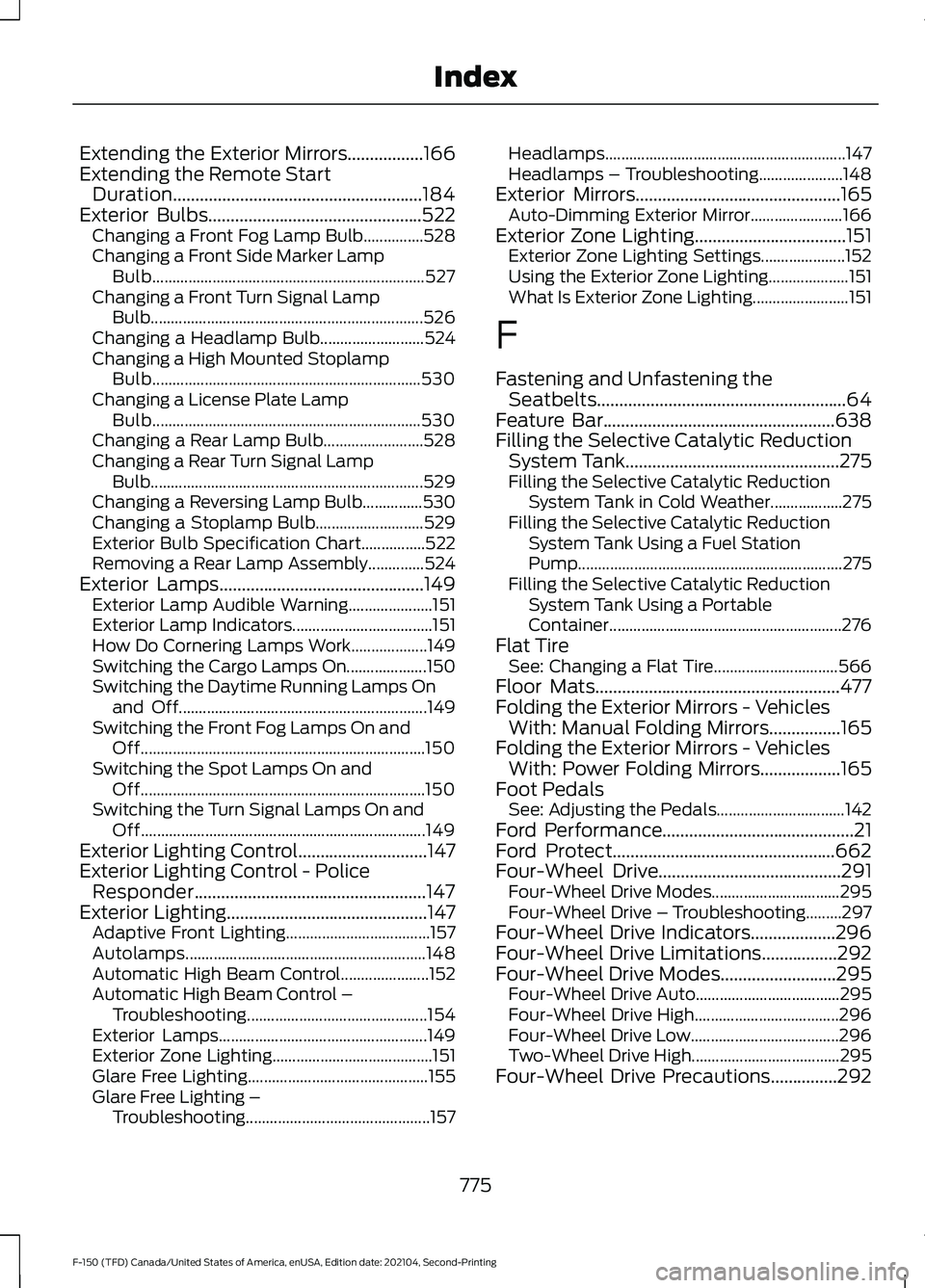
Extending the Exterior Mirrors.................166
Extending the Remote Start
Duration........................................................184
Exterior Bulbs................................................522
Changing a Front Fog Lamp Bulb...............528
Changing a Front Side Marker Lamp
Bulb.................................................................... 527
Changing a Front Turn Signal Lamp Bulb.................................................................... 526
Changing a Headlamp Bulb.......................... 524
Changing a High Mounted Stoplamp Bulb................................................................... 530
Changing a License Plate Lamp Bulb................................................................... 530
Changing a Rear Lamp Bulb......................... 528
Changing a Rear Turn Signal Lamp Bulb.................................................................... 529
Changing a Reversing Lamp Bulb...............530
Changing a Stoplamp Bulb........................... 529
Exterior Bulb Specification Chart................522
Removing a Rear Lamp Assembly..............524
Exterior Lamps
..............................................149
Exterior Lamp Audible Warning.....................151
Exterior Lamp Indicators................................... 151
How Do Cornering Lamps Work................... 149
Switching the Cargo Lamps On.................... 150
Switching the Daytime Running Lamps On and Off.............................................................. 149
Switching the Front Fog Lamps On and Off....................................................................... 150
Switching the Spot Lamps On and Off....................................................................... 150
Switching the Turn Signal Lamps On and Off....................................................................... 149
Exterior Lighting Control.............................147
Exterior Lighting Control - Police Responder....................................................147
Exterior Lighting
.............................................147
Adaptive Front Lighting.................................... 157
Autolamps............................................................ 148
Automatic High Beam Control...................... 152
Automatic High Beam Control – Troubleshooting............................................. 154
Exterior Lamps.................................................... 149
Exterior Zone Lighting........................................ 151
Glare Free Lighting............................................. 155
Glare Free Lighting – Troubleshooting.............................................. 157Headlamps............................................................
147
Headlamps – Troubleshooting.....................148
Exterior Mirrors
..............................................165
Auto-Dimming Exterior Mirror....................... 166
Exterior Zone Lighting
..................................151
Exterior Zone Lighting Settings..................... 152
Using the Exterior Zone Lighting.................... 151
What Is Exterior Zone Lighting........................ 151
F
Fastening and Unfastening the Seatbelts
........................................................64
Feature Bar....................................................638
Filling the Selective Catalytic Reduction System Tank................................................275
Filling the Selective Catalytic Reduction System Tank in Cold Weather..................275
Filling the Selective Catalytic Reduction System Tank Using a Fuel Station
Pump.................................................................. 275
Filling the Selective Catalytic Reduction System Tank Using a Portable
Container.......................................................... 276
Flat Tire See: Changing a Flat Tire............................... 566
Floor Mats.......................................................477
Folding the Exterior Mirrors - Vehicles With: Manual Folding Mirrors................165
Folding the Exterior Mirrors - Vehicles With: Power Folding Mirrors..................165
Foot Pedals See: Adjusting the Pedals................................ 142
Ford Performance...........................................21
Ford Protect
..................................................662
Four-Wheel Drive.........................................291
Four-Wheel Drive Modes................................ 295
Four-Wheel Drive – Troubleshooting.........297
Four-Wheel Drive Indicators...................296
Four-Wheel Drive Limitations.................292
Four-Wheel Drive Modes
..........................295
Four-Wheel Drive Auto.................................... 295
Four-Wheel Drive High.................................... 296
Four-Wheel Drive Low..................................... 296
Two-Wheel Drive High..................................... 295
Four-Wheel Drive Precautions...............292
775
F-150 (TFD) Canada/United States of America, enUSA, Edition date: 202104, Second-Printing Index