stop start FORD F-150 2021 User Guide
[x] Cancel search | Manufacturer: FORD, Model Year: 2021, Model line: F-150, Model: FORD F-150 2021Pages: 796, PDF Size: 13.89 MB
Page 178 of 796
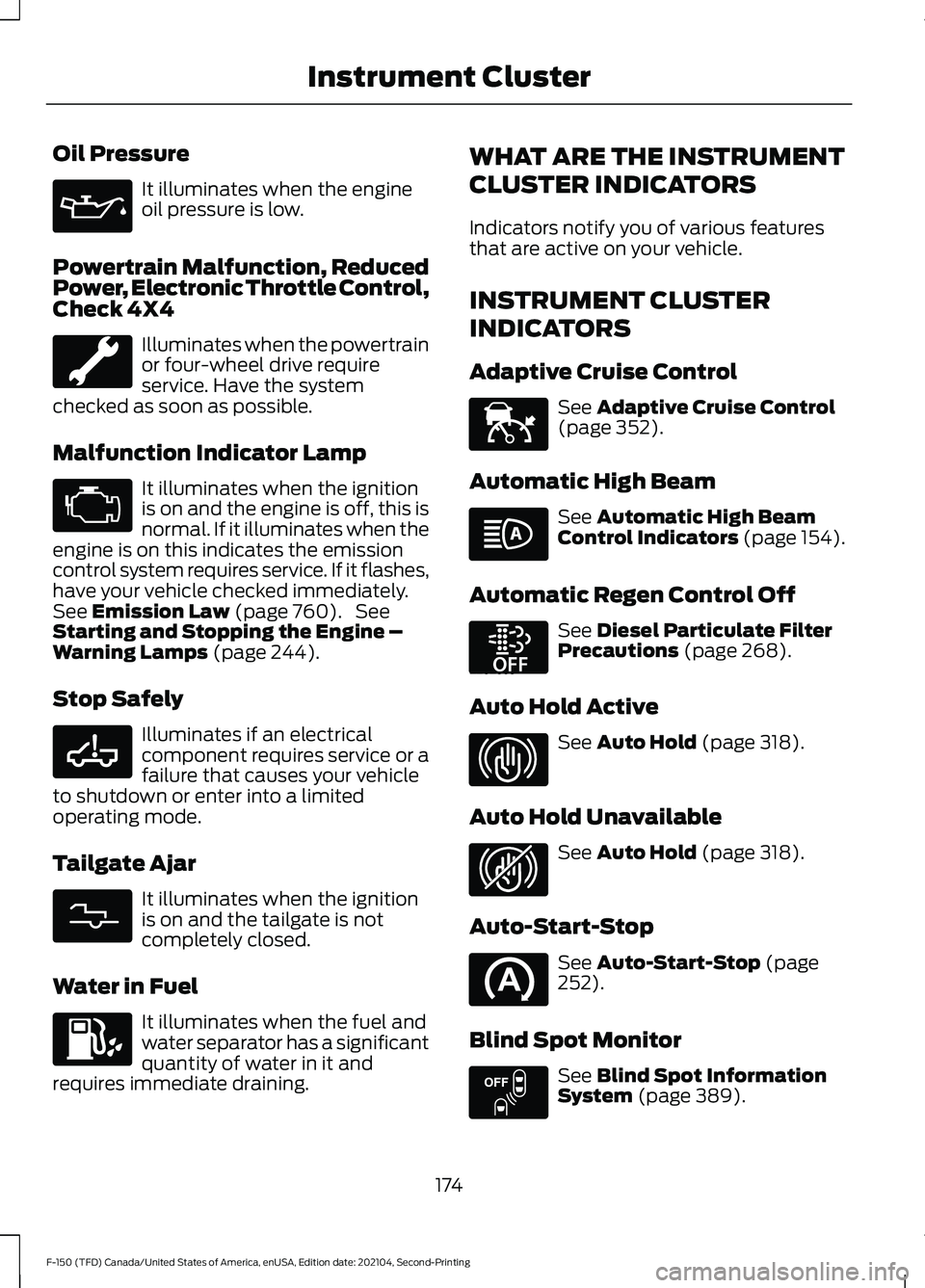
Oil Pressure
It illuminates when the engine
oil pressure is low.
Powertrain Malfunction, Reduced
Power, Electronic Throttle Control,
Check 4X4 Illuminates when the powertrain
or four-wheel drive require
service. Have the system
checked as soon as possible.
Malfunction Indicator Lamp It illuminates when the ignition
is on and the engine is off, this is
normal. If it illuminates when the
engine is on this indicates the emission
control system requires service. If it flashes,
have your vehicle checked immediately.
See Emission Law (page 760). See
Starting and Stopping the Engine –
Warning Lamps
(page 244).
Stop Safely Illuminates if an electrical
component requires service or a
failure that causes your vehicle
to shutdown or enter into a limited
operating mode.
Tailgate Ajar It illuminates when the ignition
is on and the tailgate is not
completely closed.
Water in Fuel It illuminates when the fuel and
water separator has a significant
quantity of water in it and
requires immediate draining. WHAT ARE THE INSTRUMENT
CLUSTER INDICATORS
Indicators notify you of various features
that are active on your vehicle.
INSTRUMENT CLUSTER
INDICATORS
Adaptive Cruise Control
See
Adaptive Cruise Control
(page 352).
Automatic High Beam See
Automatic High Beam
Control Indicators (page 154).
Automatic Regen Control Off See
Diesel Particulate Filter
Precautions (page 268).
Auto Hold Active See
Auto Hold (page 318).
Auto Hold Unavailable See
Auto Hold (page 318).
Auto-Start-Stop See
Auto-Start-Stop (page
252).
Blind Spot Monitor See
Blind Spot Information
System (page 389).
174
F-150 (TFD) Canada/United States of America, enUSA, Edition date: 202104, Second-Printing Instrument Cluster E332963 E311338 E144524 E252868 E323448 E323449 E151262
Page 180 of 796
INSTRUMENT CLUSTER
INDICATORS - POLICE
RESPONDER
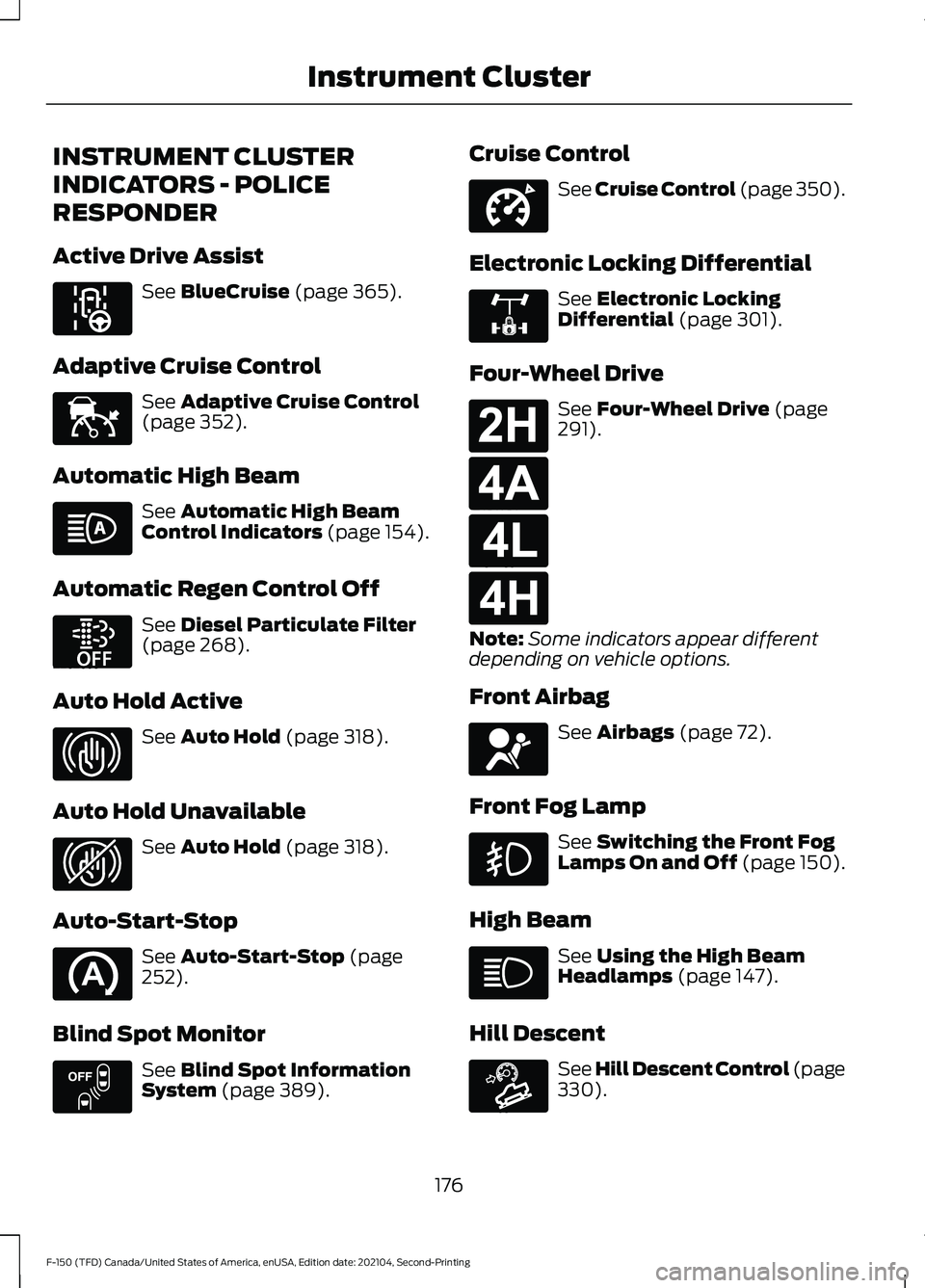
Active Drive Assist
See BlueCruise (page 365).
Adaptive Cruise Control See
Adaptive Cruise Control
(page 352).
Automatic High Beam See
Automatic High Beam
Control Indicators (page 154).
Automatic Regen Control Off See
Diesel Particulate Filter
(page 268).
Auto Hold Active See
Auto Hold (page 318).
Auto Hold Unavailable See
Auto Hold (page 318).
Auto-Start-Stop See
Auto-Start-Stop (page
252).
Blind Spot Monitor See
Blind Spot Information
System (page 389). Cruise Control See Cruise Control (page 350).
Electronic Locking Differential See
Electronic Locking
Differential (page 301).
Four-Wheel Drive See
Four-Wheel Drive (page
291).
Note: Some indicators appear different
depending on vehicle options.
Front Airbag See
Airbags (page 72).
Front Fog Lamp See
Switching the Front Fog
Lamps On and Off (page 150).
High Beam See
Using the High Beam
Headlamps (page 147).
Hill Descent See Hill Descent Control
(page
330).
176
F-150 (TFD) Canada/United States of America, enUSA, Edition date: 202104, Second-Printing Instrument ClusterE297977 E144524 E252868 E323448 E323449 E151262 E332905 E325779 E181778 E181781 E181780 E181779 E67017 E163171
Page 187 of 796
WHAT IS REMOTE START
The system allows you to remotely start
your vehicle and to adjust the interior
temperature according to the settings that
you chose.
REMOTE START
PRECAUTIONS
WARNING: Do not start the engine
in a closed garage or in other enclosed
areas. Exhaust fumes are toxic. Always
open the garage door before you start
the engine. Failure to follow this
instruction could result in personal injury
or death. WARNING: Do not keep electrical
devices plugged in the power point
whenever the device is not in use. Power
points power up during remote start. WARNING:
Do not keep electrical
devices plugged into the power outlet
whenever the device is not in use. The
outlet provides power when the vehicle
is on. Failure to follow this instruction
could result in personal injury.
REMOTE START LIMITATIONS
Remote start does not work under the
following conditions:
• The alarm horn is sounding.
• The hood is open.
• The transmission is not in park (P).
• The ignition is on.
• The battery voltage is below the
minimum operating voltage.
• Remote start is not enabled. Note:
Do not use remote start if the fuel
level is low.
Note: You can use remote start with
FordPass.
See Connecting the Vehicle to
a Wi-Fi Network (page 620).
ENABLING REMOTE START
1. Press
Settings on the touchscreen.
2. Press
Vehicle Settings.
3. Press
Remote Start Setup.
4. Switch
Remote Start on or off.
Note: To remote start with FordPass, make
sure that the modem is enabled.
See
Connecting FordPass to the Modem
(page
620).
REMOTELY STARTING AND
STOPPING THE VEHICLE
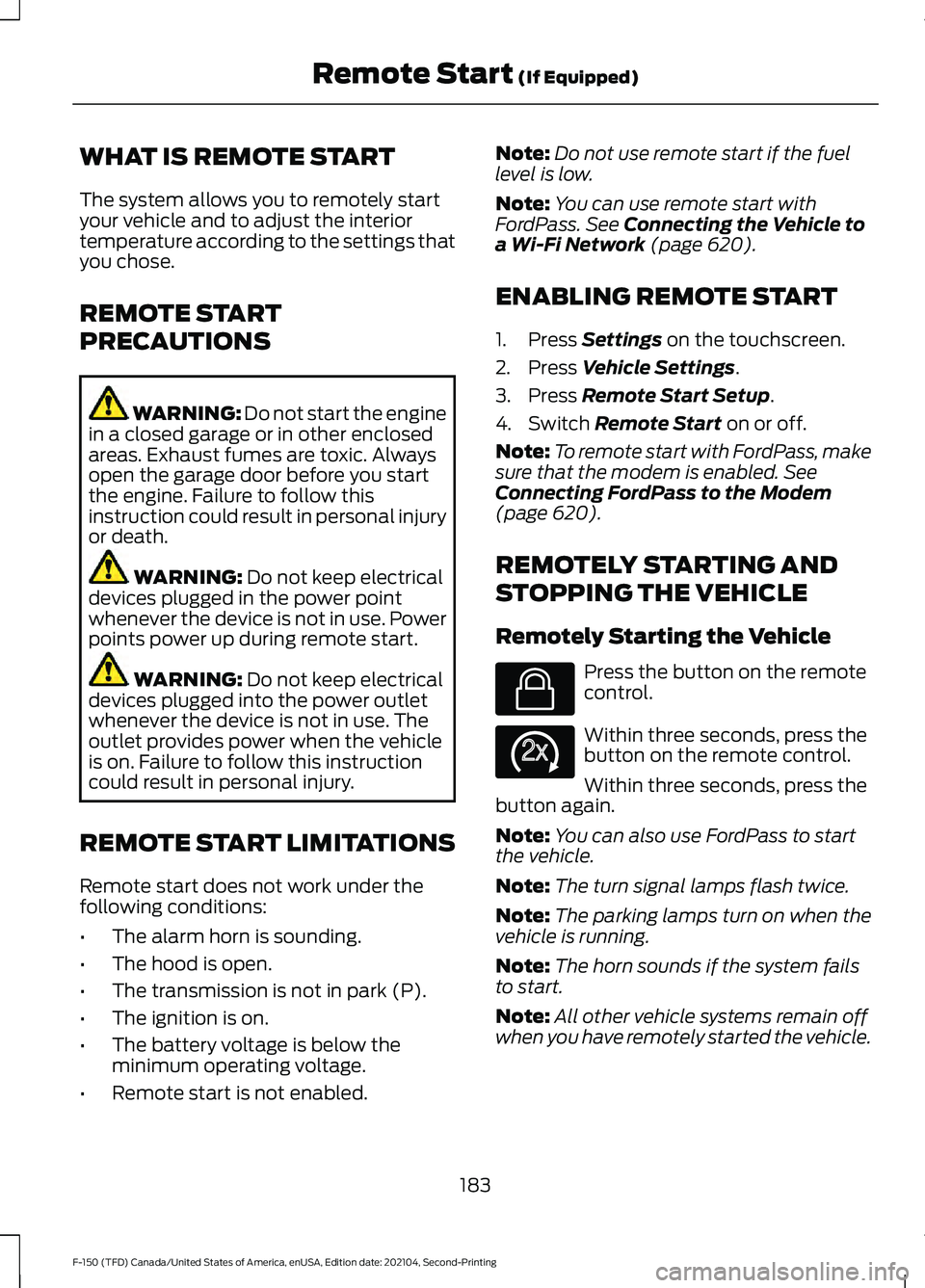
Remotely Starting the Vehicle Press the button on the remote
control.
Within three seconds, press the
button on the remote control.
Within three seconds, press the
button again.
Note: You can also use FordPass to start
the vehicle.
Note: The turn signal lamps flash twice.
Note: The parking lamps turn on when the
vehicle is running.
Note: The horn sounds if the system fails
to start.
Note: All other vehicle systems remain off
when you have remotely started the vehicle.
183
F-150 (TFD) Canada/United States of America, enUSA, Edition date: 202104, Second-Printing Remote Start
(If Equipped)E138623 E138625
Page 188 of 796
Note:
The vehicle remains secured when
you have remotely started the vehicle. A
valid key must be inside your vehicle to
switch the ignition on and drive your vehicle.
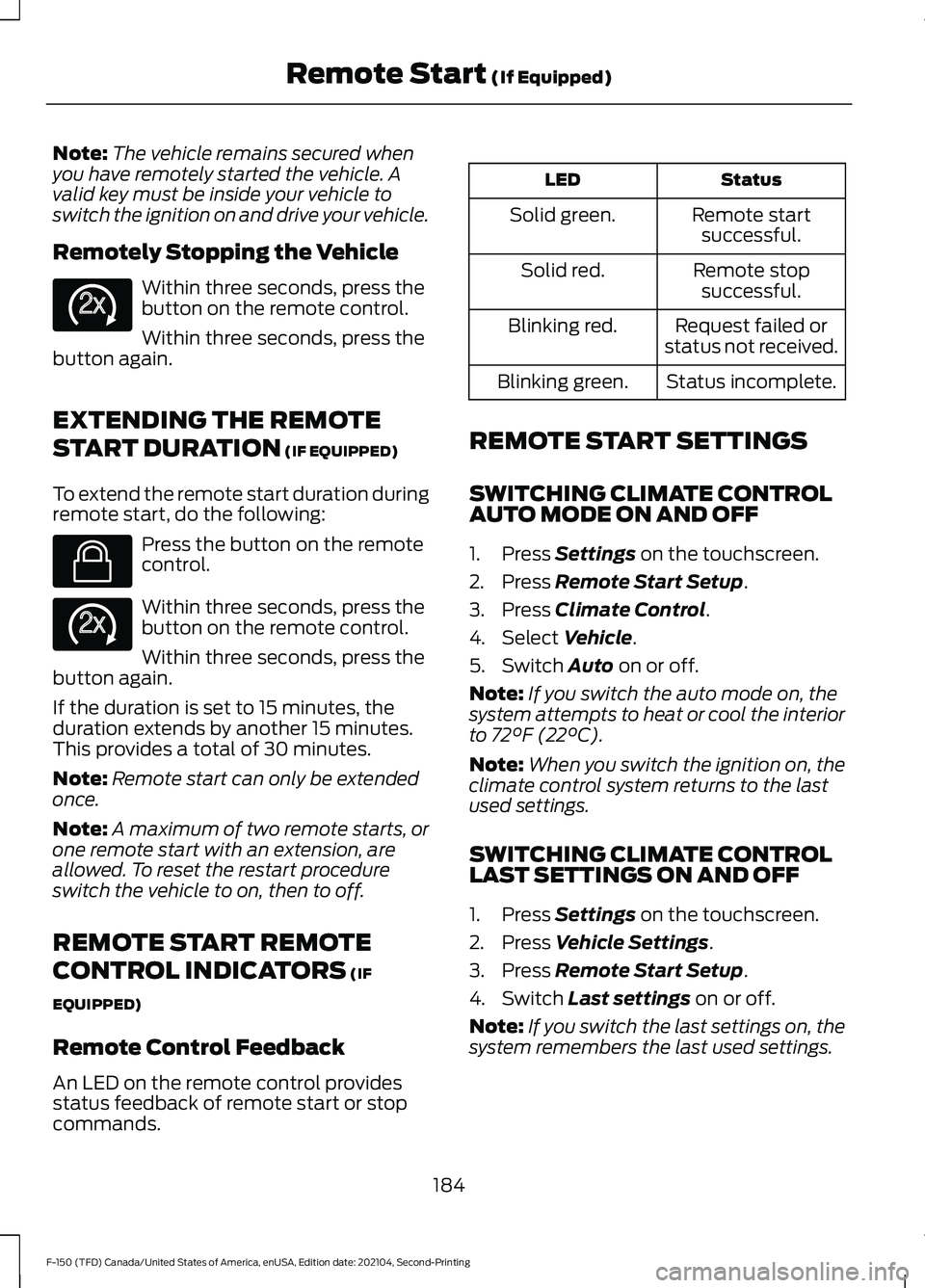
Remotely Stopping the Vehicle Within three seconds, press the
button on the remote control.
Within three seconds, press the
button again.
EXTENDING THE REMOTE
START DURATION (IF EQUIPPED)
To extend the remote start duration during
remote start, do the following: Press the button on the remote
control.
Within three seconds, press the
button on the remote control.
Within three seconds, press the
button again.
If the duration is set to 15 minutes, the
duration extends by another 15 minutes.
This provides a total of 30 minutes.
Note: Remote start can only be extended
once.
Note: A maximum of two remote starts, or
one remote start with an extension, are
allowed. To reset the restart procedure
switch the vehicle to on, then to off.
REMOTE START REMOTE
CONTROL INDICATORS
(IF
EQUIPPED)
Remote Control Feedback
An LED on the remote control provides
status feedback of remote start or stop
commands. Status
LED
Remote startsuccessful.
Solid green.
Remote stopsuccessful.
Solid red.
Request failed or
status not received.
Blinking red.
Status incomplete.
Blinking green.
REMOTE START SETTINGS
SWITCHING CLIMATE CONTROL
AUTO MODE ON AND OFF
1. Press
Settings on the touchscreen.
2. Press
Remote Start Setup.
3. Press
Climate Control.
4. Select
Vehicle.
5. Switch
Auto on or off.
Note: If you switch the auto mode on, the
system attempts to heat or cool the interior
to
72°F (22°C).
Note: When you switch the ignition on, the
climate control system returns to the last
used settings.
SWITCHING CLIMATE CONTROL
LAST SETTINGS ON AND OFF
1. Press
Settings on the touchscreen.
2. Press
Vehicle Settings.
3. Press
Remote Start Setup.
4. Switch
Last settings on or off.
Note: If you switch the last settings on, the
system remembers the last used settings.
184
F-150 (TFD) Canada/United States of America, enUSA, Edition date: 202104, Second-Printing Remote Start
(If Equipped)E138625 E138623 E138625
Page 189 of 796
SWITCHING THE HEATED SEAT
SETTINGS ON AND OFF
1. Press Settings on the touchscreen.
2. Press
Vehicle Settings.
3. Press
Remote Start Setup.
4. Press
Seats.
5. Switch
Auto on or off.
Note: If you switch the heated seat settings
on, the heated seats turn on during cold
weather.
SWITCHING THE HEATED
STEERING WHEEL SETTINGS ON
AND OFF
1. Press
Settings on the touchscreen.
2. Press
Vehicle Settings.
3. Press
Remote Start Setup.
4. Press
Seats and Steering Wheel.
5. Switch
Auto on or off.
Note: If you switch the heated steering
wheel settings on, the heated steering wheel
turns on during cold weather.
SETTING THE REMOTE START
DURATION
1. Press
Settings on the touchscreen.
2. Press
Vehicle Settings.
3. Press
Remote Start Setup.
4. Press
Duration.
Note: Wait a few seconds before remotely
starting the vehicle after the vehicle stops
running.
185
F-150 (TFD) Canada/United States of America, enUSA, Edition date: 202104, Second-Printing Remote Start
(If Equipped)
Page 207 of 796
Press the heated seat symbol on the
climate controls or touchscreen to cycle
through the various heat settings and off.
The more indicators that display, the
warmer the temperature of the seat.
Note:
The heated seats may remain on
after you remote start your vehicle, based
on your remote start settings. The heated
seats may also turn on when you start your
vehicle if they were on when you switched
your vehicle off.
VENTILATED SEATS (IF EQUIPPED)
VENTILATED SEAT PRECAUTIONS
Do not:
• Spill liquid on the front seats. This may
cause the air vent holes to become
blocked and not work properly.
• Place cargo or objects under the seats.
They may block the air intake causing
the air vents to not work properly.
SWITCHING THE VENTILATED
SEATS ON AND OFF
The vehicle must be running to use this
feature. Press this symbol on the climate controls
or the touchscreen to cycle through the
various ventilation settings and off. More
indicator lights indicate higher fan speeds.
Note:
When you switch the climate control
fan speed and the ventilated seats to their
maximum settings, the ventilated seats
provide increased cooling.
If the engine falls below 350 RPM while
the ventilated seats are on, the feature
turns itself off unless the vehicle is in
Auto-Start-Stop mode. You may need to
reactivate the ventilated seats.
Note: The ventilated seats may remain on
after you remote start your vehicle, based
on your remote start settings. The ventilated
seats may also turn on when you start your
vehicle if they were on when you switched
your vehicle off.
203
F-150 (TFD) Canada/United States of America, enUSA, Edition date: 202104, Second-Printing Front SeatsE146322 E224689
Page 220 of 796
WHAT IS THE POWER OUTLET
The vehicle functions as a portable
generator and can power devices that
require up to the rating listed on power
outlet label.
POWER OUTLET
PRECAUTIONS - VEHICLES
WITH: 2KW
WARNING: Do not start the engine
in a closed garage or in other enclosed
areas. Exhaust fumes are toxic. Always
open the garage door before you start
the engine. Failure to follow this
instruction could result in personal injury
or death. WARNING: Exhaust leaks may
result in entry of harmful and potentially
lethal fumes into the passenger
compartment. If you smell exhaust
fumes inside your vehicle, have your
vehicle inspected immediately. Do not
drive if you smell exhaust fumes. WARNING:
Do not connect any
vehicle power outlets to any premises.
This can create a backfeed to utility lines.
Failure to follow this instruction could
result in property damage, fire, electrical
shock or death. WARNING:
The vehicle's engine
runs while the generator is switched on.
Running engines emit carbon monoxide.
Only use the generator when the vehicle
is outdoors. Failure to follow this
instruction could result in personal injury
or death.
Note: Automatic engine stop is disabled
and the gasoline engine will continue to idle
when the outlet is switched on.
Note: We recommend using UL approved
devices for use with the power outlet.
Note: Unplug electrical devices from the
power outlet when they are not switched
on.
Note: Make sure there is no damage to the
outlets before driving your vehicle.
Note: Make sure that objects are not
blocking the inverter inlet and exhaust near
the rear underseat storage compartment.
Note: The climate control system may turn
on and power may be limited during extreme
hot or cold temperatures to optimize the
performance of the system.
Note: When the outlet is switched on and
the vehicle is in Park (P) the engine turns
off 30 minutes after the low fuel warning is
displayed. After the vehicle is turned off,
generator mode only operates while driving
or until the vehicle is refueled.
216
F-150 (TFD) Canada/United States of America, enUSA, Edition date: 202104, Second-Printing Power Outlet - Vehicles With: Pickup Bed Power Generator
Outlet
Page 221 of 796
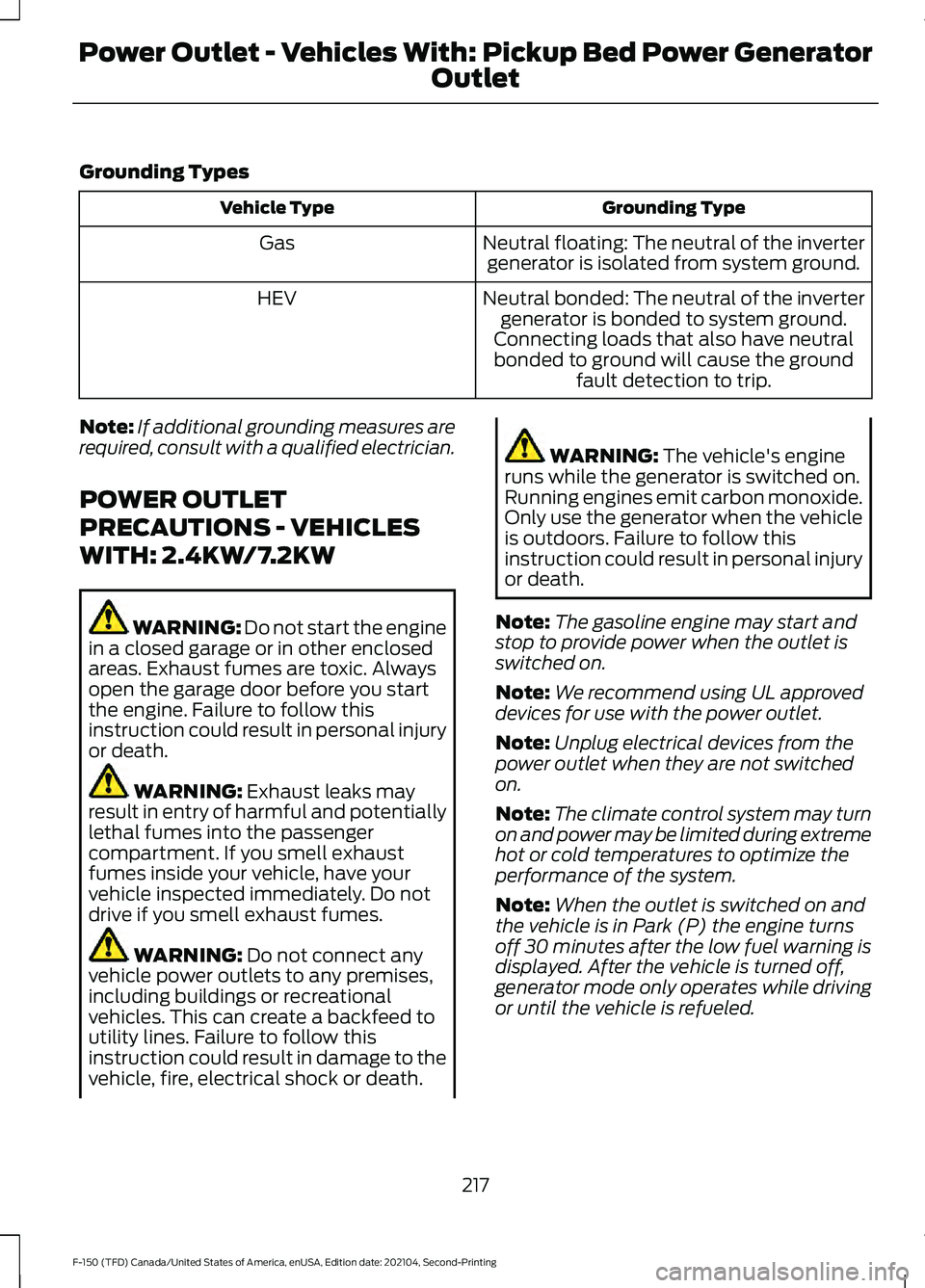
Grounding Types
Grounding Type
Vehicle Type
Neutral floating: The neutral of the invertergenerator is isolated from system ground.
Gas
Neutral bonded: The neutral of the invertergenerator is bonded to system ground.
Connecting loads that also have neutral bonded to ground will cause the ground fault detection to trip.
HEV
Note: If additional grounding measures are
required, consult with a qualified electrician.
POWER OUTLET
PRECAUTIONS - VEHICLES
WITH: 2.4KW/7.2KW WARNING: Do not start the engine
in a closed garage or in other enclosed
areas. Exhaust fumes are toxic. Always
open the garage door before you start
the engine. Failure to follow this
instruction could result in personal injury
or death. WARNING: Exhaust leaks may
result in entry of harmful and potentially
lethal fumes into the passenger
compartment. If you smell exhaust
fumes inside your vehicle, have your
vehicle inspected immediately. Do not
drive if you smell exhaust fumes. WARNING:
Do not connect any
vehicle power outlets to any premises,
including buildings or recreational
vehicles. This can create a backfeed to
utility lines. Failure to follow this
instruction could result in damage to the
vehicle, fire, electrical shock or death. WARNING:
The vehicle's engine
runs while the generator is switched on.
Running engines emit carbon monoxide.
Only use the generator when the vehicle
is outdoors. Failure to follow this
instruction could result in personal injury
or death.
Note: The gasoline engine may start and
stop to provide power when the outlet is
switched on.
Note: We recommend using UL approved
devices for use with the power outlet.
Note: Unplug electrical devices from the
power outlet when they are not switched
on.
Note: The climate control system may turn
on and power may be limited during extreme
hot or cold temperatures to optimize the
performance of the system.
Note: When the outlet is switched on and
the vehicle is in Park (P) the engine turns
off 30 minutes after the low fuel warning is
displayed. After the vehicle is turned off,
generator mode only operates while driving
or until the vehicle is refueled.
217
F-150 (TFD) Canada/United States of America, enUSA, Edition date: 202104, Second-Printing Power Outlet - Vehicles With: Pickup Bed Power Generator
Outlet
Page 223 of 796
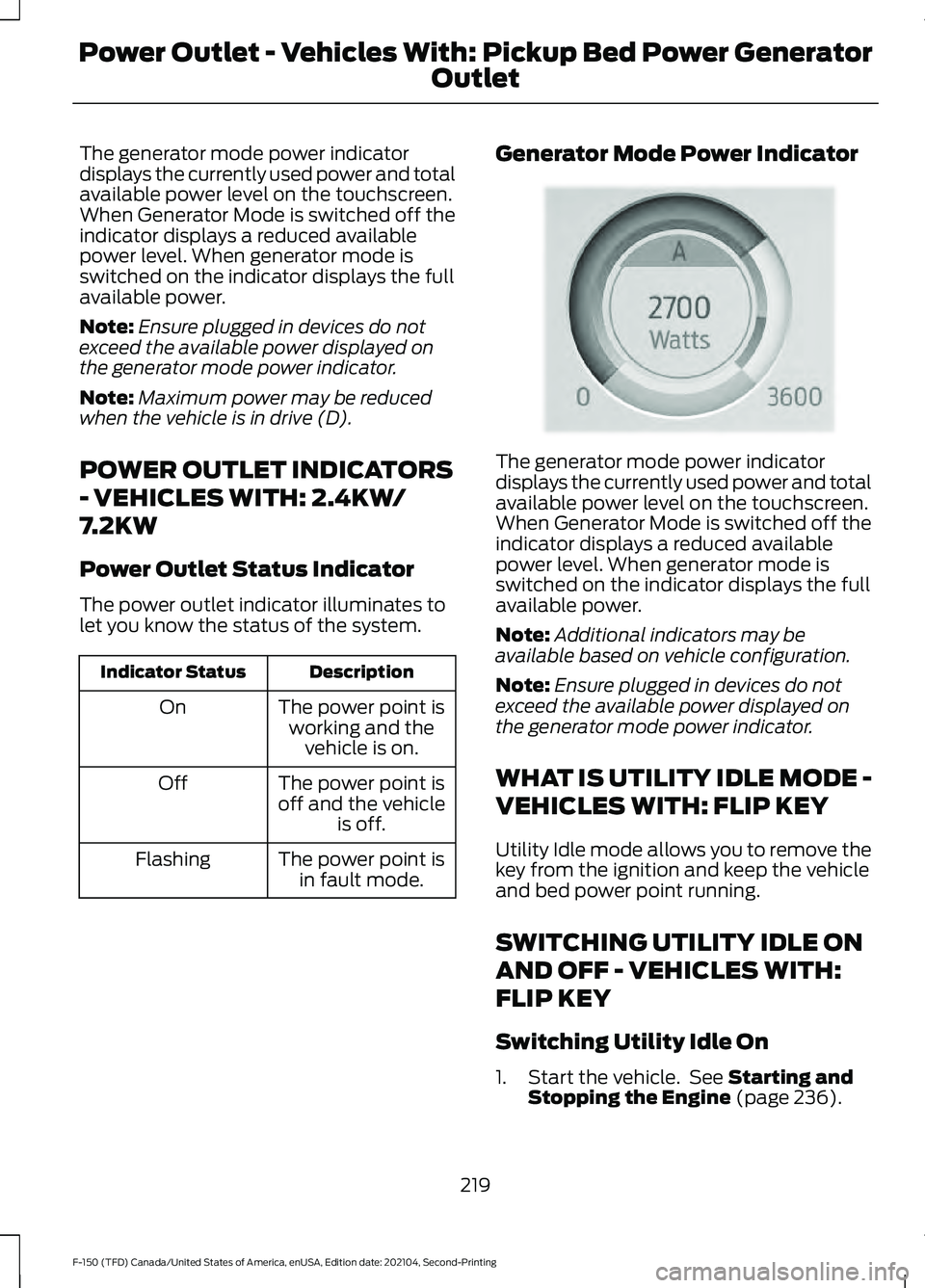
The generator mode power indicator
displays the currently used power and total
available power level on the touchscreen.
When Generator Mode is switched off the
indicator displays a reduced available
power level. When generator mode is
switched on the indicator displays the full
available power.
Note:
Ensure plugged in devices do not
exceed the available power displayed on
the generator mode power indicator.
Note: Maximum power may be reduced
when the vehicle is in drive (D).
POWER OUTLET INDICATORS
- VEHICLES WITH: 2.4KW/
7.2KW
Power Outlet Status Indicator
The power outlet indicator illuminates to
let you know the status of the system. Description
Indicator Status
The power point isworking and the vehicle is on.
On
The power point is
off and the vehicle is off.
Off
The power point isin fault mode.
Flashing Generator Mode Power Indicator The generator mode power indicator
displays the currently used power and total
available power level on the touchscreen.
When Generator Mode is switched off the
indicator displays a reduced available
power level. When generator mode is
switched on the indicator displays the full
available power.
Note:
Additional indicators may be
available based on vehicle configuration.
Note: Ensure plugged in devices do not
exceed the available power displayed on
the generator mode power indicator.
WHAT IS UTILITY IDLE MODE -
VEHICLES WITH: FLIP KEY
Utility Idle mode allows you to remove the
key from the ignition and keep the vehicle
and bed power point running.
SWITCHING UTILITY IDLE ON
AND OFF - VEHICLES WITH:
FLIP KEY
Switching Utility Idle On
1. Start the vehicle. See Starting and
Stopping the Engine (page 236).
219
F-150 (TFD) Canada/United States of America, enUSA, Edition date: 202104, Second-Printing Power Outlet - Vehicles With: Pickup Bed Power Generator
OutletE335469
Page 224 of 796
2. Press the Features button on the
touchscreen.
3. Press the Pro Power Onboard button.
4. Press the Generator Mode button to switch the power outlet to the rating
listed on the power outlet label.
5. Press the Utility Idle button.
6. Turn the key to position 0.
7. Remove the key from the ignition.
Switching Utility Idle Off using the
Key
1. Insert the key into the ignition.
2. Turn the key to position
III.
Switching Utility Idle off using the
Information and Entertainment
Display Screen
Use the controls on the touchscreen to
switch off the vehicle.
WHAT IS GENERATOR MODE
Generator Mode uses the vehicle engine
to increase power to the bed power outlets
up to the rating listed on the power outlet
label.
SWITCHING GENERATOR
MODE ON AND OFF
Using the Information and
Entertainment Display Screen
1. Switch the vehicle on.
See Starting
and Stopping the Engine (page 236).
2. Press the Features button on the touchscreen.
3. Press the Pro Power Onboard button.
4. Press the Generator Mode button to switch the power outlet to the full
rating listed on the power outlet label. Using the Instrument Panel Press the button to switch
between off, Convenience Mode,
and Generator Mode.
Using the Bed Control Press the button to switch Generator Mode
on and off.
RESETTING GROUND FAULT
DETECTION
After disconnecting all electrical loads the
ground fault can be reset using the
switches on the power point, on the
instrument panel or on the touchscreen.
Use the controls on the touchscreen to test
the ground fault detection circuit.
220
F-150 (TFD) Canada/United States of America, enUSA, Edition date: 202104, Second-Printing Power Outlet - Vehicles With: Pickup Bed Power Generator
OutletE311311 E337175