ABS FORD F-150 2021 Owners Manual
[x] Cancel search | Manufacturer: FORD, Model Year: 2021, Model line: F-150, Model: FORD F-150 2021Pages: 796, PDF Size: 13.89 MB
Page 200 of 796
•
Bend your legs slightly so that you can
press the pedals fully.
• Position the shoulder strap of the
seatbelt over the center of your
shoulder and position the lap strap
tightly across your hips.
Make sure that your driving position is
comfortable and that you can maintain full
control of your vehicle.
MANUAL SEATS (IF EQUIPPED)
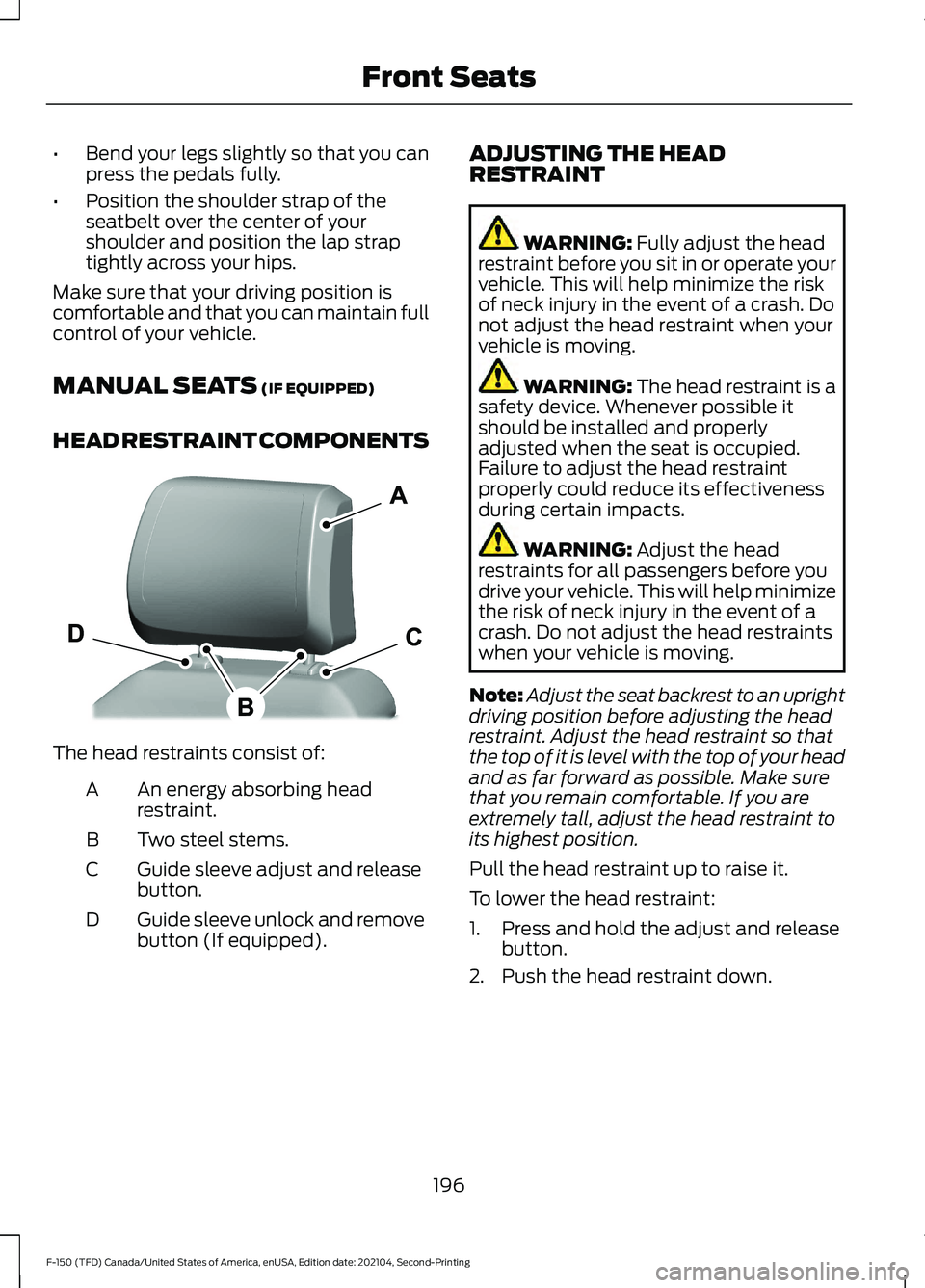
HEAD RESTRAINT COMPONENTS The head restraints consist of:
An energy absorbing head
restraint.
A
Two steel stems.
B
Guide sleeve adjust and release
button.
C
Guide sleeve unlock and remove
button (If equipped).
D ADJUSTING THE HEAD
RESTRAINT WARNING:
Fully adjust the head
restraint before you sit in or operate your
vehicle. This will help minimize the risk
of neck injury in the event of a crash. Do
not adjust the head restraint when your
vehicle is moving. WARNING:
The head restraint is a
safety device. Whenever possible it
should be installed and properly
adjusted when the seat is occupied.
Failure to adjust the head restraint
properly could reduce its effectiveness
during certain impacts. WARNING:
Adjust the head
restraints for all passengers before you
drive your vehicle. This will help minimize
the risk of neck injury in the event of a
crash. Do not adjust the head restraints
when your vehicle is moving.
Note: Adjust the seat backrest to an upright
driving position before adjusting the head
restraint. Adjust the head restraint so that
the top of it is level with the top of your head
and as far forward as possible. Make sure
that you remain comfortable. If you are
extremely tall, adjust the head restraint to
its highest position.
Pull the head restraint up to raise it.
To lower the head restraint:
1. Press and hold the adjust and release button.
2. Push the head restraint down.
196
F-150 (TFD) Canada/United States of America, enUSA, Edition date: 202104, Second-Printing Front SeatsE327921
Page 202 of 796
WARNING: Do not place cargo or
any objects behind the seat backrest
before returning it to the original position.
Pull on the seat backrest to make sure
that it has fully latched after returning
the seat backrest to its original position.
An unlatched seat may become
dangerous if you stop suddenly or have
a crash. ADJUSTING THE LUMBAR
SUPPORT POWER SEATS
(IF EQUIPPED)
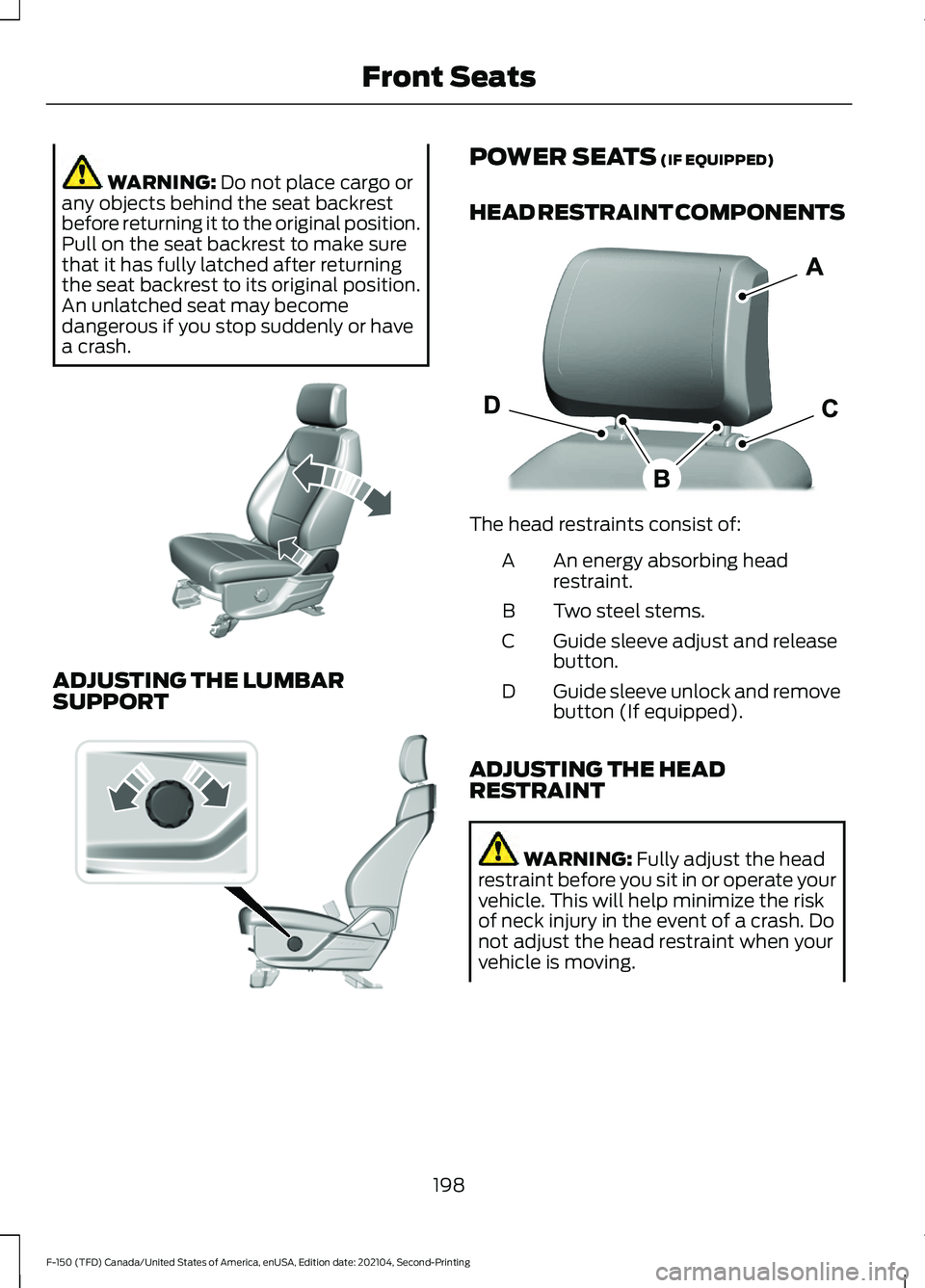
HEAD RESTRAINT COMPONENTS The head restraints consist of:
An energy absorbing head
restraint.
A
Two steel stems.
B
Guide sleeve adjust and release
button.
C
Guide sleeve unlock and remove
button (If equipped).
D
ADJUSTING THE HEAD
RESTRAINT WARNING:
Fully adjust the head
restraint before you sit in or operate your
vehicle. This will help minimize the risk
of neck injury in the event of a crash. Do
not adjust the head restraint when your
vehicle is moving.
198
F-150 (TFD) Canada/United States of America, enUSA, Edition date: 202104, Second-Printing Front SeatsE327922 E308334 E327921
Page 208 of 796
MANUAL SEATS
HEAD RESTRAINT COMPONENTS
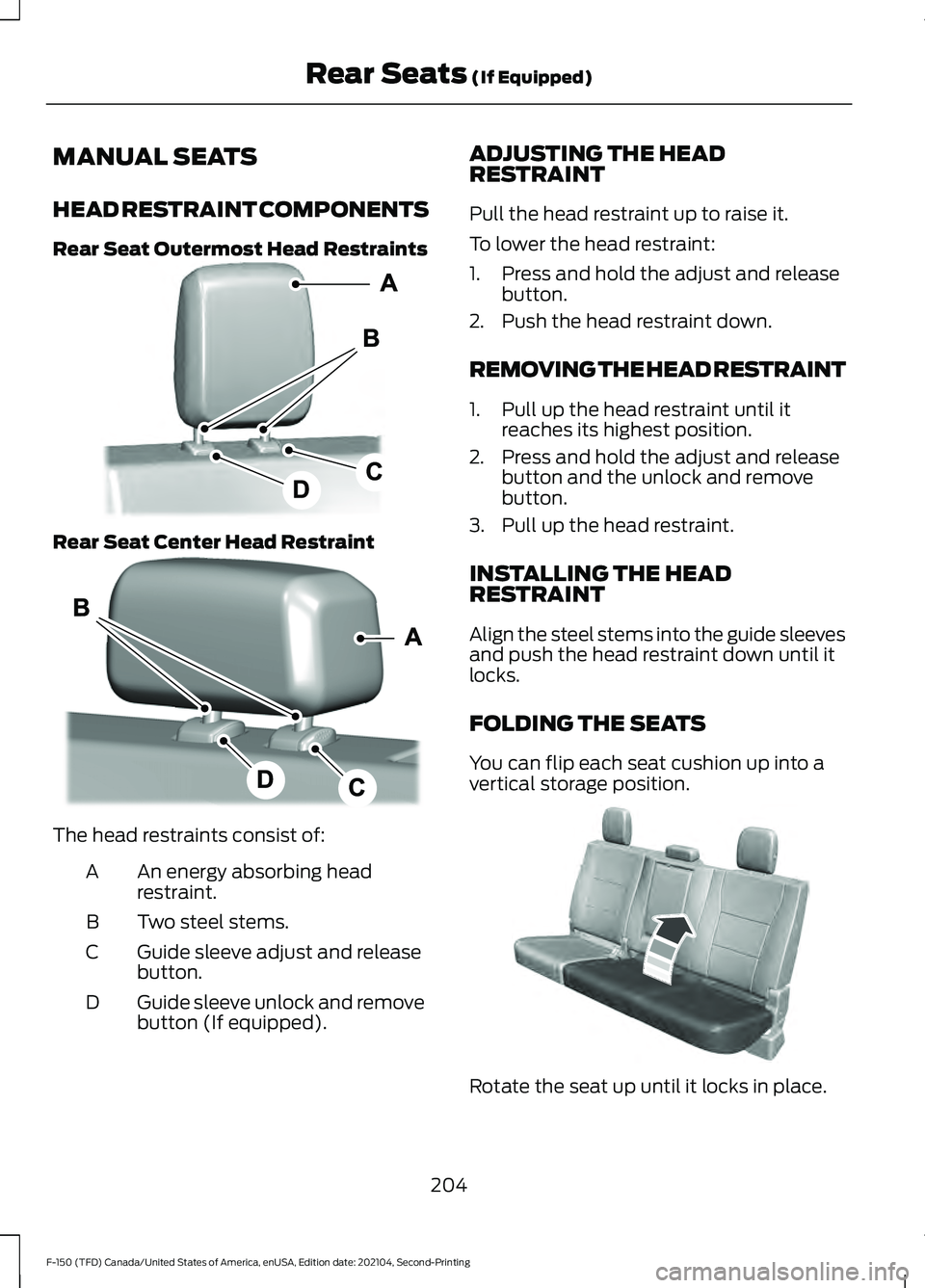
Rear Seat Outermost Head Restraints
Rear Seat Center Head Restraint
The head restraints consist of:
An energy absorbing head
restraint.
A
Two steel stems.
B
Guide sleeve adjust and release
button.
C
Guide sleeve unlock and remove
button (If equipped).
D ADJUSTING THE HEAD
RESTRAINT
Pull the head restraint up to raise it.
To lower the head restraint:
1. Press and hold the adjust and release
button.
2. Push the head restraint down.
REMOVING THE HEAD RESTRAINT
1. Pull up the head restraint until it reaches its highest position.
2. Press and hold the adjust and release button and the unlock and remove
button.
3. Pull up the head restraint.
INSTALLING THE HEAD
RESTRAINT
Align the steel stems into the guide sleeves
and push the head restraint down until it
locks.
FOLDING THE SEATS
You can flip each seat cushion up into a
vertical storage position. Rotate the seat up until it locks in place.
204
F-150 (TFD) Canada/United States of America, enUSA, Edition date: 202104, Second-Printing Rear Seats (If Equipped)E308301 E308306 E181250
Page 259 of 796
FUEL AND REFUELING
PRECAUTIONS
WARNING: Do not overfill the fuel
tank. The pressure in an overfilled tank
may cause leakage and lead to fuel spray
and fire. WARNING:
The fuel system may
be under pressure. If you hear a hissing
sound near the fuel filler inlet, do not
refuel until the sound stops. Otherwise,
fuel may spray out, which could cause
serious personal injury. WARNING: Fuels can cause serious
injury or death if misused or mishandled. WARNING:
Fuel may contain
benzene, which is a cancer-causing
agent. WARNING: When refueling always
shut the engine off and never allow
sparks or open flames near the fuel tank
filler valve. Never smoke or use a cell
phone while refueling. Fuel vapor is
extremely hazardous under certain
conditions. Avoid inhaling excess fumes. WARNING: Read and follow all the
instructions on the pump island.
Follow these guidelines when refueling:
• Extinguish all smoking materials and
any open flames before refueling your
vehicle.
• Switch the engine off before refueling. •
Automotive fuels can be harmful or
fatal if swallowed. Fuel is highly toxic
and if swallowed can cause death or
permanent injury. If fuel is swallowed
immediately call a physician, even if no
symptoms are immediately apparent.
The toxic effects of fuel may not be
apparent for hours.
• Avoid inhaling fuel vapors. Inhaling fuel
vapor can lead to eye and respiratory
tract irritation. In severe cases,
excessive or prolonged breathing of
fuel vapor can cause serious illness and
permanent injury.
• Avoid getting fuel in your eyes. If you
splash fuel in your eyes, immediately
remove contact lenses, if worn, flush
with water for 15 minutes and seek
medical attention. Failure to seek
proper medical attention could lead to
permanent injury.
• Fuels can be harmful if absorbed
through the skin. If you splash fuel on
your skin, clothing or both, promptly
remove contaminated clothing and
thoroughly wash your skin with soap
and water. Repeated or prolonged skin
contact causes skin irritation.
• Be particularly careful if you are taking
Antabuse or other forms of Disulfiram
for the treatment of alcoholism.
Breathing fuel vapors could cause an
adverse reaction, serious personal
injury or sickness. Immediately call a
physician if you experience any adverse
reactions.
255
F-150 (TFD) Canada/United States of America, enUSA, Edition date: 202104, Second-Printing Fuel and Refueling
Page 314 of 796
BRAKES –
TROUBLESHOOTING
BRAKES – WARNING LAMPS
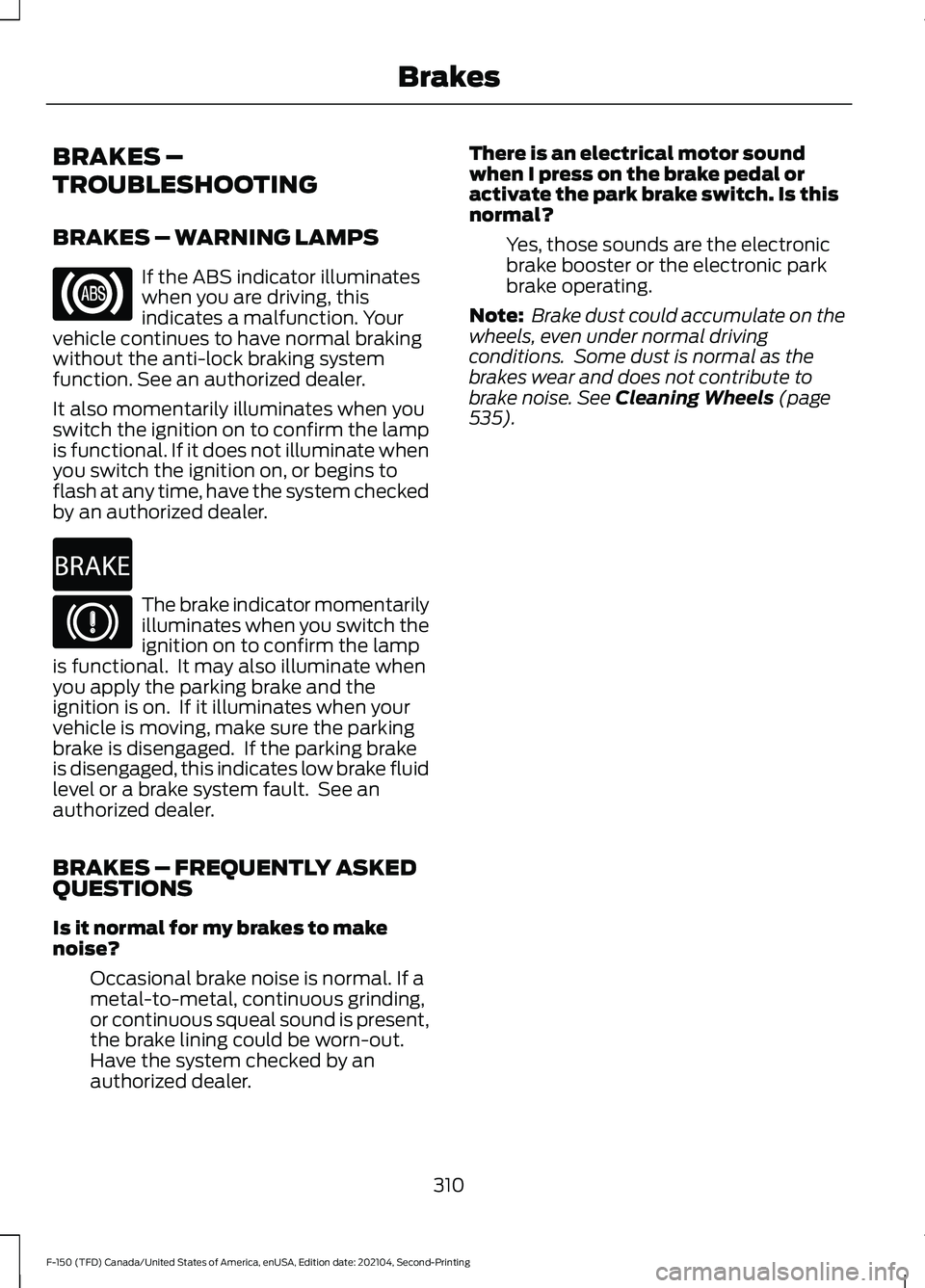
If the ABS indicator illuminates
when you are driving, this
indicates a malfunction. Your
vehicle continues to have normal braking
without the anti-lock braking system
function. See an authorized dealer.
It also momentarily illuminates when you
switch the ignition on to confirm the lamp
is functional. If it does not illuminate when
you switch the ignition on, or begins to
flash at any time, have the system checked
by an authorized dealer. The brake indicator momentarily
illuminates when you switch the
ignition on to confirm the lamp
is functional. It may also illuminate when
you apply the parking brake and the
ignition is on. If it illuminates when your
vehicle is moving, make sure the parking
brake is disengaged. If the parking brake
is disengaged, this indicates low brake fluid
level or a brake system fault. See an
authorized dealer.
BRAKES – FREQUENTLY ASKED
QUESTIONS
Is it normal for my brakes to make
noise?
Occasional brake noise is normal. If a
metal-to-metal, continuous grinding,
or continuous squeal sound is present,
the brake lining could be worn-out.
Have the system checked by an
authorized dealer. There is an electrical motor sound
when I press on the brake pedal or
activate the park brake switch. Is this
normal?
Yes, those sounds are the electronic
brake booster or the electronic park
brake operating.
Note: Brake dust could accumulate on the
wheels, even under normal driving
conditions. Some dust is normal as the
brakes wear and does not contribute to
brake noise. See Cleaning Wheels (page
535).
310
F-150 (TFD) Canada/United States of America, enUSA, Edition date: 202104, Second-Printing Brakes E270480
Page 320 of 796
REVERSE BRAKING ASSIST –
FREQUENTLY ASKED QUESTIONS
Why is reverse braking assist unavailable?
•
Make sure that all doors, liftgate and
hood are closed. Drive the vehicle on a
straight road for a short period. If the
message remains, contact an
authorized dealer.
• Make sure the cross traffic alert system
is on. See How Does Cross Traffic
Alert Work (page 393).
• Make sure the rear parking aid system
is on.
See What is the Rear Parking
Aid (page 334).
• Make sure traction control is on. See
Traction Control
(page 319).
• The vehicle has sustained a rear end
impact. Contact an authorized dealer
to have the sensors checked for proper
coverage and operation.
• An ABS, traction control or stability
control event may have occurred.
Reverse braking assist resumes
operation when the event is complete.
• Make sure the rear view camera and
360 degree camera are not dirty or
obstructed. If dirty, clean the camera.
If the message still appears after
cleaning the camera, wait a short time
and the message should clear. If the
message does not clear, contact an
authorized dealer.
• Make sure there are no blocked or
faulted sensors.
See How Does Cross
Traffic Alert Work (page 393).
• You recently had your vehicle serviced,
or the battery disconnected. Drive your
vehicle a short distance to resume
system operation.
• Reverse braking assist does not
function when you connect a trailer.
Operation resumes when you
disconnect the trailer. Note:
If the answers to why the system is
unavailable do not assist in returning reverse
braking assist to available, have the system
checked as soon as possible.
316
F-150 (TFD) Canada/United States of America, enUSA, Edition date: 202104, Second-Printing Reverse Braking Assist
(If Equipped)
Page 338 of 796
PARKING AID PRECAUTIONS
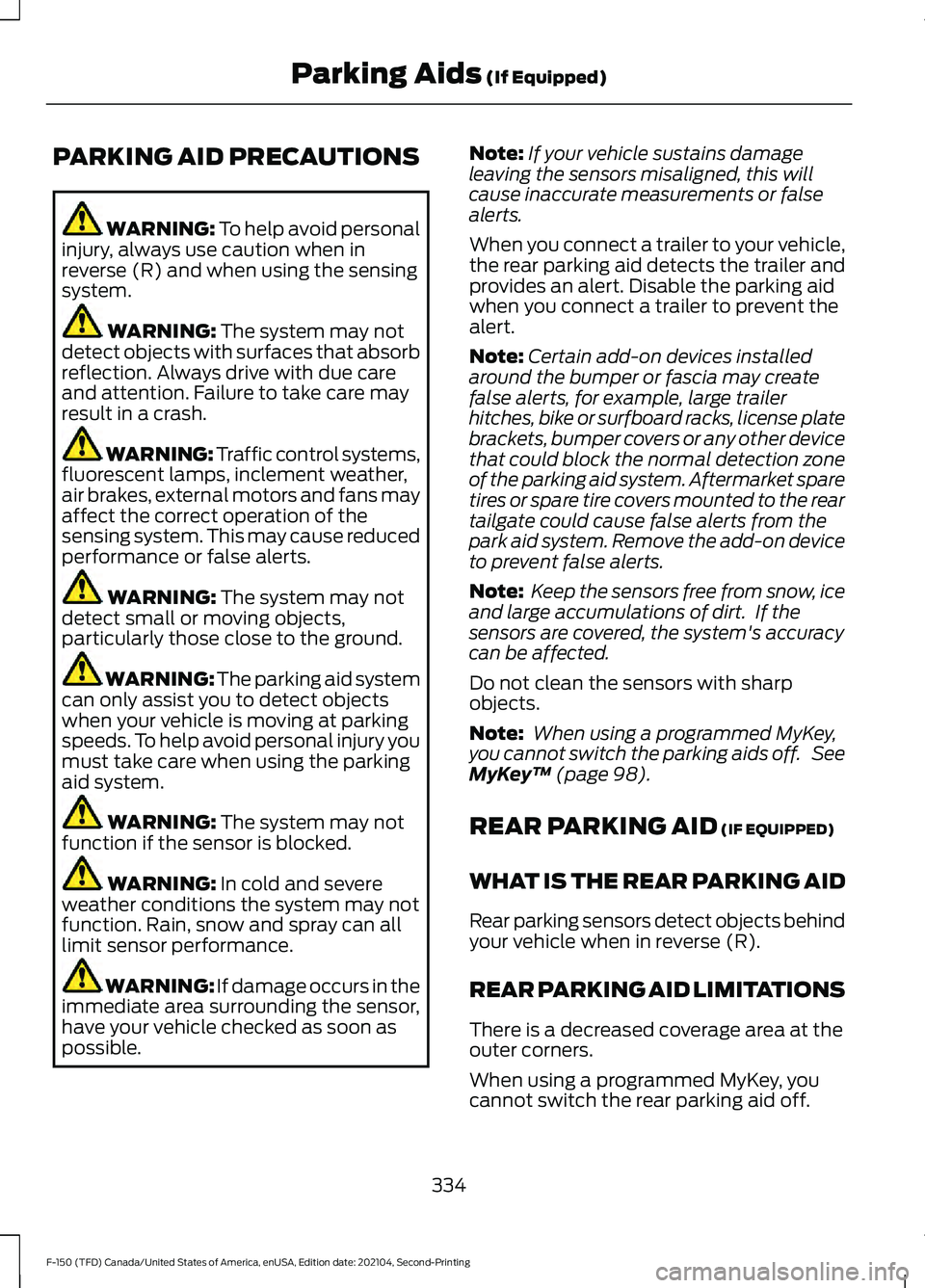
WARNING: To help avoid personal
injury, always use caution when in
reverse (R) and when using the sensing
system. WARNING:
The system may not
detect objects with surfaces that absorb
reflection. Always drive with due care
and attention. Failure to take care may
result in a crash. WARNING: Traffic control systems,
fluorescent lamps, inclement weather,
air brakes, external motors and fans may
affect the correct operation of the
sensing system. This may cause reduced
performance or false alerts. WARNING:
The system may not
detect small or moving objects,
particularly those close to the ground. WARNING:
The parking aid system
can only assist you to detect objects
when your vehicle is moving at parking
speeds. To help avoid personal injury you
must take care when using the parking
aid system. WARNING:
The system may not
function if the sensor is blocked. WARNING:
In cold and severe
weather conditions the system may not
function. Rain, snow and spray can all
limit sensor performance. WARNING:
If damage occurs in the
immediate area surrounding the sensor,
have your vehicle checked as soon as
possible. Note:
If your vehicle sustains damage
leaving the sensors misaligned, this will
cause inaccurate measurements or false
alerts.
When you connect a trailer to your vehicle,
the rear parking aid detects the trailer and
provides an alert. Disable the parking aid
when you connect a trailer to prevent the
alert.
Note: Certain add-on devices installed
around the bumper or fascia may create
false alerts, for example, large trailer
hitches, bike or surfboard racks, license plate
brackets, bumper covers or any other device
that could block the normal detection zone
of the parking aid system. Aftermarket spare
tires or spare tire covers mounted to the rear
tailgate could cause false alerts from the
park aid system. Remove the add-on device
to prevent false alerts.
Note: Keep the sensors free from snow, ice
and large accumulations of dirt. If the
sensors are covered, the system's accuracy
can be affected.
Do not clean the sensors with sharp
objects.
Note: When using a programmed MyKey,
you cannot switch the parking aids off. See
MyKey ™
(page 98).
REAR PARKING AID
(IF EQUIPPED)
WHAT IS THE REAR PARKING AID
Rear parking sensors detect objects behind
your vehicle when in reverse (R).
REAR PARKING AID LIMITATIONS
There is a decreased coverage area at the
outer corners.
When using a programmed MyKey, you
cannot switch the rear parking aid off.
334
F-150 (TFD) Canada/United States of America, enUSA, Edition date: 202104, Second-Printing Parking Aids
(If Equipped)
Page 391 of 796
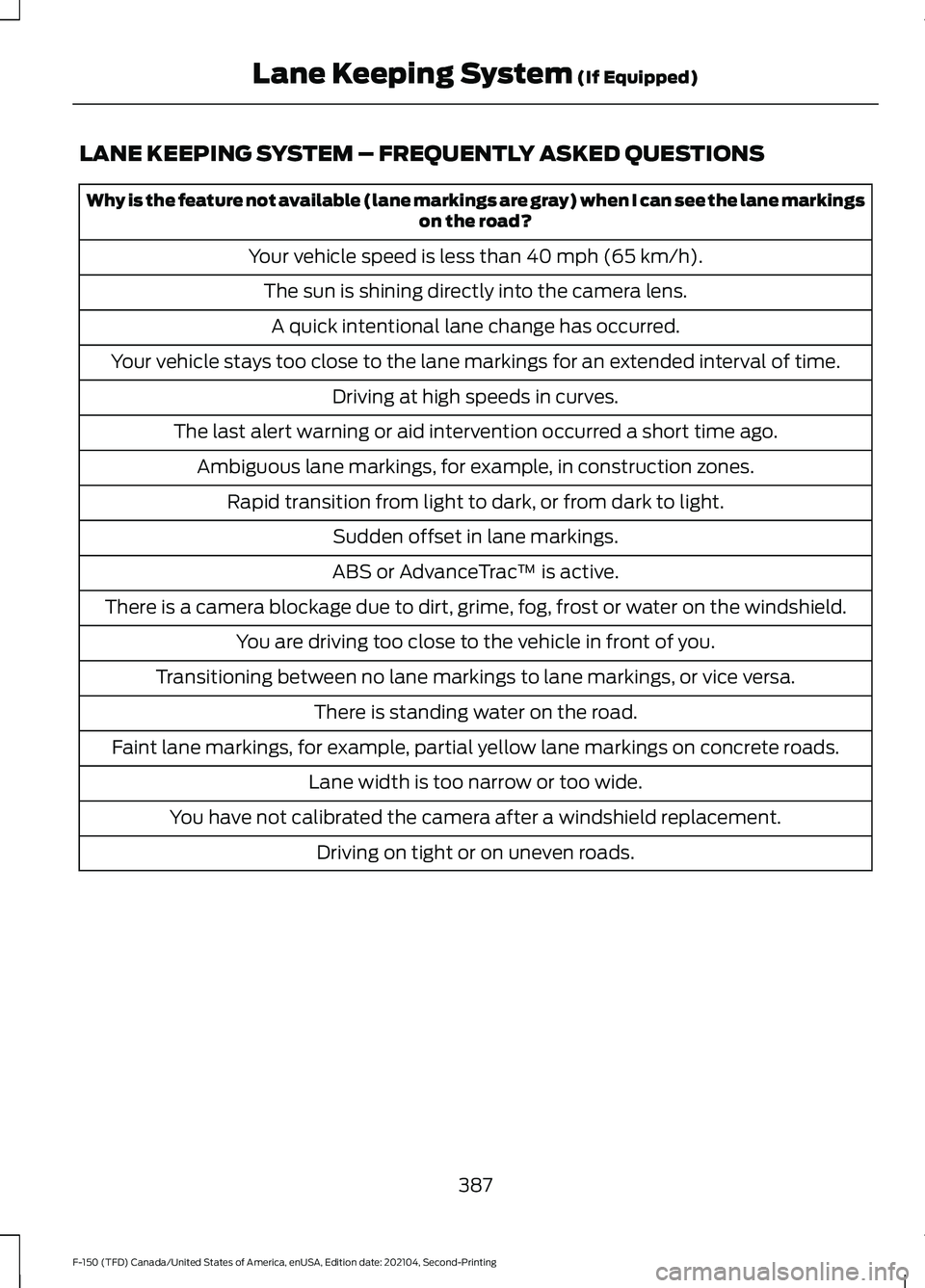
LANE KEEPING SYSTEM – FREQUENTLY ASKED QUESTIONS
Why is the feature not available (lane markings are gray) when I can see the lane markings
on the road?
Your vehicle speed is less than 40 mph (65 km/h).
The sun is shining directly into the camera lens. A quick intentional lane change has occurred.
Your vehicle stays too close to the lane markings for an extended interval of time. Driving at high speeds in curves.
The last alert warning or aid intervention occurred a short time ago. Ambiguous lane markings, for example, in construction zones. Rapid transition from light to dark, or from dark to light. Sudden offset in lane markings.
ABS or AdvanceTrac ™ is active.
There is a camera blockage due to dirt, grime, fog, frost or water on the windshield. You are driving too close to the vehicle in front of you.
Transitioning between no lane markings to lane markings, or vice versa. There is standing water on the road.
Faint lane markings, for example, partial yellow lane markings on concrete roads. Lane width is too narrow or too wide.
You have not calibrated the camera after a windshield replacement. Driving on tight or on uneven roads.
387
F-150 (TFD) Canada/United States of America, enUSA, Edition date: 202104, Second-Printing Lane Keeping System
(If Equipped)
Page 492 of 796
RECOVERY TOWING
ACCESSING THE FRONT TOWING
POINT
WARNING: Using recovery hooks
is dangerous and should only be done by
a person familiar with proper vehicle
recovery safety practices. Improper use
of recovery hooks may cause hook failure
or separation from the vehicle and could
result in serious injury or death. WARNING:
Slowly remove the
slack from the recovery strap prior to
pulling. Failure to do so can introduce
significantly higher loads which can
cause the recovery hooks to break off, or
the recovery strap to fail which can cause
serious injury or death. WARNING:
Never link two straps
together with a clevis pin. These heavy
metal objects could become projectiles
if the strap breaks and can cause serious
injury or death. WARNING:
Switch the ignition off
before removing the recovery hook.
Failure to do so could result in personal
injury. WARNING: The recovery hook can
become hot. Let the recovery hook cool
down before removing it. Failure to do
so could result in personal injury.
Your vehicle has frame-mounted front
recovery hooks.
Note: Do not apply a load to the recovery
hooks that is greater than the gross vehicle
weight rating of your vehicle. Before using recovery hooks:
•
Make sure all attaching points are
secure and capable of withstanding
the applied load.
• Do not use chains, cables or tow straps
with metal hook ends.
• Only use recovery straps that have a
minimum breaking strength two to
three times the gross vehicle weight of
the stuck vehicle.
• Make sure the recovery strap is in good
condition and free of visible cuts, tears
or damage.
• Use a damper device such as a tarp,
heavy blanket or piece of carpet, and
place it over the recovery strap to help
absorb the energy in the event the
strap breaks.
• Make sure the stuck vehicle is not
loaded heavier than its gross vehicle
weight rating specified on the
certification label.
• Align the tow vehicle and stuck vehicle
in a straight line, within 10 degrees.
• Keep bystanders to the sides of the
vehicle, at a distance of at least twice
the length of the recovery strap. This
helps avoid injury from the hazard of a
recovery hook or strap breaking, or a
vehicle lurching into their path.
488
F-150 (TFD) Canada/United States of America, enUSA, Edition date: 202104, Second-Printing Crash and Breakdown Information
Page 515 of 796
3. Add engine oil that meets our
specifications. See Capacities and
Specifications (page 574).
4. Reinstall the engine oil filler cap. Turn it clockwise until you feel a strong
resistance.
Note: Do not add oil further than the
maximum mark. Oil levels above the
maximum mark may cause engine damage.
Note: Immediately soak up any oil spillage
with an absorbent cloth.
RESETTING THE ENGINE OIL
CHANGE REMINDER - VEHICLES
WITH: 4.2 INCH SCREEN
1. Press the Menu button on the steering
wheel to enter the information display
main menu.
2. Select
Truck Info.
3. Select
Oil Life.
4. Select
Reset Oil Life.
5. Press and hold the OK button until the
system reset confirmation appears.
RESETTING THE ENGINE OIL
CHANGE REMINDER - VEHICLES
WITH: 8 INCH SCREEN/12.3 INCH
SCREEN
Depending on your cluster, there are two
paths to reset the engine oil change
reminder.
Path 1
1. Press the Menu button on the steering
wheel to enter the information display
main menu.
2. Select
Settings.
3. Select
Vehicle Maintenance.
4. Select
Oil Life.
5. Press and hold the OK button until the
system reset confirmation appears. Path 2
1.
Press the Menu button on the steering
wheel to enter the information display
main menu.
2. Select
Truck Info.
3. Select
Engine Information.
4. Press and hold the OK button until the
system reset confirmation appears.
ENGINE OIL CAPACITY AND
SPECIFICATION
For filling information, please refer to the
Capacities and Specifications section of
your owner's manual. See
Engine Oil
Capacity and Specification (page 511).
CHECKING THE COOLANT
When the engine is cold, check the
concentration and level of the coolant at
the intervals listed in the scheduled
maintenance information. See Scheduled
Maintenance
(page 664).
Note: Make sure that the coolant level is
between the minimum and maximum marks
on the coolant reservoir.
Note: Coolant expands when it is hot. The
level may extend beyond the
MAX mark.
If the coolant level is at or below the
minimum mark, add prediluted coolant
immediately.
Maintain coolant concentration within
48% to 50%, which equates to a freeze
point between
-29°F (-34°C) and -35°F
(-37°C). Coolant concentration should be
checked using a refractometer. We do not
recommend the use of hydrometers or
coolant test strips for measuring coolant
concentration.
511
F-150 (TFD) Canada/United States of America, enUSA, Edition date: 202104, Second-Printing Maintenance