brake fluid reservoir FORD F-150 2021 Owners Manual
[x] Cancel search | Manufacturer: FORD, Model Year: 2021, Model line: F-150, Model: FORD F-150 2021Pages: 796, PDF Size: 13.89 MB
Page 13 of 796

Automatic Transmission
Automatic Transmission Precautions
........................................................................\
.281
Automatic Transmission Positions .......
281
Shifting Your Vehicle Into Gear ..............
282
Shifting Your Vehicle Into Gear - Raptor ........................................................................\
282
Shifting Your Vehicle Into Gear - Police Responder .................................................
283
Manually Shifting Gears ...........................
283
Temporary Neutral Mode ........................
285
Using Progressive Range Selection ......
286
Automatic Return to Park (P) ...............
286
Stowing the Selector Lever - Vehicles With: Console Shift ................................
287
Stowing the Selector Lever - Raptor ........................................................................\
287
Manual Park Release ................................
288
Four-Wheel Drive
How Does Four-Wheel Drive Work - Raptor ..........................................................
291
How Does Four-Wheel Drive Work .......
291
Four-Wheel Drive Precautions ..............
292
Four-Wheel Drive Limitations ................
292
Selecting a Four-Wheel Drive Mode - Raptor .........................................................
293
Selecting a Four-Wheel Drive Mode ....
294
Four-Wheel Drive Modes .........................
295
Four-Wheel Drive Indicators ..................
296
Four-Wheel Drive – Troubleshooting ........................................................................\
297
Electronic Locking Differential
What Is the Electronic Locking Differential .................................................
301
How Does the Electronic Locking Differential Work - Raptor ...................
301
How Does the Electronic Locking Differential Work .....................................
301Electronic Locking Differential
Precautions ...............................................
301
Switching the Electronic Locking Differential On and Off - Raptor .......
302
Switching the Electronic Locking Differential On and Off - 4x4 .............
303
Switching the Electronic Locking Differential On and Off - 4x2 .............
305
Electronic Locking Differential Indicators .......................................................................
306
Electronic Locking Differential – Troubleshooting .....................................
306
Brakes
Brake Precautions ......................................
308
Anti-Lock Braking System ......................
308
Brake Over Accelerator - Raptor ..........
308
Brake Over Accelerator ............................
308
Locating the Brake Fluid Reservoir ......
308
Checking the Brake Fluid .........................
309
Brake Fluid Specification ........................
309
Brakes – Troubleshooting ........................
310
Electric Parking Brake
What Is the Electric Parking Brake .........
311
Applying the Electric Parking Brake .......
311
Applying the Electric Parking Brake in an Emergency ..................................................
311
Manually Releasing the Electric Parking Brake ..............................................................
311
Automatically Releasing the Electric Parking Brake .............................................
311
Electric Parking Brake Audible Warning ........................................................................\
.
312
Releasing the Electric Parking Brake if the Vehicle Battery Has Run Out of
Charge ..........................................................
312
Electric Parking Brake – Troubleshooting ........................................................................\
.
312
Reverse Braking Assist
What Is Reverse Braking Assist ..............
314
9
F-150 (TFD) Canada/United States of America, enUSA, Edition date: 202104, Second-Printing Table of Contents
Page 312 of 796
BRAKE PRECAUTIONS
WARNING: Driving your vehicle
with the warning lamp on is dangerous.
A significant decrease in braking
performance may occur. It may take you
longer to stop your vehicle. Have your
vehicle checked as soon as possible.
Driving extended distances with the
parking brake engaged can cause brake
failure and the risk of personal injury.
Wet brakes result in reduced braking
efficiency. Gently press the brake pedal a
few times when leaving a car wash or
driving from standing water to dry the
brakes.
Note: Depending on applicable laws and
regulations in the country for which your
vehicle was originally built, the stoplamps
could flash during heavy braking. Following
this the hazard warning flashers could also
turn on when your vehicle comes to a stop.
ANTI-LOCK BRAKING SYSTEM
ANTI-LOCK BRAKING SYSTEM
LIMITATIONS
The anti-lock braking system does not
eliminate the risk of crash when:
• You drive too closely to the vehicle in
front of you.
• Your vehicle is hydroplaning.
• You take corners too fast.
• The road surface is poor.
Note: If the system activates, the brake
pedal could pulse and travel further.
Maintain pressure on the brake pedal. BRAKE OVER ACCELERATOR
- RAPTOR
In the event the accelerator pedal
becomes stuck or entrapped, apply steady
and firm pressure to the brake pedal to
slow the vehicle and reduce engine power.
If you experience this condition, apply the
brakes and bring your vehicle to a safe
stop. Move the transmission to park (P),
switch the engine off and apply the parking
brake. Inspect the accelerator pedal for
any interference. If none are found and the
condition persists, have your vehicle towed
to the nearest authorized dealer.
Note:
Certain drive modes can disable
brake over accelerator for off-road driving.
BRAKE OVER ACCELERATOR
In the event the accelerator pedal
becomes stuck or entrapped, apply steady
and firm pressure to the brake pedal to
slow the vehicle and reduce engine power.
If you experience this condition, apply the
brakes and bring your vehicle to a safe
stop. Move the transmission to park (P),
switch the engine off and apply the parking
brake. Inspect the accelerator pedal for
any interference. If none are found and the
condition persists, have your vehicle towed
to the nearest authorized dealer.
LOCATING THE BRAKE FLUID
RESERVOIR
See
Under Hood Overview (page 504).
308
F-150 (TFD) Canada/United States of America, enUSA, Edition date: 202104, Second-Printing Brakes
Page 313 of 796
CHECKING THE BRAKE FLUID
WARNING: Do not use any fluid
other than the recommended brake fluid
as this will reduce brake efficiency. Use
of incorrect fluid could result in the loss
of vehicle control, serious personal injury
or death. WARNING:
Only use brake fluid
from a sealed container. Contamination
with dirt, water, petroleum products or
other materials may result in brake
system damage or failure. Failure to
adhere to this warning could result in the
loss of vehicle control, serious personal
injury or death. WARNING:
Do not allow the fluid
to touch your skin or eyes. If this
happens, rinse the affected areas
immediately with plenty of water and
contact your physician. WARNING:
The brake system
could be affected if the brake fluid level
is below the MIN mark or above the MAX
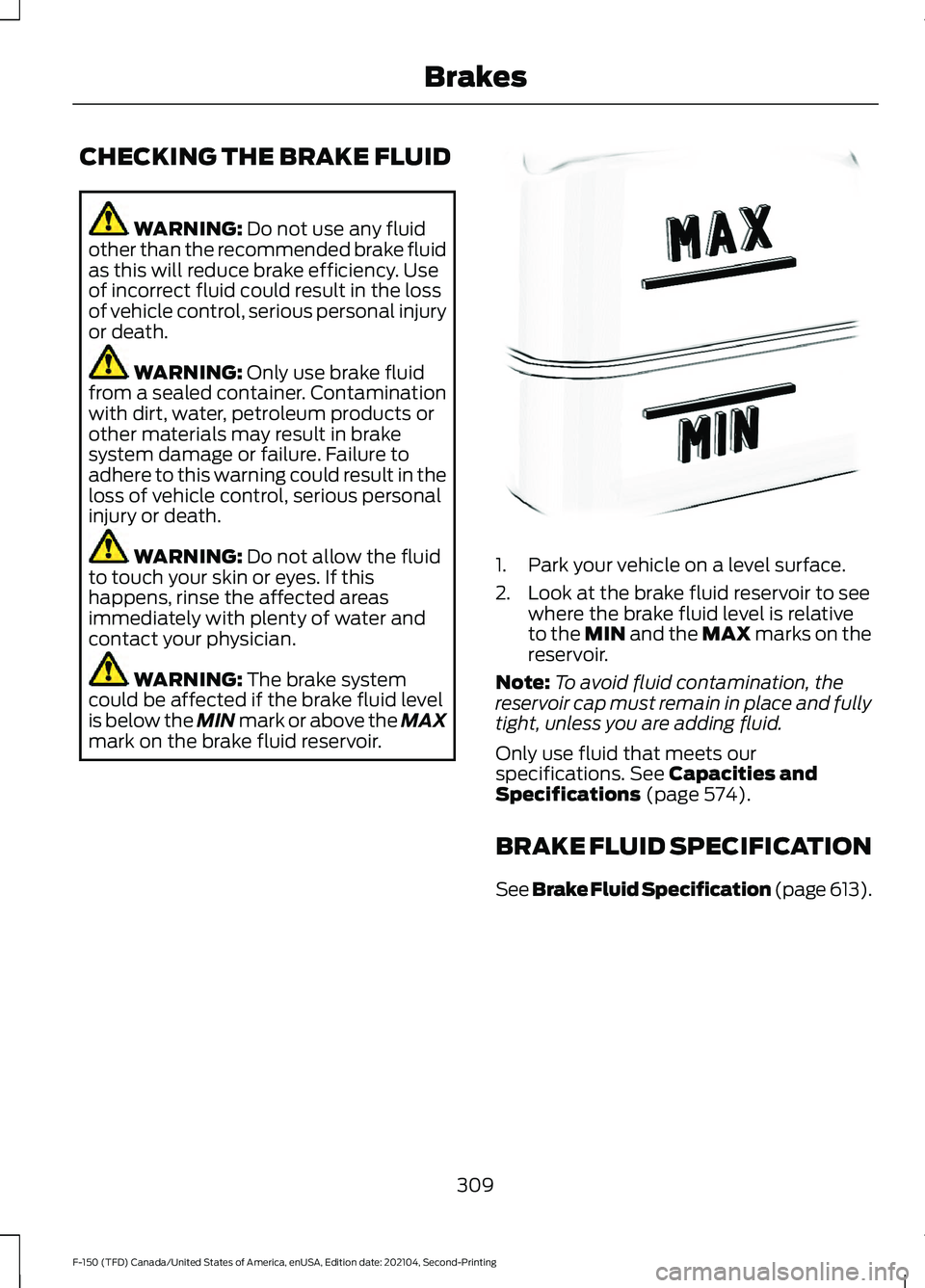
mark on the brake fluid reservoir. 1. Park your vehicle on a level surface.
2. Look at the brake fluid reservoir to see
where the brake fluid level is relative
to the MIN and the MAX marks on the
reservoir.
Note: To avoid fluid contamination, the
reservoir cap must remain in place and fully
tight, unless you are adding fluid.
Only use fluid that meets our
specifications.
See Capacities and
Specifications (page 574).
BRAKE FLUID SPECIFICATION
See Brake Fluid Specification
(page 613).
309
F-150 (TFD) Canada/United States of America, enUSA, Edition date: 202104, Second-Printing BrakesE170684
Page 509 of 796
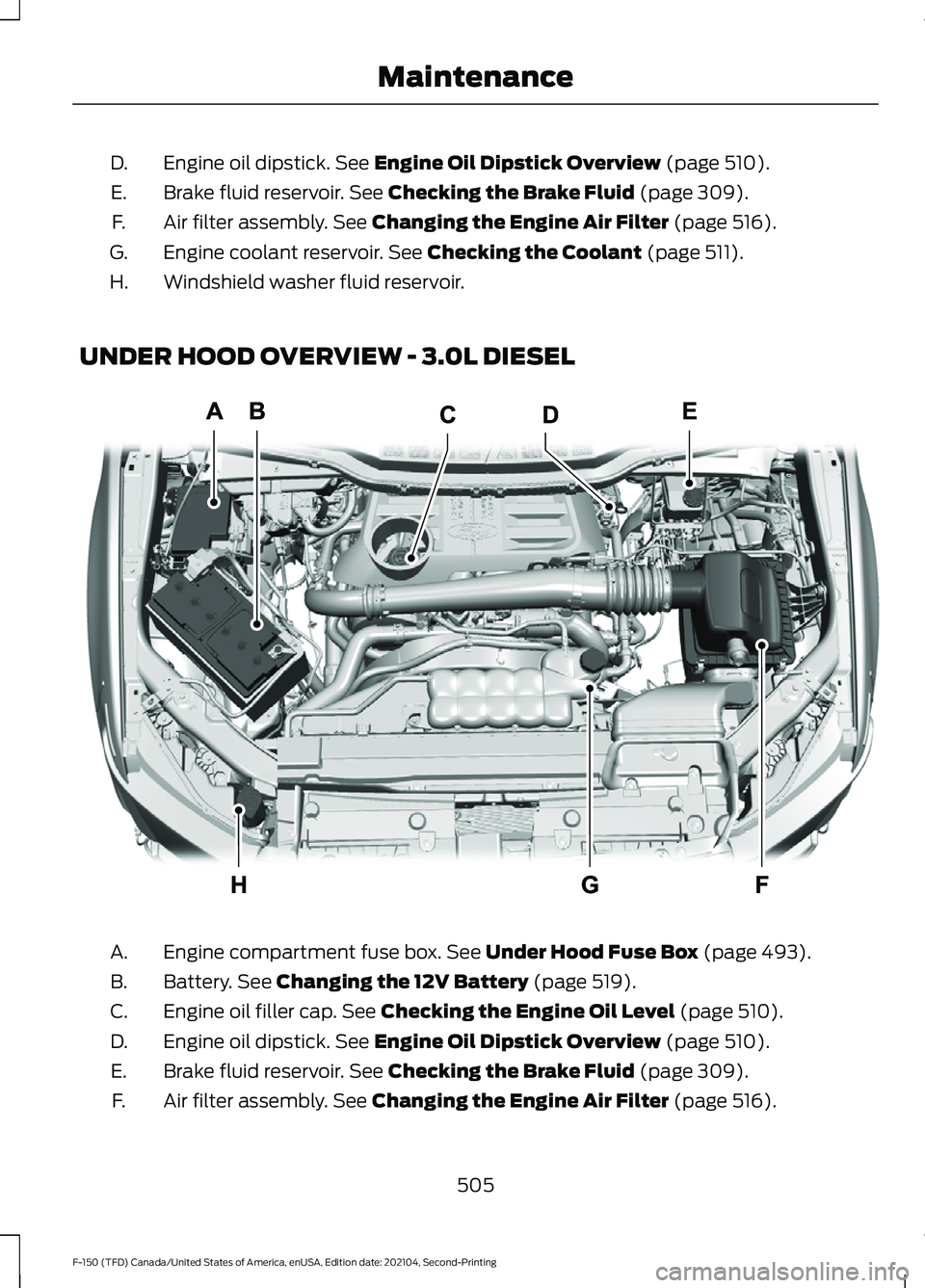
Engine oil dipstick. See Engine Oil Dipstick Overview (page 510).
D.
Brake fluid reservoir.
See Checking the Brake Fluid (page 309).
E.
Air filter assembly.
See Changing the Engine Air Filter (page 516).
F.
Engine coolant reservoir.
See Checking the Coolant (page 511).
G.
Windshield washer fluid reservoir.
H.
UNDER HOOD OVERVIEW - 3.0L DIESEL Engine compartment fuse box.
See Under Hood Fuse Box (page 493).
A.
Battery.
See Changing the 12V Battery (page 519).
B.
Engine oil filler cap.
See Checking the Engine Oil Level (page 510).
C.
Engine oil dipstick.
See Engine Oil Dipstick Overview (page 510).
D.
Brake fluid reservoir.
See Checking the Brake Fluid (page 309).
E.
Air filter assembly.
See Changing the Engine Air Filter (page 516).
F.
505
F-150 (TFD) Canada/United States of America, enUSA, Edition date: 202104, Second-Printing MaintenanceE337515
Page 510 of 796
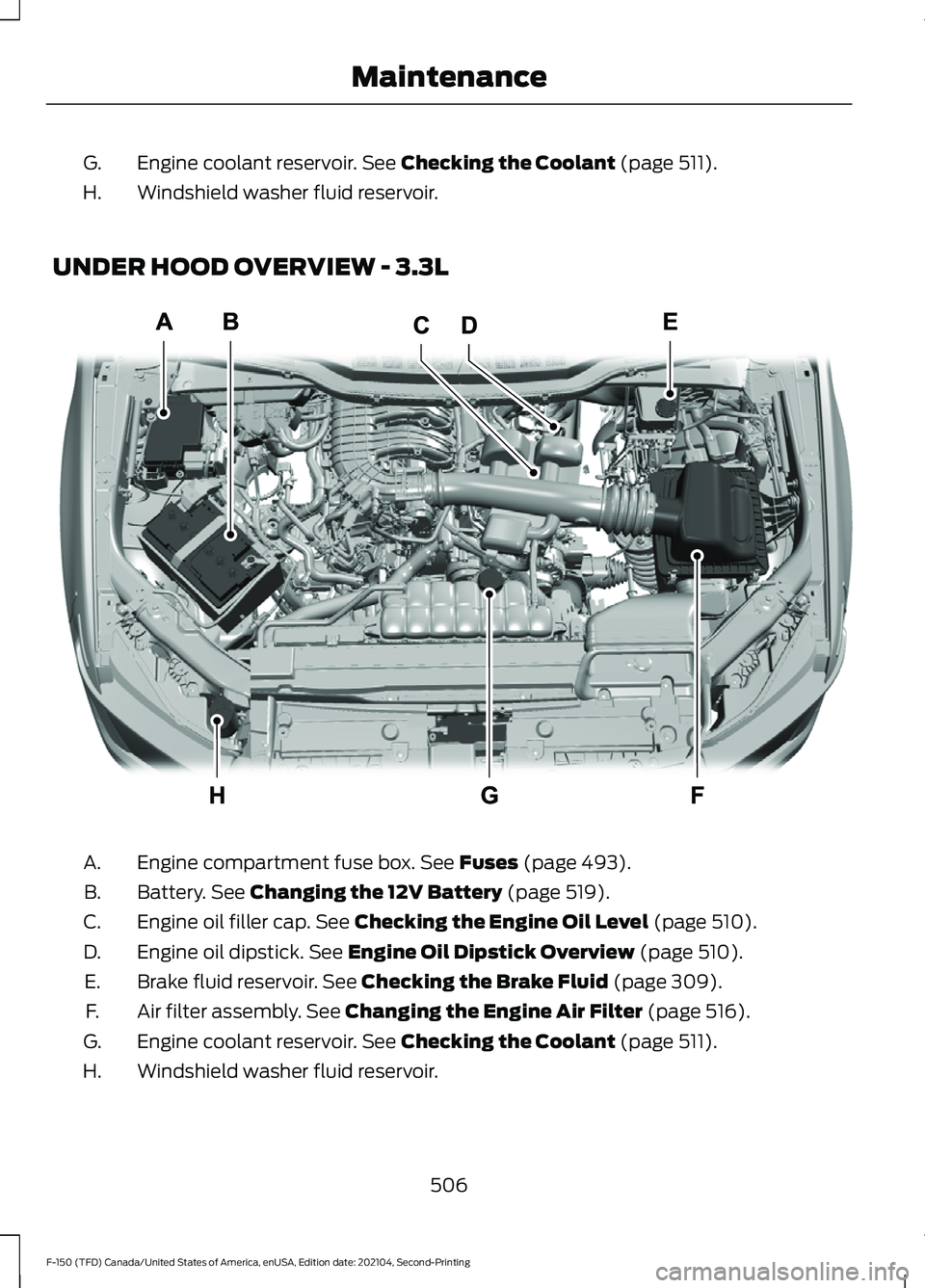
Engine coolant reservoir. See Checking the Coolant (page 511).
G.
Windshield washer fluid reservoir.
H.
UNDER HOOD OVERVIEW - 3.3L Engine compartment fuse box.
See Fuses (page 493).
A.
Battery.
See Changing the 12V Battery (page 519).
B.
Engine oil filler cap.
See Checking the Engine Oil Level (page 510).
C.
Engine oil dipstick.
See Engine Oil Dipstick Overview (page 510).
D.
Brake fluid reservoir.
See Checking the Brake Fluid (page 309).
E.
Air filter assembly.
See Changing the Engine Air Filter (page 516).
F.
Engine coolant reservoir.
See Checking the Coolant (page 511).
G.
Windshield washer fluid reservoir.
H.
506
F-150 (TFD) Canada/United States of America, enUSA, Edition date: 202104, Second-Printing MaintenanceE337514
Page 511 of 796
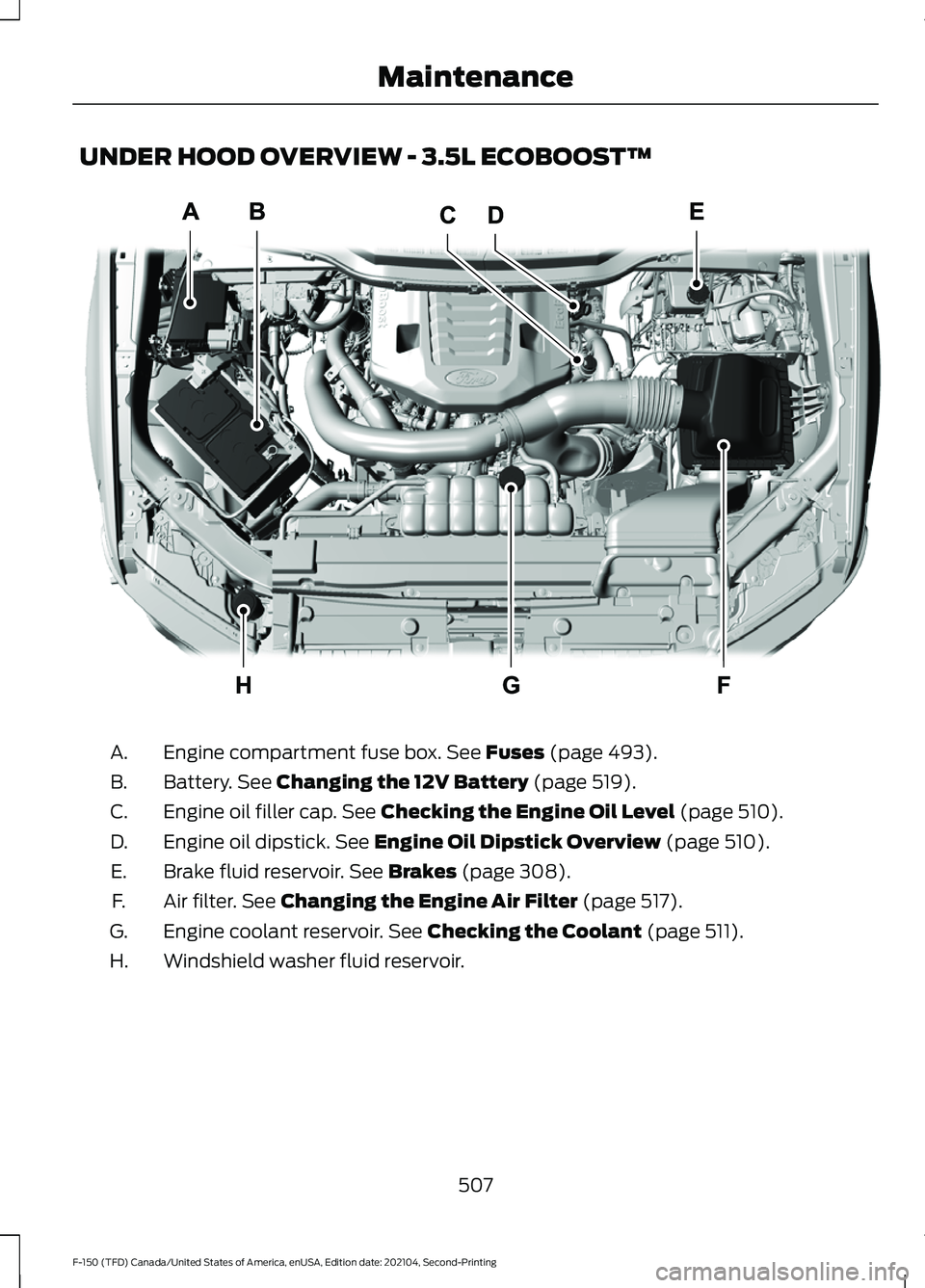
UNDER HOOD OVERVIEW - 3.5L ECOBOOST™
Engine compartment fuse box. See Fuses (page 493).
A.
Battery.
See Changing the 12V Battery (page 519).
B.
Engine oil filler cap.
See Checking the Engine Oil Level (page 510).
C.
Engine oil dipstick.
See Engine Oil Dipstick Overview (page 510).
D.
Brake fluid reservoir.
See Brakes (page 308).
E.
Air filter.
See Changing the Engine Air Filter (page 517).
F.
Engine coolant reservoir.
See Checking the Coolant (page 511).
G.
Windshield washer fluid reservoir.
H.
507
F-150 (TFD) Canada/United States of America, enUSA, Edition date: 202104, Second-Printing MaintenanceE313722
Page 512 of 796
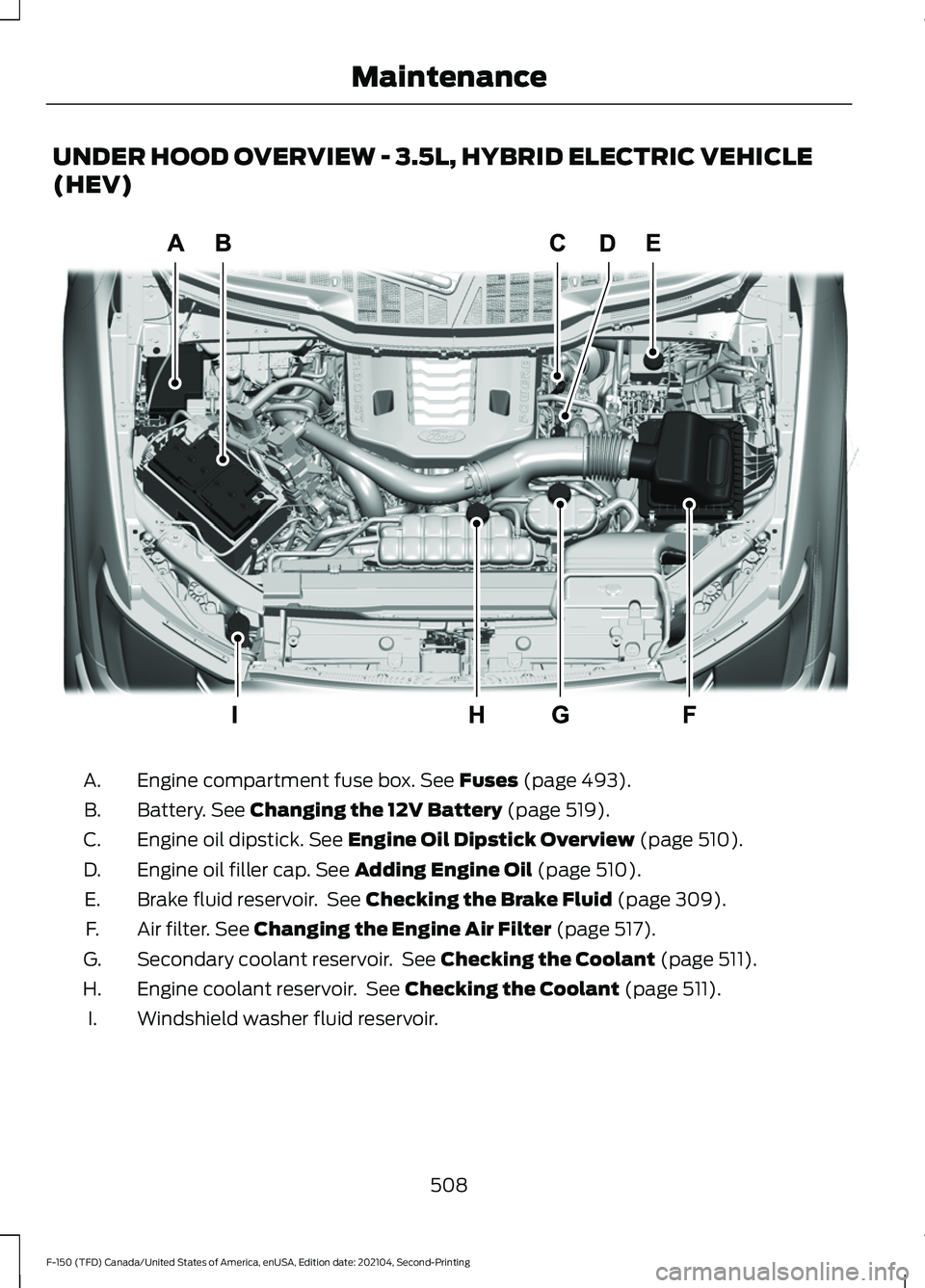
UNDER HOOD OVERVIEW - 3.5L, HYBRID ELECTRIC VEHICLE
(HEV)
Engine compartment fuse box. See Fuses (page 493).
A.
Battery.
See Changing the 12V Battery (page 519).
B.
Engine oil dipstick.
See Engine Oil Dipstick Overview (page 510).
C.
Engine oil filler cap.
See Adding Engine Oil (page 510).
D.
Brake fluid reservoir. See
Checking the Brake Fluid (page 309).
E.
Air filter.
See Changing the Engine Air Filter (page 517).
F.
Secondary coolant reservoir. See
Checking the Coolant (page 511).
G.
Engine coolant reservoir. See
Checking the Coolant (page 511).
H.
Windshield washer fluid reservoir.
I.
508
F-150 (TFD) Canada/United States of America, enUSA, Edition date: 202104, Second-Printing MaintenanceE333718
Page 513 of 796
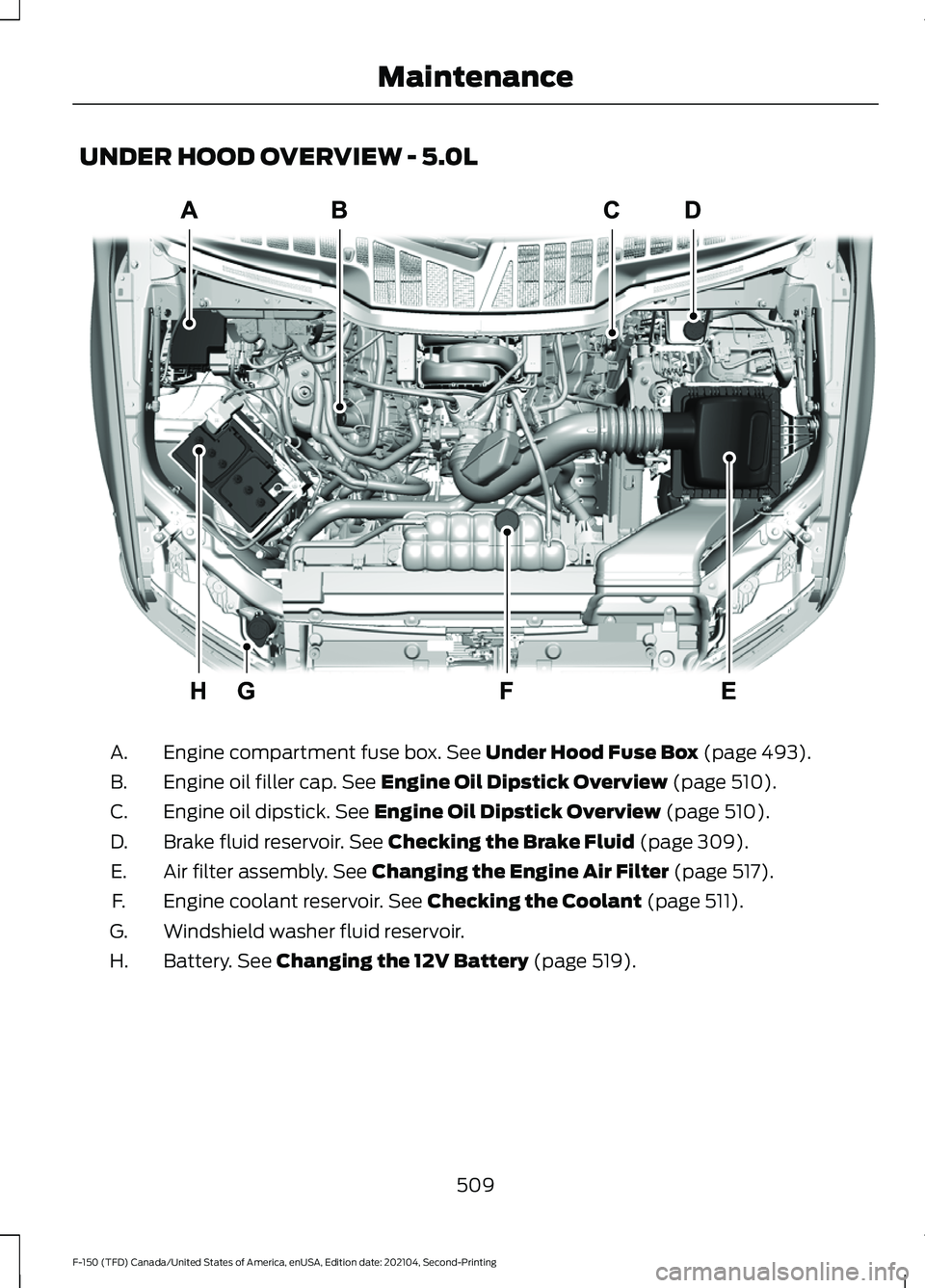
UNDER HOOD OVERVIEW - 5.0L
Engine compartment fuse box. See Under Hood Fuse Box (page 493).
A.
Engine oil filler cap.
See Engine Oil Dipstick Overview (page 510).
B.
Engine oil dipstick.
See Engine Oil Dipstick Overview (page 510).
C.
Brake fluid reservoir.
See Checking the Brake Fluid (page 309).
D.
Air filter assembly.
See Changing the Engine Air Filter (page 517).
E.
Engine coolant reservoir.
See Checking the Coolant (page 511).
F.
Windshield washer fluid reservoir.
G.
Battery.
See Changing the 12V Battery (page 519).
H.
509
F-150 (TFD) Canada/United States of America, enUSA, Edition date: 202104, Second-Printing MaintenanceE346494
Page 671 of 796
Multi-Point Inspection
Windshield for cracks, chips or pits
For oil and fluid leaks
Washer spray and wiper operation
Half-shaft dust boots
1 Brake, coolant recovery reservoir, automatic transmission and window washer.
2 If your vehicle has a temporary mobility kit, check the tire sealant expiration Use By date
on the canister. Replace as needed.
Be sure to ask your dealership service
advisor or technician about the multi-point
vehicle inspection. It is a comprehensive
way to perform a thorough inspection of
your vehicle. Your checklist gives you
immediate feedback on the overall
condition of your vehicle.
NORMAL SCHEDULED
MAINTENANCE
Oil Change Reminder
Your vehicle comes with an oil change
reminder that determines when you should
change the engine oil based on how you
use your vehicle. Your vehicle lets you know when an oil
change is due by displaying a message in
the information display.
The following table provides examples of
vehicle use and its impact on oil change
intervals. It is a guideline only. Actual oil
change intervals depend on several factors
and generally decrease with severity of
use.When to Expect the OIL CHANGE REQUIRED Message
Vehicle Use and Example
Interval 1
Normal
7,500– 10,000 mi
(12,000– 16,000 km) Normal commuting with highway driving.
No, or moderate, load or towing.
Flat to moderately hilly roads.
No extended idling.
Severe
5,000– 7,500 mi
(8,000– 12,000 km) Moderate to heavy load or towing.
Mountainous or off-road conditions.
Extended idling.
Extended hot or cold operation.
667
F-150 (TFD) Canada/United States of America, enUSA, Edition date: 202104, Second-Printing Scheduled Maintenance
Page 784 of 796
Lane Centering Alerts......................................
360
Lane Centering Automatic Cancellation................................................... 360
Lane Centering Indicators............................... 361
Lane Centering Limitations........................... 360
Lane Centering Precautions..........................359
Lane Centering Requirements......................359
Switching Lane Centering On and Off...................................................................... 360
Lane Keeping System Indicators...........385
Lane Keeping System................................382 Aid Mode.............................................................. 384
Alert and Aid Mode........................................... 384
Alert Mode............................................................ 383
Lane Keeping System – Troubleshooting............................................ 386
Lane Keeping System Limitations........382
Lane Keeping System Precautions.......382
Lane Keeping System – Troubleshooting.......................................386
Lane Keeping System – Frequently Asked Questions......................................................... 387
Lane Keeping System – Information Messages......................................................... 386
Launching or Retrieving a Boat or Personal Watercraft................................430
Linking or Unlinking a Personal Profile to a Remote Control.....................................652
Live Traffic......................................................653 Switching Live Traffic On and Off...............653
What Is Live Traffic........................................... 653
Load Carrying.................................................412
Load Carrying Precautions........................412
Loading Your Trailer....................................429
Locating the 360 Degree Cameras.......342
Locating the 360 Degree Cameras - Raptor/Tremor...........................................343
Locating the Auxiliary Switches............659
Locating the Auxiliary Switch Wiring............................................................659
Locating the Blind Spot Information System Sensors
........................................390
Locating the Brake Fluid Reservoir.......308
Locating the Cross Traffic Alert Sensors........................................................394
Locating the Fuel Filler Funnel...............260
Locating the Keyless Entry Keypad........110 Locating the Memory Function
Buttons........................................................209
Locating the Power Outlets
......................218
Locating the Pre-Collision Assist Sensors........................................................399
Locating the Pre-Collision Assist Sensors - Police Responder
..................................399
Locating the Rear View Camera............339
Locating the Safety Compliance Certification Labels...................................413
Locating the Tire label...............................542
Locating the USB Ports..............................214
Locating the USB Ports - Raptor
............214
Locating the Wireless Accessory Charger..........................................................231
Locating Your Vehicle....................................91
Locking and Unlocking the Tailgate........113
Locking the Rear Window Controls
.......163
M
Maintenance.................................................503 Engine Air Filter.................................................... 515
Engine Oil.............................................................. 510
Exterior Bulbs...................................................... 522
Interior Bulbs........................................................ 531
Maintenance Precautions........................503
Making and Receiving a Phone Call.................................................................645
Manually Dimming the Interior Mirror..............................................................164
Manually Releasing the Electric Parking Brake................................................................311
Manually Shifting Gears............................283 Shifting Using the Buttons on the Selector
Lever.................................................................. 284
Shifting Using the Paddle Shifters..............283
Manual Park Release.................................288 Manual Park Release Precautions..............288
Using Manual Park Release........................... 288
What Is Manual Park Release.......................288
Manual Seats
.................................................196
Adjusting the Head Restraint......................... 196
Adjusting the Lumbar Support..................... 198
Adjusting the Seat Backrest........................... 197
Folding the Seats.............................................. 204
Head Restraint Components......................... 196
Installing the Head Restraint.......................... 197
780
F-150 (TFD) Canada/United States of America, enUSA, Edition date: 202104, Second-Printing Index