radio FORD F-150 2021 Owners Manual
[x] Cancel search | Manufacturer: FORD, Model Year: 2021, Model line: F-150, Model: FORD F-150 2021Pages: 796, PDF Size: 13.89 MB
Page 10 of 796

Switching Air Conditioning On and Off
........................................................................\
..191
Switching Defrost On and Off .................
191
Switching Maximum Defrost On and Off ........................................................................\
..
191
Switching Maximum Cooling On and Off ........................................................................\
..
191
Switching the Heated Rear Window On and Off ........................................................
192
Setting the Blower Motor Speed ...........
192
Switching the Heated Mirrors On and Off ........................................................................\
.
192
Setting the Temperature ..........................
192
Directing the Flow of Air ............................
192
Climate Control Hints ................................
193
Interior Air Quality
What Is the Cabin Air Filter ......................
194
Replacing the Cabin Air Filter .................
194
Front Seats
Front Seat Precautions .............................
195
Sitting in the Correct Position .................
195
Manual Seats ................................................
196
Power Seats ..................................................
198
Massage Seats .............................................
201
Heated Seats ................................................
202
Ventilated Seats .........................................
203
Rear Seats
Manual Seats ...............................................
204
Heated Seats ...............................................
205
Rear Occupant Alert System
What is the Rear Occupant Alert System ........................................................................\
207
How Does the Rear Occupant Alert System Work ............................................
207
Rear Occupant Alert System Precautions ........................................................................\
207 Rear Occupant Alert System Limitations
........................................................................\
207
Switching Rear Occupant Alert System On and Off ................................................
207
Rear Occupant Alert System Indicators .......................................................................
208
Rear Occupant Alert System Audible Warnings ...................................................
208
Memory Function
What Is the Memory Function ...............
209
Memory Function Precautions ..............
209
Locating the Memory Function Buttons .......................................................................
209
Saving a Preset Position ..........................
209
Recalling a Preset Position .....................
209
Garage Door Opener
What Is the Garage Door Opener ..........
210
How Does the Garage Door Opener Work ........................................................................\
.
210
Garage Door Opener Precautions .........
210
Garage Door Opener Limitations ..........
210
Programming the Garage Door Opener to Your Hand-Held Transmitter ...........
211
Programming the Garage Door Opener to Your Garage Door Opener Motor
........................................................................\
..
211
Programming the Garage Door Opener to Your Gate Opener Motor ..................
212
Clearing the Garage Door Opener .........
212
Reprogramming the Garage Door Opener ........................................................................\
.
213
Garage Door Opener Radio Frequencies ........................................................................\
.
213
USB Ports
Locating the USB Ports .............................
214
Locating the USB Ports - Raptor ...........
214
Playing Media Using the USB Port ........
214
Charging a Device ........................................
215
6
F-150 (TFD) Canada/United States of America, enUSA, Edition date: 202104, Second-Printing Table of Contents
Page 21 of 796
Cooling System Capacity and
Specification - 5.0L ................................601
Cooling System Capacity and Specification - 3.5L Ecoboost™,
Raptor, Police Responder ...................
602
Fuel Tank Capacity - Gasoline, Excluding: Hybrid Electric Vehicle (HEV) ...........
603
Fuel Tank Capacity - Diesel ...................
604
Fuel Tank Capacity - Gasoline, Hybrid Electric Vehicle (HEV) .........................
605
Fuel Tank Capacity - Raptor ..................
606
Air Conditioning System Capacity and Specification - 2.7L EcoBoost™ .......
607
Air Conditioning System Capacity and Specification - 3.0L Diesel .................
608
Air Conditioning System Capacity and Specification - 3.3L ...............................
609
Air Conditioning System Capacity and Specification - 3.5L Ecoboost™ .......
610
Air Conditioning System Capacity and Specification - 3.5L, Hybrid Electric
Vehicle (HEV) ............................................
611
Air Conditioning System Capacity and Specification - 5.0L ................................
612
Washer Fluid Specification ......................
612
Diesel Exhaust Fluid Capacity and Specification .............................................
613
Brake Fluid Specification ..........................
613
Transfer Case Fluid Capacity and Specification - 4x4 .................................
614
Transfer Case Fluid Capacity and Specification - Raptor ...........................
615
Front Axle Fluid Capacity and Specification - 4x4 .................................
616
Rear Axle Fluid Capacity and Specification .............................................
616
Rear Axle Fluid Capacity and Specification - Raptor ............................
617
Rear Axle Fluid Capacity and Specification - Police Responder ......
618
Vehicle Identification
Vehicle Identification Number ...............
619Connected Vehicle
What Is a Connected Vehicle
................
620
Connected Vehicle Requirements .......
620
Connected Vehicle Limitations .............
620
Connecting the Vehicle to a Mobile Network .....................................................
620
Connecting the Vehicle to a Wi-Fi Network .....................................................
620
Connected Vehicle – Troubleshooting ........................................................................\
.
621
Vehicle Wi-Fi Hotspot
Creating a Vehicle Wi-Fi Hotspot .........
624
Changing the Vehicle Wi-Fi Hotspot Name or Password ................................
624
Audio System
Audio System Precautions .....................
626
Identifying the Audio Unit .......................
626
Switching the Audio Unit On and Off ........................................................................\
626
Selecting the Audio Source ....................
626
Playing or Pausing the Audio Source ........................................................................\
626
Adjusting the Volume ................................
627
Switching Shuffle Mode On and Off ........................................................................\
627
Switching Repeat Mode On and Off ........................................................................\
627
Setting a Memory Preset .........................
627
Muting the Audio .........................................
627
Adjusting the Sound Settings ................
627
Setting the Clock and Date ....................
628
AM/FM Radio ...............................................
628
Switching the Display On and Off .......
629
Digital Radio .................................................
629
Satellite Radio .............................................
630
Audio System – Troubleshooting .........
633
Center Display Overview
Center Display Precautions .....................
637
17
F-150 (TFD) Canada/United States of America, enUSA, Edition date: 202104, Second-Printing Table of Contents
Page 23 of 796
Scheduled Maintenance
General Maintenance Information
......664
Normal Scheduled Maintenance .........
667
Special Operating Conditions Scheduled Maintenance - Diesel ............................
670
Special Operating Conditions Scheduled Maintenance - Gasoline .......................
675
Special Operating Conditions Scheduled Maintenance - Raptor ..........................
678
Decommissioning the Vehicle - Police Responder
Decommissioning Requirements .........
682
Customer Information
Rollover Warning ........................................
683
The Better Business Bureau Auto Line Program .....................................................
683
The Mediation and Arbitration Program .......................................................................
684
Ordering a Canadian French Owner's Manual .......................................................
684
Reporting Safety Defects in the United States .........................................................
685
Reporting Safety Defects in Canada .......................................................................
685
Type Approvals ...........................................
686
Radio Frequency Certification Labels ........................................................................\
705
Perchlorate ....................................................
734
Replacement Parts Recommendation ........................................................................\
734
Mobile Communications Equipment ........................................................................\
735
End User License Agreement .................
735
Emission Law ...............................................
760
Export Unique Options ..............................
761
Appendices
Electromagnetic Compatibility .............
763
19
F-150 (TFD) Canada/United States of America, enUSA, Edition date: 202104, Second-Printing Table of Contents
Page 35 of 796
Note:
Event data recorder data is recorded
by your vehicle only if a non-trivial crash
situation occurs; no data is recorded by the
event data recorder under normal driving
conditions and no personal data or
information (for example name, gender,
age, and crash location) is recorded.
However, parties, such as law enforcement,
could combine the event data recorder data
with the type of personally identifying data
routinely acquired during a crash
investigation.
To read data recorded by an event data
recorder, special equipment is required,
and access to the vehicle or the event data
recorder is needed. In addition to the
vehicle manufacturer, other parties, such
as law enforcement, that have such special
equipment, can read the information if they
have access to the vehicle or the event
data recorder.
BlueCruise Data (If Equipped)
If BlueCruise is active in certain crash or
near crash-like situations, such as an
airbag deployment or hitting a road
obstacle, the system may record driver
attentiveness, based on the direction of
eyes and duration, and photographs of the
driver seat area.
Note: No data is recorded under normal
driving conditions.
SETTINGS DATA
Your vehicle has electronic control units
that have the ability to store data based
on your personalized settings. The data is
stored locally in the vehicle or on devices
that you connect to it, for example, a USB
drive or digital music player. You can delete
some of this data and also choose whether
to share it through the services to which
you subscribe. See
Enabling and
Disabling the Modem (page 620). Comfort and Convenience Data
Data recorded includes, for example:
•
Seat and steering wheel position.
• Climate control settings.
• Radio presets.
Entertainment Data
Data recorded includes, for example:
• Music, videos or album art.
• Contacts and corresponding address
book entries.
• Navigation destinations.
CONNECTED VEHICLE DATA The modem has a SIM. The
modem was enabled when your
vehicle was built and periodically
sends messages to stay connected to the
cell phone network, receive automatic
software updates and send vehicle-related
information to us, for example diagnostic
information. These messages could
include information that identifies your
vehicle, the SIM and the electronic serial
number of the modem. Cell phone network
service providers could have access to
additional information, for example cell
phone network tower identification. For
additional information about our privacy
policy, visit
www .For dC onne c t e d . c om or
refer to your local Ford website.
Note: The modem continues to send this
information unless you disable the modem
or stop the modem from sharing vehicle
data by changing the modem settings.
See
Connected Vehicle (page 620).
Note: The service can be unavailable or
interrupted for a number of reasons, for
example environmental or topographical
conditions and data plan coverage.
Note: To find out if your vehicle has a
modem, visit
www .For dC onne c t e d . c om .
31
F-150 (TFD) Canada/United States of America, enUSA, Edition date: 202104, Second-Printing Data Privacy
Page 38 of 796
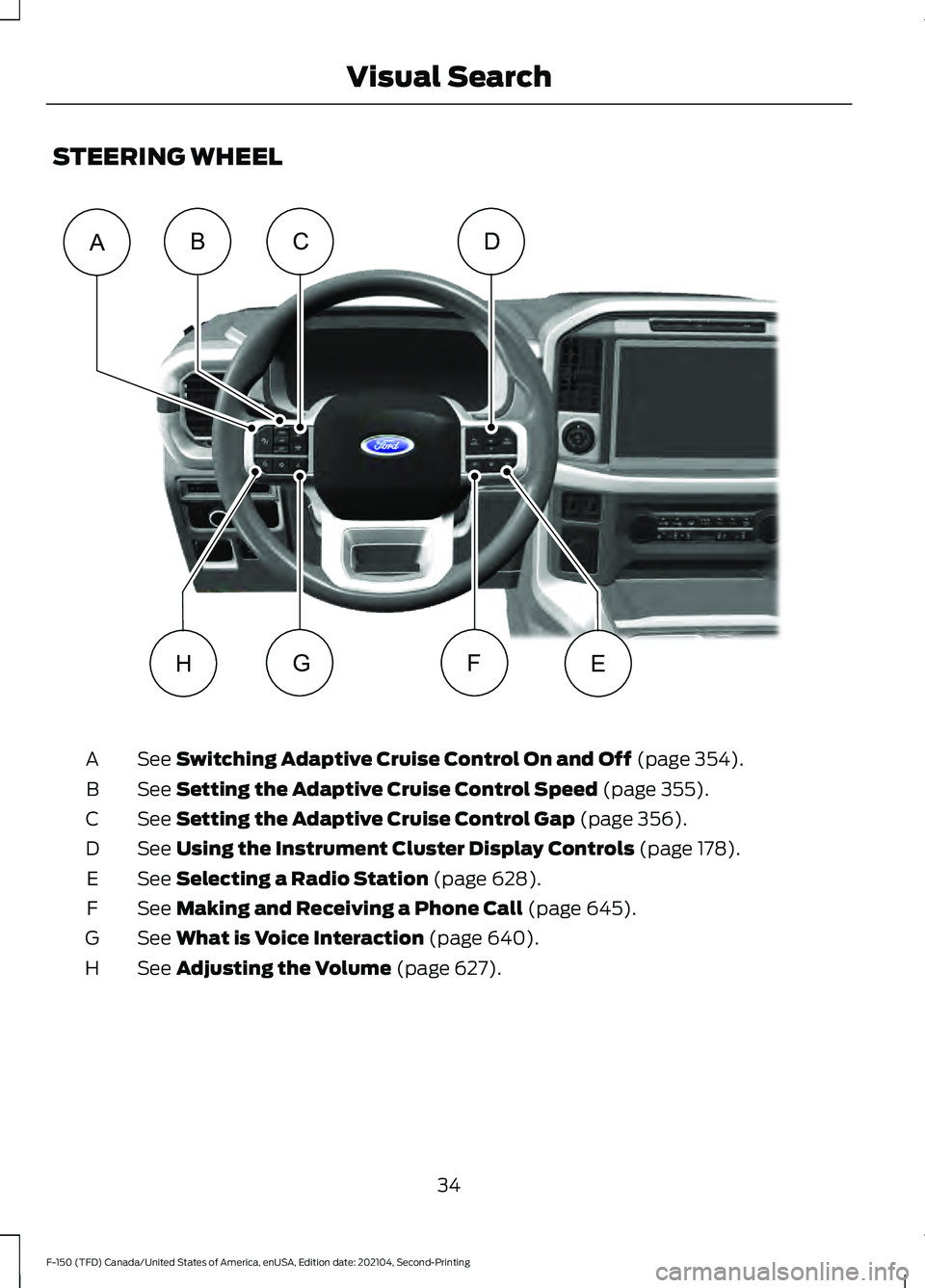
STEERING WHEEL
See Switching Adaptive Cruise Control On and Off (page 354).
A
See
Setting the Adaptive Cruise Control Speed (page 355).
B
See
Setting the Adaptive Cruise Control Gap (page 356).
C
See
Using the Instrument Cluster Display Controls (page 178).
D
See
Selecting a Radio Station (page 628).
E
See
Making and Receiving a Phone Call (page 645).
F
See
What is Voice Interaction (page 640).
G
See
Adjusting the Volume (page 627).
H
34
F-150 (TFD) Canada/United States of America, enUSA, Edition date: 202104, Second-Printing Visual SearchCD
EHFG
ABE356893
Page 39 of 796
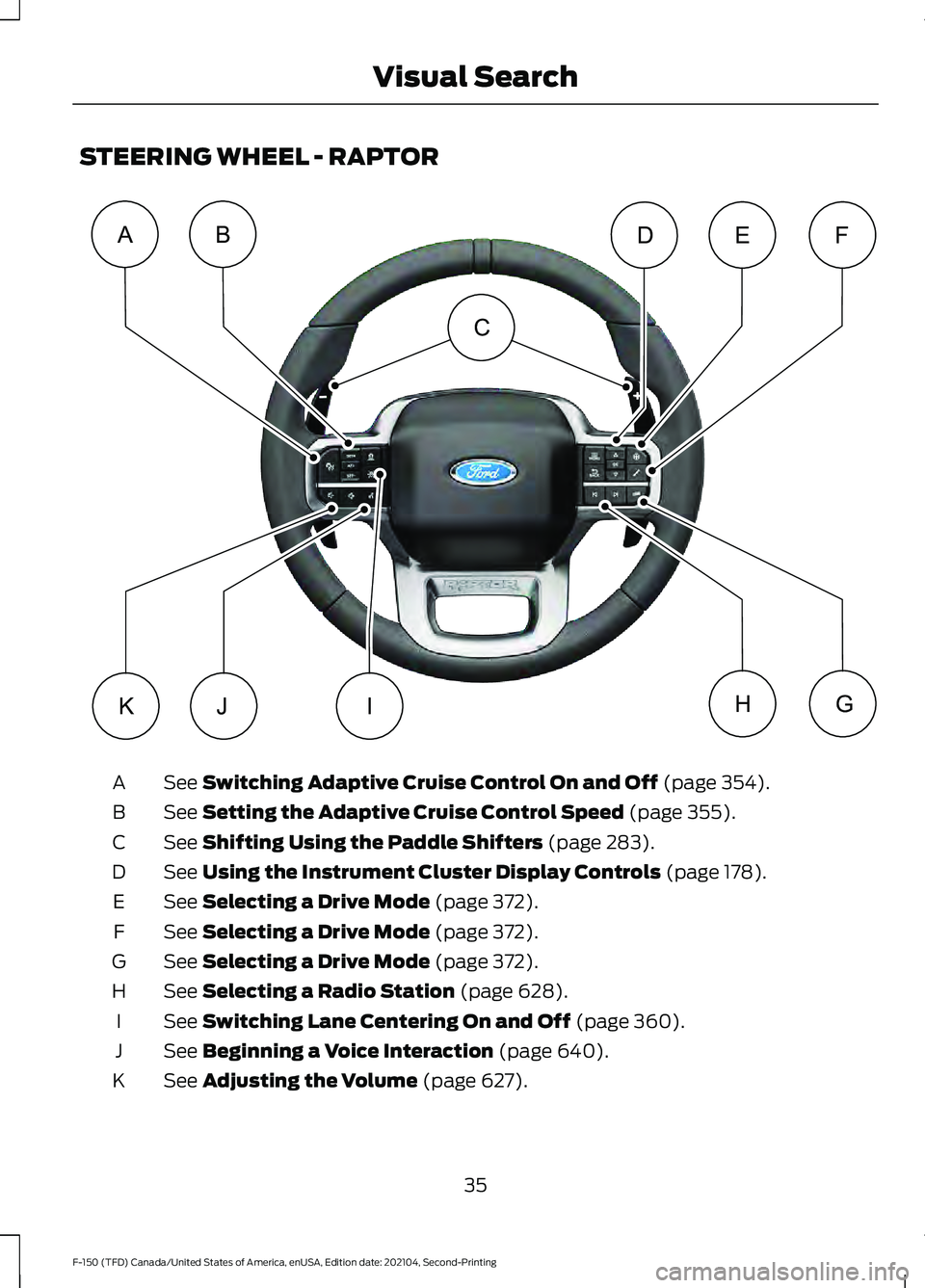
STEERING WHEEL - RAPTOR
See Switching Adaptive Cruise Control On and Off (page 354).
A
See
Setting the Adaptive Cruise Control Speed (page 355).
B
See
Shifting Using the Paddle Shifters (page 283).
C
See
Using the Instrument Cluster Display Controls (page 178).
D
See
Selecting a Drive Mode (page 372).
E
See
Selecting a Drive Mode (page 372).
F
See
Selecting a Drive Mode (page 372).
G
See
Selecting a Radio Station (page 628).
H
See
Switching Lane Centering On and Off (page 360).
I
See
Beginning a Voice Interaction (page 640).
J
See
Adjusting the Volume (page 627).
K
35
F-150 (TFD) Canada/United States of America, enUSA, Edition date: 202104, Second-Printing Visual SearchABFED
KJGHI
C E343517
Page 40 of 796
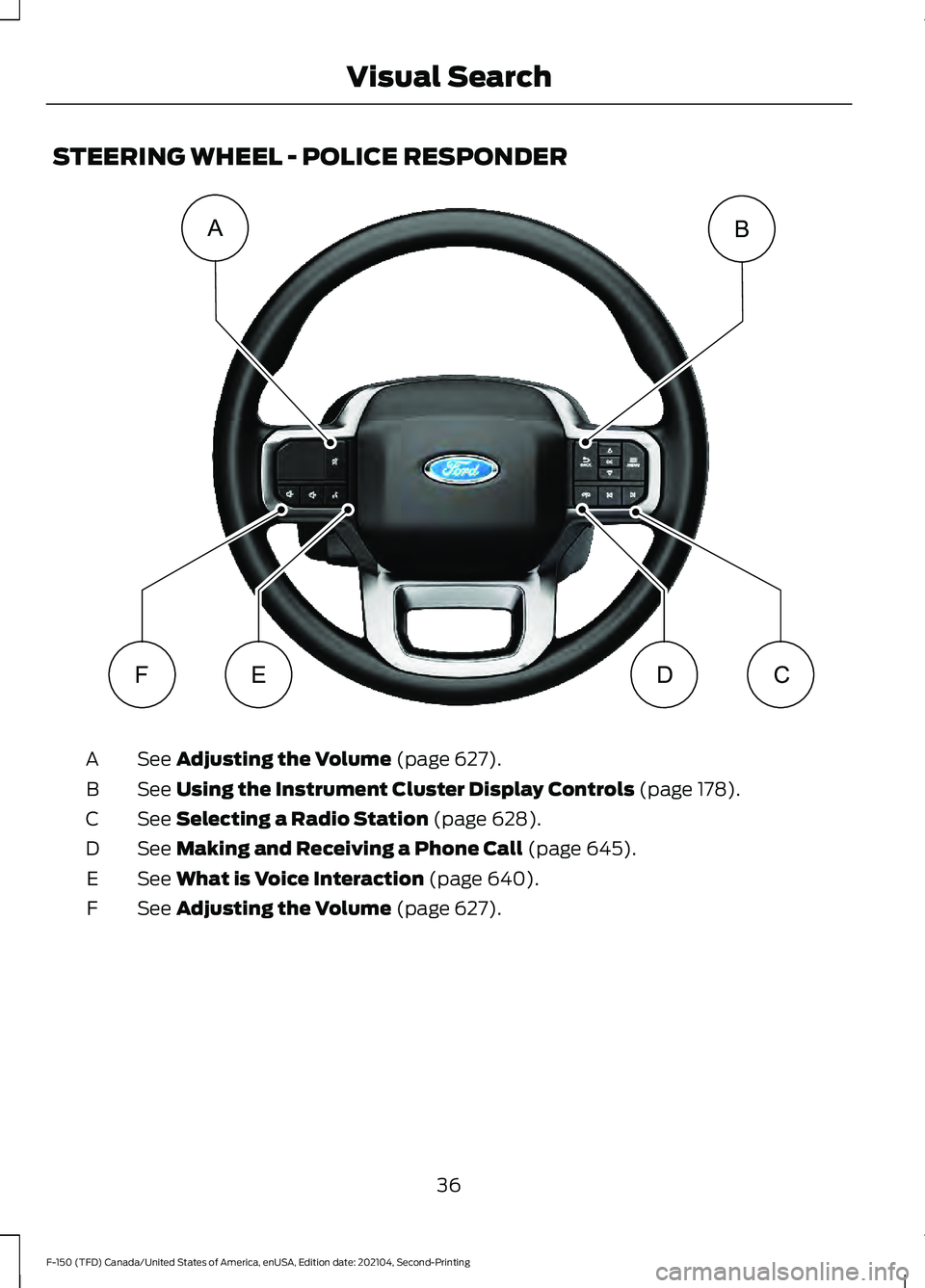
STEERING WHEEL - POLICE RESPONDER
See Adjusting the Volume (page 627).
A
See
Using the Instrument Cluster Display Controls (page 178).
B
See
Selecting a Radio Station (page 628).
C
See
Making and Receiving a Phone Call (page 645).
D
See
What is Voice Interaction (page 640).
E
See
Adjusting the Volume (page 627).
F
36
F-150 (TFD) Canada/United States of America, enUSA, Edition date: 202104, Second-Printing Visual SearchAB
FEDCE343530
Page 93 of 796
REMOTE CONTROL
LIMITATIONS
WARNING: Changes or
modifications not expressively approved
by the party responsible for compliance
could void the user's authority to operate
the equipment. The term "IC:" before the
radio certification number only signifies
that Industry Canada technical
specifications were met.
This device complies with Part 15 of the
FCC Rules and with Industry Canada
license-exempt RSS standard(s).
Operation is subject to the following two
conditions: (1) This device may not cause
harmful interference, and (2) This device
must accept any interference received,
including interference that may cause
undesired operation.
Make sure a valid remote control is within
5 ft (1.5 m)
from the front door handles
and rear of vehicle.
The system may not function if:
• The remote control remains stationary
for about a minute.
• The vehicle battery has no charge.
• The remote control battery has no
charge.
• There is interference causing issues
with the remote control frequencies.
• The remote control is too close to
metal objects or electronic devices, for
example keys or a cell phone. USING THE REMOTE CONTROL
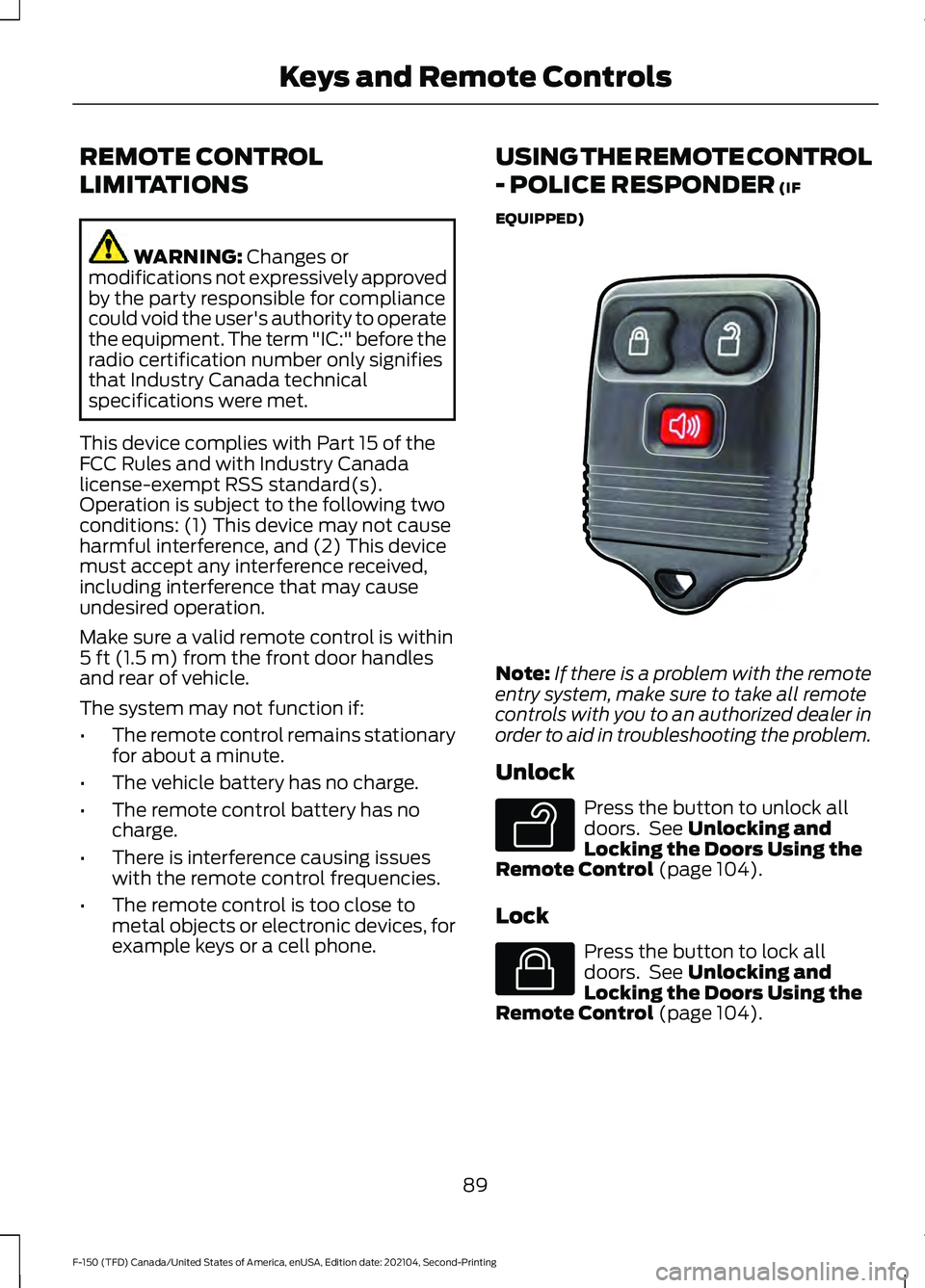
- POLICE RESPONDER
(IF
EQUIPPED) Note:
If there is a problem with the remote
entry system, make sure to take all remote
controls with you to an authorized dealer in
order to aid in troubleshooting the problem.
Unlock Press the button to unlock all
doors. See
Unlocking and
Locking the Doors Using the
Remote Control
(page 104).
Lock Press the button to lock all
doors. See
Unlocking and
Locking the Doors Using the
Remote Control
(page 104).
89
F-150 (TFD) Canada/United States of America, enUSA, Edition date: 202104, Second-Printing Keys and Remote ControlsE203600 E138629 E138623
Page 102 of 796
WHAT IS MYKEY
MyKey allows you to program keys with
restricted driving modes to promote good
driving habits.
MYKEY SETTINGS
NON-CONFIGURABLE MYKEY
SETTINGS
Seatbelt Reminder or Belt-
Minder™
MyKey mutes the audio system until the
front seat passengers buckle the front seat
belts.
Note:
If your vehicle includes an AM/FM
radio or a very basic audio system, then the
radio may not mute.
Satellite Radio (If Equipped)
Some Satellite radio channels have
restricted access to adult radio content.
Early Low Fuel
The low fuel level warning lamp turns on
earlier.
Driving and Parking Aids
You cannot configure settings for parking
aids, blind spot information system, and
cross traffic alert. These systems turn on
when the vehicle turns on, and you cannot
switch them off with a MyKey.
You cannot configure settings for
pre-collision assist and lane keeping. These
systems turn on when the vehicle turns on,
but you can switch them off with a MyKey.
A new destination in the navigation system
can only be set using voice commands
when using a MyKey, and with your vehicle
moving. Note:
MyKey drivers may be able to switch
the lane departure warning feature off, but
this feature turns back on automatically
with every new key cycle.
CONFIGURABLE MYKEY
SETTINGS
You can configure the following settings
after creating a MyKey. See
Creating a
MyKey (page 100).
Speed Limit WARNING:
Do not set MyKey
maximum speed limit to a limit that will
prevent the driver from maintaining a
safe speed considering posted speed
limits and prevailing road conditions. The
driver is always responsible to drive in
accordance with local laws and
prevailing conditions. Failure to do so
could result in accident or injury.
You can set a speed limit for your vehicle.
Warning messages appear in the
information display and a tone sounds if
your vehicle reaches the set speed. You
cannot override the set speed when using
a MyKey.
Speed Minder
You can set a speed reminder for your
vehicle. Warning messages appear in the
information display and a tone sounds if
your vehicle exceeds the set speed.
Audio System Volume Limit
The audio system maximum volume
reduces. A message appears in the
information display if you attempt to
exceed the volume limit. Automatic
volume control turns off.
98
F-150 (TFD) Canada/United States of America, enUSA, Edition date: 202104, Second-Printing MyKey
™
(If Equipped)
Page 103 of 796
Emergency Assistance
If you set emergency assistance to always
on, you cannot switch it off with a MyKey.
Do Not Disturb
If you set do not disturb to always on, you
cannot switch it off with a MyKey.
Note:
If a phone is connected using Apple
CarPlay or Android Auto while driving with
a MyKey, the driver can receive phone calls
and text messages even if the do not disturb
restriction is on, and if the vehicle comes
with satellite radio, there is no restriction on
the adult content.
Traction and Stability Control
If you set traction control or stability
control to always on, you cannot switch it
off with a MyKey.
CREATING A MYKEY -
VEHICLES WITH: PUSH
BUTTON START
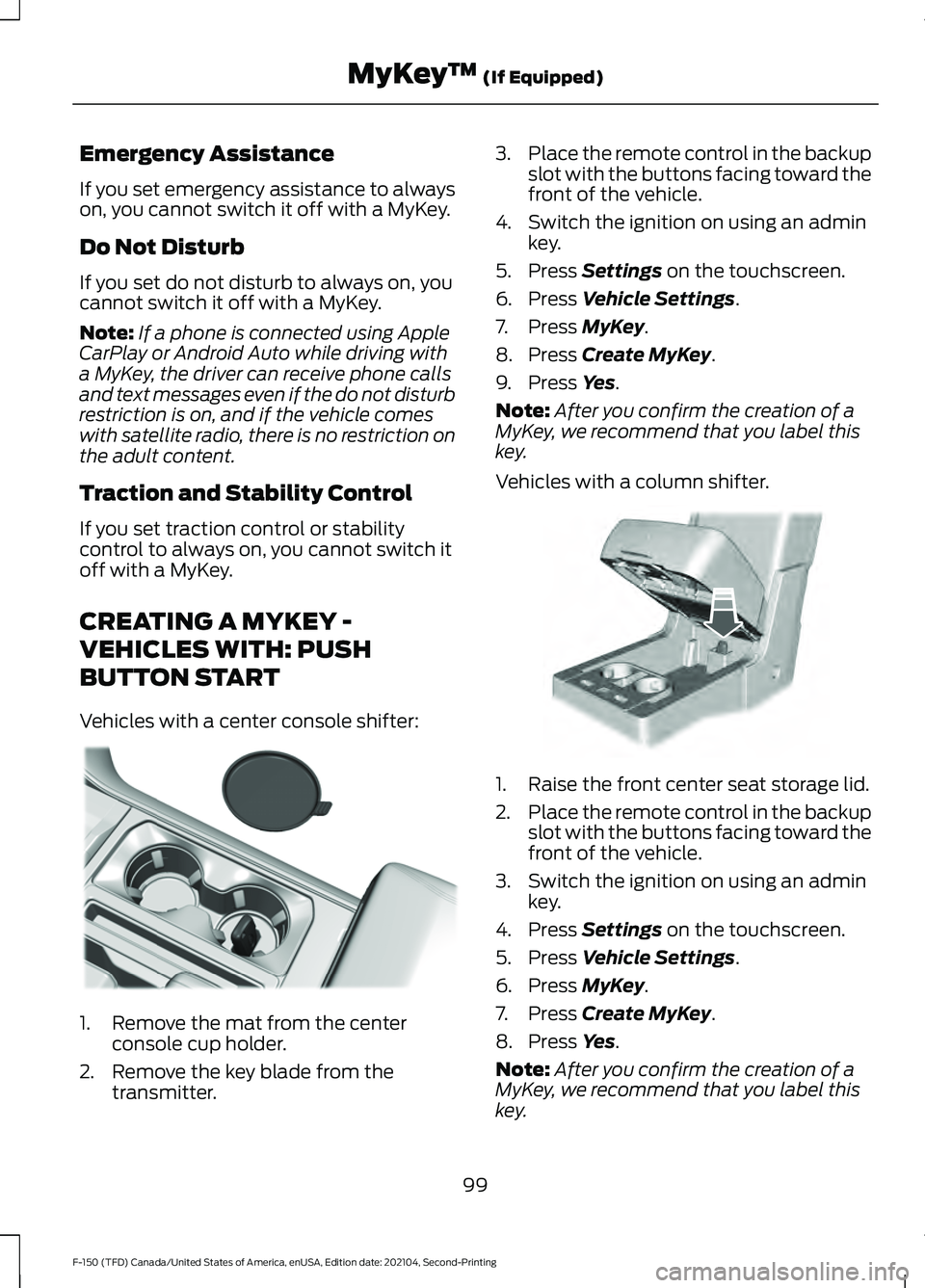
Vehicles with a center console shifter: 1. Remove the mat from the center
console cup holder.
2. Remove the key blade from the transmitter. 3.
Place the remote control in the backup
slot with the buttons facing toward the
front of the vehicle.
4. Switch the ignition on using an admin key.
5. Press Settings on the touchscreen.
6. Press
Vehicle Settings.
7. Press
MyKey.
8. Press
Create MyKey.
9. Press
Yes.
Note: After you confirm the creation of a
MyKey, we recommend that you label this
key.
Vehicles with a column shifter. 1. Raise the front center seat storage lid.
2.
Place the remote control in the backup
slot with the buttons facing toward the
front of the vehicle.
3. Switch the ignition on using an admin key.
4. Press
Settings on the touchscreen.
5. Press
Vehicle Settings.
6. Press
MyKey.
7. Press
Create MyKey.
8. Press
Yes.
Note: After you confirm the creation of a
MyKey, we recommend that you label this
key.
99
F-150 (TFD) Canada/United States of America, enUSA, Edition date: 202104, Second-Printing MyKey
™
(If Equipped)E312216 E269950