Mykey FORD F-150 2022 User Guide
[x] Cancel search | Manufacturer: FORD, Model Year: 2022, Model line: F-150, Model: FORD F-150 2022Pages: 750, PDF Size: 12.96 MB
Page 302 of 750
WHAT IS TRACTION CONTROL
The traction control system helps to avoid
drive wheel spin and loss of traction.
HOW DOES TRACTION
CONTROL WORK
If your wheels begin to spin, the loss of
traction can compromise steering control
and stability of the vehicle. The traction
control system applies the brakes to
individual wheels and when needed,
reduces engine power at the same time to
increase traction.
SWITCHING TRACTION
CONTROL ON AND OFF
WARNING: Operating your vehicle
with the traction control disabled could
lead to an increased risk of loss of vehicle
control, vehicle rollover, personal injury
and death. The traction control system turns on each
time you switch the ignition on.
The button for the stability and traction
control system is on the instrument panel. Press and release the button to switch
traction control off. The stability control
system remains fully active, to switch it off,
press and hold the button for a few
seconds, then release.
When you switch traction control off, a
message and an illuminated icon appear
on the instrument cluster.
Press the switch again to turn the traction
control system back on to normal
operation.
If your vehicle is stuck in mud or snow,
switching traction control off may be
beneficial as this allows the wheels to spin.
Your vehicle may have MyKey restrictions
regarding this feature. See
What Is
MyKey (page 96).
TRACTION CONTROL
INDICATOR
Stability and Traction Control
Indicator If the indicator does not
illuminate when you switch the
ignition on, or remains on when
the engine is running, this indicates a
malfunction. Have your vehicle checked
by an authorized dealer as soon as
possible. The traction control off indicator
illuminates when you switch the
traction control system off, or
when an alternative stability control mode
is selected that requires the traction
control off depending on the drive mode
selected.
298
2022 F-150 (TFD) Canada/United States of America, enUSA, Edition date: 202109, First-Printing Traction ControlE327252 E138639 E130458
Page 317 of 750
PARKING AID PRECAUTIONS
WARNING: To help avoid personal
injury, always use caution when in
reverse (R) and when using the sensing
system. WARNING:
The system may not
detect objects with surfaces that absorb
reflection. Always drive with due care
and attention. Failure to take care may
result in a crash. WARNING: Traffic control systems,
fluorescent lamps, inclement weather,
air brakes, external motors and fans may
affect the correct operation of the
sensing system. This may cause reduced
performance or false alerts. WARNING:
The system may not
detect small or moving objects,
particularly those close to the ground. WARNING:
The parking aid system
can only assist you to detect objects
when your vehicle is moving at parking
speeds. To help avoid personal injury you
must take care when using the parking
aid system. WARNING:
The system may not
function if the sensor is blocked. WARNING:
In cold and severe
weather conditions the system may not
function. Rain, snow and spray can all
limit sensor performance. WARNING:
If damage occurs in the
immediate area surrounding the sensor,
have your vehicle checked as soon as
possible. Note:
If your vehicle sustains damage
leaving the sensors misaligned, this will
cause inaccurate measurements or false
alerts.
When you connect a trailer to your vehicle,
the rear parking aid detects the trailer and
provides an alert. Disable the parking aid
when you connect a trailer to prevent the
alert.
Note: Certain add-on devices installed
around the bumper or fascia may create
false alerts, for example, large trailer
hitches, bike or surfboard racks, license plate
brackets, bumper covers or any other device
that could block the normal detection zone
of the parking aid system. Aftermarket spare
tires or spare tire covers mounted to the rear
tailgate could cause false alerts from the
park aid system. Remove the add-on device
to prevent false alerts.
Note: Keep the sensors free from snow, ice
and large accumulations of dirt. If the
sensors are covered, the system's accuracy
can be affected.
Do not clean the sensors with sharp
objects.
Note: When using a programmed MyKey,
you cannot switch the parking aids off. See
MyKey ™
(page 96).
SWITCHING PARKING AID ON
AND OFF Press the parking aid button and
use the menu to turn the system
on and off.
The system can also be turned off using
the pop-up message that appears when
you are in reverse (R).
313
2022 F-150 (TFD) Canada/United States of America, enUSA, Edition date: 202109, First-Printing Parking Aids
(If Equipped)PE326188
Page 318 of 750
REAR PARKING AID
WHAT IS THE REAR PARKING AID
Rear parking sensors detect objects behind
your vehicle when in reverse (R).
REAR PARKING AID LIMITATIONS
There is a decreased coverage area at the
outer corners.
When using a programmed MyKey, you
cannot switch the rear parking aid off.
The rear parking aid sensors are active
when your vehicle is in reverse (R) and the
vehicle speed is less than 5 mph (8 km/h).
The sensor coverage area is up to
71 in
(180 cm) from the rear bumper.
The rear parking aid detects large objects
when you shift into reverse (R) and any of
the following occur:
• Your vehicle is moving backward at a
low speed.
• Your vehicle is stationary but an object
is approaching the rear of your vehicle
at a low speed.
• Your vehicle is moving backward at a
low speed and an object is moving
towards your vehicle, for example
another vehicle at a low speed.
The system shall provide no audible
warning for the object behind the vehicle
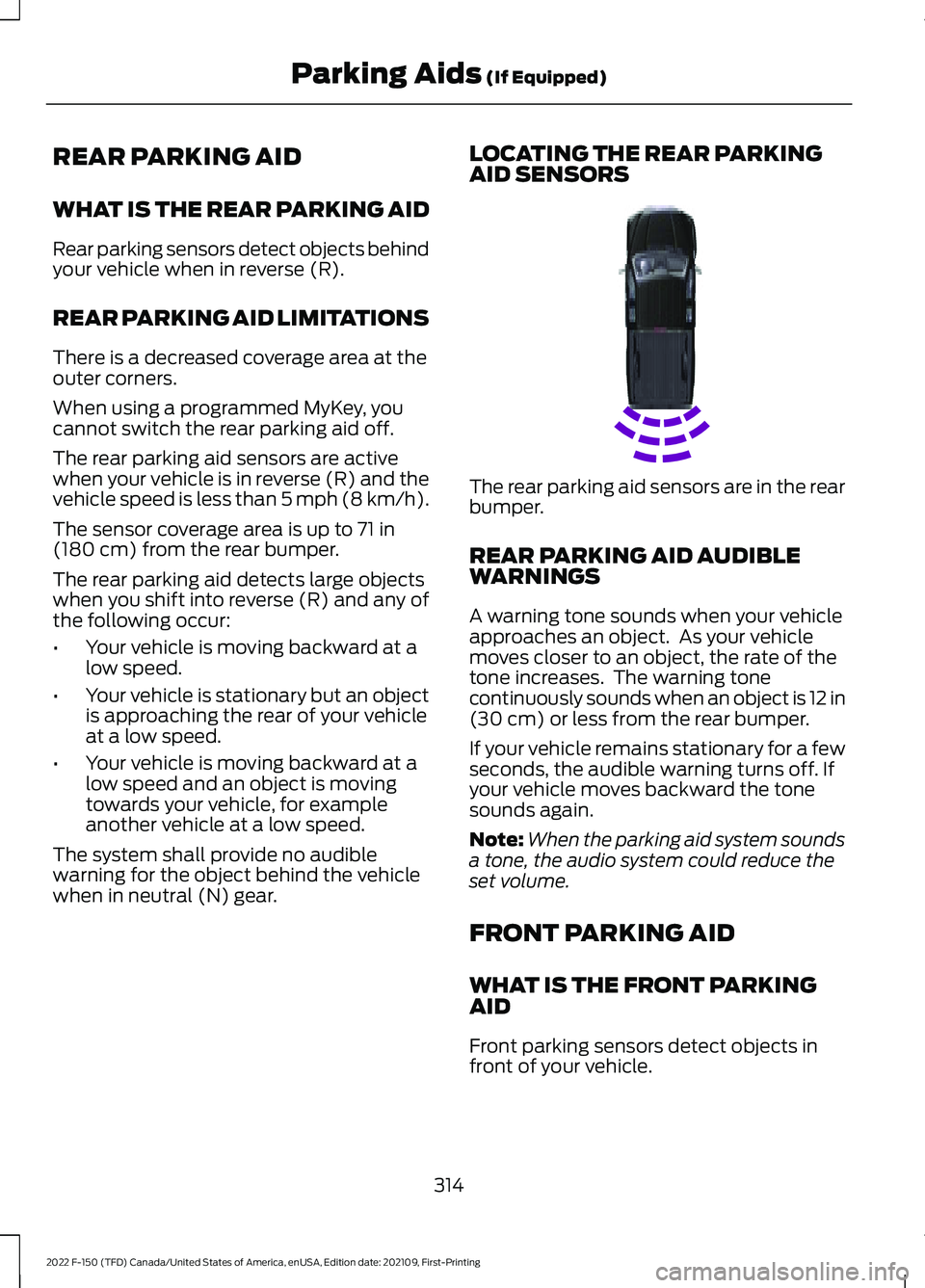
when in neutral (N) gear. LOCATING THE REAR PARKING
AID SENSORS The rear parking aid sensors are in the rear
bumper.
REAR PARKING AID AUDIBLE
WARNINGS
A warning tone sounds when your vehicle
approaches an object. As your vehicle
moves closer to an object, the rate of the
tone increases. The warning tone
continuously sounds when an object is 12 in
(30 cm)
or less from the rear bumper.
If your vehicle remains stationary for a few
seconds, the audible warning turns off. If
your vehicle moves backward the tone
sounds again.
Note: When the parking aid system sounds
a tone, the audio system could reduce the
set volume.
FRONT PARKING AID
WHAT IS THE FRONT PARKING
AID
Front parking sensors detect objects in
front of your vehicle.
314
2022 F-150 (TFD) Canada/United States of America, enUSA, Edition date: 202109, First-Printing Parking Aids
(If Equipped)E231381
Page 366 of 750
The lane keeping system may not correctly
operate in any of the following conditions:
•
The lane keeping system does not
detect at least one lane marking.
• You switch the turn signal on.
• You apply direct steering, accelerate
fast or brake hard.
• The vehicle speed is less than 40 mph
(64 km/h).
• The anti-lock brake, stability control or
traction control system activates.
• The lane is too narrow.
• Something is obscuring the camera or
it is unable to detect the lane markings
due to environment, traffic or vehicle
conditions.
• Entering or exiting a tight curve when
driving at high speeds.
The lane keeping system may not correct
lane positioning in any of the following
conditions:
• High winds.
• Uneven road surfaces.
• Heavy or uneven loads.
• Incorrect tire pressure.
SWITCHING THE LANE
KEEPING SYSTEM ON AND
OFF To activate the lane keeping
system, press the button on the
steering wheel.
To deactivate the lane keeping system,
press the button again.
Note: When switching the system on or off
a message appears in the information and
entertainment display to show the status. Note:
The system stores the on or off
setting until manually changed, unless it
detects a MyKey ™. If the system detects a
MyKey ™, it defaults to the last setting for
that MyKey ™.
Note: If the system detects a MyKey ™,
pressing the button does not affect the on
or off status of the system. You can only
change the mode and intensity settings.
SWITCHING THE LANE
KEEPING SYSTEM MODE
The lane keeping system has different
settings that you can view or adjust using
the information display.
The system stores the last known selection
for each of these settings. You do not need
to readjust your settings each time you
switch on the system.
To change the lane keeping system mode,
use the touchscreen:
1. Press
Features on the touchscreen.
2. Press
Driver Assistance.
3. Press
Lane-Keeping System.
4. Press
Lane-Keeping Mode.
5. Select a mode.
Note: The system remembers the last
setting when you start your vehicle. If the
system detects a MyKey ™, it defaults to the
last setting for that MyKey ™.
ALERT MODE
WHAT IS ALERT MODE
Alert mode vibrates the steering wheel
when it detects an unintended lane
departure.
362
2022 F-150 (TFD) Canada/United States of America, enUSA, Edition date: 202109, First-Printing Lane Keeping System
(If Equipped)E334922
Page 618 of 750
CENTER DISPLAY
PRECAUTIONS
WARNING: Driving while distracted
can result in loss of vehicle control, crash
and injury. We strongly recommend that
you use extreme caution when using any
device that may take your focus off the
road. Your primary responsibility is the
safe operation of your vehicle. We
recommend against the use of any
hand-held device while driving and
encourage the use of voice-operated
systems when possible. Make sure you
are aware of all applicable local laws
that may affect the use of electronic
devices while driving.
CENTER DISPLAY
LIMITATIONS
Speed-restricted Features
For your safety, some features are not
available while the vehicle is in motion at
or above 5 mph (8 km/h). Settings that
are not critical while driving your vehicle
are shown as restricted on your display.
Some of these settings include:
• System updates.
• Personal profiles setup.
• Valet mode setup.
• Driver assistance settings.
Vehicle Settings
• MyKey setup.
• Door keypad code setup.
• Backup start passcode setup.
These restricted features become
available when your vehicle is no longer in
motion. STATUS BAR
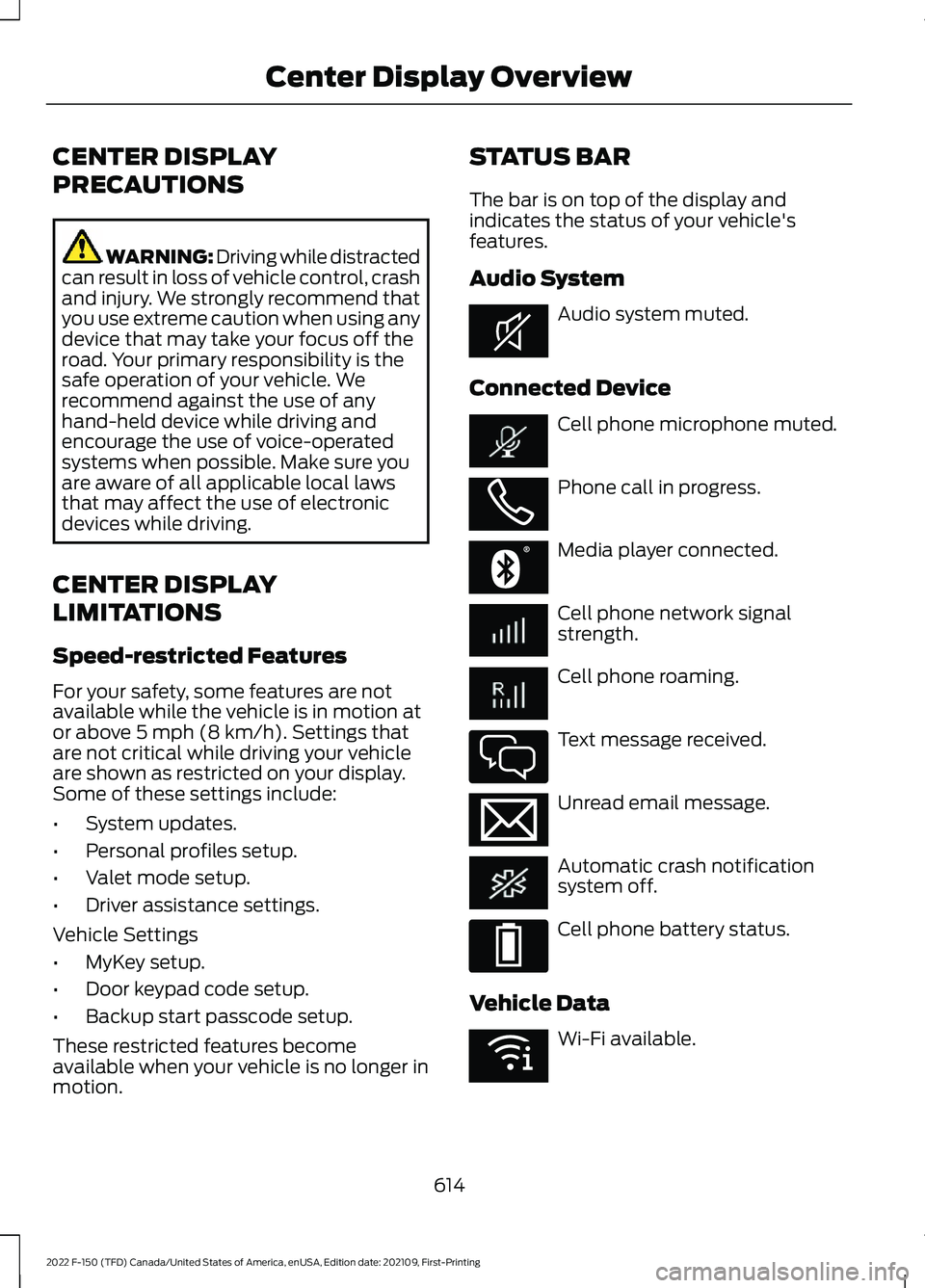
The bar is on top of the display and
indicates the status of your vehicle's
features.
Audio System
Audio system muted.
Connected Device Cell phone microphone muted.
Phone call in progress.
Media player connected.
Cell phone network signal
strength.
Cell phone roaming.
Text message received.
Unread email message.
Automatic crash notification
system off.
Cell phone battery status.
Vehicle Data Wi-Fi available.
614
2022 F-150 (TFD) Canada/United States of America, enUSA, Edition date: 202109, First-Printing Center Display OverviewE353221 E353213 E353208 E335295 E353216 E335293 E353219
Page 727 of 750
Changing the Remote Control Battery -
Vehicles With: Flip Key..............................92
Changing the Remote Control Battery - Vehicles With: Push Button Start.........90
Changing the Vehicle Wi-Fi Hotspot Name or Password...................................601
Charging a Device.........................................210
Charging a Wireless Device......................226
Checking MyKey System Status
..............98
Checking the Brake Fluid..........................287
Checking the Coolant................................489
Checking the Seatbelts................................67
Checking the Tire Pressures....................532
Checking the Wiper Blades.......................142
Children and Airbags.....................................73
Child Restraint Anchor Points...................48 Locating the Child Restraint Lower Anchor
Points................................................................... 48
Locating the Child Restraint Top Tether Anchor Points................................................... 49
What Are the Child Restraint Anchor Points................................................................... 48
Child Restraints
..............................................50
Child Restraint Position Information............50
Child Restraints Recommendation................51
Child Safety
......................................................47
Child Restraint Anchor Points......................... 48
Child Restraints.................................................... 50
Installing Child Restraints.................................. 51
Child Safety Locks
.........................................60
Child Safety Precautions.............................47
Cleaning Products
.........................................511
Cleaning the Exterior....................................511 Cleaning Camera Lenses and
Sensors.............................................................. 513
Cleaning Chrome, Aluminium or Stainless Steel.................................................................... 512
Cleaning Headlamps and Rear Lamps................................................................ 512
Cleaning Stripes or Graphics.......................... 513
Cleaning the Engine Compartment.............513
Cleaning the Exterior Precautions.................511
Cleaning the Underbody.................................. 513
Cleaning Wheels................................................. 512
Cleaning Windows and Wiper Blades.........512
Cleaning the Interior....................................513 Cleaning Carpets and Floor Mats.................515
Cleaning Displays and Screens..................... 514Cleaning Moonroof Tracks..............................
515
Cleaning Plastic................................................... 514
Cleaning Seatbelts............................................. 515
Cleaning Seats and the Headliner...............514
Cleaning the Instrument Panel..................... 513
Clearing All MyKeys.......................................98
Clearing the Garage Door Opener.........207
Climate Control
..............................................181
Auto Mode............................................................. 183
Climate Control Hints.................................184
Closing the Tailgate
.......................................117
Closing the Tailgate From Inside Your
Vehicle................................................................. 117
Closing the Tailgate From Outside Your Vehicle................................................................. 117
Closing the Tailgate Using the Remote Control................................................................ 118
Cold Weather Precautions.......................455
Connected Vehicle
......................................597
Connected Vehicle –
Troubleshooting............................................ 598
Connecting the Vehicle to a Mobile Network............................................................ 597
Connected Vehicle Data..............................29
Connected Vehicle Limitations
..............597
Connected Vehicle Requirements.........597
Connected Vehicle – Troubleshooting
.......................................598
Connected Vehicle – Frequently Asked
Questions........................................................ 598
Connecting a Bluetooth® Device..........625
Connecting a Trailer...................................399 Connecting a Trailer –
Troubleshooting............................................ 402
Hitches.................................................................. 399
Connecting a Trailer Precautions..........399
Connecting a Trailer – Troubleshooting
........................................402
Connecting a Trailer – Information
Messages......................................................... 402
Connecting the Vehicle to a Mobile Network........................................................597
Connecting FordPass to the Modem.........597
Enabling and Disabling the Modem...........597
What Is the Modem.......................................... 597
Connecting the Vehicle to a Wi-Fi Network........................................................597
Connecting Your Phone
............................620
723
2022 F-150 (TFD) Canada/United States of America, enUSA, Edition date: 202109, First-Printing Index
Page 728 of 750
Contacting Us..................................................20
Cooling System Capacity and Specification - 2.7L EcoBoost™..........578
Cooling System Capacity and Specification - 3.3L..................................579
Cooling System Capacity and Specification - 3.5L, Hybrid Electric
Vehicle (HEV)............................................580
Cooling System Capacity and Specification - 3.5L Ecoboost™.........579
Cooling System Capacity and Specification - 5.0L
..................................581
Cooling System Capacity and Specification - Raptor, Police
Responder....................................................581
Crash and Breakdown Information.................................................462
Automatic Crash Shutoff............................... 466
Jump Starting the Vehicle.............................. 464
Post-Crash Alert System................................ 466
Recovery Towing................................................ 467
Crash Sensors and Airbag Indicator........77
Crash Sensors and Airbag Indicator - Police Responder
........................................78
Creating a MyKey - Vehicles With: Flip Key....................................................................98
Creating a MyKey - Vehicles With: Push Button Start
...................................................97
Creating a Personal Profile......................629
Creating a Vehicle Wi-Fi Hotspot...........601
Cross Traffic Alert.........................................372 Cross Traffic Alert –
Troubleshooting............................................. 374
Cross Traffic Alert Indicators
...................373
Cross Traffic Alert Limitations.................372
Cross Traffic Alert Precautions...............372
Cross Traffic Alert – Troubleshooting........................................374
Cross Traffic Alert – Information Messages.......................................................... 374
Cruise Control...............................................329
Cruise Control Indicators
..........................330
Cup Holders....................................................227
Cup Holder Precautions................................... 227
Customer Information
...............................656
Radio Frequency Certification
Labels............................................................... 659Customizing the Instrument Cluster
Display............................................................175
D
Data Privacy
......................................................27
Decommissioning Requirements..........655
Decommissioning the Vehicle................655
Department of Transportation Uniform Tire Quality Grades
...................................519
Deploying and Stowing the Power Running Boards..........................................137
Digital Radio
.................................................606
Digital Radio Indicators................................... 607
Digital Radio Limitations................................ 606
How Does Digital Radio Work...................... 606
Switching Digital Radio Reception On and Off...................................................................... 607
What Is Digital Radio....................................... 606
Directing the Flow of Air.............................183
Disposing of Airbags.....................................83
Distance Alert...............................................380 Adjusting the Sensitivity of Distance
Alert.................................................................... 381
What Is Distance Alert.................................... 380
Distance Indication
.....................................379
Distance Indication Indicator........................ 380
Switching Distance Indication On and Off...................................................................... 380
What Is Distance Indication........................... 379
Doors and Locks Audible Warnings.......................................................103
Doors and Locks
...........................................102
Autolock................................................................. 103
Autounlock............................................................ 103
Doors and Locks – Troubleshooting...........104
Mislock.................................................................... 103
Operating the Doors From Inside Your Vehicle............................................................... 102
Operating the Doors From Outside Your Vehicle............................................................... 102
Doors and Locks – Troubleshooting
........................................104
Doors and Locks – Frequently Asked
Questions......................................................... 105
Doors and Locks – Information Messages.......................................................... 104
Doors and Locks – Warning Lamps............104
724
2022 F-150 (TFD) Canada/United States of America, enUSA, Edition date: 202109, First-Printing Index
Page 736 of 750
Locating the USB Ports - Raptor...........209
Locating the Wireless Accessory
Charger.........................................................226
Locating Your Vehicle...................................89
Locking and Unlocking the Tailgate.........111
Locking the Rear Window Controls........................................................160
M
Maintenance.................................................482
Engine Air Filter.................................................. 493
Engine Oil............................................................. 488
Exterior Bulbs..................................................... 499
Interior Bulbs...................................................... 508
Maintenance Precautions
........................482
Making and Receiving a Phone Call.................................................................622
Manually Dimming the Interior Mirror
...............................................................161
Manually Releasing the Electric Parking Brake.............................................................289
Manually Shifting Gears............................262 Shifting Using the Buttons on the Selector
Lever.................................................................. 263
Shifting Using the Paddle Shifters..............262
Manual Park Release
..................................267
Manual Park Release Precautions...............267
Using Manual Park Release............................ 267
What Is Manual Park Release........................ 267
Manual Seats..................................................191 Adjusting the Head Restraint.......................... 191
Adjusting the Lumbar Support...................... 192
Adjusting the Seat Backrest........................... 192
Folding the Seats............................................... 199
Head Restraint Components.......................... 191
Installing the Head Restraint......................... 192
Moving the Seat Backward and Forward............................................................. 192
Removing the Head Restraint........................ 192
Unfolding the Seats......................................... 200
Massage Seats..............................................196 Adjusting the Massage Seat Settings........196
Massage Seat Limitations.............................. 196
Memory Function
........................................204
Memory Function Precautions...............204
Mislock.............................................................103 Mislock Limitations............................................ 103Switching Mislock On and Off.......................
103
What Is Mislock................................................... 103
Mobile Communications Equipment
..................................................688
Mobile Device Data.......................................30
Moonroof Bounce-Back
............................165
Overriding Moonroof Bounce-Back.............165
What Is Moonroof Bounce-Back.................. 165
Moonroof.........................................................164 Moonroof Bounce-Back................................... 165
Motorcraft Parts - 2.7L EcoBoost™.................................................563
Motorcraft Parts - 3.3L
..............................564
Motorcraft Parts - 3.5L, Hybrid Electric Vehicle (HEV)
............................................566
Motorcraft Parts - 3.5L Ecoboost™.................................................565
Motorcraft Parts - 5.0L
..............................567
Motorcraft Parts - Raptor........................568
Muting the Audio........................................604
MyKey Settings...............................................96
Configurable MyKey Settings.......................... 96
Non-Configurable MyKey Settings................96
MyKey – Troubleshooting
...........................99
MyKey – Frequently Asked Questions.........101
MyKey – Information Messages..................... 99
MyKey ™
............................................................96
MyKey Settings..................................................... 96
MyKey – Troubleshooting................................. 99
N
Navigation Map Updates.........................630
Navigation......................................................630 Adjusting the Map............................................. 630
Live Traffic............................................................ 630
Route Guidance................................................... 631
Setting a Destination....................................... 630
Waypoints............................................................. 631
Normal Scheduled Maintenance..........645
O
Off-Road Driving.........................................449 After Driving Your Vehicle Off-Road...........454
Basic Off-Road Driving Techniques...........449
Driving Off-Road............................................... 450
Driving Through Water Limitations.............453
732
2022 F-150 (TFD) Canada/United States of America, enUSA, Edition date: 202109, First-Printing Index
Page 738 of 750
Post-Crash Alert System
Limitations...................................................... 466
Switching the Post-Crash Alert System Off...................................................................... 466
What Is the Post-Crash Alert System............................................................. 466
Power Outlet Indicators..............................221
Power Outlet Indicators - Vehicles With: 2.4kW/7.2kW................................................214
Power Outlet Indicators - Vehicles With: 2kW.................................................................213
Power Outlet Limitations.........................220
Power Outlet...................................................211
Power Outlet – Troubleshooting................... 217
Power Outlet Precautions
........................220
Power Outlet Precautions - Vehicles With: 2.4kW/7.2kW
....................................212
Power Outlet Precautions - Vehicles With: 2kW......................................................211
Power Outlet – Troubleshooting
.............217
Power Outlet – Frequently Asked
Questions......................................................... 219
Power Outlet – Information Messages........................................................... 217
Power Running Board Kick Switch
........136
Power Running Board Precautions........136
Power Running Board Settings
...............136
Power Running Boards...............................136 Power Running Boards –
Troubleshooting.............................................. 137
Power Running Boards – Troubleshooting.........................................137
Power Running Boards – Frequently Asked Questions.......................................................... 137
Power Seats
...................................................193
Adjusting the Head Restraint......................... 193
Adjusting the Lumbar Support..................... 196
Adjusting the Seat Backrest........................... 194
Adjusting the Seat Cushion............................ 194
Adjusting the Seat Height............................... 195
Head Restraint Components......................... 193
Installing the Head Restraint......................... 194
Moving the Seat Backward and Forward............................................................. 194
Removing the Head Restraint....................... 194
Pre-Collision Assist Limitations.............376
Pre-Collision Assist Precautions
............375 Pre-Collision Assist
.....................................375
Automatic Emergency Braking...................... 381
Distance Alert..................................................... 380
Distance Indication........................................... 379
Evasive Steering Assist..................................... 381
Pre-Collision Assist – Troubleshooting............................................ 382
Pre-Collision Assist – Troubleshooting
........................................382
Pre-Collision Assist – Frequently Asked
Questions........................................................ 384
Pre-Collision Assist – Information Messages......................................................... 382
Pre-Collision Assist – Warning Lamps............................................................... 382
Preparing Your Vehicle for Storage........517
Programming a MyKey
................................98
Programming the Garage Door Opener to Your Garage Door Opener
Motor
............................................................206
Programming the Garage Door Opener to Your Gate Opener Motor...................207
Programming the Garage Door Opener to Your Hand-Held Transmitter..........206
Programming the Remote Control - Vehicles With: Flip Key..............................94
Programming the Remote Control - Vehicles With: Push Button Start.........93
Properly Adjusting the Driver and Front Passenger Seats..........................................73
Puncture See: Changing a Flat Tire................................ 543
See: Changing a Flat Tire - Raptor/ Tremor.............................................................. 549
Push Button Ignition Switch
....................232
R
Radio Frequency Certification Labels...........................................................659
Blind Spot Information System Sensors............................................................ 659
Body Control Module...................................... 660
Cruise Control Module..................................... 663
Keys and Remote Controls............................ 665
Passive Anti-Theft System........................... 668
Radio Transceiver Module.............................. 672
SYNC...................................................................... 675
734
2022 F-150 (TFD) Canada/United States of America, enUSA, Edition date: 202109, First-Printing Index
Page 745 of 750
Transfer Case Fluid Capacity and
Specification - Raptor.............................591
Transfer Case Fluid Capacity and Specification...............................................591
Transmission Fluid Temperature Gauge .............................................................
169
Transporting the Vehicle..........................468
Trip Computer - Vehicles With: 4.2 Inch Screen
............................................................175
Accessing the Trip Computer......................... 175
Resetting the Trip Computer.......................... 175
Trip Computer - Vehicles With: 8 Inch Screen/12.3 Inch Screen..........................175
Accessing the Trip Computer......................... 175
Resetting the Trip Computer.......................... 175
Turbo Boost Gauge......................................169
U
Under Hood Fuse Box
................................472
Accessing the Under Hood Fuse Box.........472
Identifying the Fuses in the Under Hood
Fuse Box........................................................... 473
Locating the Under Hood Fuse Box............472
Under Hood Overview - 2.7L EcoBoost™.................................................483
Under Hood Overview - 3.3L..................484
Under Hood Overview - 3.5L, Hybrid Electric Vehicle (HEV)............................486
Under Hood Overview - 3.5L Ecoboost™.................................................485
Under Hood Overview - 5.0L..................487
Under Seat Storage
....................................228
Locating the Under Seat Storage
Compartment................................................ 228
Unique Features...............................................31
Updating the Vehicle Systems Wirelessly....................................................633
USB Ports
.......................................................209
Using a Slide-In Camper..........................389
Using Auto Hold
............................................297
Using Bead-Lock Wheels - Raptor.......530
Using Keyless Entry.....................................106
Using MyKey With Remote Start Systems..........................................................98
Using On-Board Scale...............................420
Using Progressive Range Selection......................................................265 Using Smart Hitch........................................418
Using Snow Chains.....................................528
Using the Center Console Work Surface
- Vehicles With: Column Shift..............223
Using the Center Console Work Surface - Vehicles With: Console Shift
.............224
Using the Instrument Cluster Display Controls.........................................................173
Using the Integrated Trailer Brake Controller.....................................................410
Using the Keyless Entry Keypad.............109
Using the Remote Control - Police Responder......................................................87
Using the Remote Control..........................88
Using the Trailer Backup Assistance Controller.....................................................427
Using the Trailer Backup Assistance Views.............................................................427
Using This Publication..................................23
Using Trailer Hitching Assistance...........416
Using Trailer Reverse Guidance Views..............................................................441
V
Vehicle Care
.....................................................511
Cleaning the Exterior.......................................... 511
Cleaning the Interior.......................................... 513
Vehicle Identification Number
...............596
Locating the Vehicle Identification
Number............................................................ 596
Vehicle Identification Number Overview.......................................................... 596
Vehicle Identification.................................596 Vehicle Identification Number..................... 596
Vehicle Interior - Police Responder.........40
Vehicle Interior - Raptor
...............................39
Vehicle Interior................................................38
Vehicle System Updates...........................633
Vehicle Wi-Fi Hotspot................................601
Ventilated Seats
............................................197
Switching the Ventilated Seats On and
Off........................................................................\
197
Ventilated Seat Precautions........................... 197
741
2022 F-150 (TFD) Canada/United States of America, enUSA, Edition date: 202109, First-Printing Index