Weather FORD F-150 2022 User Guide
[x] Cancel search | Manufacturer: FORD, Model Year: 2022, Model line: F-150, Model: FORD F-150 2022Pages: 750, PDF Size: 12.96 MB
Page 275 of 750
•
Additional noise from the transfer case
or other drive components.
• Difficulty shifting out of a mechanically
locked four-wheel drive mode.
Use of a dissimilar spare wheel and tire
assembly can lead to impairment of the
following:
• Comfort and noise.
• Winter weather driving capability.
• Wet driving capability.
• Four-wheel drive capability.
Mechanical Shift Blocking
On four-wheel drive vehicles with a
mechanically locked four-wheel drive high
mode, the transfer case distributes torque
to the front wheels by mechanically
interlocking the front and rear driveshafts
together. Various external factors can
affect shifting performance of this type of
system including, but not limited to:
• Vehicle acceleration.
• Dissimilar tire sizes.
• Steering input.
If the system detects a mechanical shift
blockage at speed after you select
two-wheel drive high, the message "4x4
Unable to Disengage See Manual", could
display momentarily. If this message
displays, one or more of the following
actions can relieve the mechanical shift
block:
• Momentary acceleration.
• Momentary braking.
• Bringing the vehicle to a stop.
• Shifting the transmission to neutral and
back to drive.
• Shifting the transmission to reverse
and back to drive.
• Driving the vehicle around a tight turn
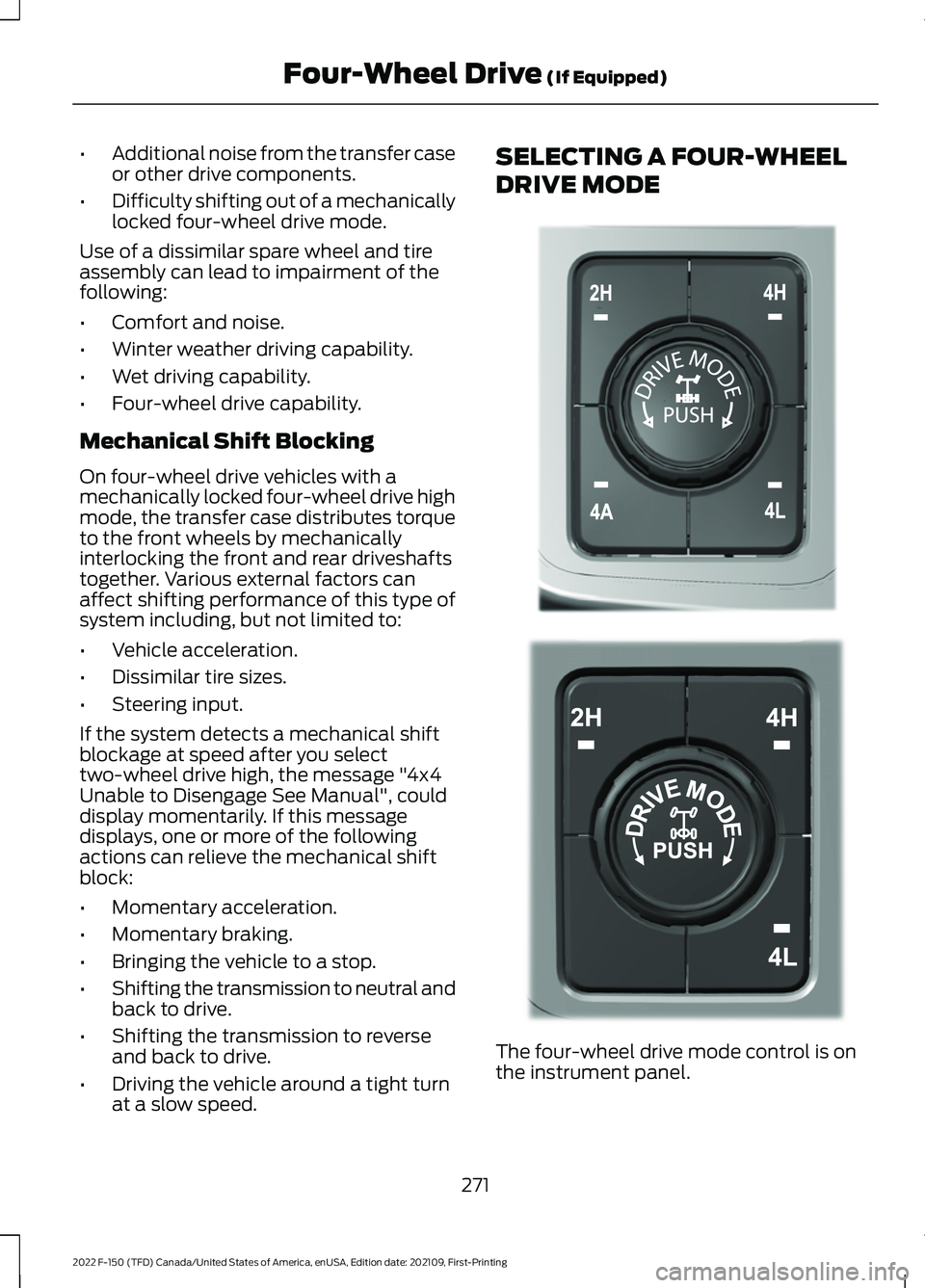
at a slow speed. SELECTING A FOUR-WHEEL
DRIVE MODE
The four-wheel drive mode control is on
the instrument panel.
271
2022 F-150 (TFD) Canada/United States of America, enUSA, Edition date: 202109, First-Printing Four-Wheel Drive (If Equipped)E308146 E323655
Page 296 of 750
WHAT IS REVERSE BRAKING
ASSIST
The system uses sensors on the rear of
your vehicle to detect a possible collision
and applies the brakes to either reduce the
damage from impact, or to assist in
avoiding the collision.
HOW DOES REVERSE
BRAKING ASSIST WORK
Reverse Braking Assist functions when in
reverse (R) and traveling at a speed of
1–
7 mph (1.5– 12 km/h).
If the system detects an obstacle behind
your vehicle, it provides a warning through
the rear parking aid or cross traffic alert
system.
REVERSE BRAKING ASSIST
PRECAUTIONS WARNING: You are responsible for
controlling your vehicle at all times. The
system is designed to be an aid and does
not relieve you of your responsibility to
drive with due care and attention. Failure
to follow this instruction could result in
the loss of control of your vehicle,
personal injury or death. WARNING:
To help avoid personal
injury, always use caution when in
reverse (R) and when using the sensing
system. WARNING:
The system may not
operate properly during severe weather
conditions, for example snow, ice, heavy
rain and spray. Always drive with due
care and attention. Failure to take care
may result in a crash. WARNING: Traffic control systems,
fluorescent lamps, inclement weather,
air brakes, external motors and fans may
affect the correct operation of the
sensing system. This may cause reduced
performance or false alerts. WARNING:
Some situations and
objects prevent hazard detection. For
example low or direct sunlight, inclement
weather, unconventional vehicle types,
and pedestrians. Apply the brakes when
necessary. Failure to follow this
instruction could result in the loss of
control of your vehicle, personal injury or
death. WARNING:
Do not use the system
with accessories that extend beyond the
front or rear of your vehicle, for example
a trailer hitch or bike rack. The system is
not able to make corrections for the
additional length of the accessories.
The system only applies the brakes for a
short period of time when an event occurs.
Act as soon as you notice the brakes apply
in order to remain in control of the vehicle.
If you do not intervene the vehicle may
start to move again.
Note: Certain add-on devices around the
bumper or fascia may create false alerts.
For example, large trailer hitches, bicycle or
surfboard racks, license plate brackets,
bumper covers or any other device that may
block the normal detection zone of the
system. Remove the add-on device to
prevent false alerts.
Note: The system does not react to small
or moving objects, particularly those close
to the ground.
Note: The system does not operate during
hard acceleration or steering.
292
2022 F-150 (TFD) Canada/United States of America, enUSA, Edition date: 202109, First-Printing Reverse Braking Assist
(If Equipped)
Page 317 of 750
PARKING AID PRECAUTIONS
WARNING: To help avoid personal
injury, always use caution when in
reverse (R) and when using the sensing
system. WARNING:
The system may not
detect objects with surfaces that absorb
reflection. Always drive with due care
and attention. Failure to take care may
result in a crash. WARNING: Traffic control systems,
fluorescent lamps, inclement weather,
air brakes, external motors and fans may
affect the correct operation of the
sensing system. This may cause reduced
performance or false alerts. WARNING:
The system may not
detect small or moving objects,
particularly those close to the ground. WARNING:
The parking aid system
can only assist you to detect objects
when your vehicle is moving at parking
speeds. To help avoid personal injury you
must take care when using the parking
aid system. WARNING:
The system may not
function if the sensor is blocked. WARNING:
In cold and severe
weather conditions the system may not
function. Rain, snow and spray can all
limit sensor performance. WARNING:
If damage occurs in the
immediate area surrounding the sensor,
have your vehicle checked as soon as
possible. Note:
If your vehicle sustains damage
leaving the sensors misaligned, this will
cause inaccurate measurements or false
alerts.
When you connect a trailer to your vehicle,
the rear parking aid detects the trailer and
provides an alert. Disable the parking aid
when you connect a trailer to prevent the
alert.
Note: Certain add-on devices installed
around the bumper or fascia may create
false alerts, for example, large trailer
hitches, bike or surfboard racks, license plate
brackets, bumper covers or any other device
that could block the normal detection zone
of the parking aid system. Aftermarket spare
tires or spare tire covers mounted to the rear
tailgate could cause false alerts from the
park aid system. Remove the add-on device
to prevent false alerts.
Note: Keep the sensors free from snow, ice
and large accumulations of dirt. If the
sensors are covered, the system's accuracy
can be affected.
Do not clean the sensors with sharp
objects.
Note: When using a programmed MyKey,
you cannot switch the parking aids off. See
MyKey ™
(page 96).
SWITCHING PARKING AID ON
AND OFF Press the parking aid button and
use the menu to turn the system
on and off.
The system can also be turned off using
the pop-up message that appears when
you are in reverse (R).
313
2022 F-150 (TFD) Canada/United States of America, enUSA, Edition date: 202109, First-Printing Parking Aids
(If Equipped)PE326188
Page 337 of 750
The radar sensor has a limited field of view.
It may not detect vehicles at all or detect
a vehicle later than expected in some
situations. The lead vehicle image does
not illuminate if the system does not
detect a vehicle in front of you.
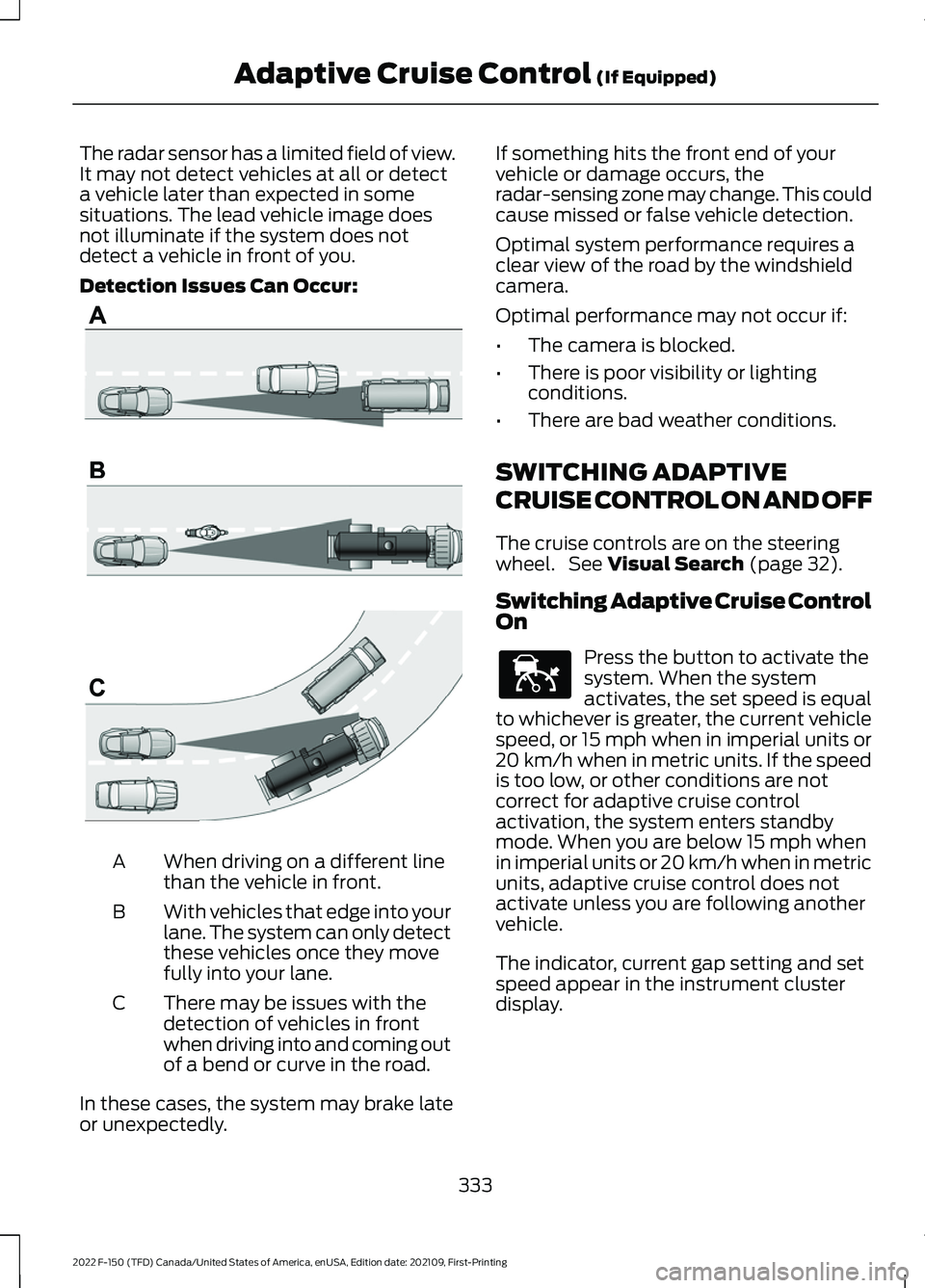
Detection Issues Can Occur:
When driving on a different line
than the vehicle in front.
A
With vehicles that edge into your
lane. The system can only detect
these vehicles once they move
fully into your lane.
B
There may be issues with the
detection of vehicles in front
when driving into and coming out
of a bend or curve in the road.
C
In these cases, the system may brake late
or unexpectedly. If something hits the front end of your
vehicle or damage occurs, the
radar-sensing zone may change. This could
cause missed or false vehicle detection.
Optimal system performance requires a
clear view of the road by the windshield
camera.
Optimal performance may not occur if:
•
The camera is blocked.
• There is poor visibility or lighting
conditions.
• There are bad weather conditions.
SWITCHING ADAPTIVE
CRUISE CONTROL ON AND OFF
The cruise controls are on the steering
wheel. See Visual Search (page 32).
Switching Adaptive Cruise Control
On Press the button to activate the
system. When the system
activates, the set speed is equal
to whichever is greater, the current vehicle
speed, or 15 mph when in imperial units or
20 km/h when in metric units. If the speed
is too low, or other conditions are not
correct for adaptive cruise control
activation, the system enters standby
mode. When you are below 15 mph when
in imperial units or 20 km/h when in metric
units, adaptive cruise control does not
activate unless you are following another
vehicle.
The indicator, current gap setting and set
speed appear in the instrument cluster
display.
333
2022 F-150 (TFD) Canada/United States of America, enUSA, Edition date: 202109, First-Printing Adaptive Cruise Control
(If Equipped)E71621 E144529
Page 343 of 750
LANE CENTERING LIMITATIONS
Adaptive cruise control limitations apply
to lane centering unless stated otherwise
or contradicted by a lane centering
limitation. See Adaptive Cruise Control
Limitations (page 332).
Lane Centering may not correctly operate
in any of the following conditions:
• The lane is too narrow or wide.
• The system does not detect at least
one lane marking or when lanes merge
or split.
• Limited steering torque input is applied.
• Areas under construction or new
infrastructure.
• When modifications to the steering
system have been made.
• When using a spare tire.
• In high wind conditions.
Note: The driving assistance torque is
limited and may not be sufficient for all
driving situations such as driving through
tight curves or driving through curves at high
speeds.
Note: In exceptional conditions, such as
inclement weather or direct sunlight, the
system could deviate from the center line
or could cancel.
SWITCHING LANE CENTERING ON
AND OFF
You must keep your hands on the steering
wheel at all times.
The controls are on the steering wheel. Press the button.
The indicator appears in the information
display. When the system is on, the color
of the indicator changes to indicate the
system status. You can override the system at any time
by steering your vehicle.
Note:
The correct requirements must be
met before you can switch the system on.
See
Lane Centering Requirements (page
338).
Enabling and Disabling Lane
Centering
1. Press
Features on the touchscreen.
2. Press
Driver Assistance.
3. Press
Cruise Control.
4. Press
Lane Centering Assist.
LANE CENTERING ALERTS
You must keep your hands on the steering
wheel at all times.
When the system is active and detects no
steering activity for a period of time, the
system alerts you to put your hands on the
steering wheel. If you do not react to the
warnings the system cancels and slows
your vehicle down to idle speeds while
maintaining steering control.
See Lane
Centering Automatic Cancellation
(page
339).
The system also alerts you if your vehicle
crosses lane markings without detected
steering activity.
Note: The system could detect a light grip
or touch on the steering wheel as hands-off
driving.
LANE CENTERING AUTOMATIC
CANCELLATION
When an external condition cancels the
system, for example, no lane markings
available, a tone sounds and a message
appears in the instrument cluster display.
339
2022 F-150 (TFD) Canada/United States of America, enUSA, Edition date: 202109, First-Printing Adaptive Cruise Control
(If Equipped)E308131
Page 347 of 750
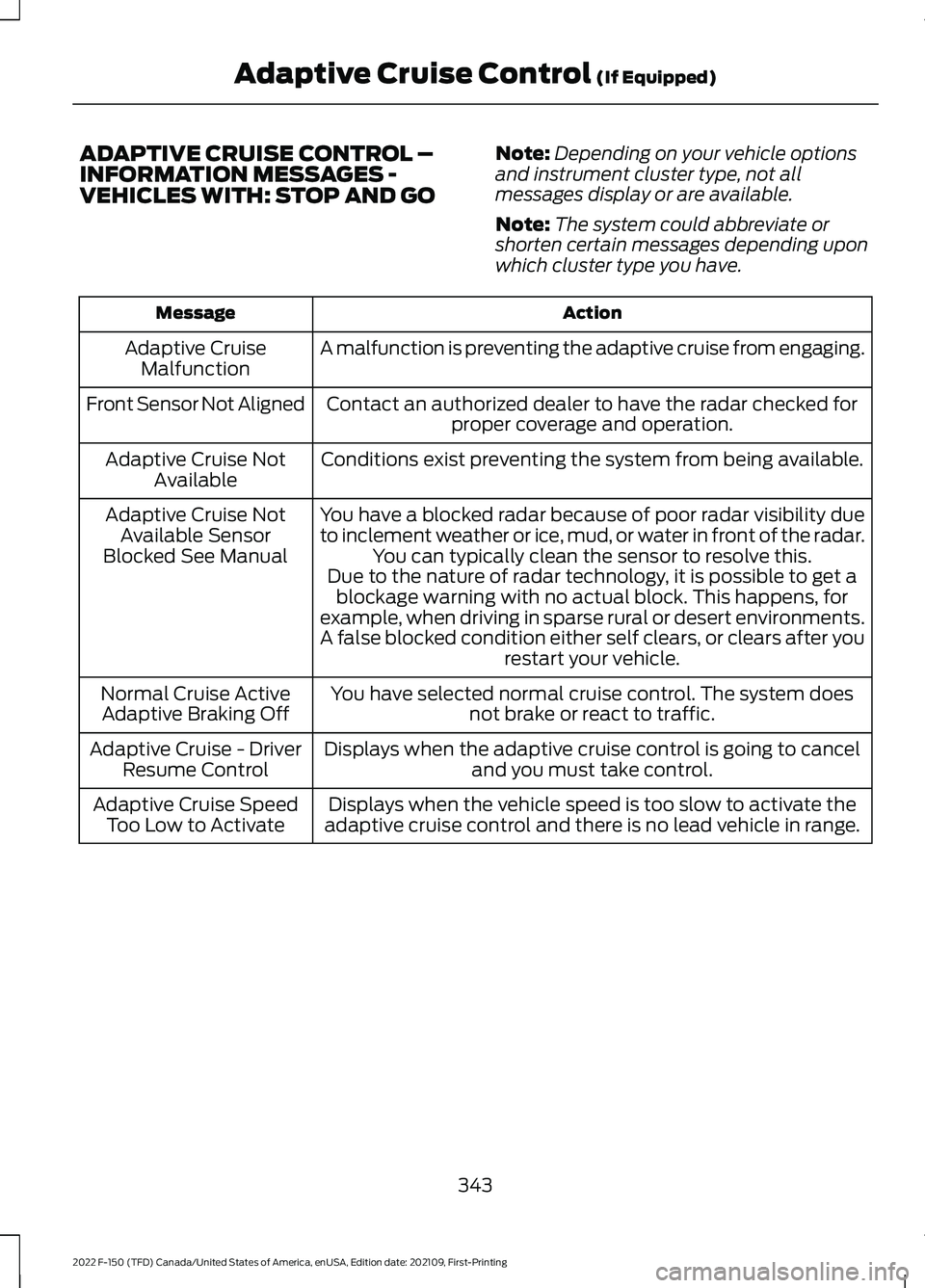
ADAPTIVE CRUISE CONTROL –
INFORMATION MESSAGES -
VEHICLES WITH: STOP AND GO
Note:
Depending on your vehicle options
and instrument cluster type, not all
messages display or are available.
Note: The system could abbreviate or
shorten certain messages depending upon
which cluster type you have. Action
Message
A malfunction is preventing the adaptive cruise from engaging.
Adaptive Cruise
Malfunction
Front Sensor Not Aligned Contact an authorized dealer to have the radar checked for
proper coverage and operation.
Conditions exist preventing the system from being available.
Adaptive Cruise Not
Available
You have a blocked radar because of poor radar visibility due
to inclement weather or ice, mud, or water in front of the radar.You can typically clean the sensor to resolve this.
Adaptive Cruise Not
Available Sensor
Blocked See Manual Due to the nature of radar technology, it is possible to get ablockage warning with no actual block. This happens, for
example, when driving in sparse rural or desert environments.
A false blocked condition either self clears, or clears after you restart your vehicle.
You have selected normal cruise control. The system does not brake or react to traffic.
Normal Cruise Active
Adaptive Braking Off
Displays when the adaptive cruise control is going to canceland you must take control.
Adaptive Cruise - Driver
Resume Control
Displays when the vehicle speed is too slow to activate the
adaptive cruise control and there is no lead vehicle in range.
Adaptive Cruise Speed
Too Low to Activate
343
2022 F-150 (TFD) Canada/United States of America, enUSA, Edition date: 202109, First-Printing Adaptive Cruise Control (If Equipped)
Page 350 of 750
The driver-facing camera may not operate
correctly due to any of the following:
•
You have a pre-existing eye condition,
such as an eye misalignment, or have
had eye surgery.
• You cover your facial features by a
mask, hat or other items.
• The lighting conditions change
significantly.
• You are not in the field of view of the
camera.
• You position or tilt yourself to one side.
• You are moving around extensively.
• You are wearing glasses or sunglasses
that are too dark or reflective.
Note: The system has limited steering
assistance and may not be sufficient for all
driving situations.
Note: In exceptional conditions, such as
inclement weather or direct sunlight, the
system could deviate from the center line.
Note: The information provided by the
navigation map data could be inaccurate or
out of date.
BLUECRUISE SETTINGS
Enabling BlueCruise
1. Press Features on the touchscreen.
2. Press
Driver Assistance.
3. Press
Cruise Control.
4. Press
Lane Centering with
Hands-Free.
Enabling Activation Prompts
1. Press
Features on the touchscreen.
2. Press
Driver Assistance.
3. Press
Cruise Control.
4. Press
Activation Prompts. SWITCHING BLUECRUISE ON
AND OFF
Switching BlueCruise On
The controls are on the steering wheel.
Using Activation Prompts
When the prompt appears, press
the button to switch BlueCruise
on.
The indicator appears in the instrument
cluster. When the system is on, the color
of the indicator changes to indicate the
system status.
Note: You must enable activation prompts
in the touchscreen.
Using Steering Wheel Controls Using the adaptive cruise control
and lateral support buttons,
ensure both systems are active.
BlueCruise activates.
Switching BlueCruise Off Press either the lateral support
or adaptive cruise control button
when system is active or in
standby mode.
BlueCruise turns off through
each ignition cycle.
346
2022 F-150 (TFD) Canada/United States of America, enUSA, Edition date: 202109, First-Printing BlueCruise
(If Equipped)E144529 E308131 E144529 E308131 E144529
Page 365 of 750
WHAT IS THE LANE KEEPING
SYSTEM
The lane keeping system alerts you by
providing temporary steering assistance
or steering wheel vibration when it detects
an unintended lane departure.
HOW DOES THE LANE
KEEPING SYSTEM WORK
The lane keeping system uses a forward
looking camera mounted on the windshield
to monitor vehicle movement within the
travel lane.
When the camera detects a drift out of the
travel lane, the lane keeping system alerts
the driver by vibrating the steering wheel,
or aids the driver by providing a small
steering input to move the vehicle back
into the travel lane.
The driver can select one of three modes:
•
Alert (If Equipped)
• Aid
• Alert + Aid
LANE KEEPING SYSTEM
PRECAUTIONS WARNING: You are responsible for
controlling your vehicle at all times. The
system is designed to be an aid and does
not relieve you of your responsibility to
drive with due care and attention. Failure
to follow this instruction could result in
the loss of control of your vehicle,
personal injury or death. WARNING: The system will not
operate if the sensor cannot track the
road lane markings. WARNING:
The sensor may
incorrectly track lane markings as other
structures or objects. This can result in
a false or missed warning. WARNING:
In cold and severe
weather conditions the system may not
function. Rain, snow and spray can all
limit sensor performance. WARNING:
The system may not
operate properly if the sensor is blocked.
Keep the windshield free from
obstruction. WARNING:
If damage occurs in the
immediate area surrounding the sensor,
have your vehicle checked as soon as
possible. WARNING:
The system may not
correctly operate if your vehicle is fitted
with a suspension kit not approved by
us. WARNING:
Large contrasts in
outside lighting can limit sensor
performance.
LANE KEEPING SYSTEM
LIMITATIONS
The lane keeping system only operates
when the vehicle speed is greater than
40 mph (64 km/h)
.
The system works when the camera can
detect at least one lane marking.
Note: When you select Aid or Alert and Aid
mode and the system detects no steering
activity for a short period of time, the system
alerts you to put your hands on the steering
wheel. The system may detect a light grip
or touch on the steering wheel as hands-off
driving.
361
2022 F-150 (TFD) Canada/United States of America, enUSA, Edition date: 202109, First-Printing Lane Keeping System
(If Equipped)
Page 372 of 750
WHAT IS BLIND SPOT
INFORMATION SYSTEM
Blind spot information system detects
vehicles that may have entered the blind
spot zone.
HOW DOES BLIND SPOT
INFORMATION SYSTEM WORK
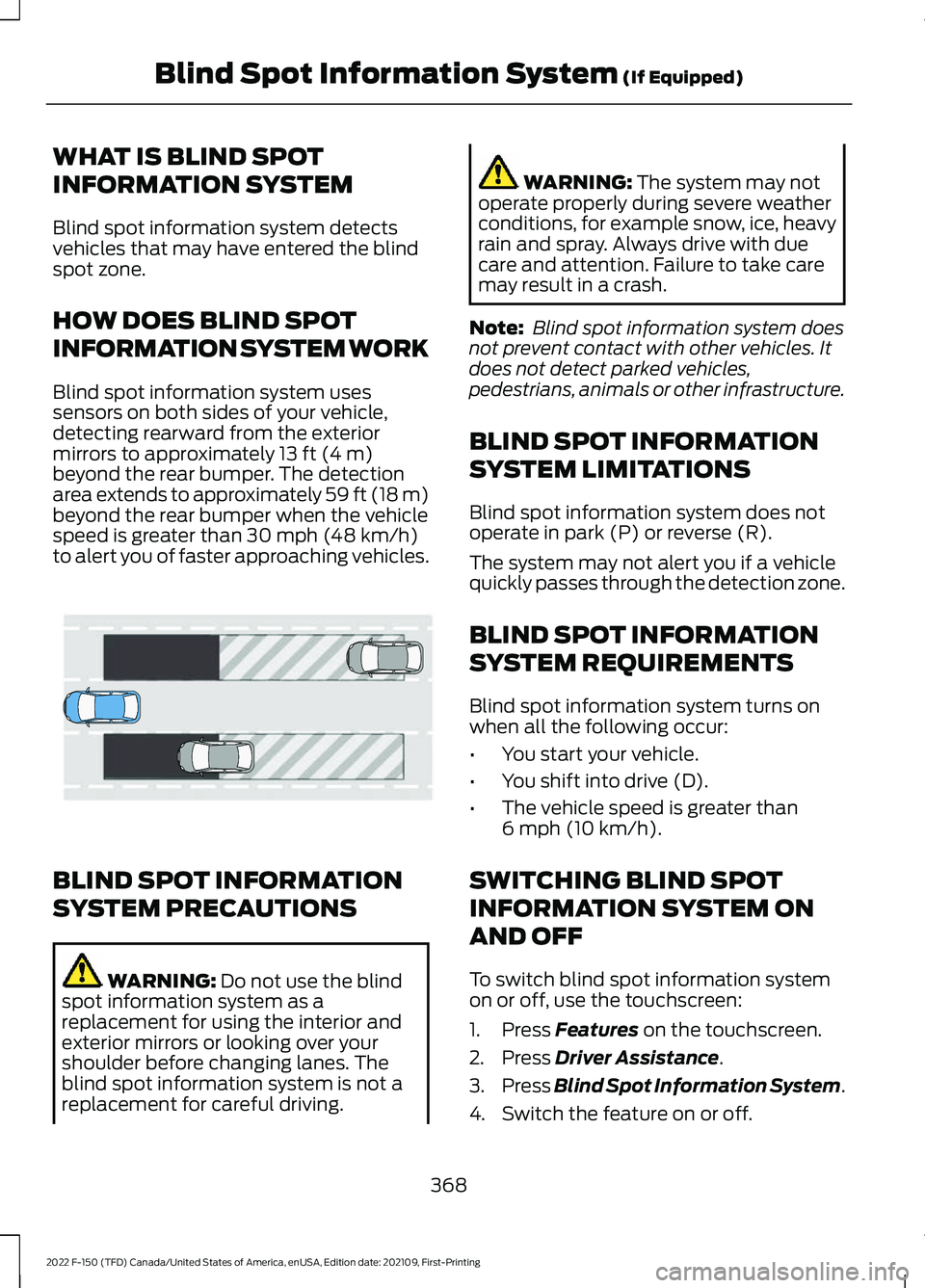
Blind spot information system uses
sensors on both sides of your vehicle,
detecting rearward from the exterior
mirrors to approximately 13 ft (4 m)
beyond the rear bumper. The detection
area extends to approximately 59 ft (18 m)
beyond the rear bumper when the vehicle
speed is greater than
30 mph (48 km/h)
to alert you of faster approaching vehicles. BLIND SPOT INFORMATION
SYSTEM PRECAUTIONS
WARNING:
Do not use the blind
spot information system as a
replacement for using the interior and
exterior mirrors or looking over your
shoulder before changing lanes. The
blind spot information system is not a
replacement for careful driving. WARNING:
The system may not
operate properly during severe weather
conditions, for example snow, ice, heavy
rain and spray. Always drive with due
care and attention. Failure to take care
may result in a crash.
Note: Blind spot information system does
not prevent contact with other vehicles. It
does not detect parked vehicles,
pedestrians, animals or other infrastructure.
BLIND SPOT INFORMATION
SYSTEM LIMITATIONS
Blind spot information system does not
operate in park (P) or reverse (R).
The system may not alert you if a vehicle
quickly passes through the detection zone.
BLIND SPOT INFORMATION
SYSTEM REQUIREMENTS
Blind spot information system turns on
when all the following occur:
• You start your vehicle.
• You shift into drive (D).
• The vehicle speed is greater than
6 mph (10 km/h)
.
SWITCHING BLIND SPOT
INFORMATION SYSTEM ON
AND OFF
To switch blind spot information system
on or off, use the touchscreen:
1. Press
Features on the touchscreen.
2. Press
Driver Assistance.
3. Press
Blind Spot Information System.
4. Switch the feature on or off.
368
2022 F-150 (TFD) Canada/United States of America, enUSA, Edition date: 202109, First-Printing Blind Spot Information System
(If Equipped)E255695
Page 376 of 750
WHAT IS CROSS TRAFFIC
ALERT
The system alerts you of vehicles
approaching from the sides behind your
vehicle when you shift into reverse (R).
HOW DOES CROSS TRAFFIC
ALERT WORK
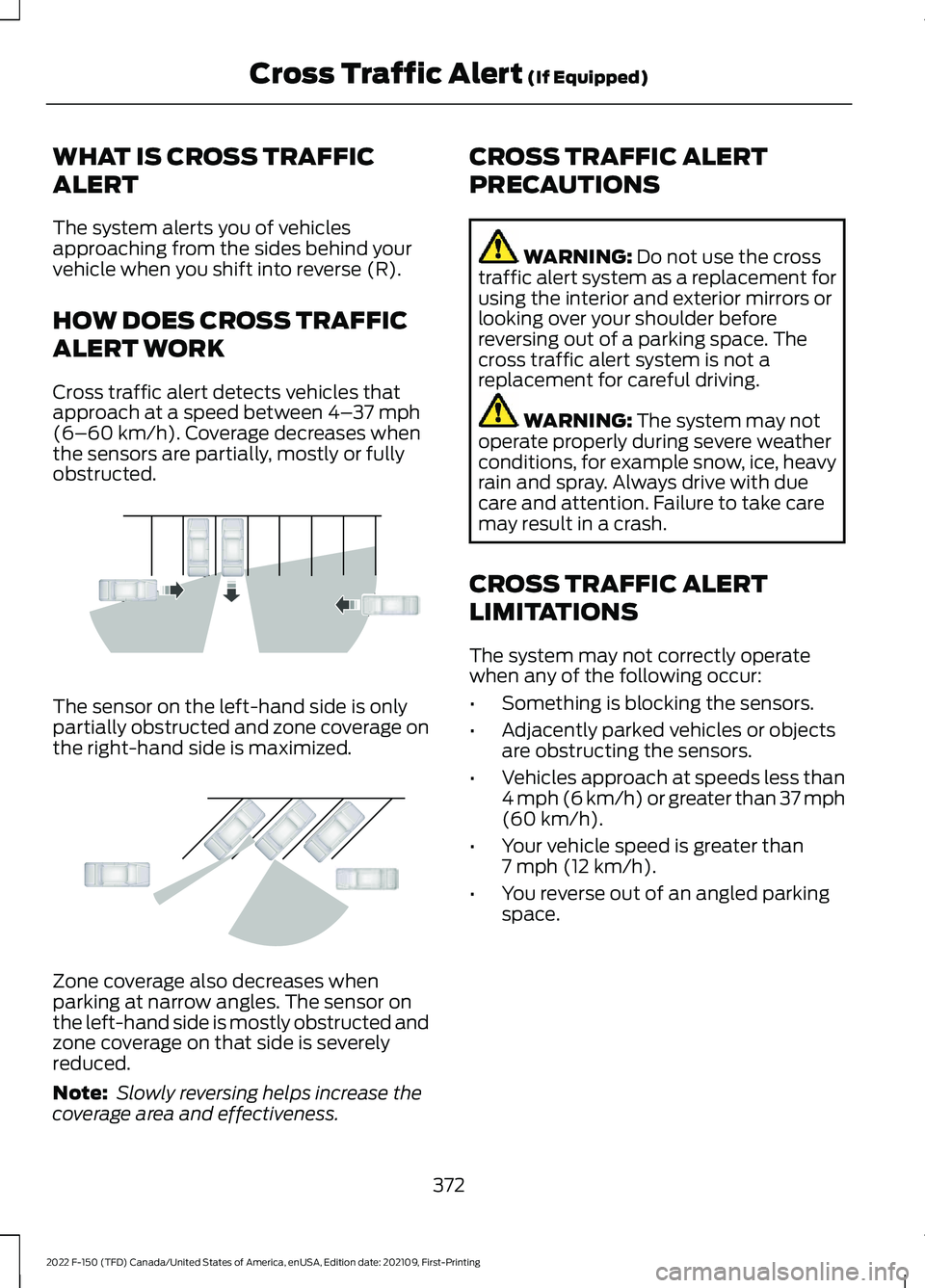
Cross traffic alert detects vehicles that
approach at a speed between 4–
37 mph
(6–60 km/h). Coverage decreases when
the sensors are partially, mostly or fully
obstructed. The sensor on the left-hand side is only
partially obstructed and zone coverage on
the right-hand side is maximized.
Zone coverage also decreases when
parking at narrow angles. The sensor on
the left-hand side is mostly obstructed and
zone coverage on that side is severely
reduced.
Note:
Slowly reversing helps increase the
coverage area and effectiveness. CROSS TRAFFIC ALERT
PRECAUTIONS WARNING:
Do not use the cross
traffic alert system as a replacement for
using the interior and exterior mirrors or
looking over your shoulder before
reversing out of a parking space. The
cross traffic alert system is not a
replacement for careful driving. WARNING:
The system may not
operate properly during severe weather
conditions, for example snow, ice, heavy
rain and spray. Always drive with due
care and attention. Failure to take care
may result in a crash.
CROSS TRAFFIC ALERT
LIMITATIONS
The system may not correctly operate
when any of the following occur:
• Something is blocking the sensors.
• Adjacently parked vehicles or objects
are obstructing the sensors.
• Vehicles approach at speeds less than
4 mph (6 km/h) or greater than 37 mph
(60 km/h)
.
• Your vehicle speed is greater than
7 mph (12 km/h)
.
• You reverse out of an angled parking
space.
372
2022 F-150 (TFD) Canada/United States of America, enUSA, Edition date: 202109, First-Printing Cross Traffic Alert
(If Equipped)E142440 E142441