Weather FORD F-150 2022 Owner's Manual
[x] Cancel search | Manufacturer: FORD, Model Year: 2022, Model line: F-150, Model: FORD F-150 2022Pages: 750, PDF Size: 12.96 MB
Page 379 of 750
WHAT IS PRE-COLLISION
ASSIST
Pre-collision assist detects and warns of
approaching hazards in the roadway. The
system provides multiple levels of
assistance to help avoid a collision if your
vehicle is rapidly approaching another
stationary vehicle, a vehicle traveling in the
same direction as yours, or a pedestrian or
cyclist within your driving path.
HOW DOES PRE-COLLISION
ASSIST WORK
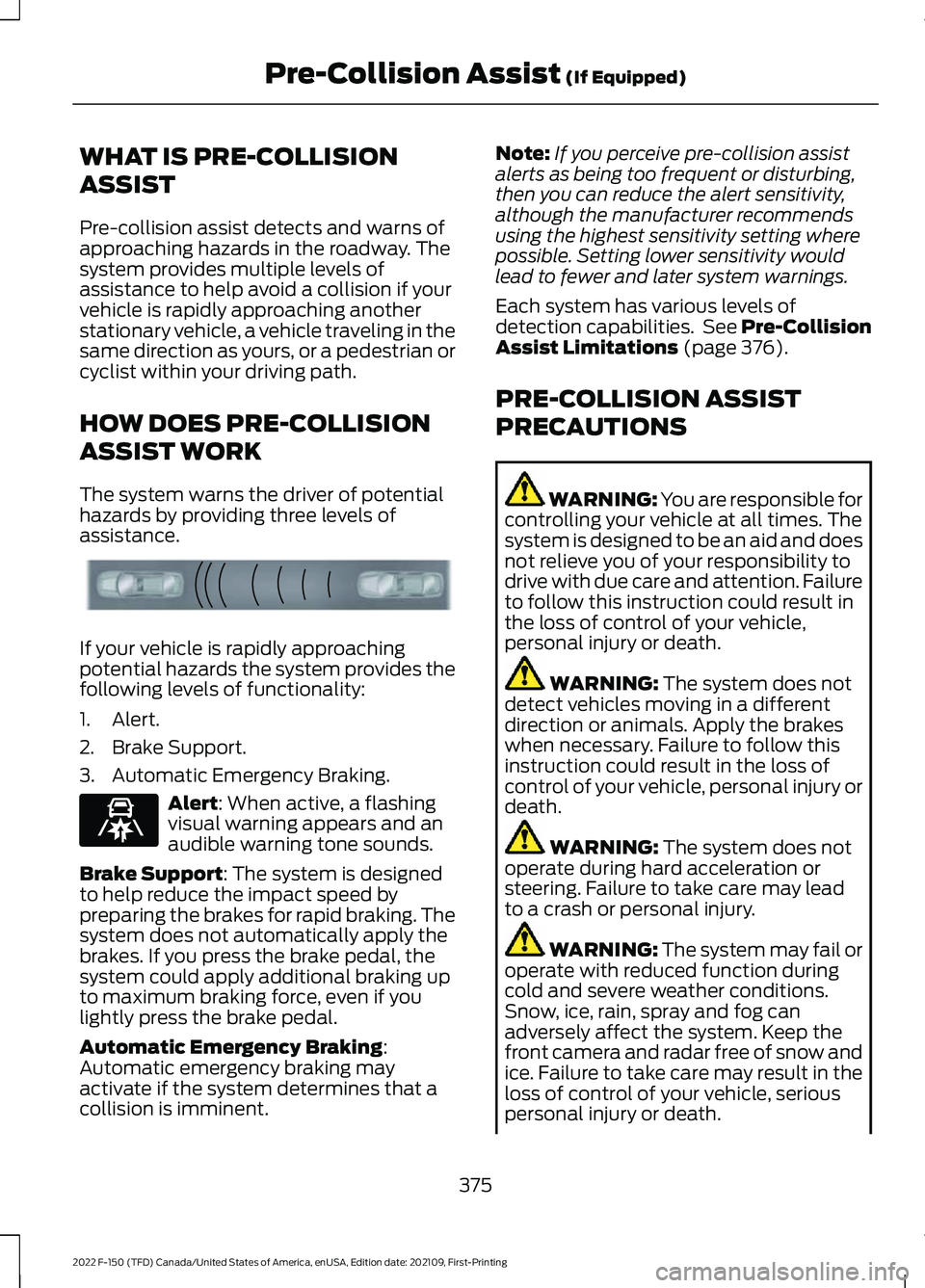
The system warns the driver of potential
hazards by providing three levels of
assistance.
If your vehicle is rapidly approaching
potential hazards the system provides the
following levels of functionality:
1. Alert.
2. Brake Support.
3. Automatic Emergency Braking.
Alert: When active, a flashing
visual warning appears and an
audible warning tone sounds.
Brake Support
: The system is designed
to help reduce the impact speed by
preparing the brakes for rapid braking. The
system does not automatically apply the
brakes. If you press the brake pedal, the
system could apply additional braking up
to maximum braking force, even if you
lightly press the brake pedal.
Automatic Emergency Braking
:
Automatic emergency braking may
activate if the system determines that a
collision is imminent. Note:
If you perceive pre-collision assist
alerts as being too frequent or disturbing,
then you can reduce the alert sensitivity,
although the manufacturer recommends
using the highest sensitivity setting where
possible. Setting lower sensitivity would
lead to fewer and later system warnings.
Each system has various levels of
detection capabilities. See Pre-Collision
Assist Limitations
(page 376).
PRE-COLLISION ASSIST
PRECAUTIONS WARNING: You are responsible for
controlling your vehicle at all times. The
system is designed to be an aid and does
not relieve you of your responsibility to
drive with due care and attention. Failure
to follow this instruction could result in
the loss of control of your vehicle,
personal injury or death. WARNING:
The system does not
detect vehicles moving in a different
direction or animals. Apply the brakes
when necessary. Failure to follow this
instruction could result in the loss of
control of your vehicle, personal injury or
death. WARNING:
The system does not
operate during hard acceleration or
steering. Failure to take care may lead
to a crash or personal injury. WARNING: The system may fail or
operate with reduced function during
cold and severe weather conditions.
Snow, ice, rain, spray and fog can
adversely affect the system. Keep the
front camera and radar free of snow and
ice. Failure to take care may result in the
loss of control of your vehicle, serious
personal injury or death.
375
2022 F-150 (TFD) Canada/United States of America, enUSA, Edition date: 202109, First-Printing Pre-Collision Assist
(If Equipped)E156130 E329466
Page 387 of 750
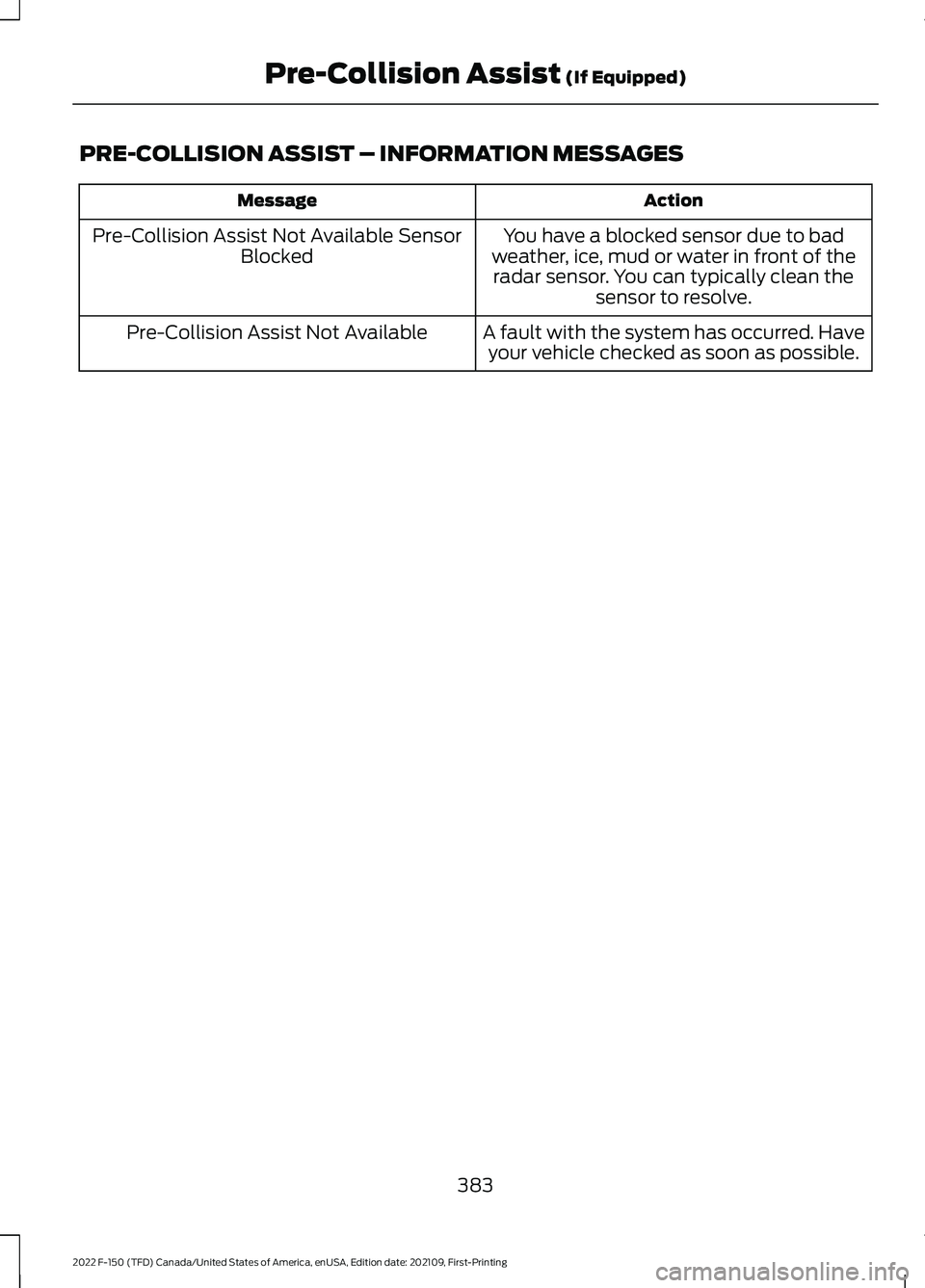
PRE-COLLISION ASSIST – INFORMATION MESSAGES
Action
Message
You have a blocked sensor due to bad
weather, ice, mud or water in front of the radar sensor. You can typically clean the sensor to resolve.
Pre-Collision Assist Not Available Sensor
Blocked
A fault with the system has occurred. Haveyour vehicle checked as soon as possible.
Pre-Collision Assist Not Available
383
2022 F-150 (TFD) Canada/United States of America, enUSA, Edition date: 202109, First-Printing Pre-Collision Assist (If Equipped)
Page 388 of 750
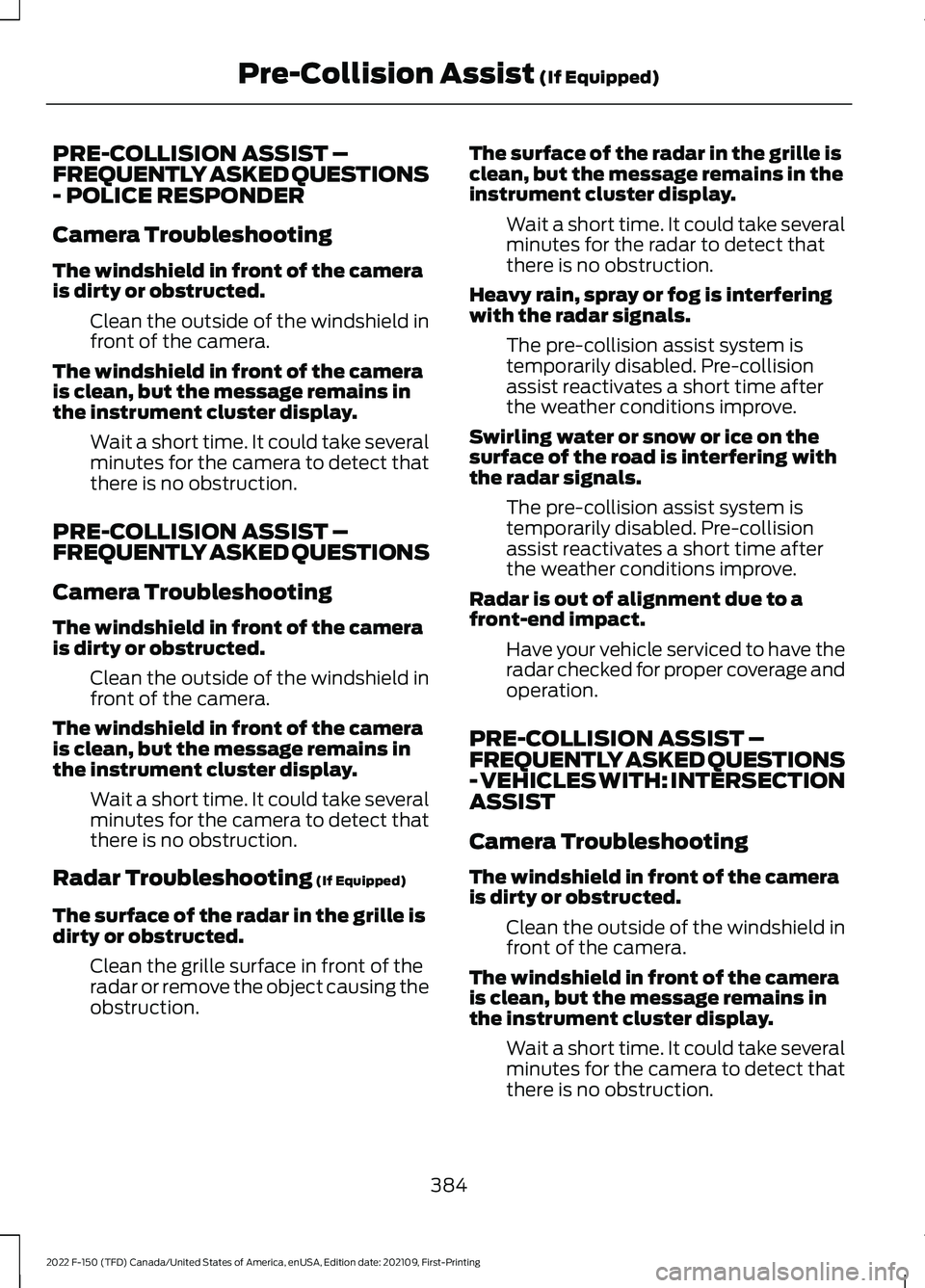
PRE-COLLISION ASSIST –
FREQUENTLY ASKED QUESTIONS
- POLICE RESPONDER
Camera Troubleshooting
The windshield in front of the camera
is dirty or obstructed.
Clean the outside of the windshield in
front of the camera.
The windshield in front of the camera
is clean, but the message remains in
the instrument cluster display. Wait a short time. It could take several
minutes for the camera to detect that
there is no obstruction.
PRE-COLLISION ASSIST –
FREQUENTLY ASKED QUESTIONS
Camera Troubleshooting
The windshield in front of the camera
is dirty or obstructed. Clean the outside of the windshield in
front of the camera.
The windshield in front of the camera
is clean, but the message remains in
the instrument cluster display. Wait a short time. It could take several
minutes for the camera to detect that
there is no obstruction.
Radar Troubleshooting (If Equipped)
The surface of the radar in the grille is
dirty or obstructed. Clean the grille surface in front of the
radar or remove the object causing the
obstruction. The surface of the radar in the grille is
clean, but the message remains in the
instrument cluster display.
Wait a short time. It could take several
minutes for the radar to detect that
there is no obstruction.
Heavy rain, spray or fog is interfering
with the radar signals. The pre-collision assist system is
temporarily disabled. Pre-collision
assist reactivates a short time after
the weather conditions improve.
Swirling water or snow or ice on the
surface of the road is interfering with
the radar signals. The pre-collision assist system is
temporarily disabled. Pre-collision
assist reactivates a short time after
the weather conditions improve.
Radar is out of alignment due to a
front-end impact. Have your vehicle serviced to have the
radar checked for proper coverage and
operation.
PRE-COLLISION ASSIST –
FREQUENTLY ASKED QUESTIONS
- VEHICLES WITH: INTERSECTION
ASSIST
Camera Troubleshooting
The windshield in front of the camera
is dirty or obstructed. Clean the outside of the windshield in
front of the camera.
The windshield in front of the camera
is clean, but the message remains in
the instrument cluster display. Wait a short time. It could take several
minutes for the camera to detect that
there is no obstruction.
384
2022 F-150 (TFD) Canada/United States of America, enUSA, Edition date: 202109, First-Printing Pre-Collision Assist
(If Equipped)
Page 389 of 750
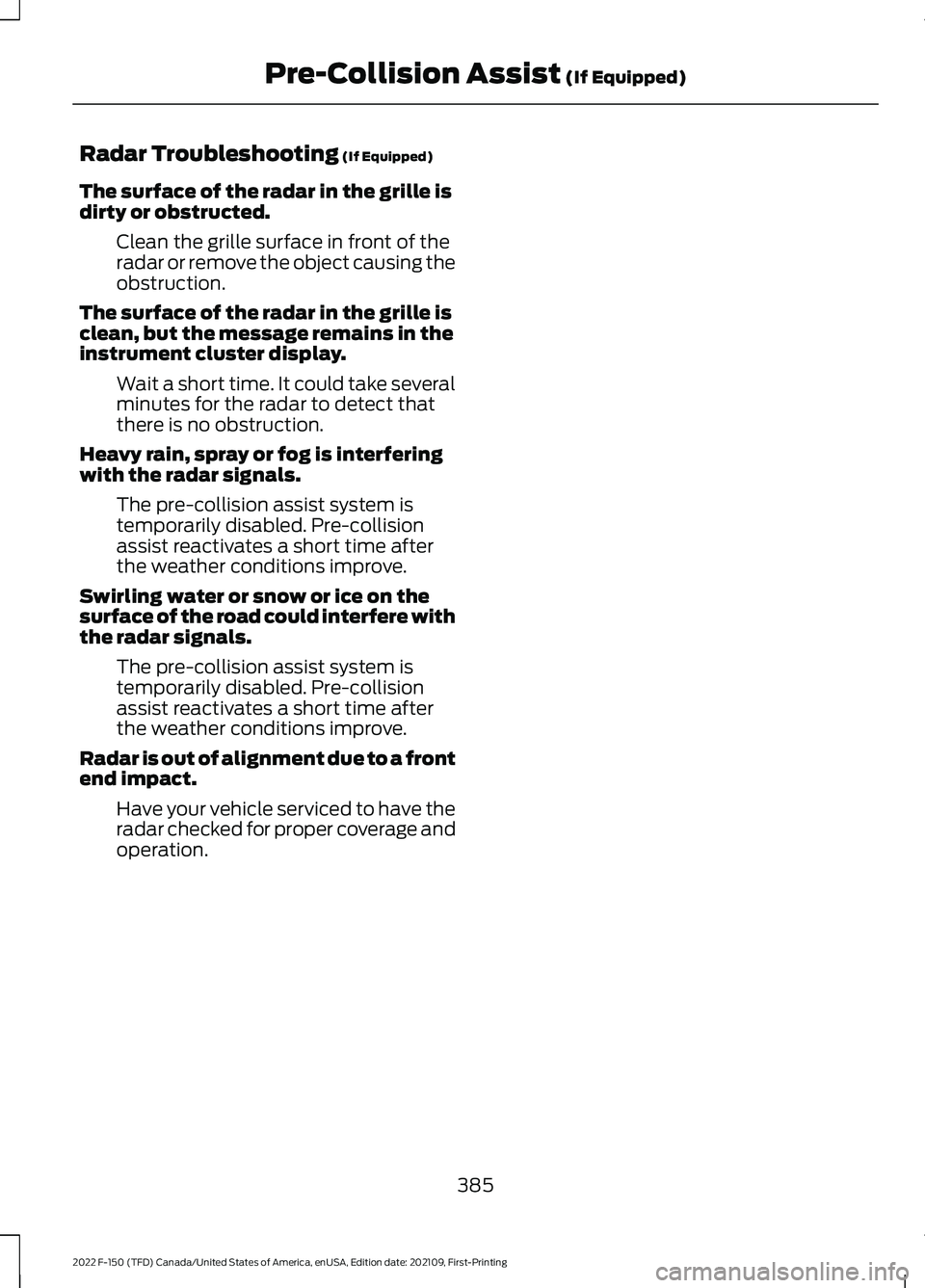
Radar Troubleshooting (If Equipped)
The surface of the radar in the grille is
dirty or obstructed. Clean the grille surface in front of the
radar or remove the object causing the
obstruction.
The surface of the radar in the grille is
clean, but the message remains in the
instrument cluster display. Wait a short time. It could take several
minutes for the radar to detect that
there is no obstruction.
Heavy rain, spray or fog is interfering
with the radar signals. The pre-collision assist system is
temporarily disabled. Pre-collision
assist reactivates a short time after
the weather conditions improve.
Swirling water or snow or ice on the
surface of the road could interfere with
the radar signals. The pre-collision assist system is
temporarily disabled. Pre-collision
assist reactivates a short time after
the weather conditions improve.
Radar is out of alignment due to a front
end impact. Have your vehicle serviced to have the
radar checked for proper coverage and
operation.
385
2022 F-150 (TFD) Canada/United States of America, enUSA, Edition date: 202109, First-Printing Pre-Collision Assist
(If Equipped)
Page 390 of 750
WHAT IS DRIVER ALERT
Driver alert alerts you if it determines that
you are becoming drowsy or if your driving
deteriorates.
HOW DOES DRIVER ALERT
WORK
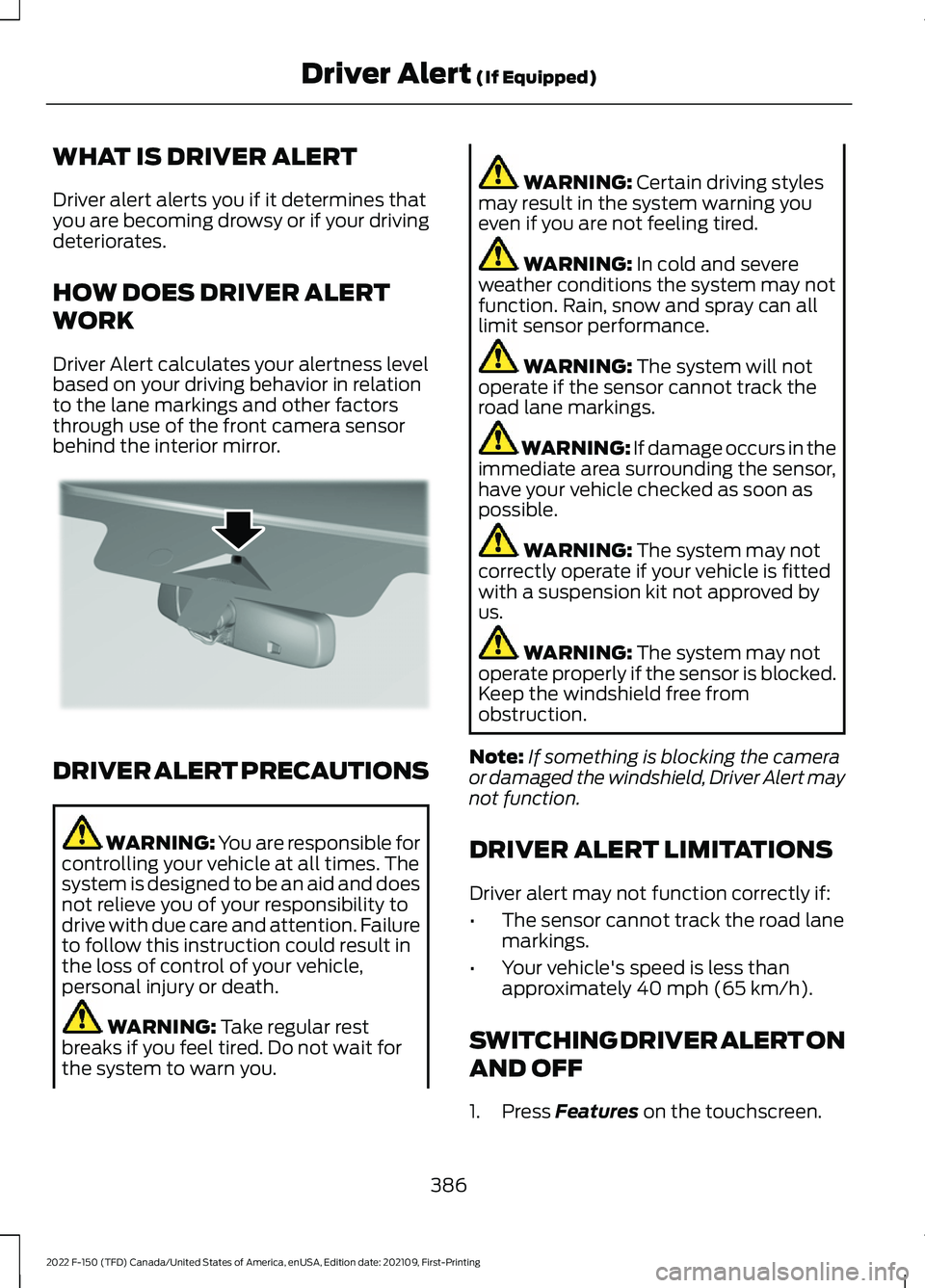
Driver Alert calculates your alertness level
based on your driving behavior in relation
to the lane markings and other factors
through use of the front camera sensor
behind the interior mirror.
DRIVER ALERT PRECAUTIONS
WARNING: You are responsible for
controlling your vehicle at all times. The
system is designed to be an aid and does
not relieve you of your responsibility to
drive with due care and attention. Failure
to follow this instruction could result in
the loss of control of your vehicle,
personal injury or death. WARNING: Take regular rest
breaks if you feel tired. Do not wait for
the system to warn you. WARNING:
Certain driving styles
may result in the system warning you
even if you are not feeling tired. WARNING:
In cold and severe
weather conditions the system may not
function. Rain, snow and spray can all
limit sensor performance. WARNING:
The system will not
operate if the sensor cannot track the
road lane markings. WARNING:
If damage occurs in the
immediate area surrounding the sensor,
have your vehicle checked as soon as
possible. WARNING:
The system may not
correctly operate if your vehicle is fitted
with a suspension kit not approved by
us. WARNING:
The system may not
operate properly if the sensor is blocked.
Keep the windshield free from
obstruction.
Note: If something is blocking the camera
or damaged the windshield, Driver Alert may
not function.
DRIVER ALERT LIMITATIONS
Driver alert may not function correctly if:
• The sensor cannot track the road lane
markings.
• Your vehicle's speed is less than
approximately
40 mph (65 km/h).
SWITCHING DRIVER ALERT ON
AND OFF
1. Press
Features on the touchscreen.
386
2022 F-150 (TFD) Canada/United States of America, enUSA, Edition date: 202109, First-Printing Driver Alert
(If Equipped)E309385
Page 409 of 750
Your vehicle may have a temporary or
conventional spare tire. A temporary spare
tire is different in diameter or width,
tread-type, or is from a different
manufacturer than the road tires on your
vehicle. Consult information on the tire
label or Safety Compliance label for
limitations when using.
When towing a trailer:
•
Obey country specific regulations for
towing a trailer.
• Do not drive faster than 70 mph
(113 km/h) during the first 500 mi
(800 km).
• Do not make full-throttle starts.
• Check your hitch, electrical connections
and trailer wheel lug nuts thoroughly
after you have traveled 50 mi (80 km).
• When stopped in congested or heavy
traffic during hot weather, place the
transmission in park (P) to aid engine
and transmission cooling and to help
A/C performance.
• Turn off the speed control with heavy
loads or in hilly terrain. The speed
control may turn off when you are
towing on long, steep slopes.
• Shift to a lower gear when driving down
a long or steep hill. Do not continuously
apply the brakes, as they may overheat
and become less effective.
• If your transmission has Grade Assist
or Tow/Haul, use this feature when
towing. This provides engine braking
and helps eliminate excessive
transmission shifting for optimum fuel
economy and transmission cooling. •
Your vehicle has AdvanceTrac with roll
stability control. When towing a trailer,
additional loads could cause the
AdvanceTrac system to engage during
cornering maneuvers. Reduce cornering
speeds to make sure that you can
maintain control of the vehicle and
trailer if the AdvanceTrac system
engages.
• Allow more distance for stopping with
a trailer attached. Anticipate stops and
gradually brake.
• Avoid parking on a slope. However, if
you must park on a slope, turn the
steering wheel to point your vehicle
tires away from traffic flow, set the
parking brake, place the transmission
in park (P) and place wheel chocks in
front and back of the trailer wheels.
Note: Chocks are not included with your
vehicle.
LAUNCHING OR RETRIEVING
A BOAT OR PERSONAL
WATERCRAFT
When backing down a ramp during boat
launching or retrieval:
• Do not allow the static water level to
rise above the bottom edge of the rear
bumper.
• Do not allow waves to break higher
than
6 in (15 cm) above the bottom
edge of the rear bumper.
Exceeding
6 in (15 cm) could allow water
to enter vehicle components, causing
internal damage to the components and
affecting driveability, emissions and
reliability.
Note: Replace the rear axle lubricant
anytime the rear axle has been submerged
in water.
405
2022 F-150 (TFD) Canada/United States of America, enUSA, Edition date: 202109, First-Printing Towing a Trailer
Page 414 of 750
WHAT IS THE INTEGRATED
TRAILER BRAKE CONTROLLER
The trailer brake controller assists in
smooth and effective trailer braking based
on the towing vehicle
’s brake pressure.
INTEGRATED TRAILER BRAKE
CONTROLLER PRECAUTIONS WARNING: Use the integrated
trailer brake controller to properly adjust
the trailer brakes and check all
connections before towing a trailer.
Failure to follow this instruction could
result in the loss of control of your
vehicle, personal injury or death.
• Only use the manual control lever for
proper adjustment of the gain during
trailer setup. Misuse, such as
application during trailer sway, could
cause instability of trailer or tow
vehicle.
• Avoid towing in adverse weather
conditions. The trailer brake controller
does not provide anti-lock control of
the trailer wheels. Trailer wheels can
lock up on slippery surfaces, resulting
in reduced stability of trailer and tow
vehicle.
• The trailer brake controller is only a
factory-installed or dealer-installed
item. Ford is not responsible for
warranty or performance of the
controller due to misuse or customer
installation.
Note: Do not attempt removal of the trailer
brake controller without consulting the
Workshop Manual. Damage to the unit may
result. USING THE INTEGRATED
TRAILER BRAKE CONTROLLER
1.
Make sure the trailer brakes are in good
working condition, functioning normally
and properly adjusted. See your trailer
dealer if necessary.
Note: An authorized dealer can diagnose
the trailer brake controller to determine
exactly which trailer fault has occurred. Your
vehicle warranty does not cover issues with
your trailer.
2. Hook up the trailer and make the electrical connections according to the
trailer manufacturer's instructions.
Note: Select default mode if the trailer has
surge brakes, or no brakes at all. The system
has no effect on the braking performance
of the trailer in either of these cases.
Note: If a trailer is connected by a four-pin
connector, the trailer braking function will
not be supported.
3. When you plug in a trailer with electric or electric-over-hydraulic brakes, a
message confirming connection
appears in the information display.
4. Use the gain adjustment to find the desired starting point. A gain setting of
6.0 is a good starting point for heavier
loads.
Note: Use the following steps to adjust the
gain setting whenever road, weather and
trailer, or vehicle loading conditions, change
from when you initially set the gain.
5. In a traffic-free environment, tow the trailer on a dry, level surface and
squeeze the manual control lever
completely.
410
2022 F-150 (TFD) Canada/United States of America, enUSA, Edition date: 202109, First-Printing Integrated Trailer Brake Controller
(If Equipped)
Page 419 of 750
WHAT IS TRAILER HITCHING
ASSISTANCE
Trailer hitching assistance helps the driver
align the vehicle hitch ball to a trailer
coupler.
HOW DOES TRAILER HITCHING
ASSISTANCE WORK
Trailer hitching assistance uses the
following to detect your trailer:
•
Rear view camera.
• Radar.
• Parking aid sensors.
• External rear lighting.
This feature also controls the following to
align the hitch ball with the trailer coupler:
• Steering.
• Shifting.
• Braking and acceleration.
Note: Blocked sensors could affect system
performance. Do not cover the sensors with
bumper stickers, tape, repair compound or
other objects.
TRAILER HITCHING
ASSISTANCE PRECAUTIONS WARNING: You are responsible for
controlling your vehicle at all times. The
system is designed to be an aid and does
not relieve you of your responsibility to
drive with due care and attention. Failure
to follow this instruction could result in
the loss of control of your vehicle,
personal injury or death. WARNING: The system is not
designed to detect cyclists,
motorcyclists, pedestrians or animals.
Apply the brakes when necessary. Failure
to follow this instruction could result
personal injury or death. WARNING:
The system may not
operate properly during severe weather
conditions, for example snow, ice, heavy
rain and spray. Always drive with due
care and attention. Failure to take care
may result in a crash.
Note: Trailer hitching assistance only works
with conventional trailers, couplers and
hitch balls.
Note: The hitch ball must be properly
installed on the vehicle for the system to
function as intended. An improperly
installed hitch ball could result in damage
to your vehicle or trailer.
Note: Certain aftermarket modifications
such as oversized tires or lift kits could make
trailer hitching assistance fail or not work
as intended.
Note: Keep the sensors and camera free
from snow, ice and dirt.
Note: Clean the camera lens with a soft,
lint-free cloth and non-abrasive cleaner.
TRAILER HITCHING
ASSISTANCE LIMITATIONS
The system could not function or could
function with reduced performance during
the following:
• When using trailer hitching assistance
in tall grass and weeds.
• When safety chains, cables or wiring
are dangling near the coupler.
• When using trailer hitching assistance
on slippery surfaces.
415
2022 F-150 (TFD) Canada/United States of America, enUSA, Edition date: 202109, First-Printing Trailer Hitching Assistance
(If Equipped)
Page 459 of 750
AFTER DRIVING YOUR VEHICLE
OFF-ROAD - RAPTOR
WARNING: After off-road use,
before returning to the road, check the
wheels and tires for damage. Off-road
use may cause damage to your wheels
and tires that can lead to tire failure, loss
of vehicle control, serious injury or death. WARNING:
Always re-inflate tires
to recommended tire pressures before
the vehicle is operated on-road. The
recommended pressure is located on the
tire label or safety certification label,
located on the B-pillar, inside the driver's
door.
Driving off-road places more stress on your
vehicle than most on-road driving. After
driving off-road, check for damage and, if
necessary, have your vehicle repaired by
an authorized dealer.
Inspect the underbody of your vehicle by
checking tires, body structure, steering,
suspension, and exhaust system for
damage.
Check the radiator for mud and debris and
clean as needed.
Remove accumulations of plants or brush.
These things could be a fire hazard or hide
damage to the fuel lines, brake hoses, and
propeller shafts.
After operation in mud, sand, water, or
similar dirty conditions, inspect the
underbody and clean your vehicle.
COLD WEATHER
PRECAUTIONS
The functional operation of some
components and systems can be affected
at temperatures below approximately
-13°F (-25°C)
. DRIVING ON SNOW AND ICE WARNING:
If you are driving in
slippery conditions that require tire
chains or cables, then it is critical that
you drive cautiously. Keep speeds down,
allow for longer stopping distances and
avoid aggressive steering to reduce the
chances of a loss of vehicle control
which can lead to serious injury or death.
If the rear end of your vehicle slides while
cornering, steer in the direction of the
slide until you regain control of your
vehicle.
On ice and snow, you should drive more
slowly than usual. Your vehicle has a four
wheel anti-lock brake system, do not pump
the brake pedal.
See Anti-Lock Braking
System Limitations (page 286).
BREAKING-IN
Your vehicle requires a break-in period. For
the first 1,000 mi (1,600 km), avoid driving
at high speeds, heavy braking, aggressive
shifting or using your vehicle to tow. During
this time, your vehicle may exhibit some
unusual driving characteristics.
DRIVING ECONOMICALLY
The following helps to improve fuel
consumption:
• Drive smoothly, accelerate gently and
anticipate the road ahead to avoid
heavy braking.
• Regularly check your tire pressures and
make sure that they are inflated to the
correct pressure.
• Follow the recommended maintenance
schedule and carry out the
recommended checks.
455
2022 F-150 (TFD) Canada/United States of America, enUSA, Edition date: 202109, First-Printing Driving Hints
Page 460 of 750
•
Plan your journey and check the traffic
before you set off. It is more efficient
to combine errands into a single trip
whenever possible.
• Avoid idling the engine in cold weather
or for extended periods. Start the
engine only when you are ready to set
off.
• Do not carry unnecessary weight in your
vehicle as extra weight wastes fuel.
• Do not add unnecessary accessories
to the exterior of your vehicle, for
example running boards. If you use a
roof rack, remember to fold it down or
remove it when not in use.
• Do not shift into neutral when you are
braking or when your vehicle is slowing
down.
• Shut all windows when driving at high
speeds.
• Switch off all electric systems when
not in use, for example air conditioning.
Make sure that you unplug any
accessories from the auxiliary power
points when not in use.
DRIVING IN SPECIAL
CONDITIONS
EMERGENCY MANEUVERS
In an unavoidable emergency where you
must make a sudden sharp maneuver, turn
the steering wheel only as rapidly and as
far as required to avoid the emergency.
Apply smooth pressure to the accelerator
pedal or brake pedal as needed. Avoid
abrupt steering, acceleration and braking
changes. Abrupt changes could increase
the risk of vehicle roll over, loss of vehicle
control and personal injury. If possible, use
any available road surfaces to bring your
vehicle under control. FLOOR MATS WARNING: Use a floor mat
designed to fit the footwell of your
vehicle that does not obstruct the pedal
area. Failure to follow this instruction
could result in the loss of control of your
vehicle, personal injury or death. WARNING:
Pedals that cannot
move freely can cause loss of vehicle
control and increase the risk of serious
personal injury. WARNING:
Secure the floor mat
to both retention devices so that it
cannot slip out of position and interfere
with the pedals. Failure to follow this
instruction could result in the loss of
control of your vehicle, personal injury or
death. WARNING: Do not place additional
floor mats or any other covering on top
of the original floor mats. This could
result in the floor mat interfering with the
operation of the pedals. Failure to follow
this instruction could result in the loss of
control of your vehicle, personal injury or
death. WARNING:
Always make sure that
objects cannot fall into the driver foot
well while your vehicle is moving. Objects
that are loose can become trapped
under the pedals causing a loss of
vehicle control.
456
2022 F-150 (TFD) Canada/United States of America, enUSA, Edition date: 202109, First-Printing Driving Hints