ground FORD F-150 2022 User Guide
[x] Cancel search | Manufacturer: FORD, Model Year: 2022, Model line: F-150, Model: FORD F-150 2022Pages: 750, PDF Size: 12.96 MB
Page 296 of 750
WHAT IS REVERSE BRAKING
ASSIST
The system uses sensors on the rear of
your vehicle to detect a possible collision
and applies the brakes to either reduce the
damage from impact, or to assist in
avoiding the collision.
HOW DOES REVERSE
BRAKING ASSIST WORK
Reverse Braking Assist functions when in
reverse (R) and traveling at a speed of
1–
7 mph (1.5– 12 km/h).
If the system detects an obstacle behind
your vehicle, it provides a warning through
the rear parking aid or cross traffic alert
system.
REVERSE BRAKING ASSIST
PRECAUTIONS WARNING: You are responsible for
controlling your vehicle at all times. The
system is designed to be an aid and does
not relieve you of your responsibility to
drive with due care and attention. Failure
to follow this instruction could result in
the loss of control of your vehicle,
personal injury or death. WARNING:
To help avoid personal
injury, always use caution when in
reverse (R) and when using the sensing
system. WARNING:
The system may not
operate properly during severe weather
conditions, for example snow, ice, heavy
rain and spray. Always drive with due
care and attention. Failure to take care
may result in a crash. WARNING: Traffic control systems,
fluorescent lamps, inclement weather,
air brakes, external motors and fans may
affect the correct operation of the
sensing system. This may cause reduced
performance or false alerts. WARNING:
Some situations and
objects prevent hazard detection. For
example low or direct sunlight, inclement
weather, unconventional vehicle types,
and pedestrians. Apply the brakes when
necessary. Failure to follow this
instruction could result in the loss of
control of your vehicle, personal injury or
death. WARNING:
Do not use the system
with accessories that extend beyond the
front or rear of your vehicle, for example
a trailer hitch or bike rack. The system is
not able to make corrections for the
additional length of the accessories.
The system only applies the brakes for a
short period of time when an event occurs.
Act as soon as you notice the brakes apply
in order to remain in control of the vehicle.
If you do not intervene the vehicle may
start to move again.
Note: Certain add-on devices around the
bumper or fascia may create false alerts.
For example, large trailer hitches, bicycle or
surfboard racks, license plate brackets,
bumper covers or any other device that may
block the normal detection zone of the
system. Remove the add-on device to
prevent false alerts.
Note: The system does not react to small
or moving objects, particularly those close
to the ground.
Note: The system does not operate during
hard acceleration or steering.
292
2022 F-150 (TFD) Canada/United States of America, enUSA, Edition date: 202109, First-Printing Reverse Braking Assist
(If Equipped)
Page 317 of 750
PARKING AID PRECAUTIONS
WARNING: To help avoid personal
injury, always use caution when in
reverse (R) and when using the sensing
system. WARNING:
The system may not
detect objects with surfaces that absorb
reflection. Always drive with due care
and attention. Failure to take care may
result in a crash. WARNING: Traffic control systems,
fluorescent lamps, inclement weather,
air brakes, external motors and fans may
affect the correct operation of the
sensing system. This may cause reduced
performance or false alerts. WARNING:
The system may not
detect small or moving objects,
particularly those close to the ground. WARNING:
The parking aid system
can only assist you to detect objects
when your vehicle is moving at parking
speeds. To help avoid personal injury you
must take care when using the parking
aid system. WARNING:
The system may not
function if the sensor is blocked. WARNING:
In cold and severe
weather conditions the system may not
function. Rain, snow and spray can all
limit sensor performance. WARNING:
If damage occurs in the
immediate area surrounding the sensor,
have your vehicle checked as soon as
possible. Note:
If your vehicle sustains damage
leaving the sensors misaligned, this will
cause inaccurate measurements or false
alerts.
When you connect a trailer to your vehicle,
the rear parking aid detects the trailer and
provides an alert. Disable the parking aid
when you connect a trailer to prevent the
alert.
Note: Certain add-on devices installed
around the bumper or fascia may create
false alerts, for example, large trailer
hitches, bike or surfboard racks, license plate
brackets, bumper covers or any other device
that could block the normal detection zone
of the parking aid system. Aftermarket spare
tires or spare tire covers mounted to the rear
tailgate could cause false alerts from the
park aid system. Remove the add-on device
to prevent false alerts.
Note: Keep the sensors free from snow, ice
and large accumulations of dirt. If the
sensors are covered, the system's accuracy
can be affected.
Do not clean the sensors with sharp
objects.
Note: When using a programmed MyKey,
you cannot switch the parking aids off. See
MyKey ™
(page 96).
SWITCHING PARKING AID ON
AND OFF Press the parking aid button and
use the menu to turn the system
on and off.
The system can also be turned off using
the pop-up message that appears when
you are in reverse (R).
313
2022 F-150 (TFD) Canada/United States of America, enUSA, Edition date: 202109, First-Printing Parking Aids
(If Equipped)PE326188
Page 380 of 750
WARNING: Take additional care if
your vehicle is heavily loaded or you are
towing a trailer. These conditions could
result in reduced performance of this
system. Failure to follow this instruction
could result in the loss of control of your
vehicle, personal injury or death. WARNING:
The system cannot
help prevent all crashes. Do not rely on
this system to replace driver judgment
and the need to maintain a safe distance
and speed. WARNING:
In situations where the
vehicle camera has limited detection
capability, this may reduce system
performance. These situations include
but are not limited to direct or low
sunlight, vehicles at night without tail
lights, unconventional vehicle types,
pedestrians with complex backgrounds,
running pedestrians, partly obscured
pedestrians, or pedestrians that the
system cannot distinguish from a group.
Failure to take care may result in the loss
of control of your vehicle, serious
personal injury or death.
PRE-COLLISION ASSIST
LIMITATIONS
Pre-collision assist depends on the
detection ability of its camera and sensors.
Any obstructions or damage to these areas
can limit detection or prevent the system
from functioning. See
Locating the
Pre-Collision Assist Sensors (page 378).
The system is active at speeds above
3 mph (5 km/h)
. Note:
The pre-collision assist system
automatically disables when you select
four-wheel drive low, manually disable
AdvanceTrac ™, or select rock crawl mode,
if your vehicle comes with it.
Note: Brake support and automatic
emergency braking are active at speeds up
to 80 mph (130 km/h). If your vehicle has a
radar sensor included with adaptive cruise
control, then brake support and automatic
emergency braking are active up to the
maximum speed of your vehicle.
Pedestrian Detection Limitations
Pedestrian detection is active at speeds
up to
50 mph (80 km/h).
Pedestrian detection operates optimally
when detected hazards are clearly
identifiable. System performance may
reduce in situations where pedestrians are
running, partly obscured, have a complex
background, or when the system cannot
distinguish pedestrians from a group.
Cyclist Detection Limitations
Cyclist detection is active at speeds up to
50 mph (80 km/h)
.
Cyclist detection functions optimally when
detected hazards are clearly identifiable.
System performance may reduce in
situations where cyclists are fast-moving,
partly obscured, have a complex
background, or cannot be distinguished
from a group.
Intersection Assist
(If Equipped)
If your vehicle comes with a radar sensor
included in adaptive cruise control, the
pre-collision assist system may operate in
a scenario where you are turning across an
oncoming vehicle's path. Detection of
vehicles driving in an oncoming direction
is active if your vehicle is driving at speeds
up to
19 mph (30 km/h).
376
2022 F-150 (TFD) Canada/United States of America, enUSA, Edition date: 202109, First-Printing Pre-Collision Assist
(If Equipped)
Page 400 of 750
A
The maximum force between the tailgate anchor points 400 lb (181 kg).
Note: Do not secure cargo from a pickup
bed anchor point to a tailgate anchor point.
This could cause the tailgate to detach.
PICKUP BED RAMPS
PICKUP BED RAMP
PRECAUTIONS WARNING:
When sliding the ramp
up or down, take care not to get your
fingers or hands caught in the
mechanism. Failure to follow this
instruction could result in personal injury. WARNING:
Make sure that you
correctly install the ramp to the tailgate
plate. Failure to follow this instruction
could result in personal injury. WARNING:
Do not step or sit on
the ramp when it is in the stowed
position. Failure to follow this instruction
could result in personal injury. WARNING:
Only install the ramp
within the prescribed ramp angles.
Failure to follow this instruction could
result in personal injury.
Note: Each pickup bed ramp has a
maximum capacity of
400 lb (181.4 kg).
Note: Verify the ramp is on stable ground
before usage. Note:
For loading and unloading
equipment, your ramp should be set
between 10 degrees upward and 26 degrees
downward to avoid damage to the ramp
claw and tailgate plate.
Note: When using your vehicle for off-road
operation, remove the bed ramps from the
vehicle and store them in a safe location
away from your vehicle.
INSTALLING AND REMOVING THE
PICKUP BED RAMP HOLDER
Installing the Ramp Holder 1. Hook the top of the ramp holder over
the mounting plate and rotate the
ramp holder into position. 2. Slide the ramp holder studs upwards
into the installed position.
396
2022 F-150 (TFD) Canada/United States of America, enUSA, Edition date: 202109, First-Printing Pickup BedE194387 E194388
Page 402 of 750
6. Pull the location pin outward and
extend the ramp until the pin is seated
in the usage position, then set the ramp
on even ground.
Removing the Ramp
Remove in the reverse order.
STORING THE PICKUP BED
RAMPS
Storing the Bed Ramp
1. Pick up the ramp. Pull the location pin outward.
2. Slide the ramp into the storage position
until the location pin locks.
Note: Make sure the proper pin location has
been applied for your bed size.
3. Slide the ramp claw off of the tailgate plate.
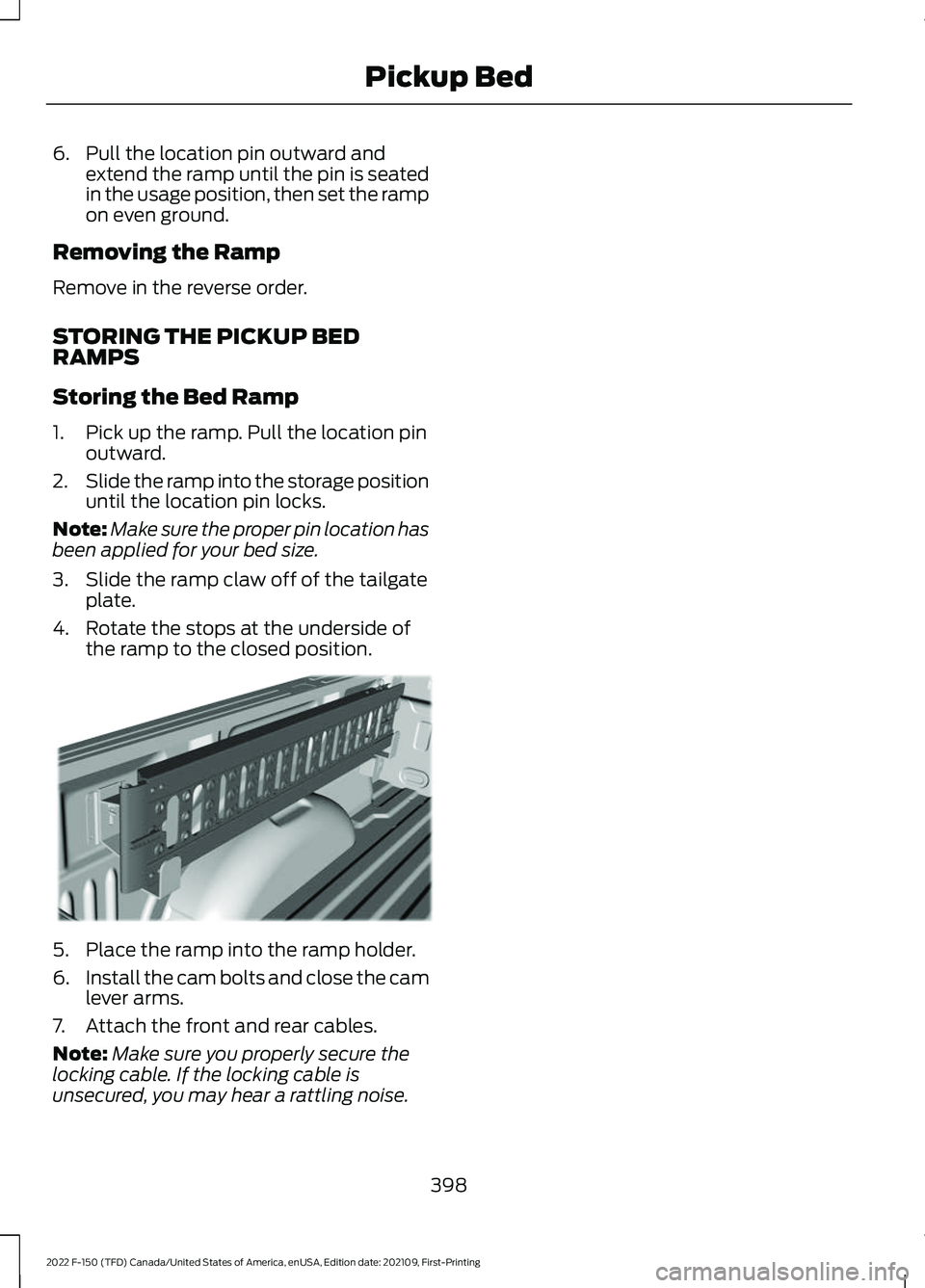
4. Rotate the stops at the underside of the ramp to the closed position. 5. Place the ramp into the ramp holder.
6.
Install the cam bolts and close the cam
lever arms.
7. Attach the front and rear cables.
Note: Make sure you properly secure the
locking cable. If the locking cable is
unsecured, you may hear a rattling noise.
398
2022 F-150 (TFD) Canada/United States of America, enUSA, Edition date: 202109, First-Printing Pickup BedE194391
Page 404 of 750
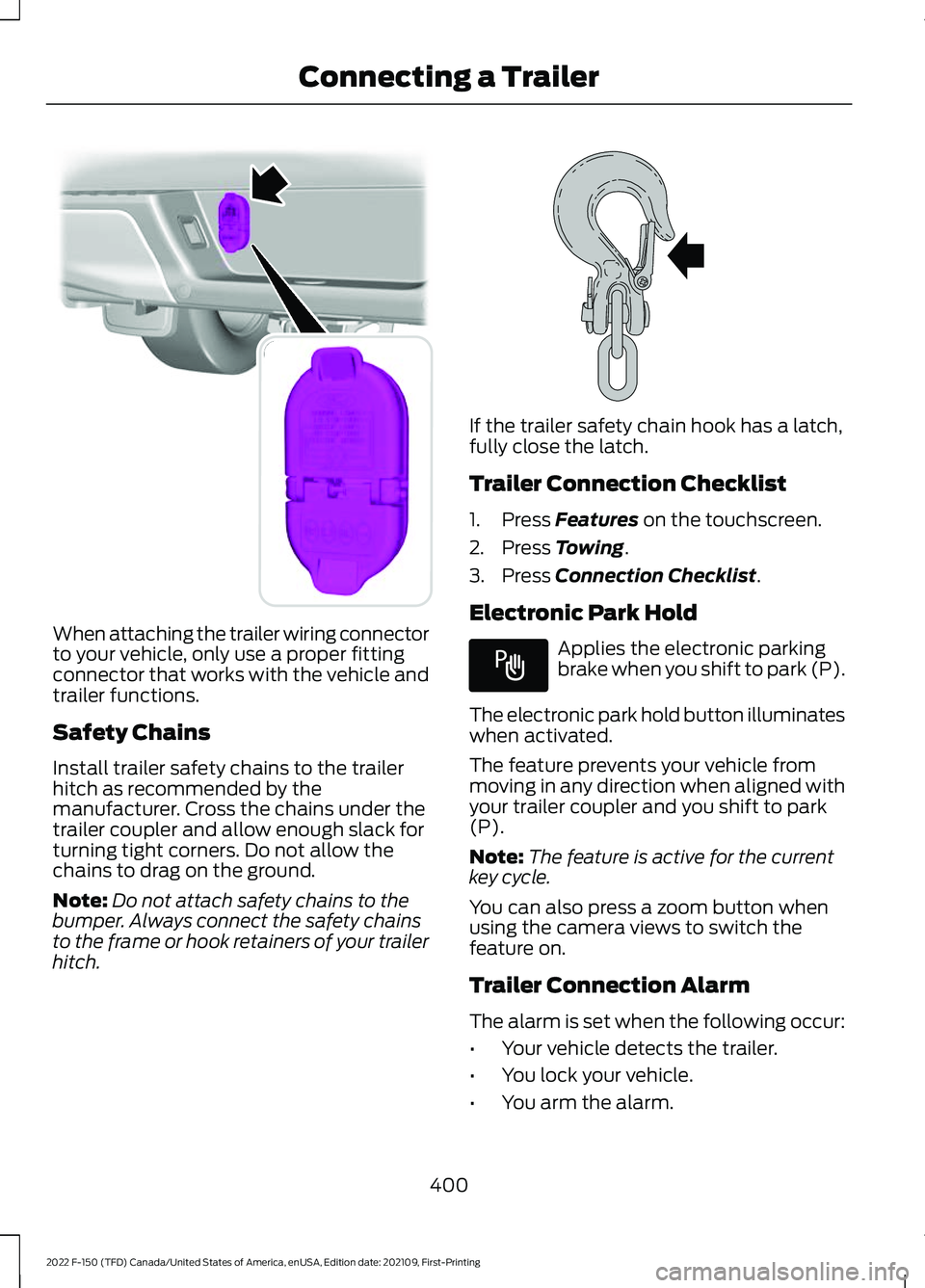
When attaching the trailer wiring connector
to your vehicle, only use a proper fitting
connector that works with the vehicle and
trailer functions.
Safety Chains
Install trailer safety chains to the trailer
hitch as recommended by the
manufacturer. Cross the chains under the
trailer coupler and allow enough slack for
turning tight corners. Do not allow the
chains to drag on the ground.
Note:
Do not attach safety chains to the
bumper. Always connect the safety chains
to the frame or hook retainers of your trailer
hitch. If the trailer safety chain hook has a latch,
fully close the latch.
Trailer Connection Checklist
1. Press Features on the touchscreen.
2. Press
Towing.
3. Press
Connection Checklist.
Electronic Park Hold Applies the electronic parking
brake when you shift to park (P).
The electronic park hold button illuminates
when activated.
The feature prevents your vehicle from
moving in any direction when aligned with
your trailer coupler and you shift to park
(P).
Note: The feature is active for the current
key cycle.
You can also press a zoom button when
using the camera views to switch the
feature on.
Trailer Connection Alarm
The alarm is set when the following occur:
• Your vehicle detects the trailer.
• You lock your vehicle.
• You arm the alarm.
400
2022 F-150 (TFD) Canada/United States of America, enUSA, Edition date: 202109, First-Printing Connecting a TrailerE193232 E265060 E337016
Page 427 of 750
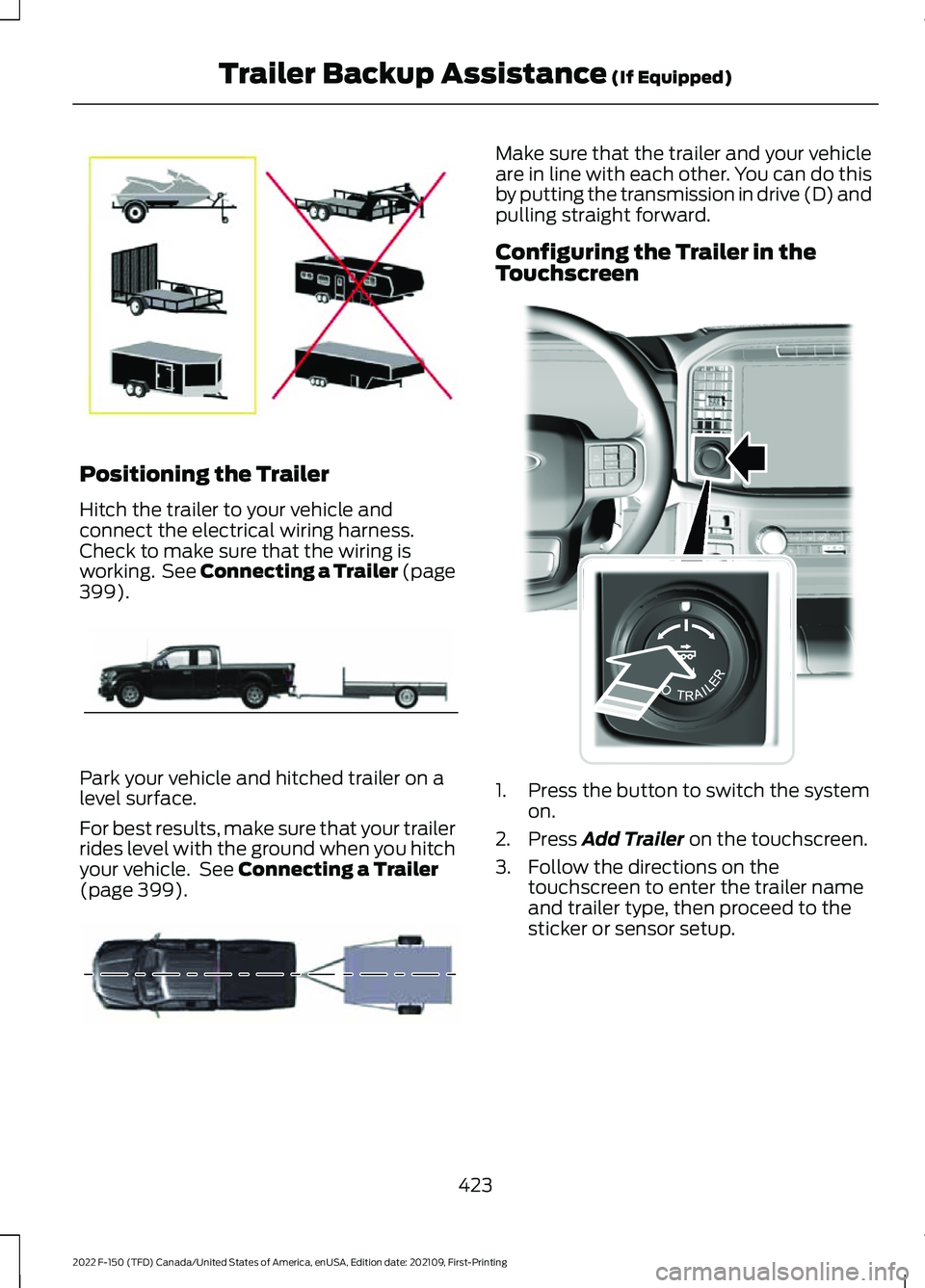
Positioning the Trailer
Hitch the trailer to your vehicle and
connect the electrical wiring harness.
Check to make sure that the wiring is
working. See Connecting a Trailer (page
399).
Park your vehicle and hitched trailer on a
level surface.
For best results, make sure that your trailer
rides level with the ground when you hitch
your vehicle. See
Connecting a Trailer
(page 399). Make sure that the trailer and your vehicle
are in line with each other. You can do this
by putting the transmission in drive (D) and
pulling straight forward.
Configuring the Trailer in the
Touchscreen
1. Press the button to switch the system
on.
2. Press
Add Trailer on the touchscreen.
3. Follow the directions on the touchscreen to enter the trailer name
and trailer type, then proceed to the
sticker or sensor setup.
423
2022 F-150 (TFD) Canada/United States of America, enUSA, Edition date: 202109, First-Printing Trailer Backup Assistance
(If Equipped)E209766 E209759 E209760 E310335
Page 438 of 750
•
The system could have difficulties
recognizing the sticker based on
environmental factors. You could need
to move to a different area to change
the lighting and background or you
could need to change the direction you
are driving. You could also try setting
up the system at a different time of
day.
• Some trailers are not compatible with
the sticker and camera system. If the
issue persists, set up the trailer with a
sensor purchased from your authorized
dealer. See Trailer Sensor
Installation (page 424).
What does it mean if the system
pauses during calibration?
• There could be steering input or trailer
movement during the straight drive
portion of the calibration process.
What does it mean if the system
displays hold steering steady
during turn?
• Part of the calibration process for the
sticker setup requires a steady turn. If
you are continually moving the steering
wheel during the turn, this delays the
calibration process. To enable the
calibration process, hold the steering
wheel at the same position when
turning. What does it mean if the system
displays that it is not available?
•
There could be a sub-system that the
system uses that is not correctly
operating. If the system continues to
display it is not available, visit your
authorized dealer to have your vehicle
checked.
• There could be a battery voltage issue.
Make sure the battery is correctly
charged. If the system continues to
display it is not available, visit your
authorized dealer to have your vehicle
checked.
What does it mean if the system
displays that driving is required to
initialize steering?
• The steering system needs to learn
internal parameters to fully turn on the
feature. Drive your vehicle straight
forward above
25 mph (40 km/h) for
approximately 5 minutes.
• Your vehicle is new, there is a battery
voltage issue or you have serviced the
steering system.
What does it mean if the system
requires you to pull forward to
initialize?
• This occurs when the vehicle has not
moved during the current key cycle
after you connect and select the trailer
in the touchscreen, or you operate the
system at speeds below
1 mph
(1 km/h) for an extended period of
time. Drive forward above 2 mph
(3 km/h) and the system indicates
when it initializes.
434
2022 F-150 (TFD) Canada/United States of America, enUSA, Edition date: 202109, First-Printing Trailer Backup Assistance
(If Equipped)
Page 442 of 750
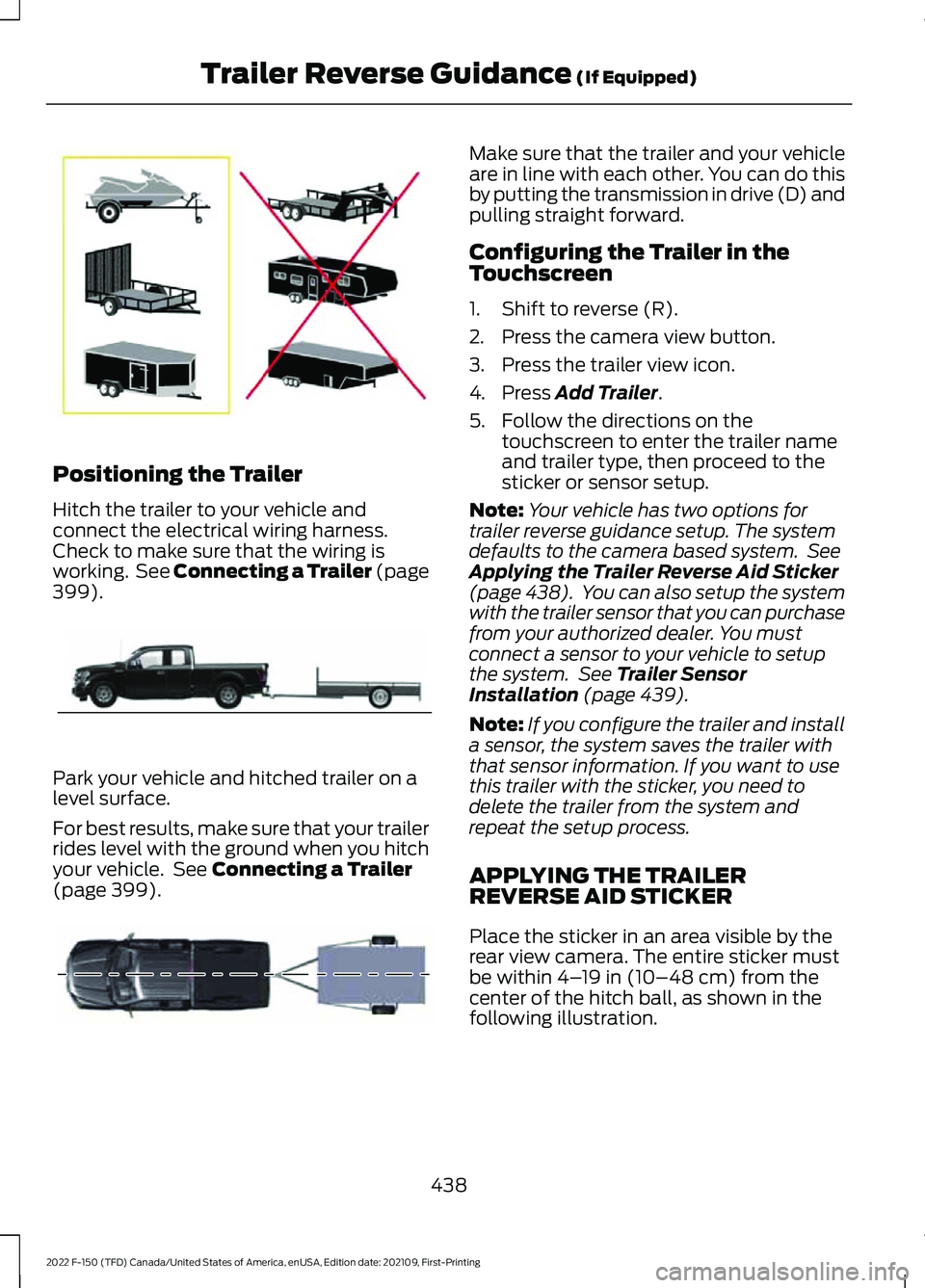
Positioning the Trailer
Hitch the trailer to your vehicle and
connect the electrical wiring harness.
Check to make sure that the wiring is
working. See Connecting a Trailer (page
399).
Park your vehicle and hitched trailer on a
level surface.
For best results, make sure that your trailer
rides level with the ground when you hitch
your vehicle. See
Connecting a Trailer
(page 399). Make sure that the trailer and your vehicle
are in line with each other. You can do this
by putting the transmission in drive (D) and
pulling straight forward.
Configuring the Trailer in the
Touchscreen
1. Shift to reverse (R).
2. Press the camera view button.
3. Press the trailer view icon.
4. Press
Add Trailer.
5. Follow the directions on the touchscreen to enter the trailer name
and trailer type, then proceed to the
sticker or sensor setup.
Note: Your vehicle has two options for
trailer reverse guidance setup. The system
defaults to the camera based system. See
Applying the Trailer Reverse Aid Sticker
(page 438). You can also setup the system
with the trailer sensor that you can purchase
from your authorized dealer. You must
connect a sensor to your vehicle to setup
the system. See
Trailer Sensor
Installation (page 439).
Note: If you configure the trailer and install
a sensor, the system saves the trailer with
that sensor information. If you want to use
this trailer with the sticker, you need to
delete the trailer from the system and
repeat the setup process.
APPLYING THE TRAILER
REVERSE AID STICKER
Place the sticker in an area visible by the
rear view camera. The entire sticker must
be within
4– 19 in (10–48 cm) from the
center of the hitch ball, as shown in the
following illustration.
438
2022 F-150 (TFD) Canada/United States of America, enUSA, Edition date: 202109, First-Printing Trailer Reverse Guidance
(If Equipped)E209766 E209759 E209760
Page 450 of 750
•
The system could have difficulties
recognizing the sticker based on
environmental factors. You could need
to move to a different area to change
the lighting and background or you
could need to change the direction you
are driving. You could also try setting
up the system at a different time of
day.
• Some trailers are not compatible with
the sticker and camera system. If the
issue persists, set up the trailer with a
sensor purchased from your authorized
dealer. See Trailer Sensor
Installation (page 439).
What does it mean if the system
pauses during calibration?
• There could be steering input or trailer
movement during the straight drive
portion of the calibration process.
What does it mean if the system
displays hold steering steady
during turn?
• Part of the calibration process for the
sticker setup requires a steady turn. If
you are continually moving the steering
wheel during the turn, this delays the
calibration process. To enable the
calibration process, hold the steering
wheel at the same position when
turning. What does it mean if the system
displays that it is not available?
•
There could be a sub-system that the
system uses that is not correctly
operating. If the system continues to
display it is not available, visit your
authorized dealer to have your vehicle
checked.
• There could be a battery voltage issue.
Make sure the battery is correctly
charged. If the system continues to
display it is not available, visit your
authorized dealer to have your vehicle
checked.
What does it mean if the system
displays that driving is required to
initialize steering?
• The steering system needs to learn
internal parameters to fully turn on the
feature. Drive your vehicle straight
forward above
25 mph (40 km/h) for
approximately 5 minutes.
• Your vehicle is new, there is a battery
voltage issue or you have serviced the
steering system.
What does it mean if the system
requires you to pull forward to
initialize?
• This occurs when the vehicle has not
moved during the current key cycle
after you connect and select the trailer
in the touchscreen, or you operate the
system at speeds below
1 mph
(1 km/h) for an extended period of
time. Drive forward above 2 mph
(3 km/h) and the system indicates
when it initializes.
446
2022 F-150 (TFD) Canada/United States of America, enUSA, Edition date: 202109, First-Printing Trailer Reverse Guidance
(If Equipped)