tail light FORD F-150 2022 User Guide
[x] Cancel search | Manufacturer: FORD, Model Year: 2022, Model line: F-150, Model: FORD F-150 2022Pages: 750, PDF Size: 12.96 MB
Page 380 of 750
WARNING: Take additional care if
your vehicle is heavily loaded or you are
towing a trailer. These conditions could
result in reduced performance of this
system. Failure to follow this instruction
could result in the loss of control of your
vehicle, personal injury or death. WARNING:
The system cannot
help prevent all crashes. Do not rely on
this system to replace driver judgment
and the need to maintain a safe distance
and speed. WARNING:
In situations where the
vehicle camera has limited detection
capability, this may reduce system
performance. These situations include
but are not limited to direct or low
sunlight, vehicles at night without tail
lights, unconventional vehicle types,
pedestrians with complex backgrounds,
running pedestrians, partly obscured
pedestrians, or pedestrians that the
system cannot distinguish from a group.
Failure to take care may result in the loss
of control of your vehicle, serious
personal injury or death.
PRE-COLLISION ASSIST
LIMITATIONS
Pre-collision assist depends on the
detection ability of its camera and sensors.
Any obstructions or damage to these areas
can limit detection or prevent the system
from functioning. See
Locating the
Pre-Collision Assist Sensors (page 378).
The system is active at speeds above
3 mph (5 km/h)
. Note:
The pre-collision assist system
automatically disables when you select
four-wheel drive low, manually disable
AdvanceTrac ™, or select rock crawl mode,
if your vehicle comes with it.
Note: Brake support and automatic
emergency braking are active at speeds up
to 80 mph (130 km/h). If your vehicle has a
radar sensor included with adaptive cruise
control, then brake support and automatic
emergency braking are active up to the
maximum speed of your vehicle.
Pedestrian Detection Limitations
Pedestrian detection is active at speeds
up to
50 mph (80 km/h).
Pedestrian detection operates optimally
when detected hazards are clearly
identifiable. System performance may
reduce in situations where pedestrians are
running, partly obscured, have a complex
background, or when the system cannot
distinguish pedestrians from a group.
Cyclist Detection Limitations
Cyclist detection is active at speeds up to
50 mph (80 km/h)
.
Cyclist detection functions optimally when
detected hazards are clearly identifiable.
System performance may reduce in
situations where cyclists are fast-moving,
partly obscured, have a complex
background, or cannot be distinguished
from a group.
Intersection Assist
(If Equipped)
If your vehicle comes with a radar sensor
included in adaptive cruise control, the
pre-collision assist system may operate in
a scenario where you are turning across an
oncoming vehicle's path. Detection of
vehicles driving in an oncoming direction
is active if your vehicle is driving at speeds
up to
19 mph (30 km/h).
376
2022 F-150 (TFD) Canada/United States of America, enUSA, Edition date: 202109, First-Printing Pre-Collision Assist
(If Equipped)
Page 405 of 750
When the trailer disconnects in this state,
the vehicle alarm sounds and the system
sends an alert to your FordPass app.
Note:
For reliable trailer detection, the
trailer ’s lamps must be SAE certified for
each intended purpose.
Note: If the trailer is not compatible with
the feature, the turn signals flash twice.
Switching the Trailer Connection
Alarm On and Off
1. Press Features on the touchscreen.
2. Press
Towing.
3. Press
Manage trailers.
4. Press the currently active trailer's name.
5. Switch
Trailer Connection Alarm on
or off.
Note: The alarm disables by default. If the
system detects a trailer, it can be
configurable.
Note: Settings are applicable only for the
selected trailer profile.
Trailer Connector Battery Lead
The trailer receives power from the vehicle
trailer connector battery lead when the
following occurs:
• Your vehicle is in accessory mode or
switched on.
• The trailer wiring connector is free of
corrosion or other damage. •
The vehicle battery is not low.
• When the trailer has a battery:
•The trailer battery voltage is within
5 volts of the vehicle battery
voltage.
• When you have the trailer battery
properly connected.
TRAILER LIGHTING CHECK WARNING:
Never connect any
trailer lamp wiring to the vehicle's tail
lamp wiring; this may damage the
electrical system resulting in fire. Contact
your authorized dealer as soon as
possible for assistance in proper trailer
tow wiring installation. Additional
electrical equipment may be required.
Perform a trailer light illumination
sequence to confirm that all lights are
functioning by using the FordPass app or
the vehicle's touchscreen.
Performing the Trailer Lighting
Check Using the Touchscreen
1. Press
Features on the touchscreen.
2. Press
Towing.
3. Press
Trailer Light Check.
4. Press
Start.
401
2022 F-150 (TFD) Canada/United States of America, enUSA, Edition date: 202109, First-Printing Connecting a Trailer
Page 412 of 750
TOWING A TRAILER – TROUBLESHOOTING
TOWING A TRAILER – INFORMATION MESSAGES
Details
Message
The left-hand trailer turn lamp requiresservice.
Trailer Left Turn Lamps Fault Check Lamps
The right-hand trailer turn lamp requiresservice.
Trailer Right Turn Lamps Fault Check
Lamps
The trailer battery voltage is too low tocharge.
Trailer Battery Not Charging See Manual
The system detects a short created by thetrailer lamps. Inspect and repair the trailer
wiring, or have the system checked as soon as possible.
Trailer Lighting Module Fault See Manual
The trailer stoplamps require service.
Trailer Stop Lamps Fault Check Lamps
Verify the trailer brake connections aresecure and that the aftermarket trailer
brake controller device is correctly installed. Perform a trailer brake and trailer light
check if possible. If the message persists, have your vehicle checked as soon as possible.
Trailer brake system fault See manual
Perform a trailer brake and trailer light
check if possible. If the message persists, have your vehicle checked as soon as possible.
Trailer brake module fault
The trailer sway control detects trailersway. Reduce the vehicle's speed.
Trailer Sway Reduce Speed
Displays when one or more tires on the
trailer is above the recommended temper- ature.
Trailer Tire Over Temperature
One or more tires on your trailer is belowthe specified tire pressure.
Trailer Tire Low Specified:
A trailer tire pressure sensor requires
service. If the warning stays on or continues to come on, have the system checked as soon as possible.
Trailer Tire Pressure Sensor Fault
408
2022 F-150 (TFD) Canada/United States of America, enUSA, Edition date: 202109, First-Printing Towing a Trailer
Page 423 of 750
Taillights
Press to see the hitch load balance on the
vehicle
’s tail lamp.
Connection Checklist
Press to go through the trailer setup guide
and adjust the load in the trailer to a
balanced range.
Reset Hitch Weight
Press to reset the weight on the hitch to
zero.
Loaded Trailer Weight
Press to set the total weight of the loaded
trailer.
Note: The vehicle's tongue weight is not
available until you attach a trailer.
Note: Make sure you include both the trailer
weight and the trailer cargo in your
calculation for total weight of the loaded
trailer.
Taillights
Press to see the hitch load balance on the
vehicle ’s tail lamp.
Smart Hitch Settings
Measurement Units
Press to change measurement units
between pounds and kilograms.
419
2022 F-150 (TFD) Canada/United States of America, enUSA, Edition date: 202109, First-Printing Smart Hitch (If Equipped)
Page 424 of 750
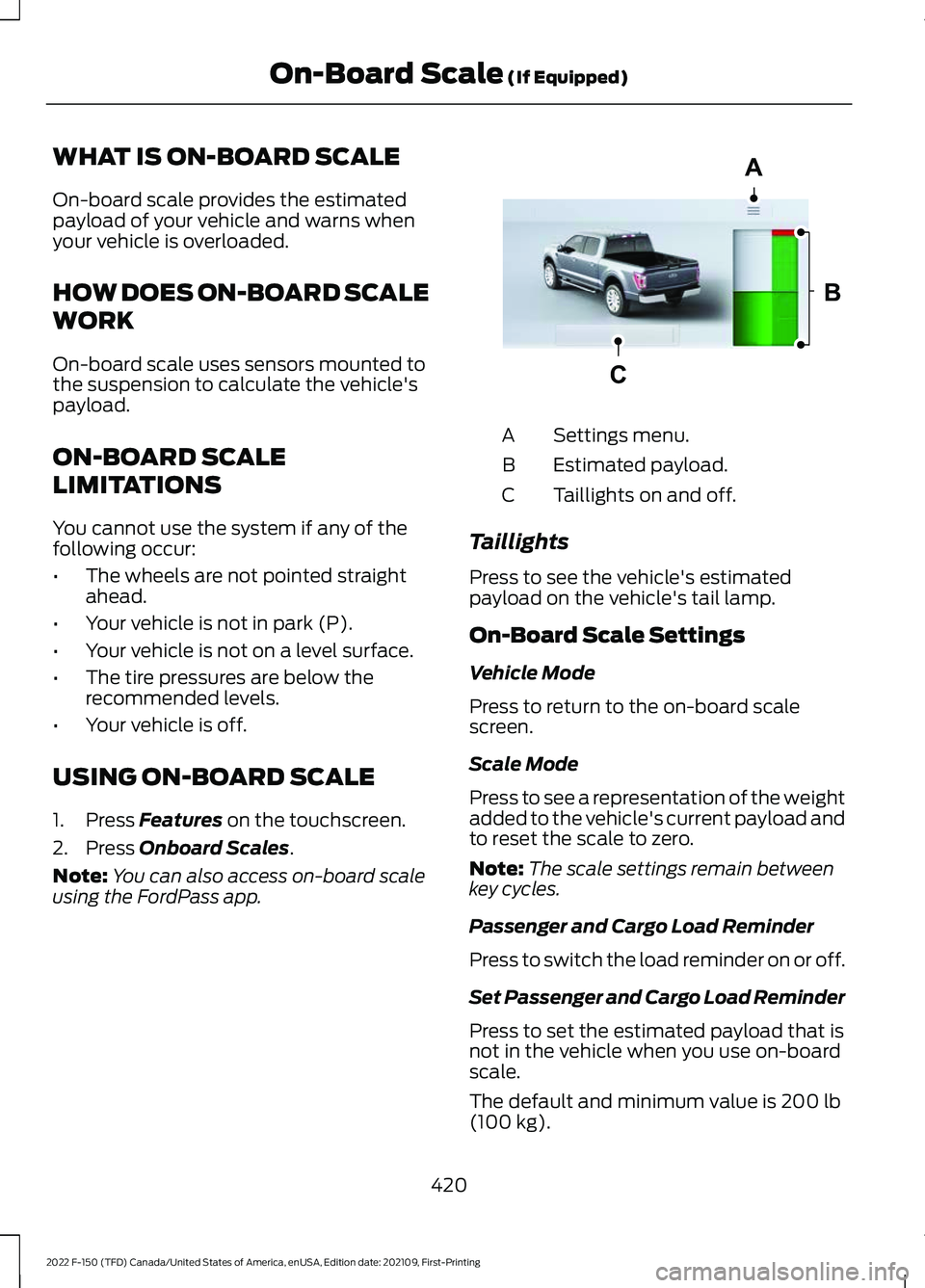
WHAT IS ON-BOARD SCALE
On-board scale provides the estimated
payload of your vehicle and warns when
your vehicle is overloaded.
HOW DOES ON-BOARD SCALE
WORK
On-board scale uses sensors mounted to
the suspension to calculate the vehicle's
payload.
ON-BOARD SCALE
LIMITATIONS
You cannot use the system if any of the
following occur:
•
The wheels are not pointed straight
ahead.
• Your vehicle is not in park (P).
• Your vehicle is not on a level surface.
• The tire pressures are below the
recommended levels.
• Your vehicle is off.
USING ON-BOARD SCALE
1. Press Features on the touchscreen.
2. Press
Onboard Scales.
Note: You can also access on-board scale
using the FordPass app. Settings menu.
A
Estimated payload.
B
Taillights on and off.
C
Taillights
Press to see the vehicle's estimated
payload on the vehicle's tail lamp.
On-Board Scale Settings
Vehicle Mode
Press to return to the on-board scale
screen.
Scale Mode
Press to see a representation of the weight
added to the vehicle's current payload and
to reset the scale to zero.
Note: The scale settings remain between
key cycles.
Passenger and Cargo Load Reminder
Press to switch the load reminder on or off.
Set Passenger and Cargo Load Reminder
Press to set the estimated payload that is
not in the vehicle when you use on-board
scale.
The default and minimum value is
200 lb
(100 kg).
420
2022 F-150 (TFD) Canada/United States of America, enUSA, Edition date: 202109, First-Printing On-Board Scale
(If Equipped)A
B
CE361332
Page 479 of 750
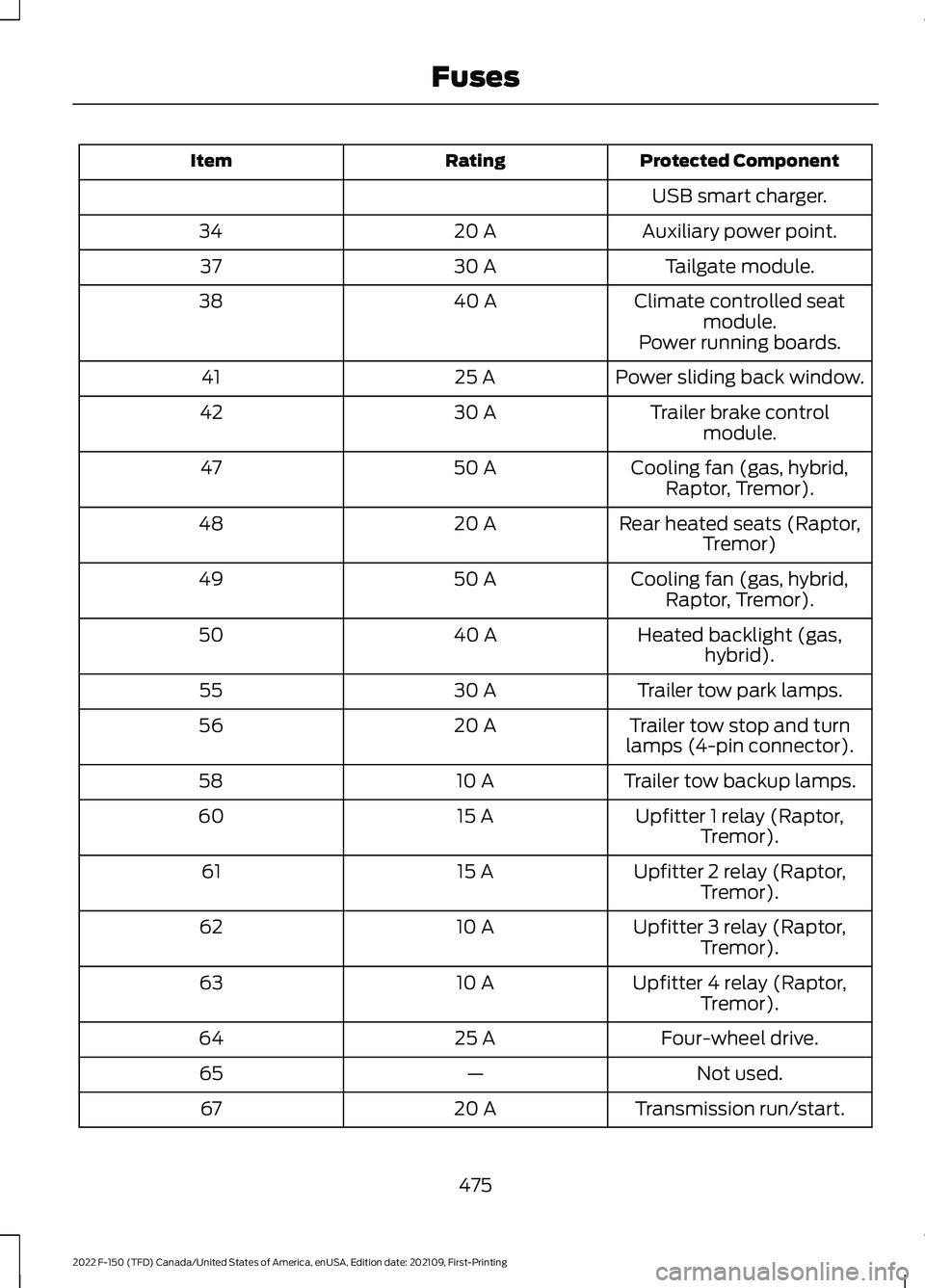
Protected Component
Rating
Item
USB smart charger.
Auxiliary power point.
20 A
34
Tailgate module.
30 A
37
Climate controlled seatmodule.
40 A
38
Power running boards.
Power sliding back window.
25 A
41
Trailer brake controlmodule.
30 A
42
Cooling fan (gas, hybrid,Raptor, Tremor).
50 A
47
Rear heated seats (Raptor,Tremor)
20 A
48
Cooling fan (gas, hybrid,Raptor, Tremor).
50 A
49
Heated backlight (gas,hybrid).
40 A
50
Trailer tow park lamps.
30 A
55
Trailer tow stop and turn
lamps (4-pin connector).
20 A
56
Trailer tow backup lamps.
10 A
58
Upfitter 1 relay (Raptor,Tremor).
15 A
60
Upfitter 2 relay (Raptor,Tremor).
15 A
61
Upfitter 3 relay (Raptor,Tremor).
10 A
62
Upfitter 4 relay (Raptor,Tremor).
10 A
63
Four-wheel drive.
25 A
64
Not used.
—
65
Transmission run/start.
20 A
67
475
2022 F-150 (TFD) Canada/United States of America, enUSA, Edition date: 202109, First-Printing Fuses
Page 480 of 750
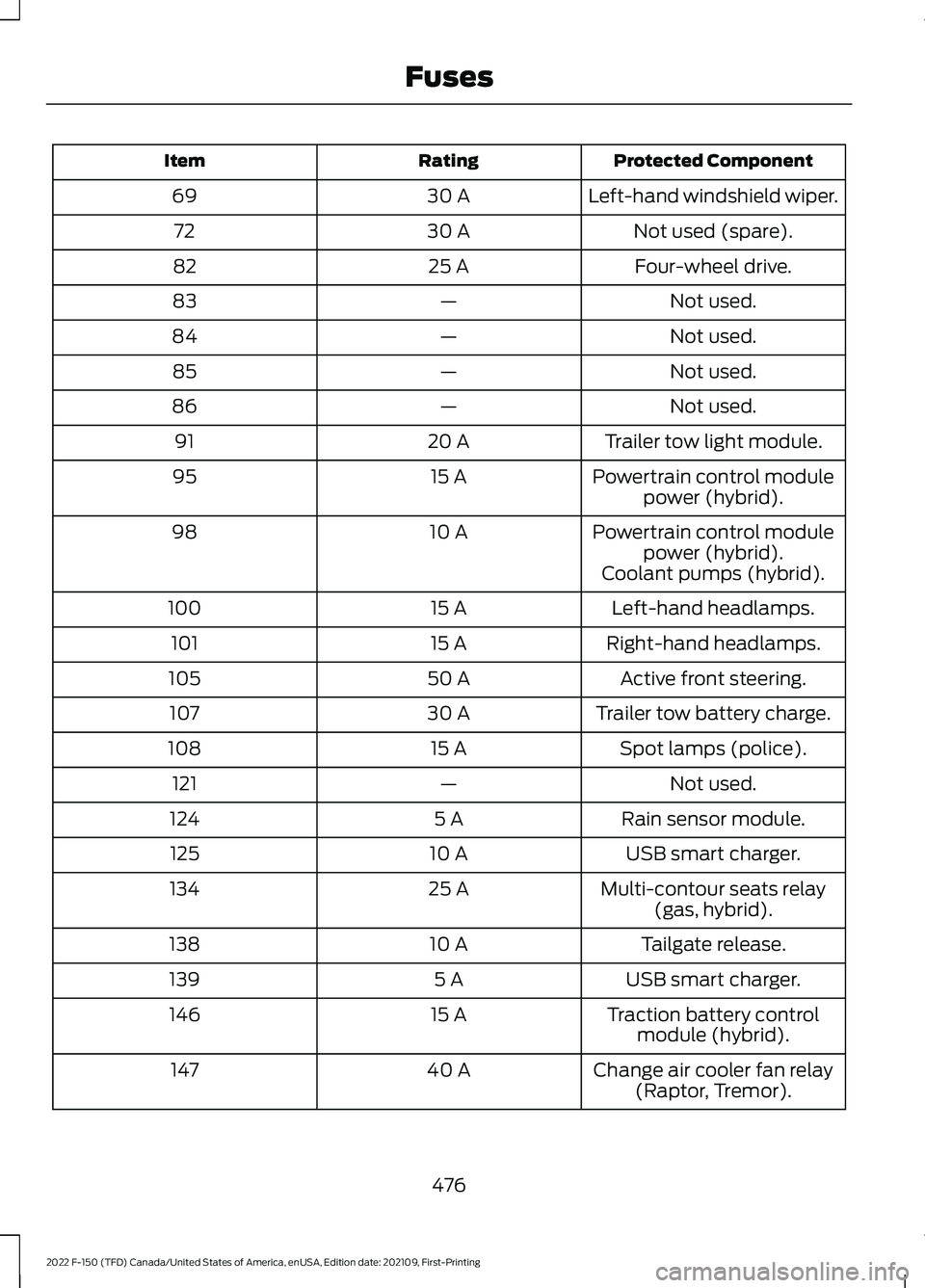
Protected Component
Rating
Item
Left-hand windshield wiper.
30 A
69
Not used (spare).
30 A
72
Four-wheel drive.
25 A
82
Not used.
—
83
Not used.
—
84
Not used.
—
85
Not used.
—
86
Trailer tow light module.
20 A
91
Powertrain control modulepower (hybrid).
15 A
95
Powertrain control modulepower (hybrid).
10 A
98
Coolant pumps (hybrid).Left-hand headlamps.
15 A
100
Right-hand headlamps.
15 A
101
Active front steering.
50 A
105
Trailer tow battery charge.
30 A
107
Spot lamps (police).
15 A
108
Not used.
—
121
Rain sensor module.
5 A
124
USB smart charger.
10 A
125
Multi-contour seats relay(gas, hybrid).
25 A
134
Tailgate release.
10 A
138
USB smart charger.
5 A
139
Traction battery controlmodule (hybrid).
15 A
146
Change air cooler fan relay(Raptor, Tremor).
40 A
147
476
2022 F-150 (TFD) Canada/United States of America, enUSA, Edition date: 202109, First-Printing Fuses
Page 717 of 750
SUNA TRAFFIC CHANNEL – TERMS
AND CONDITIONS
By activating, using and/or accessing the
SUNA Traffic Channel, SUNA Predictive or
other content or material provided by
Intelematics (together,
SUNA Products
and/or Services), you must accept
certain terms and conditions. The following
is a brief summary of the terms and
conditions that apply to you. To view the
full terms and conditions relevant to your
use of the SUNA Products and/or Services,
please consult: Website
www.sunatraffic.com.au/termsandcon- ditions/
1. Acceptance
By using SUNA Products and/or Services,
you will be deemed to have accepted and
agreed to be bound by the terms and
conditions fully detailed at: Website
www.sunatraffic.com.au/termsandcon- ditions/
2. Intellectual Property
SUNA Products and/or Services are for
your personal use. You may not record, or
retransmit the content, nor use the content
in association with any other traffic
information or route guidance service or
device not approved by Intelematics. You
obtain no right of ownership in any
Intellectual Property Rights (including
copyright) in the data that is used to
provide SUNA Products and/or Services.
3. Appropriate Use SUNA Products and/or Services are
intended as an aid to personal motoring
and travel planning, and do not provide
comprehensive or accurate information on
all occasions. On occasions, you may
experience additional delay as a result of
using SUNA Products and/or Services. You
acknowledge that it is not intended, or
suitable, for use in applications where time
of arrival or driving directions may impact
the safety of the public or yourself.
4. Use of SUNA Products and Services
while driving
You, and other authorized drivers of the
vehicle in which SUNA Products and/or
Services are available or installed and
active, remain at all times responsible for
observing all relevant laws and codes of
safe driving. In particular, you agree to only
actively operate SUNA Products and/or
Services when the Vehicle is at a complete
stop and it is safe to do so.
5. Service Continuity and Reception of
the SUNA Traffic Channel
We will use reasonable endeavors to
provide the SUNA Traffic Channel 24 hours
a day, 365 days a year. The SUNA Traffic
Channel may occasionally be unavailable
for technical reasons or for planned
maintenance. We will try to perform
maintenance at times when congestion is
light. We reserve the right to withdraw
SUNA Products and/or Services at any
time.
Also, we cannot assure the uninterrupted
reception of the SUNA Traffic Channel
RDS-TMC signal at any particular location.
6. Limitation of Liability
Neither Intelematics (nor its suppliers or
the manufacturer of your device (the
“
Suppliers”)) shall be liable to you or to
any third party for any damages either
direct, indirect, incidental, consequential
or otherwise arising out of the use of or
inability to use SUNA Products and/or
713
2022 F-150 (TFD) Canada/United States of America, enUSA, Edition date: 202109, First-Printing Customer Information