brake light FORD F-150 2022 Owner's Manual
[x] Cancel search | Manufacturer: FORD, Model Year: 2022, Model line: F-150, Model: FORD F-150 2022Pages: 750, PDF Size: 12.96 MB
Page 455 of 750
Driving In Sand
When driving over sand, try to keep all four
wheels on the most solid area of the trail.
Driving In Mud
Be cautious of sudden changes in vehicle
speed or direction when you are driving in
mud.
After driving through mud, clean your
vehicle. Excess mud stuck on the wheels
and tires and rotating components can
cause an imbalance and result in damage.
Note:
The vehicle brakes are less effective
when wet or muddy.
Driving Over Rocks and Gravel
Never attempt to straddle a rock that is
large enough to strike your axles or
undercarriage.
Leave a generous gap between your
vehicle and other vehicles to minimize the
risk of damage. Avoid dust clouds as they
reduce visibility.
Climbing A Hill WARNING: Extreme care should
be used when steering the vehicle in
reverse down a slope so as not to cause
the vehicle to swerve out of control.
Do not drive over the crest of a hill without
seeing what conditions are on the other
side. Do not drive in reverse over a hill
without the aid of an observer.
Note: Avoid turning on steep slopes or hills.
A danger lies in losing traction, slipping
sideways and possible vehicle roll over.
Note: Too much acceleration can cause
the tires to slip, spin or lose traction,
resulting in loss of vehicle control. Driving Through Water WARNING:
Do not attempt to
cross a deep, fast flowing body of water.
Failure to follow this instruction could
result in the loss of control of your
vehicle, personal injury or death.
The key to a safe crossing is the water
depth, current and bottom of the water's
condition. On soft bottoms, the vehicle
sinks in, effectively increasing the water
level on the vehicle. Make sure to consider
this when determining the depth of water.
Determine the depth and speed of the
current before attempting a water crossing.
Be aware that obstacles and debris could
be beneath the water ’s surface.
Note: Cross flowing water at an angle
heading slightly upstream.
Note: Tread lightly and avoid damage to
the environment.
Water can cause permanent damage that
may not be covered by your vehicle
warranty. See
Driving Through Water
Limitations (page 453).
Note: Failure to follow the recommended
speeds can result in vehicle damage.
Muddy waters can reduce the cooling
system effectiveness by depositing debris
into the radiator.
High currents even in shallow water can
wash the dirt out from around your tires or
push your vehicle across slippery rocks or
surfaces.
Do not cross any body of water that is fast
flowing and rising.
451
2022 F-150 (TFD) Canada/United States of America, enUSA, Edition date: 202109, First-Printing Driving Hints
Page 457 of 750
DRIVING THROUGH WATER
LIMITATIONS - RAPTOR
Maximum Wading
Depth
Model
32 in (810 mm)
All.
When you are driving though water do not
exceed 4 mph (7 km/h).
WATER WADING WARNING:
Do not attempt to
cross a deep, fast flowing body of water.
Failure to follow this instruction could
result in the loss of control of your
vehicle, personal injury or death.
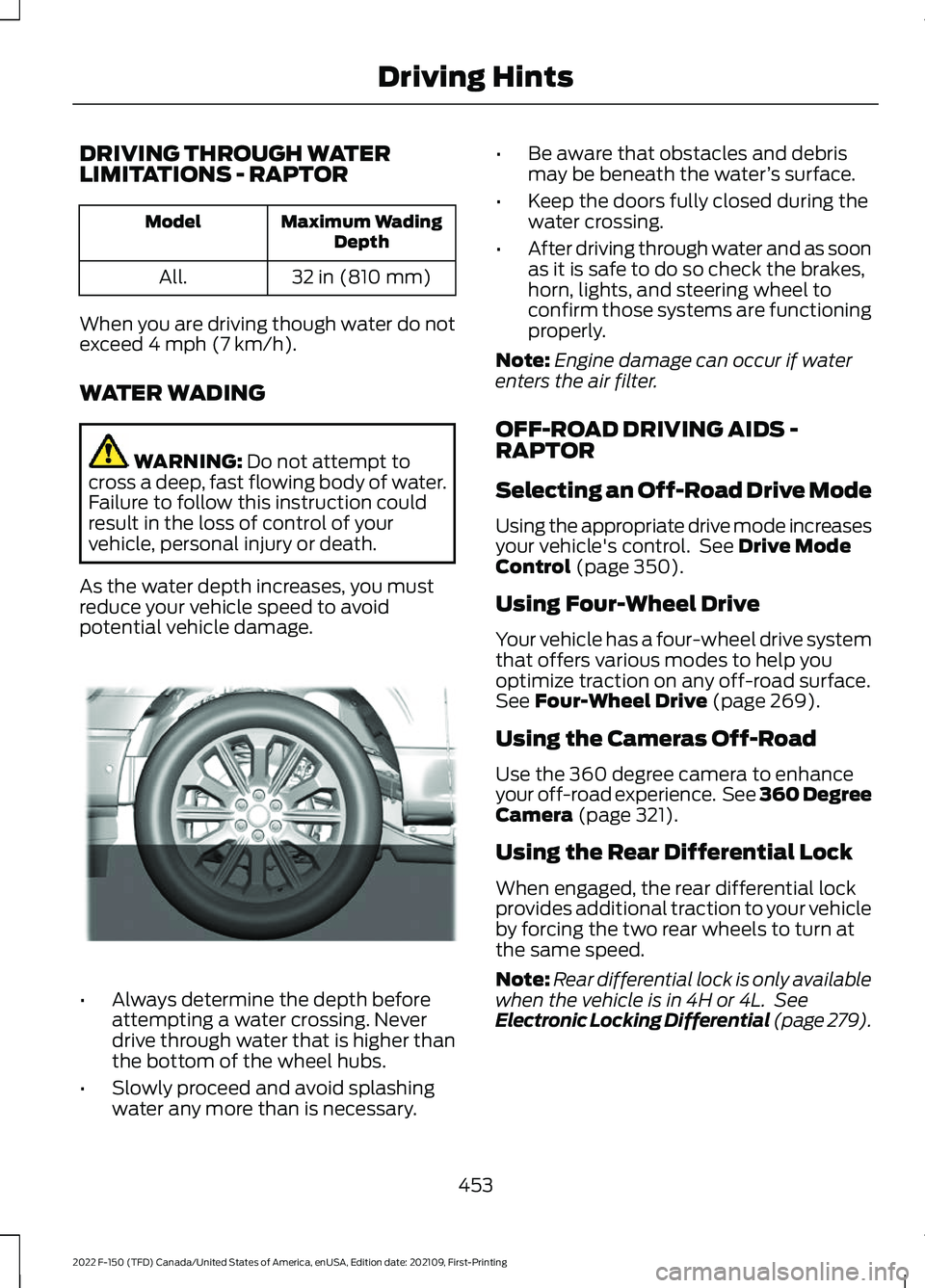
As the water depth increases, you must
reduce your vehicle speed to avoid
potential vehicle damage. •
Always determine the depth before
attempting a water crossing. Never
drive through water that is higher than
the bottom of the wheel hubs.
• Slowly proceed and avoid splashing
water any more than is necessary. •
Be aware that obstacles and debris
may be beneath the water ’s surface.
• Keep the doors fully closed during the
water crossing.
• After driving through water and as soon
as it is safe to do so check the brakes,
horn, lights, and steering wheel to
confirm those systems are functioning
properly.
Note: Engine damage can occur if water
enters the air filter.
OFF-ROAD DRIVING AIDS -
RAPTOR
Selecting an Off-Road Drive Mode
Using the appropriate drive mode increases
your vehicle's control. See
Drive Mode
Control (page 350).
Using Four-Wheel Drive
Your vehicle has a four-wheel drive system
that offers various modes to help you
optimize traction on any off-road surface.
See
Four-Wheel Drive (page 269).
Using the Cameras Off-Road
Use the 360 degree camera to enhance
your off-road experience. See 360 Degree
Camera
(page 321).
Using the Rear Differential Lock
When engaged, the rear differential lock
provides additional traction to your vehicle
by forcing the two rear wheels to turn at
the same speed.
Note: Rear differential lock is only available
when the vehicle is in 4H or 4L. See
Electronic Locking Differential (page 279).
453
2022 F-150 (TFD) Canada/United States of America, enUSA, Edition date: 202109, First-Printing Driving HintsE310941
Page 474 of 750
6. Press and hold the brake pedal.
7. Using the instrument cluster controls
on the steering wheel, select Settings.
8. Select Neutral Tow.
9. Press and hold the
OK button until a
confirmation message appears in the
information display.
Note: If completed successfully, the
information display shows
Neutral Tow
Enabled Leave Transmission in Neutral.
This indicates that your vehicle is safe to
tow with all wheels on the ground.
Note: If you do not see a confirmation
message in the instrument cluster display,
you must perform the procedure again from
the beginning.
Note: You may hear noise as the transfer
case shifts into its neutral position. This is
normal.
10. Release the brake pedal.
11. Leave the transmission in neutral (N)
and switch your vehicle off by
pressing the push button ignition
switch once without pressing the
brake pedal or turning the key as far
toward the off position.
Note: Vehicles with keys do not turn to the
off position when the transmission is in
neutral (N). You must leave the key in the
ignition when towing. Use the keyless entry
keypad or an extra set of keys to lock and
unlock your vehicle.
Switching
Neutral Tow Off
1. With your vehicle properly secured to the tow vehicle, press and hold the
brake pedal and start the engine.
2. Switch your vehicle off by pressing the
push button ignition switch once or
turning the key as far towards the off
position and release the brake pedal. 3. Place your vehicle in accessory mode
by pressing the push button ignition
switch once without pressing the brake
pedal or by turning the ignition key to
the on position.
4. Press and hold the brake pedal.
5. Shift into park (P).
6. Release the brake pedal.
Note: If completed successfully, the
instrument cluster displays 2H and Neutral
Tow Disabled
.
Note: You must perform the switching
neutral tow on and switching neutral tow
off procedures again from the beginning if
the indicator light and message do not
display.
Note: You may hear a noise as the transfer
case shifts out of its neutral position. This
is normal.
7. Apply the parking brake, then disconnect your vehicle from the tow
vehicle.
8. Release the parking brake, start the engine, and shift into drive (D) to make
sure the transfer case is out of the
neutral tow position.
9. If the transfer case does not successfully shift out of its neutral
position, set the parking brake. Have
your vehicle checked as soon as
possible.
Resolving the
Shift Delayed Drive
Forward Message
1. Press and hold the brake pedal.
2. Start your vehicle.
3. Shift into neutral (N).
4. With the vehicle running, shift into drive
(D) and let the vehicle roll forward up
to
3 ft (1 m).
470
2022 F-150 (TFD) Canada/United States of America, enUSA, Edition date: 202109, First-Printing Towing Your Vehicle
Page 479 of 750
Protected Component
Rating
Item
USB smart charger.
Auxiliary power point.
20 A
34
Tailgate module.
30 A
37
Climate controlled seatmodule.
40 A
38
Power running boards.
Power sliding back window.
25 A
41
Trailer brake controlmodule.
30 A
42
Cooling fan (gas, hybrid,Raptor, Tremor).
50 A
47
Rear heated seats (Raptor,Tremor)
20 A
48
Cooling fan (gas, hybrid,Raptor, Tremor).
50 A
49
Heated backlight (gas,hybrid).
40 A
50
Trailer tow park lamps.
30 A
55
Trailer tow stop and turn
lamps (4-pin connector).
20 A
56
Trailer tow backup lamps.
10 A
58
Upfitter 1 relay (Raptor,Tremor).
15 A
60
Upfitter 2 relay (Raptor,Tremor).
15 A
61
Upfitter 3 relay (Raptor,Tremor).
10 A
62
Upfitter 4 relay (Raptor,Tremor).
10 A
63
Four-wheel drive.
25 A
64
Not used.
—
65
Transmission run/start.
20 A
67
475
2022 F-150 (TFD) Canada/United States of America, enUSA, Edition date: 202109, First-Printing Fuses
Page 499 of 750
If you replace the battery make sure it
matches the electrical requirements of
your vehicle.
If you disconnect or replace the battery
and your vehicle has an automatic
transmission, it must relearn its adaptive
strategy. Because of this, the transmission
may shift firmly when first driven. This is
normal operation while the transmission
fully updates its operation to optimum
shift feel.
Battery Sensor Reset
When you install a new battery, reset the
battery sensor by doing the following:
1. Switch the ignition on, and leave the
engine off.
Note: Complete Steps 2 and 3 within 10
seconds.
2. Flash the high beam headlamps five times, ending with the high beams off.
3. Press and release the brake pedal three
times.
The battery warning lamp flashes three
times to confirm that the reset is
successful.
Battery Management System (If
Equipped)
The system monitors battery conditions
and takes actions to extend battery life. If
excessive battery drain is detected, the
system temporarily disables some
electrical systems to protect the battery.
Systems included are:
• Heated rear window.
• Heated seats.
• Climate control.
• Heated steering wheel.
• Audio unit.
• Navigation system. A message may appear in the information
display to alert you that battery protection
actions are active. This message is only for
notification that an action is taking place,
and not intended to indicate an electrical
problem or that the battery requires
replacement.
After battery replacement, or in some
cases after charging the battery with an
external charger, the battery management
system requires eight hours of vehicle sleep
time to relearn the battery state of charge.
During this time, your vehicle must remain
fully locked with the ignition switched off.
Note:
Prior to relearning the battery state
of charge, the battery management system
may temporarily disable some electrical
systems.
Electrical Accessory Installation
To make sure the battery management
system works correctly, do not connect an
electrical device ground connection
directly to the battery negative post. This
can cause inaccurate measurements of
the battery condition and potential
incorrect system operation.
Note: If you add electrical accessories or
components to the vehicle, it may adversely
affect battery performance and durability.
This may also affect the performance of
other electrical systems in the vehicle.
Remove and Reinstall the Battery
Install a battery approved for use by our
specifications. See
Capacities and
Specifications (page 558).
To disconnect or remove the battery, do
the following:
1. Apply the parking brake and switch the
ignition off.
2. Switch all electrical equipment off, for
example lights and radio.
495
2022 F-150 (TFD) Canada/United States of America, enUSA, Edition date: 202109, First-Printing Maintenance
Page 521 of 750
PREPARING YOUR VEHICLE
FOR STORAGE
If you plan on storing your vehicle for 30
days or more, the following maintenance
recommendations ensures your vehicle
stays in good operating condition.
Under various conditions, long-term
storage may lead to degraded engine
performance or failure unless you use
specific precautions to preserve your
vehicle.
General
•
Store all vehicles in a dry, ventilated
place.
• If vehicles are stored outside, they
require regular maintenance to protect
against rust and weather damage.
• Make sure all linkages, cables, levers
and pins under your vehicle are covered
with grease to prevent rust.
• Move vehicles at least 25 ft (7.5 m)
every 15 days to lubricate working parts
and prevent corrosion.
• Fill the fuel tank with high-quality fuel
until the first automatic shutoff of the
fuel pump nozzle.
Engine
• Change the engine oil and filter prior to
storage because used engine oil
contains contaminants which may
cause engine damage.
• Start the engine every 15 days for a
minimum of 15 minutes. Run at fast
idle with the climate controls set to
defrost until the engine reaches normal
operating temperature.
• With your foot on the brake, shift
through all the gears while the engine
is running. Body
•
Wash your vehicle thoroughly to
remove dirt, grease, oil, tar or mud from
exterior surfaces, rear-wheel housings
and the underside of front fenders.
• Periodically wash your vehicle if it is
stored in exposed locations.
• Touch-up exposed or primed metal to
prevent rust.
• Cover chrome and stainless steel parts
with a thick coat of auto wax to prevent
discoloration. Re-wax as necessary
when you wash your vehicle.
• Lubricate all hood, door and luggage
compartment hinges and latches with
a light grade oil.
• Cover interior trim to prevent fading.
• Keep all rubber parts free from oil and
solvents.
Hybrid Battery Systems
We recommend the following actions for
your vehicle:
• When storing your vehicle for greater
than 30 days the state of charge
should be approximately 50%.
Additionally we recommend
disconnecting the 12V battery which
will reduce system loads on the HV
battery.
12 Volt Battery
• Check and recharge as necessary. Keep
connections clean.
Note: It is necessary to reset memory
features if you disconnect the battery
cables.
Brakes
Make sure the brakes and parking brake
release fully.
517
2022 F-150 (TFD) Canada/United States of America, enUSA, Edition date: 202109, First-Printing Storing Your Vehicle
Page 547 of 750
CHANGING A FLAT TIRE
If you get a flat tire when driving, do not
apply the brake heavily. Instead, gradually
decrease your speed. Hold the steering
wheel firmly and slowly move to a safe
place on the side of the road.
Have a flat serviced by an authorized
dealer to prevent damage to the system
sensors. See Tire Pressure Monitoring
System Precautions (page 537). Replace
the spare tire with a road tire as soon as
possible. When repairing or replacing the
flat tire, have the authorized dealer inspect
the system sensor for damage.
Note: The use of tire sealant could damage
your tire pressure monitoring system. Only
use in roadside emergencies.
Note: The tire pressure monitoring system
indicator light illuminates when the spare
tire is in use. To restore the full function of
the monitoring system, you must mount all
road wheels that come with tire pressure
monitoring sensors on this vehicle.
Dissimilar Spare Wheel and Tire
Assembly Information WARNING:
Failure to follow these
guidelines could result in an increased
risk of loss of vehicle control, injury or
death.
If you have a dissimilar spare wheel and
tire, the intent of the spare wheel is for
temporary use only. This means that if you
need to use it, replace it as soon as
possible with a road wheel and tire
assembly that is the same size and type
as the road tires and wheels originally
provided by Ford. We define a dissimilar spare wheel and tire
assembly as a spare wheel and tire
assembly that is different in brand, size or
appearance from the road tires and
wheels.
Full-size dissimilar spare
When driving with the full-size dissimilar
spare wheel and tire assembly, do not:
•
Exceed
70 mph (113 km/h).
• Use more than one dissimilar spare
wheel and tire assembly at a time.
• Use snow chains on the end of the
vehicle with the dissimilar spare wheel
and tire assembly.
Engage any four-wheel drive mode. See
Four-Wheel Drive Limitations (page 270).
The usage of a full-size dissimilar spare
wheel and tire assembly can lead to
impairment of the following:
• Handling, stability and braking
performance.
• Comfort and noise.
• Ground clearance and parking at curbs.
• Winter weather driving capability.
• Wet weather driving capability.
• Four-wheel drive capability.
When driving with the full-size dissimilar
spare wheel and tire assembly, give
additional caution to:
• Towing a trailer.
• Driving vehicles that come with a
camper body.
• Driving vehicles with a load on the
cargo rack.
Drive cautiously when using a full-size
dissimilar spare wheel and tire assembly
and seek service as soon as possible.
543
2022 F-150 (TFD) Canada/United States of America, enUSA, Edition date: 202109, First-Printing Changing a Road Wheel
Page 553 of 750
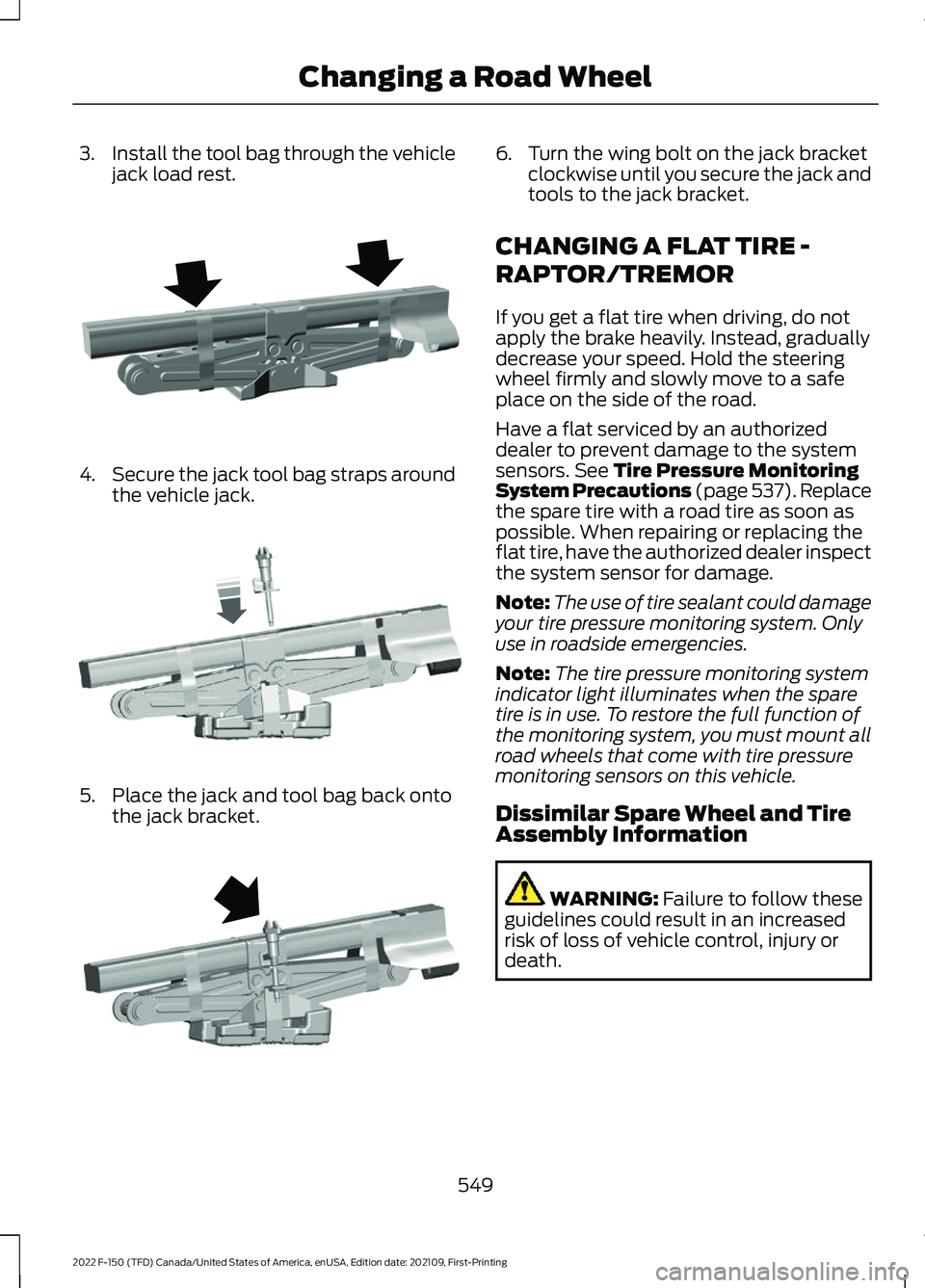
3.
Install the tool bag through the vehicle
jack load rest. 4.
Secure the jack tool bag straps around
the vehicle jack. 5. Place the jack and tool bag back onto
the jack bracket. 6. Turn the wing bolt on the jack bracket
clockwise until you secure the jack and
tools to the jack bracket.
CHANGING A FLAT TIRE -
RAPTOR/TREMOR
If you get a flat tire when driving, do not
apply the brake heavily. Instead, gradually
decrease your speed. Hold the steering
wheel firmly and slowly move to a safe
place on the side of the road.
Have a flat serviced by an authorized
dealer to prevent damage to the system
sensors. See Tire Pressure Monitoring
System Precautions (page 537). Replace
the spare tire with a road tire as soon as
possible. When repairing or replacing the
flat tire, have the authorized dealer inspect
the system sensor for damage.
Note: The use of tire sealant could damage
your tire pressure monitoring system. Only
use in roadside emergencies.
Note: The tire pressure monitoring system
indicator light illuminates when the spare
tire is in use. To restore the full function of
the monitoring system, you must mount all
road wheels that come with tire pressure
monitoring sensors on this vehicle.
Dissimilar Spare Wheel and Tire
Assembly Information WARNING:
Failure to follow these
guidelines could result in an increased
risk of loss of vehicle control, injury or
death.
549
2022 F-150 (TFD) Canada/United States of America, enUSA, Edition date: 202109, First-Printing Changing a Road WheelE323386 E327654 E323384
Page 637 of 750
UPDATING THE VEHICLE
SYSTEMS WIRELESSLY
Over the air system updates
allow you to update your vehicle
system software wirelessly. To
make sure you receive all updates, set a
recurring schedule and connect to Wi-Fi.
Updates may take longer if not connected
to Wi-Fi, or may not download at all. See
Connected Vehicle (page 597).
Over the Air System Update
Requirements
Before updating, reference this list to make
sure your vehicle is ready be updated. If
these requirements are not met during a
scheduled update, the update will be
canceled and you can reschedule.
• Your vehicle is not running.
• Your vehicle is stopped.
• Your vehicle is parked.
• The hazard indicators are switched off.
• The alarm is not sounding.
• The doors are closed.
• The parking lights are switched off.
• You are not pressing the brake pedal.
• An emergency call is not in progress.
• Your vehicle is not in limp mode.
Enabling Over the Air Updates
1. Press
Settings on the touchscreen.
2. Press
Software Update.
3. Switch
Automatic Updates on or off.
Note: Over the air updates are enabled by
default.
Note: If you do not want to receive over the
air updates you can turn them off. You will
not be notified of new updates. Scheduling an Update
Scheduling an update allows you to set a
convenient time for the update to
complete. We recommend updating
overnight when your vehicle is not in use.
Ensure Vehicle Connectivity and Automatic
Updates are enabled. Once you complete
these steps, your schedule will be saved
for future updates. As long as an update is
not in process you can adjust your
schedule.
Note:
Some updates may be applied
outside of your set schedule. Information
about the unscheduled update appears on
the touchscreen after it is applied.
Using the Settings Menu
1. Press
Settings on the touchscreen.
2. Press
Software Update.
3. Press
Schedule Updates.
4. Use the controls to set the time and day of the update.
5. Save the schedule.
Note: You can set the updates to occur at
any time.
Using the Status Bar Icon When an update is available, tap
the notification icon and follow
the prompts on the screen.
Applying an Over the Air Update
You can see the progress of the update on
the touchscreen. An update cannot be
canceled once it has been started.
633
2022 F-150 (TFD) Canada/United States of America, enUSA, Edition date: 202109, First-Printing Vehicle System UpdatesE327789 E327785
Page 647 of 750
It is important to rely upon your dealership
to properly diagnose and repair your
vehicle.
We strongly recommend only using our
genuine or our authorized re-manufactured
replacement parts engineered for your
vehicle.
Additives and Chemicals
We do not recommend using chemicals or
additives not approved by us as part of
your vehicle
’s normal maintenance. Please
consult your warranty information.
Oils, Fluids and Flushing
In many cases, fluid discoloration is a
normal operating characteristic and, by
itself, does not necessarily indicate a
concern or that the fluid needs to be
changed. Have discolored fluids that also
show signs of overheating or foreign
material contamination checked
immediately. Make sure to change the vehicle
’s oils and
fluids at the specified intervals or in
conjunction with a repair. Flushing is a
viable way to change fluid for many vehicle
sub-systems during scheduled
maintenance. It is critical that systems are
flushed only with new fluid that is the same
as that required to fill and operate the
system or using our approved flushing
chemical.
Owner Checks and Services
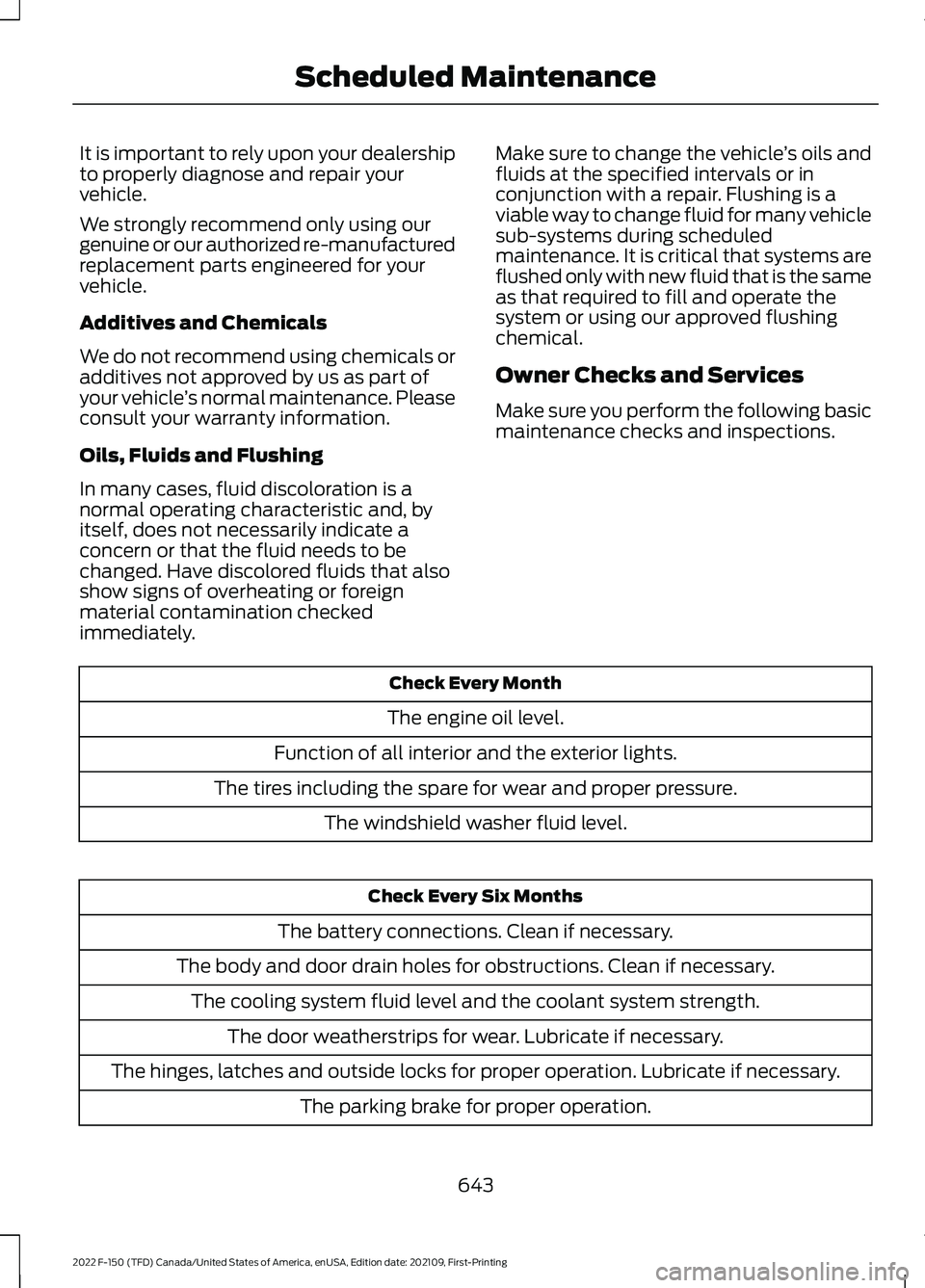
Make sure you perform the following basic
maintenance checks and inspections. Check Every Month
The engine oil level.
Function of all interior and the exterior lights.
The tires including the spare for wear and proper pressure. The windshield washer fluid level. Check Every Six Months
The battery connections. Clean if necessary.
The body and door drain holes for obstructions. Clean if necessary. The cooling system fluid level and the coolant system strength. The door weatherstrips for wear. Lubricate if necessary.
The hinges, latches and outside locks for proper operation. Lubricate if necessary. The parking brake for proper operation.
643
2022 F-150 (TFD) Canada/United States of America, enUSA, Edition date: 202109, First-Printing Scheduled Maintenance