seat memory FORD F-150 2022 Owners Manual
[x] Cancel search | Manufacturer: FORD, Model Year: 2022, Model line: F-150, Model: FORD F-150 2022Pages: 750, PDF Size: 12.96 MB
Page 10 of 750
Switching the Heated Rear Window On
and Off .........................................................187
Setting the Blower Motor Speed ...........
187
Switching the Heated Mirrors On and Off ........................................................................\
.
187
Setting the Temperature ...........................
187
Directing the Flow of Air ............................
187
Climate Control Hints ................................
188
Interior Air Quality
What Is the Cabin Air Filter ......................
189
Replacing the Cabin Air Filter .................
189
Front Seats
Front Seat Precautions .............................
190
Sitting in the Correct Position ................
190
Manual Seats .................................................
191
Power Seats ..................................................
193
Massage Seats .............................................
196
Heated Seats .................................................
197
Ventilated Seats ...........................................
197
Rear Seats
Manual Seats ................................................
199
Heated Seats ...............................................
200
Rear Occupant Alert System
What is the Rear Occupant Alert System ........................................................................\
202
How Does the Rear Occupant Alert System Work ............................................
202
Rear Occupant Alert System Precautions ........................................................................\
202
Rear Occupant Alert System Limitations ........................................................................\
202
Switching Rear Occupant Alert System On and Off ................................................
202
Rear Occupant Alert System Indicators ........................................................................\
203
Rear Occupant Alert System Audible Warnings ....................................................
203Memory Function
What Is the Memory Function
...............
204
Memory Function Precautions ..............
204
Locating the Memory Function Buttons ........................................................................\
204
Saving a Preset Position ..........................
204
Recalling a Preset Position .....................
204
Garage Door Opener
What Is the Garage Door Opener .........
205
How Does the Garage Door Opener Work ........................................................................\
205
Garage Door Opener Precautions ........
205
Garage Door Opener Limitations .........
205
Programming the Garage Door Opener to Your Hand-Held Transmitter ........
206
Programming the Garage Door Opener to Your Garage Door Opener Motor
.......................................................................
206
Programming the Garage Door Opener to Your Gate Opener Motor ................
207
Clearing the Garage Door Opener ........
207
Reprogramming the Garage Door Opener .......................................................................
208
Garage Door Opener Radio Frequencies .......................................................................
208
USB Ports
Locating the USB Ports ...........................
209
Locating the USB Ports - Raptor ..........
209
Playing Media Using the USB Port ......
209
Charging a Device ........................................
210
Power Outlet - Vehicles With: Pickup Bed Power Generator
Outlet
What Is the Power Outlet ..........................
211
Power Outlet Precautions - Vehicles With: 2kW ....................................................
211
Power Outlet Precautions - Vehicles With: 2.4kW/7.2kW ..................................
212
Locating the Power Outlets .....................
213
6
2022 F-150 (TFD) Canada/United States of America, enUSA, Edition date: 202109, First-Printing Table of Contents
Page 114 of 750
HOW DOES EASY ENTRY AND
EXIT WORK
Easy entry and exit moves the driver seat
rearward up to 2 in (5 cm) and may move
the steering column up and in when you
switch the ignition off. The driver seat and
steering column return to their previous
positions when you switch the ignition on.
SWITCHING EASY ENTRY AND
EXIT ON AND OFF
1. Press
Settings on the touchscreen.
2. Press
Vehicle.
3. Select
Easy Entry/Exit.
If you press any adjustment or memory
button when in easy exit mode, the system
cancels the operation.
110
2022 F-150 (TFD) Canada/United States of America, enUSA, Edition date: 202109, First-Printing Easy Entry and Exit
(If Equipped)
Page 208 of 750
WHAT IS THE MEMORY
FUNCTION
The memory function recalls the position
of these features:
•
Driver seat.
• Power mirrors.
• Optional power steering column.
• Optional power adjustable pedals.
MEMORY FUNCTION
PRECAUTIONS WARNING: Before activating the
memory seat, make sure that the area
immediately surrounding the seat is clear
of obstructions and that all occupants
are clear of moving parts. WARNING:
Do not use the memory
function when your vehicle is moving.
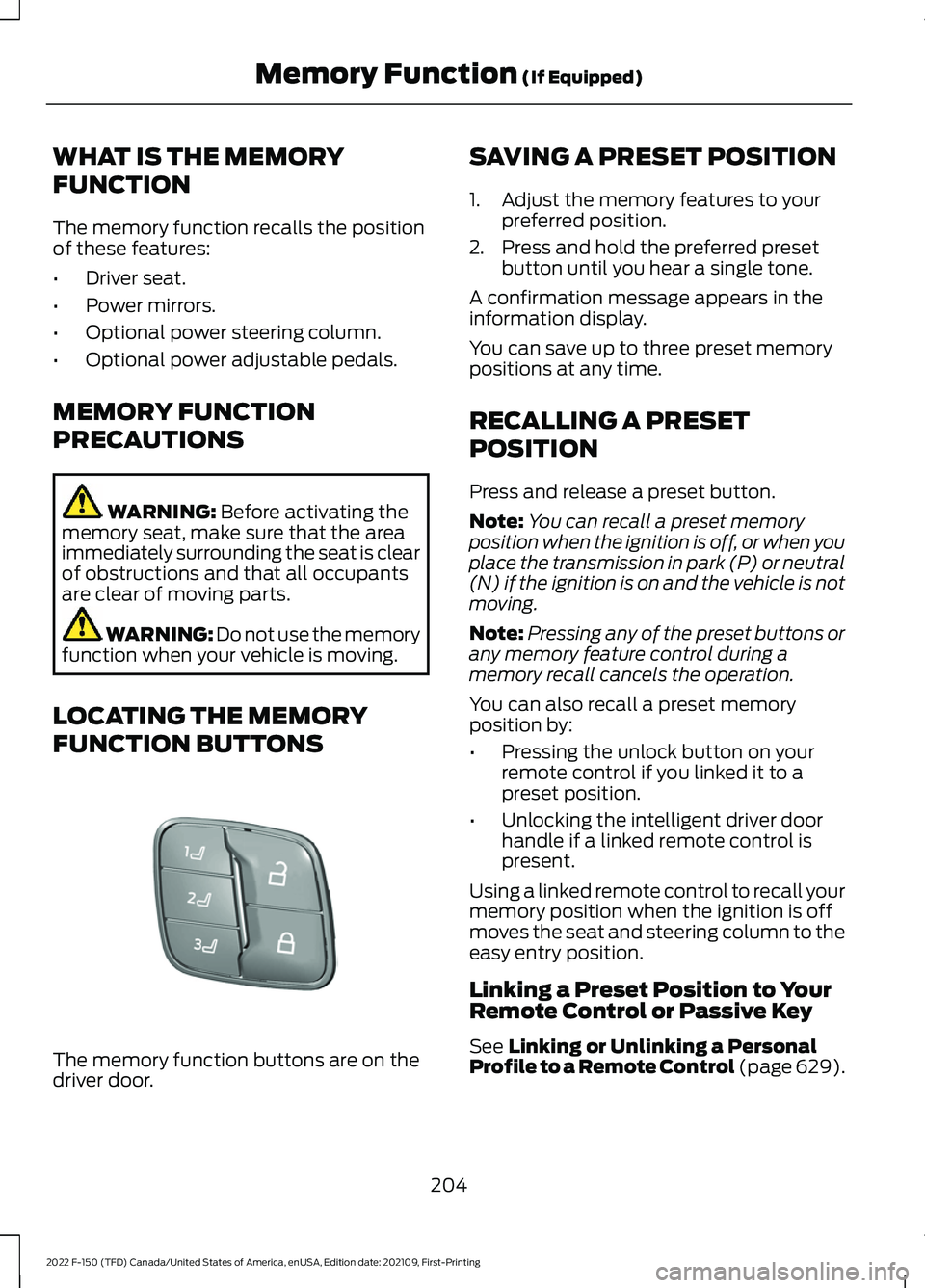
LOCATING THE MEMORY
FUNCTION BUTTONS The memory function buttons are on the
driver door. SAVING A PRESET POSITION
1. Adjust the memory features to your
preferred position.
2. Press and hold the preferred preset button until you hear a single tone.
A confirmation message appears in the
information display.
You can save up to three preset memory
positions at any time.
RECALLING A PRESET
POSITION
Press and release a preset button.
Note: You can recall a preset memory
position when the ignition is off, or when you
place the transmission in park (P) or neutral
(N) if the ignition is on and the vehicle is not
moving.
Note: Pressing any of the preset buttons or
any memory feature control during a
memory recall cancels the operation.
You can also recall a preset memory
position by:
• Pressing the unlock button on your
remote control if you linked it to a
preset position.
• Unlocking the intelligent driver door
handle if a linked remote control is
present.
Using a linked remote control to recall your
memory position when the ignition is off
moves the seat and steering column to the
easy entry position.
Linking a Preset Position to Your
Remote Control or Passive Key
See
Linking or Unlinking a Personal
Profile to a Remote Control (page 629).
204
2022 F-150 (TFD) Canada/United States of America, enUSA, Edition date: 202109, First-Printing Memory Function
(If Equipped)E332006
Page 632 of 750
HOW DO PERSONAL PROFILES
WORK
This feature allows you to create multiple
personal profiles enabling users to
personalize vehicle
’s settings such as seats
and mirrors, as well as non-positional
settings like radio, navigation, driver assist
system settings. Positional settings are
saved by holding a memory seat button.
Non-positional settings are saved you
change a setting while a profile is active.
You can create one profile for each preset
memory seat button along with a guest
profile.
Recalling and Changing a Profile
You can recall a profile using the
touchscreen or the preset button you
selected when you created your profile.
You can also link a remote control and a
mobile device to your profile, which are
used to recall it. ENABLING OR DISABLING
PERSONAL PROFILES
When you switch on the Personal Profiles
feature:
•
Unlocking a door with a remote control
or mobile device that is not linked to a
driver profile does not change the
active profile, but remains in the last
known profile. It does not change the
positional settings.
• Pressing a memory seat button that is
not linked to a driver profile or saved to
a preset setting does not change the
active profile, but remains in the last
known profile. It does not change the
positional settings.
• Pressing a memory seat button that is
not linked to a driver profile but is saved
to a preset setting does not change the
active profile, but remains in the last
known profile. It recalls the positional
settings that you saved to that memory
seat button.
When you switch off a Personal Profiles
feature:
• Unlocking a door with a remote control
or mobile device does not recall any
non-positional settings but still recalls
positional settings from the driver
profile which the remote control or
mobile device is linked to.
• Pressing a memory seat button that is
not linked to a driver profile or saved to
a preset setting does not change the
positional or non-positional settings.
• Pressing a memory seat button that is
linked to a driver profile or has saved
to a preset setting recalls the positional
settings that you saved to that memory
seat button.
628
2022 F-150 (TFD) Canada/United States of America, enUSA, Edition date: 202109, First-Printing Personal Profiles (If Equipped)
Page 736 of 750
Locating the USB Ports - Raptor...........209
Locating the Wireless Accessory
Charger.........................................................226
Locating Your Vehicle...................................89
Locking and Unlocking the Tailgate.........111
Locking the Rear Window Controls........................................................160
M
Maintenance.................................................482
Engine Air Filter.................................................. 493
Engine Oil............................................................. 488
Exterior Bulbs..................................................... 499
Interior Bulbs...................................................... 508
Maintenance Precautions
........................482
Making and Receiving a Phone Call.................................................................622
Manually Dimming the Interior Mirror
...............................................................161
Manually Releasing the Electric Parking Brake.............................................................289
Manually Shifting Gears............................262 Shifting Using the Buttons on the Selector
Lever.................................................................. 263
Shifting Using the Paddle Shifters..............262
Manual Park Release
..................................267
Manual Park Release Precautions...............267
Using Manual Park Release............................ 267
What Is Manual Park Release........................ 267
Manual Seats..................................................191 Adjusting the Head Restraint.......................... 191
Adjusting the Lumbar Support...................... 192
Adjusting the Seat Backrest........................... 192
Folding the Seats............................................... 199
Head Restraint Components.......................... 191
Installing the Head Restraint......................... 192
Moving the Seat Backward and Forward............................................................. 192
Removing the Head Restraint........................ 192
Unfolding the Seats......................................... 200
Massage Seats..............................................196 Adjusting the Massage Seat Settings........196
Massage Seat Limitations.............................. 196
Memory Function
........................................204
Memory Function Precautions...............204
Mislock.............................................................103 Mislock Limitations............................................ 103Switching Mislock On and Off.......................
103
What Is Mislock................................................... 103
Mobile Communications Equipment
..................................................688
Mobile Device Data.......................................30
Moonroof Bounce-Back
............................165
Overriding Moonroof Bounce-Back.............165
What Is Moonroof Bounce-Back.................. 165
Moonroof.........................................................164 Moonroof Bounce-Back................................... 165
Motorcraft Parts - 2.7L EcoBoost™.................................................563
Motorcraft Parts - 3.3L
..............................564
Motorcraft Parts - 3.5L, Hybrid Electric Vehicle (HEV)
............................................566
Motorcraft Parts - 3.5L Ecoboost™.................................................565
Motorcraft Parts - 5.0L
..............................567
Motorcraft Parts - Raptor........................568
Muting the Audio........................................604
MyKey Settings...............................................96
Configurable MyKey Settings.......................... 96
Non-Configurable MyKey Settings................96
MyKey – Troubleshooting
...........................99
MyKey – Frequently Asked Questions.........101
MyKey – Information Messages..................... 99
MyKey ™
............................................................96
MyKey Settings..................................................... 96
MyKey – Troubleshooting................................. 99
N
Navigation Map Updates.........................630
Navigation......................................................630 Adjusting the Map............................................. 630
Live Traffic............................................................ 630
Route Guidance................................................... 631
Setting a Destination....................................... 630
Waypoints............................................................. 631
Normal Scheduled Maintenance..........645
O
Off-Road Driving.........................................449 After Driving Your Vehicle Off-Road...........454
Basic Off-Road Driving Techniques...........449
Driving Off-Road............................................... 450
Driving Through Water Limitations.............453
732
2022 F-150 (TFD) Canada/United States of America, enUSA, Edition date: 202109, First-Printing Index