warning lights FORD F-150 2022 Owners Manual
[x] Cancel search | Manufacturer: FORD, Model Year: 2022, Model line: F-150, Model: FORD F-150 2022Pages: 750, PDF Size: 12.96 MB
Page 73 of 750
WHAT IS THE PERSONAL
SAFETY SYSTEM
An advanced safety system that protects
occupants in frontal crashes.
HOW DOES THE PERSONAL
SAFETY SYSTEM WORK
This system provides an improved level of
frontal crash protection to front seat
occupants and is designed to reduce the
risk of airbag-related injuries. The system
analyzes occupant conditions and crash
severity before activating the appropriate
safety devices. During a crash, the
restraints control module may deploy the
seatbelt pretensioners, and one or both
stages of the dual-stage airbags based on
crash severity and occupant conditions.
PERSONAL SAFETY SYSTEM
COMPONENTS
•
Driver and passenger dual-stage airbag
supplemental restraints.
• Front seat outermost seatbelts with
pretensioners, energy management
retractors and seatbelt usage sensors.
• Front passenger sensing system.
• Passenger airbag off and on indicators.
• Front crash severity sensors.
• Restraints control module with impact
and safing sensors.
• Restraint system warning light and
tone.
• The electrical wiring for the airbags,
crash sensors, seatbelt pretensioners,
front seatbelt usage sensors, front
passenger sensing system and
indicator lights.
69
2022 F-150 (TFD) Canada/United States of America, enUSA, Edition date: 202109, First-Printing Personal Safety System
™
Page 152 of 750
4. Switch Daytime Running Lights on or
off.
The daytime running lamps turn on when
all of the following occur:
• You switch the system on.
• You switch your vehicle on.
• The transmission is not in park (P) for
vehicles with automatic transmissions
or you release the parking brake for
vehicles with manual transmissions.
• The lighting control is in the autolamps
position.
• The headlamps are off.
Note: Other lighting control positions do
not turn on the daytime running lamps.
SWITCHING THE DAYTIME
RUNNING LAMPS ON AND OFF -
VEHICLES WITH: DAYTIME
RUNNING LAMPS (DRL) WARNING:
The daytime running
lamps system does not activate the rear
lamps and may not provide adequate
lighting during low visibility driving
conditions. Make sure you switch the
headlamps on, as appropriate, during all
low visibility conditions. Failure to do so
may result in a crash.
Daytime running lamps are always on
unless you switch on the headlamps or
your vehicle is in park (P).
SWITCHING THE FRONT FOG
LAMPS ON AND OFF
(If Equipped)
The front fog lamp button is on the lighting
control. Press the button to switch the
front fog lamps on or off. Note:
Only switch the front fog lamps on
during reduced visibility.
Note: The brightness of the daytime running
lamps may decrease when the front fog
lamps are switched on.
Note: When the lighting control is in the
autolamps position, you cannot switch the
fog lamps on unless the headlamps are on.
SWITCHING THE FRONT FOG
LAMPS ON AND OFF - RAPTOR
(If
Equipped)
The front fog lamp button is on the lighting
control. Press the button to switch the
front fog lamps on or off.
Note: Only switch the front fog lamps on
during reduced visibility.
Note: The brightness of the daytime running
lamps may decrease when you switch the
front fog lamps on.
Note: When the lighting control is in the
autolamps position, you cannot switch the
fog lamps on unless the headlamps are on.
Switching the Off-Road Lamps On
and Off
(If Equipped)
Use auxiliary switch 1 to switch the off-road
lamps on and off. See
What Are the
Auxiliary Switches (page 636).
SWITCHING THE CARGO LAMPS
ON Press the button in the lighting
control or in the rear cargo box.
148
2022 F-150 (TFD) Canada/United States of America, enUSA, Edition date: 202109, First-Printing Exterior Lighting E189587
Page 155 of 750
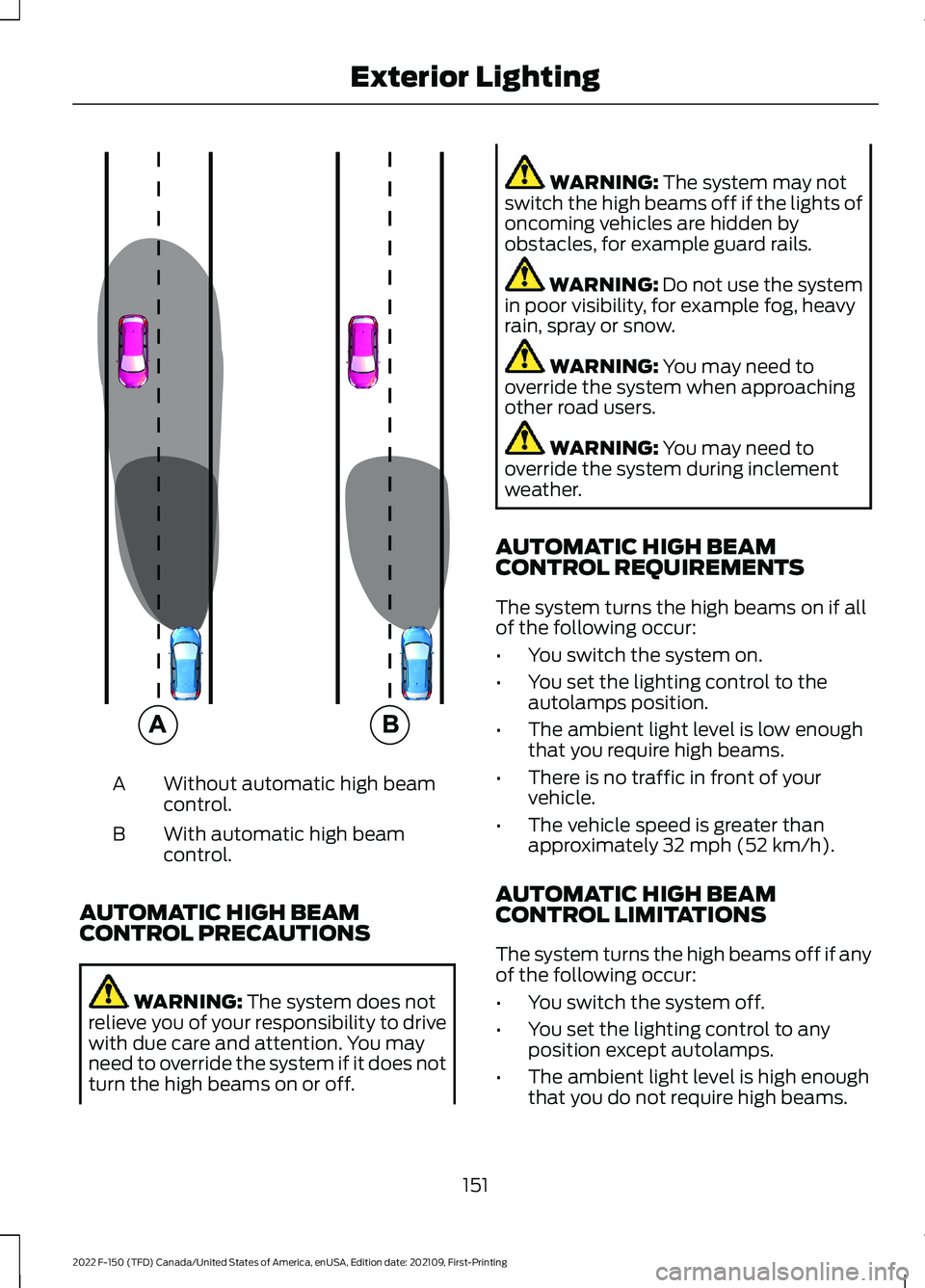
Without automatic high beam
control.
A
With automatic high beam
control.
B
AUTOMATIC HIGH BEAM
CONTROL PRECAUTIONS WARNING: The system does not
relieve you of your responsibility to drive
with due care and attention. You may
need to override the system if it does not
turn the high beams on or off. WARNING:
The system may not
switch the high beams off if the lights of
oncoming vehicles are hidden by
obstacles, for example guard rails. WARNING:
Do not use the system
in poor visibility, for example fog, heavy
rain, spray or snow. WARNING:
You may need to
override the system when approaching
other road users. WARNING:
You may need to
override the system during inclement
weather.
AUTOMATIC HIGH BEAM
CONTROL REQUIREMENTS
The system turns the high beams on if all
of the following occur:
• You switch the system on.
• You set the lighting control to the
autolamps position.
• The ambient light level is low enough
that you require high beams.
• There is no traffic in front of your
vehicle.
• The vehicle speed is greater than
approximately
32 mph (52 km/h).
AUTOMATIC HIGH BEAM
CONTROL LIMITATIONS
The system turns the high beams off if any
of the following occur:
• You switch the system off.
• You set the lighting control to any
position except autolamps.
• The ambient light level is high enough
that you do not require high beams.
151
2022 F-150 (TFD) Canada/United States of America, enUSA, Edition date: 202109, First-Printing Exterior Lighting E327596
Page 157 of 750
GLARE FREE LIGHTING (IF
EQUIPPED)
HOW DOES GLARE FREE LIGHTING
WORK
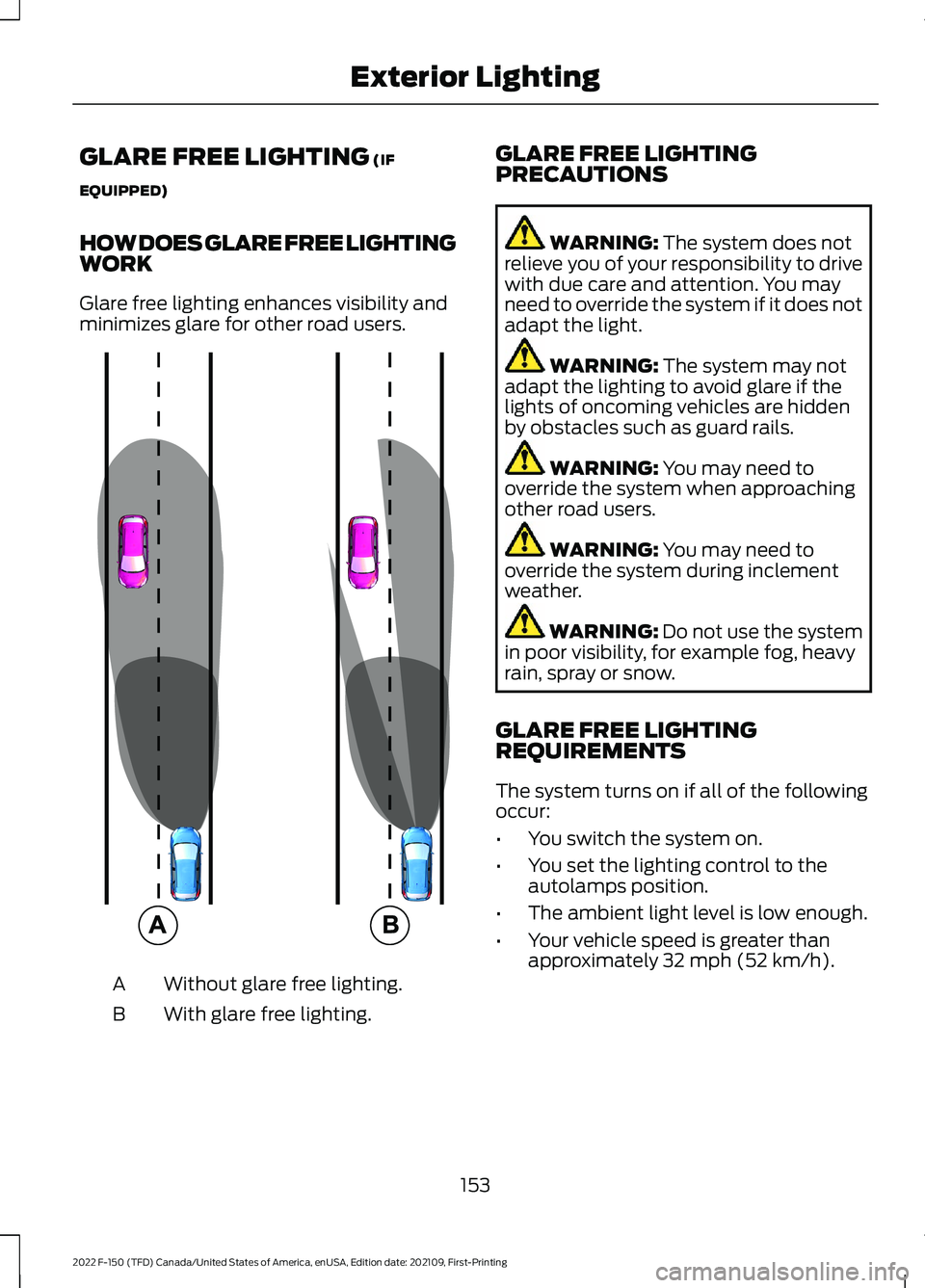
Glare free lighting enhances visibility and
minimizes glare for other road users. Without glare free lighting.
A
With glare free lighting.
B GLARE FREE LIGHTING
PRECAUTIONS WARNING:
The system does not
relieve you of your responsibility to drive
with due care and attention. You may
need to override the system if it does not
adapt the light. WARNING:
The system may not
adapt the lighting to avoid glare if the
lights of oncoming vehicles are hidden
by obstacles such as guard rails. WARNING:
You may need to
override the system when approaching
other road users. WARNING:
You may need to
override the system during inclement
weather. WARNING:
Do not use the system
in poor visibility, for example fog, heavy
rain, spray or snow.
GLARE FREE LIGHTING
REQUIREMENTS
The system turns on if all of the following
occur:
• You switch the system on.
• You set the lighting control to the
autolamps position.
• The ambient light level is low enough.
• Your vehicle speed is greater than
approximately
32 mph (52 km/h).
153
2022 F-150 (TFD) Canada/United States of America, enUSA, Edition date: 202109, First-Printing Exterior Lighting E220921
Page 248 of 750
WHAT IS AUTO-START-STOP
The system is designed to help reduce fuel
consumption and CO
2 emissions by
stopping the engine when it is idling, for
example at traffic lights.
AUTO-START-STOP
PRECAUTIONS WARNING: Apply the parking
brake, shift into park (P), switch the
ignition off and remove the key before
you leave your vehicle. Failure to follow
this instruction could result in personal
injury or death. WARNING:
Apply the parking
brake, shift into park (P), switch the
ignition off and remove the key before
you open the hood or have any service
or repair work completed. If you do not
switch the ignition off, the engine could
restart at any time. Failure to follow this
instruction could result in personal injury
or death.
SWITCHING AUTO-START-
STOP ON AND OFF
The system turns on when you switch the
ignition on. Press the button to switch the
system off.
Note: OFF
illuminates in the switch.
Note: Deactivating the system using the
button lasts only one key cycle.
Press the button again to switch the
system back on. Note:
The system turns off if it detects a
malfunction. If the system malfunctions,
have your vehicle checked as soon as
possible.
STOPPING THE ENGINE
Stop your vehicle, keep your foot on the
brake pedal and the transmission in drive
(D).
RESTARTING THE ENGINE
Release the brake pedal or press the
accelerator pedal.
A message appears in the information
display if the system requires you to take
action.
AUTO-START-STOP
INDICATORS WARNING:
The system may
require the engine to automatically
restart when the auto-start-stop
indicator illuminates green or flashes
amber. Failure to follow this instruction
could result in personal injury. The Auto-Start-Stop indicator
illuminates green when the
engine stops. It flashes amber
and a message appears when you need to
take action. The Auto-Start-Stop indicator
illuminates gray with a
strikethrough when the system
is not available.
Note: You can display the reason why the
system is not available in the information
display.
244
2022 F-150 (TFD) Canada/United States of America, enUSA, Edition date: 202109, First-Printing Auto-Start-Stop
(If Equipped) E146361
Page 276 of 750
To select a four-wheel drive mode, press
the four-wheel drive mode control button
of the desired mode. You can select
two-wheel drive high (2H), four-wheel
drive high (4H), or if your vehicle has
four-wheel drive auto (4A) at a stop or
while driving. Once the shift is complete,
the information display will then display
the selected four-wheel drive mode. While
shifts are in progress, the lights on the
four-wheel drive control switch can flash
and you could see messages in the
information display indicating that a shift
is in progress or to release the accelerator
pedal to improve shift performance.
Note:
Do not perform this operation if the
rear wheels are slipping or while applying
the accelerator pedal.
Note: You could hear some noise as the
system shifts or engages which is normal.
If the system detects a fault, a warning
message appears in the information
display. See Four-Wheel Drive –
Information Messages (page 275).
Shifting to or from Four-Wheel
Drive Low (4L)
To select or exit four-wheel drive low (4L):
1. Bring your vehicle to a speed of
3 mph
(5 km/h) or less.
2. Place the transmission in neutral (N)
3. Press the desired four-wheel drive button on the four-wheel drive mode
control switch.
The information display will display a
message indicating a four-wheel drive shift
is in progress. If any of the above shift
conditions are not present, the shift will
not occur and the information display will
display information guiding the driver
through the proper shifting procedures. If
there is a transfer case tooth blockage a
message will display in the information display. To alleviate this condition, place
the transmission in a forward gear, move
your vehicle forward approximately
5 ft
(1.5 m), and shift the transmission back to
neutral (N) to allow the transfer case to
complete the range shift.
Note: You could hear some noise as the
system shifts or engages which is normal.
If the system detects a fault, a warning
message appears in the information
display.
See Four-Wheel Drive –
Information Messages (page 275).
SELECTING A FOUR-WHEEL
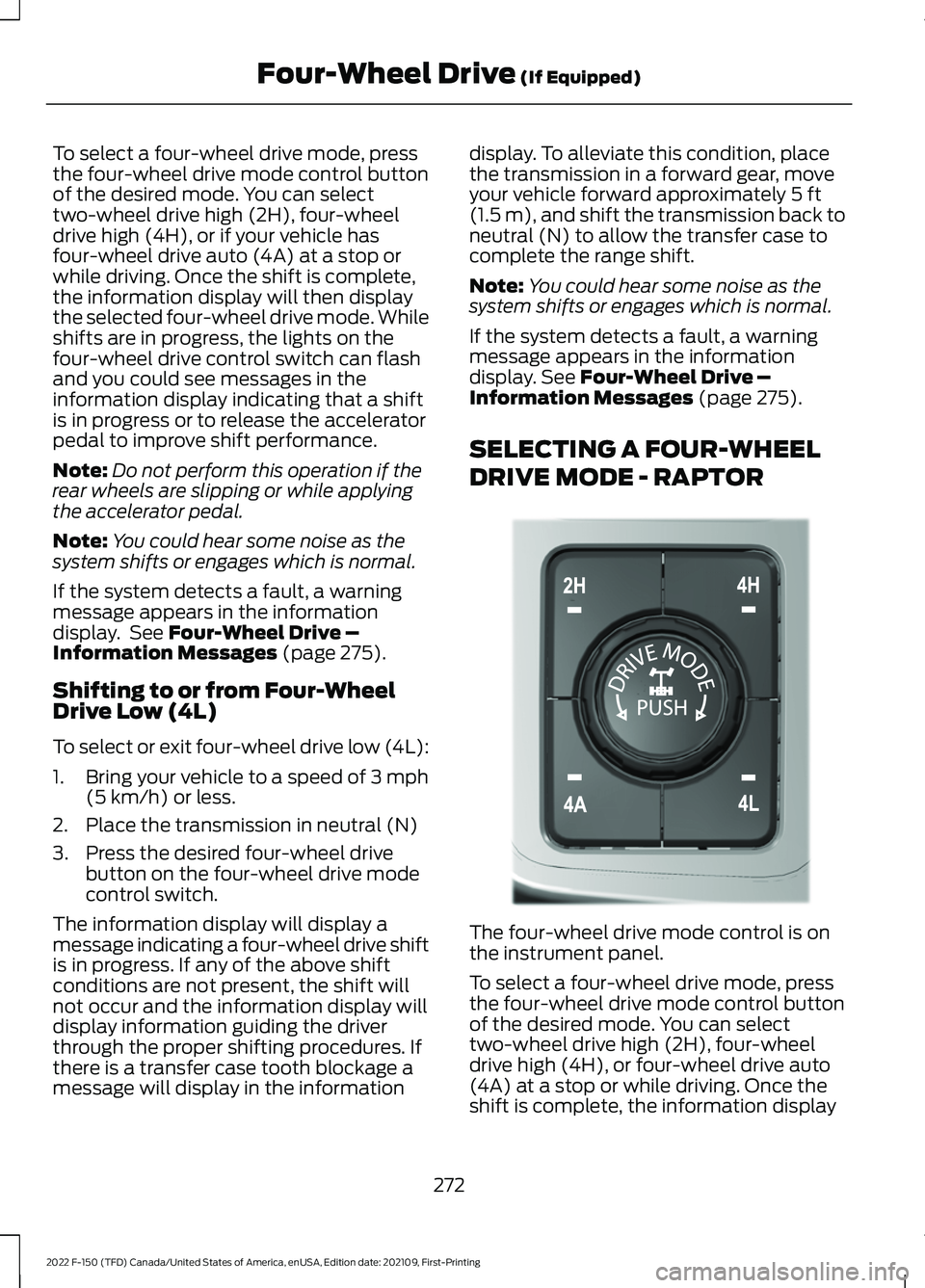
DRIVE MODE - RAPTOR The four-wheel drive mode control is on
the instrument panel.
To select a four-wheel drive mode, press
the four-wheel drive mode control button
of the desired mode. You can select
two-wheel drive high (2H), four-wheel
drive high (4H), or four-wheel drive auto
(4A) at a stop or while driving. Once the
shift is complete, the information display
272
2022 F-150 (TFD) Canada/United States of America, enUSA, Edition date: 202109, First-Printing Four-Wheel Drive
(If Equipped)E308146
Page 277 of 750
will then display the selected four-wheel
drive mode. While shifts are in progress,
the lights on the four-wheel drive control
switch can flash and you could see
messages in the information display
indicating that a shift is in progress or to
release the accelerator pedal to improve
shift performance.
Note:
Do not perform this operation if the
rear wheels are slipping or while applying
the accelerator pedal.
Note: You could hear some noise as the
system shifts or engages, which is normal.
If the system detects a fault, a warning
message appears in the information
display. See Four-Wheel Drive –
Information Messages (page 275).
Shifting to or from Four-Wheel
Drive Low (4L)
To select or exit four-wheel drive low (4L):
1. Bring your vehicle to a speed of
3 mph
(5 km/h) or less.
2. Place the transmission in neutral (N).
3. Press the desired four-wheel drive button on the four-wheel drive mode
control switch.
The information display will display a
message indicating a four-wheel drive shift
is in progress. If any of the above shift
conditions are not present, the shift does
not occur and the information display will
display information guiding the driver
through the proper shifting procedures. If
there is a transfer case tooth blockage, a
message displays in the information
display. To alleviate this condition, place
the transmission in a forward gear, move
your vehicle forward approximately
5 ft
(1.5 m), and shift the transmission back to
neutral (N) to allow the transfer case to
complete the range shift.
Note: You could hear some noise as the
system shifts or engages, which is normal. If the system detects a fault, a warning
message appears in the information
display.
See Four-Wheel Drive –
Information Messages (page 275).
FOUR-WHEEL DRIVE MODES
TWO-WHEEL DRIVE HIGH
Two-wheel drive high is for general
on-road driving. Power is sent to the rear
wheels only.
Note: Two-wheel drive high can turn on or
off based on Drive Mode selection See Drive
Mode Control
(page 350).
FOUR-WHEEL DRIVE AUTO
(If
Equipped)
Four-wheel drive auto provides
electronically controlled four-wheel drive
power to both the front and rear wheels,
as required, for increased traction in varying
on-road conditions. The four-wheel drive
auto tuning varies based on selected Drive
Mode.
See Selecting a Drive Mode (page
350).
Note: Four-wheel drive auto can turn on or
off automatically based on Drive Mode
selection.
See Selecting a Drive Mode
(page 350).
FOUR-WHEEL DRIVE HIGH
Four-wheel drive high provides
electronically or mechanically locked
four-wheel drive power to both the front
and rear wheels for use in off-road or
winter conditions such as deep snow, sand
or mud. This mode is not for use on dry
pavement.
Note: Four-wheel drive high can turn on or
off automatically based on Drive Mode
selection.
See Selecting a Drive Mode
(page 350).
273
2022 F-150 (TFD) Canada/United States of America, enUSA, Edition date: 202109, First-Printing Four-Wheel Drive
(If Equipped)
Page 336 of 750
ADAPTIVE CRUISE CONTROL
LIMITATIONS
Sensor Limitations
WARNING: On rare occasions,
detection issues can occur due to the
road infrastructures, for example bridges,
tunnels and safety barriers. In these
cases, the system may brake late or
unexpectedly. At all times, you are
responsible for controlling your vehicle,
supervising the system and intervening,
if required. WARNING:
If the system
malfunctions, have your vehicle checked
as soon as possible. WARNING:
Large contrasts in
outside lighting can limit sensor
performance. WARNING:
The system only warns
of vehicles detected by the radar sensor.
In some cases there may be no warning
or a delayed warning. Apply the brakes
when necessary. Failure to follow this
instruction could result in personal injury
or death. WARNING:
The system may not
detect stationary or slow moving
vehicles below
6 mph (10 km/h). WARNING:
The system does not
detect pedestrians or objects in the road. WARNING:
The system does not
detect oncoming vehicles in the same
lane. WARNING:
The system may not
operate properly if the sensor is blocked.
Keep the windshield free from
obstruction. WARNING:
The sensor may
incorrectly track lane markings as other
structures or objects. This can result in
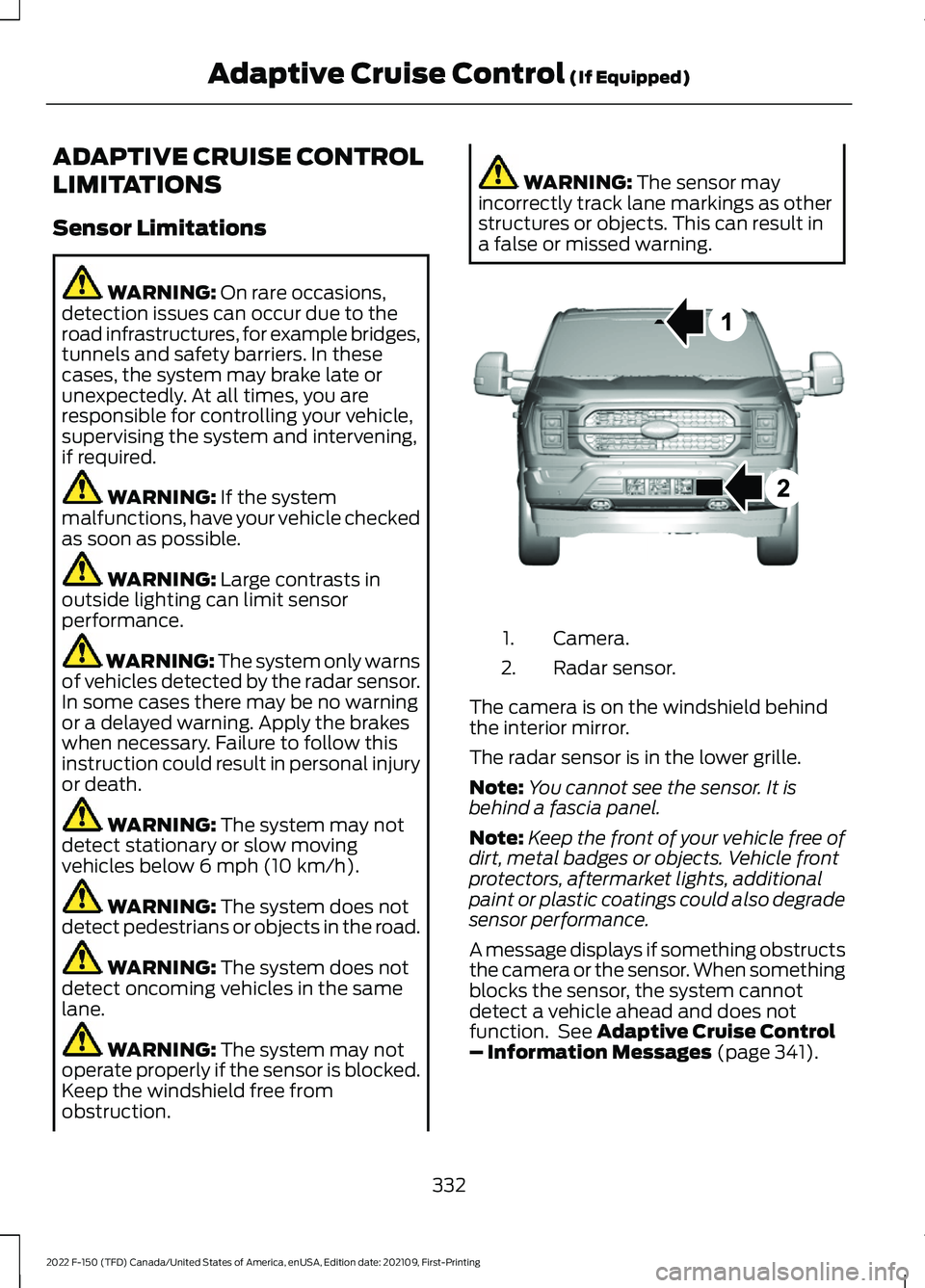
a false or missed warning. Camera.
1.
Radar sensor.
2.
The camera is on the windshield behind
the interior mirror.
The radar sensor is in the lower grille.
Note: You cannot see the sensor. It is
behind a fascia panel.
Note: Keep the front of your vehicle free of
dirt, metal badges or objects. Vehicle front
protectors, aftermarket lights, additional
paint or plastic coatings could also degrade
sensor performance.
A message displays if something obstructs
the camera or the sensor. When something
blocks the sensor, the system cannot
detect a vehicle ahead and does not
function. See
Adaptive Cruise Control
– Information Messages (page 341).
332
2022 F-150 (TFD) Canada/United States of America, enUSA, Edition date: 202109, First-Printing Adaptive Cruise Control
(If Equipped)E328125
Page 380 of 750
WARNING: Take additional care if
your vehicle is heavily loaded or you are
towing a trailer. These conditions could
result in reduced performance of this
system. Failure to follow this instruction
could result in the loss of control of your
vehicle, personal injury or death. WARNING:
The system cannot
help prevent all crashes. Do not rely on
this system to replace driver judgment
and the need to maintain a safe distance
and speed. WARNING:
In situations where the
vehicle camera has limited detection
capability, this may reduce system
performance. These situations include
but are not limited to direct or low
sunlight, vehicles at night without tail
lights, unconventional vehicle types,
pedestrians with complex backgrounds,
running pedestrians, partly obscured
pedestrians, or pedestrians that the
system cannot distinguish from a group.
Failure to take care may result in the loss
of control of your vehicle, serious
personal injury or death.
PRE-COLLISION ASSIST
LIMITATIONS
Pre-collision assist depends on the
detection ability of its camera and sensors.
Any obstructions or damage to these areas
can limit detection or prevent the system
from functioning. See
Locating the
Pre-Collision Assist Sensors (page 378).
The system is active at speeds above
3 mph (5 km/h)
. Note:
The pre-collision assist system
automatically disables when you select
four-wheel drive low, manually disable
AdvanceTrac ™, or select rock crawl mode,
if your vehicle comes with it.
Note: Brake support and automatic
emergency braking are active at speeds up
to 80 mph (130 km/h). If your vehicle has a
radar sensor included with adaptive cruise
control, then brake support and automatic
emergency braking are active up to the
maximum speed of your vehicle.
Pedestrian Detection Limitations
Pedestrian detection is active at speeds
up to
50 mph (80 km/h).
Pedestrian detection operates optimally
when detected hazards are clearly
identifiable. System performance may
reduce in situations where pedestrians are
running, partly obscured, have a complex
background, or when the system cannot
distinguish pedestrians from a group.
Cyclist Detection Limitations
Cyclist detection is active at speeds up to
50 mph (80 km/h)
.
Cyclist detection functions optimally when
detected hazards are clearly identifiable.
System performance may reduce in
situations where cyclists are fast-moving,
partly obscured, have a complex
background, or cannot be distinguished
from a group.
Intersection Assist
(If Equipped)
If your vehicle comes with a radar sensor
included in adaptive cruise control, the
pre-collision assist system may operate in
a scenario where you are turning across an
oncoming vehicle's path. Detection of
vehicles driving in an oncoming direction
is active if your vehicle is driving at speeds
up to
19 mph (30 km/h).
376
2022 F-150 (TFD) Canada/United States of America, enUSA, Edition date: 202109, First-Printing Pre-Collision Assist
(If Equipped)
Page 405 of 750
When the trailer disconnects in this state,
the vehicle alarm sounds and the system
sends an alert to your FordPass app.
Note:
For reliable trailer detection, the
trailer ’s lamps must be SAE certified for
each intended purpose.
Note: If the trailer is not compatible with
the feature, the turn signals flash twice.
Switching the Trailer Connection
Alarm On and Off
1. Press Features on the touchscreen.
2. Press
Towing.
3. Press
Manage trailers.
4. Press the currently active trailer's name.
5. Switch
Trailer Connection Alarm on
or off.
Note: The alarm disables by default. If the
system detects a trailer, it can be
configurable.
Note: Settings are applicable only for the
selected trailer profile.
Trailer Connector Battery Lead
The trailer receives power from the vehicle
trailer connector battery lead when the
following occurs:
• Your vehicle is in accessory mode or
switched on.
• The trailer wiring connector is free of
corrosion or other damage. •
The vehicle battery is not low.
• When the trailer has a battery:
•The trailer battery voltage is within
5 volts of the vehicle battery
voltage.
• When you have the trailer battery
properly connected.
TRAILER LIGHTING CHECK WARNING:
Never connect any
trailer lamp wiring to the vehicle's tail
lamp wiring; this may damage the
electrical system resulting in fire. Contact
your authorized dealer as soon as
possible for assistance in proper trailer
tow wiring installation. Additional
electrical equipment may be required.
Perform a trailer light illumination
sequence to confirm that all lights are
functioning by using the FordPass app or
the vehicle's touchscreen.
Performing the Trailer Lighting
Check Using the Touchscreen
1. Press
Features on the touchscreen.
2. Press
Towing.
3. Press
Trailer Light Check.
4. Press
Start.
401
2022 F-150 (TFD) Canada/United States of America, enUSA, Edition date: 202109, First-Printing Connecting a Trailer