steering FORD F-250 2022 User Guide
[x] Cancel search | Manufacturer: FORD, Model Year: 2022, Model line: F-250, Model: FORD F-250 2022Pages: 740, PDF Size: 12.6 MB
Page 68 of 740
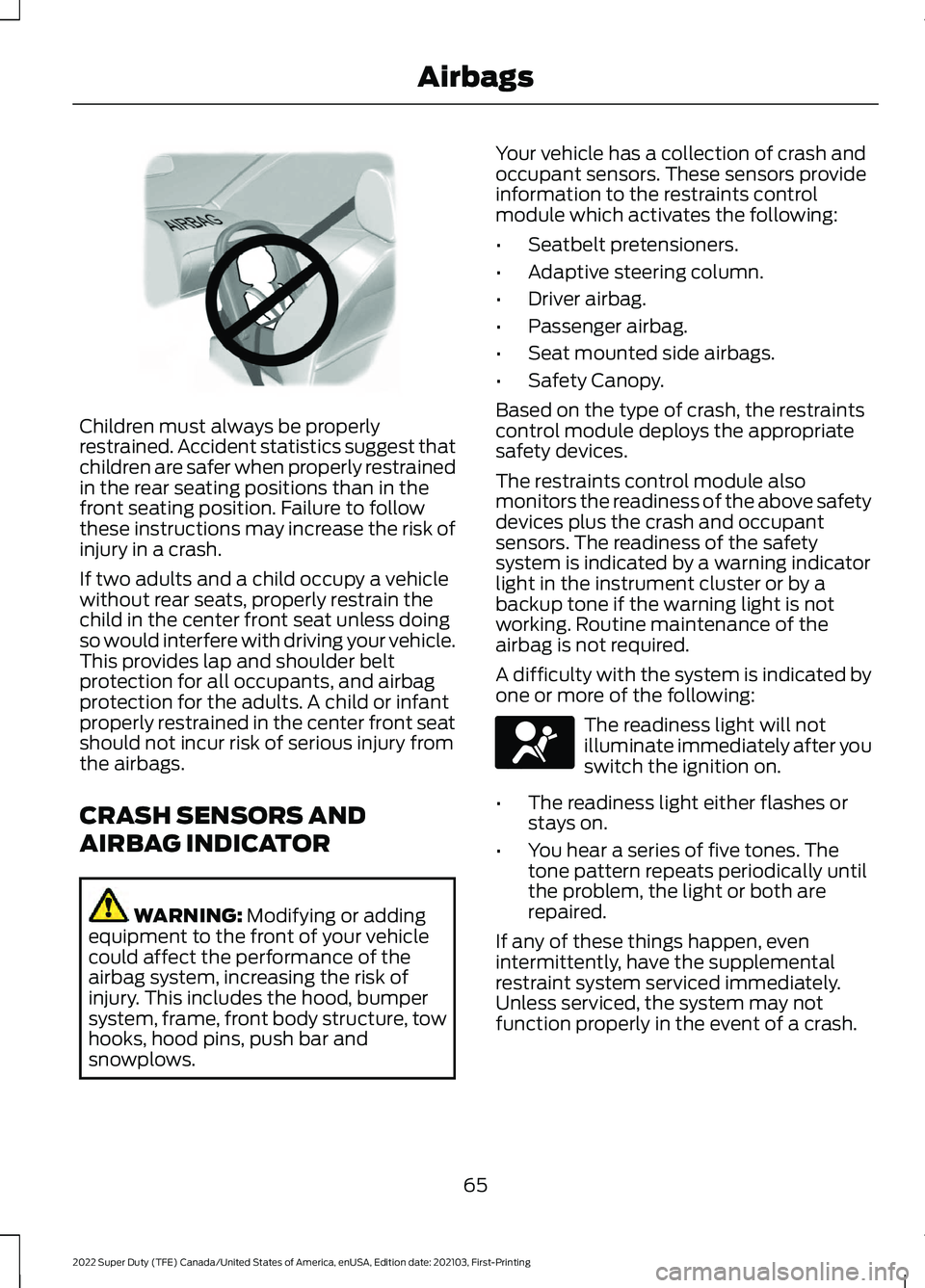
Children must always be properly
restrained. Accident statistics suggest that
children are safer when properly restrained
in the rear seating positions than in the
front seating position. Failure to follow
these instructions may increase the risk of
injury in a crash.
If two adults and a child occupy a vehicle
without rear seats, properly restrain the
child in the center front seat unless doing
so would interfere with driving your vehicle.
This provides lap and shoulder belt
protection for all occupants, and airbag
protection for the adults. A child or infant
properly restrained in the center front seat
should not incur risk of serious injury from
the airbags.
CRASH SENSORS AND
AIRBAG INDICATOR
WARNING: Modifying or adding
equipment to the front of your vehicle
could affect the performance of the
airbag system, increasing the risk of
injury. This includes the hood, bumper
system, frame, front body structure, tow
hooks, hood pins, push bar and
snowplows. Your vehicle has a collection of crash and
occupant sensors. These sensors provide
information to the restraints control
module which activates the following:
•
Seatbelt pretensioners.
• Adaptive steering column.
• Driver airbag.
• Passenger airbag.
• Seat mounted side airbags.
• Safety Canopy.
Based on the type of crash, the restraints
control module deploys the appropriate
safety devices.
The restraints control module also
monitors the readiness of the above safety
devices plus the crash and occupant
sensors. The readiness of the safety
system is indicated by a warning indicator
light in the instrument cluster or by a
backup tone if the warning light is not
working. Routine maintenance of the
airbag is not required.
A difficulty with the system is indicated by
one or more of the following: The readiness light will not
illuminate immediately after you
switch the ignition on.
• The readiness light either flashes or
stays on.
• You hear a series of five tones. The
tone pattern repeats periodically until
the problem, the light or both are
repaired.
If any of these things happen, even
intermittently, have the supplemental
restraint system serviced immediately.
Unless serviced, the system may not
function properly in the event of a crash.
65
2022 Super Duty (TFE) Canada/United States of America, enUSA, Edition date: 202103, First-Printing AirbagsE142846 E67017
Page 69 of 740
The fact that the seatbelt pretensioners
or front airbags did not activate for both
front seat occupants in a crash does not
mean that something is wrong with the
system. Rather, it means the restraints
control module determined the accident
conditions (crash severity, seatbelt usage)
were not appropriate to activate these
safety devices.
•
The front airbags activate only in
frontal and near-frontal crashes. Front
airbags may activate in rollovers, side
impacts or rear impacts if the crash
causes sufficient frontal deceleration.
• The adaptive steering column activates
only in frontal and near-frontal crashes.
It may activate in rollovers, side
impacts or rear impacts if the crash
causes sufficient frontal deceleration.
• The seatbelt pretensioners activate in
frontal, near-frontal and side crashes,
and in rollovers.
• The side airbags inflate in certain side
impact crashes or rollover events. Side
airbags may activate in other types of
crashes if the vehicle experiences
sufficient sideways motion or
deformation.
• The Safety Canopy inflates in certain
side impact crashes or rollover events.
The Safety Canopy may activate in
other types of crashes if the vehicle
experiences sufficient sideways motion
or deformation, or a certain likelihood
of rollover.
DISPOSING OF AIRBAGS
Contact your authorized dealer as soon as
possible. Airbags must be disposed of by
qualified personnel.
66
2022 Super Duty (TFE) Canada/United States of America, enUSA, Edition date: 202103, First-Printing Airbags
Page 70 of 740
WHAT IS 911 ASSIST
911 Assist is a SYNC system feature that
can call for help.
For more information, visit
www
. o wner .f or d . c om .
HOW DOES 911 ASSIST WORK
If a crash deploys an airbag, excluding knee
airbags and rear inflatable seatbelts, or
activates the fuel pump shut-off, your
vehicle may be able to contact emergency
services by dialing 911 through a paired and
connected Bluetooth®-enabled phone.
Not all crashes will deploy an airbag or
activate the fuel pump shut-off. If a
connected cell phone sustains damage or
loses its connection to SYNC during a
crash, SYNC will search for and try to
connect to a previously paired cell phone.
SYNC will then attempt to call the
emergency services.
Before making the call:
• SYNC provides about 10 seconds to
cancel the call. If you fail to cancel the
call, SYNC attempts to dial 911.
• SYNC says the following, or a similar
message: "SYNC will attempt to call
911, to cancel the call, press Cancel on
your screen or press and hold the
phone button on your steering wheel."
If you do not cancel the call and SYNC
makes a successful call a pre-recorded
message plays for the 911 operator. The
occupants in your vehicle are able to talk
with the operator. Be prepared to provide
your name, phone number and location
immediately because not all 911 systems
are capable of receiving this information
electronically.
During an emergency call the system
transmits vehicle data to the emergency
service. EMERGENCY CALL
REQUIREMENTS WARNING:
Do not wait for 911
Assist to make an emergency call if you
can do it yourself. Dial emergency
services immediately to avoid delayed
response time which could increase the
risk of serious injury or death after a
crash. If you do not hear 911 Assist within
five seconds of the crash, the system or
phone may be damaged or
non-functional. WARNING:
Always place your
phone in a secure location in your vehicle
so it does not become a projectile or get
damaged in a crash. Failure to do so may
cause serious injury to someone or
damage the phone which could prevent
911 Assist from working properly. WARNING:
Unless the 911 Assist
setting is set on before a crash, the
system will not dial for help which could
delay response time, potentially
increasing the risk of serious injury or
death after a crash.
• SYNC is powered and working properly
at the time of the incident and
throughout feature activation and use.
• The 911 Assist feature must be set on
before the incident.
• You must pair and connect a
Bluetooth®
enabled and compatible
cell phone to SYNC.
• A connected
Bluetooth® enabled
phone must have the ability to make
and maintain an outgoing call at the
time of the incident.
67
2022 Super Duty (TFE) Canada/United States of America, enUSA, Edition date: 202103, First-Printing 911 Assist
Page 81 of 740
Emergency Assistance
If you set emergency assistance to always
on, you cannot switch it off with a MyKey.
Do Not Disturb
If you set do not disturb to always on, you
cannot switch it off with a MyKey.
Note:
If a phone is connected using Apple
CarPlay or Android Auto while driving with
a MyKey, the driver can receive phone calls
and text messages even if the do not disturb
restriction is on, and if the vehicle comes
with satellite radio, there is no restriction on
the adult content.
Traction and Stability Control
If you set traction control or stability
control to always on, you cannot switch it
off with a MyKey.
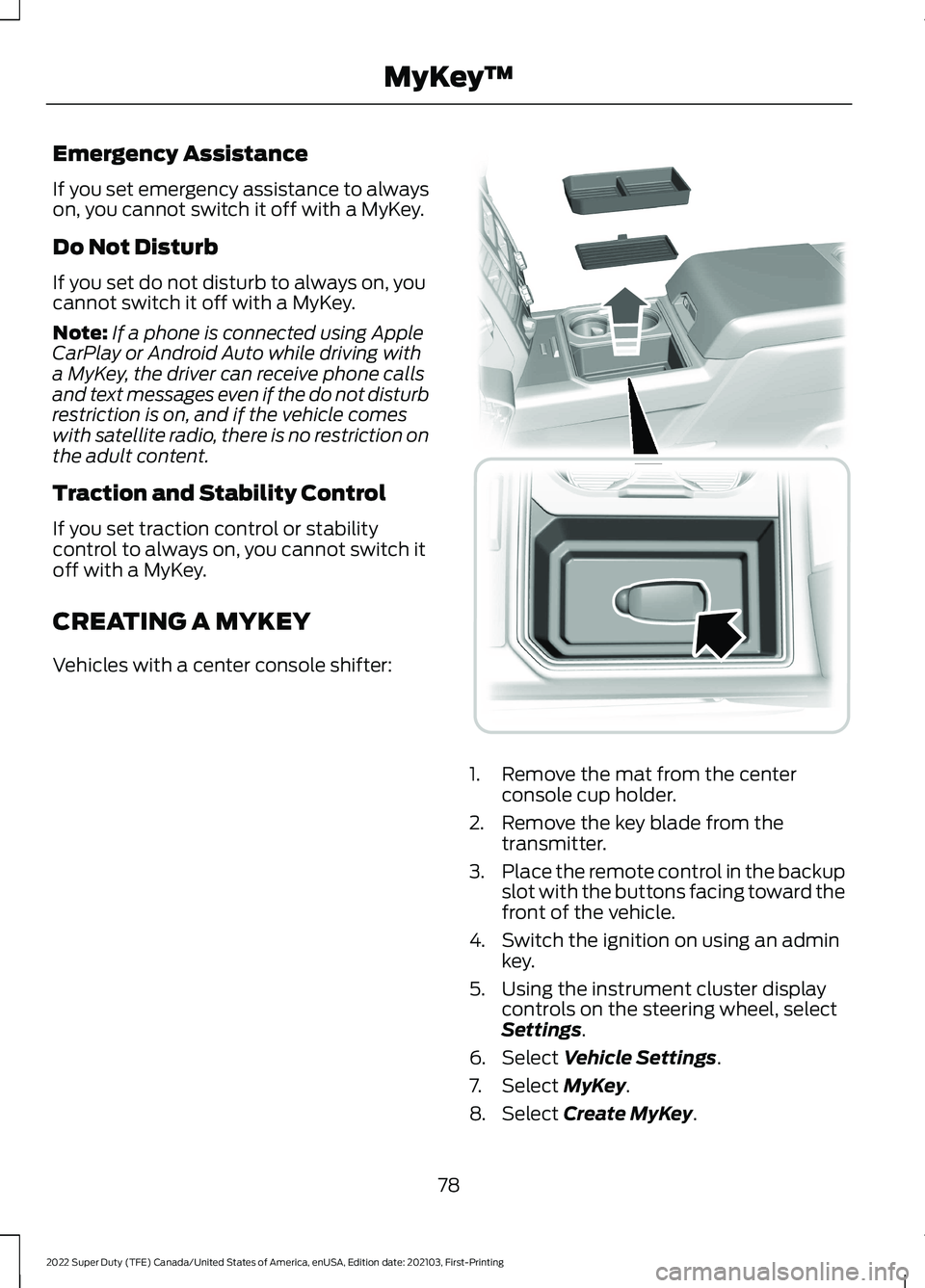
CREATING A MYKEY
Vehicles with a center console shifter: 1. Remove the mat from the center
console cup holder.
2. Remove the key blade from the transmitter.
3. Place the remote control in the backup
slot with the buttons facing toward the
front of the vehicle.
4. Switch the ignition on using an admin key.
5. Using the instrument cluster display controls on the steering wheel, select
Settings.
6. Select
Vehicle Settings.
7. Select
MyKey.
8. Select
Create MyKey.
78
2022 Super Duty (TFE) Canada/United States of America, enUSA, Edition date: 202103, First-Printing MyKey
™ E226701
Page 82 of 740
9.
Select Create MyKey and press the OK
button.
Note: After you confirm the creation of a
MyKey, we recommend that you label this
key.
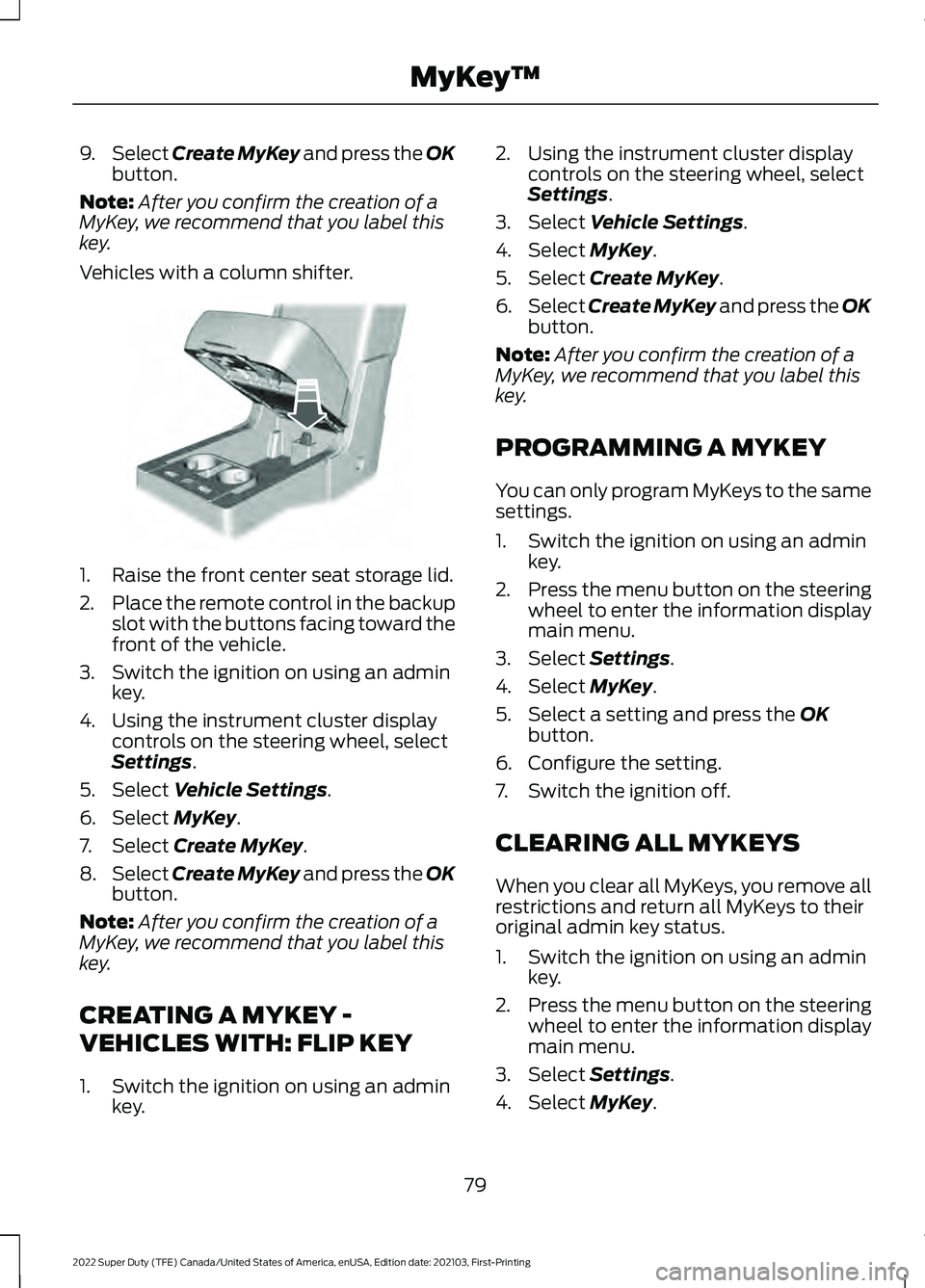
Vehicles with a column shifter. 1. Raise the front center seat storage lid.
2.
Place the remote control in the backup
slot with the buttons facing toward the
front of the vehicle.
3. Switch the ignition on using an admin key.
4. Using the instrument cluster display controls on the steering wheel, select
Settings
.
5. Select
Vehicle Settings.
6. Select
MyKey.
7. Select
Create MyKey.
8. Select
Create MyKey and press the OK
button.
Note: After you confirm the creation of a
MyKey, we recommend that you label this
key.
CREATING A MYKEY -
VEHICLES WITH: FLIP KEY
1. Switch the ignition on using an admin key. 2. Using the instrument cluster display
controls on the steering wheel, select
Settings
.
3. Select
Vehicle Settings.
4. Select
MyKey.
5. Select
Create MyKey.
6. Select
Create MyKey and press the OK
button.
Note: After you confirm the creation of a
MyKey, we recommend that you label this
key.
PROGRAMMING A MYKEY
You can only program MyKeys to the same
settings.
1. Switch the ignition on using an admin key.
2. Press the menu button on the steering
wheel to enter the information display
main menu.
3. Select
Settings.
4. Select
MyKey.
5. Select a setting and press the
OK
button.
6. Configure the setting.
7. Switch the ignition off.
CLEARING ALL MYKEYS
When you clear all MyKeys, you remove all
restrictions and return all MyKeys to their
original admin key status.
1. Switch the ignition on using an admin key.
2. Press the menu button on the steering
wheel to enter the information display
main menu.
3. Select
Settings.
4. Select
MyKey.
79
2022 Super Duty (TFE) Canada/United States of America, enUSA, Edition date: 202103, First-Printing MyKey
™E269950
Page 83 of 740
5. Select Clear MyKeys.
6. Press and hold the
OK button until a
confirmation message appears in the
information display.
CHECKING MYKEY SYSTEM
STATUS
You can find information about the
distance traveled using a MyKey and also
the number of admin keys and MyKeys
created for your vehicle.
1. Switch the ignition on. 2.
Press the menu button on the steering
wheel to enter the information display
main menu.
3. Select
Settings.
4. Select
MyKey.
5. Select
MyKey Info.
USING MYKEY WITH REMOTE
START SYSTEMS
MyKey is not compatible with unapproved,
aftermarket remote start systems. If you
choose to install a remote start system,
see an authorized dealer for an approved
remote start system.
MYKEY – TROUBLESHOOTING
MYKEY – INFORMATION MESSAGES Description
Message
Displays when trying to create a MyKey and the admin key is
not placed in the backup position. See
Creating a MyKey
(page 78).
Place Key in Backup
Location
Displays when trying to create a MyKey with a key already
designated as a MyKey.
Key is Already a MyKey
Displays to confirm that the key is restricted after you switch
the ignition off.
This Key restricted at
Next Key Cycle. Label
Key as MyKey
80
2022 Super Duty (TFE) Canada/United States of America, enUSA, Edition date: 202103, First-Printing MyKey
™
Page 87 of 740
OPENING THE DOORS FROM
INSIDE YOUR VEHICLE - CREW
CAB
Pull the interior door handle twice to
unlock and open a rear door. The first pull
unlocks the door and the second pull
opens the door.
AUTOUNLOCK
WHAT IS AUTOUNLOCK
Autounlock is an unlocking feature that
unlocks the vehicle doors when your
vehicle comes to a stop.
AUTOUNLOCK REQUIREMENTS
Autounlock unlocks all the doors when all
of the following occur:
•
The ignition is on, all the doors are
closed and your vehicle is moving at a
speed greater than 12 mph (20 km/h).
• Your vehicle comes to a stop.
• You open the driver door within 10
minutes of switching the ignition off or
to the accessory position.
SWITCHING AUTOUNLOCK ON
AND OFF
1. Using the instrument cluster display controls on the steering wheel, select
Settings.
2. Select
Vehicle Settings.
3. Switch
Autounlock on or off.
AUTOLOCK
WHAT IS AUTOLOCK
Autolock is a locking feature that locks
your vehicle doors when you start driving. AUTOLOCK REQUIREMENTS
Autolock locks all the doors when all of the
following occur:
•
All doors are closed.
• The ignition is on.
• Your vehicle reaches a speed greater
than
12 mph (20 km/h).
MISLOCK
WHAT IS MISLOCK
Mislock is a locking feature that warns you
if your vehicle has not locked.
MISLOCK LIMITATIONS
When you press the lock button once, the
direction indicators do not flash if:
• Any door or the tailgate is open.
• The hood is open.
If you switch mislock off, the horn does not
sound if you press the lock button on the
remote control when a door is open.
SWITCHING MISLOCK ON AND
OFF
1. Using the instrument cluster display controls on the steering wheel, select
Settings
.
2. Select
Vehicle Settings.
3. Switch
Mislock Chirp on or off.
DOORS AND LOCKS AUDIBLE
WARNINGS
Door Ajar Audible Warning
Sounds when a door is not fully closed and
your vehicle is moving.
84
2022 Super Duty (TFE) Canada/United States of America, enUSA, Edition date: 202103, First-Printing Doors and Locks
Page 96 of 740
HOW DOES EASY ENTRY AND
EXIT WORK
Easy entry and exit moves the driver seat
rearward up to 2 in (5 cm) and the steering
column up when you switch the ignition
off. The driver seat and steering column
return to their previous positions when you
switch the ignition on.
Note:
Depending on your vehicle, the
column may move up and in.
SWITCHING EASY ENTRY AND
EXIT ON AND OFF
1. Press Settings on the touchscreen.
2. Press
Vehicle.
3. Select
Easy Entry/Exit.
If you press any adjustment or memory
button when in easy exit mode, the system
cancels the operation.
93
2022 Super Duty (TFE) Canada/United States of America, enUSA, Edition date: 202103, First-Printing Easy Entry and Exit
Page 107 of 740
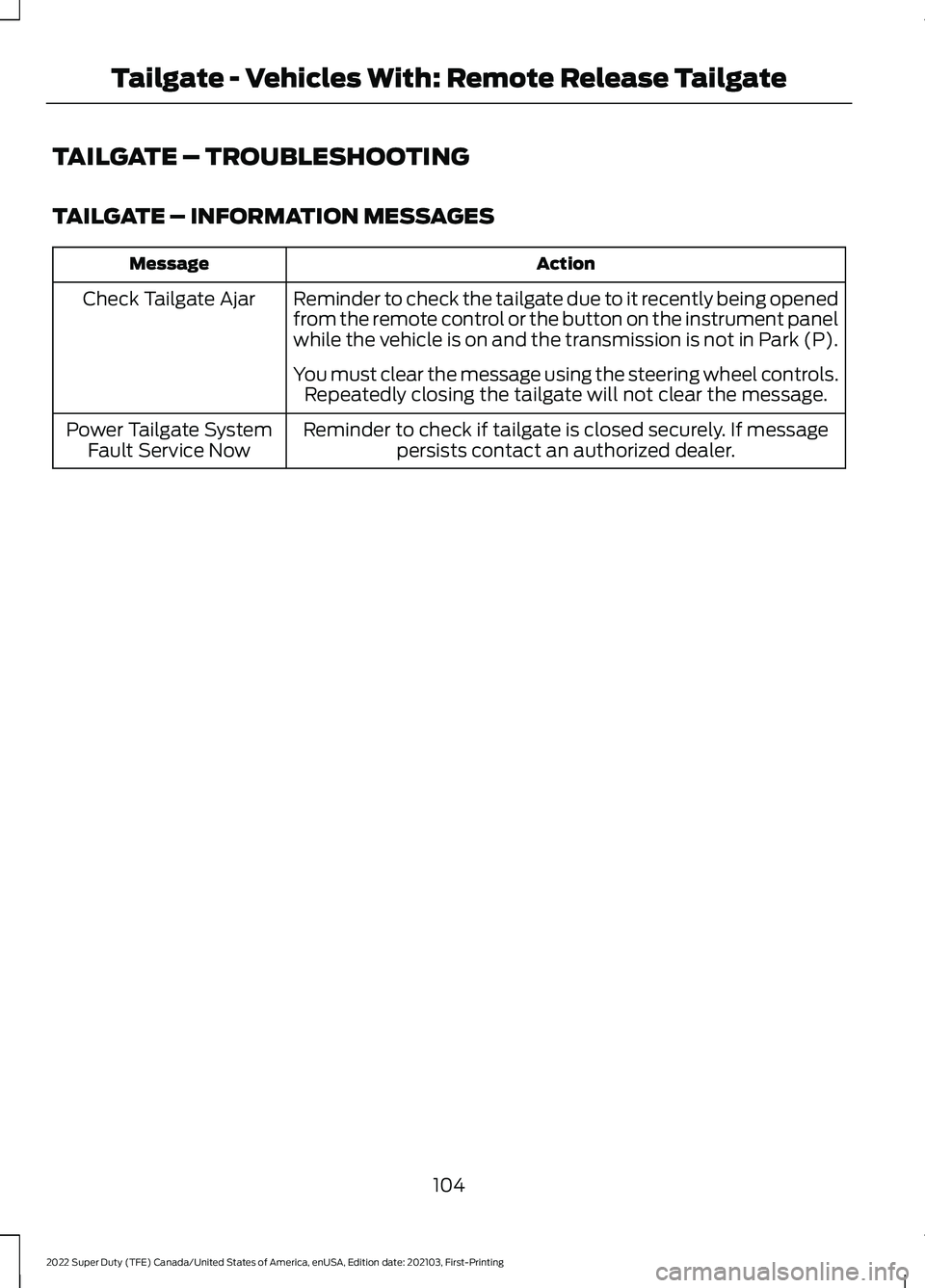
TAILGATE – TROUBLESHOOTING
TAILGATE – INFORMATION MESSAGES
Action
Message
Reminder to check the tailgate due to it recently being opened
from the remote control or the button on the instrument panel
while the vehicle is on and the transmission is not in Park (P).
Check Tailgate Ajar
You must clear the message using the steering wheel controls.Repeatedly closing the tailgate will not clear the message.
Reminder to check if tailgate is closed securely. If message persists contact an authorized dealer.
Power Tailgate System
Fault Service Now
104
2022 Super Duty (TFE) Canada/United States of America, enUSA, Edition date: 202103, First-Printing Tailgate - Vehicles With: Remote Release Tailgate
Page 113 of 740
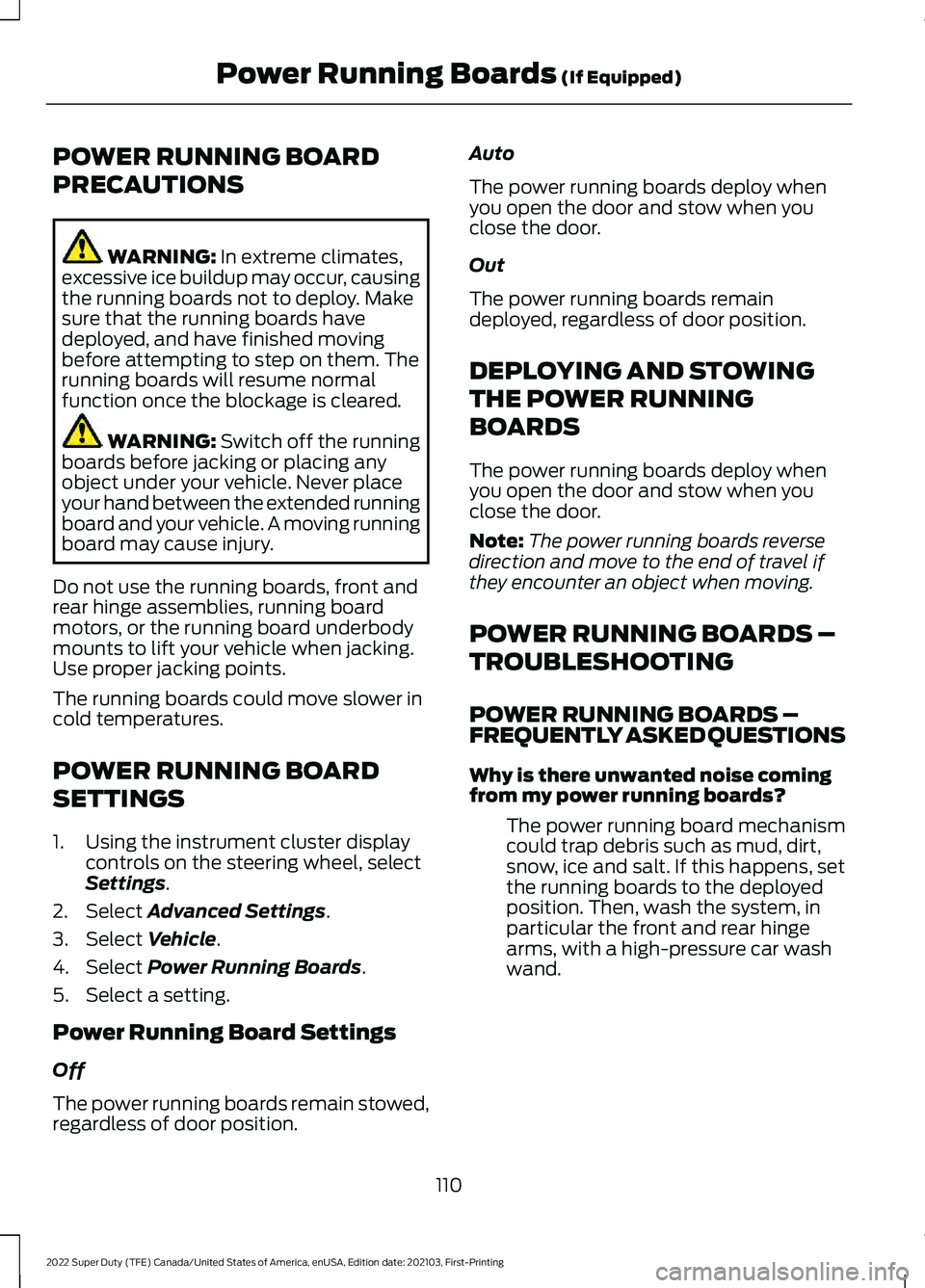
POWER RUNNING BOARD
PRECAUTIONS
WARNING: In extreme climates,
excessive ice buildup may occur, causing
the running boards not to deploy. Make
sure that the running boards have
deployed, and have finished moving
before attempting to step on them. The
running boards will resume normal
function once the blockage is cleared. WARNING:
Switch off the running
boards before jacking or placing any
object under your vehicle. Never place
your hand between the extended running
board and your vehicle. A moving running
board may cause injury.
Do not use the running boards, front and
rear hinge assemblies, running board
motors, or the running board underbody
mounts to lift your vehicle when jacking.
Use proper jacking points.
The running boards could move slower in
cold temperatures.
POWER RUNNING BOARD
SETTINGS
1. Using the instrument cluster display controls on the steering wheel, select
Settings
.
2. Select
Advanced Settings.
3. Select
Vehicle.
4. Select
Power Running Boards.
5. Select a setting.
Power Running Board Settings
Off
The power running boards remain stowed,
regardless of door position. Auto
The power running boards deploy when
you open the door and stow when you
close the door.
Out
The power running boards remain
deployed, regardless of door position.
DEPLOYING AND STOWING
THE POWER RUNNING
BOARDS
The power running boards deploy when
you open the door and stow when you
close the door.
Note:
The power running boards reverse
direction and move to the end of travel if
they encounter an object when moving.
POWER RUNNING BOARDS –
TROUBLESHOOTING
POWER RUNNING BOARDS –
FREQUENTLY ASKED QUESTIONS
Why is there unwanted noise coming
from my power running boards?
The power running board mechanism
could trap debris such as mud, dirt,
snow, ice and salt. If this happens, set
the running boards to the deployed
position. Then, wash the system, in
particular the front and rear hinge
arms, with a high-pressure car wash
wand.
110
2022 Super Duty (TFE) Canada/United States of America, enUSA, Edition date: 202103, First-Printing Power Running Boards
(If Equipped)