reset FORD F-250 2022 Repair Manual
[x] Cancel search | Manufacturer: FORD, Model Year: 2022, Model line: F-250, Model: FORD F-250 2022Pages: 740, PDF Size: 12.6 MB
Page 590 of 740
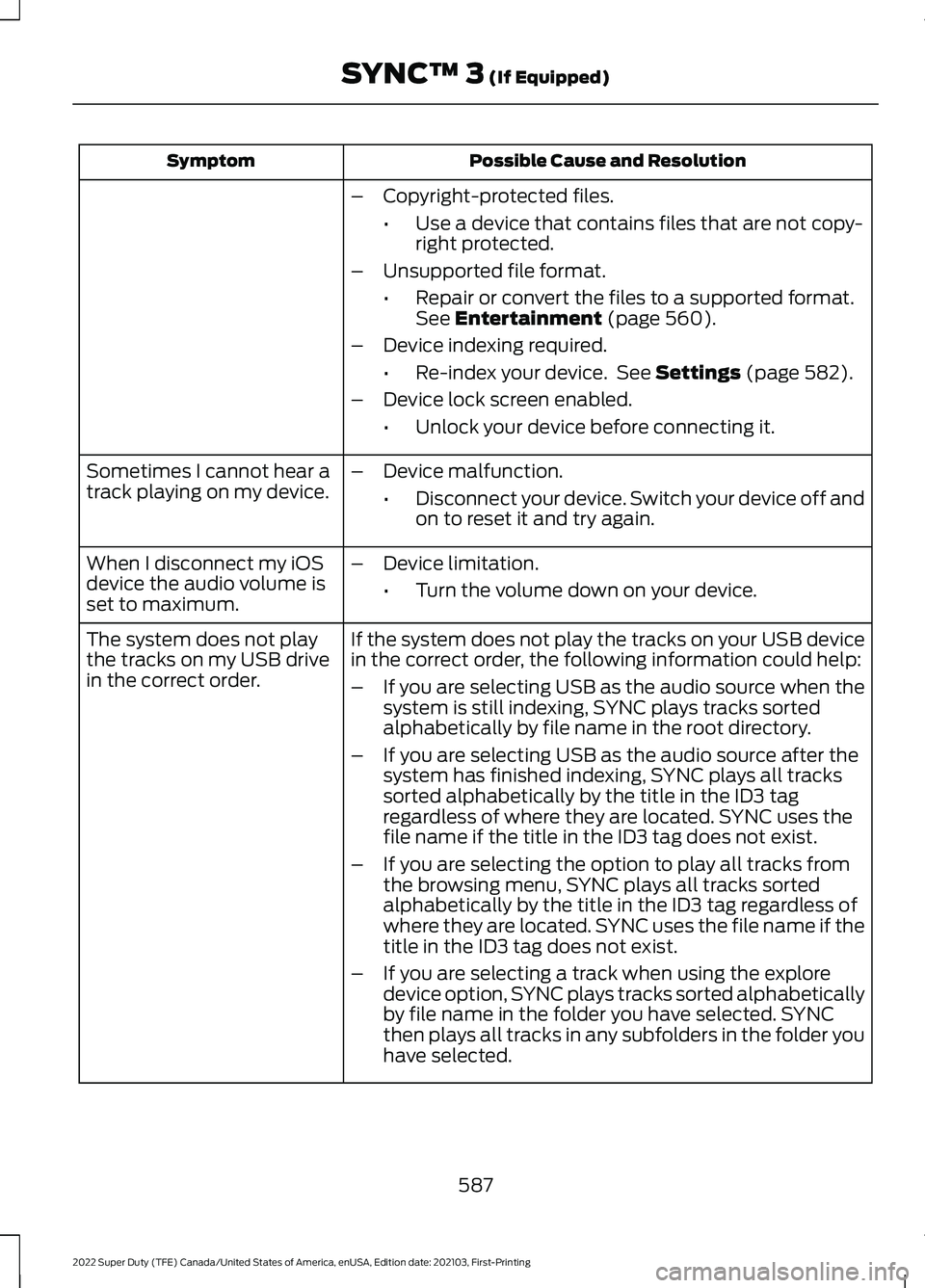
Possible Cause and Resolution
Symptom
–Copyright-protected files.
•Use a device that contains files that are not copy-
right protected.
– Unsupported file format.
•Repair or convert the files to a supported format.
See Entertainment (page 560).
– Device indexing required.
•Re-index your device. See
Settings (page 582).
– Device lock screen enabled.
•Unlock your device before connecting it.
Sometimes I cannot hear a
track playing on my device. –
Device malfunction.
•Disconnect your device. Switch your device off and
on to reset it and try again.
When I disconnect my iOS
device the audio volume is
set to maximum. –
Device limitation.
•Turn the volume down on your device.
If the system does not play the tracks on your USB device
in the correct order, the following information could help:
The system does not play
the tracks on my USB drive
in the correct order.
–If you are selecting USB as the audio source when the
system is still indexing, SYNC plays tracks sorted
alphabetically by file name in the root directory.
– If you are selecting USB as the audio source after the
system has finished indexing, SYNC plays all tracks
sorted alphabetically by the title in the ID3 tag
regardless of where they are located. SYNC uses the
file name if the title in the ID3 tag does not exist.
– If you are selecting the option to play all tracks from
the browsing menu, SYNC plays all tracks sorted
alphabetically by the title in the ID3 tag regardless of
where they are located. SYNC uses the file name if the
title in the ID3 tag does not exist.
– If you are selecting a track when using the explore
device option, SYNC plays tracks sorted alphabetically
by file name in the folder you have selected. SYNC
then plays all tracks in any subfolders in the folder you
have selected.
587
2022 Super Duty (TFE) Canada/United States of America, enUSA, Edition date: 202103, First-Printing SYNC™ 3
(If Equipped)
Page 591 of 740
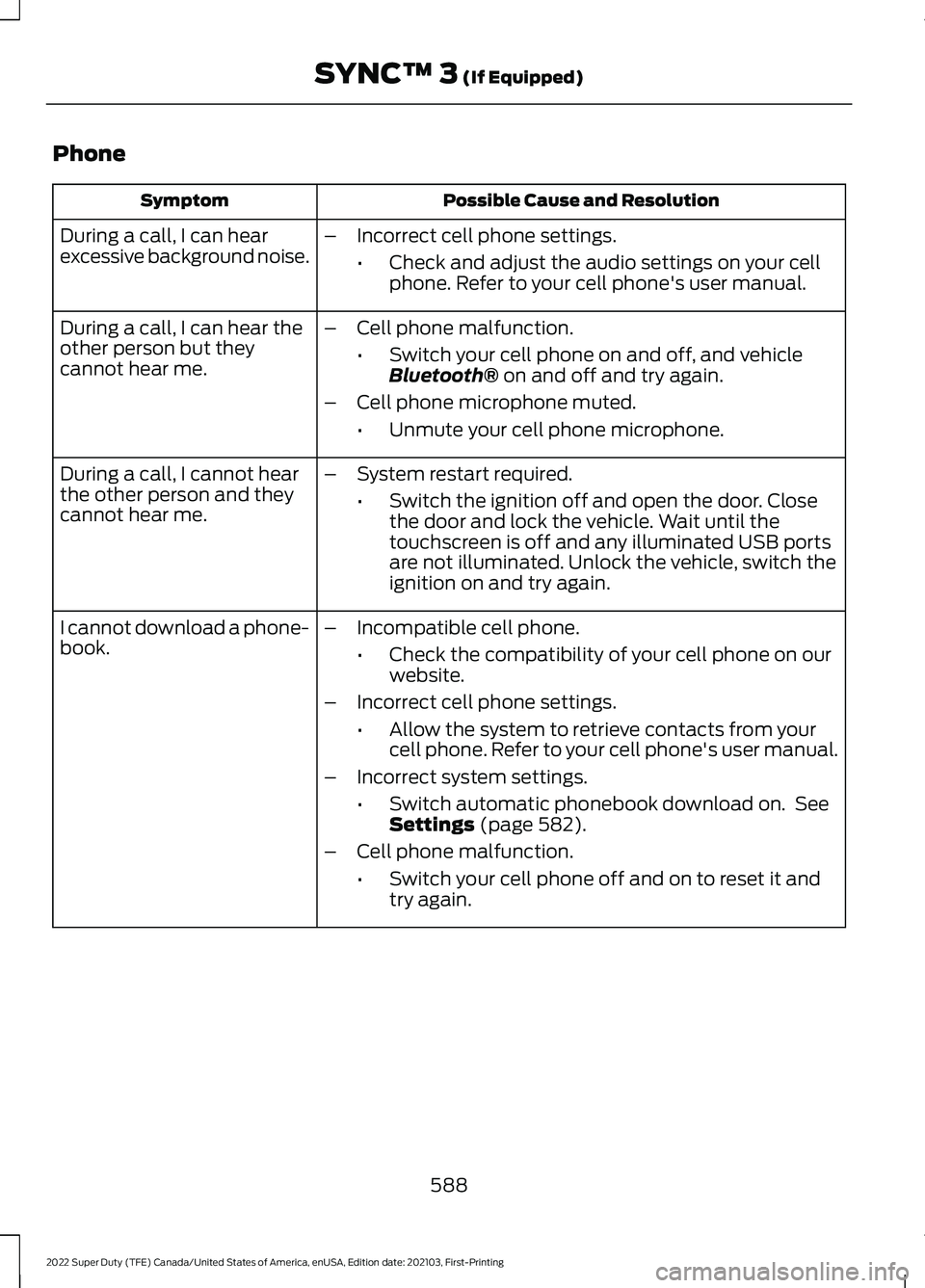
Phone
Possible Cause and Resolution
Symptom
During a call, I can hear
excessive background noise. –
Incorrect cell phone settings.
•Check and adjust the audio settings on your cell
phone. Refer to your cell phone's user manual.
– Cell phone malfunction.
•Switch your cell phone on and off, and vehicle
Bluetooth® on and off and try again.
– Cell phone microphone muted.
•Unmute your cell phone microphone.
During a call, I can hear the
other person but they
cannot hear me.
During a call, I cannot hear
the other person and they
cannot hear me.
–
System restart required.
•Switch the ignition off and open the door. Close
the door and lock the vehicle. Wait until the
touchscreen is off and any illuminated USB ports
are not illuminated. Unlock the vehicle, switch the
ignition on and try again.
I cannot download a phone-
book. –
Incompatible cell phone.
•Check the compatibility of your cell phone on our
website.
– Incorrect cell phone settings.
•Allow the system to retrieve contacts from your
cell phone. Refer to your cell phone's user manual.
– Incorrect system settings.
•Switch automatic phonebook download on. See
Settings
(page 582).
– Cell phone malfunction.
•Switch your cell phone off and on to reset it and
try again.
588
2022 Super Duty (TFE) Canada/United States of America, enUSA, Edition date: 202103, First-Printing SYNC™ 3
(If Equipped)
Page 592 of 740
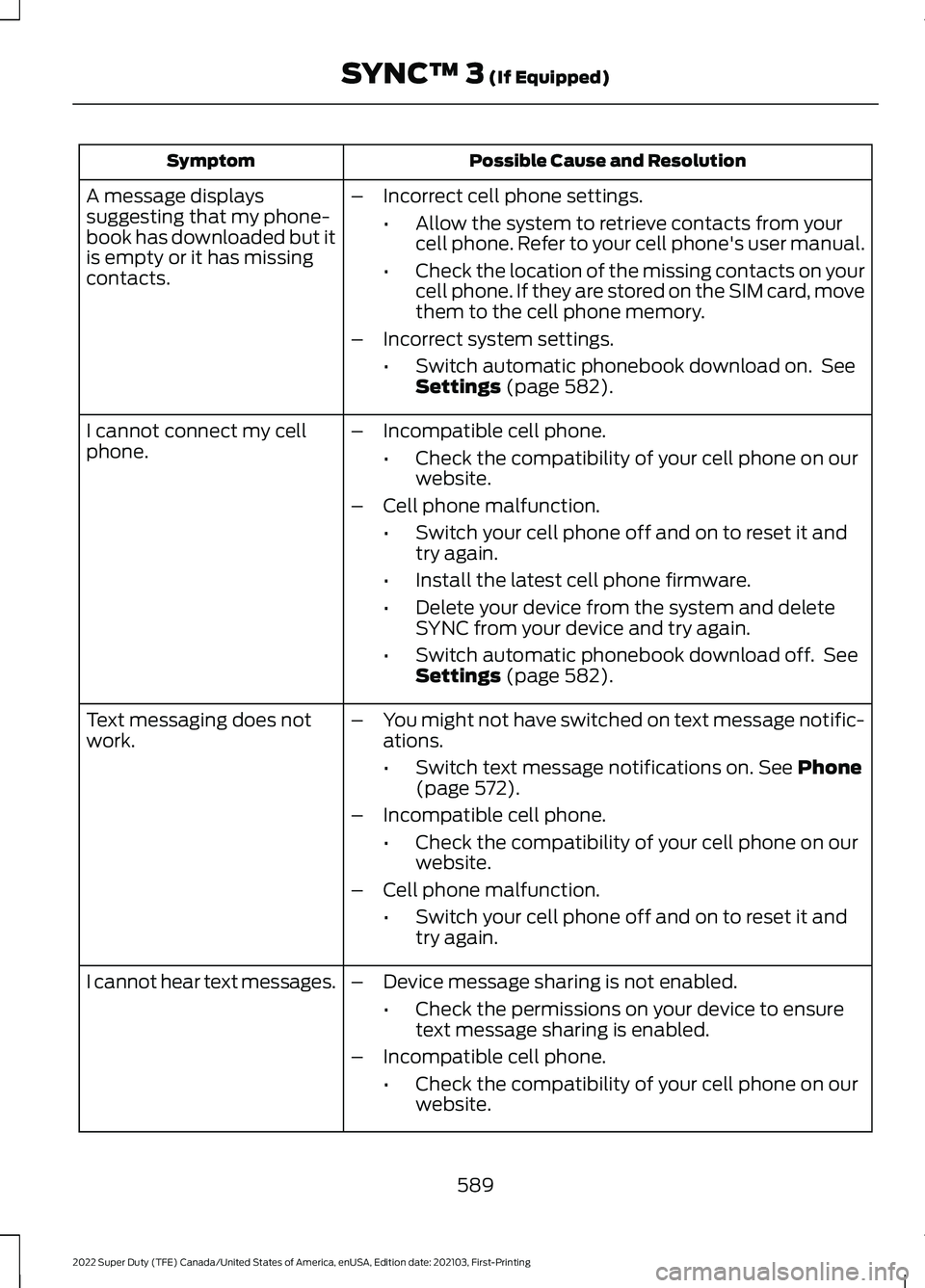
Possible Cause and Resolution
Symptom
–Incorrect cell phone settings.
•Allow the system to retrieve contacts from your
cell phone. Refer to your cell phone's user manual.
• Check the location of the missing contacts on your
cell phone. If they are stored on the SIM card, move
them to the cell phone memory.
– Incorrect system settings.
•Switch automatic phonebook download on. See
Settings (page 582).
A message displays
suggesting that my phone-
book has downloaded but it
is empty or it has missing
contacts.
–Incompatible cell phone.
•Check the compatibility of your cell phone on our
website.
– Cell phone malfunction.
•Switch your cell phone off and on to reset it and
try again.
• Install the latest cell phone firmware.
• Delete your device from the system and delete
SYNC from your device and try again.
• Switch automatic phonebook download off. See
Settings
(page 582).
I cannot connect my cell
phone.
Text messaging does not
work.
–
You might not have switched on text message notific-
ations.
•Switch text message notifications on.
See Phone
(page 572).
– Incompatible cell phone.
•Check the compatibility of your cell phone on our
website.
– Cell phone malfunction.
•Switch your cell phone off and on to reset it and
try again.
– Device message sharing is not enabled.
•Check the permissions on your device to ensure
text message sharing is enabled.
– Incompatible cell phone.
•Check the compatibility of your cell phone on our
website.
I cannot hear text messages.
589
2022 Super Duty (TFE) Canada/United States of America, enUSA, Edition date: 202103, First-Printing SYNC™ 3
(If Equipped)
Page 598 of 740
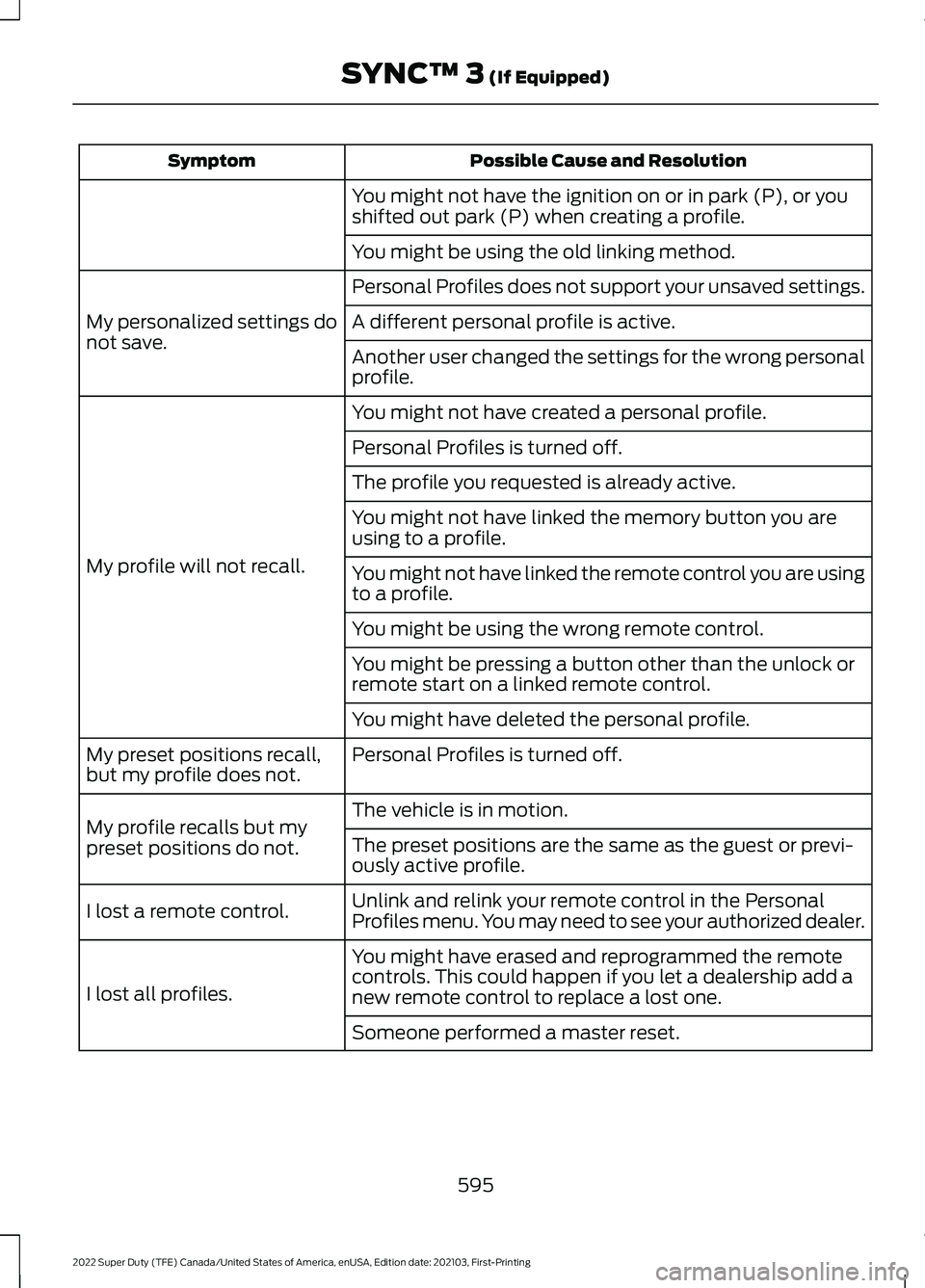
Possible Cause and Resolution
Symptom
You might not have the ignition on or in park (P), or you
shifted out park (P) when creating a profile.
You might be using the old linking method.
Personal Profiles does not support your unsaved settings.
My personalized settings do
not save. A different personal profile is active.
Another user changed the settings for the wrong personal
profile.
You might not have created a personal profile.
My profile will not recall. Personal Profiles is turned off.
The profile you requested is already active.
You might not have linked the memory button you are
using to a profile.
You might not have linked the remote control you are using
to a profile.
You might be using the wrong remote control.
You might be pressing a button other than the unlock or
remote start on a linked remote control.
You might have deleted the personal profile.
Personal Profiles is turned off.
My preset positions recall,
but my profile does not.
The vehicle is in motion.
My profile recalls but my
preset positions do not. The preset positions are the same as the guest or previ-
ously active profile.
Unlink and relink your remote control in the Personal
Profiles menu. You may need to see your authorized dealer.
I lost a remote control.
You might have erased and reprogrammed the remote
controls. This could happen if you let a dealership add a
new remote control to replace a lost one.
I lost all profiles.
Someone performed a master reset.
595
2022 Super Duty (TFE) Canada/United States of America, enUSA, Edition date: 202103, First-Printing SYNC™ 3 (If Equipped)
Page 599 of 740
Resetting the System
1. Simultaneously press and hold the
seek up and the audio unit power
buttons until the screen goes black.
2. Wait three minutes to allow the system
to complete the reset.
3. Press the audio unit power button to switch the system on.
Note: You can reset the system to restore
functionality that has stopped working. The
system reset is designed to restore
functionality and not delete any data that
you have stored.
Additional Information and
Assistance
For additional information and assistance,
we recommend that you contact an
authorized dealer or refer to our website.
596
2022 Super Duty (TFE) Canada/United States of America, enUSA, Edition date: 202103, First-Printing SYNC™ 3 (If Equipped)
Page 603 of 740
WHAT IS VOICE INTERACTION
Voice Interaction allows you to control
vehicle features using conversational
requests.
SETTING THE WAKE WORD
1. Press the Settings option on the
feature bar.
2. Press the Voice Control button.
3. Switch on Listen for Wake Word.
4. Press Preferred Wake Word
5. Select a wake word.
BEGINNING A VOICE
INTERACTION
Say the selected wake word. Press the voice interaction
button on the steering wheel.
VOICE INTERACTION
EXAMPLES
General Examples Result
Command
The system resetsthe current voice interaction.
Start Over.
The system endsthe current voice interaction.
Cancel.
The system goes tothe next page.
Next Page.
The system goes tothe previous page.
Previous Page.
The system
displays a list of available
commands you can use on the current screen.
Help.
Entertainment Examples Result
Command
The system plays
the selected music.
Play The Beatles.
The system shows
the selected music.
Show music by The
Beatles.
The system tunesthe radio to 101.9 FM.
Tune to FM 101.9.
The system tunesthe radio to Sirius Channel 2.
Set the station to
Sirius Channel 2.
600
2022 Super Duty (TFE) Canada/United States of America, enUSA, Edition date: 202103, First-Printing Voice Interaction - Vehicles With: SYNC 4E142599
Page 617 of 740
Note:
If your vehicle is plugged in, charging
will stop during an update and resume when
the update is complete.
Over-the-Air Update Requirements
If these requirements are not met during a
scheduled update the update will be
postponed. You can update your schedule
if you want to retry the update sooner.
• Your vehicle is not running.
• Your vehicle is stopped.
• Your vehicle is parked.
• The hazard indicators are switched off.
• The alarm is not sounding.
• The doors are closed.
• The parking lights are switched off.
• You are not pressing the brake pedal.
• An emergency call is not in progress.
• The Stop Safely lamp is not
illuminated. See Instrument Cluster
Warning Lamps (page 137).
Viewing Update Information
If an update is successful, the touchscreen
will provide additional details or statuses
about the update. You can also access this
information under the System Update tile.
If an update is not successful, follow the
prompt that appears on the touchscreen.
PERFORMING A MASTER
RESET Press the settings option on the
feature bar.
1. Press the
Reset tile.
2. Press
Master Reset.
3. Follow the prompts on the screen to complete the reset.
614
2022 Super Duty (TFE) Canada/United States of America, enUSA, Edition date: 202103, First-Printing Vehicle System Updates - Vehicles With: SYNC 4E280315
Page 625 of 740
GENERAL MAINTENANCE
INFORMATION
Why Maintain Your Vehicle?
Carefully following the maintenance
schedule helps protect against major repair
expenses resulting from neglect or
inadequate maintenance and may help to
increase the value of your vehicle when
you sell or trade it. Keep all receipts for
completed maintenance with your vehicle.
It is important that you have your vehicle
serviced at the proper times. These
intervals serve two purposes: first is to
maintain the reliability of your vehicle and
the second is to keep the cost of owning
your vehicle down.
It is your responsibility to have all
scheduled maintenance performed and to
make sure that the materials used meet
the specifications identified in this owner's
manual. See Capacities and
Specifications (page 467).
Failure to perform scheduled maintenance
and regularly inspect your vehicle may
result in vehicle damage not covered by
the vehicle Warranty.
Why Maintain Your Vehicle at Your
Dealership?
Our Genuine Replacement Parts
Dealerships stock our parts and our
authorized branded re-manufactured
replacement parts. These parts meet or
exceed our specifications. Parts installed
at your dealership carry a nationwide
24-month or unlimited mile (kilometer)
parts and labor limited warranty.
If you do not use our authorized parts they
may not meet our specifications and could
affect emissions compliance. Protecting Your Investment
Maintenance is an investment that pays
dividends in the form of improved
reliability, durability and resale value. To
maintain the proper performance of your
vehicle and its emission control systems,
make sure you have scheduled
maintenance performed at the designated
intervals.
Your vehicle comes with the Intelligent
Oil-Life Monitor system, a message
appears in the information display at the
proper oil change interval. This interval
may be up to one year or
10,000 mi
(16,000 km), hybrid vehicles could exceed
10,000 mi (16,000 km).
When the oil change message appears in
the information display, it is time for an oil
change. Make sure you perform the oil
change within two weeks or
500 mi
(800 km) of the message appearing. Make
sure to reset the Intelligent Oil-Life Monitor
after each oil change. See
Resetting the
Engine Oil Change Reminder (page 401).
If your information display resets
prematurely or becomes inoperative, you
should perform the oil change interval at
six months or
5,000 mi (8,000 km) from
your last oil change. Never exceed one year
or
10,000 mi (16,000 km) between oil
change intervals.
You can drive high performance vehicles
in such a way that may lead to higher oil
consumption including extended time at
high engine speeds, high loads, engine
braking, hard cornering maneuvers, track
and off-road usage. Under these
conditions, oil consumption of
approximately 1 quart per 500 miles (1 liter
per 800 km) is possible. Check the engine
oil level at every refueling and adjust to
maintain proper levels to avoid engine
damage.
622
2022 Super Duty (TFE) Canada/United States of America, enUSA, Edition date: 202103, First-Printing Scheduled Maintenance
Page 630 of 740
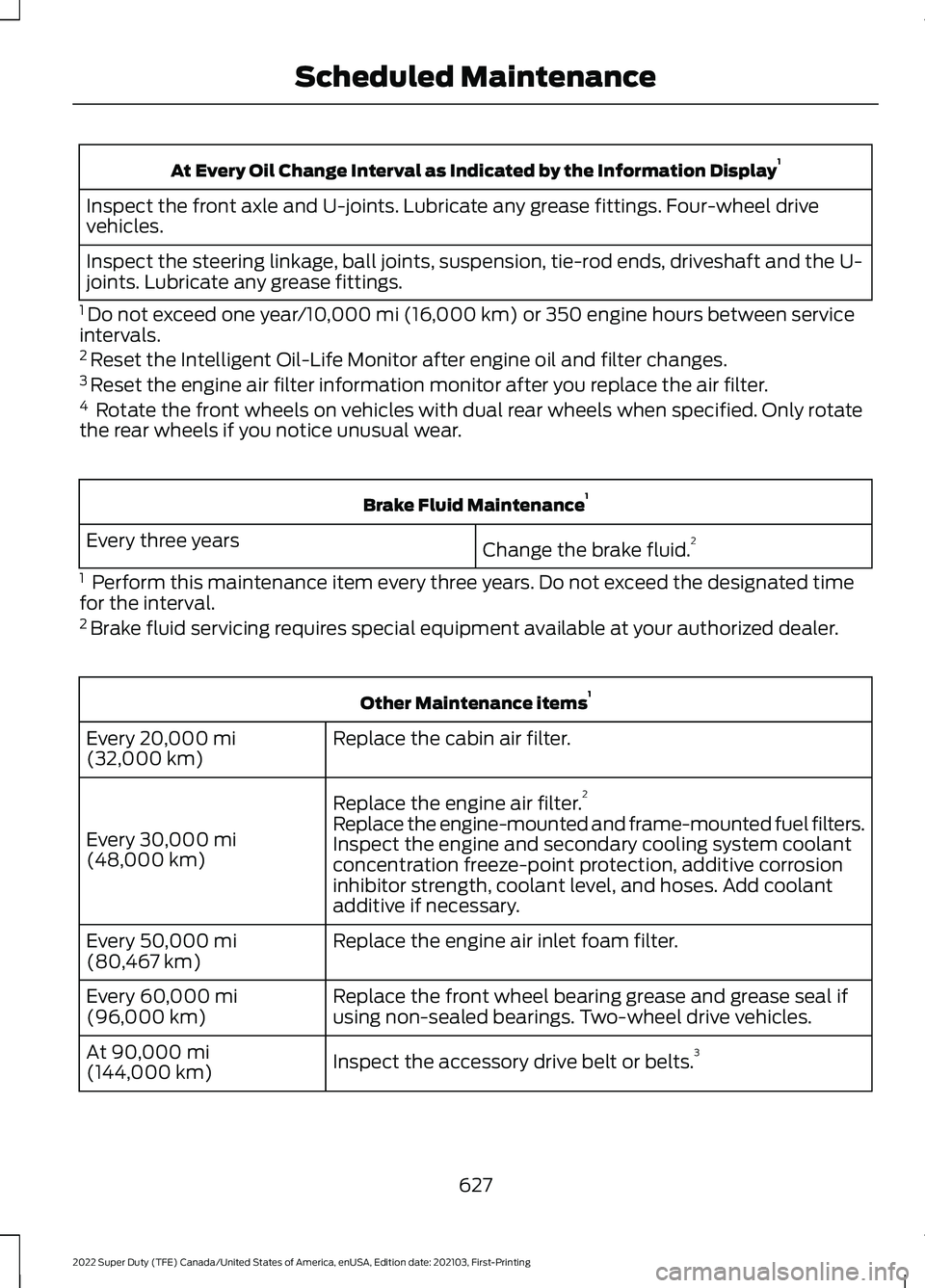
At Every Oil Change Interval as Indicated by the Information Display
1
Inspect the front axle and U-joints. Lubricate any grease fittings. Four-wheel drive
vehicles.
Inspect the steering linkage, ball joints, suspension, tie-rod ends, driveshaft and the U-
joints. Lubricate any grease fittings.
1 Do not exceed one year/10,000 mi (16,000 km) or 350 engine hours between service
intervals.
2 Reset the Intelligent Oil-Life Monitor after engine oil and filter changes.
3 Reset the engine air filter information monitor after you replace the air filter.
4 Rotate the front wheels on vehicles with dual rear wheels when specified. Only rotate
the rear wheels if you notice unusual wear. Brake Fluid Maintenance
1
Change the brake fluid. 2
Every three years
1 Perform this maintenance item every three years. Do not exceed the designated time
for the interval.
2 Brake fluid servicing requires special equipment available at your authorized dealer. Other Maintenance items
1
Replace the cabin air filter.
Every
20,000 mi
(32,000 km)
Replace the engine air filter. 2
Every
30,000 mi
(48,000 km) Replace the engine-mounted and frame-mounted fuel filters.
Inspect the engine and secondary cooling system coolant
concentration freeze-point protection, additive corrosion
inhibitor strength, coolant level, and hoses. Add coolant
additive if necessary.
Replace the engine air inlet foam filter.
Every
50,000 mi
(80,467 km)
Replace the front wheel bearing grease and grease seal if
using non-sealed bearings. Two-wheel drive vehicles.
Every
60,000 mi
(96,000 km)
Inspect the accessory drive belt or belts. 3
At
90,000 mi
(144,000 km)
627
2022 Super Duty (TFE) Canada/United States of America, enUSA, Edition date: 202103, First-Printing Scheduled Maintenance
Page 631 of 740
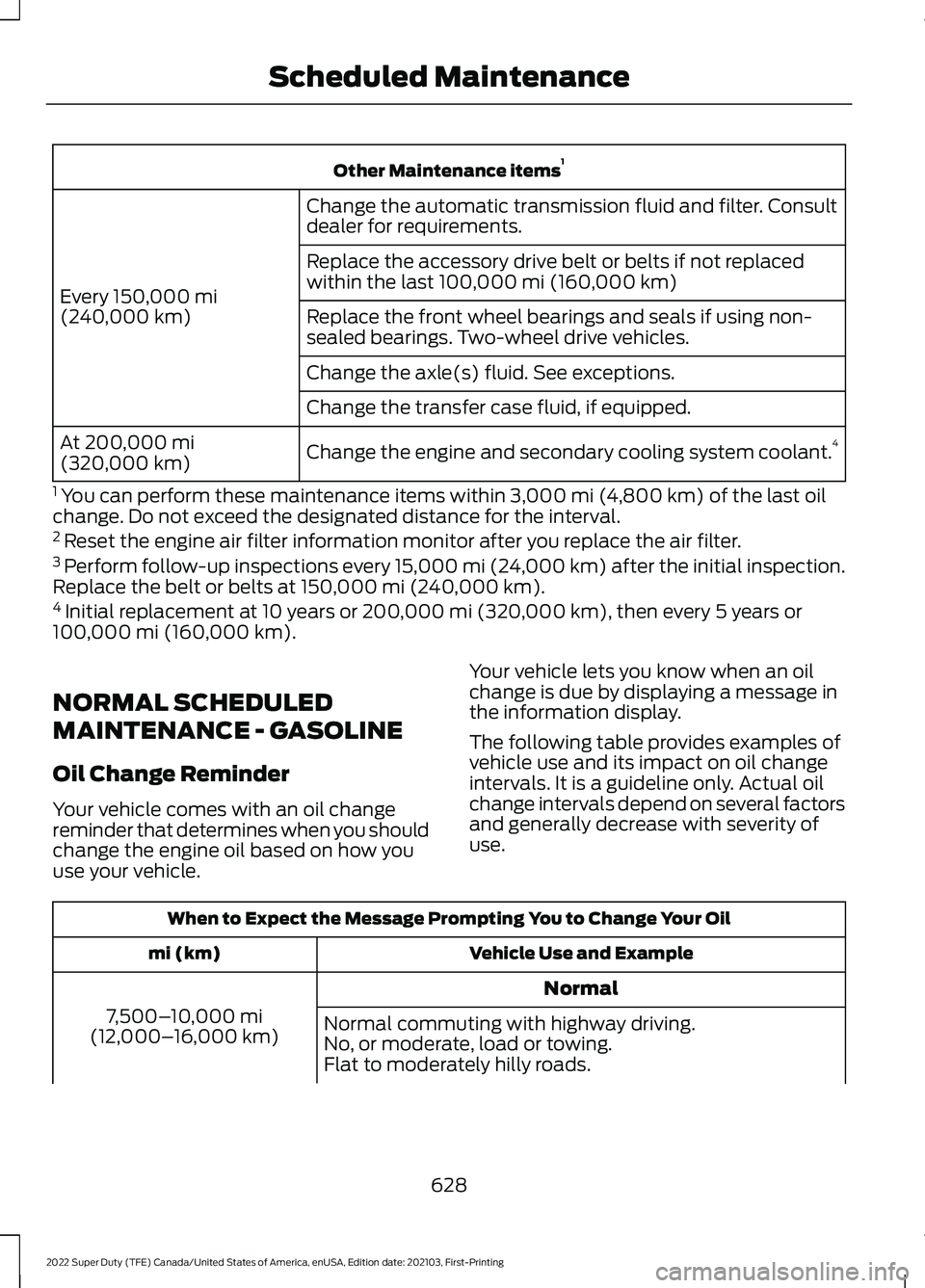
Other Maintenance items
1
Change the automatic transmission fluid and filter. Consult
dealer for requirements.
Every 150,000 mi
(240,000 km) Replace the accessory drive belt or belts if not replaced
within the last 100,000 mi (160,000 km)
Replace the front wheel bearings and seals if using non-
sealed bearings. Two-wheel drive vehicles.
Change the axle(s) fluid. See exceptions.
Change the transfer case fluid, if equipped.
Change the engine and secondary cooling system coolant. 4
At
200,000 mi
(320,000 km)
1 You can perform these maintenance items within
3,000 mi (4,800 km) of the last oil
change. Do not exceed the designated distance for the interval.
2 Reset the engine air filter information monitor after you replace the air filter.
3 Perform follow-up inspections every 15,000 mi (24,000 km) after the initial inspection.
Replace the belt or belts at
150,000 mi (240,000 km).
4 Initial replacement at 10 years or 200,000 mi (320,000 km), then every 5 years or
100,000 mi (160,000 km).
NORMAL SCHEDULED
MAINTENANCE - GASOLINE
Oil Change Reminder
Your vehicle comes with an oil change
reminder that determines when you should
change the engine oil based on how you
use your vehicle. Your vehicle lets you know when an oil
change is due by displaying a message in
the information display.
The following table provides examples of
vehicle use and its impact on oil change
intervals. It is a guideline only. Actual oil
change intervals depend on several factors
and generally decrease with severity of
use.When to Expect the Message Prompting You to Change Your Oil
Vehicle Use and Example
mi (km)
Normal
7,500– 10,000 mi
(12,000– 16,000 km) Normal commuting with highway driving.
No, or moderate, load or towing.
Flat to moderately hilly roads.
628
2022 Super Duty (TFE) Canada/United States of America, enUSA, Edition date: 202103, First-Printing Scheduled Maintenance