lock FORD F-350 2018 Owners Manual
[x] Cancel search | Manufacturer: FORD, Model Year: 2018, Model line: F-350, Model: FORD F-350 2018Pages: 660, PDF Size: 11.64 MB
Page 440 of 660
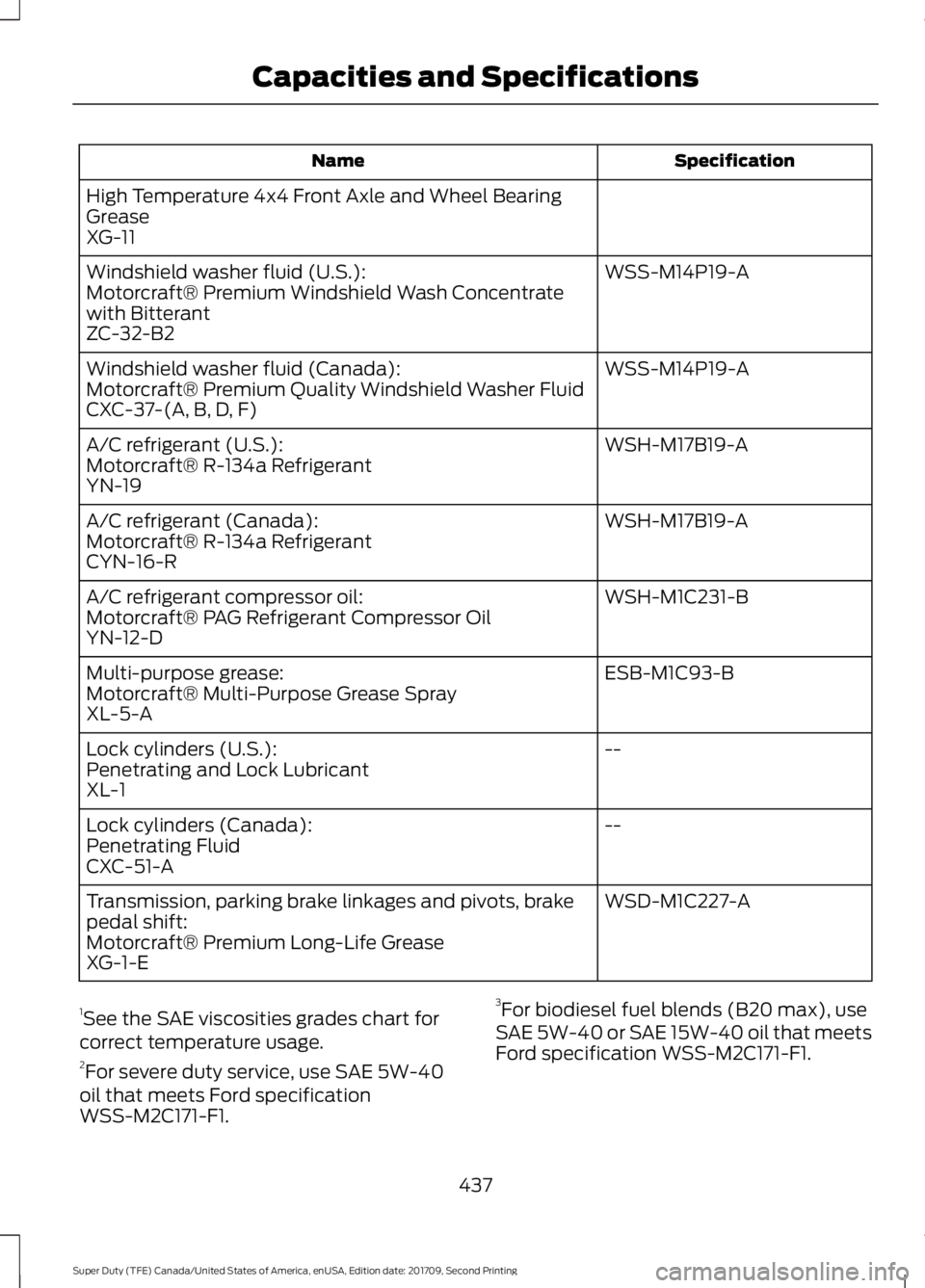
Specification
Name
High Temperature 4x4 Front Axle and Wheel Bearing
Grease
XG-11 WSS-M14P19-A
Windshield washer fluid (U.S.):
Motorcraft® Premium Windshield Wash Concentrate
with Bitterant
ZC-32-B2
WSS-M14P19-A
Windshield washer fluid (Canada):
Motorcraft® Premium Quality Windshield Washer Fluid
CXC-37-(A, B, D, F)
WSH-M17B19-A
A/C refrigerant (U.S.):
Motorcraft® R-134a Refrigerant
YN-19
WSH-M17B19-A
A/C refrigerant (Canada):
Motorcraft® R-134a Refrigerant
CYN-16-R
WSH-M1C231-B
A/C refrigerant compressor oil:
Motorcraft® PAG Refrigerant Compressor Oil
YN-12-D
ESB-M1C93-B
Multi-purpose grease:
Motorcraft® Multi-Purpose Grease Spray
XL-5-A
--
Lock cylinders (U.S.):
Penetrating and Lock Lubricant
XL-1
--
Lock cylinders (Canada):
Penetrating Fluid
CXC-51-A
WSD-M1C227-A
Transmission, parking brake linkages and pivots, brake
pedal shift:
Motorcraft® Premium Long-Life Grease
XG-1-E
1 See the SAE viscosities grades chart for
correct temperature usage.
2 For severe duty service, use SAE 5W-40
oil that meets Ford specification
WSS-M2C171-F1. 3
For biodiesel fuel blends (B20 max), use
SAE 5W-40 or SAE 15W-40 oil that meets
Ford specification WSS-M2C171-F1.
437
Super Duty (TFE) Canada/United States of America, enUSA, Edition date: 201709, Second Printing Capacities and Specifications
Page 441 of 660
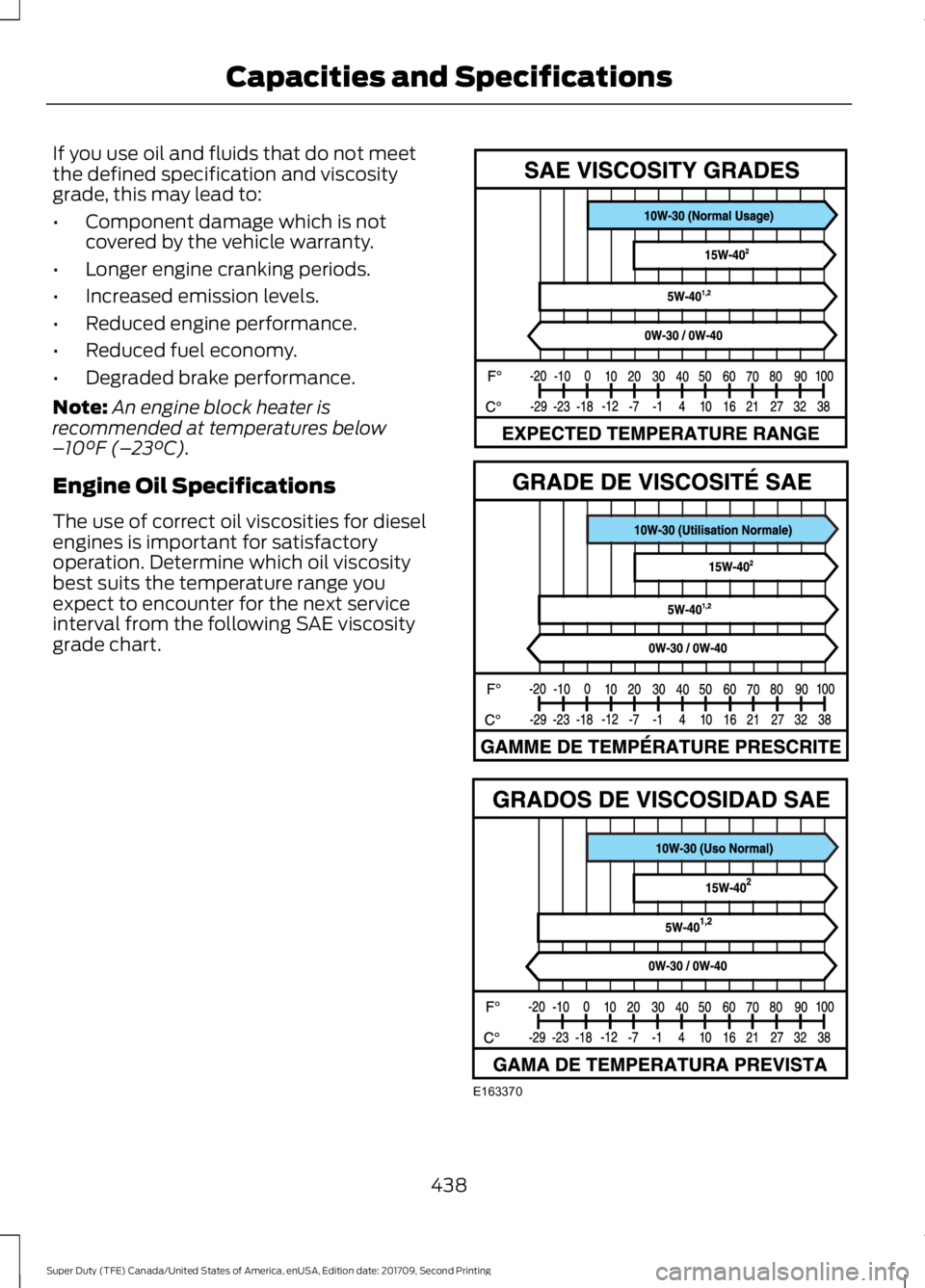
If you use oil and fluids that do not meet
the defined specification and viscosity
grade, this may lead to:
•
Component damage which is not
covered by the vehicle warranty.
• Longer engine cranking periods.
• Increased emission levels.
• Reduced engine performance.
• Reduced fuel economy.
• Degraded brake performance.
Note: An engine block heater is
recommended at temperatures below
– 10°F (– 23°C).
Engine Oil Specifications
The use of correct oil viscosities for diesel
engines is important for satisfactory
operation. Determine which oil viscosity
best suits the temperature range you
expect to encounter for the next service
interval from the following SAE viscosity
grade chart. 438
Super Duty (TFE) Canada/United States of America, enUSA, Edition date: 201709, Second Printing Capacities and SpecificationsE163370
Page 442 of 660
Note:
Ford recommends using DOT 4 Low
Viscosity (LV) High Performance Brake Fluid
or equivalent meeting WSS-M6C65-A2. Use
of any fluid other than the recommended
fluid may cause degraded brake
performance and not meet the Ford
performance standards. Keep brake fluid
clean and dry. Contamination with dirt,
water, petroleum products or other
materials may result in brake system
damage and possible failure.
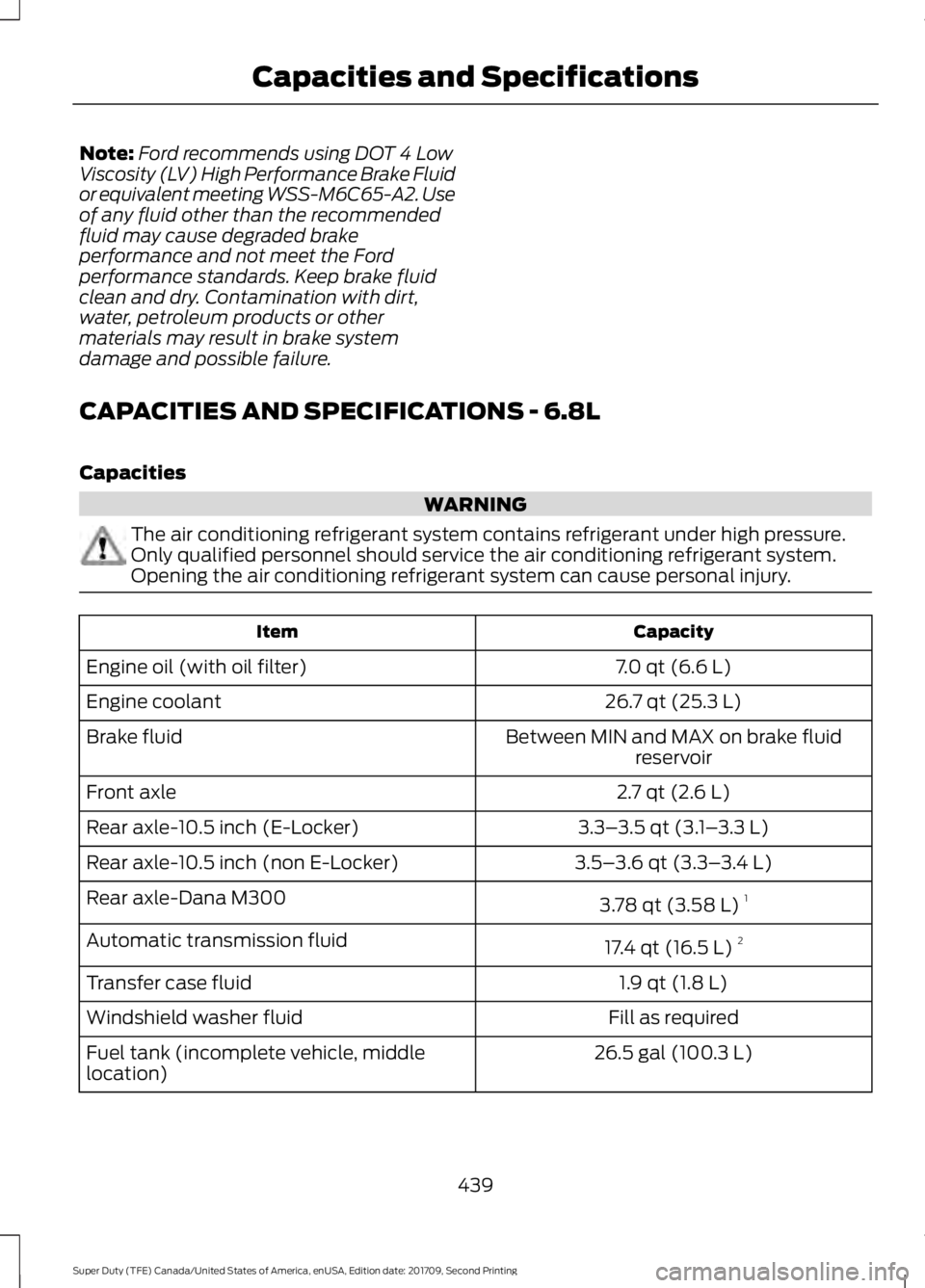
CAPACITIES AND SPECIFICATIONS - 6.8L
Capacities WARNING
The air conditioning refrigerant system contains refrigerant under high pressure.
Only qualified personnel should service the air conditioning refrigerant system.
Opening the air conditioning refrigerant system can cause personal injury.
Capacity
Item
7.0 qt (6.6 L)
Engine oil (with oil filter)
26.7 qt (25.3 L)
Engine coolant
Between MIN and MAX on brake fluidreservoir
Brake fluid
2.7 qt (2.6 L)
Front axle
3.3–3.5 qt (3.1– 3.3 L)
Rear axle-10.5 inch (E-Locker)
3.5–3.6 qt (3.3– 3.4 L)
Rear axle-10.5 inch (non E-Locker)
3.78 qt (3.58 L)1
Rear axle-Dana M300
17.4 qt (16.5 L)2
Automatic transmission fluid
1.9 qt (1.8 L)
Transfer case fluid
Fill as required
Windshield washer fluid
26.5 gal (100.3 L)
Fuel tank (incomplete vehicle, middle
location)
439
Super Duty (TFE) Canada/United States of America, enUSA, Edition date: 201709, Second Printing Capacities and Specifications
Page 444 of 660
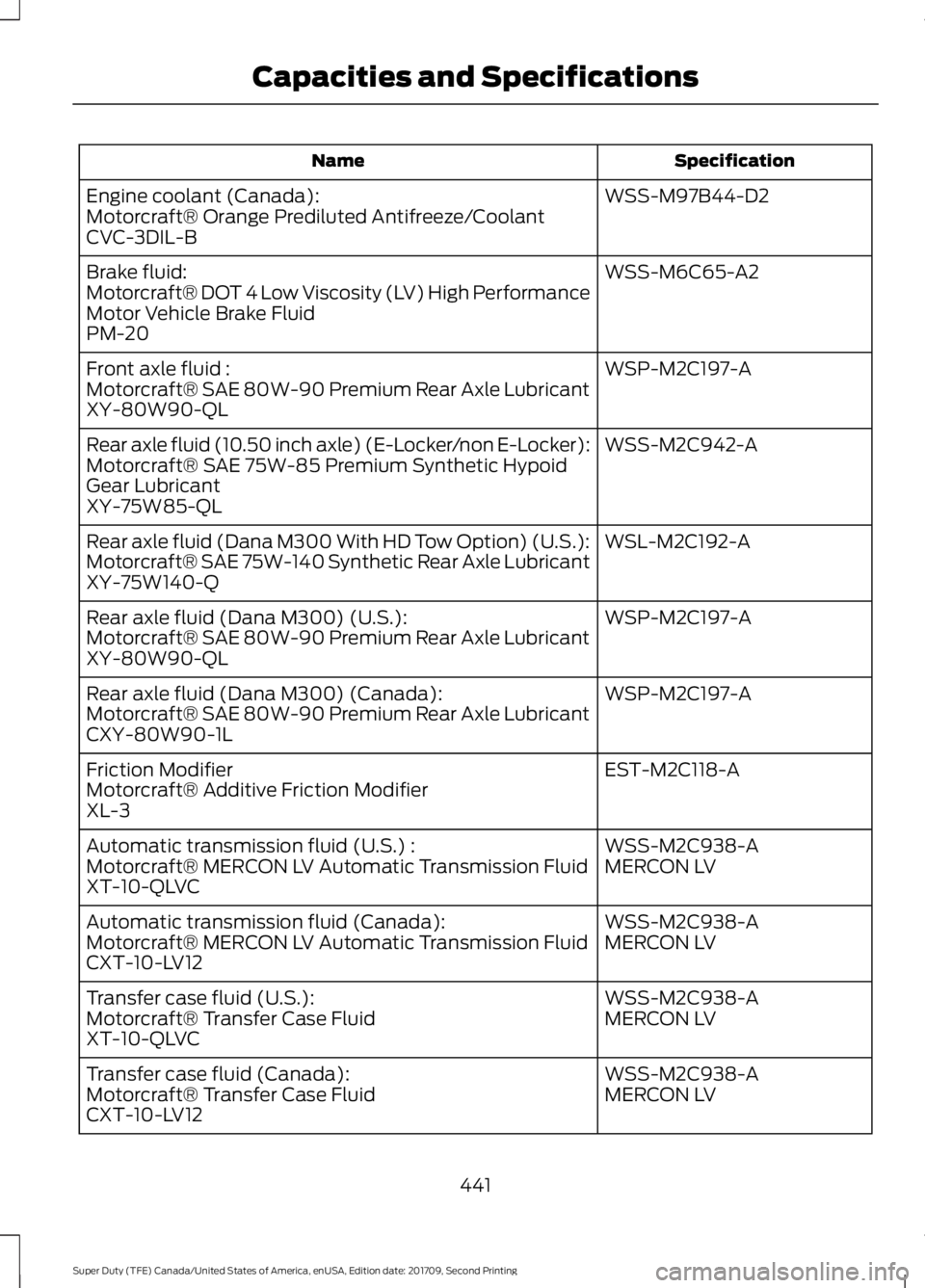
Specification
Name
WSS-M97B44-D2
Engine coolant (Canada):
Motorcraft® Orange Prediluted Antifreeze/Coolant
CVC-3DIL-B
WSS-M6C65-A2
Brake fluid:
Motorcraft® DOT 4 Low Viscosity (LV) High Performance
Motor Vehicle Brake Fluid
PM-20
WSP-M2C197-A
Front axle fluid :
Motorcraft® SAE 80W-90 Premium Rear Axle Lubricant
XY-80W90-QL
WSS-M2C942-A
Rear axle fluid (10.50 inch axle) (E-Locker/non E-Locker):
Motorcraft® SAE 75W-85 Premium Synthetic Hypoid
Gear Lubricant
XY-75W85-QL
WSL-M2C192-A
Rear axle fluid (Dana M300 With HD Tow Option) (U.S.):
Motorcraft® SAE 75W-140 Synthetic Rear Axle Lubricant
XY-75W140-Q
WSP-M2C197-A
Rear axle fluid (Dana M300) (U.S.):
Motorcraft® SAE 80W-90 Premium Rear Axle Lubricant
XY-80W90-QL
WSP-M2C197-A
Rear axle fluid (Dana M300) (Canada):
Motorcraft® SAE 80W-90 Premium Rear Axle Lubricant
CXY-80W90-1L
EST-M2C118-A
Friction Modifier
Motorcraft® Additive Friction Modifier
XL-3
WSS-M2C938-A
Automatic transmission fluid (U.S.) :
MERCON LV
Motorcraft® MERCON LV Automatic Transmission Fluid
XT-10-QLVC
WSS-M2C938-A
Automatic transmission fluid (Canada):
MERCON LV
Motorcraft® MERCON LV Automatic Transmission Fluid
CXT-10-LV12
WSS-M2C938-A
Transfer case fluid (U.S.):
MERCON LV
Motorcraft® Transfer Case Fluid
XT-10-QLVC
WSS-M2C938-A
Transfer case fluid (Canada):
MERCON LV
Motorcraft® Transfer Case Fluid
CXT-10-LV12
441
Super Duty (TFE) Canada/United States of America, enUSA, Edition date: 201709, Second Printing Capacities and Specifications
Page 445 of 660
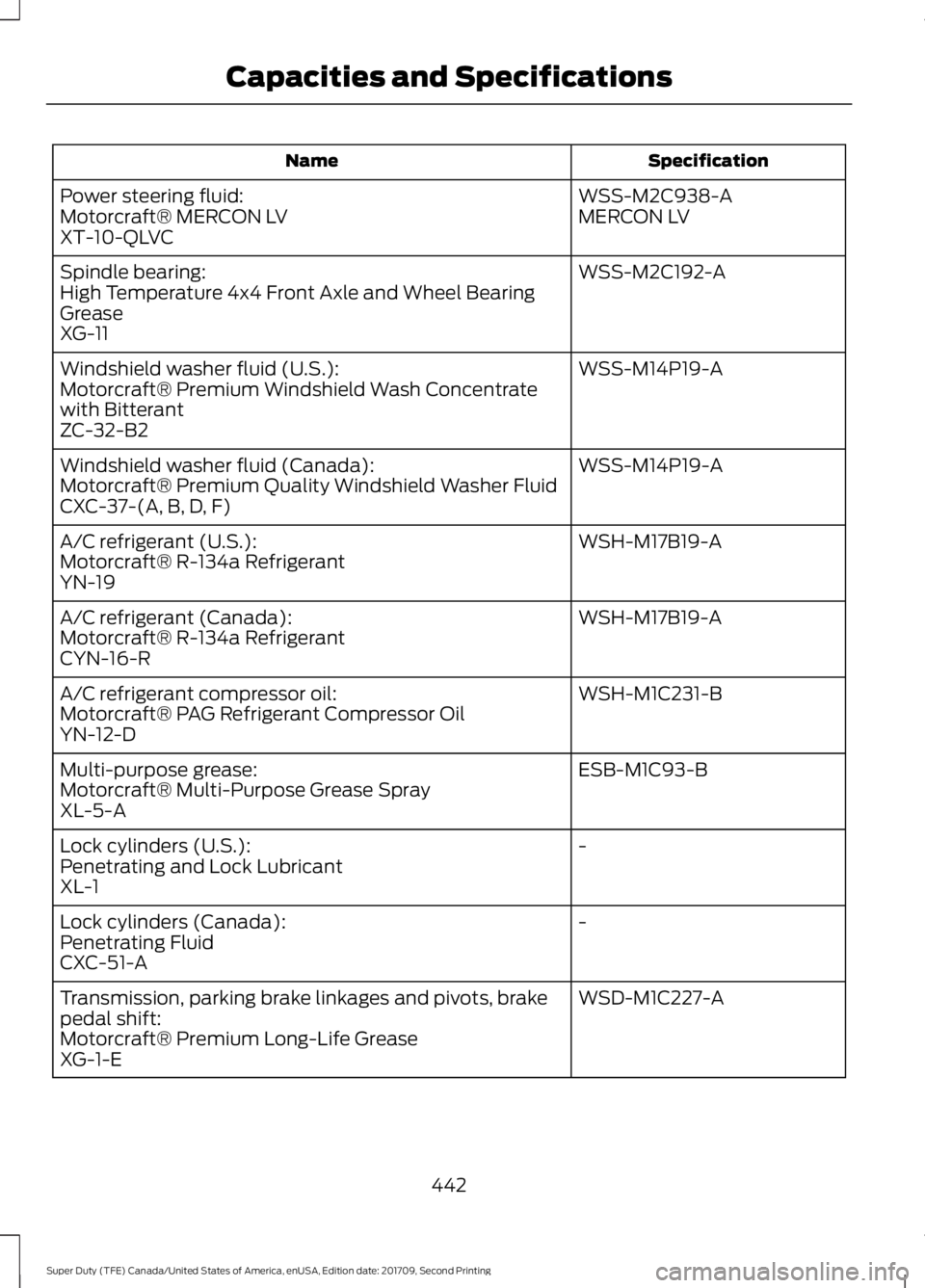
Specification
Name
WSS-M2C938-A
Power steering fluid:
MERCON LV
Motorcraft® MERCON LV
XT-10-QLVC
WSS-M2C192-A
Spindle bearing:
High Temperature 4x4 Front Axle and Wheel Bearing
Grease
XG-11
WSS-M14P19-A
Windshield washer fluid (U.S.):
Motorcraft® Premium Windshield Wash Concentrate
with Bitterant
ZC-32-B2
WSS-M14P19-A
Windshield washer fluid (Canada):
Motorcraft® Premium Quality Windshield Washer Fluid
CXC-37-(A, B, D, F)
WSH-M17B19-A
A/C refrigerant (U.S.):
Motorcraft® R-134a Refrigerant
YN-19
WSH-M17B19-A
A/C refrigerant (Canada):
Motorcraft® R-134a Refrigerant
CYN-16-R
WSH-M1C231-B
A/C refrigerant compressor oil:
Motorcraft® PAG Refrigerant Compressor Oil
YN-12-D
ESB-M1C93-B
Multi-purpose grease:
Motorcraft® Multi-Purpose Grease Spray
XL-5-A
-
Lock cylinders (U.S.):
Penetrating and Lock Lubricant
XL-1
-
Lock cylinders (Canada):
Penetrating Fluid
CXC-51-A
WSD-M1C227-A
Transmission, parking brake linkages and pivots, brake
pedal shift:
Motorcraft® Premium Long-Life Grease
XG-1-E
442
Super Duty (TFE) Canada/United States of America, enUSA, Edition date: 201709, Second Printing Capacities and Specifications
Page 450 of 660
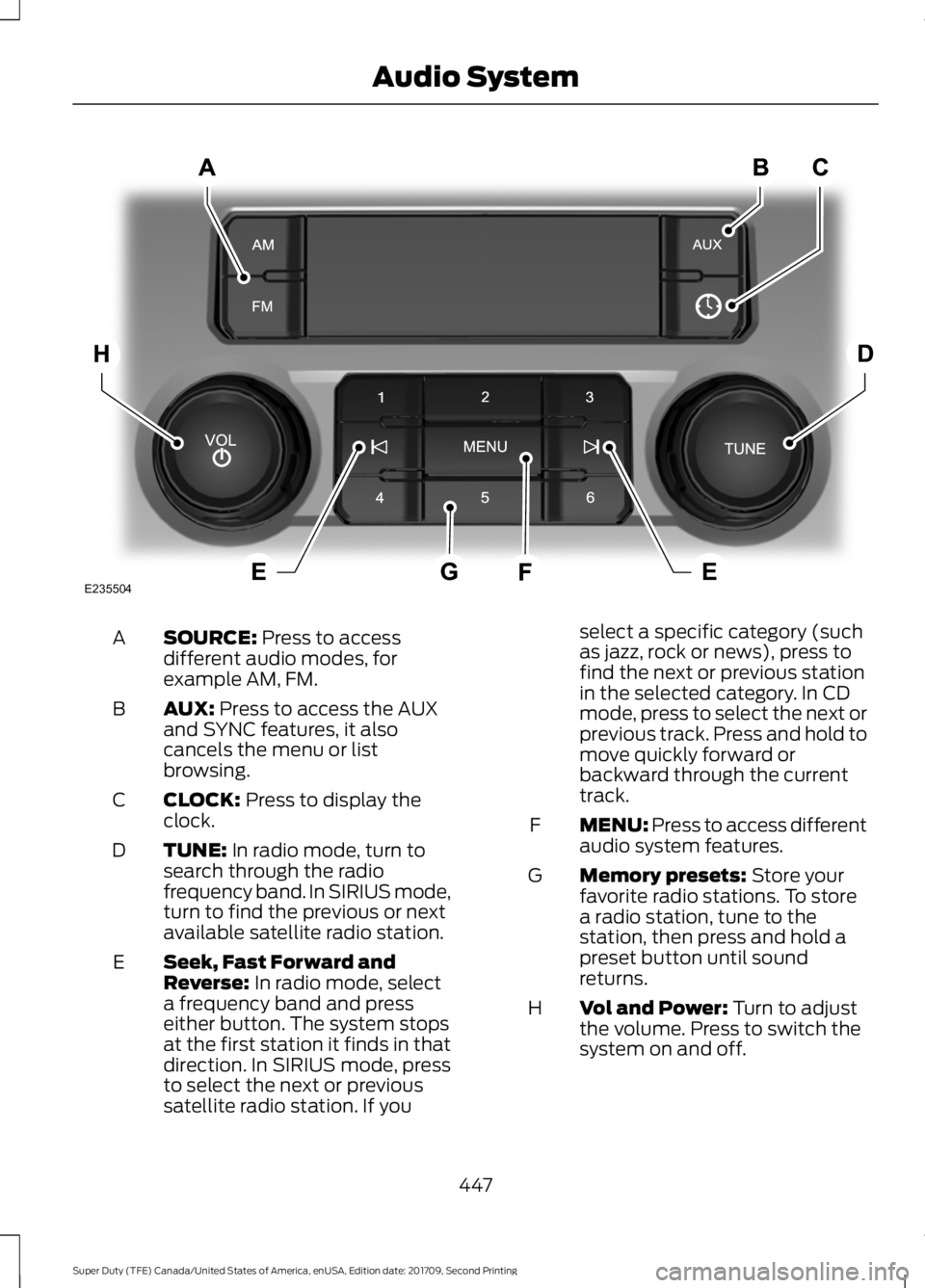
SOURCE: Press to access
different audio modes, for
example AM, FM.
A
AUX:
Press to access the AUX
and SYNC features, it also
cancels the menu or list
browsing.
B
CLOCK:
Press to display the
clock.
C
TUNE:
In radio mode, turn to
search through the radio
frequency band. In SIRIUS mode,
turn to find the previous or next
available satellite radio station.
D
Seek, Fast Forward and
Reverse:
In radio mode, select
a frequency band and press
either button. The system stops
at the first station it finds in that
direction. In SIRIUS mode, press
E
to select the next or previous
satellite radio station. If you select a specific category (such
as jazz, rock or news), press to
find the next or previous station
in the selected category. In CD
mode, press to select the next or
previous track. Press and hold to
move quickly forward or
backward through the current
track.
MENU: Press to access different
audio system features.
F
Memory presets:
Store your
favorite radio stations. To store
a radio station, tune to the
station, then press and hold a
preset button until sound
returns.
G
Vol and Power:
Turn to adjust
the volume. Press to switch the
system on and off.
H
447
Super Duty (TFE) Canada/United States of America, enUSA, Edition date: 201709, Second Printing Audio SystemE235504
Page 452 of 660
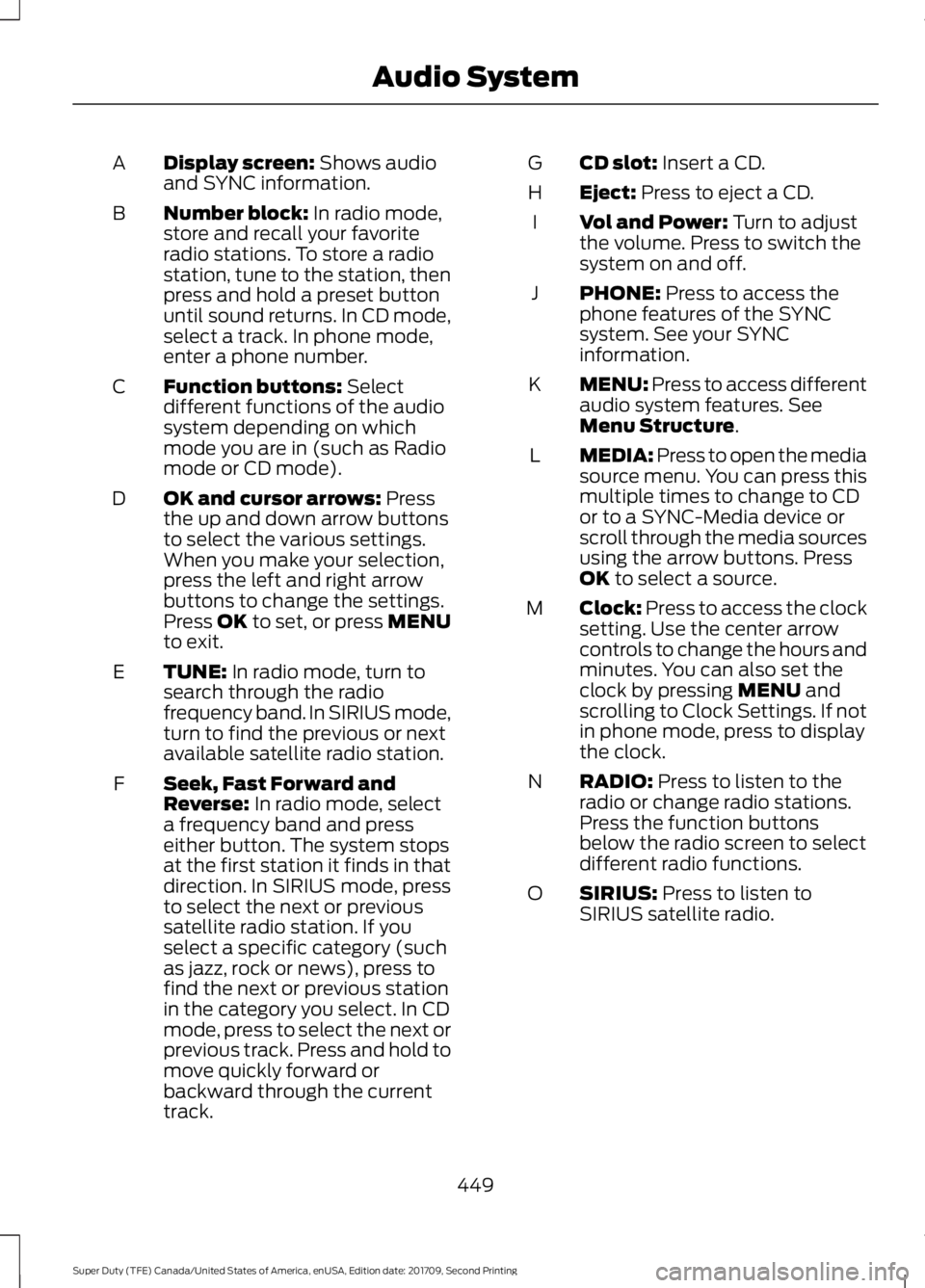
Display screen: Shows audio
and SYNC information.
A
Number block:
In radio mode,
store and recall your favorite
radio stations. To store a radio
station, tune to the station, then
press and hold a preset button
until sound returns. In CD mode,
select a track. In phone mode,
enter a phone number.
B
Function buttons:
Select
different functions of the audio
system depending on which
mode you are in (such as Radio
mode or CD mode).
C
OK and cursor arrows:
Press
the up and down arrow buttons
to select the various settings.
When you make your selection,
press the left and right arrow
buttons to change the settings.
Press OK to set, or press MENU
to exit.
D
TUNE:
In radio mode, turn to
search through the radio
frequency band. In SIRIUS mode,
turn to find the previous or next
available satellite radio station.
E
Seek, Fast Forward and
Reverse:
In radio mode, select
a frequency band and press
either button. The system stops
at the first station it finds in that
direction. In SIRIUS mode, press
F
to select the next or previous
satellite radio station. If you
select a specific category (such
as jazz, rock or news), press to
find the next or previous station
in the category you select. In CD
mode, press to select the next or
previous track. Press and hold to
move quickly forward or
backward through the current
track. CD slot:
Insert a CD.
G
Eject:
Press to eject a CD.
H
Vol and Power:
Turn to adjust
the volume. Press to switch the
system on and off.
I
PHONE:
Press to access the
phone features of the SYNC
system. See your SYNC
information.
J
MENU: Press to access different
audio system features. See
Menu Structure
.
K
MEDIA: Press to open the media
source menu. You can press this
multiple times to change to CD
or to a SYNC-Media device or
scroll through the media sources
using the arrow buttons. Press
OK
to select a source.
L
Clock:
Press to access the clock
setting. Use the center arrow
controls to change the hours and
minutes. You can also set the
clock by pressing
MENU and
scrolling to Clock Settings. If not
in phone mode, press to display
the clock.
M
RADIO:
Press to listen to the
radio or change radio stations.
Press the function buttons
below the radio screen to select
different radio functions.
N
SIRIUS:
Press to listen to
SIRIUS satellite radio.
O
449
Super Duty (TFE) Canada/United States of America, enUSA, Edition date: 201709, Second Printing Audio System
Page 454 of 660
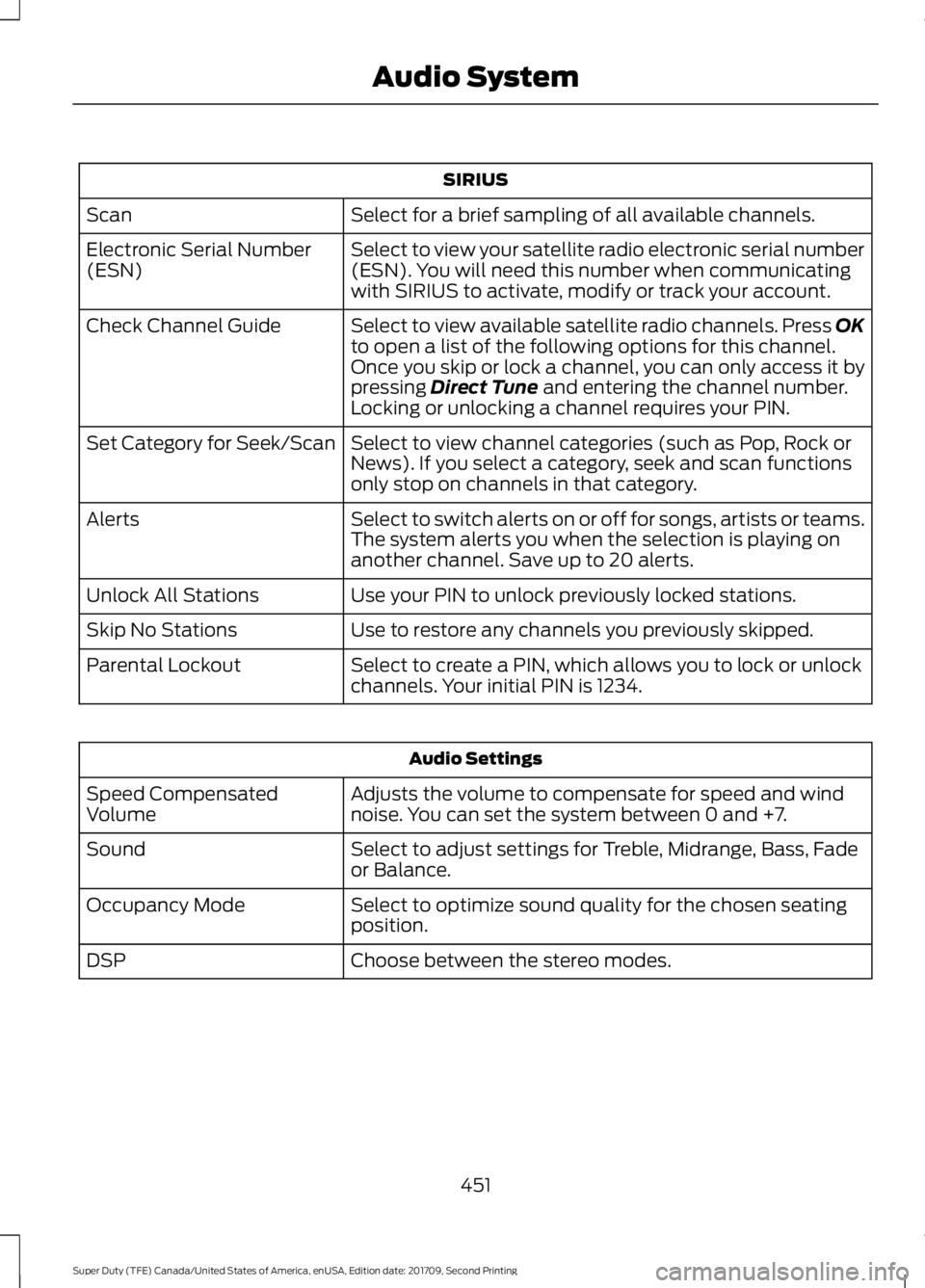
SIRIUS
Select for a brief sampling of all available channels.
Scan
Select to view your satellite radio electronic serial number
(ESN). You will need this number when communicating
with SIRIUS to activate, modify or track your account.
Electronic Serial Number
(ESN)
Select to view available satellite radio channels. Press OK
to open a list of the following options for this channel.
Once you skip or lock a channel, you can only access it by
pressing Direct Tune and entering the channel number.
Locking or unlocking a channel requires your PIN.
Check Channel Guide
Select to view channel categories (such as Pop, Rock or
News). If you select a category, seek and scan functions
only stop on channels in that category.
Set Category for Seek/Scan
Select to switch alerts on or off for songs, artists or teams.
The system alerts you when the selection is playing on
another channel. Save up to 20 alerts.
Alerts
Use your PIN to unlock previously locked stations.
Unlock All Stations
Use to restore any channels you previously skipped.
Skip No Stations
Select to create a PIN, which allows you to lock or unlock
channels. Your initial PIN is 1234.
Parental Lockout Audio Settings
Adjusts the volume to compensate for speed and wind
noise. You can set the system between 0 and +7.
Speed Compensated
Volume
Select to adjust settings for Treble, Midrange, Bass, Fade
or Balance.
Sound
Select to optimize sound quality for the chosen seating
position.
Occupancy Mode
Choose between the stereo modes.
DSP
451
Super Duty (TFE) Canada/United States of America, enUSA, Edition date: 201709, Second Printing Audio System
Page 455 of 660
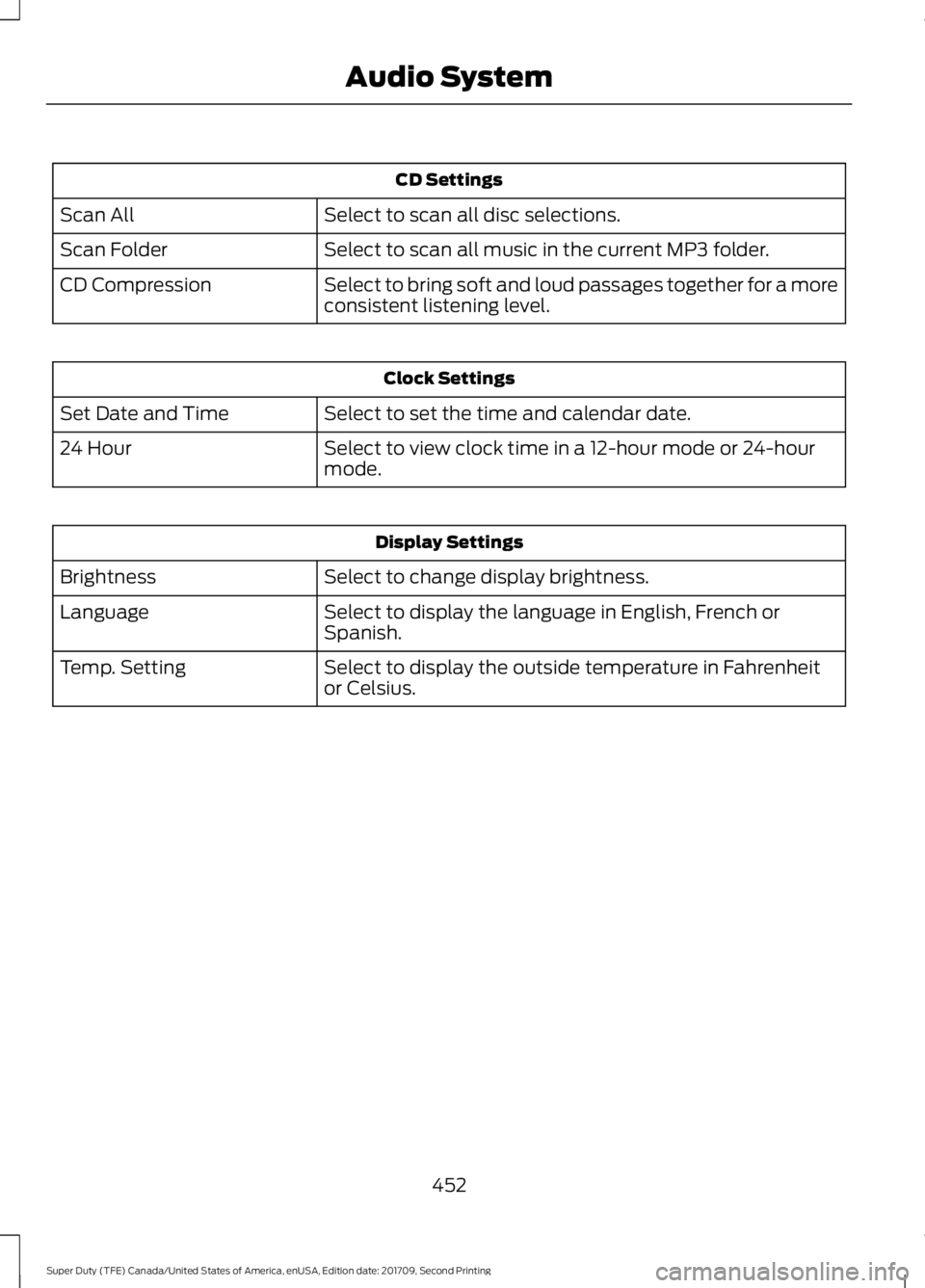
CD Settings
Select to scan all disc selections.
Scan All
Select to scan all music in the current MP3 folder.
Scan Folder
Select to bring soft and loud passages together for a more
consistent listening level.
CD Compression Clock Settings
Select to set the time and calendar date.
Set Date and Time
Select to view clock time in a 12-hour mode or 24-hour
mode.
24 Hour Display Settings
Select to change display brightness.
Brightness
Select to display the language in English, French or
Spanish.
Language
Select to display the outside temperature in Fahrenheit
or Celsius.
Temp. Setting
452
Super Duty (TFE) Canada/United States of America, enUSA, Edition date: 201709, Second Printing Audio System
Page 461 of 660
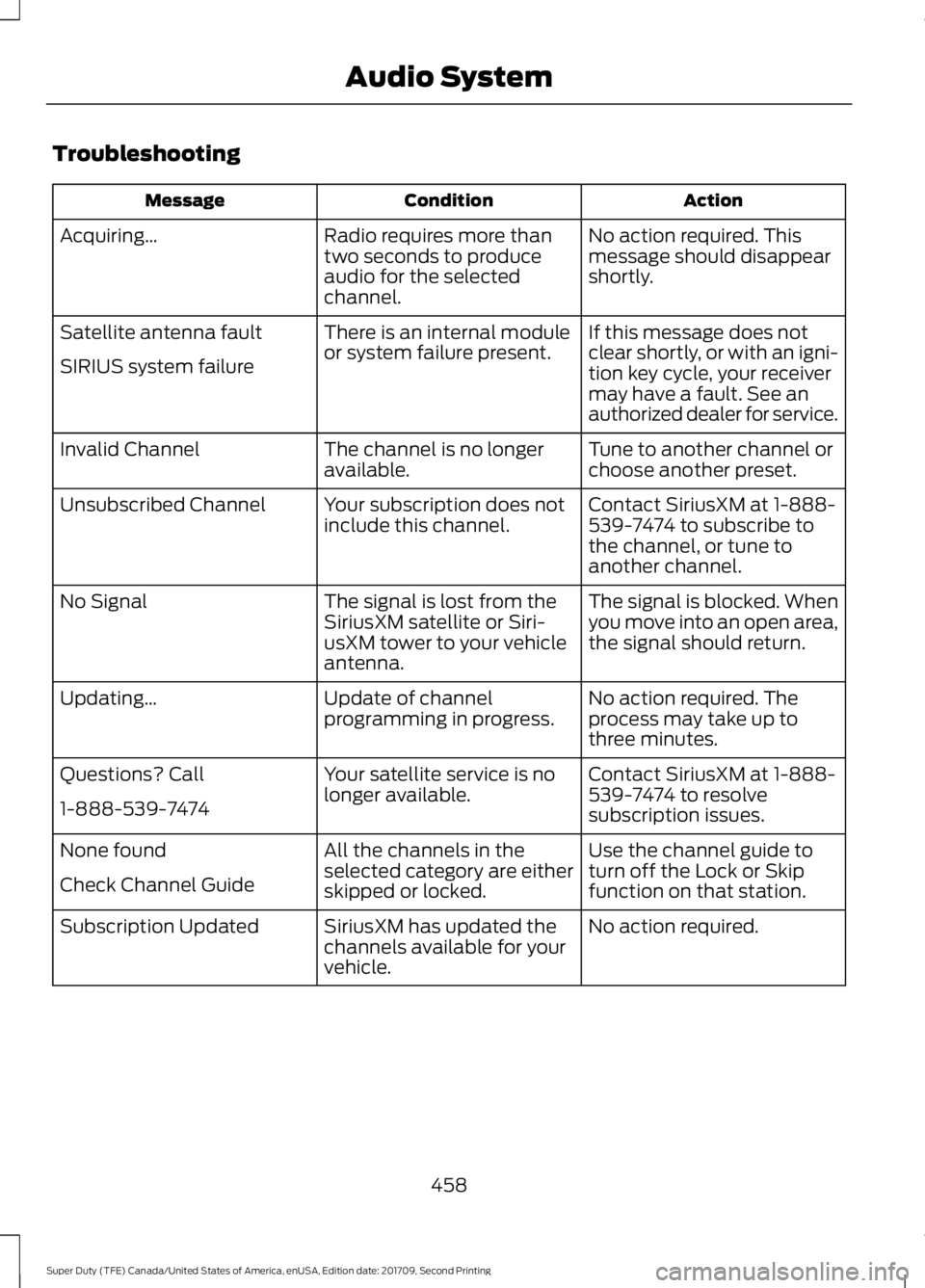
Troubleshooting
Action
Condition
Message
No action required. This
message should disappear
shortly.
Radio requires more than
two seconds to produce
audio for the selected
channel.
Acquiring\b
If this message does not
clear shortly, or with an igni-
tion key cycle, your receiver
may have a fault. See an
authorized dealer for service.
There is an internal module
or system failure present.
Satellite antenna fault
SIRIUS system failure
Tune to another channel or
choose another preset.
The channel is no longer
available.
Invalid Channel
Contact SiriusXM at 1-888-
539-7474 to subscribe to
the channel, or tune to
another channel.
Your subscription does not
include this channel.
Unsubscribed Channel
The signal is blocked. When
you move into an open area,
the signal should return.
The signal is lost from the
SiriusXM satellite or Siri-
usXM tower to your vehicle
antenna.
No Signal
No action required. The
process may take up to
three minutes.
Update of channel
programming in progress.
Updating\b
Contact SiriusXM at 1-888-
539-7474 to resolve
subscription issues.
Your satellite service is no
longer available.
Questions? Call
1-888-539-7474
Use the channel guide to
turn off the Lock or Skip
function on that station.
All the channels in the
selected category are either
skipped or locked.
None found
Check Channel Guide
No action required.
SiriusXM has updated the
channels available for your
vehicle.
Subscription Updated
458
Super Duty (TFE) Canada/United States of America, enUSA, Edition date: 201709, Second Printing Audio System