lock FORD F-350 2018 Workshop Manual
[x] Cancel search | Manufacturer: FORD, Model Year: 2018, Model line: F-350, Model: FORD F-350 2018Pages: 660, PDF Size: 11.64 MB
Page 139 of 660
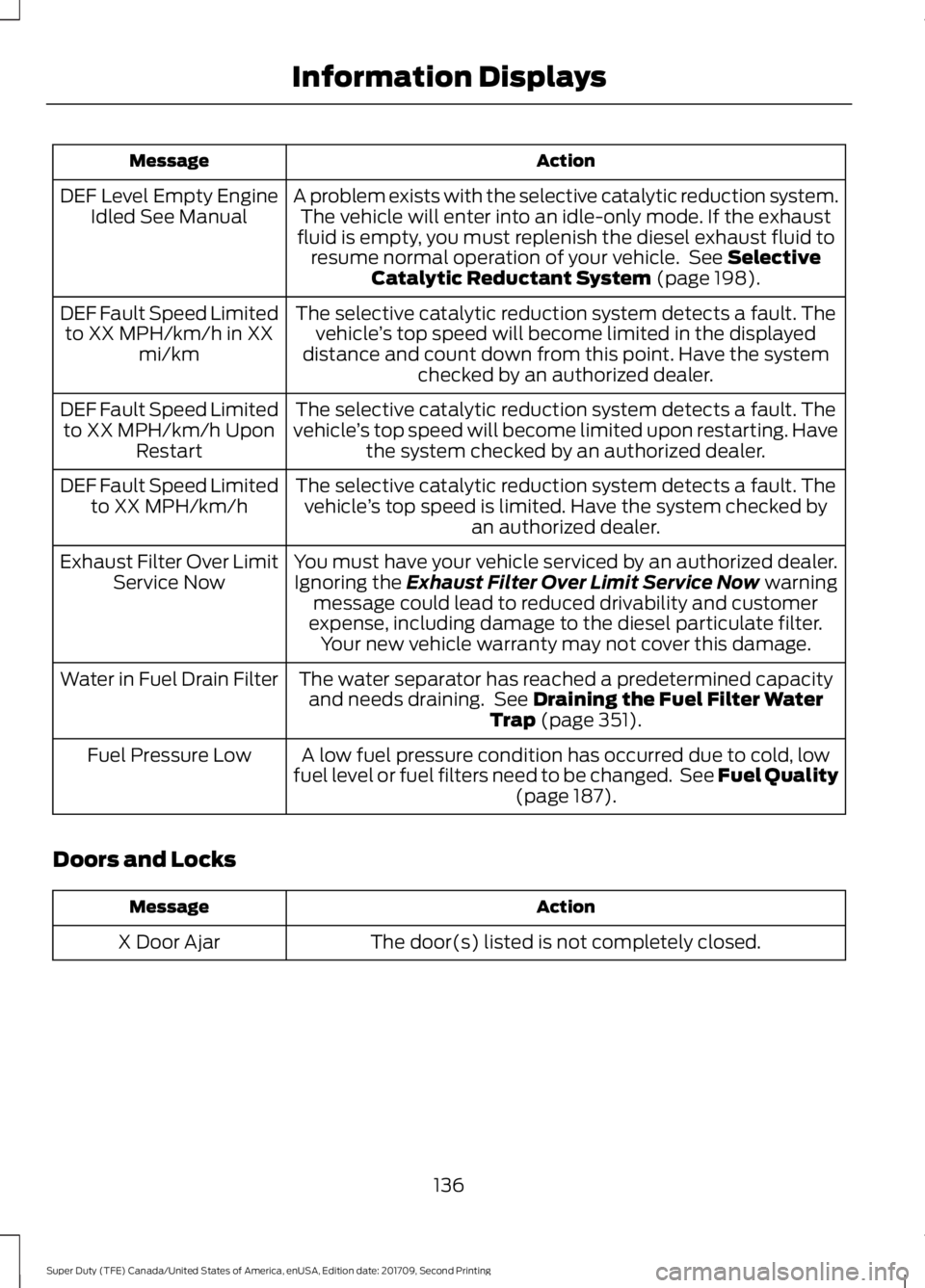
Action
Message
A problem exists with the selective catalytic reduction system.The vehicle will enter into an idle-only mode. If the exhaust
fluid is empty, you must replenish the diesel exhaust fluid to resume normal operation of your vehicle. See Selective
Catalytic Reductant System (page 198).
DEF Level Empty Engine
Idled See Manual
The selective catalytic reduction system detects a fault. Thevehicle ’s top speed will become limited in the displayed
distance and count down from this point. Have the system checked by an authorized dealer.
DEF Fault Speed Limited
to XX MPH/km/h in XX mi/km
The selective catalytic reduction system detects a fault. The
vehicle ’s top speed will become limited upon restarting. Have
the system checked by an authorized dealer.
DEF Fault Speed Limited
to XX MPH/km/h Upon Restart
The selective catalytic reduction system detects a fault. Thevehicle ’s top speed is limited. Have the system checked by
an authorized dealer.
DEF Fault Speed Limited
to XX MPH/km/h
You must have your vehicle serviced by an authorized dealer.Ignoring the
Exhaust Filter Over Limit Service Now warning
message could lead to reduced drivability and customer
expense, including damage to the diesel particulate filter. Your new vehicle warranty may not cover this damage.
Exhaust Filter Over Limit
Service Now
The water separator has reached a predetermined capacityand needs draining. See
Draining the Fuel Filter Water
Trap (page 351).
Water in Fuel Drain Filter
A low fuel pressure condition has occurred due to cold, low
fuel level or fuel filters need to be changed. See Fuel Quality (page
187).
Fuel Pressure Low
Doors and Locks Action
Message
The door(s) listed is not completely closed.
X Door Ajar
136
Super Duty (TFE) Canada/United States of America, enUSA, Edition date: 201709, Second Printing Information Displays
Page 140 of 660

Driver Alert
Action
Message
Stop and rest as soon as it is safe to do so.
Driver Alert Warning Rest
Now
Take a rest soon.
Driver Alert Warning Rest
Suggested
Drivetrain Action
Message
The electronic locking differential requests a certain speedrequirement to engage.
To Engage Locking
Differential Slow to XX mph/km/h
The electronic locking differential requests the acceleratorto be released in order to engage.
To Engage Locking
Differential Release Accelerator Pedal
An electronic locking differential (ELD) system fault is
present. Contact an authorized dealer as soon as possible.
Check Locking Differen-
tial
The transfer case is in the neutral position. This message
indicates that your vehicle is safe to be towed with all four wheels on the ground.
Neutral Tow Enabled
Leave Transmission in Neutral
The transfer case is NOT in the neutral position. This messageindicates that your vehicle is NOT safe to be towed with all four wheels on the ground.
Neutral Tow Disabled
Engine Action
Message
The engine has reduced power to help reduce highengine temperature.
Power Reduced to Lower Engine
Temp
137
Super Duty (TFE) Canada/United States of America, enUSA, Edition date: 201709, Second Printing Information Displays
Page 145 of 660
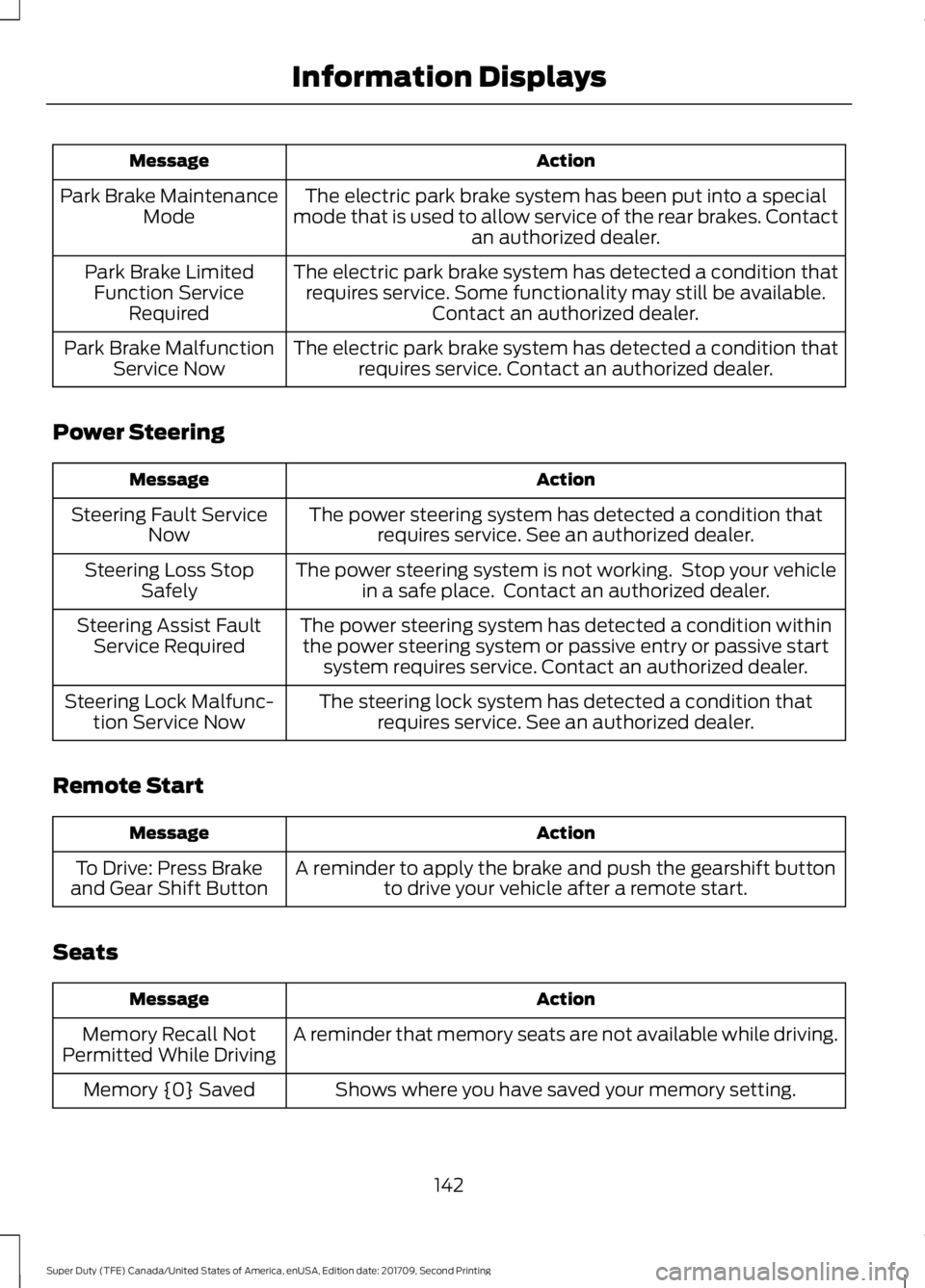
Action
Message
The electric park brake system has been put into a special
mode that is used to allow service of the rear brakes. Contact an authorized dealer.
Park Brake Maintenance
Mode
The electric park brake system has detected a condition thatrequires service. Some functionality may still be available. Contact an authorized dealer.
Park Brake Limited
Function Service Required
The electric park brake system has detected a condition thatrequires service. Contact an authorized dealer.
Park Brake Malfunction
Service Now
Power Steering Action
Message
The power steering system has detected a condition thatrequires service. See an authorized dealer.
Steering Fault Service
Now
The power steering system is not working. Stop your vehiclein a safe place. Contact an authorized dealer.
Steering Loss Stop
Safely
The power steering system has detected a condition withinthe power steering system or passive entry or passive start system requires service. Contact an authorized dealer.
Steering Assist Fault
Service Required
The steering lock system has detected a condition thatrequires service. See an authorized dealer.
Steering Lock Malfunc-
tion Service Now
Remote Start Action
Message
A reminder to apply the brake and push the gearshift buttonto drive your vehicle after a remote start.
To Drive: Press Brake
and Gear Shift Button
Seats Action
Message
A reminder that memory seats are not available while driving.
Memory Recall Not
Permitted While Driving
Shows where you have saved your memory setting.
Memory {0} Saved
142
Super Duty (TFE) Canada/United States of America, enUSA, Edition date: 201709, Second Printing Information Displays
Page 148 of 660
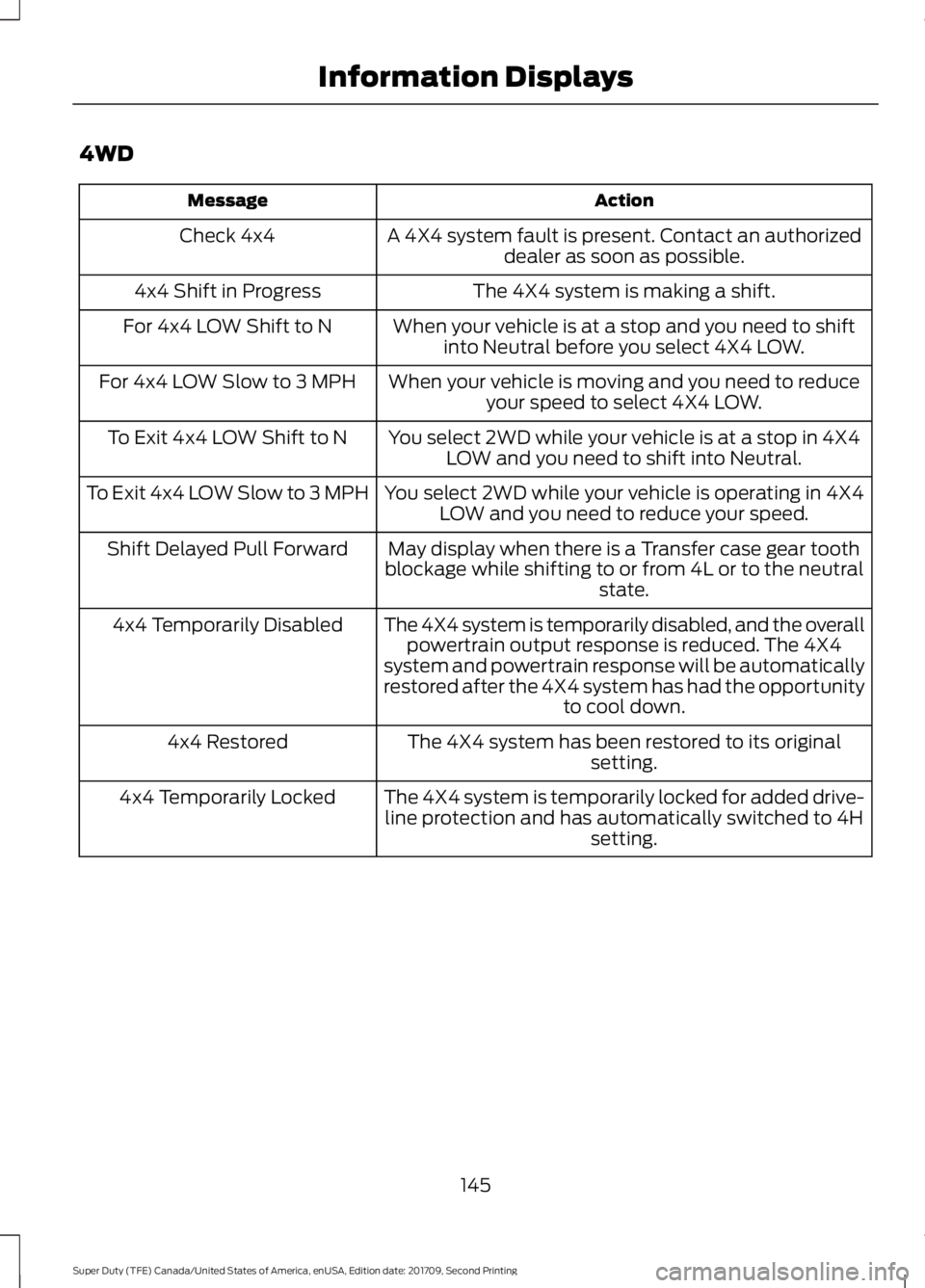
4WD
Action
Message
A 4X4 system fault is present. Contact an authorizeddealer as soon as possible.
Check 4x4
The 4X4 system is making a shift.
4x4 Shift in Progress
When your vehicle is at a stop and you need to shiftinto Neutral before you select 4X4 LOW.
For 4x4 LOW Shift to N
When your vehicle is moving and you need to reduceyour speed to select 4X4 LOW.
For 4x4 LOW Slow to 3 MPH
You select 2WD while your vehicle is at a stop in 4X4LOW and you need to shift into Neutral.
To Exit 4x4 LOW Shift to N
You select 2WD while your vehicle is operating in 4X4LOW and you need to reduce your speed.
To Exit 4x4 LOW Slow to 3 MPH
May display when there is a Transfer case gear tooth
blockage while shifting to or from 4L or to the neutral state.
Shift Delayed Pull Forward
The 4X4 system is temporarily disabled, and the overallpowertrain output response is reduced. The 4X4
system and powertrain response will be automatically
restored after the 4X4 system has had the opportunity to cool down.
4x4 Temporarily Disabled
The 4X4 system has been restored to its originalsetting.
4x4 Restored
The 4X4 system is temporarily locked for added drive-line protection and has automatically switched to 4H setting.
4x4 Temporarily Locked
145
Super Duty (TFE) Canada/United States of America, enUSA, Edition date: 201709, Second Printing Information Displays
Page 158 of 660
WARNINGS
Install the head restraint properly to
help minimize the risk of neck injury
in the event of a crash.
Note:
Adjust the seatback to an upright
driving position before adjusting the head
restraint. Adjust the head restraint so that
the top of it is level with the top of your head
and as far forward as possible. Make sure
that you remain comfortable. If you are
extremely tall, adjust the head restraint to
its highest position.
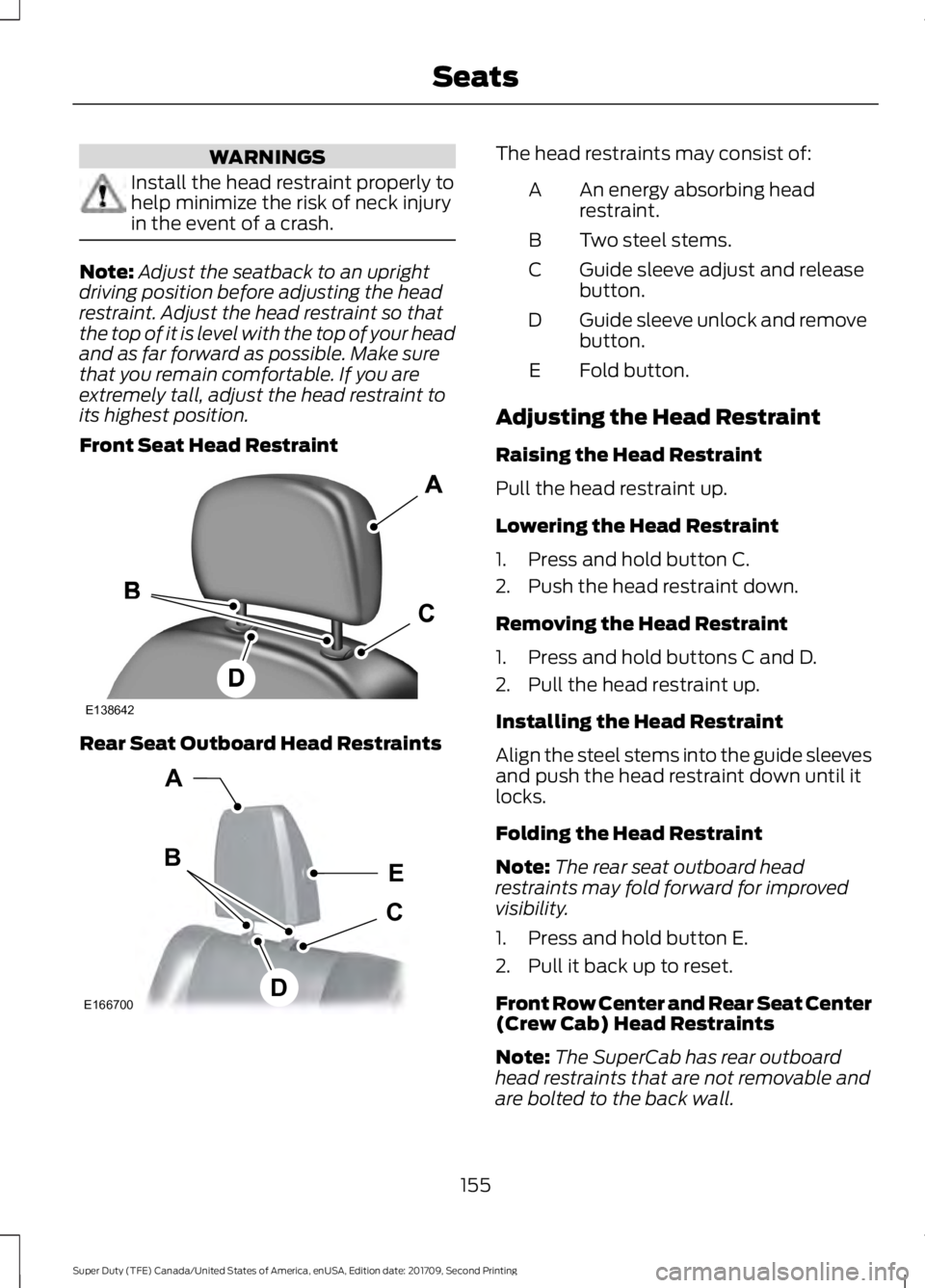
Front Seat Head Restraint Rear Seat Outboard Head Restraints The head restraints may consist of:
An energy absorbing head
restraint.
A
Two steel stems.
B
Guide sleeve adjust and release
button.
C
Guide sleeve unlock and remove
button.
D
Fold button.
E
Adjusting the Head Restraint
Raising the Head Restraint
Pull the head restraint up.
Lowering the Head Restraint
1. Press and hold button C.
2. Push the head restraint down.
Removing the Head Restraint
1. Press and hold buttons C and D.
2. Pull the head restraint up.
Installing the Head Restraint
Align the steel stems into the guide sleeves
and push the head restraint down until it
locks.
Folding the Head Restraint
Note: The rear seat outboard head
restraints may fold forward for improved
visibility.
1. Press and hold button E.
2. Pull it back up to reset.
Front Row Center and Rear Seat Center
(Crew Cab) Head Restraints
Note: The SuperCab has rear outboard
head restraints that are not removable and
are bolted to the back wall.
155
Super Duty (TFE) Canada/United States of America, enUSA, Edition date: 201709, Second Printing SeatsE138642 E166700
E
D
C
B
A
Page 159 of 660
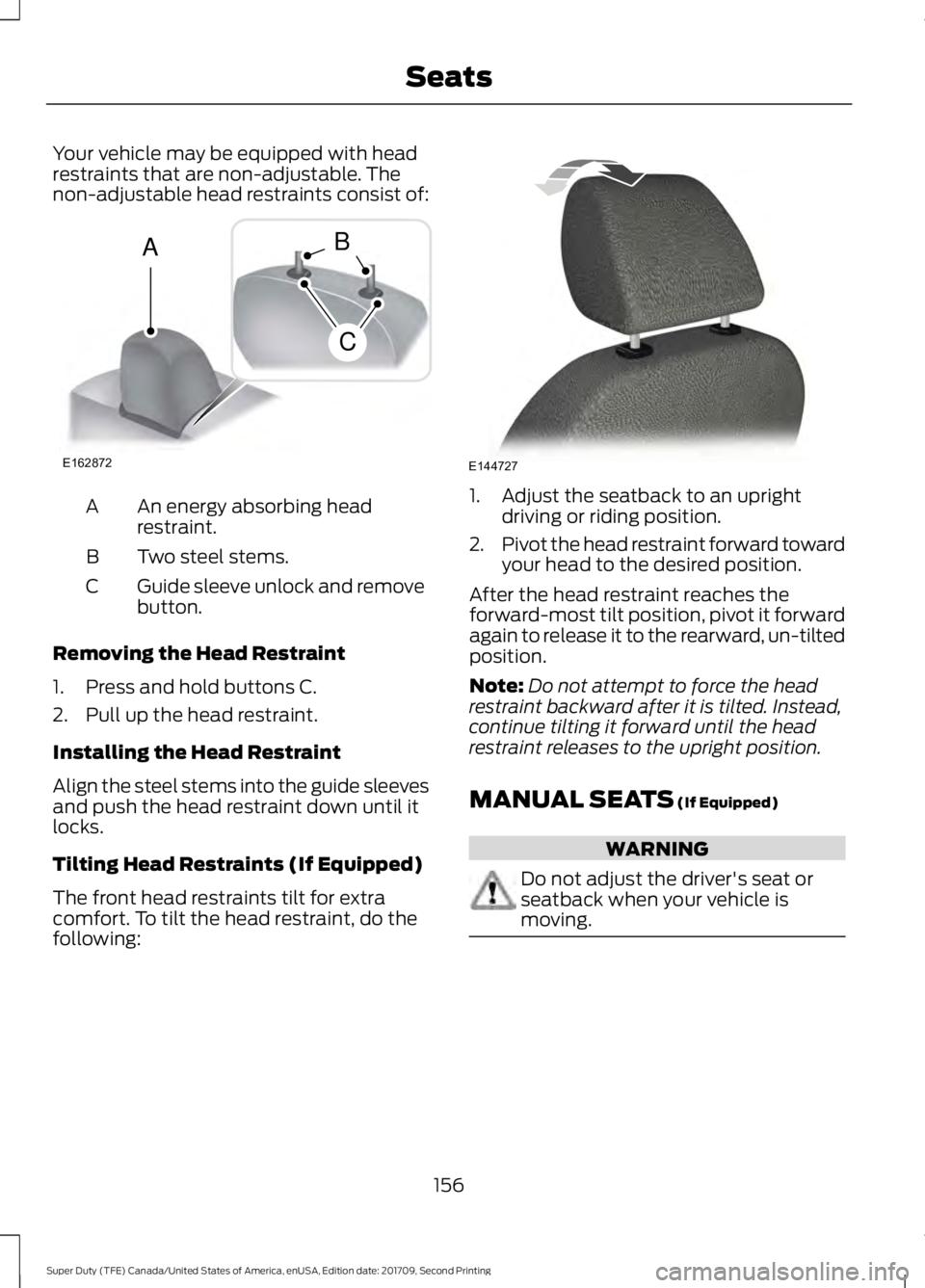
Your vehicle may be equipped with head
restraints that are non-adjustable. The
non-adjustable head restraints consist of:
An energy absorbing head
restraint.
A
Two steel stems.
B
Guide sleeve unlock and remove
button.
C
Removing the Head Restraint
1. Press and hold buttons C.
2. Pull up the head restraint.
Installing the Head Restraint
Align the steel stems into the guide sleeves
and push the head restraint down until it
locks.
Tilting Head Restraints (If Equipped)
The front head restraints tilt for extra
comfort. To tilt the head restraint, do the
following: 1. Adjust the seatback to an upright
driving or riding position.
2. Pivot the head restraint forward toward
your head to the desired position.
After the head restraint reaches the
forward-most tilt position, pivot it forward
again to release it to the rearward, un-tilted
position.
Note: Do not attempt to force the head
restraint backward after it is tilted. Instead,
continue tilting it forward until the head
restraint releases to the upright position.
MANUAL SEATS (If Equipped) WARNING
Do not adjust the driver's seat or
seatback when your vehicle is
moving.
156
Super Duty (TFE) Canada/United States of America, enUSA, Edition date: 201709, Second Printing SeatsE162872
A
C
B E144727
Page 163 of 660
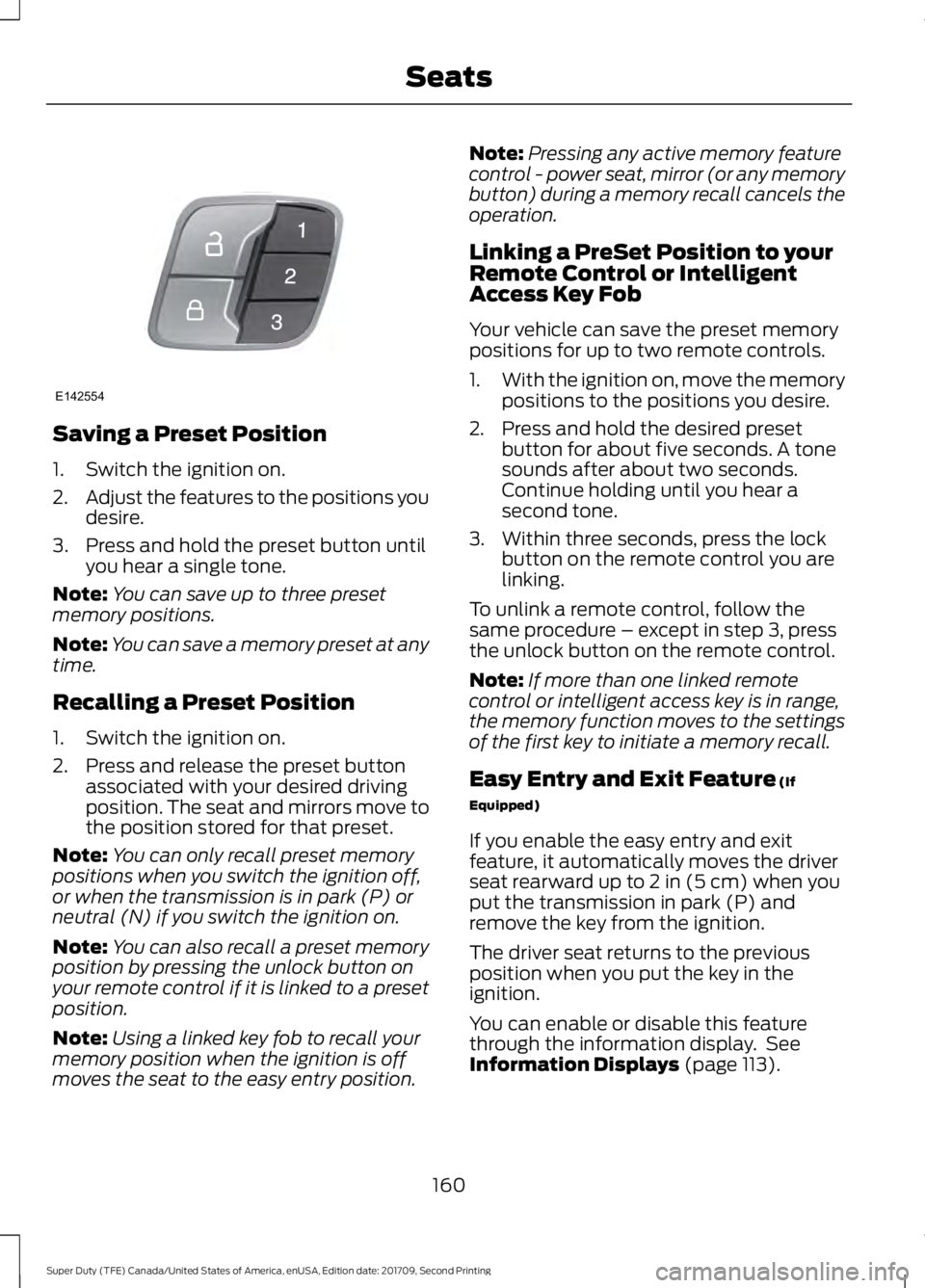
Saving a Preset Position
1. Switch the ignition on.
2.
Adjust the features to the positions you
desire.
3. Press and hold the preset button until you hear a single tone.
Note: You can save up to three preset
memory positions.
Note: You can save a memory preset at any
time.
Recalling a Preset Position
1. Switch the ignition on.
2. Press and release the preset button associated with your desired driving
position. The seat and mirrors move to
the position stored for that preset.
Note: You can only recall preset memory
positions when you switch the ignition off,
or when the transmission is in park (P) or
neutral (N) if you switch the ignition on.
Note: You can also recall a preset memory
position by pressing the unlock button on
your remote control if it is linked to a preset
position.
Note: Using a linked key fob to recall your
memory position when the ignition is off
moves the seat to the easy entry position. Note:
Pressing any active memory feature
control - power seat, mirror (or any memory
button) during a memory recall cancels the
operation.
Linking a PreSet Position to your
Remote Control or Intelligent
Access Key Fob
Your vehicle can save the preset memory
positions for up to two remote controls.
1. With the ignition on, move the memory
positions to the positions you desire.
2. Press and hold the desired preset button for about five seconds. A tone
sounds after about two seconds.
Continue holding until you hear a
second tone.
3. Within three seconds, press the lock button on the remote control you are
linking.
To unlink a remote control, follow the
same procedure – except in step 3, press
the unlock button on the remote control.
Note: If more than one linked remote
control or intelligent access key is in range,
the memory function moves to the settings
of the first key to initiate a memory recall.
Easy Entry and Exit Feature (If
Equipped)
If you enable the easy entry and exit
feature, it automatically moves the driver
seat rearward up to
2 in (5 cm) when you
put the transmission in park (P) and
remove the key from the ignition.
The driver seat returns to the previous
position when you put the key in the
ignition.
You can enable or disable this feature
through the information display. See
Information Displays
(page 113).
160
Super Duty (TFE) Canada/United States of America, enUSA, Edition date: 201709, Second Printing SeatsE142554
Page 164 of 660
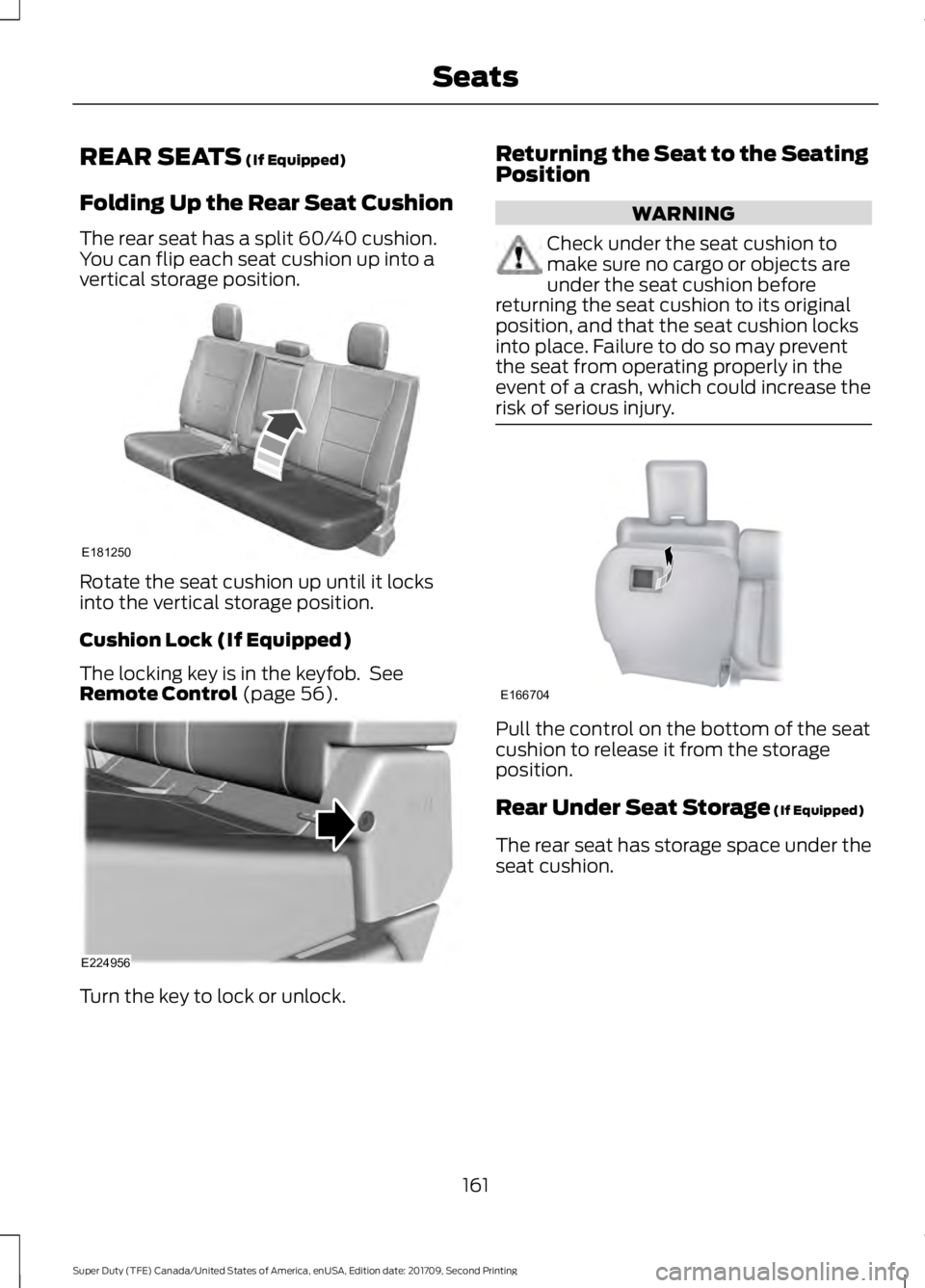
REAR SEATS (If Equipped)
Folding Up the Rear Seat Cushion
The rear seat has a split 60/40 cushion.
You can flip each seat cushion up into a
vertical storage position. Rotate the seat cushion up until it locks
into the vertical storage position.
Cushion Lock (If Equipped)
The locking key is in the keyfob. See
Remote Control
(page 56).
Turn the key to lock or unlock. Returning the Seat to the Seating
Position WARNING
Check under the seat cushion to
make sure no cargo or objects are
under the seat cushion before
returning the seat cushion to its original
position, and that the seat cushion locks
into place. Failure to do so may prevent
the seat from operating properly in the
event of a crash, which could increase the
risk of serious injury. Pull the control on the bottom of the seat
cushion to release it from the storage
position.
Rear Under Seat Storage
(If Equipped)
The rear seat has storage space under the
seat cushion.
161
Super Duty (TFE) Canada/United States of America, enUSA, Edition date: 201709, Second Printing SeatsE181250 E224956 E166704
Page 165 of 660
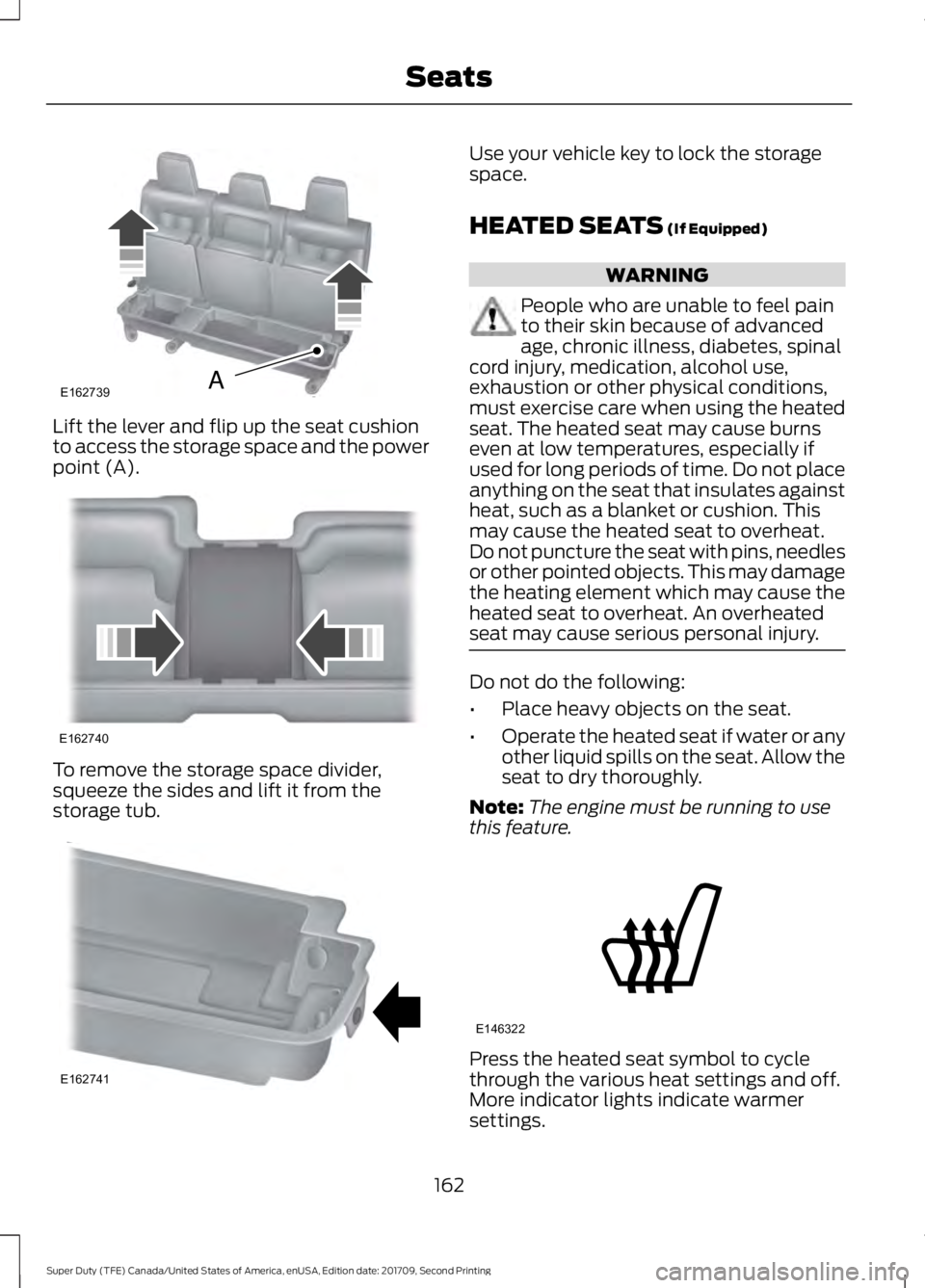
Lift the lever and flip up the seat cushion
to access the storage space and the power
point (A).
To remove the storage space divider,
squeeze the sides and lift it from the
storage tub. Use your vehicle key to lock the storage
space.
HEATED SEATS (If Equipped)
WARNING
People who are unable to feel pain
to their skin because of advanced
age, chronic illness, diabetes, spinal
cord injury, medication, alcohol use,
exhaustion or other physical conditions,
must exercise care when using the heated
seat. The heated seat may cause burns
even at low temperatures, especially if
used for long periods of time. Do not place
anything on the seat that insulates against
heat, such as a blanket or cushion. This
may cause the heated seat to overheat.
Do not puncture the seat with pins, needles
or other pointed objects. This may damage
the heating element which may cause the
heated seat to overheat. An overheated
seat may cause serious personal injury. Do not do the following:
•
Place heavy objects on the seat.
• Operate the heated seat if water or any
other liquid spills on the seat. Allow the
seat to dry thoroughly.
Note: The engine must be running to use
this feature. Press the heated seat symbol to cycle
through the various heat settings and off.
More indicator lights indicate warmer
settings.
162
Super Duty (TFE) Canada/United States of America, enUSA, Edition date: 201709, Second Printing SeatsE162739A E162740 E162741 E146322
Page 166 of 660
Note:
The heated seats may remain on
after you remote start your vehicle, based
on your remote start settings. The heated
seats may also turn on when you start your
vehicle if they were on when you switched
your vehicle off.
Rear Heated Seats (If Equipped) WARNING
People who are unable to feel pain
to their skin because of advanced
age, chronic illness, diabetes, spinal
cord injury, medication, alcohol use,
exhaustion or other physical conditions,
must exercise care when using the heated
seat. The heated seat may cause burns
even at low temperatures, especially if
used for long periods of time. Do not place
anything on the seat that insulates against
heat, such as a blanket or cushion. This
may cause the heated seat to overheat.
Do not puncture the seat with pins, needles
or other pointed objects. This may damage
the heating element which may cause the
heated seat to overheat. An overheated
seat may cause serious personal injury. Do not do the following:
•
Place heavy objects on the seat.
• Operate the heated seat if water or any
other liquid spills on the seat. Allow the
seat to dry thoroughly.
Note: The engine must be running to use
this feature.
The rear seat heat controls are on the rear
of the center console. Press the heated seat symbol to cycle
through the various heat settings and off.
More indicator lights indicate warmer
settings.
The heated seat module resets at every
ignition run cycle. While the ignition is in
the on position, press the heated seat
switch to enable heating mode. When
activated, they turn off automatically when
you switch off the engine.
CLIMATE CONTROLLED SEATS
(If Equipped)
Heated Seats
WARNING
People who are unable to feel pain
to their skin because of advanced
age, chronic illness, diabetes, spinal
cord injury, medication, alcohol use,
exhaustion or other physical conditions,
must use caution when using the heated
seat. The heated seat may cause burns
even at low temperatures, especially if
used for long periods of time. Do not place
anything on the seat that may block the
heat, such as a blanket or cushion. This can
cause the heated seat to overheat. Do not
puncture the seat with pins, needles or
other pointed objects. This damages the
heating element and can cause the heated
seat to overheat. An overheated seat may
cause serious personal injury. 163
Super Duty (TFE) Canada/United States of America, enUSA, Edition date: 201709, Second Printing SeatsE146322