fuel FORD F-350 2020 Owner's Manual
[x] Cancel search | Manufacturer: FORD, Model Year: 2020, Model line: F-350, Model: FORD F-350 2020Pages: 631, PDF Size: 9.62 MB
Page 114 of 631
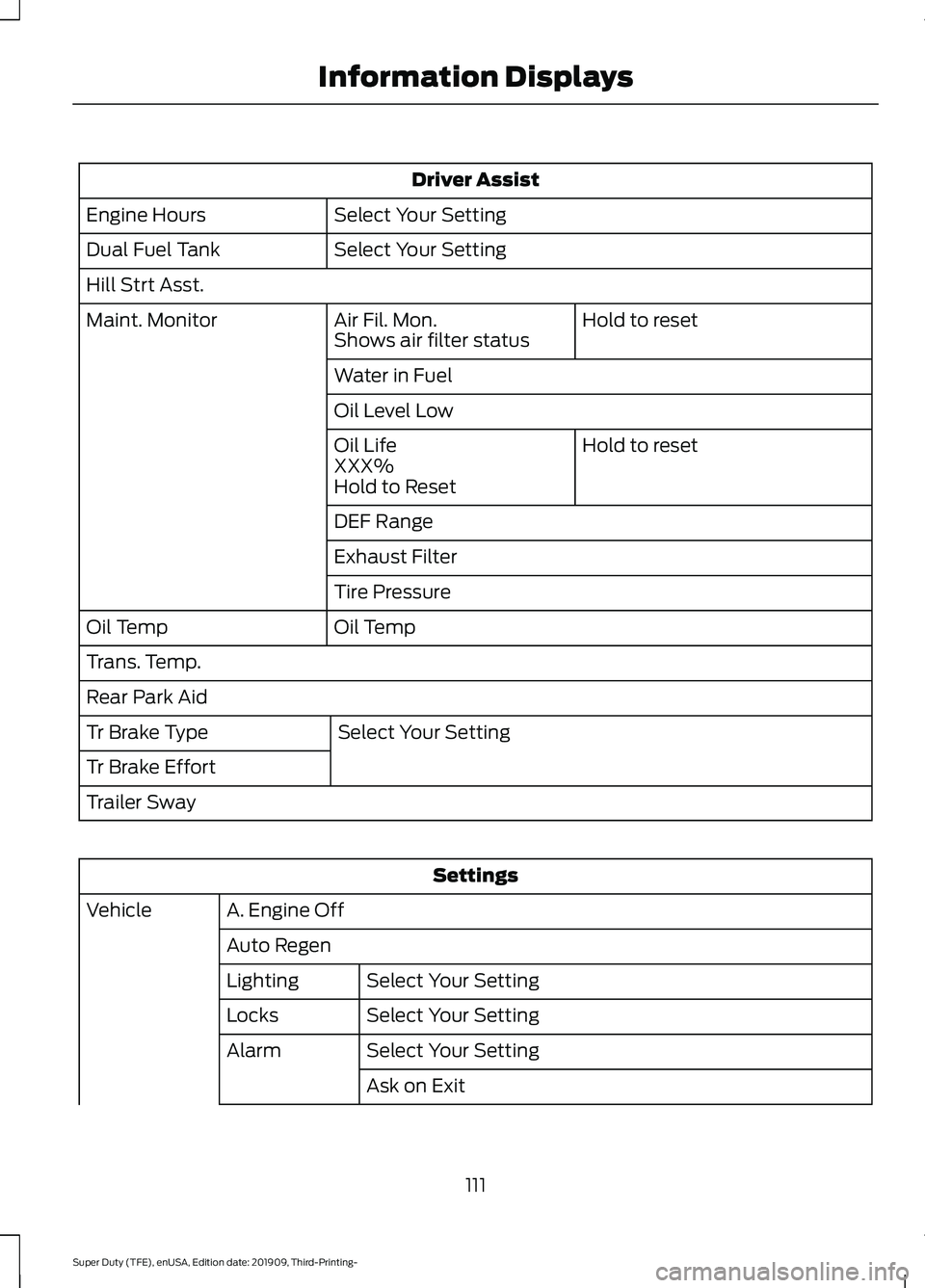
Driver Assist
Select Your Setting
Engine Hours
Select Your Setting
Dual Fuel Tank
Hill Strt Asst.
Hold to reset
Air Fil. Mon.
Maint. Monitor
Shows air filter status
Water in Fuel
Oil Level Low
Hold to reset
Oil Life
XXX%
Hold to Reset
DEF Range
Exhaust Filter
Tire Pressure
Oil Temp
Oil Temp
Trans. Temp.
Rear Park Aid
Select Your Setting
Tr Brake Type
Tr Brake Effort
Trailer Sway Settings
A. Engine Off
Vehicle
Auto RegenSelect Your Setting
Lighting
Select Your Setting
Locks
Select Your Setting
Alarm
Ask on Exit
111
Super Duty (TFE), enUSA, Edition date: 201909, Third-Printing- Information Displays
Page 115 of 631
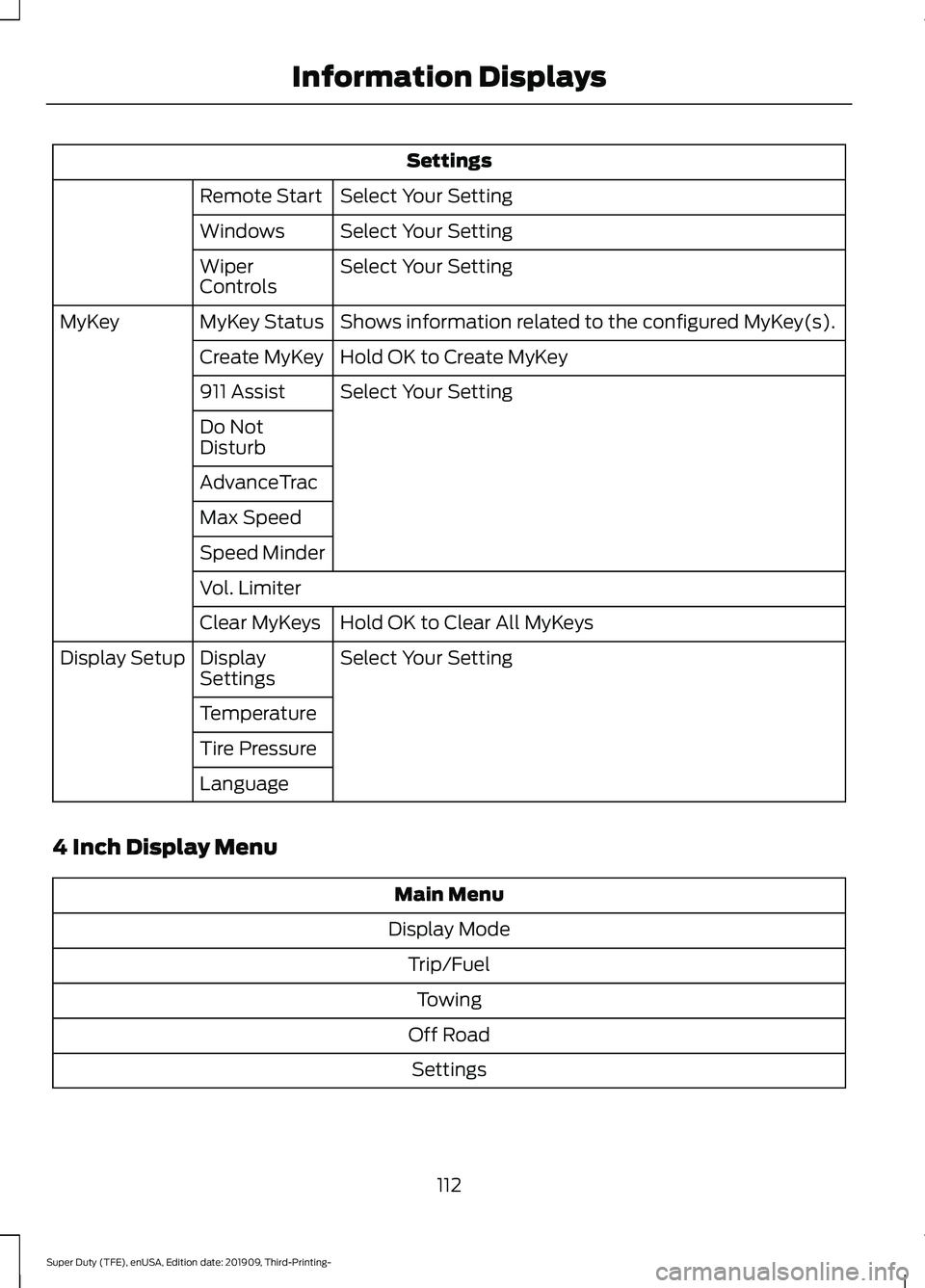
Settings
Select Your Setting
Remote Start
Select Your Setting
Windows
Select Your Setting
Wiper
Controls
Shows information related to the configured MyKey(s).
MyKey Status
MyKey
Hold OK to Create MyKey
Create MyKey
Select Your Setting
911 Assist
Do Not
Disturb
AdvanceTrac
Max Speed
Speed Minder
Vol. Limiter
Hold OK to Clear All MyKeys
Clear MyKeys
Select Your Setting
Display
Settings
Display Setup
Temperature
Tire Pressure
Language
4 Inch Display Menu Main Menu
Display Mode Trip/FuelTowing
Off Road Settings
112
Super Duty (TFE), enUSA, Edition date: 201909, Third-Printing- Information Displays
Page 116 of 631
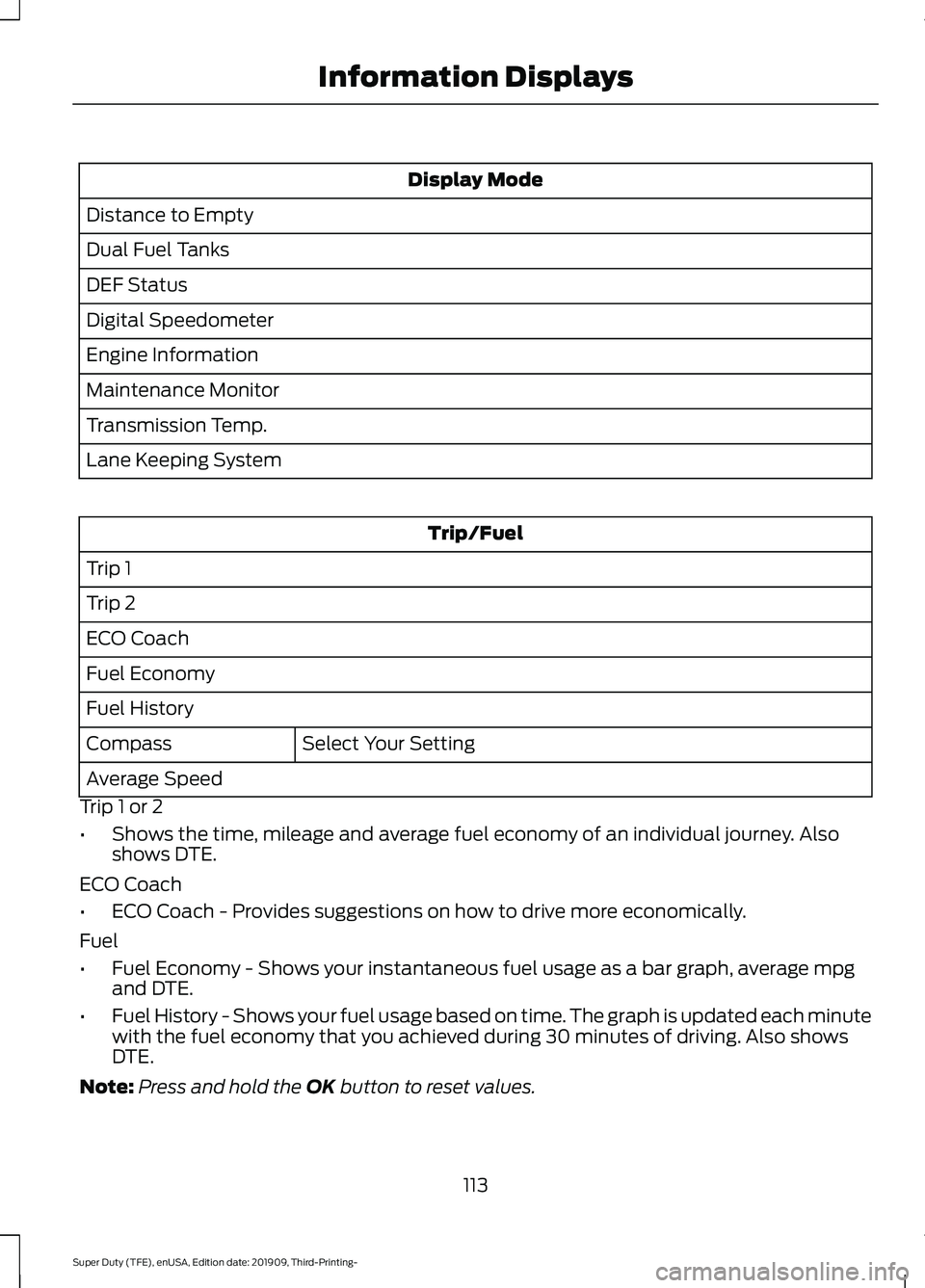
Display Mode
Distance to Empty
Dual Fuel Tanks
DEF Status
Digital Speedometer
Engine Information
Maintenance Monitor
Transmission Temp.
Lane Keeping System Trip/Fuel
Trip 1
Trip 2
ECO Coach
Fuel Economy
Fuel History Select Your Setting
Compass
Average Speed
Trip 1 or 2
• Shows the time, mileage and average fuel economy of an individual journey. Also
shows DTE.
ECO Coach
• ECO Coach - Provides suggestions on how to drive more economically.
Fuel
• Fuel Economy - Shows your instantaneous fuel usage as a bar graph, average mpg
and DTE.
• Fuel History - Shows your fuel usage based on time. The graph is updated each minute
with the fuel economy that you achieved during 30 minutes of driving. Also shows
DTE.
Note: Press and hold the OK button to reset values.
113
Super Duty (TFE), enUSA, Edition date: 201909, Third-Printing- Information Displays
Page 119 of 631
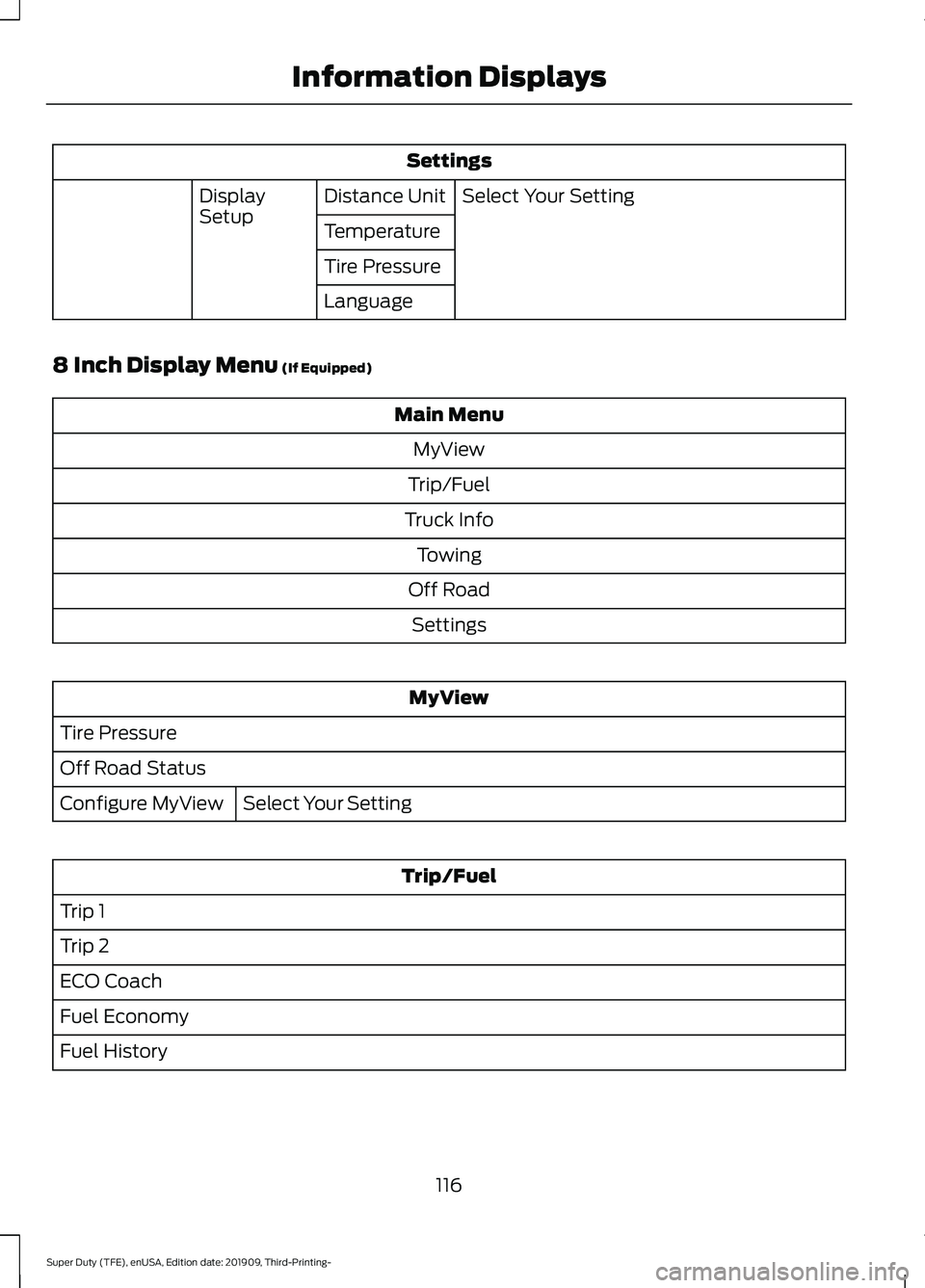
Settings
Select Your Setting
Distance Unit
Display
Setup
Temperature
Tire Pressure
Language
8 Inch Display Menu (If Equipped) Main Menu
MyView
Trip/Fuel
Truck Info Towing
Off Road Settings MyView
Tire Pressure
Off Road Status Select Your Setting
Configure MyView Trip/Fuel
Trip 1
Trip 2
ECO Coach
Fuel Economy
Fuel History
116
Super Duty (TFE), enUSA, Edition date: 201909, Third-Printing- Information Displays
Page 120 of 631
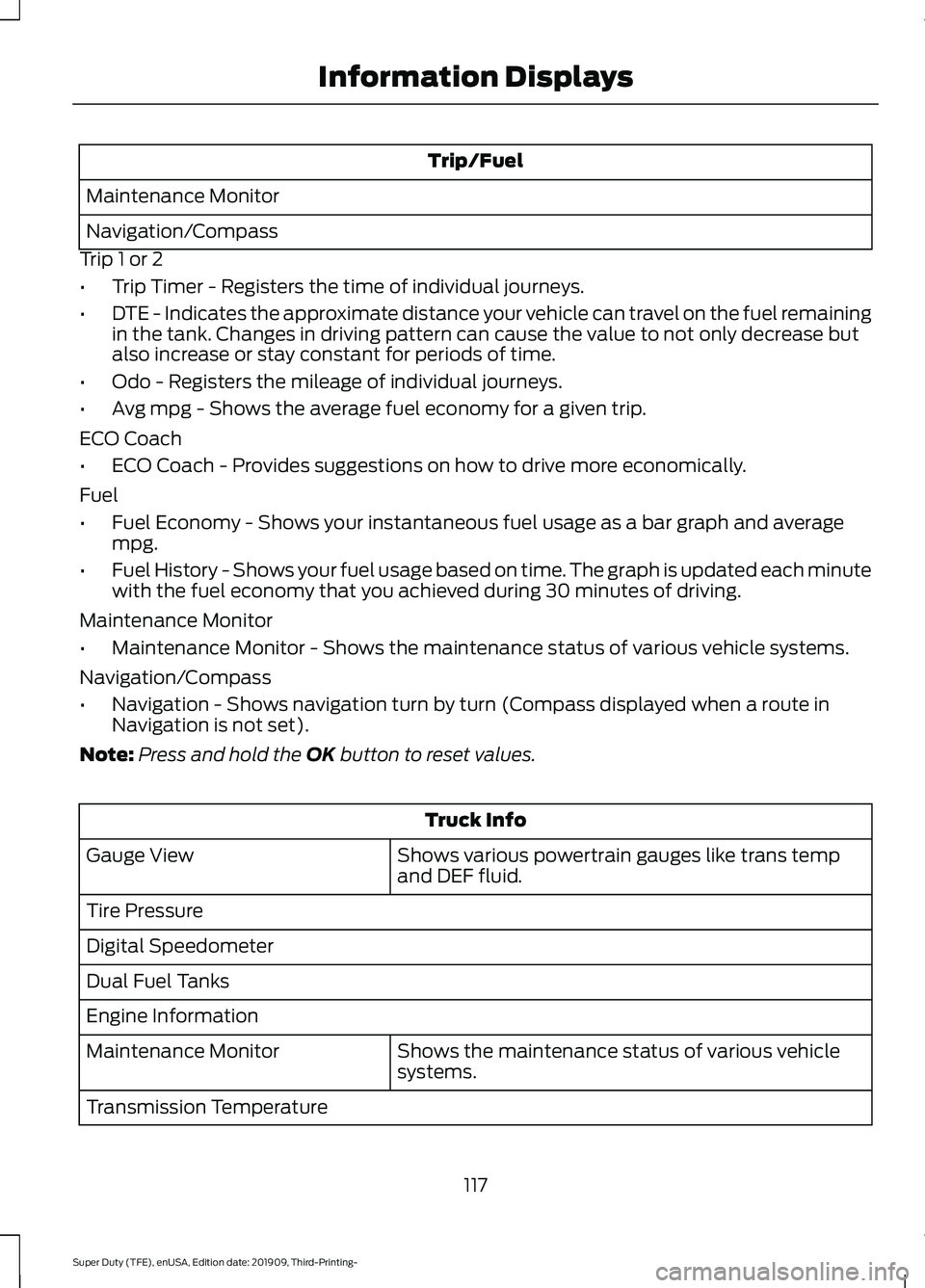
Trip/Fuel
Maintenance Monitor
Navigation/Compass
Trip 1 or 2
• Trip Timer - Registers the time of individual journeys.
• DTE - Indicates the approximate distance your vehicle can travel on the fuel remaining
in the tank. Changes in driving pattern can cause the value to not only decrease but
also increase or stay constant for periods of time.
• Odo - Registers the mileage of individual journeys.
• Avg mpg - Shows the average fuel economy for a given trip.
ECO Coach
• ECO Coach - Provides suggestions on how to drive more economically.
Fuel
• Fuel Economy - Shows your instantaneous fuel usage as a bar graph and average
mpg.
• Fuel History - Shows your fuel usage based on time. The graph is updated each minute
with the fuel economy that you achieved during 30 minutes of driving.
Maintenance Monitor
• Maintenance Monitor - Shows the maintenance status of various vehicle systems.
Navigation/Compass
• Navigation - Shows navigation turn by turn (Compass displayed when a route in
Navigation is not set).
Note: Press and hold the OK button to reset values. Truck Info
Shows various powertrain gauges like trans temp
and DEF fluid.
Gauge View
Tire Pressure
Digital Speedometer
Dual Fuel Tanks
Engine Information
Shows the maintenance status of various vehicle
systems.
Maintenance Monitor
Transmission Temperature
117
Super Duty (TFE), enUSA, Edition date: 201909, Third-Printing- Information Displays
Page 126 of 631
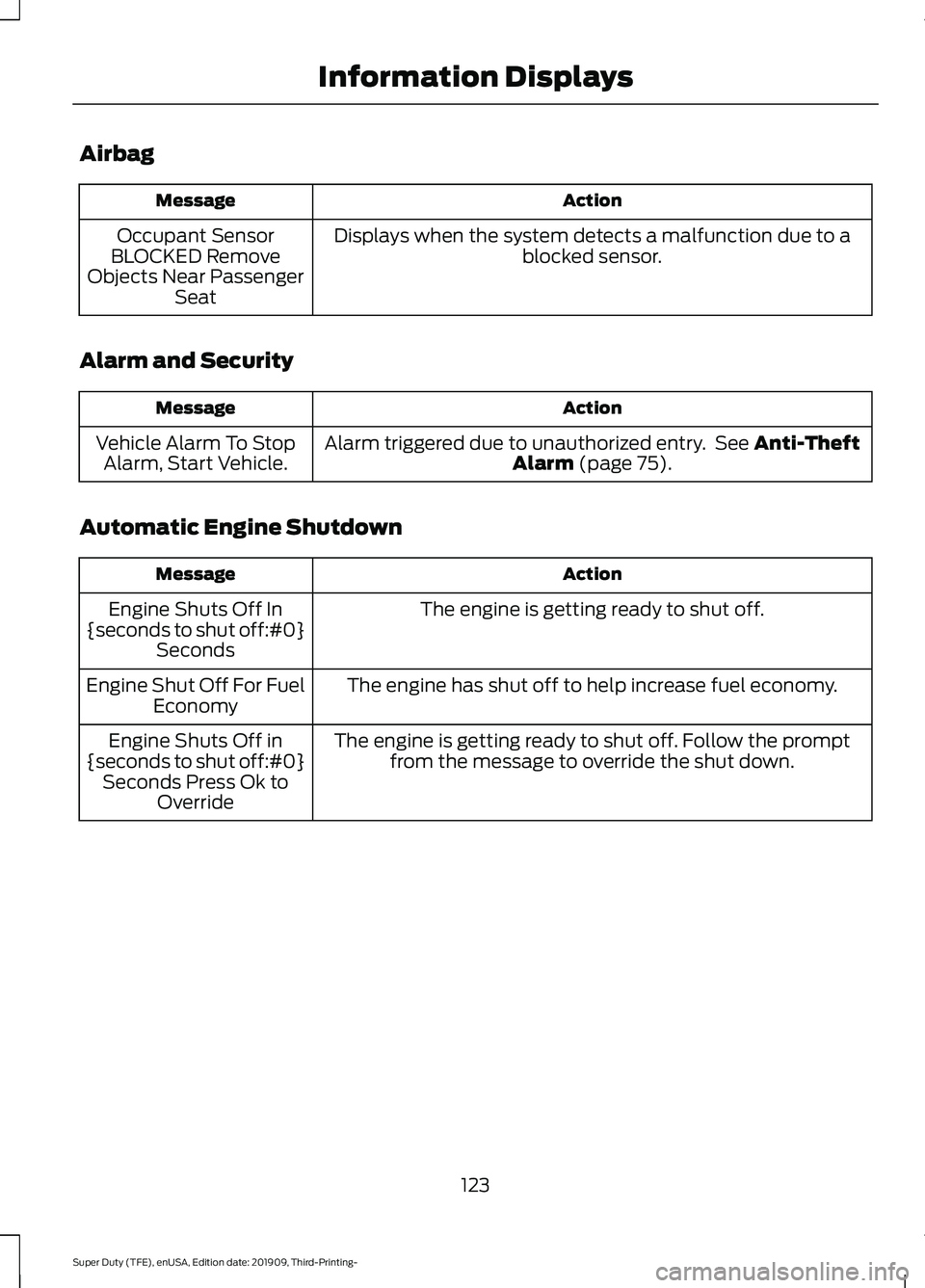
Airbag
Action
Message
Displays when the system detects a malfunction due to a blocked sensor.
Occupant Sensor
BLOCKED Remove
Objects Near Passenger Seat
Alarm and Security Action
Message
Alarm triggered due to unauthorized entry. See Anti-Theft
Alarm (page 75).
Vehicle Alarm To Stop
Alarm, Start Vehicle.
Automatic Engine Shutdown Action
Message
The engine is getting ready to shut off.
Engine Shuts Off In
{seconds to shut off:#0} Seconds
The engine has shut off to help increase fuel economy.
Engine Shut Off For Fuel
Economy
The engine is getting ready to shut off. Follow the promptfrom the message to override the shut down.
Engine Shuts Off in
{seconds to shut off:#0} Seconds Press Ok to Override
123
Super Duty (TFE), enUSA, Edition date: 201909, Third-Printing- Information Displays
Page 130 of 631
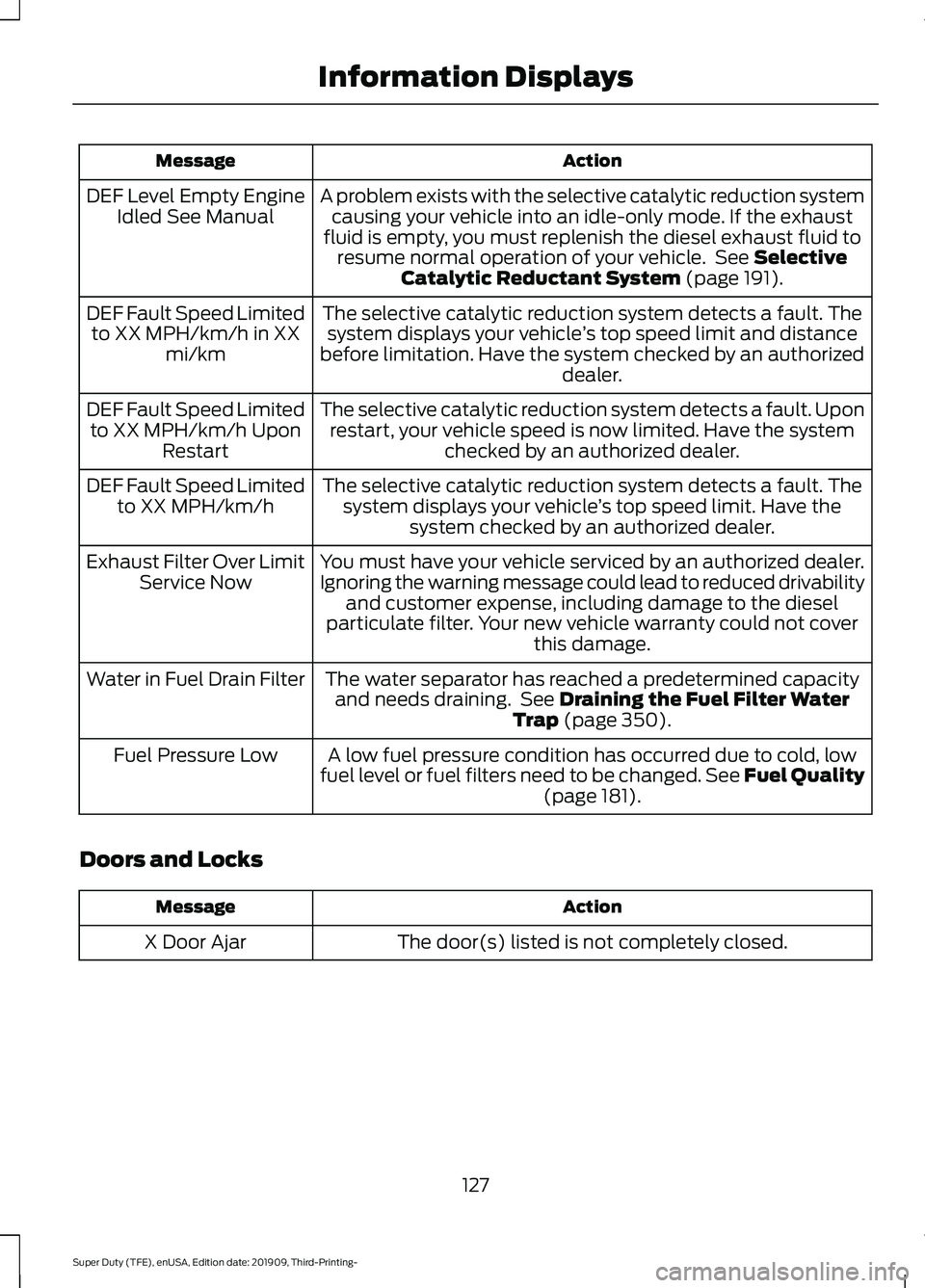
Action
Message
A problem exists with the selective catalytic reduction systemcausing your vehicle into an idle-only mode. If the exhaust
fluid is empty, you must replenish the diesel exhaust fluid to resume normal operation of your vehicle. See Selective
Catalytic Reductant System (page 191).
DEF Level Empty Engine
Idled See Manual
The selective catalytic reduction system detects a fault. Thesystem displays your vehicle ’s top speed limit and distance
before limitation. Have the system checked by an authorized dealer.
DEF Fault Speed Limited
to XX MPH/km/h in XX mi/km
The selective catalytic reduction system detects a fault. Uponrestart, your vehicle speed is now limited. Have the system checked by an authorized dealer.
DEF Fault Speed Limited
to XX MPH/km/h Upon Restart
The selective catalytic reduction system detects a fault. Thesystem displays your vehicle ’s top speed limit. Have the
system checked by an authorized dealer.
DEF Fault Speed Limited
to XX MPH/km/h
You must have your vehicle serviced by an authorized dealer.
Ignoring the warning message could lead to reduced drivability and customer expense, including damage to the diesel
particulate filter. Your new vehicle warranty could not cover this damage.
Exhaust Filter Over Limit
Service Now
The water separator has reached a predetermined capacityand needs draining. See
Draining the Fuel Filter Water
Trap (page 350).
Water in Fuel Drain Filter
A low fuel pressure condition has occurred due to cold, low
fuel level or fuel filters need to be changed. See Fuel Quality (page
181).
Fuel Pressure Low
Doors and Locks Action
Message
The door(s) listed is not completely closed.
X Door Ajar
127
Super Duty (TFE), enUSA, Edition date: 201909, Third-Printing- Information Displays
Page 132 of 631
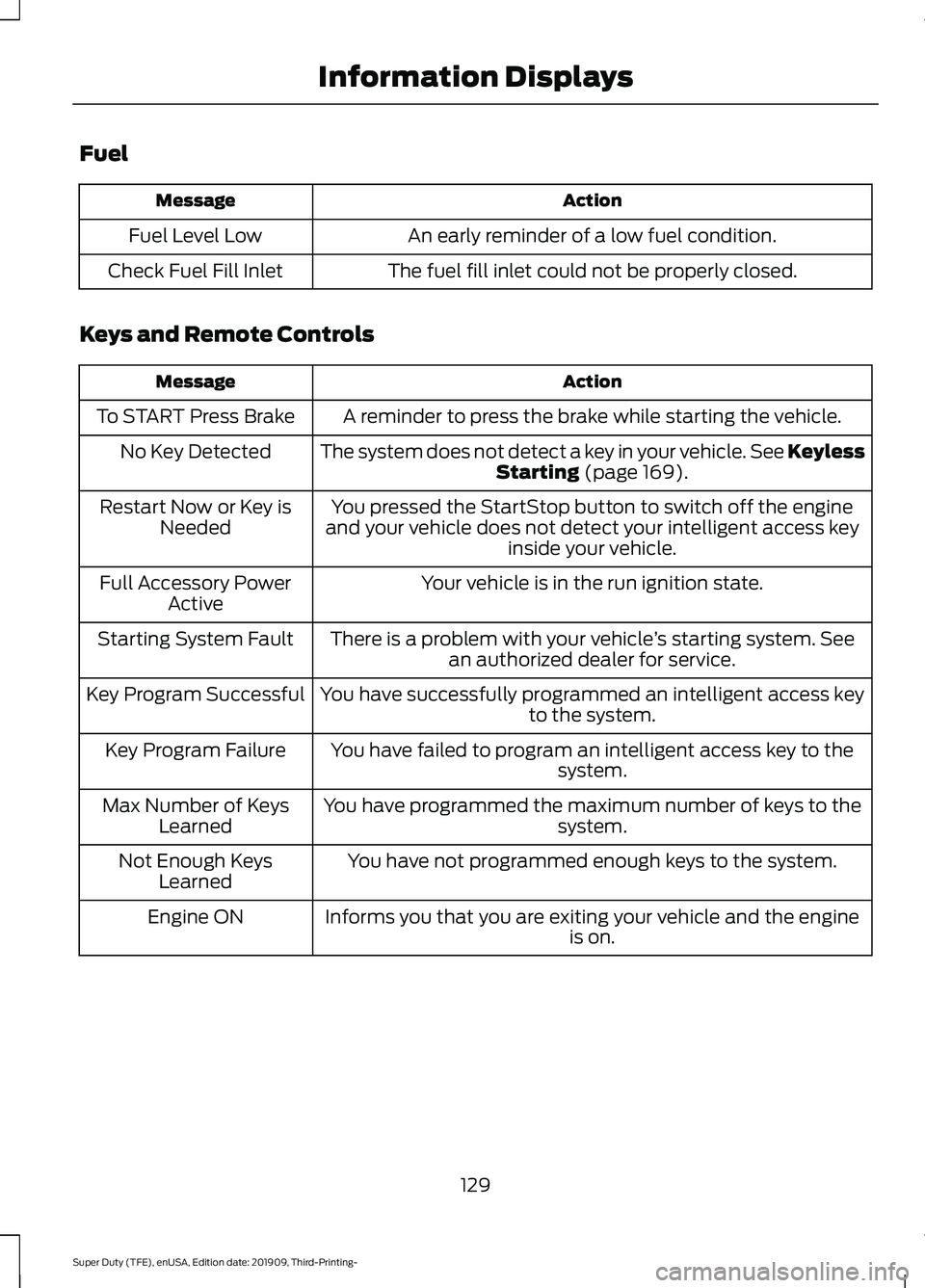
Fuel
Action
Message
An early reminder of a low fuel condition.
Fuel Level Low
The fuel fill inlet could not be properly closed.
Check Fuel Fill Inlet
Keys and Remote Controls Action
Message
A reminder to press the brake while starting the vehicle.
To START Press Brake
The system does not detect a key in your vehicle. See KeylessStarting (page 169).
No Key Detected
You pressed the StartStop button to switch off the engine
and your vehicle does not detect your intelligent access key inside your vehicle.
Restart Now or Key is
Needed
Your vehicle is in the run ignition state.
Full Accessory Power
Active
There is a problem with your vehicle ’s starting system. See
an authorized dealer for service.
Starting System Fault
You have successfully programmed an intelligent access keyto the system.
Key Program Successful
You have failed to program an intelligent access key to thesystem.
Key Program Failure
You have programmed the maximum number of keys to the system.
Max Number of Keys
Learned
You have not programmed enough keys to the system.
Not Enough Keys
Learned
Informs you that you are exiting your vehicle and the engine is on.
Engine ON
129
Super Duty (TFE), enUSA, Edition date: 201909, Third-Printing- Information Displays
Page 147 of 631
3. Direct air to the instrument panel air
vents.
Vehicle Stationary for Extended
Periods During Extreme High
Ambient Temperatures
1. Apply the parking brake.
2. Place your vehicle in park (P) or neutral.
3. Select MAX A/C.
4. Adjust the blower motor speed to the lowest speed setting.
Defogging the Side Windows in
Cold Weather
1. Direct air to the instrument panel and windshield air vents.
2. Press and release
A/C.
3. Adjust the temperature control to the setting you prefer.
4. Adjust the blower motor speed to the highest setting.
5. Direct air toward the side windows.
6. Close the instrument panel air vents.
HEATED WINDSHIELD
(IF
EQUIPPED)
Windshield Wiper De-Icer When you switch the heated rear
window on, the windshield wiper
de-icer turns on.
HEATED REAR WINDOW
(IF
EQUIPPED) Press the button to clear the rear
window of thin ice and fog. The
heated rear window turns off
after a short period of time. Note:
Do not use harsh chemicals, razor
blades or other sharp objects to clean or
remove decals from the inside of the heated
rear window. The vehicle warranty may not
cover damage to the heated rear window
grid lines.
HEATED EXTERIOR MIRRORS
(IF EQUIPPED) Press the button to clear the
exterior mirrors of thin ice and
fog. Press the button again to
switch them off. They switch off after a
short period of time.
Note: Do not remove ice from the mirrors
with a scraper or adjust the mirror glass
when it is frozen in place. These actions
could cause damage to the glass and
mirrors.
Note: Do not clean the mirror housing or
glass with harsh abrasives, fuel or other
petroleum-based cleaning products.
REMOTE START
(IF EQUIPPED)
You can switch this feature on or off and
adjust the settings in the information
display.
The system adjusts the interior
temperature depending on your chosen
settings during remote start.
You cannot adjust the climate control
setting during remote start operation. The
information display and the indicators do
not turn on during remote start. When you
switch the ignition on, the climate control
system returns to the previous settings.
You can now make adjustments.
You need to switch on certain
vehicle-dependent features, such as:
• Heated seats.
• Cooled seats.
144
Super Duty (TFE), enUSA, Edition date: 201909, Third-Printing- Climate ControlE184884 E184884
Page 173 of 631
2. Turn the key to position III to start the
engine.
3. When the engine starts, release the brake pedal.
Do not crank the engine for more than 10
seconds as starter damage may occur. If
the engine does not start, switch the
ignition off and wait 30 seconds before
trying again.
Vehicles with Keyless Start
Note: Do not touch the accelerator pedal.
Note: If you press the push button ignition
switch again prior to the engine starting, the
ignition switches to accessory mode and
will not start.
Note: If you release the brake pedal before
the engine starts, follow the engine start
sequence again.
1. Fully press the brake pedal.
2. Press the center of the push button ignition switch.
3. When the engine starts, release the brake pedal.
Failure to Start
If you cannot start the engine after three
attempts, wait 10 seconds and follow this
procedure:
1. Fully press the brake pedal.
2. Fully press the accelerator pedal and hold it there.
3. Start the engine.
Stopping the Engine When Your
Vehicle is Stationary
1. When your vehicle has stopped, shift into park (P) and switch the ignition
off.
2. Apply the parking brake. Stopping the Engine When Your
Vehicle is Moving WARNING:
Switching off the
engine when your vehicle is still moving
results in a significant decrease in
braking assistance. Higher effort is
required to apply the brakes and to stop
your vehicle. A significant decrease in
steering assistance could also occur. The
steering does not lock, but higher effort
could be required to steer your vehicle.
When you switch the ignition off, some
electrical circuits, for example airbags,
also turn off. If you unintentionally switch
the ignition off, shift into neutral (N) and
restart the engine.
1. Put the transmission into neutral (N) and use the brakes to bring your vehicle
to a safe stop.
2. When your vehicle has stopped, shift into park (P) and switch the ignition
off.
3. Apply the parking brake.
Automatic Engine Shutdown
If your vehicle has a keyless ignition, it has
a feature that shuts down the engine if it
has been idling for an extended period of
time. The ignition also turns off in order to
save battery power. Before the engine
shuts down, a message appears in the
information display showing a timer
counting down from 30 seconds. If you do
not intervene within 30 seconds, the engine
shuts down. Another message appears in
the information display to inform you that
the engine has shut down in order to save
fuel. Start your vehicle as you normally do.
170
Super Duty (TFE), enUSA, Edition date: 201909, Third-Printing- Starting and Stopping the Engine