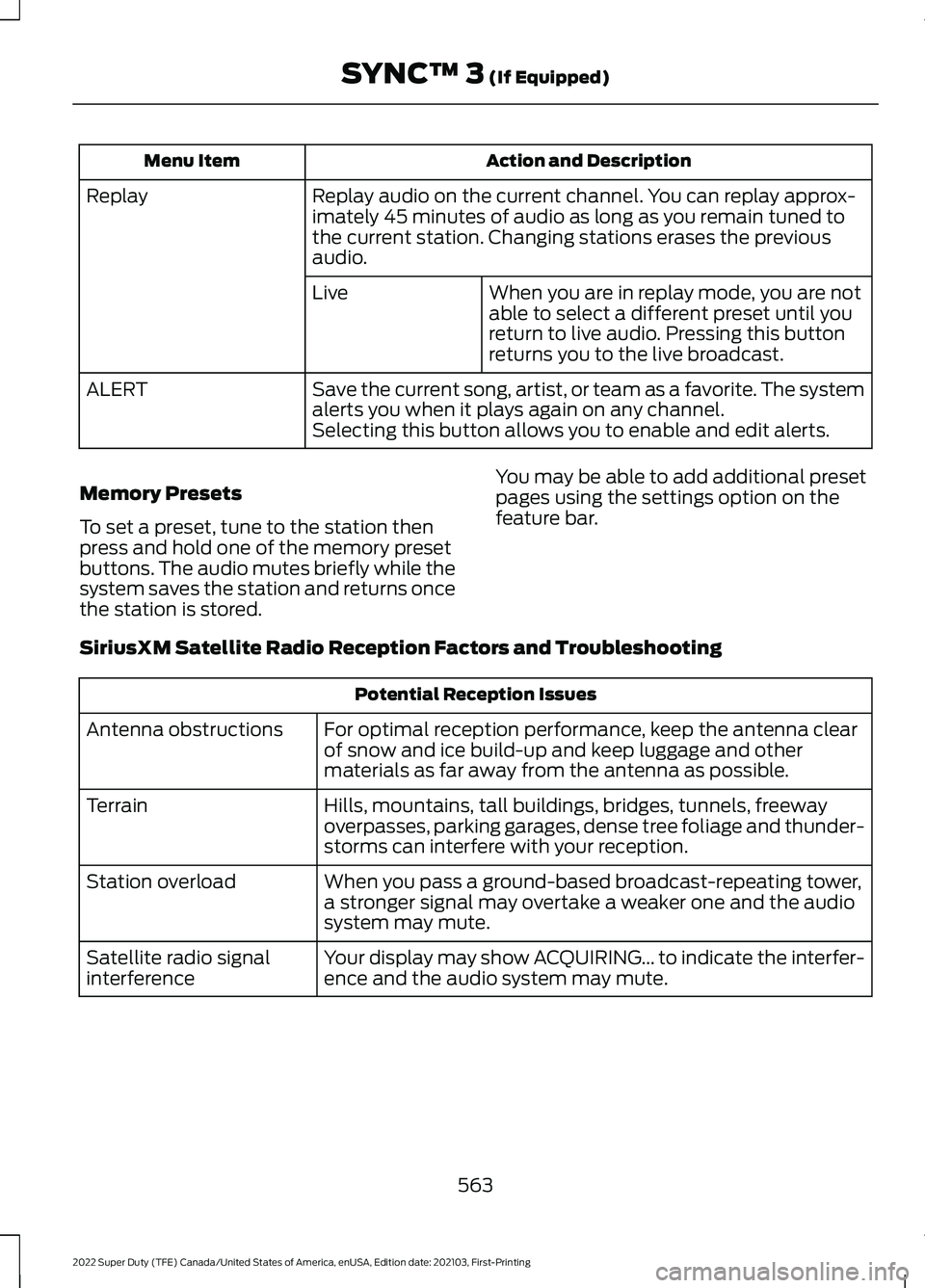
Action and Description
Menu Item
Replay audio on the current channel. You can replay approx-
imately 45 minutes of audio as long as you remain tuned to
the current station. Changing stations erases the previous
audio.
Replay
When you are in replay mode, you are not
able to select a different preset until you
return to live audio. Pressing this button
returns you to the live broadcast.
Live
Save the current song, artist, or team as a favorite. The system
alerts you when it plays again on any channel.
ALERT
Selecting this button allows you to enable and edit alerts.
Memory Presets
To set a preset, tune to the station then
press and hold one of the memory preset
buttons. The audio mutes briefly while the
system saves the station and returns once
the station is stored. You may be able to add additional preset
pages using the settings option on the
feature bar.
SiriusXM Satellite Radio Reception Factors and Troubleshooting Potential Reception Issues
For optimal reception performance, keep the antenna clear
of snow and ice build-up and keep luggage and other
materials as far away from the antenna as possible.
Antenna obstructions
Hills, mountains, tall buildings, bridges, tunnels, freeway
overpasses, parking garages, dense tree foliage and thunder-
storms can interfere with your reception.
Terrain
When you pass a ground-based broadcast-repeating tower,
a stronger signal may overtake a weaker one and the audio
system may mute.
Station overload
Your display may show ACQUIRING... to indicate the interfer-
ence and the audio system may mute.
Satellite radio signal
interference
563
2022 Super Duty (TFE) Canada/United States of America, enUSA, Edition date: 202103, First-Printing SYNC™ 3 (If Equipped)
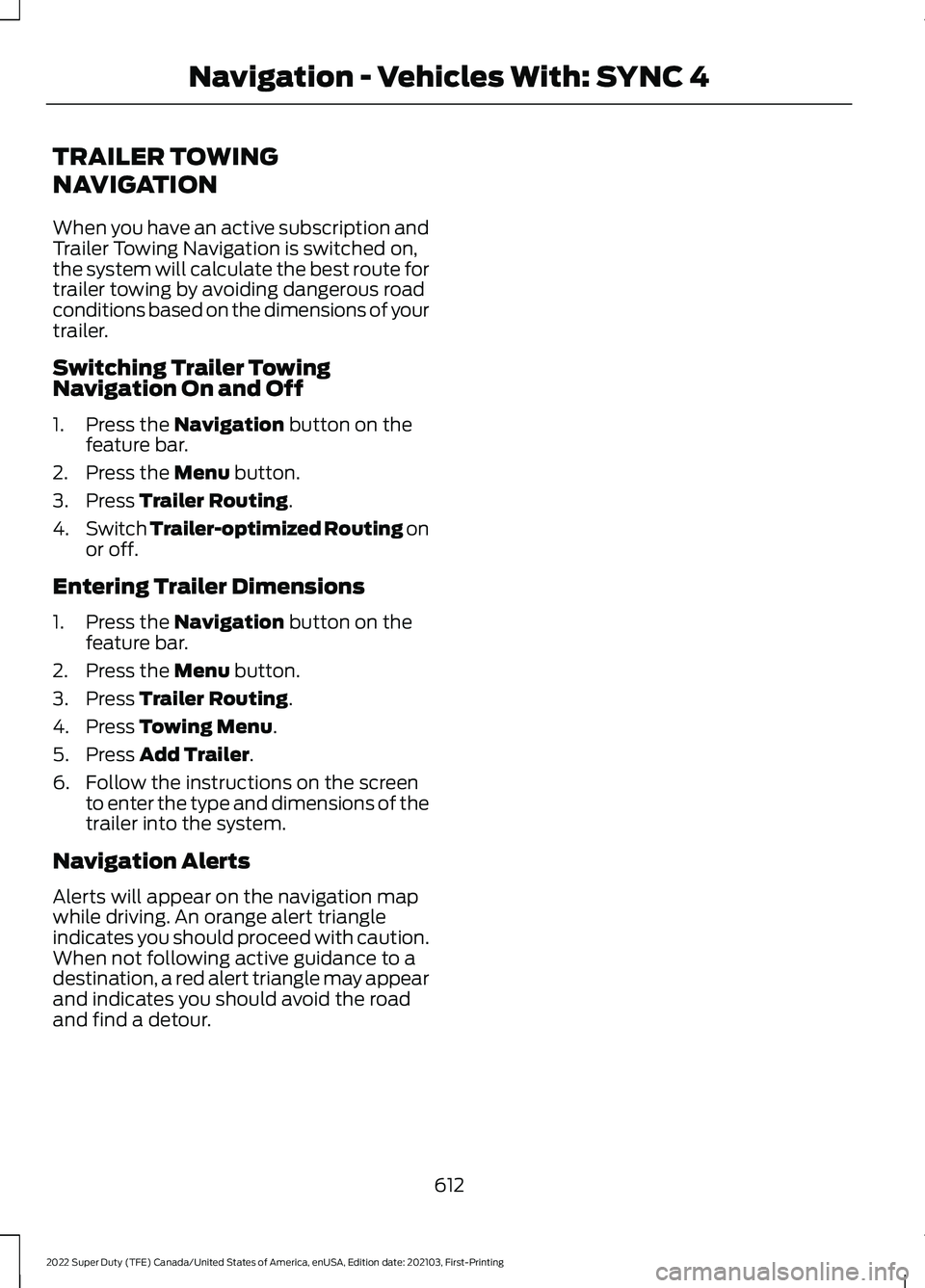
TRAILER TOWING
NAVIGATION
When you have an active subscription and
Trailer Towing Navigation is switched on,
the system will calculate the best route for
trailer towing by avoiding dangerous road
conditions based on the dimensions of your
trailer.
Switching Trailer Towing
Navigation On and Off
1. Press the Navigation button on the
feature bar.
2. Press the
Menu button.
3. Press
Trailer Routing.
4. Switch
Trailer-optimized Routing on
or off.
Entering Trailer Dimensions
1. Press the
Navigation button on the
feature bar.
2. Press the
Menu button.
3. Press
Trailer Routing.
4. Press
Towing Menu.
5. Press
Add Trailer.
6. Follow the instructions on the screen to enter the type and dimensions of the
trailer into the system.
Navigation Alerts
Alerts will appear on the navigation map
while driving. An orange alert triangle
indicates you should proceed with caution.
When not following active guidance to a
destination, a red alert triangle may appear
and indicates you should avoid the road
and find a detour.
612
2022 Super Duty (TFE) Canada/United States of America, enUSA, Edition date: 202103, First-Printing Navigation - Vehicles With: SYNC 4