phone FORD F-450 2022 User Guide
[x] Cancel search | Manufacturer: FORD, Model Year: 2022, Model line: F-450, Model: FORD F-450 2022Pages: 740, PDF Size: 12.6 MB
Page 71 of 740
•
A connected Bluetooth® enabled
phone must have adequate network
coverage, battery power and signal
strength.
• The vehicle must have battery power
and be located in the U.S., Canada or
in a territory in which 911 is the
emergency number.
Note: If any user sets 911 Assist to on or off,
that setting applies for all paired phones. If
911 Assist is off and the phone connected
to SYNC, an icon displays on the status bar.
Note: Every phone operates differently.
While SYNC 911 Assist works with most
cellular phones, some may have trouble
using this feature.
Privacy Notice
When you switch on 911 Assist, it may
disclose to emergency services that your
vehicle has been in a crash involving the
deployment of an airbag or activation of
the fuel pump shut-off. Certain versions or
updates to 911 Assist may also be capable
of electronically or verbally disclosing to
911 operators your vehicle location or other
details about your vehicle or crash to assist
911 operators to provide the most
appropriate emergency services. If you do
not want to disclose this information, do
not switch the feature on.
EMERGENCY CALL
LIMITATIONS
The SYNC 911 Assist feature only operates
in the U.S., Canada or in a territory in which
911 is the emergency number. The following
are limitations of this feature: •
Your cellular phone or 911 Assist
hardware sustains damage in a crash.
• The vehicle's battery or the SYNC
system has no power.
• The phone(s) thrown from your vehicle
are the ones paired and connected to
the system.
68
2022 Super Duty (TFE) Canada/United States of America, enUSA, Edition date: 202103, First-Printing 911 Assist
Page 72 of 740
REMOTE CONTROL
LIMITATIONS
WARNING: Changes or
modifications not expressively approved
by the party responsible for compliance
could void the user's authority to operate
the equipment. The term "IC:" before the
radio certification number only signifies
that Industry Canada technical
specifications were met.
This device complies with Part 15 of the
FCC Rules and with Industry Canada
license-exempt RSS standard(s).
Operation is subject to the following two
conditions: (1) This device may not cause
harmful interference, and (2) This device
must accept any interference received,
including interference that may cause
undesired operation.
Make sure a valid remote control is within
5 ft (1.5 m)
from the front door handles
and rear of vehicle.
The system may not function if:
• The remote control remains stationary
for about a minute.
• The vehicle battery has no charge.
• The remote control battery has no
charge.
• There is interference causing issues
with the remote control frequencies.
• The remote control is too close to
metal objects or electronic devices, for
example keys or a cell phone.
USING THE REMOTE CONTROL
Use your remote control to access various
vehicle systems.
Note: The buttons on your remote may vary
depending on the vehicle region or options. Unlock Press the button to unlock all
doors. See
Unlocking and
Locking the Doors Using the
Remote Control
(page 83).
Lock Press the button to lock all
doors. See
Unlocking and
Locking the Doors Using the
Remote Control
(page 83).
Remote Start
(If Equipped) Press the button to remote start.
See
Remotely Starting and
Stopping the Vehicle (page
146).
Tailgate
(If Equipped) Press the button to open the
tailgate. See
Opening the
Tailgate Using the Remote
Control
(page 99).
Panic Alarm
(If Equipped) Press the button to sound the
panic alarm. See Sounding the
Panic Alarm
(page 70).
OPENING AND CLOSING THE
FLIP KEY
Opening Your Flip Key
Press the round button on the remote
control to extend the flip key.
69
2022 Super Duty (TFE) Canada/United States of America, enUSA, Edition date: 202103, First-Printing Keys and Remote ControlsE138629 E138623 E138625 E191530 E138624
Page 81 of 740
Emergency Assistance
If you set emergency assistance to always
on, you cannot switch it off with a MyKey.
Do Not Disturb
If you set do not disturb to always on, you
cannot switch it off with a MyKey.
Note:
If a phone is connected using Apple
CarPlay or Android Auto while driving with
a MyKey, the driver can receive phone calls
and text messages even if the do not disturb
restriction is on, and if the vehicle comes
with satellite radio, there is no restriction on
the adult content.
Traction and Stability Control
If you set traction control or stability
control to always on, you cannot switch it
off with a MyKey.
CREATING A MYKEY
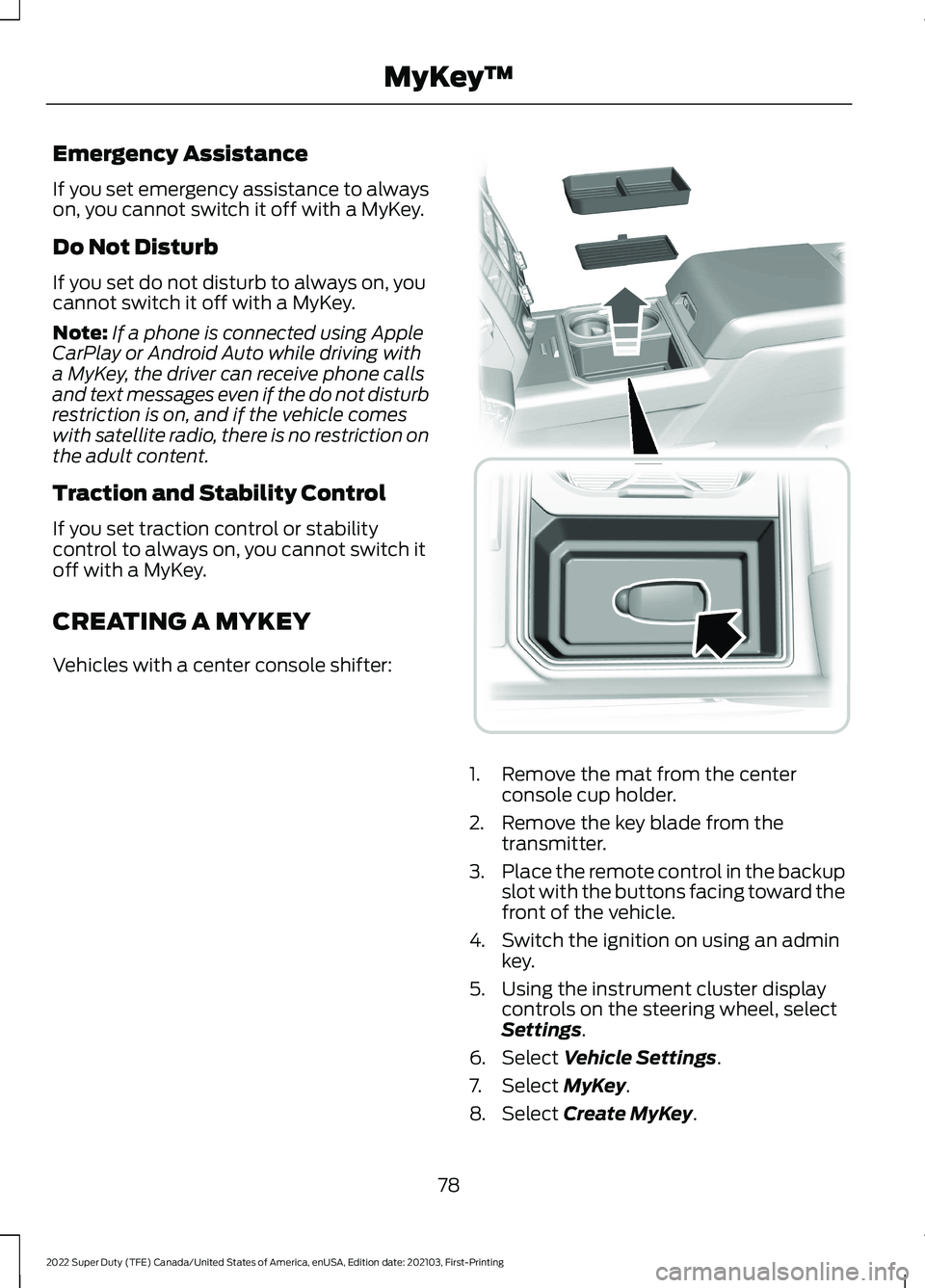
Vehicles with a center console shifter: 1. Remove the mat from the center
console cup holder.
2. Remove the key blade from the transmitter.
3. Place the remote control in the backup
slot with the buttons facing toward the
front of the vehicle.
4. Switch the ignition on using an admin key.
5. Using the instrument cluster display controls on the steering wheel, select
Settings.
6. Select
Vehicle Settings.
7. Select
MyKey.
8. Select
Create MyKey.
78
2022 Super Duty (TFE) Canada/United States of America, enUSA, Edition date: 202103, First-Printing MyKey
™ E226701
Page 90 of 740
KEYLESS ENTRY LIMITATIONS
Make sure your remote control is within 3 ft
(1 m) from the front door handles and the
tailgate.
The system could not function if:
• The remote control remains stationary
for about a minute.
• The vehicle battery has no charge.
• The remote control battery has no
charge.
• There is interference causing issues
with the remote control frequencies.
• The remote control is too close to
metal objects or electronic devices, for
example keys or a cell phone.
KEYLESS ENTRY SETTINGS
Switching Keyless Entry On and
Off
1. Switch the ignition on using an original
key that has not been created as a
MyKey.
2. Press
Settings on the touchscreen.
3. Press
Vehicle Settings.
4. Press
Locks.
Reprogramming the Unlocking
Function
You can enable two-stage unlocking
function allowing you to unlock only the
driver door when you touch the unlock
sensor.
Press and hold both the lock and unlock
buttons on the remote control for four
seconds to disable or enable two-stage
unlocking. If you program the unlocking function so
that only the driver door unlocks, you can
unlock all of the other doors from inside
your vehicle using the power door lock
control. You can unlock individual doors
by pulling the interior door handles on
those doors.
USING KEYLESS ENTRY
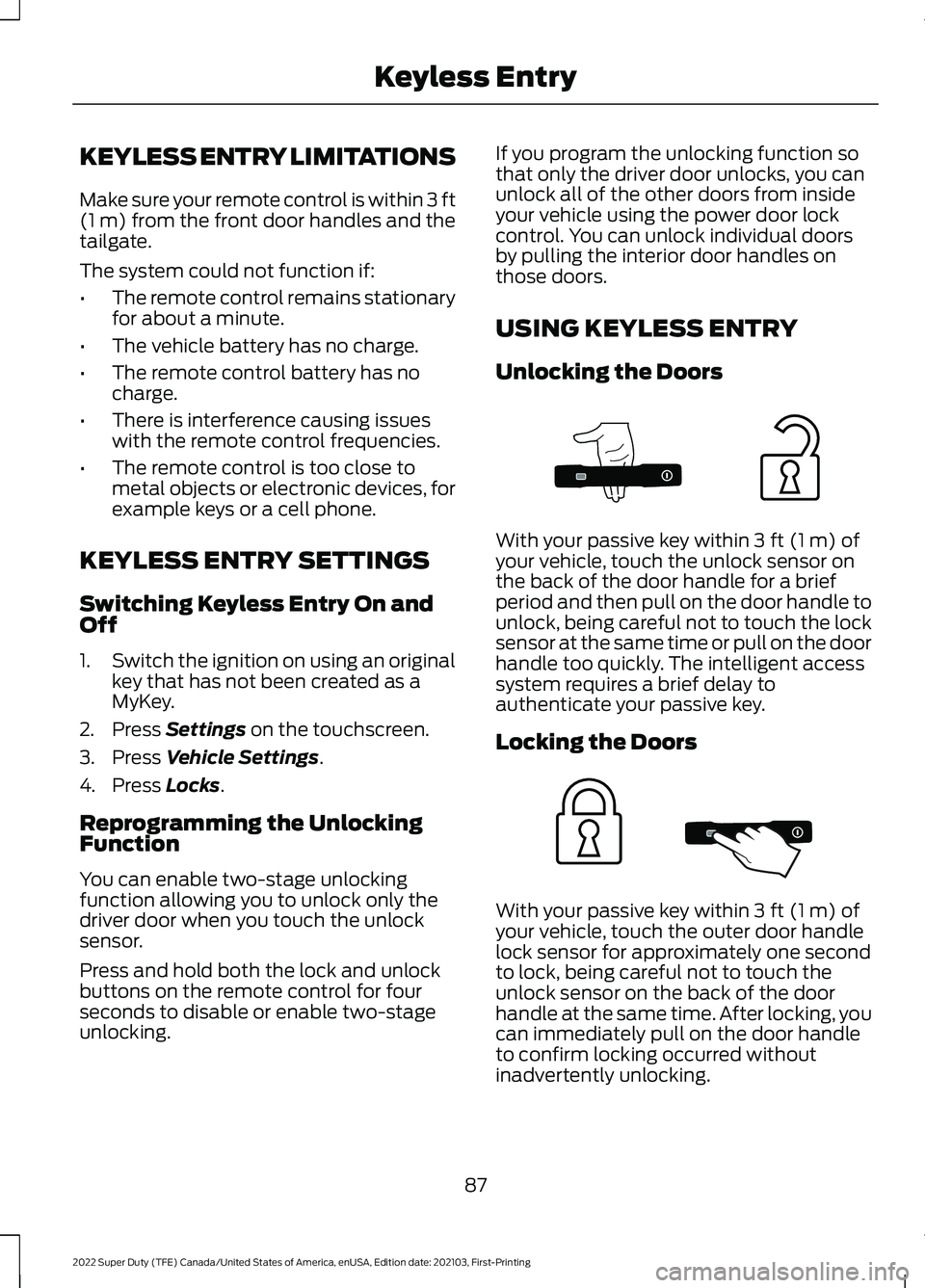
Unlocking the Doors
With your passive key within
3 ft (1 m) of
your vehicle, touch the unlock sensor on
the back of the door handle for a brief
period and then pull on the door handle to
unlock, being careful not to touch the lock
sensor at the same time or pull on the door
handle too quickly. The intelligent access
system requires a brief delay to
authenticate your passive key.
Locking the Doors With your passive key within
3 ft (1 m) of
your vehicle, touch the outer door handle
lock sensor for approximately one second
to lock, being careful not to touch the
unlock sensor on the back of the door
handle at the same time. After locking, you
can immediately pull on the door handle
to confirm locking occurred without
inadvertently unlocking.
87
2022 Super Duty (TFE) Canada/United States of America, enUSA, Edition date: 202103, First-Printing Keyless EntryE333747 E333746
Page 195 of 740
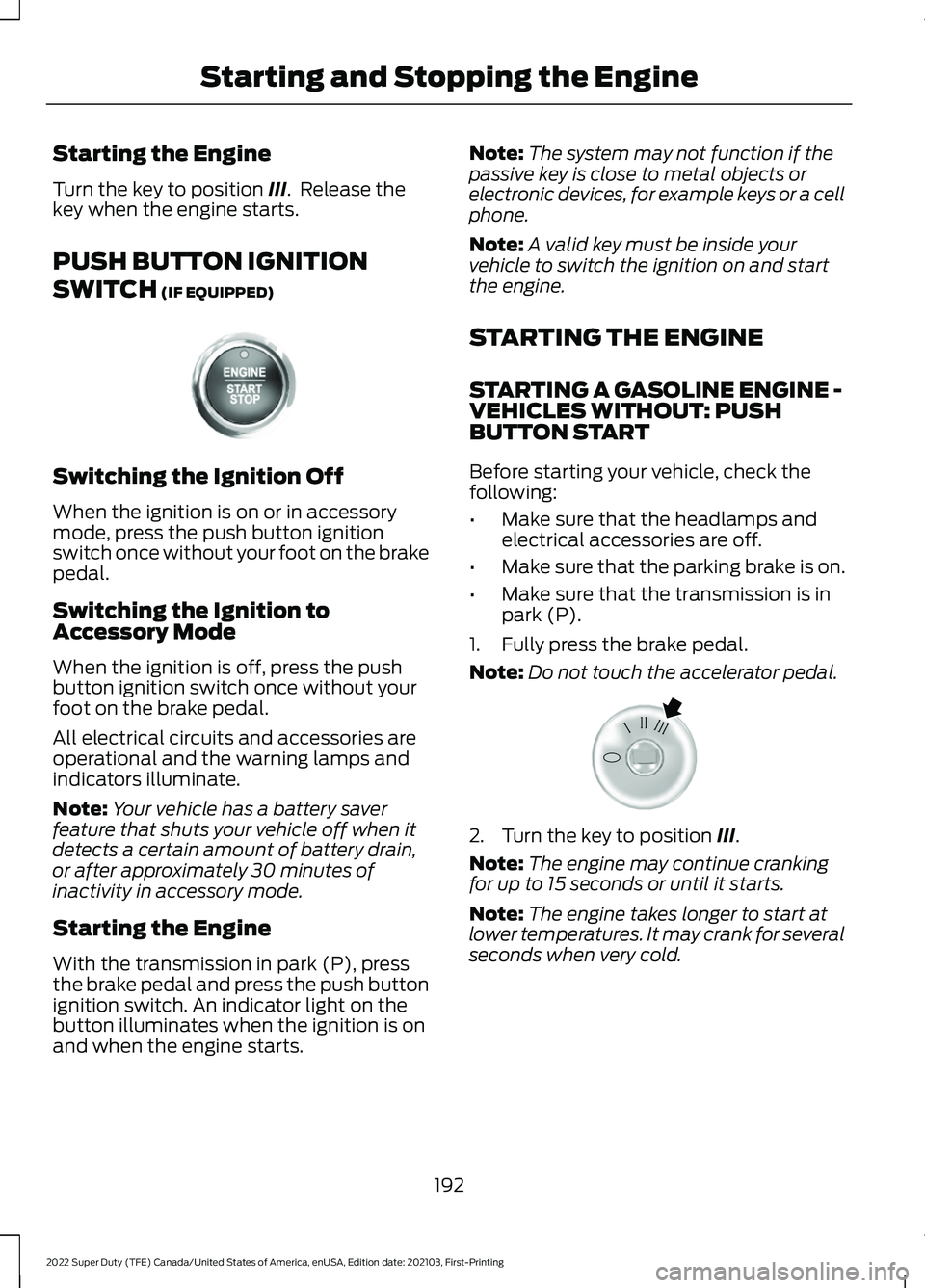
Starting the Engine
Turn the key to position III. Release the
key when the engine starts.
PUSH BUTTON IGNITION
SWITCH
(IF EQUIPPED) Switching the Ignition Off
When the ignition is on or in accessory
mode, press the push button ignition
switch once without your foot on the brake
pedal.
Switching the Ignition to
Accessory Mode
When the ignition is off, press the push
button ignition switch once without your
foot on the brake pedal.
All electrical circuits and accessories are
operational and the warning lamps and
indicators illuminate.
Note:
Your vehicle has a battery saver
feature that shuts your vehicle off when it
detects a certain amount of battery drain,
or after approximately 30 minutes of
inactivity in accessory mode.
Starting the Engine
With the transmission in park (P), press
the brake pedal and press the push button
ignition switch. An indicator light on the
button illuminates when the ignition is on
and when the engine starts. Note:
The system may not function if the
passive key is close to metal objects or
electronic devices, for example keys or a cell
phone.
Note: A valid key must be inside your
vehicle to switch the ignition on and start
the engine.
STARTING THE ENGINE
STARTING A GASOLINE ENGINE -
VEHICLES WITHOUT: PUSH
BUTTON START
Before starting your vehicle, check the
following:
• Make sure that the headlamps and
electrical accessories are off.
• Make sure that the parking brake is on.
• Make sure that the transmission is in
park (P).
1. Fully press the brake pedal.
Note: Do not touch the accelerator pedal. 2. Turn the key to position
III.
Note: The engine may continue cranking
for up to 15 seconds or until it starts.
Note: The engine takes longer to start at
lower temperatures. It may crank for several
seconds when very cold.
192
2022 Super Duty (TFE) Canada/United States of America, enUSA, Edition date: 202103, First-Printing Starting and Stopping the EngineE321258 E322354
Page 206 of 740
FUEL AND REFUELING
PRECAUTIONS
WARNING: Do not overfill the fuel
tank. The pressure in an overfilled tank
may cause leakage and lead to fuel spray
and fire. WARNING:
The fuel system may
be under pressure. If you hear a hissing
sound near the fuel filler inlet, do not
refuel until the sound stops. Otherwise,
fuel may spray out, which could cause
serious personal injury. WARNING: Fuels can cause serious
injury or death if misused or mishandled. WARNING:
Fuel may contain
benzene, which is a cancer-causing
agent. WARNING: When refueling always
shut the engine off and never allow
sparks or open flames near the fuel tank
filler valve. Never smoke or use a cell
phone while refueling. Fuel vapor is
extremely hazardous under certain
conditions. Avoid inhaling excess fumes. WARNING: Read and follow all the
instructions on the pump island.
Follow these guidelines when refueling:
• Extinguish all smoking materials and
any open flames before refueling your
vehicle.
• Switch the engine off before refueling. •
Automotive fuels can be harmful or
fatal if swallowed. Fuel is highly toxic
and if swallowed can cause death or
permanent injury. If fuel is swallowed
immediately call a physician, even if no
symptoms are immediately apparent.
The toxic effects of fuel may not be
apparent for hours.
• Avoid inhaling fuel vapors. Inhaling fuel
vapor can lead to eye and respiratory
tract irritation. In severe cases,
excessive or prolonged breathing of
fuel vapor can cause serious illness and
permanent injury.
• Avoid getting fuel in your eyes. If you
splash fuel in your eyes, immediately
remove contact lenses, if worn, flush
with water for 15 minutes and seek
medical attention. Failure to seek
proper medical attention could lead to
permanent injury.
• Fuels can be harmful if absorbed
through the skin. If you splash fuel on
your skin, clothing or both, promptly
remove contaminated clothing and
thoroughly wash your skin with soap
and water. Repeated or prolonged skin
contact causes skin irritation.
• Be particularly careful if you are taking
Antabuse or other forms of Disulfiram
for the treatment of alcoholism.
Breathing fuel vapors could cause an
adverse reaction, serious personal
injury or sickness. Immediately call a
physician if you experience any adverse
reactions.
203
2022 Super Duty (TFE) Canada/United States of America, enUSA, Edition date: 202103, First-Printing Fuel and Refueling
Page 212 of 740
4. To replace the fuel filler cap, turn it
clockwise until you feel a strong
resistance and it clicks.
5. Fully close the fuel filler door.
Note: If your vehicle runs out of fuel add a
minimum of 1.3 gal (5 L) of fuel to restart
the engine.
Note: You may need to switch the ignition
from off to on several times after refueling
to allow the fuel system to pump the fuel
from the tank to the engine. When
restarting, cranking time takes a few
seconds longer than normal.
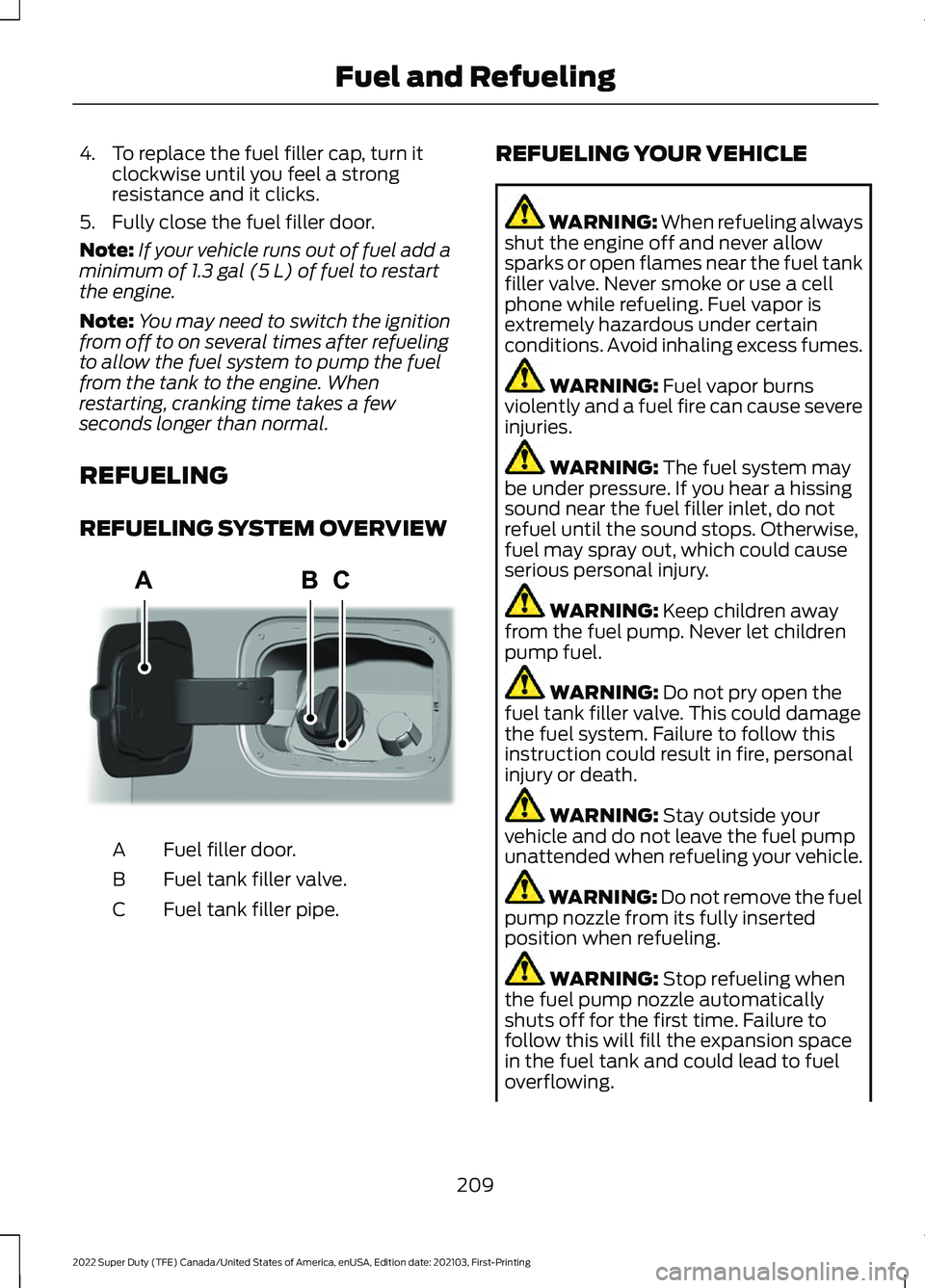
REFUELING
REFUELING SYSTEM OVERVIEW Fuel filler door.
A
Fuel tank filler valve.
B
Fuel tank filler pipe.
C REFUELING YOUR VEHICLE WARNING: When refueling always
shut the engine off and never allow
sparks or open flames near the fuel tank
filler valve. Never smoke or use a cell
phone while refueling. Fuel vapor is
extremely hazardous under certain
conditions. Avoid inhaling excess fumes. WARNING:
Fuel vapor burns
violently and a fuel fire can cause severe
injuries. WARNING:
The fuel system may
be under pressure. If you hear a hissing
sound near the fuel filler inlet, do not
refuel until the sound stops. Otherwise,
fuel may spray out, which could cause
serious personal injury. WARNING:
Keep children away
from the fuel pump. Never let children
pump fuel. WARNING:
Do not pry open the
fuel tank filler valve. This could damage
the fuel system. Failure to follow this
instruction could result in fire, personal
injury or death. WARNING:
Stay outside your
vehicle and do not leave the fuel pump
unattended when refueling your vehicle. WARNING: Do not remove the fuel
pump nozzle from its fully inserted
position when refueling. WARNING:
Stop refueling when
the fuel pump nozzle automatically
shuts off for the first time. Failure to
follow this will fill the expansion space
in the fuel tank and could lead to fuel
overflowing.
209
2022 Super Duty (TFE) Canada/United States of America, enUSA, Edition date: 202103, First-Printing Fuel and RefuelingAAE346555
Page 374 of 740
OFF-ROAD DRIVING
WHAT IS OFF-ROAD DRIVING
Off-road driving is driving your vehicle on
unsurfaced roads or trails, made from dirt,
rocks, sand and mud.
BASIC OFF-ROAD DRIVING
TECHNIQUES
Off-road Driving Hints
Before taking your vehicle off-roading, a
basic vehicle inspection should be done to
make sure that the vehicle is in top working
condition. It is always recommended that
at least two vehicles are used while
off-roading. The buddy system helps make
sure that help is close at hand should a
vehicle become stuck or damaged. It is also
wise to take supplies such as a first aid kit,
supply of water, tow strap, cell or satellite
phone with you any time an off-road
excursion is planned.
1. Grip the steering wheel with thumbs
on the outside of the rim. This will
reduce the risk of injury due to abrupt
steering wheel motions that occur
when negotiating rough terrain.
2. Throttle, brake and steering inputs should be made in a smooth and
controlled manner. Sudden inputs to
the controls can cause loss of traction
or upset the vehicle, especially while
on loose terrain or while crossing
obstacles such as rocks or logs.
3. Look ahead on your route noting upcoming obstacles, or any other
factors which may indicate a change
in available traction, and adjust the
vehicle speed and route accordingly. 4. When driving off-road, if the front or
rear suspension is bottoming out
and/or excessive contact with the
skid-plates is encountered, reduce
vehicle speed to avoid potential
damage to the vehicle.
5. When with other vehicles, it is recommended that communication is
used, and the lead vehicle notify other
vehicles of obstacles that could cause
potential vehicle damage.
6. Always keep available ground clearance in mind and pick a route that
minimizes the risk of catching the
underside of the vehicle on an obstacle.
7. When negotiating low speed obstacles,
applying light brake pressure in
conjunction with the throttle will help
prevent the vehicle from jerking and
will allow you to negotiate the obstacle
in a more controlled manner. Using 4L
will also help with this.
8. Off-roading requires a high degree of concentration. Even if your local law
does not prohibit alcohol use while
driving off-road, Ford strongly
recommends against drinking if you
plan to off-road.
Crossing Obstacles
• Review the path ahead before
attempting to cross any obstacle. It is
best if the obstacle is reviewed from
outside the vehicle so that there is a
good understanding of terrain condition
both in front of and behind the
obstacle.
• Approach obstacles slowly.
371
2022 Super Duty (TFE) Canada/United States of America, enUSA, Edition date: 202103, First-Printing Driving Hints
Page 504 of 740
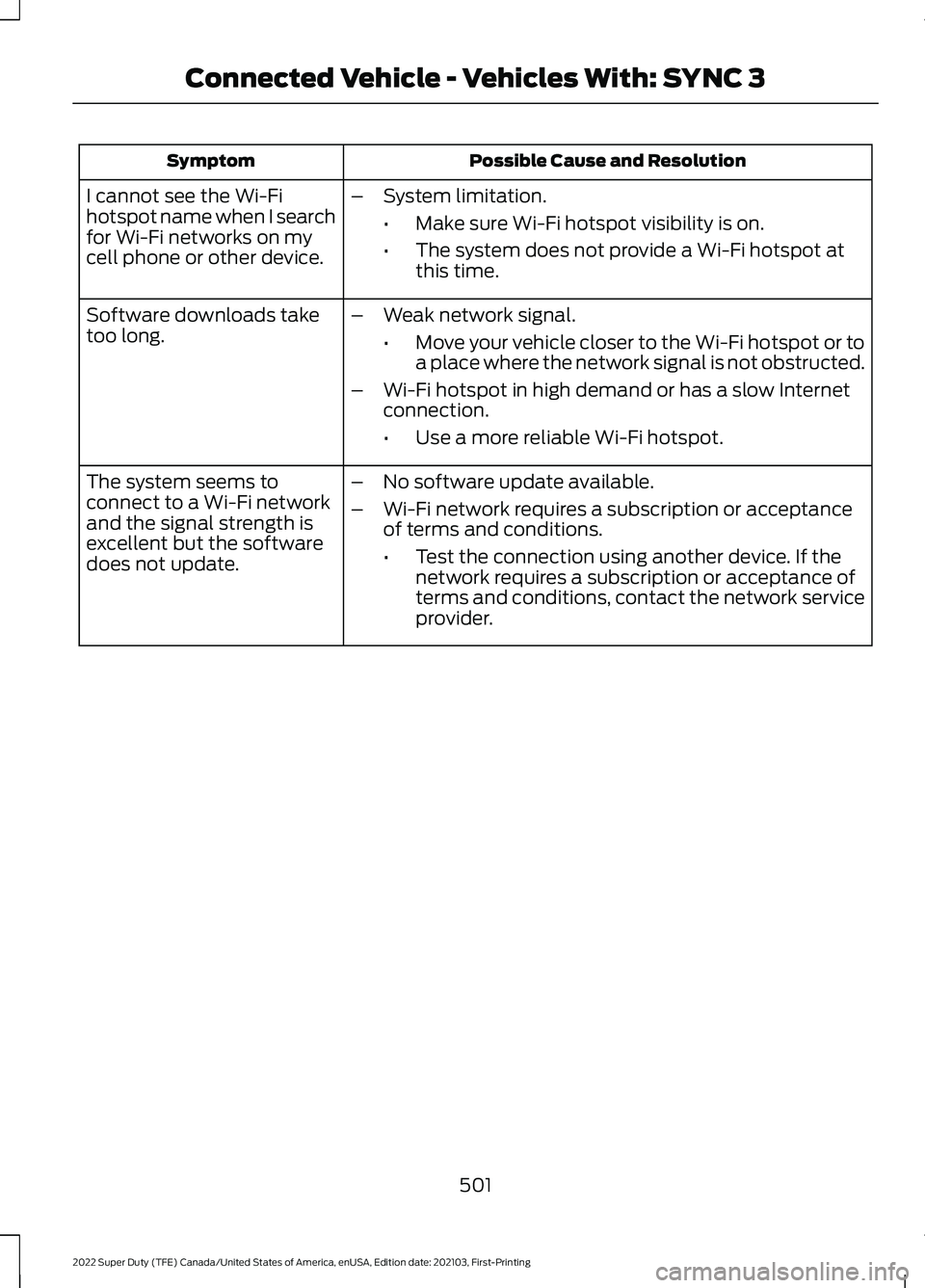
Possible Cause and Resolution
Symptom
I cannot see the Wi-Fi
hotspot name when I search
for Wi-Fi networks on my
cell phone or other device. –
System limitation.
•Make sure Wi-Fi hotspot visibility is on.
• The system does not provide a Wi-Fi hotspot at
this time.
– Weak network signal.
•Move your vehicle closer to the Wi-Fi hotspot or to
a place where the network signal is not obstructed.
– Wi-Fi hotspot in high demand or has a slow Internet
connection.
•Use a more reliable Wi-Fi hotspot.
Software downloads take
too long.
–No software update available.
– Wi-Fi network requires a subscription or acceptance
of terms and conditions.
•Test the connection using another device. If the
network requires a subscription or acceptance of
terms and conditions, contact the network service
provider.
The system seems to
connect to a Wi-Fi network
and the signal strength is
excellent but the software
does not update.
501
2022 Super Duty (TFE) Canada/United States of America, enUSA, Edition date: 202103, First-Printing Connected Vehicle - Vehicles With: SYNC 3
Page 508 of 740
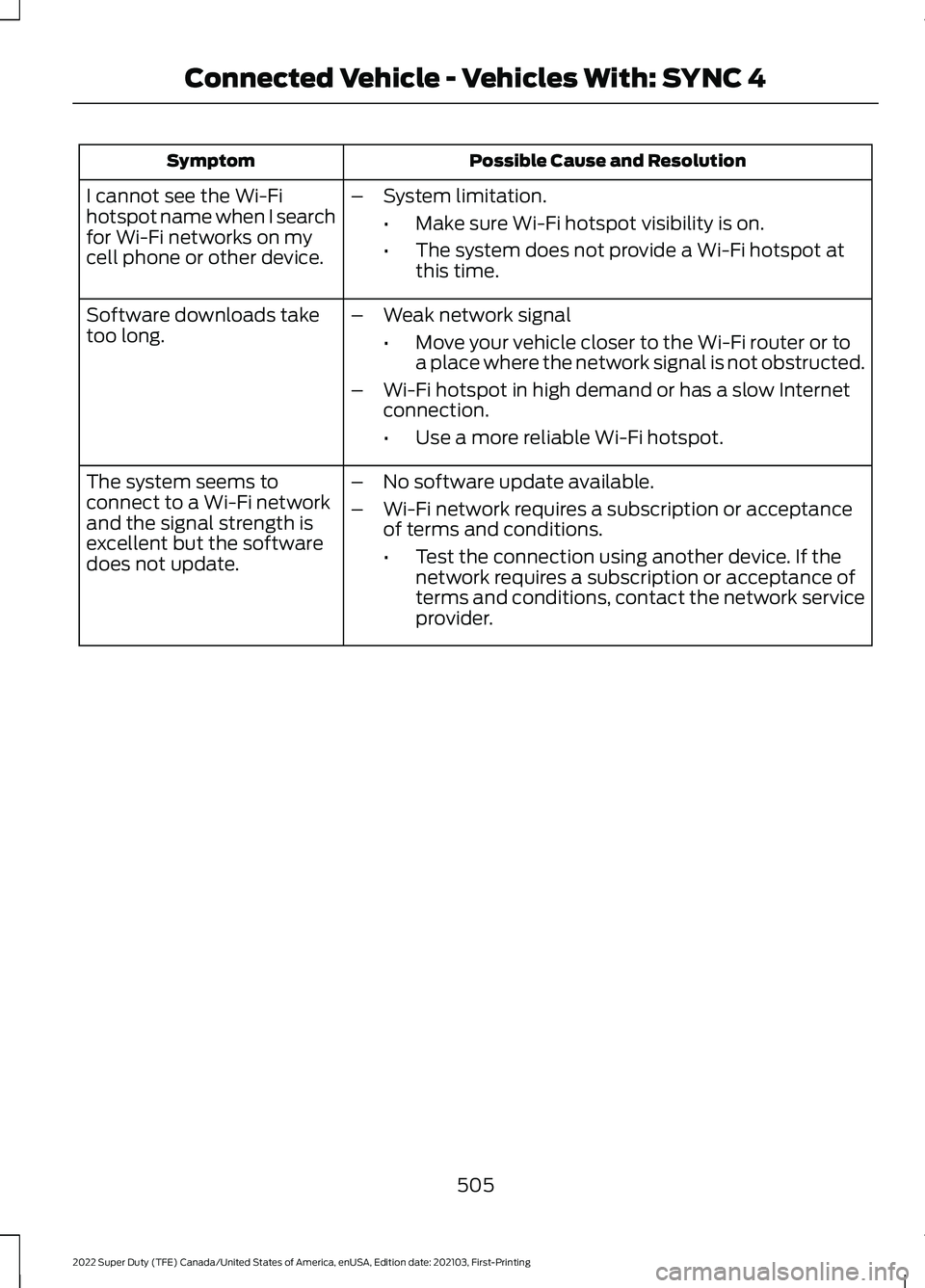
Possible Cause and Resolution
Symptom
I cannot see the Wi-Fi
hotspot name when I search
for Wi-Fi networks on my
cell phone or other device. –
System limitation.
•Make sure Wi-Fi hotspot visibility is on.
• The system does not provide a Wi-Fi hotspot at
this time.
– Weak network signal
•Move your vehicle closer to the Wi-Fi router or to
a place where the network signal is not obstructed.
– Wi-Fi hotspot in high demand or has a slow Internet
connection.
•Use a more reliable Wi-Fi hotspot.
Software downloads take
too long.
–No software update available.
– Wi-Fi network requires a subscription or acceptance
of terms and conditions.
•Test the connection using another device. If the
network requires a subscription or acceptance of
terms and conditions, contact the network service
provider.
The system seems to
connect to a Wi-Fi network
and the signal strength is
excellent but the software
does not update.
505
2022 Super Duty (TFE) Canada/United States of America, enUSA, Edition date: 202103, First-Printing Connected Vehicle - Vehicles With: SYNC 4