display FORD F-59 2021 User Guide
[x] Cancel search | Manufacturer: FORD, Model Year: 2021, Model line: F-59, Model: FORD F-59 2021Pages: 191, PDF Size: 2.84 MB
Page 33 of 191
GENERAL INFORMATION
WARNING: Driving while distracted
can result in loss of vehicle control, crash
and injury. We strongly recommend that
you use extreme caution when using any
device that may take your focus off the
road. Your primary responsibility is the
safe operation of your vehicle. We
recommend against the use of any
hand-held device while driving and
encourage the use of voice-operated
systems when possible. Make sure you
are aware of all applicable local laws
that may affect the use of electronic
devices while driving.
Note: Trailer options are not available if
your vehicle speed is greater than 3 mph
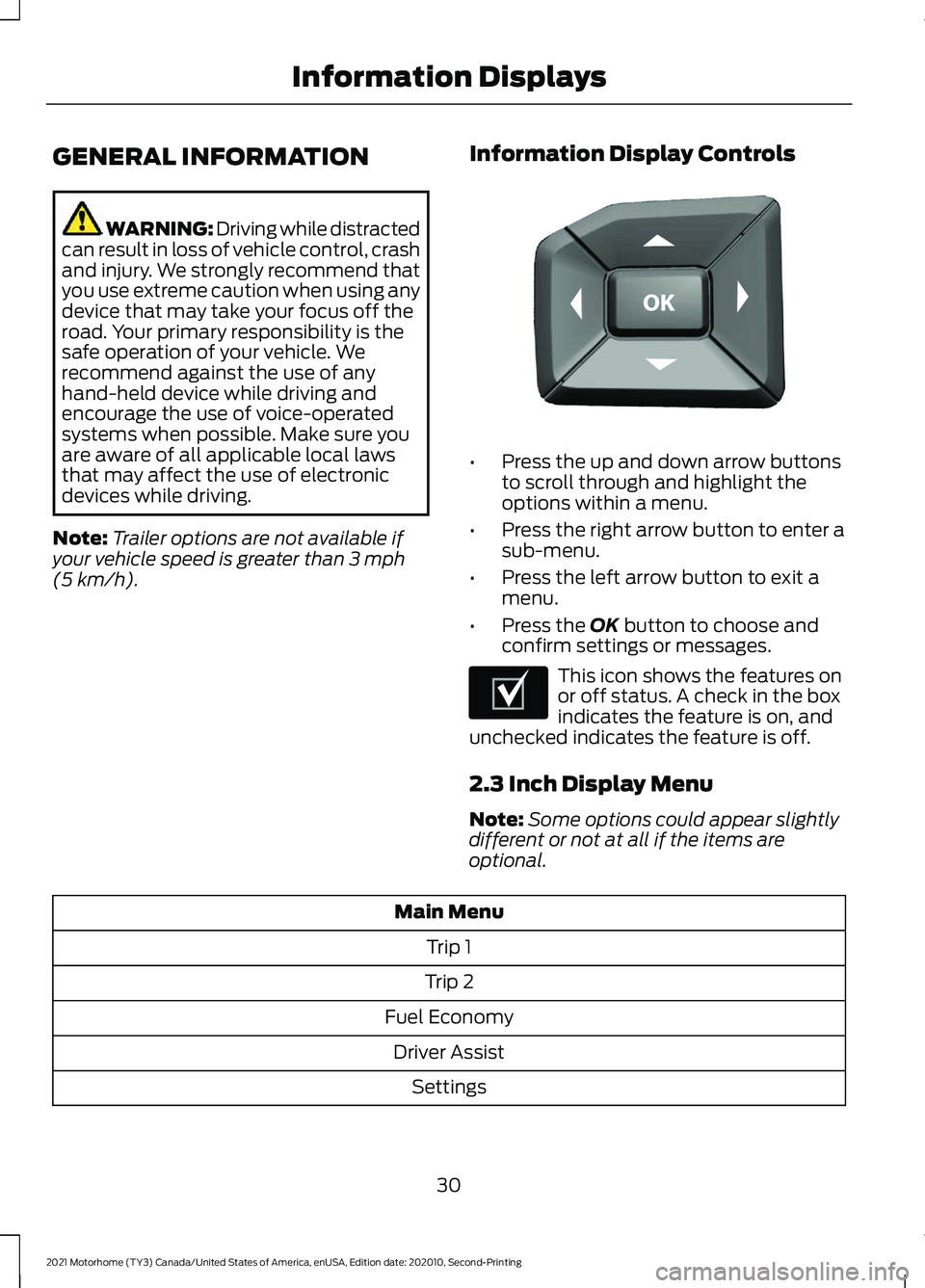
(5 km/h). Information Display Controls •
Press the up and down arrow buttons
to scroll through and highlight the
options within a menu.
• Press the right arrow button to enter a
sub-menu.
• Press the left arrow button to exit a
menu.
• Press the
OK button to choose and
confirm settings or messages. This icon shows the features on
or off status. A check in the box
indicates the feature is on, and
unchecked indicates the feature is off.
2.3 Inch Display Menu
Note: Some options could appear slightly
different or not at all if the items are
optional. Main Menu
Trip 1
Trip 2
Fuel Economy Driver Assist Settings
30
2021 Motorhome (TY3) Canada/United States of America, enUSA, Edition date: 202010, Second-Printing Information DisplaysE184451 E204495
Page 34 of 191
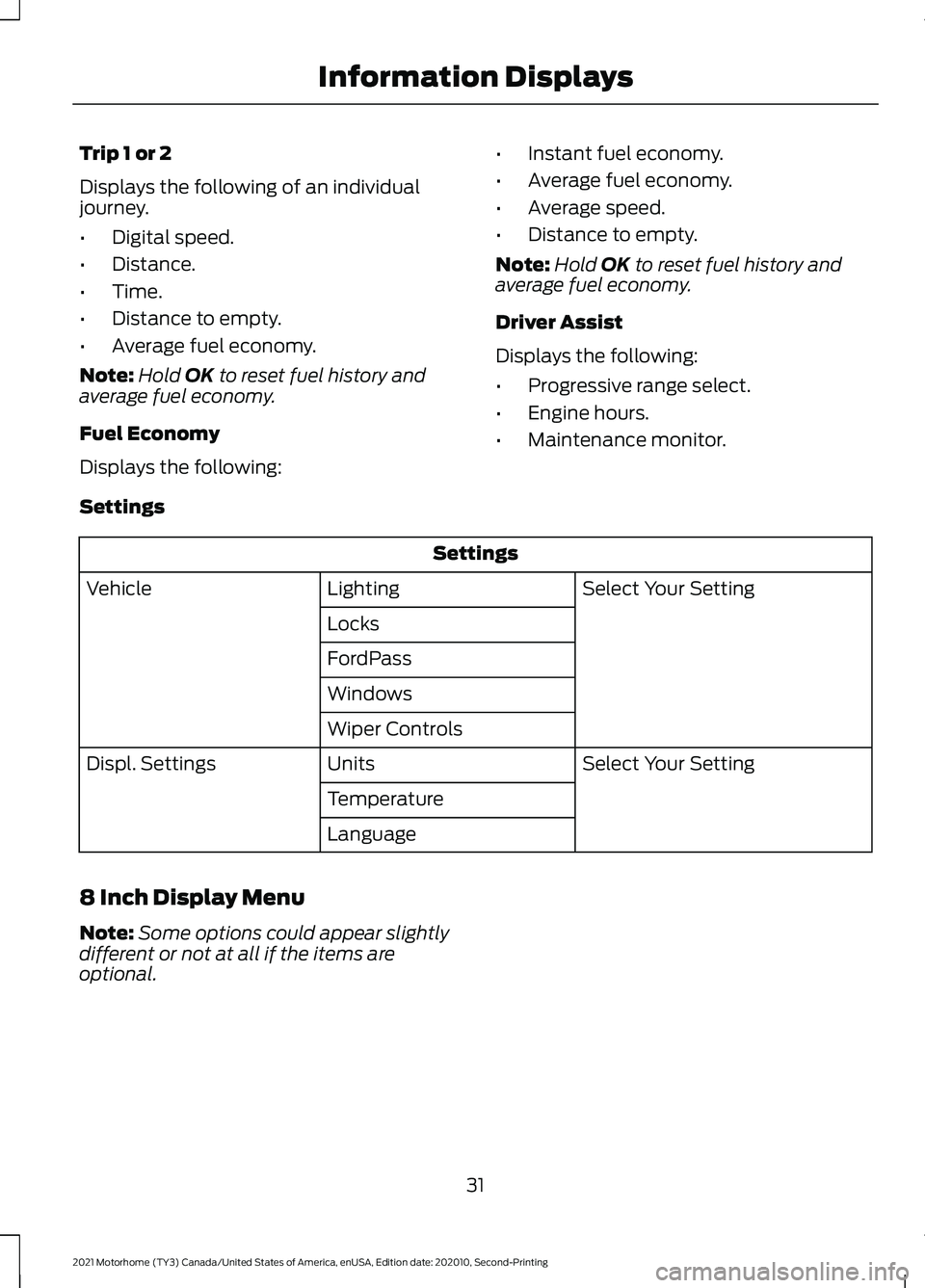
Trip 1 or 2
Displays the following of an individual
journey.
•
Digital speed.
• Distance.
• Time.
• Distance to empty.
• Average fuel economy.
Note: Hold OK to reset fuel history and
average fuel economy.
Fuel Economy
Displays the following: •
Instant fuel economy.
• Average fuel economy.
• Average speed.
• Distance to empty.
Note: Hold
OK to reset fuel history and
average fuel economy.
Driver Assist
Displays the following:
• Progressive range select.
• Engine hours.
• Maintenance monitor.
Settings Settings
Select Your Setting
Lighting
Vehicle
Locks
FordPass
Windows
Wiper Controls Select Your Setting
Units
Displ. Settings
Temperature
Language
8 Inch Display Menu
Note: Some options could appear slightly
different or not at all if the items are
optional.
31
2021 Motorhome (TY3) Canada/United States of America, enUSA, Edition date: 202010, Second-Printing Information Displays
Page 35 of 191
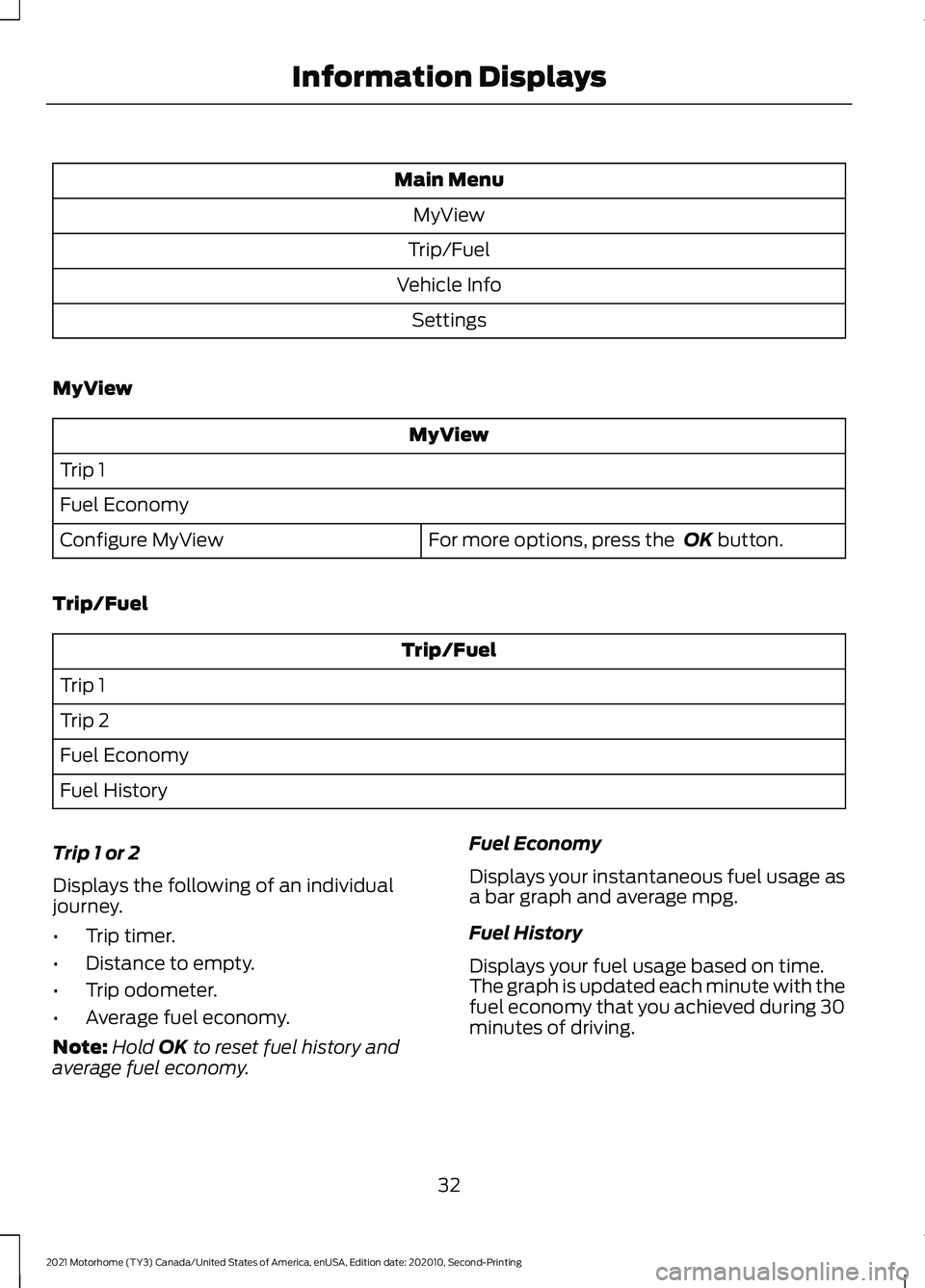
Main Menu
MyView
Trip/Fuel
Vehicle Info Settings
MyView MyView
Trip 1
Fuel Economy For more options, press the OK button.
Configure MyView
Trip/Fuel Trip/Fuel
Trip 1
Trip 2
Fuel Economy
Fuel History
Trip 1 or 2
Displays the following of an individual
journey.
• Trip timer.
• Distance to empty.
• Trip odometer.
• Average fuel economy.
Note: Hold
OK to reset fuel history and
average fuel economy. Fuel Economy
Displays your instantaneous fuel usage as
a bar graph and average mpg.
Fuel History
Displays your fuel usage based on time.
The graph is updated each minute with the
fuel economy that you achieved during 30
minutes of driving.
32
2021 Motorhome (TY3) Canada/United States of America, enUSA, Edition date: 202010, Second-Printing Information Displays
Page 36 of 191
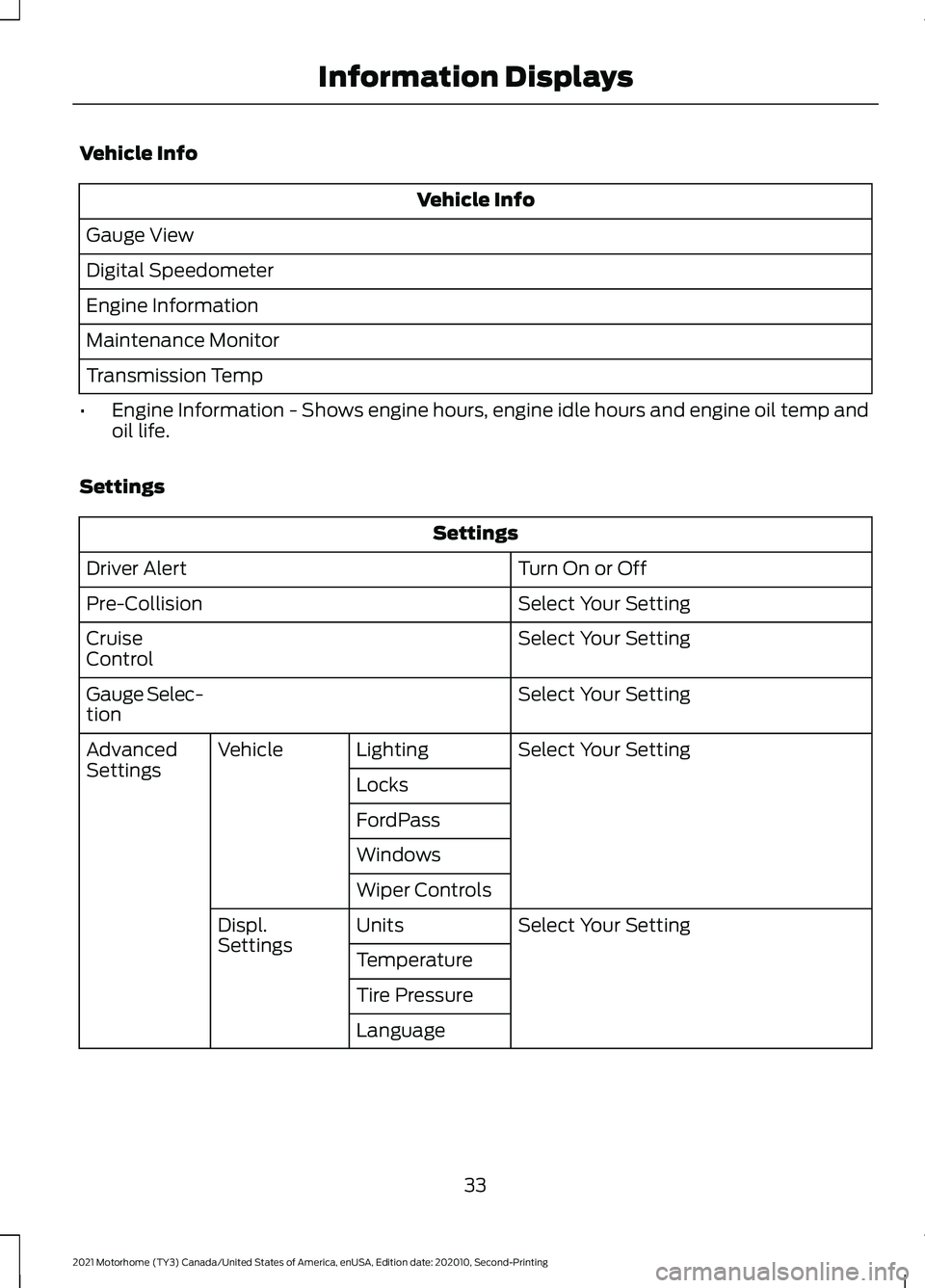
Vehicle Info
Vehicle Info
Gauge View
Digital Speedometer
Engine Information
Maintenance Monitor
Transmission Temp
• Engine Information - Shows engine hours, engine idle hours and engine oil temp and
oil life.
Settings Settings
Turn On or Off
Driver Alert
Select Your Setting
Pre-Collision
Select Your Setting
Cruise
Control
Select Your Setting
Gauge Selec-
tion
Select Your Setting
Lighting
Vehicle
Advanced
Settings
Locks
FordPass
Windows
Wiper Controls
Select Your Setting
Units
Displ.
Settings
Temperature
Tire Pressure
Language
33
2021 Motorhome (TY3) Canada/United States of America, enUSA, Edition date: 202010, Second-Printing Information Displays
Page 37 of 191
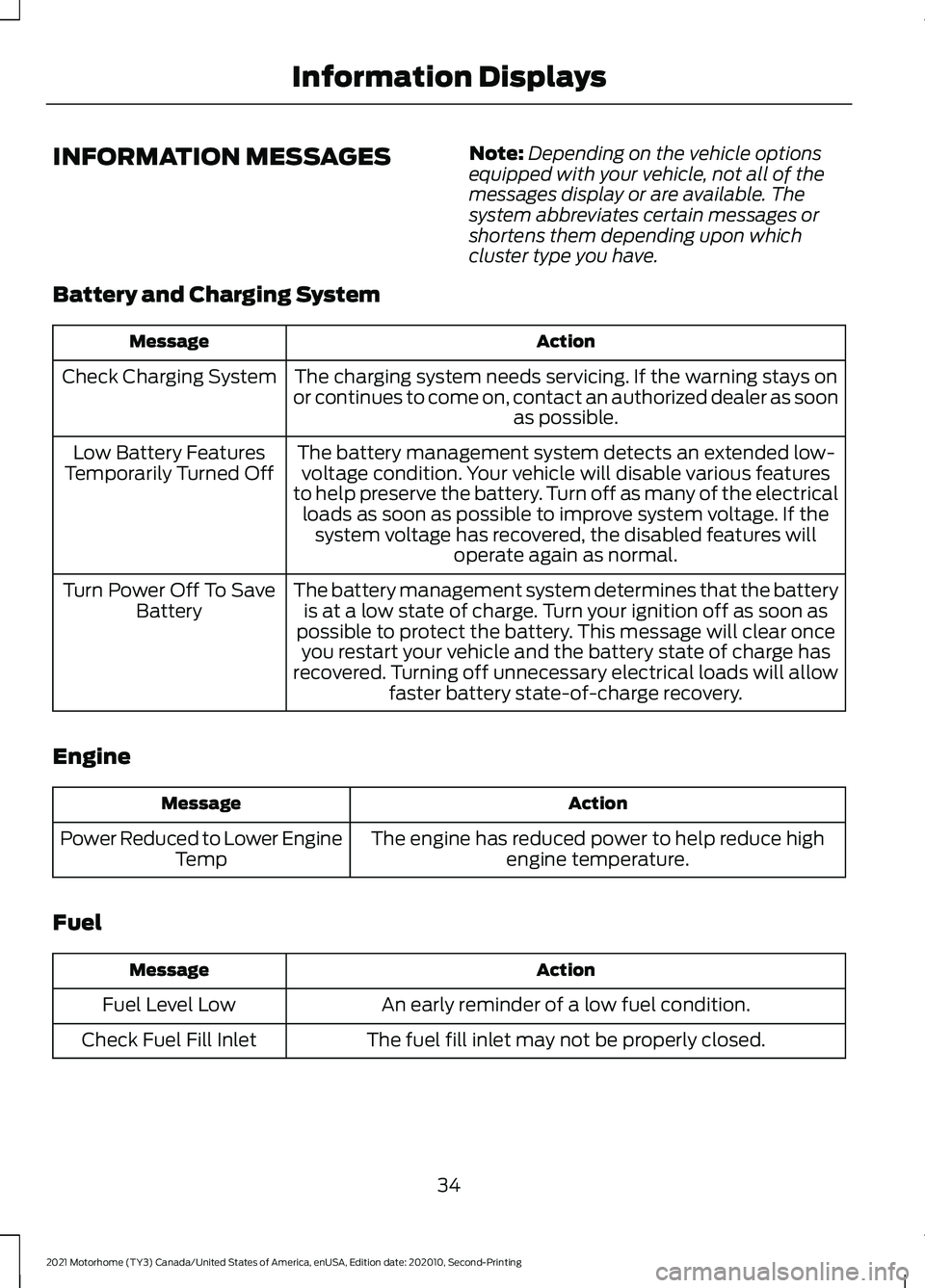
INFORMATION MESSAGES
Note:
Depending on the vehicle options
equipped with your vehicle, not all of the
messages display or are available. The
system abbreviates certain messages or
shortens them depending upon which
cluster type you have.
Battery and Charging System Action
Message
The charging system needs servicing. If the warning stays on
or continues to come on, contact an authorized dealer as soon as possible.
Check Charging System
The battery management system detects an extended low-voltage condition. Your vehicle will disable various features
to help preserve the battery. Turn off as many of the electrical loads as soon as possible to improve system voltage. If the system voltage has recovered, the disabled features will operate again as normal.
Low Battery Features
Temporarily Turned Off
The battery management system determines that the batteryis at a low state of charge. Turn your ignition off as soon as
possible to protect the battery. This message will clear once you restart your vehicle and the battery state of charge has
recovered. Turning off unnecessary electrical loads will allow faster battery state-of-charge recovery.
Turn Power Off To Save
Battery
Engine Action
Message
The engine has reduced power to help reduce highengine temperature.
Power Reduced to Lower Engine
Temp
Fuel Action
Message
An early reminder of a low fuel condition.
Fuel Level Low
The fuel fill inlet may not be properly closed.
Check Fuel Fill Inlet
34
2021 Motorhome (TY3) Canada/United States of America, enUSA, Edition date: 202010, Second-Printing Information Displays
Page 38 of 191
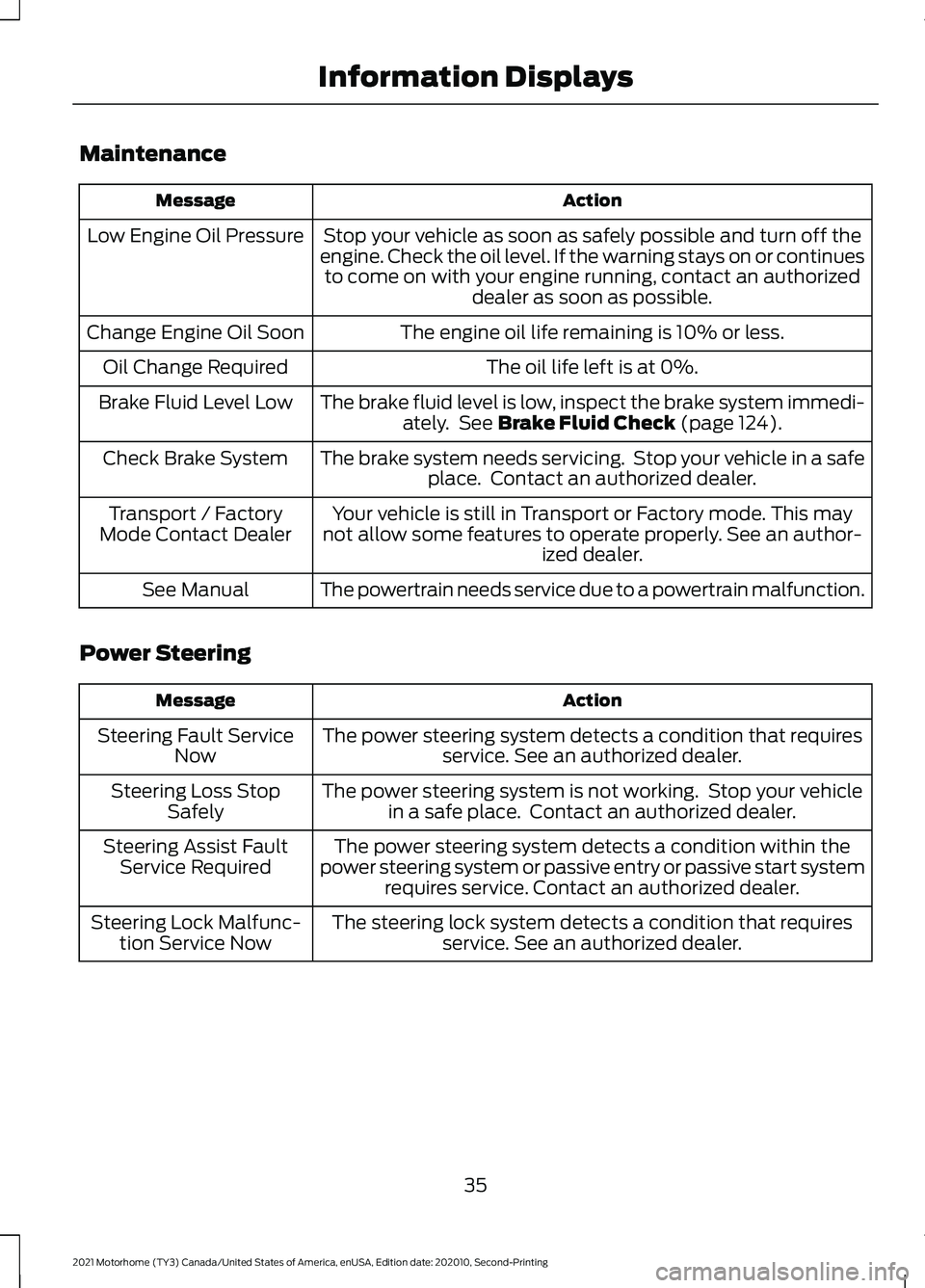
Maintenance
Action
Message
Stop your vehicle as soon as safely possible and turn off the
engine. Check the oil level. If the warning stays on or continues to come on with your engine running, contact an authorized dealer as soon as possible.
Low Engine Oil Pressure
The engine oil life remaining is 10% or less.
Change Engine Oil Soon
The oil life left is at 0%.
Oil Change Required
The brake fluid level is low, inspect the brake system immedi-ately. See Brake Fluid Check (page 124).
Brake Fluid Level Low
The brake system needs servicing. Stop your vehicle in a safeplace. Contact an authorized dealer.
Check Brake System
Your vehicle is still in Transport or Factory mode. This may
not allow some features to operate properly. See an author- ized dealer.
Transport / Factory
Mode Contact Dealer
The powertrain needs service due to a powertrain malfunction.
See Manual
Power Steering Action
Message
The power steering system detects a condition that requiresservice. See an authorized dealer.
Steering Fault Service
Now
The power steering system is not working. Stop your vehiclein a safe place. Contact an authorized dealer.
Steering Loss Stop
Safely
The power steering system detects a condition within the
power steering system or passive entry or passive start system requires service. Contact an authorized dealer.
Steering Assist Fault
Service Required
The steering lock system detects a condition that requiresservice. See an authorized dealer.
Steering Lock Malfunc-
tion Service Now
35
2021 Motorhome (TY3) Canada/United States of America, enUSA, Edition date: 202010, Second-Printing Information Displays
Page 39 of 191
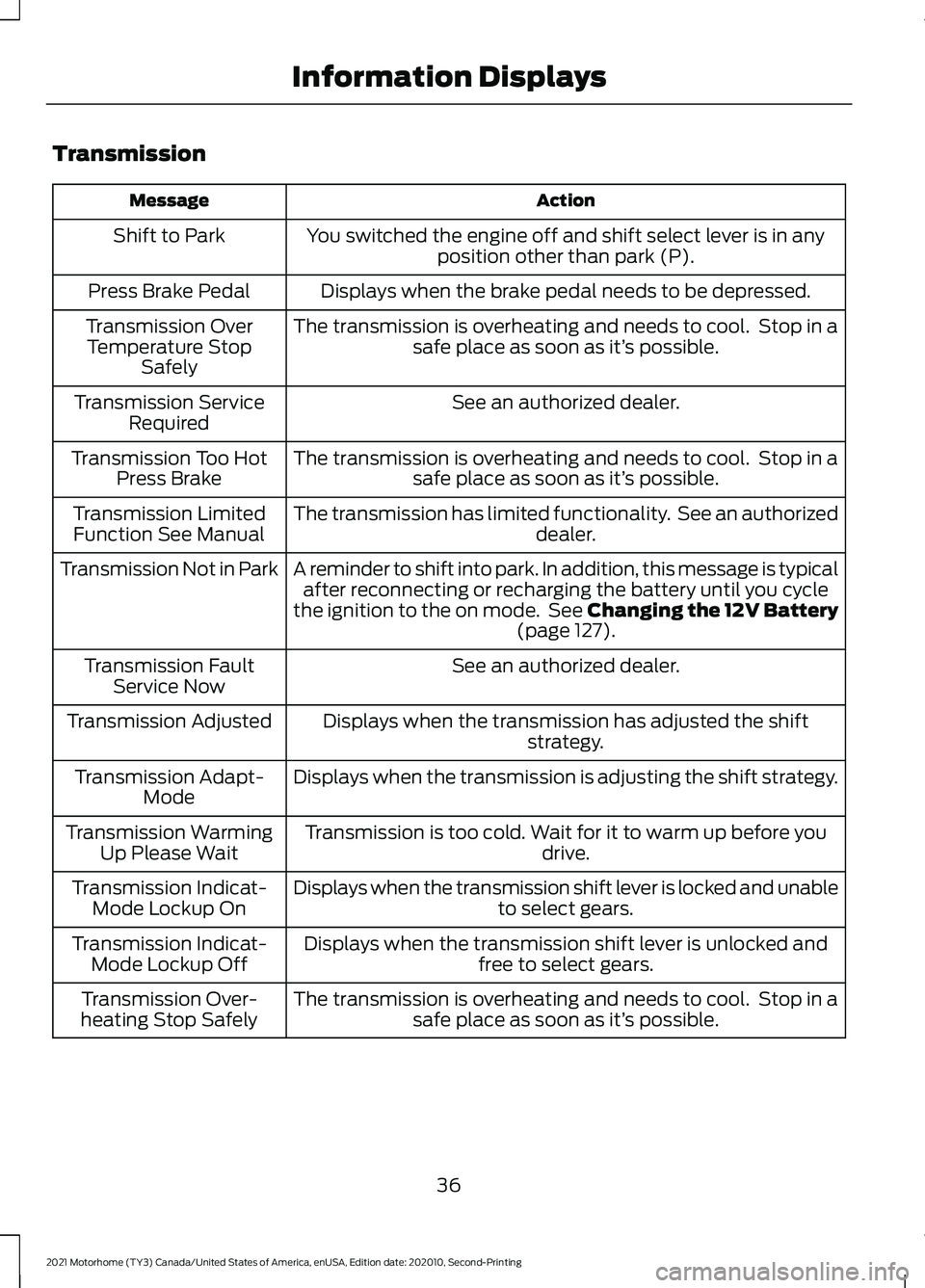
Transmission
Action
Message
You switched the engine off and shift select lever is in anyposition other than park (P).
Shift to Park
Displays when the brake pedal needs to be depressed.
Press Brake Pedal
The transmission is overheating and needs to cool. Stop in asafe place as soon as it’ s possible.
Transmission Over
Temperature Stop Safely
See an authorized dealer.
Transmission Service
Required
The transmission is overheating and needs to cool. Stop in asafe place as soon as it’ s possible.
Transmission Too Hot
Press Brake
The transmission has limited functionality. See an authorized dealer.
Transmission Limited
Function See Manual
A reminder to shift into park. In addition, this message is typicalafter reconnecting or recharging the battery until you cycle
the ignition to the on mode. See Changing the 12V Battery (page 127).
Transmission Not in Park
See an authorized dealer.
Transmission Fault
Service Now
Displays when the transmission has adjusted the shiftstrategy.
Transmission Adjusted
Displays when the transmission is adjusting the shift strategy.
Transmission Adapt-
Mode
Transmission is too cold. Wait for it to warm up before you drive.
Transmission Warming
Up Please Wait
Displays when the transmission shift lever is locked and unable to select gears.
Transmission Indicat-
Mode Lockup On
Displays when the transmission shift lever is unlocked andfree to select gears.
Transmission Indicat-
Mode Lockup Off
The transmission is overheating and needs to cool. Stop in asafe place as soon as it’ s possible.
Transmission Over-
heating Stop Safely
36
2021 Motorhome (TY3) Canada/United States of America, enUSA, Edition date: 202010, Second-Printing Information Displays
Page 53 of 191
AUTOMATIC TRANSMISSION
WARNING: Apply the parking
brake, shift into park (P), switch the
ignition off and remove the key before
you leave your vehicle. Failure to follow
this instruction could result in personal
injury or death. WARNING:
Do not apply the brake
pedal and accelerator pedal
simultaneously. Applying both pedals
simultaneously for more than a few
seconds will limit engine performance,
which may result in difficulty maintaining
speed in traffic and could lead to serious
injury.
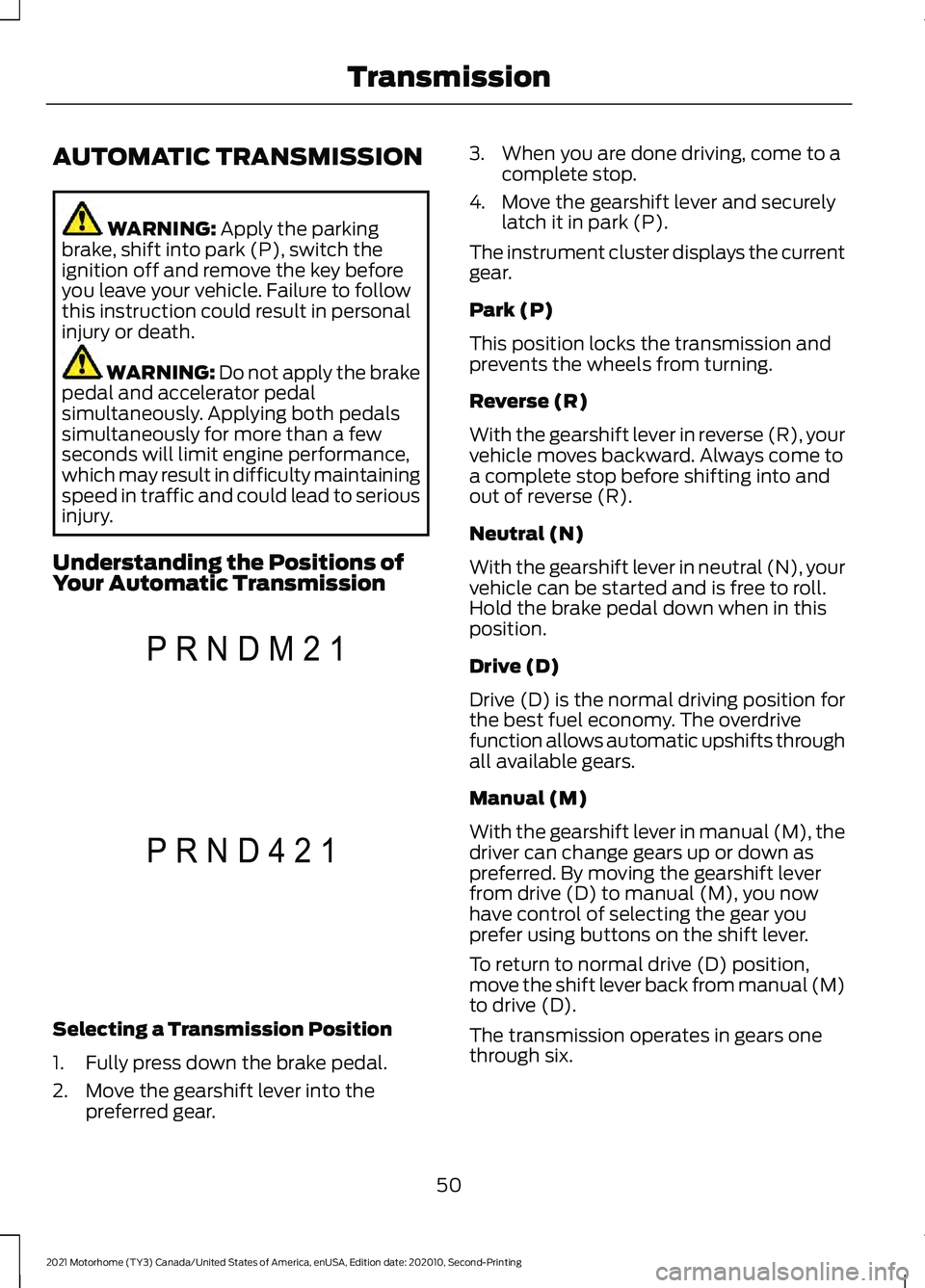
Understanding the Positions of
Your Automatic Transmission Selecting a Transmission Position
1. Fully press down the brake pedal.
2. Move the gearshift lever into the
preferred gear. 3. When you are done driving, come to a
complete stop.
4. Move the gearshift lever and securely latch it in park (P).
The instrument cluster displays the current
gear.
Park (P)
This position locks the transmission and
prevents the wheels from turning.
Reverse (R)
With the gearshift lever in reverse (R), your
vehicle moves backward. Always come to
a complete stop before shifting into and
out of reverse (R).
Neutral (N)
With the gearshift lever in neutral (N), your
vehicle can be started and is free to roll.
Hold the brake pedal down when in this
position.
Drive (D)
Drive (D) is the normal driving position for
the best fuel economy. The overdrive
function allows automatic upshifts through
all available gears.
Manual (M)
With the gearshift lever in manual (M), the
driver can change gears up or down as
preferred. By moving the gearshift lever
from drive (D) to manual (M), you now
have control of selecting the gear you
prefer using buttons on the shift lever.
To return to normal drive (D) position,
move the shift lever back from manual (M)
to drive (D).
The transmission operates in gears one
through six.
50
2021 Motorhome (TY3) Canada/United States of America, enUSA, Edition date: 202010, Second-Printing TransmissionP R N D M 2 1E307627 P R N D 4 2 1E307626
Page 55 of 191

Progressive Range Selection
(PRS) (If Equipped)
This feature gives you the ability to lockout
gears from the automatic shifting range.
This may provide you with an improved
driving experience, for example, in slippery
conditions, or when experiencing a steep
slope.
With the gearshift lever in drive (D), press
the – button to activate PRS. The
instrument cluster indicates the available
and selected gears.
Press the – button again to lock out gears
beginning with the highest gear. Only the
available gears display, and the
transmission automatically shifts between
the available gears. Press the + button to
unlock gears to allow the transmission to
shift to higher gears. The transmission
shifts within the gear range you select.
Automatic Transmission Adaptive
Learning
This feature may increase durability and
provide consistent shift feel over the life
of your vehicle. A new vehicle or
transmission may have firm shifts, soft
shifts, or both. This is normal and does not
affect function or durability of the
transmission. Over time, the adaptive
learning process fully updates transmission
operation.
Brake-Shift Interlock WARNING:
Do not drive your
vehicle until you verify that the
stoplamps are working. WARNING:
When doing this
procedure, you need to take the
transmission out of park (P) which
means your vehicle can roll freely. To
avoid unwanted vehicle movement,
always fully apply the parking brake prior
to doing this procedure. Use wheels
chocks if appropriate. WARNING:
If the parking brake is
fully released, but the brake warning
lamp remains illuminated, the brakes
may not be working properly. Have your
vehicle checked as soon as possible.
Your vehicle has a feature that prevents
the gearshift lever from moving from park
(P) when the ignition is in the on position
and the brake pedal is not pressed.
If you cannot move the gearshift lever out
of the park (P) position with the ignition in
the on position and the brake pedal
pressed, a malfunction may have occurred.
It is possible that a fuse has blown, or your
vehicle ’s brake lamps are not operating
properly.
See Fuse Specification Chart
(page 104).
If the fuse is not blown and the brake
lamps are working properly, the following
procedure allows you to move the gearshift
lever from park (P):
1. Apply the parking brake. Switch the ignition key to off, then remove the key.
2. Move the steering column to the full down and full rearward position,
toward the driver seat.
3. Remove the gearshift lever boot.
52
2021 Motorhome (TY3) Canada/United States of America, enUSA, Edition date: 202010, Second-Printing Transmission
Page 59 of 191
HILL START ASSIST
WARNING: The system does not
replace the parking brake. When you
leave your vehicle, always apply the
parking brake. WARNING:
You must remain in
your vehicle when the system turns on.
At all times, you are responsible for
controlling your vehicle, supervising the
system and intervening, if required.
Failure to take care may result in the loss
of control of your vehicle, serious
personal injury or death. WARNING:
The system will turn
off if a malfunction is apparent or if you
rev the engine excessively. Failure to take
care may result in the loss of control of
your vehicle, serious personal injury or
death.
The system makes it easier to pull away
when your vehicle is on a slope without the
need to use the parking brake.
When the system is active, your vehicle
remains stationary on the slope for two to
three seconds after you release the brake
pedal. This allows time to move your foot
from the brake to the accelerator pedal.
The system releases the brakes
automatically once the engine has
developed sufficient torque to prevent your
vehicle from rolling down the slope. This
is an advantage when pulling away on a
slope, for example from a car park ramp,
traffic lights or when reversing uphill into
a parking space.
The system activates on any slope that
causes your vehicle to roll.
Note: There is no warning light to indicate
the system is either on or off. Using Hill Start Assist
1. Press the brake pedal to bring your
vehicle to a complete standstill. Keep
the brake pedal pressed and shift into
first gear when facing uphill or reverse
(R) when facing downhill.
2. If the sensors detect that your vehicle is on a slope, the system activates
automatically.
3. When you remove your foot from the brake pedal, your vehicle remains on
the slope without rolling away for
about two to three seconds. This hold
time automatically extends if you are
in the process of driving off.
4. Drive off in the normal manner. The system releases the brakes
automatically.
Note: When you remove your foot from the
brake pedal and press the pedal again when
the system is active, you will experience
significantly reduced brake pedal travel. This
is normal.
Switching the System On and Off
Vehicles with Manual Transmission
You can switch this feature on or off in the
information display. The system
remembers the last setting when you start
your vehicle.
Vehicles with Automatic Transmission
You cannot turn the system on or off.
When you switch the ignition on, the
system automatically turns on.
56
2021 Motorhome (TY3) Canada/United States of America, enUSA, Edition date: 202010, Second-Printing Brakes