steering wheel FORD F SERIES MOTORHOME AND COMMERCIAL CHASSIS 2014 12.G Owners Manual
[x] Cancel search | Manufacturer: FORD, Model Year: 2014, Model line: F SERIES MOTORHOME AND COMMERCIAL CHASSIS, Model: FORD F SERIES MOTORHOME AND COMMERCIAL CHASSIS 2014 12.GPages: 143, PDF Size: 3.21 MB
Page 4 of 143
Introduction
About This Manual...........................................3
Symbols Glossary.............................................3
California Proposition 65...............................5
Perchlorate..........................................................5
Ford Credit...........................................................5
Replacement PartsRecommendation........................................6
Special Notices.................................................6
Mobile CommunicationsEquipment.......................................................7
Export Unique Options...................................7
Steering Wheel
Adjusting the Steering Wheel......................8
Cruise Control....................................................8
Wipers and Washers
Windshield Wipers...........................................9
Windshield Washers........................................9
Lighting
Lighting Control...............................................10
Instrument Lighting Dimmer......................10
Daytime Running Lamps...............................11
Direction Indicators..........................................11
Instrument Cluster
Gauges.................................................................12
Warning Lamps and Indicators..................13
Audible Warnings and Indicators..............15
Information Displays
General Information.......................................16
Information Messages...................................17
Starting and Stopping theEngine
General Information......................................20
Ignition Switch................................................20
Starting a Gasoline Engine.........................20
Fuel and Refueling
Safety Precautions.........................................22
Fuel Quality......................................................23
Running Out of Fuel......................................23
Refueling...........................................................24
Fuel Consumption.........................................25
Emission Control System............................26
Transmission
Automatic Transmission.............................29
Brakes
General Information......................................33
Hints on Driving With Anti-LockBrakes.............................................................33
Parking Brake...................................................34
Cruise Control
Principle of Operation..................................35
Using Cruise Control.....................................35
Load Carrying
Load Limit.........................................................36
Towing
Towing a Trailer...............................................42
Recommended Towing Weights..............43
Essential Towing Checks............................44
Transporting the Vehicle.............................46
Towing the Vehicle on Four Wheels........47
Driving Hints
Breaking-In.......................................................48
Economical Driving.......................................48
Driving Through Water.................................49
Roadside Emergencies
Roadside Assistance....................................50
1Motorhome (TY3) , enUSATable of Contents
Page 5 of 143
Hazard Warning Flashers.............................51
Jump Starting the Vehicle............................51
Customer Assistance
Getting the Services You Need.................54
In California (U.S. Only)...............................55
The Better Business Bureau (BBB) AutoLine Program (U.S. Only)........................56
Utilizing the Mediation/ArbitrationProgram (Canada Only).........................56
Getting Assistance Outside the U.S. andCanada...........................................................57
Ordering Additional Owner'sLiterature.......................................................58
Reporting Safety Defects (U.S.Only)...............................................................58
Reporting Safety Defects (CanadaOnly)...............................................................59
Fuses
Fuse Specification Chart............................60
Changing a Fuse...............................................71
Maintenance
General Information......................................72
Under Hood Overview..................................73
Engine Oil Dipstick.........................................75
Engine Oil Check.............................................75
Engine Coolant Check..................................76
Automatic Transmission FluidCheck..............................................................79
Brake Fluid Check..........................................80
Power Steering Fluid Check.......................82
Fuel Filter...........................................................83
Changing the 12V Battery...........................83
Changing the Engine Air Filter...................85
Vehicle Care
General Information......................................87
Cleaning the Exterior.....................................87
Cleaning the Engine......................................87
Cleaning the Alloy Wheels.........................88
Vehicle Storage..............................................88
Wheels and Tires
Tire Care.............................................................91
Using Snow Chains.....................................106
Changing a Road Wheel............................107
Technical Specifications.............................110
Capacities and Specific-ations
Engine Specifications....................................111
Motorcraft Parts.............................................112
Vehicle Identification Number..................113
Vehicle Certification Label.........................113
Transmission Code Designation..............114
Technical Specifications.............................115
Extended Service Plan(ESP)
Extended Service Plan (ESP)...................119
Scheduled Maintenance
General Maintenance Information..........121
Normal Scheduled Maintenance...........124
Special Operating Conditions ScheduledMaintenance..............................................126
Scheduled Maintenance Record............128
2Motorhome (TY3) , enUSATable of Contents
Page 11 of 143
ADJUSTING THE STEERING
WHEEL
WARNING
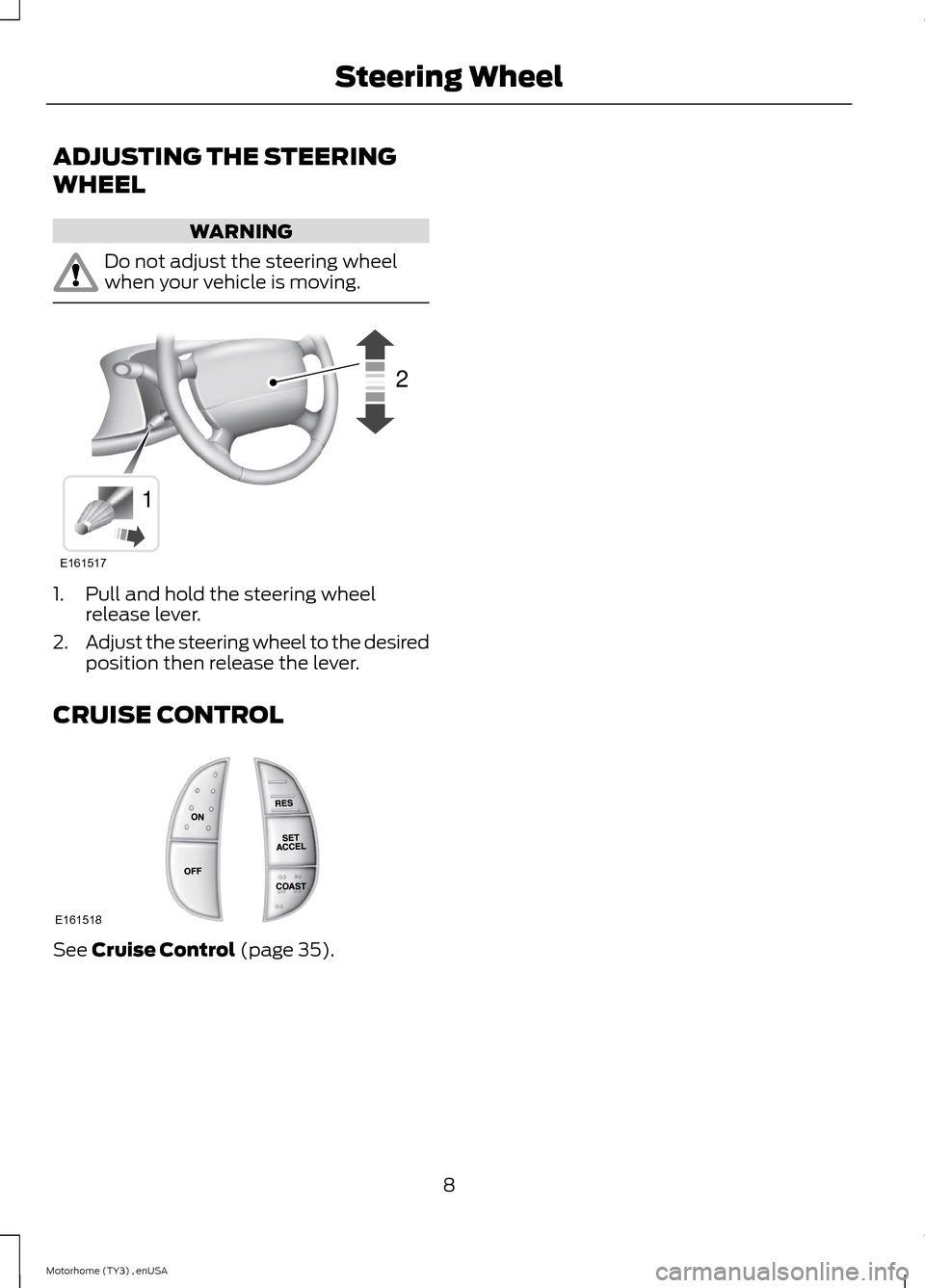
Do not adjust the steering wheelwhen your vehicle is moving.
1.Pull and hold the steering wheelrelease lever.
2.Adjust the steering wheel to the desiredposition then release the lever.
CRUISE CONTROL
See Cruise Control (page 35).
8Motorhome (TY3) , enUSASteering WheelE16151712 E161518
Page 17 of 143
Brake System
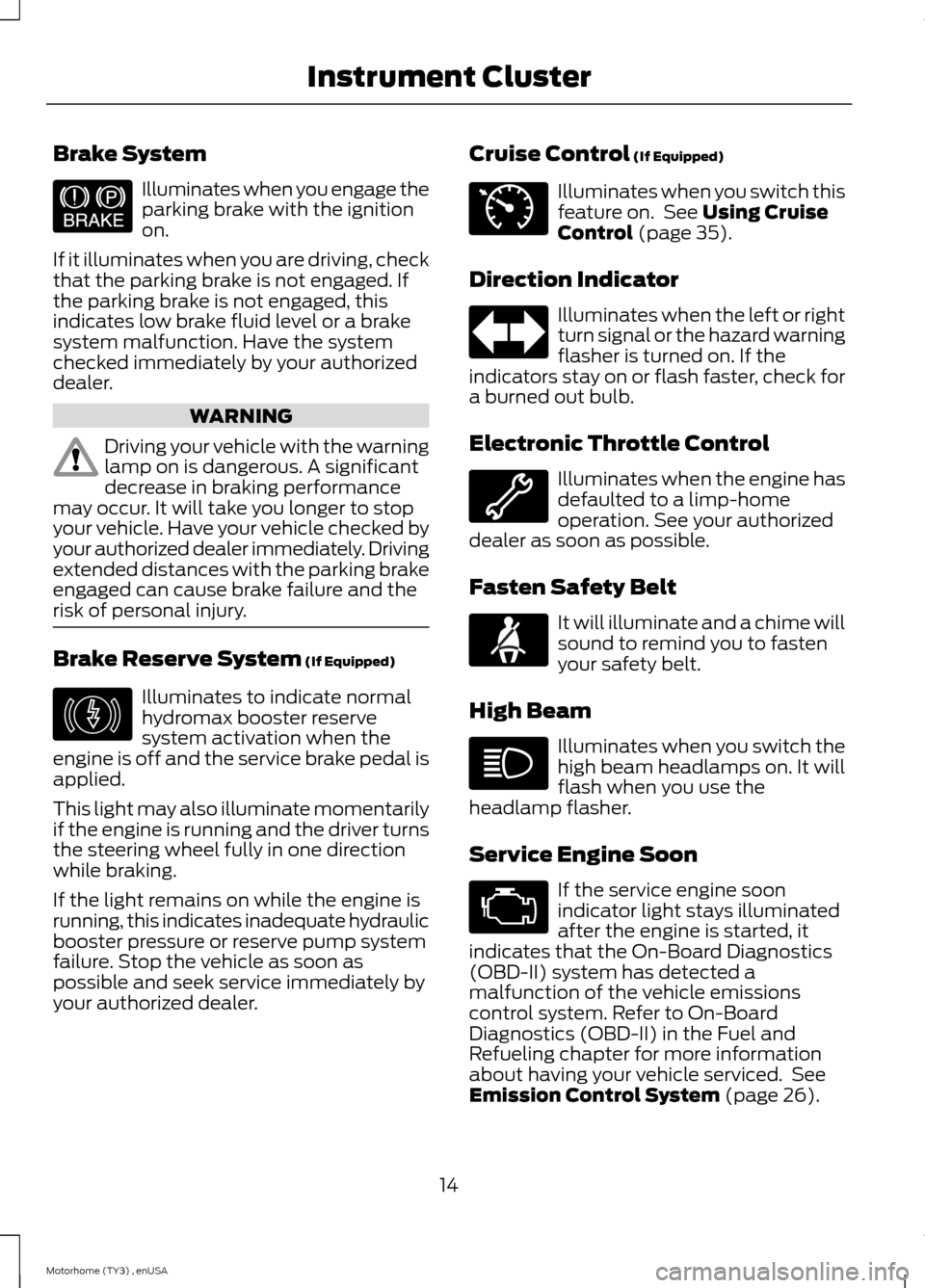
Illuminates when you engage theparking brake with the ignitionon.
If it illuminates when you are driving, checkthat the parking brake is not engaged. Ifthe parking brake is not engaged, thisindicates low brake fluid level or a brakesystem malfunction. Have the systemchecked immediately by your authorizeddealer.
WARNING
Driving your vehicle with the warninglamp on is dangerous. A significantdecrease in braking performancemay occur. It will take you longer to stopyour vehicle. Have your vehicle checked byyour authorized dealer immediately. Drivingextended distances with the parking brakeengaged can cause brake failure and therisk of personal injury.
Brake Reserve System (If Equipped)
Illuminates to indicate normalhydromax booster reservesystem activation when theengine is off and the service brake pedal isapplied.
This light may also illuminate momentarilyif the engine is running and the driver turnsthe steering wheel fully in one directionwhile braking.
If the light remains on while the engine isrunning, this indicates inadequate hydraulicbooster pressure or reserve pump systemfailure. Stop the vehicle as soon aspossible and seek service immediately byyour authorized dealer.
Cruise Control (If Equipped)
Illuminates when you switch thisfeature on. See Using CruiseControl (page 35).
Direction Indicator
Illuminates when the left or rightturn signal or the hazard warningflasher is turned on. If theindicators stay on or flash faster, check fora burned out bulb.
Electronic Throttle Control
Illuminates when the engine hasdefaulted to a limp-homeoperation. See your authorizeddealer as soon as possible.
Fasten Safety Belt
It will illuminate and a chime willsound to remind you to fastenyour safety belt.
High Beam
Illuminates when you switch thehigh beam headlamps on. It willflash when you use theheadlamp flasher.
Service Engine Soon
If the service engine soonindicator light stays illuminatedafter the engine is started, itindicates that the On-Board Diagnostics(OBD-II) system has detected amalfunction of the vehicle emissionscontrol system. Refer to On-BoardDiagnostics (OBD-II) in the Fuel andRefueling chapter for more informationabout having your vehicle serviced. SeeEmission Control System (page 26).
14Motorhome (TY3) , enUSAInstrument ClusterE144522 E146190 E71340
Page 19 of 143
GENERAL INFORMATION
WARNING
Driving while distracted can result inloss of vehicle control, crash andinjury. We strongly recommend thatyou use extreme caution when using anydevice that may take your focus off theroad. Your primary responsibility is the safeoperation of your vehicle. We recommendagainst the use of any hand-held devicewhile driving and encourage the use ofvoice-operated systems when possible.Make sure you are aware of all applicablelocal laws that may affect the use ofelectronic devices while driving.
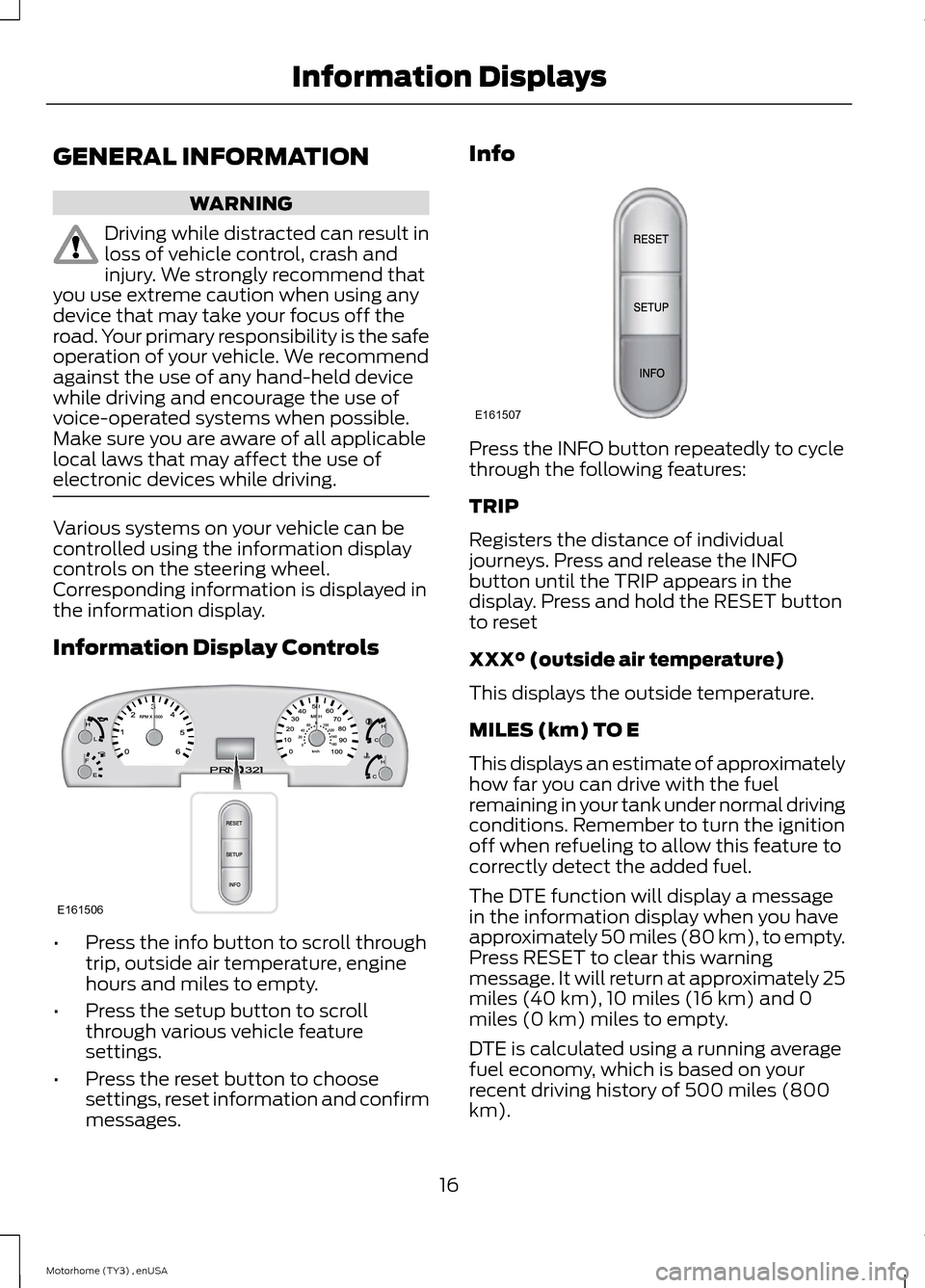
Various systems on your vehicle can becontrolled using the information displaycontrols on the steering wheel.Corresponding information is displayed inthe information display.
Information Display Controls
•Press the info button to scroll throughtrip, outside air temperature, enginehours and miles to empty.
•Press the setup button to scrollthrough various vehicle featuresettings.
•Press the reset button to choosesettings, reset information and confirmmessages.
Info
Press the INFO button repeatedly to cyclethrough the following features:
TRIP
Registers the distance of individualjourneys. Press and release the INFObutton until the TRIP appears in thedisplay. Press and hold the RESET buttonto reset
XXX° (outside air temperature)
This displays the outside temperature.
MILES (km) TO E
This displays an estimate of approximatelyhow far you can drive with the fuelremaining in your tank under normal drivingconditions. Remember to turn the ignitionoff when refueling to allow this feature tocorrectly detect the added fuel.
The DTE function will display a messagein the information display when you haveapproximately 50 miles (80 km), to empty.Press RESET to clear this warningmessage. It will return at approximately 25miles (40 km), 10 miles (16 km) and 0miles (0 km) miles to empty.
DTE is calculated using a running averagefuel economy, which is based on yourrecent driving history of 500 miles (800km).
16Motorhome (TY3) , enUSAInformation DisplaysE161506 E161507
Page 36 of 143
GENERAL INFORMATION
Note:Occasional brake noise is normal. Ifa metal-to-metal, continuous grinding orcontinuous squeal sound is present, thebrake linings may be worn-out and shouldbe inspected by an authorized dealer. If thevehicle has continuous vibration or shudderin the steering wheel while braking, thevehicle should be inspected by anauthorized dealer.
Note:Brake dust may accumulate on thewheels, even under normal drivingconditions. Some dust is inevitable as thebrakes wear and does not contribute tobrake noise. See Cleaning the AlloyWheels (page 88).
See the Instrument Clusterchapter for information on thebrake system warning light.
Wet brakes result in reduced brakingefficiency. Gently press the brake pedal afew times when driving from a car wash orstanding water to dry the brakes.
Brake Over Accelerator
In the event the accelerator pedalbecomes stuck or entrapped, apply steadyand firm pressure to the brake pedal toslow the vehicle and reduce engine power.If you experience this condition, apply thebrakes and bring your vehicle to a safestop. Turn the engine off, shift to positionP and apply the parking brake, and theninspect the accelerator pedal for anyinterferences. If none are found and thecondition persists, have your vehicle towedto the nearest authorized dealer.
Hydraulic brake booster system(Hydroboost or Hydromax)
The Hydroboost and Hydromax systemsreceive fluid pressure from the powersteering pump to provide power assistduring braking.
The Hydromax booster receives backuppressure from the reserve system electricpump whenever the fluid in the powersteering system is not flowing. When theengine is off, the pump will turn on if thebrake pedal is applied, or if the ignition isturned to the on position.
The sound of the pump operating may beheard by the driver, but this is a normalcharacteristic of the system.
The reserve system provides reducedbraking power, so the vehicle should beoperated under these conditions withcaution, and only to seek service repair andremove the vehicle from the roadway.
Note:For Hydromax-equipped vehiclesoperating under normal conditions, the noiseof the fluid flowing through the booster maybe heard whenever the brake is applied. Thiscondition is normal. Vehicle service is notrequired.
If braking performance or pedal responsebecomes very poor, even when the pedalis strongly pressed, it may indicate thepresence of air in the hydraulic system orleakage of fluid. Stop the vehicle safely assoon as possible and seek serviceimmediately.
HINTS ON DRIVING WITH
ANTI-LOCK BRAKES
Note:When the system is operating, thebrake pedal will pulse and may travelfurther. Maintain pressure on the brakepedal. You may also hear a noise from thesystem. This is normal.
The anti-lock braking system will noteliminate the risks when:
•You drive too closely to the vehicle infront of you.
•Your vehicle is hydroplaning.
33Motorhome (TY3) , enUSABrakesE144522
Page 38 of 143
PRINCIPLE OF OPERATION
Cruise control lets you maintain a setspeed without keeping your foot on theaccelerator pedal. You can use cruisecontrol when your vehicle speed is greaterthan 20 mph (30 km/h).
USING CRUISE CONTROL
WARNINGS
Do not use cruise control in heavytraffic, on winding roads or when theroad surface is slippery. This couldresult in loss of vehicle control, seriousinjury or death.
When you are going downhill, yourvehicle speed may increase abovethe set speed. The system will notapply the brakes. Change down a gear toassist the system in maintaining the setspeed. Failure to do so could result in lossof vehicle control, serious injury or death.
Note:Cruise control will disengage if yourvehicle speed decreases more than 10 mph(16 km/h) below your set speed whiledriving uphill.
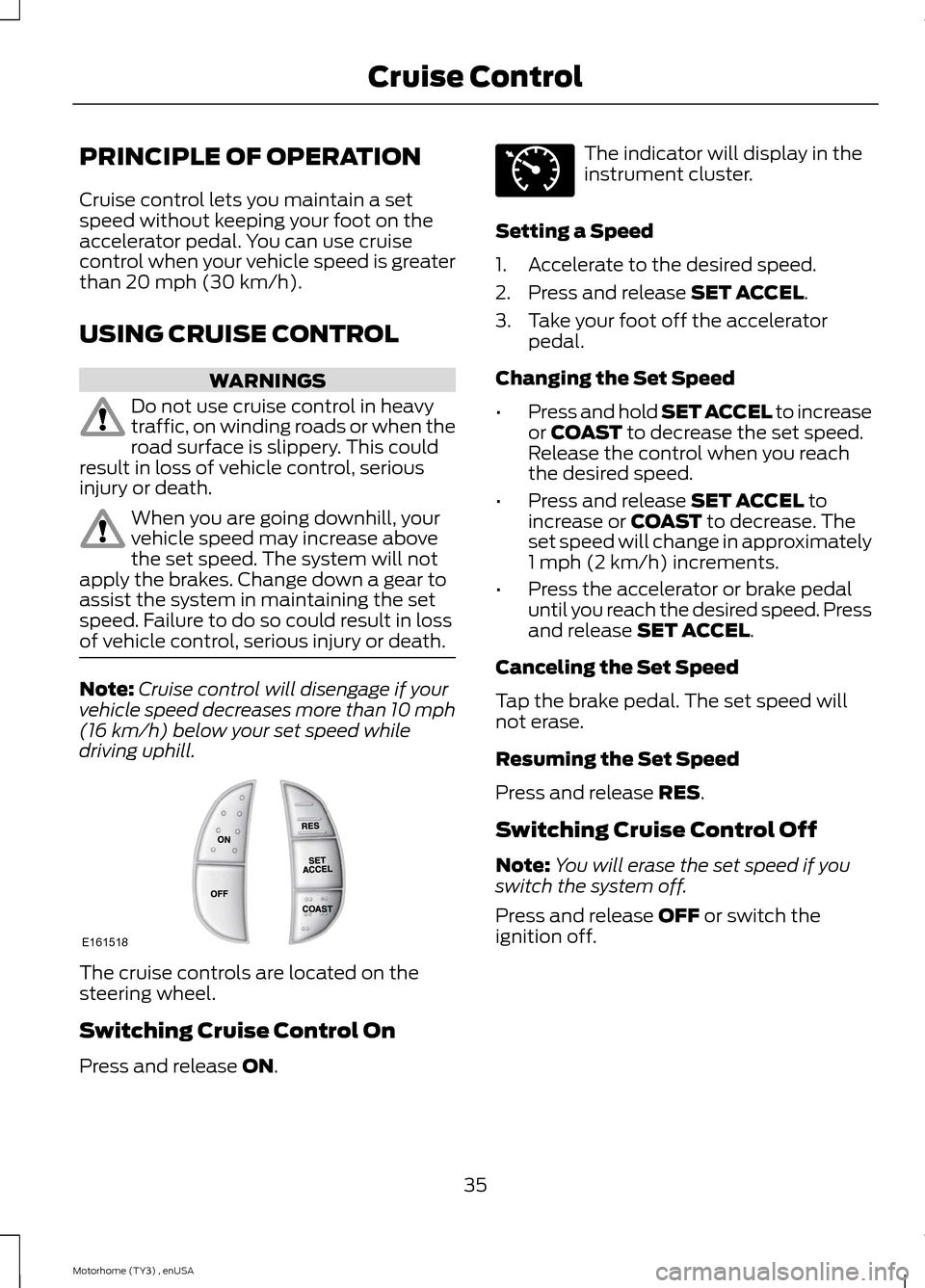
The cruise controls are located on thesteering wheel.
Switching Cruise Control On
Press and release ON.
The indicator will display in theinstrument cluster.
Setting a Speed
1.Accelerate to the desired speed.
2.Press and release SET ACCEL.
3.Take your foot off the acceleratorpedal.
Changing the Set Speed
•Press and hold SET ACCEL to increaseor COAST to decrease the set speed.Release the control when you reachthe desired speed.
•Press and release SET ACCEL toincrease or COAST to decrease. Theset speed will change in approximately1 mph (2 km/h) increments.
•Press the accelerator or brake pedaluntil you reach the desired speed. Pressand release SET ACCEL.
Canceling the Set Speed
Tap the brake pedal. The set speed willnot erase.
Resuming the Set Speed
Press and release RES.
Switching Cruise Control Off
Note:You will erase the set speed if youswitch the system off.
Press and release OFF or switch theignition off.
35Motorhome (TY3) , enUSACruise ControlE161518 E71340
Page 48 of 143
Trailer Brakes
WARNING
Do not connect a trailer's hydraulicbrake system directly to yourvehicle's brake system. Your vehiclemay not have enough braking power andyour chances of having a collision greatlyincrease.
Electric brakes and manual, automatic orsurge-type trailer brakes are safe if youinstall them properly and adjust them tothe manufacturer's specifications. Thetrailer brakes must meet local and federalregulations.
The rating for the tow vehicle's brakingsystem operation is at the gross vehicleweight rating, not the gross combinedweight rating.
Separate functioning brake systemsare required for safe control of towedvehicles and trailers weighing morethan 1500 pounds (680 kilograms)when loaded.
Trailer Lamps
WARNING
Never connect any trailer lamp wiringto the vehicle's tail lamp wiring; thismay damage the electrical systemresulting in fire. Contact your authorizeddealer as soon as possible for assistancein proper trailer tow wiring installation.Additional electrical equipment may berequired.
Trailer lamps are required on most towedvehicles. Make sure all running lights, brakelights, direction indicators and hazard lightsare working.
Before Towing a Trailer
Practice turning, stopping and backing upto get the feel of your vehicle-trailercombination before starting on a trip.When turning, make wider turns so thetrailer wheels clear curbs and otherobstacles.
When Towing a Trailer
•Do not drive faster than 70 mph(113 km/h) during the first 500 mi(800 km).
•Do not make full-throttle starts.
•Check your hitch, electrical connectionsand trailer wheel lug nuts thoroughlyafter you have traveled 50 mi (80 km).
•When stopped in congested or heavytraffic during hot weather, place thegearshift in park (P) to aid engine andtransmission cooling and to help airconditioning performance.
•Switch off the speed control withheavy loads or in hilly terrain. Thespeed control may turn offautomatically when you are towing onlong, steep grades.
•Shift to a lower gear when driving downa long or steep hill. Do not apply thebrakes continuously, as they mayoverheat and become less effective.
•If your transmission is equipped with aGrade Assist or Tow/Haul feature, usethis feature when towing. This providesengine braking and helps eliminateexcessive transmission shifting foroptimum fuel economy andtransmission cooling.
•Allow more distance for stopping witha trailer attached. Anticipate stops andbrake gradually.
•Avoid parking on a grade. However, ifyou must park on a grade:
1.Turn the steering wheel to point yourvehicle tires away from traffic flow.
45Motorhome (TY3) , enUSATowing
Page 54 of 143
Canadian roadside coverage and benefitsmay differ from the U.S. coverage. If yourequire more information, please refer tothe coverage section of your warrantyguide, call us in Canada at1-800-665-2006, or visit our website atwww.ford.ca.
Sykes Assistance Services Corporationadministers the Roadside Assistanceprogram. You must receive coveredservices in Canada or the continentalUnited States. Coverage extends tovehicles that use public, non-seasonal,annually traveled roadways. RoadsideAssistance coverage does not extend tovehicles involved in cross-country driving,logging, autocross and any other form ofoff-road use. Well maintained roads andsurfaces help ensure safe travel for thesupplier, and allow their representativesto perform service as per the standardoperating procedures.
In Remote Locations
If our supplier cannot take your vehicle byroad to the nearest authorized dealership,transportation by rail or water may benecessary. The program covers a tow tothe dock or rail terminal and also to thedealership at the end of the trip.
For rail or water transportation, however,contact your authorized dealer to confirmif you are eligible for additional coveragebefore you authorize or pay for the service.
Call the Ford Roadside Assistance at1-800-665-2006 for additionalinformation.
HAZARD WARNING FLASHERS
Note:The hazard warning flashers willoperate when the ignition is in any positionor if the key is not in the ignition. If usedwhen the engine is not running, the batterywill lose charge. As a result, there may beinsufficient power to restart your engine.
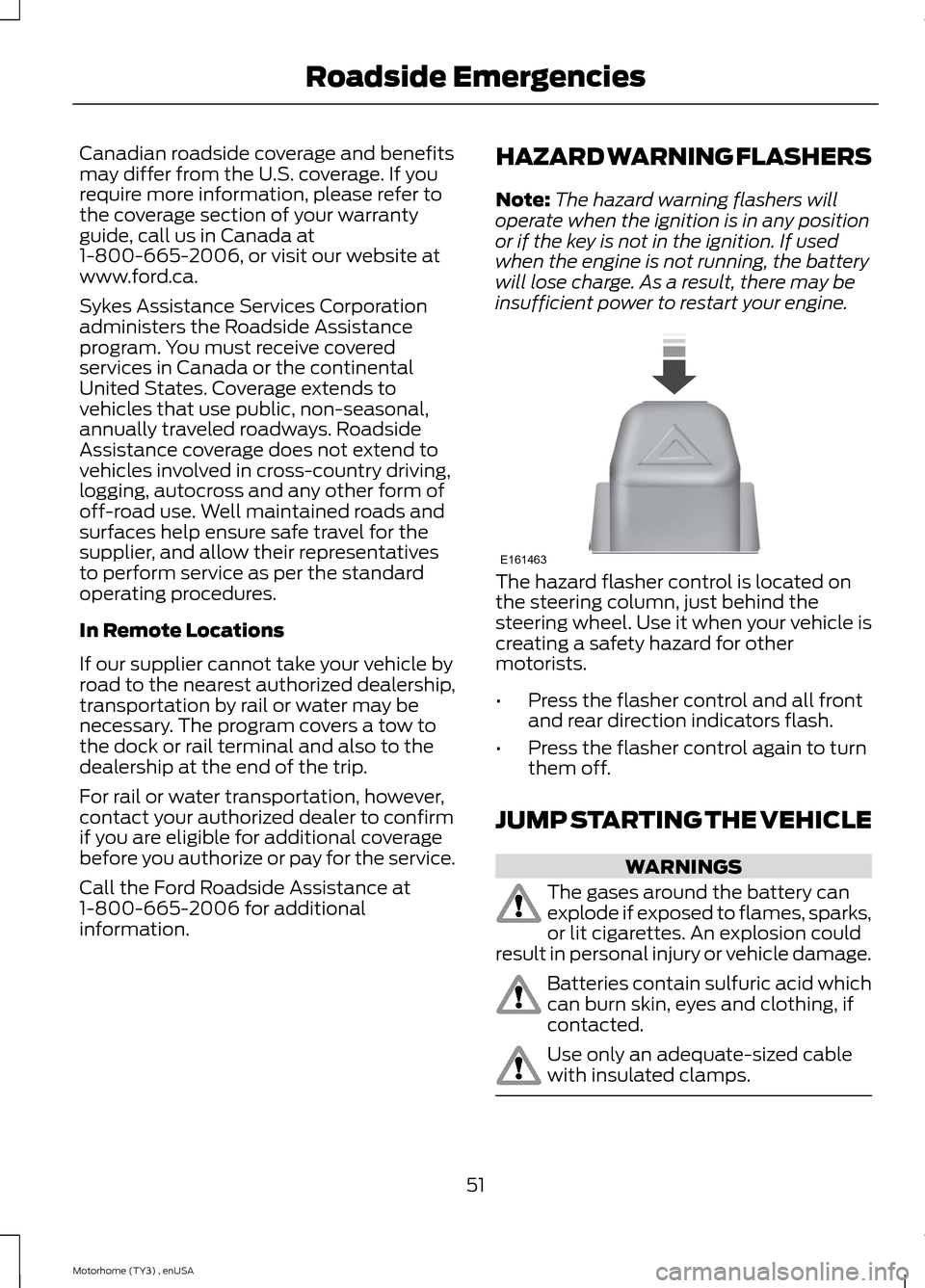
The hazard flasher control is located onthe steering column, just behind thesteering wheel. Use it when your vehicle iscreating a safety hazard for othermotorists.
•Press the flasher control and all frontand rear direction indicators flash.
•Press the flasher control again to turnthem off.
JUMP STARTING THE VEHICLE
WARNINGS
The gases around the battery canexplode if exposed to flames, sparks,or lit cigarettes. An explosion couldresult in personal injury or vehicle damage.
Batteries contain sulfuric acid whichcan burn skin, eyes and clothing, ifcontacted.
Use only an adequate-sized cablewith insulated clamps.
51Motorhome (TY3) , enUSARoadside EmergenciesE161463
Page 70 of 143
Fuse Holder ModuleLocate the fuse holder next to the diodeand relay module.
Protected componentsFuse amp ratingFuse number
Hydromax – brake on/off signal.10A1
Passenger Compartment FusePanel
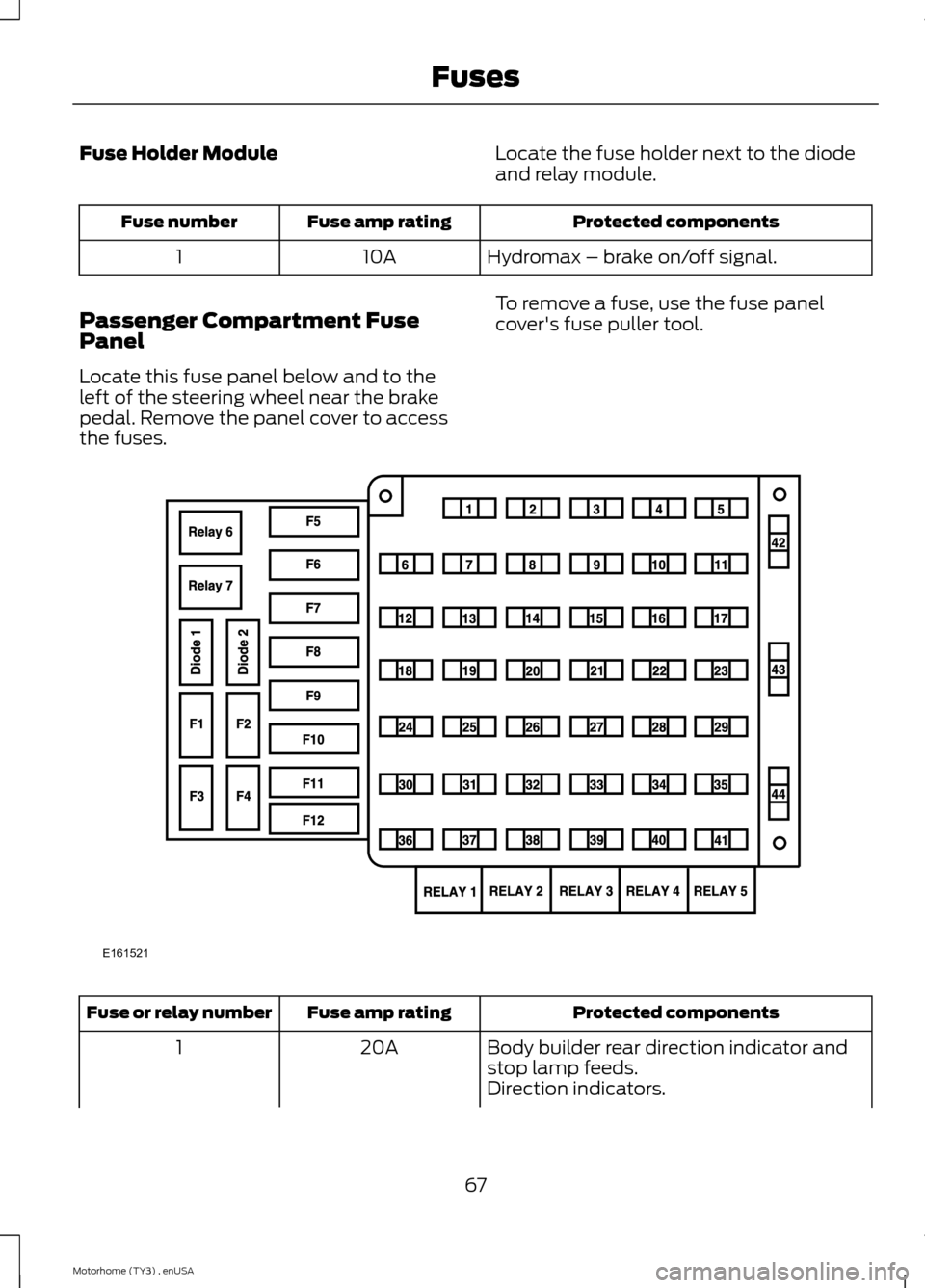
Locate this fuse panel below and to theleft of the steering wheel near the brakepedal. Remove the panel cover to accessthe fuses.
To remove a fuse, use the fuse panelcover's fuse puller tool.
Protected componentsFuse amp ratingFuse or relay number
Body builder rear direction indicator andstop lamp feeds.20A1
Direction indicators.
67Motorhome (TY3) , enUSAFusesE161521