remote control FORD F150 2011 12.G User Guide
[x] Cancel search | Manufacturer: FORD, Model Year: 2011, Model line: F150, Model: FORD F150 2011 12.GPages: 461, PDF Size: 3.1 MB
Page 140 of 461
Condition Potential Causes
button start Ford-approved remote start system (as an admin
key) then a MyKey™ is inserted without restarting
the engine.
MyKey™
programmed
total includes
one additional
key•Unknown key has been programmed to the
vehicle as a MyKey™.
•Vehicle is equipped with a non Ford-approved
remote start system. Refer toUsing MyKey™ with
remote start systemssection.
Admin keys
programmed
total includes
one additional
key•Unknown key has been programmed to the
vehicle as admin key.
•Vehicle is equipped with a non Ford-approved
remote start system. Refer toUsing MyKey™ with
remote start systemssection.
MyKey™
distance does not
accumulate•MyKey™ is not being used by the intended user.
•MyKey™ system has been recently cleared.
•Vehicles has been started using a non
Ford-approved remote start system (as an admin
key) then a MyKey™ is inserted without recycling
the MyKey™ in ignition.
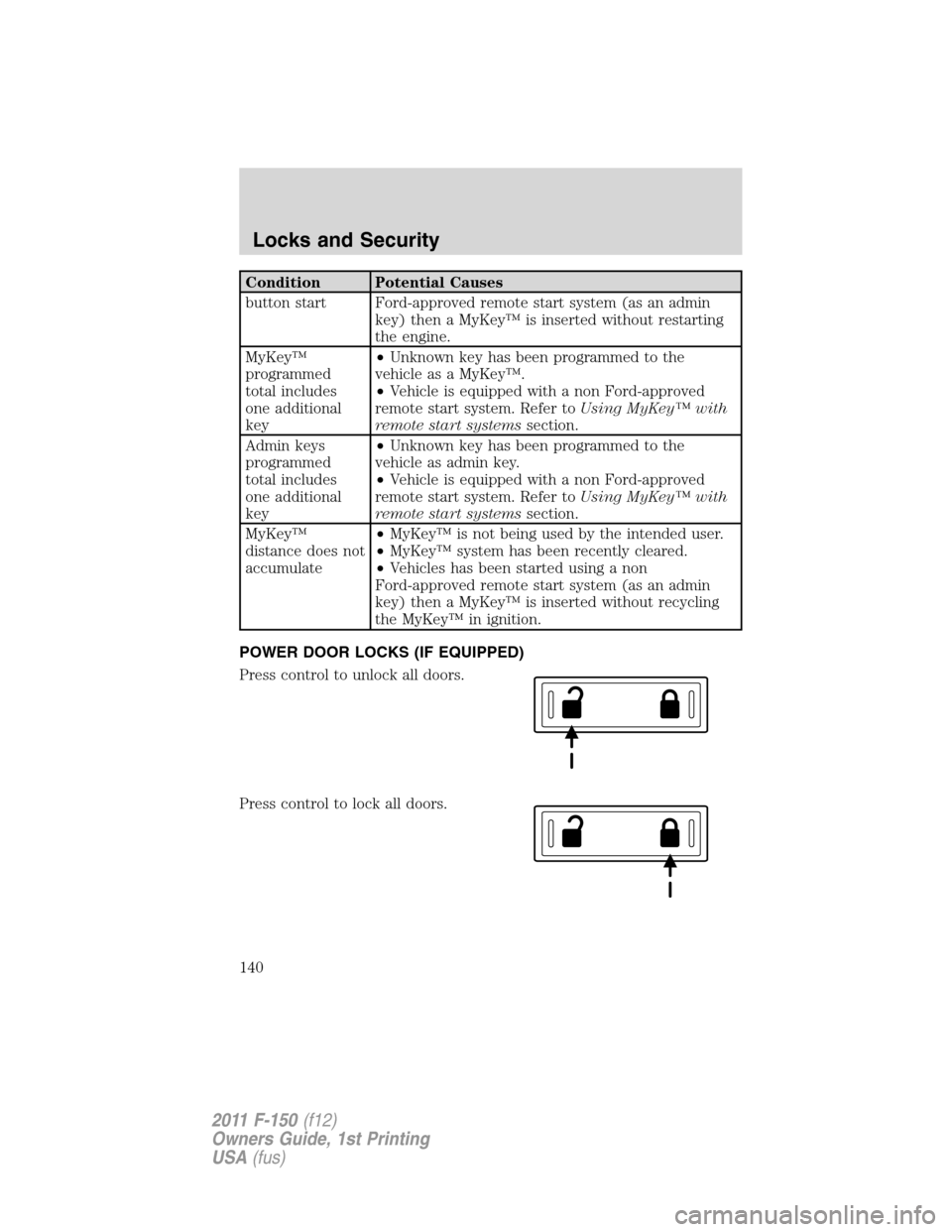
POWER DOOR LOCKS (IF EQUIPPED)
Press control to unlock all doors.
Press control to lock all doors.
Locks and Security
140
2011 F-150(f12)
Owners Guide, 1st Printing
USA(fus)
Page 141 of 461
Smart locks (if equipped)
This feature prevents you from locking yourself out of the vehicle if your
key is still in the ignition.
When you open the driver’s door and you lock the vehicle with the
power door lock control, all the doors will lock, then the driver’s door
will automatically unlock reminding you that your key is still in the
ignition.
The vehicle can still be locked, with the key in the ignition, using the
manual lock button on the door, locking the driver’s door with a key, by
simultaneously pressing button 7•8 and the 9•0 controls on the
remote entry keypad (if equipped), or using the
buttononthe
remote entry transmitter (if equipped).
Autolock feature (if equipped)
The autolock feature will lock all the doors when:
•all the doors are closed,
•the ignition is in the on position,
•you shift into any gear putting the vehicle in motion, and
•the vehicle attains a speed greater than 12 mph (20 km/h) for greater
than two seconds.
The autolock feature repeats when:
•any door is opened then closed while the ignition is in the on position
and the vehicle speed is 9 mph (15 km/h) or lower, and
•the vehicle then attains a speed greater than 12 mph (20 km/h) for
greater than two seconds.
Deactivating/activating autolock feature
There are four methods to enable/disable this feature:
•Through your authorized dealer,
•by using a power door unlock/lock procedure,
•using a keypad procedure (if equipped), or
•or by using the instrument cluster message center (if equipped). Refer
toMessage centerin theInstrument Clusterchapter.
Note:The autolock feature can be activated/deactivated independently
of the autounlock feature.
Locks and Security
141
2011 F-150(f12)
Owners Guide, 1st Printing
USA(fus)
Page 146 of 461
Two step door unlocking
1. Pressand release to unlock the driver’s door.Note:The parking
lamps and interior lamps will illuminate (refer to theIlluminated entry
feature later in this section) if the control on the overhead lamp isnot
set to theoffposition.
2. Press
and release again within three seconds to unlock the
passenger doors.
The battery saver feature will turn off the lamps 10 minutes after the
ignition is turned to the off position.
One step door unlocking
If the one step door unlocking feature is activated, press
and release
once to unlock all of the doors.Note:The parking lamps and interior
lamps will illuminate (refer to theIlluminated entryfeature later in this
section) if the control on the overhead lamp isnotset to theoff
position.
Switching from two step to one step door unlocking
Your vehicle comes with two step unlocking enabled. Unlocking can be
switched between two step and one step door unlocking by pressing and
holding both the
andbuttons simultaneously on the remote entry
transmitter for approximately four seconds. The hazard lamps will flash
twice to indicate that the vehicle has switched to one step unlocking.
Repeat the procedure to switch back to two-step unlocking.
Locking the doors
1. Press
and release to lock all the doors. The parking lamps will
illuminate if all the doors are closed and locked.
2. Press
and release again within three seconds to confirm that all
the doors are closed and locked.Note:The doors will lock again, the
horn will chirp once, and the parking lamps will illuminate once more.
If any of the doors are not properly closed the horn will make two quick
chirps and the parking lamps will not flash.
Car finder
Press
twice within three seconds. The horn will chirp and the turn
lamps will flash. It is recommended that this method be used to locate
your vehicle, rather than using the panic alarm.
Locks and Security
146
2011 F-150(f12)
Owners Guide, 1st Printing
USA(fus)
Page 149 of 461
Illuminated entry
The interior lamps and parking lamps illuminate when the remote entry
system is used to unlock the door(s).
The illuminated entry system will turn off the lights if:
•the ignition switch is turned to the on position, or
•the remote transmitter lock control is pressed, or
•the 7•8 and the 9•0 controls on the keyless entry keypad are
pressed, or
•after 25 seconds of illumination.
The dome lamp control (if equipped) mustnotbe set to the off position
for the illuminated entry system to operate.
The lights will not turn off if:
•they have been turned on with the dimmer control, or
•any door is open.
The battery saver will shut off the interior lamps 30 minutes after the
ignition has been turned to the off position, 10 minutes after if the dome
lamp is off, and 30 minutes after if the dome lamp switch is left on.
Remote start (if equipped)
Your vehicle may be equipped with the remote start feature which allows
you to start the engine from outside the vehicle. If your transmitter has
a
icon, you have remote start. The remote start feature has an
extended operating range which allows you to remote start your vehicle
from a farther distance from your vehicle. All the buttons have this
increased range performance capability when equipped with remote
start.
Many states and provinces have restrictions for the use of remote start.
Check your local and state or provincial laws for specific requirements
regarding remote start systems.
Note:Do not use remote start if your vehicle is low on fuel.
WARNING:To avoid exhaust fumes, do not use remote start if
your vehicle is parked indoors or areas that are not well
ventilated.
Locks and Security
149
2011 F-150(f12)
Owners Guide, 1st Printing
USA(fus)
Page 151 of 461
Turning the engine off after using remote start
•Press
one time. The parking lamps will turn off.
You may have to be closer to the vehicle than when starting due to
ground reflection and the added noise of the running engine.
You can disable or enable the remote start system through the message
center. Refer toMessage centerin theInstrument Clusterchapter.
SECURICODE™ KEYLESS ENTRY SYSTEM (IF EQUIPPED)
You can use the keyless entry
keypad to lock or unlock the doors
without using a key.
The keypad can be operated with
the factory set 5–digit entry code;
this code is located on the owner’s wallet card in the glove box, is
marked on the computer module, and is available from your authorized
dealer. You can also create your own 5–digit personal entry code.
When pressing the controls on the keypad, press the middle of the
controls to ensure a good activation.
Programming a personal entry code and keypad association to
memory seats, mirrors and pedals
To create your own personal entry code:
1. Enter the factory set code.
2. Within five seconds press the 1•2 on the keypad.
3. Enter your personal 5-digit code. Each number must be entered
within five seconds of each other.
4. To associate the entry code with a memory setting, enter a sixth digit
to indicate which driver should be set in a memory recalled by the
personal entry code:
•Pressing 1•2 recalls Driver 1 settings.
•Pressing 3•4 recalls Driver 2 settings.
•Pressing other keypad buttons or not pressing a keypad button as a
sixth digit does not set a driver and will not recall a memory setting.
Note:The factory-set code cannot be associated with a memory
setting.
5. The doors will again lock then unlock to confirm that your personal
entry code has been programmed to the module.
Locks and Security
151
2011 F-150(f12)
Owners Guide, 1st Printing
USA(fus)
Page 152 of 461
Tips:
•Do not set a code that uses five of the same number.
•Do not use five numbers in sequential order.
•The factory set code will work even if you have set your own personal
code.
Erasing personal code
1. Enter the factory set 5–digit code.
2. Within five seconds, press the 1•2 on the keypad and release.
3. Press and hold the 1•2 for two seconds. This must be done within
five seconds of completing Step 2.
Your personal code is now erased and only the factory set 5–digit code
will work.
Anti-scan feature
If an incorrect code has been entered seven times (35 consecutive
button presses), the keypad will go into an anti-scan mode. This mode
disables the keypad for one minute and the keypad lamp will flash during
this time.
The anti-scan feature will turn off after:
•one minute of keypad inactivity.
•pressing the
control on the remote entry transmitter.
•the ignition is turned to the on position.
Unlocking and locking the doors using keyless entry
To unlock the driver’s door,enter the factory set 5-digit code or your
personal code. Each number must be pressed within five seconds of each
other. The interior lamps will illuminate after entering a valid keypad
entry code.
To unlock all doors,press the 3•4 control within five seconds.
To lock all doors,press the 7•8 and the 9•0 at the same time. You
do notneed to enter the keypad code first.Note:The interior lamps
will turn off.
Locks and Security
152
2011 F-150(f12)
Owners Guide, 1st Printing
USA(fus)
Page 155 of 461
6. To program additional new unprogrammed key(s), repeat Steps 1
through 5.
If successful, the new coded key(s) will start the vehicle’s engine and the
theft indicator will illuminate for three seconds and then go out.
If not successful, the new coded key(s) will not start the vehicle’s engine
and the theft indicator will flash on and off and you may repeat Steps 1
through 5. If failure repeats, bring your vehicle to your authorized dealer
to have the new spare key(s) programmed.
PERIMETER ALARM SYSTEM (IF EQUIPPED)
The perimeter anti-theft system will warn you in the event of an
unauthorized entry to your vehicle.
If there is any potential perimeter anti-theft problem with your vehicle,
ensureALL remote entry transmittersare taken to the authorized
dealer to aid in troubleshooting.
Arming the system
When armed, this system will respond if unauthorized entry is
attempted. When unauthorized entry occurs, the system will flash the
park/turn lamps and will sound the horn.
The system is ready to arm whenever the key is removed from the
ignition. Either of the following actions will prearm the alarm system:
•Press the
control on the remote entry transmitter.
•Open a door and press the power door lock control to lock all the
doors, and then close the door.
•Press and hold the 7•8 and 9•0 controls on the keyless entry pad
at the same time to lock the doors (driver’s door must be closed).
There is a 20 second countdown when any of the above actions occur
before the vehicle becomes armed.
Each door and the hood is armed individually, and if any are open, they
must be closed before the open entry point can enter the 20 second
countdown.
The turn signal lamps will flash once when all doors and the hood are
closed indicating the vehicle is locked and entering the 20 second
countdown.
Locks and Security
155
2011 F-150(f12)
Owners Guide, 1st Printing
USA(fus)
Page 156 of 461
Disarming the system
You can disarm the system by any of the following actions:
•Unlock the doors by pressing the
control on your remote entry
transmitter.
•Turn the ignition to the on position with a programmed coded ignition
key.
•Unlock the doors by using your keyless entry pad.
•If using a key in the driver’s door to unlock the vehicle, a chime will
sound when you open the door and you will have 12 seconds to
disarm the alarm system using any of the actions above, otherwise the
alarm will trigger.
Pressing the power door unlock control within the 20 second prearmed
mode will return the vehicle to a disarmed state.
Triggering the anti-theft system
The armed system will be triggered if any door or hood is opened
without using the key or the remote entry transmitter.
Locks and Security
156
2011 F-150(f12)
Owners Guide, 1st Printing
USA(fus)
Page 164 of 461
position using the associated controls. Press and hold button 1 for at
least two seconds. A chime will sound confirming that a memory
position has been set.
•To program position 2, repeat the previous procedure using button 2.
A memory seat position may be programmed at any time.
To program the memory feature to a remote entry transmitter, refer to
Remote entry systemin theLocks and Securitychapter.
A programmed memory position can be recalled:
•in any gearshift position if the ignition isnoton.
•only in P (Park) or N (Neutral) if the ignition is on.
The memory positions are also recalled when you press your remote
entry transmitter
(unlock) control (if the transmitter is programmed
to a memory position) or, when you enter a valid personal entry code
that is programmed to a memory position. The mirrors will move to the
programmed position and the seat will move to the easy entry position.
The seat will move to the final position when the key is in the ignition (if
easy entry feature is enabled).
Easy-access/easy-out feature (if equipped)
The easy entry feature automatically moves the driver’s seat 2 inches
(5 cm) forward when:
•the transmission is in P (Park)
•the key is inserted into the ignition cylinder
(If the seat is located less than 2 inches [5 cm] from the front of the seat
track, the seat will travel up to
14inch (6 mm) to the front of the seat
track).
The easy out feature automatically moves the driver’s seat 2 inches
(5 cm) backward when:
•the transmission is in P (Park)
•the key is removed from the ignition cylinder
(If the seat is located less than 2 inches (5 cm) from the rear of the seat
track, the seat will travel up to
14inch (6 mm) to the rear of the seat
track).
If the memory setting is programmed through the remote transmitter,
upon unlocking the door via remote entry system, the seat position will
travel to the desired memory setting less 2 inches (5 cm). Once entering
Seating and Safety Restraints
164
2011 F-150(f12)
Owners Guide, 1st Printing
USA(fus)
Page 165 of 461
the vehicle and inserting the key in the ignition while in P (Park), the
easy entry feature will move the seat an additional 2 inches (5 cm) to
the desired memory location. SeeLocks and Securityfor activating the
memory seat feature through the remote entry system.
Deactivating/activating the easy access/easy out feature
The easy entry/exit feature can be turned off or on through the vehicle
message center, or the feature can be turned off or on through the
following process:
1. Put the key into the ignition (the driver seat may move forward if the
easy entry/exit feature is activated).
2. Place the ignition key into the on position (do not start the vehicle).
When the vehicle is in the on position, the interior and exterior lights,
the climate controls, and the radio are functional without the engine
started.
3. Turn the ignition key to the off position.
4. Cycle the ignition key between the off position and the on position a
total of three times ending with the ignition in the off position.
5. Engage the forward or rearward seat switch.
6. Remove the ignition key from the ignition switch. (The driver seat
may move rearward if the easy entry/exit feature is activated).
Steps 2 through 6 must be performed within a 20 second period. The
easy entry/exit feature will be deactivated. Repeating the above process
will also reactivate the easy entry/exit feature.
Heated seats (if equipped)
WARNING:Persons who are unable to feel pain to the skin
because of advanced age, chronic illness, diabetes, spinal cord
injury, medication, alcohol use, exhaustion, or other physical
conditions, must exercise care when using the seat heater. The seat
heater may cause burns even at low temperatures, especially if used
for long periods of time. Do not place anything on the seat that
insulates against heat, such as a blanket or cushion, because this may
cause the seat heater to overheat. Do not puncture the seat with pins,
needles, or other pointed objects because this may damage the heating
element which may cause the seat heater to overheat. An overheated
seat may cause serious personal injury.
Seating and Safety Restraints
165
2011 F-150(f12)
Owners Guide, 1st Printing
USA(fus)